@webc.site/math 0.1.19 → 0.1.21
This diff represents the content of publicly available package versions that have been released to one of the supported registries. The information contained in this diff is provided for informational purposes only and reflects changes between package versions as they appear in their respective public registries.
- package/README.md +114 -785
- package/package.json +32 -1
package/README.md
CHANGED
|
@@ -4,882 +4,211 @@
|
|
|
4
4
|
|
|
5
5
|
<a id="en"></a>
|
|
6
6
|
|
|
7
|
-
# @webc.site/math
|
|
7
|
+
# @webc.site/math : The world's smallest and fastest web Markdown formula renderer
|
|
8
8
|
|
|
9
|
-
|
|
9
|
+
- [@webc.site/math : The world's smallest and fastest web Markdown formula renderer](#webcsitemath-the-worlds-smallest-and-fastest-web-markdown-formula-renderer)
|
|
10
|
+
- [1. Features](#1-features)
|
|
11
|
+
- [2. Usage](#2-usage)
|
|
12
|
+
- [Compilation Examples](#compilation-examples)
|
|
13
|
+
- [Render TeX Formulas Directly](#render-tex-formulas-directly)
|
|
14
|
+
- [Replace Formulas in Markdown Text](#replace-formulas-in-markdown-text)
|
|
15
|
+
- [Font and CSS Configuration](#font-and-css-configuration)
|
|
16
|
+
- [CSS Font Styling](#css-font-styling)
|
|
17
|
+
- [3. Design](#3-design)
|
|
18
|
+
- [4. Tech Stack](#4-tech-stack)
|
|
19
|
+
- [5. Code Structure](#5-code-structure)
|
|
20
|
+
- [6. Historical Background](#6-historical-background)
|
|
10
21
|
|
|
11
|
-
|
|
12
|
-
|
|
13
|
-
<a href="https://github.com/webc-site/math" target="_blank"><img src="https://raw.githubusercontent.com/webc-site/math/dev/readme/en/svg/badge.github.svg" alt="github" /></a>
|
|
14
|
-
|
|
15
|
-
<a href="https://math.webc.site" target="_blank"><img src="https://raw.githubusercontent.com/webc-site/math/dev/readme/en/svg/badge.demo.svg" alt="demo" /></a>
|
|
22
|
+
## 1. Features
|
|
16
23
|
|
|
17
|
-
|
|
24
|
+
This project compiles LaTeX math formulas into browser-native MathML Core markup. Through compile-time conversion, it bypasses client-side layout engines to achieve zero-overhead formula rendering.
|
|
18
25
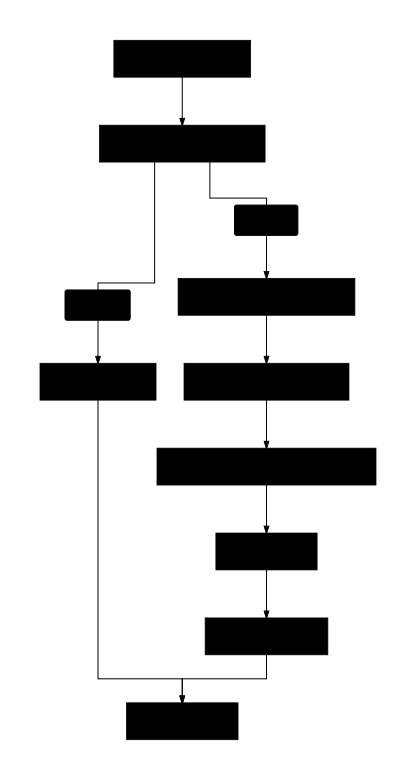
|
|
|
19
|
-
|
|
20
|
-
- [What is MathML?](#what-is-mathml)
|
|
21
|
-
- [Why Compile TeX Formulas to MathML?](#why-compile-tex-formulas-to-mathml)
|
|
22
|
-
- [Benchmark](#benchmark)
|
|
23
|
-
- [1. Size Comparison (Gzipped)](#1-size-comparison-gzipped)
|
|
24
|
-
- [2. Generation Speed (Ops/sec)](#2-generation-speed-opssec)
|
|
25
|
-
- [Usage](#usage)
|
|
26
|
-
- [JavaScript Examples](#javascript-examples)
|
|
27
|
-
- [CSS and Math Font Configuration](#css-and-math-font-configuration)
|
|
28
|
-
- [Markdown Parser Plugins](#markdown-parser-plugins)
|
|
29
|
-
- [Features](#features)
|
|
30
|
-
- [Supported Syntax List](#supported-syntax-list)
|
|
31
|
-
- [Unsupported Syntax](#unsupported-syntax)
|
|
32
|
-
- [Error Handling and Fault Tolerance](#error-handling-and-fault-tolerance)
|
|
33
|
-
- [Internal Error Codes](#internal-error-codes)
|
|
34
|
-
- [Design and Workflow](#design-and-workflow)
|
|
35
|
-
- [Module Stages](#module-stages)
|
|
36
|
-
- [Adding New Syntax](#adding-new-syntax)
|
|
37
|
-
- [1. Constant Definitions](#1-constant-definitions)
|
|
38
|
-
- [2. Lexer](#2-lexer)
|
|
39
|
-
- [3. Parser](#3-parser)
|
|
40
|
-
- [4. Codegen](#4-codegen)
|
|
41
|
-
- [Tech Stack](#tech-stack)
|
|
42
|
-
- [Directory Structure](#directory-structure)
|
|
43
|
-
- [Historical Background](#historical-background)
|
|
26
|
+
Key Features:
|
|
44
27
|
|
|
45
|
-
|
|
28
|
+
- **High Performance**: Compiles TeX formulas directly to native MathML. Processing speed exceeds 300,000 operations per second, 3 times faster than KaTeX and 40 times faster than MathJax.
|
|
29
|
+
- **Lightweight**: Core package size is 7.69 KB (3.56 KB gzipped) with zero external dependencies.
|
|
30
|
+
- **Zero Runtime Overhead**: Relies entirely on the browser's native engine for layout, eliminating client-side JavaScript formatting libraries.
|
|
31
|
+
- **Robust Fault Tolerance**: Catches syntax errors (such as unclosed braces) and reverts to raw TeX string output to prevent application crashes.
|
|
32
|
+
- **High Compatibility**: Generates standard MathML tags suitable for Server-Side Rendering (SSR), Static Site Generation (SSG), and Client-Side Rendering (CSR).
|
|
46
33
|
|
|
47
|
-
|
|
34
|
+
## 2. Usage
|
|
48
35
|
|
|
49
|
-
|
|
50
|
-
Since January 2023 (following Chrome 109's native support for MathML Core), all major browser engines (Blink, Gecko, WebKit) natively support MathML. Pages can render formulas without loading third-party JavaScript layout libraries.
|
|
36
|
+
### Compilation Examples
|
|
51
37
|
|
|
52
|
-
|
|
53
|
-
|
|
54
|
-
While MathML renders natively, its XML-based syntax is too verbose for direct writing. TeX remains the standard for authoring formulas (e.g., `$e^{i\pi} + 1 = 0$`).
|
|
55
|
-
Traditional solutions (like MathJax or KaTeX) require loading hundreds of KB of JS/CSS layout engines and consume CPU for DOM calculations.
|
|
56
|
-
`@webc.site/math` compiles TeX to MathML, offering several advantages for Client-Side Rendering (CSR):
|
|
57
|
-
|
|
58
|
-
- **Lightweight**: Only 7.78 KB raw size (3.58 KB gzipped), with zero footprint on initial page load times.
|
|
59
|
-
- **Zero Runtime Dependencies**: Performs translation at compile time, delegating all rendering, positioning, and layout to the browser's native C++ engine. No JS layout engine runs on the client.
|
|
60
|
-
- **Low CPU Overhead**: Designed for high-frequency rendering scenarios like WYSIWYG editors, running smoothly even on low-end mobile devices.
|
|
61
|
-
- **SSR-Friendly**: Outputs standard HTML MathML tags, working identically for client-side dynamic rendering or static server-side building (SSR/SSG).
|
|
62
|
-
|
|
63
|
-
## Benchmark
|
|
64
|
-
|
|
65
|
-
### 1. Size Comparison (Gzipped)
|
|
66
|
-
|
|
67
|
-
| Library | Raw Size | Gzip Size | Size Ratio |
|
|
68
|
-
| :---------------------------------------------------------- | :-------: | :-------: | :--------: |
|
|
69
|
-
| [@webc.site/math](https://github.com/webc-site/math) (Ours) | 7.78 KB | 3.58 KB | 1.0 ⭐️ |
|
|
70
|
-
| [KaTeX](https://github.com/KaTeX/KaTeX) | 264.79 KB | 75.15 KB | 21.0 |
|
|
71
|
-
| [MathJax](https://github.com/mathjax/MathJax) | 971.04 KB | 278.39 KB | 77.7 |
|
|
72
|
-
|
|
73
|
-

|
|
74
|
-
|
|
75
|
-
### 2. Generation Speed (Ops/sec)
|
|
76
|
-
|
|
77
|
-
Based on compiling standard test equations (measured using [sh/bench/pk.js](https://github.com/webc-site/math/blob/dev/sh/bench/pk.js)):
|
|
78
|
-
|
|
79
|
-
- **@webc.site/math (Ours)**: ~329,000 ops/s (1.0 ⭐️)
|
|
80
|
-
- **[KaTeX](https://github.com/KaTeX/KaTeX)**: ~92,000 ops/s (~3.6x slower)
|
|
81
|
-
- **[MathJax](https://github.com/mathjax/MathJax)**: ~6,700 ops/s (~48.8x slower)
|
|
82
|
-
|
|
83
|
-

|
|
84
|
-
|
|
85
|
-
## Usage
|
|
86
|
-
|
|
87
|
-
### JavaScript Examples
|
|
88
|
-
|
|
89
|
-
#### 1. Render TeX Formulas Directly
|
|
90
|
-
|
|
91
|
-
Use `@webc.site/math` to compile TeX formulas directly into MathML (ideal for Markdown parser plugins):
|
|
38
|
+
#### Render TeX Formulas Directly
|
|
92
39
|
|
|
93
40
|
```javascript
|
|
94
41
|
import mathml from "@webc.site/math";
|
|
95
42
|
|
|
96
|
-
|
|
97
|
-
const html = mathml(
|
|
43
|
+
// Second parameter set to true renders block style
|
|
44
|
+
const html = mathml("e^{i\\pi} + 1 = 0", true);
|
|
98
45
|
```
|
|
99
46
|
|
|
100
|
-
####
|
|
101
|
-
|
|
102
|
-
Use `@webc.site/math/md.js` to automatically detect and replace inline/block formulas in Markdown text with MathML (requires passing the math compiler):
|
|
47
|
+
#### Replace Formulas in Markdown Text
|
|
103
48
|
|
|
104
49
|
```javascript
|
|
105
50
|
import mdMath from "@webc.site/math/md.js";
|
|
106
51
|
import compile from "@webc.site/math";
|
|
107
52
|
|
|
108
|
-
const
|
|
109
|
-
const html = mdMath(markdown, compile);
|
|
110
|
-
|
|
111
|
-
console.log(html);
|
|
112
|
-
// Output: Euler's identity: <math xmlns="http://www.w3.org/1998/Math/MathML" display="block"><semantics><mrow><msup><mi>e</mi><mrow><mi>i</mi><mi>π</mi></mrow></msup><mo>+</mo><mn>1</mn><mo>=</mo><mn>0</mn></mrow><annotation encoding="application/x-tex">e^{i\pi} + 1 = 0</annotation></semantics></math>
|
|
53
|
+
const html = mdMath("Euler's identity: $$e^{i\\pi} + 1 = 0$$", compile);
|
|
113
54
|
```
|
|
114
55
|
|
|
115
|
-
###
|
|
116
|
-
|
|
117
|
-
To ensure beautifully typeset browser-native math equations, using a math font is recommended. We recommend the **Latin Modern Math** font from the `18s` package (derived from Donald Knuth's classical Computer Modern, supporting OpenType MATH table features).
|
|
118
|
-
|
|
119
|
-
#### 1. Online Reference (Recommended)
|
|
56
|
+
### Font and CSS Configuration
|
|
120
57
|
|
|
121
|
-
|
|
58
|
+
Configure math fonts to ensure proper layout alignment. Latin Modern Math font from the `18s` package is recommended.
|
|
122
59
|
|
|
123
|
-
|
|
124
|
-
/* Import the bundle (includes Source Han Sans t, monospace c, and math font m) */
|
|
125
|
-
@import url("//registry.npmmirror.com/18s/0.2.24/files/_.css");
|
|
126
|
-
```
|
|
127
|
-
|
|
128
|
-
Or import the math font `m` only:
|
|
129
|
-
|
|
130
|
-
```css
|
|
131
|
-
@import url("//registry.npmmirror.com/18s/0.2.24/files/m.css");
|
|
132
|
-
```
|
|
133
|
-
|
|
134
|
-
#### 2. Configure CSS Style
|
|
135
|
-
|
|
136
|
-
Set the font family for the `math` tag in your global CSS stylesheet.
|
|
137
|
-
|
|
138
|
-
##### Option A: Using Hosted/Local Fonts (Recommended for best visual quality)
|
|
139
|
-
|
|
140
|
-
For projects importing the `18s` font assets (which contains the optimized math font `m` and Source Han Sans `t`):
|
|
60
|
+
#### CSS Font Styling
|
|
141
61
|
|
|
142
62
|
```css
|
|
143
63
|
math {
|
|
144
|
-
/* m is the math font, t is Source Han Sans (optimized with font slicing for Chinese characters to boost loading performance), math is system math font, sans-serif is default fallback */
|
|
145
64
|
font-family: m, t, math, sans-serif;
|
|
146
65
|
}
|
|
147
66
|
```
|
|
148
67
|
|
|
149
|
-
|
|
150
|
-
|
|
151
|
-
Leverage system-default math fonts to minimize loading size:
|
|
152
|
-
|
|
153
|
-
```css
|
|
154
|
-
math {
|
|
155
|
-
/* Prioritize system-built-in math fonts, fallback to standard CSS 'math' generic font family, and use sans-serif as a final fallback */
|
|
156
|
-
font-family: "STIX Two Math", "Latin Modern Math", "Cambria Math", math, sans-serif;
|
|
157
|
-
}
|
|
158
|
-
```
|
|
159
|
-
|
|
160
|
-
#### 3. Integration with Build Tools
|
|
161
|
-
|
|
162
|
-
Install the `18s` font package via npm, and import it at your project entry using build tools like Vite or Webpack:
|
|
163
|
-
|
|
164
|
-
```bash
|
|
165
|
-
npm install 18s
|
|
166
|
-
```
|
|
167
|
-
|
|
168
|
-
Import font styles in your project entry file (do not mix JS and CSS imports):
|
|
169
|
-
|
|
170
|
-
##### Method A: Import in JS/TS Entry File
|
|
171
|
-
|
|
172
|
-
```javascript
|
|
173
|
-
// Import the bundle (includes Source Han Sans t, monospace c, and math font m)
|
|
174
|
-
import "18s/_.css";
|
|
175
|
-
```
|
|
176
|
-
|
|
177
|
-
Or import math font `m` only:
|
|
178
|
-
|
|
179
|
-
```javascript
|
|
180
|
-
import "18s/m.css";
|
|
181
|
-
```
|
|
182
|
-
|
|
183
|
-
##### Method B: Import in CSS Stylesheet
|
|
184
|
-
|
|
185
|
-
```css
|
|
186
|
-
/* Import the bundle (includes Source Han Sans t, monospace c, and math font m) */
|
|
187
|
-
@import "18s/_.css";
|
|
188
|
-
```
|
|
189
|
-
|
|
190
|
-
Or import math font `m` only:
|
|
191
|
-
|
|
192
|
-
```css
|
|
193
|
-
@import "18s/m.css";
|
|
194
|
-
```
|
|
195
|
-
|
|
196
|
-
### Markdown Parser Plugins
|
|
197
|
-
|
|
198
|
-
#### 1. Marked Extension
|
|
199
|
-
|
|
200
|
-
Use [`@webc.site/math-marked`](https://www.npmjs.com/package/@webc.site/math-marked) to automatically parse and compile inline (`$...$`) and block (`$$...$$`) formulas:
|
|
201
|
-
|
|
202
|
-
```javascript
|
|
203
|
-
import { marked } from "marked";
|
|
204
|
-
import mathMarked from "@webc.site/math-marked";
|
|
205
|
-
|
|
206
|
-
marked.use(mathMarked());
|
|
207
|
-
|
|
208
|
-
const html = marked.parse("Euler's identity: $$e^{i\\pi} + 1 = 0$$");
|
|
209
|
-
```
|
|
210
|
-
|
|
211
|
-
#### 2. Remark Plugin
|
|
212
|
-
|
|
213
|
-
Use [`@webc.site/math-remark`](https://www.npmjs.com/package/@webc.site/math-remark) to replace `inlineMath` and `math` nodes in Unified/Remark AST with native MathML HTML:
|
|
68
|
+
## 3. Design
|
|
214
69
|
|
|
215
|
-
|
|
216
|
-
import { unified } from "unified";
|
|
217
|
-
import remarkParse from "remark-parse";
|
|
218
|
-
import remarkMath from "remark-math";
|
|
219
|
-
import mathRemark from "@webc.site/math-remark";
|
|
220
|
-
import remarkHtml from "remark-html";
|
|
221
|
-
|
|
222
|
-
const html = await unified()
|
|
223
|
-
.use(remarkParse)
|
|
224
|
-
.use(remarkMath)
|
|
225
|
-
.use(mathRemark)
|
|
226
|
-
.use(remarkHtml, { sanitize: false })
|
|
227
|
-
.process("Euler's identity: $$e^{i\\pi} + 1 = 0$$");
|
|
228
|
-
```
|
|
229
|
-
|
|
230
|
-
#### 3. Markdown-it Plugin
|
|
70
|
+
The compiler extracts TeX formulas from input Markdown text, tokenizes and parses them, and translates the AST to semantic MathML markup.
|
|
231
71
|
|
|
232
|
-
|
|
72
|
+

|
|
233
73
|
|
|
234
|
-
|
|
235
|
-
import markdownit from "markdown-it";
|
|
236
|
-
import mathMarkdownIt from "@webc.site/math-markdown-it";
|
|
74
|
+
## 4. Tech Stack
|
|
237
75
|
|
|
238
|
-
|
|
76
|
+
- **Build & Test Environment**: Bun, Node.js
|
|
77
|
+
- **Linter & Formatter**: oxlint, oxfmt
|
|
78
|
+
- **Build Tool**: Vite, Rolldown, Lightning CSS
|
|
239
79
|
|
|
240
|
-
|
|
241
|
-
```
|
|
242
|
-
|
|
243
|
-
## Features
|
|
244
|
-
|
|
245
|
-
- **Highly Complete**: Successfully compiles thousands of math formulas from KaTeX/MathJax official test suites (see [extract](https://github.com/webc-site/math/tree/dev/extract)).
|
|
246
|
-
- **Fault-Tolerant**: Syntax errors (such as unclosed `\left`/`\right`) are automatically caught and degraded to display raw TeX code, preventing application crashes.
|
|
247
|
-
- **Fast Compiler**: Compiles TeX formulas directly to semantic MathML without external parser dependencies.
|
|
248
|
-
- **Markdown Integration**: Automatically parses inline math (`$formula$`) and block math (`$$formula$$`) in Markdown text.
|
|
249
|
-
- **Standard Compatibility**: Outputs valid MathML elements supported natively by modern browsers.
|
|
250
|
-
|
|
251
|
-
## Supported Syntax List
|
|
252
|
-
|
|
253
|
-
Designed to be extremely lightweight, this library supports the most commonly used math typesetting syntaxes:
|
|
254
|
-
|
|
255
|
-
- **Basic Arithmetic & Symbols**: Numbers, English letters, basic operators (`+`, `-`, `*`, `/`, `=`, `<`, `>`, `(`, `)`, `[`, `]`, `.`). Note that `-` automatically maps to minus sign `\u2212`, `*` maps to asterisk `\u2217`, and `/` is rendered in upright normal font.
|
|
256
|
-
- **Subscripts & Superscripts**:
|
|
257
|
-
- Superscript `^` (e.g., `x^2`)
|
|
258
|
-
- Subscript `_` (e.g., `x_i`)
|
|
259
|
-
- Both subscripts and superscripts (e.g., `x_i^2` or `x^2_i`)
|
|
260
|
-
- Subscripts/superscripts of sum, integration, and other big operators will automatically appear in limits form (e.g., `\sum_{i=1}^n`, `\int_a^b`)
|
|
261
|
-
- **Fractions**: `\frac{numerator}{denominator}` (e.g., `\frac{a}{b}`)
|
|
262
|
-
- **Roots**: Square root `\sqrt{x}` and $n$-th root `\sqrt[n]{x}`
|
|
263
|
-
- **Overlines & Bars**: `\overline{x}` and the shorthand `\bar{x}`
|
|
264
|
-
- **Delimiters & Brackets**: `\left` and `\right` structures (e.g., `\left( ... \right)`). Supported delimiters include:
|
|
265
|
-
- Parentheses: `(` and `)`
|
|
266
|
-
- Square brackets: `[` and `]`
|
|
267
|
-
- Braces: `\{` and `\}`
|
|
268
|
-
- Angle brackets: `<` and `>`
|
|
269
|
-
- Vertical bars: `|` or `\|`
|
|
270
|
-
- Empty delimiter: `.` (hides the delimiter on that side, e.g., `\left. \frac{df}{dx} \right| _0`)
|
|
271
|
-
- **Text Mode**: `\text{...}` (e.g., `\text{if }`), extracts literal text inside braces and renders it as MathML `<mtext>` in normal upright font.
|
|
272
|
-
- **Horizontal Spacing**: Supports `\quad` (1em spacing) and `\qquad` (2em spacing).
|
|
273
|
-
- **Styles, Strikethroughs & Phantom**:
|
|
274
|
-
- Border: `\boxed{...}` (adds a border around the formula, e.g., `\boxed{x+y}`)
|
|
275
|
-
- Strikethroughs: `\cancel{...}` (strikes through with a slash, e.g., `\cancel{x}`) and `\sout{...}` (strikes through with a horizontal line, e.g., `\sout{y}`)
|
|
276
|
-
- Hiding & Spacing: `\phantom{...}` (creates an invisible space with the same width and height, e.g., `\phantom{x}`)
|
|
277
|
-
- **Common Functions**: `\sin`, `\cos`, `\tan`, `\cot`, `\sec`, `\csc`, `\log`, `\lg`, `\ln`, `\lim`, `\exp`, `\max`, `\min`, `\sup`, `\inf`, `\det`, `\gcd`, `\arcsin`, `\arccos`, `\arctan`, `\sinh`, `\cosh`, `\tanh`, `\coth`, `\deg`, `\arg`. Subscripts/superscripts of limit-like operators (`\lim`, `\max`, `\min`, `\sup`, `\inf`) appear as limits (directly below/above) in display mode.
|
|
278
|
-
- **Modulo**: `\pmod{...}` (adds a modulo parenthesis, e.g., `\pmod{m}` renders as $(mod\ m)$)
|
|
279
|
-
- **Greek Letters**:
|
|
280
|
-
- Lowercase: `\alpha` ($\alpha$), `\beta` ($\beta$), `\gamma` ($\gamma$), `\delta` ($\delta$), `\epsilon` ($\epsilon$), `\zeta` ($\zeta$), `\eta` ($\eta$), `\theta` ($\theta$), `\iota` ($\iota$), `\kappa` ($\kappa$), `\lambda` ($\lambda$), `\mu` ($\mu$), `\nu` ($\nu$), `\xi` ($\xi$), `\pi` ($\pi$), `\rho` ($\rho$), `\sigma` ($\sigma$), `\tau` ($\tau$), `\upsilon` ($\upsilon$), `\phi` ($\phi$), `\chi` ($\chi$), `\psi` ($\psi$), `\omega` ($\omega$)
|
|
281
|
-
- Uppercase (rendered in normal upright font): `\Delta` ($\Delta$), `\Gamma` ($\Gamma$), `\Theta` ($\Theta$), `\Lambda` ($\Lambda$), `\Xi` ($\Xi$), `\Pi` ($\Pi$), `\Sigma` ($\Sigma$), `\Upsilon` ($\Upsilon$), `\Phi` ($\Phi$), `\Psi` ($\Psi$), `\Omega` ($\Omega$)
|
|
282
|
-
- **Operators & Relations**:
|
|
283
|
-
- `\le` / `\leq` ($\le$), `\ge` / `\geq` ($\ge$), `\ne` / `\neq` ($\ne$)
|
|
284
|
-
- `\cdot` ($\cdot$), `\times` ($\times$), `\pm` ($\pm$), `\mp` ($\mp$), `\div` ($\div$), `\infty` ($\infty$)
|
|
285
|
-
- `\approx` ($\approx$), `\sim` ($\sim$), `\cong` ($\cong$), `\propto` ($\propto$), `\equiv` ($\equiv$), `\perp` ($\perp$), `\parallel` ($\parallel$)
|
|
286
|
-
- **Calculus, Sets & Logic**:
|
|
287
|
-
- Gradient: `\nabla` ($\nabla$), partial differential: `\partial` ($\partial$)
|
|
288
|
-
- Quantifiers & operations: `\forall` ($\forall$), `\exists` ($\exists$), `\neg` ($\neg$), `\land` ($\land$), `\lor` ($\lor$)
|
|
289
|
-
- Set relations: `\in` ($\in$), `\notin` ($\notin$), `\ni` ($\ni$), `\subset` ($\subset$), `\supset` ($\supset$), `\subseteq` ($\subseteq$), `\supseteq` ($\supseteq$)
|
|
290
|
-
- Set operations: `\cup` ($\cup$), `\cap` ($\cap$), empty set: `\emptyset` ($\emptyset$)
|
|
291
|
-
- Special variables & constants: `\ell` ($\ell$), `\hbar` ($\hbar$)
|
|
292
|
-
- Large operators: summation `\sum` ($\sum$), integration `\int` ($\int$)
|
|
293
|
-
- **Arrows**:
|
|
294
|
-
- Single arrows: `\to` / `\rightarrow` ($\rightarrow$), `\leftarrow` / `\gets` ($\leftarrow$), `\Leftarrow` ($\Leftarrow$), `\Rightarrow` ($\Rightarrow$)
|
|
295
|
-
- Double arrows: `\leftrightarrow` ($\leftrightarrow$), `\Leftrightarrow` ($\Leftrightarrow$)
|
|
296
|
-
- **Dots**:
|
|
297
|
-
- Baseline dots: `\dots` / `\ldots` ($\dots$)
|
|
298
|
-
- Centered dots: `\cdots` ($\cdots$)
|
|
299
|
-
- **Matrices & Multi-line Layouts**:
|
|
300
|
-
- Matrix environments: `matrix`, `pmatrix`, `bmatrix`, `vmatrix`, `Vmatrix` (e.g., `\begin{pmatrix} a & b \\ c & d \end{pmatrix}`)
|
|
301
|
-
- Cases: `cases` (e.g., `\begin{cases} x & x \ge 0 \\ -x & x < 0 \end{cases}`)
|
|
302
|
-
- General arrays: `array`
|
|
303
|
-
- Line breaks & alignment: Use `\\`, `\\*` or `\\[width]` (e.g., `\\[10px]`) for line breaks, and `&` for column alignment.
|
|
304
|
-
|
|
305
|
-
## Unsupported Syntax
|
|
306
|
-
|
|
307
|
-
Currently, the following LaTeX extensions, macros, or fine-tuning style directives are not supported:
|
|
308
|
-
|
|
309
|
-
1. **Macro Definitions**: `\newcommand`, `\renewcommand`, `\providecommand`, `\gdef`, `\let`, etc.
|
|
310
|
-
2. **Background Colors & Advanced Borders**: `\colorbox`, `\fcolorbox`, `\cellcolor`, etc. (while `\boxed` is supported).
|
|
311
|
-
3. **Other Strikethroughs**: `\bcancel`, `\xcancel`, etc. (while `\cancel` and `\sout` are supported).
|
|
312
|
-
4. **Advanced Layouts & Spacing**: `\hphantom`, `\vphantom`, `\smash`, etc. (while `\phantom` is supported).
|
|
313
|
-
5. **Chemistry Package Extensions**: Chemical formula macros like `\ce{...}` (mhchem).
|
|
314
|
-
6. **Verbatim Text**: `\verb`, etc.
|
|
315
|
-
7. **Advanced Positionings**: `\sideset`, `\prescript`, `\cramped`, `\flatfrac`, etc.
|
|
316
|
-
8. **Equation Numbering & Custom Tags**: `\tag`, `\newtagform`, `\usetagform`, etc.
|
|
317
|
-
9. **Arbitrary Operator Limits**: Except for predefined big operators (`\sum`, `\int`) and limit-like operators (`\lim`), using `\limits` on arbitrary commands or structures is not supported.
|
|
318
|
-
|
|
319
|
-
## Error Handling and Fault Tolerance
|
|
320
|
-
|
|
321
|
-
When parsing Markdown text using `@webc.site/math/md.js`, syntax errors (such as an unclosed `\left`) are automatically caught and degraded to display raw TeX code (e.g., `$$x + \left( y$$`), without throwing JS exceptions. Therefore, you **do not** need to wrap it in a `try...catch` block.
|
|
322
|
-
|
|
323
|
-
If you call the compiler core `@webc.site/math` directly with invalid LaTeX, it will throw an array containing an error code (see table below). Wrap direct core compiler calls in a `try...catch` block.
|
|
324
|
-
|
|
325
|
-
### Internal Error Codes
|
|
326
|
-
|
|
327
|
-
| Error Code | Constant | Description | Trigger Example |
|
|
328
|
-
| :--------: | :------------------ | :-------------------------------------------- | :------------------------------------ |
|
|
329
|
-
| `0` | `ERR_EXTRA_END` | Extra or invalid `\end` command | `\end{matrix}` (no matching `\begin`) |
|
|
330
|
-
| `1` | `ERR_MISSING_RIGHT` | `\left` delimiter missing a matching `\right` | `\left( x` |
|
|
331
|
-
| `2` | `ERR_EXTRA_RIGHT` | Extra or invalid `\right` command | `x \right)` (no matching `\left`) |
|
|
332
|
-
| `3` | `ERR_MISSING_BRACE` | Command missing required curly brace `{}` | `\text x` (missing braces) |
|
|
333
|
-
|
|
334
|
-
## Design and Workflow
|
|
335
|
-
|
|
336
|
-
The parser processes the input Markdown string, isolates TeX expressions, and translates them into MathML structures.
|
|
337
|
-
|
|
338
|
-
```mermaid
|
|
339
|
-
graph TD
|
|
340
|
-
A[Input Markdown] --> B{Scanner}
|
|
341
|
-
B -- Plain Text --> C[Output Buffer]
|
|
342
|
-
B -- TeX Formula --> D[Lexer: Generate Tokens]
|
|
343
|
-
D --> E[Parser: Generate AST]
|
|
344
|
-
E --> F[Codegen: Generate MathML Tags]
|
|
345
|
-
F --> G[Semantic Wrapper]
|
|
346
|
-
G --> H[MathML Output]
|
|
347
|
-
C --> I[Final HTML]
|
|
348
|
-
H --> I
|
|
349
|
-
```
|
|
350
|
-
|
|
351
|
-
### Module Stages
|
|
352
|
-
|
|
353
|
-
1. **Scanner**: Scans the input string to locate formula delimiters (`$` and `$$`).
|
|
354
|
-
2. **Lexer**: Breaks the TeX string into tokens like numbers, variables, operators, and control commands.
|
|
355
|
-
3. **Parser**: Translates tokens into an Abstract Syntax Tree (AST), supporting operations like subscripts, superscripts, fractions, and built-in functions.
|
|
356
|
-
4. **Codegen**: Maps AST nodes to standard MathML Core elements (`<mi>`, `<mo>`, `<mn>`, `<mfrac>`, `<msup>`, `<msub>`, `<msubsup>`).
|
|
357
|
-
|
|
358
|
-
## Adding New Syntax
|
|
359
|
-
|
|
360
|
-
To add support for a new LaTeX command, modify the following four core parts in order:
|
|
361
|
-
|
|
362
|
-
### 1. Constant Definitions
|
|
363
|
-
|
|
364
|
-
Define the corresponding lexical token, AST node type, function name, or symbol mapping:
|
|
365
|
-
|
|
366
|
-
- **Token Type**: Defined in [const/TOK.js](https://github.com/webc-site/math/blob/dev/src/const/TOK.js) (e.g., `export const TOK_MY_CMD = ...`).
|
|
367
|
-
- **AST Node Type**: Defined in [const/TYPE.js](https://github.com/webc-site/math/blob/dev/src/const/TYPE.js) (e.g., `export const TYPE_MY_NODE = ...`).
|
|
368
|
-
- **Environment Delimiters**: If adding a new environment (like a matrix or bracket type), configure its left and right delimiters in `ENV_DELIMS` inside [mathml.js](https://github.com/webc-site/math/blob/dev/src/mathml.js).
|
|
369
|
-
- **Symbol Mapping**: For simple operators or symbols, map the command name to its Unicode character in `SYM_MAP` inside [const/SYM.js](https://github.com/webc-site/math/blob/dev/src/const/SYM.js).
|
|
370
|
-
- **Math Function Name**: Define in `FUNC_NAMES` inside [const/FUNC.js](https://github.com/webc-site/math/blob/dev/src/const/FUNC.js).
|
|
371
|
-
|
|
372
|
-
### 2. Lexer
|
|
373
|
-
|
|
374
|
-
The `lex(str)` function cuts the input LaTeX string into a token array. It is located in [lex.js](https://github.com/webc-site/math/blob/dev/src/lex.js).
|
|
375
|
-
|
|
376
|
-
- If introducing a new special character or structure, update character matching logic in `lex` to push the correct `TOK_*` type and its literal value to the `tokens` array.
|
|
377
|
-
|
|
378
|
-
### 3. Parser
|
|
379
|
-
|
|
380
|
-
The `parse(tokens, state)` function translates tokens into AST nodes. It is located in [parse.js](https://github.com/webc-site/math/blob/dev/src/parse.js).
|
|
381
|
-
|
|
382
|
-
- **Command Parsing**: Handled primarily inside the `TOK_MAP[TOK_CMD]` function. When matching your command (e.g., `\mycmd`), read its arguments (using `read(tokens, state_ref)` or `grab(tokens, state_ref)`) and return the node array: `[TYPE_MY_NODE, arg1, arg2]`.
|
|
383
|
-
|
|
384
|
-
### 4. Codegen
|
|
385
|
-
|
|
386
|
-
The `SHOW_MAP` dictionary maps AST nodes to standard MathML markup strings. It is located in [mathml.js](https://github.com/webc-site/math/blob/dev/src/mathml.js).
|
|
387
|
-
|
|
388
|
-
- Register a renderer function: `[TYPE_MY_NODE]: ([_, arg1, arg2]) => nest("mylabel", arg1, arg2)`, formatting node data into native MathML tags.
|
|
389
|
-
|
|
390
|
-
## Tech Stack
|
|
391
|
-
|
|
392
|
-
- **Runtime**: Bun, Node.js
|
|
393
|
-
- **Build & Bundle**: SWC (compression), Vite (demo site)
|
|
394
|
-
- **Quality Assurance**: oxlint, oxfmt
|
|
395
|
-
|
|
396
|
-
## Directory Structure
|
|
80
|
+
## 5. Code Structure
|
|
397
81
|
|
|
398
82
|
```
|
|
399
83
|
.
|
|
400
|
-
├── demo/ # Interactive demo
|
|
401
|
-
|
|
402
|
-
|
|
403
|
-
│ ├──
|
|
404
|
-
│
|
|
405
|
-
│ └── style.styl # Styling and themes
|
|
406
|
-
├── extract/ # Test case extraction scripts (from KaTeX / MathJax)
|
|
407
|
-
├── lib/ # Compilation output directory
|
|
408
|
-
│ ├── package.json # Lightweight package.json for npm publication
|
|
409
|
-
│ ├── README.md # Automatically generated distribution README
|
|
410
|
-
│ ├── mathml.js # Minified core TeX compiler
|
|
411
|
-
│ ├── mathml.js.map # Source map for mathml.js
|
|
412
|
-
│ ├── md.js # Minified Markdown parser
|
|
413
|
-
│ └── md.js.map # Source map for md.js
|
|
84
|
+
├── demo/ # Interactive demo page
|
|
85
|
+
├── extract/ # Test cases extraction scripts
|
|
86
|
+
├── lib/ # Compiled distribution files
|
|
87
|
+
│ ├── mathml.js # Core compiler (minified)
|
|
88
|
+
│ └── md.js # Markdown math formula parser (minified)
|
|
414
89
|
├── src/ # Source code
|
|
415
|
-
│ ├── const/ # Tokens, AST types,
|
|
90
|
+
│ ├── const/ # Tokens, AST types, symbols, and functions constants
|
|
416
91
|
│ ├── lex.js # LaTeX lexer
|
|
417
|
-
│ ├── parse.js # LaTeX parser (AST
|
|
418
|
-
│ ├── mathml.js # TeX-to-MathML compiler
|
|
419
|
-
│ └── md.js # Markdown
|
|
92
|
+
│ ├── parse.js # LaTeX parser (AST builder)
|
|
93
|
+
│ ├── mathml.js # Core TeX-to-MathML compiler
|
|
94
|
+
│ └── md.js # Markdown parser entry
|
|
420
95
|
├── sh/ # Scripts
|
|
421
|
-
|
|
422
|
-
│ │ ├── pk.js # Size and speed comparison & chart generation
|
|
423
|
-
│ │ ├── self.js # Regression tests
|
|
424
|
-
│ │ ├── util.js # Shared helpers
|
|
425
|
-
│ │ ├── chart.js # SVG chart component
|
|
426
|
-
│ │ └── history.yml # YAML historical benchmark records
|
|
427
|
-
│ └── check.js # Language file validation script
|
|
428
|
-
├── dev.js # Dev server script (Vite)
|
|
429
|
-
├── dist.js # Publish helper script (versioning and template rendering)
|
|
430
|
-
├── minify.js # Bundle compression script
|
|
431
|
-
├── package.json # Project package config
|
|
432
|
-
├── README.md # Automatically generated root README
|
|
433
|
-
├── README.mdt # Compilation template for README
|
|
434
|
-
└── test.sh # Formatting, linting, and unit test execution script
|
|
96
|
+
└── test.sh # Quality verification and test runner
|
|
435
97
|
```
|
|
436
98
|
|
|
437
|
-
## Historical Background
|
|
99
|
+
## 6. Historical Background
|
|
438
100
|
|
|
439
|
-
|
|
101
|
+
The W3C published the MathML 1.0 specification in 1998 to standardize mathematical notation on the web. However, the complexity of the specification placed a maintenance burden on browser layout engines.
|
|
440
102
|
|
|
441
|
-
|
|
103
|
+
In 2013, the Chromium team removed the unfinished MathML rendering implementation from the Blink engine due to maintenance costs and security vulnerabilities. Web developers subsequently relied on client-side JavaScript libraries (such as MathJax and KaTeX) to simulate formula layout. These libraries increased bundle sizes and consumed client-side CPU resources, impacting page load times and rendering performance.
|
|
442
104
|
|
|
443
|
-
|
|
105
|
+
To resolve this issue, organizations like Igalia and Mozilla refactored the specification into the MathML Core standard, focusing on essential, implementable parts backed by Web Platform Tests.
|
|
444
106
|
|
|
445
|
-
|
|
446
|
-
|
|
447
|
-
<a id="zh"></a>
|
|
107
|
+
In January 2023, Chrome 109 reintroduced support for the MathML Core specification. With Blink, Gecko, and WebKit all natively supporting this subset, web browsers achieved consistent native MathML rendering. This project compiles TeX directly to native MathML markup at compile time, eliminating client-side layout engines and avoiding client-side rendering overhead.
|
|
448
108
|
|
|
449
|
-
# @webc.site/math
|
|
450
109
|
|
|
451
|
-
|
|
452
|
-
|
|
453
|
-
<a href="https://www.npmjs.com/package/@webc.site/math" target="_blank"><img src="https://raw.githubusercontent.com/webc-site/math/dev/readme/zh/svg/badge.npm.svg" alt="npm" /></a>
|
|
454
|
-
|
|
455
|
-
<a href="https://github.com/webc-site/math" target="_blank"><img src="https://raw.githubusercontent.com/webc-site/math/dev/readme/zh/svg/badge.github.svg" alt="github" /></a>
|
|
456
|
-
|
|
457
|
-
<a href="https://math.webc.site" target="_blank"><img src="https://raw.githubusercontent.com/webc-site/math/dev/readme/zh/svg/badge.demo.svg" alt="demo" /></a>
|
|
458
|
-
|
|
459
|
-
无需引入数百 KB 的 KaTeX/MathJax 及庞大的字体包。包体积仅约 4KB (Gzip),将 LaTeX 公式编译为浏览器原生支持的 MathML,实现零运行开销的公式渲染。
|
|
460
|
-
|
|
461
|
-
- [核心优势](#核心优势)
|
|
462
|
-
- [什么是 MathML?](#什么是-mathml)
|
|
463
|
-
- [为什么将 TeX 编译为 MathML?](#为什么将-tex-编译为-mathml)
|
|
464
|
-
- [性能对比](#性能对比)
|
|
465
|
-
- [1. 体积对比(Gzip 压缩)](#1-体积对比gzip-压缩)
|
|
466
|
-
- [2. 生成速度对比](#2-生成速度对比)
|
|
467
|
-
- [使用方法](#使用方法)
|
|
468
|
-
- [JavaScript 示例](#javascript-示例)
|
|
469
|
-
- [CSS 与数学字体配置](#css-与数学字体配置)
|
|
470
|
-
- [Markdown 解析器插件](#markdown-解析器插件)
|
|
471
|
-
- [功能特性](#功能特性)
|
|
472
|
-
- [支持的语法清单](#支持的语法清单)
|
|
473
|
-
- [不支持的语法](#不支持的语法)
|
|
474
|
-
- [错误处理与容错机制](#错误处理与容错机制)
|
|
475
|
-
- [内部错误码](#内部错误码)
|
|
476
|
-
- [设计思路与调用流程](#设计思路与调用流程)
|
|
477
|
-
- [模块运行流程](#模块运行流程)
|
|
478
|
-
- [如何添加新语法](#如何添加新语法)
|
|
479
|
-
- [1. 常量定义](#1-常量定义)
|
|
480
|
-
- [2. 词法分析](#2-词法分析)
|
|
481
|
-
- [3. 语法分析](#3-语法分析)
|
|
482
|
-
- [4. 代码渲染](#4-代码渲染)
|
|
483
|
-
- [技术堆栈](#技术堆栈)
|
|
484
|
-
- [目录结构](#目录结构)
|
|
485
|
-
- [历史背景](#历史背景)
|
|
486
|
-
|
|
487
|
-
## 核心优势
|
|
488
|
-
|
|
489
|
-
### 什么是 MathML?
|
|
490
|
-
|
|
491
|
-
MathML(数学标记语言)是描述数学公式结构与语义的 XML 标准。
|
|
492
|
-
自 Chrome 109(2023年1月)起,所有主流浏览器引擎(Blink、Gecko、WebKit)均已原生支持 MathML Core 标准。页面无需加载 JS 排版库即可渲染公式。
|
|
493
|
-
|
|
494
|
-
### 为什么将 TeX 编译为 MathML?
|
|
495
|
-
|
|
496
|
-
MathML 语法基于 XML,不便于直接书写。日常书写的公式标准是 TeX 语法(如 `$e^{i\pi} + 1 = 0$`)。
|
|
497
|
-
传统库(如 MathJax、KaTeX)在前端运行时,需加载数百 KB 的排版引擎,并消耗 CPU 进行布局计算。
|
|
498
|
-
本库将 TeX 直接编译为 MathML,具有以下优势:
|
|
499
|
-
|
|
500
|
-
- **体积小**:包体积仅 7.78 KB(Gzip 3.58 KB),不影响首屏加载。
|
|
501
|
-
- **零运行依赖**:仅在编译期进行标签翻译,排版布局完全由浏览器底层的 C++ 原生引擎渲染,无需前端 JS 引擎介入,释放主线程。
|
|
502
|
-
- **低 CPU 开销**:适用于编辑器实时预览等高频渲染场景,低配移动设备运行流畅。
|
|
503
|
-
- **前后端通用**:输出标准 MathML 元素,适用于前端动态转换与服务端静态编译(SSR/SSG)。
|
|
504
|
-
|
|
505
|
-
## 性能对比
|
|
506
|
-
|
|
507
|
-
### 1. 体积对比(Gzip 压缩)
|
|
508
|
-
|
|
509
|
-
| 库 | 原始体积 | Gzip 体积 | 尺寸比 |
|
|
510
|
-
| :---------------------------------------------------------- | :-------: | :-------: | :----: |
|
|
511
|
-
| [@webc.site/math](https://github.com/webc-site/math) (本库) | 7.78 KB | 3.58 KB | 1.0 ⭐️ |
|
|
512
|
-
| [KaTeX](https://github.com/KaTeX/KaTeX) | 264.79 KB | 75.15 KB | 21.0 |
|
|
513
|
-
| [MathJax](https://github.com/mathjax/MathJax) | 971.04 KB | 278.39 KB | 77.7 |
|
|
110
|
+
---
|
|
514
111
|
|
|
515
|
-
|
|
112
|
+
<a id="zh"></a>
|
|
113
|
+
# @webc.site/math : 全球最小最快的网页 Markdown 公式渲染器
|
|
516
114
|
|
|
517
|
-
|
|
115
|
+
- [@webc.site/math : 全球最小最快的网页 Markdown 公式渲染器](#webcsitemath-全球最小最快的网页-markdown-公式渲染器)
|
|
116
|
+
- [1. 功能介绍](#1-功能介绍)
|
|
117
|
+
- [2. 使用演示](#2-使用演示)
|
|
118
|
+
- [编译示例](#编译示例)
|
|
119
|
+
- [直接渲染 TeX 公式](#直接渲染-tex-公式)
|
|
120
|
+
- [替换 Markdown 文本中的公式](#替换-markdown-文本中的公式)
|
|
121
|
+
- [字体与 CSS 配置](#字体与-css-配置)
|
|
122
|
+
- [CSS 样式配置](#css-样式配置)
|
|
123
|
+
- [3. 设计思路](#3-设计思路)
|
|
124
|
+
- [4. 技术栈](#4-技术栈)
|
|
125
|
+
- [5. 代码结构](#5-代码结构)
|
|
126
|
+
- [6. 历史故事](#6-历史故事)
|
|
518
127
|
|
|
519
|
-
|
|
128
|
+
## 1. 功能介绍
|
|
520
129
|
|
|
521
|
-
|
|
522
|
-
- **[KaTeX](https://github.com/KaTeX/KaTeX)**: ~92,000 ops/s (约 3.6x 较慢)
|
|
523
|
-
- **[MathJax](https://github.com/mathjax/MathJax)**: ~6,700 ops/s (约 48.8x 较慢)
|
|
130
|
+
本项目将 LaTeX 数学公式编译为浏览器原生支持的 MathML Core 标记。通过编译期转换,无需客户端排版引擎,实现零运行时开销的公式渲染。
|
|
524
131
|
|
|
525
|
-
|
|
132
|
+
主要特性:
|
|
526
133
|
|
|
527
|
-
|
|
134
|
+
- **高性能**:TeX 公式直接转换为原生 MathML 标签。处理速度达每秒 300,000 次以上,为 KaTeX 的 3 倍以上,MathJax 的 40 倍以上。
|
|
135
|
+
- **轻量化**:核心包体积 7.69 KB(Gzip 压缩后 3.56 KB),无外部依赖。
|
|
136
|
+
- **零运行开销**:完全依赖浏览器原生引擎排版与渲染,无需加载客户端 JavaScript 排版库。
|
|
137
|
+
- **高容错性**:自动捕获语法错误(例如未闭合括号),降级输出原始 TeX 字符串,保证应用运行稳定。
|
|
138
|
+
- **强兼容性**:生成的 MathML 标签符合标准,适配服务端渲染(SSR)、静态网站生成(SSG)和客户端渲染(CSR)。
|
|
528
139
|
|
|
529
|
-
|
|
140
|
+
## 2. 使用演示
|
|
530
141
|
|
|
531
|
-
|
|
142
|
+
### 编译示例
|
|
532
143
|
|
|
533
|
-
|
|
144
|
+
#### 直接渲染 TeX 公式
|
|
534
145
|
|
|
535
146
|
```javascript
|
|
536
147
|
import mathml from "@webc.site/math";
|
|
537
148
|
|
|
538
|
-
|
|
539
|
-
const html = mathml(
|
|
149
|
+
// 第二参数为 true 表示渲染为块级公式
|
|
150
|
+
const html = mathml("e^{i\\pi} + 1 = 0", true);
|
|
540
151
|
```
|
|
541
152
|
|
|
542
|
-
####
|
|
543
|
-
|
|
544
|
-
使用 `@webc.site/math/md.js` 自动识别 Markdown 文本中的行内/块级公式并替换为 MathML(需传入公式编译器):
|
|
153
|
+
#### 替换 Markdown 文本中的公式
|
|
545
154
|
|
|
546
155
|
```javascript
|
|
547
156
|
import mdMath from "@webc.site/math/md.js";
|
|
548
157
|
import compile from "@webc.site/math";
|
|
549
158
|
|
|
550
|
-
const
|
|
551
|
-
const html = mdMath(markdown, compile);
|
|
552
|
-
|
|
553
|
-
console.log(html);
|
|
554
|
-
// 输出: 欧拉恒等式:<math xmlns="http://www.w3.org/1998/Math/MathML" display="block"><semantics><mrow><msup><mi>e</mi><mrow><mi>i</mi><mi>π</mi></mrow></msup><mo>+</mo><mn>1</mn><mo>=</mo><mn>0</mn></mrow><annotation encoding="application/x-tex">e^{i\pi} + 1 = 0</annotation></semantics></math>
|
|
159
|
+
const html = mdMath("欧拉恒等式:$$e^{i\\pi} + 1 = 0$$", compile);
|
|
555
160
|
```
|
|
556
161
|
|
|
557
|
-
### CSS
|
|
558
|
-
|
|
559
|
-
为保证浏览器原生数学公式的排版,建议配置数学字体。推荐使用 `18s` 字体包的 **Latin Modern Math**(源自高德纳的 Computer Modern 字体,支持 OpenType 数学排版特性)。
|
|
560
|
-
|
|
561
|
-
#### 1. 在线引用
|
|
162
|
+
### 字体与 CSS 配置
|
|
562
163
|
|
|
563
|
-
|
|
164
|
+
配置数学字体以确保排版对齐。推荐使用 `18s` 字体包中的 Latin Modern Math 字体。
|
|
564
165
|
|
|
565
|
-
|
|
566
|
-
/* 引入合并后的字体 CSS(包含思源黑体 t、代码字体 c 及数学字体 m) */
|
|
567
|
-
@import url("//registry.npmmirror.com/18s/0.2.24/files/_.css");
|
|
568
|
-
```
|
|
569
|
-
|
|
570
|
-
或者仅按需引入数学字体 `m`:
|
|
571
|
-
|
|
572
|
-
```css
|
|
573
|
-
@import url("//registry.npmmirror.com/18s/0.2.24/files/m.css");
|
|
574
|
-
```
|
|
575
|
-
|
|
576
|
-
#### 2. 配置 CSS 样式
|
|
577
|
-
|
|
578
|
-
在全局 CSS 样式表中,为 `math` 标签指定数学字体。
|
|
579
|
-
|
|
580
|
-
##### 方案 A:使用托管/本地字体(推荐,效果最完美)
|
|
581
|
-
|
|
582
|
-
引入 `18s` 提供的字体包(含切片优化思源黑体 `t` 与数学字体 `m`):
|
|
166
|
+
#### CSS 样式配置
|
|
583
167
|
|
|
584
168
|
```css
|
|
585
169
|
math {
|
|
586
|
-
/* m 为数学字体,t 为思源黑体(对中文字符进行了切片优化以提升加载性能),math 为系统数学字体,sans-serif 为系统默认无衬线字体 */
|
|
587
170
|
font-family: m, t, math, sans-serif;
|
|
588
171
|
}
|
|
589
172
|
```
|
|
590
173
|
|
|
591
|
-
|
|
592
|
-
|
|
593
|
-
直接使用系统内置数学字体以最小化体积:
|
|
594
|
-
|
|
595
|
-
```css
|
|
596
|
-
math {
|
|
597
|
-
/* 优先使用各平台内置的数学字体,其次降级到 CSS 标准 math 泛型,最后以系统默认无衬线字体作为后备 */
|
|
598
|
-
font-family: "STIX Two Math", "Latin Modern Math", "Cambria Math", math, sans-serif;
|
|
599
|
-
}
|
|
600
|
-
```
|
|
174
|
+
## 3. 设计思路
|
|
601
175
|
|
|
602
|
-
|
|
176
|
+
编译器从输入的 Markdown 文本中提取 TeX 公式,依次通过扫描、词法分析、语法分析,最终生成对应的语义化 MathML 标记。
|
|
603
177
|
|
|
604
|
-
|
|
178
|
+
|
|
605
179
|
|
|
606
|
-
|
|
607
|
-
npm install 18s
|
|
608
|
-
```
|
|
180
|
+
## 4. 技术栈
|
|
609
181
|
|
|
610
|
-
|
|
182
|
+
- **运行环境**:Bun, Node.js
|
|
183
|
+
- **语法检查与格式化**:oxlint, oxfmt
|
|
184
|
+
- **构建工具**:Vite, Rolldown, Lightning CSS
|
|
611
185
|
|
|
612
|
-
|
|
613
|
-
|
|
614
|
-
```javascript
|
|
615
|
-
// 引入合并后的字体 CSS(包含思源黑体 t、代码字体 c 及数学字体 m)
|
|
616
|
-
import "18s/_.css";
|
|
617
|
-
```
|
|
618
|
-
|
|
619
|
-
或者仅按需引入数学字体 `m`:
|
|
620
|
-
|
|
621
|
-
```javascript
|
|
622
|
-
import "18s/m.css";
|
|
623
|
-
```
|
|
624
|
-
|
|
625
|
-
##### 方式 B:在 CSS 入口中引入
|
|
626
|
-
|
|
627
|
-
```css
|
|
628
|
-
/* 引入合并后的字体 CSS(包含思源黑体 t、代码字体 c 及数学字体 m) */
|
|
629
|
-
@import "18s/_.css";
|
|
630
|
-
```
|
|
631
|
-
|
|
632
|
-
或者仅按需引入数学字体 `m`:
|
|
633
|
-
|
|
634
|
-
```css
|
|
635
|
-
@import "18s/m.css";
|
|
636
|
-
```
|
|
637
|
-
|
|
638
|
-
### Markdown 解析器插件
|
|
639
|
-
|
|
640
|
-
#### 1. Marked 插件
|
|
641
|
-
|
|
642
|
-
使用 [`@webc.site/math-marked`](https://www.npmjs.com/package/@webc.site/math-marked) 自动解析并编译行内(`$...$`)与块级(`$$...$$`)公式:
|
|
643
|
-
|
|
644
|
-
```javascript
|
|
645
|
-
import { marked } from "marked";
|
|
646
|
-
import mathMarked from "@webc.site/math-marked";
|
|
647
|
-
|
|
648
|
-
marked.use(mathMarked());
|
|
649
|
-
|
|
650
|
-
const html = marked.parse("欧拉恒等式:$$e^{i\\pi} + 1 = 0$$");
|
|
651
|
-
```
|
|
652
|
-
|
|
653
|
-
#### 2. Remark 插件
|
|
654
|
-
|
|
655
|
-
使用 [`@webc.site/math-remark`](https://www.npmjs.com/package/@webc.site/math-remark) 将 Unified/Remark AST 中的 `inlineMath` 与 `math` 节点替换为原生 MathML HTML:
|
|
656
|
-
|
|
657
|
-
```javascript
|
|
658
|
-
import { unified } from "unified";
|
|
659
|
-
import remarkParse from "remark-parse";
|
|
660
|
-
import remarkMath from "remark-math";
|
|
661
|
-
import mathRemark from "@webc.site/math-remark";
|
|
662
|
-
import remarkHtml from "remark-html";
|
|
663
|
-
|
|
664
|
-
const html = await unified()
|
|
665
|
-
.use(remarkParse)
|
|
666
|
-
.use(remarkMath)
|
|
667
|
-
.use(mathRemark)
|
|
668
|
-
.use(remarkHtml, { sanitize: false })
|
|
669
|
-
.process("欧拉恒等式:$$e^{i\\pi} + 1 = 0$$");
|
|
670
|
-
```
|
|
671
|
-
|
|
672
|
-
#### 3. Markdown-it 插件
|
|
673
|
-
|
|
674
|
-
使用 [`@webc.site/math-markdown-it`](https://www.npmjs.com/package/@webc.site/math-markdown-it) 自动解析并渲染 `markdown-it` 中的行内与块级公式:
|
|
675
|
-
|
|
676
|
-
```javascript
|
|
677
|
-
import markdownit from "markdown-it";
|
|
678
|
-
import mathMarkdownIt from "@webc.site/math-markdown-it";
|
|
679
|
-
|
|
680
|
-
const md = markdownit().use(mathMarkdownIt);
|
|
681
|
-
|
|
682
|
-
const html = md.render("欧拉恒等式:$$e^{i\\pi} + 1 = 0$$");
|
|
683
|
-
```
|
|
684
|
-
|
|
685
|
-
## 功能特性
|
|
686
|
-
|
|
687
|
-
- **功能完备**:通过数千个 KaTeX/MathJax 官方测试用例(详见 [extract](https://github.com/webc-site/math/tree/dev/extract))。
|
|
688
|
-
- **健壮容错**:公式语法错误(如未闭合的 `\left`/`\right`)会自动捕获并降级显示原始公式,不抛出异常,防止应用崩溃。
|
|
689
|
-
- **快速编译**:无需外部依赖,直接将 TeX 公式编译为语义化 MathML。
|
|
690
|
-
- **Markdown 集成**:自动解析 Markdown 中的行内公式(`$ 公式 $`)和块级公式(`$$ 公式 $$`)。
|
|
691
|
-
- **标准兼容**:输出现代浏览器原生支持的标准 MathML 元素。
|
|
692
|
-
|
|
693
|
-
## 支持的语法清单
|
|
694
|
-
|
|
695
|
-
本库在极简的包体积下,支持最常用的数学公式排版语法:
|
|
696
|
-
|
|
697
|
-
- **基础算术与符号**:数字、英文字母、基础运算符(`+`, `-`, `*`, `/`, `=`, `<`, `>`, `(`, `)`, `[`, `]`, `.`)。其中 `-` 自动映射为减号 `\u2212`,`*` 映射为星号 `\u2217`,`/` 以直立体呈现。
|
|
698
|
-
- **上下标**:
|
|
699
|
-
- 上标 `^`(如 `x^2`)
|
|
700
|
-
- 下标 `_`(如 `x_i`)
|
|
701
|
-
- 同时存在上下标(如 `x_i^2` 或 `x^2_i`)
|
|
702
|
-
- 对于求和与积分等大型运算符,上下标会自动以限位上下标形式呈现(如 `\sum_{i=1}^n`,`\int_a^b`)
|
|
703
|
-
- **分式**:`\frac{分子}{分母}`(如 `\frac{a}{b}`)
|
|
704
|
-
- **开根号**:平方根 `\sqrt{x}` 以及 $n$ 次方根 `\sqrt[n]{x}`
|
|
705
|
-
- **上划线与横线**:`\overline{x}` 及简写形式 `\bar{x}`
|
|
706
|
-
- **自适应括号与定界符**:`\left` 和 `\right` 结构(如 `\left( ... \right)`)。支持的定界符包括:
|
|
707
|
-
- 圆括号:`(` 和 `)`
|
|
708
|
-
- 方括号:`[` 和 `]`
|
|
709
|
-
- 花括号:`\{` 和 `\}`
|
|
710
|
-
- 尖括号:`<` 和 `>`
|
|
711
|
-
- 竖线:`|` 或 `\|`
|
|
712
|
-
- 空白定界符:`.`(表示不显示该侧定界符,例如 `\left. \frac{df}{dx} \right| _0`)
|
|
713
|
-
- **文本模式**:`\text{...}`(如 `\text{if }`),提取大括号中的字面文本,渲染为 MathML `<mtext>`,以常规直立体呈现。
|
|
714
|
-
- **水平间距**:支持 `\quad`(1em 间距)和 `\qquad`(2em 间距)的空格占位。
|
|
715
|
-
- **样式、删除线与占位隐藏**:
|
|
716
|
-
- 边框:`\boxed{...}`(在公式周围加上边框,如 `\boxed{x+y}`)
|
|
717
|
-
- 删除线与取消线:`\cancel{...}`(通过斜线划掉,如 `\cancel{x}`)和 `\sout{...}`(通过水平线划掉,如 `\sout{y}`)
|
|
718
|
-
- 隐藏与占位:`\phantom{...}`(生成与输入内容相同宽高的不可见占位空间,如 `\phantom{x}`)
|
|
719
|
-
- **常用数学函数**:`\sin`, `\cos`, `\tan`, `\cot`, `\sec`, `\csc`, `\log`, `\lg`, `\ln`, `\lim`, `\exp`, `\max`, `\min`, `\sup`, `\inf`, `\det`, `\gcd`, `\arcsin`, `\arccos`, `\arctan`, `\sinh`, `\cosh`, `\tanh`, `\coth`, `\deg`, `\arg`。其中 `\lim`, `\max`, `\min`, `\sup`, `\inf` 作为极限算子,其上下标定位在行间/块级公式中会自动以 limits 形式显示在算子正下方。
|
|
720
|
-
- **同余括号**:`\pmod{...}`(生成带括号的同余占位,如 `\pmod{m}` 渲染为 $(mod\ m)$)
|
|
721
|
-
- **希腊字母**:
|
|
722
|
-
- 小写希腊字母:`\alpha` ($\alpha$), `\beta` ($\beta$), `\gamma` ($\gamma$), `\delta` ($\delta$), `\epsilon` ($\epsilon$), `\zeta` ($\zeta$), `\eta` ($\eta$), `\theta` ($\theta$), `\iota` ($\iota$), `\kappa` ($\kappa$), `\lambda` ($\lambda$), `\mu` ($\mu$), `\nu` ($\nu$), `\xi` ($\xi$), `\pi` ($\pi$), `\rho` ($\rho$), `\sigma` ($\sigma$), `\tau` ($\tau$), `\upsilon` ($\upsilon$), `\phi` ($\phi$), `\chi` ($\chi$), `\psi` ($\psi$), `\omega` ($\omega$)
|
|
723
|
-
- 大写希腊字母(以直立体呈现):`\Delta` ($\Delta$), `\Gamma` ($\Gamma$), `\Theta` ($\Theta$), `\Lambda` ($\Lambda$), `\Xi` ($\Xi$), `\Pi` ($\Pi$), `\Sigma` ($\Sigma$), `\Upsilon` ($\Upsilon$), `\Phi` ($\Phi$), `\Psi` ($\Psi$), `\Omega` ($\Omega$)
|
|
724
|
-
- **算术运算符与关系符**:
|
|
725
|
-
- `\le` / `\leq` ($\le$), `\ge` / `\geq` ($\ge$), `\ne` / `\neq` ($\ne$)
|
|
726
|
-
- `\cdot` ($\cdot$), `\times` ($\times$), `\pm` ($\pm$), `\mp` ($\mp$), `\div` ($\div$), `\infty` ($\infty$)
|
|
727
|
-
- `\approx` ($\approx$), `\sim` ($\sim$), `\cong` ($\cong$), `\propto` ($\propto$), `\equiv` ($\equiv$), `\perp` ($\perp$), `\parallel` ($\parallel$)
|
|
728
|
-
- **微积分、集合与逻辑符号**:
|
|
729
|
-
- 梯度:`\nabla` ($\nabla$),偏微分:`\partial` ($\partial$)
|
|
730
|
-
- 逻辑量词与运算:`\forall` ($\forall$),`\exists` ($\exists$),`\neg` ($\neg$),`\land` ($\land$),`\lor` ($\lor$)
|
|
731
|
-
- 集合关系:`\in` ($\in$),`\notin` ($\notin$),`\ni` ($\ni$),`\subset` ($\subset$),`\supset` ($\supset$),`\subseteq` ($\subseteq$),`\supseteq` ($\supseteq$)
|
|
732
|
-
- 集合运算:`\cup` ($\cup$),`\cap` ($\cap$),空集:`\emptyset` ($\emptyset$)
|
|
733
|
-
- 特殊变量与常量:`\ell` ($\ell$), `\hbar` ($\hbar$)
|
|
734
|
-
- 大型运算符:求和 `\sum` ($\sum$),积分 `\int` ($\int$)
|
|
735
|
-
- **箭头符号**:
|
|
736
|
-
- 单向箭头:`\to` / `\rightarrow` ($\rightarrow$), `\leftarrow` / `\gets` ($\leftarrow$), `\Leftarrow` ($\Leftarrow$), `\Rightarrow` ($\Rightarrow$)
|
|
737
|
-
- 双向箭头:`\leftrightarrow` ($\leftrightarrow$), `\Leftrightarrow` ($\Leftrightarrow$)
|
|
738
|
-
- **省略号**:
|
|
739
|
-
- 基线省略号:`\dots` / `\ldots` ($\dots$)
|
|
740
|
-
- 居中省略号:`\cdots` ($\cdots$)
|
|
741
|
-
- **矩阵与多行排版**:
|
|
742
|
-
- 矩阵环境:`matrix`, `pmatrix`, `bmatrix`, `vmatrix`, `Vmatrix`(如 `\begin{pmatrix} a & b \\ c & d \end{pmatrix}`)
|
|
743
|
-
- 方程组与条件分支:`cases`(如 `\begin{cases} x & x \ge 0 \\ -x & x < 0 \end{cases}`)
|
|
744
|
-
- 通用数组排版:`array`
|
|
745
|
-
- 换行与对齐:使用 `\\`、`\\*` 或 `\\[width]` 进行换行,以及使用 `&` 进行列对齐
|
|
746
|
-
|
|
747
|
-
## 不支持的语法
|
|
748
|
-
|
|
749
|
-
目前不支持以下 LaTeX 扩展、宏定义或样式微调指令:
|
|
750
|
-
|
|
751
|
-
1. **宏定义命令**:`\newcommand`, `\renewcommand`, `\providecommand`, `\gdef`, `\let` 等。
|
|
752
|
-
2. **背景色与高级边框**:`\colorbox`, `\fcolorbox`, `\cellcolor` 等(支持 `\boxed`)。
|
|
753
|
-
3. **其他删除线**:`\bcancel`, `\xcancel` 等(支持 `\cancel` 和 `\sout`)。
|
|
754
|
-
4. **高级布局与隐藏**:`\hphantom`, `\vphantom`, `\smash` 等(支持 `\phantom`)。
|
|
755
|
-
5. **化学公式扩展**:化学宏包 `\ce{...}` (mhchem)。
|
|
756
|
-
6. **代码/文本抄录**:`\verb` 等。
|
|
757
|
-
7. **高级上/下标定位**:`\sideset`, `\prescript`, `\cramped`, `\flatfrac` 等。
|
|
758
|
-
8. **公式编号与自定义标签**:`\tag`, `\newtagform`, `\usetagform` 等。
|
|
759
|
-
9. **任意运算符的限位强制调整**:除预设的 `\sum`, `\int` 等大型运算符和 `\lim` 等极限算子外,不支持对任意自定义命令或结构使用 `\limits` 强制限位。
|
|
760
|
-
|
|
761
|
-
## 错误处理与容错机制
|
|
762
|
-
|
|
763
|
-
使用 `@webc.site/math/md.js` 解析 Markdown 文本时,若包含非法 LaTeX 语法,内部会自动捕获错误并退化为原始公式文本(如 `$$x + \left( y$$`),不抛出 JS 异常。因此,调用时**无需**包裹 `try...catch`。
|
|
764
|
-
|
|
765
|
-
如直接调用 `@webc.site/math` 编译非法 LaTeX,则会抛出错误码数组(详见下表),建议使用 `try...catch` 包裹。
|
|
766
|
-
|
|
767
|
-
### 内部错误码
|
|
768
|
-
|
|
769
|
-
| 错误码 | 常量名 | 含义 | 触发示例 |
|
|
770
|
-
| :----: | :------------------ | :-------------------------------- | :--------------------------------- |
|
|
771
|
-
| `0` | `ERR_EXTRA_END` | 多余或非法的 `\end` 指令 | `\end{matrix}` (无对应的 `\begin`) |
|
|
772
|
-
| `1` | `ERR_MISSING_RIGHT` | `\left` 定界符缺少配对的 `\right` | `\left( x` |
|
|
773
|
-
| `2` | `ERR_EXTRA_RIGHT` | 多余或非法的 `\right` 指令 | `x \right)` (无对应的 `\left`) |
|
|
774
|
-
| `3` | `ERR_MISSING_BRACE` | 命令缺少必填的大括号参数 | `\text x` (缺少 `{}`) |
|
|
775
|
-
|
|
776
|
-
## 设计思路与调用流程
|
|
777
|
-
|
|
778
|
-
解析器处理输入的 Markdown 字符串,隔离 TeX 表达式,并将其转换为 MathML 结构。
|
|
779
|
-
|
|
780
|
-
```mermaid
|
|
781
|
-
graph TD
|
|
782
|
-
A[输入 Markdown] --> B{扫描器}
|
|
783
|
-
B -- 普通文本 --> C[输出缓冲区]
|
|
784
|
-
B -- TeX 公式 --> D[词法分析: 生成 Token]
|
|
785
|
-
D --> E[语法分析: 生成 AST]
|
|
786
|
-
E --> F[代码生成: 生成 MathML 标签]
|
|
787
|
-
F --> G[语义包装]
|
|
788
|
-
G --> H[MathML 输出]
|
|
789
|
-
C --> I[最终 HTML]
|
|
790
|
-
H --> I
|
|
791
|
-
```
|
|
792
|
-
|
|
793
|
-
### 模块运行流程
|
|
794
|
-
|
|
795
|
-
1. **扫描器**:扫描输入字符串,定位公式定界符(`$` 和 `$$`)。
|
|
796
|
-
2. **词法分析**:将 TeX 字符串分解为数字、变量、运算符和控制命令等 Token。
|
|
797
|
-
3. **语法分析**:将 Token 转换为抽象语法树(AST)节点,支持分式、上下标及预设数学函数。
|
|
798
|
-
4. **代码生成**:将 AST 节点映射为标准 XML 节点(`<mi>`、`<mo>`、`<mn>`、`<mfrac>`、`<msup>`、`<msub>`、`<msubsup>`)。
|
|
799
|
-
|
|
800
|
-
## 如何添加新语法
|
|
801
|
-
|
|
802
|
-
添加新的 LaTeX 语法支持需要按顺序修改以下四个核心部分:
|
|
803
|
-
|
|
804
|
-
### 1. 常量定义
|
|
805
|
-
|
|
806
|
-
定义相应的词法 Token、语法节点类型、函数名或符号映射表:
|
|
807
|
-
|
|
808
|
-
- **Token 类型**:在 [const/TOK.js](https://github.com/webc-site/math/blob/dev/src/const/TOK.js) 中定义(如 `export const TOK_MY_CMD = ...`)。
|
|
809
|
-
- **节点类型**:在 [const/TYPE.js](https://github.com/webc-site/math/blob/dev/src/const/TYPE.js) 中定义(如 `export const TYPE_MY_NODE = ...`)。
|
|
810
|
-
- **环境定界符**:若添加新的环境(如新矩阵或括号类型),需在 [mathml.js](https://github.com/webc-site/math/blob/dev/src/mathml.js) 的 `ENV_DELIMS` 中配置其左右定界符。
|
|
811
|
-
- **符号映射表**:如果是普通数学符号或简单命令,只需在 [const/SYM.js](https://github.com/webc-site/math/blob/dev/src/const/SYM.js) 的 `SYM_MAP` 中将命令名映射为对应的 Unicode 字符。
|
|
812
|
-
- **数学函数名**:在 [const/FUNC.js](https://github.com/webc-site/math/blob/dev/src/const/FUNC.js) 的 `FUNC_NAMES` 集合中定义。
|
|
813
|
-
|
|
814
|
-
### 2. 词法分析
|
|
815
|
-
|
|
816
|
-
`lex(str)` 函数负责将 LaTeX 输入字符串切割为 Token 数组。它位于 [lex.js](https://github.com/webc-site/math/blob/dev/src/lex.js)。
|
|
817
|
-
|
|
818
|
-
- 如果引入了新的特殊字符或不同结构,需要更新 `lex` 函数中的字符匹配逻辑,让其识别并向 `tokens` 数组中推送相应的 `TOK_*` 类型和其字面值。
|
|
819
|
-
|
|
820
|
-
### 3. 语法分析
|
|
821
|
-
|
|
822
|
-
`parse(tokens, state)` 函数负责将 Token 转换为抽象语法树(AST)节点。它位于 [parse.js](https://github.com/webc-site/math/blob/dev/src/parse.js)。
|
|
823
|
-
|
|
824
|
-
- **命令解析**:主要在 [parse.js](https://github.com/webc-site/math/blob/dev/src/parse.js) 的 `TOK_MAP[TOK_CMD]` 函数中处理。当解析到对应的 LaTeX 命令(如 `\mycmd`)时,读取其参数(可使用 `read(tokens, state_ref)` 或 `grab(tokens, state_ref)`),并返回一个表示该节点的数组:`[TYPE_MY_NODE, arg1, arg2]`。
|
|
825
|
-
|
|
826
|
-
### 4. 代码渲染
|
|
827
|
-
|
|
828
|
-
`SHOW_MAP` 字典负责将 AST 节点转换为标准的 MathML 标签字符串。它位于 [mathml.js](https://github.com/webc-site/math/blob/dev/src/mathml.js)。
|
|
829
|
-
|
|
830
|
-
- 注册新的节点渲染函数:`[TYPE_MY_NODE]: ([_, arg1, arg2]) => nest("mylabel", arg1, arg2)`,将节点数据格式化为对应的标准 MathML 标记。
|
|
831
|
-
|
|
832
|
-
## 技术堆栈
|
|
833
|
-
|
|
834
|
-
- **运行环境**:Bun、Node.js
|
|
835
|
-
- **构建与打包**:SWC(代码压缩)、Vite(演示页面)
|
|
836
|
-
- **开发工具**:oxlint、oxfmt
|
|
837
|
-
|
|
838
|
-
## 目录结构
|
|
186
|
+
## 5. 代码结构
|
|
839
187
|
|
|
840
188
|
```
|
|
841
189
|
.
|
|
842
|
-
├── demo/ #
|
|
843
|
-
|
|
844
|
-
|
|
845
|
-
│ ├──
|
|
846
|
-
│
|
|
847
|
-
|
|
848
|
-
├──
|
|
849
|
-
├──
|
|
850
|
-
│ ├──
|
|
851
|
-
│ ├──
|
|
852
|
-
│
|
|
853
|
-
│ ├── mathml.js.map # 独立 SourceMap
|
|
854
|
-
│ ├── md.js # 压缩版 JS (Markdown 解析器)
|
|
855
|
-
│ └── md.js.map # 独立 SourceMap
|
|
856
|
-
├── src/ # 源代码目录
|
|
857
|
-
│ ├── const/ # 常量定义(Token 类型、AST 节点类型、符号映射、函数名等)
|
|
858
|
-
│ ├── lex.js # LaTeX 公式词法分析器
|
|
859
|
-
│ ├── parse.js # LaTeX 公式语法分析器(生成 AST)
|
|
860
|
-
│ ├── mathml.js # TeX-to-MathML 编译器
|
|
861
|
-
│ └── md.js # Markdown 数学公式解析入口
|
|
190
|
+
├── demo/ # 演示页面
|
|
191
|
+
├── extract/ # 测试用例提取脚本
|
|
192
|
+
├── lib/ # 编译产物目录
|
|
193
|
+
│ ├── mathml.js # 核心编译器(压缩版)
|
|
194
|
+
│ └── md.js # Markdown 公式解析器(压缩版)
|
|
195
|
+
├── src/ # 源代码
|
|
196
|
+
│ ├── const/ # Token、AST 节点、符号和函数常量定义
|
|
197
|
+
│ ├── lex.js # LaTeX 词法分析器
|
|
198
|
+
│ ├── parse.js # LaTeX 语法分析器
|
|
199
|
+
│ ├── mathml.js # TeX 至 MathML 核心编译器
|
|
200
|
+
│ └── md.js # Markdown 公式解析入口
|
|
862
201
|
├── sh/ # 脚本目录
|
|
863
|
-
|
|
864
|
-
│ │ ├── pk.js # 体积/性能对比评测与 SVG 生成脚本
|
|
865
|
-
│ │ ├── self.js # 体积/性能回归测试脚本
|
|
866
|
-
│ │ ├── util.js # 评测共享工具库
|
|
867
|
-
│ │ ├── chart.js # SVG 柱状图生成组件
|
|
868
|
-
│ │ └── history.yml # YAML 格式历史基准数据
|
|
869
|
-
│ └── check.js # 语言文件校验脚本
|
|
870
|
-
├── dev.js # 启动 Vite 开发服务器脚本
|
|
871
|
-
├── dist.js # 打包发布辅助脚本(自动递增版本、渲染模板)
|
|
872
|
-
├── minify.js # 代码打包压缩脚本
|
|
873
|
-
├── package.json # 项目配置文件
|
|
874
|
-
├── README.md # 同步生成的根目录项目说明
|
|
875
|
-
├── README.mdt # 用于合并中英文及介绍文件的 Markdown 模板
|
|
876
|
-
└── test.sh # 格式化、代码检查及测试运行脚本
|
|
202
|
+
└── test.sh # 代码规范与测试运行脚本
|
|
877
203
|
```
|
|
878
204
|
|
|
879
|
-
##
|
|
205
|
+
## 6. 历史故事
|
|
206
|
+
|
|
207
|
+
1998 年,W3C 发布 MathML 1.0 规范,旨在提供万维网数学公式的标准排版方案。由于早期规范复杂,给浏览器排版引擎带来维护负担。
|
|
208
|
+
|
|
209
|
+
2013 年,Chromium 团队因维护成本与安全漏洞考量,移除了 Blink 引擎中的 MathML 渲染代码。网页公式排版转为依赖第三方 JavaScript 库(如 MathJax、KaTeX)模拟公式布局。这增加了网页资源体积,并消耗客户端 CPU 资源,影响页面加载与渲染速度。
|
|
880
210
|
|
|
881
|
-
|
|
211
|
+
为了解决该困境,Igalia、Mozilla 等团队推动了规范的重构,形成聚焦核心、易于实现的 MathML Core 标准,并进行了 Web 平台测试。
|
|
882
212
|
|
|
883
|
-
|
|
213
|
+
2023 年 1 月,Chrome 109 重新支持 MathML Core 标准,Blink、Gecko 和 WebKit 三大主流浏览器引擎实现原生 MathML 渲染支持。本项目在此背景下开发,将 TeX 在构建期或服务端直接编译为原生 MathML 标记,消除客户端排版计算开销。
|
|
884
214
|
|
|
885
|
-
配合 `18s` 项目提供的数学字体 `m`(Latin Modern Math,源自高德纳的 Computer Modern 经典字体),`@webc.site/math` 编译器能够将 TeX 公式直接转换为原生的 MathML 元素,完全利用浏览器底层的排版能力,消除了对运行时排版库的依赖。
|
package/package.json
CHANGED
|
@@ -1 +1,32 @@
|
|
|
1
|
-
{
|
|
1
|
+
{
|
|
2
|
+
"name": "@webc.site/math",
|
|
3
|
+
"version": "0.1.21",
|
|
4
|
+
"description": "The world's smallest and fastest web Markdown formula renderer / 全球最小最快的网页Markdown公式渲染器",
|
|
5
|
+
"keywords": [
|
|
6
|
+
"markdown",
|
|
7
|
+
"math",
|
|
8
|
+
"mathml",
|
|
9
|
+
"render",
|
|
10
|
+
"tex"
|
|
11
|
+
],
|
|
12
|
+
"homepage": "https://math.webc.site",
|
|
13
|
+
"license": "MulanPSL-2.0",
|
|
14
|
+
"author": "i18n.site@gmail.com",
|
|
15
|
+
"repository": {
|
|
16
|
+
"type": "git",
|
|
17
|
+
"url": "git+https://github.com/webc-site/math.git"
|
|
18
|
+
},
|
|
19
|
+
"type": "module",
|
|
20
|
+
"exports": {
|
|
21
|
+
".": {
|
|
22
|
+
"types": "./mathml.d.ts",
|
|
23
|
+
"default": "./mathml.js"
|
|
24
|
+
},
|
|
25
|
+
"./md.js": {
|
|
26
|
+
"types": "./md.d.ts",
|
|
27
|
+
"default": "./md.js"
|
|
28
|
+
},
|
|
29
|
+
"./*": "./*"
|
|
30
|
+
},
|
|
31
|
+
"dependencies": {}
|
|
32
|
+
}
|