@weact-pipenet/weact-cli 1.0.0
This diff represents the content of publicly available package versions that have been released to one of the supported registries. The information contained in this diff is provided for informational purposes only and reflects changes between package versions as they appear in their respective public registries.
- package/CHANGELOG.md +1339 -0
- package/LICENSE +21 -0
- package/README.md +293 -0
- package/README.zh.md +294 -0
- package/checksums.txt +7 -0
- package/package.json +39 -0
- package/scripts/install-wizard.js +380 -0
- package/scripts/install.js +347 -0
- package/scripts/run.js +72 -0
package/LICENSE
ADDED
|
@@ -0,0 +1,21 @@
|
|
|
1
|
+
MIT License
|
|
2
|
+
|
|
3
|
+
Copyright (c) 2026 Lark Technologies Pte. Ltd.
|
|
4
|
+
|
|
5
|
+
Permission is hereby granted, free of charge, to any person obtaining a copy
|
|
6
|
+
of this software and associated documentation files (the "Software"), to deal
|
|
7
|
+
in the Software without restriction, including without limitation the rights
|
|
8
|
+
to use, copy, modify, merge, publish, distribute, sublicense, and/or sell
|
|
9
|
+
copies of the Software, and to permit persons to whom the Software is
|
|
10
|
+
furnished to do so, subject to the following conditions:
|
|
11
|
+
|
|
12
|
+
The above copyright notice and this permission notice shall be included in all
|
|
13
|
+
copies or substantial portions of the Software.
|
|
14
|
+
|
|
15
|
+
THE SOFTWARE IS PROVIDED "AS IS", WITHOUT WARRANTY OF ANY KIND, EXPRESS OR
|
|
16
|
+
IMPLIED, INCLUDING BUT NOT LIMITED TO THE WARRANTIES OF MERCHANTABILITY,
|
|
17
|
+
FITNESS FOR A PARTICULAR PURPOSE AND NONINFRINGEMENT. IN NO EVENT SHALL THE
|
|
18
|
+
AUTHORS OR COPYRIGHT HOLDERS BE LIABLE FOR ANY CLAIM, DAMAGES OR OTHER
|
|
19
|
+
LIABILITY, WHETHER IN AN ACTION OF CONTRACT, TORT OR OTHERWISE, ARISING FROM,
|
|
20
|
+
OUT OF OR IN CONNECTION WITH THE SOFTWARE OR THE USE OR OTHER DEALINGS IN THE
|
|
21
|
+
SOFTWARE.
|
package/README.md
ADDED
|
@@ -0,0 +1,293 @@
|
|
|
1
|
+
# lark-cli
|
|
2
|
+
|
|
3
|
+
[](https://opensource.org/licenses/MIT)
|
|
4
|
+
[](https://go.dev/)
|
|
5
|
+
[](https://www.npmjs.com/package/@larksuite/cli)
|
|
6
|
+
|
|
7
|
+
[中文版](./README.zh.md) | [English](./README.md)
|
|
8
|
+
|
|
9
|
+
The official [Lark/Feishu](https://www.larksuite.com/) CLI tool, maintained by the [larksuite](https://github.com/larksuite) team — built for humans and AI Agents. Covers core business domains including Messenger, Docs, Base, Sheets, Slides, Calendar, Mail, Tasks, Meetings, Markdown, and more, with 200+ commands and 26 AI Agent [Skills](./skills/).
|
|
10
|
+
|
|
11
|
+
[Install](#installation--quick-start) · [AI Agent Skills](#agent-skills) · [Auth](#authentication) · [Commands](#three-layer-command-system) · [Advanced](#advanced-usage) · [Security](#security--risk-warnings-read-before-use) · [Contributing](#contributing)
|
|
12
|
+
|
|
13
|
+
## Why lark-cli?
|
|
14
|
+
|
|
15
|
+
- **Agent-Native Design** — 24 structured [Skills](./skills/) out of the box, compatible with popular AI tools — Agents can operate Lark with zero extra setup
|
|
16
|
+
- **Wide Coverage** — 18 business domains, 200+ curated commands, 26 AI Agent [Skills](./skills/)
|
|
17
|
+
- **AI-Friendly & Optimized** — Every command is tested with real Agents, featuring concise parameters, smart defaults, and structured output to maximize Agent call success rates
|
|
18
|
+
- **Open Source, Zero Barriers** — MIT license, ready to use, just `npm install`
|
|
19
|
+
- **Up and Running in 3 Minutes** — One-click app creation, interactive login, from install to first API call in just 3 steps
|
|
20
|
+
- **Secure & Controllable** — Input injection protection, terminal output sanitization, OS-native keychain credential storage
|
|
21
|
+
- **Three-Layer Architecture** — Shortcuts (human & AI friendly) → API Commands (platform-synced) → Raw API (full coverage), choose the right granularity
|
|
22
|
+
|
|
23
|
+
## Features
|
|
24
|
+
|
|
25
|
+
| Category | Capabilities |
|
|
26
|
+
| ------------- |-----------------------------------------------------------------------------------------------------------------------------------|
|
|
27
|
+
| 📅 Calendar | View, create and update events, invite attendees, find meeting rooms, RSVP to invitations, check free/busy & time suggestions |
|
|
28
|
+
| 💬 Messenger | Send/reply messages, create and manage group chats, view chat history & threads, search messages, download media |
|
|
29
|
+
| 📄 Docs | Create, read, update, and search documents, read/write media & whiteboards |
|
|
30
|
+
| 📁 Drive | Upload and download files, search docs & wiki, manage comments |
|
|
31
|
+
| 📝 Markdown | Create, fetch, patch, and overwrite Drive-native `.md` files |
|
|
32
|
+
| 📊 Base | Create and manage tables, fields, records, views, dashboards, workflows, forms, roles & permissions, data aggregation & analytics |
|
|
33
|
+
| 📈 Sheets | Create, read, write, append, find, and export spreadsheet data |
|
|
34
|
+
| 🖼️ Slides | Create and manage presentations, read presentation content, and add or remove slides |
|
|
35
|
+
| ✅ Tasks | Create, query, update, and complete tasks; manage task lists, subtasks, comments & reminders |
|
|
36
|
+
| 📚 Wiki | Create and manage knowledge spaces, nodes, and documents |
|
|
37
|
+
| 👤 Contact | Search users by name/email/phone, get user profiles |
|
|
38
|
+
| 📧 Mail | Browse, search, read emails, send, reply, forward, manage drafts, watch new mail |
|
|
39
|
+
| 🎥 Meetings | Search meeting records, query meeting minutes artifacts and recordings |
|
|
40
|
+
| 🕐 Attendance | Query personal attendance check-in records |
|
|
41
|
+
| ✍️ Approval | Query approval tasks, approve/reject/transfer tasks, cancel and CC instances |
|
|
42
|
+
| 🎯 OKR | Query, create, update OKRs; manage objective & key results, alignments, indicators and progress. |
|
|
43
|
+
| 📋 Project | Meegle — manage work items, schedules, and data via the standalone [meegle-cli](https://github.com/larksuite/meegle-cli) (install separately) |
|
|
44
|
+
| 🔗 Apps | Create Spark/Miaoda apps, publish HTML/static sites, run cloud generation, and manage access scope |
|
|
45
|
+
|
|
46
|
+
## Installation & Quick Start
|
|
47
|
+
|
|
48
|
+
### Requirements
|
|
49
|
+
|
|
50
|
+
Before you start, make sure you have:
|
|
51
|
+
|
|
52
|
+
- Node.js (`npm`/`npx`)
|
|
53
|
+
- Go `v1.23`+ and Python 3 (only required for building from source)
|
|
54
|
+
|
|
55
|
+
### Quick Start (Human Users)
|
|
56
|
+
|
|
57
|
+
> **Note for AI assistants:** If you are an AI Agent helping the user with installation, jump directly to [Quick Start (AI Agent)](#quick-start-ai-agent), which contains all the steps you need to complete.
|
|
58
|
+
|
|
59
|
+
#### Install
|
|
60
|
+
|
|
61
|
+
Choose **one** of the following methods:
|
|
62
|
+
|
|
63
|
+
**Option 1 — From npm (recommended):**
|
|
64
|
+
|
|
65
|
+
```bash
|
|
66
|
+
npx @larksuite/cli@latest install
|
|
67
|
+
```
|
|
68
|
+
|
|
69
|
+
**Option 2 — From source:**
|
|
70
|
+
|
|
71
|
+
Requires Go `v1.23`+ and Python 3.
|
|
72
|
+
|
|
73
|
+
```bash
|
|
74
|
+
git clone https://github.com/larksuite/cli.git
|
|
75
|
+
cd cli
|
|
76
|
+
make install
|
|
77
|
+
|
|
78
|
+
# Install CLI SKILL (required)
|
|
79
|
+
npx skills add larksuite/cli -y -g
|
|
80
|
+
```
|
|
81
|
+
|
|
82
|
+
#### Configure & Use
|
|
83
|
+
|
|
84
|
+
```bash
|
|
85
|
+
# 1. Configure app credentials (one-time, interactive guided setup)
|
|
86
|
+
lark-cli config init
|
|
87
|
+
|
|
88
|
+
# 2. Log in (--recommend auto-selects commonly used scopes)
|
|
89
|
+
lark-cli auth login --recommend
|
|
90
|
+
|
|
91
|
+
# 3. Start using
|
|
92
|
+
lark-cli calendar +agenda
|
|
93
|
+
```
|
|
94
|
+
|
|
95
|
+
## Quick Start (AI Agent)
|
|
96
|
+
|
|
97
|
+
> The following steps are for AI Agents. Some steps require the user to complete actions in a browser.
|
|
98
|
+
|
|
99
|
+
**Step 1 — Install**
|
|
100
|
+
|
|
101
|
+
```bash
|
|
102
|
+
npx @larksuite/cli@latest install
|
|
103
|
+
```
|
|
104
|
+
|
|
105
|
+
**Step 2 — Configure app credentials**
|
|
106
|
+
|
|
107
|
+
> Run this command in the background. It will output an authorization URL — extract it and send it to the user. The command exits automatically after the user completes the setup in the browser.
|
|
108
|
+
|
|
109
|
+
```bash
|
|
110
|
+
lark-cli config init --new
|
|
111
|
+
```
|
|
112
|
+
|
|
113
|
+
**Step 3 — Login**
|
|
114
|
+
|
|
115
|
+
> Same as above: run in the background, extract the authorization URL and send it to the user.
|
|
116
|
+
|
|
117
|
+
```bash
|
|
118
|
+
lark-cli auth login --recommend
|
|
119
|
+
```
|
|
120
|
+
|
|
121
|
+
**Step 4 — Verify**
|
|
122
|
+
|
|
123
|
+
```bash
|
|
124
|
+
lark-cli auth status
|
|
125
|
+
```
|
|
126
|
+
|
|
127
|
+
## Agent Skills
|
|
128
|
+
|
|
129
|
+
| Skill | Description |
|
|
130
|
+
| ------------------------------- |----------------------------------------------------------------------------------------------------------------|
|
|
131
|
+
| `lark-shared` | App config, auth login, identity switching, scope management, security rules (auto-loaded by all other skills) |
|
|
132
|
+
| `lark-calendar` | Calendar events (create/update), agenda view, free/busy queries, time suggestions, room finding, RSVP replies |
|
|
133
|
+
| `lark-im` | Send/reply messages, group chat management, message search, upload/download images & files, reactions |
|
|
134
|
+
| `lark-doc` | Create, read, update, search documents (Markdown-based) |
|
|
135
|
+
| `lark-drive` | Upload, download files, manage permissions & comments |
|
|
136
|
+
| `lark-markdown` | Create, fetch, patch, and overwrite Drive-native Markdown files |
|
|
137
|
+
| `lark-sheets` | Create, read, write, append, find, export spreadsheets |
|
|
138
|
+
| `lark-slides` | Create and manage presentations, read presentation content, and add or remove slides |
|
|
139
|
+
| `lark-base` | Tables, fields, records, views, dashboards, data aggregation & analytics |
|
|
140
|
+
| `lark-task` | Tasks, task lists, subtasks, reminders, member assignment |
|
|
141
|
+
| `lark-mail` | Browse, search, read emails, send, reply, forward, draft management, watch new mail |
|
|
142
|
+
| `lark-contact` | Search users by name/email/phone, get user profiles |
|
|
143
|
+
| `lark-wiki` | Knowledge spaces, nodes, documents |
|
|
144
|
+
| `lark-event` | Real-time event subscriptions (WebSocket), regex routing & agent-friendly format |
|
|
145
|
+
| `lark-vc` | Search meeting records, query meeting minutes (summary, todos, transcript) |
|
|
146
|
+
| `lark-whiteboard` | Whiteboard/chart DSL rendering |
|
|
147
|
+
| `lark-minutes` | Minutes metadata & AI artifacts (summary, todos, chapters); upload audio/video to create minutes, download media |
|
|
148
|
+
| `lark-openapi-explorer` | Explore underlying APIs from official docs |
|
|
149
|
+
| `lark-skill-maker` | Custom skill creation framework |
|
|
150
|
+
| `lark-attendance` | Query personal attendance check-in records |
|
|
151
|
+
| `lark-approval` | Query approval tasks, approve/reject/transfer tasks, cancel and CC instances |
|
|
152
|
+
| `lark-workflow-meeting-summary` | Workflow: meeting minutes aggregation & structured report |
|
|
153
|
+
| `lark-workflow-standup-report` | Workflow: agenda & todo summary |
|
|
154
|
+
| `lark-okr` | Query, create, update OKRs; manage objective & key results, alignments and indicators. |
|
|
155
|
+
|
|
156
|
+
## Authentication
|
|
157
|
+
|
|
158
|
+
| Command | Description |
|
|
159
|
+
| ------------- | -------------------------------------------------------------- |
|
|
160
|
+
| `auth login` | OAuth login with interactive selection or CLI flags for scopes |
|
|
161
|
+
| `auth logout` | Sign out and remove stored credentials |
|
|
162
|
+
| `auth status` | Show current login status and granted scopes |
|
|
163
|
+
| `auth check` | Verify a specific scope (exit 0 = ok, 1 = missing) |
|
|
164
|
+
| `auth scopes` | List all available scopes for the app |
|
|
165
|
+
| `auth list` | List all authenticated users |
|
|
166
|
+
|
|
167
|
+
```bash
|
|
168
|
+
# Interactive login (TUI guides domain and permission level selection)
|
|
169
|
+
lark-cli auth login
|
|
170
|
+
|
|
171
|
+
# Filter by domain
|
|
172
|
+
lark-cli auth login --domain calendar,task
|
|
173
|
+
|
|
174
|
+
# Recommended auto-approval scopes
|
|
175
|
+
lark-cli auth login --recommend
|
|
176
|
+
|
|
177
|
+
# Exact scope
|
|
178
|
+
lark-cli auth login --scope "calendar:calendar:read"
|
|
179
|
+
|
|
180
|
+
# Agent mode: return verification URL immediately, non-blocking
|
|
181
|
+
lark-cli auth login --domain calendar --no-wait
|
|
182
|
+
# Resume polling later
|
|
183
|
+
lark-cli auth login --device-code <DEVICE_CODE>
|
|
184
|
+
|
|
185
|
+
# Identity switching: execute commands as user or bot
|
|
186
|
+
lark-cli calendar +agenda --as user
|
|
187
|
+
lark-cli im +messages-send --as bot --chat-id "oc_xxx" --text "Hello"
|
|
188
|
+
```
|
|
189
|
+
|
|
190
|
+
## Three-Layer Command System
|
|
191
|
+
|
|
192
|
+
The CLI provides three levels of granularity, covering everything from quick operations to fully custom API calls:
|
|
193
|
+
|
|
194
|
+
### 1. Shortcuts
|
|
195
|
+
|
|
196
|
+
Prefixed with `+`, designed to be friendly for both humans and AI, with smart defaults, table output, and dry-run previews.
|
|
197
|
+
|
|
198
|
+
```bash
|
|
199
|
+
lark-cli calendar +agenda
|
|
200
|
+
lark-cli im +messages-send --chat-id "oc_xxx" --text "Hello"
|
|
201
|
+
lark-cli docs +create --doc-format markdown --content $'<title>Weekly Report</title>\n# Progress\n- Completed feature X'
|
|
202
|
+
```
|
|
203
|
+
|
|
204
|
+
Run `lark-cli <service> --help` to see all shortcut commands.
|
|
205
|
+
|
|
206
|
+
### 2. API Commands
|
|
207
|
+
|
|
208
|
+
Auto-generated from Lark OAPI metadata, curated through evaluation and quality gates — 100+ commands mapped 1:1 to platform endpoints.
|
|
209
|
+
|
|
210
|
+
```bash
|
|
211
|
+
lark-cli calendar calendars list
|
|
212
|
+
lark-cli calendar events instance_view --params '{"calendar_id":"primary","start_time":"1700000000","end_time":"1700086400"}'
|
|
213
|
+
```
|
|
214
|
+
|
|
215
|
+
### 3. Raw API Calls
|
|
216
|
+
|
|
217
|
+
Call any Lark Open Platform endpoint directly, covering 2500+ APIs.
|
|
218
|
+
|
|
219
|
+
```bash
|
|
220
|
+
lark-cli api GET /open-apis/calendar/v4/calendars
|
|
221
|
+
lark-cli api POST /open-apis/im/v1/messages --params '{"receive_id_type":"chat_id"}' --data '{"receive_id":"oc_xxx","msg_type":"text","content":"{\"text\":\"Hello\"}"}'
|
|
222
|
+
```
|
|
223
|
+
|
|
224
|
+
## Advanced Usage
|
|
225
|
+
|
|
226
|
+
### Output Formats
|
|
227
|
+
|
|
228
|
+
```bash
|
|
229
|
+
--format json # Full JSON response (default)
|
|
230
|
+
--format pretty # Human-friendly formatted output
|
|
231
|
+
--format table # Readable table
|
|
232
|
+
--format ndjson # Newline-delimited JSON (for piping)
|
|
233
|
+
--format csv # Comma-separated values
|
|
234
|
+
```
|
|
235
|
+
|
|
236
|
+
### Pagination
|
|
237
|
+
|
|
238
|
+
```bash
|
|
239
|
+
--page-all # Auto-paginate through all pages
|
|
240
|
+
--page-limit 5 # Max 5 pages
|
|
241
|
+
--page-delay 500 # 500ms between page requests
|
|
242
|
+
```
|
|
243
|
+
|
|
244
|
+
### Dry Run
|
|
245
|
+
|
|
246
|
+
For commands that may have side effects, preview the request with --dry-run first:
|
|
247
|
+
|
|
248
|
+
```bash
|
|
249
|
+
lark-cli im +messages-send --chat-id oc_xxx --text "hello" --dry-run
|
|
250
|
+
```
|
|
251
|
+
|
|
252
|
+
### Schema Introspection
|
|
253
|
+
|
|
254
|
+
Use schema to inspect any API method's parameters, request body, response structure, supported identities, and scopes:
|
|
255
|
+
|
|
256
|
+
```bash
|
|
257
|
+
lark-cli schema
|
|
258
|
+
lark-cli schema calendar.events.instance_view
|
|
259
|
+
lark-cli schema im.messages.delete
|
|
260
|
+
```
|
|
261
|
+
|
|
262
|
+
## Security & Risk Warnings (Read Before Use)
|
|
263
|
+
|
|
264
|
+
This tool can be invoked by AI Agents to automate operations on the Lark/Feishu Open Platform, and carries inherent risks such as model hallucinations, unpredictable execution, and prompt injection. After you authorize Lark/Feishu permissions, the AI Agent will act under your user identity within the authorized scope, which may lead to high-risk consequences such as leakage of sensitive data or unauthorized operations. Please use with caution.
|
|
265
|
+
|
|
266
|
+
To reduce these risks, the tool enables default security protections at multiple layers. However, these risks still exist. We strongly recommend that you do not proactively modify any default security settings; once relevant restrictions are relaxed, the risks will increase significantly, and you will bear the consequences.
|
|
267
|
+
|
|
268
|
+
We recommend using the Lark/Feishu bot integrated with this tool as a private conversational assistant. Do not add it to group chats or allow other users to interact with it, to avoid abuse of permissions or data leakage.
|
|
269
|
+
|
|
270
|
+
Please fully understand all usage risks. By using this tool, you are deemed to voluntarily assume all related responsibilities.
|
|
271
|
+
|
|
272
|
+
## Star History
|
|
273
|
+
|
|
274
|
+
[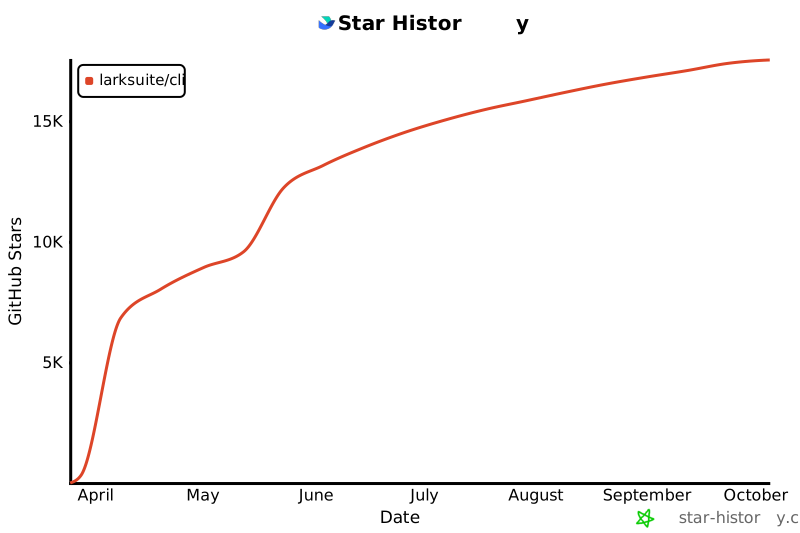](https://star-history.com/#larksuite/cli&Date)
|
|
275
|
+
|
|
276
|
+
## Contributing
|
|
277
|
+
|
|
278
|
+
Community contributions are welcome! If you find a bug or have feature suggestions, please submit an [Issue](https://github.com/larksuite/cli/issues) or [Pull Request](https://github.com/larksuite/cli/pulls).
|
|
279
|
+
|
|
280
|
+
For major changes, we recommend discussing with us first via an Issue.
|
|
281
|
+
|
|
282
|
+
Before opening a PR, see [AGENTS.md](./AGENTS.md) for the local build, test, and PR checklist used by contributors and AI agents.
|
|
283
|
+
|
|
284
|
+
## License
|
|
285
|
+
|
|
286
|
+
This project is licensed under the **MIT License**.
|
|
287
|
+
When running, it calls Lark/Feishu Open Platform APIs. To use these APIs, you must comply with the following agreements and privacy policies:
|
|
288
|
+
|
|
289
|
+
- [Feishu User Terms of Service](https://www.feishu.cn/terms)
|
|
290
|
+
- [Feishu Privacy Policy](https://www.feishu.cn/privacy)
|
|
291
|
+
- [Feishu Open Platform App Service Provider Security Management Specifications](https://open.feishu.cn/document/uAjLw4CM/uMzNwEjLzcDMx4yM3ATM/management-practice/app-service-provider-security-management-specifications)
|
|
292
|
+
- [Lark User Terms of Service](https://www.larksuite.com/user-terms-of-service)
|
|
293
|
+
- [Lark Privacy Policy](https://www.larksuite.com/privacy-policy)
|
package/README.zh.md
ADDED
|
@@ -0,0 +1,294 @@
|
|
|
1
|
+
# lark-cli
|
|
2
|
+
|
|
3
|
+
[](https://opensource.org/licenses/MIT)
|
|
4
|
+
[](https://go.dev/)
|
|
5
|
+
[](https://www.npmjs.com/package/@larksuite/cli)
|
|
6
|
+
|
|
7
|
+
[中文版](./README.zh.md) | [English](./README.md)
|
|
8
|
+
|
|
9
|
+
飞书官方 CLI 工具,由 [larksuite](https://github.com/larksuite) 团队维护 — 让人类和 AI Agent 都能在终端中操作飞书。覆盖消息、文档、多维表格、电子表格、幻灯片、日历、邮箱、任务、会议、Markdown 等核心业务域,提供 200+ 命令及 26 个 AI Agent [Skills](./skills/)。
|
|
10
|
+
|
|
11
|
+
[安装](#安装与快速开始) · [AI Agent Skills](#agent-skills) · [认证](#认证) · [命令](#三层命令调用) · [进阶用法](#进阶用法) · [安全](#安全与风险提示使用前必读) · [贡献](#贡献)
|
|
12
|
+
|
|
13
|
+
## 为什么选 lark-cli?
|
|
14
|
+
|
|
15
|
+
- **为 Agent 原生设计** — 26 个 [Skills](./skills/) 开箱即用,适配主流 AI 工具,Agent 无需额外适配即可操作飞书
|
|
16
|
+
- **覆盖面广** — 18 大业务域、200+ 精选命令、26 个 AI Agent [Skills](./skills/)
|
|
17
|
+
- **AI 友好调优** — 每条命令经过 Agent 实测验证,提供更友好的参数、智能默认值和结构化输出,大幅提升 Agent 调用成功率
|
|
18
|
+
- **开源零门槛** — MIT 协议,开箱即用,`npm install` 即可使用
|
|
19
|
+
- **三分钟上手** — 一键创建应用、交互式登录授权,从安装到第一次 API 调用只需三步
|
|
20
|
+
- **安全可控** — 输入防注入、终端输出净化、OS 原生密钥链存储凭证
|
|
21
|
+
- **三层调用架构** — 快捷命令(人机友好)→ API 命令(平台同步)→ 通用调用(全 API 覆盖),按需选择粒度
|
|
22
|
+
|
|
23
|
+
## 功能
|
|
24
|
+
|
|
25
|
+
| 类别 | 能力 |
|
|
26
|
+
| ------------- |--------------------------------------------|
|
|
27
|
+
| 📅 日历 | 查看、创建和更新日程,邀请参会人、查找会议室、回复日程邀请、查询忙闲与时间建议 |
|
|
28
|
+
| 💬 即时通讯 | 发送/回复消息、创建和管理群聊、查看聊天记录与话题、搜索消息、下载媒体文件 |
|
|
29
|
+
| 📄 云文档 | 创建、读取、更新文档、搜索文档、读写素材与画板 |
|
|
30
|
+
| 📁 云空间 | 上传和下载文件、搜索文档与知识库、管理评论 |
|
|
31
|
+
| 📝 Markdown | 创建、读取、局部 patch、覆盖更新 Drive 中的原生 `.md` 文件 |
|
|
32
|
+
| 📊 多维表格 | 创建和管理数据表、字段、记录、视图、仪表盘、自动化流程、表单、角色权限,数据聚合分析 |
|
|
33
|
+
| 📈 电子表格 | 创建、读取、写入、追加、查找和导出表格数据 |
|
|
34
|
+
| 🖼️ 幻灯片 | 创建和管理演示文稿、读取演示文稿内容,以及新增或删除幻灯片页面 |
|
|
35
|
+
| ✅ 任务 | 创建、查询、更新和完成任务;管理任务清单、子任务、评论与提醒 |
|
|
36
|
+
| 📚 知识库 | 创建和管理知识空间、节点和文档 |
|
|
37
|
+
| 👤 通讯录 | 按姓名/邮箱/手机号搜索用户、获取用户信息 |
|
|
38
|
+
| 📧 邮箱 | 浏览、搜索、阅读邮件,发送、回复、转发邮件,管理草稿,监听新邮件 |
|
|
39
|
+
| 🎥 视频会议 | 搜索会议记录、查询会议纪要产物与会议录制 |
|
|
40
|
+
| 🕐 考勤打卡 | 查询个人考勤打卡记录 |
|
|
41
|
+
| ✍️ 审批 | 查询审批任务、同意/拒绝/转交审批任务、撤回与抄送审批实例 |
|
|
42
|
+
| 🎯 OKR | 查询、创建、更新 OKR,管理目标、关键结果、对齐、指标和进展记录 |
|
|
43
|
+
| 📋 飞书项目 | 管理工作项、排期与数据 — 由独立的 [meegle-cli](https://github.com/larksuite/meegle-cli) 提供(需单独安装) |
|
|
44
|
+
| 🔗 应用 | 创建妙搭(Spark/Miaoda)应用、发布 HTML/静态站点、云端生成迭代、管理可用范围 |
|
|
45
|
+
|
|
46
|
+
## 安装与快速开始
|
|
47
|
+
|
|
48
|
+
### 环境要求
|
|
49
|
+
|
|
50
|
+
开始之前,请确保具备以下条件:
|
|
51
|
+
|
|
52
|
+
- Node.js(`npm`/`npx`)
|
|
53
|
+
- Go `v1.23`+ 和 Python 3(仅源码构建需要)
|
|
54
|
+
|
|
55
|
+
### 快速开始(人类用户)
|
|
56
|
+
|
|
57
|
+
> **Note for AI assistants:** 如果你是 AI Agent 且正在协助用户执行安装,请直接跳转到[快速开始(AI Agent)](#快速开始ai-agent)执行,那里包含你需要完成的所有步骤。
|
|
58
|
+
|
|
59
|
+
#### 安装
|
|
60
|
+
|
|
61
|
+
以下两种方式**任选其一**:
|
|
62
|
+
|
|
63
|
+
**方式一 — 从 npm 安装(推荐):**
|
|
64
|
+
|
|
65
|
+
```bash
|
|
66
|
+
npx @larksuite/cli@latest install
|
|
67
|
+
```
|
|
68
|
+
|
|
69
|
+
**方式二 — 从源码安装:**
|
|
70
|
+
|
|
71
|
+
需要 Go `v1.23`+ 和 Python 3。
|
|
72
|
+
|
|
73
|
+
```bash
|
|
74
|
+
git clone https://github.com/larksuite/cli.git
|
|
75
|
+
cd cli
|
|
76
|
+
make install
|
|
77
|
+
|
|
78
|
+
# 安装 CLI SKILL(必需)
|
|
79
|
+
npx skills add larksuite/cli -y -g
|
|
80
|
+
```
|
|
81
|
+
|
|
82
|
+
#### 配置与使用
|
|
83
|
+
|
|
84
|
+
```bash
|
|
85
|
+
# 1. 配置应用凭证(仅需一次,交互式引导完成)
|
|
86
|
+
lark-cli config init
|
|
87
|
+
|
|
88
|
+
# 2. 登录授权(--recommend 自动选择常用权限)
|
|
89
|
+
lark-cli auth login --recommend
|
|
90
|
+
|
|
91
|
+
# 3. 开始使用
|
|
92
|
+
lark-cli calendar +agenda
|
|
93
|
+
```
|
|
94
|
+
|
|
95
|
+
### 快速开始(AI Agent)
|
|
96
|
+
|
|
97
|
+
> 以下步骤面向 AI Agent,部分步骤需要用户在浏览器中配合完成。
|
|
98
|
+
|
|
99
|
+
**第 1 步 — 安装**
|
|
100
|
+
|
|
101
|
+
```bash
|
|
102
|
+
npx @larksuite/cli@latest install
|
|
103
|
+
```
|
|
104
|
+
|
|
105
|
+
**第 2 步 — 配置应用凭证**
|
|
106
|
+
|
|
107
|
+
> 在后台运行此命令,命令会输出一个授权链接,提取该链接并发送给用户,用户在浏览器中完成配置后命令会自动退出。
|
|
108
|
+
|
|
109
|
+
```bash
|
|
110
|
+
lark-cli config init --new
|
|
111
|
+
```
|
|
112
|
+
|
|
113
|
+
**第 3 步 — 登录**
|
|
114
|
+
|
|
115
|
+
> 同上,后台运行,提取授权链接发给用户。
|
|
116
|
+
|
|
117
|
+
```bash
|
|
118
|
+
lark-cli auth login --recommend
|
|
119
|
+
```
|
|
120
|
+
|
|
121
|
+
**第 4 步 — 验证**
|
|
122
|
+
|
|
123
|
+
```bash
|
|
124
|
+
lark-cli auth status
|
|
125
|
+
```
|
|
126
|
+
|
|
127
|
+
|
|
128
|
+
## Agent Skills
|
|
129
|
+
|
|
130
|
+
| Skill | 说明 |
|
|
131
|
+
| --------------------------------- |-------------------------------------------|
|
|
132
|
+
| `lark-shared` | 应用配置、认证登录、身份切换、权限管理、安全规则(所有其他 skill 自动加载) |
|
|
133
|
+
| `lark-calendar` | 日历日程(创建/更新)、议程查看、忙闲查询、时间建议、会议室查找、回复邀请 |
|
|
134
|
+
| `lark-im` | 发送/回复消息、群聊管理、消息搜索、上传下载图片与文件、表情回复 |
|
|
135
|
+
| `lark-doc` | 创建、读取、更新、搜索文档(基于 Markdown) |
|
|
136
|
+
| `lark-drive` | 上传、下载文件,管理权限与评论 |
|
|
137
|
+
| `lark-markdown` | 创建、读取、局部 patch、覆盖更新 Drive 中的原生 Markdown 文件 |
|
|
138
|
+
| `lark-sheets` | 创建、读取、写入、追加、查找、导出电子表格 |
|
|
139
|
+
| `lark-slides` | 创建和管理演示文稿、读取演示文稿内容,以及新增或删除幻灯片页面 |
|
|
140
|
+
| `lark-base` | 多维表格、字段、记录、视图、仪表盘、数据聚合分析 |
|
|
141
|
+
| `lark-task` | 任务、任务清单、子任务、提醒、成员分配 |
|
|
142
|
+
| `lark-mail` | 浏览、搜索、阅读邮件,发送、回复、转发,草稿管理,监听新邮件 |
|
|
143
|
+
| `lark-contact` | 按姓名/邮箱/手机号搜索用户,获取用户信息 |
|
|
144
|
+
| `lark-wiki` | 知识空间、节点、文档 |
|
|
145
|
+
| `lark-event` | 实时事件订阅(WebSocket),支持正则路由与 Agent 友好格式 |
|
|
146
|
+
| `lark-vc` | 搜索会议记录、查询会议纪要产物(总结、待办、逐字稿) |
|
|
147
|
+
| `lark-whiteboard` | 画板/图表 DSL 渲染 |
|
|
148
|
+
| `lark-minutes` | 妙记元数据与 AI 产物(总结、待办、章节),上传音视频生成妙记,下载音视频文件 |
|
|
149
|
+
| `lark-openapi-explorer` | 从官方文档探索底层 API |
|
|
150
|
+
| `lark-skill-maker` | 自定义 skill 创建框架 |
|
|
151
|
+
| `lark-attendance` | 查询个人考勤打卡记录 |
|
|
152
|
+
| `lark-approval` | 审批任务查询、同意/拒绝/转交审批任务、撤回与抄送审批实例 |
|
|
153
|
+
| `lark-workflow-meeting-summary` | 工作流:会议纪要汇总与结构化报告 |
|
|
154
|
+
| `lark-workflow-standup-report` | 工作流:日程待办摘要 |
|
|
155
|
+
| `lark-okr` | 查询、创建、更新 OKR,管理目标、关键结果、对齐、指标和进展记录 |
|
|
156
|
+
|
|
157
|
+
## 认证
|
|
158
|
+
|
|
159
|
+
| 命令 | 说明 |
|
|
160
|
+
| --------------- | -------------------------------------------------- |
|
|
161
|
+
| `auth login` | OAuth 登录,支持交互式选择或命令行参数指定 scope |
|
|
162
|
+
| `auth logout` | 登出并删除已存储的凭证 |
|
|
163
|
+
| `auth status` | 查看当前登录状态和已授权的 scope |
|
|
164
|
+
| `auth check` | 校验指定 scope(exit 0 = 有权限,1 = 缺失) |
|
|
165
|
+
| `auth scopes` | 列出应用的所有可用 scope |
|
|
166
|
+
| `auth list` | 列出所有已认证的用户 |
|
|
167
|
+
|
|
168
|
+
```bash
|
|
169
|
+
# 交互式登录(TUI 引导选择业务域和权限级别)
|
|
170
|
+
lark-cli auth login
|
|
171
|
+
|
|
172
|
+
# 按域筛选
|
|
173
|
+
lark-cli auth login --domain calendar,task
|
|
174
|
+
|
|
175
|
+
# 推荐的自动审批 scopes
|
|
176
|
+
lark-cli auth login --recommend
|
|
177
|
+
|
|
178
|
+
# 精确 scope
|
|
179
|
+
lark-cli auth login --scope "calendar:calendar:read"
|
|
180
|
+
|
|
181
|
+
# Agent 模式:立即返回验证 URL,不阻塞
|
|
182
|
+
lark-cli auth login --domain calendar --no-wait
|
|
183
|
+
# 稍后恢复轮询
|
|
184
|
+
lark-cli auth login --device-code <DEVICE_CODE>
|
|
185
|
+
|
|
186
|
+
# 身份切换:以用户或机器人身份执行命令
|
|
187
|
+
lark-cli calendar +agenda --as user
|
|
188
|
+
lark-cli im +messages-send --as bot --chat-id "oc_xxx" --text "Hello"
|
|
189
|
+
```
|
|
190
|
+
|
|
191
|
+
## 三层命令调用
|
|
192
|
+
|
|
193
|
+
CLI 提供三种粒度的调用方式,覆盖从快速操作到完全自定义的全部场景:
|
|
194
|
+
|
|
195
|
+
### 1. 快捷命令(Shortcuts)
|
|
196
|
+
|
|
197
|
+
以 `+` 为前缀,对人类与 AI 友好化封装,内置智能默认值、表格输出和 dry-run 预览。
|
|
198
|
+
|
|
199
|
+
```bash
|
|
200
|
+
lark-cli calendar +agenda
|
|
201
|
+
lark-cli im +messages-send --chat-id "oc_xxx" --text "Hello"
|
|
202
|
+
lark-cli docs +create --doc-format markdown --content $'<title>周报</title>\n# 本周进展\n- 完成了 X 功能'
|
|
203
|
+
```
|
|
204
|
+
|
|
205
|
+
运行 `lark-cli <service> --help` 查看所有快捷命令。
|
|
206
|
+
|
|
207
|
+
### 2. API 命令
|
|
208
|
+
|
|
209
|
+
从飞书 OAPI 元数据自动生成,经过评测与准入筛选,100+ 精选命令与平台端点一一对应。
|
|
210
|
+
|
|
211
|
+
```bash
|
|
212
|
+
lark-cli calendar calendars list
|
|
213
|
+
lark-cli calendar events instance_view --params '{"calendar_id":"primary","start_time":"1700000000","end_time":"1700086400"}'
|
|
214
|
+
```
|
|
215
|
+
|
|
216
|
+
### 3. 通用 API 调用
|
|
217
|
+
|
|
218
|
+
直接调用任意飞书开放平台端点,覆盖 2500+ API。
|
|
219
|
+
|
|
220
|
+
```bash
|
|
221
|
+
lark-cli api GET /open-apis/calendar/v4/calendars
|
|
222
|
+
lark-cli api POST /open-apis/im/v1/messages --params '{"receive_id_type":"chat_id"}' --data '{"receive_id":"oc_xxx","msg_type":"text","content":"{\"text\":\"Hello\"}"}'
|
|
223
|
+
```
|
|
224
|
+
|
|
225
|
+
## 进阶用法
|
|
226
|
+
|
|
227
|
+
### 输出格式
|
|
228
|
+
|
|
229
|
+
```bash
|
|
230
|
+
--format json # 完整 JSON 响应(默认)
|
|
231
|
+
--format pretty # 人性化格式输出
|
|
232
|
+
--format table # 易读表格
|
|
233
|
+
--format ndjson # 换行分隔 JSON(适合管道处理)
|
|
234
|
+
--format csv # 逗号分隔值
|
|
235
|
+
```
|
|
236
|
+
|
|
237
|
+
### 分页
|
|
238
|
+
|
|
239
|
+
```bash
|
|
240
|
+
--page-all # 自动翻页获取所有数据
|
|
241
|
+
--page-limit 5 # 最多获取 5 页
|
|
242
|
+
--page-delay 500 # 每页请求间隔 500ms
|
|
243
|
+
```
|
|
244
|
+
|
|
245
|
+
### Dry Run
|
|
246
|
+
|
|
247
|
+
对可能产生副作用的命令,建议先用 --dry-run 预览请求:
|
|
248
|
+
|
|
249
|
+
```bash
|
|
250
|
+
lark-cli im +messages-send --chat-id oc_xxx --text "hello" --dry-run
|
|
251
|
+
```
|
|
252
|
+
|
|
253
|
+
### Schema 自省
|
|
254
|
+
|
|
255
|
+
使用 schema 查看任意 API 方法的参数、请求体、响应结构、支持身份和 scopes:
|
|
256
|
+
|
|
257
|
+
```bash
|
|
258
|
+
lark-cli schema
|
|
259
|
+
lark-cli schema calendar.events.instance_view
|
|
260
|
+
lark-cli schema im.messages.delete
|
|
261
|
+
```
|
|
262
|
+
|
|
263
|
+
## 安全与风险提示(使用前必读)
|
|
264
|
+
|
|
265
|
+
本工具可供 AI Agent 调用以自动化操作飞书/Lark 开放平台,存在模型幻觉、执行不可控、提示词注入等固有风险;授权飞书权限后,AI Agent 将以您的用户身份在授权范围内执行操作,可能导致敏感数据泄露、越权操作等高风险后果,请您谨慎操作和使用。
|
|
266
|
+
|
|
267
|
+
为降低上述风险,工具已在多个层面启用默认安全保护,但上述风险仍然存在。我们强烈建议不要主动修改任何默认安全配置;一旦放开相关限制,上述风险将显著提高,由此产生的后果需由您自行承担。
|
|
268
|
+
|
|
269
|
+
我们建议您将对接本工具的飞书机器人作为私人对话助手使用,请勿将其拉入群聊或允许其他用户与其交互,以避免权限被滥用或数据泄露。
|
|
270
|
+
|
|
271
|
+
请您充分知悉全部使用风险,使用本工具即视为您自愿承担相关所有责任。
|
|
272
|
+
|
|
273
|
+
## Star History
|
|
274
|
+
|
|
275
|
+
[](https://star-history.com/#larksuite/cli&Date)
|
|
276
|
+
|
|
277
|
+
## 贡献
|
|
278
|
+
|
|
279
|
+
欢迎社区贡献!如果你发现 bug 或有功能建议,请提交 [Issue](https://github.com/larksuite/cli/issues) 或 [Pull Request](https://github.com/larksuite/cli/pulls)。
|
|
280
|
+
|
|
281
|
+
对于较大的改动,建议先通过 Issue 与我们讨论。
|
|
282
|
+
|
|
283
|
+
提交 PR 前,请先阅读 [AGENTS.md](./AGENTS.md),其中列出了贡献者和 AI Agent 使用的本地构建、测试和 PR 检查清单。
|
|
284
|
+
|
|
285
|
+
## 许可证
|
|
286
|
+
|
|
287
|
+
本项目基于 **MIT 许可证** 开源。
|
|
288
|
+
该软件运行时会调用 Lark/飞书开放平台的 API,使用这些 API 需要遵守如下协议和隐私政策:
|
|
289
|
+
|
|
290
|
+
- [飞书用户服务协议](https://www.feishu.cn/terms)
|
|
291
|
+
- [飞书隐私政策](https://www.feishu.cn/privacy)
|
|
292
|
+
- [飞书开放平台独立软件服务商安全管理运营规范](https://open.feishu.cn/document/uAjLw4CM/uMzNwEjLzcDMx4yM3ATM/management-practice/app-service-provider-security-management-specifications)
|
|
293
|
+
- [Lark User Terms of Service](https://www.larksuite.com/user-terms-of-service)
|
|
294
|
+
- [Lark Privacy Policy](https://www.larksuite.com/privacy-policy)
|
package/checksums.txt
ADDED
|
@@ -0,0 +1,7 @@
|
|
|
1
|
+
9c97f436113d2e39cbe8743c45e7f94ad4fa194c40f834a5f6743a6c6f95445b weact-cli-1.0.0-darwin-amd64.tar.gz
|
|
2
|
+
ba5a8d4dda7f4f6172cac3a6318aee7d92b95d62ae4efde33937a2ecab9d0789 weact-cli-1.0.0-darwin-arm64.tar.gz
|
|
3
|
+
90939f987ef43a2c5fb1aac40f47f124f8c4c8ed57762600a4067198fae6266c weact-cli-1.0.0-linux-amd64.tar.gz
|
|
4
|
+
a0d1fef381000fdfa0656fb5f2a4a1c2a5801464d30973f4b599c1ff1a68999a weact-cli-1.0.0-linux-arm64.tar.gz
|
|
5
|
+
fb25fd0a11c1fe7fdf4d0477d86f266d8278a48da8a9695b2a50ab044dd047ee weact-cli-1.0.0-linux-riscv64.tar.gz
|
|
6
|
+
b087f2a83d4a283270a783f6fc4802e1a0aefc41b87f55b11637fe45addd87cd weact-cli-1.0.0-windows-amd64.zip
|
|
7
|
+
985a7e95f2c325b92d32c38e63c7e5654f1723043dc300f8567627e3dfd1aada weact-cli-1.0.0-windows-arm64.zip
|
package/package.json
ADDED
|
@@ -0,0 +1,39 @@
|
|
|
1
|
+
{
|
|
2
|
+
"name": "@weact-pipenet/weact-cli",
|
|
3
|
+
"version": "1.0.0",
|
|
4
|
+
"description": "The official CLI for WeAct open platform",
|
|
5
|
+
"bin": {
|
|
6
|
+
"weact-cli": "scripts/run.js"
|
|
7
|
+
},
|
|
8
|
+
"scripts": {
|
|
9
|
+
"postinstall": "node scripts/install.js"
|
|
10
|
+
},
|
|
11
|
+
"os": [
|
|
12
|
+
"darwin",
|
|
13
|
+
"linux",
|
|
14
|
+
"win32"
|
|
15
|
+
],
|
|
16
|
+
"cpu": [
|
|
17
|
+
"x64",
|
|
18
|
+
"arm64",
|
|
19
|
+
"riscv64"
|
|
20
|
+
],
|
|
21
|
+
"engines": {
|
|
22
|
+
"node": ">=16"
|
|
23
|
+
},
|
|
24
|
+
"repository": {
|
|
25
|
+
"type": "git",
|
|
26
|
+
"url": "git+https://github.com/jixinyuan1996/weact-cli.git"
|
|
27
|
+
},
|
|
28
|
+
"license": "MIT",
|
|
29
|
+
"files": [
|
|
30
|
+
"scripts/install.js",
|
|
31
|
+
"scripts/install-wizard.js",
|
|
32
|
+
"scripts/run.js",
|
|
33
|
+
"checksums.txt",
|
|
34
|
+
"CHANGELOG.md"
|
|
35
|
+
],
|
|
36
|
+
"dependencies": {
|
|
37
|
+
"@clack/prompts": "^1.2.0"
|
|
38
|
+
}
|
|
39
|
+
}
|