@wdio/junit-reporter 9.19.2 → 9.20.0
This diff represents the content of publicly available package versions that have been released to one of the supported registries. The information contained in this diff is provided for informational purposes only and reflects changes between package versions as they appear in their respective public registries.
- package/README.md +181 -80
- package/package.json +4 -4
package/README.md
CHANGED
|
@@ -1,4 +1,4 @@
|
|
|
1
|
-
WebdriverIO
|
|
1
|
+
WebdriverIO JUnit Reporter
|
|
2
2
|
========================
|
|
3
3
|
|
|
4
4
|
> A WebdriverIO reporter that creates [Jenkins](http://jenkins-ci.org/) compatible XML based JUnit reports
|
|
@@ -15,7 +15,7 @@ Instructions on how to install `WebdriverIO` can be found [here](https://webdriv
|
|
|
15
15
|
|
|
16
16
|
## Output
|
|
17
17
|
|
|
18
|
-
This reporter will output a report for each runner, so in turn you will receive an
|
|
18
|
+
This reporter will output a report for each runner, so in turn you will receive an XML report for each spec file. Below
|
|
19
19
|
are examples of XML output given different scenarios in the spec file.
|
|
20
20
|
|
|
21
21
|
### Single describe block
|
|
@@ -132,22 +132,16 @@ Error: some assertion failure
|
|
|
132
132
|
|
|
133
133
|
## Configuration
|
|
134
134
|
|
|
135
|
-
|
|
136
|
-
to the array. To get some output during the test you can run the [WDIO Dot Reporter](https://github.com/webdriverio/webdriverio/tree/main/packages/wdio-dot-reporter) and the WDIO JUnit Reporter at the same time:
|
|
135
|
+
The following example shows a basic configuration for this reporter:
|
|
137
136
|
|
|
138
137
|
```js
|
|
139
138
|
// wdio.conf.js
|
|
140
|
-
|
|
139
|
+
export const config = {
|
|
141
140
|
// ...
|
|
142
|
-
reporters: [
|
|
143
|
-
'
|
|
144
|
-
|
|
145
|
-
|
|
146
|
-
outputFileFormat: function(options) { // optional
|
|
147
|
-
return `results-${options.cid}.${options.capabilities}.xml`
|
|
148
|
-
}
|
|
149
|
-
}]
|
|
150
|
-
],
|
|
141
|
+
reporters: [['junit', {
|
|
142
|
+
outputDir: './',
|
|
143
|
+
outputFileFormat: () => `test-results.xml`;
|
|
144
|
+
}]],
|
|
151
145
|
// ...
|
|
152
146
|
};
|
|
153
147
|
```
|
|
@@ -155,76 +149,182 @@ module.exports = {
|
|
|
155
149
|
The following options are supported:
|
|
156
150
|
|
|
157
151
|
### outputDir
|
|
158
|
-
Define a directory where your
|
|
152
|
+
Define a directory where your XML files should get stored. Ignored if either `logFile` or `setLogFile` are defined.
|
|
159
153
|
|
|
160
|
-
Type: `String
|
|
161
|
-
Required
|
|
154
|
+
Type: `String`
|
|
162
155
|
|
|
163
156
|
### outputFileFormat
|
|
164
|
-
|
|
157
|
+
Function for defining the filename format for the reporter log files. Ignored if either `logFile` or `setLogFile`
|
|
158
|
+
are defined.
|
|
159
|
+
|
|
160
|
+
The function accepts an object input parameter with the `cid` and `capabilities` keys.
|
|
165
161
|
|
|
166
162
|
Type: `Object`<br />
|
|
167
|
-
Default: ``
|
|
163
|
+
Default: ``(opts) => `wdio-${opts.cid}-junit-reporter.log` ``<br />
|
|
164
|
+
Example:
|
|
165
|
+
```js
|
|
166
|
+
// wdio.conf.js
|
|
167
|
+
export const config = {
|
|
168
|
+
// ...
|
|
169
|
+
reporters: [['junit', {
|
|
170
|
+
outputDir: './',
|
|
171
|
+
outputFileFormat: (opts) => `results-${opts.cid}-${opts.capabilities.browserName}.xml`,
|
|
172
|
+
}]],
|
|
173
|
+
// ...
|
|
174
|
+
};
|
|
175
|
+
```
|
|
168
176
|
|
|
177
|
+
### logFile
|
|
178
|
+
Path to the reporter log file relative to the current directory. Overrides `outputDir` and `outputFileFormat`.
|
|
179
|
+
Ignored if `setLogFile` is defined.
|
|
180
|
+
|
|
181
|
+
Type: `String`<br />
|
|
182
|
+
Example:
|
|
183
|
+
```js
|
|
184
|
+
// wdio.conf.js
|
|
185
|
+
export const config = {
|
|
186
|
+
// ...
|
|
187
|
+
reporters: [['junit', {
|
|
188
|
+
logFile: './reports/junit-report.xml',
|
|
189
|
+
}]],
|
|
190
|
+
// ...
|
|
191
|
+
};
|
|
169
192
|
```
|
|
170
|
-
|
|
171
|
-
|
|
172
|
-
|
|
193
|
+
|
|
194
|
+
### setLogFile
|
|
195
|
+
Function for defining the path for the reporter log files. Overrides `outputDir`, `outputFileFormat`, and `logFile`.
|
|
196
|
+
|
|
197
|
+
The function accepts two input parameters: `cid` and `name` (the reporter name, set to `junit`).
|
|
198
|
+
|
|
199
|
+
Type: `Object`<br />
|
|
200
|
+
Example:
|
|
201
|
+
```js
|
|
202
|
+
// wdio.conf.js
|
|
203
|
+
export const config = {
|
|
204
|
+
// ...
|
|
205
|
+
reporters: [['junit', {
|
|
206
|
+
setLogFile: (cid, name) => `./reports/results-${cid}-${name}.xml`,
|
|
207
|
+
}]],
|
|
208
|
+
// ...
|
|
209
|
+
};
|
|
173
210
|
```
|
|
174
211
|
|
|
175
|
-
|
|
212
|
+
### stdout
|
|
213
|
+
Output the generated XML to the console instead of creating a log file.
|
|
214
|
+
|
|
215
|
+
Type: `boolean`<br />
|
|
216
|
+
Default: `false`
|
|
217
|
+
|
|
218
|
+
### writeStream
|
|
219
|
+
Set a stream to which the generated XML should be output, instead of creating a log file.
|
|
220
|
+
|
|
221
|
+
Note: `logFile` must not be set, unless `stdout` is set to `true`.
|
|
222
|
+
|
|
223
|
+
Type: `WriteStream`
|
|
176
224
|
|
|
177
225
|
### suiteNameFormat
|
|
226
|
+
Format the generated name of a test suite, using custom regex or a function.
|
|
178
227
|
|
|
179
|
-
|
|
228
|
+
The function accepts an object input parameter with the `name` and `suite` keys.
|
|
180
229
|
|
|
181
|
-
Type: `Regex`,<br />
|
|
182
|
-
Default: `/[^a-zA-Z0-9@]
|
|
230
|
+
Type: `Regex | Object`,<br />
|
|
231
|
+
Default: `/[^a-zA-Z0-9@]+/`<br />
|
|
232
|
+
Example with Regex:
|
|
233
|
+
```js
|
|
234
|
+
// wdio.conf.js
|
|
235
|
+
export const config = {
|
|
236
|
+
// ...
|
|
237
|
+
reporters: [['junit', {
|
|
238
|
+
outputDir: './',
|
|
239
|
+
suiteNameFormat: /[^a-zA-Z0-9@]+/
|
|
240
|
+
}]],
|
|
241
|
+
// ...
|
|
242
|
+
};
|
|
243
|
+
```
|
|
244
|
+
Example with function:
|
|
245
|
+
```js
|
|
246
|
+
// wdio.conf.js
|
|
247
|
+
export const config = {
|
|
248
|
+
// ...
|
|
249
|
+
reporters: [['junit', {
|
|
250
|
+
outputDir: './',
|
|
251
|
+
suiteNameFormat: ({name, suite}) => `suite-${name}-${suite.title}`,
|
|
252
|
+
}]],
|
|
253
|
+
// ...
|
|
254
|
+
};
|
|
255
|
+
```
|
|
256
|
+
|
|
257
|
+
### classNameFormat
|
|
258
|
+
Format the generated classname of a test case.
|
|
183
259
|
|
|
260
|
+
The function accepts an object input parameter with the [`packageName`](#packagename), `activeFeatureName`
|
|
261
|
+
(Cucumber only), and `suite` (non-Cucumber only) keys.
|
|
262
|
+
|
|
263
|
+
Type: `Object`<br />
|
|
264
|
+
Default (Cucumber): ``(opts) => `${opts.packageName}${opts.activeFeatureName}` ``<br />
|
|
265
|
+
Default (others): ``(opts) => `${opts.packageName}.${(opts.suite.fullTitle || opts.suite.title).replace(/\s/g, '_')}` ``<br />
|
|
266
|
+
Example (Cucumber):
|
|
267
|
+
```js
|
|
268
|
+
// wdio.conf.js
|
|
269
|
+
export const config = {
|
|
270
|
+
// ...
|
|
271
|
+
reporters: [['junit', {
|
|
272
|
+
outputDir: './',
|
|
273
|
+
classNameFormat: ({packageName, activeFeatureName}) => `class-${packageName}-${activeFeatureName}`,
|
|
274
|
+
}]],
|
|
275
|
+
// ...
|
|
276
|
+
};
|
|
277
|
+
```
|
|
278
|
+
Example (others):
|
|
184
279
|
```js
|
|
185
280
|
// wdio.conf.js
|
|
186
|
-
|
|
281
|
+
export const config = {
|
|
187
282
|
// ...
|
|
188
|
-
reporters: [
|
|
189
|
-
'
|
|
190
|
-
|
|
191
|
-
|
|
192
|
-
suiteNameFormat: /[^a-zA-Z0-9@]+/
|
|
193
|
-
outputFileFormat: function(options) { // optional
|
|
194
|
-
return `results-${options.cid}.${options.capabilities}.xml`
|
|
195
|
-
}
|
|
196
|
-
}]
|
|
197
|
-
],
|
|
283
|
+
reporters: [['junit', {
|
|
284
|
+
outputDir: './',
|
|
285
|
+
classNameFormat: ({packageName, suite}) => `class-${packageName}-${suite.title}`,
|
|
286
|
+
}]],
|
|
198
287
|
// ...
|
|
199
288
|
};
|
|
200
289
|
```
|
|
201
290
|
|
|
202
|
-
### addFileAttribute
|
|
203
291
|
|
|
204
|
-
|
|
292
|
+
### addFileAttribute
|
|
205
293
|
|
|
206
|
-
|
|
207
|
-
|
|
294
|
+
Adds a `file` attribute to each testcase. The value of this attribute matches the filepath property of the parent test
|
|
295
|
+
suite. This config is primarily for CircleCI, but may break on other CI platforms.
|
|
208
296
|
|
|
297
|
+
Type: `Boolean`<br />
|
|
298
|
+
Default: `false`<br />
|
|
299
|
+
Example simplified XML:
|
|
300
|
+
```xml
|
|
301
|
+
<testsuite>
|
|
302
|
+
<properties>
|
|
303
|
+
<property name="file" value="file://./path/to/test/file.js"/>
|
|
304
|
+
</properties>
|
|
305
|
+
<testcase file="file://./path/to/test/file.js">
|
|
306
|
+
<!-- ... -->
|
|
307
|
+
</testcase>
|
|
308
|
+
</testsuite>
|
|
309
|
+
```
|
|
209
310
|
|
|
210
311
|
### packageName
|
|
211
312
|
|
|
212
|
-
You can break out packages by an additional level by setting `'packageName'`. For example, if you wanted to iterate over a test suite with different environment variable set:
|
|
313
|
+
You can break out packages by an additional level by setting `'packageName'`. For example, if you wanted to iterate over a test suite with a different environment variable set:
|
|
213
314
|
|
|
214
315
|
Type: `String`<br />
|
|
316
|
+
Default (Cucumber): `CucumberJUnitReport-${sanitizedCapabilities}`<br />
|
|
317
|
+
Default (others): `${sanitizedCapabilities}`<br />
|
|
215
318
|
Example:
|
|
216
319
|
|
|
217
320
|
```js
|
|
218
321
|
// wdio.conf.js
|
|
219
|
-
|
|
322
|
+
export const config = {
|
|
220
323
|
// ...
|
|
221
|
-
reporters: [
|
|
222
|
-
'
|
|
223
|
-
|
|
224
|
-
|
|
225
|
-
packageName: process.env.USER_ROLE // chrome.41 - administrator
|
|
226
|
-
}]
|
|
227
|
-
]
|
|
324
|
+
reporters: [['junit', {
|
|
325
|
+
outputDir: './',
|
|
326
|
+
packageName: process.env.USER_ROLE // chrome.41 - administrator
|
|
327
|
+
}]],
|
|
228
328
|
// ...
|
|
229
329
|
};
|
|
230
330
|
```
|
|
@@ -253,26 +353,23 @@ Example:
|
|
|
253
353
|
|
|
254
354
|
```js
|
|
255
355
|
// wdio.conf.js
|
|
256
|
-
|
|
356
|
+
export const config = {
|
|
257
357
|
// ...
|
|
258
|
-
reporters: [
|
|
259
|
-
'
|
|
260
|
-
|
|
261
|
-
|
|
262
|
-
|
|
263
|
-
|
|
264
|
-
|
|
265
|
-
|
|
266
|
-
}
|
|
267
|
-
}]
|
|
268
|
-
],
|
|
358
|
+
reporters: [['junit', {
|
|
359
|
+
outputDir: './',
|
|
360
|
+
errorOptions: {
|
|
361
|
+
error: 'message',
|
|
362
|
+
failure: 'message',
|
|
363
|
+
stacktrace: 'stack'
|
|
364
|
+
}
|
|
365
|
+
}]],
|
|
269
366
|
// ...
|
|
270
367
|
};
|
|
271
368
|
```
|
|
272
369
|
|
|
273
370
|
### addWorkerLogs
|
|
274
371
|
|
|
275
|
-
|
|
372
|
+
Attach console logs from the test in the reporter.
|
|
276
373
|
|
|
277
374
|
Type: `Boolean`<br />
|
|
278
375
|
Default: `false`<br />
|
|
@@ -280,29 +377,24 @@ Example:
|
|
|
280
377
|
|
|
281
378
|
```js
|
|
282
379
|
// wdio.conf.js
|
|
283
|
-
|
|
380
|
+
export const config = {
|
|
284
381
|
// ...
|
|
285
|
-
reporters: [
|
|
286
|
-
'
|
|
287
|
-
|
|
288
|
-
|
|
289
|
-
addWorkerLogs: true
|
|
290
|
-
}]
|
|
291
|
-
],
|
|
382
|
+
reporters: [['junit', {
|
|
383
|
+
outputDir: './',
|
|
384
|
+
addWorkerLogs: true
|
|
385
|
+
}]],
|
|
292
386
|
// ...
|
|
293
387
|
};
|
|
294
388
|
```
|
|
295
389
|
|
|
296
|
-
##
|
|
297
|
-
|
|
298
|
-
This plugin provides a function `addProperty(name, value)`. This function may be used to add additional junit testcase properties to the currently running test step. These properties will be reported in the resulting xml as `<property name="${name}" value="${value}" />`.
|
|
299
|
-
|
|
300
|
-
Typical usecase for this is adding a link to an issue or a testcase.
|
|
390
|
+
## API
|
|
301
391
|
|
|
392
|
+
### addProperty
|
|
302
393
|
|
|
303
|
-
|
|
394
|
+
Add a JUnit testcase property to the currently running test step. The typical usecase for this is adding a link to
|
|
395
|
+
an issue or a testcase.
|
|
304
396
|
|
|
305
|
-
|
|
397
|
+
Simplified example (Mocha):
|
|
306
398
|
|
|
307
399
|
```js
|
|
308
400
|
import { addProperty } from '@wdio/junit-reporter'
|
|
@@ -313,14 +405,23 @@ describe('Suite', () => {
|
|
|
313
405
|
})
|
|
314
406
|
})
|
|
315
407
|
```
|
|
408
|
+
```xml
|
|
409
|
+
<testsuite name="Suite">
|
|
410
|
+
<testcase classname="chrome.Case" name="Suite Case">
|
|
411
|
+
<properties>
|
|
412
|
+
<property name="test_case" value="TC-1234" />
|
|
413
|
+
</properties>
|
|
414
|
+
</testcase>
|
|
415
|
+
</testsuite>
|
|
416
|
+
```
|
|
316
417
|
|
|
317
418
|
## Jenkins Setup
|
|
318
419
|
|
|
319
|
-
Last but not least you need to tell your CI job (e.g. Jenkins) where it can find the
|
|
420
|
+
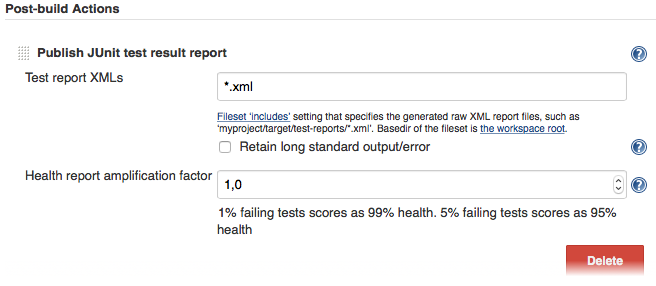
Last but not least you need to tell your CI job (e.g. Jenkins) where it can find the XML file. To do that, add a post-build action to your job that gets executed after the test has run and point Jenkins (or your desired CI system) to your XML test results:
|
|
320
421
|
|
|
321
422
|
|
|
322
423
|
|
|
323
|
-
If there is no such post-build step in your CI system there is probably a plugin for that somewhere on the internet.
|
|
424
|
+
If there is no such post-build step in your CI system, there is probably a plugin for that somewhere on the internet.
|
|
324
425
|
|
|
325
426
|
----
|
|
326
427
|
|
package/package.json
CHANGED
|
@@ -1,6 +1,6 @@
|
|
|
1
1
|
{
|
|
2
2
|
"name": "@wdio/junit-reporter",
|
|
3
|
-
"version": "9.
|
|
3
|
+
"version": "9.20.0",
|
|
4
4
|
"description": "A WebdriverIO reporter that creates Jenkins compatible XML based JUnit reports",
|
|
5
5
|
"author": "Christian Bromann <mail@bromann.dev>",
|
|
6
6
|
"homepage": "https://github.com/webdriverio/webdriverio/tree/main/packages/wdio-junit-reporter",
|
|
@@ -35,8 +35,8 @@
|
|
|
35
35
|
},
|
|
36
36
|
"typeScriptVersion": "3.8.3",
|
|
37
37
|
"dependencies": {
|
|
38
|
-
"@wdio/reporter": "9.
|
|
39
|
-
"@wdio/types": "9.
|
|
38
|
+
"@wdio/reporter": "9.20.0",
|
|
39
|
+
"@wdio/types": "9.20.0",
|
|
40
40
|
"json-stringify-safe": "^5.0.1",
|
|
41
41
|
"junit-report-builder": "^5.1.1"
|
|
42
42
|
},
|
|
@@ -46,5 +46,5 @@
|
|
|
46
46
|
"publishConfig": {
|
|
47
47
|
"access": "public"
|
|
48
48
|
},
|
|
49
|
-
"gitHead": "
|
|
49
|
+
"gitHead": "6c8694a72b8e173ecdd20dacae5d49d089b2877c"
|
|
50
50
|
}
|