@vinh0809it/claude-sessions 0.1.0 → 0.2.0
This diff represents the content of publicly available package versions that have been released to one of the supported registries. The information contained in this diff is provided for informational purposes only and reflects changes between package versions as they appear in their respective public registries.
- package/README.md +49 -36
- package/index.js +673 -289
- package/package.json +2 -2
package/README.md
CHANGED
|
@@ -1,38 +1,30 @@
|
|
|
1
1
|
# claude-sessions
|
|
2
2
|
|
|
3
|
-
A zero-dependency terminal UI for browsing, resuming, moving, and deleting [Claude Code](https://claude.ai/code) sessions.
|
|
3
|
+
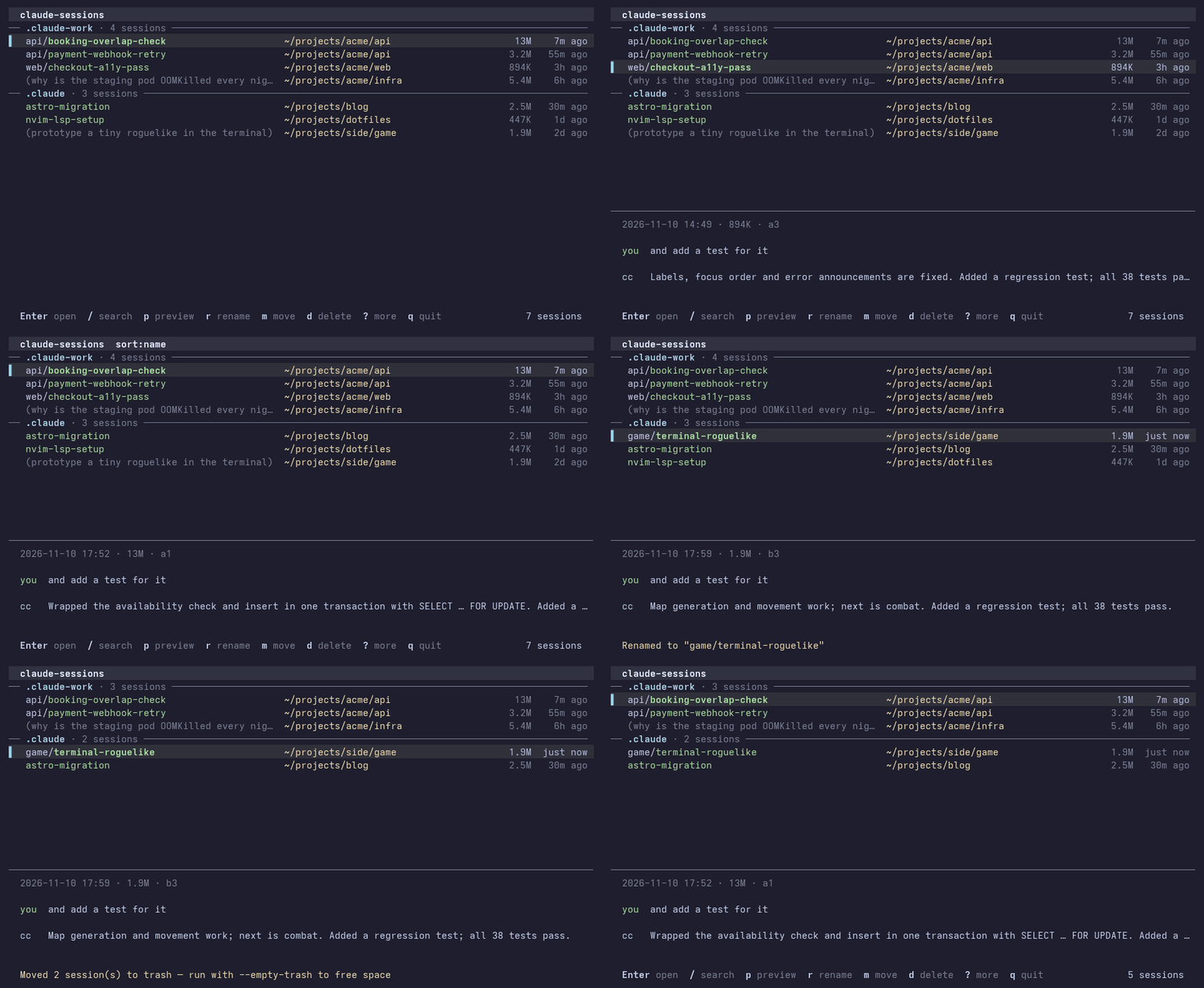
A zero-dependency terminal UI for browsing, previewing, resuming, renaming, moving, and deleting [Claude Code](https://claude.ai/code) sessions.
|
|
4
4
|
|
|
5
|
-
|
|
6
|
-
claude-sessions path:/home/you/projects/acme
|
|
7
|
-
[.claude-main]
|
|
8
|
-
/home/you/projects/acme/api
|
|
9
|
-
> booking-overlap-check 2026-05-11 23:00
|
|
10
|
-
ekyc-japan-fallback 2026-05-11 22:52
|
|
11
|
-
[.claude-company]
|
|
12
|
-
/home/you/projects/acme/api
|
|
13
|
-
payment-status-check 2026-05-11 16:10
|
|
14
|
-
↑↓/jk=nav /=search Enter=open n=new m=move d=del q=quit [42]
|
|
15
|
-
```
|
|
5
|
+
|
|
16
6
|
|
|
17
7
|
## Features
|
|
18
8
|
|
|
19
|
-
- **
|
|
20
|
-
- **
|
|
21
|
-
- **
|
|
22
|
-
- **
|
|
23
|
-
- **
|
|
24
|
-
- **
|
|
25
|
-
- **
|
|
9
|
+
- **Fast** — reads only the head and tail of each session file and caches the result, so even multi-GB histories load in well under a second
|
|
10
|
+
- **Auto-discovers** all `~/.claude*` config directories and `$CLAUDE_CONFIG_DIR` — multiple Claude Code profiles just work
|
|
11
|
+
- **Live search** across session titles, first messages and project paths
|
|
12
|
+
- **Preview** — press `p` to see the last few messages of the selected session
|
|
13
|
+
- **Resume anywhere** — `Enter` opens a new tab in kitty, WezTerm, tmux, iTerm2 or Terminal.app, and otherwise resumes right in the current terminal (you return to the list when Claude exits). `o` always resumes in place
|
|
14
|
+
- **Rename** — press `r`; writes the same record `/rename` does
|
|
15
|
+
- **Move** sessions to another profile, an existing folder, or a typed path
|
|
16
|
+
- **Delete safely** — sessions go to a trash folder; mark several with `Space` to delete in bulk; `--empty-trash` frees the space
|
|
17
|
+
- **Sort** by date, size or name — find the huge sessions eating your disk
|
|
26
18
|
- Zero runtime dependencies — pure Node.js stdlib
|
|
27
19
|
|
|
28
20
|
## Install
|
|
29
21
|
|
|
30
22
|
```sh
|
|
31
23
|
# Global install (recommended)
|
|
32
|
-
npm install -g
|
|
24
|
+
npm install -g @vinh0809it/claude-sessions
|
|
33
25
|
|
|
34
26
|
# Or run without installing
|
|
35
|
-
npx
|
|
27
|
+
npx @vinh0809it/claude-sessions
|
|
36
28
|
|
|
37
29
|
# Or manually
|
|
38
30
|
curl -fsSL https://raw.githubusercontent.com/vinh0809it/claude-sessions/main/index.js \
|
|
@@ -50,8 +42,12 @@ claude-sessions --named-only # Only show /rename'd sessions
|
|
|
50
42
|
claude-sessions --list # Plain list (pipe-friendly)
|
|
51
43
|
claude-sessions --json # JSON output
|
|
52
44
|
claude-sessions -d ~/.claude-work # Scan a specific config dir
|
|
45
|
+
claude-sessions --empty-trash # Permanently remove deleted sessions
|
|
46
|
+
claude-sessions --no-cache # Ignore the metadata cache
|
|
53
47
|
```
|
|
54
48
|
|
|
49
|
+
Tip: `alias ccs=claude-sessions`
|
|
50
|
+
|
|
55
51
|
### TUI keys
|
|
56
52
|
|
|
57
53
|
| Key | Action |
|
|
@@ -59,12 +55,18 @@ claude-sessions -d ~/.claude-work # Scan a specific config dir
|
|
|
59
55
|
| `↑` `↓` / `j` `k` | Navigate |
|
|
60
56
|
| `PgUp` `PgDn` | Page up / down |
|
|
61
57
|
| `g` / `G` | Jump to top / bottom |
|
|
62
|
-
| `/` | Search by title or
|
|
63
|
-
| `Esc` | Clear search |
|
|
64
|
-
| `Enter` | Open session
|
|
58
|
+
| `/` | Search by title, message or path |
|
|
59
|
+
| `Esc` | Clear search and marks |
|
|
60
|
+
| `Enter` | Open session (new tab if supported, otherwise here) |
|
|
61
|
+
| `o` | Open session in this terminal |
|
|
62
|
+
| `p` | Toggle preview of recent messages |
|
|
63
|
+
| `r` | Rename session |
|
|
64
|
+
| `s` | Cycle sort: date / size / name |
|
|
65
|
+
| `Space` | Mark session for bulk delete |
|
|
65
66
|
| `n` | New session (choose profile + folder) |
|
|
66
67
|
| `m` | Move session to another profile / folder |
|
|
67
|
-
| `d` |
|
|
68
|
+
| `d` | Move marked (or selected) sessions to trash |
|
|
69
|
+
| `?` | Help |
|
|
68
70
|
| `q` / `Ctrl-C` | Quit |
|
|
69
71
|
|
|
70
72
|
## Multiple profiles
|
|
@@ -79,16 +81,20 @@ alias claude-work='CLAUDE_CONFIG_DIR=~/.claude-work claude'
|
|
|
79
81
|
|
|
80
82
|
Sessions are grouped by profile in the UI. Press `m` to move a session to a different profile or folder (including a custom typed path). Press `n` to open a new session in any profile and folder.
|
|
81
83
|
|
|
82
|
-
##
|
|
84
|
+
## Opening sessions
|
|
83
85
|
|
|
84
|
-
|
|
86
|
+
`Enter` opens the session in a new tab when the terminal supports it, and otherwise runs `claude -r <id>` right in the current terminal — when Claude exits you're back in the list.
|
|
85
87
|
|
|
86
88
|
| Terminal | Support | Notes |
|
|
87
89
|
|----------|---------|-------|
|
|
88
|
-
| **Kitty** | ✅ | Requires `allow_remote_control yes` in `kitty.conf` |
|
|
89
|
-
| **WezTerm** | ✅ | Uses `wezterm cli spawn` |
|
|
90
|
-
| **tmux** | ✅
|
|
91
|
-
|
|
|
90
|
+
| **Kitty** | ✅ new tab | Requires `allow_remote_control yes` in `kitty.conf` |
|
|
91
|
+
| **WezTerm** | ✅ new tab | Uses `wezterm cli spawn` |
|
|
92
|
+
| **tmux** | ✅ new window | In the current session |
|
|
93
|
+
| **iTerm2** | ✅ new tab | Via `osascript` |
|
|
94
|
+
| **Terminal.app** | ✅ new window | Via `osascript` |
|
|
95
|
+
| Anything else | ✅ same terminal | GNOME Terminal, Ghostty, VS Code, … |
|
|
96
|
+
|
|
97
|
+
Set `CLAUDE_SESSIONS_TERMINAL=here` to always resume in place.
|
|
92
98
|
|
|
93
99
|
### Custom open command
|
|
94
100
|
|
|
@@ -101,17 +107,23 @@ export CLAUDE_SESSIONS_OPEN_CMD="ghostty --command=bash -i -c %cmd%"
|
|
|
101
107
|
# iTerm2 via osascript
|
|
102
108
|
export CLAUDE_SESSIONS_OPEN_CMD="osascript -e 'tell app \"iTerm\" to create window with default profile command \"bash -i -c %cmd%\"'"
|
|
103
109
|
|
|
104
|
-
# Force a specific
|
|
110
|
+
# Force a specific mode: kitty | wezterm | tmux | iterm2 | apple-terminal | here
|
|
105
111
|
export CLAUDE_SESSIONS_TERMINAL=wezterm
|
|
106
112
|
```
|
|
107
113
|
|
|
108
114
|
## How sessions are stored
|
|
109
115
|
|
|
110
|
-
Claude Code stores sessions in `~/.claude*/projects/<encoded-path>/<uuid>.jsonl
|
|
116
|
+
Claude Code stores sessions in `~/.claude*/projects/<encoded-path>/<uuid>.jsonl`, where `<encoded-path>` is the project path with every non-alphanumeric character replaced by `-`. Each line is a JSON record. `claude-sessions` reads:
|
|
117
|
+
|
|
118
|
+
- `type: "custom-title"` → the name set by `/rename` (the last one wins)
|
|
119
|
+
- First real `type: "user"` message → shown as a fallback title
|
|
120
|
+
- `cwd` field → the project path (used for filtering and resuming)
|
|
121
|
+
|
|
122
|
+
Only the first and last 256 KB of each file are read. Results are cached in `~/.cache/claude-sessions/index.json` (or `$XDG_CACHE_HOME`), keyed by file size and mtime.
|
|
123
|
+
|
|
124
|
+
Deleted sessions are moved to `<config dir>/.claude-sessions-trash/`; run `claude-sessions --empty-trash` to remove them for good.
|
|
111
125
|
|
|
112
|
-
-
|
|
113
|
-
- First `type: "user"` message → shown as a fallback title
|
|
114
|
-
- `cwd` field → the actual project path (used for filtering)
|
|
126
|
+
> **Renaming a session that is open in Claude Code:** Claude keeps re-writing its own title, so rename it from inside that session with `/rename` instead.
|
|
115
127
|
|
|
116
128
|
## Contributing
|
|
117
129
|
|
|
@@ -123,6 +135,7 @@ cd claude-sessions
|
|
|
123
135
|
node index.js # run directly
|
|
124
136
|
npm link # install globally from source
|
|
125
137
|
npm test # run the test suite (Node built-in test runner, no extra deps)
|
|
138
|
+
scripts/demo/record.sh # re-record docs/demo.gif from fake sessions (needs Pillow + ffmpeg)
|
|
126
139
|
```
|
|
127
140
|
|
|
128
141
|
## License
|