@vincenzosgueradev/pptb-connection-reference-governance 0.0.0-stage → 0.1.1
This diff represents the content of publicly available package versions that have been released to one of the supported registries. The information contained in this diff is provided for informational purposes only and reflects changes between package versions as they appear in their respective public registries.
- package/LICENSE +21 -0
- package/README.md +202 -3
- package/dist/assets/index.js +3 -0
- package/dist/assets/style.css +2 -0
- package/dist/index.html +26 -0
- package/dist/logo-color.svg +1 -0
- package/dist/logo.svg +1 -0
- package/package.json +63 -6
package/LICENSE
ADDED
|
@@ -0,0 +1,21 @@
|
|
|
1
|
+
MIT License
|
|
2
|
+
|
|
3
|
+
Copyright (c) 2026 Vincenzo Sguera
|
|
4
|
+
|
|
5
|
+
Permission is hereby granted, free of charge, to any person obtaining a copy
|
|
6
|
+
of this software and associated documentation files (the "Software"), to deal
|
|
7
|
+
in the Software without restriction, including without limitation the rights
|
|
8
|
+
to use, copy, modify, merge, publish, distribute, sublicense, and/or sell
|
|
9
|
+
copies of the Software, and to permit persons to whom the Software is
|
|
10
|
+
furnished to do so, subject to the following conditions:
|
|
11
|
+
|
|
12
|
+
The above copyright notice and this permission notice shall be included in all
|
|
13
|
+
copies or substantial portions of the Software.
|
|
14
|
+
|
|
15
|
+
THE SOFTWARE IS PROVIDED "AS IS", WITHOUT WARRANTY OF ANY KIND, EXPRESS OR
|
|
16
|
+
IMPLIED, INCLUDING BUT NOT LIMITED TO THE WARRANTIES OF MERCHANTABILITY,
|
|
17
|
+
FITNESS FOR A PARTICULAR PURPOSE AND NONINFRINGEMENT. IN NO EVENT SHALL THE
|
|
18
|
+
AUTHORS OR COPYRIGHT HOLDERS BE LIABLE FOR ANY CLAIM, DAMAGES OR OTHER
|
|
19
|
+
LIABILITY, WHETHER IN AN ACTION OF CONTRACT, TORT OR OTHERWISE, ARISING FROM,
|
|
20
|
+
OUT OF OR IN CONNECTION WITH THE SOFTWARE OR THE USE OR OTHER DEALINGS IN THE
|
|
21
|
+
SOFTWARE.
|
package/README.md
CHANGED
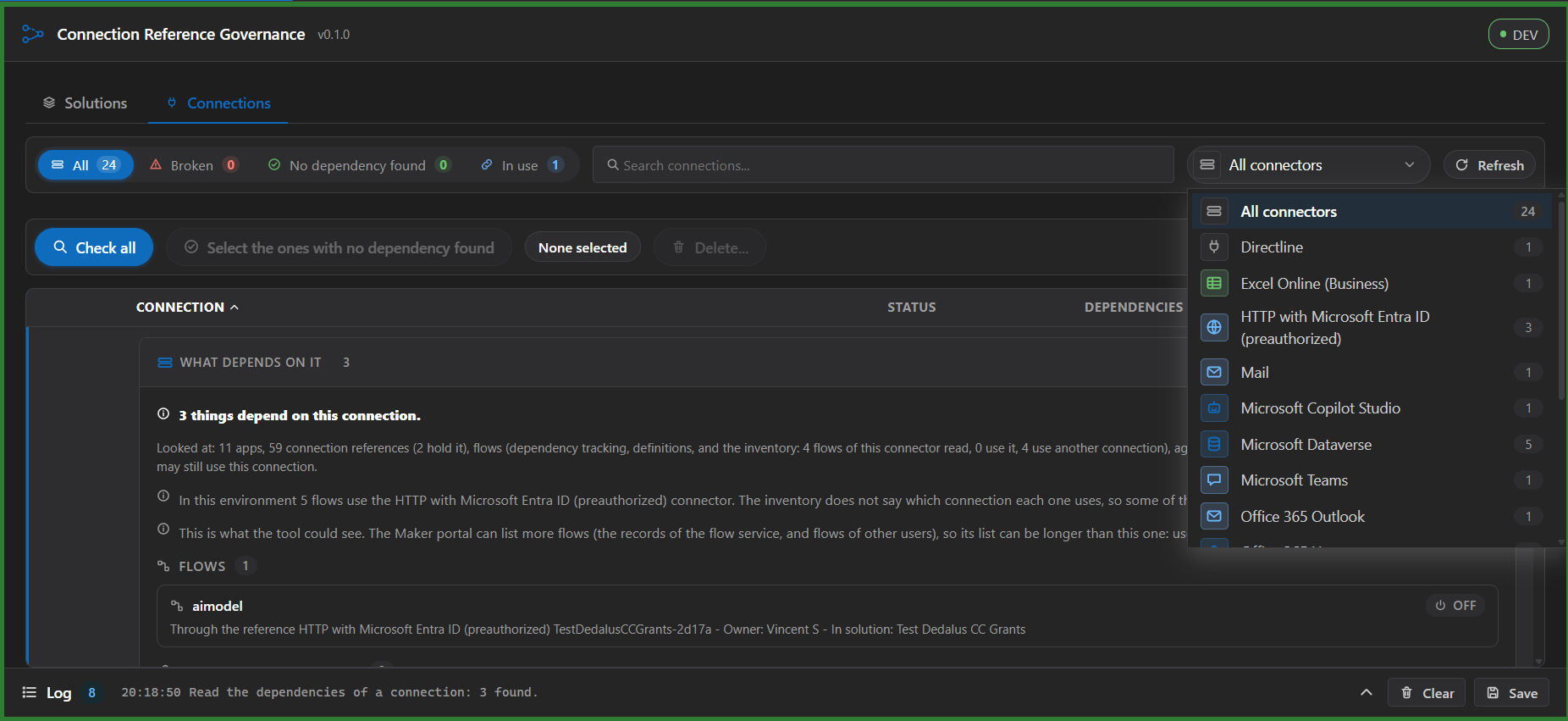
|
@@ -1,3 +1,202 @@
|
|
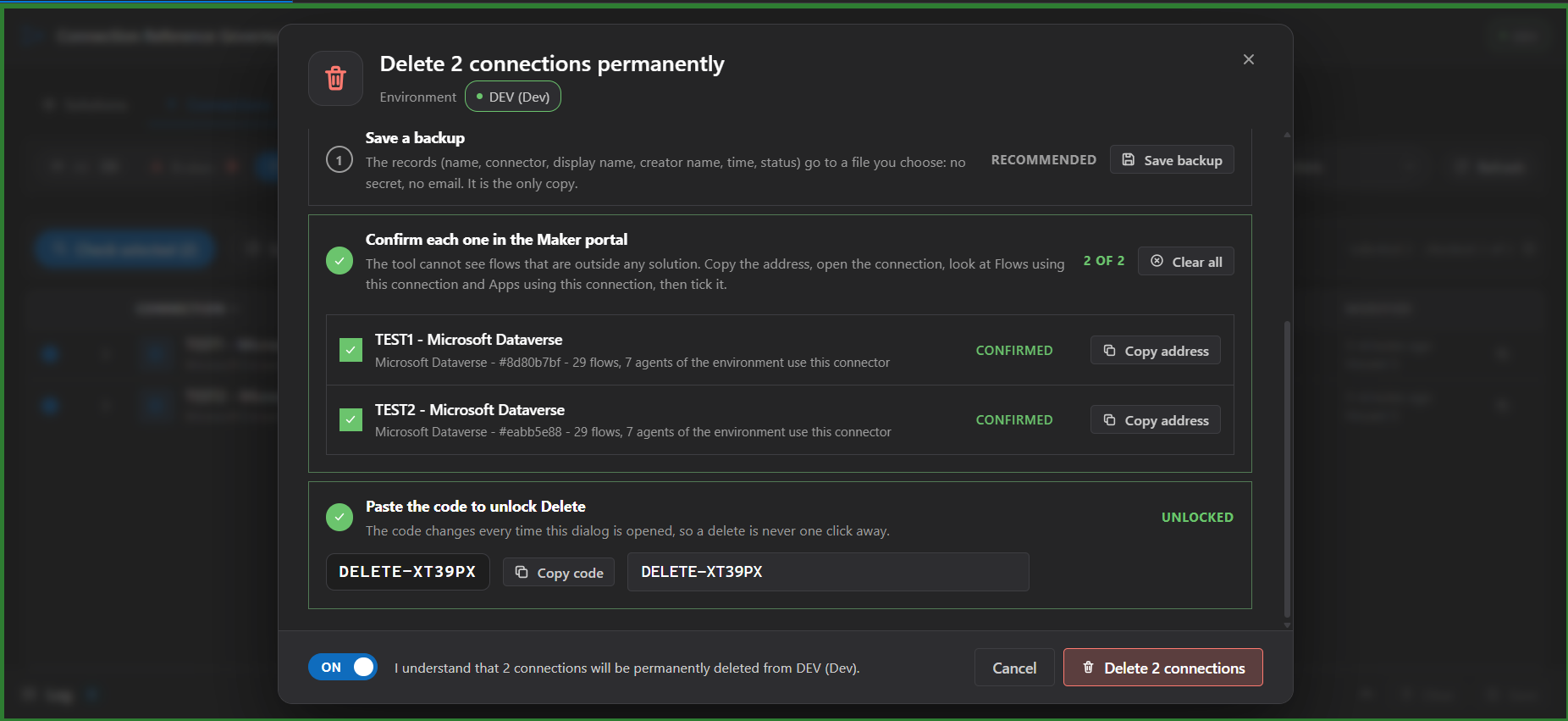
|
1
|
-
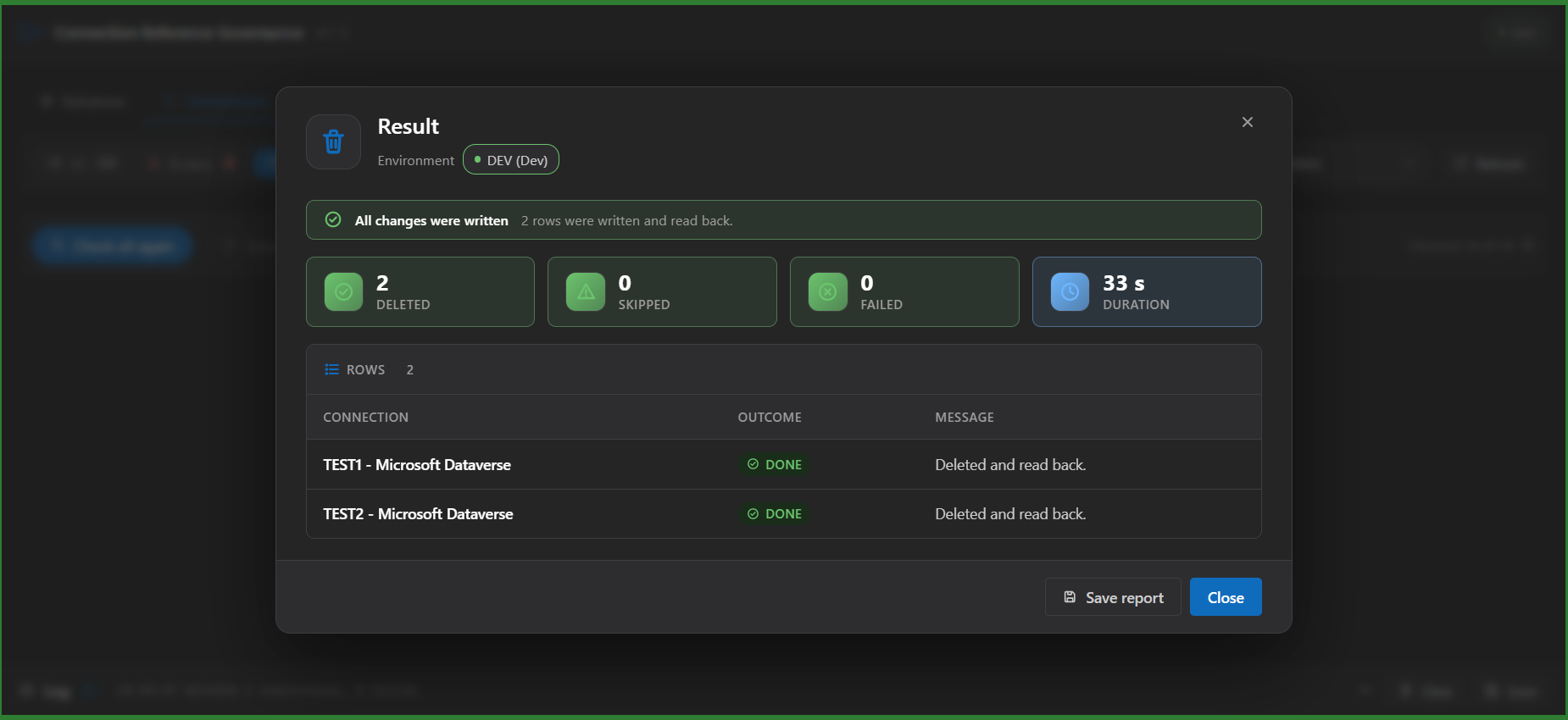
#
|
|
2
|
-
|
|
3
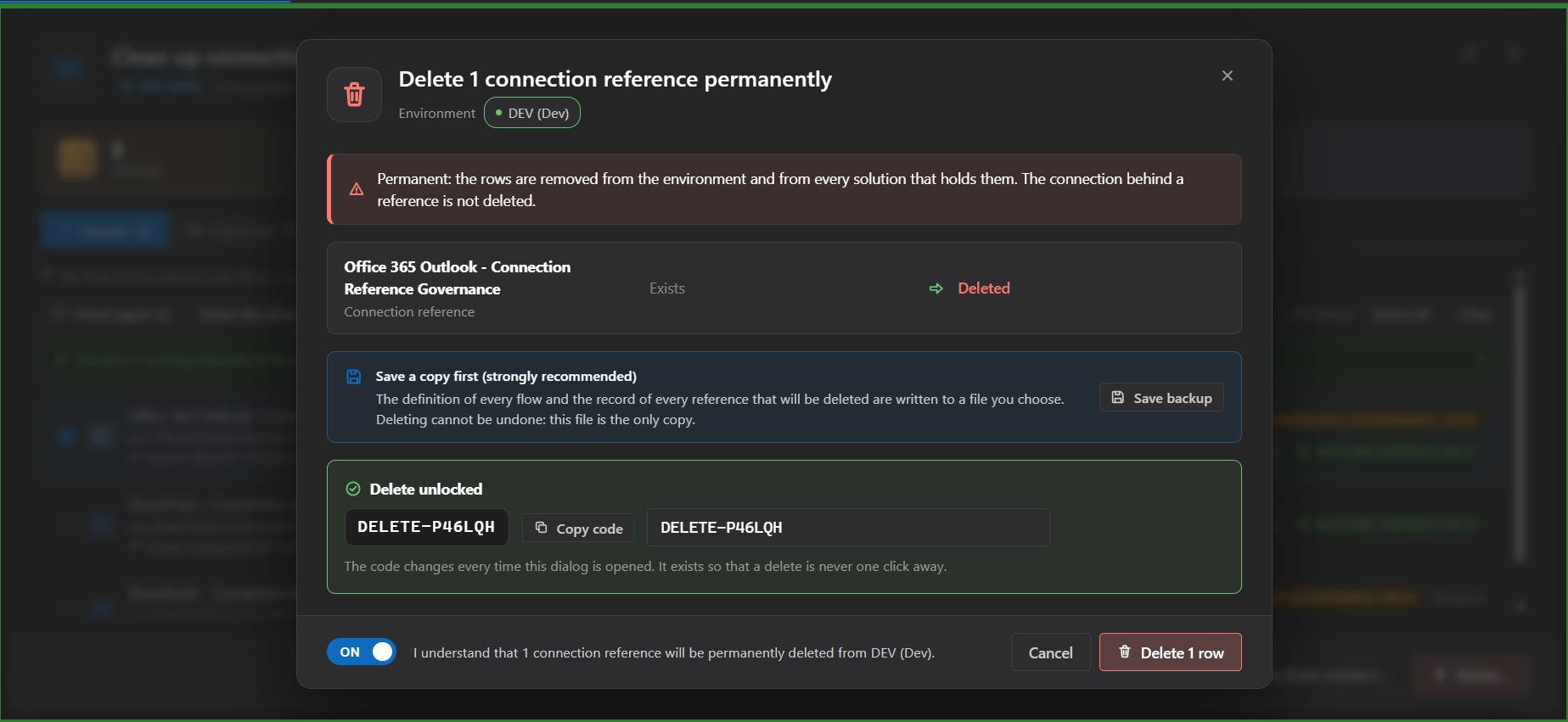
|
-
|
|
1
|
+
# Connection Reference Governance
|
|
2
|
+
|
|
3
|
+
A solution-first workbench for connection references in one environment. Open a solution, see which references and connections each flow really uses, re-point flows to the reference you choose with the exact change shown as a line diff, and find out what depends on a reference or a connection anywhere in the environment before you remove or delete it. Works on unmanaged solutions in the connected environment.
|
|
4
|
+
|
|
5
|
+
## What sets it apart
|
|
6
|
+
|
|
7
|
+
- **It starts from the flow.** One row per flow with the reference, connector and connection behind every action, and the same data grouped by reference. You choose which flow points where, not only which duplicates merge.
|
|
8
|
+
- **It shows the change before it is written.** The preview is the exact definition that will be stored, as a line diff, with what each row is now and will be, and a per-row result and read-back afterwards.
|
|
9
|
+
- **It looks beyond the solution.** Dependencies are read for the whole environment (flows, Copilot Studio agents, apps, other components, in any solution) and the Connections area covers the connections themselves, with what depends on each one.
|
|
10
|
+
- **It says what it could not see.** A connection nothing was found for says "No dependency found", never "unused", and each source reports how much it read.
|
|
11
|
+
|
|
12
|
+
## Features
|
|
13
|
+
|
|
14
|
+
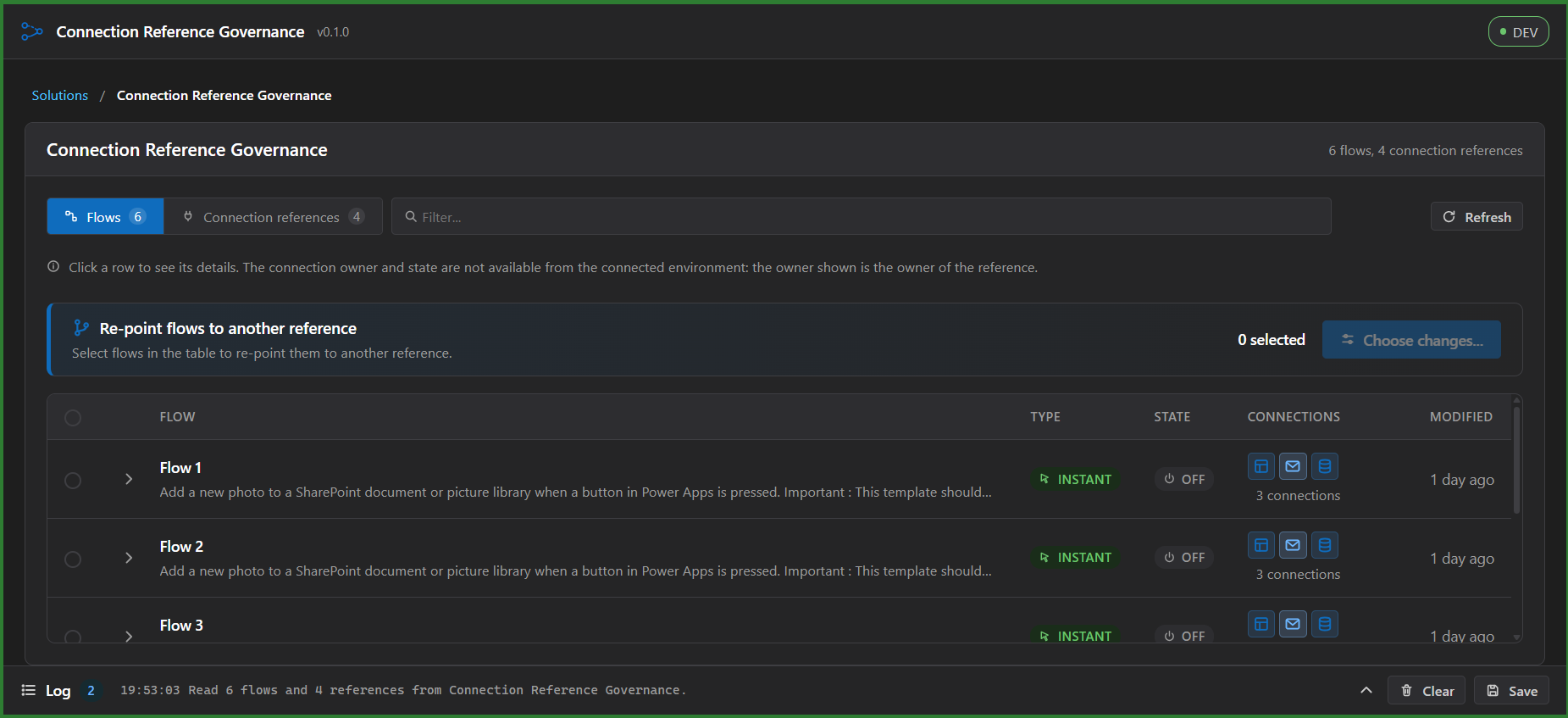
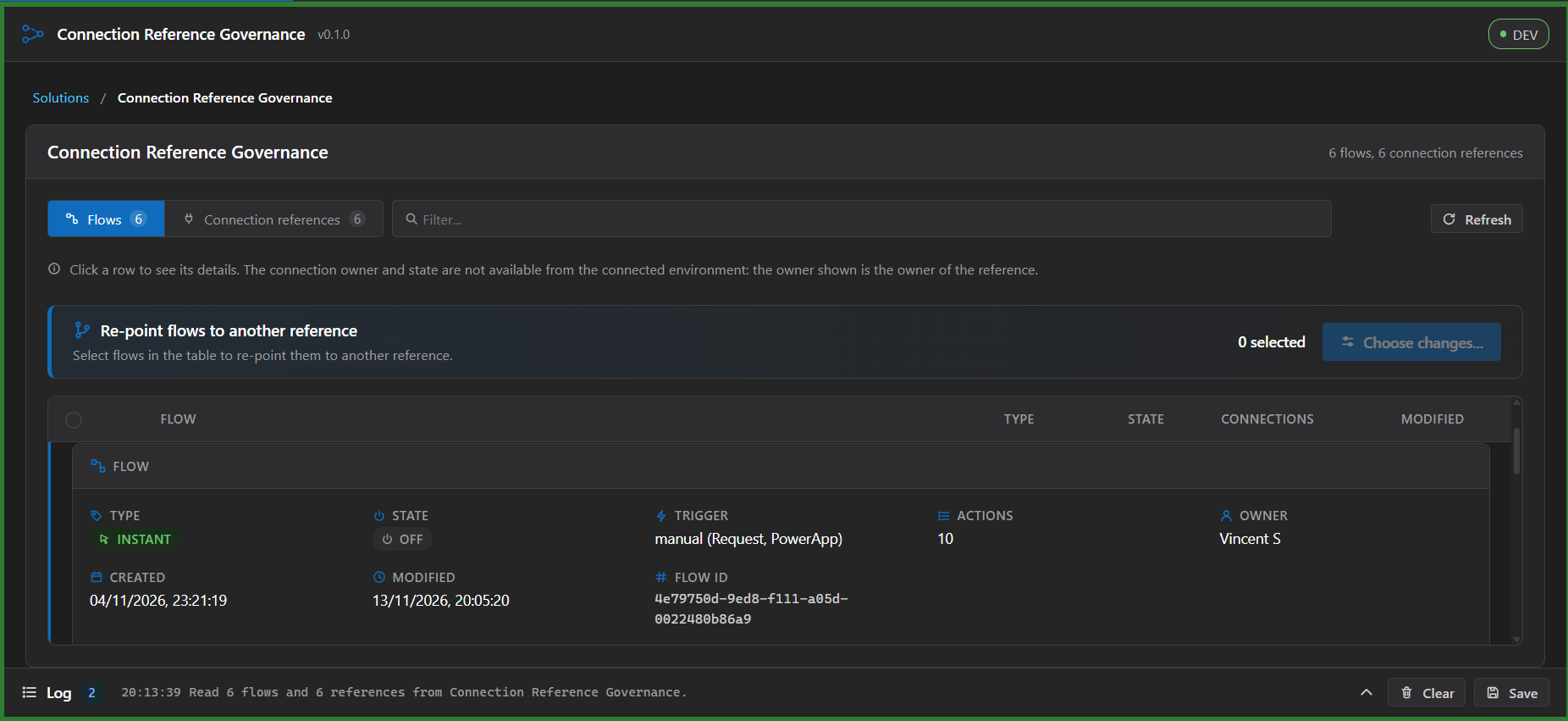
- One row per flow with its type (instant, automated or scheduled), state, connections at a glance and last modified date; open a row to see the trigger, actions, owner, dates, id and a table of its connections with reference, connector and connection in full (custom connectors are marked). It adapts to narrow panes.
|
|
15
|
+
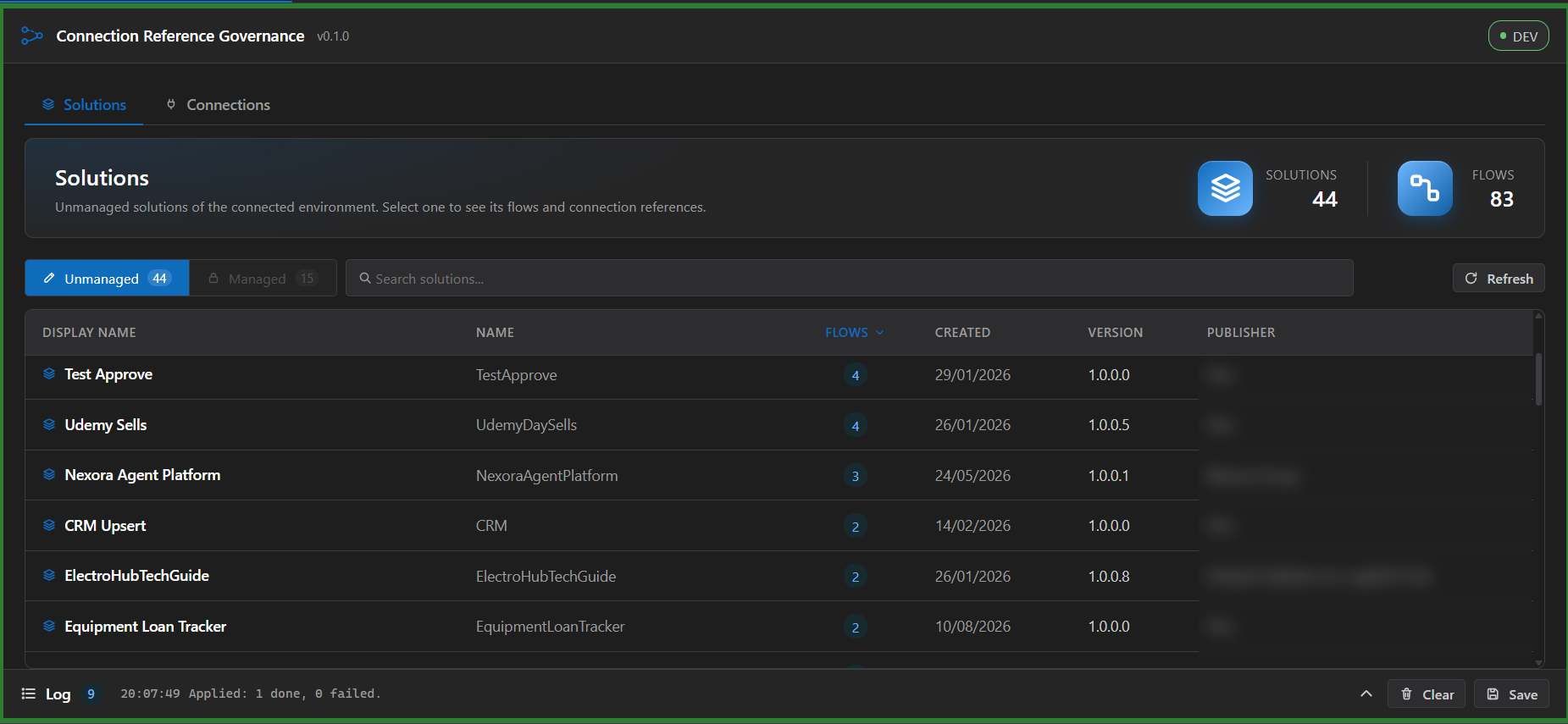
- Opens on a home screen with the number of unmanaged solutions and of flows, and a sortable table of the solutions (flows, created, version, publisher) with search; choose one to see its flows with the connection references each flow uses.
|
|
16
|
+
- A second view groups by connection reference: connector, connection, reference owner and the flows that use it.
|
|
17
|
+
- Flags what the data proves: a reference with no connection set, and a flow that declares a reference that does not exist.
|
|
18
|
+
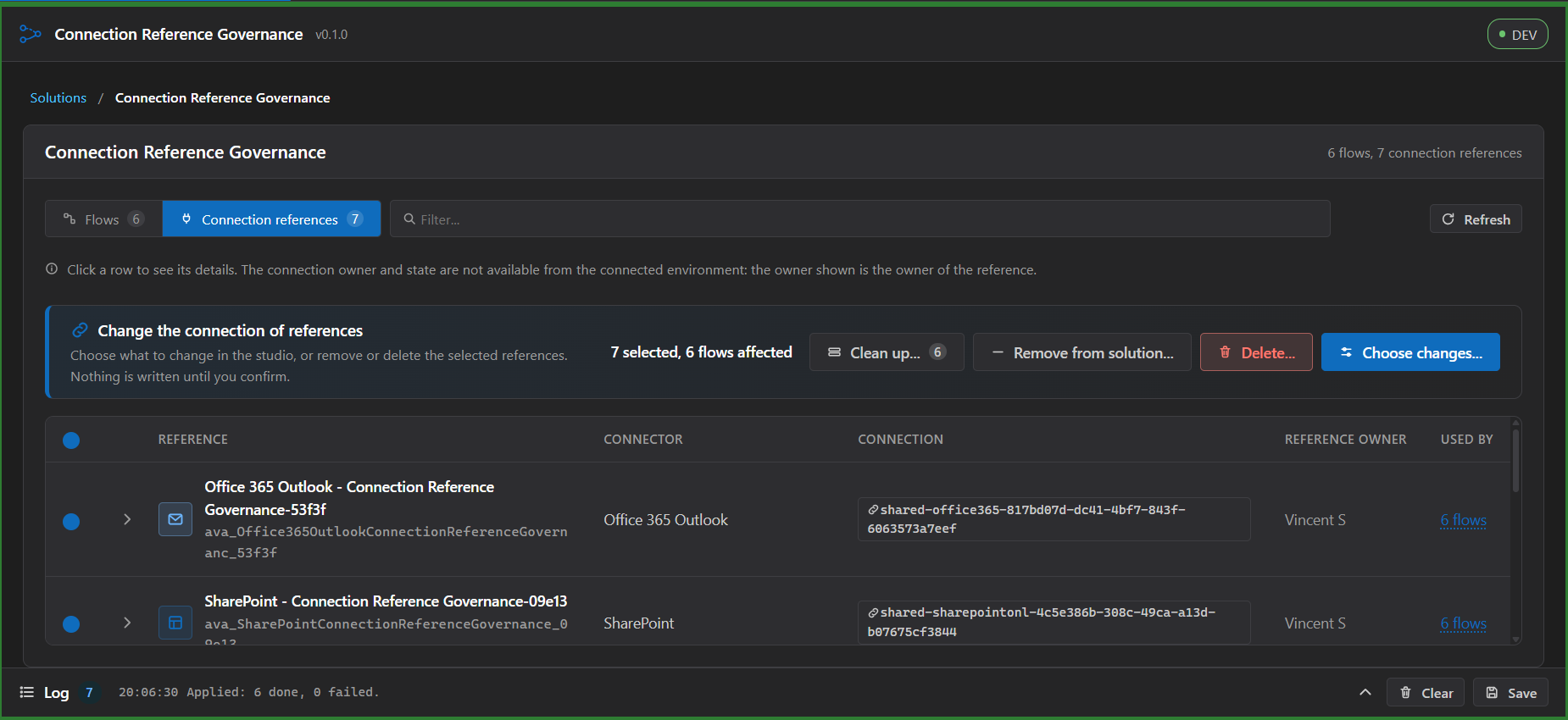
- Change the connection of selected references in bulk, with a preview that lists every row, the old value and the number of flows affected.
|
|
19
|
+
- Re-point selected flows to another reference of the same solution and connector, with the same preview and a per-row result.
|
|
20
|
+
- In the Re-point dialog: **New reference** creates a connection reference of the category's connector in the open solution: the connector is fixed, the name is checked against the environment, ready-made names and descriptions can be applied with one click (Maker style, readable, by account), the connection is optional and is accepted only when it is found among your connections (listed through the Power Platform API; paste an id and press Check), a Review step shows the exact record, and the row is read back after the write.
|
|
21
|
+
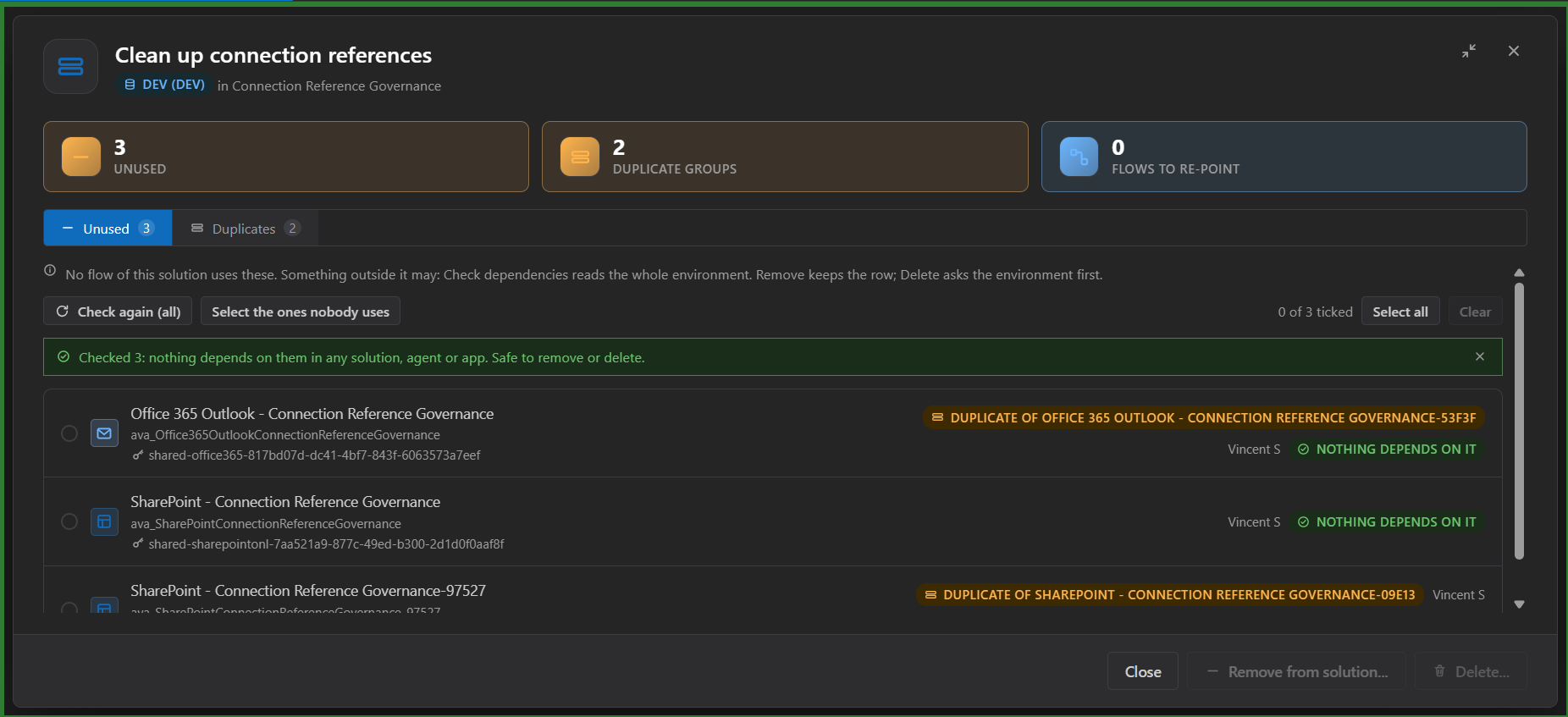
- **Dependencies in the whole environment**: open a reference (click its row) and press **Check dependencies** to see every component that depends on it, in any solution: flows, Copilot Studio agents, apps and other components, with their state, owner and the solutions that hold them, and what is **outside this solution** marked. The same is available for a connection in the new-reference panel (Used by) and in Clean up, where **Select the ones nobody uses** ticks only the unused references that nothing depends on anywhere. When Delete is blocked it names the components that block it. It reads from Dataverse dependency tracking, the source of Show dependencies in the maker portal; it reads and changes nothing, and a component whose dependency is not tracked is not listed.
|
|
22
|
+
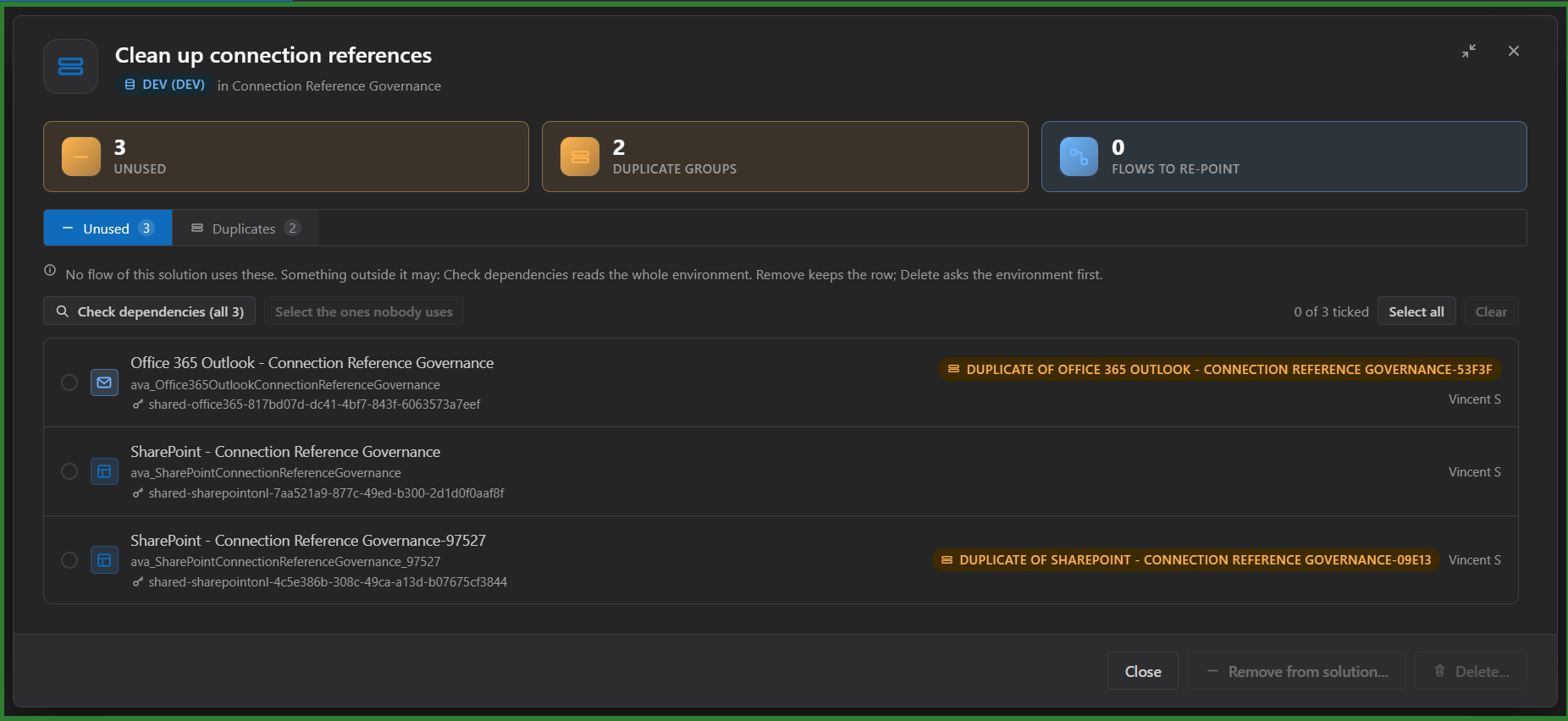
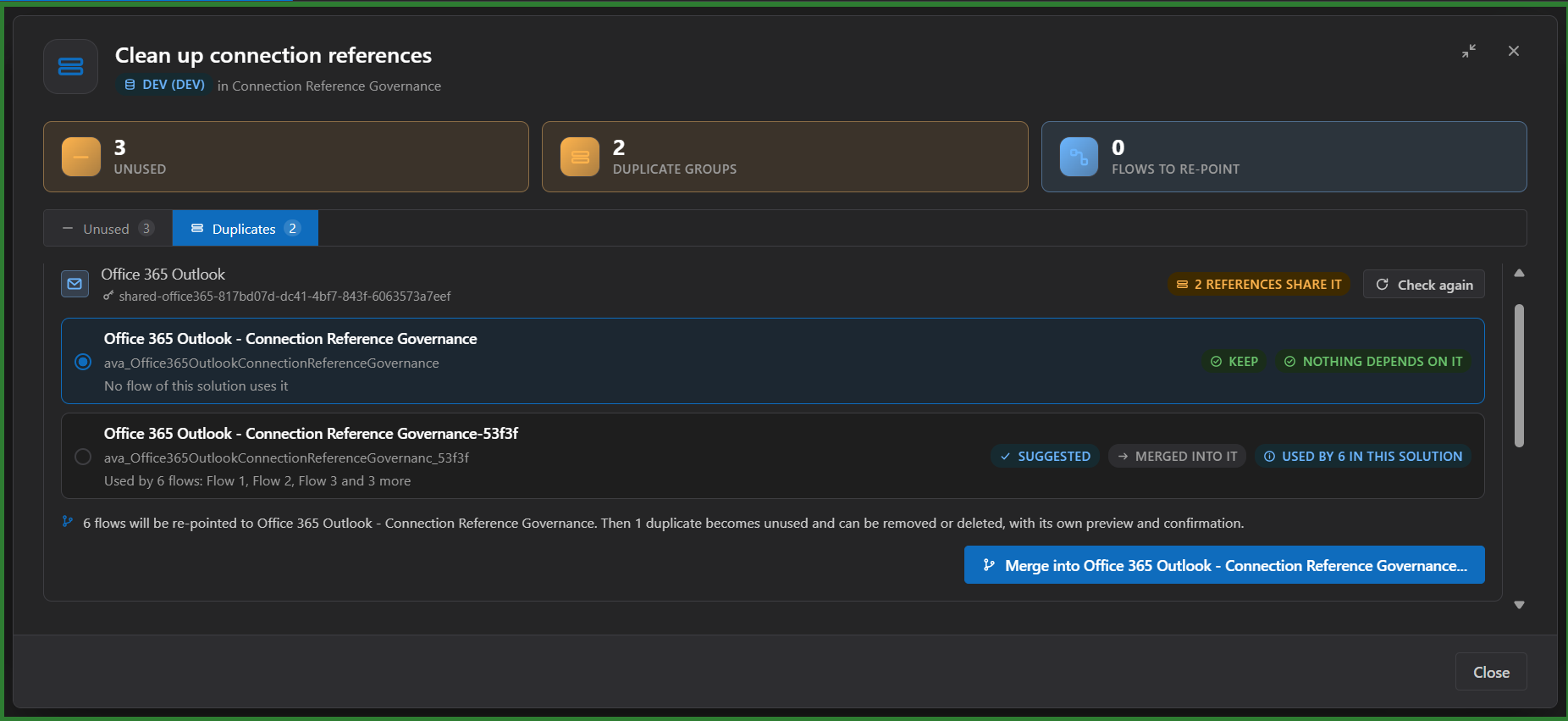
- In the Connection references view: **Clean up...** finds the references no flow of the solution uses and the duplicates (several references of one connector that hold the same connection). Unused ones are ticked and removed or deleted through the usual dialogs. For duplicates you choose the reference to keep (the most used is suggested): the flows of the others are re-pointed to it after a preview, and then the duplicates, now unused, can be removed or deleted with their own preview and confirmation. Two operations, two confirmations: a merge is never confirmed in one go. Check dependencies there to see which unused references something outside the solution still uses.
|
|
23
|
+
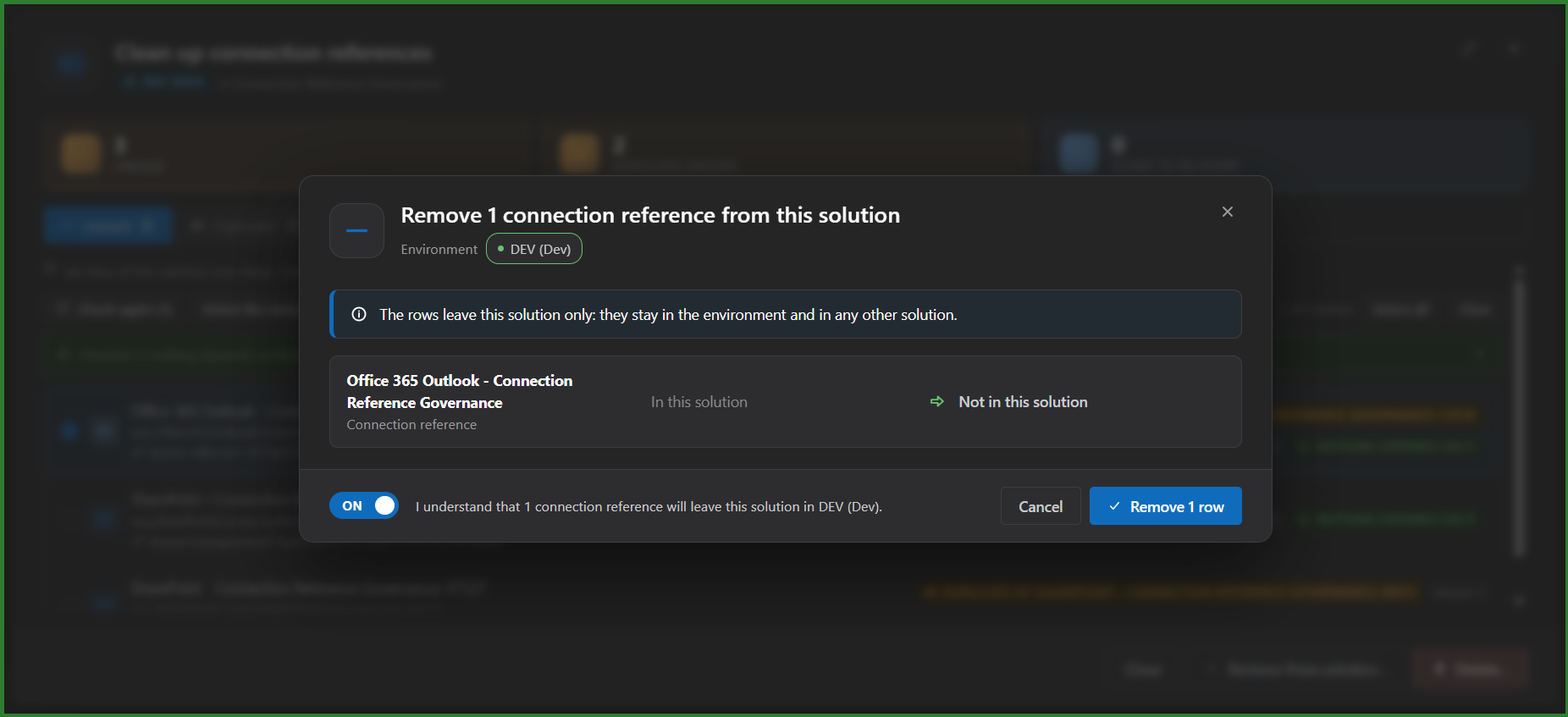
- In the Connection references view: remove the selected references from the solution (they stay in the environment), or delete them from the environment, each with the same preview, confirmation and per-row result.
|
|
24
|
+
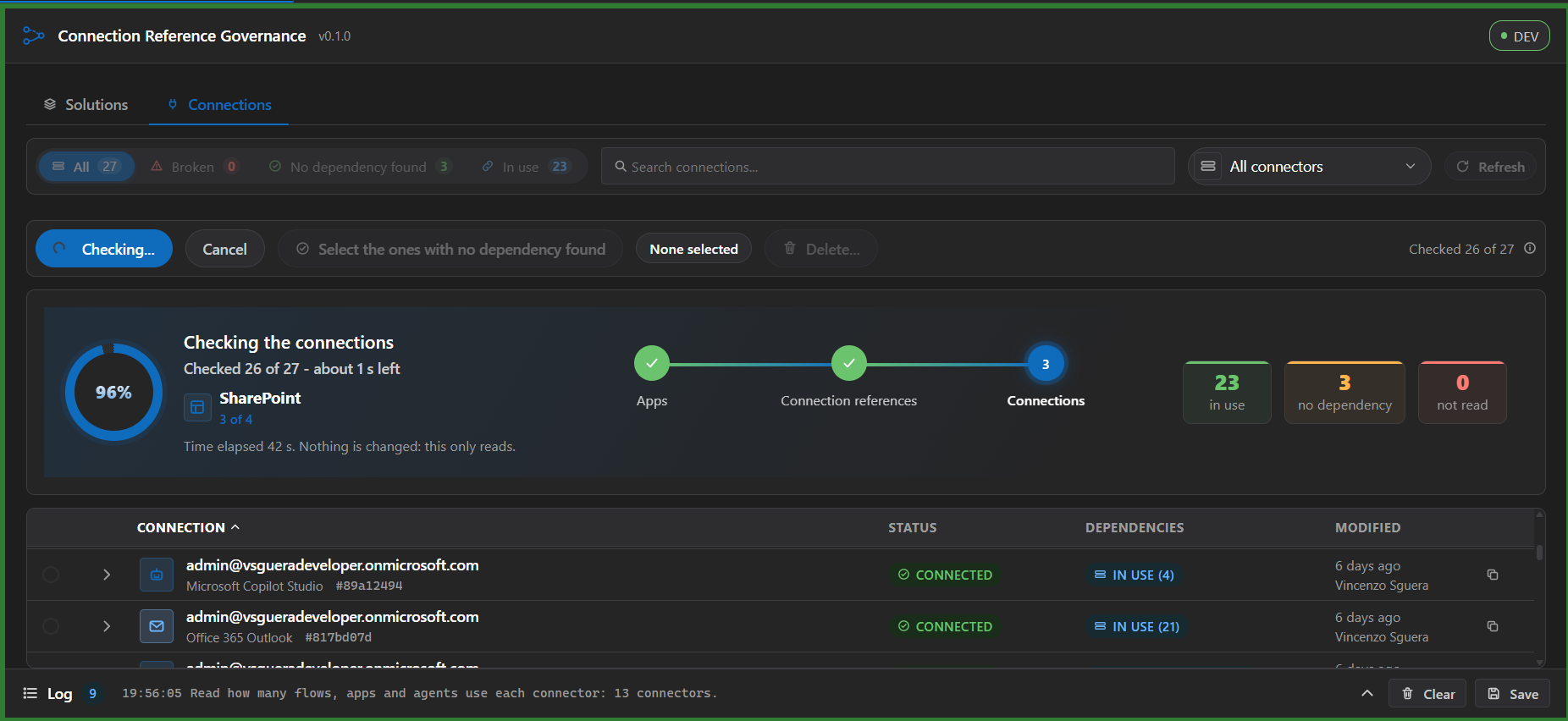
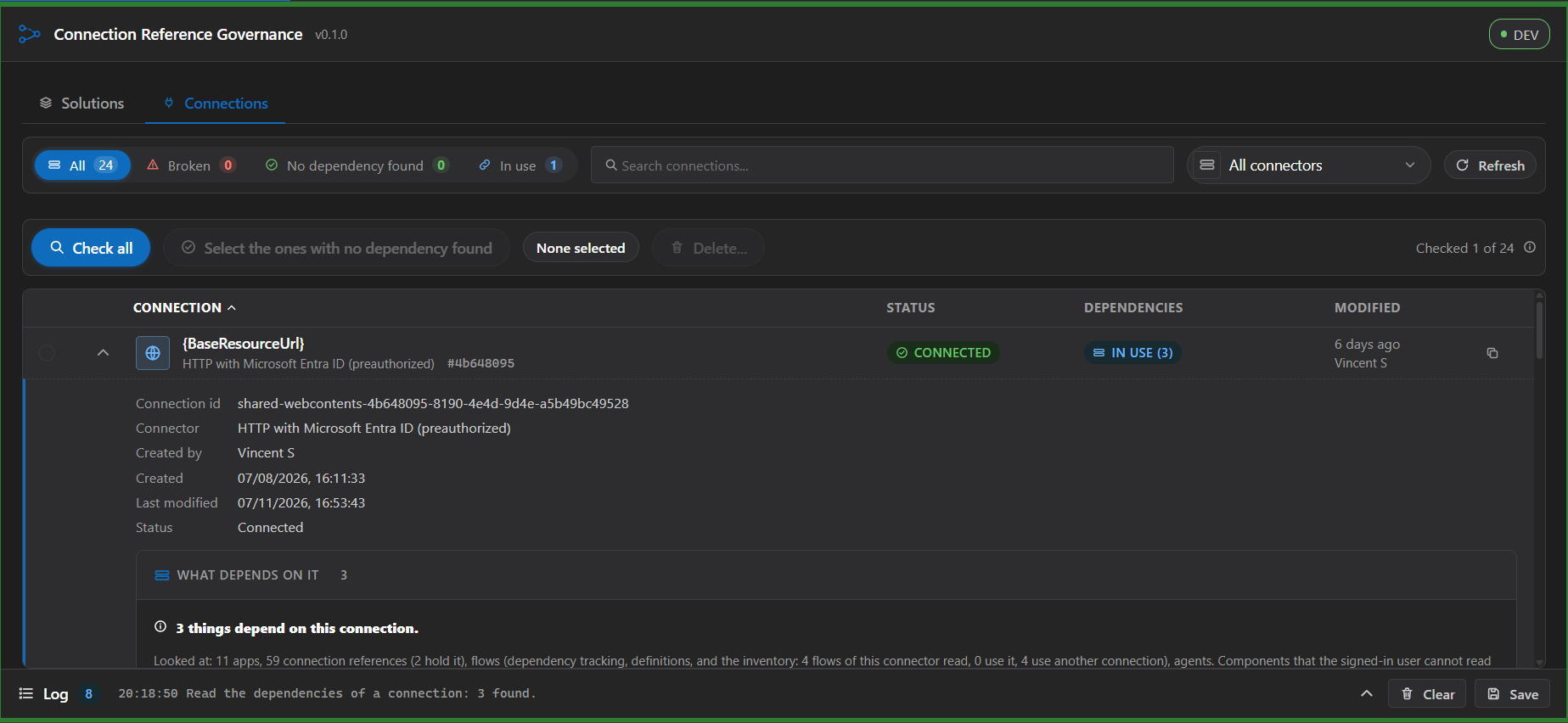
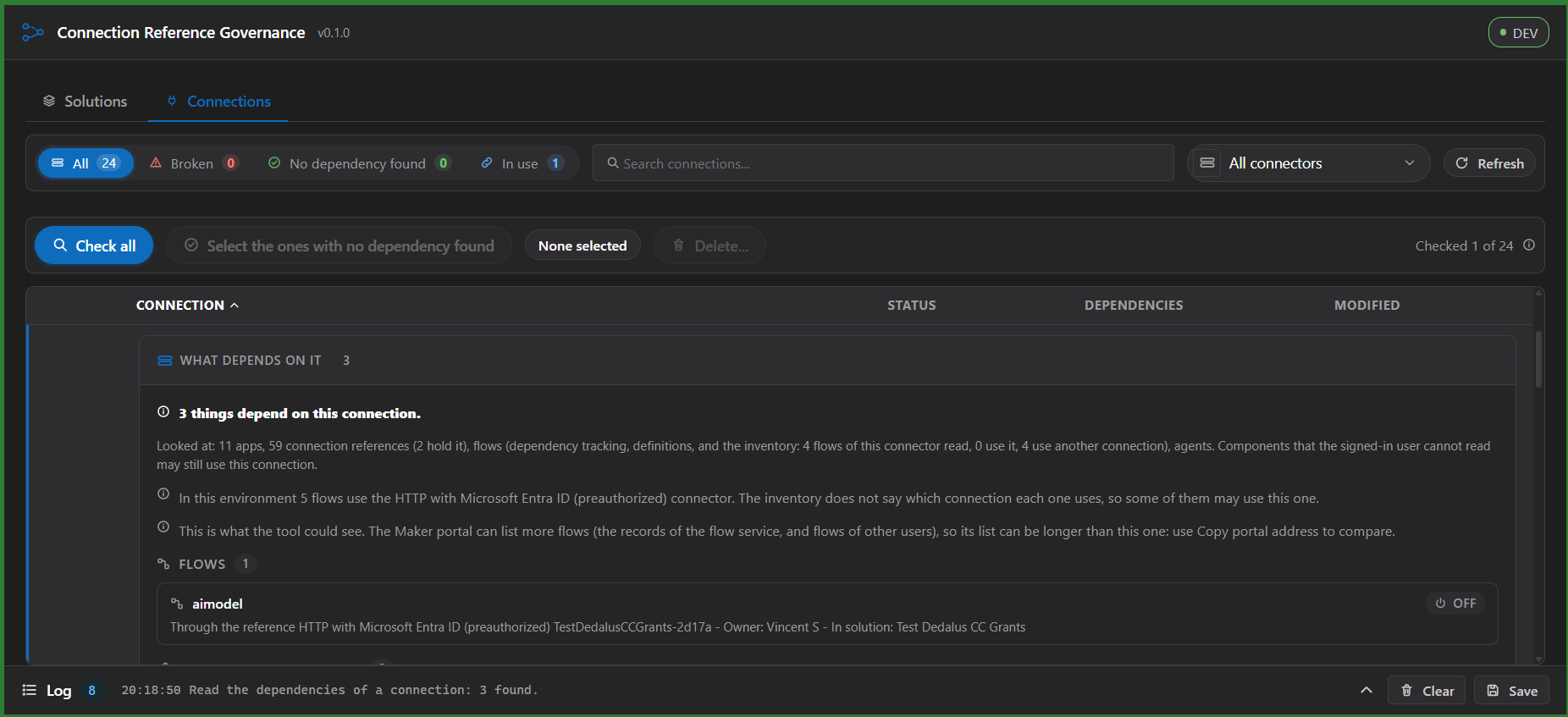
- **Connections** (a second area, beside the solutions, outside any solution): a rich list of the connections of the environment that you can see, with the connector, display name, status (Connected, Needs reconnect, Error), created and modified time, creator and id; counts (total, broken, no dependency found, in use) on the filters, search and sorting. Open a row and what depends on it is read by itself: apps, connection references, flows and Copilot Studio agents, with where they live. **Check all** reads every connection four at a time, with progress and a Cancel, and **Select the ones with no dependency found** ticks them. A connection nothing was found for says **No dependency found**, never "unused": the signed-in user cannot read everything, a note says how much each source read (and each problem once), and the tool says plainly that the Maker portal can list flows (from the flow service) that it cannot see, so check "Flows using this connection" there before deleting. The connection chip of a reference opens the connection there. **Delete** removes the selected connections: you first confirm each one in the Maker portal (the tool cannot see flows that live only in the flow service), then Preview, an optional backup with no email and no secret, a code to copy and an acknowledgement; each connection is checked again just before it is deleted and read back after. Connections that belong to a flow are not listed. **Copy portal address** takes you to the connection in the Maker portal.
|
|
25
|
+
- Every wait that fills the screen shows the tool's own logo, animated, with a caption of what is being read (and the count so far when there is one); it follows the light and dark themes, slows down with reduced motion and is announced to screen readers.
|
|
26
|
+
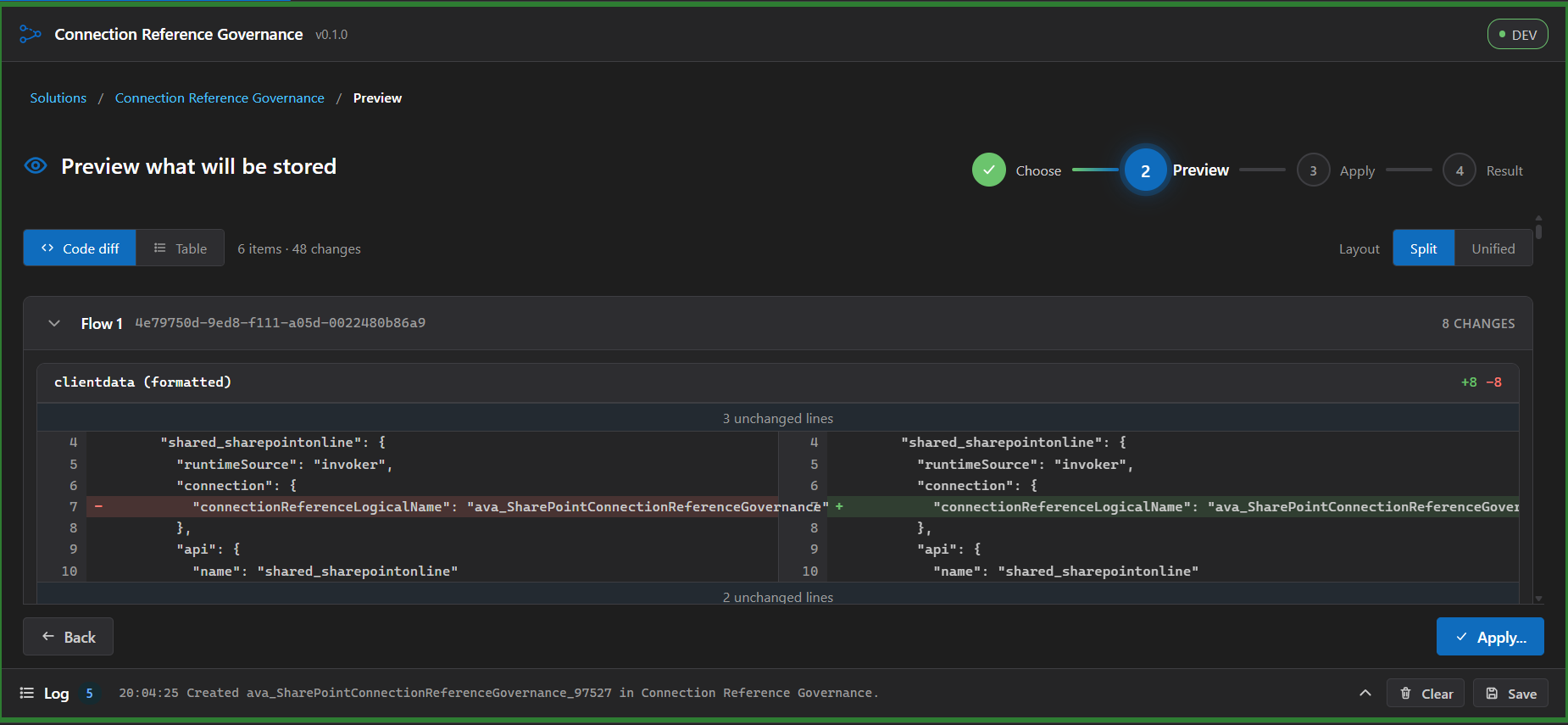
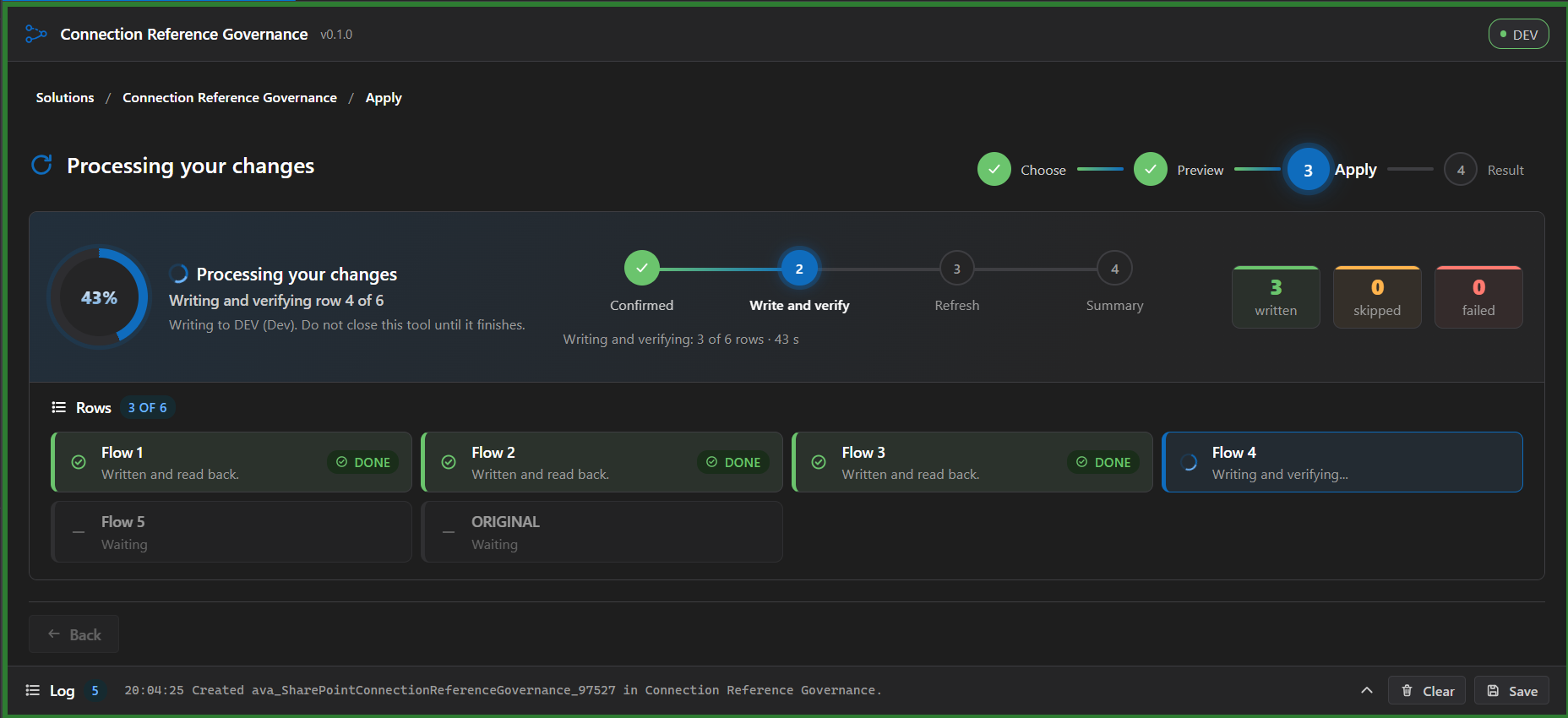
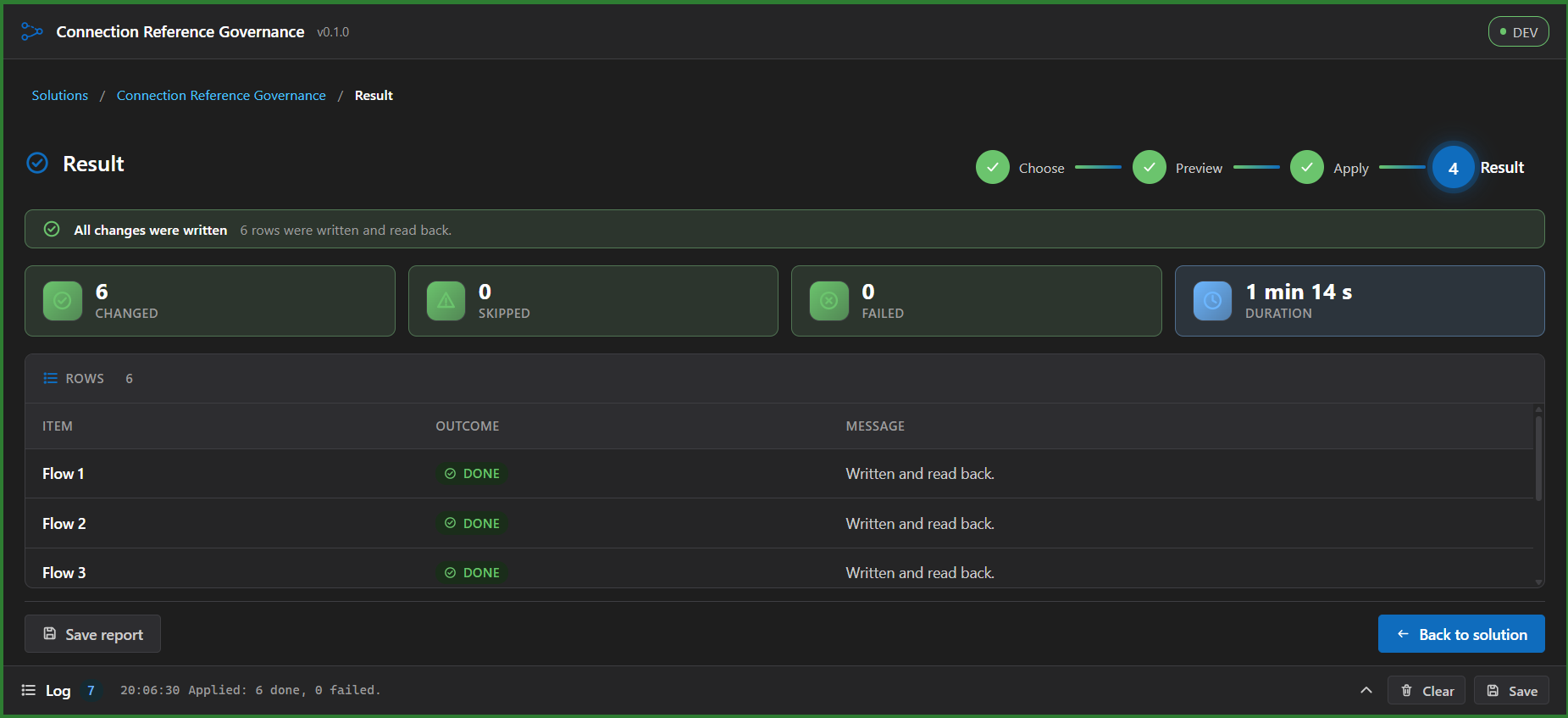
- A change runs as a guided path with a stepper and a breadcrumb: Choose, Preview (two tabs: the exact content as a line diff, split or unified, and a table of what each item is now and will be), Apply (a timeline with the time elapsed and the rows as they finish) and Result (a banner, figures, one line per row and a report you can save). You can go back until the write starts; after that the only way out is the Result.
|
|
27
|
+
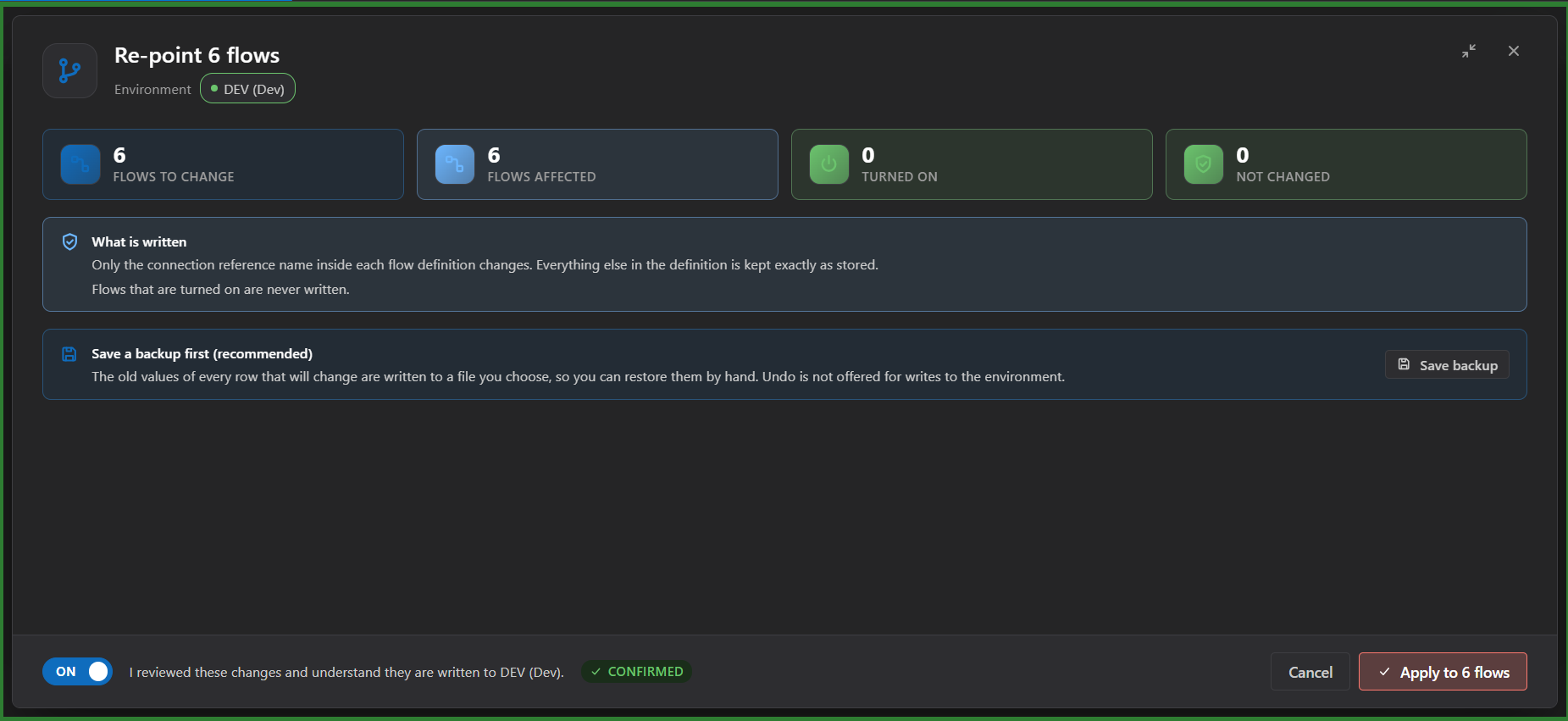
- Before anything is written a confirmation dialog opens over the screen: the environment, the scope in four figures (rows to change, flows affected, flows turned on, rows not changed), one before-and-after line per row, the warnings, the offer to save a backup of the old values, and an acknowledgement you must tick before Apply is enabled. Cancel, Escape and the close button write nothing.
|
|
28
|
+
- When re-pointing, the new reference can only be another reference of the same connector in the solution, and is disabled until you choose which reference to replace.
|
|
29
|
+
- Each row is checked again just before it is written (skipped if someone changed it meanwhile) and read back afterwards.
|
|
30
|
+
- Flows that are turned on cannot be changed in Dataverse. With your permission (off by default, a block in the studio with a warning, the list of flows and a second acknowledgement) the tool turns them off for the change and on again afterwards, even when the write fails; a flow left off is named in the result and in the report.
|
|
31
|
+
- Managed solutions cannot be changed, so they are not offered: a disabled Managed tab shows how many there are.
|
|
32
|
+
|
|
33
|
+
## Overlap with EnvVar & ConnRef Matrix
|
|
34
|
+
|
|
35
|
+
The listed tool **EnvVar & ConnRef Matrix** also works with connection references: it binds them to connections, consolidates duplicate references by re-pointing flows, deletes unused references after a dependency check and flags flows that point at a missing reference. Its centre is the **comparison of environments** and the deployment of values between them (a matrix of environment variables and references across environments, copying values, `deploymentSettings.json`). This tool stays in **one environment** and starts from the solution and its flows. What it adds:
|
|
36
|
+
|
|
37
|
+
- The **per-solution flow-to-reference view**: one row per flow with every reference, connector and connection it uses, and the same data grouped by reference.
|
|
38
|
+
- **Re-point any flow** to another reference of the same connector, chosen flow by flow, with a line diff of the flow definition before anything is written (not only the merge of duplicates).
|
|
39
|
+
- **Create a connection reference** in the open solution, with checked names and an optional connection.
|
|
40
|
+
- **Remove references from a solution** while they stay in the environment (as well as delete them).
|
|
41
|
+
- **Dependencies in the whole environment** for a reference or a connection, in any solution: flows, Copilot Studio agents, apps and other components, with what lies outside the solution.
|
|
42
|
+
- The **Connections** area: the connections of the environment with status, what depends on each one, and a guarded delete.
|
|
43
|
+
|
|
44
|
+
If you compare environments or bind references from a settings file, use that tool; the two do not need each other.
|
|
45
|
+
|
|
46
|
+
## Screenshots
|
|
47
|
+
|
|
48
|
+
All screenshots are real, taken on a test environment with sample data.
|
|
49
|
+
|
|
50
|
+
### Find what each flow uses
|
|
51
|
+
|
|
52
|
+
|
|
53
|
+
|
|
54
|
+
Start from the solution you care about; managed solutions are shown but never offered for change.
|
|
55
|
+
|
|
56
|
+
|
|
57
|
+
|
|
58
|
+
One row per flow tells you at a glance which connections it depends on.
|
|
59
|
+
|
|
60
|
+
|
|
61
|
+
|
|
62
|
+
Open any flow to see what it is before you change it.
|
|
63
|
+
|
|
64
|
+
|
|
65
|
+
|
|
66
|
+
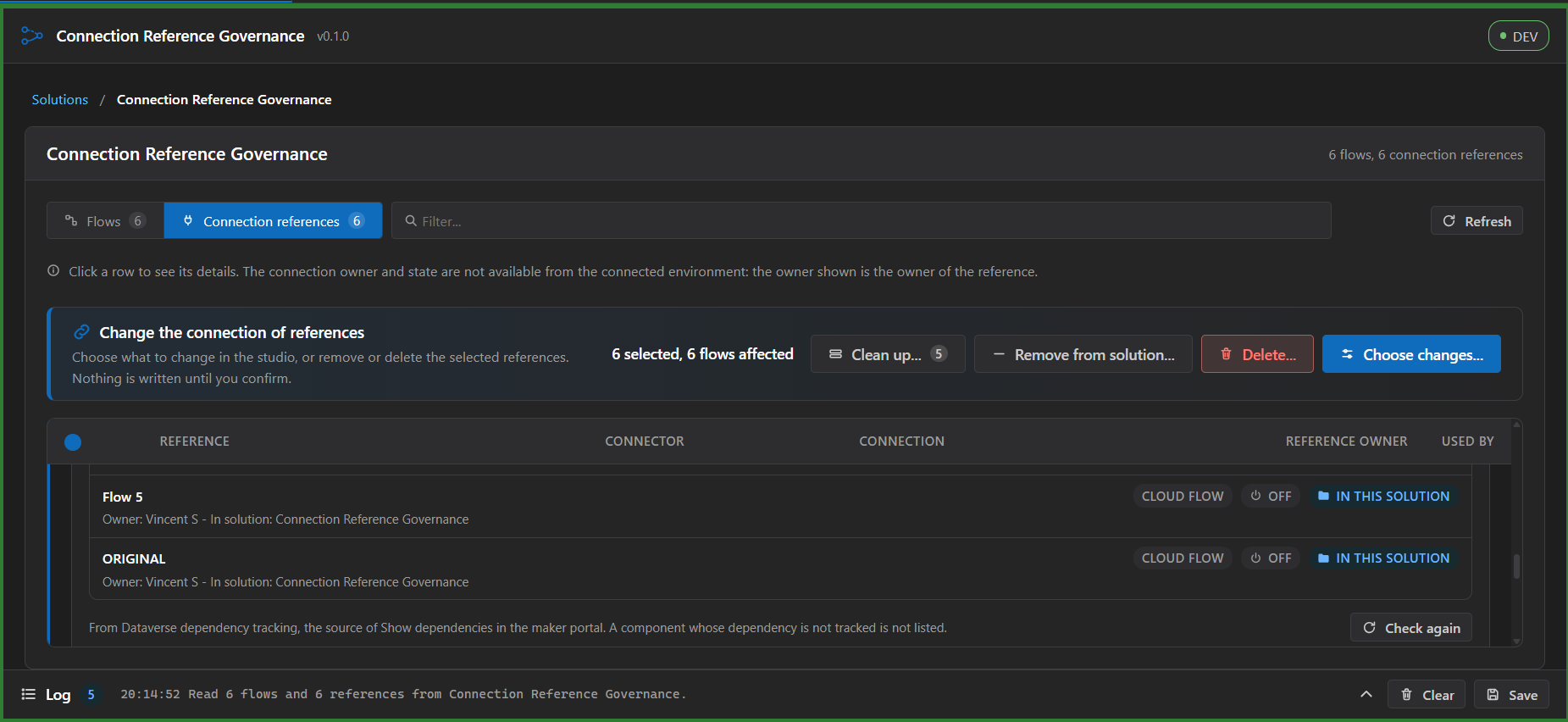
Change, clean up, remove or delete references from one place; nothing is written until you confirm.
|
|
67
|
+
|
|
68
|
+
|
|
69
|
+
|
|
70
|
+
See everything that depends on a reference before you touch it, wherever it lives.
|
|
71
|
+
|
|
72
|
+
|
|
73
|
+
|
|
74
|
+
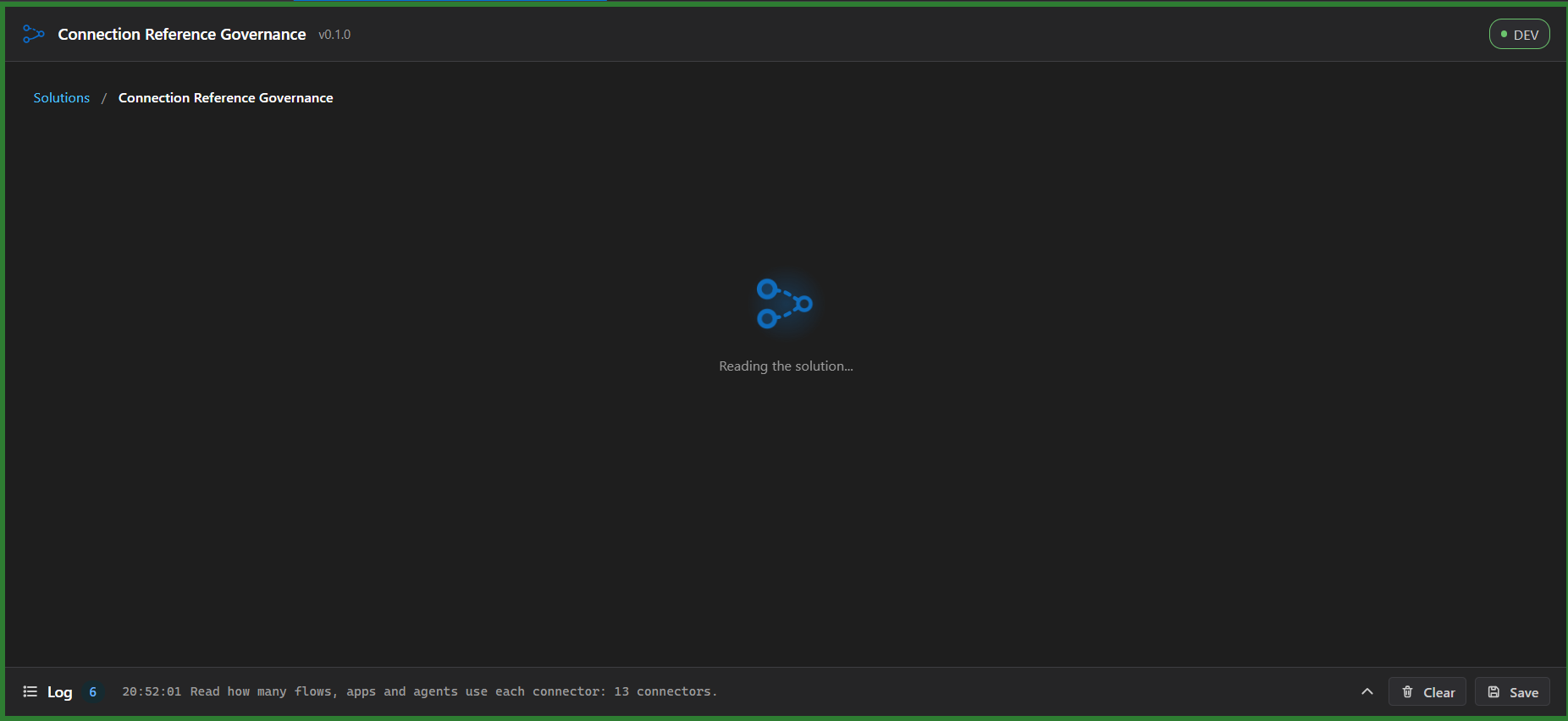
Every wait shows the tool is working and what it is reading, and follows the light and dark themes.
|
|
75
|
+
|
|
76
|
+
### Re-point flows to another reference
|
|
77
|
+
|
|
78
|
+
|
|
79
|
+
|
|
80
|
+
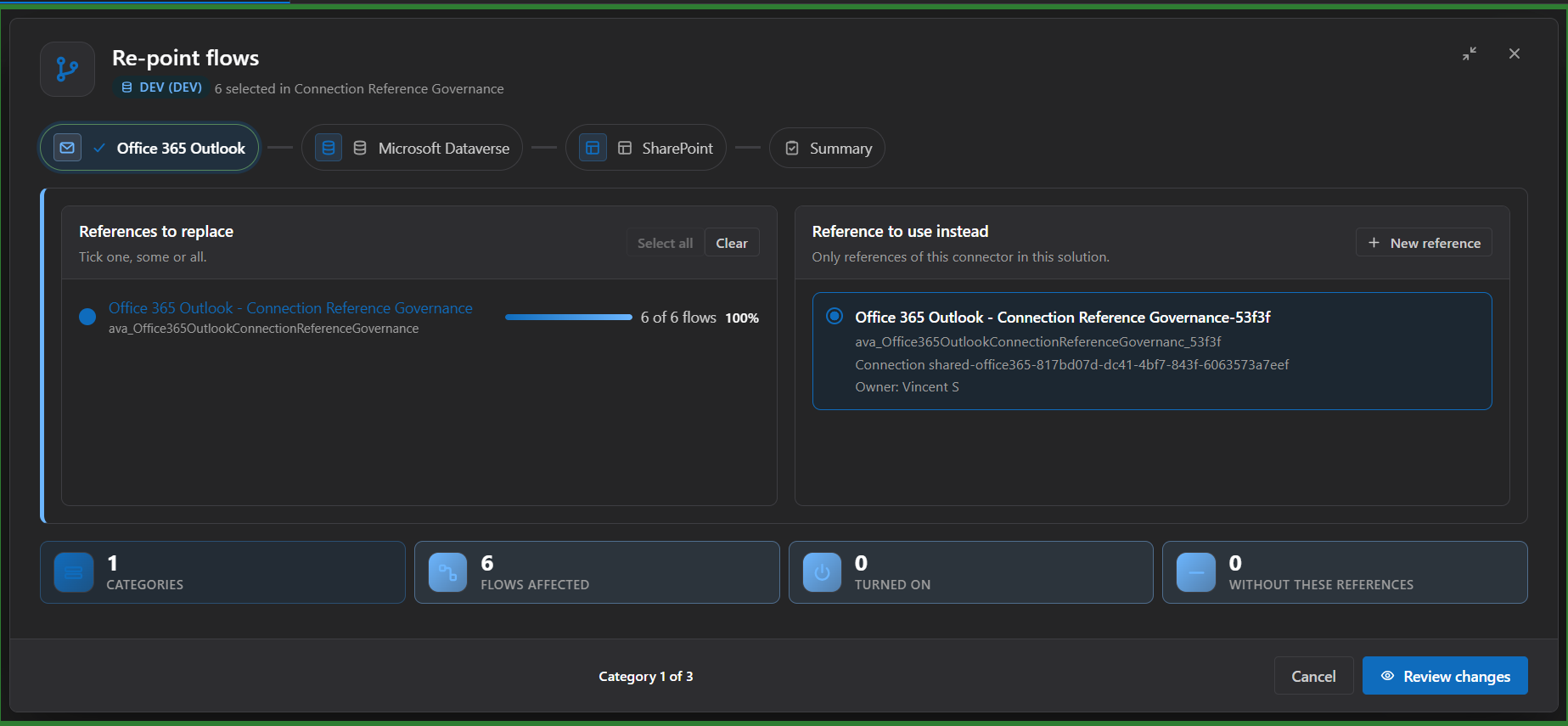
Move many flows at once, a connector at a time, and see how many flows are affected before you go on.
|
|
81
|
+
|
|
82
|
+
|
|
83
|
+
|
|
84
|
+
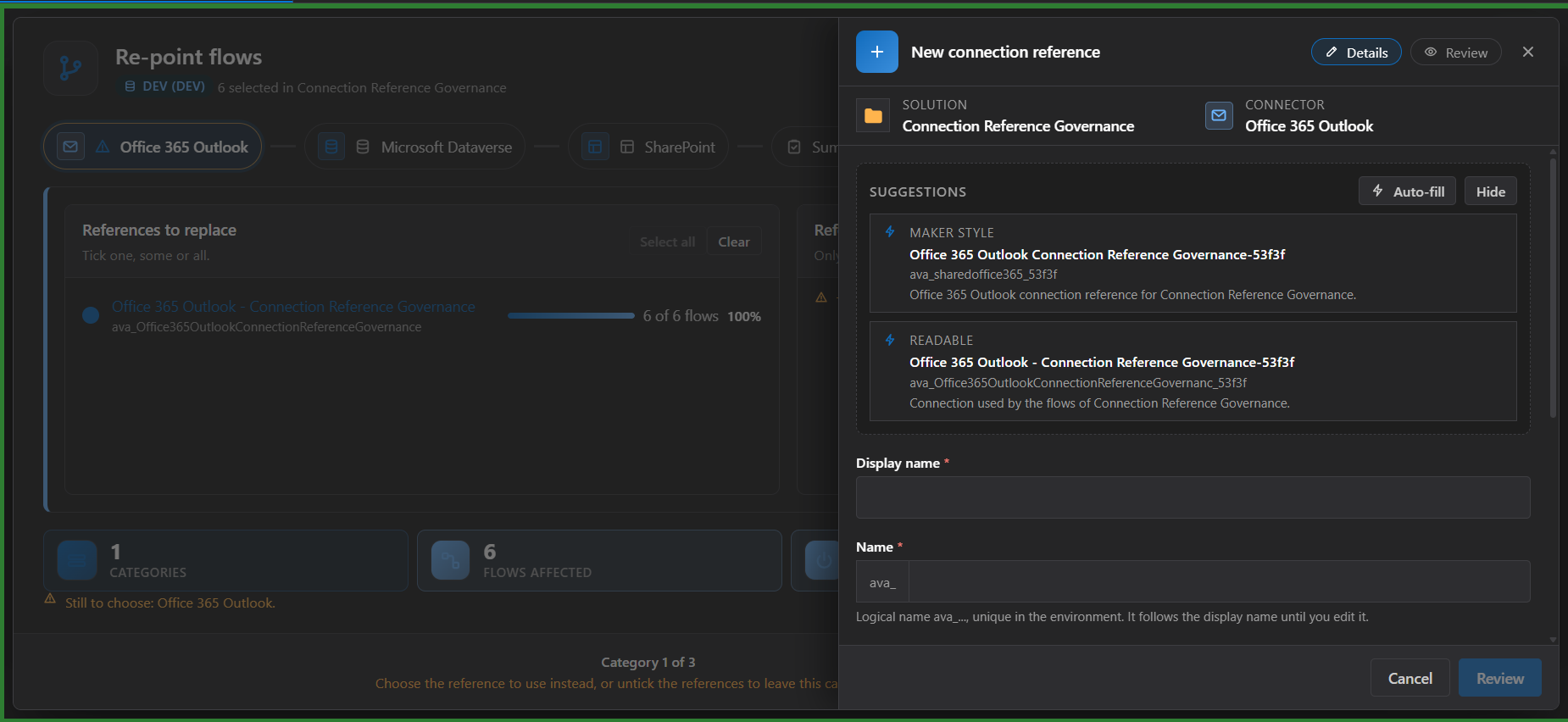
Create the reference you need without leaving the screen; the name is checked against the environment.
|
|
85
|
+
|
|
86
|
+
|
|
87
|
+
|
|
88
|
+
See precisely what will be stored in each flow before anything is written.
|
|
89
|
+
|
|
90
|
+
|
|
91
|
+
|
|
92
|
+
A change cannot start by accident; you can save the old values first.
|
|
93
|
+
|
|
94
|
+
|
|
95
|
+
|
|
96
|
+
Every wait is visible and honest; each flow is written and read back.
|
|
97
|
+
|
|
98
|
+
|
|
99
|
+
|
|
100
|
+
You know exactly what changed and what did not.
|
|
101
|
+
|
|
102
|
+
### Clean up and remove
|
|
103
|
+
|
|
104
|
+
|
|
105
|
+
|
|
106
|
+
Find leftovers; they are listed, never changed by the dialog itself.
|
|
107
|
+
|
|
108
|
+
|
|
109
|
+
|
|
110
|
+
Know whether something outside the solution, such as an agent or an app, still depends on a reference.
|
|
111
|
+
|
|
112
|
+
|
|
113
|
+
|
|
114
|
+
Merge duplicates in two confirmed steps: re-point the flows, then remove what is left.
|
|
115
|
+
|
|
116
|
+
|
|
117
|
+
|
|
118
|
+
Take references out of a solution safely.
|
|
119
|
+
|
|
120
|
+
|
|
121
|
+
|
|
122
|
+
A permanent delete is never one click away.
|
|
123
|
+
|
|
124
|
+
### Connections of the environment
|
|
125
|
+
|
|
126
|
+
|
|
127
|
+
|
|
128
|
+
Read what depends on every connection, four at a time, with a Cancel.
|
|
129
|
+
|
|
130
|
+
|
|
131
|
+
|
|
132
|
+
See the whole record of a connection in one place.
|
|
133
|
+
|
|
134
|
+
|
|
135
|
+
|
|
136
|
+
Never told that a connection is unused when the tool could not see everything.
|
|
137
|
+
|
|
138
|
+
|
|
139
|
+
|
|
140
|
+
Narrow a long list to one connector in a click.
|
|
141
|
+
|
|
142
|
+
|
|
143
|
+
|
|
144
|
+
The strongest safeguards sit on the most destructive action.
|
|
145
|
+
|
|
146
|
+
|
|
147
|
+
|
|
148
|
+
Proof of what was deleted.
|
|
149
|
+
|
|
150
|
+
## What this tool changes
|
|
151
|
+
|
|
152
|
+
It reads solutions, solution components, connection references and flows (modern flows, not desktop flows) from the connected Dataverse environment. When you create a connection reference it also reads, read only, the list of your connections of that environment from the Power Platform API (the API has to be enabled on the connection in Power Platform ToolBox; without it you can still create a reference with no connection yet). Nothing read is stored or sent anywhere else. It writes only after you review a preview and confirm:
|
|
153
|
+
|
|
154
|
+
- the connection of existing connection references (the connection id column);
|
|
155
|
+
- the flow definition of existing flows, only the name of the connection reference a flow points to;
|
|
156
|
+
- the membership of connection references in the open unmanaged solution (**Remove from solution**): the rows themselves stay in the environment;
|
|
157
|
+
- the existence of connection references (**Delete**): the rows are deleted from the environment and so from every solution. This cannot be undone. The confirmation says so in its own words, asks for an acknowledgement, offers a file with the reference records first, and stays locked until you have copied and pasted a code shown in the dialog. A reference that anything depends on (the environment is asked just before, and again at the moment of the delete) is never deleted.
|
|
158
|
+
- the existence of connections (**Delete** in the Connections area): the connection is deleted through the Power Platform API and cannot be undone. The tool never deletes one that was not confirmed in the Maker portal, checked again just before, and ticked with the acknowledgement and code of the dialog.
|
|
159
|
+
|
|
160
|
+
Otherwise the Connections area only reads: the list of connections and of apps through the Power Platform API, and the connection references, flows and agents from Dataverse. It never changes the owner of a connection and never creates, shares or re-authenticates one.
|
|
161
|
+
|
|
162
|
+
A reference that a flow of the solution still uses cannot be removed or deleted: re-point those flows first. It creates only one thing: a new connection reference of the same connector, from the re-point dialog, after a review step that shows the exact record. A flow that is turned on is never written, because Dataverse does not accept the change: turn it off first, or give the tool your permission (off by default, with its own acknowledgement) to turn it off for the change and on again afterwards; a flow that cannot be turned on again is named in the result and in the report. Undo is not offered for writes to Dataverse; the preview lists the old values so you can restore them by hand.
|
|
163
|
+
|
|
164
|
+
Connection owner and connection state are not available from the connected environment, so the tool shows the owner of the reference and does not flag by connection owner or state.
|
|
165
|
+
|
|
166
|
+
## Privacy and network use
|
|
167
|
+
|
|
168
|
+
The tool talks only to the Dataverse environment you are connected to and to the Power Platform API for that environment, both through Power Platform ToolBox. No data is sent anywhere else, nothing is stored outside the session, and there is no telemetry.
|
|
169
|
+
|
|
170
|
+
## Support and bugs
|
|
171
|
+
|
|
172
|
+
- Bugs and ideas: https://github.com/vincenzosgueradev/connection-reference-governance/issues
|
|
173
|
+
- Security: report privately through https://github.com/vincenzosgueradev/connection-reference-governance/security (see https://github.com/vincenzosgueradev/connection-reference-governance/blob/main/SECURITY.md)
|
|
174
|
+
|
|
175
|
+
## AI Assistance
|
|
176
|
+
|
|
177
|
+
AI helped write a substantial part of the code and tests. The author reviews and tests everything that is published.
|
|
178
|
+
|
|
179
|
+
## Updates
|
|
180
|
+
|
|
181
|
+
Page text reviewed for version 0.1.1.
|
|
182
|
+
|
|
183
|
+
Full history: https://github.com/vincenzosgueradev/connection-reference-governance/blob/main/CHANGELOG.md
|
|
184
|
+
|
|
185
|
+
### 0.1.1 - 2026-11-14
|
|
186
|
+
|
|
187
|
+
- The tool now follows the Power Platform ToolBox theme (light or dark) instead of the operating system theme, and changes with it while open.
|
|
188
|
+
- Added a section that explains how this tool relates to EnvVar & ConnRef Matrix and what it adds, and a short summary of what sets this tool apart.
|
|
189
|
+
|
|
190
|
+
### 0.1.0 - 2026-11-13
|
|
191
|
+
|
|
192
|
+
- Added a view of every flow of an unmanaged solution with the connection references it uses, and a view grouped by connection reference.
|
|
193
|
+
- Added flags for references with no connection and for flows that declare a reference that does not exist.
|
|
194
|
+
- Added bulk change of the connection of references and bulk re-point of flows to another reference, with a preview, a confirmation and a result per row.
|
|
195
|
+
- Added creation of a connection reference from the re-point dialog, remove from solution and delete, each with its own preview and confirmation.
|
|
196
|
+
- Added Clean up: unused references and duplicates, with a merge of duplicates in two confirmed steps.
|
|
197
|
+
- Added dependencies in the whole environment for a reference: flows, Copilot Studio agents, apps and other components, in any solution.
|
|
198
|
+
- Added a Connections area outside any solution: connections with connector, status and creator, what depends on each one, Check all, and a guarded delete confirmed in the Maker portal one by one.
|
|
199
|
+
|
|
200
|
+
## License
|
|
201
|
+
|
|
202
|
+
MIT. The full text is in https://github.com/vincenzosgueradev/connection-reference-governance/blob/main/LICENSE
|