@vigent/cli 0.3.0 → 0.3.2
This diff represents the content of publicly available package versions that have been released to one of the supported registries. The information contained in this diff is provided for informational purposes only and reflects changes between package versions as they appear in their respective public registries.
- package/README.md +5 -63
- package/dist/app.js +5 -2
- package/dist/cli-engines.js +1 -1
- package/dist/cli.js +3 -1
- package/dist/engines.js +36 -2
- package/package.json +2 -2
package/README.md
CHANGED
|
@@ -2,9 +2,9 @@
|
|
|
2
2
|
|
|
3
3
|
A vim-style, lightweight terminal app for running several coding agents at once, built on the [pi](https://github.com/badlogic/pi-mono) engine. It can also drive the Claude Code, Codex and OpenCode CLIs you already have installed, with their own logins.
|
|
4
4
|
|
|
5
|
-
|
|
5
|
+
**Website:** [vigent.farming-labs.dev](https://vigent.farming-labs.dev) · **Docs:** [vigent.farming-labs.dev/docs](https://vigent.farming-labs.dev/docs)
|
|
6
6
|
|
|
7
|
-
|
|
8
8
|
|
|
9
9
|
## Install
|
|
10
10
|
|
|
@@ -38,28 +38,18 @@ vigent --help
|
|
|
38
38
|
|
|
39
39
|
Like LazyVim, vigent opens on a dashboard. Press `i` and type a task, `n` to name a new agent, `t` for themes, `s` for settings, `m` / `e` for model and effort, `c` to check engines, `?` for every key, or `q` to quit. Press `Space` (the leader) and pause, and a which-key panel lists every key that can follow and what it does. `Esc` closes it, and `:set nowhichkey` turns it off.
|
|
40
40
|
|
|
41
|
-

|
|
42
|
-
|
|
43
|
-

|
|
44
|
-
|
|
45
41
|
### While several agents run
|
|
46
42
|
|
|
47
43
|
When an agent finishes, fails or needs you while you're looking at another one (or at another window), vigent rings the bell. In iTerm2, WezTerm, Ghostty and kitty it also sends a desktop notification, inside tmux too. The message line says which agent and the key to open it, and the agent gets a ◆ in the sidebar until you do. Set `notify` in `[ui]` (or `:settings`) to `"bell"`, `"desktop"` or `"off"`.
|
|
48
44
|
|
|
49
|
-

|
|
50
|
-
|
|
51
45
|
The statusline shows what the agent on screen has used, like `74.8k tok · $0.50`, and `:dash` adds up every agent. `:cost` lists each agent with its engine, tokens and cost, and the total. Costs are what each engine reports: Claude Code prices what it used at API rates even on a subscription, OpenCode prices each step, pi uses its model prices, and Codex reports tokens only. CLI agents keep their totals across restarts.
|
|
52
46
|
|
|
53
|
-

|
|
54
|
-
|
|
55
47
|
### From your phone
|
|
56
48
|
|
|
57
49
|
**`:serve`** lets you follow your agents from your phone, or start `vigent --serve` to have it on from the beginning. vigent shows an address on your network and an 8-character access code. Open the address on your phone and type the code, or open the link that already has the code in it.
|
|
58
50
|
|
|
59
51
|
The page uses your theme's colors. It lists your agents with their state, branch, changes and cost, and follows a reply as it streams. You can send a follow-up (it waits its turn if the agent is busy), stop an agent, or start a new one.
|
|
60
52
|
|
|
61
|
-

|
|
62
|
-
|
|
63
53
|
The code is new each time, and every request needs it. Prompts and stops need it in a header, so no other web page can send them through your browser. After 10 wrong codes the server stops answering. It's plain HTTP, so use it on your own Wi-Fi or over a VPN like Tailscale, not on public Wi-Fi. `:serve local` listens on this machine only, for an SSH tunnel. `:serve 9000` picks the port (the default is 8377). `:serve stop` ends it and retires the code.
|
|
64
54
|
|
|
65
55
|
### First agent
|
|
@@ -70,16 +60,10 @@ Inside a git repository, press `i`, type what you want done, and press Enter. An
|
|
|
70
60
|
|
|
71
61
|
Type `@` in a prompt and a file picker opens over it with the files in the agent's worktree (what git tracks plus new files, never what `.gitignore` hides). Type to narrow it, `Enter` writes `@src/cart.js`, `Esc` keeps a plain `@`, and `Backspace` takes the `@` back. Each engine gets the files its own way: Claude Code reads `@path` itself, OpenCode gets them with `-f`, and for Codex and pi vigent adds each file's contents under your prompt (text files up to 100 KB; the transcript notes any it left out). The transcript shows what you typed, with the mentions highlighted.
|
|
72
62
|
|
|
73
|
-

|
|
74
|
-
|
|
75
|
-

|
|
76
|
-
|
|
77
63
|
### Templates
|
|
78
64
|
|
|
79
65
|
For prompts you use often, `:new -t fix the cart total is off by one` starts an agent and sends it the `fix` template with your task filled in. Four are built in: `fix` (failing test first, then the fix), `test`, `review` (changes nothing) and `explain`. `:templates` (`Space T`, or `T` on the start screen) picks one. Add your own under `[templates.<name>]` in config.toml, each with an optional engine, model and effort ([docs/config.md](docs/config.md#templates)).
|
|
80
66
|
|
|
81
|
-

|
|
82
|
-
|
|
83
67
|
## From source
|
|
84
68
|
|
|
85
69
|
```bash
|
|
@@ -111,13 +95,9 @@ Bump `version` in package.json, merge, then push a matching tag (`git tag v0.2.0
|
|
|
111
95
|
|
|
112
96
|
Copies go to the system clipboard through the terminal (OSC 52), so they work over SSH too. `:help` lists every active key, including yours.
|
|
113
97
|
|
|
114
|
-

|
|
115
|
-
|
|
116
|
-

|
|
117
|
-
|
|
118
98
|
## Engines: pi, Claude Code, Codex, OpenCode
|
|
119
99
|
|
|
120
|
-
pi runs inside vigent. Claude Code, Codex and OpenCode are the CLIs you may already use: vigent runs them as installed, in the agent's worktree, so each one uses its own login and settings. vigent never reads their credentials; it only runs their version and sign-in status commands to show what's connected.
|
|
100
|
+
pi runs inside vigent. Claude Code, Codex and OpenCode are the CLIs you may already use: vigent runs them as installed, in the agent's worktree, so each one uses its own login and settings. vigent never reads their credentials; it only runs their version and sign-in status commands to show what's connected. If `ANTHROPIC_API_KEY` is set and Claude Code is also signed in with a Claude account, vigent runs Claude Code without that variable, so it uses your account (a key that isn't scoped to a workspace, or is out of credit, would otherwise fail every request). `:checkhealth` says so: *signed in (Claude account; ANTHROPIC_API_KEY left out)*.
|
|
121
101
|
|
|
122
102
|
```vim
|
|
123
103
|
:new fix the race --engine codex " this agent runs Codex
|
|
@@ -127,10 +107,6 @@ pi runs inside vigent. Claude Code, Codex and OpenCode are the CLIs you may alre
|
|
|
127
107
|
|
|
128
108
|
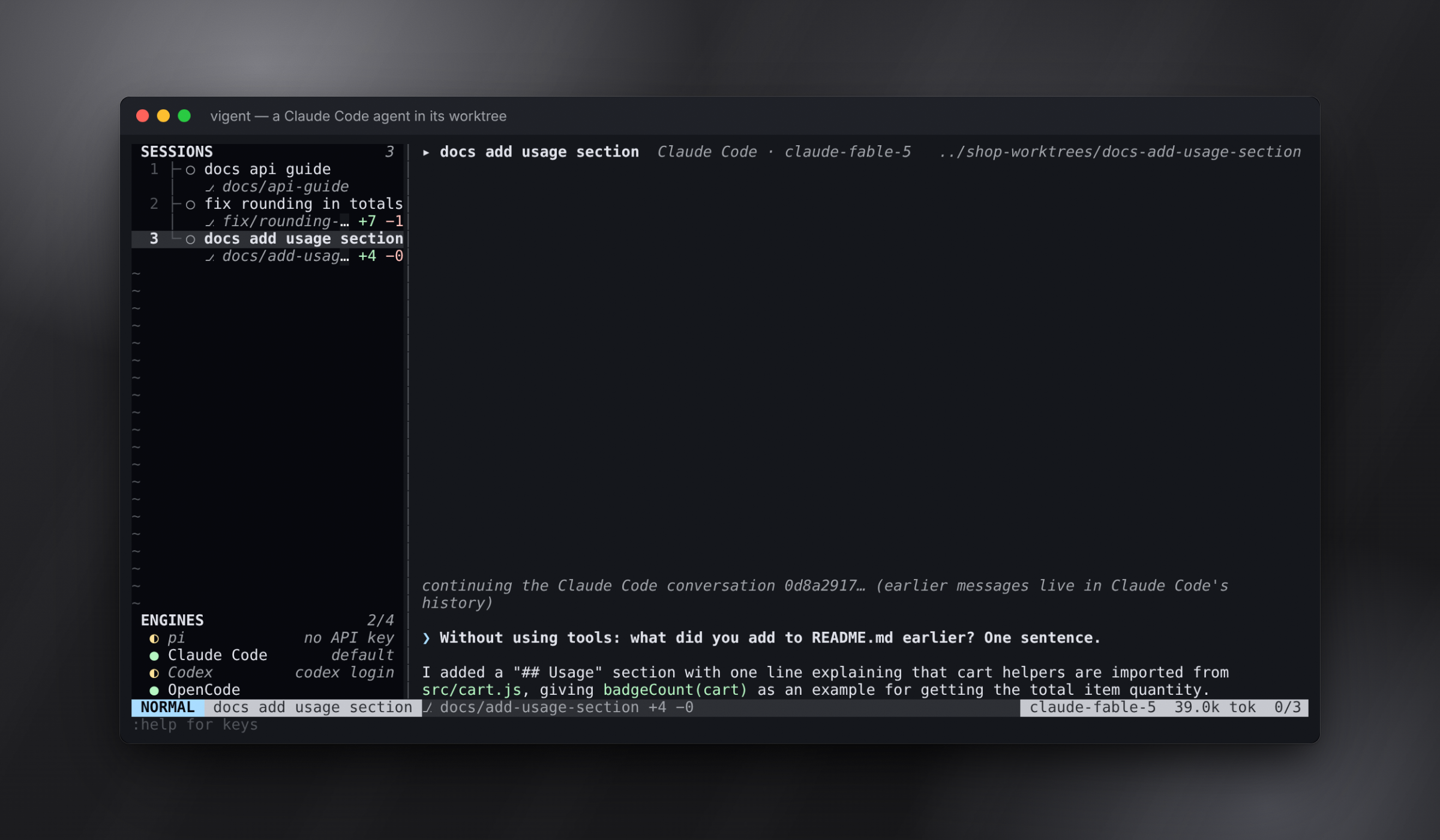
The sidebar's ENGINES block shows each one: `●` signed in, `◐` installed but not signed in (with the command to sign in, like `codex login`), `○` not installed. Without `--engine`, new agents use `engine` from the config. Its default, `"auto"`, picks the first signed-in CLI, otherwise pi if it has an API key. With neither, vigent starts nothing and says what to run (`claude auth login`, `codex login`) or export (`ANTHROPIC_API_KEY`) to connect one. **`:engine`** (`<Space>E`, or `E` on the dashboard) switches it while vigent runs: a menu lists auto, pi, Claude Code, Codex and OpenCode with which are ready, and `:engine claude` sets it directly. Agents already open keep their engine, since their conversation lives there; `:new <task>` starts one on the new engine. A CLI agent survives a restart too: vigent saves the CLI's conversation id and continues that conversation. Its earlier messages stay in the CLI's own history.
|
|
129
109
|
|
|
130
|
-

|
|
131
|
-
|
|
132
|
-

|
|
133
|
-
|
|
134
110
|
| Engine | vigent runs | Default extra arguments |
|
|
135
111
|
|---|---|---|
|
|
136
112
|
| `claude` | `claude -p --output-format stream-json` | `--permission-mode acceptEdits` |
|
|
@@ -139,8 +115,6 @@ The sidebar's ENGINES block shows each one: `●` signed in, `◐` installed but
|
|
|
139
115
|
|
|
140
116
|
**Model and effort:** `:model` (`<Space>M`) opens a picker with the models the agent's engine offers (Claude Code's model names, Codex's own catalog from `codex debug models`, OpenCode's `opencode models`, or pi's for the providers you have a key for). In the picker, `j`/`k` move, `g`/`G` jump to the top or bottom, Enter picks and `q` or Esc closes. Press `/` to search, or to type any model name. `:effort` (`<Space>e`) sets the reasoning effort (pi: thinking level). Both apply from the next prompt, show in the winbar and survive a restart. With no agent open, they set the defaults for new agents.
|
|
141
117
|
|
|
142
|
-

|
|
143
|
-
|
|
144
118
|
Change the arguments or the model per engine in `[engines.<id>]` ([docs/config.md](https://github.com/farming-labs/vigent/blob/main/docs/config.md#engines)).
|
|
145
119
|
|
|
146
120
|
### pi extensions, skills and prompt templates
|
|
@@ -151,8 +125,6 @@ vigent gives extensions a UI of their own. When an extension asks for confirmati
|
|
|
151
125
|
|
|
152
126
|
Type an extension's command (`/deploy`), a skill (`/skill:changelog`) or a prompt template (`/tidy src/cart.js`) as a prompt. **`:pi`** lists everything the focused agent loaded, including extensions that failed and why. Press Enter on a command, skill or prompt template to start a prompt with it.
|
|
153
127
|
|
|
154
|
-

|
|
155
|
-
|
|
156
128
|
## Worktrees
|
|
157
129
|
|
|
158
130
|
Every agent gets its own git worktree and branch, so agents never touch your checkout or each other's files:
|
|
@@ -177,18 +149,10 @@ A worktree is normally a full copy of your checkout, so ten agents on a big repo
|
|
|
177
149
|
- On restart, vigent inspects riftri's worktrees before reopening their agents. If an OverlayFS view lost its mount (after a reboot), vigent repairs it first.
|
|
178
150
|
- vigent falls back to git only when riftri declines with a receipt saying nothing was changed (unsupported volume, checkout or environment). Any other riftri failure is shown, never papered over. `[worktree] backend = "riftri"` requires riftri, and `"git"` turns it off.
|
|
179
151
|
|
|
180
|
-

|
|
181
|
-
|
|
182
|
-

|
|
183
|
-
|
|
184
|
-

|
|
185
|
-
|
|
186
152
|
## Reviewing and landing work
|
|
187
153
|
|
|
188
154
|
**`:review`** (`Space r`) goes through the agent's changes one hunk at a time. That covers its commits, its uncommitted edits and its new files. Press `x` to drop the hunk under the cursor, `X` to drop the whole file, and `u` to undo. Dropping takes the change out of the agent's worktree, so `:merge` and `:pr` land only what you kept.
|
|
189
155
|
|
|
190
|
-

|
|
191
|
-
|
|
192
156
|
```vim
|
|
193
157
|
:diff " the agent's changes; ]c / [c jump between hunks
|
|
194
158
|
:merge " squash-merge its branch into yours: one commit, e.g. "fix: flaky checkout test"
|
|
@@ -210,14 +174,6 @@ Agents survive a restart: quit vigent, start it again in the same repo, and the
|
|
|
210
174
|
|
|
211
175
|
`:merge` and `:pr` first commit anything the agent left uncommitted. `:merge` only touches your checkout when it's on the agent's base branch with no uncommitted changes, and a conflict is rolled back so nothing changes. After a merge, `:kill!` removes the worktree and the merged branch. `:q` won't quit while agents are running; `:q!` or `ZQ` does. Use `:new <task> --model <id>` to give one agent a different model.
|
|
212
176
|
|
|
213
|
-

|
|
214
|
-
|
|
215
|
-

|
|
216
|
-
|
|
217
|
-

|
|
218
|
-
|
|
219
|
-

|
|
220
|
-
|
|
221
177
|
## Configuration
|
|
222
178
|
|
|
223
179
|
Everything lives in `~/.config/vigent/config.toml`. `vigent config init` writes a commented starter file, and `vigent config check` validates it. Keys use vim notation, and the right-hand side can be an action, an ex command or other keys:
|
|
@@ -247,8 +203,6 @@ Normal = { bg = "NONE" }
|
|
|
247
203
|
|
|
248
204
|
You can also change keys while vigent runs, with `:nmap`, `:imap`, `:cmap`, `:unmap` and `:let mapleader`. **[docs/config.md](https://github.com/farming-labs/vigent/blob/main/docs/config.md)** has every option, action and built-in key.
|
|
249
205
|
|
|
250
|
-

|
|
251
|
-
|
|
252
206
|
## Themes
|
|
253
207
|
|
|
254
208
|
vigent speaks Neovim's highlight groups (`Normal`, `StatusLine`, `CursorLine`, …), so your vim or Neovim theme carries straight over.
|
|
@@ -281,21 +235,9 @@ CursorLine = "guibg=#2a2f3a"
|
|
|
281
235
|
|
|
282
236
|
**Icons and fonts:** `icons = "nerd"` (or `:settings`, Icons) uses Nerd Font icons like AstroNvim and LazyVim: a git branch icon, status and engine icons, an icon per tool call (terminal, pencil, file, search…) and file-type icons in the diff view, colored from your theme. vigent draws in your terminal's font, the same as Neovim in a terminal, so for these icons set your terminal's font to a [Nerd Font](https://www.nerdfonts.com) (for example JetBrainsMono Nerd Font).
|
|
283
237
|
|
|
284
|
-
25 built in, including `lazyvim` (LazyVim's look, transparent), the tokyonight, catppuccin and rose-pine families, `dracula`, `onedark`, `everforest`, `nightfox`, `gruvbox`, `kanagawa`, `nord`, `monokai-pro`, `ayu-mirage`, and GitHub and solarized in dark and light. The picker shows each one's colors
|
|
285
|
-
|
|
286
|
-

|
|
287
|
-
|
|
288
|
-
**`:settings`** (`<Space>s`) changes the theme, transparency, layout, engine, worktrees and any key in one place. Press `w` and it's saved to config.toml:
|
|
289
|
-
|
|
290
|
-

|
|
291
|
-
|
|
292
|
-

|
|
293
|
-
|
|
294
|
-

|
|
295
|
-
|
|
296
|
-

|
|
238
|
+
25 built in, including `lazyvim` (LazyVim's look, transparent), the tokyonight, catppuccin and rose-pine families, `dracula`, `onedark`, `everforest`, `nightfox`, `gruvbox`, `kanagawa`, `nord`, `monokai-pro`, `ayu-mirage`, and GitHub and solarized in dark and light. The picker shows each one's colors.
|
|
297
239
|
|
|
298
|
-
|
|
240
|
+
**`:settings`** (`<Space>s`) changes the theme, transparency, layout, engine, worktrees and any key in one place. Press `w` and it's saved to config.toml.
|
|
299
241
|
|
|
300
242
|
The full guide covers importing, theme files, palettes, every option and every highlight group: **[docs/themes.md](https://github.com/farming-labs/vigent/blob/main/docs/themes.md)**.
|
|
301
243
|
|
package/dist/app.js
CHANGED
|
@@ -64,6 +64,7 @@ const ICONS = {
|
|
|
64
64
|
here: "●",
|
|
65
65
|
unread: "◆",
|
|
66
66
|
serve: "⇄ ",
|
|
67
|
+
light: "✦",
|
|
67
68
|
ok: "●",
|
|
68
69
|
warn: "◐",
|
|
69
70
|
off: "○",
|
|
@@ -87,6 +88,7 @@ const ICONS = {
|
|
|
87
88
|
here: NERD.circle,
|
|
88
89
|
unread: NERD.bell,
|
|
89
90
|
serve: "\uf10b ",
|
|
91
|
+
light: "\uf0e7",
|
|
90
92
|
ok: NERD.check,
|
|
91
93
|
warn: NERD.warning,
|
|
92
94
|
off: NERD.circleO,
|
|
@@ -110,6 +112,7 @@ const ICONS = {
|
|
|
110
112
|
here: "*",
|
|
111
113
|
unread: "!",
|
|
112
114
|
serve: "~ ",
|
|
115
|
+
light: "*",
|
|
113
116
|
ok: "+",
|
|
114
117
|
warn: "~",
|
|
115
118
|
off: "-",
|
|
@@ -1478,7 +1481,7 @@ export class App {
|
|
|
1478
1481
|
this.refreshStorage();
|
|
1479
1482
|
const by = s.engine !== "pi" ? ` · ${ENGINE_NAMES[s.engine]}` : "";
|
|
1480
1483
|
if (wt?.path) {
|
|
1481
|
-
const how = wt.riftri ?
|
|
1484
|
+
const how = wt.riftri ? " · lightweight copy" : wt.riftriSkipped ? " · full copy (:checkhealth says why)" : "";
|
|
1482
1485
|
this.setMessage(`'${name}'${by} on ${wt.branch} in ${this.shortPath(wt.path)}${wt.base ? ` (from ${wt.base})` : ""}${how}`, wt.riftriSkipped ? "WarningMsg" : "ModeMsg");
|
|
1483
1486
|
}
|
|
1484
1487
|
else if (wt) {
|
|
@@ -2549,7 +2552,7 @@ export class App {
|
|
|
2549
2552
|
const s = this.focusedSession;
|
|
2550
2553
|
const left = s ? ` ${this.icons.open_agent} ${s.name}` : ` ${this.icons.open_agent} [no agent]`;
|
|
2551
2554
|
const model = s ? ` ${s.engine !== "pi" && s.model !== ENGINE_NAMES[s.engine] ? `${ENGINE_NAMES[s.engine]} · ` : ""}${s.model}${s.effort ? ` · ${s.effort}` : ""}` : "";
|
|
2552
|
-
const where = s?.worktree?.path ? `${this.shortPath(s.worktree.path)}${s.worktree.riftri ?
|
|
2555
|
+
const where = s?.worktree?.path ? `${this.shortPath(s.worktree.path)}${s.worktree.riftri ? ` ${this.icons.light}` : ""}` : s ? "this checkout" : "";
|
|
2553
2556
|
const ext = s && "extensionStatus" in s ? [...s.extensionStatus.values()].join(" · ") : "";
|
|
2554
2557
|
const status = (s?.state === "paused" ? " paused" : s?.queue.length ? ` ${this.icons.queued}${s.queue.length} queued` : "") + (ext ? ` ${ext}` : "");
|
|
2555
2558
|
// the path gives way first (from its start: the end names the worktree), always two spaces before it
|
package/dist/cli-engines.js
CHANGED
|
@@ -321,7 +321,7 @@ export class CliSession extends Session {
|
|
|
321
321
|
try {
|
|
322
322
|
child = spawn(this.opts.bin ?? this.adapter.bin, args, {
|
|
323
323
|
cwd: this.cwd,
|
|
324
|
-
env: this.opts.env ?? process.env,
|
|
324
|
+
env: typeof this.opts.env === "function" ? this.opts.env() : (this.opts.env ?? process.env),
|
|
325
325
|
stdio: ["ignore", "pipe", "pipe"],
|
|
326
326
|
});
|
|
327
327
|
}
|
package/dist/cli.js
CHANGED
|
@@ -9,7 +9,7 @@ import { App } from "./app.js";
|
|
|
9
9
|
import { FOCUS_REPORTING_OFF, FOCUS_REPORTING_ON } from "./notify.js";
|
|
10
10
|
import { staleBuild, VERSION_TEXT } from "./version.js";
|
|
11
11
|
import { CliSession } from "./cli-engines.js";
|
|
12
|
-
import { defaultEngine, detectEngines, ENGINE_BINS, isEngineId, onPath, piConnected, quickEngines } from "./engines.js";
|
|
12
|
+
import { defaultEngine, detectEngines, ENGINE_BINS, isEngineId, onPath, piConnected, quickEngines, engineEnv } from "./engines.js";
|
|
13
13
|
import { CONFIG_TEMPLATE, configPath, loadConfig } from "./config.js";
|
|
14
14
|
import { createDemoSessions } from "./demo.js";
|
|
15
15
|
import { buildKeymap, KEY_MODES } from "./keys.js";
|
|
@@ -306,6 +306,8 @@ async function main() {
|
|
|
306
306
|
resumeId,
|
|
307
307
|
effort,
|
|
308
308
|
extraArgs: config.engines[engine]?.args,
|
|
309
|
+
// e.g. Claude Code without ANTHROPIC_API_KEY when it has a Claude account (see detectClaude)
|
|
310
|
+
env: () => engineEnv(app.engines?.find((e) => e.id === engine)),
|
|
309
311
|
onResumeId: (id) => {
|
|
310
312
|
if (!wt?.path)
|
|
311
313
|
return;
|
package/dist/engines.js
CHANGED
|
@@ -12,6 +12,15 @@ import * as os from "node:os";
|
|
|
12
12
|
import * as path from "node:path";
|
|
13
13
|
import { PI_INSTALL, piInstalled } from "./pi-sdk.js";
|
|
14
14
|
export const ENGINE_IDS = ["pi", "claude", "codex", "opencode"];
|
|
15
|
+
/** The environment to run an engine's CLI with: everything but what detection said to leave out. */
|
|
16
|
+
export function engineEnv(engine, env = process.env) {
|
|
17
|
+
if (!engine?.dropEnv?.length)
|
|
18
|
+
return env;
|
|
19
|
+
const out = { ...env };
|
|
20
|
+
for (const k of engine.dropEnv)
|
|
21
|
+
delete out[k];
|
|
22
|
+
return out;
|
|
23
|
+
}
|
|
15
24
|
export const ENGINE_NAMES = {
|
|
16
25
|
pi: "pi",
|
|
17
26
|
claude: "Claude Code",
|
|
@@ -127,8 +136,33 @@ async function detectClaude(env, timeoutMs) {
|
|
|
127
136
|
try {
|
|
128
137
|
const st = JSON.parse(s.stdout);
|
|
129
138
|
if (st.loggedIn) {
|
|
130
|
-
const
|
|
131
|
-
|
|
139
|
+
const usesKey = st.authMethod === "api_key" || !!st.apiKeySource;
|
|
140
|
+
// ANTHROPIC_API_KEY wins over a signed-in Claude account. When there is an account too,
|
|
141
|
+
// leave the key out, so Claude Code runs on the login you use it with (an unscoped or
|
|
142
|
+
// spent key otherwise fails every request, e.g. "not scoped to a workspace")
|
|
143
|
+
if (usesKey && env.ANTHROPIC_API_KEY) {
|
|
144
|
+
const without = { ...env };
|
|
145
|
+
delete without.ANTHROPIC_API_KEY;
|
|
146
|
+
const account = await run("claude", ["auth", "status", "--json"], timeoutMs, without);
|
|
147
|
+
try {
|
|
148
|
+
const a = JSON.parse(account.stdout);
|
|
149
|
+
if (a.loggedIn && a.authMethod !== "api_key" && !a.apiKeySource) {
|
|
150
|
+
return {
|
|
151
|
+
...base,
|
|
152
|
+
installed: true,
|
|
153
|
+
connected: true,
|
|
154
|
+
version,
|
|
155
|
+
detail: "signed in (Claude account; ANTHROPIC_API_KEY left out)",
|
|
156
|
+
connect: undefined,
|
|
157
|
+
dropEnv: ["ANTHROPIC_API_KEY"],
|
|
158
|
+
};
|
|
159
|
+
}
|
|
160
|
+
}
|
|
161
|
+
catch {
|
|
162
|
+
// no account to fall back to: the key it is
|
|
163
|
+
}
|
|
164
|
+
}
|
|
165
|
+
return { ...base, installed: true, connected: true, version, detail: `signed in (${usesKey ? "API key" : "Claude account"})`, connect: undefined };
|
|
132
166
|
}
|
|
133
167
|
return { ...base, installed: true, connected: false, version, detail: "not signed in" };
|
|
134
168
|
}
|
package/package.json
CHANGED
|
@@ -1,6 +1,6 @@
|
|
|
1
1
|
{
|
|
2
2
|
"name": "@vigent/cli",
|
|
3
|
-
"version": "0.3.
|
|
3
|
+
"version": "0.3.2",
|
|
4
4
|
"description": "A vim-style terminal app for running coding agents side by side, each in its own git worktree. Built on pi.",
|
|
5
5
|
"keywords": [
|
|
6
6
|
"vim",
|
|
@@ -15,7 +15,7 @@
|
|
|
15
15
|
"llm",
|
|
16
16
|
"cli"
|
|
17
17
|
],
|
|
18
|
-
"homepage": "https://
|
|
18
|
+
"homepage": "https://vigent.farming-labs.dev",
|
|
19
19
|
"bugs": {
|
|
20
20
|
"url": "https://github.com/farming-labs/vigent/issues"
|
|
21
21
|
},
|