@vertigis/arcgis-extensions 52.2.0 → 53.0.0
This diff represents the content of publicly available package versions that have been released to one of the supported registries. The information contained in this diff is provided for informational purposes only and reflects changes between package versions as they appear in their respective public registries.
- package/AppConfig.schema.json +1969 -329
- package/data/Feature.d.ts +1 -1
- package/data/FeatureList.d.ts +1 -1
- package/data/FeatureList.js +1 -1
- package/data/FeatureSet.d.ts +27 -4
- package/data/FeatureSet.js +1 -1
- package/data/FeatureSettings.d.ts +6 -1
- package/data/FeatureSettings.js +1 -1
- package/data/Schema.d.ts +32 -2
- package/data/Schema.js +1 -1
- package/data/TaskSettings.d.ts +6 -1
- package/data/_TableExtension.d.ts +1 -1
- package/data/support/_dxfConverters.d.ts +2 -1
- package/data/support/_dxfFunctions.d.ts +2 -1
- package/declarations/arcgis-js-api-extensions/index.d.ts +2 -217
- package/declarations/arcgis-js-api-extensions/modules.d.ts +99 -0
- package/docs/html/assets/highlight.css +16 -16
- package/docs/html/assets/navigation.js +1 -1
- package/docs/html/assets/search.js +1 -1
- package/docs/html/classes/Entity.EntityBase.html +7 -10
- package/docs/html/classes/data_ArcGISServiceTableExtension.ArcGISServiceTableExtension.html +7 -10
- package/docs/html/classes/data_Attachment.Attachment.html +7 -10
- package/docs/html/classes/data_Feature.Feature.html +7 -10
- package/docs/html/classes/data_FeatureList.FeatureList.html +56 -28
- package/docs/html/classes/data_FeatureSet.FeatureSet.html +6 -5
- package/docs/html/classes/data_FeatureSettings.FeatureSettings.html +6 -3
- package/docs/html/classes/data_FeatureSourceBase.FeatureSourceBase.html +7 -10
- package/docs/html/classes/data_FeatureSourceBase.RelationshipCollection.html +53 -25
- package/docs/html/classes/data_FeatureStream.FeatureStream.html +7 -10
- package/docs/html/classes/data_FieldExtension.FieldExtension.html +7 -10
- package/docs/html/classes/data_PopupContentExtension.PopupContentExtension.html +7 -10
- package/docs/html/classes/data_RelationshipBase.RelationshipBase.html +7 -10
- package/docs/html/classes/data_Schema.Schema.html +6 -3
- package/docs/html/classes/data_TaskSettings.TaskSettings.html +5 -2
- package/docs/html/classes/data__TableExtension.TableExtension.html +7 -10
- package/docs/html/classes/data__TableExtension.TableFeatureSettings.html +6 -3
- package/docs/html/classes/data__TableExtension.TableSchema.html +7 -4
- package/docs/html/classes/data_support__dxfConverters.DxfEntityProcessor.html +2 -2
- package/docs/html/classes/layer_preset_LayerPreset.LayerPreset.html +7 -10
- package/docs/html/classes/mapping_ArcGISSublayerExtension.ArcGISSublayerExtension.html +12 -15
- package/docs/html/classes/mapping_ArcGISSublayerExtension.ArcGISSublayerRelationshipCollection.html +54 -26
- package/docs/html/classes/mapping_BasemapExtension.BasemapExtension.html +8 -11
- package/docs/html/classes/mapping_Bookmark.Bookmark.html +7 -10
- package/docs/html/classes/mapping_BuildingComponentSublayerExtension.BuildingComponentSublayerExtension.html +12 -15
- package/docs/html/classes/mapping_BuildingComponentSublayerExtension.BuildingComponentSublayerSchema.html +5 -2
- package/docs/html/classes/mapping_BuildingGroupSublayerExtension.BuildingGroupSublayerExtension.html +12 -15
- package/docs/html/classes/mapping_BuildingGroupSublayerExtension.BuildingGroupSublayerSchema.html +5 -2
- package/docs/html/classes/mapping_BuildingSceneLayerExtension.BuildingSceneLayerExtension.html +14 -17
- package/docs/html/classes/mapping_BuildingSceneLayerExtension.BuildingSceneLayerReadOnlySchema.html +5 -2
- package/docs/html/classes/mapping_BuildingSublayerExtension.BuildingSublayerExtension.html +12 -15
- package/docs/html/classes/mapping_BuildingSublayerExtension.BuildingSublayerFeatureSettings.html +5 -2
- package/docs/html/classes/mapping_BuildingSublayerExtension.BuildingSublayerSchema.html +5 -2
- package/docs/html/classes/mapping_CSVLayerExtension.CSVLayerExtension.html +12 -15
- package/docs/html/classes/mapping_ElevationLayerExtension.ElevationLayerExtension.html +14 -17
- package/docs/html/classes/mapping_FeatureCollectionLayerExtension.FeatureCollectionLayerExtension.html +14 -17
- package/docs/html/classes/mapping_FeatureLayerExtension.FeatureLayerExtension.html +12 -15
- package/docs/html/classes/mapping_FeatureLayerExtensionBase.FeatureLayerExtensionBase.html +14 -17
- package/docs/html/classes/mapping_FeatureLayerExtensionBase.FeatureLayerReadOnlySchema.html +5 -2
- package/docs/html/classes/mapping_FeatureLayerExtensionBase.FeatureLayerSchema.html +5 -2
- package/docs/html/classes/mapping_GeoJSONLayerExtension.GeoJSONLayerExtension.html +12 -15
- package/docs/html/classes/mapping_GeoRSSLayerExtension.GeoRSSLayerExtension.html +14 -17
- package/docs/html/classes/mapping_GraphicsLayerExtension.GraphicsLayerExtension.html +14 -17
- package/docs/html/classes/mapping_GroundExtension.GroundExtension.html +8 -11
- package/docs/html/classes/mapping_GroupLayerExtension.GroupLayerExtension.html +15 -18
- package/docs/html/classes/mapping_GroupLayerExtension.GroupLayerExtensionCollection.html +76 -25
- package/docs/html/classes/mapping_ImageryLayerExtension.ImageryLayerExtension.html +14 -17
- package/docs/html/classes/mapping_ImageryTileLayerExtension.ImageryTileLayerExtension.html +14 -17
- package/docs/html/classes/mapping_IntegratedMeshLayerExtension.IntegratedMeshLayerExtension.html +14 -17
- package/docs/html/classes/mapping_KMLLayerExtension.KMLLayerExtension.html +14 -17
- package/docs/html/classes/mapping_KMLSublayerExtension.KMLSublayerExtension.html +12 -15
- package/docs/html/classes/mapping_MapConstraints.MapConstraints.html +5 -2
- package/docs/html/classes/mapping_MapExtension.MapExtension.html +7 -10
- package/docs/html/classes/mapping_MapImageLayerExtension.MapImageLayerExtension.html +14 -17
- package/docs/html/classes/mapping_MapImageSublayerExtension.MapImageSublayerExtension.html +12 -15
- package/docs/html/classes/mapping_MapNotesLayerExtension.MapNotesLayerExtension.html +14 -17
- package/docs/html/classes/mapping_MapNotesSublayerExtension.MapNotesSublayerExtension.html +12 -15
- package/docs/html/classes/mapping_MapNotesSublayerExtension.MapNotesSublayerExtensionSchema.html +5 -2
- package/docs/html/classes/mapping_MediaLayerExtension.MediaLayerExtension.html +14 -17
- package/docs/html/classes/mapping_OpenStreetMapLayerExtension.OpenStreetMapLayerExtension.html +14 -17
- package/docs/html/classes/mapping_PointCloudLayerExtension.PointCloudLayerExtension.html +14 -17
- package/docs/html/classes/mapping_RouteLayerExtension.RouteLayerExtension.html +14 -17
- package/docs/html/classes/mapping_RouteLayerExtension.RouteLayerExtensionSchema.html +5 -2
- package/docs/html/classes/mapping_SceneLayerExtension.SceneLayerExtension.html +14 -17
- package/docs/html/classes/mapping_StreamLayerExtension.StreamLayerExtension.html +14 -17
- package/docs/html/classes/mapping_StreamLayerExtension.StreamLayerSchema.html +5 -2
- package/docs/html/classes/mapping_SubtypeGroupLayerExtension.SubtypeGroupLayerExtension.html +14 -17
- package/docs/html/classes/mapping_SubtypeGroupLayerExtension.SubtypeGroupLayerRelationshipCollection.html +54 -26
- package/docs/html/classes/mapping_SubtypeGroupLayerExtension.SubtypeGroupLayerSchema.html +5 -2
- package/docs/html/classes/mapping_SubtypeSublayerExtension.SubtypeSublayerExtension.html +12 -15
- package/docs/html/classes/mapping_SubtypeSublayerExtension.SubtypeSublayerRelationshipCollection.html +54 -26
- package/docs/html/classes/mapping_SubtypeSublayerExtension.SubtypeSublayerSchema.html +5 -2
- package/docs/html/classes/mapping_TileLayerExtension.TileLayerExtension.html +14 -17
- package/docs/html/classes/mapping_TileSublayerExtension.TileSublayerExtension.html +12 -15
- package/docs/html/classes/mapping_UnsupportedLayerExtension.UnsupportedLayerExtension.html +14 -17
- package/docs/html/classes/mapping_VectorTileLayerExtension.VectorTileLayerExtension.html +14 -17
- package/docs/html/classes/mapping_WFSLayerExtension.WFSLayerExtension.html +14 -17
- package/docs/html/classes/mapping_WMSLayerExtension.WMSLayerExtension.html +14 -17
- package/docs/html/classes/mapping_WMSSublayerExtension.WMSSublayerExtension.html +12 -15
- package/docs/html/classes/mapping_WMTSLayerExtension.WMTSLayerExtension.html +14 -17
- package/docs/html/classes/mapping_WebTileLayerExtension.WebTileLayerExtension.html +14 -17
- package/docs/html/classes/mapping__LayerExtension.LayerExtension.html +14 -17
- package/docs/html/classes/mapping__LayerExtension.LayerExtensionReadOnlySchema.html +5 -2
- package/docs/html/classes/mapping__LayerExtension.LayerExtensionSchema.html +5 -2
- package/docs/html/classes/mapping__LayerExtensionCollectionImpl.LayerExtensionCollectionImpl.html +76 -25
- package/docs/html/classes/mapping__SublayerExtension.SubSublayerExtensionCollection.html +76 -25
- package/docs/html/classes/mapping__SublayerExtension.SublayerExtension.html +12 -15
- package/docs/html/classes/mapping__SublayerExtension.SublayerSchema.html +5 -2
- package/docs/html/classes/mapping_support_ArrayWrappedCollection.ArrayWrappedCollection.html +53 -25
- package/docs/html/classes/mapping_support__LayerExtensionCollection.LayerExtensionCollectionBase.html +76 -25
- package/docs/html/classes/mapping_support__SublayerExtensionCollection.SublayerExtensionCollectionBase.html +76 -25
- package/docs/html/classes/menus_Menu.Menu.html +7 -10
- package/docs/html/classes/menus_MenuItem.MenuItem.html +7 -10
- package/docs/html/classes/support_FormatSettings.FormatSettings.html +5 -2
- package/docs/html/classes/support_InitializableBase.InitializableBase.html +6 -9
- package/docs/html/classes/support_InitializableCollectionProxy.InitializableCollectionProxy.html +53 -25
- package/docs/html/classes/support_ReadOnlyInitializableCollection.ReadOnlyInitializableCollection.html +53 -25
- package/docs/html/classes/support_Settings.Settings.html +5 -2
- package/docs/html/classes/support__ArcGISRelationshipCollection.ArcGISRelationshipCollection.html +54 -26
- package/docs/html/classes/tasks_geocoding_ArcGISGeocoder.ArcGISGeocoder.html +7 -10
- package/docs/html/classes/tasks_geocoding_Geocoder.Geocoder.html +7 -10
- package/docs/html/classes/tasks_identify_IdentifyService.IdentifyService.html +7 -10
- package/docs/html/classes/tasks_identify_WMSLayerFeatureInfoIdentifyProvider.WMSLayerFeatureInfoIdentifyProvider.html +2 -2
- package/docs/html/classes/tasks_query_ArcGISRelationship.ArcGISRelationship.html +7 -10
- package/docs/html/classes/tasks_query_QueryBasedRelationship.QueryBasedRelationship.html +7 -10
- package/docs/html/classes/tasks_query_QueryService.QueryService.html +8 -11
- package/docs/html/classes/tasks_query_SubtypeSublayerQueryProvider.SubtypeSublayerQueryProvider.html +2 -2
- package/docs/html/classes/tasks_search_SearchService.SearchService.html +8 -11
- package/docs/html/classes/utilities_CaseInsensitiveObservableMap.CaseInsensitiveObservableMap.html +6 -5
- package/docs/html/classes/utilities_CollectionProxy.CollectionProxy.html +56 -29
- package/docs/html/classes/utilities_CopyOnWriteCollection.CopyOnWriteCollection.html +53 -25
- package/docs/html/classes/utilities_MapTransformCollection.MapTransformCollection.html +53 -25
- package/docs/html/classes/utilities_ObservableMap.ObservableMap.html +6 -5
- package/docs/html/classes/utilities_ObservableSet.ObservableSet.html +6 -5
- package/docs/html/classes/utilities_ReadOnlyCollection.ReadOnlyCollection.html +53 -25
- package/docs/html/classes/utilities_ReadOnlyMap.ReadOnlyMap.html +35 -9
- package/docs/html/classes/utilities__ReferenceCountedHandle.default.html +2 -2
- package/docs/html/functions/mapping_support_LayerListSettings.fromLayerListMode.html +1 -1
- package/docs/html/functions/support_observableUtils.observable-1.html +3 -3
- package/docs/html/functions/support_observableUtils.onWatch.html +1 -1
- package/docs/html/functions/support_observableUtils.watch.html +1 -1
- package/docs/html/functions/support_observableUtils.watchEach.html +1 -1
- package/docs/html/functions/support_observableUtils.watchEvent.html +3 -3
- package/docs/html/functions/utilities_checkArg.checkArg.html +1 -1
- package/docs/html/functions/utilities_renderers.isClassBreaksRenderer.html +1 -1
- package/docs/html/functions/utilities_renderers.isDictionaryRenderer.html +1 -1
- package/docs/html/functions/utilities_renderers.isDotDensityRenderer.html +1 -1
- package/docs/html/functions/utilities_renderers.isHeatMapRenderer.html +1 -1
- package/docs/html/functions/utilities_renderers.isRenderer.html +2 -2
- package/docs/html/functions/utilities_renderers.isSimpleRenderer.html +1 -1
- package/docs/html/functions/utilities_renderers.isUniqueValueRenderer.html +1 -1
- package/docs/html/functions/utilities_symbol.isPolygonGeometrySymbol.html +2 -2
- package/docs/html/functions/utilities_watch.onCollectionPropertyChange.html +3 -3
- package/docs/html/functions/utilities_watch.onEach.html +4 -4
- package/docs/html/functions/utilities_watch.onOnce.html +5 -5
- package/docs/html/hierarchy.html +1 -1
- package/docs/html/interfaces/data_Feature.PresentableAttributes.html +36 -10
- package/docs/html/interfaces/data_FeatureSet.FeatureSetEvents.html +12 -0
- package/docs/html/interfaces/data_PopupContentExtension.ContentProperties.html +2 -2
- package/docs/html/interfaces/data_Schema.FieldCollection.html +1 -1
- package/docs/html/interfaces/data_Schema.SchemaEvents.html +16 -0
- package/docs/html/interfaces/data_support__dxfInterfaces.IDxfJsonComponentContext.html +2 -2
- package/docs/html/interfaces/data_support_attachments.AttachmentEnabledLayer.html +19 -6
- package/docs/html/interfaces/json_AnnotationLayerJson.AnnotationLayerJson.html +2 -2
- package/docs/html/interfaces/json_BuildingSceneLayerJson.BuildingSceneLayerJson.html +2 -2
- package/docs/html/interfaces/json_BuildingSceneSublayerJson.BuildingSceneSublayerJson.html +2 -2
- package/docs/html/interfaces/json_CSVLayerJson.CSVLayerJson.html +2 -2
- package/docs/html/interfaces/json_EnvironmentJson.SnowyWeatherJson.html +2 -2
- package/docs/html/interfaces/json_FeatureLayerJson.FeatureLayerJson.html +2 -2
- package/docs/html/interfaces/json_GeoJSONLayerJson.GeoJSONLayerJson.html +2 -2
- package/docs/html/interfaces/json_GeoRSSLayerJson.GeoRSSLayerJson.html +2 -2
- package/docs/html/interfaces/json_GroupLayerJson.GroupLayerJson.html +2 -2
- package/docs/html/interfaces/json_ImageServiceLayerJson.ImageServiceLayerJson.html +2 -2
- package/docs/html/interfaces/json_ImageServiceVectorLayerJson.ImageServiceVectorLayerJson.html +2 -2
- package/docs/html/interfaces/json_IntegratedMeshLayerJson.IntegratedMeshLayerJson.html +2 -2
- package/docs/html/interfaces/json_KMLLayerJson.KMLLayerJson.html +2 -2
- package/docs/html/interfaces/json_MapServiceLayerJson.MapServiceLayerJson.html +2 -2
- package/docs/html/interfaces/json_MediaLayerJson.MediaLayerJson.html +2 -2
- package/docs/html/interfaces/json_OperationalLayerJson.OperationalLayerJsonBase.html +2 -2
- package/docs/html/interfaces/json_PointCloudLayerJson.PointCloudLayerJson.html +2 -2
- package/docs/html/interfaces/json_PopupInfoJson.PopupElementJson.html +2 -2
- package/docs/html/interfaces/json_RasterDataElevationLayerJson.RasterDataElevationLayerJson.html +2 -2
- package/docs/html/interfaces/json_RendererJson.SizeInfoJson.html +2 -2
- package/docs/html/interfaces/json_SceneLayerJson.SceneLayerJson.html +2 -2
- package/docs/html/interfaces/json_StreamLayerJson.StreamLayerJson.html +2 -2
- package/docs/html/interfaces/json_SubtypeGroupLayerJson.SubtypeGroupLayerJson.html +2 -2
- package/docs/html/interfaces/json_SubtypeGroupLayerJson.SubtypeSubtypeGroupLayerJson.html +2 -2
- package/docs/html/interfaces/json_SubtypeSublayerJson.SubtypeSublayerJson.html +2 -2
- package/docs/html/interfaces/json_TiledElevationServiceLayerJson.TiledElevationServiceLayerJson.html +2 -2
- package/docs/html/interfaces/json_TiledImageServiceLayerJson.TiledImageServiceLayerJson.html +2 -2
- package/docs/html/interfaces/json_TiledMapServiceLayerJson.TiledMapServiceLayerJson.html +2 -2
- package/docs/html/interfaces/json_VectorTileLayerJson.VectorTileLayerJson.html +2 -2
- package/docs/html/interfaces/json_WFSLayerJson.WFSLayerJson.html +2 -2
- package/docs/html/interfaces/json_WMSLayerJson.WMSLayerJson.html +2 -2
- package/docs/html/interfaces/json_WebSceneJson.HeightModelInfoJson.html +2 -2
- package/docs/html/interfaces/json_WebTileLayerJson.WebTileLayerJson.html +2 -2
- package/docs/html/interfaces/mapping_ArcGISSublayerExtension.ArcGISSublayerExtensionProperties.html +2 -2
- package/docs/html/interfaces/mapping_BuildingComponentSublayerExtension.BuildingComponentSublayerExtensionProperties.html +2 -2
- package/docs/html/interfaces/mapping_BuildingGroupSublayerExtension.BuildingGroupSublayerExtensionProperties.html +2 -2
- package/docs/html/interfaces/mapping_BuildingSceneLayerExtension.BuildingSceneLayerExtensionProperties.html +3 -3
- package/docs/html/interfaces/mapping_BuildingSceneLayerExtension.BuildingSceneLayerProperties.html +2 -2
- package/docs/html/interfaces/mapping_BuildingSublayerExtension.BuildingSublayerExtensionProperties.html +2 -2
- package/docs/html/interfaces/mapping_BuildingSublayerExtension.BuildingSublayerProperties.html +2 -2
- package/docs/html/interfaces/mapping_CSVLayerExtension.CSVLayerExtensionProperties.html +2 -2
- package/docs/html/interfaces/mapping_ElevationLayerExtension.ElevationLayerExtensionProperties.html +2 -2
- package/docs/html/interfaces/mapping_FeatureLayerExtension.FeatureLayerExtensionProperties.html +2 -2
- package/docs/html/interfaces/mapping_FeatureLayerExtension.FeatureLayerProperties.html +2 -2
- package/docs/html/interfaces/mapping_FeatureLayerExtensionBase.FeatureLayerBaseProperties.html +2 -2
- package/docs/html/interfaces/mapping_FeatureLayerExtensionBase.FeatureLayerExtensionBaseProperties.html +2 -2
- package/docs/html/interfaces/mapping_GeoJSONLayerExtension.GeoJSONLayerExtensionProperties.html +2 -2
- package/docs/html/interfaces/mapping_GeoRSSLayerExtension.GeoRSSLayerExtensionProperties.html +2 -2
- package/docs/html/interfaces/mapping_GraphicsLayerExtension.GraphicsLayerExtensionProperties.html +2 -2
- package/docs/html/interfaces/mapping_GroupLayerExtension.GroupLayerExtensionProperties.html +2 -2
- package/docs/html/interfaces/mapping_ImageryLayerExtension.ImageryLayerExtensionProperties.html +2 -2
- package/docs/html/interfaces/mapping_ImageryTileLayerExtension.ImageryTileLayerExtensionProperties.html +2 -2
- package/docs/html/interfaces/mapping_IntegratedMeshLayerExtension.IntegratedMeshLayerExtensionProperties.html +2 -2
- package/docs/html/interfaces/mapping_KMLLayerExtension.KMLLayerExtensionProperties.html +2 -2
- package/docs/html/interfaces/mapping_KMLSublayerExtension.KMLSublayerExtensionProperties.html +2 -2
- package/docs/html/interfaces/mapping_MapExtension.MapExtensionEvents.html +14 -0
- package/docs/html/interfaces/mapping_MapImageLayerExtension.MapImageLayerExtensionProperties.html +4 -4
- package/docs/html/interfaces/mapping_MapImageSublayerExtension.MapImageSublayerExtensionProperties.html +2 -2
- package/docs/html/interfaces/mapping_MapNotesLayerExtension.MapNotesLayerExtensionProperties.html +2 -2
- package/docs/html/interfaces/mapping_MapNotesSublayerExtension.MapNotesSublayerExtensionProperties.html +2 -2
- package/docs/html/interfaces/mapping_MediaLayerExtension.MediaLayerExtensionProperties.html +2 -2
- package/docs/html/interfaces/mapping_OpenStreetMapLayerExtension.OpenStreetMapLayerExtensionProperties.html +2 -2
- package/docs/html/interfaces/mapping_PointCloudLayerExtension.PointCloudLayerExtensionProperties.html +2 -2
- package/docs/html/interfaces/mapping_PointCloudLayerExtension.PointCloudLayerProperties.html +2 -2
- package/docs/html/interfaces/mapping_RouteLayerExtension.RouteLayerExtensionProperties.html +2 -2
- package/docs/html/interfaces/mapping_SceneLayerExtension.SceneLayerExtensionProperties.html +2 -2
- package/docs/html/interfaces/mapping_StreamLayerExtension.StreamLayerExtensionProperties.html +2 -2
- package/docs/html/interfaces/mapping_SubtypeGroupLayerExtension.SubtypeGroupLayerExtensionProperties.html +2 -2
- package/docs/html/interfaces/mapping_SubtypeSublayerExtension.SubtypeSublayerExtensionProperties.html +2 -2
- package/docs/html/interfaces/mapping_TileLayerExtension.TileLayerExtensionProperties.html +2 -2
- package/docs/html/interfaces/mapping_TileSublayerExtension.TileSublayerExtensionProperties.html +2 -2
- package/docs/html/interfaces/mapping_VectorTileLayerExtension.VectorTileLayerExtensionProperties.html +2 -2
- package/docs/html/interfaces/mapping_WFSLayerExtension.WFSLayerExtensionProperties.html +2 -2
- package/docs/html/interfaces/mapping_WMSLayerExtension.WMSLayerExtensionProperties.html +2 -2
- package/docs/html/interfaces/mapping_WMSSublayerExtension.WMSSublayerExtensionProperties.html +2 -2
- package/docs/html/interfaces/mapping_WMTSLayerExtension.WMTSLayerExtensionProperties.html +2 -2
- package/docs/html/interfaces/mapping_WebTileLayerExtension.WebTileLayerExtensionProperties.html +2 -2
- package/docs/html/interfaces/mapping__LayerExtension.LayerExtensionProperties.html +2 -2
- package/docs/html/interfaces/mapping__SublayerExtension.SublayerExtensionProperties.html +2 -2
- package/docs/html/interfaces/support_ArcGISRequestHelper.ArcGISRequestHelperResponse.html +1 -1
- package/docs/html/interfaces/support_ArcGISRequestHelper.ArcGISRequestOptions.html +2 -2
- package/docs/html/interfaces/support_InitializableBase.InitializableBaseEvents.html +7 -0
- package/docs/html/interfaces/support_InitializableCollectionProxy.InitializableCollection.html +1 -1
- package/docs/html/interfaces/support_Settings.SettingsEvents.html +7 -0
- package/docs/html/interfaces/support_esri.ChangeEvent.html +5 -5
- package/docs/html/interfaces/support_esri.LayerWithSublayers.html +1 -1
- package/docs/html/interfaces/support_esri.SublayerLike.html +2 -2
- package/docs/html/interfaces/support_observableUtils.WatchEachOptions.html +3 -3
- package/docs/html/interfaces/support_observableUtils.WatchOptions.html +3 -3
- package/docs/html/interfaces/utilities_ObservableMap.MapAfterItemEvent.html +4 -0
- package/docs/html/interfaces/utilities_ObservableMap.MapEvents.html +10 -0
- package/docs/html/interfaces/utilities_ObservableSet.SetAfterItemEvent.html +4 -0
- package/docs/html/interfaces/utilities_ObservableSet.SetChangeEvent.html +10 -0
- package/docs/html/interfaces/utilities_ObservableSet.SetEvents.html +10 -0
- package/docs/html/interfaces/utilities__layers.LayerWithLegendEnabledProperty.html +1 -1
- package/docs/html/interfaces/utilities__layers.TimeAwareLayer.html +1 -1
- package/docs/html/interfaces/utilities_collection.AfterItemChangeEvent.html +1 -1
- package/docs/html/modules/data_FeatureSet.html +2 -1
- package/docs/html/modules/data_Schema.html +1 -0
- package/docs/html/modules/mapping_MapExtension.html +2 -1
- package/docs/html/modules/support_InitializableBase.html +1 -0
- package/docs/html/modules/support_Settings.html +1 -0
- package/docs/html/modules/support_esri.html +1 -6
- package/docs/html/modules/support_observableUtils.html +2 -1
- package/docs/html/modules/utilities_ObservableMap.html +3 -1
- package/docs/html/modules/utilities_ObservableSet.html +3 -0
- package/docs/html/types/json_SymbolJson.ColorJson.html +1 -1
- package/docs/html/types/support_observableUtils.EventTarget.html +2 -0
- package/docs/html/types/support_observableUtils.WhenOptions.html +1 -1
- package/docs/html/variables/support_esri.Collection.html +1 -1
- package/docs/html/variables/version.version.html +1 -1
- package/json/SymbolJson.d.ts +1 -1
- package/mapping/ArcGISSublayerExtension.d.ts +2 -2
- package/mapping/BasemapExtension.d.ts +2 -1
- package/mapping/BuildingComponentSublayerExtension.d.ts +2 -2
- package/mapping/BuildingSceneLayerExtension.d.ts +2 -2
- package/mapping/CSVLayerExtension.d.ts +1 -1
- package/mapping/FeatureLayerExtension.d.ts +1 -1
- package/mapping/FeatureLayerExtensionBase.d.ts +2 -2
- package/mapping/GeoJSONLayerExtension.d.ts +1 -1
- package/mapping/GroundExtension.d.ts +2 -1
- package/mapping/MapExtension.d.ts +24 -4
- package/mapping/MapExtension.js +1 -1
- package/mapping/SceneLayerExtension.d.ts +2 -2
- package/mapping/StreamLayerExtension.d.ts +2 -2
- package/mapping/SubtypeSublayerExtension.d.ts +3 -3
- package/mapping/WFSLayerExtension.d.ts +2 -2
- package/mapping/_LayerExtension.d.ts +6 -5
- package/mapping/_LayerExtension.js +1 -1
- package/mapping/_SublayerExtension.d.ts +4 -2
- package/mapping/support/_LayerExtensionCollection.d.ts +3 -9
- package/mapping/support/_LayerExtensionCollection.js +1 -1
- package/mapping/support/_SublayerExtensionCollection.d.ts +4 -9
- package/mapping/support/_SublayerExtensionCollection.js +1 -1
- package/mapping/support/featureService.js +1 -1
- package/package.json +2 -2
- package/portal/CSVLayer.d.ts +1 -1
- package/portal/ElevationInfo.d.ts +4 -3
- package/portal/ElevationInfo.js +1 -1
- package/portal/LabelingInfo.js +1 -1
- package/portal/LayerDefinition.js +1 -1
- package/portal/MapServiceLayer.js +1 -1
- package/portal/Slide.js +1 -1
- package/portal/SubtypeGroupLayer.d.ts +2 -2
- package/portal/Symbol.d.ts +1 -1
- package/portal/Symbol.js +1 -1
- package/portal/TiledMapServiceLayer.d.ts +1 -1
- package/portal/TiledMapServiceLayer.js +1 -1
- package/portal/WMSLayer.d.ts +4 -3
- package/portal/WMTSInfo.d.ts +2 -2
- package/portal/WebMap.js +1 -1
- package/support/ArcGISRequestHelper.d.ts +2 -2
- package/support/FormatSettings.d.ts +6 -1
- package/support/InitializableBase.d.ts +17 -2
- package/support/InitializableBase.js +1 -1
- package/support/Serializable.d.ts +1 -1
- package/support/Serializable.js +1 -1
- package/support/Settings.d.ts +19 -0
- package/support/_esriInternal.d.ts +1 -3
- package/support/_esriInternal.js +1 -1
- package/support/esri.d.ts +2 -7
- package/support/observableUtils.d.ts +8 -8
- package/support/observableUtils.js +1 -1
- package/tasks/identify/ArcGISSublayerIdentifyProvider.d.ts +1 -1
- package/tasks/identify/BuildingComponentSublayerHitTestIdentifyProvider.d.ts +1 -1
- package/tasks/identify/CSVLayer3DHitTestIdentifyProvider.d.ts +1 -1
- package/tasks/identify/CSVLayerClientSideQueryIdentifyProvider.d.ts +1 -1
- package/tasks/identify/FeatureLayer3DHitTestIdentifyProvider.d.ts +1 -1
- package/tasks/identify/FeatureLayerClientSideIdentifyProvider.d.ts +1 -1
- package/tasks/identify/FeatureLayerQueryIdentifyProvider.d.ts +1 -1
- package/tasks/identify/GeoJSONLayer3DHitTestIdentifyProvider.d.ts +1 -1
- package/tasks/identify/GeoJSONLayerClientSideQueryIdentifyProvider.d.ts +1 -1
- package/tasks/identify/GeoRSSLayerIdentifyProvider.d.ts +1 -1
- package/tasks/identify/GraphicsLayerQueryIdentifyProvider.d.ts +1 -1
- package/tasks/identify/HitTestIdentifyProvider.d.ts +1 -1
- package/tasks/identify/IdentifyProviderBase.d.ts +1 -1
- package/tasks/identify/IdentifyService.d.ts +1 -1
- package/tasks/identify/ImageryLayerIdentifyProvider.d.ts +1 -1
- package/tasks/identify/KMLLayerQueryIdentifyProvider.d.ts +1 -1
- package/tasks/identify/MapNotesSublayerQueryIdentifyProvider.d.ts +1 -1
- package/tasks/identify/PointCloudLayerHitTestIdentifyProvider.d.ts +1 -1
- package/tasks/identify/RouteLayerQueryIdentifyProvider.d.ts +1 -1
- package/tasks/identify/SceneLayerHitTestIdentifyProvider.d.ts +1 -1
- package/tasks/identify/SceneLayerQueryIdentifyProvider.d.ts +1 -1
- package/tasks/identify/SubtypeSublayerQueryIdentifyProvider.d.ts +1 -1
- package/tasks/identify/WMSLayerFeatureInfoIdentifyProvider.d.ts +1 -1
- package/tasks/identify/WMSSublayerIdentifyProvider.d.ts +1 -1
- package/tasks/query/QueryOptions.d.ts +1 -1
- package/tasks/query/SubtypeSublayerQueryProvider.d.ts +3 -2
- package/tasks/search/SearchOptions.d.ts +1 -1
- package/tasks/search/support/_querySearchProviderUtils.d.ts +1 -1
- package/utilities/CollectionProxy.d.ts +30 -22
- package/utilities/CollectionProxy.js +1 -1
- package/utilities/MapTransformCollection.js +1 -1
- package/utilities/ObservableMap.d.ts +30 -6
- package/utilities/ObservableMap.js +1 -1
- package/utilities/ObservableSet.d.ts +52 -7
- package/utilities/ObservableSet.js +1 -1
- package/utilities/ReadOnlyMap.d.ts +10 -8
- package/utilities/_ReferenceCountedHandle.d.ts +3 -2
- package/utilities/_geoJson.d.ts +1 -1
- package/utilities/_gml.d.ts +1 -1
- package/utilities/_project.d.ts +1 -1
- package/utilities/_wkt.d.ts +1 -1
- package/utilities/collection.d.ts +2 -1
- package/utilities/esri.d.ts +1 -1
- package/utilities/geometry.d.ts +1 -1
- package/utilities/query.d.ts +1 -1
- package/utilities/renderers.d.ts +8 -8
- package/utilities/symbol.d.ts +2 -2
- package/utilities/watch.d.ts +6 -6
- package/utilities/watch.js +1 -1
- package/version.d.ts +1 -1
- package/version.js +1 -1
- package/docs/html/types/support_esri.BuildingComponentSublayerCapabilities.html +0 -1
- package/docs/html/types/support_esri.BuildingComponentSublayerCapabilitiesData.html +0 -1
- package/docs/html/types/support_esri.CollectionAfterChangesEventHandler.html +0 -1
- package/docs/html/types/support_esri.CollectionBeforeChangesEventHandler.html +0 -1
- package/docs/html/types/support_esri.FeatureLayerElevationInfo.html +0 -1
package/AppConfig.schema.json
CHANGED
|
@@ -1,5 +1,1901 @@
|
|
|
1
1
|
{
|
|
2
2
|
"definitions": {
|
|
3
|
+
"@arcgis.core.Basemap.Basemap": {
|
|
4
|
+
"description": "* [Overview](https://developers.arcgis.com/javascript/latest/references/core/Basemap/#overview)\n* [Creating a Basemap](https://developers.arcgis.com/javascript/latest/references/core/Basemap/#creating-a-basemap)\n* [Setting the LOD](https://developers.arcgis.com/javascript/latest/references/core/Basemap/#setting-the-lod)\n* [Waiting for Load](https://developers.arcgis.com/javascript/latest/references/core/Basemap/#waiting-for-load)\n\n<span id=\"overview\"></span>\n## Overview\n\nA basemap is a collection of layers that provide geographic context to a map or scene with data such as topographic features, road networks, buildings, and labels.\nThese features can be represented with different styles as applicable to your application, such as streets, topographic, or imagery.\n\nA basemap can contain both [base layers](https://developers.arcgis.com/javascript/latest/references/core/Basemap/#baseLayers), which comprise one or more layers, and [reference layers](https://developers.arcgis.com/javascript/latest/references/core/Basemap/#referenceLayers).\nReference layers are displayed on top of the base layers and all other layers in the map. They can be used to display labels on top of terrain or streets.\n\n<span id=\"creating-a-basemap\"></span>\n## Creating a Basemap\n\nCreates a new basemap object. Basemaps can be created in a variety of ways:\n1. From a [PortalItem](https://developers.arcgis.com/javascript/latest/references/core/portal/PortalItem/)\n ```js\n // in this case the portalItem has to be a webmap\n const basemap = new Basemap({\n portalItem: {\n id: \"8dda0e7b5e2d4fafa80132d59122268c\" // WGS84 Streets Vector webmap\n }\n });\n ```\n2. From a [basemap id](https://developers.arcgis.com/javascript/latest/references/core/Basemap/#fromId)\n ```js\n // create the basemap from a basemap id\n Basemap.fromId(\"topo-vector\");\n ```\n3. From a [basemap style](https://developers.arcgis.com/javascript/latest/references/core/Basemap/#style)\n ```js\n // create a basemap from the basemap styles service\n const basemap = new Basemap({\n style: {\n id: \"arcgis/outdoor\",\n language: \"es\" // displays basemap place labels in spanish\n }\n });\n ```\n4. From a custom basemap layer. These basemaps may be created from services you publish to your own server, or from services published by third parties.\n ```js\n // create from a third party source\n const basemap = new Basemap({\n baseLayers: [\n new WebTileLayer(...)\n ],\n referenceLayers: [\n new WebTileLayer(...)\n ]\n });\n ```\n\n<span id=\"setting-the-lod\"></span>\n## Setting the LOD\n\nThe [MapView.constraints.lods](https://developers.arcgis.com/javascript/latest/references/core/views/MapView/#constraints) property should be specified when using a dynamic service for a basemap.\nDo this by either explicitly setting the `lods` within this property, or create the `lods` via the [TileInfo.create()](https://developers.arcgis.com/javascript/latest/references/core/layers/support/TileInfo/#create)\nmethod on the [TileInfo](https://developers.arcgis.com/javascript/latest/references/core/layers/support/TileInfo/) class. This method is used to create a new [TileInfo](https://developers.arcgis.com/javascript/latest/references/core/layers/support/TileInfo/) instance\nwith preset properties for [TileInfo.lods](https://developers.arcgis.com/javascript/latest/references/core/layers/support/TileInfo/#lods). See [Zoom and LODs](https://developers.arcgis.com/javascript/latest/references/core/views/MapView/#mapview-lods) section in\n[MapView](https://developers.arcgis.com/javascript/latest/references/core/views/MapView/) SDK document for more information.\n\n```js\n// create a basemap from a dynamic MapServer\nconst basemap = new Basemap({\n baseLayers: [\n new MapImageLayer({\n url: \"url to your dynamic MapServer\",\n title: \"Basemap\"\n })\n ],\n title: \"basemap\",\n id: \"basemap\"\n});\n\nconst map = new Map({\n basemap: basemap\n});\n\n// create a TileInfo instance using the default settings and\n// pass its resulting LOD's to a MapView's constraints\n// in this case, lods will match the ArcGIS Online web mercator LODs\nconst view = new MapView({\n container: \"viewDiv\",\n map: map,\n constraints: {\n lods: TileInfo.create().lods\n }\n});\n```\n\n<span id=\"waiting-for-load\"></span>\n## Waiting for Load\n\nThe [when()](https://developers.arcgis.com/javascript/latest/references/core/Basemap/#when) method on the Basemap instance can be called to execute processes that may only run after the Basemap is [loaded](https://developers.arcgis.com/javascript/latest/references/core/Basemap/#loaded).\n\n> [!WARNING]\n>\n> **Note:** Basemaps containing 3D layers can only be used in a [SceneView](https://developers.arcgis.com/javascript/latest/references/core/views/SceneView/)."
|
|
5
|
+
},
|
|
6
|
+
"@arcgis.core.Graphic.Graphic": {
|
|
7
|
+
"description": "A Graphic is a vector representation of real world geographic phenomena.\nIt can contain [geometry](https://developers.arcgis.com/javascript/latest/references/core/Graphic/#geometry), a [symbol](https://developers.arcgis.com/javascript/latest/references/core/Graphic/#symbol), and [attributes](https://developers.arcgis.com/javascript/latest/references/core/Graphic/#attributes).\nA Graphic is displayed in the [GraphicsLayer](https://developers.arcgis.com/javascript/latest/references/core/layers/GraphicsLayer/).\n\nTo learn how to work with graphics, see the\n[Intro to graphics](https://developers.arcgis.com/javascript/latest/sample-code/intro-graphics/) tutorial.\n\n```js\nlet polyline = {\n type: \"polyline\", // autocasts as new Polyline()\n paths: [\n [-111.30, 52.68],\n [-98, 49.5],\n [-93.94, 29.89]\n ]\n};\n\nlet polylineSymbol = {\n type: \"simple-line\", // autocasts as SimpleLineSymbol()\n color: [226, 119, 40],\n width: 4\n};\n\nlet polylineAtt = {\n Name: \"Keystone Pipeline\",\n Owner: \"TransCanada\"\n};\n\nlet polylineGraphic = new Graphic({\n geometry: polyline,\n symbol: polylineSymbol,\n attributes: polylineAtt\n});\n\nview.graphics.add(polylineGraphic);\n```"
|
|
8
|
+
},
|
|
9
|
+
"@arcgis.core.Ground.Ground": {
|
|
10
|
+
"description": "The Ground class contains properties that specify how the ground surface is\ndisplayed in a [SceneView](https://developers.arcgis.com/javascript/latest/references/core/views/SceneView/). It contains a [layers](https://developers.arcgis.com/javascript/latest/references/core/Ground/#layers)\nproperty, which is a collection of [ElevationLayer](https://developers.arcgis.com/javascript/latest/references/core/layers/ElevationLayer/) that\ndefines the elevation or terrain of the map's surface.\n\nOn a [Map](https://developers.arcgis.com/javascript/latest/references/core/Map/) instance, a default ground surface using the\n[World Elevation Service](https://www.arcgis.com/home/item.html?id=7029fb60158543ad845c7e1527af11e4)\ncan conveniently be initialized through the [Map.ground](https://developers.arcgis.com/javascript/latest/references/core/Map/#ground) property:\n```js\nlet map = new Map({\n basemap: \"topo-vector\",\n ground: \"world-elevation\"\n});\n```\n\nWhen terrain and bathymetry values are needed, the\n[TopoBathy 3D Service](https://www.arcgis.com/home/item.html?id=0c69ba5a5d254118841d43f03aa3e97d) can be used:\n\n```js\nlet map = new Map({\n basemap: \"topo-vector\",\n ground: \"world-topobathymetry\"\n});\n```\n\nWhen no basemap is available, the Ground displays a grid by default:\n\n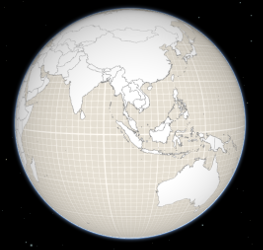\n\nThat can be changed by setting a color on the [surfaceColor](https://developers.arcgis.com/javascript/latest/references/core/Ground/#surfaceColor) property:\n\n```js\nmap.ground.surfaceColor = '#004c73';\n```\n\n\n\nIf the scene contains underground data, reduce the [opacity](https://developers.arcgis.com/javascript/latest/references/core/Ground/#opacity) of the ground to be able to see through the ground:\n\n```js\nmap.ground.opacity = 0.4;\n```\n\n[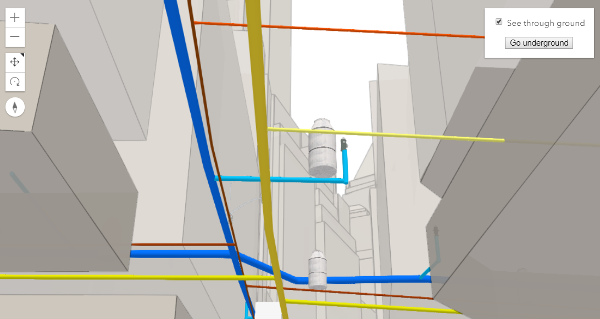](https://developers.arcgis.com/javascript/latest/sample-code/sceneview-underground/)"
|
|
11
|
+
},
|
|
12
|
+
"@arcgis.core.Map.Map": {
|
|
13
|
+
"description": "The Map class contains properties and methods for storing, managing, and overlaying [layers](https://developers.arcgis.com/javascript/latest/references/core/Map/#layers)\ncommon to both 2D and 3D viewing.\nLayers can be added and removed from the map, but are rendered via a\n[MapView](https://developers.arcgis.com/javascript/latest/references/core/views/MapView/) (for viewing data in 2D) or a\n[SceneView](https://developers.arcgis.com/javascript/latest/references/core/views/SceneView/) (for viewing data in 3D). Thus a map instance is a simple container\nthat holds the layers, while the [View](https://developers.arcgis.com/javascript/latest/references/core/views/View/) is the means of displaying and\ninteracting with a map's layers and basemap.\n\nA single map may be referenced by multiple views. [This sample](https://developers.arcgis.com/javascript/latest/sample-code/views-synchronize/)\nfor example, contains a single Map that is visible in two separate views - one in [2D](https://developers.arcgis.com/javascript/latest/references/core/views/MapView/)\nand the other in [3D](https://developers.arcgis.com/javascript/latest/references/core/views/SceneView/). Because one map may be accessed by multiple views\nin the same application, all user interaction with a map's layers is handled on the\n[View](https://developers.arcgis.com/javascript/latest/references/core/views/View/), not the Map.\n\nAn instance of Map is an essential component of the [MapView](https://developers.arcgis.com/javascript/latest/references/core/views/MapView/)\nand [SceneView](https://developers.arcgis.com/javascript/latest/references/core/views/SceneView/). A Map object should be created prior to a\nview so it can be passed into the `map` property of that view\n(e.g. [MapView.map](https://developers.arcgis.com/javascript/latest/references/core/views/MapView/#map), [SceneView.map](https://developers.arcgis.com/javascript/latest/references/core/views/SceneView/#map)).\n\n```js\n// Load the Map and MapView modules\nconst [Map, MapView] = await $arcgis.import([\"@arcgis/core/Map.js\", \"@arcgis/core/views/MapView.js\"]);\n// Create a Map instance\nconst myMap = new Map({\n basemap: \"streets-vector\"\n});\n// Create a MapView instance (for 2D viewing) and reference the map instance\nconst view = new MapView({\n map: myMap\n});\n```"
|
|
14
|
+
},
|
|
15
|
+
"@arcgis.core.PopupTemplate.PopupTemplate": {
|
|
16
|
+
"description": "A PopupTemplate formats and defines the content of a [Popup](https://developers.arcgis.com/javascript/latest/references/core/widgets/Popup/) for\na specific [Layer](https://developers.arcgis.com/javascript/latest/references/core/layers/Layer/) or [Graphic](https://developers.arcgis.com/javascript/latest/references/core/Graphic/). The user can also use\nthe PopupTemplate to access values from feature attributes and values returned\nfrom [Arcade](https://developers.arcgis.com/javascript/latest/arcade/) expressions when a feature in the\nview is selected.\n\nThe PopupTemplate contains [title](https://developers.arcgis.com/javascript/latest/references/core/PopupTemplate/#title) and [content](https://developers.arcgis.com/javascript/latest/references/core/PopupTemplate/#content) properties\nthat act as a template used to transform a feature's\n[Graphic.attributes](https://developers.arcgis.com/javascript/latest/references/core/Graphic/#attributes) into an HTML representation.\nThe syntax `{fieldName}` or `{expression/expressionName}` performs parameter\nsubstitution. The default behavior on a [Graphic](https://developers.arcgis.com/javascript/latest/references/core/Graphic/) is to show the\nview's Popup after a\nclick on the [Graphic](https://developers.arcgis.com/javascript/latest/references/core/Graphic/). A PopupTemplate is required for this\ndefault behavior.\n\nPopupTemplate also allows you to format the `Number` and `Date` field values and\noverride field aliases with\nthe [fieldInfos](https://developers.arcgis.com/javascript/latest/references/core/PopupTemplate/#fieldInfos) property. [actions](https://developers.arcgis.com/javascript/latest/references/core/PopupTemplate/#actions) may also be added\nto the template to give users\nthe ability to perform actions related to the feature, such as zooming to it or performing a Query based on\nthe feature's location or attributes.\n\n[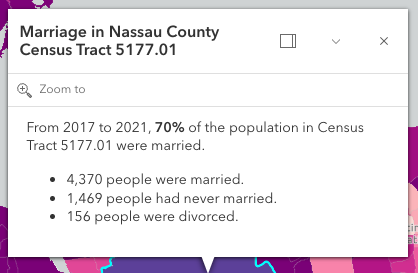](https://developers.arcgis.com/javascript/latest/sample-code/sandbox/?sample=intro-popuptemplate)\n\nIn the image above, the initial text **Marriage in Nassau County Census Tract 5177.01** is set in the [title](https://developers.arcgis.com/javascript/latest/references/core/PopupTemplate/#title)\nproperty of the PopupTemplate where `CENSUS_TRACT` is the name of the field containing census tract numbers.\n\n```\npopupTemplate.title = \"Marriage in {COUNTY} County {CENSUS_TRACT}\",\n```\n\nThe rest of the content is defined in the [content](https://developers.arcgis.com/javascript/latest/references/core/PopupTemplate/#content) property where\n`MARRIEDRATE`, `NEVMARR_CY`, `MARRIED_CY`, and `DIVORCD_CY` are all field names that contain\nvalues to be used in the popup.\n\n```\npopupTemplate.content = \"<p>From 2017 to 2021, <b>{MARRIEDRATE}%</b> of the\" +\n\" population in {CENSUS_TRACT} were married.</p>\" +\n\"<ul><li>{MARRIED_CY} people were married.</li>\" +\n\"<li>{NEVMARR_CY} people had never married.</li>\" +\n\"<li>{DIVORCD_CY} people were divorced.</li><ul>\";\n```\nThe above example demonstrates how to format the content directly with a custom\ntext string. This is one way to format the template, it is also possible to\nadd additional elements in the content such as `fields`, `media`, and `attachments`.\nThese elements can be added individually or combined. More information on working\nwith these various elements can be found in [content](https://developers.arcgis.com/javascript/latest/references/core/PopupTemplate/#content).\n\nPopupTemplates may also contain custom [actions](https://developers.arcgis.com/javascript/latest/references/core/PopupTemplate/#actions). When clicked, these actions execute custom code\ndefined by the developer. See the [actions](https://developers.arcgis.com/javascript/latest/references/core/PopupTemplate/#actions) property for more details."
|
|
17
|
+
},
|
|
18
|
+
"@arcgis.core.PopupTemplate.PopupTemplateProperties": {
|
|
19
|
+
"properties": {
|
|
20
|
+
"actions": {
|
|
21
|
+
"$ref": "#/definitions/ReadonlyArrayOrCollection<(ActionButtonProperties&{type:\"button\";})|(ActionToggleProperties&{type:\"toggle\";})>",
|
|
22
|
+
"description": "A [Collection](https://developers.arcgis.com/javascript/latest/references/core/core/Collection/) of [action](https://developers.arcgis.com/javascript/latest/references/core/support/actions/ActionButton/) or [action toggle](https://developers.arcgis.com/javascript/latest/references/core/support/actions/ActionToggle/) objects.\nEach object represents an action or function that may be executed by clicking the icon\nor image symbolizing them in the [Popup](https://developers.arcgis.com/javascript/latest/references/core/widgets/Popup/). By default, every\n[Popup](https://developers.arcgis.com/javascript/latest/references/core/widgets/Popup/) has a `zoom-to` action styled with a magnifying glass icon\n.\nWhen this icon is clicked, the view zooms in four LODs and centers on the selected feature.\n\nPopupTemplates do not have default actions. To override actions on the\n[Popup](https://developers.arcgis.com/javascript/latest/references/core/widgets/Popup/) using PopupTemplate see [overwriteActions](https://developers.arcgis.com/javascript/latest/references/core/PopupTemplate/#overwriteActions).\nActions defined in a PopupTemplate will only appear in the [Popup](https://developers.arcgis.com/javascript/latest/references/core/widgets/Popup/) for\nfeatures or layers that apply that particular PopupTemplate.\n\nThe order of each action in the popup is the same order in which they appear in\nthe actions [Collection](https://developers.arcgis.com/javascript/latest/references/core/core/Collection/).\n\nThe [Popup.@trigger-action](https://developers.arcgis.com/javascript/latest/references/core/widgets/Popup/#event-trigger-action) event in\n[Popup](https://developers.arcgis.com/javascript/latest/references/core/widgets/Popup/) fires each time an action in the popup is clicked.\nThis event should be used to execute custom code for each action clicked. For example, if you would\nlike to add a `zoom-out` action to the PopupTemplate that zooms the view out several LODs, you would\ndefine the zoom-out code in a separate function. Then you would call the custom `zoom-out` function\nin the [Popup.@trigger-action](https://developers.arcgis.com/javascript/latest/references/core/widgets/Popup/#event-trigger-action) event handler. See the sample code\nsnippet below for more details on how this works.\n\nActions are defined with the properties listed in the [ActionButton](https://developers.arcgis.com/javascript/latest/references/core/support/actions/ActionButton/) or [ActionToggle](https://developers.arcgis.com/javascript/latest/references/core/support/actions/ActionToggle/) class."
|
|
23
|
+
},
|
|
24
|
+
"content": {
|
|
25
|
+
"anyOf": [
|
|
26
|
+
{
|
|
27
|
+
"$ref": "#/definitions/HTMLElement"
|
|
28
|
+
},
|
|
29
|
+
{
|
|
30
|
+
"$ref": "#/definitions/@arcgis.core.widgets.Widget.Widget"
|
|
31
|
+
},
|
|
32
|
+
{
|
|
33
|
+
"items": {
|
|
34
|
+
"$ref": "#/definitions/@arcgis.core.popup.content.Content.ContentProperties"
|
|
35
|
+
},
|
|
36
|
+
"type": "array"
|
|
37
|
+
},
|
|
38
|
+
{
|
|
39
|
+
"$ref": "#/definitions/Promise"
|
|
40
|
+
},
|
|
41
|
+
{
|
|
42
|
+
"$ref": "#/definitions/__type"
|
|
43
|
+
},
|
|
44
|
+
{
|
|
45
|
+
"type": "string"
|
|
46
|
+
}
|
|
47
|
+
],
|
|
48
|
+
"description": "The template for defining and formatting a popup's content.\n\n* **String** - A popup's content can be a simple text or string value referencing field\n values or [Arcade](https://developers.arcgis.com/javascript/latest/arcade/) expressions. Expressions must be defined in\n the [expressionInfos](https://developers.arcgis.com/javascript/latest/references/core/PopupTemplate/#expressionInfos) property.\n* **Popup elements** - You can also display content as popup elements. There are various types of\n elements which can be used individually or combined. The order in which they are set determines\n how they display within the popup. See the items below describing each element.\n - **text** - A [text content element](https://developers.arcgis.com/javascript/latest/references/core/popup/content/TextContent/)\n that provides descriptive text as content.\n - **media** - A [media content element](https://developers.arcgis.com/javascript/latest/references/core/popup/content/MediaContent/)\n that is used to display media such as charts/images.\n - **fields** - A [fields content element](https://developers.arcgis.com/javascript/latest/references/core/popup/content/FieldsContent/).\n that contains the fields to display within the content. If this is not set\n directly within the `content` property, the popup will display whatever is set in the\n [fieldInfos](https://developers.arcgis.com/javascript/latest/references/core/PopupTemplate/#fieldInfos) property.\n - **attachments** - An [attachments content element](https://developers.arcgis.com/javascript/latest/references/core/popup/content/AttachmentsContent/)\n that contains attachments associated with the feature.\n - **expression** - An [expression content element](https://developers.arcgis.com/javascript/latest/references/core/popup/content/ExpressionContent/) that contains an [Arcade](https://developers.arcgis.com/javascript/latest/arcade/)\n expression evaluating to a dictionary representing a [TextContent](https://developers.arcgis.com/javascript/latest/references/core/popup/content/TextContent/),\n [FieldsContent](https://developers.arcgis.com/javascript/latest/references/core/popup/content/FieldsContent/), or a [MediaContent](https://developers.arcgis.com/javascript/latest/references/core/popup/content/MediaContent/) popup element as\n defined in the [Popup Element web map specification](https://developers.arcgis.com/web-map-specification/objects/popupElement/).\n - **relationship** - A [relationship content element](https://developers.arcgis.com/javascript/latest/references/core/popup/content/RelationshipContent/) associated with a feature.\n - **custom** - A [custom content element](https://developers.arcgis.com/javascript/latest/references/core/popup/content/CustomContent/)\n that contains custom content.\n* **promise** - The PopupTemplate's content may also be defined with a promise that resolves to any of the\n above-mentioned elements. This is useful for cases when you call a method or execute a query and want\n to display the results in the popup. Simply pass the promise to the popupTemplate's content and ensure\n that it resolves to a string or other popup element.\n* **function** - Content may be defined with a JavaScript function that returns any of the above-mentioned\n elements. This is useful when your popup requires additional processing or functionality than what is\n provided with the content types listed above. For example, assume that you would like to\n display charts using third-party JavaScript libraries or categorize information into separate tabs.\n In these cases, you can use a function that returns either a string, a reference to an\n HTML element, a popup element, or a promise.\n When the feature is clicked, the feature is passed as an argument to the function and provides\n access to the feature's graphic and attributes. Set the [outFields](https://developers.arcgis.com/javascript/latest/references/core/PopupTemplate/#outFields) property to\n specify any fields needed for rendering the popup and set the [returnGeometry](https://developers.arcgis.com/javascript/latest/references/core/PopupTemplate/#returnGeometry) property\n to `true` if needing access to the associated feature's geometry.\n The function then executes and returns a value to display in the popup template.\n\n> [!CAUTION]\n>\n> **Note:** Autocasting does not apply when creating content via a function or promise."
|
|
49
|
+
},
|
|
50
|
+
"expressionInfos": {
|
|
51
|
+
"description": "An array of objects or [ExpressionInfo[]](https://developers.arcgis.com/javascript/latest/references/core/popup/ExpressionInfo/) that reference\n[Arcade](https://developers.arcgis.com/javascript/latest/arcade/) expressions following\nthe specification defined by the [Arcade Popup Profile](https://developers.arcgis.com/javascript/latest/arcade/#popup).",
|
|
52
|
+
"items": {
|
|
53
|
+
"$ref": "#/definitions/@arcgis.core.popup.ExpressionInfo.ExpressionInfoProperties"
|
|
54
|
+
},
|
|
55
|
+
"type": "array"
|
|
56
|
+
},
|
|
57
|
+
"fieldInfos": {
|
|
58
|
+
"description": "An array of [FieldInfo](https://developers.arcgis.com/javascript/latest/references/core/popup/FieldInfo/) that defines how fields in the dataset\nor values from [Arcade](https://developers.arcgis.com/javascript/latest/arcade/) expressions participate\nin a popup. If no [FieldInfo](https://developers.arcgis.com/javascript/latest/references/core/popup/FieldInfo/) are specified, nothing will display since\nthe popup will only display the fields that are defined by this array.\nEach [FieldInfo](https://developers.arcgis.com/javascript/latest/references/core/popup/FieldInfo/) contains properties for a single field\nor expression. This property can be set directly within the PopupTemplate or\nwithin the [fields content element](https://developers.arcgis.com/javascript/latest/references/core/popup/content/FieldsContent/).\nIf this is not set within the [fields content element](https://developers.arcgis.com/javascript/latest/references/core/popup/content/FieldsContent/),\nit will default to whatever is specified directly within the `PopupTemplate.fieldInfos`.\n\n> [!WARNING]\n>\n> Use this `fieldInfos` property to display fields from related tables in chart or text elements.\n> `FieldInfos` set within the template's [fields content element](https://developers.arcgis.com/javascript/latest/references/core/popup/content/FieldsContent/) take precedence over the `PopupTemplate.fieldInfos`.\n\nThe image on the left is a result of using the first example snippet below, whereas the image on the right is a result of the second snippet.\n\n| **Content set using 'fields' type** | **Content referenced from fields set within fieldInfo** |\n| -------------------------- | --------------------------- |\n| 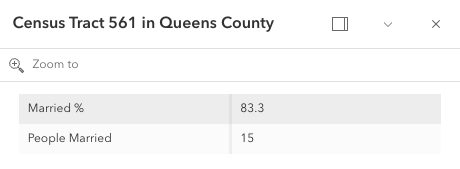 | 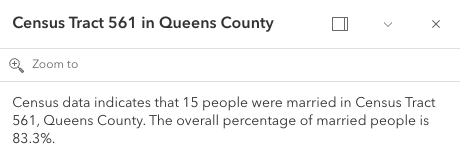 |",
|
|
59
|
+
"items": {
|
|
60
|
+
"$ref": "#/definitions/@arcgis.core.popup.FieldInfo.FieldInfoProperties"
|
|
61
|
+
},
|
|
62
|
+
"type": "array"
|
|
63
|
+
},
|
|
64
|
+
"lastEditInfoEnabled": {
|
|
65
|
+
"default": true,
|
|
66
|
+
"description": "Indicates whether or not editor tracking should display.\n\n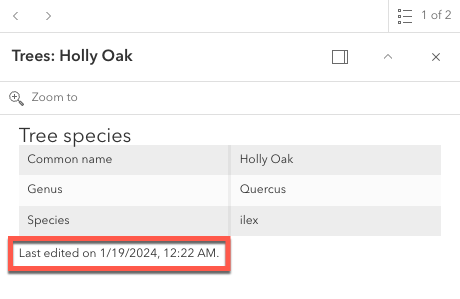",
|
|
67
|
+
"type": "boolean"
|
|
68
|
+
},
|
|
69
|
+
"layerOptions": {
|
|
70
|
+
"$ref": "#/definitions/@arcgis.core.popup.LayerOptions.LayerOptionsProperties",
|
|
71
|
+
"description": "Additional options that can be defined for the popup layer."
|
|
72
|
+
},
|
|
73
|
+
"outFields": {
|
|
74
|
+
"description": "An array of field names used in the PopupTemplate.\nUse this property to indicate what fields are required\nto fully render the PopupTemplate. This is important if setting\n[content](https://developers.arcgis.com/javascript/latest/references/core/PopupTemplate/#content) via a function since any fields needed for successful\nrendering should be specified here.\n\nGenerally speaking, it is good practice to always set this property\nwhen instantiating a new popup template.\n\nTo fetch the values from all fields, use `[\"*\"]`.\n\n> [!WARNING]\n>\n> This will not fetch fields from related tables. If related features\n> are needed, set this using [FieldInfo](https://developers.arcgis.com/javascript/latest/references/core/popup/FieldInfo/).",
|
|
75
|
+
"items": {
|
|
76
|
+
"type": "string"
|
|
77
|
+
},
|
|
78
|
+
"type": "array"
|
|
79
|
+
},
|
|
80
|
+
"overwriteActions": {
|
|
81
|
+
"default": false,
|
|
82
|
+
"description": "Indicates whether actions should replace existing [popup actions](https://developers.arcgis.com/javascript/latest/references/core/widgets/Popup/#actions).",
|
|
83
|
+
"type": "boolean"
|
|
84
|
+
},
|
|
85
|
+
"returnGeometry": {
|
|
86
|
+
"default": false,
|
|
87
|
+
"description": "Indicates whether to include the feature's geometry for use by the template. This\nproperty should be set to `true` if needing to access the popup's selected feature's geometry.\nAccess the geometry via the returned graphic from the popup's\n[Popup.selectedFeatureWidget](https://developers.arcgis.com/javascript/latest/references/core/widgets/Popup/#selectedFeatureWidget).\nThis is needed since the geometry is not automatically queried and returned in the popup's selected feature.\n\nIf the feature layer does not specify its\n[FeatureLayer.outFields](https://developers.arcgis.com/javascript/latest/references/core/layers/FeatureLayer/#outFields) and the\ntemplate's [outFields](https://developers.arcgis.com/javascript/latest/references/core/PopupTemplate/#outFields) isn't set, the returned popup's geometry is only returned if\n`returnGeometry` is set to `true`.\nThis also applies when working with [WebMaps](https://developers.arcgis.com/javascript/latest/references/core/WebMap/).",
|
|
88
|
+
"type": "boolean"
|
|
89
|
+
},
|
|
90
|
+
"title": {
|
|
91
|
+
"$ref": "#/definitions/PopupTemplateTitle",
|
|
92
|
+
"default": "",
|
|
93
|
+
"description": "The template for defining how to format the title used in a popup.\nYou can format the title by specifying either a string value or a JavaScript function\nthat returns a simple string or a promise (since 4.15) that resolves to a string.\n\nIf using a function, the defined content returns a string value. When the feature is clicked,\nthe feature is passed as an argument to the function and provides\naccess to the feature's graphic and attributes. The function then executes and returns\na value to display in the popup template's title."
|
|
94
|
+
}
|
|
95
|
+
},
|
|
96
|
+
"type": "object"
|
|
97
|
+
},
|
|
98
|
+
"@arcgis.core.Viewpoint.Viewpoint": {
|
|
99
|
+
"description": "Describes a point of view for a 2D or 3D view. In a 2D view, the viewpoint is\ndetermined using a center point and scale value. In a 3D view, it is determined\nusing a [Camera](https://developers.arcgis.com/javascript/latest/references/core/Camera/) position. The Viewpoint can be\nbookmarked for later use, or used for navigation purposes."
|
|
100
|
+
},
|
|
101
|
+
"@arcgis.core.core.Collection.Collection": {
|
|
102
|
+
"description": "Collection stores an array of items of the same type.\nIt provides useful utility methods for working with items in the Collection, including\n[filter()](https://developers.arcgis.com/javascript/latest/references/core/core/Collection/#filter), [find()](https://developers.arcgis.com/javascript/latest/references/core/core/Collection/#find), and [reduce()](https://developers.arcgis.com/javascript/latest/references/core/core/Collection/#reduce).\n\nA Collection can be of any type. For example, [GraphicsLayer.graphics](https://developers.arcgis.com/javascript/latest/references/core/layers/GraphicsLayer/#graphics)\nis a collection of graphics that are stored in the GraphicsLayer. You can use the methods found in the Collection class\nto add, remove, re-order, or manipulate graphics in a GraphicsLayer.\n\nAnother example of a Collection is [Map.layers](https://developers.arcgis.com/javascript/latest/references/core/Map/#layers), which is a Collection of operational layers included in\nthe [Map](https://developers.arcgis.com/javascript/latest/references/core/Map/).\n\n```js\n// Removes a layer from the map using Collection.remove();\nmap.layers.remove(layer);\n```\n\nThe [change event](https://developers.arcgis.com/javascript/latest/references/core/core/Collection/#event-change) fires each time an item is [added](https://developers.arcgis.com/javascript/latest/references/core/core/Collection/#add), [moved](https://developers.arcgis.com/javascript/latest/references/core/core/Collection/#reorder), or [removed](https://developers.arcgis.com/javascript/latest/references/core/core/Collection/#remove)\nfrom the Collection.\n\nAs of version 4.18, you can iterate through the items of a Collection using [for...of](https://developer.mozilla.org/en-US/docs/Web/JavaScript/Reference/Statements/for...of).\n\n```js\n// a collection of graphics displayed in the view\nconst graphics = view.graphics;\n\nfor (const graphic of graphics){\n // do something with each view graphic\n}\n```\nAs of version 4.23, [reactiveUtils](https://developers.arcgis.com/javascript/latest/references/core/core/reactiveUtils/) can be utilized to watch for property changes on items in a Collection.\n\n```js\n// reactiveUtils watch method can be used to watch the visible\n// property of each layer within the map.allLayer's collection\nconst handle = reactiveUtils.watch(\n () => view.map.allLayers.every((layer) => layer.visible),\n (allVisible) => {\n console.log(`All layers are visible = ${allVisible}`);\n }\n);\n```"
|
|
103
|
+
},
|
|
104
|
+
"@arcgis.core.core.Collection.ReadonlyCollection": {},
|
|
105
|
+
"@arcgis.core.core.Error.Error": {
|
|
106
|
+
"description": "Error is a class that enhances the debugging and error handling process. Rather than returning a generic\n[JavaScript error](https://developer.mozilla.org/en-US/docs/Web/JavaScript/Reference/Global_Objects/Error),\nthis Error returns a standardized error object with several properties. The error class can be useful\nin many scenarios, such as working with promises, the [esriRequest](https://developers.arcgis.com/javascript/latest/references/core/request/) module, and many different layers and widgets."
|
|
107
|
+
},
|
|
108
|
+
"@arcgis.core.editing.sharedTemplates.SharedTemplateMetadata.SharedTemplateMetadata": {
|
|
109
|
+
"description": "The `SharedTemplateMetadata` class represents a minimal set of\ninformation about a shared template. This is the information from\nthe the [`sharedTemplates/query` endpoint](https://developers.arcgis.com/rest/services-reference/enterprise/query-shared-templates/) of a feature service. By contrast, the [SharedTemplate](https://developers.arcgis.com/javascript/latest/references/core/editing/sharedTemplates/SharedTemplate/) class represents full information about a shared template, which is a larger payload obtained from the\n[`sharedTemplates/templates`\nendpoint](https://developers.arcgis.com/rest/services-reference/enterprise/fs-template/).\nUse the `SharedTemplateMetadata` class when you\nneed only minimal information about many shared templates, such as when\npopulating a gallery or picker interface. Use the [SharedTemplate](https://developers.arcgis.com/javascript/latest/references/core/editing/sharedTemplates/SharedTemplate/) class when\nyou need full information about a specific template, such as when a\nparticular template has been selected for use in a feature creation workflow."
|
|
110
|
+
},
|
|
111
|
+
"@arcgis.core.geometry.Extent.Extent": {
|
|
112
|
+
"description": "The minimum and maximum X and Y coordinates of a bounding box. Extent is used\nto describe the visible portion of a [MapView](https://developers.arcgis.com/javascript/latest/references/core/views/MapView/).\nWhen working in a [SceneView](https://developers.arcgis.com/javascript/latest/references/core/views/SceneView/), [Camera](https://developers.arcgis.com/javascript/latest/references/core/Camera/)\nis used to define the visible part of the map within the view."
|
|
113
|
+
},
|
|
114
|
+
"@arcgis.core.geometry.Extent.ExtentProperties": {
|
|
115
|
+
"properties": {
|
|
116
|
+
"hasM": {
|
|
117
|
+
"default": false,
|
|
118
|
+
"description": "Indicates if the geometry has M values.",
|
|
119
|
+
"type": "boolean"
|
|
120
|
+
},
|
|
121
|
+
"hasZ": {
|
|
122
|
+
"default": false,
|
|
123
|
+
"description": "Indicates if the geometry has z-values (elevation).\n\n> [!WARNING]\n>\n> **Z-values** defined in a geographic or metric coordinate system are\n> expressed in meters. However, in local scenes that use a\n> projected coordinate system, vertical units are assumed to be the same as the\n> horizontal units specified by the service.",
|
|
124
|
+
"type": "boolean"
|
|
125
|
+
},
|
|
126
|
+
"mmax": {
|
|
127
|
+
"description": "The maximum possible `m` value in an extent envelope.",
|
|
128
|
+
"type": "number"
|
|
129
|
+
},
|
|
130
|
+
"mmin": {
|
|
131
|
+
"description": "The minimum possible `m` value of an extent envelope.",
|
|
132
|
+
"type": "number"
|
|
133
|
+
},
|
|
134
|
+
"spatialReference": {
|
|
135
|
+
"$ref": "#/definitions/@arcgis.core.geometry.SpatialReference.SpatialReferenceProperties",
|
|
136
|
+
"description": "The spatial reference of the geometry."
|
|
137
|
+
},
|
|
138
|
+
"xmax": {
|
|
139
|
+
"default": 0,
|
|
140
|
+
"description": "The maximum X-coordinate of an extent envelope.",
|
|
141
|
+
"type": "number"
|
|
142
|
+
},
|
|
143
|
+
"xmin": {
|
|
144
|
+
"default": 0,
|
|
145
|
+
"description": "The minimum X-coordinate of an extent envelope.",
|
|
146
|
+
"type": "number"
|
|
147
|
+
},
|
|
148
|
+
"ymax": {
|
|
149
|
+
"default": 0,
|
|
150
|
+
"description": "The maximum Y-coordinate of an extent envelope.",
|
|
151
|
+
"type": "number"
|
|
152
|
+
},
|
|
153
|
+
"ymin": {
|
|
154
|
+
"default": 0,
|
|
155
|
+
"description": "The minimum Y-coordinate of an extent envelope.",
|
|
156
|
+
"type": "number"
|
|
157
|
+
},
|
|
158
|
+
"zmax": {
|
|
159
|
+
"description": "The maximum possible `z`, or elevation, value in an extent envelope.\n\n> [!WARNING]\n>\n> **Z-values** defined in a geographic or metric coordinate system are\n> expressed in meters. However, in local scenes that use a\n> projected coordinate system, vertical units are assumed to be the same as the\n> horizontal units specified by the service.",
|
|
160
|
+
"type": "number"
|
|
161
|
+
},
|
|
162
|
+
"zmin": {
|
|
163
|
+
"description": "The minimum possible `z`, or elevation, value of an extent envelope.\n\n> [!WARNING]\n>\n> **Z-values** defined in a geographic or metric coordinate system are\n> expressed in meters. However, in local scenes that use a\n> projected coordinate system, vertical units are assumed to be the same as the\n> horizontal units specified by the service.",
|
|
164
|
+
"type": "number"
|
|
165
|
+
}
|
|
166
|
+
},
|
|
167
|
+
"type": "object"
|
|
168
|
+
},
|
|
169
|
+
"@arcgis.core.geometry.Mesh.Mesh": {
|
|
170
|
+
"description": "A mesh is a general, client-side 3D [Geometry](https://developers.arcgis.com/javascript/latest/references/core/geometry/Geometry/) type\ncomposed of [vertices with attributes](https://developers.arcgis.com/javascript/latest/references/core/geometry/Mesh/#vertexAttributes). The vertices include\ngeographic position, normals that affect lighting/shading and UV coordinates that\ncan be used to map images to the mesh. Vertices are combined into 3D primitives\nto render the mesh in the scene (only triangle primitives are currently supported).\n\nMesh geometries can have an intrinsic material that determines how it is being\ndisplayed. Similar to 3D objects in scene layers, mesh geometries are symbolized with a\n[MeshSymbol3D](https://developers.arcgis.com/javascript/latest/references/core/symbols/MeshSymbol3D/) symbol containing a\n[FillSymbol3DLayer](https://developers.arcgis.com/javascript/latest/references/core/symbols/FillSymbol3DLayer/).\n\nTo support multiple materials (as is often the case for complex 3D models), meshes\nmay define [components](https://developers.arcgis.com/javascript/latest/references/core/geometry/Mesh/#components) that define a material for a specific region\nin the mesh. In addition to supporting multiple materials, components can also\nreuse vertices that would otherwise be duplicated to form triangles.\n\nMeshes are loadable since 4.27. In particular when meshes come from remote services like\nthrough [SceneLayer.queryFeatures()](https://developers.arcgis.com/javascript/latest/references/core/layers/SceneLayer/#queryFeatures), then\nthe contents of the mesh needs to be loaded asynchronously through the\n[load()](https://developers.arcgis.com/javascript/latest/references/core/geometry/Mesh/#load) method before\n[vertexAttributes](https://developers.arcgis.com/javascript/latest/references/core/geometry/Mesh/#vertexAttributes),\n[extent](https://developers.arcgis.com/javascript/latest/references/core/geometry/Mesh/#extent),\n[components](https://developers.arcgis.com/javascript/latest/references/core/geometry/Mesh/#components), etc. are available.\n\nMeshes represent fully georeferenced 3D geometry and care needs to be taken when importing mesh data.\n<details>\n<summary>Read More</summary>\n\nIt is typical for modern 3D GIS workflows that 3D geometry data be represented by 3D models, which can be stored in different file formats like glTF, OBJ, FBX, IFC, etc. These models can come from different sources, such as 3D modeling software like SketchUp or Blender, CAD software like Revit, or even custom mesh generation code.\n\nWhile some of the software may work in a georeferenced space and some of the file formats, such as IFC, may be georeferenced, much of the software and most of the model file formats are not georeferenced. This presents the challenge of expressing different georeferencing scenarios while maintaining a fast and efficient experience when displaying and editing 3D model content. In the Maps SDK we strive to strike a good balance between allowing our users to work with different scenarios while preventing situations in which good display and editing experience cannot be provided.\n\n<span id=\"mesh-api\"></span>\n## Mesh API\n\nThe entry point for representing 3D models in the Maps SDK is the [Mesh](https://developers.arcgis.com/javascript/latest/references/core/geometry/Mesh/). We refer to the API reference for details on mesh [components](https://developers.arcgis.com/javascript/latest/references/core/geometry/Mesh/#components), [MeshComponent.material](https://developers.arcgis.com/javascript/latest/references/core/geometry/support/MeshComponent/#material) and how to create meshes. This guide is concerned with georeferencing meshes.\n\nA mesh represents a georeferenced 3D model in the Maps SDK. In order to fully georeference meshes three things are needed:\n1. Spatial reference\n2. Location of the mesh in that spatial reference. We call this the origin.\n3. The coordinate system in which mesh vertices are provided. We call it the vertex space.\n\nGiven these three things, meshes can be fully georeferenced. However, for certain configurations of spatial reference, mesh vertex space and viewing mode, costly projection may be required. Because that would greatly affect display and editing performance, we decided to not display or allow editing in those cases. Please see the [limitations](https://developers.arcgis.com/javascript/latest/references/core/geometry/Mesh/#limitations) section for an overview of these restrictions.\n\nThe [spatial reference](https://developers.arcgis.com/javascript/latest/references/core/geometry/SpatialReference/) of the mesh is provided with its construction. When using one of the create functions, such as\n[createFromGLTF()](https://developers.arcgis.com/javascript/latest/references/core/geometry/Mesh/#createFromGLTF), the spatial reference will be taken from the provided location.\n\n### Mesh vertex spaces\n\nThe origin and spatial reference of a mesh provide georeferencing, but only for the origin. A mesh is composed of vertices, and they may exist in different coordinate systems depending on the data source. Hence, to fully georeference the mesh, it's crucial to define the coordinate system associated with the mesh vertices. The [mesh vertex space property](https://developers.arcgis.com/javascript/latest/references/core/geometry/Mesh/#vertexSpace) was introduced to address this need. This property specifies the meaning of the mesh vertex coordinates, ensuring that the entire mesh can be correctly georeferenced.\n\n#### Mesh local vertex space\n\nMost popular 3D model formats, such as glTF, are not georeferenced and represent the mesh vertex coordinates in a plain **local cartesian** space with some length unit (e.g. `meters` for glTF). The coordinate (0,0,0) is the origin. We call this coordinate system \"local\" and represent it using the [MeshLocalVertexSpace](https://developers.arcgis.com/javascript/latest/references/core/geometry/support/MeshLocalVertexSpace/). The units in this vertex space are always \"meters\".\n\n<img src=\"https://developers.arcgis.com/javascript/latest/assets/references/core/geometry/mesh-local-vertex-space.png\" style=\"width:300px;\"/>\n\n*local vertex space*\n\nGeoreferencing local coordinates is done by \"putting them on the map\" using a georeferenced cartesian reference frame. This frame is found by using the [local tangent plane](https://en.wikipedia.org/wiki/Local_tangent_plane_coordinates) at the georeferenced origin of the mesh. When the spatial reference uses a geographic coordinate system (GCS) or Web Mercator, the tangent plane is aligned such that the local Y tangent vector is always pointing to the north pole resulting in the east, north, up (ENU) frame.\n\nCurrently we use the tangent plane of the sphere even for ellipsoidal geographic coordinate systems. This is a simplification we use as we render on a perfect sphere in global viewing mode.\n\n<img src=\"https://developers.arcgis.com/javascript/latest/assets/references/core/geometry/mesh-local-vertex-space-on-GCS-or-WM.png\" style=\"width:300px;\"/>\n\n*local vertex space on GCS or Web Mercator (ENU)*\n\nA [local vertex space](https://developers.arcgis.com/javascript/latest/references/core/geometry/support/MeshLocalVertexSpace/) with a spatial reference which is a GCS or Web Mercator is efficient to work with as the tangent plane is easy to find and we can simply move the vertices to its georeferenced location using efficient linear transformations. This comes at the cost of an approximation error between the tangent plane and the actual surface. Consequently for larger models, this error increases while it decreases as the models get smaller.\n\nThere is an important element to consider when a mesh is created with a [local vertex space](https://developers.arcgis.com/javascript/latest/references/core/geometry/support/MeshLocalVertexSpace/) (e.g. by creating it from a glTF) and displayed in local viewing mode where a projected coordinate system (PCS) is used:\n\nThe projection introduces a warping and distortion of the space in order to allow mapping of surface coordinates to a plane. This produces a mismatch between the linear coordinates of the local vertex space and the warped, non-linear coordinates of the underlying spatial reference. While steps along a line in the local vertex space are of same length, steps along a line in the underlying spatial reference are not. This means that measuring the same line in local space and the underlying spatial reference will produce different measurements. This difference further depends on the origin location of the mesh. It is important to realize that this scenario cannot be used when correct georeferencing is required.\n\n#### Mesh georeferenced vertex spaces\n\nThe [georeferenced vertex space](https://developers.arcgis.com/javascript/latest/references/core/geometry/support/MeshGeoreferencedVertexSpace/) indicates that mesh vertices are already projected and that their coordinates are in the spatial reference of the mesh. If an [MeshGeoreferencedVertexSpace.origin](https://developers.arcgis.com/javascript/latest/references/core/geometry/support/MeshGeoreferencedVertexSpace/#origin) is provided, those vertex coordinates are interpreted as offsets relative to the origin. Otherwise, the coordinates are interpreted as absolute.\n\n<img src=\"https://developers.arcgis.com/javascript/latest/assets/references/core/geometry/mesh-georeferenced-vertex-space-on-PCS.png\" style=\"width:300px;\"/>\n\n*georeferenced vertex space on PCS*\n\nDisplay and editing are efficient for meshes with a georeferenced vertex space and when the spatial reference is a projected coordinate system and matches the spatial reference of the view. This is because in those cases, manipulations like moving a mesh can be expressed as linear transformations.\n\n## The effect of viewing modes\n\nWe will not display or allow edits for configurations where efficient display or editing is not possible due to costly reprojections being required. It is important to realize that the [SceneView.viewingMode](https://developers.arcgis.com/javascript/latest/references/core/views/SceneView/#viewingMode) defines the spatial reference in which the data is displayed and hence has a direct effect on which vertex space and spatial reference combination of meshes can be done efficiently. This means that, depending on the viewing mode, display and editing of meshes with certain combinations of vertex space and spatial reference are not supported. See [limitations](https://developers.arcgis.com/javascript/latest/references/core/geometry/Mesh/#limitations) for an overview.\n\nWe established that for mesh spatial references which use a geographic coordinate system (or Web Mercator) and a local vertex space, display and editing can be done efficiently. That is true for `\"global\"` viewing mode, where the view uses a geographic coordinate system (or Web Mercator) for display.\n\nMeshes with a georeferenced vertex space and a spatial reference using a projected coordinate system (PCS) can be displayed and edited efficiently in a view using the `\"local\"` viewing mode and when the view has the same spatial reference as the mesh.\n\n## Web Mercator\n\nWeb Mercator is a spatial reference with a projected coordinate system and the de facto standard for web mapping applications. This is due to its suitability for efficient map tiling. Even though it uses a projected coordinate system, we still support using Web Mercator in global viewing mode. This is because of its importance for web mapping and also because projecting Web Mercator on the globe cancels out the strong distortions near the poles. It is the only PCS based spatial reference we support in global viewing mode.\n\nWeb Mercator support for global viewing mode naturally extends to supporting efficient display and editing for meshes with a Web Mercator spatial reference and a local vertex space, even though it is based on a projected coordinate system. Since Web Mercator is a spatial reference based on a PCS, we also support efficient display and editing for Web Mercator with meshes using a georeferenced vertex space. Web Mercator is the only exception to the rule of only meshes with a spatial reference with a geographic coordinate system can be supported in global viewing mode.\n\n<span id=\"limitations\"></span>\n## Limitations\n\n- See [Scene Layers](https://developers.arcgis.com/javascript/latest/references/core/layers/SceneLayer/) in regards to limitations on display and editing for mesh features.\n\n## Troubleshooting mesh georeferencing\n\nIf meshes are not being displayed, then chances are that this is due to a configuration which the API does not support for display and editing.\n\n- First check the [SceneView.viewingMode](https://developers.arcgis.com/javascript/latest/references/core/views/SceneView/#viewingMode), [spatial reference](https://developers.arcgis.com/javascript/latest/references/core/geometry/Mesh/#spatialReference) and [vertex space](https://developers.arcgis.com/javascript/latest/references/core/geometry/Mesh/#vertexSpace) of the problematic mesh and consult the console of the JavaScript debugger. If the API rejects display of meshes, a warning message is printed.\n- If it is determined that an unsupported configuration is used, consider switching the [SceneView.viewingMode](https://developers.arcgis.com/javascript/latest/references/core/views/SceneView/#viewingMode) in your application.\n- If there is no other option, consider changing the data by switching to a supported spatial reference for the required [SceneView.viewingMode](https://developers.arcgis.com/javascript/latest/references/core/views/SceneView/#viewingMode) or by converting the mesh vertex data between local and georeferenced vertex space.\n- If meshes are displayed wrongly, then this could also be due to the vertex space not being correct. If applications export geometry with georeferenced coordinates as OBJ file for example, then one would need to use the `\"georeferenced\"` vertex space.\n\n</details>\n\n## Create simple mesh geometry primitives\n\nThe mesh geometry class has a number of convenience functions to create simple\nprimitive shapes. These shapes can help you get started with understanding\nmesh geometries.\n\n```js\n// Create a box mesh geometry\nlet mesh = Mesh.createBox(location, {\n size: {\n width: 100,\n height: 50,\n depth: 50\n },\n material: {\n color: \"red\"\n }\n});\n\n// Create a graphic and add it to the view\nlet graphic = new Graphic({\n geometry: mesh,\n symbol: {\n type: \"mesh-3d\",\n symbolLayers: [ { type: \"fill\" } ]\n }\n});\n\nview.graphics.add(graphic);\n```\n\n## Create mesh geometries manually\n\nMesh geometries can be manually created by specifying [vertexAttributes](https://developers.arcgis.com/javascript/latest/references/core/geometry/Mesh/#vertexAttributes) and\n[components](https://developers.arcgis.com/javascript/latest/references/core/geometry/Mesh/#components) like in the following example:\n\n```js\n// Create a mesh geometry representing a pyramid\nlet pyramidMesh = new Mesh({\n vertexAttributes: {\n // vertex positions for the Louvre pyramid, Paris\n position: [\n // vertex 0 - base of the pyramid, south\n 2.336006, 48.860818, 0,\n\n // vertex 1 - base of the pyramid, east\n 2.336172, 48.861114, 0,\n\n // vertex 2 - base of the pyramid, north\n 2.335724, 48.861229, 0,\n\n // vertex 3 - base of the pyramid, west\n 2.335563, 48.860922, 0,\n\n // vertex 4 - top of the pyramid\n 2.335896, 48.861024, 21\n ]\n },\n // Add a single component with faces that index the vertices\n // so we only need to define them once\n components: [\n {\n faces: [\n 0, 4, 3,\n 0, 1, 4,\n 1, 2, 4,\n 2, 3, 4\n ]\n }\n ],\n // specify a spatial reference if the position of the vertices is not in WGS84\n});\n\n// add the mesh geometry to a graphic\nlet graphic = new Graphic({\n geometry: pyramidMesh,\n symbol: {\n type: \"mesh-3d\",\n symbolLayers: [ { type: \"fill\" } ]\n }\n});\n\nview.graphics.add(graphic);\n```\n\n**Note:** Starting with version 4.11 autocasting is no longer supported for Mesh geometry."
|
|
171
|
+
},
|
|
172
|
+
"@arcgis.core.geometry.Multipoint.Multipoint": {
|
|
173
|
+
"description": "An ordered collection of points.\n\n> [!WARNING]\n>\n> **Known Limitations**\n>\n> There is currently no support for rendering multipoint geometries in scenes (3D)."
|
|
174
|
+
},
|
|
175
|
+
"@arcgis.core.geometry.Point.Point": {
|
|
176
|
+
"description": "A location defined by X, Y, and Z coordinates.\n\n> [!WARNING]\n>\n> **Z-values** defined in a geographic or metric coordinate system are\n> expressed in meters. However, in local scenes that use a\n> projected coordinate system, vertical units are assumed to be the same as the\n> horizontal units specified by the service."
|
|
177
|
+
},
|
|
178
|
+
"@arcgis.core.geometry.Polygon.Polygon": {
|
|
179
|
+
"description": "A polygon contains an array of [rings](https://developers.arcgis.com/javascript/latest/references/core/geometry/Polygon/#rings) and a [spatialReference](https://developers.arcgis.com/javascript/latest/references/core/geometry/Polygon/#spatialReference).\nEach ring is represented as an array of points. The first and last points of a ring must be the same.\nA polygon also has boolean-valued [hasM](https://developers.arcgis.com/javascript/latest/references/core/geometry/Polygon/#hasM) and [hasZ](https://developers.arcgis.com/javascript/latest/references/core/geometry/Polygon/#hasZ) fields.\n\n> [!WARNING]\n>\n> **Known Limitations**\n>\n> The polygon geometries must be simple when added to the following layers:\n> * [View.graphics](https://developers.arcgis.com/javascript/latest/references/core/views/View/#graphics)\n> * [GraphicsLayer](https://developers.arcgis.com/javascript/latest/references/core/layers/GraphicsLayer/)\n> * Feature collections added through [FeatureLayer.source](https://developers.arcgis.com/javascript/latest/references/core/layers/FeatureLayer/#source)\n>\n> Polygon geometries can be inspected and simplified before they are added to those layers.\n> Use the [simplifyOperator](https://developers.arcgis.com/javascript/latest/references/core/geometry/operators/simplifyOperator/)\n> to make sure that polygons display correctly on the client-side."
|
|
180
|
+
},
|
|
181
|
+
"@arcgis.core.geometry.Polyline.Polyline": {
|
|
182
|
+
"description": "A polyline contains an array of [paths](https://developers.arcgis.com/javascript/latest/references/core/geometry/Polyline/#paths) and [spatialReference](https://developers.arcgis.com/javascript/latest/references/core/geometry/Polyline/#spatialReference).\nEach path is represented as an array of points. A polyline also has boolean-valued\n[hasM](https://developers.arcgis.com/javascript/latest/references/core/geometry/Polyline/#hasM) and [hasZ](https://developers.arcgis.com/javascript/latest/references/core/geometry/Polyline/#hasZ) properties."
|
|
183
|
+
},
|
|
184
|
+
"@arcgis.core.geometry.SpatialReference.SpatialReference": {
|
|
185
|
+
"description": "Defines the spatial reference of a view, layer, or method parameters.\nThis indicates the projected or geographic coordinate system used to locate geographic features in the map.\nEach projected and geographic coordinate system is defined by either a\nwell-known ID [(WKID)](https://developers.arcgis.com/javascript/latest/references/core/geometry/SpatialReference/#wkid) or a definition string [(WKT)](https://developers.arcgis.com/javascript/latest/references/core/geometry/SpatialReference/#wkt). Note that for versions prior to ArcGIS 10, only [wkid](https://developers.arcgis.com/javascript/latest/references/core/geometry/SpatialReference/#wkid) was supported.\nFor a full list of supported spatial reference IDs and their corresponding definition strings, see\n[Using spatial references](https://developers.arcgis.com/rest/services-reference/enterprise/using-spatial-references.htm)."
|
|
186
|
+
},
|
|
187
|
+
"@arcgis.core.geometry.SpatialReference.SpatialReferenceProperties": {
|
|
188
|
+
"properties": {
|
|
189
|
+
"falseM": {
|
|
190
|
+
"description": "The false origin of coordinate M values. The default is determined by the spatial reference.",
|
|
191
|
+
"type": "number"
|
|
192
|
+
},
|
|
193
|
+
"falseX": {
|
|
194
|
+
"description": "The false origin of coordinate X values. The default is determined by the spatial reference.",
|
|
195
|
+
"type": "number"
|
|
196
|
+
},
|
|
197
|
+
"falseY": {
|
|
198
|
+
"description": "The false origin of coordinate Y values. The default is determined by the spatial reference.",
|
|
199
|
+
"type": "number"
|
|
200
|
+
},
|
|
201
|
+
"falseZ": {
|
|
202
|
+
"description": "The false origin of coordinate Z values. The default is determined by the spatial reference.",
|
|
203
|
+
"type": "number"
|
|
204
|
+
},
|
|
205
|
+
"imageCoordinateSystem": {
|
|
206
|
+
"description": "An [image coordinate system](https://developers.arcgis.com/rest/services-reference/raster-ics.htm) defines the\nspatial reference used to display the image in its original coordinates\nwithout distortion, map transformations or ortho-rectification. Typically, [ImageryLayer](https://developers.arcgis.com/javascript/latest/references/core/layers/ImageryLayer/)\nis displayed in the [MapView.spatialReference](https://developers.arcgis.com/javascript/latest/references/core/views/MapView/#spatialReference) of the view.\nIn some cases, converting images into map coordinates can cause your images to look skewed or distorted because\nof the various transformations and terrain corrections that are used.\nSince there is no distortion with images in the image coordinate system, it is ideal for using with oblique imagery\nand mensuration.\n\nThe image can be displayed in its original coordinates only in 2D [MapView](https://developers.arcgis.com/javascript/latest/references/core/views/MapView/) with a\n`top-up`rotation which is always oriented in the look of direction of the dataset. This works similarly to an in-car navigation\nsystem where the choices are often either north is at the top of the screen (therefore, not using a top up option) or\nthe screen rotates so the travel direction is always displayed at the top."
|
|
207
|
+
},
|
|
208
|
+
"latestVcsWkid": {
|
|
209
|
+
"description": "The latest vertical coordinate system well-known ID of the spatial reference.",
|
|
210
|
+
"type": "number"
|
|
211
|
+
},
|
|
212
|
+
"latestWkid": {
|
|
213
|
+
"description": "The latest well-known ID of the spatial reference.",
|
|
214
|
+
"type": "number"
|
|
215
|
+
},
|
|
216
|
+
"mTolerance": {
|
|
217
|
+
"description": "The tolerance value reflects the accuracy of coordinates.\nIf one coordinate is within the tolerance value of another, they are interpreted as being at the same location.\nThis value is used in relational and topological operations when determining whether two points are close enough to be given the same coordinate value or they are far enough apart to each have their own coordinate value.\nThe default tolerance is set to 0.001 meters or its equivalent in map units.",
|
|
218
|
+
"type": "number"
|
|
219
|
+
},
|
|
220
|
+
"mUnits": {
|
|
221
|
+
"description": "The number of distinct values that can be represented per one unit of floating point coordinates.\nThe resolution for M is 1/mUnits. The default resolution is set to 0.0001 meters or its equivalent in map units.",
|
|
222
|
+
"type": "number"
|
|
223
|
+
},
|
|
224
|
+
"vcsWkid": {
|
|
225
|
+
"description": "The vertical coordinate system well-known ID of the spatial reference.",
|
|
226
|
+
"type": "number"
|
|
227
|
+
},
|
|
228
|
+
"wkid": {
|
|
229
|
+
"description": "The well-known ID of a spatial reference.\nSee [Using spatial references](https://developers.arcgis.com/rest/services-reference/enterprise/using-spatial-references.htm)\nfor a list of supported spatial references.",
|
|
230
|
+
"type": "number"
|
|
231
|
+
},
|
|
232
|
+
"wkt": {
|
|
233
|
+
"description": "The well-known text that defines a spatial reference.",
|
|
234
|
+
"type": "string"
|
|
235
|
+
},
|
|
236
|
+
"wkt2": {
|
|
237
|
+
"description": "The well-known text of the coordinate system as defined by OGC standard for well-known text strings.",
|
|
238
|
+
"type": "string"
|
|
239
|
+
},
|
|
240
|
+
"xyTolerance": {
|
|
241
|
+
"description": "The tolerance value reflects the accuracy of coordinates.\nIf one coordinate is within the tolerance value of another, they are interpreted as being at the same location.\nThis value is used in relational and topological operations when determining whether two points are close enough to be given the same coordinate value or they are far enough apart to each have their own coordinate value.\nThe default tolerance is set to 0.001 meters or its equivalent in map units.",
|
|
242
|
+
"type": "number"
|
|
243
|
+
},
|
|
244
|
+
"xyUnits": {
|
|
245
|
+
"description": "The number of distinct values that can be represented per one unit of floating point coordinates.\nThe resolution for X and Y is 1/xyUnits. The default resolution is set to 0.0001 meters or its equivalent in map units.",
|
|
246
|
+
"type": "number"
|
|
247
|
+
},
|
|
248
|
+
"zTolerance": {
|
|
249
|
+
"description": "The tolerance value reflects the accuracy of coordinates.\nIf one coordinate is within the tolerance value of another, they are interpreted as being at the same location.\nThis value is used in relational and topological operations when determining whether two points are close enough to be given the same coordinate value or they are far enough apart to each have their own coordinate value.\nThe default tolerance is set to 0.001 meters or its equivalent in map units.",
|
|
250
|
+
"type": "number"
|
|
251
|
+
},
|
|
252
|
+
"zUnits": {
|
|
253
|
+
"description": "The number of distinct values that can be represented per one unit of floating point coordinates.\nThe resolution for Z is 1/zUnits. The default resolution is set to 0.0001 meters or its equivalent in map units.",
|
|
254
|
+
"type": "number"
|
|
255
|
+
}
|
|
256
|
+
},
|
|
257
|
+
"type": "object"
|
|
258
|
+
},
|
|
259
|
+
"@arcgis.core.geometry.geometryEngineTypes.AreaUnit": {
|
|
260
|
+
"description": "Units for area measurements.\nUse one of the string values below or a numerical value from\n[here](https://resources.arcgis.com/en/help/arcobjects-cpp/componenthelp/index.html#/esriSRUnitType_Constants/000w00000042000000/)\nor\n[here](https://resources.arcgis.com/en/help/arcobjects-cpp/componenthelp/index.html#/esriSRUnit2Type_Constants/000w00000041000000/)."
|
|
261
|
+
},
|
|
262
|
+
"@arcgis.core.geometry.geometryEngineTypes.LinearUnit": {
|
|
263
|
+
"description": "Units for linear measurements.\nUse one of the string values below or a numerical value from\n[here](https://resources.arcgis.com/en/help/arcobjects-cpp/componenthelp/index.html#/esriSRUnitType_Constants/000w00000042000000/)\nor\n[here](https://resources.arcgis.com/en/help/arcobjects-cpp/componenthelp/index.html#/esriSRUnit2Type_Constants/000w00000041000000/)."
|
|
264
|
+
},
|
|
265
|
+
"@arcgis.core.layers.FeatureLayer.FeatureLayer": {
|
|
266
|
+
"description": "* [Overview](https://developers.arcgis.com/javascript/latest/references/core/layers/FeatureLayer/#overview)\n* [Creating a FeatureLayer](https://developers.arcgis.com/javascript/latest/references/core/layers/FeatureLayer/#creating-a-featurelayer)\n* [Querying](https://developers.arcgis.com/javascript/latest/references/core/layers/FeatureLayer/#querying)\n* [Data Visualization](https://developers.arcgis.com/javascript/latest/references/core/layers/FeatureLayer/#data-visualization)\n* [Known limitations](https://developers.arcgis.com/javascript/latest/references/core/layers/FeatureLayer/#limits)\n\n<span id=\"overview\"></span>\n## Overview\n\nA FeatureLayer is a single layer that can be created from a\n[Map Service](https://enterprise.arcgis.com/en/server/latest/publish-services/windows/what-is-a-map-service.htm)\nor [Feature Service](https://enterprise.arcgis.com/en/server/latest/publish-services/windows/what-is-a-feature-service-.htm);\nArcGIS Online or ArcGIS Enterprise portal items; or from an array of client-side features. The layer can be either a\nspatial (has geographic features) or non-spatial (table).\n\nSpatial layer is composed of discrete features, each of which has a [Geometry](https://developers.arcgis.com/javascript/latest/references/core/geometry/Geometry/)\nthat allows it to be rendered in either a 2D [MapView](https://developers.arcgis.com/javascript/latest/references/core/views/MapView/) or\n3D [SceneView](https://developers.arcgis.com/javascript/latest/references/core/views/SceneView/) as a\n[Graphic](https://developers.arcgis.com/javascript/latest/references/core/Graphic/) with spatial context. Features also contain data\n[Graphic.attributes](https://developers.arcgis.com/javascript/latest/references/core/Graphic/#attributes) that provide additional information about\nthe real-world feature it represents; attributes may be viewed in [popup](https://developers.arcgis.com/javascript/latest/references/core/layers/FeatureLayer/#popupTemplate) windows\nand used for [rendering](https://developers.arcgis.com/javascript/latest/references/core/renderers/Renderer/) the layer.\nFeatureLayers may be [queried](https://developers.arcgis.com/javascript/latest/references/core/layers/FeatureLayer/#queryFeatures), [analyzed](https://developers.arcgis.com/javascript/latest/spatial-analysis/intro-geometry-operators/),\nand [rendered](https://developers.arcgis.com/javascript/latest/references/core/layers/FeatureLayer/#renderer) to visualize data in a spatial context.\n\nNon-spatial layer is a table which does not have a spatial column representing geographic features.\n\n\n<span id=\"creating-a-featurelayer\"></span>\n## Creating a FeatureLayer\n\nFeatureLayers may be created in one of three ways: from a [service URL](https://developers.arcgis.com/javascript/latest/references/core/layers/FeatureLayer/#url), an ArcGIS portal [item ID](https://developers.arcgis.com/javascript/latest/references/core/layers/FeatureLayer/#portalItem),\nor from an [array of client-side features](https://developers.arcgis.com/javascript/latest/references/core/layers/FeatureLayer/#source).\n\n<details>\n<summary>Read More</summary>\n\n### Reference a service URL\n\nTo create a FeatureLayer instance from a service, you must set the [url](https://developers.arcgis.com/javascript/latest/references/core/layers/FeatureLayer/#url) property\nto the REST endpoint of a layer in either a Feature Service\nor a Map Service. For a layer to be visible in a view, it must be added to the [Map](https://developers.arcgis.com/javascript/latest/references/core/Map/)\nreferenced by the view. See [Map.add()](https://developers.arcgis.com/javascript/latest/references/core/Map/#add) for information about adding layers to a map.\n\n```js\nconst FeatureLayer = await $arcgis.import(\"@arcgis/core/layers/FeatureLayer.js\");\n// points to the states layer in a service storing U.S. census data\nconst fl = new FeatureLayer({\n url: \"https://sampleserver6.arcgisonline.com/arcgis/rest/services/Census/MapServer/3\"\n});\nmap.add(fl); // adds the layer to the map\n```\n\nNon-spatial table instance can be created from the table [url](https://developers.arcgis.com/javascript/latest/references/core/layers/FeatureLayer/#url) in a service and the table must be loaded by calling [load()](https://developers.arcgis.com/javascript/latest/references/core/layers/FeatureLayer/#load)\nmethod.\n\n```js\n// Add a non-spatial table.\nconst FeatureLayer = await $arcgis.import(\"@arcgis/core/layers/FeatureLayer.js\");\n// points to the non-spatial table in a service storing San Francisco crime incidents.\nconst table = new FeatureLayer({\n url: \"https://sampleserver6.arcgisonline.com/arcgis/rest/services/SF311/FeatureServer/1\"\n});\ntable.load().then(function() {\n // table is loaded. ready to be queried on the server.\n});\n```\n\nIf the service is requested from a different domain, a [CORS enabled server](https://developers.arcgis.com/javascript/latest/cors/) or a [proxy](https://developers.arcgis.com/javascript/latest/proxies/) is required.\n\n### Reference an ArcGIS portal Item ID\n\nYou can also create a FeatureLayer from its ID if it exists as an item in ArcGIS Online or ArcGIS Enterprise.\nFor example, the following snippet shows how to add a new FeatureLayer instance to a map using the\n[portalItem](https://developers.arcgis.com/javascript/latest/references/core/layers/FeatureLayer/#portalItem) property.\n\n```js\n// points to a hosted Feature Layer in ArcGIS Online\nconst fl = new FeatureLayer({\n portalItem: { // autocasts as esri/portal/PortalItem\n id: \"8444e275037549c1acab02d2626daaee\"\n }\n});\nmap.add(fl); // adds the layer to the map\n```\n\nThe following snippet shows how to create a FeatureLayer referencing a table using the\n[portalItem](https://developers.arcgis.com/javascript/latest/references/core/layers/FeatureLayer/#portalItem) property.\n\n```js\n// points to a hosted table in ArcGIS Online\nconst table = new FeatureLayer({\n portalItem: { // autocasts as esri/portal/PortalItem\n id: \"123f4410054b43d7a0bacc1533ceb8dc\"\n }\n});\n\n// Before adding the table to the map, it must first be loaded and confirm it is the right type.\ntable.load().then(function() {\n if (table.isTable) {\n map.tables.add(table);\n }\n});\n```\n\n<span id=\"client-side\"></span>\n### Add an array of client-side features\n\nA FeatureLayer can be created from client-side features such as an array of [graphics](https://developers.arcgis.com/javascript/latest/references/core/Graphic/).\nThese graphics may have [geometries](https://developers.arcgis.com/javascript/latest/references/core/Graphic/#geometry) for spatial layers or may be non-spatial.\nIf the graphics do not include geometries and the [geometryType](https://developers.arcgis.com/javascript/latest/references/core/layers/FeatureLayer/#geometryType) is `null`, the resulting layer will be a non-spatial FeatureLayer.\nSince a FeatureLayer requires a defined schema, several properties must be specified when initializing a layer with client-side data.\n\n**Automatic property inference:** If required properties are not explicitly set, the API attempts to infer values from the provided parameters or features\nin the [source](https://developers.arcgis.com/javascript/latest/references/core/layers/FeatureLayer/#source). For example, the [spatialReference](https://developers.arcgis.com/javascript/latest/references/core/layers/FeatureLayer/#spatialReference), [geometryType](https://developers.arcgis.com/javascript/latest/references/core/layers/FeatureLayer/#geometryType), [hasZ](https://developers.arcgis.com/javascript/latest/references/core/layers/FeatureLayer/#hasZ)\nand [hasM](https://developers.arcgis.com/javascript/latest/references/core/layers/FeatureLayer/#hasM) properties can be derived from the features provided in the [source](https://developers.arcgis.com/javascript/latest/references/core/layers/FeatureLayer/#source). However, if the source is an empty array at the time of\ninitialization, the [geometryType](https://developers.arcgis.com/javascript/latest/references/core/layers/FeatureLayer/#geometryType) cannot be inferred, and the layer will fail to initialize when the layer is added to the map.\n\n**Geometry type and spatial reference:** For spatial data, the [geometryType](https://developers.arcgis.com/javascript/latest/references/core/layers/FeatureLayer/#geometryType) must be defined explicitly, if the [source](https://developers.arcgis.com/javascript/latest/references/core/layers/FeatureLayer/#source)\nis empty at the time layer's initialization. A valid [spatialReference](https://developers.arcgis.com/javascript/latest/references/core/layers/FeatureLayer/#spatialReference) is also required.\n\n**Field schema:** Both spatial and non-spatial feature collections must include an [objectIdField](https://developers.arcgis.com/javascript/latest/references/core/layers/FeatureLayer/#objectIdField), which provides a unique identifier\nfor each feature. This must be indicated along with an array of [field](https://developers.arcgis.com/javascript/latest/references/core/layers/FeatureLayer/#fields) objects, providing the schema of each field.\nCertain characters are not supported in field names. See [field naming guidelines](https://support.esri.com/en-us/knowledge-base/what-characters-should-not-be-used-in-arcgis-for-field--000005588)\nfor details. If the data includes date fields with values recorded in a time zone other than `UTC`, the [dateFieldsTimeZone](https://developers.arcgis.com/javascript/latest/references/core/layers/FeatureLayer/#dateFieldsTimeZone) property should be set to\nensure correct results in [date-based queries](https://developers.arcgis.com/javascript/latest/references/core/rest/support/Query/#date-query).\n\nOnce all required properties are configured, the array of features must be assigned to the [source](https://developers.arcgis.com/javascript/latest/references/core/layers/FeatureLayer/#source) property. See\n[create a FeatureLayer with client-side graphics sample](https://developers.arcgis.com/javascript/latest/sample-code/layers-featurelayer-collection/).\n\n**Runtime updates:** FeatureLayer's [source](https://developers.arcgis.com/javascript/latest/references/core/layers/FeatureLayer/#source) is not updated after the FeatureLayer is initialized. If features are added, removed or updated at runtime,\nthen use [applyEdits()](https://developers.arcgis.com/javascript/latest/references/core/layers/FeatureLayer/#applyEdits) to update the features then use [queryFeatures()](https://developers.arcgis.com/javascript/latest/references/core/layers/FeatureLayer/#queryFeatures) to return updated features. Check out\n[Working with large feature collections](https://developers.arcgis.com/javascript/latest/sample-code/layers-featurelayer-large-collection/)\nto see this in action.\n\nAttribute values used in attribute queries executed against client-side feature layer, and layer views are case sensitive.\n\n```js\nconst layer = new FeatureLayer({\n // create an instance of esri/layers/support/Field for each field object\n fields: [\n {\n name: \"ObjectID\",\n alias: \"ObjectID\",\n type: \"oid\"\n }, {\n name: \"type\",\n alias: \"Type\",\n type: \"string\"\n }, {\n name: \"place\",\n alias: \"Place\",\n type: \"string\"\n },{\n name: \"recordedDate\",\n alias: \"recordedDate\",\n type: \"date\"\n }],\n dateFieldsTimeZone: \"America/New_York\", // date field values in are eastern time zone\n objectIdField: \"ObjectID\", // inferred from fields array if not specified\n geometryType: \"point\", // geometryType and spatialReference are inferred from the first feature\n // in the source array if they are not specified.\n spatialReference: { wkid: 4326 },\n source: graphics, // an array of graphics with geometry and attributes\n // popupTemplate and symbol are not required in each feature\n // since those are handled with the popupTemplate and\n // renderer properties of the layer\n popupTemplate: popupTemplate,\n // a default simple renderer will be applied if not set.\n renderer: uvRenderer // UniqueValueRenderer based on `type` attribute\n});\nmap.add(layer);\n```\n\nA client-side non-spatial table can be created by setting the layer's [geometryType](https://developers.arcgis.com/javascript/latest/references/core/layers/FeatureLayer/#geometryType) property to `null`,\nthen the table must be loaded by calling the [load()](https://developers.arcgis.com/javascript/latest/references/core/layers/FeatureLayer/#load) method.\n\n```js\n// Create an empty non-spatial feature layer\n// Set geometryType property to null when creating non-spatial feature layer\nconst layer = new FeatureLayer({\n source: [],\n objectIdField: \"OBJECTID\",\n fields: [{\n name: \"OBJECTID\",\n type: \"oid\"\n },\n {\n name: \"type\",\n type: \"string\",\n }],\n geometryType: null\n});\nlayer.load().then(() => console.log(layer.isTable))\n```\n\n</details>\n\n<span id=\"querying\"></span>\n## Querying\n\nFeatures within a FeatureLayer are rendered as [features](https://developers.arcgis.com/javascript/latest/references/core/Graphic/) inside a\n[FeatureLayerView](https://developers.arcgis.com/javascript/latest/references/core/views/layers/FeatureLayerView/). A FeatureLayerView may or may not have all features from the associated FeatureLayer.\nTo determine this, check the [FeatureLayerView.hasAllFeatures](https://developers.arcgis.com/javascript/latest/references/core/views/layers/FeatureLayerView/#hasAllFeatures) property on the FeatureLayerView.\nIf `hasAllFeatures` is `true`, the FeatureLayerView has all features from the layer, not just those visible in the view extent.\n\nWhen `hasAllFeatures` is `true`, calling [FeatureLayerView.queryFeatures()](https://developers.arcgis.com/javascript/latest/references/core/views/layers/FeatureLayerView/#queryFeatures) on the FeatureLayerView\nruns against all features in the layer. Otherwise, the `FeatureLayerView.queryFeatures()` runs only against features available for drawing in the FeatureLayerView.\nTo limit the query to features currently visible in the view when `hasAllFeatures` is `true`, set the query’s [Query.geometry](https://developers.arcgis.com/javascript/latest/references/core/rest/support/Query/#geometry)\nproperty to the View's [View2D.extent](https://developers.arcgis.com/javascript/latest/references/core/views/View2D/#extent).\n\n<details>\n<summary>Read More</summary>\n\n```js\n// returns all the graphics from the layer view\nview.whenLayerView(layer).then((layerView) => {\n reactiveUtils.when(\n () => !layerView.updating,\n (val) => {\n const query = layerView.createQuery();\n // check if layerView has all features in the layer\n // if true, set query.geoemtry to view.extent to run\n // the query against features visible in the view\n if (layerView.hasAllFeatures) {\n query.geometry = view.extent;\n }\n\n layerView.queryFeatures(query).then((results) =>{\n console.log(results);\n });\n }\n );\n});\n```\n\nWhen accessing features from a query on the [FeatureLayerView](https://developers.arcgis.com/javascript/latest/references/core/views/layers/FeatureLayerView/), note that\nfeatures are returned as they are displayed in the view, including any generalization that may have been\napplied to the features to enhance performance. To obtain feature geometries at full resolution, first check the FeatureLayerView’s\n[FeatureLayerView.hasFullGeometries](https://developers.arcgis.com/javascript/latest/references/core/views/layers/FeatureLayerView/#hasFullGeometries) property; if it is `true`, use the\n[FeatureLayerView.queryFeatures()](https://developers.arcgis.com/javascript/latest/references/core/views/layers/FeatureLayerView/#queryFeatures) method on the FeatureLayerView;\notherwise, use the [queryFeatures()](https://developers.arcgis.com/javascript/latest/references/core/layers/FeatureLayer/#queryFeatures) method on the FeatureLayer.\n\nThe [query methods](https://developers.arcgis.com/javascript/latest/references/core/layers/FeatureLayer/#queryFeatures) in the FeatureLayer class query features directly from the service.\nFor example, the following snippet returns all features from the service, not just the features drawn in the\n[FeatureLayerView](https://developers.arcgis.com/javascript/latest/references/core/views/layers/FeatureLayerView/).\n\n```js\n// Queries for all the features in the service (not the graphics in the view)\nlayer.queryFeatures().then((results) => {\n // prints an array of all the features in the service to the console\n console.log(results.features);\n});\n```\n\nFor information regarding how to create a LayerView\nfor a particular layer, see [View.whenLayerView()](https://developers.arcgis.com/javascript/latest/references/core/views/View/#whenLayerView).\n\n</details>\n\n<span id=\"data-visualization\"></span>\n## Data Visualization\n\nFeatures in a FeatureLayer are visualized by setting a [Renderer](https://developers.arcgis.com/javascript/latest/references/core/renderers/Renderer/) to the\n[renderer](https://developers.arcgis.com/javascript/latest/references/core/layers/FeatureLayer/#renderer) property of the layer. See the [Styles and data visualization](https://developers.arcgis.com/javascript/latest/visualization/) guide for\na comprehensive set of examples of how to visualize data in a FeatureLayer.\n\nFeatureLayer supports [FeatureLayerView.highlight()](https://developers.arcgis.com/javascript/latest/references/core/views/layers/FeatureLayerView/#highlight), which is enabled by default when users click or tap features to view the popup. You can also call the\n[FeatureLayerView.highlight()](https://developers.arcgis.com/javascript/latest/references/core/views/layers/FeatureLayerView/#highlight) method on the\n[FeatureLayerView](https://developers.arcgis.com/javascript/latest/references/core/views/layers/FeatureLayerView/) to highlight features in other workflows.\n\n> [!WARNING]\n>\n> <span id=\"limits\"></span>\n> **Known Limitations**\n>\n> Locations with a very high density of features may not display all available features at small scales.\n> Very large datasets may require potentially long initial load times, particularly at small scales.\n> FeatureLayers are not optimized for high-frequency, dynamic data, or real-time streaming use cases. As a result, they may not perform efficiently with rapidly updating data streams.\n> For real-time or dynamic data updates, use [StreamLayers](https://developers.arcgis.com/javascript/latest/references/core/layers/StreamLayer/), which are designed for efficient handling of high-frequency streaming data and dynamic features.\n> Server-side and client-side feature tile caching allow features to load much faster after the initial data download.\n> We are continuously improving our feature fetching strategy and load time efficiency in each release.\n> The [big-integer](https://developers.arcgis.com/javascript/latest/references/core/layers/support/Field/#type) field type is still in beta and may not be fully supported in the JavaScript SDK. Console\n> warnings will be thrown when a layer has a `big-integer` field. To disable the warnings use the following flag:\n> ```js\n> <script>\n> var esriConfig = {\n> has: {\n> \"big-integer-warning-enabled\": false\n> }\n> }\n> </script>\n> ```"
|
|
267
|
+
},
|
|
268
|
+
"@arcgis.core.layers.Layer.Layer": {
|
|
269
|
+
"description": "The layer is the most fundamental component of a [Map](https://developers.arcgis.com/javascript/latest/references/core/Map/). It is a collection of spatial data\nin the form of vector graphics, raster images, or 3D objects that represent real-world phenomena. Layers may contain\ndiscrete features that store vector data or continuous cells/pixels that store raster data.\n\nIn the case of vector-based layers, such as [FeatureLayer](https://developers.arcgis.com/javascript/latest/references/core/layers/FeatureLayer/) and\n[GraphicsLayer](https://developers.arcgis.com/javascript/latest/references/core/layers/GraphicsLayer/), each feature\ncontained in the layer has a [Geometry](https://developers.arcgis.com/javascript/latest/references/core/geometry/Geometry/)\nthat allows it to be rendered as a [Graphic](https://developers.arcgis.com/javascript/latest/references/core/Graphic/) with spatial context on\nthe [View](https://developers.arcgis.com/javascript/latest/references/core/views/View/).\nFeatures within the layer also contain data [Graphic.attributes](https://developers.arcgis.com/javascript/latest/references/core/Graphic/#attributes) that\nprovide additional information, which may be viewed in [Popup](https://developers.arcgis.com/javascript/latest/references/core/widgets/Popup/) windows\nand used for [rendering](https://developers.arcgis.com/javascript/latest/references/core/renderers/Renderer/) the layer.\n\nTo create a layer you must use one of the subclasses of Layer or call the\n[fromPortalItem()](https://developers.arcgis.com/javascript/latest/references/core/layers/Layer/#fromPortalItem) method. A few examples\nof layers include the following:\n\n* Roads and highways may be represented using linear features in a [FeatureLayer](https://developers.arcgis.com/javascript/latest/references/core/layers/FeatureLayer/)\n* Land parcels can be displayed as polygons in a [MapImageLayer](https://developers.arcgis.com/javascript/latest/references/core/layers/MapImageLayer/)\n* Satellite imagery may be displayed as tiled images in a [TileLayer](https://developers.arcgis.com/javascript/latest/references/core/layers/TileLayer/)\n\nMultiple layers may be added to the same map and overlaid on top of one another for visualization\nand analytical purposes. See [Map](https://developers.arcgis.com/javascript/latest/references/core/Map/) for additional information regarding how to\n[add layers](https://developers.arcgis.com/javascript/latest/references/core/Map/#add) to a map. Layers are rendered in the [View](https://developers.arcgis.com/javascript/latest/references/core/views/View/) with a [LayerView](https://developers.arcgis.com/javascript/latest/references/core/views/layers/LayerView/).\n\nIn a broad sense, layers can be used for the following purposes:\n* Displaying location for geographic context\n* Querying data\n* Displaying categorical and/or numeric data\n* Analytics\n\nAll layer types inherit from Layer. To learn more about each\nlayer type, comparing and contrasting their data sources and capabilities, see the\ntable below.\n\n<span id=\"layer-types\"></span>\n\n### Layers for querying, visualizing, analyzing data\n\nLayer type | Data source | Data types | Features | Limitations\n-----------|-------------|------------|----------|------------\n[FeatureLayer](https://developers.arcgis.com/javascript/latest/references/core/layers/FeatureLayer/) | ArcGIS FeatureServer/MapServer, ArcGIS portal item, or client-side graphics | Points, polylines, polygons downloaded as vector graphics | Client-side processing, popup templates, renderers with 2D and 3D symbols, querying, editing (in a future release) | Limited number of features for display; may require large download depending on number of features\n[GraphicsLayer](https://developers.arcgis.com/javascript/latest/references/core/layers/GraphicsLayer/) | Client-side graphics | Points, polylines, polygons displayed as vector graphics | No geometry schema. Points, polylines and polygons may be stored in a single layer. | No renderer nor popup templates; visualization and popup templates are handled on a graphic-by-graphic basis.\n[MapImageLayer](https://developers.arcgis.com/javascript/latest/references/core/layers/MapImageLayer/) | ArcGIS MapServer, ArcGIS portal item | Points, polylines, polygons, rasters exported in a single image | May contain nested sublayers. Server-side processing of renderers, popup templates, opacity, and labels for fast display of many features. May be used to display, query, and join data in registered workspaces | No editing support\n[SceneLayer](https://developers.arcgis.com/javascript/latest/references/core/layers/SceneLayer/) | ArcGIS SceneServer, ArcGIS portal item | Point and multipatch geometries | Can display a large number of features on the client. Ideal for rendering 3D features | No 2D support; editing via associated feature layer\n[CSVLayer](https://developers.arcgis.com/javascript/latest/references/core/layers/CSVLayer/) | CSV file | Points downloaded as vector graphics | Client-side processing, popup templates, renderers with 2D and 3D symbols | May require large download depending on the number of features\n[KMLLayer](https://developers.arcgis.com/javascript/latest/references/core/layers/KMLLayer/) | KML file (.kml, .kmz), ArcGIS portal item | Points, polylines, polygons displayed as vector graphics | Display KML file in a map or webmap | No 3D support; requires access to utility service from ArcGIS.com or ArcGIS Enterprise\n[StreamLayer](https://developers.arcgis.com/javascript/latest/references/core/layers/StreamLayer/) | ArcGIS StreamServer | Points downloaded as vector graphics | Downloads and updates feature locations in real time | N/A\n[ImageryLayer](https://developers.arcgis.com/javascript/latest/references/core/layers/ImageryLayer/) | ArcGIS ImageServer, ArcGIS portal item | Raster data exported as a single image | Client-side and server-side pixel filtering and rendering; popup templates; querying | N/A\n[ImageryTileLayer](https://developers.arcgis.com/javascript/latest/references/core/layers/ImageryTileLayer/) | ArcGIS ImageServer, ArcGIS portal item | Raster data exported as a single image | Client-side rendering; popup templates | N/A\n[GeoJSONLayer](https://developers.arcgis.com/javascript/latest/references/core/layers/GeoJSONLayer/) | [GeoJSON](https://geojson.org/) | Points, polylines, polygons | Renderers, labels, editing, popups | Data must comply with the RFC 7946 specification which states that the coordinates are in SpatialReference WGS84\n[OGCFeatureLayer](https://developers.arcgis.com/javascript/latest/references/core/layers/OGCFeatureLayer/) | [OGC API - Features](https://ogcapi.ogc.org/features/) | Points, polylines, polygons | Renderers, labels, popups | Data must comply with the RFC 7946 specification which states that the coordinates are in SpatialReference WGS84\n[GeoRSSLayer](https://developers.arcgis.com/javascript/latest/references/core/layers/GeoRSSLayer/) | [GeoRSS feed](https://www.ogc.org/standards/georss/) | Points, polylines, polygons | No geometry schema; popup templates | No 3D support; no support for renderers\n[DimensionLayer](https://developers.arcgis.com/javascript/latest/references/core/layers/DimensionLayer/) | ArcGIS WebScene | [DimensionAnalysis](https://developers.arcgis.com/javascript/latest/references/core/analysis/DimensionAnalysis/) | Client-side length dimensions | No 2D support\n[LineOfSightLayer](https://developers.arcgis.com/javascript/latest/references/core/layers/LineOfSightLayer/) | ArcGIS WebScene | [LineOfSightAnalysis](https://developers.arcgis.com/javascript/latest/references/core/analysis/LineOfSightAnalysis/) | Client-side line of sight analysis | No 2D support\n[ViewshedLayer](https://developers.arcgis.com/javascript/latest/references/core/layers/ViewshedLayer/) | ArcGIS WebScene | [ViewshedAnalysis](https://developers.arcgis.com/javascript/latest/references/core/analysis/ViewshedAnalysis/) | Client-side viewsheds | No 2D support\n[MapNotesLayer](https://developers.arcgis.com/javascript/latest/references/core/layers/MapNotesLayer/) | ArcGIS WebMap, ArcGIS portal item | Points, polylines, polygons, text | Map Notes in a webmap | No 3D support; Read-only\n[WCSLayer](https://developers.arcgis.com/javascript/latest/references/core/layers/WCSLayer/) | WCS service | Raster data exported as a single image | OGC specification | N/A\n[WFSLayer](https://developers.arcgis.com/javascript/latest/references/core/layers/WFSLayer/) | WFS service, ArcGIS portal item | Points, multipoints, lines, polygons | OGC specification | Data must be GeoJSON format, only support version 2.0.0\n[WMSLayer](https://developers.arcgis.com/javascript/latest/references/core/layers/WMSLayer/) | WMS service, ArcGIS portal item | Data exported as a single image | OGC specification | N/A\n[BaseDynamicLayer](https://developers.arcgis.com/javascript/latest/references/core/layers/BaseDynamicLayer/) | ArcGIS MapServer, WMS service | Data exported as a single image | This class may be extended to create dynamic map layers | No 3D support; exported images cannot be cached in the browser\n[BuildingSceneLayer](https://developers.arcgis.com/javascript/latest/references/core/layers/BuildingSceneLayer/) | ArcGIS SceneServer, ArcGIS portal item | Data is organized in BuildingGroupSublayers which contain BuildingComponentSublayers | Visualize complex digital models of buildings and interact with its components | No 2D support\n[SubtypeGroupLayer](https://developers.arcgis.com/javascript/latest/references/core/layers/SubtypeGroupLayer/) | ArcGIS FeatureServer/MapServer, ArcGIS portal item | Points, polylines, polygons downloaded as vector graphics | Contains a sublayer for each subtype in the feature service; each sublayer can be configured individually with its own renderer, popup, and labels | No 3D support; no editing support at the sublayer level\n[KnowledgeGraphLayer](https://developers.arcgis.com/javascript/latest/references/core/layers/KnowledgeGraphLayer/) | ArcGIS KnowledgeGraphService| Data is organized in spatial and non-spatial sublayers. Spatial sublayers contain points, multipoints, lines and polygons | Contains a sublayer for each named type in the layer; each sublayer can be queried; spatial sublayers can be configured individually with their own renderer, popup, and labels| Can only be added to Map instance. Not a portal item, cannot be added to WebMap or MapViewer. Requires ArcGIS Enterprise 11.1\n\n### Layers for providing geographic context\n\nLayer type | Data source | Data types | Features | Limitations\n-----------|-------------|------------|----------|------------\n[TileLayer](https://developers.arcgis.com/javascript/latest/references/core/layers/TileLayer/) | ArcGIS MapServer, ArcGIS portal item | Image tiles | Better performance for large datasets; querying features | No editing, client-side rendering, or popup templates; some schema limitations in 3D views.\n[BaseTileLayer](https://developers.arcgis.com/javascript/latest/references/core/layers/BaseTileLayer/) | ArcGIS MapServer, ArcGIS portal item | Image tiles | This class may be extended to create custom tile layers | No editing, client-side rendering, or popup templates; some schema limitations in 3D views.\n[VectorTileLayer](https://developers.arcgis.com/javascript/latest/references/core/layers/VectorTileLayer/) | ArcGIS portal item | Points, polylines, and polygons rendered as vector tiles | Features may be styled client-side and used as a tiled basemap | No editing, client-side rendering, or popup templates.\n[IntegratedMeshLayer](https://developers.arcgis.com/javascript/latest/references/core/layers/IntegratedMeshLayer/) or [IntegratedMesh3DTilesLayer](https://developers.arcgis.com/javascript/latest/references/core/layers/IntegratedMesh3DTilesLayer/) | ArcGIS SceneServer, ArcGIS portal item | triangulated mesh with texture | Displays 3D objects with a high level of detail | No 2D support\n[VoxelLayer](https://developers.arcgis.com/javascript/latest/references/core/layers/VoxelLayer/) | ArcGIS SceneServer, ArcGIS portal item | multidimensional voxel cubes | Displays multidimensional volumetric phenomena (e.g. underground models) | No 2D support\n[ElevationLayer](https://developers.arcgis.com/javascript/latest/references/core/layers/ElevationLayer/) | ArcGIS ImageServer, ArcGIS portal item | Tiled elevation mesh/surface | Renders elevation surfaces in 3D views | No 2D support\n[BaseElevationLayer](https://developers.arcgis.com/javascript/latest/references/core/layers/BaseElevationLayer/) | ArcGIS ImageServer, ArcGIS portal item | Tiled elevation mesh/surface | This class may be extended to create custom elevation layers | No 2D support\n[PointCloudLayer](https://developers.arcgis.com/javascript/latest/references/core/layers/PointCloudLayer/) | ArcGIS SceneServer, ArcGIS portal item | Point clouds (e.g. collected from LiDAR) | Renderers; fast display of point clouds | No 2D support\n[OpenStreetMapLayer](https://developers.arcgis.com/javascript/latest/references/core/layers/OpenStreetMapLayer/) | OpenStreetMap tile services | Image tiles | Displays OpenStreetMap tiled content | N/A\n[WMTSLayer](https://developers.arcgis.com/javascript/latest/references/core/layers/WMTSLayer/) | WMTS tile services, ArcGIS portal item | Image tiles | OGC specification | N/A\n[WebTileLayer](https://developers.arcgis.com/javascript/latest/references/core/layers/WebTileLayer/) | non-ArcGIS, non-OGC, and non-OSM tile services | Image tiles | N/A | No editing, client-side rendering, or popup templates.\n[BingMapsLayer](https://developers.arcgis.com/javascript/latest/references/core/layers/BingMapsLayer/) | Bing Spatial Data Service data | Image tiles | Displays Microsoft's Bing tiled content | Bing Maps key is required; three map styles are supported: `road`, `aerial`, and `hybrid`\n[MediaLayer](https://developers.arcgis.com/javascript/latest/references/core/layers/MediaLayer/) | HTMLVideoElement, HTMLImageElement, or HTMLCanvasElement | Image/video element | Displays image and video elements in the map at specified geographic locations | GIF/APNG not currently\n[VideoLayer](https://developers.arcgis.com/javascript/latest/references/core/layers/VideoLayer/) | ArcGIS VideoServer, ArcGIS portal item | Video | Displays a georeferenced video in the map | No 3D support\n\n### Other layers\n\nLayer type | Data source | Data types | Features | Limitations\n-----------|-------------|------------|----------|------------\n[GroupLayer](https://developers.arcgis.com/javascript/latest/references/core/layers/GroupLayer/) | Any combination of other layer types | N/A | Combines two or more layers into a single layer | N/A"
|
|
270
|
+
},
|
|
271
|
+
"@arcgis.core.layers.buildingSublayers.BuildingSublayer.BuildingSublayer": {
|
|
272
|
+
"description": "BuildingSublayer is the base class for sublayers of a BuildingSceneLayer.\nIt can be either a [BuildingGroupSublayer](https://developers.arcgis.com/javascript/latest/references/core/layers/buildingSublayers/BuildingGroupSublayer/) which contains\nnested BuildingSublayers or a [BuildingComponentSublayer](https://developers.arcgis.com/javascript/latest/references/core/layers/buildingSublayers/BuildingComponentSublayer/), which is a layer similar to\na 3DObject [SceneLayer](https://developers.arcgis.com/javascript/latest/references/core/layers/SceneLayer/) for one component of the building."
|
|
273
|
+
},
|
|
274
|
+
"@arcgis.core.layers.support.DateTimeFieldFormat.DateTimeFieldFormat": {
|
|
275
|
+
"description": "The `DateTimeFieldFormat` class defines the formatting options for date and time. It is used in the [FieldConfiguration](https://developers.arcgis.com/javascript/latest/references/core/layers/support/FieldConfiguration/) class to define the display format of fields in a [FeatureLayer](https://developers.arcgis.com/javascript/latest/references/core/layers/FeatureLayer/). It applies to both the map's popup and any components/widgets that display the field. It is applicable to field [types](https://developers.arcgis.com/javascript/latest/references/core/layers/support/Field/#type) of `date`, `date-only`, `time-only`, and `timestamp-offset`.\n\n> [!WARNING]\n>\n> **Breaking change**\n> Some date formats may now appear slightly different. For example, if working with the `en-US` locale, the legacy [FieldInfoFormat.dateFormat](https://developers.arcgis.com/javascript/latest/references/core/popup/support/FieldInfoFormat/#dateFormat) property would display `short-date` with a four-digit year, e.g. `3/4/2025`. Using `DateTimeFieldFormat` follows [CLDR](https://cldr.unicode.org/#what-is-cldr) standards based on the specified locale. For `en-US`, this means dates now display with a two-digit year, e.g. `3/4/25`.\n> Set the [timeStyle](https://developers.arcgis.com/javascript/latest/references/core/layers/support/DateTimeFieldFormat/#timeStyle) property to either `long` or `full` if the view’s [MapView.timeZone](https://developers.arcgis.com/javascript/latest/references/core/views/MapView/#timeZone) is set to `unknown` and the field includes time information.\n\n### Date/Time Format Mappings\n\nThe following tables show equivalencies between the legacy [FieldInfoFormat.dateFormat](https://developers.arcgis.com/javascript/latest/references/core/popup/support/FieldInfoFormat/#dateFormat) values and `DateTimeFieldFormat` properties. The examples shown are for the `en-US` locale. Note that the actual display will vary based on the locale of the user.\n\n> [!WARNING]\n>\n> **Breaking change**\n> When using `dateStyle = \"short\"`, the display of the year varies by locale. For example, in the `en-US locale`, the year `1969` may be shown as `69`. This formatting follows the\n> [CLDR](https://cldr.unicode.org/) standards.\n---\n\n#### Date & Time Formats\n\n| **Legacy FieldInfoFormat** | **Equivalent DateTimeFieldFormat** | **Example (en-US)** |\n|---|---|---|\n| `short-date` | `dateStyle = \"short\"` | 12/31/1969. |\n| `short-date-short-time` | `dateStyle = \"short\"`, `timeStyle = \"short\"`, `hour12 = \"always\"` | 12/31/1969, 7:00 PM |\n| `short-date-short-time-24` | `dateStyle = \"short\"`, `timeStyle = \"short\"`, `hour12 = never` | 12/31/1969, 19:00 |\n| `short-date-long-time` | `dateStyle = \"short\"`, `timeStyle = \"medium\"`, `hour12 = \"always\"` | 12/31/1969, 7:00:00 PM |\n| `short-date-long-time-24` | `dateStyle = \"short\"`, `timeStyle = \"medium\"`, `hour12 = never` | 12/31/1969, 19:00:00 |\n| `long-month-day-year` | `dateStyle = \"long\"` | December 31, 1969 |\n| `long-month-day-year-short-time` | `dateStyle = \"long\"`, `timeStyle = \"short\"`, `hour12 = \"always\"` | December 31, 1969, 7:00 PM |\n| `long-month-day-year-short-time-24` | `dateStyle = \"long\"`, `timeStyle = \"short\"`, `hour12 = never` | December 31, 1969, 19:00 |\n| `long-month-day-year-long-time` | `dateStyle = \"long\"`, `timeStyle = \"medium\"`, `hour12 = \"always\"` | December 31, 1969, 7:00:00 PM |\n| `long-month-day-year-long-time-24` | `dateStyle = \"long\", timeStyle = \"medium\"`, `hour12 = never` | December 31, 1969, 19:00:00 |\n| `day-short-month-year` | `dateStyle = \"medium\"` | Dec 31, 1969 |\n| `day-short-month-year-short-time` | `dateStyle = \"medium\"`, `timeStyle = \"short\"`, `hour12 = \"always\"` | Dec 31, 1969, 7:00 PM |\n| `day-short-month-year-short-time-24` | `dateStyle = \"medium\"`, `timeStyle = \"short\"`, `hour12 = never` | Dec 31, 1969, 19:00 |\n| `day-short-month-year-long-time` | `dateStyle = \"medium\"`, `timeStyle = \"medium\"`, `hour12 = \"always\"` | Dec 31, 1969, 7:00:00 PM |\n| `day-short-month-year-long-time-24` | `dateStyle = \"medium\"`, `timeStyle = \"medium\"`, `hour12 = never` | Dec 31, 1969, 19:00:00 |\n| `long-date` | `dateStyle = \"full\"` | Wednesday, December 31, 1969 |\n| `long-date-short-time` | `dateStyle = \"full\"`, `timeStyle = \"short\"`, `hour12 = \"always\"` | Wednesday, December 31, 1969, 7:00 PM |\n| `long-date-short-time-24` | `dateStyle = \"full\"`, `timeStyle = \"short\"`, `hour12 = never` | Wednesday, December 31, 1969, 19:00 |\n| `long-date-long-time` | `dateStyle = \"full\"`, `timeStyle = \"medium\"`, `hour12 = \"always\"` | Wednesday, December 31, 1969, 7:00:00 PM |\n| `long-date-long-time-24` | `dateStyle = \"full\"`, `timeStyle = \"medium\"`, `hour12 = never` | Wednesday, December 31, 1969, 19:00:00 |\n\n---\n\n#### Month/Year Only Formats\n\n| **Legacy (`Format.dateFormat`)** | **DateTimeFieldFormat equivalency** | **Example (en-US)** |\n|---|---|---|\n| `longMonthYear` | `month: \"long\"`, `year: \"numeric\"` | December 1969 |\n| `shortMonthYear` | `month: \"short\"`, `year: \"numeric\"` | Dec 1969 |\n| `year` | `year: \"numeric\"` | 1969 |\n\n---\n\n#### Legacy (`LE`) Formats\n| **Legacy (`Format.dateFormat`)** | **DateTimeFieldFormat equivalency** |\n|---|---|\n| `short-date-le`, `short-date-le-short-time`, `short-date-le-short-time-24`, `short-date-le-long-time`, `short-date-le-long-time-24` | Treated as equivalent to non-LE versions. `LE` is no longer needed since locale is implied from the browser. |"
|
|
276
|
+
},
|
|
277
|
+
"@arcgis.core.layers.support.DateTimeFieldFormat.DateTimeFieldFormatProperties": {
|
|
278
|
+
"properties": {
|
|
279
|
+
"dateStyle": {
|
|
280
|
+
"description": "Defines the date format. For more options, refer to the [MDN documentation](https://developer.mozilla.org/en-US/docs/Web/JavaScript/Reference/Global_Objects/DateTimeFormat#parameters).",
|
|
281
|
+
"enum": [
|
|
282
|
+
"full",
|
|
283
|
+
"long",
|
|
284
|
+
"medium",
|
|
285
|
+
"short"
|
|
286
|
+
],
|
|
287
|
+
"type": "string"
|
|
288
|
+
},
|
|
289
|
+
"hour12": {
|
|
290
|
+
"$ref": "#/definitions/@arcgis.core.layers.support.DateTimeFieldFormat.Hour12",
|
|
291
|
+
"default": "auto",
|
|
292
|
+
"description": "Determines whether to use 12-hour time (as opposed to 24-hour time). Possible values include:\n\nValue | Description\n------|------------\n always | Always use 12-hour time (e.g., 1 PM).\n auto | (_default_) Use either 12-hour or 24-hour time as based on the locale.\n never | Never use 12-hour time (e.g., 13:00)."
|
|
293
|
+
},
|
|
294
|
+
"month": {
|
|
295
|
+
"description": "Specifies how the month is displayed. For more options, refer to the [MDN documentation](https://developer.mozilla.org/en-US/docs/Web/JavaScript/Reference/Global_Objects/DateTimeFormat).",
|
|
296
|
+
"enum": [
|
|
297
|
+
"long",
|
|
298
|
+
"short"
|
|
299
|
+
],
|
|
300
|
+
"type": "string"
|
|
301
|
+
},
|
|
302
|
+
"timeStyle": {
|
|
303
|
+
"description": "Defines the time format. For more options, refer to the [MDN documentation](https://developer.mozilla.org/en-US/docs/Web/JavaScript/Reference/Global_Objects/DateTimeFormat#parameters).",
|
|
304
|
+
"enum": [
|
|
305
|
+
"full",
|
|
306
|
+
"long",
|
|
307
|
+
"medium",
|
|
308
|
+
"short"
|
|
309
|
+
],
|
|
310
|
+
"type": "string"
|
|
311
|
+
},
|
|
312
|
+
"year": {
|
|
313
|
+
"const": "numeric",
|
|
314
|
+
"description": "Specifies how the year is displayed. Currently, only supports `numeric`. For more options, refer to the [MDN documentation](https://developer.mozilla.org/en-US/docs/Web/JavaScript/Reference/Global_Objects/DateTimeFormat).",
|
|
315
|
+
"type": "string"
|
|
316
|
+
}
|
|
317
|
+
},
|
|
318
|
+
"type": "object"
|
|
319
|
+
},
|
|
320
|
+
"@arcgis.core.layers.support.DateTimeFieldFormat.Hour12": {},
|
|
321
|
+
"@arcgis.core.layers.support.FeatureTemplate.FeatureTemplate": {
|
|
322
|
+
"description": "Feature templates define all the information required to create a new feature in a [feature layer](https://developers.arcgis.com/javascript/latest/references/core/layers/FeatureLayer/).\nThese include information such as the default attribute values with which a feature will be created, and the default tool used to create that feature."
|
|
323
|
+
},
|
|
324
|
+
"@arcgis.core.layers.support.FeatureType.FeatureType": {
|
|
325
|
+
"description": "FeatureType is a subset of features defined in a [FeatureLayer](https://developers.arcgis.com/javascript/latest/references/core/layers/FeatureLayer/) that share the same attributes.\nThey are used as a way to categorize your data. For example, the streets in a city streets feature layer could be categorized into three\nfeature types: local streets, collector streets, and arterial streets."
|
|
326
|
+
},
|
|
327
|
+
"@arcgis.core.layers.support.Field.Field": {
|
|
328
|
+
"description": "Information about each field in a layer. Field objects must be constructed when\ncreating a [FeatureLayer](https://developers.arcgis.com/javascript/latest/references/core/layers/FeatureLayer/) from client-side graphics.\nThis class allows you to define the schema of each field in the FeatureLayer.\nNote that you do not need to add fields to the constructor of a FeatureLayer loaded from a\nservice since they are already defined by the service. See the\nsample below for more information about using this module."
|
|
329
|
+
},
|
|
330
|
+
"@arcgis.core.layers.support.NumberFieldFormat.Grouping": {},
|
|
331
|
+
"@arcgis.core.layers.support.NumberFieldFormat.NumberFieldFormat": {
|
|
332
|
+
"description": "The `NumberFieldFormat` class defines the formatting options for numeric field [types](https://developers.arcgis.com/javascript/latest/references/core/layers/support/Field/#type). It is used in the [FieldConfiguration](https://developers.arcgis.com/javascript/latest/references/core/layers/support/FieldConfiguration/) class to define the display format of fields in a [FeatureLayer](https://developers.arcgis.com/javascript/latest/references/core/layers/FeatureLayer/). It is also used in the [FieldInfo](https://developers.arcgis.com/javascript/latest/references/core/popup/FieldInfo/) class to define the display format of fields content in a [PopupTemplate.content](https://developers.arcgis.com/javascript/latest/references/core/PopupTemplate/#content).\n\nIt applies to both the map's popup and any components/widgets that display the field.\n\n> [!WARNING]\n>\n> **Breaking change**\n> Numeric fields with decimal values are now automatically formatted with a limit on decimal places. For example, a value such as `1.234566788` would display with all available decimal places in the FeatureTable. Now, if no field configurations are defined, components automatically limit the display to two decimal places (`1.23`). To customize this behavior, define field configurations on your layer.\n\n### Numeric Format Mappings\n\nThe following tables show equivalencies between the legacy [FieldInfoFormat.places](https://developers.arcgis.com/javascript/latest/references/core/popup/support/FieldInfoFormat/#places) and [FieldInfoFormat.digitSeparator](https://developers.arcgis.com/javascript/latest/references/core/popup/support/FieldInfoFormat/#digitSeparator) values and `NumberFieldFormat` properties. The examples shown are for the `en-US` locale. Note that the actual display will vary based on the locale of the user.\n\n---\n\n#### Integer Field Types\n\n| **Legacy** | **NumberFieldFormat equivalency** | **Example (en-US)** |\n|---|---|---|\n| `digitSeparator = true` | `useGrouping = \"always\"` | 1,234,567 |\n| `digitSeparator = false` | `useGrouping = \"never\"` | 1234567 |\n\n### Floating-point field types\n| **Legacy** | **NumberFieldFormat equivalency** | **Example: (en-US) Input** | **`NumberFieldFormat` output** |\n|---|---|---| --- |\n| `digitSeparator = true`, `places = 4` | `useGrouping = \"always\"`, `minimumFractionDigits = 4`, `maximumFractionDigits = 4` | 1,234.5678 | 1,234.5678 |\n| `digitSeparator = false`, `places = 4` | `useGrouping = \"never\"`, `minimumFractionDigits = 4`, `maximumFractionDigits = 4` | 1234.5678 | 1234.5678 |\n| `digitSeparator = false`, `places = 3` | `useGrouping = \"never\"`, `minimumFractionDigits = 2`, `maximumFractionDigits = 3` | 1234.323443 | 1234.323 |\n| `digitSeparator = true`, `places = 2` | `useGrouping = \"auto\"`, `minimumFractionDigits = 3`, `maximumFractionDigits = 3` | 1,234.323443 | 1,234.323 |\n\n---"
|
|
333
|
+
},
|
|
334
|
+
"@arcgis.core.layers.support.NumberFieldFormat.NumberFieldFormatProperties": {
|
|
335
|
+
"properties": {
|
|
336
|
+
"maximumFractionDigits": {
|
|
337
|
+
"description": "The maximum number of decimal places to display. If the number has more decimal places, it will be rounded to the nearest value with the specified number of decimal places. For example, if `maximumFractionDigits` is set to `2`, the number `3.456` will be displayed as `3.46`.",
|
|
338
|
+
"type": "number"
|
|
339
|
+
},
|
|
340
|
+
"minimumFractionDigits": {
|
|
341
|
+
"description": "The minimum number of decimal places to display.\nIf the number has fewer decimal places, it will be padded with trailing zeros.\nIf the number has more decimal places, it will be rounded to the nearest value\nwith the specified number of decimal places.\nFor example, if `minimumFractionDigits` is set to `2`, the number `3.1` will be displayed as `3.10` and the number `3.456` will be displayed as `3.46`.",
|
|
342
|
+
"type": "number"
|
|
343
|
+
},
|
|
344
|
+
"useGrouping": {
|
|
345
|
+
"$ref": "#/definitions/@arcgis.core.layers.support.NumberFieldFormat.Grouping",
|
|
346
|
+
"default": "auto",
|
|
347
|
+
"description": "Indicates whether to use grouping separators, such as thousands separators. For example, if `useGrouping` is set to `always`, the number `1234567` will be displayed as `1,234,567`. If set to `never`, the number will be displayed as `1234567`. `auto` is the default value and uses grouping separators based on the locale and the number of digits."
|
|
348
|
+
}
|
|
349
|
+
},
|
|
350
|
+
"type": "object"
|
|
351
|
+
},
|
|
352
|
+
"@arcgis.core.layers.support.SubtypeSublayer.SubtypeSublayer": {
|
|
353
|
+
"description": "Represents a sublayer in a [SubtypeGroupLayer](https://developers.arcgis.com/javascript/latest/references/core/layers/SubtypeGroupLayer/). Each SubtypeSublayer\nis not a standalone service, but rather each sublayer corresponds to one subtype in the source feature service. This pattern allows\neach sublayer to be symbolized independently of one another, without requiring an individual service per sublayer. This relationship differs from\nthe relationship between the [MapImageLayer](https://developers.arcgis.com/javascript/latest/references/core/layers/MapImageLayer/) and its sublayers. In the case with the MapImageLayer, its sublayers\nrepresent individual map services.\n\nThe SubtypeSublayers are identified by their unique [subtypeCode](https://developers.arcgis.com/javascript/latest/references/core/layers/support/SubtypeSublayer/#subtypeCode). You can configure the properties of each sublayer while\ninitializing the SubtypeGroupLayer"
|
|
354
|
+
},
|
|
355
|
+
"@arcgis.core.linkChart.LayoutSettings.LayoutSettings": {
|
|
356
|
+
"description": "Additional settings for chronological and organic link chart [layouts](https://developers.arcgis.com/javascript/latest/references/core/linkChart/LinkChartProperties/#layoutType).\nThese settings refine how entities and relationships are placed on the link chart. For chronological layouts these settings also\nconfigure the graphical components of the layout."
|
|
357
|
+
},
|
|
358
|
+
"@arcgis.core.linkChart.NonspatialDataDisplay.NonspatialDataDisplay": {
|
|
359
|
+
"description": "Object that defines instructions on the visualization of nonspatial link chart data.\nLink charts can contain both spatial and nonspatial records. Spatial records are entities with geometry and relationships that\nconnect two spatial entities (both the relationship origin and destination entities have geometry). Nonspatial records are entities without\ngeometry (even if they are a member of a spatially enabled entity type) and relationships that have at least one endpoint with no geometry."
|
|
360
|
+
},
|
|
361
|
+
"@arcgis.core.networks.support.TraceConfiguration.TraceConfiguration": {
|
|
362
|
+
"description": "The TraceConfiguration class provides the ability to configure custom trace properties required to run a network trace. These properties control trace settings for [traversability](https://developers.arcgis.com/javascript/latest/references/core/networks/support/TraceConfiguration/#traversabilityScope), [functions](https://developers.arcgis.com/javascript/latest/references/core/networks/support/TraceConfiguration/#functions), filters, and [outputs](https://developers.arcgis.com/javascript/latest/references/core/networks/support/TraceConfiguration/#outputConditions). The [Configure a trace](https://pro.arcgis.com/en/pro-app/latest/help/data/utility-network/configure-a-trace.htm) and [Add Trace Configuration (Utility Network)](https://pro.arcgis.com/en/pro-app/latest/tool-reference/utility-networks/add-trace-configuration.htm) documentation is helpful to learn more about trace configuration parameters.\n\nThe Trace Configuration differs from the [NamedTraceConfiguration](https://developers.arcgis.com/javascript/latest/references/core/networks/support/NamedTraceConfiguration/). A NamedTraceConfiguration allows for configuring and storing properties on complex traces in a utility network. These configurations are created and stored within the utility network, and can be reused and shared across an organization. The named trace configurations can be referenced by a [globalID](https://developers.arcgis.com/javascript/latest/references/core/rest/networks/support/TraceParameters/#namedTraceConfigurationGlobalId).\n\nThe benefit of using a TraceConfiguration is the ability to configure custom trace properties without having to create and share a new named trace configuration within the utility network. This improves user experience because it does not require users to understand all the details that go into creating an entire named trace configuration. Users can just modify certain trace properties and then execute their own custom trace.\nIn order to achieve this, users can fetch the NamedTraceConfigurations available in the [utility network](https://developers.arcgis.com/javascript/latest/references/core/networks/UtilityNetwork/#sharedNamedTraceConfigurations) and override it. To override an existing named trace configuration, create a TraceConfiguration instance and assign it to the [NamedTraceConfiguration.traceConfiguration](https://developers.arcgis.com/javascript/latest/references/core/networks/support/NamedTraceConfiguration/#traceConfiguration) property of the NamedTraceConfiguration."
|
|
363
|
+
},
|
|
364
|
+
"@arcgis.core.networks.support.TraceConfiguration.TraceConfigurationProperties": {
|
|
365
|
+
"properties": {
|
|
366
|
+
"conditionBarriers": {
|
|
367
|
+
"description": "An array of objects representing network attribute or category conditions that serve as barriers.",
|
|
368
|
+
"items": {
|
|
369
|
+
"$ref": "#/definitions/@arcgis.core.networks.support.jsonTypes.BarrierJSON"
|
|
370
|
+
},
|
|
371
|
+
"type": "array"
|
|
372
|
+
},
|
|
373
|
+
"functionBarriers": {
|
|
374
|
+
"description": "An array of objects representing function barriers. Function barriers define when a trace should stop when an aggregated function condition is satisfied. For example,\nstop the trace when the sum of the shape length network attribute exceeds 100 meters.",
|
|
375
|
+
"items": {
|
|
376
|
+
"$ref": "#/definitions/@arcgis.core.networks.support.jsonTypes.FunctionBarrierJSON"
|
|
377
|
+
},
|
|
378
|
+
"type": "array"
|
|
379
|
+
},
|
|
380
|
+
"functions": {
|
|
381
|
+
"description": "An array of objects representing function. A function allows the ability to run calculations on network attributes associated with traced network features.\nMultiple functions can be specified for a single trace.",
|
|
382
|
+
"items": {
|
|
383
|
+
"$ref": "#/definitions/@arcgis.core.networks.support.jsonTypes.FunctionJSON"
|
|
384
|
+
},
|
|
385
|
+
"type": "array"
|
|
386
|
+
},
|
|
387
|
+
"ignoreBarriersAtStartingPoints": {
|
|
388
|
+
"description": "Do not stop the trace if the starting point is a barrier.",
|
|
389
|
+
"type": "boolean"
|
|
390
|
+
},
|
|
391
|
+
"includeBarriers": {
|
|
392
|
+
"description": "Specifies whether the traversability barrier features will be included in the trace results.",
|
|
393
|
+
"type": "boolean"
|
|
394
|
+
},
|
|
395
|
+
"outputConditions": {
|
|
396
|
+
"description": "Specifies the type of features returned based on a network attribute or check for a category string.\nA condition barrier uses a network attribute, an operator, a type, and an attribute value.",
|
|
397
|
+
"items": {
|
|
398
|
+
"$ref": "#/definitions/@arcgis.core.networks.support.jsonTypes.OutputConditionJSON"
|
|
399
|
+
},
|
|
400
|
+
"type": "array"
|
|
401
|
+
},
|
|
402
|
+
"shortestPathNetworkAttributeName": {
|
|
403
|
+
"description": "Specifies the network attribute name used for determining the shortest path. The shortest path is calculated using a numeric network attribute such as shape length.",
|
|
404
|
+
"type": "string"
|
|
405
|
+
},
|
|
406
|
+
"traversabilityScope": {
|
|
407
|
+
"description": "Determines whether traversability is applied to both junctions and edges, junctions only, or edges only. For example, if we set the `traversabilityScope` to be `junctions` only, `edges` will not get evaluated\nagainst traversability conditions and filters.\n\nValue | Description\n------|------------\njunctions | Traversability will be applied to junctions only.\nedges | Traversability will be applied to edges only.\njunctionsAndEdges | Traversability will be applied to both junctions and edges.",
|
|
408
|
+
"enum": [
|
|
409
|
+
"edges",
|
|
410
|
+
"junctions",
|
|
411
|
+
"junctionsAndEdges"
|
|
412
|
+
],
|
|
413
|
+
"type": "string"
|
|
414
|
+
},
|
|
415
|
+
"validateConsistency": {
|
|
416
|
+
"description": "Specifies whether an error will be returned if dirty areas are encountered in any of the traversed features. If set to `false` the trace will succeed even when dirty areas were encountered. However, the\ntrace results might not be consistent.",
|
|
417
|
+
"type": "boolean"
|
|
418
|
+
}
|
|
419
|
+
},
|
|
420
|
+
"type": "object"
|
|
421
|
+
},
|
|
422
|
+
"@arcgis.core.networks.support.jsonTypes.BarrierJSON": {
|
|
423
|
+
"description": "Contains the [Barrier](https://pro.arcgis.com/en/pro-app/latest/help/data/utility-network/barriers.htm) information in JSON format."
|
|
424
|
+
},
|
|
425
|
+
"@arcgis.core.networks.support.jsonTypes.FunctionBarrierJSON": {
|
|
426
|
+
"description": "Contains the [function barrier](https://pro.arcgis.com/en/pro-app/latest/help/data/utility-network/barriers.htm#ESRI_SECTION1_F224BC2C2FC3488D840952275B4FDB35) information in JSON format."
|
|
427
|
+
},
|
|
428
|
+
"@arcgis.core.networks.support.jsonTypes.FunctionJSON": {
|
|
429
|
+
"description": "Contains the [function](https://pro.arcgis.com/en/pro-app/latest/help/data/utility-network/configure-a-trace.htm#ESRI_SECTION1_383BDD7175084697A7E771090A410CBB) information in JSON format."
|
|
430
|
+
},
|
|
431
|
+
"@arcgis.core.networks.support.jsonTypes.OutputConditionJSON": {
|
|
432
|
+
"description": "Contains the output condition information in JSON format. Output conditions define which traced features are returned."
|
|
433
|
+
},
|
|
434
|
+
"@arcgis.core.networks.support.jsonTypes.ResultType": {
|
|
435
|
+
"description": "ResultTypeJSON specifies the type of results to return after running a trace."
|
|
436
|
+
},
|
|
437
|
+
"@arcgis.core.popup.ExpressionInfo.ExpressionInfo": {
|
|
438
|
+
"description": "The `ExpressionInfo` class references [Arcade](https://developers.arcgis.com/javascript/latest/arcade/) expressions following\nthe specification defined by the [Arcade Popup Profile](https://developers.arcgis.com/javascript/latest/arcade/#popup).\nExpressions must return a string or a number and may access data values from the feature, its layer, or other layers\nin the map or datastore with the `$feature`, `$layer`, `$map`, and `$datastore` profile variables.\n\nExpression names are referenced in a layer's [PopupTemplate](https://developers.arcgis.com/javascript/latest/references/core/PopupTemplate/) and execute once a layer's popup is opened.\nThe values display within the view's popup as if they are field values. They can be displayed in a table using the\n[FieldInfo](https://developers.arcgis.com/javascript/latest/references/core/popup/FieldInfo/) of the popupTemplate's content or referenced within a simple string."
|
|
439
|
+
},
|
|
440
|
+
"@arcgis.core.popup.ExpressionInfo.ExpressionInfoProperties": {
|
|
441
|
+
"properties": {
|
|
442
|
+
"expression": {
|
|
443
|
+
"description": "An [Arcade](https://developers.arcgis.com/javascript/latest/arcade/) expression following\nthe specification defined by the [Arcade Popup Profile](https://developers.arcgis.com/javascript/latest/arcade/#popup).\nExpressions must return a string or a number and may access data values from the feature, its layer, or other layers\nin the map or datastore with the `$feature`, `$layer`, `$map`, and `$datastore` profile variables.",
|
|
444
|
+
"type": "string"
|
|
445
|
+
},
|
|
446
|
+
"name": {
|
|
447
|
+
"description": "The name of the expression. This is used to reference the value of the\ngiven `expression` in the popupTemplate's\n[PopupTemplate.content](https://developers.arcgis.com/javascript/latest/references/core/PopupTemplate/#content) property by wrapping\nit in curly braces and prefacing it with `expression/`\n(e.g. `{expression/expressionName}`).",
|
|
448
|
+
"type": "string"
|
|
449
|
+
},
|
|
450
|
+
"returnType": {
|
|
451
|
+
"description": "Indicates the return type of the Arcade expression.",
|
|
452
|
+
"enum": [
|
|
453
|
+
"number",
|
|
454
|
+
"string"
|
|
455
|
+
],
|
|
456
|
+
"type": "string"
|
|
457
|
+
},
|
|
458
|
+
"title": {
|
|
459
|
+
"description": "The title used to describe the value returned by the expression in the\npopup. This will display if the value is referenced in a [FieldInfo](https://developers.arcgis.com/javascript/latest/references/core/popup/FieldInfo/) table.",
|
|
460
|
+
"type": "string"
|
|
461
|
+
}
|
|
462
|
+
},
|
|
463
|
+
"type": "object"
|
|
464
|
+
},
|
|
465
|
+
"@arcgis.core.popup.FieldInfo.FieldInfo": {
|
|
466
|
+
"description": "The `FieldInfo` class defines how a [Field](https://developers.arcgis.com/javascript/latest/references/core/layers/support/Field/) participates,\nor in some cases, does not participate, in a [PopupTemplate](https://developers.arcgis.com/javascript/latest/references/core/PopupTemplate/)."
|
|
467
|
+
},
|
|
468
|
+
"@arcgis.core.popup.FieldInfo.FieldInfoProperties": {
|
|
469
|
+
"properties": {
|
|
470
|
+
"fieldFormat": {
|
|
471
|
+
"anyOf": [
|
|
472
|
+
{
|
|
473
|
+
"allOf": [
|
|
474
|
+
{
|
|
475
|
+
"$ref": "#/definitions/@arcgis.core.layers.support.DateTimeFieldFormat.DateTimeFieldFormatProperties"
|
|
476
|
+
},
|
|
477
|
+
{
|
|
478
|
+
"$ref": "#/definitions/__type"
|
|
479
|
+
}
|
|
480
|
+
]
|
|
481
|
+
},
|
|
482
|
+
{
|
|
483
|
+
"allOf": [
|
|
484
|
+
{
|
|
485
|
+
"$ref": "#/definitions/@arcgis.core.layers.support.NumberFieldFormat.NumberFieldFormatProperties"
|
|
486
|
+
},
|
|
487
|
+
{
|
|
488
|
+
"$ref": "#/definitions/__type"
|
|
489
|
+
}
|
|
490
|
+
]
|
|
491
|
+
}
|
|
492
|
+
],
|
|
493
|
+
"description": "Provides formatting options for numerical or date fields, using the same format types as the [layer level field formatting](https://developers.arcgis.com/javascript/latest/references/core/layers/FeatureLayer/#fieldConfigurations).\nSetting this property automatically updates the [format](https://developers.arcgis.com/javascript/latest/references/core/popup/FieldInfo/#format) property. This property takes precedence over the [format](https://developers.arcgis.com/javascript/latest/references/core/popup/FieldInfo/#format) property when both are set and working with supported layer types. `FieldInfo.fieldFormat` should be used in the context of [fields content](https://developers.arcgis.com/javascript/latest/references/core/popup/content/FieldsContent/) used within [PopupTemplate.content](https://developers.arcgis.com/javascript/latest/references/core/PopupTemplate/), rather than directly on the [PopupTemplate.fieldInfos](https://developers.arcgis.com/javascript/latest/references/core/PopupTemplate/#fieldInfos) property.\n\n> [!WARNING]\n>\n> **Notes:**\n> - This property is only supported for [FeatureLayers](https://developers.arcgis.com/javascript/latest/references/core/layers/FeatureLayer/) that reference services (not supported for feature collections) and when set on a [FieldsContent](https://developers.arcgis.com/javascript/latest/references/core/popup/content/FieldsContent/) element within a [PopupTemplate](https://developers.arcgis.com/javascript/latest/references/core/PopupTemplate/).\n> - FieldInfos participating in [clustering](https://developers.arcgis.com/javascript/latest/references/core/layers/support/FeatureReductionCluster/#popupTemplate) or [binning](https://developers.arcgis.com/javascript/latest/references/core/layers/support/FeatureReductionBinning/#popupTemplate) are also supported when the parent layer is a service-based [FeatureLayer](https://developers.arcgis.com/javascript/latest/references/core/layers/FeatureLayer/).\n> - Use the [format](https://developers.arcgis.com/javascript/latest/references/core/popup/FieldInfo/#format) property instead if formatting:\n> - [Layers](https://developers.arcgis.com/javascript/latest/references/core/layers/Layer/) other than [FeatureLayer](https://developers.arcgis.com/javascript/latest/references/core/layers/FeatureLayer/) or feature collections.\n> - [PopupTemplate.fieldInfos](https://developers.arcgis.com/javascript/latest/references/core/PopupTemplate/#fieldInfos) for layer types that don't support [layer level field formatting](https://developers.arcgis.com/javascript/latest/references/core/layers/FeatureLayer/#fieldConfigurations).\n> - FieldInfo that contains [field names](https://developers.arcgis.com/javascript/latest/references/core/popup/FieldInfo/#fieldName) referencing related fields or Arcade expressions."
|
|
494
|
+
},
|
|
495
|
+
"fieldName": {
|
|
496
|
+
"description": "The field name as defined by the service or the [ExpressionInfo.name](https://developers.arcgis.com/javascript/latest/references/core/popup/ExpressionInfo/#name) of\nan [Arcade](https://developers.arcgis.com/javascript/latest/arcade/)\nexpression. Arcade expression names are defined in the [PopupTemplate.expressionInfos](https://developers.arcgis.com/javascript/latest/references/core/PopupTemplate/#expressionInfos)\nproperty of the PopupTemplate. When referencing Arcade expressions, you must preface the name with `expression/`, such as\n`expression/percent-total`.",
|
|
497
|
+
"type": "string"
|
|
498
|
+
},
|
|
499
|
+
"format": {
|
|
500
|
+
"$ref": "#/definitions/@arcgis.core.popup.support.FieldInfoFormat.FieldInfoFormatProperties",
|
|
501
|
+
"description": "Class which provides formatting options for numerical or date fields and how they should display.\nSetting this property will also automatically update the [fieldFormat](https://developers.arcgis.com/javascript/latest/references/core/popup/FieldInfo/#fieldFormat) property.\n\n> [!WARNING]\n>\n> **Notes:**\n> - Use this property to format date and numerical fields in the following scenarios:\n> - Formatting fields in [Layers](https://developers.arcgis.com/javascript/latest/references/core/layers/Layer/) other than [FeatureLayer](https://developers.arcgis.com/javascript/latest/references/core/layers/FeatureLayer/) or feature collections.\n> - Formatting fields in [PopupTemplate.fieldInfos](https://developers.arcgis.com/javascript/latest/references/core/PopupTemplate/#fieldInfos) for layer types that don't support [layer level field formatting](https://developers.arcgis.com/javascript/latest/references/core/layers/FeatureLayer/#fieldConfigurations).\n> - Formatting fields that contain [field names](https://developers.arcgis.com/javascript/latest/references/core/popup/FieldInfo/#fieldName) referencing related fields or Arcade expressions.\n> - If formatting [FieldsContent](https://developers.arcgis.com/javascript/latest/references/core/popup/content/FieldsContent/) for a [FeatureLayer](https://developers.arcgis.com/javascript/latest/references/core/layers/FeatureLayer/), use the [fieldFormat](https://developers.arcgis.com/javascript/latest/references/core/popup/FieldInfo/#fieldFormat) property to format dates and numbers instead. See the [fieldFormat](https://developers.arcgis.com/javascript/latest/references/core/popup/FieldInfo/#fieldFormat) property description for limitations.\n> - If displaying a `timestamp-offset` or `date` [Field.type](https://developers.arcgis.com/javascript/latest/references/core/layers/support/Field/#type) field in a [Popup](https://developers.arcgis.com/javascript/latest/references/core/widgets/Popup/), [Features](https://developers.arcgis.com/javascript/latest/references/core/widgets/Features/), or [Feature](https://developers.arcgis.com/javascript/latest/references/core/widgets/Feature/) widget and the [MapView](https://developers.arcgis.com/javascript/latest/references/core/views/MapView/) has a [MapView.timeZone](https://developers.arcgis.com/javascript/latest/references/core/views/MapView/#timeZone) set other than `unknown`,\n> the abbreviated time zone suffix will be omitted from the attribute value. For example, the attribute value will display as `9/28/2014, 7:58 PM`. To display an abbreviated time zone suffix, see the `Read more` section.\n> <details>\n> <summary>Read More</summary>\n>\n> * If the user wants `date` fields to show a time zone suffix (e.g. `9/28/2014, 7:58 PM PST`), then the [Arcade](https://developers.arcgis.com/javascript/latest/arcade/) [Text](https://developers.arcgis.com/arcade/function-reference/text_functions/#text) function can be used to format the field value. This can be done either with [ExpressionContent](https://developers.arcgis.com/javascript/latest/references/core/popup/content/ExpressionContent/) or [attribute expressions](https://developers.arcgis.com/javascript/latest/references/core/popup/ExpressionInfo/).\n> ```js\n> // Attribute expression using expressionInfos to append the time zone suffix to a date field.\n> // Date field types will show in the MapView's current time zone.\n> layer.popupTemplate = {\n> title: \"Display time zones\",\n> fieldInfos: [{\n> fieldName: \"expression/date-with-time-zone-suffix\",\n> }],\n> expressionInfos: [{\n> expression: `Text($feature.date_Field, \"M/D/Y, h:mm A ZZZZ\")`,\n> name: \"date-with-time-zone-suffix\",\n> }],\n> content: [{\n> type: \"fields\"\n> }]\n> };\n> ```\n> ```js\n> // ExpressionContent to append the time zone suffix to a date field.\n> // Date field types will show in the MapView's current time zone by default.\n> layer.popupTemplate = {\n> title: \"Display time zones\",\n> content: [{\n> type: \"expression\",\n> expressionInfo: {\n> expression: `return {\n> type : 'text',\n> text : Text($feature.date_Field, \"M/D/Y, h:mm A ZZZZ\")\n> }`\n> }\n> }]\n> };\n> ```\n> * If the user wants `timestamp-offset` fields to display in the time zone from the server with an abbreviated time zone suffix, then the [Arcade](https://developers.arcgis.com/javascript/latest/arcade/) [Text](https://developers.arcgis.com/arcade/function-reference/text_functions/#text) function can be used to format the field value. This can be done either with [ExpressionContent](https://developers.arcgis.com/javascript/latest/references/core/popup/content/ExpressionContent/) or [attribute expressions](https://developers.arcgis.com/javascript/latest/references/core/popup/ExpressionInfo/).\n> ```js\n> // Attribute expression using expressionInfos to append the time zone suffix to a timestamp-offset field.\n> layer.popupTemplate = {\n> title: \"Display time zones\",\n> fieldInfos: [{\n> fieldName: \"expression/TSO-from-server\",\n> }],\n> expressionInfos: [{\n> expression: `Text($feature.TimestampOffset_Field, \"M/D/Y, h:mm A ZZZZ\")`,\n> name: \"TSO-from-server\",\n> }],\n> content: [{\n> type: \"fields\"\n> }]\n> };\n> ```\n> ```js\n> // ExpressionContent to append the time zone suffix to a timestamp-offset field.\n> layer.popupTemplate = {\n> title: \"Display time zones\",\n> content: [{\n> type: \"expression\",\n> expressionInfo: {\n> expression: `return {\n> type : 'text',\n> text : Text($feature.TimestampOffset_Field, \"M/D/Y, h:mm A ZZZZ\")\n> }`\n> }\n> }]\n> };\n> ```\n> * If the user wants `timestamp-offset` fields to display in the MapView's time zone with an abbreviated time zone suffix, then the [`ChangeTimeZone`](https://developers.arcgis.com/javascript/latest/arcade/function-reference/date_functions/#changetimezone) [Arcade](https://developers.arcgis.com/javascript/latest/arcade/) function can be used to format the value.\n> ```js\n> // Attribute expression using expressionInfos to append the MapView's current time zone suffix to a timestamp-offset field\n> layer.popupTemplate = {\n> title: \"Display time zones\",\n> fieldInfos: [{\n> fieldName: \"expression/TSO-matching-view-tz\",\n> }],\n> expressionInfos: [{\n> expression: `Text(ChangeTimeZone($feature.TimestampOffset_Field, GetEnvironment().timeZone), \"M/D/Y, h:mm A ZZZZ\")`,\n> name: \"TSO-matching-view-tz\",\n> }],\n> content: [{\n> type: \"fields\"\n> }]\n> };\n> ```\n> ```js\n> // ExpressionContent to append the MapView's current time zone suffix to a timestamp-offset field\n> layer.popupTemplate = {\n> title: \"Display time zones\",\n> content: [{\n> type: \"expression\",\n> expressionInfo: {\n> expression: `return {\n> type: \"text\",\n> text: Text(ChangeTimeZone($feature.TimestampOffset_Field, GetEnvironment().timeZone), \"M/D/Y, h:mm A ZZZZ\")\n> }`\n> }\n> }]\n> };\n> ```\n>\n> </details>"
|
|
502
|
+
},
|
|
503
|
+
"isEditable": {
|
|
504
|
+
"default": true,
|
|
505
|
+
"description": "A Boolean determining whether users can edit this field.\nThis is not applicable to Arcade expressions.",
|
|
506
|
+
"type": "boolean"
|
|
507
|
+
},
|
|
508
|
+
"label": {
|
|
509
|
+
"description": "A string containing the field alias. Not applicable to\nArcade expressions as the title is used instead.",
|
|
510
|
+
"type": "string"
|
|
511
|
+
},
|
|
512
|
+
"statisticType": {
|
|
513
|
+
"description": "Used in a `one:many` or `many:many` relationship to compute the statistics\non the field to show in the popup. If the property is present,\nmust be one of the following values:",
|
|
514
|
+
"enum": [
|
|
515
|
+
"avg",
|
|
516
|
+
"count",
|
|
517
|
+
"max",
|
|
518
|
+
"min",
|
|
519
|
+
"stddev",
|
|
520
|
+
"sum",
|
|
521
|
+
"var"
|
|
522
|
+
],
|
|
523
|
+
"type": "string"
|
|
524
|
+
},
|
|
525
|
+
"stringFieldOption": {
|
|
526
|
+
"$ref": "#/definitions/@arcgis.core.popup.FieldInfo.StringFieldOption",
|
|
527
|
+
"default": "text-box",
|
|
528
|
+
"description": "A string determining what type of input box editors see\nwhen editing the field. Applies only to string fields.\nThis is not applicable to Arcade expressions. If this property\nis present, it must be one of the following values:"
|
|
529
|
+
},
|
|
530
|
+
"tooltip": {
|
|
531
|
+
"description": "A string providing an editing hint for editors of the field.\nThis is not applicable to Arcade expressions.",
|
|
532
|
+
"type": "string"
|
|
533
|
+
},
|
|
534
|
+
"visible": {
|
|
535
|
+
"default": true,
|
|
536
|
+
"description": "Indicates whether the field is visible in the popup window.\n\n> [!WARNING]\n>\n> As of version 4.16, the default [Popup.defaultPopupTemplateEnabled](https://developers.arcgis.com/javascript/latest/references/core/widgets/Popup/#defaultPopupTemplateEnabled)\n> has been improved to no longer display system fields that do not hold significant value,\n> e.g. `Shape__Area` and `Shape__Length` are two fields that\n> no longer display.",
|
|
537
|
+
"type": "boolean"
|
|
538
|
+
}
|
|
539
|
+
},
|
|
540
|
+
"type": "object"
|
|
541
|
+
},
|
|
542
|
+
"@arcgis.core.popup.FieldInfo.StringFieldOption": {},
|
|
543
|
+
"@arcgis.core.popup.LayerOptions.LayerOptions": {
|
|
544
|
+
"description": "The `LayerOptions` class defines additional options that can be\ndefined for a layer's [PopupTemplate](https://developers.arcgis.com/javascript/latest/references/core/PopupTemplate/)."
|
|
545
|
+
},
|
|
546
|
+
"@arcgis.core.popup.LayerOptions.LayerOptionsProperties": {
|
|
547
|
+
"properties": {
|
|
548
|
+
"returnTopmostRaster": {
|
|
549
|
+
"default": false,
|
|
550
|
+
"description": "Applicable to [Imagery Layers](https://developers.arcgis.com/javascript/latest/references/core/layers/ImageryLayer/).\nIndicates whether or not only the topmost raster should be displayed.",
|
|
551
|
+
"type": "boolean"
|
|
552
|
+
},
|
|
553
|
+
"showNoDataRecords": {
|
|
554
|
+
"default": true,
|
|
555
|
+
"description": "Applicable to [Imagery Layers](https://developers.arcgis.com/javascript/latest/references/core/layers/ImageryLayer/).\nIndicates whether records without data should display within the popup.",
|
|
556
|
+
"type": "boolean"
|
|
557
|
+
}
|
|
558
|
+
},
|
|
559
|
+
"type": "object"
|
|
560
|
+
},
|
|
561
|
+
"@arcgis.core.popup.content.Content.Content": {
|
|
562
|
+
"description": "Content elements define what should display within the [PopupTemplate](https://developers.arcgis.com/javascript/latest/references/core/PopupTemplate/) content.\nThere are seven specific element types:\n\n* [TextContent](https://developers.arcgis.com/javascript/latest/references/core/popup/content/TextContent/)\n* [MediaContent](https://developers.arcgis.com/javascript/latest/references/core/popup/content/MediaContent/)\n* [FieldsContent](https://developers.arcgis.com/javascript/latest/references/core/popup/content/FieldsContent/)\n* [AttachmentsContent](https://developers.arcgis.com/javascript/latest/references/core/popup/content/AttachmentsContent/)\n* [CustomContent](https://developers.arcgis.com/javascript/latest/references/core/popup/content/CustomContent/)\n* [ExpressionContent](https://developers.arcgis.com/javascript/latest/references/core/popup/content/ExpressionContent/)\n* [RelationshipContent](https://developers.arcgis.com/javascript/latest/references/core/popup/content/RelationshipContent/)\n* [UtilityNetworkAssociationsContent](https://developers.arcgis.com/javascript/latest/references/core/popup/content/UtilityNetworkAssociationsContent/)\n\nThe `Content` class is a read-only base class which has no constructor."
|
|
563
|
+
},
|
|
564
|
+
"@arcgis.core.popup.content.Content.ContentProperties": {
|
|
565
|
+
"type": "object"
|
|
566
|
+
},
|
|
567
|
+
"@arcgis.core.popup.support.FieldInfoFormat.FieldInfoFormat": {
|
|
568
|
+
"description": "The `FieldInfoFormat` class is used with numerical or date fields to provide more detail\nabout how the value should be displayed in a popup. Use this class in place of the legacy\nformatting functions: `DateString`, `DateFormat`, and/or `NumberFormat`.\n\n> [!WARNING]\n>\n> When formatting `Number` fields, you must set both the `digitSeparator` and `places`\n> properties for the formatting to take effect."
|
|
569
|
+
},
|
|
570
|
+
"@arcgis.core.popup.support.FieldInfoFormat.FieldInfoFormatProperties": {
|
|
571
|
+
"properties": {
|
|
572
|
+
"dateFormat": {
|
|
573
|
+
"$ref": "#/definitions/DateFormat",
|
|
574
|
+
"description": "Used only with `Date` fields. Specifies how the date should appear in a popup.\n\n**Possible Values**\n\n| **Format** | **Date Formatting** |\n|---|---|\n| **short-date** | 12/31/1969 |\n| **short-date-short-time** | 12/31/1969, 7:00 PM |\n| **short-date-short-time-24** | 12/31/1969, 19:00 |\n| **short-date-long-time** | 12/31/1969, 7:00:00 PM |\n| **short-date-long-time-24** | 12/31/1969, 19:00:00 |\n| **long-month-day-year** | December 31, 1969 |\n| **long-month-day-year-short-time** | December 31, 1969, 7:00 PM |\n| **long-month-day-year-short-time-24** | December 31, 1969, 19:00 |\n| **long-month-day-year-long-time** | December 31, 1969, 7:00:00 PM |\n| **long-month-day-year-long-time-24** | December 31, 1969, 19:00:00 |\n| **day-short-month-year** | Dec 31, 1969 |\n| **day-short-month-year-short-time** | Dec 31, 1969, 7:00 PM |\n| **day-short-month-year-short-time-24** | Dec 31, 1969, 19:00 |\n| **day-short-month-year-long-time** | Dec 31, 1969, 7:00:00 PM |\n| **day-short-month-year-long-time-24** | Dec 31, 1969, 19:00:00 |\n| **long-date** | Wednesday, December 31, 1969 |\n| **long-date-short-time** | Wednesday, December 31, 1969, 7:00 PM |\n| **long-date-short-time-24** | Wednesday, December 31, 1969, 19:00 |\n| **long-date-long-time** | Wednesday, December 31, 1969, 7:00:00 PM |\n| **long-date-long-time-24** | Wednesday, December 31, 1969, 19:00:00 |\n| **long-month-year** | December 1969 |\n| **short-month-year** | Dec 1969 |\n| **year** | 1969 |\n\n> [!WARNING]\n>\n> The `time-only` date fields will only honor the _time_ component (i.e. _ShortTime_, _ShortTime24_,\n> _LongTime_ or _LongTime24_) in a dateFormat. Date formats without a time component are not supported by time-only fields.\n> Starting with version 4.28, `date` fields are formatted using the `short-date-short-time` format rather than\n> `long-month-day-year` in [popup templates](https://developers.arcgis.com/javascript/latest/references/core/PopupTemplate/) created with the [createPopupTemplate()](https://developers.arcgis.com/javascript/latest/references/core/support/popupUtils/#createPopupTemplate) method.\n> This is also the case for default [popup templates](https://developers.arcgis.com/javascript/latest/references/core/PopupTemplate/) created by setting the `defaultPopupTemplateEnabled` property to `true` on the\n> [Popup.defaultPopupTemplateEnabled](https://developers.arcgis.com/javascript/latest/references/core/widgets/Popup/#defaultPopupTemplateEnabled), [Features](https://developers.arcgis.com/javascript/latest/references/core/widgets/Features/FeaturesViewModel/#defaultPopupTemplateEnabled), or [Feature.defaultPopupTemplateEnabled](https://developers.arcgis.com/javascript/latest/references/core/widgets/Feature/#defaultPopupTemplateEnabled) widgets.\n> For example, previously a date that may have appeared as `\"December 30, 1997\"` will now appear as `\"12/30/1997 6:00 PM\"`.\n> fields that need to have number formatting for chart/text elements.\n> If displaying a `timestamp-offset` or `date` [Field.type](https://developers.arcgis.com/javascript/latest/references/core/layers/support/Field/#type) field in a [Popup](https://developers.arcgis.com/javascript/latest/references/core/widgets/Popup/), [Features](https://developers.arcgis.com/javascript/latest/references/core/widgets/Features/), or [Feature](https://developers.arcgis.com/javascript/latest/references/core/widgets/Feature/) widget and the [MapView](https://developers.arcgis.com/javascript/latest/references/core/views/MapView/) has a [MapView.timeZone](https://developers.arcgis.com/javascript/latest/references/core/views/MapView/#timeZone) set other than `unknown`,\n> the abbreviated time zone suffix will be omitted from the attribute value. For example, the attribute value will display as `9/28/2014, 7:58 PM`. To display an abbreviated time zone suffix, see the `Read more` section.\n> <details>\n> <summary>Read More</summary>\n>\n> * If the user wants `date` fields to show a time zone suffix (e.g. `9/28/2014, 7:58 PM PST`), then the [Arcade](https://developers.arcgis.com/javascript/latest/arcade/) [Text](https://developers.arcgis.com/arcade/function-reference/text_functions/#text) function can be used to format the field value. This can be done either with [ExpressionContent](https://developers.arcgis.com/javascript/latest/references/core/popup/content/ExpressionContent/) or [attribute expressions](https://developers.arcgis.com/javascript/latest/references/core/popup/ExpressionInfo/).\n> ```js\n> // Attribute expression using expressionInfos to append the time zone suffix to a date field.\n> // Date field types will show in the MapView's current time zone.\n> layer.popupTemplate = {\n> title: \"Display time zones\",\n> fieldInfos: [{\n> fieldName: \"expression/date-with-time-zone-suffix\",\n> }],\n> expressionInfos: [{\n> expression: `Text($feature.date_Field, \"M/D/Y, h:mm A ZZZZ\")`,\n> name: \"date-with-time-zone-suffix\",\n> }],\n> content: [{\n> type: \"fields\"\n> }]\n> };\n> ```\n> ```js\n> // ExpressionContent to append the time zone suffix to a date field.\n> // Date field types will show in the MapView's current time zone by default.\n> layer.popupTemplate = {\n> title: \"Display time zones\",\n> content: [{\n> type: \"expression\",\n> expressionInfo: {\n> expression: `return {\n> type : 'text',\n> text : Text($feature.date_Field, \"M/D/Y, h:mm A ZZZZ\")\n> }`\n> }\n> }]\n> };\n> ```\n> * If the user wants `timestamp-offset` fields to display in the time zone from the server with an abbreviated time zone suffix, then the [Arcade](https://developers.arcgis.com/javascript/latest/arcade/) [Text](https://developers.arcgis.com/arcade/function-reference/text_functions/#text) function can be used to format the field value. This can be done either with [ExpressionContent](https://developers.arcgis.com/javascript/latest/references/core/popup/content/ExpressionContent/) or [attribute expressions](https://developers.arcgis.com/javascript/latest/references/core/popup/ExpressionInfo/).\n> ```js\n> // Attribute expression using expressionInfos to append the time zone suffix to a timestamp-offset field.\n> layer.popupTemplate = {\n> title: \"Display time zones\",\n> fieldInfos: [{\n> fieldName: \"expression/TSO-from-server\",\n> }],\n> expressionInfos: [{\n> expression: `Text($feature.TimestampOffset_Field, \"M/D/Y, h:mm A ZZZZ\")`,\n> name: \"TSO-from-server\",\n> }],\n> content: [{\n> type: \"fields\"\n> }]\n> };\n> ```\n> ```js\n> // ExpressionContent to append the time zone suffix to a timestamp-offset field.\n> layer.popupTemplate = {\n> title: \"Display time zones\",\n> content: [{\n> type: \"expression\",\n> expressionInfo: {\n> expression: `return {\n> type : 'text',\n> text : Text($feature.TimestampOffset_Field, \"M/D/Y, h:mm A ZZZZ\")\n> }`\n> }\n> }]\n> };\n> ```\n> * If the user wants `timestamp-offset` fields to display in the MapView's time zone with an abbreviated time zone suffix, then the [`ChangeTimeZone`](https://developers.arcgis.com/javascript/latest/arcade/function-reference/date_functions/#changetimezone) [Arcade](https://developers.arcgis.com/javascript/latest/arcade/) function can be used to format the value.\n> ```js\n> // Attribute expression using expressionInfos to append the MapView's current time zone suffix to a timestamp-offset field\n> layer.popupTemplate = {\n> title: \"Display time zones\",\n> fieldInfos: [{\n> fieldName: \"expression/TSO-matching-view-tz\",\n> }],\n> expressionInfos: [{\n> expression: `Text(ChangeTimeZone($feature.TimestampOffset_Field, GetEnvironment().timeZone), \"M/D/Y, h:mm A ZZZZ\")`,\n> name: \"TSO-matching-view-tz\",\n> }],\n> content: [{\n> type: \"fields\"\n> }]\n> };\n> ```\n> ```js\n> // ExpressionContent to append the MapView's current time zone suffix to a timestamp-offset field\n> layer.popupTemplate = {\n> title: \"Display time zones\",\n> content: [{\n> type: \"expression\",\n> expressionInfo: {\n> expression: `return {\n> type: \"text\",\n> text: Text(ChangeTimeZone($feature.TimestampOffset_Field, GetEnvironment().timeZone), \"M/D/Y, h:mm A ZZZZ\")\n> }`\n> }\n> }]\n> };\n> ```\n>\n> </details>"
|
|
575
|
+
},
|
|
576
|
+
"digitSeparator": {
|
|
577
|
+
"default": false,
|
|
578
|
+
"description": "Used only with `Number` fields. A value of `true` indicates the number\nshould have a digit (or thousands) separator when the value appears in popups.\nA value of `false` means that no separator will be used.",
|
|
579
|
+
"type": "boolean"
|
|
580
|
+
},
|
|
581
|
+
"places": {
|
|
582
|
+
"description": "Used only with `Number` fields to specify the number of supported decimal places\nthat should appear in popups. Any places beyond this value are rounded.",
|
|
583
|
+
"type": "number"
|
|
584
|
+
}
|
|
585
|
+
},
|
|
586
|
+
"type": "object"
|
|
587
|
+
},
|
|
588
|
+
"@arcgis.core.portal.Portal.FeaturedGroup": {},
|
|
589
|
+
"@arcgis.core.portal.Portal.Portal": {
|
|
590
|
+
"description": "The Portal class is part of the [ArcGIS Enterprise portal](https://enterprise.arcgis.com/en/portal/)\nthat provides a way to build applications that work with content from [ArcGIS Online](https://www.arcgis.com/home/) or\nan [ArcGIS Enterprise portal](https://enterprise.arcgis.com/en/portal/). [ArcGIS Enterprise](https://enterprise.arcgis.com/en/portal/)\nis software from Esri that customers can deploy either on-premises or in the cloud.\n[ArcGIS Online](https://www.arcgis.com/home/) is Esri's Software as a Service offering that\nrepresents GIS as a Service and is implemented using the same technology as ArcGIS Enterprise.\n\nThe Portal API allows application developers to work with users, groups and content hosted\nwithin ArcGIS Online or within an ArcGIS Enterprise portal. The API allows developers to build web,\nmobile, and desktop applications that support sharing and collaboration using web maps.\nOrganizational developers can also use the API to build custom applications for their users.\n\nThe Portal class provides a view of the portal as seen by the current user, anonymous or logged in.\nIt includes information such as the name, logo, featured items and supported protocols\n(http vs https) for this portal. If the user is not logged in, this call will return the default\nview of the portal. If the user is logged in, the view of the portal returned will be\nspecific to the organization that the user belongs to. The default view of the portal is\ndependent on the culture of the user that is obtained from the users profile.\n\nIf no [url](https://developers.arcgis.com/javascript/latest/references/core/portal/Portal/#url) is set before loading the Portal, the API defaults to that of [esriConfig.portalUrl](https://developers.arcgis.com/javascript/latest/references/core/config/#Config-portalUrl).\nThere may be scenarios when more than one portal instance are needed. In these circumstances, there are a couple\nof different options to take into account.\n\n1. Set a new Portal instance within the [PortalItem](https://developers.arcgis.com/javascript/latest/references/core/portal/PortalItem/)\nand set the portal's [url](https://developers.arcgis.com/javascript/latest/references/core/portal/Portal/#url).\n ```js\n Layer.fromPortalItem({\n portalItem: {\n id: \"e691172598f04ea8881cd2a4adaa45ba\",\n // autocastable to Portal\n portal: {\n url: \"https://thePortalUrl\"\n }\n }\n });\n ```\n2. Create separate portal instances before passing them into the [PortalItem's portal](https://developers.arcgis.com/javascript/latest/references/core/portal/PortalItem/#portal) property.\n ```js\n let portalA = new Portal({\n url: \"https://www.exampleA.com/arcgis\" // First instance\n });\n\n let portalB = new Portal({\n url: \"https://www.exampleB.com/arcgis\" // Second instance\n });\n\n let item = new PortalItem({\n id: \"e691172598f04ea8881cd2a4adaa45ba\",\n portal: portalA // This loads the first portal instance set above\n });\n\n item.load();\n ```\n\nThe [when()](https://developers.arcgis.com/javascript/latest/references/core/portal/Portal/#when) method on the Portal instance can be called to execute processes that may only run after the Portal is [loaded](https://developers.arcgis.com/javascript/latest/references/core/portal/Portal/#loaded).\n\n```js\n// load the Portal and PortalQueryParams modules\nconst [Portal, PortalQueryParams] = await $arcgis.import([\n \"@arcgis/core/portal/Portal.js\",\n \"@arcgis/core/portal/PortalQueryParams.js\"\n]);\nportal = new Portal();\n// Setting authMode to immediate signs the user in once loaded\nportal.authMode = \"immediate\";\n\n// Once portal is loaded, user signed in\nportal.load().then(function() {\n console.log(portal);\n\n // Create query parameters for the portal search\n // This object autocasts as new PortalQueryParams()\n let queryParams = {\n query: \"owner:\" + portal.user.username,\n sortField: \"numViews\",\n sortOrder: \"desc\",\n num: 20\n };\n // Query the items based on the queryParams created from portal above\n portal.queryItems(queryParams).then(createGallery);\n});\n```"
|
|
591
|
+
},
|
|
592
|
+
"@arcgis.core.portal.Portal.PortalProperties": {
|
|
593
|
+
"properties": {
|
|
594
|
+
"access": {
|
|
595
|
+
"description": "The access level of the organization. When public, anonymous users can access the\norganization. When private, access is restricted to only members of the organization.",
|
|
596
|
+
"enum": [
|
|
597
|
+
"private",
|
|
598
|
+
"public"
|
|
599
|
+
],
|
|
600
|
+
"type": "string"
|
|
601
|
+
},
|
|
602
|
+
"allSSL": {
|
|
603
|
+
"default": false,
|
|
604
|
+
"description": "When `true`, access to the organization's Portal resources must occur over SSL.",
|
|
605
|
+
"type": "boolean"
|
|
606
|
+
},
|
|
607
|
+
"authMode": {
|
|
608
|
+
"$ref": "#/definitions/@arcgis.core.portal.types.PortalAuthMode",
|
|
609
|
+
"default": "auto",
|
|
610
|
+
"description": "The authentication mode for handling authentication when the user attempts to\naccess a secure resource.\n\nPossible Value | Description\n---------------|------------\nanonymous | An error will be returned when a secure resource is requested.\nauto | The user will be signed in when a secure resource is requested.\nimmediate | The user will be signed in when the Portal is loaded.\nno-prompt | Checks for whether the user is already signed in. If so, no additional prompts display for sign-in."
|
|
611
|
+
},
|
|
612
|
+
"authorizedCrossOriginDomains": {
|
|
613
|
+
"description": "Array of trusted servers to send credentials to when making Cross-Origin Resource Sharing (CORS) requests to access services\nsecured with web-tier authentication.",
|
|
614
|
+
"items": {
|
|
615
|
+
"type": "string"
|
|
616
|
+
},
|
|
617
|
+
"type": "array"
|
|
618
|
+
},
|
|
619
|
+
"basemapGalleryGroupQuery": {
|
|
620
|
+
"description": "The query that defines the basemaps that should be displayed in the\n[BasemapGallery](https://developers.arcgis.com/javascript/latest/references/core/widgets/BasemapGallery/) when [useVectorBasemaps](https://developers.arcgis.com/javascript/latest/references/core/portal/Portal/#useVectorBasemaps) is not true.\nThe [fetchBasemaps()](https://developers.arcgis.com/javascript/latest/references/core/portal/Portal/#fetchBasemaps) method does this automatically.",
|
|
621
|
+
"type": "string"
|
|
622
|
+
},
|
|
623
|
+
"basemapGalleryGroupQuery3D": {
|
|
624
|
+
"description": "The query that defines the 3D basemaps that should be displayed in the\n[BasemapGallery](https://developers.arcgis.com/javascript/latest/references/core/widgets/BasemapGallery/).\nThe [fetchBasemaps()](https://developers.arcgis.com/javascript/latest/references/core/portal/Portal/#fetchBasemaps) method does this automatically.",
|
|
625
|
+
"type": "string"
|
|
626
|
+
},
|
|
627
|
+
"bingKey": {
|
|
628
|
+
"description": "The Bing key to use for web maps using Bing Maps.",
|
|
629
|
+
"type": "string"
|
|
630
|
+
},
|
|
631
|
+
"canListApps": {
|
|
632
|
+
"default": false,
|
|
633
|
+
"description": "Indicates whether an organization can list applications in the marketplace.",
|
|
634
|
+
"type": "boolean"
|
|
635
|
+
},
|
|
636
|
+
"canListData": {
|
|
637
|
+
"default": false,
|
|
638
|
+
"description": "Indicates whether an organization can list data services in the marketplace.",
|
|
639
|
+
"type": "boolean"
|
|
640
|
+
},
|
|
641
|
+
"canListPreProvisionedItems": {
|
|
642
|
+
"default": false,
|
|
643
|
+
"description": "Indicates whether an organization can list pre-provisioned items in the marketplace.",
|
|
644
|
+
"type": "boolean"
|
|
645
|
+
},
|
|
646
|
+
"canProvisionDirectPurchase": {
|
|
647
|
+
"default": false,
|
|
648
|
+
"description": "Indicates whether an organization can provision direct purchases in the marketplace without customer request.",
|
|
649
|
+
"type": "boolean"
|
|
650
|
+
},
|
|
651
|
+
"canSearchPublic": {
|
|
652
|
+
"default": true,
|
|
653
|
+
"description": "When `true`, the organization's public items, groups and users are included in search queries.\nWhen `false`, no public items outside of the organization are included. However,\npublic items which are part of the organization are included.",
|
|
654
|
+
"type": "boolean"
|
|
655
|
+
},
|
|
656
|
+
"canShareBingPublic": {
|
|
657
|
+
"default": false,
|
|
658
|
+
"description": "The Bing key can be shared to the public and is returned as part of a portal's description call (`/sharing/rest/portals/<orgid>`).\nThis requires the access of the portal to be set to public. The canShareBingPublic property is not returned publicly but only\nshown to users within the organization.",
|
|
659
|
+
"type": "boolean"
|
|
660
|
+
},
|
|
661
|
+
"canSharePublic": {
|
|
662
|
+
"default": false,
|
|
663
|
+
"description": "When `true`, members of the organization can share resources outside the organization.",
|
|
664
|
+
"type": "boolean"
|
|
665
|
+
},
|
|
666
|
+
"canSignInArcGIS": {
|
|
667
|
+
"default": false,
|
|
668
|
+
"description": "Indicates whether to allow an organization with an enterprise IDP configured to be able to turn on or off the ArcGIS sign in.",
|
|
669
|
+
"type": "boolean"
|
|
670
|
+
},
|
|
671
|
+
"canSignInIDP": {
|
|
672
|
+
"default": false,
|
|
673
|
+
"description": "Indicates whether to allow an organization with an enterprise IDP configured to be able to turn on or off the enterprise sign in.",
|
|
674
|
+
"type": "boolean"
|
|
675
|
+
},
|
|
676
|
+
"colorSetsGroupQuery": {
|
|
677
|
+
"description": "The query that identifies the group containing the color sets used for rendering in the map viewer.",
|
|
678
|
+
"type": "string"
|
|
679
|
+
},
|
|
680
|
+
"commentsEnabled": {
|
|
681
|
+
"default": false,
|
|
682
|
+
"description": "Indicates whether to allow the organization to disable commenting. When commentsEnabled is false, comments are hidden and not\nremoved. numComments are set to zero for all items in the organization. Calls to add a comment and view comments will fail. If the\norganization re-enables comments, the comments display and numComments are restored.",
|
|
683
|
+
"type": "boolean"
|
|
684
|
+
},
|
|
685
|
+
"created": {
|
|
686
|
+
"anyOf": [
|
|
687
|
+
{
|
|
688
|
+
"format": "date-time",
|
|
689
|
+
"type": "string"
|
|
690
|
+
},
|
|
691
|
+
{
|
|
692
|
+
"type": [
|
|
693
|
+
"string",
|
|
694
|
+
"number"
|
|
695
|
+
]
|
|
696
|
+
}
|
|
697
|
+
],
|
|
698
|
+
"description": "Date the organization was created."
|
|
699
|
+
},
|
|
700
|
+
"culture": {
|
|
701
|
+
"description": "The default locale (language and country) information.",
|
|
702
|
+
"type": "string"
|
|
703
|
+
},
|
|
704
|
+
"customBaseUrl": {
|
|
705
|
+
"description": "The custom base URL for the portal.",
|
|
706
|
+
"type": "string"
|
|
707
|
+
},
|
|
708
|
+
"default3DBasemapQuery": {
|
|
709
|
+
"description": "The query that defines the default 3d basemap to use in scene views for the portal.\nThe [fetchDefault3DBasemap()](https://developers.arcgis.com/javascript/latest/references/core/portal/Portal/#fetchDefault3DBasemap) method uses this to return a basemap object.",
|
|
710
|
+
"type": "string"
|
|
711
|
+
},
|
|
712
|
+
"defaultBasemap": {
|
|
713
|
+
"$ref": "#/definitions/@arcgis.core.Basemap.Basemap",
|
|
714
|
+
"description": "The default basemap to use for the portal. Used in the map viewer."
|
|
715
|
+
},
|
|
716
|
+
"defaultDevBasemap": {
|
|
717
|
+
"$ref": "#/definitions/@arcgis.core.Basemap.Basemap",
|
|
718
|
+
"description": "The default developer basemap to use for the portal when an [Config](https://developers.arcgis.com/javascript/latest/references/core/config/#Config-apiKey) is defined."
|
|
719
|
+
},
|
|
720
|
+
"defaultExtent": {
|
|
721
|
+
"$ref": "#/definitions/@arcgis.core.geometry.Extent.ExtentProperties",
|
|
722
|
+
"description": "The default extent to use for the portal. Used in the map viewer.\nThe extent will be in the default basemap's spatial reference."
|
|
723
|
+
},
|
|
724
|
+
"defaultVectorBasemap": {
|
|
725
|
+
"$ref": "#/definitions/@arcgis.core.Basemap.Basemap",
|
|
726
|
+
"description": "The default vector basemap to use for the portal. Used in the map viewer."
|
|
727
|
+
},
|
|
728
|
+
"description": {
|
|
729
|
+
"description": "A description of the organization/portal.",
|
|
730
|
+
"type": "string"
|
|
731
|
+
},
|
|
732
|
+
"devBasemapGalleryGroupQuery": {
|
|
733
|
+
"description": "The query that defines the basemaps that should be displayed in the\n[BasemapGallery](https://developers.arcgis.com/javascript/latest/references/core/widgets/BasemapGallery/) when an [Config](https://developers.arcgis.com/javascript/latest/references/core/config/#Config-apiKey) is defined.\nThe [fetchBasemaps()](https://developers.arcgis.com/javascript/latest/references/core/portal/Portal/#fetchBasemaps) method does this automatically.",
|
|
734
|
+
"type": "string"
|
|
735
|
+
},
|
|
736
|
+
"eueiEnabled": {
|
|
737
|
+
"description": "Boolean value indicating whether to opt-in to the\n[Esri User Experience Improvement (EUEI) program](https://doc.arcgis.com/en/arcgis-online/reference/faq.htm#ESRI_QUESTIONANSWER_AED97F28DCD84F7682623C2FA9E5CE49).",
|
|
738
|
+
"type": "boolean"
|
|
739
|
+
},
|
|
740
|
+
"featuredGroups": {
|
|
741
|
+
"description": "The featured groups for the portal. Returns an array of objects that provide access to the owner and title for each featured group.\nEach item in this array has the following specification:",
|
|
742
|
+
"items": {
|
|
743
|
+
"$ref": "#/definitions/@arcgis.core.portal.Portal.FeaturedGroup"
|
|
744
|
+
},
|
|
745
|
+
"type": "array"
|
|
746
|
+
},
|
|
747
|
+
"featuredItemsGroupQuery": {
|
|
748
|
+
"description": "The query that defines the featured group. If null, then the most viewed items in the organization will be the featured items.",
|
|
749
|
+
"type": "string"
|
|
750
|
+
},
|
|
751
|
+
"g3DTilesGalleryGroupQuery": {
|
|
752
|
+
"description": "The query defining Google 3D Tiles basemaps displayed in the\n[BasemapGallery](https://developers.arcgis.com/javascript/latest/references/core/widgets/BasemapGallery/).\nThe [fetchBasemaps()](https://developers.arcgis.com/javascript/latest/references/core/portal/Portal/#fetchBasemaps) method does this automatically.",
|
|
753
|
+
"type": "string"
|
|
754
|
+
},
|
|
755
|
+
"g3dTilesEnabled": {
|
|
756
|
+
"description": "Indicates whether Google 3D Tiles basemaps are enabled on this portal",
|
|
757
|
+
"type": "boolean"
|
|
758
|
+
},
|
|
759
|
+
"galleryTemplatesGroupQuery": {
|
|
760
|
+
"description": "The query that identifies the group containing features items for the gallery. Set a Group ID or, if null, then the most viewed\nitems in your organization are displayed in the gallery.",
|
|
761
|
+
"type": "string"
|
|
762
|
+
},
|
|
763
|
+
"hasCategorySchema": {
|
|
764
|
+
"default": false,
|
|
765
|
+
"description": "Indicates whether the organization has content categories.",
|
|
766
|
+
"type": "boolean"
|
|
767
|
+
},
|
|
768
|
+
"hasClassificationSchema": {
|
|
769
|
+
"default": false,
|
|
770
|
+
"description": "Indicates whether the organization has classification schema.",
|
|
771
|
+
"type": "boolean"
|
|
772
|
+
},
|
|
773
|
+
"helperServices": {
|
|
774
|
+
"description": "This class contains properties to obtain information for various web services available on the portal.\nThis is useful for determining the URLs for relevant methods from the `portal.helperServices` object.\nThe `url` property of each helper service is the URL to the REST endpoint for that service.\n\nIt is recommended to use these URLs with their respective `rest` modules instead of the deprecated helper methods.\nFor additional information about helper services,\nsee the [about utility services](https://enterprise.arcgis.com/en/portal/latest/administer/windows/about-utility-services.htm)\ntopic from the ArcGIS Server documentation."
|
|
775
|
+
},
|
|
776
|
+
"homePageFeaturedContent": {
|
|
777
|
+
"description": "The group that contains featured content to be displayed on the home page.",
|
|
778
|
+
"type": "string"
|
|
779
|
+
},
|
|
780
|
+
"homePageFeaturedContentCount": {
|
|
781
|
+
"description": "The number of featured items that can be displayed on the home page. The max is 100. Accepts integers only.",
|
|
782
|
+
"type": "number"
|
|
783
|
+
},
|
|
784
|
+
"httpPort": {
|
|
785
|
+
"description": "The port used by the portal for HTTP communication.",
|
|
786
|
+
"type": "number"
|
|
787
|
+
},
|
|
788
|
+
"httpsPort": {
|
|
789
|
+
"description": "The port used by the portal for HTTPS communication.",
|
|
790
|
+
"type": "number"
|
|
791
|
+
},
|
|
792
|
+
"id": {
|
|
793
|
+
"description": "The id of the organization that owns this portal. If `null` then this is the\ndefault portal for anonymous and non-organizational users.",
|
|
794
|
+
"type": "string"
|
|
795
|
+
},
|
|
796
|
+
"ipCntryCode": {
|
|
797
|
+
"description": "The country code of the calling IP (ArcGIS Online only).",
|
|
798
|
+
"type": "string"
|
|
799
|
+
},
|
|
800
|
+
"isPortal": {
|
|
801
|
+
"default": false,
|
|
802
|
+
"description": "Indicates if the portal is on-premises.",
|
|
803
|
+
"type": "boolean"
|
|
804
|
+
},
|
|
805
|
+
"isReadOnly": {
|
|
806
|
+
"default": false,
|
|
807
|
+
"description": "Indicates if the portal is in read-only mode.\nWhen `true`, content cannot be created, modified,\nor deleted on the Portal.",
|
|
808
|
+
"type": "boolean"
|
|
809
|
+
},
|
|
810
|
+
"layerTemplatesGroupQuery": {
|
|
811
|
+
"description": "The query that identifies the group containing editing templates.",
|
|
812
|
+
"type": "string"
|
|
813
|
+
},
|
|
814
|
+
"maxTokenExpirationMinutes": {
|
|
815
|
+
"description": "The maximum validity in minutes of tokens issued for users of the organization.\n-1 is the default and is a special value that indicates infinite timeout or permanent\ntokens. For tokens granted using OAuth 2.0 authorization grant, it represents the maximum\nvalidity of refresh tokens. For access tokens, the maximum validity is the lower of\ntwo weeks or this value.",
|
|
816
|
+
"type": "number"
|
|
817
|
+
},
|
|
818
|
+
"modified": {
|
|
819
|
+
"anyOf": [
|
|
820
|
+
{
|
|
821
|
+
"format": "date-time",
|
|
822
|
+
"type": "string"
|
|
823
|
+
},
|
|
824
|
+
{
|
|
825
|
+
"type": [
|
|
826
|
+
"string",
|
|
827
|
+
"number"
|
|
828
|
+
]
|
|
829
|
+
}
|
|
830
|
+
],
|
|
831
|
+
"description": "Date the organization was last modified."
|
|
832
|
+
},
|
|
833
|
+
"name": {
|
|
834
|
+
"description": "Name of the organization.",
|
|
835
|
+
"type": "string"
|
|
836
|
+
},
|
|
837
|
+
"portalHostname": {
|
|
838
|
+
"description": "URL of the portal host.",
|
|
839
|
+
"type": "string"
|
|
840
|
+
},
|
|
841
|
+
"portalMode": {
|
|
842
|
+
"description": "The portal mode.",
|
|
843
|
+
"enum": [
|
|
844
|
+
"multitenant",
|
|
845
|
+
"singletenant"
|
|
846
|
+
],
|
|
847
|
+
"type": "string"
|
|
848
|
+
},
|
|
849
|
+
"portalProperties": {
|
|
850
|
+
"description": "Properties specific to the organization, for example the \"contact us\" link. If the\norganization is public, the properties are visible to the anonymous user."
|
|
851
|
+
},
|
|
852
|
+
"recycleBinEnabled": {
|
|
853
|
+
"default": false,
|
|
854
|
+
"description": "Indicates whether the recycle bin is enabled for the organization.",
|
|
855
|
+
"type": "boolean"
|
|
856
|
+
},
|
|
857
|
+
"region": {
|
|
858
|
+
"description": "The region for the organization.",
|
|
859
|
+
"type": "string"
|
|
860
|
+
},
|
|
861
|
+
"rotatorPanels": {
|
|
862
|
+
"description": "Custom HTML for the home page.",
|
|
863
|
+
"items": {},
|
|
864
|
+
"type": "array"
|
|
865
|
+
},
|
|
866
|
+
"showHomePageDescription": {
|
|
867
|
+
"default": false,
|
|
868
|
+
"description": "Indicates whether the description of your organization displays on the home page.",
|
|
869
|
+
"type": "boolean"
|
|
870
|
+
},
|
|
871
|
+
"sourceJSON": {
|
|
872
|
+
"description": "The JSON used to create the property values when the `Portal` is loaded.\nAlthough most commonly used properties are exposed on the `Portal` class directly,\nthis provides access to all information returned by the portal. This property is\nuseful if working in an application built using an older version of the API which\nrequires access to portal properties from a more recent version."
|
|
873
|
+
},
|
|
874
|
+
"supportsHostedServices": {
|
|
875
|
+
"default": false,
|
|
876
|
+
"description": "Indicates whether hosted services are supported.",
|
|
877
|
+
"type": "boolean"
|
|
878
|
+
},
|
|
879
|
+
"symbolSetsGroupQuery": {
|
|
880
|
+
"description": "The query that defines the symbols sets.",
|
|
881
|
+
"type": "string"
|
|
882
|
+
},
|
|
883
|
+
"templatesGroupQuery": {
|
|
884
|
+
"description": "The query that defines the collection of templates that will appear in the template\ngallery.",
|
|
885
|
+
"type": "string"
|
|
886
|
+
},
|
|
887
|
+
"units": {
|
|
888
|
+
"description": "Sets the units of measure for the organization's users. The user default is derived\nfrom the organization's [region](https://developers.arcgis.com/javascript/latest/references/core/portal/Portal/#region).",
|
|
889
|
+
"enum": [
|
|
890
|
+
"english",
|
|
891
|
+
"metric"
|
|
892
|
+
],
|
|
893
|
+
"type": "string"
|
|
894
|
+
},
|
|
895
|
+
"url": {
|
|
896
|
+
"description": "The URL to the portal instance. Setting the location of the portal instance via\n[esriConfig.portalUrl](https://developers.arcgis.com/javascript/latest/references/core/config/#Config-portalUrl)\nshould be used in favor of setting it directly on this property.\n\nIf using an on-premise portal, the syntax should look similar to:\n`https://www.example.com/arcgis`\n\nDefault Value: The default value for this property is the same as the\n[esriConfig.portalUrl](https://developers.arcgis.com/javascript/latest/references/core/config/#Config-portalUrl)\nproperty value.",
|
|
897
|
+
"type": "string"
|
|
898
|
+
},
|
|
899
|
+
"urlKey": {
|
|
900
|
+
"description": "The prefix selected by the organization's administrator to be used with the customBaseURL.",
|
|
901
|
+
"type": "string"
|
|
902
|
+
},
|
|
903
|
+
"use3dBasemaps": {
|
|
904
|
+
"default": true,
|
|
905
|
+
"description": "When `false`, 3D basemaps are hidden from the [BasemapGallery](https://developers.arcgis.com/javascript/latest/references/core/widgets/BasemapGallery/), regardless\nof the type of the view.",
|
|
906
|
+
"type": "boolean"
|
|
907
|
+
},
|
|
908
|
+
"useDefault3dBasemap": {
|
|
909
|
+
"default": false,
|
|
910
|
+
"description": "When `false`, The default 3d basemap is not used in the SceneViewer.",
|
|
911
|
+
"type": "boolean"
|
|
912
|
+
},
|
|
913
|
+
"useStandardizedQuery": {
|
|
914
|
+
"default": false,
|
|
915
|
+
"description": "When `true`, only simple where clauses that are compliant with SQL92 can be used when querying layers and tables.\nThe recommended security setting is true.",
|
|
916
|
+
"type": "boolean"
|
|
917
|
+
},
|
|
918
|
+
"useVectorBasemaps": {
|
|
919
|
+
"default": false,
|
|
920
|
+
"description": "When `true`, the organization has opted in to use the vector tile basemaps,\nand (a) [vectorBasemapGalleryGroupQuery](https://developers.arcgis.com/javascript/latest/references/core/portal/Portal/#vectorBasemapGalleryGroupQuery) should\nbe used instead of [basemapGalleryGroupQuery](https://developers.arcgis.com/javascript/latest/references/core/portal/Portal/#basemapGalleryGroupQuery), while\n(b) [defaultVectorBasemap](https://developers.arcgis.com/javascript/latest/references/core/portal/Portal/#defaultVectorBasemap) should be used instead of [defaultBasemap](https://developers.arcgis.com/javascript/latest/references/core/portal/Portal/#defaultBasemap).\nThe [fetchBasemaps()](https://developers.arcgis.com/javascript/latest/references/core/portal/Portal/#fetchBasemaps) method automatically uses vectorBasemapGalleryGroupQuery.",
|
|
921
|
+
"type": "boolean"
|
|
922
|
+
},
|
|
923
|
+
"user": {
|
|
924
|
+
"$ref": "#/definitions/@arcgis.core.portal.PortalUser.PortalUser",
|
|
925
|
+
"description": "Information representing a registered user of the portal."
|
|
926
|
+
},
|
|
927
|
+
"vectorBasemapGalleryGroupQuery": {
|
|
928
|
+
"description": "The query that defines the vector tiles basemaps that should be displayed in the\n[BasemapGallery](https://developers.arcgis.com/javascript/latest/references/core/widgets/BasemapGallery/) when [useVectorBasemaps](https://developers.arcgis.com/javascript/latest/references/core/portal/Portal/#useVectorBasemaps) is true.\nThe [fetchBasemaps()](https://developers.arcgis.com/javascript/latest/references/core/portal/Portal/#fetchBasemaps) method does this automatically.",
|
|
929
|
+
"type": "string"
|
|
930
|
+
}
|
|
931
|
+
},
|
|
932
|
+
"type": "object"
|
|
933
|
+
},
|
|
934
|
+
"@arcgis.core.portal.PortalItem.ApplicationProxy": {
|
|
935
|
+
"properties": {
|
|
936
|
+
"proxyId": {
|
|
937
|
+
"description": "The proxy ID registered in ArcGIS Online or ArcGIS Enterprise Portal.",
|
|
938
|
+
"type": "string"
|
|
939
|
+
},
|
|
940
|
+
"proxyUrl": {
|
|
941
|
+
"description": "The proxy URL for the source URL.",
|
|
942
|
+
"type": "string"
|
|
943
|
+
},
|
|
944
|
+
"sourceUrl": {
|
|
945
|
+
"description": "The URL of the premium map service layer.",
|
|
946
|
+
"type": "string"
|
|
947
|
+
}
|
|
948
|
+
},
|
|
949
|
+
"required": [
|
|
950
|
+
"proxyId",
|
|
951
|
+
"proxyUrl",
|
|
952
|
+
"sourceUrl"
|
|
953
|
+
],
|
|
954
|
+
"type": "object"
|
|
955
|
+
},
|
|
956
|
+
"@arcgis.core.portal.PortalItem.PortalItem": {
|
|
957
|
+
"description": "An item (a unit of content) in the Portal. Each item has a unique identifier and a\nwell known URL that is independent of the user owning the item. An item may have\nassociated binary or textual data which is available via the item data resource.\nView the ArcGIS portal API REST documentation for the\n[item](https://developers.arcgis.com/rest/users-groups-and-items/working-with-users-groups-and-items.htm)\nfor more details.",
|
|
958
|
+
"properties": {
|
|
959
|
+
"access": {
|
|
960
|
+
"description": "Indicates the level of access to this item: `private`, `shared`, `org`, or `public`.",
|
|
961
|
+
"enum": [
|
|
962
|
+
"org",
|
|
963
|
+
"private",
|
|
964
|
+
"public",
|
|
965
|
+
"shared"
|
|
966
|
+
],
|
|
967
|
+
"type": "string"
|
|
968
|
+
},
|
|
969
|
+
"accessInformation": {
|
|
970
|
+
"description": "Information on the source of the item and its copyright status.",
|
|
971
|
+
"type": "string"
|
|
972
|
+
},
|
|
973
|
+
"apiKey": {
|
|
974
|
+
"description": "An authorization string used to access the portal item.\nSet this property when the portal item is secured and configured with API key authentication.\nThis property will append the API key to all requests made to the portal item resources.\n[API keys](https://developers.arcgis.com/documentation/security-and-authentication/api-key-authentication/) are generated and managed in the portal.\nAn API key is tied explicitly to an ArcGIS account; it is also used to monitor service usage.",
|
|
975
|
+
"type": "string"
|
|
976
|
+
},
|
|
977
|
+
"applicationProxies": {
|
|
978
|
+
"description": "Contains an array of objects containing proxy information for premium platform services.\nThis is most widely seen in registered applications that work with premium and subscriber\nservices, e.g. routing and analysis services.",
|
|
979
|
+
"items": {
|
|
980
|
+
"$ref": "#/definitions/@arcgis.core.portal.PortalItem.ApplicationProxy"
|
|
981
|
+
},
|
|
982
|
+
"type": "array"
|
|
983
|
+
},
|
|
984
|
+
"avgRating": {
|
|
985
|
+
"description": "Average rating. Uses a weighted average called \"Bayesian average.\"",
|
|
986
|
+
"type": "number"
|
|
987
|
+
},
|
|
988
|
+
"categories": {
|
|
989
|
+
"description": "An array of organization categories that are set on the item.",
|
|
990
|
+
"items": {
|
|
991
|
+
"type": "string"
|
|
992
|
+
},
|
|
993
|
+
"type": "array"
|
|
994
|
+
},
|
|
995
|
+
"classification": {
|
|
996
|
+
"description": "The classification information for the item."
|
|
997
|
+
},
|
|
998
|
+
"created": {
|
|
999
|
+
"description": "The date the item was created.",
|
|
1000
|
+
"format": "date-time",
|
|
1001
|
+
"type": "string"
|
|
1002
|
+
},
|
|
1003
|
+
"culture": {
|
|
1004
|
+
"description": "The item's locale information (language and country).",
|
|
1005
|
+
"type": "string"
|
|
1006
|
+
},
|
|
1007
|
+
"declaredClass": {
|
|
1008
|
+
"description": "The name of the class. The declared class name is formatted as `esri.folder.className`.",
|
|
1009
|
+
"type": "string"
|
|
1010
|
+
},
|
|
1011
|
+
"description": {
|
|
1012
|
+
"description": "The detailed description of the item.",
|
|
1013
|
+
"type": "string"
|
|
1014
|
+
},
|
|
1015
|
+
"destroyed": {
|
|
1016
|
+
"type": "boolean"
|
|
1017
|
+
},
|
|
1018
|
+
"extent": {
|
|
1019
|
+
"$ref": "#/definitions/@arcgis.core.geometry.Extent.Extent",
|
|
1020
|
+
"description": "The geographic extent, or bounding rectangle, of the item."
|
|
1021
|
+
},
|
|
1022
|
+
"groupCategories": {
|
|
1023
|
+
"description": "An array of group categories set on the item. This varies slightly\nfrom `categories` as it only returns categories in the group content\nreturned from [PortalGroup.queryItems()](https://developers.arcgis.com/javascript/latest/references/core/portal/PortalGroup/#queryItems).",
|
|
1024
|
+
"items": {
|
|
1025
|
+
"type": "string"
|
|
1026
|
+
},
|
|
1027
|
+
"type": "array"
|
|
1028
|
+
},
|
|
1029
|
+
"id": {
|
|
1030
|
+
"description": "The unique id for the item. You can typically find the id for an item in its url.",
|
|
1031
|
+
"type": "string"
|
|
1032
|
+
},
|
|
1033
|
+
"initialized": {
|
|
1034
|
+
"description": "Set to `true` once the initialize function has executed.",
|
|
1035
|
+
"type": "boolean"
|
|
1036
|
+
},
|
|
1037
|
+
"isLayer": {
|
|
1038
|
+
"description": "Indicates whether a layer can be created from this item using [Layer.fromPortalItem()](https://developers.arcgis.com/javascript/latest/references/core/layers/Layer/#fromPortalItem).",
|
|
1039
|
+
"type": "boolean"
|
|
1040
|
+
},
|
|
1041
|
+
"isOrgItem": {
|
|
1042
|
+
"default": false,
|
|
1043
|
+
"description": "Indicates whether this item and the user whose credential was used to fetch this item belong\nto the same ArcGIS Enterprise Portal or ArcGIS Online Organization.",
|
|
1044
|
+
"type": "boolean"
|
|
1045
|
+
},
|
|
1046
|
+
"itemControl": {
|
|
1047
|
+
"description": "Indicates whether an item can be updated and deleted.\n\nPossible Value | Description\n---------------|------------\nadmin | The item can be updated or deleted.\nupdate | The item can be updated, but not deleted.\nnull | The item cannot be updated nor deleted.",
|
|
1048
|
+
"enum": [
|
|
1049
|
+
"admin",
|
|
1050
|
+
"null",
|
|
1051
|
+
"update"
|
|
1052
|
+
],
|
|
1053
|
+
"type": "string"
|
|
1054
|
+
},
|
|
1055
|
+
"itemPageUrl": {
|
|
1056
|
+
"description": "The URL to the [Item page](https://doc.arcgis.com/en/arcgis-online/manage-data/item-details.htm) on the portal.",
|
|
1057
|
+
"type": "string"
|
|
1058
|
+
},
|
|
1059
|
+
"itemUrl": {
|
|
1060
|
+
"description": "The URL to the item.",
|
|
1061
|
+
"type": "string"
|
|
1062
|
+
},
|
|
1063
|
+
"licenseInfo": {
|
|
1064
|
+
"description": "Information on license or restrictions related to the item.",
|
|
1065
|
+
"type": "string"
|
|
1066
|
+
},
|
|
1067
|
+
"loadError": {
|
|
1068
|
+
"$ref": "#/definitions/@arcgis.core.core.Error.Error",
|
|
1069
|
+
"description": "The Error object returned if an error occurred while loading."
|
|
1070
|
+
},
|
|
1071
|
+
"loadStatus": {
|
|
1072
|
+
"default": "not-loaded",
|
|
1073
|
+
"description": "Represents the status of a [load()](https://developers.arcgis.com/javascript/latest/references/core/core/Loadable/#load) operation.\n\nValue | Description\n------|------------\nnot-loaded | The object's resources have not loaded.\nloading | The object's resources are currently loading.\nloaded | The object's resources have loaded without errors.\nfailed | The object's resources failed to load. See [loadError](https://developers.arcgis.com/javascript/latest/references/core/core/Loadable/#loadError) for more details.",
|
|
1074
|
+
"enum": [
|
|
1075
|
+
"failed",
|
|
1076
|
+
"loaded",
|
|
1077
|
+
"loading",
|
|
1078
|
+
"not-loaded"
|
|
1079
|
+
],
|
|
1080
|
+
"type": "string"
|
|
1081
|
+
},
|
|
1082
|
+
"loadWarnings": {
|
|
1083
|
+
"description": "A list of warnings which occurred while loading.",
|
|
1084
|
+
"items": {},
|
|
1085
|
+
"type": "array"
|
|
1086
|
+
},
|
|
1087
|
+
"loaded": {
|
|
1088
|
+
"default": false,
|
|
1089
|
+
"description": "Indicates whether the item's resources have loaded from the portal. When `true`,\nall the properties of the object can be accessed.",
|
|
1090
|
+
"type": "boolean"
|
|
1091
|
+
},
|
|
1092
|
+
"modified": {
|
|
1093
|
+
"description": "The date the item was last modified.",
|
|
1094
|
+
"format": "date-time",
|
|
1095
|
+
"type": "string"
|
|
1096
|
+
},
|
|
1097
|
+
"name": {
|
|
1098
|
+
"description": "The name of the item.",
|
|
1099
|
+
"type": "string"
|
|
1100
|
+
},
|
|
1101
|
+
"numComments": {
|
|
1102
|
+
"description": "Number of comments on the item.",
|
|
1103
|
+
"type": "number"
|
|
1104
|
+
},
|
|
1105
|
+
"numRatings": {
|
|
1106
|
+
"description": "Number of ratings on the item.",
|
|
1107
|
+
"type": "number"
|
|
1108
|
+
},
|
|
1109
|
+
"numViews": {
|
|
1110
|
+
"description": "Number of views on the item.",
|
|
1111
|
+
"type": "number"
|
|
1112
|
+
},
|
|
1113
|
+
"owner": {
|
|
1114
|
+
"description": "The username of the user who owns this item.",
|
|
1115
|
+
"type": "string"
|
|
1116
|
+
},
|
|
1117
|
+
"ownerFolder": {
|
|
1118
|
+
"description": "The ID of the folder in which the owner has stored the item.\nThis is only returned to the item owner or the org administrator.",
|
|
1119
|
+
"type": "string"
|
|
1120
|
+
},
|
|
1121
|
+
"portal": {
|
|
1122
|
+
"$ref": "#/definitions/@arcgis.core.portal.Portal.Portal",
|
|
1123
|
+
"description": "The portal that contains the item. It uses [Portal.getDefault()](https://developers.arcgis.com/javascript/latest/references/core/portal/Portal/#getDefault).\nThis, in turn, obtains the URL from [Config](https://developers.arcgis.com/javascript/latest/references/core/config/#Config-portalUrl).\nIt's suggested to use [Config](https://developers.arcgis.com/javascript/latest/references/core/config/#Config-portalUrl) instead of this property.\nIf needing to work with multiple portal instances, either set the portal's [Portal.url](https://developers.arcgis.com/javascript/latest/references/core/portal/Portal/#url)\ndirectly within the PortalItem or create separate portal instances before passing them into the PortalItem.portal property.\nBoth examples are shown below.\n\n```js\nLayer.fromPortalItem({\n portalItem: {\n id: \"e691172598f04ea8881cd2a4adaa45ba\",\n // autocastable to Portal\n portal: {\n url: \"https://thePortalUrl\"\n }\n }\n});\n```\n\n```js\n\nlet portalA = new Portal({\n url: \"https://www.exampleA.com/arcgis\" // First instance\n});\n\nlet portalB = new Portal({\n url: \"https://www.exampleB.com/arcgis\" // Second instance\n});\n\nlet item = new PortalItem({\n id: \"e691172598f04ea8881cd2a4adaa45ba\",\n portal: portalA // This loads the first portal instance set above\n});\n\nitem.load();\n```"
|
|
1124
|
+
},
|
|
1125
|
+
"screenshots": {
|
|
1126
|
+
"description": "An array of string URLs. These URLs should point to\nscreenshots (i.e. screen captures) associated with an application.\n\nAn example value could be something similar to\n`\"screenshots/Basic.png\"`.",
|
|
1127
|
+
"items": {
|
|
1128
|
+
"type": "string"
|
|
1129
|
+
},
|
|
1130
|
+
"type": "array"
|
|
1131
|
+
},
|
|
1132
|
+
"size": {
|
|
1133
|
+
"description": "The size of the item (in bytes).",
|
|
1134
|
+
"type": "number"
|
|
1135
|
+
},
|
|
1136
|
+
"snippet": {
|
|
1137
|
+
"description": "A summary description of the item.",
|
|
1138
|
+
"type": "string"
|
|
1139
|
+
},
|
|
1140
|
+
"sourceJSON": {
|
|
1141
|
+
"description": "The JSON used to create the property values when the `PortalItem` is loaded.\nAlthough most commonly used properties are exposed on the `PortalItem` class directly,\nthis provides access to all information returned by the portal item. This property is\nuseful if working in an application built using an older version of the API which\nrequires access to a portal's item properties from a more recent version."
|
|
1142
|
+
},
|
|
1143
|
+
"tags": {
|
|
1144
|
+
"description": "User defined tags that describe the item.",
|
|
1145
|
+
"items": {
|
|
1146
|
+
"type": "string"
|
|
1147
|
+
},
|
|
1148
|
+
"type": "array"
|
|
1149
|
+
},
|
|
1150
|
+
"thumbnailUrl": {
|
|
1151
|
+
"description": "The URL to the thumbnail used for the item.",
|
|
1152
|
+
"type": "string"
|
|
1153
|
+
},
|
|
1154
|
+
"title": {
|
|
1155
|
+
"description": "The title for the item. This is the name that is displayed to users and\nused to refer to the item. Every item must have a title.",
|
|
1156
|
+
"type": "string"
|
|
1157
|
+
},
|
|
1158
|
+
"type": {
|
|
1159
|
+
"description": "The GIS content type of this item. Example types include Web Map, Map Service, Shapefile, and Web Mapping Application.\nSee the [ArcGIS REST API Items and Items Types Reference](https://developers.arcgis.com/rest/users-groups-and-items/items-and-item-types.htm) to get an understanding of the item type hierarchy.",
|
|
1160
|
+
"type": "string"
|
|
1161
|
+
},
|
|
1162
|
+
"typeKeywords": {
|
|
1163
|
+
"description": "Type keywords that describe the type of content of this item.",
|
|
1164
|
+
"items": {
|
|
1165
|
+
"type": "string"
|
|
1166
|
+
},
|
|
1167
|
+
"type": "array"
|
|
1168
|
+
},
|
|
1169
|
+
"url": {
|
|
1170
|
+
"description": "The service URL of this item. Only certain layer item types such as\n\"Feature Service\", \"Map Service\", \"Image Service\", \"Scene Service\",\n\"WMS\" and \"KML\" have service URLs.",
|
|
1171
|
+
"type": "string"
|
|
1172
|
+
}
|
|
1173
|
+
},
|
|
1174
|
+
"required": [
|
|
1175
|
+
"access",
|
|
1176
|
+
"accessInformation",
|
|
1177
|
+
"apiKey",
|
|
1178
|
+
"applicationProxies",
|
|
1179
|
+
"avgRating",
|
|
1180
|
+
"categories",
|
|
1181
|
+
"classification",
|
|
1182
|
+
"created",
|
|
1183
|
+
"culture",
|
|
1184
|
+
"declaredClass",
|
|
1185
|
+
"description",
|
|
1186
|
+
"destroyed",
|
|
1187
|
+
"extent",
|
|
1188
|
+
"groupCategories",
|
|
1189
|
+
"id",
|
|
1190
|
+
"initialized",
|
|
1191
|
+
"isLayer",
|
|
1192
|
+
"isOrgItem",
|
|
1193
|
+
"itemControl",
|
|
1194
|
+
"itemPageUrl",
|
|
1195
|
+
"itemUrl",
|
|
1196
|
+
"licenseInfo",
|
|
1197
|
+
"loadError",
|
|
1198
|
+
"loadStatus",
|
|
1199
|
+
"loadWarnings",
|
|
1200
|
+
"loaded",
|
|
1201
|
+
"modified",
|
|
1202
|
+
"name",
|
|
1203
|
+
"numComments",
|
|
1204
|
+
"numRatings",
|
|
1205
|
+
"numViews",
|
|
1206
|
+
"owner",
|
|
1207
|
+
"ownerFolder",
|
|
1208
|
+
"portal",
|
|
1209
|
+
"screenshots",
|
|
1210
|
+
"size",
|
|
1211
|
+
"snippet",
|
|
1212
|
+
"sourceJSON",
|
|
1213
|
+
"tags",
|
|
1214
|
+
"thumbnailUrl",
|
|
1215
|
+
"title",
|
|
1216
|
+
"type",
|
|
1217
|
+
"typeKeywords",
|
|
1218
|
+
"url"
|
|
1219
|
+
],
|
|
1220
|
+
"type": "object"
|
|
1221
|
+
},
|
|
1222
|
+
"@arcgis.core.portal.PortalUser.PortalUser": {
|
|
1223
|
+
"description": "Represents a registered user of the [Portal](https://developers.arcgis.com/javascript/latest/references/core/portal/Portal/). Personal details\nof the user, such as email and groups, are returned only to the user or the administrator\nof the user's organization. View the ArcGIS\n[Portal API REST documentation for the user](https://developers.arcgis.com/rest/users-groups-and-items/working-with-users-groups-and-items.htm) for more details."
|
|
1224
|
+
},
|
|
1225
|
+
"@arcgis.core.portal.jsonTypes.LayoutType": {},
|
|
1226
|
+
"@arcgis.core.portal.types.PortalAuthMode": {},
|
|
1227
|
+
"@arcgis.core.support.actions.ActionButton.ActionButton": {
|
|
1228
|
+
"description": "A customizable button that performs a specific action(s) used\nin widgets such as the [Popup](https://developers.arcgis.com/javascript/latest/references/core/widgets/Popup/),\n[LayerList](https://developers.arcgis.com/javascript/latest/references/core/widgets/LayerList/), and\n[BasemapLayerList](https://developers.arcgis.com/javascript/latest/references/core/widgets/BasemapLayerList/)."
|
|
1229
|
+
},
|
|
1230
|
+
"@arcgis.core.support.actions.ActionButton.ActionButtonProperties": {
|
|
1231
|
+
"properties": {
|
|
1232
|
+
"active": {
|
|
1233
|
+
"default": false,
|
|
1234
|
+
"description": "Set this property to `true` to display a spinner icon. You should do this\nif the action executes an async operation, such as a query, that\nrequires letting the end user know that a process is ongoing in the background.\nSet the property back to `false` to communicate to the user that the process has finished.",
|
|
1235
|
+
"type": "boolean"
|
|
1236
|
+
},
|
|
1237
|
+
"className": {
|
|
1238
|
+
"description": "This adds a CSS class to the [ActionButton's](https://developers.arcgis.com/javascript/latest/references/core/support/actions/ActionButton/)\nnode. It can be used in conjunction with its [ActionButton.image](https://developers.arcgis.com/javascript/latest/references/core/support/actions/ActionButton/#image)\nproperty or by itself. Any icon font may be used in this property.\nThe [Esri Icon Font](https://developers.arcgis.com/javascript/latest/esri-icon-font/) is\nautomatically made available via the ArcGIS Maps SDK for JavaScript for you to\nuse in styling custom actions. To use one of these provided icon fonts, you must\nprefix the class name with `esri-`. For example, the default `zoom-to` action in\n[Popup](https://developers.arcgis.com/javascript/latest/references/core/widgets/Popup/) uses the font `esri-icon-zoom-in-magnifying-glass`.",
|
|
1239
|
+
"type": "string"
|
|
1240
|
+
},
|
|
1241
|
+
"disabled": {
|
|
1242
|
+
"default": false,
|
|
1243
|
+
"description": "Indicates whether this action is disabled.",
|
|
1244
|
+
"type": "boolean"
|
|
1245
|
+
},
|
|
1246
|
+
"icon": {
|
|
1247
|
+
"description": "Calcite icon used for the action."
|
|
1248
|
+
},
|
|
1249
|
+
"id": {
|
|
1250
|
+
"description": "The name of the ID assigned to this action. This is used for differentiating actions when listening to the [PopupViewModel.@trigger-action](https://developers.arcgis.com/javascript/latest/references/core/widgets/Popup/PopupViewModel/#event-trigger-action) event.",
|
|
1251
|
+
"type": "string"
|
|
1252
|
+
},
|
|
1253
|
+
"image": {
|
|
1254
|
+
"description": "The URL to an image that will be used to represent the action.\nThis property will be used as a background image for the node.\nIt may be used in conjunction with the `className` property or by itself.\nIf neither `image` nor `className` are specified, a default icon\n will display.",
|
|
1255
|
+
"type": "string"
|
|
1256
|
+
},
|
|
1257
|
+
"title": {
|
|
1258
|
+
"description": "The title of the action.\n\n_For popups_: When space is limited, actions will display in the menu.\nText is always shown next to the icon but long text is truncated.\nA tooltip with this title will display when hovering over it.\n\n_For LayerList_: The first action is displayed in the layerlist with an icon.\nThe layerlist has a menu that will display all actions with their titles.",
|
|
1259
|
+
"type": "string"
|
|
1260
|
+
},
|
|
1261
|
+
"type": {
|
|
1262
|
+
"description": "Specifies the type of action. Choose between [\"button\"](https://developers.arcgis.com/javascript/latest/references/core/support/actions/ActionButton/) or [\"toggle\"](https://developers.arcgis.com/javascript/latest/references/core/support/actions/ActionToggle/).",
|
|
1263
|
+
"enum": [
|
|
1264
|
+
"button",
|
|
1265
|
+
"slider",
|
|
1266
|
+
"toggle"
|
|
1267
|
+
],
|
|
1268
|
+
"type": "string"
|
|
1269
|
+
},
|
|
1270
|
+
"visible": {
|
|
1271
|
+
"default": true,
|
|
1272
|
+
"description": "Indicates if the action is visible.",
|
|
1273
|
+
"type": "boolean"
|
|
1274
|
+
}
|
|
1275
|
+
},
|
|
1276
|
+
"type": "object"
|
|
1277
|
+
},
|
|
1278
|
+
"@arcgis.core.support.actions.ActionToggle.ActionToggle": {
|
|
1279
|
+
"description": "A customizable toggle used in the [LayerList](https://developers.arcgis.com/javascript/latest/references/core/widgets/LayerList/) widget\nthat performs a specific action(s) which can be toggled\non/off."
|
|
1280
|
+
},
|
|
1281
|
+
"@arcgis.core.support.actions.ActionToggle.ActionToggleProperties": {
|
|
1282
|
+
"properties": {
|
|
1283
|
+
"active": {
|
|
1284
|
+
"default": false,
|
|
1285
|
+
"description": "Set this property to `true` to display a spinner icon. You should do this\nif the action executes an async operation, such as a query, that\nrequires letting the end user know that a process is ongoing in the background.\nSet the property back to `false` to communicate to the user that the process has finished.",
|
|
1286
|
+
"type": "boolean"
|
|
1287
|
+
},
|
|
1288
|
+
"className": {
|
|
1289
|
+
"description": "This adds a CSS class to the [ActionButton's](https://developers.arcgis.com/javascript/latest/references/core/support/actions/ActionButton/)\nnode. It can be used in conjunction with its [ActionButton.image](https://developers.arcgis.com/javascript/latest/references/core/support/actions/ActionButton/#image)\nproperty or by itself. Any icon font may be used in this property.\nThe [Esri Icon Font](https://developers.arcgis.com/javascript/latest/esri-icon-font/) is\nautomatically made available via the ArcGIS Maps SDK for JavaScript for you to\nuse in styling custom actions. To use one of these provided icon fonts, you must\nprefix the class name with `esri-`. For example, the default `zoom-to` action in\n[Popup](https://developers.arcgis.com/javascript/latest/references/core/widgets/Popup/) uses the font `esri-icon-zoom-in-magnifying-glass`.",
|
|
1290
|
+
"type": "string"
|
|
1291
|
+
},
|
|
1292
|
+
"disabled": {
|
|
1293
|
+
"default": false,
|
|
1294
|
+
"description": "Indicates whether this action is disabled.",
|
|
1295
|
+
"type": "boolean"
|
|
1296
|
+
},
|
|
1297
|
+
"icon": {
|
|
1298
|
+
"description": "Calcite icon used for the action."
|
|
1299
|
+
},
|
|
1300
|
+
"id": {
|
|
1301
|
+
"description": "The name of the ID assigned to this action. This is used for differentiating actions when listening to the [PopupViewModel.@trigger-action](https://developers.arcgis.com/javascript/latest/references/core/widgets/Popup/PopupViewModel/#event-trigger-action) event.",
|
|
1302
|
+
"type": "string"
|
|
1303
|
+
},
|
|
1304
|
+
"title": {
|
|
1305
|
+
"description": "The title of the action.\n\n_For popups_: When space is limited, actions will display in the menu.\nText is always shown next to the icon but long text is truncated.\nA tooltip with this title will display when hovering over it.\n\n_For LayerList_: The first action is displayed in the layerlist with an icon.\nThe layerlist has a menu that will display all actions with their titles.",
|
|
1306
|
+
"type": "string"
|
|
1307
|
+
},
|
|
1308
|
+
"type": {
|
|
1309
|
+
"description": "Specifies the type of action. Choose between [\"button\"](https://developers.arcgis.com/javascript/latest/references/core/support/actions/ActionButton/) or [\"toggle\"](https://developers.arcgis.com/javascript/latest/references/core/support/actions/ActionToggle/).",
|
|
1310
|
+
"enum": [
|
|
1311
|
+
"button",
|
|
1312
|
+
"slider",
|
|
1313
|
+
"toggle"
|
|
1314
|
+
],
|
|
1315
|
+
"type": "string"
|
|
1316
|
+
},
|
|
1317
|
+
"value": {
|
|
1318
|
+
"default": false,
|
|
1319
|
+
"description": "Indicates the value of whether the action is toggled on/off.",
|
|
1320
|
+
"type": "boolean"
|
|
1321
|
+
},
|
|
1322
|
+
"visible": {
|
|
1323
|
+
"default": true,
|
|
1324
|
+
"description": "Indicates if the action is visible.",
|
|
1325
|
+
"type": "boolean"
|
|
1326
|
+
}
|
|
1327
|
+
},
|
|
1328
|
+
"type": "object"
|
|
1329
|
+
},
|
|
1330
|
+
"@arcgis.core.symbols.cim.types.CIMAnimatedSymbolEasingType": {
|
|
1331
|
+
"description": "Options for easing types of animated symbols."
|
|
1332
|
+
},
|
|
1333
|
+
"@arcgis.core.symbols.cim.types.CIMAnimatedSymbolRepeatType": {
|
|
1334
|
+
"description": "Options for repeat types of animated symbols."
|
|
1335
|
+
},
|
|
1336
|
+
"@arcgis.core.time.TimeExtent.TimeExtent": {
|
|
1337
|
+
"description": "A period of time with a definitive [start](https://developers.arcgis.com/javascript/latest/references/core/time/TimeExtent/#start) and [end](https://developers.arcgis.com/javascript/latest/references/core/time/TimeExtent/#end) date. Time extent is used to\n[FeatureLayerView.filter](https://developers.arcgis.com/javascript/latest/references/core/views/layers/FeatureLayerView/#filter) or\n[query](https://developers.arcgis.com/javascript/latest/references/core/views/layers/FeatureLayerView/#queryFeatures) features that fall within the specified time period.\nTo represent an instant of time, set the [start](https://developers.arcgis.com/javascript/latest/references/core/time/TimeExtent/#start) and [end](https://developers.arcgis.com/javascript/latest/references/core/time/TimeExtent/#end) times to the same date.\n\nWhen creating a [JavaScript Date](https://developer.mozilla.org/en-US/docs/Web/JavaScript/Reference/Global_Objects/Date),\nbe mindful that most constructors will create a date with respect to your local timezone rather than\n[UTC](https://en.wikipedia.org/wiki/Coordinated_Universal_Time) (i.e. universal time). To create a date with\nrespect to UTC, use the [UTC method](https://developer.mozilla.org/en-US/docs/Web/JavaScript/Reference/Global_Objects/Date/UTC)\non the Date object."
|
|
1338
|
+
},
|
|
1339
|
+
"@arcgis.core.views.layers.StreamLayerView.StreamLayerView": {
|
|
1340
|
+
"description": "Represents the [LayerView](https://developers.arcgis.com/javascript/latest/references/core/views/layers/LayerView/) of a [StreamLayer](https://developers.arcgis.com/javascript/latest/references/core/layers/StreamLayer/)\nafter it has been added to a [Map](https://developers.arcgis.com/javascript/latest/references/core/Map/) in either a [MapView](https://developers.arcgis.com/javascript/latest/references/core/views/MapView/), [Map component](https://developers.arcgis.com/javascript/latest/references/map-components/components/arcgis-map/),\n[SceneView](https://developers.arcgis.com/javascript/latest/references/core/views/SceneView/) or [Scene component](https://developers.arcgis.com/javascript/latest/references/map-components/components/arcgis-scene/).\n\nThe StreamLayerView is responsible for rendering a [StreamLayer's](https://developers.arcgis.com/javascript/latest/references/core/layers/StreamLayer/)\nfeatures as [graphics](https://developers.arcgis.com/javascript/latest/references/core/Graphic/) in the [View](https://developers.arcgis.com/javascript/latest/references/core/views/View/). The [methods](https://developers.arcgis.com/javascript/latest/references/core/views/layers/StreamLayerView/#queryExtent)\nin the StreamLayerView provide developers with the ability to query and highlight graphics in the view. See the\ncode snippets in the [methods](https://developers.arcgis.com/javascript/latest/references/core/views/layers/StreamLayerView/#queryExtent) below for examples of how to access client-side graphics from the\nview.\n\nIt connects to a server that emits geographic features continuously. The stream layer is suitable when you would like\nto map dynamic streams of data that are unbounded and\ncontinuous. When a StreamLayer is added to a map, users are able to see any real-time updates\npushed out by the server. For more information, read the documentation of\n[StreamLayer](https://developers.arcgis.com/javascript/latest/references/core/layers/StreamLayer/)."
|
|
1341
|
+
},
|
|
1342
|
+
"@arcgis.core.views.layers.StreamLayerView.StreamLayerViewConnectionStatus": {
|
|
1343
|
+
"description": "The status of the Web Socket connection with the stream service."
|
|
1344
|
+
},
|
|
1345
|
+
"@arcgis.core.webdoc.applicationProperties.Search.Search": {
|
|
1346
|
+
"description": "Represents the search parameters set within the web scene or the web map.",
|
|
1347
|
+
"properties": {
|
|
1348
|
+
"addressSearchEnabled": {
|
|
1349
|
+
"default": true,
|
|
1350
|
+
"description": "Indicates whether the place finder is enabled in the web scene or the web map.",
|
|
1351
|
+
"type": "boolean"
|
|
1352
|
+
},
|
|
1353
|
+
"declaredClass": {
|
|
1354
|
+
"description": "The name of the class. The declared class name is formatted as `esri.folder.className`.",
|
|
1355
|
+
"type": "string"
|
|
1356
|
+
},
|
|
1357
|
+
"destroyed": {
|
|
1358
|
+
"type": "boolean"
|
|
1359
|
+
},
|
|
1360
|
+
"enabled": {
|
|
1361
|
+
"default": true,
|
|
1362
|
+
"description": "Whether search functionality is enabled in the web scene or the web map.",
|
|
1363
|
+
"type": "boolean"
|
|
1364
|
+
},
|
|
1365
|
+
"hintText": {
|
|
1366
|
+
"description": "The hint provided with the search dialog.",
|
|
1367
|
+
"type": "string"
|
|
1368
|
+
},
|
|
1369
|
+
"initialized": {
|
|
1370
|
+
"description": "Set to `true` once the initialize function has executed.",
|
|
1371
|
+
"type": "boolean"
|
|
1372
|
+
},
|
|
1373
|
+
"layers": {
|
|
1374
|
+
"$ref": "#/definitions/@arcgis.core.core.Collection.Collection",
|
|
1375
|
+
"description": "A collection of layers to be included in search."
|
|
1376
|
+
},
|
|
1377
|
+
"tables": {
|
|
1378
|
+
"$ref": "#/definitions/@arcgis.core.core.Collection.Collection",
|
|
1379
|
+
"description": "A collection of tables to be included in search."
|
|
1380
|
+
}
|
|
1381
|
+
},
|
|
1382
|
+
"required": [
|
|
1383
|
+
"addressSearchEnabled",
|
|
1384
|
+
"declaredClass",
|
|
1385
|
+
"destroyed",
|
|
1386
|
+
"enabled",
|
|
1387
|
+
"hintText",
|
|
1388
|
+
"initialized",
|
|
1389
|
+
"layers",
|
|
1390
|
+
"tables"
|
|
1391
|
+
],
|
|
1392
|
+
"type": "object"
|
|
1393
|
+
},
|
|
1394
|
+
"@arcgis.core.webdoc.applicationProperties.Viewing.Viewing": {
|
|
1395
|
+
"description": "Represents view-specific properties of application and UI elements for the web map or web scene.",
|
|
1396
|
+
"properties": {
|
|
1397
|
+
"declaredClass": {
|
|
1398
|
+
"description": "The name of the class. The declared class name is formatted as `esri.folder.className`.",
|
|
1399
|
+
"type": "string"
|
|
1400
|
+
},
|
|
1401
|
+
"destroyed": {
|
|
1402
|
+
"type": "boolean"
|
|
1403
|
+
},
|
|
1404
|
+
"initialized": {
|
|
1405
|
+
"description": "Set to `true` once the initialize function has executed.",
|
|
1406
|
+
"type": "boolean"
|
|
1407
|
+
},
|
|
1408
|
+
"search": {
|
|
1409
|
+
"$ref": "#/definitions/@arcgis.core.webdoc.applicationProperties.Search.Search",
|
|
1410
|
+
"description": "An object specifying the search parameters set within the web scene or web map."
|
|
1411
|
+
}
|
|
1412
|
+
},
|
|
1413
|
+
"required": [
|
|
1414
|
+
"declaredClass",
|
|
1415
|
+
"destroyed",
|
|
1416
|
+
"initialized",
|
|
1417
|
+
"search"
|
|
1418
|
+
],
|
|
1419
|
+
"type": "object"
|
|
1420
|
+
},
|
|
1421
|
+
"@arcgis.core.webmap.background.ColorBackground.ColorBackground": {
|
|
1422
|
+
"description": "Represents the background color of the [WebMap](https://developers.arcgis.com/javascript/latest/references/core/WebMap/)\nwhen displayed in a [MapView](https://developers.arcgis.com/javascript/latest/references/core/views/MapView/)."
|
|
1423
|
+
},
|
|
1424
|
+
"@arcgis.core.webscene.Environment.Environment": {
|
|
1425
|
+
"description": "Represents settings that affect the environment in\nwhich the [WebScene](https://developers.arcgis.com/javascript/latest/references/core/WebScene/) is displayed (such as lighting). It is part of the\n[initial state](https://developers.arcgis.com/javascript/latest/references/core/WebScene/#initialViewProperties) of the WebScene\nas well as [Presentation.slides](https://developers.arcgis.com/javascript/latest/references/core/webscene/Presentation/#slides) in the presentation."
|
|
1426
|
+
},
|
|
1427
|
+
"@arcgis.core.widgets.FeatureTemplates.TemplateItem.TemplateItem": {
|
|
1428
|
+
"description": "The item displayed within the [FeatureTemplates](https://developers.arcgis.com/javascript/latest/references/core/widgets/FeatureTemplates/) widget.",
|
|
1429
|
+
"properties": {
|
|
1430
|
+
"declaredClass": {
|
|
1431
|
+
"description": "The name of the class. The declared class name is formatted as `esri.folder.className`.",
|
|
1432
|
+
"type": "string"
|
|
1433
|
+
},
|
|
1434
|
+
"description": {
|
|
1435
|
+
"description": "The description that is displayed for the template item.\nThis is similar to the description provided in [FeatureTemplate.description](https://developers.arcgis.com/javascript/latest/references/core/layers/support/FeatureTemplate/#description).",
|
|
1436
|
+
"type": "string"
|
|
1437
|
+
},
|
|
1438
|
+
"destroyed": {
|
|
1439
|
+
"type": "boolean"
|
|
1440
|
+
},
|
|
1441
|
+
"initialized": {
|
|
1442
|
+
"description": "Set to `true` once the initialize function has executed.",
|
|
1443
|
+
"type": "boolean"
|
|
1444
|
+
},
|
|
1445
|
+
"label": {
|
|
1446
|
+
"description": "The label that is displayed for the template item.\nThis is similar to the name provided in [FeatureTemplate.name](https://developers.arcgis.com/javascript/latest/references/core/layers/support/FeatureTemplate/#name).",
|
|
1447
|
+
"type": "string"
|
|
1448
|
+
},
|
|
1449
|
+
"layer": {
|
|
1450
|
+
"$ref": "#/definitions/LayerWithFeatureTemplatesUnion",
|
|
1451
|
+
"description": "The layer associated with the template item."
|
|
1452
|
+
},
|
|
1453
|
+
"template": {
|
|
1454
|
+
"anyOf": [
|
|
1455
|
+
{
|
|
1456
|
+
"$ref": "#/definitions/@arcgis.core.layers.support.FeatureTemplate.FeatureTemplate"
|
|
1457
|
+
},
|
|
1458
|
+
{
|
|
1459
|
+
"$ref": "#/definitions/@arcgis.core.editing.sharedTemplates.SharedTemplateMetadata.SharedTemplateMetadata"
|
|
1460
|
+
}
|
|
1461
|
+
],
|
|
1462
|
+
"description": "The associated [FeatureTemplate](https://developers.arcgis.com/javascript/latest/references/core/layers/support/FeatureTemplate/) for the item."
|
|
1463
|
+
},
|
|
1464
|
+
"thumbnail": {
|
|
1465
|
+
"$ref": "#/definitions/HTMLElement",
|
|
1466
|
+
"description": "An object used to create a thumbnail image that represents a feature type in the feature template.\nThis is similar to [FeatureTemplate.thumbnail](https://developers.arcgis.com/javascript/latest/references/core/layers/support/FeatureTemplate/#thumbnail)."
|
|
1467
|
+
}
|
|
1468
|
+
},
|
|
1469
|
+
"required": [
|
|
1470
|
+
"declaredClass",
|
|
1471
|
+
"description",
|
|
1472
|
+
"destroyed",
|
|
1473
|
+
"initialized",
|
|
1474
|
+
"label",
|
|
1475
|
+
"layer",
|
|
1476
|
+
"template",
|
|
1477
|
+
"thumbnail"
|
|
1478
|
+
],
|
|
1479
|
+
"type": "object"
|
|
1480
|
+
},
|
|
1481
|
+
"@arcgis.core.widgets.Search.LayerSearchSource.LayerSearchSource": {
|
|
1482
|
+
"description": "The following properties define a\n[Layer](https://developers.arcgis.com/javascript/latest/references/core/layers/Layer/)-based [source](https://developers.arcgis.com/javascript/latest/references/core/widgets/Search/#sources) whose\nfeatures may be searched by a [Search widget](https://developers.arcgis.com/javascript/latest/references/core/widgets/Search/) or [Search component](https://developers.arcgis.com/javascript/latest/references/map-components/components/arcgis-search/).\n\nFor `string` field searches, there is no leading wildcard. This effectively makes [exactMatch](https://developers.arcgis.com/javascript/latest/references/core/widgets/Search/LayerSearchSource/#exactMatch)\n`true`, which will remove unnecessary search results and suggestions.\n\n> [!WARNING]\n>\n> Layers created from client-side graphics are not supported."
|
|
1483
|
+
},
|
|
1484
|
+
"@arcgis.core.widgets.Search.LayerSearchSource.LayerSearchSourceProperties": {
|
|
1485
|
+
"properties": {
|
|
1486
|
+
"autoNavigate": {
|
|
1487
|
+
"default": true,
|
|
1488
|
+
"description": "Indicates whether to automatically navigate to the\nselected result once selected.",
|
|
1489
|
+
"type": "boolean"
|
|
1490
|
+
},
|
|
1491
|
+
"displayField": {
|
|
1492
|
+
"description": "The results are displayed using this field. Defaults\nto the layer's `displayField` or the first string field.",
|
|
1493
|
+
"type": "string"
|
|
1494
|
+
},
|
|
1495
|
+
"exactMatch": {
|
|
1496
|
+
"default": false,
|
|
1497
|
+
"description": "Indicates to only return results that match the\nsearch value exactly.\nThis property only applies to `string` field searches. `exactMatch` is always\n`true` when searching fields of type `number`.",
|
|
1498
|
+
"type": "boolean"
|
|
1499
|
+
},
|
|
1500
|
+
"filter": {
|
|
1501
|
+
"$ref": "#/definitions/@arcgis.core.widgets.Search.types.SearchFilter",
|
|
1502
|
+
"description": "For filtering suggests or search results. Setting a value here takes precedence over [withinViewEnabled](https://developers.arcgis.com/javascript/latest/references/core/widgets/Search/SearchSource/#withinViewEnabled).\nPlease see the object specification table below for details."
|
|
1503
|
+
},
|
|
1504
|
+
"getResults": {
|
|
1505
|
+
"$ref": "#/definitions/__type",
|
|
1506
|
+
"description": "Function used to get search results. See [GetResultsCallback](https://developers.arcgis.com/javascript/latest/references/core/widgets/Search/types/#GetResultsCallback) for the function definition.\nWhen resolved, returns an object containing an array of [search results](https://developers.arcgis.com/javascript/latest/references/core/widgets/Search/types/#SearchResult)."
|
|
1507
|
+
},
|
|
1508
|
+
"getSuggestions": {
|
|
1509
|
+
"$ref": "#/definitions/__type",
|
|
1510
|
+
"description": "Function used to get search suggestions. See [GetSuggestionsCallback](https://developers.arcgis.com/javascript/latest/references/core/widgets/Search/types/#GetSuggestionsCallback) for the function definition.\nWhen resolved, returns an object containing an array of [suggest results](https://developers.arcgis.com/javascript/latest/references/core/widgets/Search/types/#SuggestResult)."
|
|
1511
|
+
},
|
|
1512
|
+
"layer": {
|
|
1513
|
+
"$ref": "#/definitions/@arcgis.core.layers.Layer.Layer",
|
|
1514
|
+
"description": "The layer queried in the search. This is **required**.\nThe layer can be a [map](https://developers.arcgis.com/javascript/latest/references/core/layers/MapImageLayer/)/[feature](https://developers.arcgis.com/javascript/latest/references/core/layers/FeatureLayer/) service feature\nlayer(s), [SceneLayers](https://developers.arcgis.com/javascript/latest/references/core/layers/SceneLayer/) with an associated feature layer,\n[BuildingComponentSublayer](https://developers.arcgis.com/javascript/latest/references/core/layers/buildingSublayers/BuildingComponentSublayer/) with an associated feature layer,\n[GeoJSONLayer](https://developers.arcgis.com/javascript/latest/references/core/layers/GeoJSONLayer/), [CSVLayer](https://developers.arcgis.com/javascript/latest/references/core/layers/CSVLayer/) or [OGCFeatureLayer](https://developers.arcgis.com/javascript/latest/references/core/layers/OGCFeatureLayer/).\nSee the [SceneLayer Guide page](https://developers.arcgis.com/javascript/latest/working-with-scene-layers/)\non how to publish SceneLayers with associated feature layers.\n\nThe geometry type of the layer affects the behavior when a result is found. If the layer type is [Point](https://developers.arcgis.com/javascript/latest/references/core/geometry/Point/),\nthe view will pan, but not zoom, to the result. If the layer type is [Polygon](https://developers.arcgis.com/javascript/latest/references/core/geometry/Polygon/) or\n[Polyline](https://developers.arcgis.com/javascript/latest/references/core/geometry/Polyline/), the view will pan and zoom to the result.\n\n> [!WARNING]\n>\n> Feature layers created from client-side graphics are not supported."
|
|
1515
|
+
},
|
|
1516
|
+
"maxResults": {
|
|
1517
|
+
"default": 6,
|
|
1518
|
+
"description": "Indicates the maximum number of search results to return.",
|
|
1519
|
+
"type": "number"
|
|
1520
|
+
},
|
|
1521
|
+
"maxSuggestions": {
|
|
1522
|
+
"default": 6,
|
|
1523
|
+
"description": "Indicates the maximum number of suggestions\nto return for the widget's input.",
|
|
1524
|
+
"type": "number"
|
|
1525
|
+
},
|
|
1526
|
+
"minSuggestCharacters": {
|
|
1527
|
+
"description": "Indicates the minimum number of characters\nrequired before querying for a suggestion.",
|
|
1528
|
+
"type": "number"
|
|
1529
|
+
},
|
|
1530
|
+
"name": {
|
|
1531
|
+
"description": "The name of the source for display.",
|
|
1532
|
+
"type": "string"
|
|
1533
|
+
},
|
|
1534
|
+
"orderByFields": {
|
|
1535
|
+
"description": "One or more field names used to order the query results. Specify `ASC` (ascending) or `DESC`\n(descending) after the field name to control the order. The default order is `ASC`.",
|
|
1536
|
+
"items": {
|
|
1537
|
+
"type": "string"
|
|
1538
|
+
},
|
|
1539
|
+
"type": "array"
|
|
1540
|
+
},
|
|
1541
|
+
"outFields": {
|
|
1542
|
+
"description": "Specifies the fields returned with the search results.",
|
|
1543
|
+
"items": {
|
|
1544
|
+
"type": "string"
|
|
1545
|
+
},
|
|
1546
|
+
"type": "array"
|
|
1547
|
+
},
|
|
1548
|
+
"placeholder": {
|
|
1549
|
+
"default": "",
|
|
1550
|
+
"description": "Used as a hint for the source input text.",
|
|
1551
|
+
"type": "string"
|
|
1552
|
+
},
|
|
1553
|
+
"popupEnabled": {
|
|
1554
|
+
"description": "Indicates whether to display a\n[Popup](https://developers.arcgis.com/javascript/latest/references/core/widgets/Popup/) when a selected result is clicked.",
|
|
1555
|
+
"type": "boolean"
|
|
1556
|
+
},
|
|
1557
|
+
"popupTemplate": {
|
|
1558
|
+
"$ref": "#/definitions/@arcgis.core.PopupTemplate.PopupTemplateProperties",
|
|
1559
|
+
"description": "The popup template used to display search results.\nIf no popup is needed, set the source's popupTemplate to `null`.\n\n> [!WARNING]\n>\n> This property should be set in instances\n> where there is no existing [PopupTemplate](https://developers.arcgis.com/javascript/latest/references/core/PopupTemplate/)\n> configured. For example, [feature sources](https://developers.arcgis.com/javascript/latest/references/core/widgets/Search/LayerSearchSource/)\n> will default to any existing [FeatureLayer.popupTemplate](https://developers.arcgis.com/javascript/latest/references/core/layers/FeatureLayer/#popupTemplate)\n> configured on the layer."
|
|
1560
|
+
},
|
|
1561
|
+
"prefix": {
|
|
1562
|
+
"default": "",
|
|
1563
|
+
"description": "Specify this to prefix the user's input of the search text.",
|
|
1564
|
+
"type": "string"
|
|
1565
|
+
},
|
|
1566
|
+
"resultGraphicEnabled": {
|
|
1567
|
+
"description": "Indicates whether to show a graphic on the\nmap for the selected source using the [resultSymbol](https://developers.arcgis.com/javascript/latest/references/core/widgets/Search/SearchSource/#resultSymbol).\nIf using a [LayerSearchSource](https://developers.arcgis.com/javascript/latest/references/core/widgets/Search/LayerSearchSource/), then this property only applies when the `LayerSearchSource` is not part of the map.",
|
|
1568
|
+
"type": "boolean"
|
|
1569
|
+
},
|
|
1570
|
+
"resultSymbol": {
|
|
1571
|
+
"$ref": "#/definitions/SymbolUnion",
|
|
1572
|
+
"description": "The symbol used to display the result.\n\n> [!WARNING]\n>\n> **Known Limitations**\n>\n> This property only applies when the layer/locator/source is not part of the map."
|
|
1573
|
+
},
|
|
1574
|
+
"searchFields": {
|
|
1575
|
+
"description": "An array of string values representing the\nnames of fields in the feature layer to search.",
|
|
1576
|
+
"items": {
|
|
1577
|
+
"type": "string"
|
|
1578
|
+
},
|
|
1579
|
+
"type": "array"
|
|
1580
|
+
},
|
|
1581
|
+
"searchTemplate": {
|
|
1582
|
+
"description": "A template string used to display multiple\nfields in a defined order when results are displayed.",
|
|
1583
|
+
"type": "string"
|
|
1584
|
+
},
|
|
1585
|
+
"suffix": {
|
|
1586
|
+
"default": "",
|
|
1587
|
+
"description": "Specify this to add a suffix to the user's input for the search value.",
|
|
1588
|
+
"type": "string"
|
|
1589
|
+
},
|
|
1590
|
+
"suggestionTemplate": {
|
|
1591
|
+
"description": "A template string used to display multiple\nfields in a defined order\nwhen suggestions are displayed. This takes precedence over `displayField`.\nField names in the template must have the following\nformat: `{FieldName}`. An example suggestionTemplate could look something\nlike: `Name: {OWNER}, Parcel: {PARCEL_ID}`.",
|
|
1592
|
+
"type": "string"
|
|
1593
|
+
},
|
|
1594
|
+
"suggestionsEnabled": {
|
|
1595
|
+
"default": true,
|
|
1596
|
+
"description": "Indicates whether to display suggestions\nas the user enters input text in the widget.",
|
|
1597
|
+
"type": "boolean"
|
|
1598
|
+
},
|
|
1599
|
+
"withinViewEnabled": {
|
|
1600
|
+
"default": false,
|
|
1601
|
+
"description": "Indicates whether to constrain the search\nresults to the view's extent.",
|
|
1602
|
+
"type": "boolean"
|
|
1603
|
+
},
|
|
1604
|
+
"zoomScale": {
|
|
1605
|
+
"description": "The set zoom scale for the resulting search result.\nThis scale is automatically honored.",
|
|
1606
|
+
"type": "number"
|
|
1607
|
+
}
|
|
1608
|
+
},
|
|
1609
|
+
"type": "object"
|
|
1610
|
+
},
|
|
1611
|
+
"@arcgis.core.widgets.Search.LocatorSearchSource.LocatorSearchSource": {
|
|
1612
|
+
"description": "The following properties define a [source](https://developers.arcgis.com/javascript/latest/references/core/widgets/Search/#sources) pointing to a\n[url](https://developers.arcgis.com/javascript/latest/references/core/widgets/Search/LocatorSearchSource/#url) that represents a locator service, which may be used to geocode locations\nwith a [Search widget](https://developers.arcgis.com/javascript/latest/references/core/widgets/Search/) or [Search component](https://developers.arcgis.com/javascript/latest/references/map-components/components/arcgis-search/)."
|
|
1613
|
+
},
|
|
1614
|
+
"@arcgis.core.widgets.Search.LocatorSearchSource.LocatorSearchSourceProperties": {
|
|
1615
|
+
"properties": {
|
|
1616
|
+
"apiKey": {
|
|
1617
|
+
"description": "An authorization string used to access a resource or service.\n[API keys](https://developers.arcgis.com/documentation/security-and-authentication/api-key-authentication/) are generated and managed in the\nportal. An API key is tied explicitly to an ArcGIS account; it is also used to\nmonitor service usage.\nSetting a fine-grained API key on a specific class overrides the [global API key](https://developers.arcgis.com/javascript/latest/references/core/config/#Config-apiKey).",
|
|
1618
|
+
"type": "string"
|
|
1619
|
+
},
|
|
1620
|
+
"autoNavigate": {
|
|
1621
|
+
"default": true,
|
|
1622
|
+
"description": "Indicates whether to automatically navigate to the\nselected result once selected.",
|
|
1623
|
+
"type": "boolean"
|
|
1624
|
+
},
|
|
1625
|
+
"categories": {
|
|
1626
|
+
"description": "A string array which limits the results to one\nor more categories. For example, `Populated Place` or\n`airport`. Only applicable when using the\nWorld Geocode Service.",
|
|
1627
|
+
"items": {
|
|
1628
|
+
"type": "string"
|
|
1629
|
+
},
|
|
1630
|
+
"type": "array"
|
|
1631
|
+
},
|
|
1632
|
+
"countryCode": {
|
|
1633
|
+
"description": "Constricts search results to a specified country code.\nFor example, `US` for United States or `SE` for Sweden.\nOnly applies to the World Geocode Service.",
|
|
1634
|
+
"type": "string"
|
|
1635
|
+
},
|
|
1636
|
+
"defaultZoomScale": {
|
|
1637
|
+
"description": "Sets the scale of the [MapView.scale](https://developers.arcgis.com/javascript/latest/references/core/views/MapView/#scale) or [SceneView.scale](https://developers.arcgis.com/javascript/latest/references/core/views/SceneView/#scale)\nfor the resulting search result, if the locator service doesn't return an extent with a scale. An example of this is using\nthe `Use current location` option in the Search bar.\n\nIf you want to override the scale returned by the locator service, use [zoomScale](https://developers.arcgis.com/javascript/latest/references/core/widgets/Search/LocatorSearchSource/#zoomScale) instead.",
|
|
1638
|
+
"type": "number"
|
|
1639
|
+
},
|
|
1640
|
+
"filter": {
|
|
1641
|
+
"$ref": "#/definitions/@arcgis.core.widgets.Search.types.SearchFilter",
|
|
1642
|
+
"description": "This property replaces the now deprecated `searchQueryParams`, `suggestQueryParams`, and `searchExtent`\nproperties. Setting a value here takes precedence over [withinViewEnabled](https://developers.arcgis.com/javascript/latest/references/core/widgets/Search/LocatorSearchSource/#withinViewEnabled).\nPlease see the object specification table below for details."
|
|
1643
|
+
},
|
|
1644
|
+
"getResults": {
|
|
1645
|
+
"$ref": "#/definitions/__type",
|
|
1646
|
+
"description": "Function used to get search results. See [GetResultsCallback](https://developers.arcgis.com/javascript/latest/references/core/widgets/Search/types/#GetResultsCallback) for the function definition.\nWhen resolved, returns an object containing an array of [search results](https://developers.arcgis.com/javascript/latest/references/core/widgets/Search/types/#SearchResult)."
|
|
1647
|
+
},
|
|
1648
|
+
"getSuggestions": {
|
|
1649
|
+
"$ref": "#/definitions/__type",
|
|
1650
|
+
"description": "Function used to get search suggestions. See [GetSuggestionsCallback](https://developers.arcgis.com/javascript/latest/references/core/widgets/Search/types/#GetSuggestionsCallback) for the function definition.\nWhen resolved, returns an object containing an array of [suggest results](https://developers.arcgis.com/javascript/latest/references/core/widgets/Search/types/#SuggestResult)."
|
|
1651
|
+
},
|
|
1652
|
+
"language": {
|
|
1653
|
+
"description": "This property defines the preferred language for reverse geocoded results (if supported by the locator service at the geolocated location).\nIf `null`, the default language of the geocoded country will be used.\nSimilarly, the default language will be used if the parsed language is not supported in that geocoded country.",
|
|
1654
|
+
"type": "string"
|
|
1655
|
+
},
|
|
1656
|
+
"localSearchDisabled": {
|
|
1657
|
+
"default": false,
|
|
1658
|
+
"description": "This property controls prioritization of Search result\ncandidates depending on the view scale.\n\nWhen this property is `false` (the default value), the `location` parameter is included in\nthe request when the scale of the [MapView.scale](https://developers.arcgis.com/javascript/latest/references/core/views/MapView/#scale)\nor [SceneView.scale](https://developers.arcgis.com/javascript/latest/references/core/views/SceneView/#scale) is less than or equal to 300,000.\nThis prioritizes result candidates based on their distance from a specified point (the\ncenter of the view).\n\nWhen this property is `true`, the `location` parameter is never included in the request,\nno matter the scale of the [MapView.scale](https://developers.arcgis.com/javascript/latest/references/core/views/MapView/#scale) or\n[SceneView.scale](https://developers.arcgis.com/javascript/latest/references/core/views/SceneView/#scale).",
|
|
1659
|
+
"type": "boolean"
|
|
1660
|
+
},
|
|
1661
|
+
"locationType": {
|
|
1662
|
+
"$ref": "#/definitions/LocationType",
|
|
1663
|
+
"description": "Defines the type of location, either `street` or `rooftop`, of the point returned from the\n[World Geocoding Service](https://developers.arcgis.com/rest/geocode/api-reference/geocoding-category-filtering.htm)."
|
|
1664
|
+
},
|
|
1665
|
+
"maxResults": {
|
|
1666
|
+
"default": 6,
|
|
1667
|
+
"description": "Indicates the maximum number of search results to return.",
|
|
1668
|
+
"type": "number"
|
|
1669
|
+
},
|
|
1670
|
+
"maxSuggestions": {
|
|
1671
|
+
"default": 6,
|
|
1672
|
+
"description": "Indicates the maximum number of suggestions\nto return for the widget's input.",
|
|
1673
|
+
"type": "number"
|
|
1674
|
+
},
|
|
1675
|
+
"minSuggestCharacters": {
|
|
1676
|
+
"description": "Indicates the minimum number of characters\nrequired before querying for a suggestion.",
|
|
1677
|
+
"type": "number"
|
|
1678
|
+
},
|
|
1679
|
+
"name": {
|
|
1680
|
+
"default": "",
|
|
1681
|
+
"description": "The name of the source for display.",
|
|
1682
|
+
"type": "string"
|
|
1683
|
+
},
|
|
1684
|
+
"outFields": {
|
|
1685
|
+
"description": "Specifies the fields returned with the search results.",
|
|
1686
|
+
"items": {
|
|
1687
|
+
"type": "string"
|
|
1688
|
+
},
|
|
1689
|
+
"type": "array"
|
|
1690
|
+
},
|
|
1691
|
+
"placeholder": {
|
|
1692
|
+
"default": "",
|
|
1693
|
+
"description": "Used as a hint for the source input text.",
|
|
1694
|
+
"type": "string"
|
|
1695
|
+
},
|
|
1696
|
+
"popupEnabled": {
|
|
1697
|
+
"description": "Indicates whether to display a\n[Popup](https://developers.arcgis.com/javascript/latest/references/core/widgets/Popup/) when a selected result is clicked.",
|
|
1698
|
+
"type": "boolean"
|
|
1699
|
+
},
|
|
1700
|
+
"popupTemplate": {
|
|
1701
|
+
"$ref": "#/definitions/@arcgis.core.PopupTemplate.PopupTemplateProperties",
|
|
1702
|
+
"description": "The popup template used to display search results.\nIf no popup is needed, set the source's popupTemplate to `null`.\n\n> [!WARNING]\n>\n> This property should be set in instances\n> where there is no existing [PopupTemplate](https://developers.arcgis.com/javascript/latest/references/core/PopupTemplate/)\n> configured. For example, [feature sources](https://developers.arcgis.com/javascript/latest/references/core/widgets/Search/LayerSearchSource/)\n> will default to any existing [FeatureLayer.popupTemplate](https://developers.arcgis.com/javascript/latest/references/core/layers/FeatureLayer/#popupTemplate)\n> configured on the layer."
|
|
1703
|
+
},
|
|
1704
|
+
"prefix": {
|
|
1705
|
+
"default": "",
|
|
1706
|
+
"description": "Specify this to prefix the user's input of the search text.",
|
|
1707
|
+
"type": "string"
|
|
1708
|
+
},
|
|
1709
|
+
"resultGraphicEnabled": {
|
|
1710
|
+
"description": "Indicates whether to show a graphic on the\nmap for the selected source using the [resultSymbol](https://developers.arcgis.com/javascript/latest/references/core/widgets/Search/SearchSource/#resultSymbol).\nIf using a [LayerSearchSource](https://developers.arcgis.com/javascript/latest/references/core/widgets/Search/LayerSearchSource/), then this property only applies when the `LayerSearchSource` is not part of the map.",
|
|
1711
|
+
"type": "boolean"
|
|
1712
|
+
},
|
|
1713
|
+
"resultSymbol": {
|
|
1714
|
+
"$ref": "#/definitions/SymbolUnion",
|
|
1715
|
+
"description": "The symbol used to display the result.\n\n> [!WARNING]\n>\n> **Known Limitations**\n>\n> This property only applies when the layer/locator/source is not part of the map."
|
|
1716
|
+
},
|
|
1717
|
+
"searchTemplate": {
|
|
1718
|
+
"default": "",
|
|
1719
|
+
"description": "A template string used to display multiple\nfields in a defined order when results are displayed.",
|
|
1720
|
+
"type": "string"
|
|
1721
|
+
},
|
|
1722
|
+
"singleLineFieldName": {
|
|
1723
|
+
"description": "The field name of the Single Line Address\nField in the REST services directory for the locator service.\nCommon values are `SingleLine` and `SingleLineFieldName`.",
|
|
1724
|
+
"type": "string"
|
|
1725
|
+
},
|
|
1726
|
+
"suffix": {
|
|
1727
|
+
"default": "",
|
|
1728
|
+
"description": "Specify this to add a suffix to the user's input for the search value.",
|
|
1729
|
+
"type": "string"
|
|
1730
|
+
},
|
|
1731
|
+
"suggestionsEnabled": {
|
|
1732
|
+
"default": true,
|
|
1733
|
+
"description": "Indicates whether to display suggestions\nas the user enters input text.",
|
|
1734
|
+
"type": "boolean"
|
|
1735
|
+
},
|
|
1736
|
+
"url": {
|
|
1737
|
+
"description": "URL to the ArcGIS Server REST resource that represents a locator service.\nThis is **required**.",
|
|
1738
|
+
"type": "string"
|
|
1739
|
+
},
|
|
1740
|
+
"withinViewEnabled": {
|
|
1741
|
+
"default": false,
|
|
1742
|
+
"description": "Indicates whether to constrain the search\nresults to the view's extent.",
|
|
1743
|
+
"type": "boolean"
|
|
1744
|
+
},
|
|
1745
|
+
"zoomScale": {
|
|
1746
|
+
"description": "The set zoom scale for the resulting search result.\nThis scale is automatically honored.",
|
|
1747
|
+
"type": "number"
|
|
1748
|
+
}
|
|
1749
|
+
},
|
|
1750
|
+
"type": "object"
|
|
1751
|
+
},
|
|
1752
|
+
"@arcgis.core.widgets.Search.Search": {
|
|
1753
|
+
"description": "The Search widget provides a way to perform search operations on [locator service(s)](https://developers.arcgis.com/javascript/latest/references/core/rest/locator/),\n[map](https://developers.arcgis.com/javascript/latest/references/core/layers/MapImageLayer/)/[feature](https://developers.arcgis.com/javascript/latest/references/core/layers/FeatureLayer/) service feature\nlayer(s), [SceneLayers](https://developers.arcgis.com/javascript/latest/references/core/layers/SceneLayer/) with an associated feature layer,\n[BuildingComponentSublayer](https://developers.arcgis.com/javascript/latest/references/core/layers/buildingSublayers/BuildingComponentSublayer/) with an associated feature layer,\n[GeoJSONLayer](https://developers.arcgis.com/javascript/latest/references/core/layers/GeoJSONLayer/), [CSVLayer](https://developers.arcgis.com/javascript/latest/references/core/layers/CSVLayer/), [OGCFeatureLayer](https://developers.arcgis.com/javascript/latest/references/core/layers/OGCFeatureLayer/), and/or\n[table(s)](https://developers.arcgis.com/javascript/latest/references/core/webdoc/applicationProperties/SearchTable/). If using a locator with a geocoding service, the\n[findAddressCandidates](https://developers.arcgis.com/rest/geocode/api-reference/geocoding-find-address-candidates.htm)\noperation is used, whereas [queries](https://developers.arcgis.com/javascript/latest/references/core/rest/support/Query/) are used on feature layers.\n\nBy default, the Search widget uses the ArcGIS World Geocoding Service via this URL:\n`https://geocode.arcgis.com/arcgis/rest/services/World/GeocodeServer`.\nIf a [global apiKey](https://developers.arcgis.com/javascript/latest/references/core/config/#Config-apiKey) is present, the Search widget uses this URL:\n`https://geocode-api.arcgis.com/arcgis/rest/services/World/GeocodeServer`.\nIf an [LocatorSearchSource.apiKey](https://developers.arcgis.com/javascript/latest/references/core/widgets/Search/LocatorSearchSource/#apiKey) is present on the\n[LocatorSearchSource](https://developers.arcgis.com/javascript/latest/references/core/widgets/Search/LocatorSearchSource/),\nthen the Search widget uses the URL defined by the [LocatorSearchSource.url](https://developers.arcgis.com/javascript/latest/references/core/widgets/Search/LocatorSearchSource/#url)\nproperty.\n\nThe Search widget sets the view on the [Search result](https://developers.arcgis.com/javascript/latest/references/core/widgets/Search/types/#SearchResult). The level of detail (LOD)\nat the center of the view depends on the data source, with higher quality data sources returning extents closer to the\n`feature` obtained from the search. To manually define the scale of the view at the Search result, use the `zoomScale` property\nof the [LocatorSearchSource.zoomScale](https://developers.arcgis.com/javascript/latest/references/core/widgets/Search/LocatorSearchSource/#zoomScale)\nor [LayerSearchSource.zoomScale](https://developers.arcgis.com/javascript/latest/references/core/widgets/Search/LayerSearchSource/#zoomScale).\n\nSearch widget results are typically sorted according to their relevance to the search and their relative importance.\nHowever, when the scale of the [MapView.scale](https://developers.arcgis.com/javascript/latest/references/core/views/MapView/#scale) or\n[SceneView.scale](https://developers.arcgis.com/javascript/latest/references/core/views/SceneView/#scale) is less than or equal to 300,000, the operations\nsupport prioritization of candidates based on their distance from a specified point (the center of the view)\nby passing in the `location` parameter. Features closest to the input location show up higher in the list of results.\nThis behavior can be changed by using the [LocatorSearchSource.localSearchDisabled](https://developers.arcgis.com/javascript/latest/references/core/widgets/Search/LocatorSearchSource/#localSearchDisabled)\nproperty.\n\n\n\nYou can use the view's [DefaultUI](https://developers.arcgis.com/javascript/latest/references/core/views/ui/DefaultUI/) to add widgets to the view's user interface via the\n`ui` property on the view. See the example below."
|
|
1754
|
+
},
|
|
1755
|
+
"@arcgis.core.widgets.Search.SearchActiveMenu": {},
|
|
1756
|
+
"@arcgis.core.widgets.Search.SearchViewModel.SearchViewModel": {
|
|
1757
|
+
"description": "Provides the logic for the [Search widget](https://developers.arcgis.com/javascript/latest/references/core/widgets/Search/) and [Search component](https://developers.arcgis.com/javascript/latest/references/map-components/components/arcgis-search/), which performs search\noperations on [locator service(s)](https://developers.arcgis.com/javascript/latest/references/core/rest/locator/),\n[map](https://developers.arcgis.com/javascript/latest/references/core/layers/MapImageLayer/)/[feature](https://developers.arcgis.com/javascript/latest/references/core/layers/FeatureLayer/) service feature\nlayer(s), and/or [table(s)](https://developers.arcgis.com/javascript/latest/references/core/webdoc/applicationProperties/SearchTable/).\nIf using a locator with a geocoding service, the\n[findAddressCandidates](https://developers.arcgis.com/rest/geocode/api-reference/geocoding-find-address-candidates.htm)\noperation is used, whereas [queries](https://developers.arcgis.com/javascript/latest/references/core/rest/support/Query/) are used on feature layers."
|
|
1758
|
+
},
|
|
1759
|
+
"@arcgis.core.widgets.Search.SearchViewModel.SearchViewModelProperties": {
|
|
1760
|
+
"properties": {
|
|
1761
|
+
"activeSourceIndex": {
|
|
1762
|
+
"default": 0,
|
|
1763
|
+
"description": "The selected source's index. This value is `-1` when all sources are selected.",
|
|
1764
|
+
"type": "number"
|
|
1765
|
+
},
|
|
1766
|
+
"allPlaceholder": {
|
|
1767
|
+
"default": "Find address or place",
|
|
1768
|
+
"description": "String value used as a hint for input text when searching on multiple sources. See\nthe image below to view the location and style of this text.\n\n",
|
|
1769
|
+
"type": "string"
|
|
1770
|
+
},
|
|
1771
|
+
"autoNavigate": {
|
|
1772
|
+
"default": true,
|
|
1773
|
+
"description": "Indicates whether to automatically navigate to the selected result.",
|
|
1774
|
+
"type": "boolean"
|
|
1775
|
+
},
|
|
1776
|
+
"autoSelect": {
|
|
1777
|
+
"default": true,
|
|
1778
|
+
"description": "Indicates whether to automatically select and zoom to the first geocoded result. If `false`, the\n[findAddressCandidates](https://developers.arcgis.com/rest/geocode/api-reference/geocoding-find-address-candidates.htm)\noperation will still geocode the input string, but the top result will not be selected. To work with the\ngeocoded results, you can set up a [@search-complete](https://developers.arcgis.com/javascript/latest/references/core/widgets/Search/SearchViewModel/#event-search-complete) event handler and get the results\nthrough the event object.",
|
|
1779
|
+
"type": "boolean"
|
|
1780
|
+
},
|
|
1781
|
+
"defaultPopupTemplate": {
|
|
1782
|
+
"$ref": "#/definitions/@arcgis.core.PopupTemplate.PopupTemplateProperties",
|
|
1783
|
+
"description": "The default popupTemplate."
|
|
1784
|
+
},
|
|
1785
|
+
"defaultSymbols": {
|
|
1786
|
+
"$ref": "#/definitions/@arcgis.core.widgets.Search.types.SearchDefaultSymbols",
|
|
1787
|
+
"description": "The default [symbol(s)](https://developers.arcgis.com/javascript/latest/references/core/symbols/Symbol/) for the search result.\nChoosing a symbol depends on the [View](https://developers.arcgis.com/javascript/latest/references/core/views/View/) type (SceneView or MapView),\nand the [geometry type](https://developers.arcgis.com/javascript/latest/references/core/geometry/Geometry/#type) of the search result.\nThis property allows developers to overwrite the default symbology for one or more geometry types."
|
|
1788
|
+
},
|
|
1789
|
+
"goToOverride": {
|
|
1790
|
+
"$ref": "#/definitions/__type",
|
|
1791
|
+
"description": "This function provides the ability to override either the\n[MapView goTo()](https://developers.arcgis.com/javascript/latest/references/core/views/MapView/#goTo) or\n[SceneView goTo()](https://developers.arcgis.com/javascript/latest/references/core/views/SceneView/#goTo) methods."
|
|
1792
|
+
},
|
|
1793
|
+
"includeDefaultSources": {
|
|
1794
|
+
"anyOf": [
|
|
1795
|
+
{
|
|
1796
|
+
"$ref": "#/definitions/__type"
|
|
1797
|
+
},
|
|
1798
|
+
{
|
|
1799
|
+
"type": "boolean"
|
|
1800
|
+
}
|
|
1801
|
+
],
|
|
1802
|
+
"default": true,
|
|
1803
|
+
"description": "Indicates whether or not to include [defaultSources](https://developers.arcgis.com/javascript/latest/references/core/widgets/Search/SearchViewModel/#defaultSources) in the Search UI.\nThis can be a boolean value or a function that returns an array of Search [sources](https://developers.arcgis.com/javascript/latest/references/core/widgets/Search/SearchViewModel/#sources)."
|
|
1804
|
+
},
|
|
1805
|
+
"locationEnabled": {
|
|
1806
|
+
"description": "Indicates whether location services are enabled.\n\n\n\n> [!WARNING]\n>\n> The use of this property is only supported on secure origins.\n> To use it, switch your application to a secure origin, such as HTTPS.\n> Note that localhost is considered \"potentially secure\" and can be used\n> for easy testing in browsers that supports [Window.isSecureContext](https://developer.mozilla.org/en-US/docs/Web/API/isSecureContext#browser_compatibility)\n> (currently Chrome and Firefox).",
|
|
1807
|
+
"type": "boolean"
|
|
1808
|
+
},
|
|
1809
|
+
"maxInputLength": {
|
|
1810
|
+
"default": 128,
|
|
1811
|
+
"description": "The maximum character length of the search text.",
|
|
1812
|
+
"type": "number"
|
|
1813
|
+
},
|
|
1814
|
+
"maxResults": {
|
|
1815
|
+
"default": 6,
|
|
1816
|
+
"description": "The maximum number of results returned if not specified by the source.",
|
|
1817
|
+
"type": "number"
|
|
1818
|
+
},
|
|
1819
|
+
"maxSuggestions": {
|
|
1820
|
+
"default": 6,
|
|
1821
|
+
"description": "The maximum number of suggestions returned if not specified by the source.\n\nIf working with the default\n[ArcGIS Online Geocoding service](https://developers.arcgis.com/rest/geocode/api-reference/overview-world-geocoding-service.htm),\nthe default remains at `5`.",
|
|
1822
|
+
"type": "number"
|
|
1823
|
+
},
|
|
1824
|
+
"messages": {
|
|
1825
|
+
"description": "The associated message bundle."
|
|
1826
|
+
},
|
|
1827
|
+
"minSuggestCharacters": {
|
|
1828
|
+
"default": 3,
|
|
1829
|
+
"description": "The minimum number of characters needed for the search if not specified by the source.",
|
|
1830
|
+
"type": "number"
|
|
1831
|
+
},
|
|
1832
|
+
"popupEnabled": {
|
|
1833
|
+
"default": true,
|
|
1834
|
+
"description": "Indicates whether to display the [Popup](https://developers.arcgis.com/javascript/latest/references/core/widgets/Popup/) on feature click. The graphic can\nbe clicked to display a [Popup](https://developers.arcgis.com/javascript/latest/references/core/widgets/Popup/).",
|
|
1835
|
+
"type": "boolean"
|
|
1836
|
+
},
|
|
1837
|
+
"popupTemplate": {
|
|
1838
|
+
"$ref": "#/definitions/@arcgis.core.PopupTemplate.PopupTemplateProperties",
|
|
1839
|
+
"description": "A customized [PopupTemplate](https://developers.arcgis.com/javascript/latest/references/core/PopupTemplate/) for the selected feature.\nNote that any [templates](https://developers.arcgis.com/javascript/latest/references/core/PopupTemplate/)\ndefined on [allSources](https://developers.arcgis.com/javascript/latest/references/core/widgets/Search/SearchViewModel/#allSources) take precedence over those defined directly on the template."
|
|
1840
|
+
},
|
|
1841
|
+
"portal": {
|
|
1842
|
+
"$ref": "#/definitions/@arcgis.core.portal.Portal.PortalProperties",
|
|
1843
|
+
"description": "It is possible to search a specified portal instance's [locator services](https://enterprise.arcgis.com/en/portal/latest/administer/windows/configure-portal-to-geocode-addresses.htm)\nUse this property to set this [ArcGIS Portal](https://enterprise.arcgis.com/en/portal/) instance to search."
|
|
1844
|
+
},
|
|
1845
|
+
"resultCount": {
|
|
1846
|
+
"description": "The number of results found in the search.",
|
|
1847
|
+
"type": "number"
|
|
1848
|
+
},
|
|
1849
|
+
"resultGraphicEnabled": {
|
|
1850
|
+
"default": true,
|
|
1851
|
+
"description": "Indicates if the [resultGraphic](https://developers.arcgis.com/javascript/latest/references/core/widgets/Search/SearchViewModel/#resultGraphic) will display at the\nlocation of the selected feature.\n\n> [!CAUTION]\n>\n> A graphic will be placed in the View's\n> [View.graphics](https://developers.arcgis.com/javascript/latest/references/core/views/View/#graphics)\n> for [layer views](https://developers.arcgis.com/javascript/latest/references/core/views/layers/LayerView/)\n> that do not support the `highlight` method.",
|
|
1852
|
+
"type": "boolean"
|
|
1853
|
+
},
|
|
1854
|
+
"searchAllEnabled": {
|
|
1855
|
+
"default": true,
|
|
1856
|
+
"description": "Indicates whether to display the option to search all sources. When `true`, the \"All\" option\nis displayed by default:\n\n\n\nWhen `false`, no option to search all sources at once is available:\n\n",
|
|
1857
|
+
"type": "boolean"
|
|
1858
|
+
},
|
|
1859
|
+
"searchTerm": {
|
|
1860
|
+
"description": "The value of the search box input text string.",
|
|
1861
|
+
"type": "string"
|
|
1862
|
+
},
|
|
1863
|
+
"sources": {
|
|
1864
|
+
"$ref": "#/definitions/ReadonlyArrayOrCollection<LocatorSearchSourceProperties|LayerSearchSourceProperties<default>>",
|
|
1865
|
+
"description": "Search may be used to search features in a\n[FeatureLayer](https://developers.arcgis.com/javascript/latest/references/core/layers/FeatureLayer/) or [table](https://developers.arcgis.com/javascript/latest/references/core/webdoc/applicationProperties/SearchTable/),\nor geocode locations with a [locator](https://developers.arcgis.com/javascript/latest/references/core/rest/locator/). The `sources` property defines the sources from which\nto search for the [view](https://developers.arcgis.com/javascript/latest/references/core/widgets/Search/SearchViewModel/#view) specified by the Search instance. There are two types of sources:\n\n* [LayerSearchSource](https://developers.arcgis.com/javascript/latest/references/core/widgets/Search/LayerSearchSource/)\n* [LocatorSearchSource](https://developers.arcgis.com/javascript/latest/references/core/widgets/Search/LocatorSearchSource/)\n\nAny combination of these sources may be used\ntogether in the same instance of Search."
|
|
1866
|
+
},
|
|
1867
|
+
"suggestionCount": {
|
|
1868
|
+
"description": "The number of suggestions found for the search.",
|
|
1869
|
+
"type": "number"
|
|
1870
|
+
},
|
|
1871
|
+
"suggestionDelay": {
|
|
1872
|
+
"default": 350,
|
|
1873
|
+
"description": "The millisecond delay after keyup and before making a [suggest()](https://developers.arcgis.com/javascript/latest/references/core/widgets/Search/SearchViewModel/#suggest) network request.",
|
|
1874
|
+
"type": "number"
|
|
1875
|
+
},
|
|
1876
|
+
"suggestionsEnabled": {
|
|
1877
|
+
"default": true,
|
|
1878
|
+
"description": "Enable suggestions.\n\nThis is only available if working with a 10.3 or greater geocoding service that has [suggest capability loaded]\n(https://developers.arcgis.com/rest/geocode/api-reference/geocoding-suggest.htm) or a 10.3 or greater feature layer that supports pagination, i.e. `supportsPagination = true`.",
|
|
1879
|
+
"type": "boolean"
|
|
1880
|
+
},
|
|
1881
|
+
"view": {
|
|
1882
|
+
"$ref": "#/definitions/MapViewOrSceneView",
|
|
1883
|
+
"description": "A reference to the [MapView](https://developers.arcgis.com/javascript/latest/references/core/views/MapView/) or [SceneView](https://developers.arcgis.com/javascript/latest/references/core/views/SceneView/). Set this to link to a specific view."
|
|
1884
|
+
}
|
|
1885
|
+
},
|
|
1886
|
+
"type": "object"
|
|
1887
|
+
},
|
|
1888
|
+
"@arcgis.core.widgets.Search.types.SearchDefaultSymbols": {},
|
|
1889
|
+
"@arcgis.core.widgets.Search.types.SearchFilter": {},
|
|
1890
|
+
"@arcgis.core.widgets.UtilityNetworkTrace.UtilityNetworkTrace": {
|
|
1891
|
+
"description": "The UtilityNetworkTrace widget provides a way to run traces in a Utility Network based on connectivity or traversability from set input flags.\nInput flags (starting points and barriers) can be set by clicking the view. Alternatively, the widget allows setting input flags programmatically on creation, or at runtime, by setting the [flags](https://developers.arcgis.com/javascript/latest/references/core/widgets/UtilityNetworkTrace/#flags) property.\nThe widget can execute one or multiple traces concurrently by selecting them from the trace types dropdown. Trace types can be preset in the widget programmatically on creation, or at runtime, by setting the [selectedTraces](https://developers.arcgis.com/javascript/latest/references/core/widgets/UtilityNetworkTrace/#selectedTraces) property.\n\n\nThe trace results are returned as a selection or as graphics, or both (if aggregated geometry is set as a [Result Type](https://pro.arcgis.com/en/pro-app/latest/help/data/utility-network/configure-a-trace.htm#ESRI_SECTION2_A4D0D10A7C904C278F61ACDEBFCEDDA5)).\n\n\nThe resulting selection of features can be visualized in a list organized by asset groups and asset types if the [showSelectionAttributes](https://developers.arcgis.com/javascript/latest/references/core/widgets/UtilityNetworkTrace/#showSelectionAttributes) property is `true`.\n\n\nIn the image above, the left image displays a list of trace results filtered by asset group. The center image displays a list of asset types for the asset group \"Service Point\". The right image displays a list of features for the asset type \"Single Phase Low Voltage Meter\".\n\nNonspatial data can be included as trace starting points and barriers. Additionally, users can examine nonspatial data within the trace results.\n\n\n> [!WARNING]\n>\n> **Notes**\n>\n> The UtilityNetworkTrace widget class is unable to support proxied feature services or feature services that utilize stored credentials.\n> Requires a [WebMap](https://developers.arcgis.com/javascript/latest/references/core/WebMap/) published with a Utility Network and [shared named trace configurations](https://developers.arcgis.com/javascript/latest/references/core/networks/UtilityNetwork/#sharedNamedTraceConfigurations) (Available at [Enterprise 10.9](https://enterprise.arcgis.com/en/get-started/10.9/windows/what-is-arcgis-enterprise-.htm)).\n> The network topology must be [enabled](https://pro.arcgis.com/en/pro-app/latest/help/data/utility-network/enable-the-network-topology.htm) and the results of a trace are not guaranteed to be accurate if dirty areas are traced. The network topology for the area to be traced must be [validated](https://pro.arcgis.com/en/pro-app/latest/help/data/utility-network/validate-a-network-topology.htm) to reflect the most recent edits or updates made to the network.\n> Running traces on map services is not supported.\n> Support for adding nonspatial features as trace locations and displaying [Utility Network Associations](https://pro.arcgis.com/en/pro-app/latest/help/data/utility-network/associations.htm) info in the [trace result](https://developers.arcgis.com/javascript/latest/references/core/rest/networks/support/TraceResult/) require using a [WebMap](https://developers.arcgis.com/javascript/latest/references/core/WebMap/) with popups including [UtilityNetworkAssociationsContent](https://developers.arcgis.com/javascript/latest/references/core/popup/content/UtilityNetworkAssociationsContent/).\n> Updating the `map` property in the [View](https://developers.arcgis.com/javascript/latest/references/core/views/View/) does not automatically refresh the contents of the UtilityNetworkTrace widget."
|
|
1892
|
+
},
|
|
1893
|
+
"@arcgis.core.widgets.UtilityNetworkTrace.UtilityNetworkTraceViewModel.GraphicColor": {
|
|
1894
|
+
"description": "GraphicColor represents the color for the trace result graphic in the graphics layer."
|
|
1895
|
+
},
|
|
1896
|
+
"@arcgis.core.widgets.Widget.Widget": {
|
|
1897
|
+
"description": "The base class for the SDK's out-of-the-box widgets. Each widget's presentation is separate from its properties, methods, and data.\n\nThe properties and methods of each widget are handled in its `viewModel` property, which is an\n[Accessor](https://developers.arcgis.com/javascript/latest/references/core/core/Accessor/)-based class. Since each view model class extends Accessor,\nall properties on the widget can be accessed using the methods outlined in the\n[Widget viewModel pattern](https://developers.arcgis.com/javascript/latest/programming-patterns/#widget-viewmodel-pattern) guide topic."
|
|
1898
|
+
},
|
|
3
1899
|
"Action": {
|
|
4
1900
|
"description": "Defines an action to perform."
|
|
5
1901
|
},
|
|
@@ -106,7 +2002,7 @@
|
|
|
106
2002
|
"table": {
|
|
107
2003
|
"anyOf": [
|
|
108
2004
|
{
|
|
109
|
-
"$ref": "#/definitions
|
|
2005
|
+
"$ref": "#/definitions/@arcgis.core.layers.FeatureLayer.FeatureLayer"
|
|
110
2006
|
},
|
|
111
2007
|
{
|
|
112
2008
|
"$ref": "#/definitions/TableProperties"
|
|
@@ -165,7 +2061,7 @@
|
|
|
165
2061
|
"basemap": {
|
|
166
2062
|
"anyOf": [
|
|
167
2063
|
{
|
|
168
|
-
"$ref": "#/definitions
|
|
2064
|
+
"$ref": "#/definitions/@arcgis.core.Basemap.Basemap"
|
|
169
2065
|
},
|
|
170
2066
|
{
|
|
171
2067
|
"$ref": "#/definitions/BasemapProperties"
|
|
@@ -301,7 +2197,7 @@
|
|
|
301
2197
|
"viewpoint": {
|
|
302
2198
|
"anyOf": [
|
|
303
2199
|
{
|
|
304
|
-
"$ref": "#/definitions
|
|
2200
|
+
"$ref": "#/definitions/@arcgis.core.Viewpoint.Viewpoint"
|
|
305
2201
|
},
|
|
306
2202
|
{
|
|
307
2203
|
"$ref": "#/definitions/ViewpointJson"
|
|
@@ -321,6 +2217,9 @@
|
|
|
321
2217
|
"CSVLayerJson": {
|
|
322
2218
|
"description": "The CSV layer type references a CSV or TXT file from a publicly-accessible\nweb server. It then dynamically loads into the map at run time. The CSV layer\nwill maintain a reference to the CSV resource.\n\nSee\n{@link https://developers.arcgis.com/web-map-specification/objects/csvLayer/}\n{@link https://developers.arcgis.com/web-scene-specification/objects/csvLayer/}."
|
|
323
2219
|
},
|
|
2220
|
+
"ColorJson": {
|
|
2221
|
+
"description": "Color is represented as a four-element array. The four elements represent\nvalues for red, green, blue, and alpha in that order. Values range from 0\nthrough 255. If color is undefined for a symbol, the color value is null. See\n{@link https://developers.arcgis.com/web-map-specification/objects/color/}\n{@link https://developers.arcgis.com/web-scene-specification/objects/color/}."
|
|
2222
|
+
},
|
|
324
2223
|
"ContentProperties": {
|
|
325
2224
|
"description": "Properties that extend the ArcGis portal representation of a PopupContent.",
|
|
326
2225
|
"properties": {
|
|
@@ -398,6 +2297,7 @@
|
|
|
398
2297
|
"ContentRef": {
|
|
399
2298
|
"description": "A set of properties used to reference an ESRI Content instance."
|
|
400
2299
|
},
|
|
2300
|
+
"DateFormat": {},
|
|
401
2301
|
"DefinitionEditorJson": {
|
|
402
2302
|
"description": "The definitionEditor stores interactive filters at the same level as\nlayerDefinition.\n\nSee\n{@link https://developers.arcgis.com/web-map-specification/objects/definitionEditor/}\n{@link https://developers.arcgis.com/web-scene-specification/objects/definitionEditor/}."
|
|
403
2303
|
},
|
|
@@ -501,22 +2401,22 @@
|
|
|
501
2401
|
"geometry": {
|
|
502
2402
|
"anyOf": [
|
|
503
2403
|
{
|
|
504
|
-
"$ref": "#/definitions
|
|
2404
|
+
"$ref": "#/definitions/@arcgis.core.geometry.Extent.Extent"
|
|
505
2405
|
},
|
|
506
2406
|
{
|
|
507
|
-
"$ref": "#/definitions
|
|
2407
|
+
"$ref": "#/definitions/@arcgis.core.geometry.Multipoint.Multipoint"
|
|
508
2408
|
},
|
|
509
2409
|
{
|
|
510
|
-
"$ref": "#/definitions
|
|
2410
|
+
"$ref": "#/definitions/@arcgis.core.geometry.Point.Point"
|
|
511
2411
|
},
|
|
512
2412
|
{
|
|
513
|
-
"$ref": "#/definitions
|
|
2413
|
+
"$ref": "#/definitions/@arcgis.core.geometry.Polygon.Polygon"
|
|
514
2414
|
},
|
|
515
2415
|
{
|
|
516
|
-
"$ref": "#/definitions
|
|
2416
|
+
"$ref": "#/definitions/@arcgis.core.geometry.Polyline.Polyline"
|
|
517
2417
|
},
|
|
518
2418
|
{
|
|
519
|
-
"$ref": "#/definitions
|
|
2419
|
+
"$ref": "#/definitions/@arcgis.core.geometry.Mesh.Mesh"
|
|
520
2420
|
},
|
|
521
2421
|
{
|
|
522
2422
|
"$ref": "#/definitions/PointJson"
|
|
@@ -681,7 +2581,7 @@
|
|
|
681
2581
|
"type": "array"
|
|
682
2582
|
},
|
|
683
2583
|
"outSpatialReference": {
|
|
684
|
-
"$ref": "#/definitions
|
|
2584
|
+
"$ref": "#/definitions/@arcgis.core.geometry.SpatialReference.SpatialReference",
|
|
685
2585
|
"description": "See {@link data /FeatureSettings!FeatureSettings.outSpatialReference}."
|
|
686
2586
|
},
|
|
687
2587
|
"popupContentExtensions": {
|
|
@@ -701,7 +2601,7 @@
|
|
|
701
2601
|
"popupTemplate": {
|
|
702
2602
|
"anyOf": [
|
|
703
2603
|
{
|
|
704
|
-
"$ref": "#/definitions
|
|
2604
|
+
"$ref": "#/definitions/@arcgis.core.PopupTemplate.PopupTemplate"
|
|
705
2605
|
},
|
|
706
2606
|
{
|
|
707
2607
|
"$ref": "#/definitions/PopupInfoJson"
|
|
@@ -744,7 +2644,7 @@
|
|
|
744
2644
|
"field": {
|
|
745
2645
|
"anyOf": [
|
|
746
2646
|
{
|
|
747
|
-
"$ref": "#/definitions
|
|
2647
|
+
"$ref": "#/definitions/@arcgis.core.layers.support.Field.Field"
|
|
748
2648
|
},
|
|
749
2649
|
{
|
|
750
2650
|
"$ref": "#/definitions/FieldProperties"
|
|
@@ -1101,6 +3001,7 @@
|
|
|
1101
3001
|
"GroupLayerJson": {
|
|
1102
3002
|
"description": "GroupLayer provides the ability to organize several sublayers into one common\nlayer. Suppose there are several FeatureLayers that all represent water\nfeatures in different dimensions. For example, wells (points), streams\n(lines), and lakes (polygons). The GroupLayer provides the functionality to\ntreat them as one layer called Water Features even though they are stored as\nseparate feature layers.\n\nSee\n{@link https://developers.arcgis.com/web-scene-specification/objects/groupLayer/}."
|
|
1103
3003
|
},
|
|
3004
|
+
"HTMLElement": {},
|
|
1104
3005
|
"Hyperlink": {
|
|
1105
3006
|
"description": "A hyperlink associated with a feature or layer."
|
|
1106
3007
|
},
|
|
@@ -1137,8 +3038,17 @@
|
|
|
1137
3038
|
"ImageServiceLayerJson": {
|
|
1138
3039
|
"description": "An image service provides access to raster data through a web service.\nMultiple rasters can be served as one image service through mosaic dataset\ntechnology, dynamically processed and mosaiced on the fly. An image service\nsupports accessing both the mosaicked image and its catalog, as well as\nindividual rasters in the catalog. Also, image services can be cached (tiled)\nor uncached (dynamic). This object specifically details properties within\nuncached image services.\n\nSee\n{@link https://developers.arcgis.com/web-map-specification/objects/imageServiceLayer/}\n{@link https://developers.arcgis.com/web-scene-specification/objects/imageServiceLayer/}."
|
|
1139
3040
|
},
|
|
1140
|
-
"ImageServiceVectorLayerJson": {
|
|
1141
|
-
"description": "The imageServiceVectorLayer displays pixel values as vectors. To do this, the\nimage service layer must be a two-band raster in which one band holds\nmagnitude values and one band holds direction values. The\nimageServiceVectorLayer also supports time-enabled data.\n\nSee\n{@link https://developers.arcgis.com/web-map-specification/objects/imageServiceVectorLayer/}."
|
|
3041
|
+
"ImageServiceVectorLayerJson": {
|
|
3042
|
+
"description": "The imageServiceVectorLayer displays pixel values as vectors. To do this, the\nimage service layer must be a two-band raster in which one band holds\nmagnitude values and one band holds direction values. The\nimageServiceVectorLayer also supports time-enabled data.\n\nSee\n{@link https://developers.arcgis.com/web-map-specification/objects/imageServiceVectorLayer/}."
|
|
3043
|
+
},
|
|
3044
|
+
"Initializable": {
|
|
3045
|
+
"description": "Represents an item that can be initialized."
|
|
3046
|
+
},
|
|
3047
|
+
"InitializableBase": {
|
|
3048
|
+
"description": "A base class that contains logic for initializing items."
|
|
3049
|
+
},
|
|
3050
|
+
"InitializableBaseEvents": {
|
|
3051
|
+
"description": "A type that maps event names to their corresponding event object types for an\ninstance of {@link InitializableBase}."
|
|
1142
3052
|
},
|
|
1143
3053
|
"IntegratedMeshLayerJson": {
|
|
1144
3054
|
"description": "An integrated mesh can represent built and natural 3D features, such as\nbuilding walls, trees, valleys, and cliffs, with realistic textures and\nincludes elevation information.\n\nSee\n{@link https://developers.arcgis.com/web-scene-specification/objects/integratedMeshLayer/}."
|
|
@@ -1489,7 +3399,7 @@
|
|
|
1489
3399
|
"layer": {
|
|
1490
3400
|
"anyOf": [
|
|
1491
3401
|
{
|
|
1492
|
-
"$ref": "#/definitions
|
|
3402
|
+
"$ref": "#/definitions/@arcgis.core.layers.Layer.Layer"
|
|
1493
3403
|
},
|
|
1494
3404
|
{
|
|
1495
3405
|
"allOf": [
|
|
@@ -1872,6 +3782,11 @@
|
|
|
1872
3782
|
"LayerPresetJson": {
|
|
1873
3783
|
"description": "Layer preset properties with a layer reference."
|
|
1874
3784
|
},
|
|
3785
|
+
"LayerWithFeatureTemplatesUnion": {
|
|
3786
|
+
"description": "Union of layer types that support feature templates."
|
|
3787
|
+
},
|
|
3788
|
+
"Location": {},
|
|
3789
|
+
"LocationType": {},
|
|
1875
3790
|
"Map": {},
|
|
1876
3791
|
"MapConstraints": {
|
|
1877
3792
|
"description": "Settings that pertain to map constraints."
|
|
@@ -2017,7 +3932,7 @@
|
|
|
2017
3932
|
"map": {
|
|
2018
3933
|
"anyOf": [
|
|
2019
3934
|
{
|
|
2020
|
-
"$ref": "#/definitions
|
|
3935
|
+
"$ref": "#/definitions/@arcgis.core.Map.Map"
|
|
2021
3936
|
},
|
|
2022
3937
|
{
|
|
2023
3938
|
"$ref": "#/definitions/__type"
|
|
@@ -2139,6 +4054,7 @@
|
|
|
2139
4054
|
"MapServiceLayerJson": {
|
|
2140
4055
|
"description": "ArcGIS web maps are designed to work with web services hosted on ArcGIS\nServer and ArcGIS Online, in addition to other types of servers. Map services\ncan be cached (tiled) or uncached (dynamic). This object specifically details\nproperties within uncached map services.\n\nSee\n{@link https://developers.arcgis.com/web-map-specification/objects/mapServiceLayer/}\n{@link https://developers.arcgis.com/web-scene-specification/objects/mapServiceLayer/}."
|
|
2141
4056
|
},
|
|
4057
|
+
"MapViewOrSceneView": {},
|
|
2142
4058
|
"MediaInfoJson": {
|
|
2143
4059
|
"description": "Defines an image or a chart to be displayed in a pop-up window. See\nhttps://developers.arcgis.com/web-map-specification/objects/mediaInfo/ and\nhttps://developers.arcgis.com/web-scene-specification/objects/mediaInfo/."
|
|
2144
4060
|
},
|
|
@@ -2151,6 +4067,9 @@
|
|
|
2151
4067
|
"MenuItem": {
|
|
2152
4068
|
"description": "An item within a {@link menus /Menu!Menu}.",
|
|
2153
4069
|
"properties": {
|
|
4070
|
+
"@eventTypes": {
|
|
4071
|
+
"$ref": "#/definitions/InitializableBaseEvents"
|
|
4072
|
+
},
|
|
2154
4073
|
"__isObservable": {
|
|
2155
4074
|
"const": true,
|
|
2156
4075
|
"type": "boolean"
|
|
@@ -2297,6 +4216,7 @@
|
|
|
2297
4216
|
}
|
|
2298
4217
|
},
|
|
2299
4218
|
"required": [
|
|
4219
|
+
"@eventTypes",
|
|
2300
4220
|
"__isObservable",
|
|
2301
4221
|
"_action",
|
|
2302
4222
|
"_alternate",
|
|
@@ -2494,6 +4414,9 @@
|
|
|
2494
4414
|
"MultipointJson": {
|
|
2495
4415
|
"description": "Contains an array of points, along with a spatial reference field. See\n{@link https://developers.arcgis.com/web-map-specification/objects/multipoint_geometry/}\n{@link https://developers.arcgis.com/web-scene-specification/objects/multipoint_geometry/}."
|
|
2496
4416
|
},
|
|
4417
|
+
"ObservableMap": {
|
|
4418
|
+
"description": "A Map that supports observability."
|
|
4419
|
+
},
|
|
2497
4420
|
"OpenStreetMapLayerJson": {
|
|
2498
4421
|
"description": "Allows use of OpenStreetMap data for use in basemaps only.\n\nSee\n{@link https://developers.arcgis.com/web-map-specification/objects/openStreetMapLayer/}\n{@link https://developers.arcgis.com/web-scene-specification/objects/openStreetMapLayer/}\nNote: In the JavaScript API, open street map derived from Web tile layer."
|
|
2499
4422
|
},
|
|
@@ -2521,7 +4444,7 @@
|
|
|
2521
4444
|
"content": {
|
|
2522
4445
|
"anyOf": [
|
|
2523
4446
|
{
|
|
2524
|
-
"$ref": "#/definitions
|
|
4447
|
+
"$ref": "#/definitions/@arcgis.core.popup.content.Content.Content"
|
|
2525
4448
|
},
|
|
2526
4449
|
{
|
|
2527
4450
|
"$ref": "#/definitions/ContentProperties"
|
|
@@ -2557,6 +4480,7 @@
|
|
|
2557
4480
|
"PopupInfoJson": {
|
|
2558
4481
|
"description": "Defines the look and feel of pop-up windows when users click or query a\nfeature.\n\nSee https://developers.arcgis.com/web-map-specification/objects/popupInfo/\nand\nhttps://developers.arcgis.com/web-scene-specification/objects/popupInfo/."
|
|
2559
4482
|
},
|
|
4483
|
+
"PopupTemplateTitle": {},
|
|
2560
4484
|
"PortalUri": {
|
|
2561
4485
|
"description": "A Portal URI, which is a special URI in the form \"portal://item-id\" or\n\"portal://portal-id/item-id\"."
|
|
2562
4486
|
},
|
|
@@ -2564,6 +4488,26 @@
|
|
|
2564
4488
|
"RasterDataElevationLayerJson": {
|
|
2565
4489
|
"description": "RasterDataElevationLayer is a single-band raster layer used for rendering\nelevation.\n\nSee\n{@link https://developers.arcgis.com/web-scene-specification/objects/rasterDataElevationLayer/}."
|
|
2566
4490
|
},
|
|
4491
|
+
"ReadonlyArrayOrCollection<LocatorSearchSourceProperties|LayerSearchSourceProperties<default>>": {
|
|
4492
|
+
"anyOf": [
|
|
4493
|
+
{
|
|
4494
|
+
"items": {
|
|
4495
|
+
"anyOf": [
|
|
4496
|
+
{
|
|
4497
|
+
"$ref": "#/definitions/@arcgis.core.widgets.Search.LocatorSearchSource.LocatorSearchSourceProperties"
|
|
4498
|
+
},
|
|
4499
|
+
{
|
|
4500
|
+
"$ref": "#/definitions/@arcgis.core.widgets.Search.LayerSearchSource.LayerSearchSourceProperties"
|
|
4501
|
+
}
|
|
4502
|
+
]
|
|
4503
|
+
},
|
|
4504
|
+
"type": "array"
|
|
4505
|
+
},
|
|
4506
|
+
{
|
|
4507
|
+
"$ref": "#/definitions/@arcgis.core.core.Collection.ReadonlyCollection"
|
|
4508
|
+
}
|
|
4509
|
+
]
|
|
4510
|
+
},
|
|
2567
4511
|
"Relationship": {
|
|
2568
4512
|
"description": "Describes a relationship between a {@link data /FeatureSource!FeatureSource}\nand another source."
|
|
2569
4513
|
},
|
|
@@ -2642,7 +4586,7 @@
|
|
|
2642
4586
|
"items": {
|
|
2643
4587
|
"anyOf": [
|
|
2644
4588
|
{
|
|
2645
|
-
"$ref": "#/definitions
|
|
4589
|
+
"$ref": "#/definitions/@arcgis.core.layers.support.Field.Field"
|
|
2646
4590
|
},
|
|
2647
4591
|
{
|
|
2648
4592
|
"$ref": "#/definitions/FieldJson"
|
|
@@ -2660,7 +4604,7 @@
|
|
|
2660
4604
|
"type": "string"
|
|
2661
4605
|
},
|
|
2662
4606
|
"spatialReference": {
|
|
2663
|
-
"$ref": "#/definitions
|
|
4607
|
+
"$ref": "#/definitions/@arcgis.core.geometry.SpatialReference.SpatialReference",
|
|
2664
4608
|
"description": "See {@link data /Schema!Schema.spatialReference}."
|
|
2665
4609
|
},
|
|
2666
4610
|
"timeZone": {
|
|
@@ -2676,7 +4620,7 @@
|
|
|
2676
4620
|
"items": {
|
|
2677
4621
|
"anyOf": [
|
|
2678
4622
|
{
|
|
2679
|
-
"$ref": "#/definitions
|
|
4623
|
+
"$ref": "#/definitions/@arcgis.core.layers.support.FeatureType.FeatureType"
|
|
2680
4624
|
},
|
|
2681
4625
|
{
|
|
2682
4626
|
"$ref": "#/definitions/TypeJson"
|
|
@@ -2960,6 +4904,9 @@
|
|
|
2960
4904
|
"SubtypeGroupLayerJson": {
|
|
2961
4905
|
"description": "SubtypeGroupLayer provides the ability to organize several sublayers into one\ncommon layer. Suppose there are several FeatureLayers that all represent\nwater features in different dimensions. For example, wells (points), streams\n(lines), and lakes (polygons). The SubtypeGroupLayer provides the\nfunctionality to treat them as one layer called Water Features even though\nthey are stored as separate feature layers.\n\nSee\n{@link https://developers.arcgis.com/web-map-specification/objects/subtypeGroupLayer/}."
|
|
2962
4906
|
},
|
|
4907
|
+
"SymbolUnion": {
|
|
4908
|
+
"description": "Union of all symbols."
|
|
4909
|
+
},
|
|
2963
4910
|
"TableExtension": {
|
|
2964
4911
|
"description": "Extends the capabilities of an table object (represented by an ArcGIS\n`FeatureLayer` object)."
|
|
2965
4912
|
},
|
|
@@ -3054,7 +5001,7 @@
|
|
|
3054
5001
|
"table": {
|
|
3055
5002
|
"anyOf": [
|
|
3056
5003
|
{
|
|
3057
|
-
"$ref": "#/definitions
|
|
5004
|
+
"$ref": "#/definitions/@arcgis.core.layers.FeatureLayer.FeatureLayer"
|
|
3058
5005
|
},
|
|
3059
5006
|
{
|
|
3060
5007
|
"$ref": "#/definitions/TableProperties"
|
|
@@ -3190,6 +5137,7 @@
|
|
|
3190
5137
|
"TiledMapServiceLayerJson": {
|
|
3191
5138
|
"description": "An ArcGIS Tiled Map Service layer displays map content from an ArcGIS Server\nMap service that has been cached (tiled).\n\nSee\n{@link https://developers.arcgis.com/web-map-specification/objects/tiledMapServiceLayer/}\n{@link https://developers.arcgis.com/web-scene-specification/objects/tiledMapServiceLayer/}."
|
|
3192
5139
|
},
|
|
5140
|
+
"TraceType": {},
|
|
3193
5141
|
"TypeJson": {
|
|
3194
5142
|
"description": "Types contain information about the combinations of attributes allowed for\nfeatures in the dataset. Each feature in the dataset can have a type,\nindicated in its typeIdField, which is used in LayerDefinition.\n\nSee {@link https://developers.arcgis.com/web-map-specification/objects/type/}\n{@link https://developers.arcgis.com/web-scene-specification/objects/type/}."
|
|
3195
5143
|
},
|
|
@@ -3225,314 +5173,6 @@
|
|
|
3225
5173
|
"description": "A tile layer is a derived from a set of web-accessible tiles which reside on\na server. The tiles are accessed by a direct URL request from the web\nbrowser. Because the tiles in a tile layer are not available as a service,\nthey must be in a specific format for a web app such as the ArcGIS.com map\nviewer to display the layer on a map.\n\nSee\n{@link https://developers.arcgis.com/web-map-specification/objects/tiledLayer/}\n{@link https://developers.arcgis.com/web-scene-specification/objects/tiledLayer/}."
|
|
3226
5174
|
},
|
|
3227
5175
|
"__type": {},
|
|
3228
|
-
"esri.Basemap": {},
|
|
3229
|
-
"esri.Collection": {},
|
|
3230
|
-
"esri.Content": {},
|
|
3231
|
-
"esri.Environment": {},
|
|
3232
|
-
"esri.Error": {},
|
|
3233
|
-
"esri.Extent": {},
|
|
3234
|
-
"esri.Feature": {},
|
|
3235
|
-
"esri.FeatureLayer": {},
|
|
3236
|
-
"esri.FeatureType": {},
|
|
3237
|
-
"esri.Field": {},
|
|
3238
|
-
"esri.Layer": {},
|
|
3239
|
-
"esri.Map": {},
|
|
3240
|
-
"esri.Mesh": {},
|
|
3241
|
-
"esri.Multipoint": {},
|
|
3242
|
-
"esri.Point": {},
|
|
3243
|
-
"esri.Polygon": {},
|
|
3244
|
-
"esri.Polyline": {},
|
|
3245
|
-
"esri.Popup": {},
|
|
3246
|
-
"esri.PopupTemplate": {},
|
|
3247
|
-
"esri.Portal": {},
|
|
3248
|
-
"esri.PortalItem": {
|
|
3249
|
-
"properties": {
|
|
3250
|
-
"access": {
|
|
3251
|
-
"description": "Indicates the level of access to this item: `private`, `shared`, `org`, or `public`.\n\n{@link https://developers.arcgis.com/javascript/latest/api-reference/esri-portal-PortalItem.html#access Read more...}",
|
|
3252
|
-
"enum": [
|
|
3253
|
-
"org",
|
|
3254
|
-
"private",
|
|
3255
|
-
"public",
|
|
3256
|
-
"shared"
|
|
3257
|
-
],
|
|
3258
|
-
"type": "string"
|
|
3259
|
-
},
|
|
3260
|
-
"accessInformation": {
|
|
3261
|
-
"description": "Information on the source of the item and its copyright status.\n\n{@link https://developers.arcgis.com/javascript/latest/api-reference/esri-portal-PortalItem.html#accessInformation Read more...}",
|
|
3262
|
-
"type": "string"
|
|
3263
|
-
},
|
|
3264
|
-
"apiKey": {
|
|
3265
|
-
"description": "An authorization string used to access the portal item.\n\n{@link https://developers.arcgis.com/javascript/latest/api-reference/esri-portal-PortalItem.html#apiKey Read more...}",
|
|
3266
|
-
"type": "string"
|
|
3267
|
-
},
|
|
3268
|
-
"applicationProxies": {
|
|
3269
|
-
"description": "Contains an array of objects containing proxy information for premium platform services.\n\n{@link https://developers.arcgis.com/javascript/latest/api-reference/esri-portal-PortalItem.html#applicationProxies Read more...}",
|
|
3270
|
-
"items": {
|
|
3271
|
-
"$ref": "#/definitions/esri.PortalItemApplicationProxies"
|
|
3272
|
-
},
|
|
3273
|
-
"type": "array"
|
|
3274
|
-
},
|
|
3275
|
-
"avgRating": {
|
|
3276
|
-
"description": "Average rating.\n\n{@link https://developers.arcgis.com/javascript/latest/api-reference/esri-portal-PortalItem.html#avgRating Read more...}",
|
|
3277
|
-
"type": "number"
|
|
3278
|
-
},
|
|
3279
|
-
"categories": {
|
|
3280
|
-
"description": "An array of organization categories that are set on the item.\n\n{@link https://developers.arcgis.com/javascript/latest/api-reference/esri-portal-PortalItem.html#categories Read more...}",
|
|
3281
|
-
"items": {
|
|
3282
|
-
"type": "string"
|
|
3283
|
-
},
|
|
3284
|
-
"type": "array"
|
|
3285
|
-
},
|
|
3286
|
-
"classification": {
|
|
3287
|
-
"$ref": "#/definitions/__type",
|
|
3288
|
-
"description": "The classification information for the item.\n\n{@link https://developers.arcgis.com/javascript/latest/api-reference/esri-portal-PortalItem.html#classification Read more...}"
|
|
3289
|
-
},
|
|
3290
|
-
"created": {
|
|
3291
|
-
"description": "The date the item was created.\n\n{@link https://developers.arcgis.com/javascript/latest/api-reference/esri-portal-PortalItem.html#created Read more...}",
|
|
3292
|
-
"format": "date-time",
|
|
3293
|
-
"type": "string"
|
|
3294
|
-
},
|
|
3295
|
-
"culture": {
|
|
3296
|
-
"description": "The item's locale information (language and country).\n\n{@link https://developers.arcgis.com/javascript/latest/api-reference/esri-portal-PortalItem.html#culture Read more...}",
|
|
3297
|
-
"type": "string"
|
|
3298
|
-
},
|
|
3299
|
-
"declaredClass": {
|
|
3300
|
-
"type": "string"
|
|
3301
|
-
},
|
|
3302
|
-
"description": {
|
|
3303
|
-
"description": "The detailed description of the item.\n\n{@link https://developers.arcgis.com/javascript/latest/api-reference/esri-portal-PortalItem.html#description Read more...}",
|
|
3304
|
-
"type": "string"
|
|
3305
|
-
},
|
|
3306
|
-
"destroyed": {
|
|
3307
|
-
"type": "boolean"
|
|
3308
|
-
},
|
|
3309
|
-
"extent": {
|
|
3310
|
-
"$ref": "#/definitions/esri.Extent",
|
|
3311
|
-
"description": "The geographic extent, or bounding rectangle, of the item.\n\n{@link https://developers.arcgis.com/javascript/latest/api-reference/esri-portal-PortalItem.html#extent Read more...}"
|
|
3312
|
-
},
|
|
3313
|
-
"groupCategories": {
|
|
3314
|
-
"description": "An array of group categories set on the item.\n\n{@link https://developers.arcgis.com/javascript/latest/api-reference/esri-portal-PortalItem.html#groupCategories Read more...}",
|
|
3315
|
-
"items": {
|
|
3316
|
-
"type": "string"
|
|
3317
|
-
},
|
|
3318
|
-
"type": "array"
|
|
3319
|
-
},
|
|
3320
|
-
"id": {
|
|
3321
|
-
"description": "The unique id for the item.\n\n{@link https://developers.arcgis.com/javascript/latest/api-reference/esri-portal-PortalItem.html#id Read more...}",
|
|
3322
|
-
"type": "string"
|
|
3323
|
-
},
|
|
3324
|
-
"initialized": {
|
|
3325
|
-
"type": "boolean"
|
|
3326
|
-
},
|
|
3327
|
-
"isLayer": {
|
|
3328
|
-
"description": "Indicates whether a layer can be created from this item using [Layer.fromPortalItem()](esri-layers-Layer.html#fromPortalItem).\n\n{@link https://developers.arcgis.com/javascript/latest/api-reference/esri-portal-PortalItem.html#isLayer Read more...}",
|
|
3329
|
-
"type": "boolean"
|
|
3330
|
-
},
|
|
3331
|
-
"isOrgItem": {
|
|
3332
|
-
"description": "Indicates whether this item and the user whose credential was used to fetch this item belong\nto the same ArcGIS Enterprise Portal or ArcGIS Online Organization.\n\n{@link https://developers.arcgis.com/javascript/latest/api-reference/esri-portal-PortalItem.html#isOrgItem Read more...}",
|
|
3333
|
-
"type": "boolean"
|
|
3334
|
-
},
|
|
3335
|
-
"itemControl": {
|
|
3336
|
-
"description": "Indicates whether an item can be updated and deleted.\n\n{@link https://developers.arcgis.com/javascript/latest/api-reference/esri-portal-PortalItem.html#itemControl Read more...}",
|
|
3337
|
-
"enum": [
|
|
3338
|
-
"admin",
|
|
3339
|
-
"null",
|
|
3340
|
-
"update"
|
|
3341
|
-
],
|
|
3342
|
-
"type": "string"
|
|
3343
|
-
},
|
|
3344
|
-
"itemPageUrl": {
|
|
3345
|
-
"description": "The URL to the [Item page](https://doc.arcgis.com/en/arcgis-online/manage-data/item-details.htm) on the portal.\n\n{@link https://developers.arcgis.com/javascript/latest/api-reference/esri-portal-PortalItem.html#itemPageUrl Read more...}",
|
|
3346
|
-
"type": "string"
|
|
3347
|
-
},
|
|
3348
|
-
"itemUrl": {
|
|
3349
|
-
"description": "The URL to the item.\n\n{@link https://developers.arcgis.com/javascript/latest/api-reference/esri-portal-PortalItem.html#itemUrl Read more...}",
|
|
3350
|
-
"type": "string"
|
|
3351
|
-
},
|
|
3352
|
-
"licenseInfo": {
|
|
3353
|
-
"description": "Information on license or restrictions related to the item.\n\n{@link https://developers.arcgis.com/javascript/latest/api-reference/esri-portal-PortalItem.html#licenseInfo Read more...}",
|
|
3354
|
-
"type": "string"
|
|
3355
|
-
},
|
|
3356
|
-
"loadError": {
|
|
3357
|
-
"$ref": "#/definitions/esri.Error",
|
|
3358
|
-
"default": "null\n\n{@link https://developers.arcgis.com/javascript/latest/api-reference/esri-portal-PortalItem.html#loadError Read more...}",
|
|
3359
|
-
"description": "The Error object returned if an error occurred while loading."
|
|
3360
|
-
},
|
|
3361
|
-
"loadStatus": {
|
|
3362
|
-
"default": "\"not-loaded\"\n\n{@link https://developers.arcgis.com/javascript/latest/api-reference/esri-portal-PortalItem.html#loadStatus Read more...}",
|
|
3363
|
-
"description": "Represents the status of a {@link https://developers.arcgis.com/javascript/latest/api-reference/esri-portal-PortalItem.html#load load} operation.",
|
|
3364
|
-
"enum": [
|
|
3365
|
-
"failed",
|
|
3366
|
-
"loaded",
|
|
3367
|
-
"loading",
|
|
3368
|
-
"not-loaded"
|
|
3369
|
-
],
|
|
3370
|
-
"type": "string"
|
|
3371
|
-
},
|
|
3372
|
-
"loadWarnings": {
|
|
3373
|
-
"description": "A list of warnings which occurred while loading.\n\n{@link https://developers.arcgis.com/javascript/latest/api-reference/esri-portal-PortalItem.html#loadWarnings Read more...}",
|
|
3374
|
-
"items": {},
|
|
3375
|
-
"type": "array"
|
|
3376
|
-
},
|
|
3377
|
-
"loaded": {
|
|
3378
|
-
"default": "false\n\n{@link https://developers.arcgis.com/javascript/latest/api-reference/esri-portal-PortalItem.html#loaded Read more...}",
|
|
3379
|
-
"description": "Indicates whether the item's resources have loaded from the portal.",
|
|
3380
|
-
"type": "boolean"
|
|
3381
|
-
},
|
|
3382
|
-
"modified": {
|
|
3383
|
-
"description": "The date the item was last modified.\n\n{@link https://developers.arcgis.com/javascript/latest/api-reference/esri-portal-PortalItem.html#modified Read more...}",
|
|
3384
|
-
"format": "date-time",
|
|
3385
|
-
"type": "string"
|
|
3386
|
-
},
|
|
3387
|
-
"name": {
|
|
3388
|
-
"description": "The name of the item.\n\n{@link https://developers.arcgis.com/javascript/latest/api-reference/esri-portal-PortalItem.html#name Read more...}",
|
|
3389
|
-
"type": "string"
|
|
3390
|
-
},
|
|
3391
|
-
"numComments": {
|
|
3392
|
-
"description": "Number of comments on the item.\n\n{@link https://developers.arcgis.com/javascript/latest/api-reference/esri-portal-PortalItem.html#numComments Read more...}",
|
|
3393
|
-
"type": "number"
|
|
3394
|
-
},
|
|
3395
|
-
"numRatings": {
|
|
3396
|
-
"description": "Number of ratings on the item.\n\n{@link https://developers.arcgis.com/javascript/latest/api-reference/esri-portal-PortalItem.html#numRatings Read more...}",
|
|
3397
|
-
"type": "number"
|
|
3398
|
-
},
|
|
3399
|
-
"numViews": {
|
|
3400
|
-
"description": "Number of views on the item.\n\n{@link https://developers.arcgis.com/javascript/latest/api-reference/esri-portal-PortalItem.html#numViews Read more...}",
|
|
3401
|
-
"type": "number"
|
|
3402
|
-
},
|
|
3403
|
-
"owner": {
|
|
3404
|
-
"description": "The username of the user who owns this item.\n\n{@link https://developers.arcgis.com/javascript/latest/api-reference/esri-portal-PortalItem.html#owner Read more...}",
|
|
3405
|
-
"type": "string"
|
|
3406
|
-
},
|
|
3407
|
-
"ownerFolder": {
|
|
3408
|
-
"description": "The ID of the folder in which the owner has stored the item.\n\n{@link https://developers.arcgis.com/javascript/latest/api-reference/esri-portal-PortalItem.html#ownerFolder Read more...}",
|
|
3409
|
-
"type": "string"
|
|
3410
|
-
},
|
|
3411
|
-
"portal": {
|
|
3412
|
-
"$ref": "#/definitions/esri.Portal",
|
|
3413
|
-
"description": "The portal that contains the item.\n\n{@link https://developers.arcgis.com/javascript/latest/api-reference/esri-portal-PortalItem.html#portal Read more...}"
|
|
3414
|
-
},
|
|
3415
|
-
"screenshots": {
|
|
3416
|
-
"default": "null\n\n{@link https://developers.arcgis.com/javascript/latest/api-reference/esri-portal-PortalItem.html#screenshots Read more...}",
|
|
3417
|
-
"description": "An array of string URLs.",
|
|
3418
|
-
"items": {
|
|
3419
|
-
"type": "string"
|
|
3420
|
-
},
|
|
3421
|
-
"type": "array"
|
|
3422
|
-
},
|
|
3423
|
-
"size": {
|
|
3424
|
-
"description": "The size of the item (in bytes).\n\n{@link https://developers.arcgis.com/javascript/latest/api-reference/esri-portal-PortalItem.html#size Read more...}",
|
|
3425
|
-
"type": "number"
|
|
3426
|
-
},
|
|
3427
|
-
"snippet": {
|
|
3428
|
-
"description": "A summary description of the item.\n\n{@link https://developers.arcgis.com/javascript/latest/api-reference/esri-portal-PortalItem.html#snippet Read more...}",
|
|
3429
|
-
"type": "string"
|
|
3430
|
-
},
|
|
3431
|
-
"sourceJSON": {
|
|
3432
|
-
"description": "The JSON used to create the property values when the `PortalItem` is loaded.\n\n{@link https://developers.arcgis.com/javascript/latest/api-reference/esri-portal-PortalItem.html#sourceJSON Read more...}"
|
|
3433
|
-
},
|
|
3434
|
-
"tags": {
|
|
3435
|
-
"description": "User defined tags that describe the item.\n\n{@link https://developers.arcgis.com/javascript/latest/api-reference/esri-portal-PortalItem.html#tags Read more...}",
|
|
3436
|
-
"items": {
|
|
3437
|
-
"type": "string"
|
|
3438
|
-
},
|
|
3439
|
-
"type": "array"
|
|
3440
|
-
},
|
|
3441
|
-
"thumbnailUrl": {
|
|
3442
|
-
"description": "The URL to the thumbnail used for the item.\n\n{@link https://developers.arcgis.com/javascript/latest/api-reference/esri-portal-PortalItem.html#thumbnailUrl Read more...}",
|
|
3443
|
-
"type": "string"
|
|
3444
|
-
},
|
|
3445
|
-
"title": {
|
|
3446
|
-
"description": "The title for the item.\n\n{@link https://developers.arcgis.com/javascript/latest/api-reference/esri-portal-PortalItem.html#title Read more...}",
|
|
3447
|
-
"type": "string"
|
|
3448
|
-
},
|
|
3449
|
-
"type": {
|
|
3450
|
-
"description": "The GIS content type of this item.\n\n{@link https://developers.arcgis.com/javascript/latest/api-reference/esri-portal-PortalItem.html#type Read more...}",
|
|
3451
|
-
"type": "string"
|
|
3452
|
-
},
|
|
3453
|
-
"typeKeywords": {
|
|
3454
|
-
"description": "Type keywords that describe the type of content of this item.\n\n{@link https://developers.arcgis.com/javascript/latest/api-reference/esri-portal-PortalItem.html#typeKeywords Read more...}",
|
|
3455
|
-
"items": {
|
|
3456
|
-
"type": "string"
|
|
3457
|
-
},
|
|
3458
|
-
"type": "array"
|
|
3459
|
-
},
|
|
3460
|
-
"url": {
|
|
3461
|
-
"description": "The service URL of this item.\n\n{@link https://developers.arcgis.com/javascript/latest/api-reference/esri-portal-PortalItem.html#url Read more...}",
|
|
3462
|
-
"type": "string"
|
|
3463
|
-
}
|
|
3464
|
-
},
|
|
3465
|
-
"required": [
|
|
3466
|
-
"access",
|
|
3467
|
-
"accessInformation",
|
|
3468
|
-
"apiKey",
|
|
3469
|
-
"applicationProxies",
|
|
3470
|
-
"avgRating",
|
|
3471
|
-
"categories",
|
|
3472
|
-
"classification",
|
|
3473
|
-
"created",
|
|
3474
|
-
"culture",
|
|
3475
|
-
"declaredClass",
|
|
3476
|
-
"description",
|
|
3477
|
-
"destroyed",
|
|
3478
|
-
"extent",
|
|
3479
|
-
"groupCategories",
|
|
3480
|
-
"id",
|
|
3481
|
-
"initialized",
|
|
3482
|
-
"isLayer",
|
|
3483
|
-
"isOrgItem",
|
|
3484
|
-
"itemControl",
|
|
3485
|
-
"itemPageUrl",
|
|
3486
|
-
"itemUrl",
|
|
3487
|
-
"licenseInfo",
|
|
3488
|
-
"loadError",
|
|
3489
|
-
"loadStatus",
|
|
3490
|
-
"loadWarnings",
|
|
3491
|
-
"loaded",
|
|
3492
|
-
"modified",
|
|
3493
|
-
"name",
|
|
3494
|
-
"numComments",
|
|
3495
|
-
"numRatings",
|
|
3496
|
-
"numViews",
|
|
3497
|
-
"owner",
|
|
3498
|
-
"ownerFolder",
|
|
3499
|
-
"portal",
|
|
3500
|
-
"screenshots",
|
|
3501
|
-
"size",
|
|
3502
|
-
"snippet",
|
|
3503
|
-
"sourceJSON",
|
|
3504
|
-
"tags",
|
|
3505
|
-
"thumbnailUrl",
|
|
3506
|
-
"title",
|
|
3507
|
-
"type",
|
|
3508
|
-
"typeKeywords",
|
|
3509
|
-
"url"
|
|
3510
|
-
],
|
|
3511
|
-
"type": "object"
|
|
3512
|
-
},
|
|
3513
|
-
"esri.PortalItemApplicationProxies": {
|
|
3514
|
-
"properties": {
|
|
3515
|
-
"proxyId": {
|
|
3516
|
-
"type": "string"
|
|
3517
|
-
},
|
|
3518
|
-
"proxyUrl": {
|
|
3519
|
-
"type": "string"
|
|
3520
|
-
},
|
|
3521
|
-
"sourceUrl": {
|
|
3522
|
-
"type": "string"
|
|
3523
|
-
}
|
|
3524
|
-
},
|
|
3525
|
-
"required": [
|
|
3526
|
-
"proxyId",
|
|
3527
|
-
"proxyUrl",
|
|
3528
|
-
"sourceUrl"
|
|
3529
|
-
],
|
|
3530
|
-
"type": "object"
|
|
3531
|
-
},
|
|
3532
|
-
"esri.SpatialReference": {},
|
|
3533
|
-
"esri.TimeExtent": {},
|
|
3534
|
-
"esri.Viewing": {},
|
|
3535
|
-
"esri.Viewpoint": {},
|
|
3536
5176
|
"layer-preset.LayerPreset.LayerPreset": {
|
|
3537
5177
|
"description": "A LayerPreset that can be applied to a map or a map extension."
|
|
3538
5178
|
},
|