@versatiles/svg-renderer 1.2.0 → 2.0.0
This diff represents the content of publicly available package versions that have been released to one of the supported registries. The information contained in this diff is provided for informational purposes only and reflects changes between package versions as they appear in their respective public registries.
- package/README.md +38 -78
- package/dist/index.d.ts +2665 -4
- package/dist/index.js +199 -124
- package/package.json +15 -92
- package/dist/index.cjs +0 -11623
- package/dist/maplibre-svg-export.d.ts +0 -42
- package/dist/maplibre-svg-export.js +0 -12072
- package/dist/maplibre-svg-export.umd.js +0 -12081
package/README.md
CHANGED
|
@@ -1,36 +1,47 @@
|
|
|
1
|
-
[![
|
|
2
|
-
[](https://www.npmjs.com/package/@versatiles/svg-renderer)
|
|
3
|
-
[](https://codecov.io/gh/versatiles-org/versatiles-svg-renderer)
|
|
1
|
+
[](https://www.npmjs.com/package/@versatiles/svg-renderer)
|
|
4
2
|
[](https://github.com/versatiles-org/versatiles-svg-renderer/actions/workflows/ci.yml)
|
|
5
|
-
[](LICENSE)
|
|
3
|
+
[](https://github.com/versatiles-org/versatiles-svg-renderer/blob/main/LICENSE)
|
|
6
4
|
|
|
7
|
-
#
|
|
5
|
+
# @versatiles/svg-renderer
|
|
8
6
|
|
|
9
|
-
Renders
|
|
7
|
+
Renders MapLibre styles as SVG, in Node.js or the browser.
|
|
10
8
|
|
|
11
|
-
|
|
9
|
+
The result is a single self-contained SVG document: vector layers become paths, raster tiles and icons are embedded, and nothing refers to external files. It can be saved, inlined into HTML or edited in a vector editor.
|
|
12
10
|
|
|
13
|
-
[
|
|
11
|
+
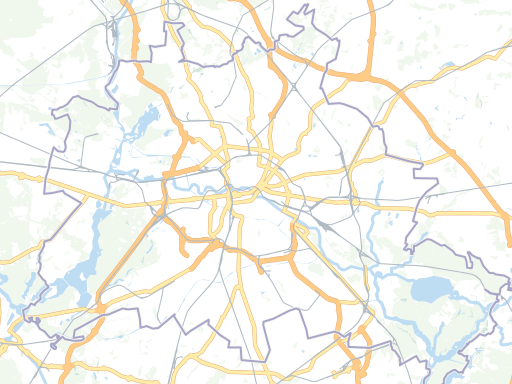
|
|
14
12
|
|
|
15
13
|
Supported layer types: background, fill, line, circle, symbol, and raster.
|
|
16
14
|
|
|
15
|
+
**[API documentation](https://versatiles.org/versatiles-svg-renderer/doc-typescript/)** · **[Visual comparison with MapLibre](https://versatiles.org/versatiles-svg-renderer/e2e/report.html)**
|
|
16
|
+
|
|
17
|
+
> [!TIP]
|
|
18
|
+
> **Need PNG output?** Use [`@versatiles/png-renderer`](https://www.npmjs.com/package/@versatiles/png-renderer). It renders PNG in Node.js and includes this package's `renderToSVG` as well.
|
|
19
|
+
>
|
|
20
|
+
> **Want an "export as SVG" button on a MapLibre map?** Use [`@versatiles/maplibre-svg-export`](https://www.npmjs.com/package/@versatiles/maplibre-svg-export).
|
|
21
|
+
|
|
17
22
|
## Installation
|
|
18
23
|
|
|
19
24
|
```bash
|
|
20
25
|
npm install @versatiles/svg-renderer
|
|
21
26
|
```
|
|
22
27
|
|
|
28
|
+
No native code. The only dependency is `@types/geojson` (types only). The package is ESM; Node.js 22 or later, or any modern bundler.
|
|
29
|
+
|
|
23
30
|
## Usage
|
|
24
31
|
|
|
25
32
|
### Node.js
|
|
26
33
|
|
|
27
34
|
```typescript
|
|
28
35
|
import { renderToSVG } from '@versatiles/svg-renderer';
|
|
29
|
-
import {
|
|
30
|
-
import {
|
|
36
|
+
import { inlineSources, osm } from '@versatiles/style';
|
|
37
|
+
import { writeFile } from 'node:fs/promises';
|
|
38
|
+
|
|
39
|
+
// inlineSources() resolves the style's TileJSON sources into tile URLs, which the
|
|
40
|
+
// renderer needs. Without it, the map comes out empty.
|
|
41
|
+
const style = await inlineSources(osm({ theme: 'colorful' }));
|
|
31
42
|
|
|
32
43
|
const svg = await renderToSVG({
|
|
33
|
-
style
|
|
44
|
+
style,
|
|
34
45
|
width: 800,
|
|
35
46
|
height: 600,
|
|
36
47
|
lon: 13.4,
|
|
@@ -38,74 +49,29 @@ const svg = await renderToSVG({
|
|
|
38
49
|
zoom: 10,
|
|
39
50
|
});
|
|
40
51
|
|
|
41
|
-
|
|
52
|
+
await writeFile('map.svg', svg);
|
|
42
53
|
```
|
|
43
54
|
|
|
55
|
+
> [!IMPORTANT]
|
|
56
|
+
> The style's sources must list their tile URLs directly (`"tiles": [...]`). A source that only points at a TileJSON document (`"url": ".../tiles.json"`) is **not fetched, and the map comes out empty without an error**. Styles built with `@versatiles/style` are in that form, so pass them through its `inlineSources()` as above. Hosted style files usually list their tiles already.
|
|
57
|
+
|
|
44
58
|
### Browser
|
|
45
59
|
|
|
46
60
|
```typescript
|
|
47
61
|
import { renderToSVG } from '@versatiles/svg-renderer';
|
|
48
62
|
|
|
49
|
-
const
|
|
50
|
-
|
|
51
|
-
|
|
52
|
-
|
|
63
|
+
const style = await fetch('https://tiles.versatiles.org/assets/styles/colorful/style.json').then(
|
|
64
|
+
(r) => r.json(),
|
|
65
|
+
);
|
|
66
|
+
|
|
67
|
+
document.body.innerHTML = await renderToSVG({
|
|
68
|
+
style,
|
|
53
69
|
width: 800,
|
|
54
70
|
height: 600,
|
|
55
71
|
lon: 13.4,
|
|
56
72
|
lat: 52.5,
|
|
57
73
|
zoom: 10,
|
|
58
74
|
});
|
|
59
|
-
|
|
60
|
-
document.body.innerHTML = svg;
|
|
61
|
-
```
|
|
62
|
-
|
|
63
|
-
### MapLibre Plugin
|
|
64
|
-
|
|
65
|
-
The package includes an `SVGExportControl` that adds an export button to any MapLibre GL JS map.
|
|
66
|
-
|
|
67
|
-
With a bundler, import it from the `/maplibre` subpath:
|
|
68
|
-
|
|
69
|
-
```typescript
|
|
70
|
-
import { SVGExportControl } from '@versatiles/svg-renderer/maplibre';
|
|
71
|
-
|
|
72
|
-
map.addControl(new SVGExportControl(), 'top-right');
|
|
73
|
-
```
|
|
74
|
-
|
|
75
|
-
Or load it directly in the browser via the UMD bundle, which exposes a `VersaTilesSVG` global:
|
|
76
|
-
|
|
77
|
-
```html
|
|
78
|
-
<!DOCTYPE html>
|
|
79
|
-
<html>
|
|
80
|
-
<head>
|
|
81
|
-
<link rel="stylesheet" href="https://unpkg.com/maplibre-gl@5/dist/maplibre-gl.css" />
|
|
82
|
-
<script src="https://unpkg.com/maplibre-gl@5/dist/maplibre-gl.js"></script>
|
|
83
|
-
<script src="https://unpkg.com/@versatiles/svg-renderer/dist/maplibre-svg-export.umd.js"></script>
|
|
84
|
-
</head>
|
|
85
|
-
<body>
|
|
86
|
-
<div id="map"></div>
|
|
87
|
-
<script>
|
|
88
|
-
const map = new maplibregl.Map({
|
|
89
|
-
container: 'map',
|
|
90
|
-
style: 'https://tiles.versatiles.org/assets/styles/colorful/style.json',
|
|
91
|
-
center: [13.4, 52.5],
|
|
92
|
-
zoom: 10,
|
|
93
|
-
});
|
|
94
|
-
map.addControl(new VersaTilesSVG.SVGExportControl(), 'top-right');
|
|
95
|
-
</script>
|
|
96
|
-
</body>
|
|
97
|
-
</html>
|
|
98
|
-
```
|
|
99
|
-
|
|
100
|
-
The control opens a panel where the user can set width and height, preview the SVG, download it, or open it in a new tab. Map interactions are disabled while the panel is open.
|
|
101
|
-
|
|
102
|
-
Options:
|
|
103
|
-
|
|
104
|
-
```typescript
|
|
105
|
-
new SVGExportControl({
|
|
106
|
-
defaultWidth: 1024, // default: 1024
|
|
107
|
-
defaultHeight: 1024, // default: 1024
|
|
108
|
-
});
|
|
109
75
|
```
|
|
110
76
|
|
|
111
77
|
## API
|
|
@@ -114,7 +80,7 @@ new SVGExportControl({
|
|
|
114
80
|
|
|
115
81
|
| Option | Type | Default | Description |
|
|
116
82
|
| -------------- | -------------------- | ------------ | ----------------------------------------- |
|
|
117
|
-
| `style` | `StyleSpecification` |
|
|
83
|
+
| `style` | `StyleSpecification` | _(required)_ | MapLibre style specification |
|
|
118
84
|
| `width` | `number` | `1024` | Output width in pixels |
|
|
119
85
|
| `height` | `number` | `1024` | Output height in pixels |
|
|
120
86
|
| `lon` | `number` | `0` | Center longitude |
|
|
@@ -126,6 +92,8 @@ new SVGExportControl({
|
|
|
126
92
|
|
|
127
93
|
When `renderLabels` is set to `true`, symbol layers are rendered, including text labels and sprite-based icons. By default, this option is disabled.
|
|
128
94
|
|
|
95
|
+
The SVG names each label's font (`text-font`) and leaves resolving it to whatever displays the SVG, so labels use the intended typeface only where that font is installed or provided with `@font-face`.
|
|
96
|
+
|
|
129
97
|
> [!WARNING]
|
|
130
98
|
> The rendering of labels and icons is experimental and may produce imperfect results. Since we cannot use the original layouting engine of MapLibre GL JS, there are known limitations:
|
|
131
99
|
>
|
|
@@ -134,16 +102,8 @@ When `renderLabels` is set to `true`, symbol layers are rendered, including text
|
|
|
134
102
|
|
|
135
103
|
### Projections
|
|
136
104
|
|
|
137
|
-
The renderer follows the style's [`projection`](https://maplibre.org/maplibre-style-spec/projection/): `mercator` (the default), `vertical-perspective` and `globe`, which — like in MapLibre GL JS — shows the globe up to zoom 11 and blends into mercator between zoom 11 and 12. Zoom-dependent `step`/`interpolate` expressions are supported as well. On the globe, geometry is clipped at the horizon and the map is clipped to the globe's outline; everything outside of it stays transparent. Raster tiles are drawn as a mesh of small,
|
|
138
|
-
|
|
139
|
-
## E2E Visual Comparison
|
|
140
|
-
|
|
141
|
-
A visual comparison report between the SVG renderer and MapLibre GL JS is published to GitHub Pages:
|
|
142
|
-
|
|
143
|
-
[View Report](https://versatiles-org.github.io/versatiles-svg-renderer/report.html)
|
|
144
|
-
|
|
145
|
-
## Dependency Graph
|
|
105
|
+
The renderer follows the style's [`projection`](https://maplibre.org/maplibre-style-spec/projection/): `mercator` (the default), `vertical-perspective` and `globe`, which — like in MapLibre GL JS — shows the globe up to zoom 11 and blends into mercator between zoom 11 and 12. Zoom-dependent `step`/`interpolate` expressions are supported as well. On the globe, geometry is clipped at the horizon and the map is clipped to the globe's outline; everything outside of it stays transparent. Raster tiles are drawn as a mesh of small triangles, each mapped exactly onto the globe by its own affine transform.
|
|
146
106
|
|
|
147
|
-
|
|
107
|
+
## License
|
|
148
108
|
|
|
149
|
-
[
|
|
109
|
+
MIT. Part of [VersaTiles](https://github.com/versatiles-org/versatiles-svg-renderer): source code, issues and the changelog are on GitHub.
|