@vatvaghool/create-ipl-dashboard 0.1.20 → 0.1.23
This diff represents the content of publicly available package versions that have been released to one of the supported registries. The information contained in this diff is provided for informational purposes only and reflects changes between package versions as they appear in their respective public registries.
- package/README.md +37 -122
- package/package.json +2 -3
- package/src/index.mjs +5 -26
- package/src/prompts.mjs +0 -19
- package/src/scaffold.mjs +20 -25
- package/template/README.md +22 -191
- package/template/app/api/ops/seed/route.ts +76 -0
- package/template/app/lib/matchStatus.ts +0 -12
- package/template/package.json +1 -6
- package/template/scripts/dev-simple.js +1 -1
- package/template/scripts/dev-welcome.mjs +39 -18
- package/screenshots/ai-roasting.png +0 -0
- package/screenshots/captain-board.png +0 -0
- package/screenshots/dashboard-overview.png +0 -0
- package/screenshots/ledger-table.png +0 -0
- package/screenshots/match-scrubber.png +0 -0
- package/screenshots/performance-tracker.png +0 -0
- package/src/scraper.mjs +0 -79
- package/template/app/hooks/dashboardPolling.ts +0 -53
- package/template/app/hooks/snapshotCache.ts +0 -47
- package/template/app/lib/utils/diff.ts +0 -24
- package/template/app/lib/utils/time.ts +0 -40
- package/template/screenshots/ai-roasting.png +0 -0
- package/template/screenshots/captain-board.png +0 -0
- package/template/screenshots/dashboard-overview.png +0 -0
- package/template/screenshots/ledger-table.png +0 -0
- package/template/screenshots/match-scrubber.png +0 -0
- package/template/screenshots/performance-tracker.png +0 -0
- package/template/tests/coverage-gaps.test.ts +0 -290
- package/template/tests/dashboard-polling.test.ts +0 -96
- package/template/tests/utils-and-cache.test.ts +0 -267
package/README.md
CHANGED
|
@@ -4,13 +4,16 @@ Scaffold a full-featured IPL fantasy cricket dashboard in seconds.
|
|
|
4
4
|
|
|
5
5
|
```bash
|
|
6
6
|
npx @vatvaghool/create-ipl-dashboard my-league
|
|
7
|
+
cd my-league
|
|
8
|
+
# Edit .env with your MongoDB URI, league URL and POST secret
|
|
9
|
+
npm run dev:simple
|
|
7
10
|
```
|
|
8
11
|
|
|
9
|
-
|
|
12
|
+
Open http://localhost:3000
|
|
10
13
|
|
|
11
14
|
## Usage
|
|
12
15
|
|
|
13
|
-
```
|
|
16
|
+
```
|
|
14
17
|
npx @vatvaghool/create-ipl-dashboard [project-name] [options]
|
|
15
18
|
```
|
|
16
19
|
|
|
@@ -19,149 +22,61 @@ npx @vatvaghool/create-ipl-dashboard [project-name] [options]
|
|
|
19
22
|
| Flag | Description |
|
|
20
23
|
|------|-------------|
|
|
21
24
|
| `--help`, `-h` | Show help message |
|
|
22
|
-
| `--scrape` | Auto-detect team names from the league URL |
|
|
23
25
|
| `--skip-install` | Skip `npm install` (useful for testing) |
|
|
24
26
|
|
|
25
|
-
###
|
|
27
|
+
### Prompts
|
|
26
28
|
|
|
27
29
|
| Prompt | Description |
|
|
28
30
|
|--------|-------------|
|
|
29
31
|
| Project name | Directory to scaffold into |
|
|
30
|
-
| MongoDB URI | Your MongoDB connection string (press Enter for default) |
|
|
31
|
-
| League URL | The fantasy.iplt20.com league page URL |
|
|
32
32
|
| League name | Used as MongoDB collection name |
|
|
33
|
-
| Team names | Comma-separated with optional owner in parens
|
|
34
|
-
|
|
35
|
-
Use `--scrape` to auto-detect from the league URL, or press Enter at the team names prompt for default placeholder teams. You can always edit `app/data/teams.ts` later.
|
|
36
|
-
|
|
37
|
-
## Screenshots
|
|
38
|
-
|
|
39
|
-
|
|
40
|
-
|
|
41
|
-
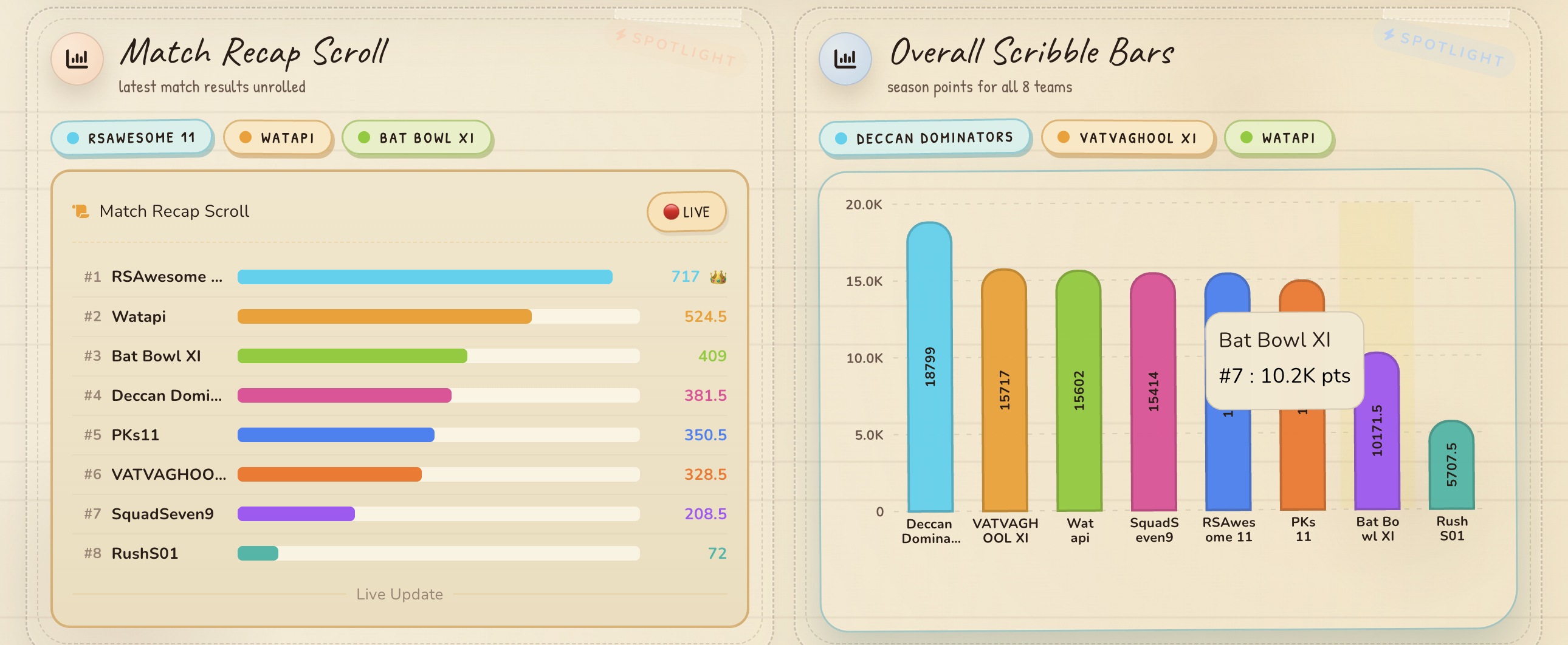
*Dashboard overview — full page*
|
|
42
|
-
|
|
43
|
-
|
|
44
|
-
|
|
45
|
-
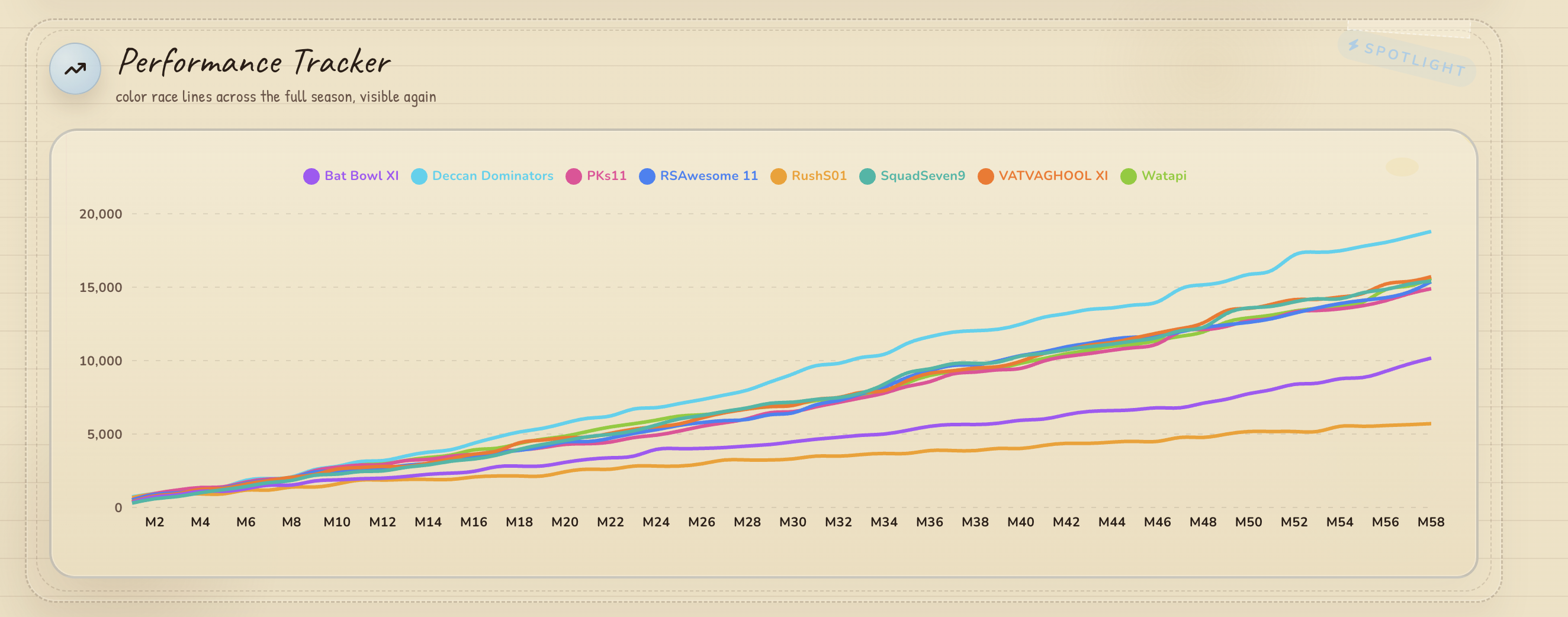
*Performance Tracker — Recharts line chart*
|
|
46
|
-
|
|
47
|
-
|
|
48
|
-
|
|
49
|
-
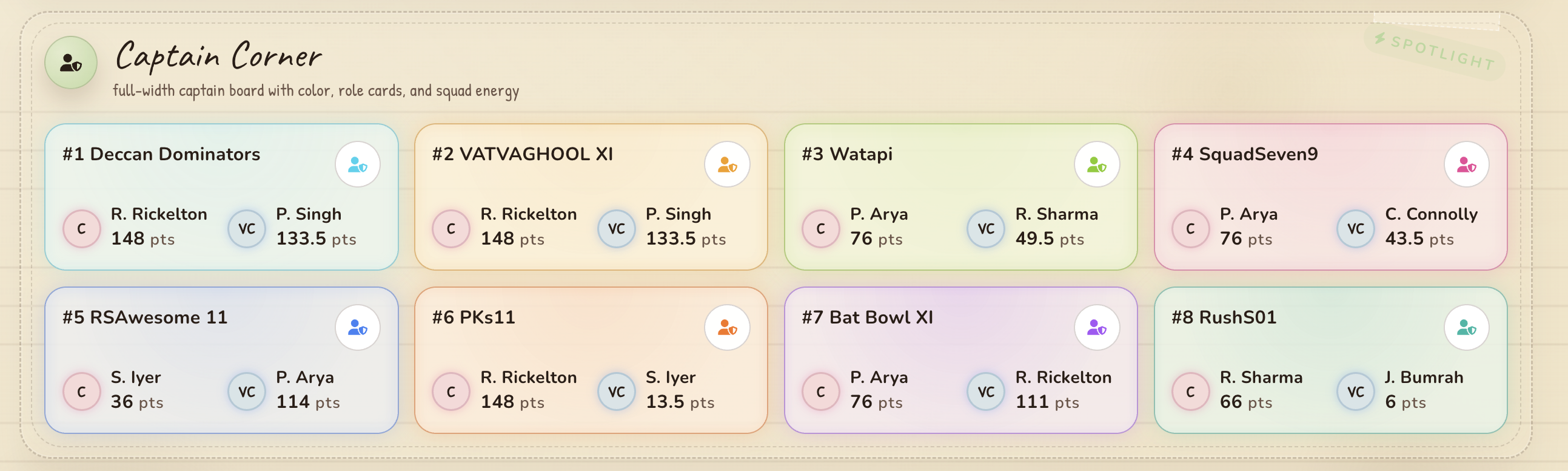
*Captain Board — captain/vice-captain picks*
|
|
33
|
+
| Team names | Comma-separated with optional owner in parens e.g. `Team A (Alice), Team B (Bob)` (Enter for 8 default teams) |
|
|
50
34
|
|
|
51
|
-
|
|
35
|
+
### Setup
|
|
52
36
|
|
|
53
|
-
|
|
37
|
+
After scaffolding, edit `.env` and fill in:
|
|
54
38
|
|
|
55
|
-
|
|
56
|
-
|
|
57
|
-
|
|
58
|
-
|
|
59
|
-
|
|
60
|
-
|
|
61
|
-
*AI Roast Corner — generated commentary*
|
|
62
|
-
|
|
63
|
-
## What you get
|
|
64
|
-
|
|
65
|
-
A full Next.js 16 project with:
|
|
66
|
-
|
|
67
|
-
- **Leaderboard dashboard** — live standings with rank movements and point gaps
|
|
68
|
-
- **Performance charts** — Recharts line charts tracking every team's trajectory
|
|
69
|
-
- **Captain board** — captain/vice-captain picks per team
|
|
70
|
-
- **Match scrubber** — interactive timeline through match history
|
|
71
|
-
- **AI roasting** — generated commentary in multiple languages
|
|
72
|
-
- **Stock ticker** — fantasy stocks with sparklines
|
|
73
|
-
- **Live updates** — bookmarklet or Playwright scraper for live sync
|
|
74
|
-
- **MongoDB persistence** — auto-configured database connection with collection per league
|
|
39
|
+
```
|
|
40
|
+
MONGODB_URI=mongodb+srv://...
|
|
41
|
+
IPL_LEAGUE_URL=https://fantasy.iplt20.com/classic/league/view/...
|
|
42
|
+
IPL_POST_SECRET=your-secret
|
|
43
|
+
```
|
|
75
44
|
|
|
76
|
-
|
|
45
|
+
Then seed data and start syncing:
|
|
77
46
|
|
|
78
47
|
```bash
|
|
79
|
-
|
|
80
|
-
|
|
81
|
-
#
|
|
82
|
-
npm run
|
|
48
|
+
npm run seed:api # Seed match data into MongoDB
|
|
49
|
+
npm run seed:league # Seed league metadata
|
|
50
|
+
npm run capture:ipl-auth # One-time Playwright login
|
|
51
|
+
npm run sync:ipl:watch # Start live sync
|
|
83
52
|
```
|
|
84
53
|
|
|
85
|
-
|
|
86
|
-
|
|
87
|
-
### Available commands
|
|
54
|
+
## Commands
|
|
88
55
|
|
|
89
56
|
| Command | Description |
|
|
90
57
|
|---------|-------------|
|
|
91
|
-
| `npm run dev` |
|
|
92
|
-
| `npm run dev:simple` | Dev server (simple, no splash) |
|
|
58
|
+
| `npm run dev:simple` | Start dev server |
|
|
93
59
|
| `npm run build` | Production build |
|
|
94
|
-
| `npm start` | Production server |
|
|
95
60
|
| `npm run capture:ipl-auth` | Capture Playwright login state (one-time) |
|
|
96
61
|
| `npm run sync:ipl` | Scrape live leaderboard snapshot |
|
|
97
|
-
| `npm run sync:ipl:watch` | Scrape leaderboard in watch mode
|
|
98
|
-
| `npm run sync:
|
|
99
|
-
| `npm run
|
|
100
|
-
| `npm run seed:league` | Seed league metadata into
|
|
101
|
-
| `npm run
|
|
102
|
-
| `npm run seed:mongodb:reset` | Reset and re-seed MongoDB data |
|
|
103
|
-
| `npm run verify:production` | Verify production setup |
|
|
104
|
-
| `npm run monitor:ops` | Check ops health status |
|
|
105
|
-
| `npm run test` | Run test suite |
|
|
62
|
+
| `npm run sync:ipl:watch` | Scrape leaderboard in watch mode |
|
|
63
|
+
| `npm run sync:cloud` | Run all scrapers |
|
|
64
|
+
| `npm run seed:api` | POST /api/ops/seed — seed match data into MongoDB |
|
|
65
|
+
| `npm run seed:league` | Seed league metadata into MongoDB |
|
|
66
|
+
| `npm run test` | Run tests |
|
|
106
67
|
| `npm run lint` | Run linter |
|
|
107
68
|
|
|
108
|
-
##
|
|
69
|
+
## API
|
|
109
70
|
|
|
110
|
-
|
|
71
|
+
| Route | Method | Description |
|
|
72
|
+
|-------|--------|-------------|
|
|
73
|
+
| `/api/ipl` | GET | Dashboard payload |
|
|
74
|
+
| `/api/ipl` | POST | Ingest leaderboard snapshot |
|
|
75
|
+
| `/api/ipl/transfers` | GET/POST | Transfer/booster data |
|
|
76
|
+
| `/api/ipl/upcoming-matches` | GET | Upcoming match schedule |
|
|
77
|
+
| `/api/ops/status` | GET | Health check |
|
|
78
|
+
| `/api/ops/seed` | POST | Seed initial match data into MongoDB |
|
|
111
79
|
|
|
112
|
-
|
|
113
|
-
2. Writes your `.env` with the `MONGODB_URI`, `COLLECTION_NAME`, league URL, and league name
|
|
114
|
-
3. Generates `app/data/teams.ts` with your team roster (if `--scrape` was used)
|
|
115
|
-
4. Generates `app/data/league.ts` with league metadata
|
|
116
|
-
5. Creates a placeholder `app/data/match-points.ts` (auto-populates as you sync)
|
|
117
|
-
6. Installs dependencies
|
|
118
|
-
7. Runs `seed:league` to create a **document in your specified collection** in the pre-configured database, storing league metadata (name, URL, teams, timestamps)
|
|
119
|
-
|
|
120
|
-
Each league gets its own collection — run `create-ipl-dashboard` again with a different league name to add another league.
|
|
121
|
-
|
|
122
|
-
The template includes all dashboard components, API endpoints, scrapers, and tests from the [ipl-dashboard](https://github.com/anomalyco/ipl-dashboard) project.
|
|
123
|
-
|
|
124
|
-
---
|
|
125
|
-
|
|
126
|
-
## Next Steps
|
|
127
|
-
|
|
128
|
-
### Adding more leagues
|
|
129
|
-
|
|
130
|
-
```bash
|
|
131
|
-
npx @vatvaghool/create-ipl-dashboard another-league
|
|
132
|
-
```
|
|
133
|
-
|
|
134
|
-
Provide a different league name and the new league will be stored in its own collection — data stays fully isolated.
|
|
135
|
-
|
|
136
|
-
### Viewing seeded data
|
|
137
|
-
|
|
138
|
-
Connect with any MongoDB client. Each league appears as a separate collection with `type: "league"`.
|
|
139
|
-
|
|
140
|
-
### Production deployment
|
|
141
|
-
|
|
142
|
-
```bash
|
|
143
|
-
cd my-league
|
|
144
|
-
npm run build
|
|
145
|
-
npx vercel --prod
|
|
146
|
-
```
|
|
147
|
-
|
|
148
|
-
Set `IPL_POST_SECRET` in your Vercel dashboard. Storage credentials are already populated in the scaffolded `.env`.
|
|
149
|
-
|
|
150
|
-
### Data sync workflow
|
|
151
|
-
|
|
152
|
-
```bash
|
|
153
|
-
# 1. Capture browser login (one-time)
|
|
154
|
-
npm run capture:ipl-auth
|
|
155
|
-
|
|
156
|
-
# 2. Scrape leaderboard (manual or watch mode)
|
|
157
|
-
npm run sync:ipl
|
|
158
|
-
npm run sync:ipl:watch # auto-poll every 2 min
|
|
159
|
-
|
|
160
|
-
# 3. Scrape transfer/booster data
|
|
161
|
-
npm run sync:ipl:transfers-daily
|
|
162
|
-
|
|
163
|
-
# 4. Run all scrapers (for cloud jobs)
|
|
164
|
-
npm run sync:cloud
|
|
165
|
-
```
|
|
80
|
+
## Project
|
|
166
81
|
|
|
167
|
-
|
|
82
|
+
A full Next.js 16 project with dashboard components, API endpoints, scrapers, and tests.
|
package/package.json
CHANGED
|
@@ -1,6 +1,6 @@
|
|
|
1
1
|
{
|
|
2
2
|
"name": "@vatvaghool/create-ipl-dashboard",
|
|
3
|
-
"version": "0.1.
|
|
3
|
+
"version": "0.1.23",
|
|
4
4
|
"description": "Scaffold an IPL fantasy cricket dashboard project",
|
|
5
5
|
"type": "module",
|
|
6
6
|
"bin": {
|
|
@@ -8,8 +8,7 @@
|
|
|
8
8
|
},
|
|
9
9
|
"files": [
|
|
10
10
|
"src",
|
|
11
|
-
"template"
|
|
12
|
-
"screenshots"
|
|
11
|
+
"template"
|
|
13
12
|
],
|
|
14
13
|
"publishConfig": {
|
|
15
14
|
"access": "public"
|
package/src/index.mjs
CHANGED
|
@@ -3,9 +3,8 @@
|
|
|
3
3
|
import { join } from "node:path";
|
|
4
4
|
import { existsSync } from "node:fs";
|
|
5
5
|
import { mkdir } from "node:fs/promises";
|
|
6
|
-
import { getProjectName,
|
|
6
|
+
import { getProjectName, getLeagueName, getTeams, close } from "./prompts.mjs";
|
|
7
7
|
import { scaffoldProject } from "./scaffold.mjs";
|
|
8
|
-
import { scrapeTeamsFromUrl } from "./scraper.mjs";
|
|
9
8
|
|
|
10
9
|
function printHelp(exitCode) {
|
|
11
10
|
console.log(`
|
|
@@ -19,11 +18,9 @@ function printHelp(exitCode) {
|
|
|
19
18
|
Options:
|
|
20
19
|
--help, -h Show this help message
|
|
21
20
|
--skip-install Skip npm install after scaffolding
|
|
22
|
-
--scrape Auto-detect team names from the league URL
|
|
23
21
|
|
|
24
22
|
Examples:
|
|
25
23
|
npx create-ipl-dashboard my-league
|
|
26
|
-
npx create-ipl-dashboard my-league --scrape
|
|
27
24
|
npx create-ipl-dashboard --skip-install
|
|
28
25
|
`);
|
|
29
26
|
process.exit(exitCode);
|
|
@@ -31,12 +28,11 @@ function printHelp(exitCode) {
|
|
|
31
28
|
|
|
32
29
|
async function main() {
|
|
33
30
|
const args = process.argv.slice(2);
|
|
34
|
-
const flags = {
|
|
31
|
+
const flags = { skipInstall: false, help: false };
|
|
35
32
|
const positional = [];
|
|
36
33
|
|
|
37
34
|
for (const arg of args) {
|
|
38
35
|
if (arg === "--help" || arg === "-h") flags.help = true;
|
|
39
|
-
else if (arg === "--scrape") flags.scrape = true;
|
|
40
36
|
else if (arg === "--skip-install") flags.skipInstall = true;
|
|
41
37
|
else if (!arg.startsWith("--")) positional.push(arg);
|
|
42
38
|
else { console.error(`Unknown flag: ${arg}`); printHelp(1); }
|
|
@@ -59,22 +55,9 @@ async function main() {
|
|
|
59
55
|
|
|
60
56
|
await mkdir(projectPath, { recursive: true });
|
|
61
57
|
|
|
62
|
-
const mongoUri = await getMongoUri();
|
|
63
|
-
const leagueUrl = await getLeagueUrl();
|
|
64
58
|
const leagueName = await getLeagueName();
|
|
65
59
|
|
|
66
|
-
let teams;
|
|
67
|
-
if (flags.scrape && leagueUrl) {
|
|
68
|
-
console.log(" Attempting to scrape team names from league URL...");
|
|
69
|
-
teams = await scrapeTeamsFromUrl(leagueUrl);
|
|
70
|
-
if (teams && teams.length > 0) {
|
|
71
|
-
console.log(` Found ${teams.length} team(s): ${teams.map((t) => t.name).join(", ")}`);
|
|
72
|
-
}
|
|
73
|
-
}
|
|
74
|
-
|
|
75
|
-
if (!teams) {
|
|
76
|
-
teams = await getTeams();
|
|
77
|
-
}
|
|
60
|
+
let teams = await getTeams();
|
|
78
61
|
|
|
79
62
|
if (!teams || teams.length === 0) {
|
|
80
63
|
teams = [
|
|
@@ -91,18 +74,14 @@ async function main() {
|
|
|
91
74
|
|
|
92
75
|
close();
|
|
93
76
|
|
|
94
|
-
await scaffoldProject(projectPath, {
|
|
77
|
+
await scaffoldProject(projectPath, { leagueName, teams, skipInstall: flags.skipInstall });
|
|
95
78
|
|
|
96
79
|
console.log("");
|
|
97
80
|
console.log(" Next steps:");
|
|
98
81
|
console.log(` cd ${projectName}`);
|
|
82
|
+
console.log(" Edit .env — set MONGODB_URI, IPL_LEAGUE_URL and IPL_POST_SECRET");
|
|
99
83
|
console.log(" npm run dev:simple");
|
|
100
84
|
console.log("");
|
|
101
|
-
console.log(" For live data sync, capture auth state:");
|
|
102
|
-
console.log(` cd ${projectName}`);
|
|
103
|
-
console.log(" npm run capture:ipl-auth");
|
|
104
|
-
console.log(" npm run sync:ipl");
|
|
105
|
-
console.log("");
|
|
106
85
|
}
|
|
107
86
|
|
|
108
87
|
main().catch((err) => {
|
package/src/prompts.mjs
CHANGED
|
@@ -33,25 +33,6 @@ export async function getProjectName(args) {
|
|
|
33
33
|
return (await prompt("Project name: ")).trim() || "ipl-dashboard";
|
|
34
34
|
}
|
|
35
35
|
|
|
36
|
-
const DEFAULT_MONGODB_URI = "mongodb+srv://admin:admin@cricket.ptjjrub.mongodb.net/?appName=cricket";
|
|
37
|
-
|
|
38
|
-
export async function getMongoUri() {
|
|
39
|
-
if (!isTTY) {
|
|
40
|
-
await consumeAllLines();
|
|
41
|
-
return (pipedLines[promptIndex++] || DEFAULT_MONGODB_URI || "").trim();
|
|
42
|
-
}
|
|
43
|
-
const answer = (await prompt("MongoDB URI (press Enter for default): ")).trim();
|
|
44
|
-
return answer || DEFAULT_MONGODB_URI || "";
|
|
45
|
-
}
|
|
46
|
-
|
|
47
|
-
export async function getLeagueUrl() {
|
|
48
|
-
if (!isTTY) {
|
|
49
|
-
await consumeAllLines();
|
|
50
|
-
return (pipedLines[promptIndex++] || "").trim();
|
|
51
|
-
}
|
|
52
|
-
return (await prompt("IPL fantasy league URL: ")).trim();
|
|
53
|
-
}
|
|
54
|
-
|
|
55
36
|
export async function getLeagueName() {
|
|
56
37
|
if (!isTTY) {
|
|
57
38
|
await consumeAllLines();
|
package/src/scaffold.mjs
CHANGED
|
@@ -10,7 +10,7 @@ const TEMPLATE_DIR = join(PACKAGE_ROOT, "template");
|
|
|
10
10
|
|
|
11
11
|
export async function scaffoldProject(
|
|
12
12
|
projectPath,
|
|
13
|
-
{
|
|
13
|
+
{ leagueName, teams, skipInstall = false },
|
|
14
14
|
) {
|
|
15
15
|
console.log(`\nCreating project at ${projectPath}...`);
|
|
16
16
|
|
|
@@ -33,13 +33,9 @@ export async function scaffoldProject(
|
|
|
33
33
|
} catch {}
|
|
34
34
|
}
|
|
35
35
|
|
|
36
|
-
await writeEnvFile(projectPath, {
|
|
37
|
-
mongoUri,
|
|
38
|
-
leagueUrl,
|
|
39
|
-
leagueName,
|
|
40
|
-
});
|
|
36
|
+
await writeEnvFile(projectPath, { leagueName });
|
|
41
37
|
await writeTeamData(projectPath, teams || []);
|
|
42
|
-
await writeLeagueData(projectPath, { leagueName,
|
|
38
|
+
await writeLeagueData(projectPath, { leagueName, teams: teams || [] });
|
|
43
39
|
await writeMatchPointsPlaceholder(projectPath);
|
|
44
40
|
await updatePackageJson(projectPath);
|
|
45
41
|
|
|
@@ -56,16 +52,11 @@ export async function scaffoldProject(
|
|
|
56
52
|
console.log(" Running npm install...");
|
|
57
53
|
execSync("npm install", { cwd: projectPath, stdio: "inherit" });
|
|
58
54
|
|
|
59
|
-
|
|
60
|
-
|
|
61
|
-
|
|
62
|
-
|
|
63
|
-
|
|
64
|
-
stdio: "inherit",
|
|
65
|
-
});
|
|
66
|
-
} catch {
|
|
67
|
-
console.log(" League seed skipped (storage may not be reachable yet)");
|
|
68
|
-
}
|
|
55
|
+
console.log(" Installing Playwright browser...");
|
|
56
|
+
try {
|
|
57
|
+
execSync("npx playwright install chromium", { cwd: projectPath, stdio: "inherit" });
|
|
58
|
+
} catch {
|
|
59
|
+
console.log(" Playwright install skipped (run manually: npx playwright install chromium)");
|
|
69
60
|
}
|
|
70
61
|
} else {
|
|
71
62
|
console.log(
|
|
@@ -76,18 +67,21 @@ export async function scaffoldProject(
|
|
|
76
67
|
console.log("\n Done! Your project is ready at:", projectPath);
|
|
77
68
|
}
|
|
78
69
|
|
|
79
|
-
async function writeEnvFile(
|
|
80
|
-
projectPath,
|
|
81
|
-
{ mongoUri, leagueUrl, leagueName },
|
|
82
|
-
) {
|
|
70
|
+
async function writeEnvFile(projectPath, { leagueName }) {
|
|
83
71
|
const envPath = join(projectPath, ".env");
|
|
84
72
|
const lines = [
|
|
85
73
|
`COLLECTION_NAME=${leagueName || "my_league"}`,
|
|
86
|
-
`MONGODB_URI
|
|
87
|
-
`IPL_LEAGUE_URL
|
|
74
|
+
`MONGODB_URI=`,
|
|
75
|
+
`IPL_LEAGUE_URL=`,
|
|
88
76
|
`IPL_LEAGUE_NAME=${leagueName || ""}`,
|
|
89
77
|
`IPL_POST_SECRET=`,
|
|
90
78
|
``,
|
|
79
|
+
`# Replace the values above, then run:`,
|
|
80
|
+
`# npm run seed:api (seed match data into MongoDB)`,
|
|
81
|
+
`# npm run seed:league (seed league metadata)`,
|
|
82
|
+
`# npm run capture:ipl-auth (one-time login)`,
|
|
83
|
+
`# npm run sync:ipl (scrape live leaderboard)`,
|
|
84
|
+
``,
|
|
91
85
|
`IPL_API_BASE_URL=http://localhost:3000`,
|
|
92
86
|
`IPL_API_LOG=1`,
|
|
93
87
|
`IPL_API_LOG_PAYLOAD=0`,
|
|
@@ -137,7 +131,7 @@ for (const team of TEAMS) {
|
|
|
137
131
|
await writeFile(join(dir, "teams.ts"), content);
|
|
138
132
|
}
|
|
139
133
|
|
|
140
|
-
async function writeLeagueData(projectPath, { leagueName,
|
|
134
|
+
async function writeLeagueData(projectPath, { leagueName, teams }) {
|
|
141
135
|
const dir = join(projectPath, "app/data");
|
|
142
136
|
await mkdir(dir, { recursive: true });
|
|
143
137
|
|
|
@@ -153,7 +147,7 @@ async function writeLeagueData(projectPath, { leagueName, leagueUrl, teams }) {
|
|
|
153
147
|
|
|
154
148
|
export const leagueInfo: LeagueInfo = {
|
|
155
149
|
name: "${leagueName || ""}",
|
|
156
|
-
leagueUrl: "
|
|
150
|
+
leagueUrl: "",
|
|
157
151
|
teams: [
|
|
158
152
|
${teamEntries},
|
|
159
153
|
],
|
|
@@ -188,6 +182,7 @@ async function updatePackageJson(projectPath) {
|
|
|
188
182
|
pkg.private = false;
|
|
189
183
|
delete pkg.scripts?.["generate:template"];
|
|
190
184
|
pkg.scripts["seed:league"] = "node scripts/seed-league.mjs";
|
|
185
|
+
pkg.scripts["seed:api"] = "node --experimental-strip-types -e \"fetch('http://localhost:3000/api/ops/seed',{method:'POST'}).then(r=>r.json()).then(console.log).catch(console.error)\"";
|
|
191
186
|
await writeFile(pkgPath, JSON.stringify(pkg, null, 2) + "\n");
|
|
192
187
|
} catch {}
|
|
193
188
|
}
|
package/template/README.md
CHANGED
|
@@ -1,226 +1,57 @@
|
|
|
1
1
|
# IPL Fantasy Cricket Dashboard
|
|
2
2
|
|
|
3
|
-
Private Next.js dashboard for an IPL fantasy league. Combines seeded match history with live leaderboard snapshots to show standings, match-by-match movement, captain picks, cumulative trends, and league insights in one place.
|
|
4
|
-
|
|
5
3
|
## Quick Start
|
|
6
4
|
|
|
7
5
|
```bash
|
|
8
|
-
# Scaffold a new project
|
|
9
6
|
npx @vatvaghool/create-ipl-dashboard my-league
|
|
10
|
-
|
|
11
|
-
#
|
|
12
|
-
npm
|
|
13
|
-
|
|
14
|
-
|
|
15
|
-
Start
|
|
16
|
-
|
|
17
|
-
```bash
|
|
18
|
-
npm run dev:simple
|
|
7
|
+
cd my-league
|
|
8
|
+
# Edit .env — set MONGODB_URI, IPL_LEAGUE_URL and IPL_POST_SECRET
|
|
9
|
+
npm run seed:api # Seed match data into MongoDB
|
|
10
|
+
npm run seed:league # Seed league metadata
|
|
11
|
+
npm run capture:ipl-auth # One-time Playwright login
|
|
12
|
+
npm run sync:ipl:watch # Start live sync
|
|
19
13
|
```
|
|
20
14
|
|
|
21
15
|
Open http://localhost:3000
|
|
22
16
|
|
|
23
|
-
|
|
17
|
+
## Commands
|
|
24
18
|
|
|
25
19
|
| Command | Description |
|
|
26
20
|
|---------|-------------|
|
|
27
|
-
| `npm run dev` |
|
|
28
|
-
| `npm run dev:simple` | Dev server (simple, no splash) |
|
|
21
|
+
| `npm run dev:simple` | Start dev server |
|
|
29
22
|
| `npm run build` | Production build |
|
|
30
|
-
| `npm start` | Production server |
|
|
31
23
|
| `npm run capture:ipl-auth` | Capture Playwright login state (one-time) |
|
|
32
24
|
| `npm run sync:ipl` | Scrape live leaderboard snapshot |
|
|
33
|
-
| `npm run sync:ipl:watch` | Scrape leaderboard in watch mode
|
|
34
|
-
| `npm run sync:
|
|
35
|
-
| `npm run
|
|
36
|
-
| `npm run seed:league` | Seed league metadata
|
|
37
|
-
| `npm run
|
|
38
|
-
| `npm run seed:mongodb:reset` | Reset and re-seed MongoDB data |
|
|
39
|
-
| `npm run verify:production` | Verify production setup |
|
|
40
|
-
| `npm run monitor:ops` | Check ops health status |
|
|
41
|
-
| `npm run test` | Run test suite |
|
|
25
|
+
| `npm run sync:ipl:watch` | Scrape leaderboard in watch mode |
|
|
26
|
+
| `npm run sync:cloud` | Run all scrapers |
|
|
27
|
+
| `npm run seed:api` | Seed match data into MongoDB |
|
|
28
|
+
| `npm run seed:league` | Seed league metadata |
|
|
29
|
+
| `npm run test` | Run tests |
|
|
42
30
|
| `npm run lint` | Run linter |
|
|
43
31
|
|
|
44
|
-
|
|
45
|
-
|
|
46
|
-
## Screenshots
|
|
47
|
-
|
|
48
|
-

|
|
49
|
-
|
|
50
|
-
*Dashboard overview — full page*
|
|
51
|
-
|
|
52
|
-

|
|
53
|
-
|
|
54
|
-
*Performance Tracker — Recharts line chart*
|
|
55
|
-
|
|
56
|
-

|
|
57
|
-
|
|
58
|
-
*Captain Board — captain/vice-captain picks*
|
|
59
|
-
|
|
60
|
-
|
|
61
|
-
|
|
62
|
-
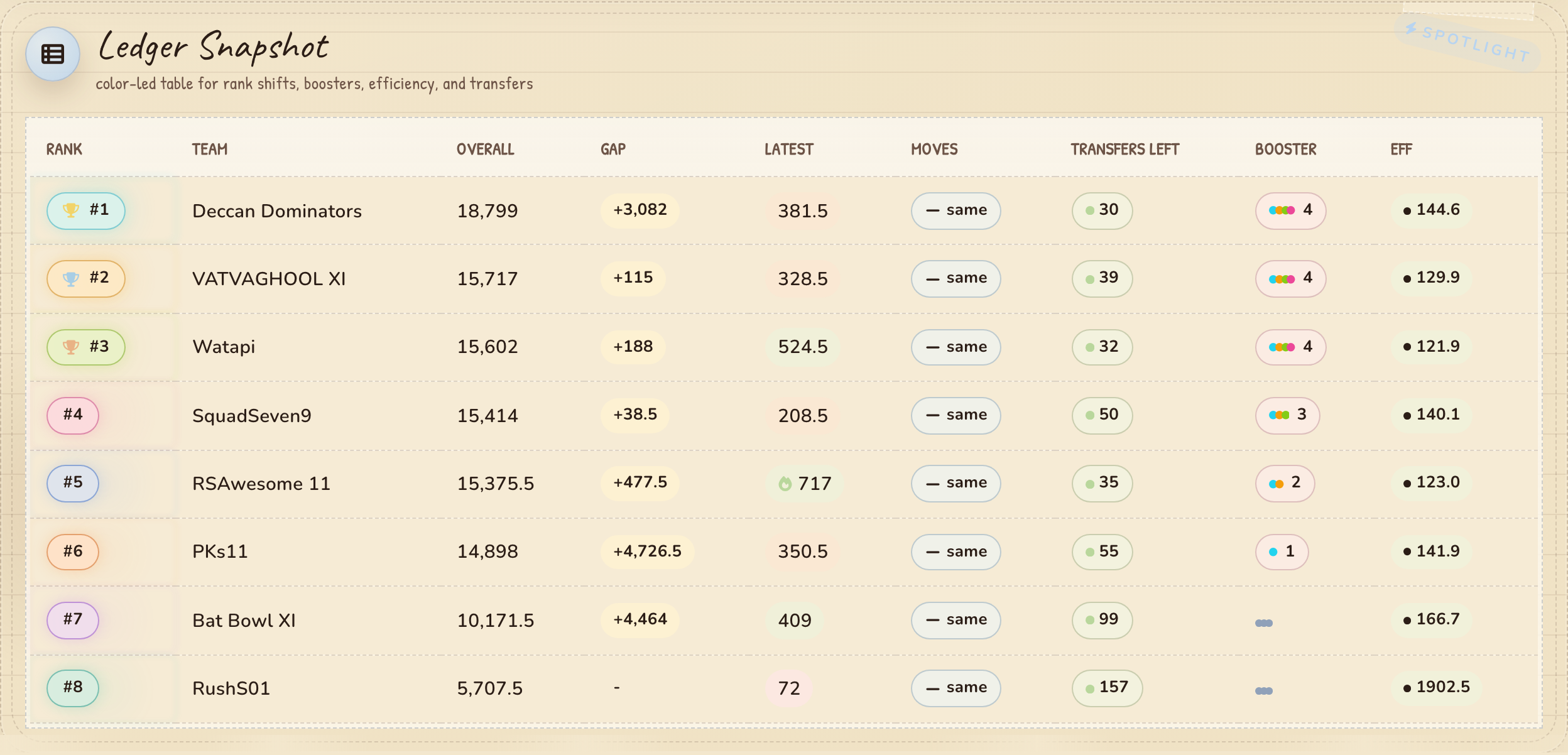
*Ledger Table — standings with rank shifts and efficiency*
|
|
63
|
-
|
|
64
|
-
|
|
65
|
-
|
|
66
|
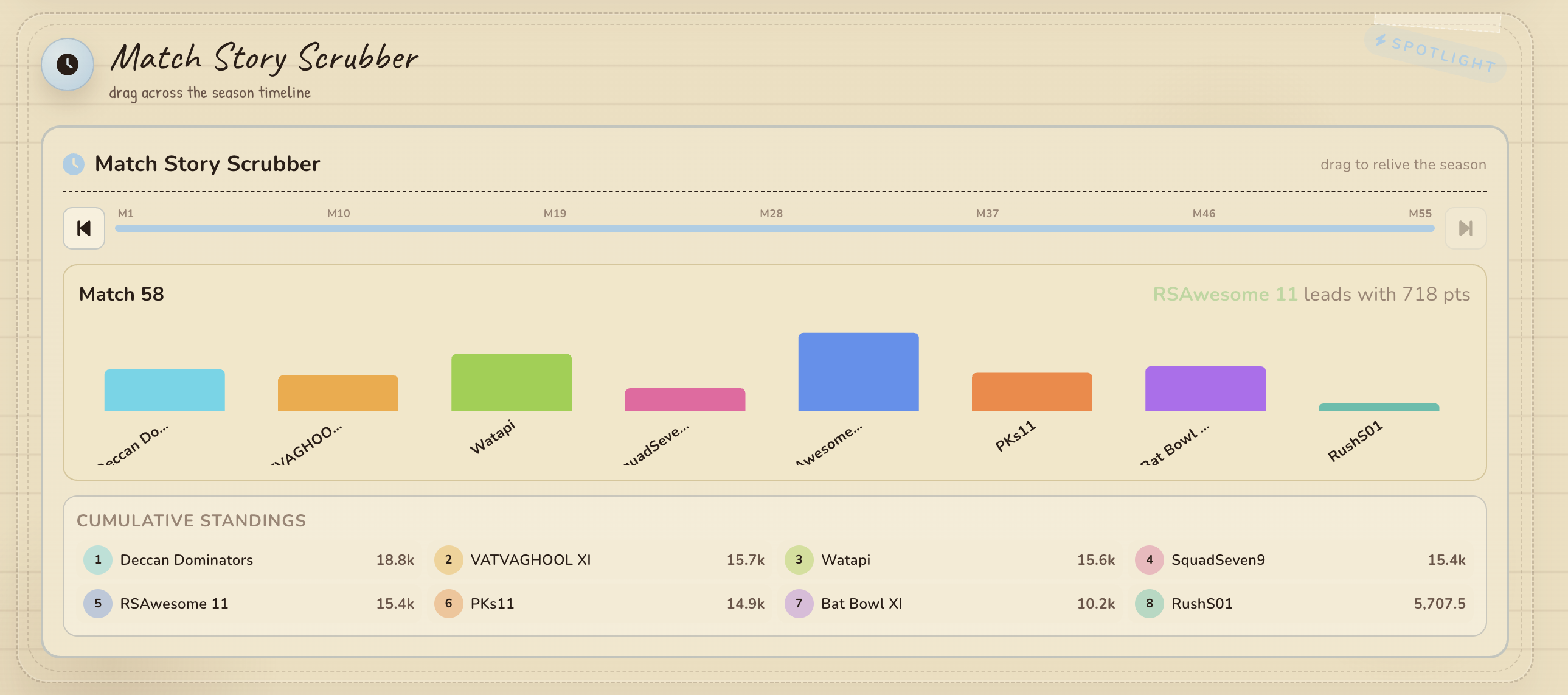
-
*Match Scrubber — interactive timeline scrubber*
|
|
67
|
-
|
|
68
|
-
|
|
69
|
-
|
|
70
|
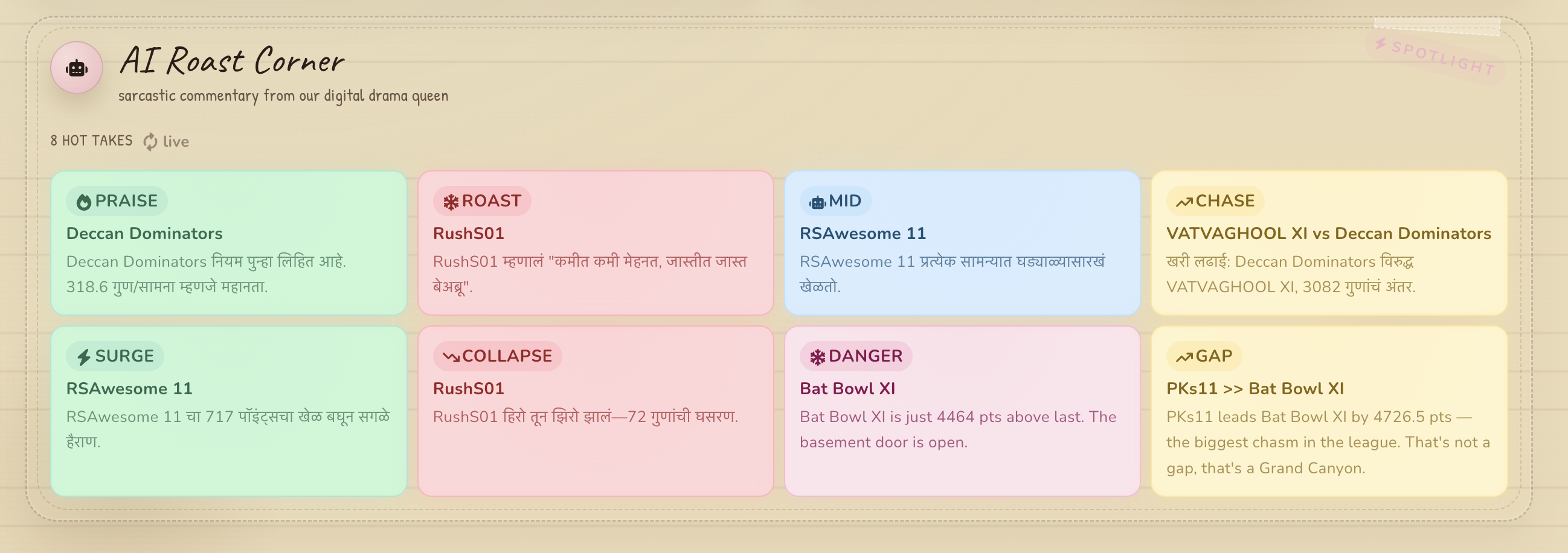
-
*AI Roast Corner — generated commentary*
|
|
71
|
-
|
|
72
|
-
---
|
|
73
|
-
|
|
74
|
-
## Components
|
|
75
|
-
|
|
76
|
-
### Dashboard Sections
|
|
77
|
-
|
|
78
|
-
| Component | File | Description |
|
|
79
|
-
|-----------|------|-------------|
|
|
80
|
-
| **StickyMini** | `components/dashboard/StickyMini.tsx` | Compact stat card with title, value, note, and color-coded icon |
|
|
81
|
-
| **SectionCard** | `components/dashboard/SectionCard.tsx` | Animated motion-section wrapper with title, note, accent color, and staggered entrance |
|
|
82
|
-
| **ChartBoard** | `components/dashboard/ChartBoard.tsx` | Recharts bar chart for team data with pill tags and tooltips |
|
|
83
|
-
| **CaptainBoard** | `components/dashboard/CaptainBoard.tsx` | All playing players with points as TeamPills badges, C/VC highlighted |
|
|
84
|
-
| **LedgerTable** | `components/dashboard/LedgerTable.tsx` | Full standings table with colors, boosters, rank arrows, and formatted points |
|
|
85
|
-
| **LatestBadge** | `components/dashboard/LatestBadge.tsx` | Color-coded pill badge for points (pink <200, orange 200-400, green >400) |
|
|
86
|
-
|
|
87
|
-
### Widgets
|
|
88
|
-
|
|
89
|
-
| Component | File | Description |
|
|
90
|
-
|-----------|------|-------------|
|
|
91
|
-
| **PerformanceTracker** | `components/PerformanceTracker.tsx` | Recharts line chart tracking each team's point trajectory across match days |
|
|
92
|
-
| **CrownBattle** | `components/CrownBattle.tsx` | Head-to-head showdown between #1 and #2 ranked teams |
|
|
93
|
-
| **AIRoasting** | `components/AIRoasting.tsx` | AI-generated roast commentary cards cycling through hot/cold/lightning/trend types |
|
|
94
|
-
| **FantasyStockTicker** | `components/FantasyStockTicker.tsx` | Team stocks with trend arrows, sparklines, and fluctuating values |
|
|
95
|
-
| **TeamDNAScanner** | `components/TeamDNAScanner.tsx` | Sci-fi DNA scan visualization with moving scan-line and std deviation metrics |
|
|
96
|
-
| **MatchRecapScroll** | `components/MatchRecapScroll.tsx` | Scroll-styled recap panel for the latest match day results |
|
|
97
|
-
| **MatchStoryScrubber** | `components/MatchStoryScrubber.tsx` | Interactive timeline scrubber to step through match history with bar charts |
|
|
98
|
-
| **LiveMatchTicker** | `components/LiveMatchTicker.tsx` | Live-scrolling ticker of upcoming matches with countdowns |
|
|
99
|
-
| **ProgressGlowRings** | `components/ProgressGlowRings.tsx` | Animated SVG glowing ring progress indicators per team |
|
|
100
|
-
| **ColorWave** | `components/ColorWave.tsx` | Animated SVG wave/chart visualizing team scores over time |
|
|
101
|
-
| **FireworksBurst** | `components/FireworksBurst.tsx` | Particle-based fireworks celebration on milestones |
|
|
102
|
-
| **ThemeToggle** | `components/ThemeToggle.tsx` | Dark/light mode toggle persisted to localStorage |
|
|
103
|
-
|
|
104
|
-
### UI Primitives
|
|
105
|
-
|
|
106
|
-
| Component | File | Description |
|
|
107
|
-
|-----------|------|-------------|
|
|
108
|
-
| **TeamPills** | `components/ui/TeamPills.tsx` | Flex-wrap row of bordered pill/chip team labels |
|
|
109
|
-
| **DashboardChartFrame** | `components/ui/DashboardChartFrame.tsx` | Responsive chart wrapper with hover-jitter effects |
|
|
110
|
-
| **DoodleSpinner** | `components/ui/DoodleSpinner.tsx` | Hand-drawn SVG loading spinner with dotted circles |
|
|
111
|
-
|
|
112
|
-
---
|
|
113
|
-
|
|
114
|
-
## API Endpoints
|
|
32
|
+
## API
|
|
115
33
|
|
|
116
34
|
| Route | Method | Description |
|
|
117
35
|
|-------|--------|-------------|
|
|
118
|
-
| `/api/ipl` | GET |
|
|
119
|
-
| `/api/ipl
|
|
120
|
-
| `/api/ipl` | POST |
|
|
121
|
-
| `/api/ipl/transfers` | GET | Transfer/booster snapshot for all teams (fetched once on mount, not on poll) |
|
|
122
|
-
| `/api/ipl/transfers` | POST | Ingest a single team transfer record |
|
|
36
|
+
| `/api/ipl` | GET | Dashboard payload |
|
|
37
|
+
| `/api/ipl` | POST | Ingest leaderboard snapshot |
|
|
38
|
+
| `/api/ipl/transfers` | GET/POST | Transfer/booster data |
|
|
123
39
|
| `/api/ipl/upcoming-matches` | GET | Upcoming match schedule |
|
|
124
|
-
| `/api/ops/status` | GET | Health
|
|
125
|
-
|
|
126
|
-
---
|
|
127
|
-
|
|
128
|
-
## Data Flow
|
|
129
|
-
|
|
130
|
-
```
|
|
131
|
-
GET /api/ipl resolution order:
|
|
132
|
-
1. MongoDB raw users (if MONGODB_URI configured)
|
|
133
|
-
2. Fallback: local seed data (app/api/ipl/data.ts)
|
|
134
|
-
3. MongoDB live snapshot (if MONGODB_URI configured)
|
|
135
|
-
4. Fallback: local snapshot file (app/api/ipl/live-snapshot.json)
|
|
136
|
-
```
|
|
137
|
-
|
|
138
|
-
---
|
|
139
|
-
|
|
140
|
-
## Configuration
|
|
141
|
-
|
|
142
|
-
All hardcoded values are centralized in `app/lib/config.ts` and overridable via environment variables:
|
|
143
|
-
|
|
144
|
-
| Variable | Default | Description |
|
|
145
|
-
|----------|---------|-------------|
|
|
146
|
-
| `MONGODB_URI` | - | MongoDB connection string |
|
|
147
|
-
| `LEAGUE_NAME` | - | League name (collection name) |
|
|
148
|
-
| `IPL_LEAGUE_URL` | fantasy.iplt20.com/... | Fantasy league page URL |
|
|
149
|
-
| `IPL_POST_SECRET` | - | Bearer token for POST endpoints |
|
|
150
|
-
| `IPL_DB_NAME` | `ipl` | MongoDB database name |
|
|
151
|
-
| `IPL_COLLECTION_NAME` | `ipl` | MongoDB collection name |
|
|
152
|
-
| `IPL_TOTAL_TRANSFERS` | `160` | Total transfers per season |
|
|
153
|
-
| `IPL_SYNC_INTERVAL_MS` | `120000` | Dashboard polling interval |
|
|
154
|
-
| `IPL_DASHBOARD_STALE_MINUTES` | `20` (prod) / `180` (dev) | Staleness threshold |
|
|
155
|
-
| `IPL_TRANSFERS_STALE_MINUTES` | `720` (prod) / `1440` (dev) | Transfer staleness threshold |
|
|
156
|
-
|
|
157
|
-
---
|
|
158
|
-
|
|
159
|
-
## Automation
|
|
160
|
-
|
|
161
|
-
See the [commands table](#available-commands) above for all options.
|
|
162
|
-
|
|
163
|
-
Also supports a browser bookmarklet — visit `/api/ipl/bookmarklet` while the app is running, copy the returned `javascript:` code, and save it as a bookmark. Click it on the fantasy leaderboard page to sync data.
|
|
164
|
-
|
|
165
|
-
---
|
|
40
|
+
| `/api/ops/status` | GET | Health check |
|
|
41
|
+
| `/api/ops/seed` | POST | Seed initial match data into MongoDB |
|
|
166
42
|
|
|
167
43
|
## Deployment
|
|
168
44
|
|
|
169
|
-
### Deploy to Vercel (recommended)
|
|
170
|
-
|
|
171
45
|
```bash
|
|
172
|
-
# Build the app
|
|
173
46
|
npm run build
|
|
174
|
-
|
|
175
|
-
# Deploy to Vercel
|
|
176
47
|
npx vercel --prod
|
|
177
48
|
```
|
|
178
49
|
|
|
179
|
-
Set
|
|
180
|
-
|
|
181
|
-
| Variable | Required | Description |
|
|
182
|
-
|----------|----------|-------------|
|
|
183
|
-
| `MONGODB_URI` | Yes | MongoDB connection string |
|
|
184
|
-
| `LEAGUE_NAME` | Yes | MongoDB collection name |
|
|
185
|
-
| `IPL_POST_SECRET` | Yes | Bearer token protecting write endpoints |
|
|
186
|
-
| `IPL_LEAGUE_URL` | Yes | Your fantasy league page URL |
|
|
187
|
-
| `IPL_DASHBOARD_STALE_MINUTES` | No | Staleness threshold for health checks (default: `20`) |
|
|
188
|
-
| `IPL_TRANSFERS_STALE_MINUTES` | No | Transfer staleness threshold (default: `720`) |
|
|
189
|
-
|
|
190
|
-
After deployment:
|
|
191
|
-
|
|
192
|
-
1. Verify the app is healthy — visit `https://your-app.vercel.app/api/ops/status`
|
|
193
|
-
2. Run the Playwright scraper (`npm run sync:cloud`) pointed at your production URL to populate live data
|
|
194
|
-
3. Optionally deploy the scraper as a Cloud Run Job with `Dockerfile.sync` for automated sync every 5-10 minutes
|
|
195
|
-
|
|
196
|
-
### Without Vercel
|
|
197
|
-
|
|
198
|
-
```bash
|
|
199
|
-
# Build
|
|
200
|
-
npm run build
|
|
201
|
-
|
|
202
|
-
# Start production server
|
|
203
|
-
npm start
|
|
204
|
-
```
|
|
205
|
-
|
|
206
|
-
The app runs as a standard Node.js server on `process.env.PORT` (default `3000`).
|
|
207
|
-
|
|
208
|
-
### Production requirements
|
|
209
|
-
|
|
210
|
-
- **MongoDB** is required in production for POST endpoints (returns `503` without it)
|
|
211
|
-
- **IPL_POST_SECRET** should be a strong random value set in your hosting environment
|
|
212
|
-
- The scraper should run outside the web app (Cloud Run, GitHub Actions, cron) — never in the same process
|
|
213
|
-
|
|
214
|
-
---
|
|
50
|
+
Set `MONGODB_URI`, `COLLECTION_NAME`, `IPL_LEAGUE_URL`, and `IPL_POST_SECRET` in your Vercel dashboard.
|
|
215
51
|
|
|
216
52
|
## Stack
|
|
217
53
|
|
|
218
|
-
- **Next.js** 16 App Router
|
|
219
|
-
- **
|
|
220
|
-
- **TypeScript**
|
|
221
|
-
- **Tailwind CSS** 4
|
|
222
|
-
- **Recharts** — charts
|
|
223
|
-
- **Framer Motion** — animations
|
|
54
|
+
- **Next.js** 16 App Router, **React** 19, **TypeScript**, **Tailwind CSS** 4
|
|
55
|
+
- **Recharts**, **Framer Motion**, **Zustand**
|
|
224
56
|
- **MongoDB** — data persistence
|
|
225
|
-
- **Zustand** — client state
|
|
226
57
|
- **Playwright** — scraper automation
|