@upstash/context7-mcp 1.0.12 → 1.0.13
This diff represents the content of publicly available package versions that have been released to one of the supported registries. The information contained in this diff is provided for informational purposes only and reflects changes between package versions as they appear in their respective public registries.
- package/README.md +268 -102
- package/dist/index.js +175 -75
- package/dist/lib/api.js +26 -7
- package/package.json +1 -1
package/README.md
CHANGED
|
@@ -2,8 +2,7 @@
|
|
|
2
2
|
|
|
3
3
|
[](https://context7.com) [](https://smithery.ai/server/@upstash/context7-mcp) [<img alt="Install in VS Code (npx)" src="https://img.shields.io/badge/VS_Code-VS_Code?style=flat-square&label=Install%20Context7%20MCP&color=0098FF">](https://insiders.vscode.dev/redirect?url=vscode%3Amcp%2Finstall%3F%7B%22name%22%3A%22context7%22%2C%22command%22%3A%22npx%22%2C%22args%22%3A%5B%22-y%22%2C%22%40upstash%2Fcontext7-mcp%40latest%22%5D%7D)
|
|
4
4
|
|
|
5
|
-
[](./docs/README.zh-TW.md) [](./docs/README.zh-CN.md) [](./docs/README.ko.md) [](./docs/README.es.md) [](./docs/README.fr.md) [-purple>)](./docs/README.pt-BR.md) [](./docs/README.it.md) [](./docs/README.id-ID.md) [](./docs/README.de.md) [](./docs/README.ru.md) [](./docs/README.tr.md) [](./docs/README.ar.md)
|
|
7
6
|
|
|
8
7
|
## ❌ Without Context7
|
|
9
8
|
|
|
@@ -35,27 +34,57 @@ Context7 fetches up-to-date code examples and documentation right into your LLM'
|
|
|
35
34
|
|
|
36
35
|
No tab-switching, no hallucinated APIs that don't exist, no outdated code generations.
|
|
37
36
|
|
|
38
|
-
##
|
|
37
|
+
## 📚 Adding Projects
|
|
38
|
+
|
|
39
|
+
Check out our [project addition guide](./docs/adding-projects.md) to learn how to add (or update) your favorite libraries to Context7.
|
|
40
|
+
|
|
41
|
+
## 🛠️ Installation
|
|
39
42
|
|
|
40
43
|
### Requirements
|
|
41
44
|
|
|
42
45
|
- Node.js >= v18.0.0
|
|
43
46
|
- Cursor, Windsurf, Claude Desktop or another MCP Client
|
|
44
47
|
|
|
45
|
-
|
|
48
|
+
<details>
|
|
49
|
+
<summary><b>Installing via Smithery</b></summary>
|
|
46
50
|
|
|
47
|
-
To install Context7 MCP Server for
|
|
51
|
+
To install Context7 MCP Server for any client automatically via [Smithery](https://smithery.ai/server/@upstash/context7-mcp):
|
|
48
52
|
|
|
49
53
|
```bash
|
|
50
|
-
npx -y @smithery/cli install @upstash/context7-mcp --client
|
|
54
|
+
npx -y @smithery/cli@latest install @upstash/context7-mcp --client <CLIENT_NAME> --key <YOUR_SMITHERY_KEY>
|
|
51
55
|
```
|
|
52
56
|
|
|
53
|
-
|
|
57
|
+
You can find your Smithery key in the [Smithery.ai webpage](https://smithery.ai/server/@upstash/context7-mcp).
|
|
58
|
+
|
|
59
|
+
</details>
|
|
60
|
+
|
|
61
|
+
<details>
|
|
62
|
+
<summary><b>Install in Cursor</b></summary>
|
|
54
63
|
|
|
55
64
|
Go to: `Settings` -> `Cursor Settings` -> `MCP` -> `Add new global MCP server`
|
|
56
65
|
|
|
57
66
|
Pasting the following configuration into your Cursor `~/.cursor/mcp.json` file is the recommended approach. You may also install in a specific project by creating `.cursor/mcp.json` in your project folder. See [Cursor MCP docs](https://docs.cursor.com/context/model-context-protocol) for more info.
|
|
58
67
|
|
|
68
|
+
> Since Cursor 1.0, you can click the install button below for instant one-click installation.
|
|
69
|
+
|
|
70
|
+
#### Cursor Remote Server Connection
|
|
71
|
+
|
|
72
|
+
[](https://cursor.com/install-mcp?name=context7&config=eyJ1cmwiOiJodHRwczovL21jcC5jb250ZXh0Ny5jb20vbWNwIn0%3D)
|
|
73
|
+
|
|
74
|
+
```json
|
|
75
|
+
{
|
|
76
|
+
"mcpServers": {
|
|
77
|
+
"context7": {
|
|
78
|
+
"url": "https://mcp.context7.com/mcp"
|
|
79
|
+
}
|
|
80
|
+
}
|
|
81
|
+
}
|
|
82
|
+
```
|
|
83
|
+
|
|
84
|
+
#### Cursor Local Server Connection
|
|
85
|
+
|
|
86
|
+
[](https://cursor.com/install-mcp?name=context7&config=eyJjb21tYW5kIjoibnB4IC15IEB1cHN0YXNoL2NvbnRleHQ3LW1jcCJ9)
|
|
87
|
+
|
|
59
88
|
```json
|
|
60
89
|
{
|
|
61
90
|
"mcpServers": {
|
|
@@ -70,6 +99,8 @@ Pasting the following configuration into your Cursor `~/.cursor/mcp.json` file i
|
|
|
70
99
|
<details>
|
|
71
100
|
<summary>Alternative: Use Bun</summary>
|
|
72
101
|
|
|
102
|
+
[](https://cursor.com/install-mcp?name=context7&config=eyJjb21tYW5kIjoiYnVueCAteSBAdXBzdGFzaC9jb250ZXh0Ny1tY3AifQ%3D%3D)
|
|
103
|
+
|
|
73
104
|
```json
|
|
74
105
|
{
|
|
75
106
|
"mcpServers": {
|
|
@@ -86,6 +117,8 @@ Pasting the following configuration into your Cursor `~/.cursor/mcp.json` file i
|
|
|
86
117
|
<details>
|
|
87
118
|
<summary>Alternative: Use Deno</summary>
|
|
88
119
|
|
|
120
|
+
[](https://cursor.com/install-mcp?name=context7&config=eyJjb21tYW5kIjoiZGVubyBydW4gLS1hbGxvdy1lbnYgLS1hbGxvdy1uZXQgbnBtOkB1cHN0YXNoL2NvbnRleHQ3LW1jcCJ9)
|
|
121
|
+
|
|
89
122
|
```json
|
|
90
123
|
{
|
|
91
124
|
"mcpServers": {
|
|
@@ -99,10 +132,27 @@ Pasting the following configuration into your Cursor `~/.cursor/mcp.json` file i
|
|
|
99
132
|
|
|
100
133
|
</details>
|
|
101
134
|
|
|
102
|
-
|
|
135
|
+
</details>
|
|
136
|
+
|
|
137
|
+
<details>
|
|
138
|
+
<summary><b>Install in Windsurf</b></summary>
|
|
103
139
|
|
|
104
140
|
Add this to your Windsurf MCP config file. See [Windsurf MCP docs](https://docs.windsurf.com/windsurf/mcp) for more info.
|
|
105
141
|
|
|
142
|
+
#### Windsurf Remote Server Connection
|
|
143
|
+
|
|
144
|
+
```json
|
|
145
|
+
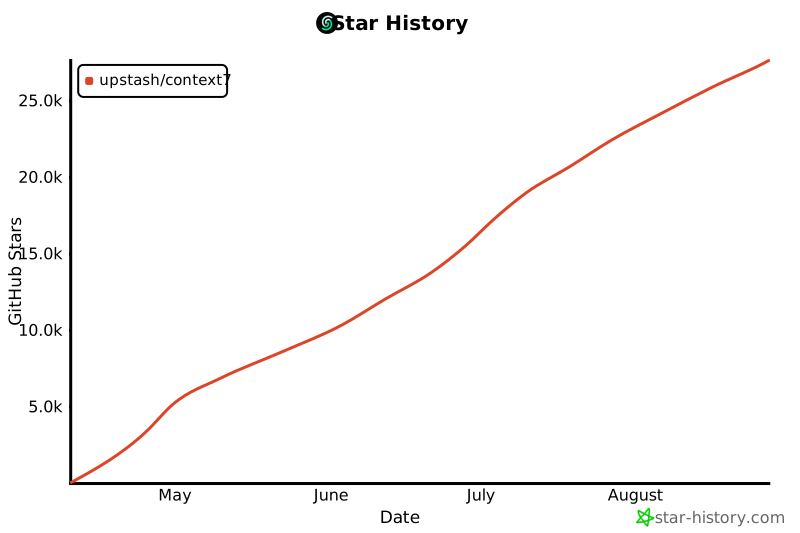
{
|
|
146
|
+
"mcpServers": {
|
|
147
|
+
"context7": {
|
|
148
|
+
"serverUrl": "https://mcp.context7.com/sse"
|
|
149
|
+
}
|
|
150
|
+
}
|
|
151
|
+
}
|
|
152
|
+
```
|
|
153
|
+
|
|
154
|
+
#### Windsurf Local Server Connection
|
|
155
|
+
|
|
106
156
|
```json
|
|
107
157
|
{
|
|
108
158
|
"mcpServers": {
|
|
@@ -114,17 +164,35 @@ Add this to your Windsurf MCP config file. See [Windsurf MCP docs](https://docs.
|
|
|
114
164
|
}
|
|
115
165
|
```
|
|
116
166
|
|
|
117
|
-
|
|
167
|
+
</details>
|
|
168
|
+
|
|
169
|
+
<details>
|
|
170
|
+
<summary><b>Install in VS Code</b></summary>
|
|
118
171
|
|
|
119
172
|
[<img alt="Install in VS Code (npx)" src="https://img.shields.io/badge/VS_Code-VS_Code?style=flat-square&label=Install%20Context7%20MCP&color=0098FF">](https://insiders.vscode.dev/redirect?url=vscode%3Amcp%2Finstall%3F%7B%22name%22%3A%22context7%22%2C%22command%22%3A%22npx%22%2C%22args%22%3A%5B%22-y%22%2C%22%40upstash%2Fcontext7-mcp%40latest%22%5D%7D)
|
|
120
173
|
[<img alt="Install in VS Code Insiders (npx)" src="https://img.shields.io/badge/VS_Code_Insiders-VS_Code_Insiders?style=flat-square&label=Install%20Context7%20MCP&color=24bfa5">](https://insiders.vscode.dev/redirect?url=vscode-insiders%3Amcp%2Finstall%3F%7B%22name%22%3A%22context7%22%2C%22command%22%3A%22npx%22%2C%22args%22%3A%5B%22-y%22%2C%22%40upstash%2Fcontext7-mcp%40latest%22%5D%7D)
|
|
121
174
|
|
|
122
175
|
Add this to your VS Code MCP config file. See [VS Code MCP docs](https://code.visualstudio.com/docs/copilot/chat/mcp-servers) for more info.
|
|
123
176
|
|
|
177
|
+
#### VS Code Remote Server Connection
|
|
178
|
+
|
|
124
179
|
```json
|
|
125
|
-
{
|
|
180
|
+
"mcp": {
|
|
126
181
|
"servers": {
|
|
127
|
-
"
|
|
182
|
+
"context7": {
|
|
183
|
+
"type": "http",
|
|
184
|
+
"url": "https://mcp.context7.com/mcp"
|
|
185
|
+
}
|
|
186
|
+
}
|
|
187
|
+
}
|
|
188
|
+
```
|
|
189
|
+
|
|
190
|
+
#### VS Code Local Server Connection
|
|
191
|
+
|
|
192
|
+
```json
|
|
193
|
+
"mcp": {
|
|
194
|
+
"servers": {
|
|
195
|
+
"context7": {
|
|
128
196
|
"type": "stdio",
|
|
129
197
|
"command": "npx",
|
|
130
198
|
"args": ["-y", "@upstash/context7-mcp"]
|
|
@@ -133,7 +201,10 @@ Add this to your VS Code MCP config file. See [VS Code MCP docs](https://code.vi
|
|
|
133
201
|
}
|
|
134
202
|
```
|
|
135
203
|
|
|
136
|
-
|
|
204
|
+
</details>
|
|
205
|
+
|
|
206
|
+
<details>
|
|
207
|
+
<summary><b>Install in Zed</b></summary>
|
|
137
208
|
|
|
138
209
|
It can be installed via [Zed Extensions](https://zed.dev/extensions?query=Context7) or you can add this to your Zed `settings.json`. See [Zed Context Server docs](https://zed.dev/docs/assistant/context-servers) for more info.
|
|
139
210
|
|
|
@@ -151,15 +222,29 @@ It can be installed via [Zed Extensions](https://zed.dev/extensions?query=Contex
|
|
|
151
222
|
}
|
|
152
223
|
```
|
|
153
224
|
|
|
154
|
-
|
|
225
|
+
</details>
|
|
226
|
+
|
|
227
|
+
<details>
|
|
228
|
+
<summary><b>Install in Claude Code</b></summary>
|
|
155
229
|
|
|
156
230
|
Run this command. See [Claude Code MCP docs](https://docs.anthropic.com/en/docs/agents-and-tools/claude-code/tutorials#set-up-model-context-protocol-mcp) for more info.
|
|
157
231
|
|
|
232
|
+
#### Claude Code Remote Server Connection
|
|
233
|
+
|
|
234
|
+
```sh
|
|
235
|
+
claude mcp add --transport sse context7 https://mcp.context7.com/sse
|
|
236
|
+
```
|
|
237
|
+
|
|
238
|
+
#### Claude Code Local Server Connection
|
|
239
|
+
|
|
158
240
|
```sh
|
|
159
241
|
claude mcp add context7 -- npx -y @upstash/context7-mcp
|
|
160
242
|
```
|
|
161
243
|
|
|
162
|
-
|
|
244
|
+
</details>
|
|
245
|
+
|
|
246
|
+
<details>
|
|
247
|
+
<summary><b>Install in Claude Desktop</b></summary>
|
|
163
248
|
|
|
164
249
|
Add this to your Claude Desktop `claude_desktop_config.json` file. See [Claude Desktop MCP docs](https://modelcontextprotocol.io/quickstart/user) for more info.
|
|
165
250
|
|
|
@@ -174,7 +259,10 @@ Add this to your Claude Desktop `claude_desktop_config.json` file. See [Claude D
|
|
|
174
259
|
}
|
|
175
260
|
```
|
|
176
261
|
|
|
177
|
-
|
|
262
|
+
</details>
|
|
263
|
+
|
|
264
|
+
<details>
|
|
265
|
+
<summary><b>Install in BoltAI</b></summary>
|
|
178
266
|
|
|
179
267
|
Open the "Settings" page of the app, navigate to "Plugins," and enter the following JSON:
|
|
180
268
|
|
|
@@ -191,76 +279,79 @@ Open the "Settings" page of the app, navigate to "Plugins," and enter the follow
|
|
|
191
279
|
|
|
192
280
|
Once saved, enter in the chat `get-library-docs` followed by your Context7 documentation ID (e.g., `get-library-docs /nuxt/ui`). More information is available on [BoltAI's Documentation site](https://docs.boltai.com/docs/plugins/mcp-servers). For BoltAI on iOS, [see this guide](https://docs.boltai.com/docs/boltai-mobile/mcp-servers).
|
|
193
281
|
|
|
194
|
-
|
|
282
|
+
</details>
|
|
283
|
+
|
|
284
|
+
<details>
|
|
285
|
+
<summary><b>Using Docker</b></summary>
|
|
195
286
|
|
|
196
287
|
If you prefer to run the MCP server in a Docker container:
|
|
197
288
|
|
|
198
|
-
1.
|
|
289
|
+
1. **Build the Docker Image:**
|
|
199
290
|
|
|
200
|
-
|
|
291
|
+
First, create a `Dockerfile` in the project root (or anywhere you prefer):
|
|
201
292
|
|
|
202
|
-
|
|
203
|
-
|
|
293
|
+
<details>
|
|
294
|
+
<summary>Click to see Dockerfile content</summary>
|
|
204
295
|
|
|
205
|
-
|
|
206
|
-
|
|
296
|
+
```Dockerfile
|
|
297
|
+
FROM node:18-alpine
|
|
207
298
|
|
|
208
|
-
|
|
299
|
+
WORKDIR /app
|
|
209
300
|
|
|
210
|
-
|
|
211
|
-
|
|
301
|
+
# Install the latest version globally
|
|
302
|
+
RUN npm install -g @upstash/context7-mcp
|
|
212
303
|
|
|
213
|
-
|
|
214
|
-
|
|
304
|
+
# Expose default port if needed (optional, depends on MCP client interaction)
|
|
305
|
+
# EXPOSE 3000
|
|
215
306
|
|
|
216
|
-
|
|
217
|
-
|
|
218
|
-
|
|
307
|
+
# Default command to run the server
|
|
308
|
+
CMD ["context7-mcp"]
|
|
309
|
+
```
|
|
219
310
|
|
|
220
|
-
|
|
311
|
+
</details>
|
|
221
312
|
|
|
222
|
-
|
|
313
|
+
Then, build the image using a tag (e.g., `context7-mcp`). **Make sure Docker Desktop (or the Docker daemon) is running.** Run the following command in the same directory where you saved the `Dockerfile`:
|
|
223
314
|
|
|
224
|
-
|
|
225
|
-
|
|
226
|
-
|
|
315
|
+
```bash
|
|
316
|
+
docker build -t context7-mcp .
|
|
317
|
+
```
|
|
227
318
|
|
|
228
319
|
2. **Configure Your MCP Client:**
|
|
229
320
|
|
|
230
|
-
|
|
321
|
+
Update your MCP client's configuration to use the Docker command.
|
|
231
322
|
|
|
232
|
-
|
|
323
|
+
_Example for a cline_mcp_settings.json:_
|
|
233
324
|
|
|
234
|
-
|
|
235
|
-
|
|
236
|
-
|
|
237
|
-
|
|
238
|
-
|
|
239
|
-
|
|
240
|
-
|
|
241
|
-
|
|
242
|
-
|
|
243
|
-
|
|
244
|
-
|
|
245
|
-
|
|
246
|
-
|
|
247
|
-
|
|
325
|
+
```json
|
|
326
|
+
{
|
|
327
|
+
"mcpServers": {
|
|
328
|
+
"Сontext7": {
|
|
329
|
+
"autoApprove": [],
|
|
330
|
+
"disabled": false,
|
|
331
|
+
"timeout": 60,
|
|
332
|
+
"command": "docker",
|
|
333
|
+
"args": ["run", "-i", "--rm", "context7-mcp"],
|
|
334
|
+
"transportType": "stdio"
|
|
335
|
+
}
|
|
336
|
+
}
|
|
337
|
+
}
|
|
338
|
+
```
|
|
339
|
+
|
|
340
|
+
_Note: This is an example configuration. Please refer to the specific examples for your MCP client (like Cursor, VS Code, etc.) earlier in this README to adapt the structure (e.g., `mcpServers` vs `servers`). Also, ensure the image name in `args` matches the tag used during the `docker build` command._
|
|
341
|
+
|
|
342
|
+
</details>
|
|
343
|
+
|
|
344
|
+
<details>
|
|
345
|
+
<summary><b>Install in Windows</b></summary>
|
|
248
346
|
|
|
249
|
-
|
|
347
|
+
The configuration on Windows is slightly different compared to Linux or macOS (_`Cline` is used in the example_). The same principle applies to other editors; refer to the configuration of `command` and `args`.
|
|
250
348
|
|
|
251
|
-
### Install in Windows
|
|
252
|
-
The configuration on Windows is slightly different compared to Linux or macOS (*`Cline` is used in the example*). The same principle applies to other editors; refer to the configuration of `command` and `args`.
|
|
253
349
|
```json
|
|
254
350
|
{
|
|
255
351
|
"mcpServers": {
|
|
256
352
|
"github.com/upstash/context7-mcp": {
|
|
257
353
|
"command": "cmd",
|
|
258
|
-
"args": [
|
|
259
|
-
"/c",
|
|
260
|
-
"npx",
|
|
261
|
-
"-y",
|
|
262
|
-
"@upstash/context7-mcp"
|
|
263
|
-
],
|
|
354
|
+
"args": ["/c", "npx", "-y", "@upstash/context7-mcp@latest"],
|
|
264
355
|
"disabled": false,
|
|
265
356
|
"autoApprove": []
|
|
266
357
|
}
|
|
@@ -268,11 +359,74 @@ The configuration on Windows is slightly different compared to Linux or macOS (*
|
|
|
268
359
|
}
|
|
269
360
|
```
|
|
270
361
|
|
|
271
|
-
|
|
362
|
+
</details>
|
|
363
|
+
|
|
364
|
+
<details>
|
|
365
|
+
<summary><b>Install in Augment Code</b></summary>
|
|
366
|
+
|
|
367
|
+
To configure Context7 MCP in Augment Code, follow these steps:
|
|
368
|
+
|
|
369
|
+
1. Press Cmd/Ctrl Shift P or go to the hamburger menu in the Augment panel
|
|
370
|
+
2. Select Edit Settings
|
|
371
|
+
3. Under Advanced, click Edit in settings.json
|
|
372
|
+
4. Add the server configuration to the `mcpServers` array in the `augment.advanced` object
|
|
373
|
+
|
|
374
|
+
```json
|
|
375
|
+
"augment.advanced": {
|
|
376
|
+
"mcpServers": [
|
|
377
|
+
{
|
|
378
|
+
"name": "context7",
|
|
379
|
+
"command": "npx",
|
|
380
|
+
"args": ["-y", "@upstash/context7-mcp"]
|
|
381
|
+
}
|
|
382
|
+
]
|
|
383
|
+
}
|
|
384
|
+
```
|
|
385
|
+
|
|
386
|
+
Once the MCP server is added, restart your editor. If you receive any errors, check the syntax to make sure closing brackets or commas are not missing.
|
|
387
|
+
|
|
388
|
+
</details>
|
|
389
|
+
|
|
390
|
+
<details>
|
|
391
|
+
<summary><b>Install in Roo Code</b></summary>
|
|
392
|
+
|
|
393
|
+
Add this to your Roo Code MCP configuration file. See [Roo Code MCP docs](https://docs.roocode.com/features/mcp/using-mcp-in-roo) for more info.
|
|
394
|
+
|
|
395
|
+
#### Roo Code Remote Server Connection
|
|
396
|
+
|
|
397
|
+
```json
|
|
398
|
+
{
|
|
399
|
+
"mcpServers": {
|
|
400
|
+
"context7": {
|
|
401
|
+
"type": "streamable-http",
|
|
402
|
+
"url": "https://mcp.context7.com/mcp"
|
|
403
|
+
}
|
|
404
|
+
}
|
|
405
|
+
}
|
|
406
|
+
```
|
|
407
|
+
|
|
408
|
+
#### Roo Code Local Server Connection
|
|
272
409
|
|
|
273
|
-
|
|
410
|
+
```json
|
|
411
|
+
{
|
|
412
|
+
"mcpServers": {
|
|
413
|
+
"context7": {
|
|
414
|
+
"command": "npx",
|
|
415
|
+
"args": ["-y", "@upstash/context7-mcp"]
|
|
416
|
+
}
|
|
417
|
+
}
|
|
418
|
+
}
|
|
419
|
+
```
|
|
420
|
+
|
|
421
|
+
</details>
|
|
422
|
+
|
|
423
|
+
## 🔧 Environment Variables
|
|
424
|
+
|
|
425
|
+
The Context7 MCP server supports the following environment variables:
|
|
274
426
|
|
|
275
|
-
|
|
427
|
+
- `DEFAULT_MINIMUM_TOKENS`: Set the minimum token count for documentation retrieval (default: 10000)
|
|
428
|
+
|
|
429
|
+
Example configuration with environment variables:
|
|
276
430
|
|
|
277
431
|
```json
|
|
278
432
|
{
|
|
@@ -281,23 +435,27 @@ Examples:
|
|
|
281
435
|
"command": "npx",
|
|
282
436
|
"args": ["-y", "@upstash/context7-mcp"],
|
|
283
437
|
"env": {
|
|
284
|
-
"DEFAULT_MINIMUM_TOKENS": "
|
|
438
|
+
"DEFAULT_MINIMUM_TOKENS": "6000"
|
|
285
439
|
}
|
|
286
440
|
}
|
|
287
441
|
}
|
|
288
442
|
}
|
|
289
443
|
```
|
|
290
444
|
|
|
291
|
-
|
|
445
|
+
## 🔨 Available Tools
|
|
446
|
+
|
|
447
|
+
Context7 MCP provides the following tools that LLMs can use:
|
|
292
448
|
|
|
293
449
|
- `resolve-library-id`: Resolves a general library name into a Context7-compatible library ID.
|
|
294
|
-
|
|
450
|
+
|
|
451
|
+
- `libraryName` (required): The name of the library to search for
|
|
452
|
+
|
|
295
453
|
- `get-library-docs`: Fetches documentation for a library using a Context7-compatible library ID.
|
|
296
|
-
- `context7CompatibleLibraryID` (required)
|
|
454
|
+
- `context7CompatibleLibraryID` (required): Exact Context7-compatible library ID (e.g., `/mongodb/docs`, `/vercel/next.js`)
|
|
297
455
|
- `topic` (optional): Focus the docs on a specific topic (e.g., "routing", "hooks")
|
|
298
456
|
- `tokens` (optional, default 10000): Max number of tokens to return. Values less than the configured `DEFAULT_MINIMUM_TOKENS` value or the default value of 10000 are automatically increased to that value.
|
|
299
457
|
|
|
300
|
-
## Development
|
|
458
|
+
## 💻 Development
|
|
301
459
|
|
|
302
460
|
Clone the project and install dependencies:
|
|
303
461
|
|
|
@@ -311,7 +469,8 @@ Build:
|
|
|
311
469
|
bun run build
|
|
312
470
|
```
|
|
313
471
|
|
|
314
|
-
|
|
472
|
+
<details>
|
|
473
|
+
<summary><b>Local Configuration Example</b></summary>
|
|
315
474
|
|
|
316
475
|
```json
|
|
317
476
|
{
|
|
@@ -324,17 +483,23 @@ bun run build
|
|
|
324
483
|
}
|
|
325
484
|
```
|
|
326
485
|
|
|
327
|
-
|
|
486
|
+
</details>
|
|
487
|
+
|
|
488
|
+
<details>
|
|
489
|
+
<summary><b>Testing with MCP Inspector</b></summary>
|
|
328
490
|
|
|
329
491
|
```bash
|
|
330
492
|
npx -y @modelcontextprotocol/inspector npx @upstash/context7-mcp
|
|
331
493
|
```
|
|
332
494
|
|
|
333
|
-
|
|
495
|
+
</details>
|
|
334
496
|
|
|
335
|
-
|
|
497
|
+
## 🚨 Troubleshooting
|
|
336
498
|
|
|
337
|
-
|
|
499
|
+
<details>
|
|
500
|
+
<summary><b>Module Not Found Errors</b></summary>
|
|
501
|
+
|
|
502
|
+
If you encounter `ERR_MODULE_NOT_FOUND`, try using `bunx` instead of `npx`:
|
|
338
503
|
|
|
339
504
|
```json
|
|
340
505
|
{
|
|
@@ -347,82 +512,83 @@ If you see this error, try using `bunx` instead of `npx`.
|
|
|
347
512
|
}
|
|
348
513
|
```
|
|
349
514
|
|
|
350
|
-
This often resolves module resolution issues
|
|
515
|
+
This often resolves module resolution issues in environments where `npx` doesn't properly install or resolve packages.
|
|
516
|
+
|
|
517
|
+
</details>
|
|
351
518
|
|
|
352
|
-
|
|
519
|
+
<details>
|
|
520
|
+
<summary><b>ESM Resolution Issues</b></summary>
|
|
353
521
|
|
|
354
|
-
|
|
522
|
+
For errors like `Error: Cannot find module 'uriTemplate.js'`, try the `--experimental-vm-modules` flag:
|
|
355
523
|
|
|
356
524
|
```json
|
|
357
525
|
{
|
|
358
526
|
"mcpServers": {
|
|
359
527
|
"context7": {
|
|
360
528
|
"command": "npx",
|
|
361
|
-
"args": [
|
|
362
|
-
"-y",
|
|
363
|
-
"--node-options=--experimental-vm-modules",
|
|
364
|
-
"@upstash/context7-mcp"
|
|
365
|
-
]
|
|
529
|
+
"args": ["-y", "--node-options=--experimental-vm-modules", "@upstash/context7-mcp@1.0.6"]
|
|
366
530
|
}
|
|
367
531
|
}
|
|
368
532
|
}
|
|
369
533
|
```
|
|
370
534
|
|
|
371
|
-
|
|
535
|
+
</details>
|
|
372
536
|
|
|
373
|
-
|
|
537
|
+
<details>
|
|
538
|
+
<summary><b>TLS/Certificate Issues</b></summary>
|
|
539
|
+
|
|
540
|
+
Use the `--experimental-fetch` flag to bypass TLS-related problems:
|
|
374
541
|
|
|
375
542
|
```json
|
|
376
543
|
{
|
|
377
544
|
"mcpServers": {
|
|
378
545
|
"context7": {
|
|
379
546
|
"command": "npx",
|
|
380
|
-
"args": [
|
|
381
|
-
"-y",
|
|
382
|
-
"--node-options=--experimental-fetch",
|
|
383
|
-
"@upstash/context7-mcp"
|
|
384
|
-
]
|
|
547
|
+
"args": ["-y", "--node-options=--experimental-fetch", "@upstash/context7-mcp"]
|
|
385
548
|
}
|
|
386
549
|
}
|
|
387
550
|
}
|
|
388
551
|
```
|
|
389
552
|
|
|
390
|
-
|
|
391
|
-
|
|
392
|
-
1. Try adding `@latest` to the package name.
|
|
553
|
+
</details>
|
|
393
554
|
|
|
394
|
-
|
|
555
|
+
<details>
|
|
556
|
+
<summary><b>General MCP Client Errors</b></summary>
|
|
395
557
|
|
|
396
|
-
|
|
558
|
+
1. Try adding `@latest` to the package name
|
|
559
|
+
2. Use `bunx` as an alternative to `npx`
|
|
560
|
+
3. Consider using `deno` as another alternative
|
|
561
|
+
4. Ensure you're using Node.js v18 or higher for native fetch support
|
|
397
562
|
|
|
398
|
-
|
|
563
|
+
</details>
|
|
399
564
|
|
|
400
|
-
## Disclaimer
|
|
565
|
+
## ⚠️ Disclaimer
|
|
401
566
|
|
|
402
567
|
Context7 projects are community-contributed and while we strive to maintain high quality, we cannot guarantee the accuracy, completeness, or security of all library documentation. Projects listed in Context7 are developed and maintained by their respective owners, not by Context7. If you encounter any suspicious, inappropriate, or potentially harmful content, please use the "Report" button on the project page to notify us immediately. We take all reports seriously and will review flagged content promptly to maintain the integrity and safety of our platform. By using Context7, you acknowledge that you do so at your own discretion and risk.
|
|
403
568
|
|
|
404
|
-
## Connect with Us
|
|
569
|
+
## 🤝 Connect with Us
|
|
405
570
|
|
|
406
571
|
Stay updated and join our community:
|
|
572
|
+
|
|
407
573
|
- 📢 Follow us on [X](https://x.com/contextai) for the latest news and updates
|
|
408
574
|
- 🌐 Visit our [Website](https://context7.com)
|
|
409
|
-
- 💬 Join our [Discord Community](https://upstash.com/discord)
|
|
575
|
+
- 💬 Join our [Discord Community](https://upstash.com/discord)
|
|
410
576
|
|
|
411
|
-
## Context7 In Media
|
|
577
|
+
## 📺 Context7 In Media
|
|
412
578
|
|
|
413
579
|
- [Better Stack: "Free Tool Makes Cursor 10x Smarter"](https://youtu.be/52FC3qObp9E)
|
|
414
580
|
- [Cole Medin: "This is Hands Down the BEST MCP Server for AI Coding Assistants"](https://www.youtube.com/watch?v=G7gK8H6u7Rs)
|
|
415
|
-
- [Income
|
|
581
|
+
- [Income Stream Surfers: "Context7 + SequentialThinking MCPs: Is This AGI?"](https://www.youtube.com/watch?v=-ggvzyLpK6o)
|
|
416
582
|
- [Julian Goldie SEO: "Context7: New MCP AI Agent Update"](https://www.youtube.com/watch?v=CTZm6fBYisc)
|
|
417
583
|
- [JeredBlu: "Context 7 MCP: Get Documentation Instantly + VS Code Setup"](https://www.youtube.com/watch?v=-ls0D-rtET4)
|
|
418
|
-
- [Income
|
|
584
|
+
- [Income Stream Surfers: "Context7: The New MCP Server That Will CHANGE AI Coding"](https://www.youtube.com/watch?v=PS-2Azb-C3M)
|
|
419
585
|
- [AICodeKing: "Context7 + Cline & RooCode: This MCP Server Makes CLINE 100X MORE EFFECTIVE!"](https://www.youtube.com/watch?v=qZfENAPMnyo)
|
|
420
586
|
- [Sean Kochel: "5 MCP Servers For Vibe Coding Glory (Just Plug-In & Go)"](https://www.youtube.com/watch?v=LqTQi8qexJM)
|
|
421
587
|
|
|
422
|
-
## Star History
|
|
588
|
+
## ⭐ Star History
|
|
423
589
|
|
|
424
590
|
[](https://www.star-history.com/#upstash/context7&Date)
|
|
425
591
|
|
|
426
|
-
## License
|
|
592
|
+
## 📄 License
|
|
427
593
|
|
|
428
594
|
MIT
|
package/dist/index.js
CHANGED
|
@@ -5,6 +5,10 @@ import { z } from "zod";
|
|
|
5
5
|
import { searchLibraries, fetchLibraryDocumentation } from "./lib/api.js";
|
|
6
6
|
import { formatSearchResults } from "./lib/utils.js";
|
|
7
7
|
import dotenv from "dotenv";
|
|
8
|
+
import { createServer } from "http";
|
|
9
|
+
import { StreamableHTTPServerTransport } from "@modelcontextprotocol/sdk/server/streamableHttp.js";
|
|
10
|
+
import { SSEServerTransport } from "@modelcontextprotocol/sdk/server/sse.js";
|
|
11
|
+
import { parse } from "url";
|
|
8
12
|
// Load environment variables from .env file if present
|
|
9
13
|
dotenv.config();
|
|
10
14
|
// Get DEFAULT_MINIMUM_TOKENS from environment variable or use default
|
|
@@ -18,18 +22,21 @@ if (process.env.DEFAULT_MINIMUM_TOKENS) {
|
|
|
18
22
|
console.warn(`Warning: Invalid DEFAULT_MINIMUM_TOKENS value provided in environment variable. Using default value of 10000`);
|
|
19
23
|
}
|
|
20
24
|
}
|
|
21
|
-
//
|
|
22
|
-
const
|
|
23
|
-
|
|
24
|
-
|
|
25
|
-
|
|
26
|
-
|
|
27
|
-
|
|
28
|
-
|
|
29
|
-
|
|
30
|
-
}
|
|
31
|
-
|
|
32
|
-
|
|
25
|
+
// Store SSE transports by session ID
|
|
26
|
+
const sseTransports = {};
|
|
27
|
+
// Function to create a new server instance with all tools registered
|
|
28
|
+
function createServerInstance() {
|
|
29
|
+
const server = new McpServer({
|
|
30
|
+
name: "Context7",
|
|
31
|
+
description: "Retrieves up-to-date documentation and code examples for any library.",
|
|
32
|
+
version: "v1.0.13",
|
|
33
|
+
capabilities: {
|
|
34
|
+
resources: {},
|
|
35
|
+
tools: {},
|
|
36
|
+
},
|
|
37
|
+
});
|
|
38
|
+
// Register Context7 tools
|
|
39
|
+
server.tool("resolve-library-id", `Resolves a package/product name to a Context7-compatible library ID and returns a list of matching libraries.
|
|
33
40
|
|
|
34
41
|
You MUST call this function before 'get-library-docs' to obtain a valid Context7-compatible library ID UNLESS the user explicitly provides a library ID in the format '/org/project' or '/org/project/version' in their query.
|
|
35
42
|
|
|
@@ -48,37 +55,29 @@ Response Format:
|
|
|
48
55
|
- If no good matches exist, clearly state this and suggest query refinements
|
|
49
56
|
|
|
50
57
|
For ambiguous queries, request clarification before proceeding with a best-guess match.`, {
|
|
51
|
-
|
|
52
|
-
|
|
53
|
-
|
|
54
|
-
}, async ({ libraryName }) => {
|
|
55
|
-
|
|
56
|
-
|
|
58
|
+
libraryName: z
|
|
59
|
+
.string()
|
|
60
|
+
.describe("Library name to search for and retrieve a Context7-compatible library ID."),
|
|
61
|
+
}, async ({ libraryName }) => {
|
|
62
|
+
const searchResponse = await searchLibraries(libraryName);
|
|
63
|
+
if (!searchResponse.results || searchResponse.results.length === 0) {
|
|
64
|
+
return {
|
|
65
|
+
content: [
|
|
66
|
+
{
|
|
67
|
+
type: "text",
|
|
68
|
+
text: searchResponse.error
|
|
69
|
+
? searchResponse.error
|
|
70
|
+
: "Failed to retrieve library documentation data from Context7",
|
|
71
|
+
},
|
|
72
|
+
],
|
|
73
|
+
};
|
|
74
|
+
}
|
|
75
|
+
const resultsText = formatSearchResults(searchResponse);
|
|
57
76
|
return {
|
|
58
77
|
content: [
|
|
59
78
|
{
|
|
60
79
|
type: "text",
|
|
61
|
-
text:
|
|
62
|
-
},
|
|
63
|
-
],
|
|
64
|
-
};
|
|
65
|
-
}
|
|
66
|
-
if (searchResponse.results.length === 0) {
|
|
67
|
-
return {
|
|
68
|
-
content: [
|
|
69
|
-
{
|
|
70
|
-
type: "text",
|
|
71
|
-
text: "No documentation libraries available",
|
|
72
|
-
},
|
|
73
|
-
],
|
|
74
|
-
};
|
|
75
|
-
}
|
|
76
|
-
const resultsText = formatSearchResults(searchResponse);
|
|
77
|
-
return {
|
|
78
|
-
content: [
|
|
79
|
-
{
|
|
80
|
-
type: "text",
|
|
81
|
-
text: `Available Libraries (top matches):
|
|
80
|
+
text: `Available Libraries (top matches):
|
|
82
81
|
|
|
83
82
|
Each result includes:
|
|
84
83
|
- Library ID: Context7-compatible identifier (format: /org/project)
|
|
@@ -93,51 +92,152 @@ For best results, select libraries based on name match, trust score, snippet cov
|
|
|
93
92
|
----------
|
|
94
93
|
|
|
95
94
|
${resultsText}`,
|
|
96
|
-
|
|
97
|
-
|
|
98
|
-
|
|
99
|
-
});
|
|
100
|
-
server.tool("get-library-docs", "Fetches up-to-date documentation for a library. You must call 'resolve-library-id' first to obtain the exact Context7-compatible library ID required to use this tool, UNLESS the user explicitly provides a library ID in the format '/org/project' or '/org/project/version' in their query.", {
|
|
101
|
-
context7CompatibleLibraryID: z
|
|
102
|
-
.string()
|
|
103
|
-
.describe("Exact Context7-compatible library ID (e.g., '/mongodb/docs', '/vercel/next.js', '/supabase/supabase', '/vercel/next.js/v14.3.0-canary.87') retrieved from 'resolve-library-id' or directly from user query in the format '/org/project' or '/org/project/version'."),
|
|
104
|
-
topic: z
|
|
105
|
-
.string()
|
|
106
|
-
.optional()
|
|
107
|
-
.describe("Topic to focus documentation on (e.g., 'hooks', 'routing')."),
|
|
108
|
-
tokens: z
|
|
109
|
-
.preprocess((val) => (typeof val === "string" ? Number(val) : val), z.number())
|
|
110
|
-
.transform((val) => (val < DEFAULT_MINIMUM_TOKENS ? DEFAULT_MINIMUM_TOKENS : val))
|
|
111
|
-
.optional()
|
|
112
|
-
.describe(`Maximum number of tokens of documentation to retrieve (default: ${DEFAULT_MINIMUM_TOKENS}). Higher values provide more context but consume more tokens.`),
|
|
113
|
-
}, async ({ context7CompatibleLibraryID, tokens = DEFAULT_MINIMUM_TOKENS, topic = "" }) => {
|
|
114
|
-
const documentationText = await fetchLibraryDocumentation(context7CompatibleLibraryID, {
|
|
115
|
-
tokens,
|
|
116
|
-
topic,
|
|
95
|
+
},
|
|
96
|
+
],
|
|
97
|
+
};
|
|
117
98
|
});
|
|
118
|
-
|
|
99
|
+
server.tool("get-library-docs", "Fetches up-to-date documentation for a library. You must call 'resolve-library-id' first to obtain the exact Context7-compatible library ID required to use this tool, UNLESS the user explicitly provides a library ID in the format '/org/project' or '/org/project/version' in their query.", {
|
|
100
|
+
context7CompatibleLibraryID: z
|
|
101
|
+
.string()
|
|
102
|
+
.describe("Exact Context7-compatible library ID (e.g., '/mongodb/docs', '/vercel/next.js', '/supabase/supabase', '/vercel/next.js/v14.3.0-canary.87') retrieved from 'resolve-library-id' or directly from user query in the format '/org/project' or '/org/project/version'."),
|
|
103
|
+
topic: z
|
|
104
|
+
.string()
|
|
105
|
+
.optional()
|
|
106
|
+
.describe("Topic to focus documentation on (e.g., 'hooks', 'routing')."),
|
|
107
|
+
tokens: z
|
|
108
|
+
.preprocess((val) => (typeof val === "string" ? Number(val) : val), z.number())
|
|
109
|
+
.transform((val) => (val < DEFAULT_MINIMUM_TOKENS ? DEFAULT_MINIMUM_TOKENS : val))
|
|
110
|
+
.optional()
|
|
111
|
+
.describe(`Maximum number of tokens of documentation to retrieve (default: ${DEFAULT_MINIMUM_TOKENS}). Higher values provide more context but consume more tokens.`),
|
|
112
|
+
}, async ({ context7CompatibleLibraryID, tokens = DEFAULT_MINIMUM_TOKENS, topic = "" }) => {
|
|
113
|
+
const fetchDocsResponse = await fetchLibraryDocumentation(context7CompatibleLibraryID, {
|
|
114
|
+
tokens,
|
|
115
|
+
topic,
|
|
116
|
+
});
|
|
117
|
+
if (!fetchDocsResponse) {
|
|
118
|
+
return {
|
|
119
|
+
content: [
|
|
120
|
+
{
|
|
121
|
+
type: "text",
|
|
122
|
+
text: "Documentation not found or not finalized for this library. This might have happened because you used an invalid Context7-compatible library ID. To get a valid Context7-compatible library ID, use the 'resolve-library-id' with the package name you wish to retrieve documentation for.",
|
|
123
|
+
},
|
|
124
|
+
],
|
|
125
|
+
};
|
|
126
|
+
}
|
|
119
127
|
return {
|
|
120
128
|
content: [
|
|
121
129
|
{
|
|
122
130
|
type: "text",
|
|
123
|
-
text:
|
|
131
|
+
text: fetchDocsResponse,
|
|
124
132
|
},
|
|
125
133
|
],
|
|
126
134
|
};
|
|
127
|
-
}
|
|
128
|
-
return
|
|
129
|
-
|
|
130
|
-
{
|
|
131
|
-
type: "text",
|
|
132
|
-
text: documentationText,
|
|
133
|
-
},
|
|
134
|
-
],
|
|
135
|
-
};
|
|
136
|
-
});
|
|
135
|
+
});
|
|
136
|
+
return server;
|
|
137
|
+
}
|
|
137
138
|
async function main() {
|
|
138
|
-
const
|
|
139
|
-
|
|
140
|
-
|
|
139
|
+
const transportType = process.env.MCP_TRANSPORT || "stdio";
|
|
140
|
+
if (transportType === "http" || transportType === "sse") {
|
|
141
|
+
// Get initial port from environment or use default
|
|
142
|
+
const initialPort = process.env.PORT ? parseInt(process.env.PORT, 10) : 3000;
|
|
143
|
+
// Keep track of which port we end up using
|
|
144
|
+
let actualPort = initialPort;
|
|
145
|
+
const httpServer = createServer(async (req, res) => {
|
|
146
|
+
const url = parse(req.url || "").pathname;
|
|
147
|
+
// Set CORS headers for all responses
|
|
148
|
+
res.setHeader("Access-Control-Allow-Origin", "*");
|
|
149
|
+
res.setHeader("Access-Control-Allow-Methods", "GET,POST,OPTIONS,DELETE");
|
|
150
|
+
res.setHeader("Access-Control-Allow-Headers", "Content-Type, MCP-Session-Id, mcp-session-id");
|
|
151
|
+
// Handle preflight OPTIONS requests
|
|
152
|
+
if (req.method === "OPTIONS") {
|
|
153
|
+
res.writeHead(200);
|
|
154
|
+
res.end();
|
|
155
|
+
return;
|
|
156
|
+
}
|
|
157
|
+
try {
|
|
158
|
+
// Create new server instance for each request
|
|
159
|
+
const requestServer = createServerInstance();
|
|
160
|
+
if (url === "/mcp") {
|
|
161
|
+
const transport = new StreamableHTTPServerTransport({
|
|
162
|
+
sessionIdGenerator: undefined,
|
|
163
|
+
});
|
|
164
|
+
await requestServer.connect(transport);
|
|
165
|
+
await transport.handleRequest(req, res);
|
|
166
|
+
}
|
|
167
|
+
else if (url === "/sse" && req.method === "GET") {
|
|
168
|
+
// Create new SSE transport for GET request
|
|
169
|
+
const sseTransport = new SSEServerTransport("/messages", res);
|
|
170
|
+
// Store the transport by session ID
|
|
171
|
+
sseTransports[sseTransport.sessionId] = sseTransport;
|
|
172
|
+
// Clean up transport when connection closes
|
|
173
|
+
res.on("close", () => {
|
|
174
|
+
delete sseTransports[sseTransport.sessionId];
|
|
175
|
+
});
|
|
176
|
+
await requestServer.connect(sseTransport);
|
|
177
|
+
}
|
|
178
|
+
else if (url === "/messages" && req.method === "POST") {
|
|
179
|
+
// Get session ID from query parameters
|
|
180
|
+
const parsedUrl = parse(req.url || "", true);
|
|
181
|
+
const sessionId = parsedUrl.query.sessionId;
|
|
182
|
+
if (!sessionId) {
|
|
183
|
+
res.writeHead(400);
|
|
184
|
+
res.end("Missing sessionId parameter");
|
|
185
|
+
return;
|
|
186
|
+
}
|
|
187
|
+
// Get existing transport for this session
|
|
188
|
+
const sseTransport = sseTransports[sessionId];
|
|
189
|
+
if (!sseTransport) {
|
|
190
|
+
res.writeHead(400);
|
|
191
|
+
res.end(`No transport found for sessionId: ${sessionId}`);
|
|
192
|
+
return;
|
|
193
|
+
}
|
|
194
|
+
// Handle the POST message with the existing transport
|
|
195
|
+
await sseTransport.handlePostMessage(req, res);
|
|
196
|
+
}
|
|
197
|
+
else if (url === "/ping") {
|
|
198
|
+
res.writeHead(200, { "Content-Type": "text/plain" });
|
|
199
|
+
res.end("pong");
|
|
200
|
+
}
|
|
201
|
+
else {
|
|
202
|
+
res.writeHead(404);
|
|
203
|
+
res.end("Not found");
|
|
204
|
+
}
|
|
205
|
+
}
|
|
206
|
+
catch (error) {
|
|
207
|
+
console.error("Error handling request:", error);
|
|
208
|
+
if (!res.headersSent) {
|
|
209
|
+
res.writeHead(500);
|
|
210
|
+
res.end("Internal Server Error");
|
|
211
|
+
}
|
|
212
|
+
}
|
|
213
|
+
});
|
|
214
|
+
// Function to attempt server listen with port fallback
|
|
215
|
+
const startServer = (port, maxAttempts = 10) => {
|
|
216
|
+
httpServer.once("error", (err) => {
|
|
217
|
+
if (err.code === "EADDRINUSE" && port < initialPort + maxAttempts) {
|
|
218
|
+
console.warn(`Port ${port} is in use, trying port ${port + 1}...`);
|
|
219
|
+
startServer(port + 1, maxAttempts);
|
|
220
|
+
}
|
|
221
|
+
else {
|
|
222
|
+
console.error(`Failed to start server: ${err.message}`);
|
|
223
|
+
process.exit(1);
|
|
224
|
+
}
|
|
225
|
+
});
|
|
226
|
+
httpServer.listen(port, () => {
|
|
227
|
+
actualPort = port;
|
|
228
|
+
console.error(`Context7 Documentation MCP Server running on ${transportType.toUpperCase()} at http://localhost:${actualPort}/mcp and legacy SSE at /sse`);
|
|
229
|
+
});
|
|
230
|
+
};
|
|
231
|
+
// Start the server with initial port
|
|
232
|
+
startServer(initialPort);
|
|
233
|
+
}
|
|
234
|
+
else {
|
|
235
|
+
// Stdio transport - this is already stateless by nature
|
|
236
|
+
const server = createServerInstance();
|
|
237
|
+
const transport = new StdioServerTransport();
|
|
238
|
+
await server.connect(transport);
|
|
239
|
+
console.error("Context7 Documentation MCP Server running on stdio");
|
|
240
|
+
}
|
|
141
241
|
}
|
|
142
242
|
main().catch((error) => {
|
|
143
243
|
console.error("Fatal error in main():", error);
|
package/dist/lib/api.js
CHANGED
|
@@ -11,14 +11,25 @@ export async function searchLibraries(query) {
|
|
|
11
11
|
url.searchParams.set("query", query);
|
|
12
12
|
const response = await fetch(url);
|
|
13
13
|
if (!response.ok) {
|
|
14
|
-
|
|
15
|
-
|
|
14
|
+
const errorCode = response.status;
|
|
15
|
+
if (errorCode === 429) {
|
|
16
|
+
console.error(`Rate limited due to too many requests. Please try again later.`);
|
|
17
|
+
return {
|
|
18
|
+
results: [],
|
|
19
|
+
error: `Rate limited due to too many requests. Please try again later.`,
|
|
20
|
+
};
|
|
21
|
+
}
|
|
22
|
+
console.error(`Failed to search libraries. Please try again later. Error code: ${errorCode}`);
|
|
23
|
+
return {
|
|
24
|
+
results: [],
|
|
25
|
+
error: `Failed to search libraries. Please try again later. Error code: ${errorCode}`,
|
|
26
|
+
};
|
|
16
27
|
}
|
|
17
28
|
return await response.json();
|
|
18
29
|
}
|
|
19
30
|
catch (error) {
|
|
20
31
|
console.error("Error searching libraries:", error);
|
|
21
|
-
return
|
|
32
|
+
return { results: [], error: `Error searching libraries: ${error}` };
|
|
22
33
|
}
|
|
23
34
|
}
|
|
24
35
|
/**
|
|
@@ -44,8 +55,15 @@ export async function fetchLibraryDocumentation(libraryId, options = {}) {
|
|
|
44
55
|
},
|
|
45
56
|
});
|
|
46
57
|
if (!response.ok) {
|
|
47
|
-
|
|
48
|
-
|
|
58
|
+
const errorCode = response.status;
|
|
59
|
+
if (errorCode === 429) {
|
|
60
|
+
const errorMessage = `Rate limited due to too many requests. Please try again later.`;
|
|
61
|
+
console.error(errorMessage);
|
|
62
|
+
return errorMessage;
|
|
63
|
+
}
|
|
64
|
+
const errorMessage = `Failed to fetch documentation. Please try again later. Error code: ${errorCode}`;
|
|
65
|
+
console.error(errorMessage);
|
|
66
|
+
return errorMessage;
|
|
49
67
|
}
|
|
50
68
|
const text = await response.text();
|
|
51
69
|
if (!text || text === "No content available" || text === "No context data available") {
|
|
@@ -54,7 +72,8 @@ export async function fetchLibraryDocumentation(libraryId, options = {}) {
|
|
|
54
72
|
return text;
|
|
55
73
|
}
|
|
56
74
|
catch (error) {
|
|
57
|
-
|
|
58
|
-
|
|
75
|
+
const errorMessage = `Error fetching library documentation. Please try again later. ${error}`;
|
|
76
|
+
console.error(errorMessage);
|
|
77
|
+
return errorMessage;
|
|
59
78
|
}
|
|
60
79
|
}
|
package/package.json
CHANGED
|
@@ -1 +1 @@
|
|
|
1
|
-
{"name":"@upstash/context7-mcp","version":"v1.0.
|
|
1
|
+
{"name":"@upstash/context7-mcp","version":"v1.0.13","description":"MCP server for Context7","scripts":{"test":"echo \"Error: no test specified\" && exit 1","build":"tsc && chmod 755 dist/index.js","format":"prettier --write .","lint":"eslint \"**/*.{js,ts,tsx}\" --fix","lint:check":"eslint \"**/*.{js,ts,tsx}\"","start":"MCP_TRANSPORT=http node dist/index.js"},"repository":{"type":"git","url":"git+https://github.com/upstash/context7.git"},"keywords":["modelcontextprotocol","mcp","context7"],"author":"abdush","license":"MIT","type":"module","bin":{"context7-mcp":"dist/index.js"},"files":["dist"],"bugs":{"url":"https://github.com/upstash/context7/issues"},"homepage":"https://github.com/upstash/context7#readme","dependencies":{"@modelcontextprotocol/sdk":"^1.12.0","dotenv":"^16.5.0","zod":"^3.24.2"},"devDependencies":{"@types/node":"^22.13.14","@typescript-eslint/eslint-plugin":"^8.28.0","@typescript-eslint/parser":"^8.28.0","eslint":"^9.23.0","eslint-config-prettier":"^10.1.1","eslint-plugin-prettier":"^5.2.5","prettier":"^3.5.3","typescript":"^5.8.2","typescript-eslint":"^8.28.0"}}
|