@umoteam/editor 9.0.1 → 10.0.1
This diff represents the content of publicly available package versions that have been released to one of the supported registries. The information contained in this diff is provided for informational purposes only and reflects changes between package versions as they appear in their respective public registries.
- package/README.md +31 -20
- package/README.zh-CN.md +43 -18
- package/dist/umo-editor.css +1 -0
- package/dist/umo-editor.js +35183 -36451
- package/package.json +102 -170
- package/dist/style.css +0 -1
- package/types/index.d.ts +0 -274
- package/types/src/components/index.d.ts +0 -9
- package/types/src/components/index.vue.d.ts +0 -1621
- package/types/src/components/menus/button.vue.d.ts +0 -583
- package/types/src/components/modal.vue.d.ts +0 -2
- package/types/src/components/tooltip.vue.d.ts +0 -27
package/README.md
CHANGED
|
@@ -5,8 +5,8 @@
|
|
|
5
5
|
<p style="text-align: center;">
|
|
6
6
|
<a href="https://github.com/umodoc/editor/blob/main/LICENSE" target="_blank"><img src="https://img.shields.io/npm/l/@umoteam/editor" /></a>
|
|
7
7
|
<a href="https://www.npmjs.com/package/@umoteam/editor" target="_blank"><img src="https://img.shields.io/npm/v/@umoteam/editor" /></a>
|
|
8
|
-
<a href="https://www.npmjs.com/package/@umoteam/editor" target="_blank"><img src="https://img.shields.io/npm/
|
|
9
|
-
<a href="https://www.npmjs.com/package/@umoteam/editor" target="_blank"><img src="https://img.shields.io/npm/unpacked-size
|
|
8
|
+
<a href="https://www.npmjs.com/package/@umoteam/editor" target="_blank"><img src="https://img.shields.io/npm/dm/@umoteam/editor" /></a>
|
|
9
|
+
<a href="https://www.npmjs.com/package/@umoteam/editor" target="_blank"><img src="https://img.shields.io/npm/unpacked-size/@umoteam/editor" /></a>
|
|
10
10
|
<a href="https://github.com/umodoc/editor/commits" target="_blank"><img src="https://img.shields.io/github/commit-activity/m/umodoc/editor" /></a>
|
|
11
11
|
</p>
|
|
12
12
|
|
|
@@ -14,30 +14,45 @@
|
|
|
14
14
|
|
|
15
15
|
## 中文介绍
|
|
16
16
|
|
|
17
|
-
Umo Editor 是一个基于 Vue3 和
|
|
17
|
+
Umo Editor 是一个基于 Vue3 和 Tiptap3 的本土化开源文档编辑器,提供类似于 Microsoft Word 的在线编辑功能和浏览体验,专为国人用户设计。它提供了强大的文档编辑能力和 AI 创作功能,支持分页模式和普通 Web 模式、Markdown 语法、富文本编辑、多种格式的节点插入、页面样式设置、文档导出与打印等功能。
|
|
18
18
|
|
|
19
19
|
此外,Umo Editor 还支持自定义扩展、多语言设置和暗色主题。同时我们提供了单独的文本预览组件 [Umo Viewer](https://github.com/umodoc/viewer),用户可以在项目中使用该组件来预览文档。
|
|
20
20
|
|
|
21
|
-
Umo Editor 最大的特点是代码完全开源且自主可控,支持私有部署,您可以内网环境中使用,而无需担心数据安全问题。同时 Umo Editor 基于 Vue3 和
|
|
21
|
+
Umo Editor 最大的特点是代码完全开源且自主可控,支持私有部署,您可以内网环境中使用,而无需担心数据安全问题。同时 Umo Editor 基于 Vue3 和 Tiptap3,两者都有丰富的生态系统和社区支持,在遇到问题时可以迅速得到解决。
|
|
22
22
|
|
|
23
23
|
## Introduction
|
|
24
24
|
|
|
25
|
-
Umo Editor is an open-source document editor based on Vue3 and
|
|
25
|
+
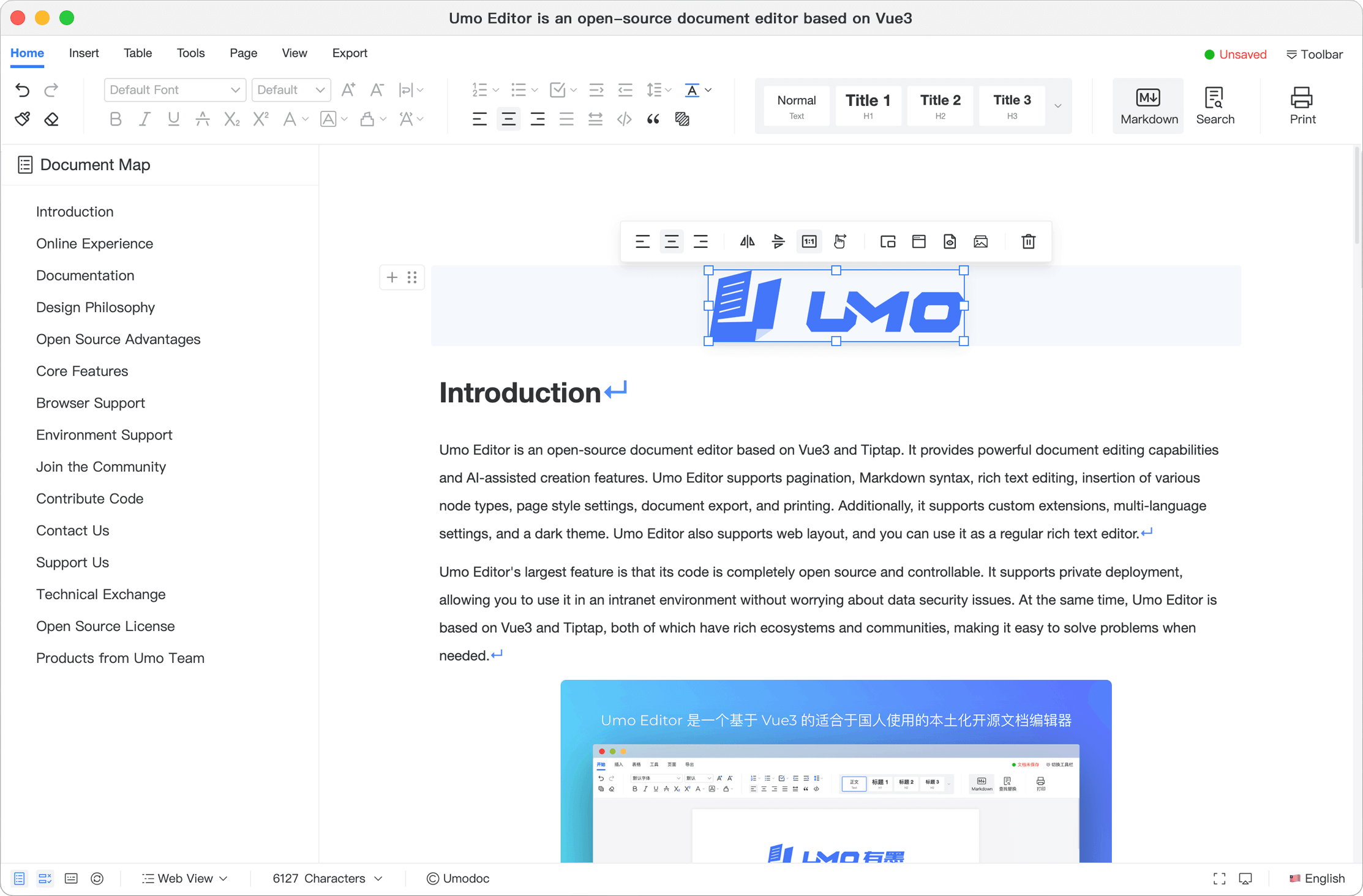
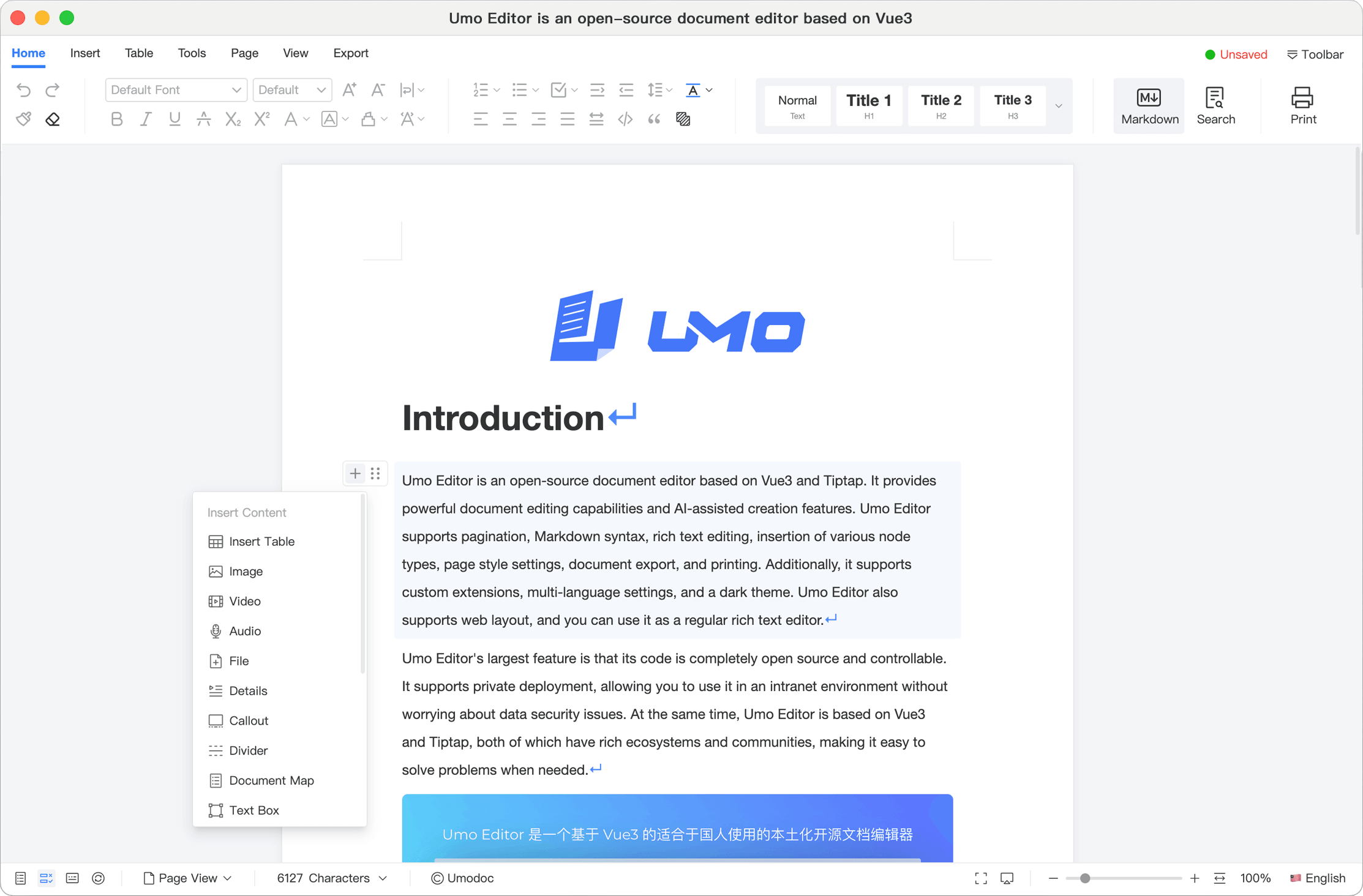
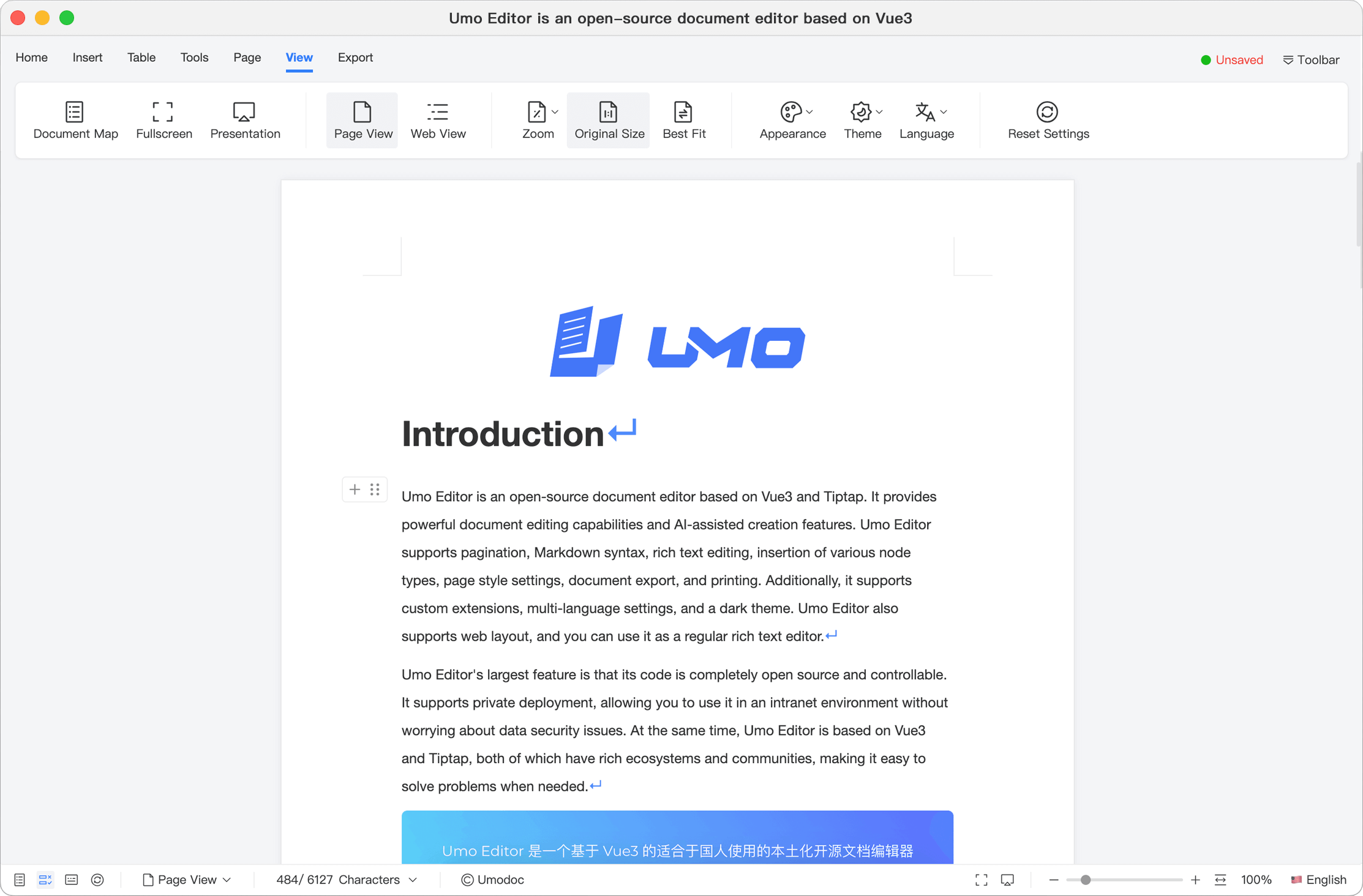
Umo Editor is an open-source document editor based on Vue3 and Tiptap3, providing an online editing experience similar to Microsoft Word. It provides powerful document editing capabilities and AI-assisted creation features. Umo Editor supports pagination and normal web layout, Markdown syntax, rich text editing, insertion of various node types, page style settings, document export, and printing. Additionally, it supports custom extensions, multi-language settings, and a dark theme. Umo Editor also supports web layout, and you can use it as a regular rich text editor.
|
|
26
26
|
|
|
27
27
|
Additionally, Umo Editor supports custom extensions, multi-language settings, and dark theme. We also provide a standalone text preview component, [Umo Viewer](https://github.com/umodoc/viewer), which users can integrate into their projects to preview documents.
|
|
28
28
|
|
|
29
|
-
Umo Editor's largest feature is that its code is completely open source and controllable. It supports private deployment, allowing you to use it in an intranet environment without worrying about data security issues. At the same time, Umo Editor is based on Vue3 and
|
|
30
|
-
|
|
31
|
-

|
|
29
|
+
Umo Editor's largest feature is that its code is completely open source and controllable. It supports private deployment, allowing you to use it in an intranet environment without worrying about data security issues. At the same time, Umo Editor is based on Vue3 and Tiptap3, both of which have rich ecosystems and communities, making it easy to solve problems when needed.
|
|
32
30
|
|
|
33
31
|
As an independent Vue3 plugin, Umo Editor can be easily integrated into various Vue3 projects with zero configuration. For non-Vue3 projects, you can embed Umo Editor into your project via an iframe.
|
|
34
32
|
|
|
35
33
|
[Website](https://www.umodoc.com/en) | [Documentation](https://dev.umodoc.com/en/docs/editor) | [Playground](https://www.umodoc.com/en/demo) | [GitHub](https://github.com/umodoc/editor) | [NPM](https://www.npmjs.com/package/@umoteam/editor)
|
|
36
34
|
|
|
35
|
+
## Screenshots
|
|
36
|
+
|
|
37
|
+
|
|
38
|
+
|
|
39
|
+
|
|
40
|
+
|
|
41
|
+
|
|
42
|
+
|
|
37
43
|
## Online Experience
|
|
38
44
|
|
|
39
45
|
Visit [Playground](https://www.umodoc.com/en/demo?pane=hide) to try Umo Editor.
|
|
40
46
|
|
|
47
|
+
## Example Project
|
|
48
|
+
|
|
49
|
+
To help you get started quickly, we provide a demo project: https://github.com/umodoc/demo. You can view and run Umo Editor sample code in this project.
|
|
50
|
+
|
|
51
|
+
You can also preview and run it online with StackBlitz or CodeSandbox:
|
|
52
|
+
|
|
53
|
+
- View and run on [StackBlitz](https://stackblitz.com/~/github.com/umodoc/demo?file=src/app.vue)
|
|
54
|
+
- View and run on [CodeSandbox](https://codesandbox.io/p/github/umodoc/demo/main?import=true)
|
|
55
|
+
|
|
41
56
|
## Documentation
|
|
42
57
|
|
|
43
58
|
Please visit [Documentation](https://dev.umodoc.com/en/docs/editor) for detailed instructions.
|
|
@@ -65,7 +80,6 @@ Umo Editor aims to simplify document editing in web applications by providing Mi
|
|
|
65
80
|
- Presentation mode
|
|
66
81
|
- Document export and sharing
|
|
67
82
|
- Page settings
|
|
68
|
-
- AI document assistant
|
|
69
83
|
- Print and print preview support
|
|
70
84
|
- Custom extensions support
|
|
71
85
|
- Shortcut key support
|
|
@@ -89,11 +103,9 @@ For more details, see [Features](https://dev.umodoc.com/en/docs/editor/features)
|
|
|
89
103
|
|
|
90
104
|
## Environment Support
|
|
91
105
|
|
|
92
|
-
- **Node.js** (>=v18.
|
|
106
|
+
- **Node.js** (>=v18.x)
|
|
93
107
|
- **Vue** (>=v3.x)
|
|
94
|
-
- **
|
|
95
|
-
- **Tiptap** (>=v2.6)
|
|
96
|
-
- **TypeScript** (>=v5.5)
|
|
108
|
+
- **Tiptap** (>=v3.x)
|
|
97
109
|
|
|
98
110
|
## Join the Community
|
|
99
111
|
|
|
@@ -108,13 +120,12 @@ Report bugs via [GitHub Issues](https://github.com/umodoc/editor/issues).
|
|
|
108
120
|
The development of Umo Editor relies on community support. Below is a list of contributors who have contributed code to Umo Editor. We thank them for their efforts:
|
|
109
121
|
|
|
110
122
|
- [Umo Team](https://github.com/umodoc): 👨💻 Core developers
|
|
111
|
-
- [Cassielxd](https://github.com/Cassielxd): 💪🏻 Implemented pagination and many important features
|
|
112
123
|
- [china-wangxu](https://github.com/china-wangxu): 💪🏻 Added many important features
|
|
113
|
-
- [
|
|
114
|
-
- [
|
|
124
|
+
- [Cassielxd](https://github.com/Cassielxd): 💪🏻 Added many important features
|
|
125
|
+
- [Na'aman Hirschfeld](https://github.com/Goldziher): 🛠️ Contributed code
|
|
126
|
+
- [SevenDreamYang](https://github.com/SevenDreamYang):🛠️ Contributed code
|
|
115
127
|
- [ChenErik](https://github.com/ChenErik): 🛠️ Contributed code
|
|
116
128
|
- [SerRashin](https://github.com/SerRashin): 🛠️ Added Russian language support
|
|
117
|
-
- [SevenDreamYang](https://github.com/SevenDreamYang):🛠️ Fixed some issues
|
|
118
129
|
- [Sunny Wisozk](https://github.com/SunnyWisozk): 🛠️ Contributed code
|
|
119
130
|
- [Sherman Xu](https://github.com/xuzhenjun130): 🛠️ Contributed code
|
|
120
131
|
- [vace](https://github.com/vace):🛠️ Contributed code
|
|
@@ -132,7 +143,7 @@ If you have any questions or suggestions, please contact us through the followin
|
|
|
132
143
|
|
|
133
144
|
## Technical Exchange
|
|
134
145
|
|
|
135
|
-
- Discord:[Umo Editor](https://discord.gg/
|
|
146
|
+
- Discord:[Umo Editor](https://discord.gg/k8GjuBBhXD)
|
|
136
147
|
|
|
137
148
|
## Support Us
|
|
138
149
|
|
|
@@ -143,8 +154,8 @@ If you find Umo Editor useful, please consider supporting us in the following wa
|
|
|
143
154
|
|
|
144
155
|
## Products from Umo Team
|
|
145
156
|
|
|
146
|
-
- [Umo Editor](https://dev.umodoc.com/en/docs/editor): A localized open-source document editor based on Vue3 and
|
|
147
|
-
- [Umo Viewer](https://dev.umodoc.com/en/docs/viewer):
|
|
157
|
+
- [Umo Editor](https://dev.umodoc.com/en/docs/editor): A localized open-source document editor based on Vue3 and Tiptap3.
|
|
158
|
+
- [Umo Viewer](https://dev.umodoc.com/en/docs/viewer): An open-source, lightweight document viewer for Umo Editor.
|
|
148
159
|
- [Umo Editor Next](https://dev.umodoc.com/en/docs/next): An enhanced version of Umo Editor that includes all features of the latest Umo Editor while adding or improving support for multi-user real-time collaborative editing, document annotations (comments), document version history, AI-assisted creation, document import/export, tables, and more. It also enhances customization of toolbars and sidebars.
|
|
149
160
|
- [Umo Editor Server](https://dev.umodoc.com/en/docs/server): A companion server-side software developed to extend Umo Editor capabilities such as multi-user collaborative editing, document annotations, and document import/export.
|
|
150
161
|
- [Umo Office Viewer](https://dev.umodoc.com/en/docs/office-viewer): An Office document viewer that supports previewing over 40 mainstream office document in web pages.
|
package/README.zh-CN.md
CHANGED
|
@@ -5,30 +5,59 @@
|
|
|
5
5
|
<p style="text-align: center;">
|
|
6
6
|
<a href="https://github.com/umodoc/editor/blob/main/LICENSE" target="_blank"><img src="https://img.shields.io/npm/l/@umoteam/editor" /></a>
|
|
7
7
|
<a href="https://www.npmjs.com/package/@umoteam/editor" target="_blank"><img src="https://img.shields.io/npm/v/@umoteam/editor" /></a>
|
|
8
|
-
<a href="https://www.npmjs.com/package/@umoteam/editor" target="_blank"><img src="https://img.shields.io/npm/
|
|
9
|
-
<a href="https://www.npmjs.com/package/@umoteam/editor" target="_blank"><img src="https://img.shields.io/npm/unpacked-size
|
|
8
|
+
<a href="https://www.npmjs.com/package/@umoteam/editor" target="_blank"><img src="https://img.shields.io/npm/dm/@umoteam/editor" /></a>
|
|
9
|
+
<a href="https://www.npmjs.com/package/@umoteam/editor" target="_blank"><img src="https://img.shields.io/npm/unpacked-size/@umoteam/editor" /></a>
|
|
10
10
|
<a href="https://github.com/umodoc/editor/commits" target="_blank"><img src="https://img.shields.io/github/commit-activity/m/umodoc/editor" /></a>
|
|
11
11
|
</p>
|
|
12
12
|
<p style="text-align: center;"><a href="https://dev.umodoc.com/en/docs/editor">[English Documentation]</a> | 中文文档</p>
|
|
13
13
|
|
|
14
14
|
## 基本介绍
|
|
15
15
|
|
|
16
|
-
Umo Editor 是一个基于 Vue3 和
|
|
16
|
+
Umo Editor 是一个基于 Vue3 和 Tiptap3 的本土化开源文档编辑器,提供类似于 Microsoft Word 的在线编辑功能和浏览体验,专为国人用户设计。它提供了强大的文档编辑能力和 AI 创作功能,支持分页模式和普通 Web 模式、Markdown 语法、富文本编辑、多种格式的节点插入、页面样式设置、文档导出与打印等功能。
|
|
17
17
|
|
|
18
18
|
此外,Umo Editor 还支持自定义扩展、多语言设置和暗色主题。同时我们提供了单独的文本预览组件[Umo Viewer](https://github.com/umodoc/viewer),用户可以在项目中使用该组件来预览文档。
|
|
19
19
|
|
|
20
|
-
Umo Editor 最大的特点是代码完全开源且自主可控,支持私有部署,您可以内网环境中使用,而无需担心数据安全问题。同时 Umo Editor 基于 Vue3 和
|
|
21
|
-
|
|
22
|
-

|
|
20
|
+
Umo Editor 最大的特点是代码完全开源且自主可控,支持私有部署,您可以内网环境中使用,而无需担心数据安全问题。同时 Umo Editor 基于 Vue3 和 Tiptap3,两者都有丰富的生态系统和社区支持,在遇到问题时可以迅速得到解决。
|
|
23
21
|
|
|
24
22
|
作为一个独立的 Vue3 插件,Umo Editor 可以轻松集成到各类 Vue3 项目中。对于非 Vue3 项目,您可以通过 Iframe 将 Umo Editor 嵌入到您的项目中。
|
|
25
23
|
|
|
26
24
|
[官网](https://www.umodoc.com) | [开发文档](https://dev.umodoc.com/cn/docs/editor) | [在线演示](https://www.umodoc.com/demo) | [GitHub](https://github.com/umodoc/editor) | [码云(国内镜像)](https://gitee.com/umodoc/editor) | [NPM](https://www.npmjs.com/package/@umoteam/editor)
|
|
27
25
|
|
|
26
|
+
## 部分截图
|
|
27
|
+
|
|
28
|
+
**Umo Editor**
|
|
29
|
+
|
|
30
|
+

|
|
31
|
+
|
|
32
|
+

|
|
33
|
+
|
|
34
|
+

|
|
35
|
+
|
|
36
|
+
**Umo Editor Next**
|
|
37
|
+
|
|
38
|
+

|
|
39
|
+
|
|
40
|
+

|
|
41
|
+
|
|
42
|
+

|
|
43
|
+
|
|
44
|
+
了解 Umo Editor Next 更多功能,请访问:[https://www.umodoc.com](https://www.umodoc.com)。
|
|
45
|
+
|
|
28
46
|
## 在线体验
|
|
29
47
|
|
|
30
48
|
访问[https://www.umodoc.com/demo?pane=hide](https://www.umodoc.com/demo?pane=hide)快速体验。
|
|
31
49
|
|
|
50
|
+
|
|
51
|
+
|
|
52
|
+
## 示例项目
|
|
53
|
+
|
|
54
|
+
为了方便您快速上手 Umo Editor,我们提供了一个示例项目:https://github.com/umodoc/demo ,您可以在该项目中查看和运行 Umo Editor 的示例代码。
|
|
55
|
+
|
|
56
|
+
您也可以在 StackBlitz 或 CodeSandbox 上快速查看和运行该项目。
|
|
57
|
+
|
|
58
|
+
- 在 [StackBlitz](https://stackblitz.com/~/github.com/umodoc/demo?file=src/app.vue) 上查看和运行该项目。
|
|
59
|
+
- 在 [CodeSandbox](https://codesandbox.io/p/github/umodoc/demo/main?import=true) 上查看和运行该项目。
|
|
60
|
+
|
|
32
61
|
## 开发文档
|
|
33
62
|
|
|
34
63
|
请访问[https://dev.umodoc.com/cn/docs/editor](https://dev.umodoc.com/cn/docs/editor)。
|
|
@@ -56,7 +85,6 @@ Umo Editor 的诞生旨在解决 Web 应用中文档编辑的复杂性,为 Web
|
|
|
56
85
|
- 演示模式
|
|
57
86
|
- 文档导出与分享
|
|
58
87
|
- 页面设置
|
|
59
|
-
- AI 文档助手
|
|
60
88
|
- 支持打印及打印预览
|
|
61
89
|
- 支持自定义扩展
|
|
62
90
|
- 快捷键支持
|
|
@@ -82,11 +110,9 @@ Umo Editor 的诞生旨在解决 Web 应用中文档编辑的复杂性,为 Web
|
|
|
82
110
|
|
|
83
111
|
## 环境支持
|
|
84
112
|
|
|
85
|
-
- **Node.js** (>=v18.
|
|
113
|
+
- **Node.js** (>=v18.x)
|
|
86
114
|
- **Vue** (>=v3.x)
|
|
87
|
-
- **
|
|
88
|
-
- **Tiptap** (>=v2.6)
|
|
89
|
-
- **TypeScript** (>=v5.5)
|
|
115
|
+
- **Tiptap** (>=v3.x)
|
|
90
116
|
|
|
91
117
|
## 加入社区
|
|
92
118
|
|
|
@@ -101,13 +127,12 @@ Umo Editor 的诞生旨在解决 Web 应用中文档编辑的复杂性,为 Web
|
|
|
101
127
|
Umo Editor 的发展离不开社区的支持,以下是为 Umo Editor 贡献过代码的贡献者名单,向他们致谢:
|
|
102
128
|
|
|
103
129
|
- [Umo Team](https://github.com/umodoc):👨💻 核心开发者
|
|
104
|
-
- [Cassielxd](https://github.com/Cassielxd):💪🏻 实现了分页和许多重要功能
|
|
105
130
|
- [china-wangxu](https://github.com/china-wangxu):💪🏻 添加了许多重要功能
|
|
106
|
-
- [
|
|
107
|
-
- [
|
|
131
|
+
- [Cassielxd](https://github.com/Cassielxd):💪🏻 添加了许多重要功能
|
|
132
|
+
- [Na'aman Hirschfeld](https://github.com/Goldziher):🛠️ 贡献了部分代码
|
|
133
|
+
- [SevenDreamYang](https://github.com/SevenDreamYang):🛠️ 贡献了部分代码
|
|
108
134
|
- [ChenErik](https://github.com/ChenErik):🛠️ 贡献了部分代码
|
|
109
135
|
- [SerRashin](https://github.com/SerRashin):🛠️ 添加了俄语支持
|
|
110
|
-
- [SevenDreamYang](https://github.com/SevenDreamYang):🛠️ 修复了部分问题
|
|
111
136
|
- [Sunny Wisozk](https://github.com/SunnyWisozk):🛠️ 贡献了部分代码
|
|
112
137
|
- [Sherman Xu](https://github.com/xuzhenjun130):🛠️ 贡献了部分代码
|
|
113
138
|
- [vace](https://github.com/vace):🛠️ 贡献了部分代码
|
|
@@ -127,7 +152,7 @@ Umo Editor 的发展离不开社区的支持,以下是为 Umo Editor 贡献过
|
|
|
127
152
|
|
|
128
153
|
- Umo Editor 技术交流 1 群(即将满员):[994500039](https://qm.qq.com/q/gFsQShETqE)
|
|
129
154
|
- Umo Editor 技术交流 2 群:[455825557](https://qm.qq.com/q/rzgt2bUcAE)
|
|
130
|
-
- Discord:[Umo Editor](https://discord.gg/
|
|
155
|
+
- Discord:[Umo Editor](https://discord.gg/k8GjuBBhXD)
|
|
131
156
|
|
|
132
157
|
## 支持我们
|
|
133
158
|
|
|
@@ -138,8 +163,8 @@ Umo Editor 的发展离不开社区的支持,以下是为 Umo Editor 贡献过
|
|
|
138
163
|
|
|
139
164
|
## Umo Team 出品
|
|
140
165
|
|
|
141
|
-
- [Umo Editor](https://dev.umodoc.com/cn/docs/editor): 基于 Vue3 和
|
|
142
|
-
- [Umo Viewer](https://dev.umodoc.com/cn/docs/viewer):
|
|
166
|
+
- [Umo Editor](https://dev.umodoc.com/cn/docs/editor): 基于 Vue3 和 Tiptap3 的本土化开源文档编辑器,专为国人用户设计。
|
|
167
|
+
- [Umo Viewer](https://dev.umodoc.com/cn/docs/viewer): 开源轻量级的 Umo Editor 文档查看器。
|
|
143
168
|
- [Umo Editor Next](https://dev.umodoc.com/cn/docs/next): Umo Editor 的增强版,在包含最新版本的 Umo Editor 所有功能的基础上,重点增加或者增强了对多用户在线协作编辑、文档批注(评论)、文档历史版本管理、AI 创作、文档导入导出、表格等功能的支持,同时增强了工具栏和页边栏等区域的自定义能力。
|
|
144
169
|
- [Umo Editor Server](https://dev.umodoc.com/cn/docs/server): 为增强 Umo Editor 功能,如多用户在线协作编辑、文档批注(评论)、文档导入导出等功能而开发的配套服务器端软件。
|
|
145
170
|
- [Umo Office Viewer](https://dev.umodoc.com/cn/docs/office-viewer): Umo Office Viewer 是一款 Office 文档查看器,支持在 Web 页面中查看包括 WPS 文档在内的 40 余种主流的办公文档。
|