@umage.ai/redline-agent 0.1.0 → 0.2.1
This diff represents the content of publicly available package versions that have been released to one of the supported registries. The information contained in this diff is provided for informational purposes only and reflects changes between package versions as they appear in their respective public registries.
- package/README.md +95 -48
- package/dist/index.cjs +1974 -264
- package/dist/panel.js +156 -46
- package/dist/terminal.js +18 -18
- package/package.json +2 -2
package/README.md
CHANGED
|
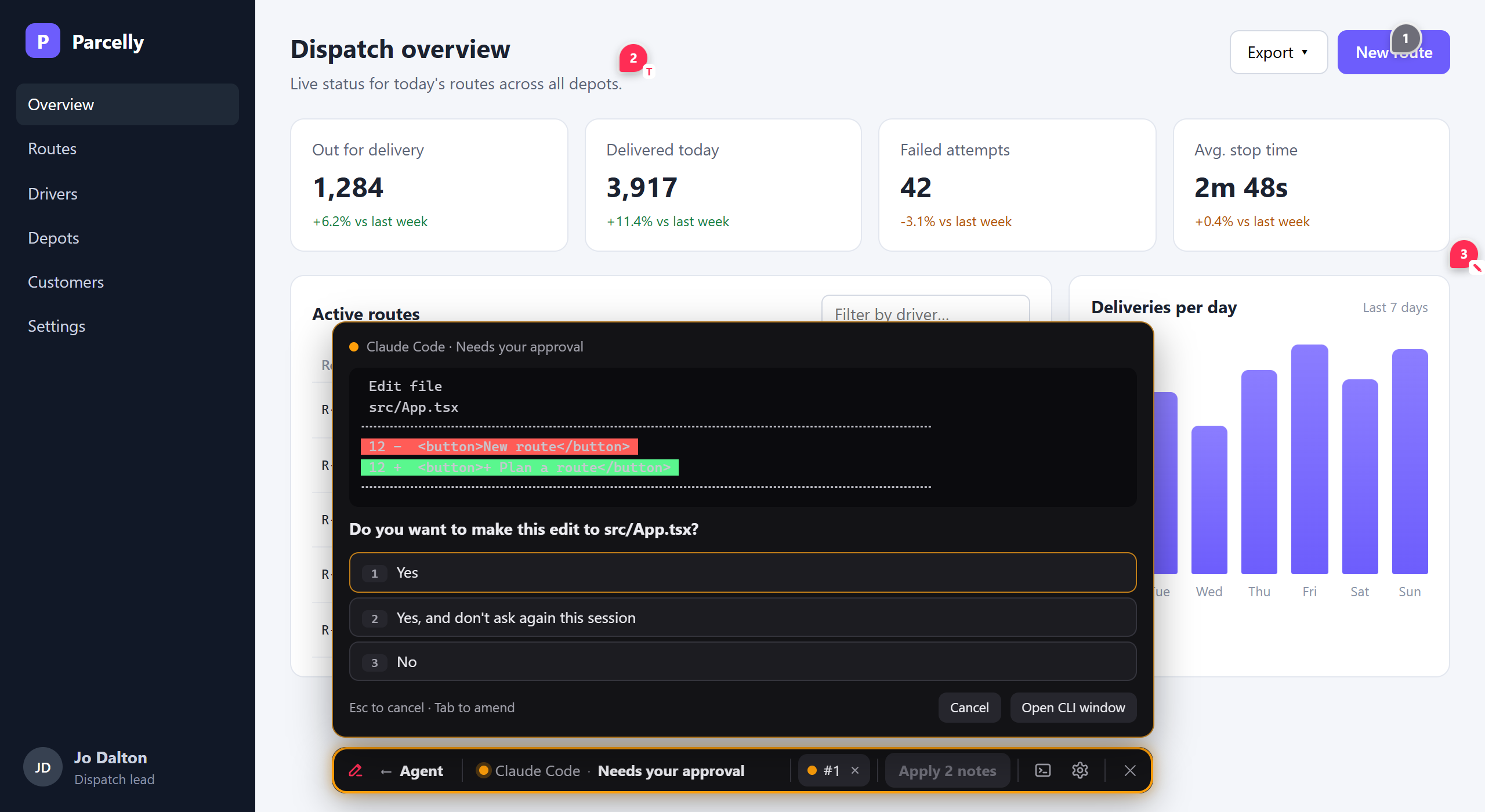
@@ -1,74 +1,121 @@
|
|
|
1
|
-
|
|
2
|
-
|
|
3
|
-
|
|
4
|
-
|
|
5
|
-
|
|
6
|
-
|
|
7
|
-
|
|
8
|
-
|
|
9
|
-
|
|
10
|
-
|
|
11
|
-
|
|
12
|
-
|
|
13
|
-
CLI's cursor and presses Enter. This is for Claude Code (detected from its OSC 7501 reports or the command
|
|
14
|
-
`claude`); other CLIs get **Allow**/**Deny** and the terminal (`menus: true` tries it anyway).
|
|
15
|
-
- **Live status** from the CLI's OSC 7501 reports (Claude Code sends them): a light sweeping round the toolbar
|
|
16
|
-
and a turning ring on the closed launcher while it works, an orange glow while it waits for you, green when done.
|
|
17
|
-
- **Fresh sessions** (the toolbar's **Fresh**, or `sessions: 'fresh'`): every prompt starts its own session with
|
|
18
|
-
only its notes (none that a running session already has), several at once, a tab each (3 shown, the rest
|
|
19
|
-
behind **+N**, a list of every session; on phones one session button opens it). The default is one shared
|
|
20
|
-
session that keeps its context; either way a note goes to one running session at a time.
|
|
21
|
-
- **The notes panel** tags each note it was sent: being worked on, waiting for your answer, sent, or done.
|
|
22
|
-
- **← and ✕**: ← goes back to the main toolbar (Esc too), ✕ closes the overlay.
|
|
23
|
-
|
|
24
|
-
Local dev only: it answers this machine only (whatever Redline's `network` option says), and every call needs a
|
|
25
|
-
per-process token. The CLI keeps its own permission prompts.
|
|
26
|
-
|
|
27
|
-
## Install
|
|
1
|
+
<h1 align="center">Redline agent</h1>
|
|
2
|
+
<p align="center"><b>Your agent CLI, run from the Redline overlay: apply notes, answer its questions, see what it changed.</b></p>
|
|
3
|
+
<p align="center"><a href="https://www.npmjs.com/package/@umage.ai/redline-agent"><img alt="npm" src="https://img.shields.io/npm/v/@umage.ai/redline-agent?label=npm&color=e5484d"></a> <a href="https://github.com/umage-ai/redline/blob/main/LICENSE"><img alt="MIT license" src="https://img.shields.io/npm/l/@umage.ai/redline-agent?color=555"></a></p>
|
|
4
|
+
<p align="center"><a href="#quick-start"><b>Quick start</b></a> · <a href="#features">Features</a> · <a href="#options">Options</a> · <a href="https://github.com/umage-ai/redline/blob/main/docs/USAGE.md#agent-panel">Guide</a> · <a href="https://github.com/umage-ai/redline#packages">All packages</a></p>
|
|
5
|
+
|
|
6
|
+
|
|
7
|
+
|
|
8
|
+
Reviewers pin notes with [Redline](https://github.com/umage-ai/redline); this package runs your agent CLI (Claude Code,
|
|
9
|
+
OpenCode, any terminal program, any [ACP](https://agentclientprotocol.com) agent) on the dev server and drives it from
|
|
10
|
+
the overlay. **Apply 3 notes**, answer its permission prompts in a card, and see the files it changed, without opening a terminal.
|
|
11
|
+
|
|
12
|
+
## Quick start
|
|
28
13
|
|
|
29
14
|
```bash
|
|
30
15
|
npm i -D @umage.ai/redline @umage.ai/redline-agent
|
|
31
16
|
```
|
|
32
17
|
|
|
33
|
-
|
|
34
|
-
|
|
18
|
+
```js
|
|
19
|
+
redline({ agent: true }) // in vite.config (or Astro, Next, Angular, the Node server): every installed CLI is offered
|
|
20
|
+
```
|
|
21
|
+
|
|
22
|
+
Open the app, press **Alt+Shift+A** (or **A** in Redline's toolbar), pin a note, press **Apply 1 note**. node-pty comes with
|
|
23
|
+
it (prebuilt on Windows and macOS, compiled on Linux; without build tools: `npm i -D @lydell/node-pty`).
|
|
24
|
+
|
|
25
|
+
## Features
|
|
26
|
+
|
|
27
|
+
| | |
|
|
28
|
+
|---|---|
|
|
29
|
+
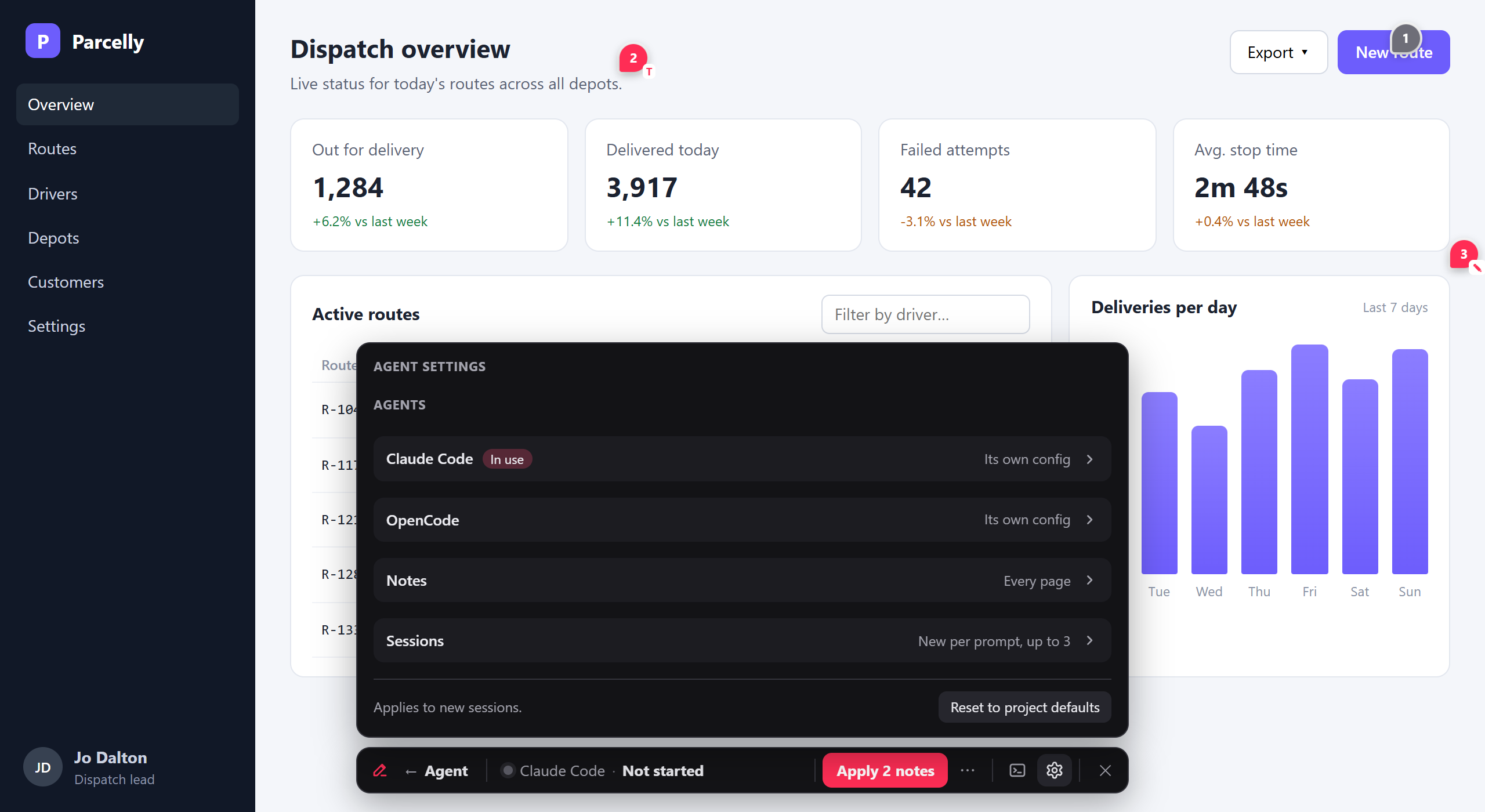
| **The agent toolbar** | **← Agent**, the state ("Claude Code · Working…"), a tab per session (named by its notes), **Apply N notes**, **>_** the CLI window, **⚙** settings |
|
|
30
|
+
| **Questions in a card** | Permission prompts with their diff, Claude Code's stepped questions, trust dialogs: every option, and a field for your own answer. ACP agents send theirs as data |
|
|
31
|
+
| **Several CLIs** | Every installed one is offered; ⚙ or holding **Apply** switches; model and effort per CLI (only values the CLI offers reach it) |
|
|
32
|
+
| **All your notes** | **Apply** hands over the open notes on every page, so you can pin across the app and apply them in one go; ⚙ › Notes narrows it to this page |
|
|
33
|
+
| **Send after a save** | A toast after each note: **This note** or **All N** to the agent, gone in a few seconds; ⚙ › Notes turns it off |
|
|
34
|
+
| **Fresh sessions** | A new session per prompt with only its notes, several at once; or one shared session that keeps its context |
|
|
35
|
+
| **Worktrees** | ⚙ **Each new session in its own git worktree**: its own branch, `redline/<name>`; when it ends, keep, merge (clean only) or discard it |
|
|
36
|
+
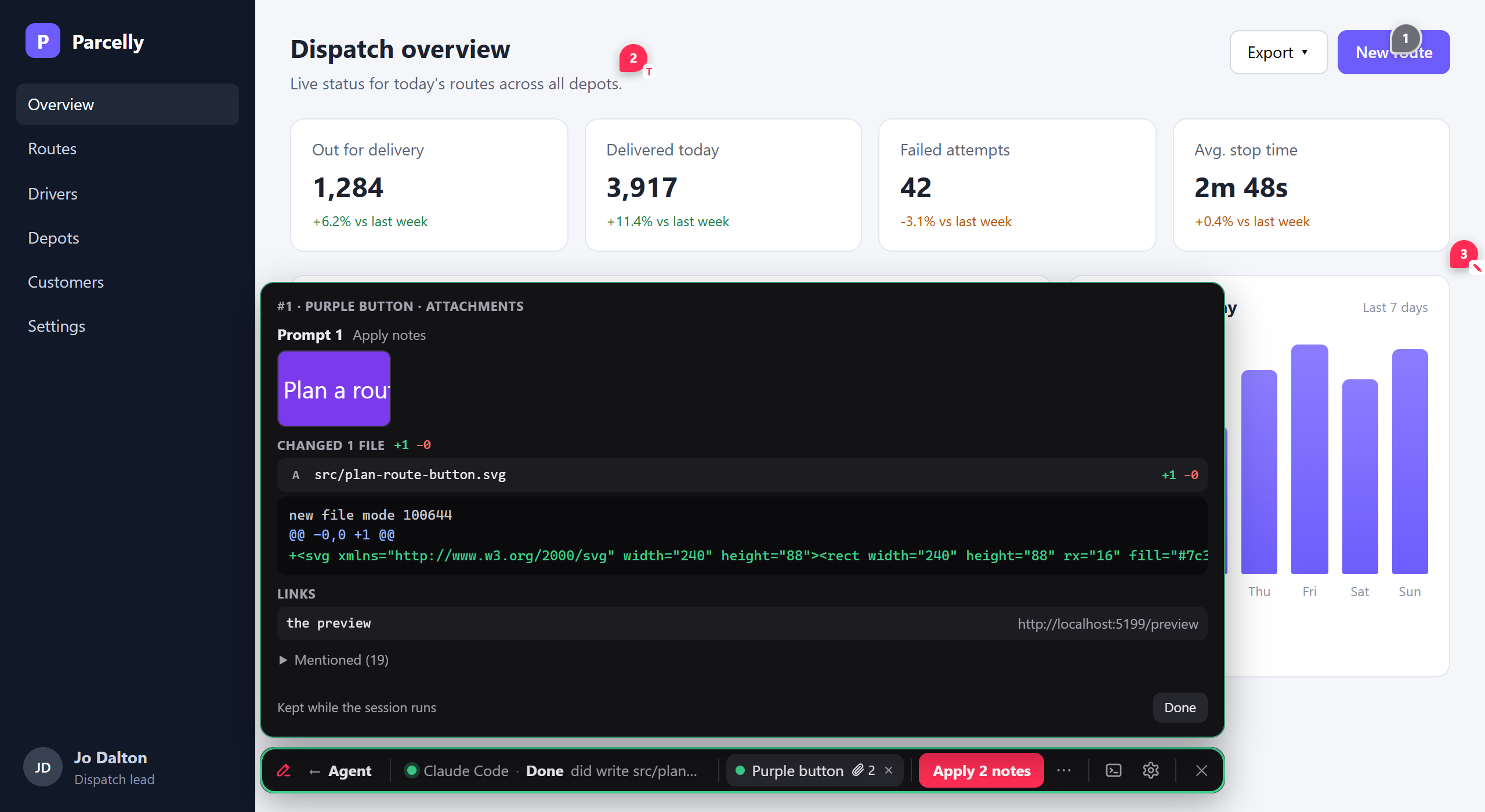
| **Attachments** | A 📎 count on each tab: per prompt, the files it changed (with the diff), images, files and links it pointed at |
|
|
37
|
+
| **MCP wired in** | Sessions it starts get Redline's MCP: `working_on` tags the note being worked on, `attach` shows a file on the tab, `note_dom` and `page_console` read the open page |
|
|
38
|
+
| **Live status** | From the CLI's OSC 7501 reports or the ACP session: a sweeping light while it works, orange while it waits for you, green when done; a ring on the closed launcher too |
|
|
35
39
|
|
|
36
|
-
|
|
40
|
+
|
|
37
41
|
|
|
38
|
-
|
|
42
|
+
Local dev only: it answers this machine only (whatever Redline's `network` option says), every call needs a per-process
|
|
43
|
+
token, and the CLI keeps its own permission prompts.
|
|
44
|
+
|
|
45
|
+
## Options
|
|
39
46
|
|
|
40
47
|
```js
|
|
41
|
-
redline({ agent:
|
|
42
|
-
redline({ agent: 'codex' })
|
|
48
|
+
redline({ agent: 'opencode' }) // one CLI by name, no picker
|
|
49
|
+
redline({ agent: { clis: ['claude', 'opencode', { command: 'codex', label: 'Codex' }] } }) // the CLIs offered
|
|
43
50
|
redline({
|
|
44
51
|
agent: {
|
|
45
52
|
command: 'claude', args: ['--permission-mode', 'acceptEdits'],
|
|
53
|
+
model: 'opus', effort: 'high', // defaults for ⚙ (Claude Code --model/--effort; ACP: the agent's options)
|
|
46
54
|
commands: [{ label: 'Review page', prompt: 'Review page {page} against the open Redline notes {ids}' }],
|
|
47
|
-
|
|
48
|
-
|
|
49
|
-
|
|
50
|
-
|
|
51
|
-
instructions: { file: 'redline-agent.md' }, // or a string; see below
|
|
55
|
+
sessions: 'fresh', maxSessions: 3, // a new session per prompt (the default; 'shared': one session)
|
|
56
|
+
worktrees: true, // each new session in its own git worktree (default off; ⚙ switches)
|
|
57
|
+
instructions: { file: 'redline-agent.md' }, // your rules for the sessions Redline starts
|
|
58
|
+
hotkey: 'alt+shift+a', key: 'a', // false for none
|
|
52
59
|
},
|
|
53
60
|
})
|
|
54
61
|
```
|
|
55
62
|
|
|
56
|
-
|
|
63
|
+
Or hand it over yourself, typed: `import { agent } from '@umage.ai/redline-agent'; redline({ agent: agent({ command: 'codex' }) })`.
|
|
64
|
+
Every option and its default: [docs/OPTIONS.md](https://github.com/umage-ai/redline/blob/main/docs/OPTIONS.md#agent-umageairedline-agent-d53).
|
|
65
|
+
|
|
66
|
+
Prompts fill in `{page}`, `{url}`, `{ids}` (the open notes no running session has: on every page, or this page only per ⚙ › Notes) and `{pages}` (where they are); a prompt with `{ids}`
|
|
67
|
+
shows their count and tags those notes in the notes panel (sent, being worked on, waiting for you, done).
|
|
68
|
+
`instructions` (text, or `{ file }` read at every start) reach Claude Code as `--append-system-prompt-file`, any other CLI
|
|
69
|
+
ahead of its first prompt.
|
|
70
|
+
|
|
71
|
+
### Worktrees
|
|
72
|
+
|
|
73
|
+
With **Each new session in its own git worktree** on (⚙, or `worktrees: true`), a fresh session works in
|
|
74
|
+
`.redline/worktrees/<name>` on the branch `redline/<name>`, so parallel sessions never edit the same files. The tab's
|
|
75
|
+
hover names the branch. When the session ends, the card offers **Keep branch**, **Merge into <your branch>** (a
|
|
76
|
+
fast-forward or a clean merge, never forced; uncommitted work must be committed first) or **Discard** (asks first when
|
|
77
|
+
that would drop work). The worktree has no node_modules: the agent edits and commits there; to run the app or tests in
|
|
78
|
+
it, install first. Not a git repo: the switch is off and says why.
|
|
79
|
+
|
|
80
|
+
### Attachments
|
|
81
|
+
|
|
82
|
+
|
|
83
|
+
|
|
84
|
+
A 📎 count on a tab opens what that session pointed at, per prompt, most reliable first: what the agent attached (MCP
|
|
85
|
+
`attach`, an ACP agent's resource links and tool-call files), the files that changed in the turn (git, with +/− and the
|
|
86
|
+
diff), links the CLI marked (OSC 8), and, folded, files and URLs its output merely mentioned. Images open zoomed; links
|
|
87
|
+
on this machine open in a new tab; nothing is fetched by the server, and files are served only from inside the project.
|
|
88
|
+
|
|
89
|
+
### MCP
|
|
90
|
+
|
|
91
|
+
Sessions the toolbar starts get Redline's MCP (`/__redline/mcp`) wired in: Claude Code through `--mcp-config`, an ACP agent
|
|
92
|
+
through `session/new`, with their own token and session id (`REDLINE_AGENT_SESSION`). Besides the note tools they get
|
|
93
|
+
`working_on` (the note it is on: its tag and the tab say so), `attach`, `note_dom` and `page_console` (from the open page),
|
|
94
|
+
`check_page`, and `list_agent_sessions` / `get_agent_session` to see what other sessions are doing.
|
|
95
|
+
|
|
96
|
+
### Several CLIs, adapters, ACP
|
|
97
|
+
|
|
98
|
+
Hold **Apply** (500 ms; or right-click, Alt+↓, Shift+F10) to switch the CLI for the next prompt; the pick is remembered in
|
|
99
|
+
this browser. With one shared session, a prompt for another CLI stops it between turns and starts the new one.
|
|
100
|
+
What is particular to a CLI sits in an adapter: Claude Code (menus read off its screen, `--model`, `--effort`, instructions as
|
|
101
|
+
a file) and OpenCode (over ACP by default). Add your own, tried first:
|
|
57
102
|
|
|
58
103
|
```js
|
|
59
|
-
import { agent } from '@umage.ai/redline-agent';
|
|
60
|
-
redline({ agent: agent({ command: '
|
|
104
|
+
import { agent, openCode } from '@umage.ai/redline-agent';
|
|
105
|
+
redline({ agent: agent({ command: 'opencode', adapters: [{ ...openCode, settleMs: 2000 }] }) })
|
|
61
106
|
```
|
|
62
107
|
|
|
63
|
-
|
|
64
|
-
|
|
108
|
+
ACP agents run without a terminal: status and permission requests arrive as data (the card shows "Allow once", "Always
|
|
109
|
+
allow", "Reject"), the CLI window shows a transcript and takes typed prompts. Any other ACP agent:
|
|
110
|
+
`{ command: 'my-acp-agent', protocol: 'acp' }`. OpenCode asks before nothing by default; to approve from the card, set
|
|
111
|
+
`"permission": { "bash": "ask", "edit": "ask" }` in its config (or `env: { OPENCODE_CONFIG_CONTENT: '…' }` for Redline's sessions only).
|
|
65
112
|
|
|
66
|
-
|
|
67
|
-
(say "don't commit", "run the tests for the files you touch"). Text, or `{ file }` relative to the project root,
|
|
68
|
-
read at every start. Claude Code gets it as `--append-system-prompt-file`; any other CLI ahead of the session's
|
|
69
|
-
first prompt. The agent starts in the project root (where `.redline/` is), or `cwd`.
|
|
113
|
+
## How it is built
|
|
70
114
|
|
|
71
|
-
|
|
115
|
+
The generic part, driving agent CLIs from a browser (sessions, adapters, OSC 7501, menu reading, worktrees, attachments,
|
|
116
|
+
one guarded HTTP handler), is [`agent-bridge/`](https://github.com/umage-ai/redline/blob/main/agent-bridge/README.md),
|
|
117
|
+
bundled into this package; this package adds the toolbar and Redline's notes. Decisions:
|
|
118
|
+
[D53, D55, D56, D58, D59, D62–D66](https://github.com/umage-ai/redline/blob/main/docs/DECISIONS.md). MIT licensed.
|
|
72
119
|
|
|
73
120
|
---
|
|
74
121
|
|