@trycore/spec-build-harness 0.7.0 → 0.7.1
This diff represents the content of publicly available package versions that have been released to one of the supported registries. The information contained in this diff is provided for informational purposes only and reflects changes between package versions as they appear in their respective public registries.
- package/.claude-plugin/plugin.json +1 -1
- package/INSTALL.md +7 -7
- package/README.md +8 -4
- package/VERSION +1 -1
- package/dist/lib/settings-merge.js +1 -1
- package/docs/agents.md +20 -13
- package/docs/commands.md +22 -4
- package/docs/customization/mcp-extensions.md +5 -4
- package/docs/getting-started.md +6 -5
- package/docs/hooks.md +13 -7
- package/package.json +1 -1
- package/templates/CLAUDE.md.template +6 -2
- package/templates/settings-hooks.template.json +1 -1
- package/docs/super-power-workflows.md +0 -281
|
@@ -2,7 +2,7 @@
|
|
|
2
2
|
"$schema": "https://json.schemastore.org/claude-code-plugin-manifest.json",
|
|
3
3
|
"name": "trycore-spec-build-harness",
|
|
4
4
|
"displayName": "Trycore — Spec & Build Harness",
|
|
5
|
-
"version": "0.7.
|
|
5
|
+
"version": "0.7.1",
|
|
6
6
|
"description": "Arnés de construcción de dos loops (slice por épica + release gate) para Claude Code, con gates de calidad, estado compartido y OpenSpec. Compañero de @trycore/spec-product-flow. Agnóstico al proyecto.",
|
|
7
7
|
"author": {
|
|
8
8
|
"name": "Trycore",
|
package/INSTALL.md
CHANGED
|
@@ -11,7 +11,7 @@ Es el **compañero** de [`@trycore/spec-product-flow`](https://www.npmjs.com/pac
|
|
|
11
11
|
| CLI (bin) | `trycore-build` |
|
|
12
12
|
| Plugin | `trycore-spec-build-harness` |
|
|
13
13
|
| Marketplace | `trycore-build` |
|
|
14
|
-
| Versión | `0.
|
|
14
|
+
| Versión | `0.7.0` |
|
|
15
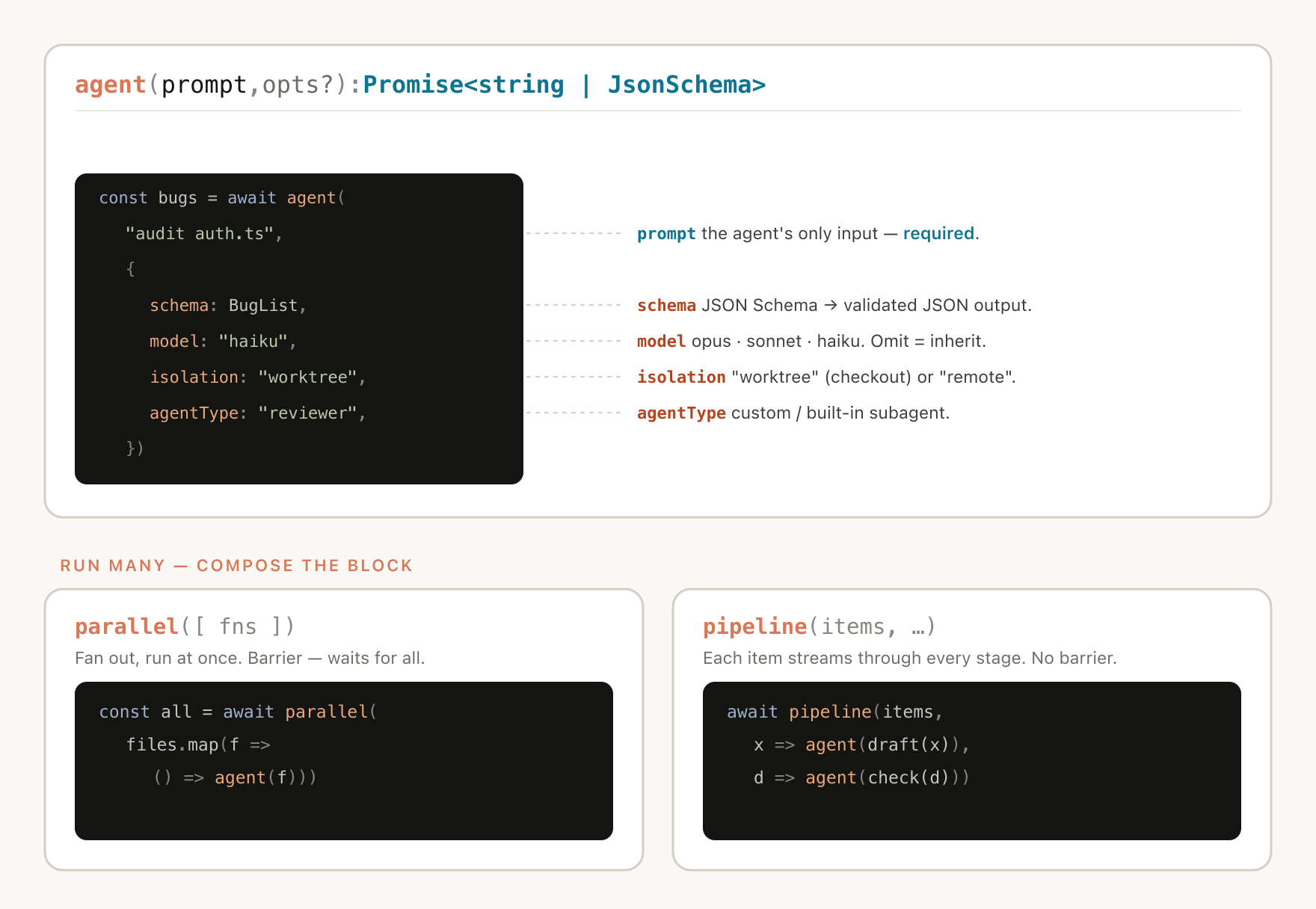
15
|
|
|
16
16
|
> **¿Solo quieres empezar ya?** El [Quickstart](docs/getting-started.md) te lleva de 0 a tu primer slice en pocos comandos. Esta guía es la **referencia detallada** (flags, CI, plugin, troubleshooting).
|
|
17
17
|
|
|
@@ -30,7 +30,7 @@ npm install -g @trycore/spec-build-harness
|
|
|
30
30
|
Esto expone el binario `trycore-build`. Comprueba la versión:
|
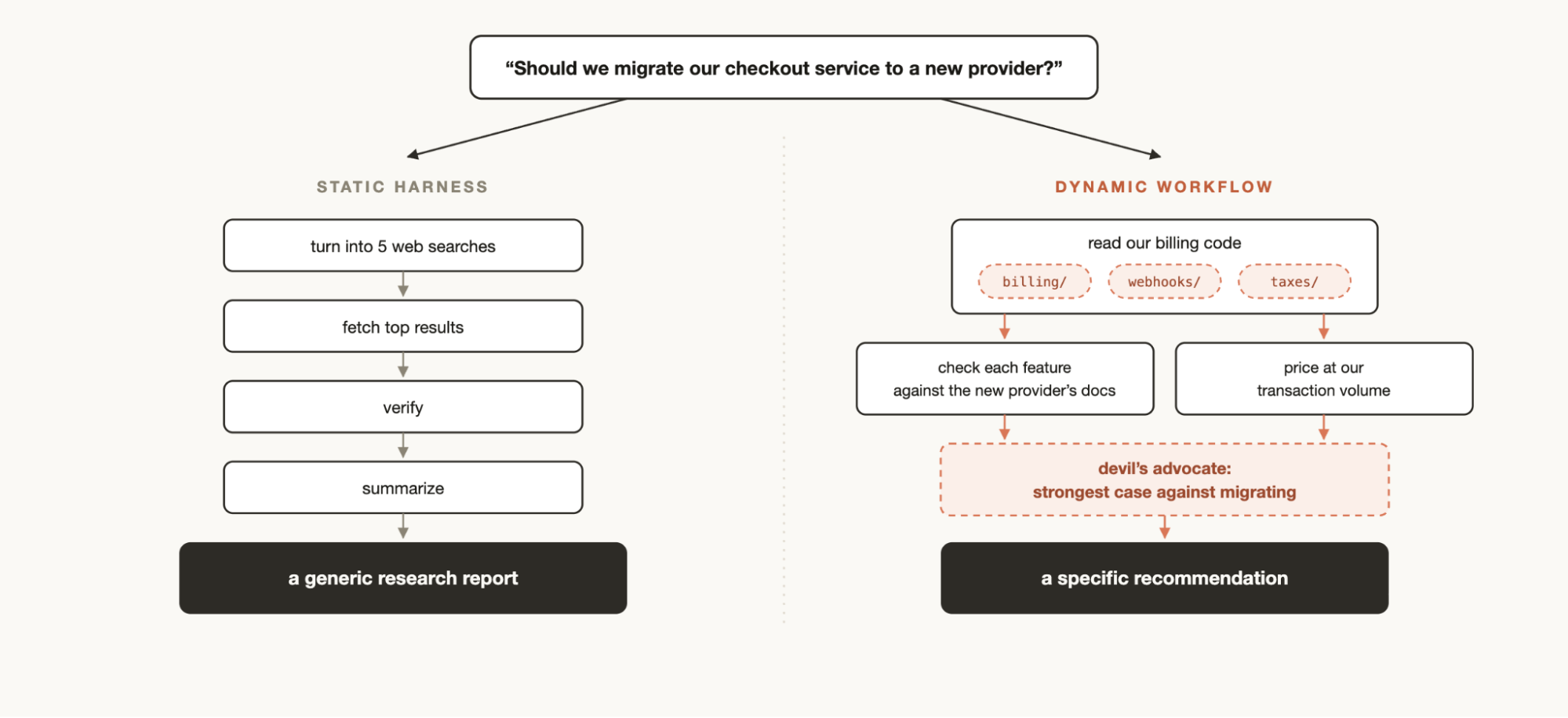
|
31
31
|
|
|
32
32
|
```bash
|
|
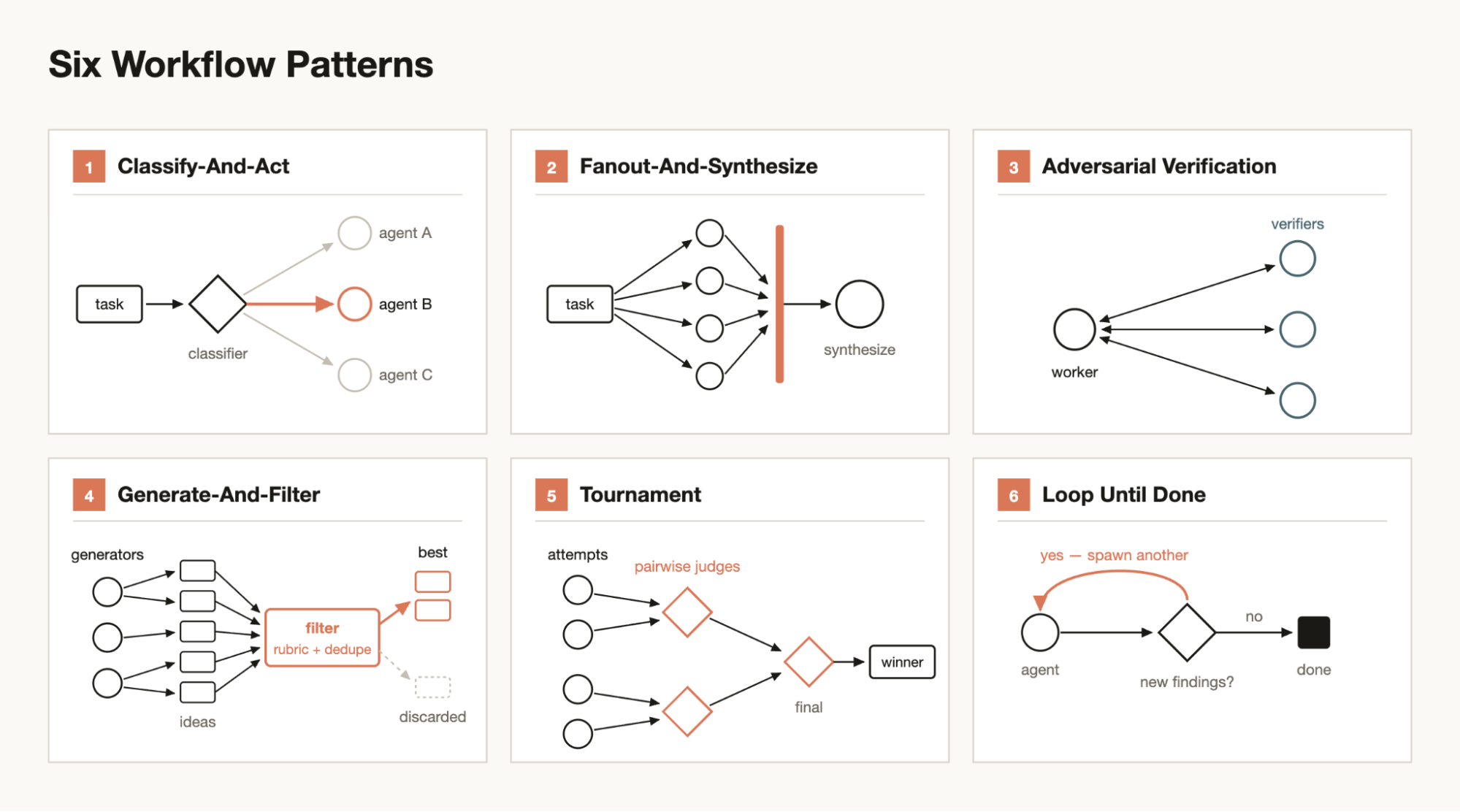
33
|
-
trycore-build --version # → 0.
|
|
33
|
+
trycore-build --version # → 0.7.0
|
|
34
34
|
trycore-build --help
|
|
35
35
|
```
|
|
36
36
|
|
|
@@ -87,9 +87,9 @@ Qué hace `init`:
|
|
|
87
87
|
1. **Verifica requisitos duros** (a menos que uses `--skip-doctor`).
|
|
88
88
|
2. **Siembra los assets** en rutas nativas de Claude Code:
|
|
89
89
|
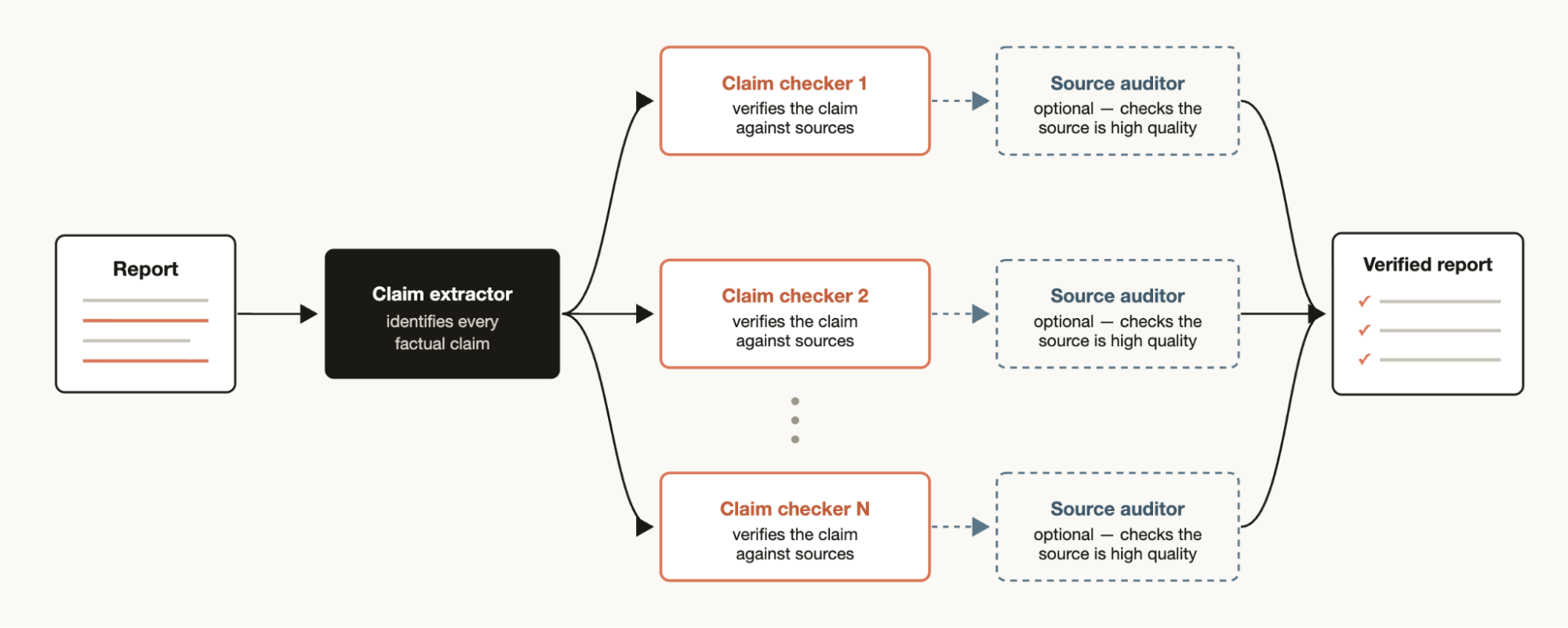
- `.claude/agents/build/` — 12 agentes.
|
|
90
|
-
- `.claude/commands/opsx/` (10 comandos `/opsx:*`) y `.claude/commands/build/` (`/build:onboard`, `/build:reflect`).
|
|
91
|
-
- `.claude/skills/` —
|
|
92
|
-
- `.claude/hooks/build/` —
|
|
90
|
+
- `.claude/commands/opsx/` (10 comandos `/opsx:*`) y `.claude/commands/build/` (5 comandos: `/build:onboard`, `/build:reflect`, `/build:slice`, `/build:release`, `/build:work`).
|
|
91
|
+
- `.claude/skills/` — 13 skills (`building-a-slice`, `building-a-micro-change`, `releasing-a-version`, `openspec-*`).
|
|
92
|
+
- `.claude/hooks/build/` — 10 hooks bash.
|
|
93
93
|
3. **Siembra el estado**: `state/build-state.schema.json` y `state/README.md` se versionan;
|
|
94
94
|
`state/build-state.json` se siembra **vacío y nunca se sobrescribe** (va al `.gitignore`).
|
|
95
95
|
4. **Siembra `config/stack-allowlist.json`** (artefacto del consumidor; lo puebla `/build:onboard`).
|
|
@@ -205,7 +205,7 @@ Como conveniencia a nivel usuario, el arnés también se instala como **plugin n
|
|
|
205
205
|
### ⚠ Caveat de canales (importante)
|
|
206
206
|
|
|
207
207
|
- El **canal npm CLI es el CANÓNICO**. `trycore-build init` instala los comandos en
|
|
208
|
-
`.claude/commands/{opsx,build}/`, que namespacean **por subcarpeta** → `/opsx:*` y `/build
|
|
208
|
+
`.claude/commands/{opsx,build}/`, que namespacean **por subcarpeta** → `/opsx:*` y `/build:*`,
|
|
209
209
|
y los agentes se referencian por su **nombre** (`security-reviewer`, `stack-guardian`, …).
|
|
210
210
|
- El **canal plugin nativo** namespacea **todos** los componentes bajo el **nombre del plugin**
|
|
211
211
|
(→ `/trycore-spec-build-harness:*`), por diseño de Claude Code.
|
|
@@ -235,7 +235,7 @@ Ambos paquetes coexisten en el mismo `.claude/` **sin colisión**, porque usan *
|
|
|
235
235
|
|
|
236
236
|
| | Discovery — `spec-product-flow` | Construcción — `spec-build-harness` |
|
|
237
237
|
|---|---|---|
|
|
238
|
-
| Comandos | `/trycore:*` | `/opsx:*` + `/build
|
|
238
|
+
| Comandos | `/trycore:*` | `/opsx:*` + `/build:*` (`onboard`, `reflect`, `slice`, `release`, `work`) |
|
|
239
239
|
| Marca de versión | `.trycore-version` | `.build-harness-version` |
|
|
240
240
|
| Bloque en `CLAUDE.md` | `<!-- BEGIN trycore-vertical -->` | `<!-- BEGIN trycore-build-harness -->` |
|
|
241
241
|
|
package/README.md
CHANGED
|
@@ -73,6 +73,9 @@ Gate de release que corre **una sola vez por versión** sobre el conjunto de sli
|
|
|
73
73
|
|---|---|
|
|
74
74
|
| `/build:onboard` | Onboarding capa 2: lee el PRD, pregunta por PII/IA/determinismo/secretos, resuelve `{{placeholders}}` y escribe la auto-memory. |
|
|
75
75
|
| `/build:reflect` | Reflexión post-slice: tras archivar, propone convenciones aprendidas / errores recurrentes al bloque `trycore-build-learnings` de `CLAUDE.md` (tras tu aprobación) y marca el slice como reflexionado. |
|
|
76
|
+
| `/build:slice` | Entrada del **inner loop**: abre o continúa un slice (épica `EP-XXX`) y conduce el pipeline DoR → change → TDD → smoke → api/data → DoD → PR+archive. Adaptador delgado que delega en la skill `building-a-slice`. |
|
|
77
|
+
| `/build:release` | Entrada del **outer loop**: corre el Release Gate **una sola vez** sobre el diff acumulado (los 5 reviewers pesados en paralelo + integración secuencial). Delega en la skill `releasing-a-version`. |
|
|
78
|
+
| `/build:work` | Router *classify-and-act*: clasifica el trabajo entrante y enruta al carril correcto (`building-a-micro-change` · `building-a-slice` · `releasing-a-version`). Es ruteo, no política: no ejecuta el pipeline ni toca el estado. |
|
|
76
79
|
| `/opsx:*` (10) | Ciclo OpenSpec: `explore` · `new` · `continue` · `apply` · `verify` · `archive` · `bulk-archive` · `ff` · `onboard` · `sync`. Detalle → [`docs/commands.md`](docs/commands.md). |
|
|
77
80
|
|
|
78
81
|
## Arquitectura
|
|
@@ -85,9 +88,9 @@ trycore-spec-build-harness/
|
|
|
85
88
|
├── agents/build/ ← 12 agentes revisores (segunda opinión, contexto limpio)
|
|
86
89
|
├── commands/
|
|
87
90
|
│ ├── opsx/ ← 10 comandos /opsx:* (ciclo OpenSpec)
|
|
88
|
-
│ └── build/ ← /build
|
|
89
|
-
├── skills/ ←
|
|
90
|
-
├── hooks/build/ ←
|
|
91
|
+
│ └── build/ ← 5 comandos /build:* (onboard, reflect, slice, release, work)
|
|
92
|
+
├── skills/ ← 13 skills (building-a-slice, building-a-micro-change, releasing-a-version, 10 openspec-*) + 3 plantillas *.workflow.js (opt-in, read-only)
|
|
93
|
+
├── hooks/build/ ← 10 hooks bash (gate-check, reflect-nudge, release-gate-nudge, scaffold-guard, gitflow-guard, stack-guard, …)
|
|
91
94
|
├── state/ ← máquina de estado: build-state.json + schema + README
|
|
92
95
|
├── config/ ← stack-allowlist.template.json (artefacto del consumidor)
|
|
93
96
|
├── src/ + dist/ ← CLI trycore-build (init/update/status/uninstall/doctor)
|
|
@@ -122,7 +125,8 @@ El core no menciona ningún dominio de cliente. Toda parametrización entra por
|
|
|
122
125
|
- ✅ **v0.3.0** — **ciclo autocorrectivo** (hook `reflect-nudge.sh` + comando `/build:reflect`: propone convenciones aprendidas al bloque `trycore-build-learnings` de `CLAUDE.md` tras tu aprobación; campos `reflected`/`reflected_at`) y **LSP opt-in** (`docs/customization/lsp-extensions.md` + sugerencia en `doctor` para stacks tipados). Total: **8 hooks**; comandos `/opsx:*` + `/build:onboard` + `/build:reflect`.
|
|
123
126
|
- ✅ **v0.4.0** — carril `building-a-micro-change` (mantenimiento ligero sin slice) + DoR proporcional a la complejidad.
|
|
124
127
|
- ✅ **v0.5.0** — seguro de fuente de diseño (`design_source` + `design-source-guard.sh`) + agente `ux-fidelity-reviewer` (gate `fidelity`, inner loop). Total: **11 agentes**, **9 hooks**.
|
|
125
|
-
- ✅ **v0.6.0
|
|
128
|
+
- ✅ **v0.6.0** — **calidad de cierre contra horizonte largo** (feedback exodocs): handoff fino en disco (`wiring_checklist[]` + `progress_log[]` + `sub_slices[]`), gate `wiring_verified` por nuevo agente **`wiring-adversarial-verifier`** (verificación adversarial independiente, contexto virgen), cimiento pre-construido + tag `layer` y gate de tamaño en el DoR, runner fuera-de-chat `integration-check`, y **fidelidad estricta por verificación visual real** (MCP requerido para UI). Convenciones anti-deriva (producto completo, no MVP) upstreadas al bloque del arnés. Total: **12 agentes**, **9 hooks**.
|
|
129
|
+
- ✅ **v0.7.0 (actual)** — **orquestación con workflows dinámicos + hardening** (de una evaluación adversarial del propio arnés): **3 plantillas `*.workflow.js`** opt-in y read-only (`explore-fanout`, `wiring-verify`, `release-gate`) que entran **solo donde aportan valor** y nunca en el camino caliente del inner loop; **3 comandos nuevos** `/build:slice` (entrada del inner loop), `/build:release` (outer loop) y `/build:work` (router *classify-and-act*); hook **`release-gate-nudge.sh`** (Stop, determinista: solo sugiere el Release Gate). Rename de los gates de los 5 reviewers pesados → `releases[].gates.{security,smell,ux,coherence,stack_arch}` (`stack`→`stack_arch`; separación `coherence` (release) / `coherence_link` (inner)). Hardening: degradación segura en 8 agentes, escritura atómica del estado, cierre del bypass de specs no-semver, `wiring` exige evidencia ejecutada y `check-agnostic` barre `*.js`. Total: **12 agentes**, **10 hooks**, **5 comandos `/build:*`**.
|
|
126
130
|
|
|
127
131
|
## Licencia
|
|
128
132
|
|
package/VERSION
CHANGED
|
@@ -1 +1 @@
|
|
|
1
|
-
0.7.
|
|
1
|
+
0.7.1
|
|
@@ -20,7 +20,7 @@ const HOOK_SPECS = [
|
|
|
20
20
|
{ event: 'PreToolUse', matcher: 'Bash', scripts: ['gitflow-guard.sh'] },
|
|
21
21
|
{ event: 'PreToolUse', matcher: 'Write|Edit|MultiEdit', scripts: ['stack-guard.sh', 'scaffold-guard.sh', 'design-source-guard.sh'] },
|
|
22
22
|
{ event: 'PostToolUse', matcher: 'Write|Edit|MultiEdit', scripts: ['lint-typecheck.sh', 'coherence-flag.sh'] },
|
|
23
|
-
{ event: 'Stop', matcher: '.*', scripts: ['build-gate-check.sh', 'reflect-nudge.sh'] },
|
|
23
|
+
{ event: 'Stop', matcher: '.*', scripts: ['build-gate-check.sh', 'reflect-nudge.sh', 'release-gate-nudge.sh'] },
|
|
24
24
|
];
|
|
25
25
|
/** Permisos MÍNIMOS y enumerados [H11]. Nunca permisos amplios (mcp__*, additionalDirectories…). */
|
|
26
26
|
const MIN_PERMISSIONS = [
|
package/docs/agents.md
CHANGED
|
@@ -12,7 +12,14 @@ veredicto al `build-orchestrator`**, que es quien propone la escritura del estad
|
|
|
12
12
|
> **inner loop** (skill `building-a-slice`, por épica `EP-XXX`). Los 5 revisores pesados de
|
|
13
13
|
> release (`security-reviewer`, `simple-design-reviewer`, `ux-krug-reviewer`,
|
|
14
14
|
> `coherence-three-way`, `stack-guardian`) corren **una vez por release** en el **outer loop**
|
|
15
|
-
> (skill `releasing-a-version`).
|
|
15
|
+
> (skill `releasing-a-version`) y escriben sus veredictos en `releases[].gates`
|
|
16
|
+
> (`security`, `smell`, `ux`, `coherence`, `stack_arch` — este último renombrado desde el antiguo
|
|
17
|
+
> `stack` por-slice).
|
|
18
|
+
>
|
|
19
|
+
> **Conducción opcional vía plantillas de workflow.** Tres plantillas read-only (opt-in, no editan
|
|
20
|
+
> estado) sirven de andamiaje para orquestar estos agentes sin sustituir su juicio:
|
|
21
|
+
> `explore-fanout.workflow.js` y `wiring-verify.workflow.js` en `building-a-slice` (inner loop), y
|
|
22
|
+
> `release-gate.workflow.js` en `releasing-a-version` (outer loop).
|
|
16
23
|
|
|
17
24
|
## Tabla resumen
|
|
18
25
|
|
|
@@ -23,8 +30,8 @@ veredicto al `build-orchestrator`**, que es quien propone la escritura del estad
|
|
|
23
30
|
| 3 | `security-reviewer` | sonnet | Revisores de release | Gate `security` — seguridad enfocada al dominio |
|
|
24
31
|
| 4 | `simple-design-reviewer` | sonnet | Revisores de release | Gate `smell` — 4 reglas de Beck + code smells |
|
|
25
32
|
| 5 | `ux-krug-reviewer` | sonnet | Revisores de release | Gate `ux` — usabilidad (Steve Krug) |
|
|
26
|
-
| 6 | `coherence-three-way` | **opus** | Revisores de release | Gate `coherence` — coherencia triple AC↔change↔código |
|
|
27
|
-
| 7 | `stack-guardian` | sonnet | Revisores de release | Gate `
|
|
33
|
+
| 6 | `coherence-three-way` | **opus** | Revisores de release | Gate `coherence` (en `releases[].gates`) — coherencia triple AC↔change↔código |
|
|
34
|
+
| 7 | `stack-guardian` | sonnet | Revisores de release | Gate `stack_arch` (en `releases[].gates`) — stack y arquitectura vs. allowlist |
|
|
28
35
|
| 8 | `api-contract-tester` | sonnet | Contrato / datos | Gate `api` — pruebas de contrato (Newman/Postman) |
|
|
29
36
|
| 9 | `data-consistency-checker` | sonnet | Contrato / datos | Gate `data` — invariantes y consistencia de datos |
|
|
30
37
|
| 10 | `change-epic-coherence` | sonnet | Trazabilidad | Gate `coherence_link` — enlace change↔épica↔HU |
|
|
@@ -53,7 +60,7 @@ frontmatter completo y `estado: lista`; AC en Given/When/Then con happy/error/ed
|
|
|
53
60
|
dependencias declaradas; alcance dentro de la allowlist) y abre el `active_slice` si pasa. A
|
|
54
61
|
la salida valida la **Definition of Done reducida por slice** (gate `dod`): `tdd`,
|
|
55
62
|
`journey_smoke`, `coherence_link`, `data`, `api`, documentación con back-refs y hooks verdes.
|
|
56
|
-
**No valida aquí** `security`, `smell`, `ux`, `coherence` ni `
|
|
63
|
+
**No valida aquí** `security`, `smell`, `ux`, `coherence` ni `stack_arch`: esos son del Release Gate (viven en `releases[].gates`).
|
|
57
64
|
|
|
58
65
|
## Revisores de release
|
|
59
66
|
|
|
@@ -69,39 +76,39 @@ los **especializa al dominio declarado por el consumidor**: secretos de servicio
|
|
|
69
76
|
solo server-side, datos sensibles/PII regulados no persistidos crudos, validación de archivos
|
|
70
77
|
y entrada, salida de servicios externos/IA tratada como input no confiable, logs sin PII y
|
|
71
78
|
decisiones auditables sin sobre-exposición. Veredicto por severidad
|
|
72
|
-
(CRÍTICO/ALTO/MEDIO/BAJO); sin CRÍTICO/ALTO → `gates.security: true`.
|
|
79
|
+
(CRÍTICO/ALTO/MEDIO/BAJO); sin CRÍTICO/ALTO → `releases[].gates.security: true`.
|
|
73
80
|
|
|
74
81
|
### `simple-design-reviewer` · modelo `sonnet`
|
|
75
82
|
**Revisor de diseño simple y code smells** (gate `smell`), sobre código ya en verde. Aplica
|
|
76
83
|
las 4 reglas de Kent Beck (pasa los tests → revela la intención → sin duplicación → mínimos
|
|
77
84
|
elementos) y caza un catálogo de smells (funciones largas, clases "Dios", números mágicos,
|
|
78
85
|
duplicación de validación, props drilling, código muerto, `any`, acoplamiento a servicios
|
|
79
|
-
externos). Hallazgos BLOQUEANTE/RECOMENDADO/NIT; sin bloqueantes → `gates.smell: true`.
|
|
86
|
+
externos). Hallazgos BLOQUEANTE/RECOMENDADO/NIT; sin bloqueantes → `releases[].gates.smell: true`.
|
|
80
87
|
|
|
81
88
|
### `ux-krug-reviewer` · modelo `sonnet` · lee el dominio
|
|
82
|
-
**Revisor de usabilidad** según Steve Krug (gate `ux`); aplica solo a
|
|
83
|
-
`gates.ux: null`). Verifica "don't make me think", jerarquía visual, convenciones,
|
|
89
|
+
**Revisor de usabilidad** según Steve Krug (gate `releases[].gates.ux`); aplica solo a releases con UI (sin UI →
|
|
90
|
+
`releases[].gates.ux: null`). Verifica "don't make me think", jerarquía visual, convenciones,
|
|
84
91
|
escaneabilidad, affordances, tolerancia al error (claridad de las decisiones de alto impacto y
|
|
85
92
|
su justificación según el dominio) y accesibilidad básica. Revisión estática y, si la app
|
|
86
93
|
corre, dinámica vía MCP `chrome-devtools` (`take_snapshot`, `lighthouse_audit`). Sin
|
|
87
|
-
bloqueantes → `gates.ux: true`.
|
|
94
|
+
bloqueantes → `releases[].gates.ux: true`.
|
|
88
95
|
|
|
89
96
|
### `coherence-three-way` · modelo `opus` · lee el dominio
|
|
90
|
-
**Auditor de coherencia triple** (gate `coherence`). Usa el modelo más capaz porque razona a
|
|
97
|
+
**Auditor de coherencia triple** (gate `releases[].gates.coherence`). Usa el modelo más capaz porque razona a
|
|
91
98
|
la vez sobre tres documentos: los **AC (G/W/T)** de las HU de la épica ↔ el **OpenSpec change**
|
|
92
99
|
(`specs/` + `tasks.md`) ↔ el **código y tests** implementados. Hace comprobaciones top-down
|
|
93
100
|
(cada requisito tiene implementación) y bottom-up (nada huérfano: ni tests sin propósito ni
|
|
94
101
|
código fuera del alcance de `hus[]`). Produce una matriz de trazabilidad; COHERENTE →
|
|
95
|
-
`gates.coherence: true`. Complementa a `change-epic-coherence` verificando la implementación real.
|
|
102
|
+
`releases[].gates.coherence: true`. Complementa a `change-epic-coherence` verificando la implementación real.
|
|
96
103
|
|
|
97
104
|
### `stack-guardian` · modelo `sonnet` · lee el dominio
|
|
98
|
-
**Guardián del stack** (gate `
|
|
105
|
+
**Guardián del stack** (gate `releases[].gates.stack_arch`, arquitectura; antes `gates.stack` por-slice). Defiende la sección de requisitos
|
|
99
106
|
técnicos del PRD del consumidor (ruta en `stack-allowlist.json#source`), operacionalizada en
|
|
100
107
|
`.claude/config/stack-allowlist.json`. Verifica que las **dependencias** matcheen la
|
|
101
108
|
allowlist y que la **arquitectura** respete el stack declarado (frontend/runtime del
|
|
102
109
|
consumidor; servicio externo/IA usado solo en su frontera server-side; capa de decisión del
|
|
103
110
|
dominio determinista sin servicio no determinista cuando el PRD lo exige; persistencia sin PII
|
|
104
|
-
regulada cruda) y señala anti-patrones. STACK-OK → `gates.
|
|
111
|
+
regulada cruda) y señala anti-patrones. STACK-OK → `releases[].gates.stack_arch: true`. El hook
|
|
105
112
|
`stack-guard.sh` bloquea deps fuera de lista en tiempo real; este agente razona sobre
|
|
106
113
|
arquitectura y uso.
|
|
107
114
|
|
package/docs/commands.md
CHANGED
|
@@ -2,8 +2,8 @@
|
|
|
2
2
|
|
|
3
3
|
Esta referencia cubre los **dos planos de operación** del arnés de construcción:
|
|
4
4
|
|
|
5
|
-
1. El **CLI `trycore-build`** (binario Node, paquete `@trycore/spec-build-harness` v0.
|
|
6
|
-
2. Los **slash commands de Claude Code** (`/opsx:*` + `/build
|
|
5
|
+
1. El **CLI `trycore-build`** (binario Node, paquete `@trycore/spec-build-harness` v0.7.0) — instala, actualiza, diagnostica y desinstala el arnés en el proyecto consumidor. Captura el **stack mecánico**.
|
|
6
|
+
2. Los **slash commands de Claude Code** (`/opsx:*` + los 5 `/build:*`: `onboard`, `reflect`, `slice`, `release`, `work`) — operan el pipeline de dos loops, resuelven la parametrización **semántica** del dominio y capturan el conocimiento aprendido por slice.
|
|
7
7
|
|
|
8
8
|
> **División de responsabilidades del onboarding (dos capas).** Un binario Node **no puede** escribir la auto-memory de Claude. Por eso `trycore-build init` siembra archivos y captura el stack mecánico (lenguaje/deps, package manager, runtime, ruta del PRD), y el slash command `/build:onboard` —ejecutado por Claude— lee el PRD, pregunta por PII / capa de servicios externos-IA / capa determinista / secretos / decisiones de alto impacto, resuelve los `{{placeholders}}` del bloque marcado de `CLAUDE.md` y escribe la auto-memory.
|
|
9
9
|
|
|
@@ -52,7 +52,7 @@ Solo `init` y `update` aceptan flags. `status`, `uninstall` y `doctor` toman ún
|
|
|
52
52
|
|
|
53
53
|
## 2. Slash commands de Claude Code
|
|
54
54
|
|
|
55
|
-
El canal CLI namespacea por subcarpeta: `.claude/commands/opsx/` → `/opsx:*` y `.claude/commands/build/` → `/build
|
|
55
|
+
El canal CLI namespacea por subcarpeta: `.claude/commands/opsx/` → `/opsx:*` y `.claude/commands/build/` → los 5 `/build:*` (`onboard`, `reflect`, `slice`, `release`, `work`).
|
|
56
56
|
|
|
57
57
|
### `/opsx:*` — pipeline OpenSpec
|
|
58
58
|
|
|
@@ -69,6 +69,24 @@ El canal CLI namespacea por subcarpeta: `.claude/commands/opsx/` → `/opsx:*` y
|
|
|
69
69
|
| `/opsx:onboard` | Onboarding guiado: recorre un ciclo completo del workflow OpenSpec con narración (tutorial de aprendizaje). |
|
|
70
70
|
| `/opsx:sync` | Sincroniza los delta specs de un cambio hacia los specs principales. |
|
|
71
71
|
|
|
72
|
+
### `/build:slice` — entrada del inner loop
|
|
73
|
+
|
|
74
|
+
| Slash command | Propósito |
|
|
75
|
+
|---|---|
|
|
76
|
+
| `/build:slice` | Punto de entrada del **inner loop** sobre una épica (`EP-XXX`). Adaptador delgado: **delega** en la skill `building-a-slice` (o en el agente `build-orchestrator` para épicas multicapa) y conduce el pipeline `DoR → change → TDD → smoke → api/data → DoD → PR + archive` respetando el **orden estricto de gates**. Exige `scaffold.confirmed: true` (y `design_source.confirmed: true` si hay UI) como precondición; el arnés **lo exige pero no lo genera**. **Un solo slice activo** (secuencial). No dispara los reviewers pesados (eso es del Release Gate). |
|
|
77
|
+
|
|
78
|
+
### `/build:release` — entrada del outer loop (Release Gate)
|
|
79
|
+
|
|
80
|
+
| Slash command | Propósito |
|
|
81
|
+
|---|---|
|
|
82
|
+
| `/build:release` | Punto de entrada del **outer loop**: corre el **Release Gate UNA vez** sobre el diff acumulado de una release (no por épica). Dispara **en paralelo** los 5 reviewers pesados (`security` → `security-reviewer`, `smell` → `simple-design-reviewer`, `ux` → `ux-krug-reviewer`, `coherence` → `coherence-three-way`, `stack_arch` → `stack-guardian`) y luego el gate `integration` **secuencial** con dependencias reales (no stubs). Escribe `releases[].gates.{security,smell,ux,coherence,stack_arch}` y `status` vía la skill `releasing-a-version` (única escritora de `releases[]`). Lo **sugiere** el hook `release-gate-nudge.sh` al cerrar sesión. No duplica el inner loop (ni TDD ni gates por slice). |
|
|
83
|
+
|
|
84
|
+
### `/build:work` — router classify-and-act
|
|
85
|
+
|
|
86
|
+
| Slash command | Propósito |
|
|
87
|
+
|---|---|
|
|
88
|
+
| `/build:work` | **Router puro** (classify-and-act): clasifica el trabajo entrante y **delega** en la skill correcta — `building-a-micro-change` (mantenimiento), `building-a-slice` (épica / capacidad nueva) o `releasing-a-version` (Release Gate) — codificando el *decision gate* del micro-change y el default del Release Gate. Es **ruteo, no política**: no ejecuta el pipeline, no escribe `build-state.json` ni crea ramas. Aplica los **límites duros** del micro-change (dependencia nueva, endpoint/API nuevo, o tocar lógica de dominio / invariantes de datos → escala a épica) y, **ante la duda, SIEMPRE épica**. |
|
|
89
|
+
|
|
72
90
|
### `/build:onboard` — parametrización del dominio
|
|
73
91
|
|
|
74
92
|
| Slash command | Propósito |
|
|
@@ -90,7 +108,7 @@ El arnés se distribuye por **dos canales** que coexisten, pero **namespacean di
|
|
|
90
108
|
| Aspecto | Canal **CLI** (canónico) | Canal **Plugin** nativo |
|
|
91
109
|
|---|---|---|
|
|
92
110
|
| Instalación | `npm i -g @trycore/spec-build-harness` → `trycore-build init` | `/plugin marketplace add <repo-github>` → `/plugin install trycore-spec-build-harness@trycore-build` |
|
|
93
|
-
| Namespace de comandos | Por subcarpeta: `/opsx
|
|
111
|
+
| Namespace de comandos | Por subcarpeta: `/opsx:*` y los 5 `/build:*` (`onboard`, `reflect`, `slice`, `release`, `work`) | Por nombre del plugin: `/trycore-spec-build-harness:*` (por diseño de Claude Code) |
|
|
94
112
|
| Referencia a agentes | Por su nombre (p. ej. `build-orchestrator`) | Bajo el nombre del plugin |
|
|
95
113
|
| Cross-references internas | ✔ Escritas para este canal (skills invocan `/opsx:*`, agentes por nombre) | Pueden no resolver según están escritas |
|
|
96
114
|
| Recomendación | **Usar este canal para operar un proyecto** | Conveniencia a nivel usuario |
|
|
@@ -78,14 +78,15 @@ cada uno por el que aplique a **tu** stack declarado en el PRD; ninguno es oblig
|
|
|
78
78
|
| `ux` (release) | `ux-krug-reviewer` | Navegador headless con auditoría tipo Lighthouse | Accesibilidad / Best-Practices y snapshots de la UI ensamblada de la release. | Revisión heurística Krug sobre el código + capturas manuales. |
|
|
79
79
|
| `api` (inner) | `api-contract-tester` | **Newman corre por CLI, no es MCP** | Contratos de endpoints sobre una colección de pruebas. | Es la vía por defecto: se ejecuta vía Bash, sin MCP. |
|
|
80
80
|
| `data` (inner) | `data-consistency-checker` | MCP de base de datos (solo si tu slice usa esa BD) | Consultas de lectura / describe de tablas para validar invariantes y consistencia. | Validación por tests contra un almacén embebido o cliente del stack. |
|
|
81
|
-
| `coherence` /
|
|
81
|
+
| `coherence` / `smell` / `stack_arch` (release) | `coherence-three-way`, `simple-design-reviewer`, `stack-guardian` | **LSP del lenguaje** (p. ej. LSP de TypeScript en stacks TS tipados) | Seguir definiciones/referencias con precisión de compilador: trazar símbolo→test, detectar duplicación y uso real. Mejor ROI que `grep` en código tipado. | Navegación con `grep`/`glob` + lectura dirigida. |
|
|
82
82
|
| perf (opcional, **fuera del DoD**) | — | MCP de pruebas de carga (p. ej. un MCP de k6) | Carga/latencia si una HU de la épica lo exige explícitamente. | Omitir; no es un gate del arnés. |
|
|
83
83
|
|
|
84
84
|
Notas de coherencia con el arnés:
|
|
85
85
|
|
|
86
|
-
- En el **inner loop** los gates pesados (`security`, `smell`, `ux`, coherencia triple
|
|
87
|
-
|
|
88
|
-
|
|
86
|
+
- En el **inner loop** los gates pesados (`security`, `smell`, `ux`, `coherence` —coherencia triple
|
|
87
|
+
completa, distinta del `coherence_link` barato del inner—, `stack_arch` —arquitectura— e
|
|
88
|
+
`integration` con deps reales) **no** se cierran por épica: corren **una vez por release** en
|
|
89
|
+
`releasing-a-version`. Habilita los MCP de esas fases pensando en el outer loop.
|
|
89
90
|
- El gate `api` usa **Newman por CLI**: es un ejemplo de que la herramienta de un gate **no tiene por
|
|
90
91
|
qué ser un MCP**. Lo importante es la evidencia (los contratos responden), no el canal.
|
|
91
92
|
- **Excepción única — `fidelity` en slices con UI.** Es el **único** gate donde un MCP es **requerido**,
|
package/docs/getting-started.md
CHANGED
|
@@ -16,9 +16,10 @@ trycore-build doctor # verifica requisitos y hooks
|
|
|
16
16
|
```text
|
|
17
17
|
# 3) En Claude Code (lo corre Claude, no la terminal)
|
|
18
18
|
/build:onboard # parametriza el dominio: lee tu PRD, resuelve los {{placeholders}}
|
|
19
|
-
|
|
19
|
+
/build:slice # construye una épica: DoR → change → TDD → smoke → DoD → PR
|
|
20
20
|
/build:reflect # (opcional) captura aprendizajes del slice recién archivado
|
|
21
|
-
|
|
21
|
+
/build:release # al cerrar una línea de release del Story Map
|
|
22
|
+
# /build:work # (opcional) router: clasifica la tarea y la enruta (micro-change/slice/release)
|
|
22
23
|
```
|
|
23
24
|
|
|
24
25
|
Eso es el ciclo completo. Lo de abajo explica cada paso.
|
|
@@ -47,7 +48,7 @@ npm i -g @fission-ai/openspec @trycore/spec-build-harness
|
|
|
47
48
|
|
|
48
49
|
## 2 · `trycore-build init` (terminal)
|
|
49
50
|
|
|
50
|
-
Desde la raíz de tu proyecto. Es **idempotente** (re-correrlo es seguro) y siembra: **12 agentes**, **
|
|
51
|
+
Desde la raíz de tu proyecto. Es **idempotente** (re-correrlo es seguro) y siembra: **12 agentes**, **13 skills** (`building-a-slice`, `building-a-micro-change`, `releasing-a-version` + 10 `openspec-*`), **10 comandos `/opsx:*`** + **5 comandos `/build:*`** (`onboard`, `slice`, `release`, `reflect`, `work`), **10 hooks**, el estado vacío `.claude/state/build-state.json` (gitignored, nunca se sobreescribe) y el bloque `<!-- BEGIN trycore-build-harness -->` en tu `CLAUDE.md` con `{{placeholders}}` sin resolver.
|
|
51
52
|
|
|
52
53
|
```bash
|
|
53
54
|
trycore-build init
|
|
@@ -81,7 +82,7 @@ Si un punto no aplica, se registra como "no aplica" (no se deja como `{{...}}`).
|
|
|
81
82
|
|
|
82
83
|
## 4 · Construir un slice (Claude Code)
|
|
83
84
|
|
|
84
|
-
**Un slice = una épica `EP-XXX` = un OpenSpec change = una rama = un PR.** Las HU de la épica son su alcance interno. Invoca
|
|
85
|
+
**Un slice = una épica `EP-XXX` = un OpenSpec change = una rama = un PR.** Las HU de la épica son su alcance interno. Invoca `/build:slice` —la entrada del **inner loop**— (o pídelo en lenguaje natural: *"construye EP-001"*; o deja que `/build:work` clasifique y enrute la tarea). Pipeline del **inner loop**:
|
|
85
86
|
|
|
86
87
|
```
|
|
87
88
|
DoR → change (+ trazabilidad) → TDD → journey-smoke (+ fidelidad si hay UI) → api/data → DoD reducido → PR + archive
|
|
@@ -99,7 +100,7 @@ Lo que importa:
|
|
|
99
100
|
|
|
100
101
|
## 5 · Release Gate (Claude Code, por release)
|
|
101
102
|
|
|
102
|
-
Al archivar una épica, la skill te **pregunta** si correr el Release Gate (default computado desde las líneas de release del Story Map
|
|
103
|
+
Al archivar una épica, la skill te **pregunta** si correr el Release Gate (default computado desde las líneas de release del Story Map; lo respalda el hook `release-gate-nudge`, que solo **sugiere** y nunca ejecuta trabajo pesado). `/build:release` (outer loop) corre las **revisiones pesadas una sola vez** sobre el diff acumulado:
|
|
103
104
|
|
|
104
105
|
| Gate | Delega en |
|
|
105
106
|
|---|---|
|
package/docs/hooks.md
CHANGED
|
@@ -1,12 +1,12 @@
|
|
|
1
1
|
# Hooks del arnés de construcción
|
|
2
2
|
|
|
3
|
-
Este documento describe los **
|
|
3
|
+
Este documento describe los **10 hooks** que `@trycore/spec-build-harness` instala en el proyecto del consumidor. Todos viven en `hooks/build/` (un script bash por hook) y se cablean a los eventos de Claude Code mediante una **cadena de comando única**, idéntica en ambos canales de instalación.
|
|
4
4
|
|
|
5
|
-
Los hooks son el sistema nervioso del arnés: vigilan GitFlow, el stack declarado, el scaffold y la fuente de diseño (bloqueantes), inyectan el estado del build al iniciar la sesión, delegan estilo/typecheck a herramientas, y recuerdan validar trazabilidad, gates abiertos
|
|
5
|
+
Los hooks son el sistema nervioso del arnés: vigilan GitFlow, el stack declarado, el scaffold y la fuente de diseño (bloqueantes), inyectan el estado del build al iniciar la sesión, delegan estilo/typecheck a herramientas, y recuerdan validar trazabilidad, gates abiertos, reflexionar al cerrar un slice y correr el Release Gate cuando se acumulan épicas sin auditar. No reemplazan a los agentes ni a las skills; los **complementan** liberando capacidad de razonamiento del modelo y poniendo barandillas mecánicas donde un olvido cuesta caro.
|
|
6
6
|
|
|
7
7
|
---
|
|
8
8
|
|
|
9
|
-
## Resumen de los
|
|
9
|
+
## Resumen de los 10 hooks
|
|
10
10
|
|
|
11
11
|
| Hook | Evento | Matcher | Qué hace | ¿Bloqueante? |
|
|
12
12
|
|---|---|---|---|---|
|
|
@@ -19,8 +19,9 @@ Los hooks son el sistema nervioso del arnés: vigilan GitFlow, el stack declarad
|
|
|
19
19
|
| `coherence-flag.sh` | `PostToolUse` | `Write\|Edit\|MultiEdit` | Recuerda validar la trazabilidad de un `proposal.md` de OpenSpec recién tocado. | No |
|
|
20
20
|
| `build-gate-check.sh` | `Stop` | `.*` | Al cerrar el turno, avisa si el slice activo tiene gates abiertos. | No |
|
|
21
21
|
| `reflect-nudge.sh` | `Stop` | `.*` | Al cerrar el turno, sugiere `/build:reflect` si hay slice(s) archivado(s) sin reflexionar (`reflected != true`). | No |
|
|
22
|
+
| `release-gate-nudge.sh` | `Stop` | `.*` | Al cerrar el turno, sugiere correr el Release Gate (`/build:release`) cuando hay ≥2 épicas archivadas sin auditar desde el último release. Determinista; solo sugiere. | No |
|
|
22
23
|
|
|
23
|
-
> Cuatro bloqueantes (`gitflow-guard`, `stack-guard`, `scaffold-guard`, `design-source-guard`) y
|
|
24
|
+
> Cuatro bloqueantes (`gitflow-guard`, `stack-guard`, `scaffold-guard`, `design-source-guard`) y seis informativos. Los bloqueantes usan `exit 2`: Claude Code devuelve el `stderr` al modelo y aborta la herramienta; el resto siempre sale `0`.
|
|
24
25
|
|
|
25
26
|
---
|
|
26
27
|
|
|
@@ -89,6 +90,10 @@ Cierra el **ciclo autocorrectivo**. Al terminar el turno, si en `history[]` hay
|
|
|
89
90
|
|
|
90
91
|
Refuerza el **seguro de fuente de diseño** (espejo de `scaffold-guard`, para slices con UI). Bloquea con `exit 2` la escritura de **código de un slice con UI** —cuando `active_slice.phase` ∈ `red`/`green`/`refactor`/`smoke`/`api`/`data` **y** `active_slice.gates.fidelity === false` (marcado UI-pendiente por la DoR)— mientras el proyecto tenga UI (`design_source.applies === true`) y `design_source.confirmed` no sea `true`. **Permite** todo lo demás: slices sin UI (`gates.fidelity === null` o ausente), proyectos sin UI (`applies !== true`), fases de planificación (`dor`/`change`), o fuente ya confirmada. El arnés **exige** la fuente de diseño pero **no genera** el prototipo; la confirmación es **explícita** (vía `building-a-slice` Fase 0-bis / `dor-dod-gatekeeper`), nunca auto-detectada. Guarda `python3` fail-closed dirigido. En la práctica, como `design_source` es gate de proyecto, solo muerde la **primera** construcción de UI sin fuente declarada.
|
|
91
92
|
|
|
93
|
+
### 10. `release-gate-nudge.sh` — `Stop` · no bloqueante (desde v0.7.0)
|
|
94
|
+
|
|
95
|
+
Cierra el lazo del **outer loop**. Al terminar el turno, cuenta las épicas **archivadas** (`history[].epica`) que **ningún** release ha cubierto todavía (`releases[].epicas`); si quedan **≥2 épicas sin auditar**, imprime un *nudge* sugiriendo ejecutar `/build:release` (o la skill `releasing-a-version`) para correr los gates pesados **una sola vez** sobre el diff acumulado. Es puramente determinista: **aritmética de conjuntos** (archivadas − cubiertas) independiente de *timestamps*, sin consultar fechas ni el criterio de "cierre de línea de release" (eso lo computa la skill `building-a-slice` en su fase de cierre). **Nunca bloquea** el cierre, **nunca** ejecuta trabajo pesado, **nunca** llama al modelo ni escribe el estado; si falta `python3` o el estado, sale `0` en silencio (**fail-open**).
|
|
96
|
+
|
|
92
97
|
---
|
|
93
98
|
|
|
94
99
|
## La cadena de comando única (sin doble disparo entre canales)
|
|
@@ -113,7 +118,7 @@ Como la cadena es **carácter por carácter idéntica** en ambos canales, si el
|
|
|
113
118
|
Los hooks parsean el JSON del evento con `python3`. Qué pasa si **falta** `python3` depende de si el hook es bloqueante:
|
|
114
119
|
|
|
115
120
|
- **Bloqueantes** (`gitflow-guard`, `stack-guard`, `scaffold-guard`, `design-source-guard`) → **fail-closed dirigido**: si no pueden analizar el comando/edición, solo bloquean (`exit 2`) cuando la entrada *cruda* parece relevante (un `git commit`/`push`, una edición que menciona `package.json`, o código de slice sin scaffold/fuente de diseño confirmados); en cualquier otro caso salen `0`. Esto evita falsos negativos peligrosos sin frenar el trabajo no relacionado. El mensaje pide instalar `python3` (verificable con `trycore-build doctor`).
|
|
116
|
-
- **No bloqueantes** (`load-build-state`, `lint-typecheck`, `coherence-flag`, `build-gate-check`, `reflect-nudge`) → si falta `python3`, simplemente **omiten** su trabajo y salen `0` (fail-open).
|
|
121
|
+
- **No bloqueantes** (`load-build-state`, `lint-typecheck`, `coherence-flag`, `build-gate-check`, `reflect-nudge`, `release-gate-nudge`) → si falta `python3`, simplemente **omiten** su trabajo y salen `0` (fail-open).
|
|
117
122
|
|
|
118
123
|
> `python3` es un **requisito duro**: `trycore-build init` y `trycore-build doctor` **fallan** si no está presente, justo porque toda la cadena de hooks depende de él para leer el JSON del evento.
|
|
119
124
|
|
|
@@ -134,6 +139,7 @@ Los hooks que tocan el código construido se **auto-arman**: permanecen **inerte
|
|
|
134
139
|
| `design-source-guard.sh` | Permite (sin slice UI en fases de código, o sin `design_source.applies=true`, no hay nada que bloquear). |
|
|
135
140
|
| `build-gate-check.sh` | Inerte (sale `0` de inmediato). |
|
|
136
141
|
| `reflect-nudge.sh` | Silencioso (en `authoring` no hay slices archivados que reflexionar). |
|
|
142
|
+
| `release-gate-nudge.sh` | Silencioso (en `authoring` no hay épicas archivadas que auditar). |
|
|
137
143
|
|
|
138
144
|
Así el arnés convive sin fricción con la fase de *discovery* y se "enciende" cuando empieza la construcción real.
|
|
139
145
|
|
|
@@ -147,7 +153,7 @@ Una sola definición de hooks, expresada en dos archivos espejo según el canal:
|
|
|
147
153
|
|
|
148
154
|
`trycore-build init` hace un **merge idempotente y aditivo** en el `settings.json` del consumidor (lógica en `src/lib/settings-merge.ts`; espejo documental en `templates/settings-hooks.template.json`):
|
|
149
155
|
|
|
150
|
-
- Agrega las 5 agrupaciones de hooks (
|
|
156
|
+
- Agrega las 5 agrupaciones de hooks (10 invocaciones: `PreToolUse·Write` agrupa `stack-guard` + `scaffold-guard` + `design-source-guard`; `PostToolUse·Write` agrupa `lint-typecheck` + `coherence-flag`; `Stop` agrupa `build-gate-check` + `reflect-nudge` + `release-gate-nudge`) sin pisar lo que ya exista. Ambos canales (CLI y plugin) cablean las **mismas 10 invocaciones**.
|
|
151
157
|
- Agrega **permisos mínimos y enumerados** (sin `mcp__*` ni rutas absolutas):
|
|
152
158
|
|
|
153
159
|
```
|
|
@@ -160,6 +166,6 @@ Una sola definición de hooks, expresada en dos archivos espejo según el canal:
|
|
|
160
166
|
|
|
161
167
|
### Canal plugin — `hooks/build-harness.json`
|
|
162
168
|
|
|
163
|
-
El plugin declara los hooks en `hooks/build-harness.json` (referenciado desde `.claude-plugin/plugin.json` con `"hooks": "./hooks/build-harness.json"`)
|
|
169
|
+
El plugin declara los hooks en `hooks/build-harness.json` (referenciado desde `.claude-plugin/plugin.json` con `"hooks": "./hooks/build-harness.json"`) y usa la **misma cadena de comando**. Es el bloque más completo: su grupo `Stop` cablea las **3** invocaciones (`build-gate-check` + `reflect-nudge` + `release-gate-nudge`), por lo que el canal plugin suma las **10** invocaciones. La única diferencia con el merge del CLI es ese `release-gate-nudge.sh`; las otras 4 agrupaciones son idénticas. Si un consumidor instala ambos canales, las cadenas comunes se deduplican (ver arriba) y `release-gate-nudge.sh` lo aporta el plugin.
|
|
164
170
|
|
|
165
171
|
> **Caveat de canales:** el canal CLI es el **canónico** para operar en un proyecto. El plugin namespacea los componentes bajo el nombre del plugin (`/trycore-spec-build-harness:*`) por diseño de Claude Code; las cross-references internas (skills que invocan `/opsx:*`, agentes por nombre) están escritas para el canal CLI. Los **hooks**, en cambio, son idénticos en ambos canales y se deduplican si coexisten.
|
package/package.json
CHANGED
|
@@ -1,6 +1,6 @@
|
|
|
1
1
|
{
|
|
2
2
|
"name": "@trycore/spec-build-harness",
|
|
3
|
-
"version": "0.7.
|
|
3
|
+
"version": "0.7.1",
|
|
4
4
|
"description": "Arnés agéntico de construcción de Trycore para Claude Code: pipeline de dos loops (slice por épica + release gate) con gates de calidad, estado compartido y OpenSpec. Compañero de @trycore/spec-product-flow. Agnóstico al proyecto.",
|
|
5
5
|
"type": "module",
|
|
6
6
|
"bin": {
|
|
@@ -13,14 +13,18 @@ Outer loop (por release): Release Gate (seguridad · diseño · UX · cohe
|
|
|
13
13
|
|
|
14
14
|
- **Unidad de construcción**: la épica (`EP-XXX`). Un slice = una épica = un OpenSpec change = una rama = un PR.
|
|
15
15
|
- **Una sola fuente de verdad**: `.claude/state/build-state.json` (schema + protocolo en `.claude/state/README.md`).
|
|
16
|
-
- **Skills**: `building-a-slice` (inner loop), `releasing-a-version` (outer loop), `openspec-*` (ciclo de changes).
|
|
17
|
-
- **Agentes** en `.claude/agents/build/`; **comandos** `/opsx:*`; gates automatizados por **hooks** en `.claude/hooks/build/`.
|
|
16
|
+
- **Skills**: `building-a-slice` (inner loop), `releasing-a-version` (outer loop), `building-a-micro-change` (carril de mantenimiento), `openspec-*` (ciclo de changes).
|
|
17
|
+
- **Agentes** en `.claude/agents/build/`; **comandos** `/build:*` + `/opsx:*`; gates automatizados por **hooks** en `.claude/hooks/build/`.
|
|
18
18
|
|
|
19
19
|
### Slash commands
|
|
20
20
|
|
|
21
21
|
| Comando | Propósito |
|
|
22
22
|
|---|---|
|
|
23
|
+
| `/build:work` | Router (classify-and-act): enruta el trabajo a micro-change / slice / release |
|
|
24
|
+
| `/build:slice` | Abre/continúa un slice (épica `EP-XXX`) — entrada del inner loop |
|
|
25
|
+
| `/build:release` | Corre el Release Gate (outer loop) sobre el diff acumulado de la release |
|
|
23
26
|
| `/build:onboard` | Parametriza el dominio del arnés (rellena el bloque de dominio de abajo) y escribe memoria |
|
|
27
|
+
| `/build:reflect` | Reflexión post-slice: propone aprendizajes a `CLAUDE.md` (solo con tu aprobación) |
|
|
24
28
|
| `/opsx:explore` `/opsx:new` `/opsx:continue` `/opsx:apply` | Ciclo OpenSpec: explorar → crear change → artefactos → implementar |
|
|
25
29
|
| `/opsx:verify` `/opsx:archive` `/opsx:sync` `/opsx:ff` `/opsx:bulk-archive` | Verificar, archivar, sincronizar specs |
|
|
26
30
|
|
|
@@ -19,7 +19,7 @@
|
|
|
19
19
|
{ "matcher": "Write|Edit|MultiEdit", "hooks": [ { "type": "command", "command": "\"${CLAUDE_PLUGIN_ROOT:-$CLAUDE_PROJECT_DIR/.claude}/hooks/build/lint-typecheck.sh\"" }, { "type": "command", "command": "\"${CLAUDE_PLUGIN_ROOT:-$CLAUDE_PROJECT_DIR/.claude}/hooks/build/coherence-flag.sh\"" } ] }
|
|
20
20
|
],
|
|
21
21
|
"Stop": [
|
|
22
|
-
{ "matcher": ".*", "hooks": [ { "type": "command", "command": "\"${CLAUDE_PLUGIN_ROOT:-$CLAUDE_PROJECT_DIR/.claude}/hooks/build/build-gate-check.sh\"" } ] }
|
|
22
|
+
{ "matcher": ".*", "hooks": [ { "type": "command", "command": "\"${CLAUDE_PLUGIN_ROOT:-$CLAUDE_PROJECT_DIR/.claude}/hooks/build/build-gate-check.sh\"" }, { "type": "command", "command": "\"${CLAUDE_PLUGIN_ROOT:-$CLAUDE_PROJECT_DIR/.claude}/hooks/build/reflect-nudge.sh\"" }, { "type": "command", "command": "\"${CLAUDE_PLUGIN_ROOT:-$CLAUDE_PROJECT_DIR/.claude}/hooks/build/release-gate-nudge.sh\"" } ] }
|
|
23
23
|
]
|
|
24
24
|
}
|
|
25
25
|
}
|
|
@@ -1,281 +0,0 @@
|
|
|
1
|
-

|
|
2
|
-
|
|
3
|
-
#
|
|
4
|
-
|
|
5
|
-
A
|
|
6
|
-
|
|
7
|
-
harness
|
|
8
|
-
|
|
9
|
-
for
|
|
10
|
-
|
|
11
|
-
every
|
|
12
|
-
|
|
13
|
-
task:
|
|
14
|
-
|
|
15
|
-
dynamic
|
|
16
|
-
|
|
17
|
-
workflows
|
|
18
|
-
|
|
19
|
-
in
|
|
20
|
-
|
|
21
|
-
Claude
|
|
22
|
-
|
|
23
|
-
Code
|
|
24
|
-
|
|
25
|
-
Claude Code can now write and orchestrate its own multi-agent harness on the fly. Here's how dynamic workflows work, and the patterns that get the most out of them.
|
|
26
|
-
|
|
27
|
-
|
|
28
|
-
|
|
29
|
-
[](#)
|
|
30
|
-
|
|
31
|
-
[](#)
|
|
32
|
-
|
|
33
|
-
Get Claude Code
|
|
34
|
-
|
|
35
|
-
curl -fsSL https://claude.ai/install.sh | bash
|
|
36
|
-
|
|
37
|
-
Copy command to clipboard
|
|
38
|
-
|
|
39
|
-
irm https://claude.ai/install.ps1 | iex
|
|
40
|
-
|
|
41
|
-
Copy command to clipboard
|
|
42
|
-
|
|
43
|
-
Or read the [documentation](https://code.claude.com/docs/en/overview)
|
|
44
|
-
|
|
45
|
-
Try Claude Code
|
|
46
|
-
|
|
47
|
-
[Try Claude Code](https://claude.ai/redirect/claudedotcom.v1.e9ed21ea-4023-46bb-ad88-1ac576336b09/code)Try Claude Code
|
|
48
|
-
|
|
49
|
-
Developer docs
|
|
50
|
-
|
|
51
|
-
[Developer docs](https://code.claude.com/docs/en/overview)Developer docs
|
|
52
|
-
|
|
53
|
-
* Category
|
|
54
|
-
|
|
55
|
-
[Claude Code](https://claude.com/blog/category/claude-code)
|
|
56
|
-
|
|
57
|
-
* Product
|
|
58
|
-
|
|
59
|
-
No items found.
|
|
60
|
-
|
|
61
|
-
* Date
|
|
62
|
-
|
|
63
|
-
June 2, 2026
|
|
64
|
-
|
|
65
|
-
* Reading time
|
|
66
|
-
|
|
67
|
-
5
|
|
68
|
-
|
|
69
|
-
min
|
|
70
|
-
|
|
71
|
-
* Share
|
|
72
|
-
|
|
73
|
-
[Copy link](#)
|
|
74
|
-
|
|
75
|
-
|
|
76
|
-
Last week, we released [dynamic workflows](https://code.claude.com/docs/en/workflows) in Claude Code. Claude can now write its own [harness](https://code.claude.com/docs/en/glossary#agentic-harness) on the fly, custom-built for the task at hand.
|
|
77
|
-
|
|
78
|
-
While the default Claude Code harness is built for coding, it is also useful for many other types of tasks because, as it turns out, many tasks resemble coding tasks. But there are certain classes of tasks where we have had to build custom harnesses on top of Claude Code to achieve peak performance such as [Research](https://support.claude.com/en/articles/11088861-using-research-on-claude), [security analysis](https://support.claude.com/en/articles/11932705-automated-security-reviews-in-claude-code), [agent teams](https://code.claude.com/docs/en/agent-teams), or [Code Review](https://code.claude.com/docs/en/code-review).
|
|
79
|
-
|
|
80
|
-
Workflows allow you to dynamically create harnesses built on top of Claude Code that enable Claude to solve all of those problems more natively. You can also share and reuse these workflows with others.
|
|
81
|
-
|
|
82
|
-
In this article, I’ll cover my initial workflows experiences and learnings so you can best take full advantage. Keep in mind, best practices are still developing: dynamic workflows often use more tokens and are best suited for complex, high value tasks.
|
|
83
|
-
|
|
84
|
-
## Example prompts
|
|
85
|
-
|
|
86
|
-
Before diving into the technical details, I’d like to start with several example prompts to get you thinking about the possibilities with workflows:
|
|
87
|
-
|
|
88
|
-
"This test fails maybe 1 in 50 runs. Set up a workflow to reproduce it. Form competing theories about the race, and don't stop until one theory survives the evidence."
|
|
89
|
-
|
|
90
|
-
"Using a workflow, go through my last 50 sessions and mine them for corrections I keep making and turn the recurring ones into `CLAUDE.md` rules"
|
|
91
|
-
|
|
92
|
-
“Use a workflow to dig through #incidents in Slack for the past six months and find recurring root causes where nobody has filed a ticket."
|
|
93
|
-
|
|
94
|
-
"Take my business plan and run a workflow where different agents tear it apart from an investor's, a customer's, and a competitor's perspective."
|
|
95
|
-
|
|
96
|
-
"Here's a folder of 80 resumes, use a workflow to rank them for the backend role and double-check the top ten. Interview me using the AskUserQuestion tool for a rubric."
|
|
97
|
-
|
|
98
|
-
"I need a name for this CLI tool. Use a workflow to brainstorm a bunch of options and run a tournament to pick the top 3."
|
|
99
|
-
|
|
100
|
-
"Use a workflow to rename our User model to Account everywhere."
|
|
101
|
-
|
|
102
|
-
“Go through my blog post draft and verify every technical claim against the codebase using a workflow, I don't want to ship anything wrong."
|
|
103
|
-
|
|
104
|
-
## How dynamic workflows work
|
|
105
|
-
|
|
106
|
-
Dynamic workflows execute a javascript file with a few special functions that help spawn and coordinate [subagents](https://code.claude.com/docs/en/sub-agents):
|
|
107
|
-
|
|
108
|
-
|
|
109
|
-
|
|
110
|
-
Dynamic workflows also include standard JavaScript functions like JSON, Math, and Array, to help process data.
|
|
111
|
-
|
|
112
|
-
It’s particularly useful to know that dynamic workflows can decide which models an agent uses and whether subagents are run in their own worktree, allowing Claude to choose the intelligence level and isolation needed.
|
|
113
|
-
|
|
114
|
-
If a workflow is interrupted, for example by user action or quitting the terminal, resuming the session will allow the workflow to pick up where it left off.
|
|
115
|
-
|
|
116
|
-
## Why dynamic workflows
|
|
117
|
-
|
|
118
|
-
When you ask the default Claude Code harness to do a task, it needs to both plan and execute in the same context window. For many coding tasks, this is highly effective, but it can break down over long-running, massively parallel, highly structured and/or adversarial tasks.
|
|
119
|
-
|
|
120
|
-
This is because the longer Claude works on a complex task in a single context window, the more it becomes susceptible to a few specific failure modes:
|
|
121
|
-
|
|
122
|
-
* **Agentic laziness** refers to when Claude stops before finishing a particularly complex, multi-part task and declares the job done after partial progress, for example addressing 35 of the 50 items in a security review.
|
|
123
|
-
* **Self-preferential bias** refers to Claude’s tendency to prefer its own results or findings, especially when asked to verify or judge them against a rubric.
|
|
124
|
-
* **Goal drift** refers to the gradual loss of fidelity to the original objective across many turns, especially after compaction. Each summarization step is lossy, and details like edge-case requirements or "don't do X" constraints can get lost.
|
|
125
|
-
|
|
126
|
-
Creating a workflow helps combat these by orchestrating separate Claude subagents with their own context windows and focused, isolated goals.
|
|
127
|
-
|
|
128
|
-
## Dynamic vs static workflows
|
|
129
|
-
|
|
130
|
-
You may have previously created a static workflow using the Claude Agent SDK or `claude -p` to coordinate multiple instances of Claude Code together.
|
|
131
|
-
|
|
132
|
-
But because static workflows need to work for all edge cases, they are usually more generic. With [Claude Opus 4.8](https://www.anthropic.com/news/claude-opus-4-8) and dynamic workflows, Claude is now intelligent enough to write a custom harness tailor-made for your use case.
|
|
133
|
-
|
|
134
|
-
|
|
135
|
-
|
|
136
|
-
## Helpful patterns when using dynamic workflows
|
|
137
|
-
|
|
138
|
-
You can start using dynamic workflows just by asking Claude to make one, or by using the trigger word “`ultracode`” to ensure that Claude Code creates a workflow.
|
|
139
|
-
|
|
140
|
-
But building a mental model for how dynamic workflows work will help you understand when to use them and how you might nudge Claude via prompts.
|
|
141
|
-
|
|
142
|
-
There are a few common patterns that Claude might use and compose together when building workflows:
|
|
143
|
-
|
|
144
|
-
|
|
145
|
-
|
|
146
|
-
### Classify-and-act
|
|
147
|
-
|
|
148
|
-
Use a classifier agent to decide on the type of task, and then route to different agents or behavior based on the task. Or, use a classifier at the end to determine output.
|
|
149
|
-
|
|
150
|
-
### Fan-out-and-synthesize
|
|
151
|
-
|
|
152
|
-
Split up a task into many smaller steps, run an agent on each step and then synthesize those results. This is particularly useful for when there are a large number of smaller steps, or when each step benefits from its own clean context window so they don't interfere or cross-contaminate. The synthesize step is a barrier—it waits for all the fan-out agents, then merges their structured outputs into one result.
|
|
153
|
-
|
|
154
|
-
### Adversarial verification
|
|
155
|
-
|
|
156
|
-
For each spawned agent, run a separate spawned agent to adversarially verify its output against a rubric or criteria.
|
|
157
|
-
|
|
158
|
-
### Generate-and-filter
|
|
159
|
-
|
|
160
|
-
Generate a number of ideas on a topic and then filter them by a rubric or by verification, dedupe duplicates and return only the highest quality, tested ideas.
|
|
161
|
-
|
|
162
|
-
### Tournament
|
|
163
|
-
|
|
164
|
-
Instead of dividing the work, have agents compete on it. Spawn N agents that each attempt the same task using different approaches. Prompts or models then judge the results in a pairwise fashion using a judging agent until you have a winner.
|
|
165
|
-
|
|
166
|
-
### Loop until done
|
|
167
|
-
|
|
168
|
-
For tasks with an unknown amount of work, loop spawning agents until a stop condition is met (no new findings, or no more errors in the logs) instead of a fixed number of passes.
|
|
169
|
-
|
|
170
|
-
## Use cases
|
|
171
|
-
|
|
172
|
-
Think creatively of when and how to ask Claude Code to make dynamic workflows. I’ve found that workflows are sometimes even more useful for non-technical work.
|
|
173
|
-
|
|
174
|
-
### Migrations and refactors
|
|
175
|
-
|
|
176
|
-
[Bun](https://bun.com/) was rewritten from Zig to Rust using workflows. You can read more about how that was done in [Jarred’s X thread](https://x.com/jarredsumner/status/2060050578026189172).
|
|
177
|
-
|
|
178
|
-
The key is to break down the task into a series of steps that need to be operated on for example callsites, failing tests, modules, etc. Spin off a subagent for every fix in a worktree to make the fix, then have another agent adversarially review, and merge them. Consider telling the agent not to use resource intensive commands so that you can maximally parallelize without running out of resources on your machine.
|
|
179
|
-
|
|
180
|
-
### Deep research
|
|
181
|
-
|
|
182
|
-
We published a deep research skill (`/deep-research`) inside Claude Code that uses dynamic workflows. Specifically, it fans-out web searches, fetches sources, adversarially verifies their claims, and synthesizes a cited report.
|
|
183
|
-
|
|
184
|
-
But you may do this sort of research for more than just web searches. For example, asking Claude to compile a status report from context in Slack or to research how a feature works by exploring a codebase in-depth.
|
|
185
|
-
|
|
186
|
-
### Deep verification
|
|
187
|
-
|
|
188
|
-
|
|
189
|
-
|
|
190
|
-
On the other hand, if you have a report where you want to check and source every factual claim that it references you may want to generate a workflow which has one agent identify all of the factual claims and then spin off a subagent to check each one in-detail. You could also have a verification agent check the source subagent to make sure its source is high quality.
|
|
191
|
-
|
|
192
|
-
### Sorting
|
|
193
|
-
|
|
194
|
-
|
|
195
|
-
|
|
196
|
-
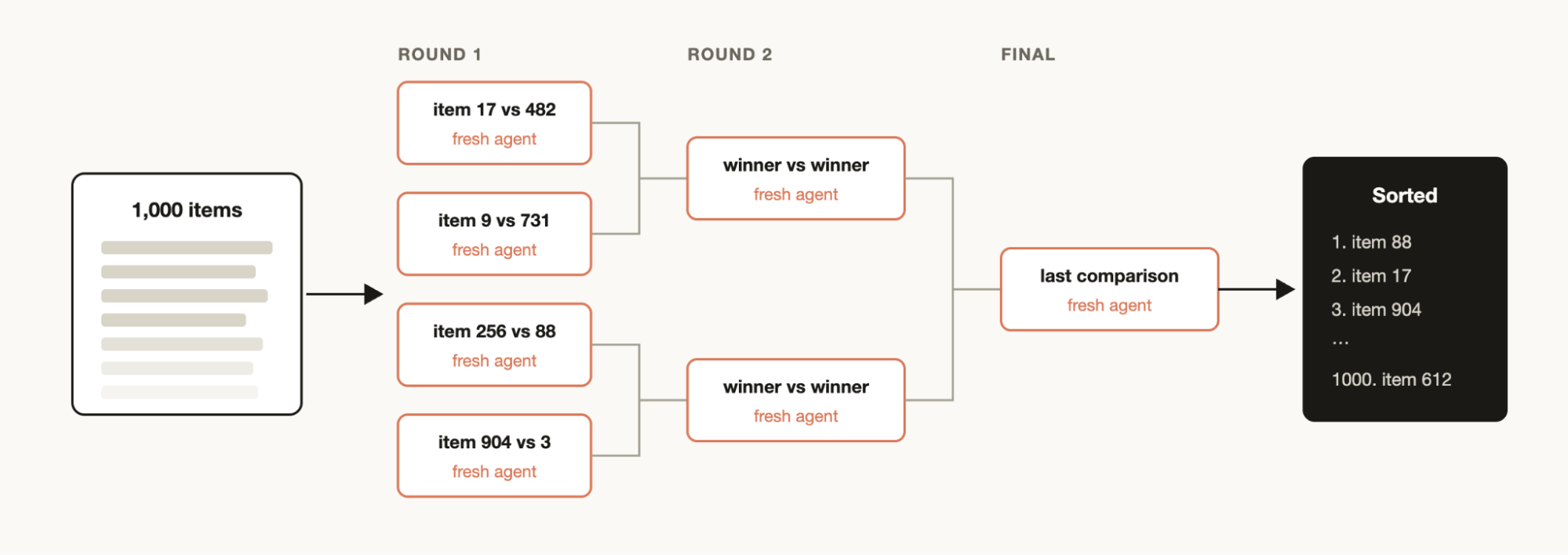
You may have a list of items that you want to sort by some qualitative measurement that you believe that Claude Code is good at evaluating, for example: support tickets sorted by severity of the bug. But if you try to sort 1000+ rows in one prompt, quality degrades and it won't fit in context. Instead run a tournament, a pipeline of pairwise-comparison agents (comparative judgment is more reliable than absolute scoring), or bucket-rank in parallel then merge. Each comparison is its own agent, so the deterministic loop holds the bracket and only the running order stays in context.
|
|
197
|
-
|
|
198
|
-
### Memory and rule adherence
|
|
199
|
-
|
|
200
|
-
|
|
201
|
-
|
|
202
|
-
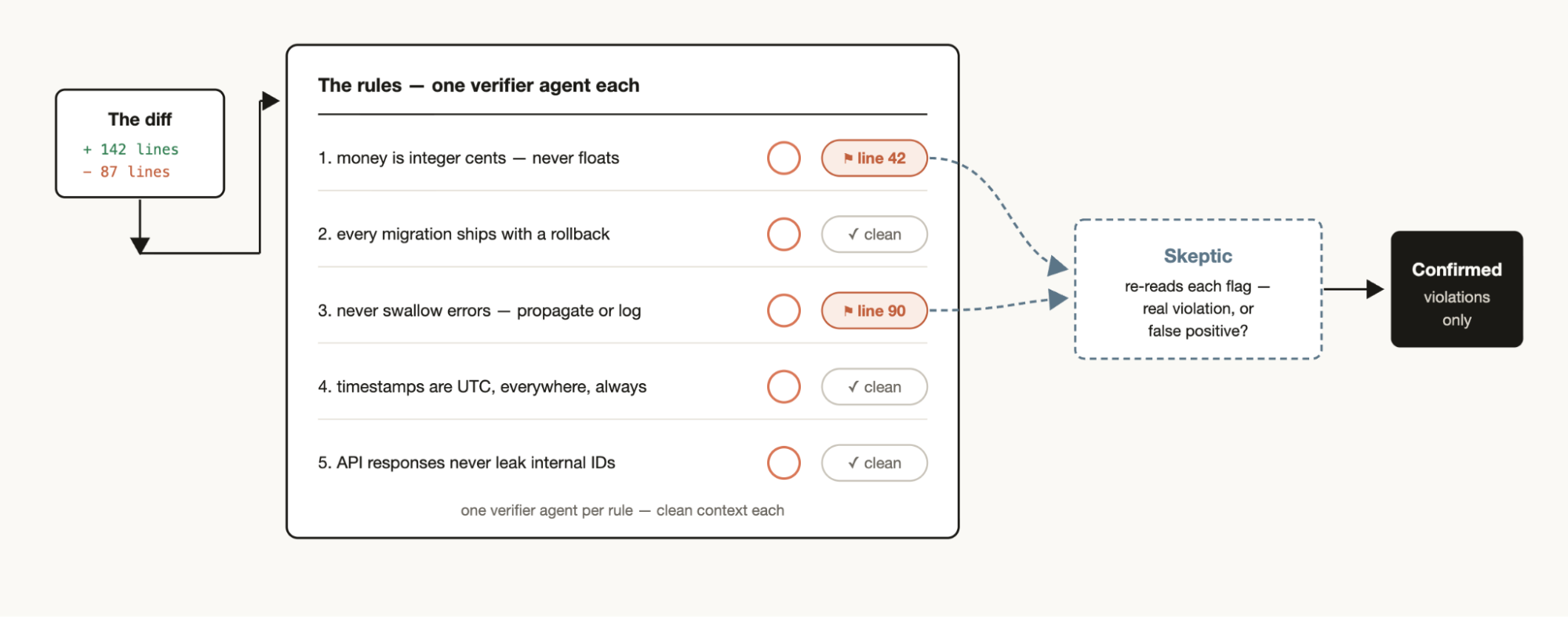
If you have a particular set of rules that you find Claude misses or struggles with, even when put into the `CLAUDE.mds`, create a workflow with a list of rules that must be checked by verifier agents—one verifier per rule. Creating a skeptic persona subagent to review the rules to make sure they are in line will help avoid too many false positives.
|
|
203
|
-
|
|
204
|
-
The reverse direction works too: mine your recent sessions and code review comments for corrections you keep making, cluster them with parallel agents, adversarially verify each candidate (would this rule have prevented a real mistake?), and then distill the survivors back into a `CLAUDE.md`.
|
|
205
|
-
|
|
206
|
-
### Root-cause investigation
|
|
207
|
-
|
|
208
|
-
Debugging works best when you come up with several independent hypotheses and test them, but if you’re only using one context window, Claude can run into self-preferential bias
|
|
209
|
-
|
|
210
|
-
A workflow can structurally prevent this by spinning up agents to generate hypotheses from disjoint evidence. For example, separate agents for logs, files, and data. Each hypothesis can then face a panel of verifiers and refuters.
|
|
211
|
-
|
|
212
|
-
This isn't just for code. Workflows can be used for sales (why did sales drop in March?), data engineering (why did this pipeline fail?), or any post-mortem exercise.
|
|
213
|
-
|
|
214
|
-
### Triaging at scale
|
|
215
|
-
|
|
216
|
-
|
|
217
|
-
|
|
218
|
-
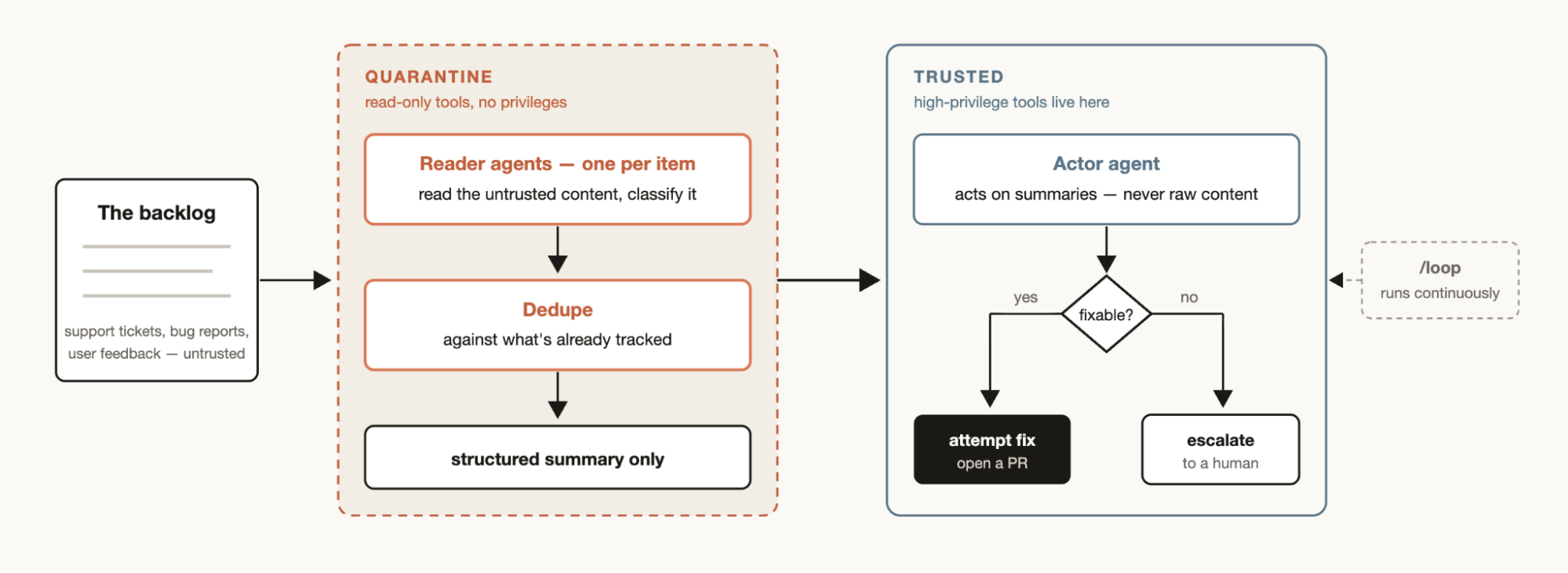
Every team has a support queue, bug reports, or some other backlog that cannot be fully processed by humans.
|
|
219
|
-
|
|
220
|
-
A triage workflow classifies each item, dedupes against what's already tracked, and takes action. This could mean attempting the fix or escalating to a human user.
|
|
221
|
-
|
|
222
|
-
A useful pattern for triage workflows is quarantine. This involves barring the agents that read untrusted public content from taking high-privilege actions, which are instead done by the agents in charge of acting on the information.
|
|
223
|
-
|
|
224
|
-
Pair triage workflows with /loop to have Claude do this continuously.
|
|
225
|
-
|
|
226
|
-
### Exploration and taste
|
|
227
|
-
|
|
228
|
-
Workflows can be useful when exploring different approaches to a solution, especially when it is taste based, like design or naming, and would benefit from a rubric.
|
|
229
|
-
|
|
230
|
-
Try asking Claude to explore a bunch of solutions, and give a review agent a rubric for what a good solution looks like. The task is complete when the review agent feels like it has met the criteria. Solutions can also be ordered or selected via a tournament based on the rubric.
|
|
231
|
-
|
|
232
|
-
### Evals
|
|
233
|
-
|
|
234
|
-
You can run lightweight evals for particular tasks by spinning off separate agents in a worktree and then spinning off comparison agents to compare and grade the specific outputs against a rubric. For example, evaluating and then refining a skill you’ve created against a particular criteria.
|
|
235
|
-
|
|
236
|
-
### Model and intelligence routing
|
|
237
|
-
|
|
238
|
-
Create a classifier agent tuned to your tasks that decides which model to use. This can be helpful when your task will involve many tool calls and conducting research prior to execution can identify the best model for the job.
|
|
239
|
-
|
|
240
|
-
For example, the best model for the task “explain how the auth module works” depends on how many files in the auth module there are and the shape of the codebase. A classifier agent can do this research and then route to Sonnet or Opus based on the expected complexity of the task.
|
|
241
|
-
|
|
242
|
-
## When not to use dynamic workflows
|
|
243
|
-
|
|
244
|
-
Workflows are new. While there are many use cases where it will create outsized results, they are not needed for every task and may end up using significantly more tokens.
|
|
245
|
-
|
|
246
|
-
It’s best to use workflows creatively to push Claude Code in ways that you haven’t previously. For regular coding tasks, try and ask yourself: does it really need more compute? For example, most traditional coding tasks do not need a panel of 5 reviewers.
|
|
247
|
-
|
|
248
|
-
## Tips for building dynamic workflows
|
|
249
|
-
|
|
250
|
-
### Prompting
|
|
251
|
-
|
|
252
|
-
Detailed prompting, using the specific techniques we described above, for dynamic workflows creates the best results.
|
|
253
|
-
|
|
254
|
-
Workflows are not just for large tasks. You can prompt the model to use a “quick workflow.” For example, you can create a quick adversarial review of an assumption.
|
|
255
|
-
|
|
256
|
-
### Combine with `/goal` and `/loop`
|
|
257
|
-
|
|
258
|
-
When using workflows that can be repeated, for example triage, research, or verification, pair them with `/loop` to be run at regular intervals, and /goal to set a hard completion requirement.
|
|
259
|
-
|
|
260
|
-
### Token usage budgets
|
|
261
|
-
|
|
262
|
-
You can set explicit token usage budgets for dynamic workflows to limit how many tokens a task uses. You can prompt it with a budget like: “use 10k tokens,” which will set the cap.
|
|
263
|
-
|
|
264
|
-
### Saving and sharing dynamic workflows
|
|
265
|
-
|
|
266
|
-
You can save workflows by pressing “s” in the workflow menu. You can check these into `~/.claude/workflows` or distribute them via a skill.
|
|
267
|
-
|
|
268
|
-
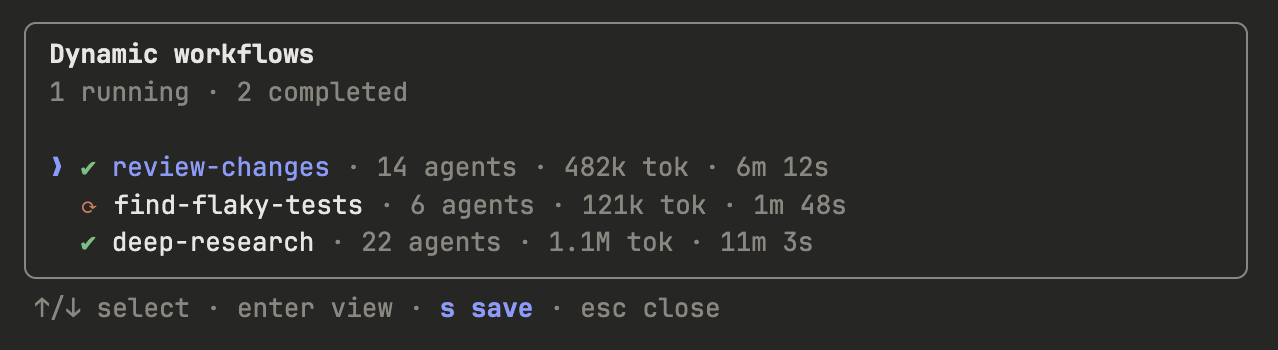
|
|
269
|
-
|
|
270
|
-
To share them via a skill, put your JavaScript workflow files in the skill and folder and reference them in the [SKILL.MD](http://skill.md). To allow for more flexibility, you may want to prompt Claude to think of the workflows in the skill as a template instead of a script that needs to be run verbatim.
|
|
271
|
-
|
|
272
|
-
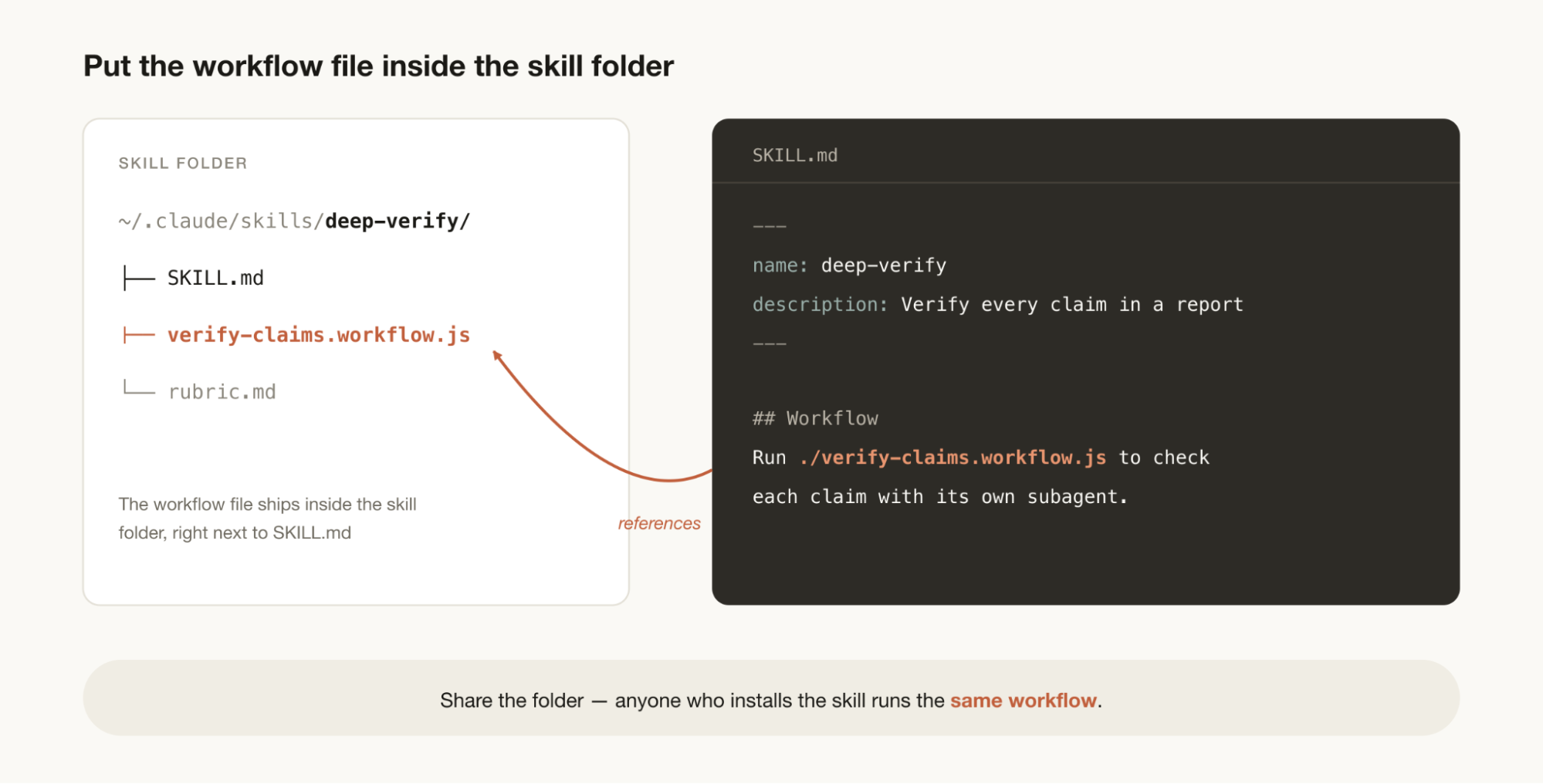
|
|
273
|
-
|
|
274
|
-
## A new starting point for discovery
|
|
275
|
-
|
|
276
|
-
Workflows are a helpful new way to extend Claude Code. I encourage you to think of them as a starting point to explore new ways to use Claude to help accomplish your tasks. There is still much to discover in how to use them best. Let me know what you find.
|
|
277
|
-
|
|
278
|
-
|
|
279
|
-
|
|
280
|
-
*This article was written by Thariq Shihipar and Sid Bidasaria, members of technical staff at Anthropic working on Claude Code.*
|
|
281
|
-
|