@trixwell/ngx-parl 0.0.0-watch
This diff represents the content of publicly available package versions that have been released to one of the supported registries. The information contained in this diff is provided for informational purposes only and reflects changes between package versions as they appear in their respective public registries.
- package/README.md +91 -0
- package/fesm2022/trixwell-ngx-parl.mjs +894 -0
- package/fesm2022/trixwell-ngx-parl.mjs.map +1 -0
- package/package.json +47 -0
package/README.md
ADDED
|
@@ -0,0 +1,91 @@
|
|
|
1
|
+
# NgxParl Component Documentation
|
|
2
|
+
|
|
3
|
+
## Overview
|
|
4
|
+
|
|
5
|
+
|
|
6
|
+
|
|
7
|
+
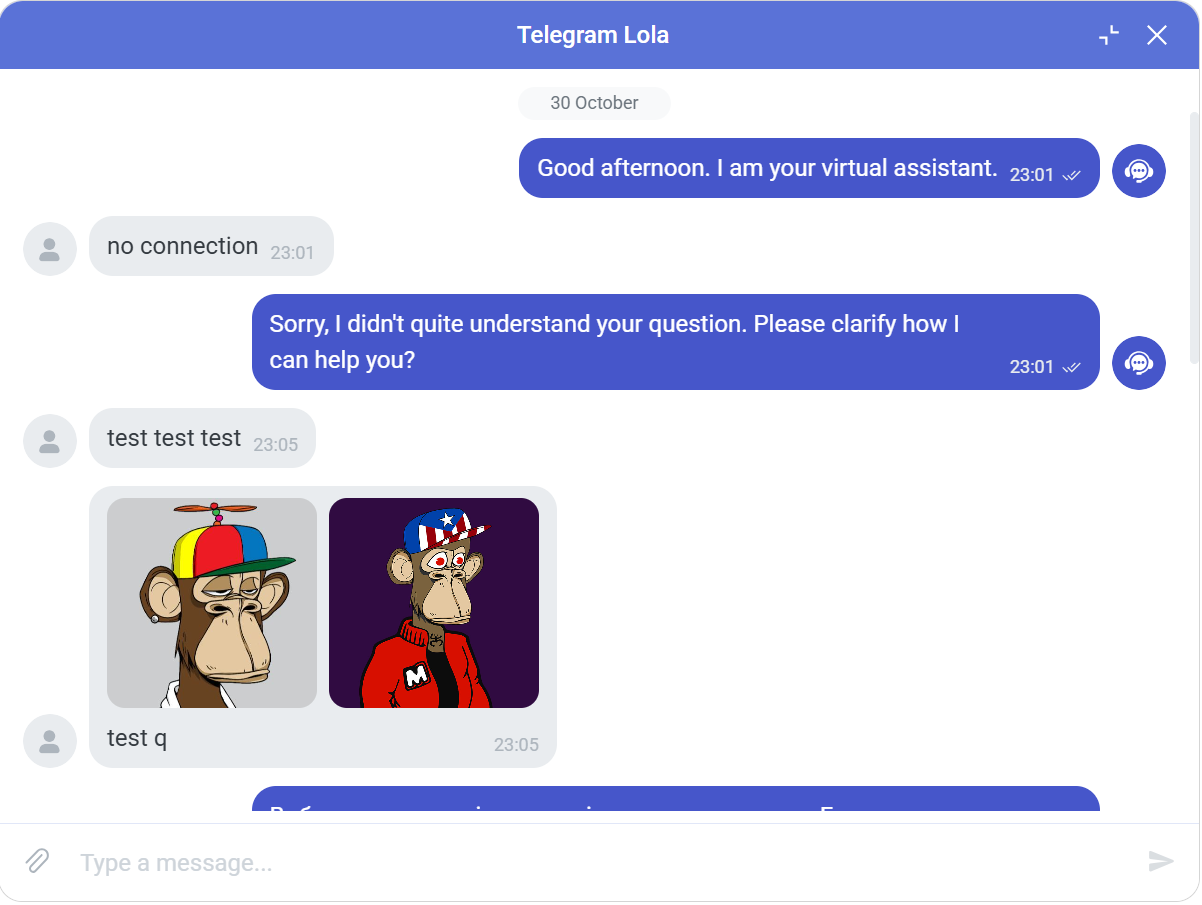
NgxParl is an Angular chat component that renders a fully interactive, customizable messaging interface. It supports features such as real-time message updates from external sources, sending and editing messages, deleting messages, day separators, and smooth auto-scrolling. The component is backend-agnostic, works with any data source, and integrates seamlessly with Angular Material, making it easy to plug into different projects as an open-source chat UI.
|
|
8
|
+
|
|
9
|
+
# GitHub Repository: [Trixwell/parl](https://github.com/Trixwell/parl)
|
|
10
|
+
|
|
11
|
+
## Installation
|
|
12
|
+
|
|
13
|
+
To use NgxParl, ensure you have Angular and Angular Material installed. Then, import the component into your module:
|
|
14
|
+
|
|
15
|
+
```
|
|
16
|
+
npm install @trixwell/ngx-parl
|
|
17
|
+
```
|
|
18
|
+
|
|
19
|
+
## Required peer dependencies:
|
|
20
|
+
|
|
21
|
+
```
|
|
22
|
+
npm install @angular/material
|
|
23
|
+
npm install @ngneat/transloco
|
|
24
|
+
```
|
|
25
|
+
|
|
26
|
+
In your app.module.ts:
|
|
27
|
+
|
|
28
|
+
```
|
|
29
|
+
import { NgxParl } from 'ngx-parl';
|
|
30
|
+
|
|
31
|
+
@NgModule({
|
|
32
|
+
declarations: [AppComponent],
|
|
33
|
+
imports: [NgxParl],
|
|
34
|
+
bootstrap: [AppComponent],
|
|
35
|
+
})
|
|
36
|
+
export class AppModule {}
|
|
37
|
+
```
|
|
38
|
+
|
|
39
|
+
Add the NgxParl providers to your application configuration:
|
|
40
|
+
|
|
41
|
+
```
|
|
42
|
+
export const appConfig: ApplicationConfig = {
|
|
43
|
+
providers: [provideNgxParl()]
|
|
44
|
+
}
|
|
45
|
+
```
|
|
46
|
+
|
|
47
|
+
Enables i18n, translations and core chat configuration
|
|
48
|
+
|
|
49
|
+
## Signal Data
|
|
50
|
+
|
|
51
|
+
| Name | Type | Description |
|
|
52
|
+
|:-------------:|:-------------:|:---------------------------------------------------------:|
|
|
53
|
+
| header | boolean | Display the chat title with the name of the interlocutor |
|
|
54
|
+
| theme | string | Choose a theme color (```primary``` or ```secondary```) |
|
|
55
|
+
| language | string | Set language (```uk``` or ```en```). Default ```en``` |
|
|
56
|
+
| messageList | ChatMessage[] | List of chat messages, user information |
|
|
57
|
+
| messageUpdate | ChatMessage | Subject / Observable / Signal, who sends a new message |
|
|
58
|
+
|
|
59
|
+
# Example Usage
|
|
60
|
+
|
|
61
|
+
## Component Setup
|
|
62
|
+
```
|
|
63
|
+
public header = input<boolean>(true);
|
|
64
|
+
public messageList = model<ChatMessage[]>([]);
|
|
65
|
+
public messageUpdate = model<ChatMessage>();
|
|
66
|
+
```
|
|
67
|
+
|
|
68
|
+
## Entity
|
|
69
|
+
```
|
|
70
|
+
export interface ChatMessageDTO {
|
|
71
|
+
id: number;
|
|
72
|
+
chat_id: number;
|
|
73
|
+
cr_time: string; // ISO or 'YYYY-MM-DD HH:mm:ss'
|
|
74
|
+
type: ChatMessageType;
|
|
75
|
+
user: string;
|
|
76
|
+
content: string;
|
|
77
|
+
avatar?: string | null;
|
|
78
|
+
file_path?: string[] | null;
|
|
79
|
+
checked?: boolean | null;
|
|
80
|
+
}
|
|
81
|
+
|
|
82
|
+
export type ChatMessageType = 'incoming' | 'outgoing';
|
|
83
|
+
```
|
|
84
|
+
|
|
85
|
+
## Template
|
|
86
|
+
```
|
|
87
|
+
<ngx-parl [header]="header()"
|
|
88
|
+
[(messageList)]="messageList"
|
|
89
|
+
[(messageUpdate)]="messageUpdate">
|
|
90
|
+
</ngx-parl>
|
|
91
|
+
```
|