@transistorsoft/capacitor-background-geolocation 8.0.1 → 9.0.1
This diff represents the content of publicly available package versions that have been released to one of the supported registries. The information contained in this diff is provided for informational purposes only and reflects changes between package versions as they appear in their respective public registries.
- package/Package.swift +10 -16
- package/README.md +99 -211
- package/TransistorsoftCapacitorBackgroundGeolocation.podspec +7 -5
- package/android/build.gradle +16 -54
- package/android/src/main/java/com/transistorsoft/bggeo/capacitor/BackgroundGeolocationPlugin.java +132 -70
- package/dist/index.js +198 -189
- package/dist/index.js.map +1 -1
- package/dist/plugin.cjs.js +255 -205
- package/dist/plugin.cjs.js.map +1 -1
- package/dist/plugin.js +1141 -1092
- package/dist/plugin.js.map +1 -1
- package/ios/Sources/BackgroundGeolocationPlugin/BackgroundGeolocationPlugin.swift +353 -306
- package/package.json +14 -15
- package/src/index.d.ts +10 -0
- package/android/libs/com/transistorsoft/tslocationmanager/3.7.0/tslocationmanager-3.7.0.aar +0 -0
- package/android/libs/com/transistorsoft/tslocationmanager/3.7.0/tslocationmanager-3.7.0.aar.md5 +0 -1
- package/android/libs/com/transistorsoft/tslocationmanager/3.7.0/tslocationmanager-3.7.0.aar.sha1 +0 -1
- package/android/libs/com/transistorsoft/tslocationmanager/3.7.0/tslocationmanager-3.7.0.aar.sha256 +0 -1
- package/android/libs/com/transistorsoft/tslocationmanager/3.7.0/tslocationmanager-3.7.0.aar.sha512 +0 -1
- package/android/libs/com/transistorsoft/tslocationmanager/3.7.0/tslocationmanager-3.7.0.pom +0 -9
- package/android/libs/com/transistorsoft/tslocationmanager/3.7.0/tslocationmanager-3.7.0.pom.md5 +0 -1
- package/android/libs/com/transistorsoft/tslocationmanager/3.7.0/tslocationmanager-3.7.0.pom.sha1 +0 -1
- package/android/libs/com/transistorsoft/tslocationmanager/3.7.0/tslocationmanager-3.7.0.pom.sha256 +0 -1
- package/android/libs/com/transistorsoft/tslocationmanager/3.7.0/tslocationmanager-3.7.0.pom.sha512 +0 -1
- package/android/libs/com/transistorsoft/tslocationmanager/maven-metadata.xml +0 -13
- package/android/libs/com/transistorsoft/tslocationmanager-v21/3.7.0/tslocationmanager-v21-3.7.0.aar +0 -0
- package/android/libs/com/transistorsoft/tslocationmanager-v21/3.7.0/tslocationmanager-v21-3.7.0.aar.md5 +0 -1
- package/android/libs/com/transistorsoft/tslocationmanager-v21/3.7.0/tslocationmanager-v21-3.7.0.aar.sha1 +0 -1
- package/android/libs/com/transistorsoft/tslocationmanager-v21/3.7.0/tslocationmanager-v21-3.7.0.aar.sha256 +0 -1
- package/android/libs/com/transistorsoft/tslocationmanager-v21/3.7.0/tslocationmanager-v21-3.7.0.aar.sha512 +0 -1
- package/android/libs/com/transistorsoft/tslocationmanager-v21/3.7.0/tslocationmanager-v21-3.7.0.pom +0 -9
- package/android/libs/com/transistorsoft/tslocationmanager-v21/3.7.0/tslocationmanager-v21-3.7.0.pom.md5 +0 -1
- package/android/libs/com/transistorsoft/tslocationmanager-v21/3.7.0/tslocationmanager-v21-3.7.0.pom.sha1 +0 -1
- package/android/libs/com/transistorsoft/tslocationmanager-v21/3.7.0/tslocationmanager-v21-3.7.0.pom.sha256 +0 -1
- package/android/libs/com/transistorsoft/tslocationmanager-v21/3.7.0/tslocationmanager-v21-3.7.0.pom.sha512 +0 -1
- package/android/libs/com/transistorsoft/tslocationmanager-v21/maven-metadata.xml +0 -13
- package/dist/Events.js +0 -19
- package/dist/Events.js.map +0 -1
- package/dist/declarations/BackgroundGeolocation.d.ts +0 -1632
- package/dist/declarations/interfaces/Authorization.d.ts +0 -185
- package/dist/declarations/interfaces/AuthorizationEvent.d.ts +0 -34
- package/dist/declarations/interfaces/Config.d.ts +0 -2474
- package/dist/declarations/interfaces/ConnectivityChangeEvent.d.ts +0 -18
- package/dist/declarations/interfaces/CurrentPositionRequest.d.ts +0 -45
- package/dist/declarations/interfaces/DeviceInfo.d.ts +0 -33
- package/dist/declarations/interfaces/DeviceSettings.d.ts +0 -223
- package/dist/declarations/interfaces/Geofence.d.ts +0 -319
- package/dist/declarations/interfaces/GeofenceEvent.d.ts +0 -35
- package/dist/declarations/interfaces/GeofencesChangeEvent.d.ts +0 -22
- package/dist/declarations/interfaces/HeartbeatEvent.d.ts +0 -20
- package/dist/declarations/interfaces/HttpEvent.d.ts +0 -313
- package/dist/declarations/interfaces/Location.d.ts +0 -257
- package/dist/declarations/interfaces/LocationAuthorizationAlert.d.ts +0 -41
- package/dist/declarations/interfaces/Logger.d.ts +0 -359
- package/dist/declarations/interfaces/MotionActivityEvent.d.ts +0 -34
- package/dist/declarations/interfaces/MotionChangeEvent.d.ts +0 -15
- package/dist/declarations/interfaces/Notification.d.ts +0 -491
- package/dist/declarations/interfaces/PermissionRationale.d.ts +0 -31
- package/dist/declarations/interfaces/ProviderChangeEvent.d.ts +0 -74
- package/dist/declarations/interfaces/SQLQuery.d.ts +0 -60
- package/dist/declarations/interfaces/Sensors.d.ts +0 -31
- package/dist/declarations/interfaces/State.d.ts +0 -51
- package/dist/declarations/interfaces/Subscription.d.ts +0 -104
- package/dist/declarations/interfaces/TransistorAuthorizationToken.d.ts +0 -63
- package/dist/declarations/interfaces/WatchPositionRequest.d.ts +0 -45
- package/dist/declarations/types.d.ts +0 -188
- package/dist/index.d.ts +0 -3
|
@@ -1,1632 +0,0 @@
|
|
|
1
|
-
/// <reference path="types.d.ts" />
|
|
2
|
-
/// <reference path="interfaces/Config.d.ts" />
|
|
3
|
-
/// <reference path="interfaces/ConnectivityChangeEvent.d.ts" />
|
|
4
|
-
/// <reference path="interfaces/CurrentPositionRequest.d.ts" />
|
|
5
|
-
/// <reference path="interfaces/Geofence.d.ts" />
|
|
6
|
-
/// <reference path="interfaces/GeofenceEvent.d.ts" />
|
|
7
|
-
/// <reference path="interfaces/GeofencesChangeEvent.d.ts" />
|
|
8
|
-
/// <reference path="interfaces/HeartbeatEvent.d.ts" />
|
|
9
|
-
/// <reference path="interfaces/HttpEvent.d.ts" />
|
|
10
|
-
/// <reference path="interfaces/Location.d.ts" />
|
|
11
|
-
/// <reference path="interfaces/LocationAuthorizationAlert.d.ts" />
|
|
12
|
-
/// <reference path="interfaces/Logger.d.ts" />
|
|
13
|
-
/// <reference path="interfaces/MotionActivityEvent.d.ts" />
|
|
14
|
-
/// <reference path="interfaces/MotionChangeEvent.d.ts" />
|
|
15
|
-
/// <reference path="interfaces/ProviderChangeEvent.d.ts" />
|
|
16
|
-
/// <reference path="interfaces/Sensors.d.ts" />
|
|
17
|
-
/// <reference path="interfaces/State.d.ts" />
|
|
18
|
-
/// <reference path="interfaces/WatchPositionRequest.d.ts" />
|
|
19
|
-
/// <reference path="interfaces/DeviceSettings.d.ts" />
|
|
20
|
-
/// <reference path="interfaces/Notification.d.ts" />
|
|
21
|
-
/// <reference path="interfaces/SQLQuery.d.ts" />
|
|
22
|
-
/// <reference path="interfaces/DeviceInfo.d.ts" />
|
|
23
|
-
/// <reference path="interfaces/Authorization.d.ts" />
|
|
24
|
-
/// <reference path="interfaces/AuthorizationEvent.d.ts" />
|
|
25
|
-
/// <reference path="interfaces/TransistorAuthorizationToken.d.ts" />
|
|
26
|
-
/// <reference path="interfaces/Subscription.d.ts" />
|
|
27
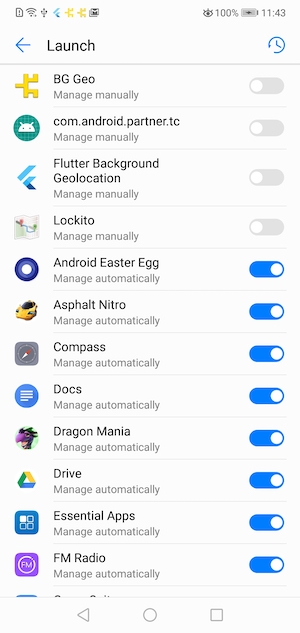
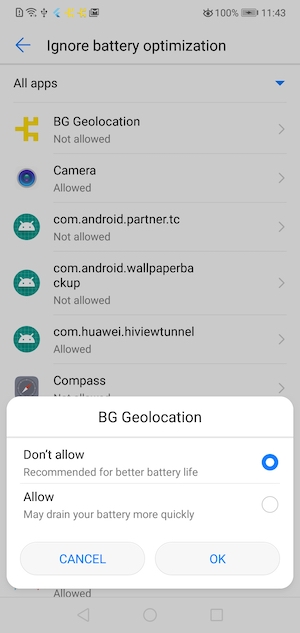
|
-
declare module "@transistorsoft/capacitor-background-geolocation" {
|
|
28
|
-
/**
|
|
29
|
-
* Primary API of the SDK.
|
|
30
|
-
* @break
|
|
31
|
-
*
|
|
32
|
-
* ## 📚 Help
|
|
33
|
-
* - 📘 [Philosophy of Operation](github:wiki/Philosophy-of-Operation)
|
|
34
|
-
* - 📘 [[HttpEvent | HTTP Guide]].
|
|
35
|
-
* - 📘 [[Geofence | Geofencing Guide]].
|
|
36
|
-
* - 📘 [Android Headless Mode](github:wiki/Android-Headless-Mode).
|
|
37
|
-
* - 📘 [Debugging Guide](github:wiki/Debugging).
|
|
38
|
-
*
|
|
39
|
-
* ## ⚡️ Events
|
|
40
|
-
*
|
|
41
|
-
* [[BackgroundGeolocation]] is event-based. Interacting with the SDK is largely through implementing listeners on the following events:
|
|
42
|
-
*
|
|
43
|
-
* | Method | Description |
|
|
44
|
-
* |------------------------|-----------------------------------------|
|
|
45
|
-
* | [[onLocation]] | Fired with each recorded [[Location]] |
|
|
46
|
-
* | [[onMotionChange]] | Fired when the plugin changes state between *moving* / *stationary* |
|
|
47
|
-
* | [[onHttp]] | Fired with each HTTP response from your server. (see [[Config.url]]). |
|
|
48
|
-
* | [[onActivityChange]] | Fired with each change in device motion-activity. |
|
|
49
|
-
* | [[onProviderChange]] | Fired after changes to device location-services configuration. |
|
|
50
|
-
* | [[onHeartbeat]] | Periodic timed events. See [[heartbeatInterval]]. iOS requires [[preventSuspend]]. |
|
|
51
|
-
* | [[onGeofence]] | Fired with each [[Geofence]] transition event (`ENTER, EXIT, DWELL`). |
|
|
52
|
-
* | [[onGeofencesChange]] | Fired when the list of actively-monitored geofences changed. See [[geofenceProximityRadius]]. |
|
|
53
|
-
* | [[onSchedule]] | Fired for [[schedule]] events. |
|
|
54
|
-
* | [[onConnectivityChange]] | Fired when network-connectivity changes (connected / disconnected). |
|
|
55
|
-
* | [[onPowerSaveChange]] | Fired when state of operating-system's "power-saving" feature is enabled / disabled. |
|
|
56
|
-
* | [[onEnabledChange]] | Fired when the plugin is enabled / disabled via its [[start]] / [[stop]] methods. |
|
|
57
|
-
* | [[onAuthorization]] | Fired when a response from [[Authorization.refreshUrl]] is received. |
|
|
58
|
-
* | [[onNotificationAction]] | __Android only__: Fired when a button is clicked on a custom [[Notification.layout]] of a foreground-service notification. |
|
|
59
|
-
*
|
|
60
|
-
* ## 🔧 [[Config]] API
|
|
61
|
-
*
|
|
62
|
-
* [[BackgroundGeolocation]] is highly configurable. See the [[Config]] API for more information.
|
|
63
|
-
*
|
|
64
|
-
* There are three main steps to using `BackgroundGeolocation`
|
|
65
|
-
* 1. Wire up event-listeners.
|
|
66
|
-
* 2. [[ready]] the SDK.
|
|
67
|
-
* 3. [[start]] tracking.
|
|
68
|
-
*
|
|
69
|
-
* @example
|
|
70
|
-
* ```typescript
|
|
71
|
-
*
|
|
72
|
-
* ////
|
|
73
|
-
* // 1. Wire up event-listeners
|
|
74
|
-
* //
|
|
75
|
-
*
|
|
76
|
-
* // This handler fires whenever bgGeo receives a location update.
|
|
77
|
-
* BackgroundGeolocation.onLocation(location => {
|
|
78
|
-
* console.log("[location] ", location);
|
|
79
|
-
* }, error => {
|
|
80
|
-
* console.log("[location] ERROR: ", error);
|
|
81
|
-
* });
|
|
82
|
-
*
|
|
83
|
-
* // This handler fires when movement states changes (stationary->moving; moving->stationary)
|
|
84
|
-
* BackgroundGeolocation.onMotionChange(location => {
|
|
85
|
-
* console.log("[motionchange] ", location);
|
|
86
|
-
* });
|
|
87
|
-
*
|
|
88
|
-
* // This handler fires on HTTP responses
|
|
89
|
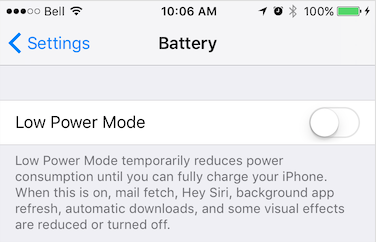
-
* BackgroundGeolocation.onHttp(response => {
|
|
90
|
-
* console.log("[http] ", response);
|
|
91
|
-
* });
|
|
92
|
-
*
|
|
93
|
-
* // This event fires when a change in motion activity is detected
|
|
94
|
-
* BackgroundGeolocation.onActivityChange(activityEvent => {
|
|
95
|
-
* console.log("[activitychange] ", activityEvent);
|
|
96
|
-
* });
|
|
97
|
-
*
|
|
98
|
-
* // This event fires when the user toggles location-services authorization
|
|
99
|
-
* BackgroundGeolocation.onProviderChange(providerEvent => {
|
|
100
|
-
* console.log("[providerchange] ", providerEvent);
|
|
101
|
-
* });
|
|
102
|
-
*
|
|
103
|
-
* ////
|
|
104
|
-
* // 2. Execute #ready method (required)
|
|
105
|
-
* //
|
|
106
|
-
* BackgroundGeolocation.ready({
|
|
107
|
-
* // Geolocation Config
|
|
108
|
-
* desiredAccuracy: BackgroundGeolocation.DESIRED_ACCURACY_HIGH,
|
|
109
|
-
* distanceFilter: 10,
|
|
110
|
-
* // Activity Recognition
|
|
111
|
-
* stopTimeout: 1,
|
|
112
|
-
* // Application config
|
|
113
|
-
* debug: true, // <-- enable this hear debug sounds.
|
|
114
|
-
* logLevel: BackgroundGeolocation.LOG_LEVEL_VERBOSE,
|
|
115
|
-
* stopOnTerminate: false, // <-- Allow the background-service to continue tracking when app terminated.
|
|
116
|
-
* startOnBoot: true, // <-- Auto start tracking when device is powered-up.
|
|
117
|
-
* // HTTP / SQLite config
|
|
118
|
-
* url: "http://yourserver.com/locations",
|
|
119
|
-
* batchSync: false, // <-- Set true to sync locations to server in a single HTTP request.
|
|
120
|
-
* autoSync: true, // <-- Set true to sync each location to server as it arrives.
|
|
121
|
-
* headers: { // <-- Optional HTTP headers
|
|
122
|
-
* "X-FOO": "bar"
|
|
123
|
-
* },
|
|
124
|
-
* params: { // <-- Optional HTTP params
|
|
125
|
-
* "auth_token": "maybe_your_server_authenticates_via_token_YES?"
|
|
126
|
-
* }
|
|
127
|
-
* }, (state) => {
|
|
128
|
-
* console.log("- BackgroundGeolocation is configured and ready: ", state.enabled);
|
|
129
|
-
*
|
|
130
|
-
* if (!state.enabled) {
|
|
131
|
-
* ////
|
|
132
|
-
* // 3. Start tracking!
|
|
133
|
-
* //
|
|
134
|
-
* BackgroundGeolocation.start(function() {
|
|
135
|
-
* console.log("- Start success");
|
|
136
|
-
* });
|
|
137
|
-
* }
|
|
138
|
-
* });
|
|
139
|
-
*
|
|
140
|
-
* ```
|
|
141
|
-
*
|
|
142
|
-
* @example
|
|
143
|
-
* ```typescript
|
|
144
|
-
* BackgroundGeolocation.ready({
|
|
145
|
-
* distanceFilter: 10,
|
|
146
|
-
* stopOnTerminate: false,
|
|
147
|
-
* logLevel: BackgroundGeolocation.LOG_LEVEL_VERBOSE,
|
|
148
|
-
* debug: true
|
|
149
|
-
* }, (state) => {
|
|
150
|
-
* console.log("- BackgroundGeolocation is ready: ", state);
|
|
151
|
-
* });
|
|
152
|
-
* ```
|
|
153
|
-
*
|
|
154
|
-
* ### ⚠️ Warning:
|
|
155
|
-
* Do not execute *any* API method which will require accessing location-services until the callback to [[ready]] executes (eg: [[getCurrentPosition]], [[watchPosition]], [[start]]).
|
|
156
|
-
*
|
|
157
|
-
* ### Promise API
|
|
158
|
-
*
|
|
159
|
-
* The `BackgroundGeolocation` Javascript API supports [Promises](https://developer.mozilla.org/en-US/docs/Web/JavaScript/Reference/Global_Objects/Promise) for *nearly* every method (the exceptions are [[watchPosition]] and adding event-listeners via **`#onEventName`** methods.)
|
|
160
|
-
* @example
|
|
161
|
-
* ```typescript
|
|
162
|
-
* // Traditional API still works:
|
|
163
|
-
* BackgroundGeolocation.ready({desiredAccuracy: 0, distanceFilter: 50}).then(state => {
|
|
164
|
-
* console.log("- BackgroundGeolocation is ready: ", state);
|
|
165
|
-
* }).catch(error => {
|
|
166
|
-
* console.log("- BackgroundGeolocation error: ", error);
|
|
167
|
-
* });
|
|
168
|
-
* ```
|
|
169
|
-
*/
|
|
170
|
-
export class BackgroundGeolocation {
|
|
171
|
-
static EVENT_BOOT: Event;
|
|
172
|
-
static EVENT_TERMINATE: Event;
|
|
173
|
-
static EVENT_LOCATION: Event;
|
|
174
|
-
static EVENT_MOTIONCHANGE: Event;
|
|
175
|
-
static EVENT_HTTP: Event;
|
|
176
|
-
static EVENT_HEARTBEAT: Event;
|
|
177
|
-
static EVENT_PROVIDERCHANGE: Event;
|
|
178
|
-
static EVENT_ACTIVITYCHANGE: Event;
|
|
179
|
-
static EVENT_GEOFENCE: Event;
|
|
180
|
-
static EVENT_GEOFENCESCHANGE: Event;
|
|
181
|
-
static EVENT_ENABLEDCHANGE: Event;
|
|
182
|
-
static EVENT_CONNECTIVITYCHANGE: Event;
|
|
183
|
-
static EVENT_SCHEDULE: Event;
|
|
184
|
-
static EVENT_POWERSAVECHANGE: Event;
|
|
185
|
-
static EVENT_NOTIFICATIONACTION: Event;
|
|
186
|
-
static EVENT_AUTHORIZATION: Event;
|
|
187
|
-
|
|
188
|
-
static LOG_LEVEL_OFF: LogLevel;
|
|
189
|
-
static LOG_LEVEL_ERROR: LogLevel;
|
|
190
|
-
static LOG_LEVEL_WARNING: LogLevel;
|
|
191
|
-
static LOG_LEVEL_INFO: LogLevel;
|
|
192
|
-
static LOG_LEVEL_DEBUG: LogLevel;
|
|
193
|
-
static LOG_LEVEL_VERBOSE: LogLevel;
|
|
194
|
-
|
|
195
|
-
static DESIRED_ACCURACY_NAVIGATION:LocationAccuracy;
|
|
196
|
-
static DESIRED_ACCURACY_HIGH:LocationAccuracy;
|
|
197
|
-
static DESIRED_ACCURACY_MEDIUM:LocationAccuracy;
|
|
198
|
-
static DESIRED_ACCURACY_LOW:LocationAccuracy;
|
|
199
|
-
static DESIRED_ACCURACY_VERY_LOW:LocationAccuracy;
|
|
200
|
-
static DESIRED_ACCURACY_LOWEST:LocationAccuracy;
|
|
201
|
-
|
|
202
|
-
static AUTHORIZATION_STATUS_NOT_DETERMINED:AuthorizationStatus;
|
|
203
|
-
static AUTHORIZATION_STATUS_RESTRICTED:AuthorizationStatus;
|
|
204
|
-
static AUTHORIZATION_STATUS_DENIED:AuthorizationStatus;
|
|
205
|
-
static AUTHORIZATION_STATUS_ALWAYS:AuthorizationStatus;
|
|
206
|
-
static AUTHORIZATION_STATUS_WHEN_IN_USE:AuthorizationStatus;
|
|
207
|
-
|
|
208
|
-
static NOTIFICATION_PRIORITY_DEFAULT:NotificationPriority;
|
|
209
|
-
static NOTIFICATION_PRIORITY_HIGH:NotificationPriority;
|
|
210
|
-
static NOTIFICATION_PRIORITY_LOW:NotificationPriority;
|
|
211
|
-
static NOTIFICATION_PRIORITY_MAX:NotificationPriority;
|
|
212
|
-
static NOTIFICATION_PRIORITY_MIN:NotificationPriority;
|
|
213
|
-
|
|
214
|
-
static ACTIVITY_TYPE_OTHER:ActivityType;
|
|
215
|
-
static ACTIVITY_TYPE_AUTOMOTIVE_NAVIGATION:ActivityType;
|
|
216
|
-
static ACTIVITY_TYPE_FITNESS:ActivityType;
|
|
217
|
-
static ACTIVITY_TYPE_OTHER_NAVIGATION:ActivityType;
|
|
218
|
-
static ACTIVITY_TYPE_AIRBORNE:ActivityType;
|
|
219
|
-
|
|
220
|
-
static PERSIST_MODE_ALL: PersistMode;
|
|
221
|
-
static PERSIST_MODE_LOCATION: PersistMode;
|
|
222
|
-
static PERSIST_MODE_GEOFENCE: PersistMode;
|
|
223
|
-
static PERSIST_MODE_NONE: PersistMode;
|
|
224
|
-
|
|
225
|
-
static ACCURACY_AUTHORIZATION_FULL: AccuracyAuthorization;
|
|
226
|
-
static ACCURACY_AUTHORIZATION_REDUCED: AccuracyAuthorization;
|
|
227
|
-
|
|
228
|
-
/**
|
|
229
|
-
* [[DeviceSettings]] API
|
|
230
|
-
*
|
|
231
|
-
* Provides an API to show Android & vendor-specific Battery / Power Management settings screens that can affect performance of the Background Geolocation SDK on various devices.
|
|
232
|
-
*
|
|
233
|
-
* The site [Don't Kill My App](https://dontkillmyapp.com/) provides a comprehensive list of poor Android vendors which throttle background-services that this plugin relies upon.
|
|
234
|
-
*
|
|
235
|
-
* This [[DeviceSettings]] API is an attempt to provide resources to direct the user to the appropriate vendor-specific settings screen to resolve issues with background operation.
|
|
236
|
-
*
|
|
237
|
-
* 
|
|
238
|
-
* 
|
|
239
|
-
*
|
|
240
|
-
*/
|
|
241
|
-
static deviceSettings: DeviceSettings;
|
|
242
|
-
|
|
243
|
-
/**
|
|
244
|
-
* [[Logger]] API
|
|
245
|
-
*/
|
|
246
|
-
static logger: Logger;
|
|
247
|
-
|
|
248
|
-
/**
|
|
249
|
-
* @hidden
|
|
250
|
-
*/
|
|
251
|
-
static addListener(event: string, success:Function, failure?:Function):void;
|
|
252
|
-
/**
|
|
253
|
-
* @hidden
|
|
254
|
-
*/
|
|
255
|
-
static on(event: string, success:Function, failure?:Function):void;
|
|
256
|
-
/**
|
|
257
|
-
* @deprecated. Use [[Subscription]] returned from __`BackgroundGeolocation.onXXX`__ to remove listeners.
|
|
258
|
-
*
|
|
259
|
-
* @example
|
|
260
|
-
* ```typescript
|
|
261
|
-
* const subscription = BackgroundGeolocation.onLocation((location) => {
|
|
262
|
-
* console.log('[onLocation]', location);
|
|
263
|
-
* });
|
|
264
|
-
* .
|
|
265
|
-
* .
|
|
266
|
-
* .
|
|
267
|
-
* // Remove listener
|
|
268
|
-
* subscription.remove();
|
|
269
|
-
* ```
|
|
270
|
-
*
|
|
271
|
-
* ---------------------------------------------------------------------
|
|
272
|
-
* ### ⚠️ [Deprecated]
|
|
273
|
-
*
|
|
274
|
-
* Removes an event listener. You must supply the *type* of event to remove in addition to a reference to the *exact* function you
|
|
275
|
-
* used to subscribe to the event.
|
|
276
|
-
*
|
|
277
|
-
*
|
|
278
|
-
* | Event |
|
|
279
|
-
* |----------------------|
|
|
280
|
-
* | `location` |
|
|
281
|
-
* | `motionchange` |
|
|
282
|
-
* | `activitychange` |
|
|
283
|
-
* | `providerchange` |
|
|
284
|
-
* | `geofence` |
|
|
285
|
-
* | `geofenceschange` |
|
|
286
|
-
* | `heartbeat` |
|
|
287
|
-
* | `http` |
|
|
288
|
-
* | `powersavechange` |
|
|
289
|
-
* | `schedule` |
|
|
290
|
-
* | `connectivitychange` |
|
|
291
|
-
* | `enabledchange` |
|
|
292
|
-
*
|
|
293
|
-
* @example
|
|
294
|
-
* ```typescript
|
|
295
|
-
* const locationHandler = (location) => {
|
|
296
|
-
* console.log("[location] - ", location)
|
|
297
|
-
* }
|
|
298
|
-
* BackgroundGeolocation.onLocation(locationHandler)
|
|
299
|
-
* .
|
|
300
|
-
* .
|
|
301
|
-
* // Remove the listener providing a reference to the original callback.
|
|
302
|
-
* BackgroundGeolocation.removeListener("location", locationHandler)
|
|
303
|
-
* ```
|
|
304
|
-
*/
|
|
305
|
-
static removeListener(event: string, handler: Function, success?:Function, failure?:Function): void;
|
|
306
|
-
|
|
307
|
-
/**
|
|
308
|
-
* Alias for [[removeListener]].
|
|
309
|
-
* @ignore
|
|
310
|
-
*/
|
|
311
|
-
static un(event: string, handler: Function, success?:Function, failure?:Function): void;
|
|
312
|
-
|
|
313
|
-
/**
|
|
314
|
-
* Removes all event-listeners.
|
|
315
|
-
*
|
|
316
|
-
* Calls [[Subscription.remove]] on all subscriptions.
|
|
317
|
-
*
|
|
318
|
-
* @example
|
|
319
|
-
* ```typescript
|
|
320
|
-
* BackgroundGeolocation.removeListeners();
|
|
321
|
-
* ```
|
|
322
|
-
*/
|
|
323
|
-
static removeListeners(success?:Function, failure?:Function): Promise<void>;
|
|
324
|
-
|
|
325
|
-
/**
|
|
326
|
-
* Alias for [[removeListeners]]
|
|
327
|
-
*/
|
|
328
|
-
static removeAllListeners(success?:Function, failure?:Function): Promise<void>;
|
|
329
|
-
|
|
330
|
-
/**
|
|
331
|
-
* Subscribe to location events.
|
|
332
|
-
*
|
|
333
|
-
* Every location recorded by the SDK is provided to your `callback`, including those from [[onMotionChange]], [[getCurrentPosition]] and [[watchPosition]].
|
|
334
|
-
*
|
|
335
|
-
* @example
|
|
336
|
-
* ```typescript
|
|
337
|
-
* const subscription = BackgroundGeolocation.onLocation((location) => {
|
|
338
|
-
* console.log("[onLocation] success: ", location);
|
|
339
|
-
* }, (error) => {
|
|
340
|
-
* console.log("[onLocation] ERROR: ", error);
|
|
341
|
-
* });
|
|
342
|
-
* ```
|
|
343
|
-
*
|
|
344
|
-
* ### Error Codes
|
|
345
|
-
*
|
|
346
|
-
* If the native location API fails to return a location, the `failure` callback will be provided a [[LocationError]].
|
|
347
|
-
*
|
|
348
|
-
* ### ⚠️ Note [[Location.sample]]:
|
|
349
|
-
*
|
|
350
|
-
* When performing a [[onMotionChange]] or [[getCurrentPosition]], the plugin requests **multiple** location *samples* in order to record the most accurate location possible. These *samples* are **not** persisted to the database but they will be provided to your `callback`, for your convenience, since it can take some seconds for the best possible location to arrive.
|
|
351
|
-
*
|
|
352
|
-
* For example, you might use these samples to progressively update the user's position on a map. You can detect these *samples* in your `callback` via `location.sample == true`. If you're manually `POST`ing location to your server, you should ignore these locations.
|
|
353
|
-
*
|
|
354
|
-
* @event location
|
|
355
|
-
*/
|
|
356
|
-
static onLocation(success: (location:Location)=>void, failure?:(errorCode: LocationError) => void):Subscription;
|
|
357
|
-
|
|
358
|
-
/**
|
|
359
|
-
* Subscribe to Geofence transition events.
|
|
360
|
-
*
|
|
361
|
-
* Your supplied `callback` will be called when any monitored geofence crossing occurs.
|
|
362
|
-
*
|
|
363
|
-
* @example
|
|
364
|
-
* ```typescript
|
|
365
|
-
* const subscription = BackgroundGeolocation.onGeofence((event) => {
|
|
366
|
-
* console.log("[onGeofence] ", event);
|
|
367
|
-
* });
|
|
368
|
-
* ```
|
|
369
|
-
*
|
|
370
|
-
* ### ℹ️ See also:
|
|
371
|
-
* - 📘 [[Geofence | Geofencing Guide]]
|
|
372
|
-
*
|
|
373
|
-
* @event geofence
|
|
374
|
-
*/
|
|
375
|
-
static onGeofence(callback: (event: GeofenceEvent) => void):Subscription;
|
|
376
|
-
|
|
377
|
-
/**
|
|
378
|
-
* Subscribe to __`motionchange`__ events.
|
|
379
|
-
*
|
|
380
|
-
* Your `callback` will be executed each time the device has changed-state between **MOVING** or **STATIONARY**.
|
|
381
|
-
*
|
|
382
|
-
*
|
|
383
|
-
* @example
|
|
384
|
-
* ```typescript
|
|
385
|
-
* const subscription = BackgroundGeolocation.onMotionChange((event) => {
|
|
386
|
-
* if (event.isMoving) {
|
|
387
|
-
* console.log("[onMotionChange] Device has just started MOVING ", event.location);
|
|
388
|
-
* } else {
|
|
389
|
-
* console.log("[onMotionChange] Device has just STOPPED: ", event.location);
|
|
390
|
-
* }
|
|
391
|
-
* });
|
|
392
|
-
* ```
|
|
393
|
-
*
|
|
394
|
-
* ----------------------------------------------------------------------
|
|
395
|
-
* ### ⚠️ Warning: `autoSyncThreshold`
|
|
396
|
-
*
|
|
397
|
-
* If you've configured [[Config.autoSyncThreshold]], it **will be ignored** during a `onMotionChange` event — all queued locations will be uploaded, since:
|
|
398
|
-
* - If an `onMotionChange` event fires **into the *moving* state**, the device may have been sitting dormant for a long period of time. The plugin is *eager* to upload this state-change to the server as soon as possible.
|
|
399
|
-
* - If an `onMotionChange` event fires **into the *stationary* state**, the device may be about to lie dormant for a long period of time. The plugin is *eager* to upload all queued locations to the server before going dormant.
|
|
400
|
-
* ----------------------------------------------------------------------
|
|
401
|
-
*
|
|
402
|
-
* ### ℹ️ See also:
|
|
403
|
-
* - [[stopTimeout]]
|
|
404
|
-
* - 📘 [Philosophy of Operation](github:wiki/Philosophy-of-Operation)
|
|
405
|
-
*
|
|
406
|
-
* @event motionchange
|
|
407
|
-
*/
|
|
408
|
-
static onMotionChange(callback: (event:MotionChangeEvent) => void): Subscription;
|
|
409
|
-
|
|
410
|
-
/**
|
|
411
|
-
* Subscribe to HTTP responses from your server [[Config.url]].
|
|
412
|
-
*
|
|
413
|
-
* @example
|
|
414
|
-
* ```typescript
|
|
415
|
-
* const subscription = BackgroundGeolocation.onHttp((response) => {
|
|
416
|
-
* let status = response.status;
|
|
417
|
-
* let success = response.success;
|
|
418
|
-
* let responseText = response.responseText;
|
|
419
|
-
* console.log("[onHttp] ", response);
|
|
420
|
-
* });
|
|
421
|
-
* ```
|
|
422
|
-
* ### ℹ️ See also:
|
|
423
|
-
* - [[HttpEvent | HTTP Guide]]
|
|
424
|
-
*
|
|
425
|
-
* @event http
|
|
426
|
-
*/
|
|
427
|
-
static onHttp(callback: (response:HttpEvent) => void): Subscription;
|
|
428
|
-
|
|
429
|
-
/**
|
|
430
|
-
* Subscribe to changes in motion activity.
|
|
431
|
-
*
|
|
432
|
-
* Your `callback` will be executed each time the activity-recognition system receives an event (`still, on_foot, in_vehicle, on_bicycle, running`).
|
|
433
|
-
*
|
|
434
|
-
* ### Android
|
|
435
|
-
* Android [[MotionActivityEvent.confidence]] always reports `100`%.
|
|
436
|
-
*
|
|
437
|
-
* @example
|
|
438
|
-
* ```typescript
|
|
439
|
-
* const subscription = BackgroundGeolocation.onActivityChange((event) => {
|
|
440
|
-
* console.log("[onActivityChange] ", event);
|
|
441
|
-
* });
|
|
442
|
-
* ```
|
|
443
|
-
* @event activitychange
|
|
444
|
-
*/
|
|
445
|
-
static onActivityChange(callback: (event: MotionActivityEvent) => void): Subscription;
|
|
446
|
-
|
|
447
|
-
/**
|
|
448
|
-
* Subscribe to changes in device's location-services configuration / authorization.
|
|
449
|
-
*
|
|
450
|
-
* Your `callback` fill be executed whenever a change in the state of the device's **Location Services** has been detected. eg: "GPS ON", "WiFi only".
|
|
451
|
-
*
|
|
452
|
-
* @example
|
|
453
|
-
* ```typescript
|
|
454
|
-
* const subscription = BackgroundGeolocation.onProviderChange((event) => {
|
|
455
|
-
* console.log("[onProviderChange: ", event);
|
|
456
|
-
*
|
|
457
|
-
* switch(event.status) {
|
|
458
|
-
* case BackgroundGeolocation.AUTHORIZATION_STATUS_DENIED:
|
|
459
|
-
* // Android & iOS
|
|
460
|
-
* console.log("- Location authorization denied");
|
|
461
|
-
* break;
|
|
462
|
-
* case BackgroundGeolocation.AUTHORIZATION_STATUS_ALWAYS:
|
|
463
|
-
* // Android & iOS
|
|
464
|
-
* console.log("- Location always granted");
|
|
465
|
-
* break;
|
|
466
|
-
* case BackgroundGeolocation.AUTHORIZATION_STATUS_WHEN_IN_USE:
|
|
467
|
-
* // iOS only
|
|
468
|
-
* console.log("- Location WhenInUse granted");
|
|
469
|
-
* break;
|
|
470
|
-
* }
|
|
471
|
-
* });
|
|
472
|
-
* ```
|
|
473
|
-
*
|
|
474
|
-
* ### ℹ️ See also:
|
|
475
|
-
* - You can explicitly request the current state of location-services using [[getProviderState]].
|
|
476
|
-
*
|
|
477
|
-
* ### ⚠️ Note:
|
|
478
|
-
* - The plugin always force-fires an [[onProviderChange]] event whenever the app is launched (right after the [[ready]] method is executed), regardless of current state, so you can learn the the current state of location-services with each boot of your application.
|
|
479
|
-
*
|
|
480
|
-
* @event providerchange
|
|
481
|
-
*/
|
|
482
|
-
static onProviderChange(callback: (event:ProviderChangeEvent) => void): Subscription;
|
|
483
|
-
|
|
484
|
-
/**
|
|
485
|
-
* Subscribe to periodic heartbeat events.
|
|
486
|
-
*
|
|
487
|
-
* Your `callback` will be executed for each [[heartbeatInterval]] while the device is in **stationary** state (**iOS** requires [[preventSuspend]]: true as well).
|
|
488
|
-
*
|
|
489
|
-
* @example
|
|
490
|
-
* ```typescript
|
|
491
|
-
* BackgroundGeolocation.ready({
|
|
492
|
-
* heartbeatInterval: 60,
|
|
493
|
-
* preventSuspend: true // <-- Required for iOS
|
|
494
|
-
* });
|
|
495
|
-
*
|
|
496
|
-
* const subscription = BackgroundGeolocation.onHeartbeat((event) => {
|
|
497
|
-
* console.log("[onHeartbeat] ", event);
|
|
498
|
-
*
|
|
499
|
-
* // You could request a new location if you wish.
|
|
500
|
-
* BackgroundGeolocation.getCurrentPosition({
|
|
501
|
-
* samples: 1,
|
|
502
|
-
* persist: true
|
|
503
|
-
* }).then((location) => {
|
|
504
|
-
* console.log("[getCurrentPosition] ", location);
|
|
505
|
-
* });
|
|
506
|
-
* })
|
|
507
|
-
* ```
|
|
508
|
-
*
|
|
509
|
-
* ### ⚠️ Note:
|
|
510
|
-
* - The [[Location]] provided by the [[HeartbeatEvent]] is only the last-known location. The *heartbeat* event does not actively engage location-services. If you wish to get the current location in your `callback`, use [[getCurrentPosition]].
|
|
511
|
-
* @event heartbeat
|
|
512
|
-
*/
|
|
513
|
-
static onHeartbeat(callback: (event: HeartbeatEvent) => void): Subscription;
|
|
514
|
-
|
|
515
|
-
/**
|
|
516
|
-
* Subscribe to changes in actively monitored geofences.
|
|
517
|
-
*
|
|
518
|
-
* Fired when the list of monitored-geofences changed. The BackgroundGeolocation SDK contains powerful geofencing features that allow you to monitor
|
|
519
|
-
* any number of circular geofences you wish (thousands even), in spite of limits imposed by the native platform APIs (**20 for iOS; 100 for Android**).
|
|
520
|
-
*
|
|
521
|
-
* The plugin achieves this by storing your geofences in its database, using a [geospatial query](https://en.wikipedia.org/wiki/Spatial_query) to determine
|
|
522
|
-
* those geofences in proximity (@see [[geofenceProximityRadius]]), activating only those geofences closest to the device's current location
|
|
523
|
-
* (according to limit imposed by the corresponding platform).
|
|
524
|
-
*
|
|
525
|
-
* When the device is determined to be moving, the plugin periodically queries for geofences in proximity (eg. every minute) using the latest recorded
|
|
526
|
-
* location. This geospatial query is **very fast**, even with tens-of-thousands geofences in the database.
|
|
527
|
-
*
|
|
528
|
-
* It's when this list of monitored geofences *changes*, that the plugin will fire the `onGeofencesChange` event.
|
|
529
|
-
*
|
|
530
|
-
* @example
|
|
531
|
-
* ```typescript
|
|
532
|
-
* const subscription = BackgroundGeolocation.onGeofencesChange((event) => {
|
|
533
|
-
* let on = event.on; //<-- new geofences activated.
|
|
534
|
-
* let off = event.off; //<-- geofences that were just de-activated.
|
|
535
|
-
*
|
|
536
|
-
* // Create map circles
|
|
537
|
-
* on.forEach((geofence) => {
|
|
538
|
-
* createGeofenceMarker(geofence)
|
|
539
|
-
* });
|
|
540
|
-
*
|
|
541
|
-
* // Remove map circles
|
|
542
|
-
* off.forEach((identifier) => {
|
|
543
|
-
* removeGeofenceMarker(identifier);
|
|
544
|
-
* }
|
|
545
|
-
* });
|
|
546
|
-
* ```
|
|
547
|
-
*
|
|
548
|
-
* ### ℹ️ See also:
|
|
549
|
-
* - 📘 [[Geofence | Geofencing Guide]]
|
|
550
|
-
* @event geofenceschange
|
|
551
|
-
*/
|
|
552
|
-
static onGeofencesChange(callback: (event: GeofencesChangeEvent) => void): Subscription;
|
|
553
|
-
|
|
554
|
-
/**
|
|
555
|
-
* Subscribe to [[schedule]] events.
|
|
556
|
-
*
|
|
557
|
-
* Your `callback` will be executed each time a [[schedule]] event fires. Your `callback` will be provided with the current [[State]]: **`state.enabled`**
|
|
558
|
-
* will reflect the state according to your [[schedule]].
|
|
559
|
-
*
|
|
560
|
-
* @example
|
|
561
|
-
* ```typescript
|
|
562
|
-
* const subscription = BackgroundGeolocation.onSchedule((state) => {
|
|
563
|
-
* if (state.enabled) {
|
|
564
|
-
* console.log("[onSchedule] scheduled start tracking");
|
|
565
|
-
* } else {
|
|
566
|
-
* console.log("[onSchedule] scheduled stop tracking");
|
|
567
|
-
* }
|
|
568
|
-
* });
|
|
569
|
-
* ```
|
|
570
|
-
* @event schedule
|
|
571
|
-
*/
|
|
572
|
-
static onSchedule(callback: (state:State) => void): Subscription;
|
|
573
|
-
|
|
574
|
-
/**
|
|
575
|
-
* Subscribe to changes in network connectivity.
|
|
576
|
-
*
|
|
577
|
-
* Fired when the state of the device's network-connectivity changes (enabled -> disabled and vice-versa). By default, the plugin will automatically fire
|
|
578
|
-
* a `connectivitychange` event with the current state network-connectivity whenever the [[start]] method is executed.
|
|
579
|
-
*
|
|
580
|
-
* ℹ️ The SDK subscribes internally to `connectivitychange` events — if you've configured the SDK's HTTP Service (See [[HttpEvent | HTTP Guide]]) and your app has queued locations,
|
|
581
|
-
* the SDK will automatically initiate uploading to your configured [[Config.url]] when network connectivity is detected.
|
|
582
|
-
*
|
|
583
|
-
* @example
|
|
584
|
-
* ```typescript
|
|
585
|
-
* const subscription = BackgroundGeolocation.onConnectivityChange((event) => {
|
|
586
|
-
* console.log("[onConnectivityChange] ", event);
|
|
587
|
-
* });
|
|
588
|
-
* ```
|
|
589
|
-
* @event connectivitychange
|
|
590
|
-
*/
|
|
591
|
-
static onConnectivityChange(callback: (event:ConnectivityChangeEvent) => void): Subscription;
|
|
592
|
-
|
|
593
|
-
/**
|
|
594
|
-
* Subscribe to state changes in OS power-saving system.
|
|
595
|
-
*
|
|
596
|
-
* Fired when the state of the operating-system's "Power Saving" mode changes. Your `callback` will be provided with a `bool` showing whether
|
|
597
|
-
* "Power Saving" is **enabled** or **disabled**. Power Saving mode can throttle certain services in the background, such as HTTP requests or GPS.
|
|
598
|
-
* @break
|
|
599
|
-
*
|
|
600
|
-
* ℹ️ You can manually request the current-state of "Power Saving" mode with the method [[isPowerSaveMode]].
|
|
601
|
-
*
|
|
602
|
-
* ### iOS
|
|
603
|
-
*
|
|
604
|
-
* iOS Power Saving mode can be engaged manually by the user in **Settings -> Battery** or from an automatic OS dialog.
|
|
605
|
-
*
|
|
606
|
-
* 
|
|
607
|
-
*
|
|
608
|
-
* ### Android
|
|
609
|
-
*
|
|
610
|
-
* Android Power Saving mode can be engaged manually by the user in **Settings -> Battery -> Battery Saver** or automatically with a user-specified "threshold" (eg: 15%).
|
|
611
|
-
*
|
|
612
|
-
* 
|
|
613
|
-
*
|
|
614
|
-
* @example
|
|
615
|
-
* ```typescript
|
|
616
|
-
* const subscription = BackgroundGeolocation.onPowerSaveChange((isPowerSaveMode) => {
|
|
617
|
-
* console.log("[onPowerSaveChange: ", isPowerSaveMode);
|
|
618
|
-
* });
|
|
619
|
-
* ```
|
|
620
|
-
* @event powersavechange
|
|
621
|
-
*/
|
|
622
|
-
static onPowerSaveChange(callback: (enabled:boolean) => void): Subscription;
|
|
623
|
-
|
|
624
|
-
/**
|
|
625
|
-
* Subscribe to changes in plugin [[State.enabled]].
|
|
626
|
-
*
|
|
627
|
-
* Fired when the SDK's [[State.enabled]] changes. For example, executing [[start]] and [[stop]] will cause the `onEnabledChnage` event to fire.
|
|
628
|
-
* This event is primarily designed for use with the configuration option [[stopAfterElapsedMinutes]], which automatically executes the SDK's
|
|
629
|
-
* [[stop]] method.
|
|
630
|
-
*
|
|
631
|
-
* @example
|
|
632
|
-
* ```typescript
|
|
633
|
-
* const subscription = BackgroundGeolocation.onEnabledChange(isEnabled => {
|
|
634
|
-
* console.log("[onEnabledChanged] isEnabled? ", isEnabled);
|
|
635
|
-
* });
|
|
636
|
-
* ```
|
|
637
|
-
* @event enabledchange
|
|
638
|
-
*/
|
|
639
|
-
static onEnabledChange(callback: (enabled:boolean) => void): Subscription;
|
|
640
|
-
|
|
641
|
-
/**
|
|
642
|
-
* [__Android-only__] Subscribe to button-clicks of a custom [[Notification.layout]] on the Android foreground-service notification.
|
|
643
|
-
*/
|
|
644
|
-
static onNotificationAction(callback: (buttonId:string) => void): Subscription;
|
|
645
|
-
|
|
646
|
-
/**
|
|
647
|
-
* Subscribe to [[Authorization]] events.
|
|
648
|
-
*
|
|
649
|
-
* Fired when [[Authorization.refreshUrl]] responds, either successfully or not. If successful, [[AuthorizationEvent.success]] will be `true` and [[AuthorizationEvent.response]] will
|
|
650
|
-
* contain the decoded JSON response returned from the server.
|
|
651
|
-
*
|
|
652
|
-
* If authorization failed, [[AuthorizationEvent.error]] will contain the error message.
|
|
653
|
-
*
|
|
654
|
-
* @example
|
|
655
|
-
* ```typescript
|
|
656
|
-
* const subscription = BackgroundGeolocation.onAuthorization((event) => {
|
|
657
|
-
* if (event.success) {
|
|
658
|
-
* console.log("[authorization] ERROR: ", event.error);
|
|
659
|
-
* } else {
|
|
660
|
-
* console.log("[authorization] SUCCESS: ", event.response);
|
|
661
|
-
* }
|
|
662
|
-
* });
|
|
663
|
-
* ```
|
|
664
|
-
*
|
|
665
|
-
*/
|
|
666
|
-
static onAuthorization(callback: (event:AuthorizationEvent) => void): Subscription;
|
|
667
|
-
|
|
668
|
-
/**
|
|
669
|
-
* Registers a Javascript callback to execute in the Android "Headless" state, where the app has been terminated configured with
|
|
670
|
-
* [[stopOnTerminate]]`:false`. * The received `event` object contains a `name` (the event name) and `params` (the event data-object).
|
|
671
|
-
*
|
|
672
|
-
* ### ⚠️ Note Cordova & Capacitor
|
|
673
|
-
* - Javascript headless callbacks are not supported by Cordova or Capacitor. See [Android Headless Mode](github:wiki/Android-Headless-Mode)
|
|
674
|
-
*
|
|
675
|
-
* ### ⚠️ Warning:
|
|
676
|
-
* - You __must__ `registerHeadlessTask` in your application root file (eg: `index.js`).
|
|
677
|
-
*
|
|
678
|
-
* @example
|
|
679
|
-
* ```typescript
|
|
680
|
-
* const BackgroundGeolocationHeadlessTask = async (event) => {
|
|
681
|
-
* let params = event.params;
|
|
682
|
-
* console.log("[BackgroundGeolocation HeadlessTask] -", event.name, params);
|
|
683
|
-
*
|
|
684
|
-
* switch (event.name) {
|
|
685
|
-
* case "heartbeat":
|
|
686
|
-
* // Use await for async tasks
|
|
687
|
-
* let location = await BackgroundGeolocation.getCurrentPosition({
|
|
688
|
-
* samples: 1,
|
|
689
|
-
* persist: false
|
|
690
|
-
* });
|
|
691
|
-
* console.log("[BackgroundGeolocation HeadlessTask] - getCurrentPosition:", location);
|
|
692
|
-
* break;
|
|
693
|
-
* }
|
|
694
|
-
* }
|
|
695
|
-
*
|
|
696
|
-
* BackgroundGeolocation.registerHeadlessTask(BackgroundGeolocationHeadlessTask);
|
|
697
|
-
* ```
|
|
698
|
-
*
|
|
699
|
-
* ### ℹ️ See also:
|
|
700
|
-
* - 📘 [Android Headless Mode](github:wiki/Android-Headless-Mode).
|
|
701
|
-
*
|
|
702
|
-
*/
|
|
703
|
-
static registerHeadlessTask(callback:(event:Object)=> Promise<void>): void;
|
|
704
|
-
|
|
705
|
-
/**
|
|
706
|
-
*
|
|
707
|
-
* Signal to the plugin that your app is launched and ready, proving the default [[Config]].
|
|
708
|
-
*
|
|
709
|
-
* The supplied [[Config]] will be applied **only at first install** of your app — for every launch thereafter,
|
|
710
|
-
* the plugin will automatically load its last-known configuration from persistent storage.
|
|
711
|
-
* The plugin always remembers the configuration you apply to it.
|
|
712
|
-
*
|
|
713
|
-
* @example
|
|
714
|
-
* ```typescript
|
|
715
|
-
* BackgroundGeolocation.ready({
|
|
716
|
-
* desiredAccuracy: BackgroundGeolocation.DESIRED_ACCURACY_HIGH,
|
|
717
|
-
* distanceFilter: 10,
|
|
718
|
-
* stopOnTerminate: false,
|
|
719
|
-
* startOnBoot: true,
|
|
720
|
-
* url: "http://your.server.com",
|
|
721
|
-
* headers: {
|
|
722
|
-
* "my-auth-token": "secret-token"
|
|
723
|
-
* }
|
|
724
|
-
* }).then((state) => {
|
|
725
|
-
* console.log("[ready] success", state);
|
|
726
|
-
* });
|
|
727
|
-
* ```
|
|
728
|
-
*
|
|
729
|
-
* ### ⚠️ Warning: You must call __`.ready(confg)`__ **once** and **only** once, each time your app is launched.
|
|
730
|
-
* - Do not hide the call to `#ready` within a view which is loaded only by clicking a UI action. This is particularly important
|
|
731
|
-
* for iOS in the case where the OS relaunches your app in the background when the device is detected to be moving. If you don't ensure that `#ready` is called in this case, tracking will not resume.
|
|
732
|
-
*
|
|
733
|
-
* ### The [[reset]] method.
|
|
734
|
-
*
|
|
735
|
-
* If you wish, you can use the [[reset]] method to reset all [[Config]] options to documented default-values (with optional overrides):
|
|
736
|
-
*
|
|
737
|
-
* ### [[Config.reset]]: false
|
|
738
|
-
*
|
|
739
|
-
* Configuring the plugin with __`reset: false`__ should generally be avoided unless you know *exactly* what it does. People often find this from the *Demo* app. If you do configure `reset: false`, you'll find that your `Config` provided to `.ready` is consumed **only at first launch after install**. Thereafter, the plugin will ignore any changes you've provided there. The only way to change the config then is to use [[setConfig]].
|
|
740
|
-
*
|
|
741
|
-
* You will especially not want to use `reset: false` during development, while you're fine-tuning your `Config` options.
|
|
742
|
-
*
|
|
743
|
-
* The reason the *Demo* app uses `reset: false` is because it hosts an advanced "*Settings*" screen to tune the `Config` at runtime and we don't want those runtime changes to be overwritten by `.ready(config)` each time the app launches.
|
|
744
|
-
*
|
|
745
|
-
* ⚠️ If you *don't* undestand what __`reset: false`__ does, **NO NOT USE IT**. If you blindly copy/pasted it from the *Demo* app, **REMOVE IT** from your `Config`.
|
|
746
|
-
*
|
|
747
|
-
* @example
|
|
748
|
-
* ```typescript
|
|
749
|
-
* BackgroundGeolocation.reset();
|
|
750
|
-
* // Reset to documented default-values with overrides
|
|
751
|
-
* bgGeo.reset({
|
|
752
|
-
* distanceFilter: 10
|
|
753
|
-
* });
|
|
754
|
-
* ```
|
|
755
|
-
*/
|
|
756
|
-
static ready(config: Config, success?:(state:State) => void, failure?:(error:string) => void): Promise<State>;
|
|
757
|
-
|
|
758
|
-
/**
|
|
759
|
-
* @ignore
|
|
760
|
-
* __DEPRECATED__. Use [[ready]] instead.
|
|
761
|
-
*/
|
|
762
|
-
static configure(config: Config, success?:(state:State) => void, failure?:Function): Promise<State>;
|
|
763
|
-
|
|
764
|
-
/**
|
|
765
|
-
*
|
|
766
|
-
* Re-configure the SDK's [[Config]] parameters. This is the method to use when you wish to *change*
|
|
767
|
-
* the plugin [[Config]] *after* [[ready]] has been executed.
|
|
768
|
-
*
|
|
769
|
-
* The supplied [[Config]] will be appended to the current configuration and applied in realtime.
|
|
770
|
-
*
|
|
771
|
-
* @example
|
|
772
|
-
* ```typescript
|
|
773
|
-
* BackgroundGeolocation.setConfig({
|
|
774
|
-
* desiredAccuracy: Config.DESIRED_ACCURACY_HIGH,
|
|
775
|
-
* distanceFilter: 100.0,
|
|
776
|
-
* stopOnTerminate: false,
|
|
777
|
-
* startOnBoot: true
|
|
778
|
-
* }).then((state) => {
|
|
779
|
-
* console.log("[setConfig] success: ", state);
|
|
780
|
-
* })
|
|
781
|
-
* ```
|
|
782
|
-
*/
|
|
783
|
-
static setConfig(config: Config, success?:(state:State) => void, failure?:Function): Promise<State>;
|
|
784
|
-
|
|
785
|
-
/**
|
|
786
|
-
* Resets the plugin configuration to documented default-values.
|
|
787
|
-
*
|
|
788
|
-
* If an optional [[Config]] is provided, it will be applied *after* the configuration reset.
|
|
789
|
-
*
|
|
790
|
-
*/
|
|
791
|
-
static reset(config?:Config, success?:(state:State) => void, failure?:Function): Promise<State>;
|
|
792
|
-
|
|
793
|
-
/**
|
|
794
|
-
* Enable location + geofence tracking.
|
|
795
|
-
*
|
|
796
|
-
* This is the SDK's power **ON** button. The plugin will initially start into its **stationary** state, fetching an initial location before
|
|
797
|
-
* turning off location services. Android will be monitoring its **Activity Recognition System** while iOS will create a stationary geofence around
|
|
798
|
-
* the current location.
|
|
799
|
-
*
|
|
800
|
-
* ### ⚠️ Note:
|
|
801
|
-
* If you've configured a [[schedule]], this method will override that schedule and engage tracking immediately.
|
|
802
|
-
*
|
|
803
|
-
* @example
|
|
804
|
-
* ```typescript
|
|
805
|
-
* BackgroundGeolocation.start().then((state) => {
|
|
806
|
-
* console.log("[start] success - ", state);
|
|
807
|
-
* });
|
|
808
|
-
* ```
|
|
809
|
-
*
|
|
810
|
-
* ### ℹ️ See also:
|
|
811
|
-
* - [[stop]]
|
|
812
|
-
* - [[startGeofences]]
|
|
813
|
-
* - 📘 [Philosophy of Operation](github:wiki/Philosophy-of-Operation)
|
|
814
|
-
*/
|
|
815
|
-
static start(success?:(state:State) => void, error?:(error:string) => void): Promise<State>;
|
|
816
|
-
|
|
817
|
-
/**
|
|
818
|
-
* Disable location and geofence monitoring. This is the SDK's power **OFF** button.
|
|
819
|
-
*
|
|
820
|
-
* @example
|
|
821
|
-
* ```typescript
|
|
822
|
-
* BackgroundGeolocation.stop();
|
|
823
|
-
* ```
|
|
824
|
-
*
|
|
825
|
-
* ### ⚠️ Note:
|
|
826
|
-
* If you've configured a [[schedule]], **`#stop`** will **not** halt the Scheduler. You must explicitly [[stopSchedule]] as well:
|
|
827
|
-
*
|
|
828
|
-
* @example
|
|
829
|
-
* ```typescript
|
|
830
|
-
* // Later when you want to stop the Scheduler (eg: user logout)
|
|
831
|
-
* BackgroundGeolocation.stopSchedule();
|
|
832
|
-
* ```
|
|
833
|
-
*/
|
|
834
|
-
static stop(success?:(state:State) => void, error?: (error:string) => void): Promise<State>;
|
|
835
|
-
|
|
836
|
-
/**
|
|
837
|
-
* Manually toggles the SDK's **motion state** between **stationary** and **moving**.
|
|
838
|
-
*
|
|
839
|
-
* When provided a value of **`true`**, the plugin will engage location-services and begin aggressively tracking the device's location *immediately*,
|
|
840
|
-
* bypassing stationary monitoring.
|
|
841
|
-
*
|
|
842
|
-
* If you were making a "Jogging" application, this would be your **`[Start Workout]`** button to immediately begin location-tracking. Send **`false`**
|
|
843
|
-
* to turn **off** location-services and return the plugin to the **stationary** state.
|
|
844
|
-
*
|
|
845
|
-
* @example
|
|
846
|
-
* ```typescript
|
|
847
|
-
* BackgroundGeolocation.changePace(true); // <-- Location-services ON ("moving" state)
|
|
848
|
-
* BackgroundGeolocation.changePace(false); // <-- Location-services OFF ("stationary" state)
|
|
849
|
-
* ```
|
|
850
|
-
*/
|
|
851
|
-
static changePace(isMoving:boolean, success?: Function, failure?:(error:string) => void): Promise<void>;
|
|
852
|
-
|
|
853
|
-
/**
|
|
854
|
-
* Engages the geofences-only [[State.trackingMode]].
|
|
855
|
-
*
|
|
856
|
-
* In this mode, no active location-tracking will occur — only geofences will be monitored. To stop monitoring "geofences" [[TrackingMode]],
|
|
857
|
-
* simply use the usual [[stop]] method.
|
|
858
|
-
*
|
|
859
|
-
* @example
|
|
860
|
-
* ```typescript
|
|
861
|
-
* // Add a geofence.
|
|
862
|
-
* BackgroundGeolocation.addGeofence({
|
|
863
|
-
* notifyOnExit: true,
|
|
864
|
-
* radius: 200,
|
|
865
|
-
* identifier: "ZONE_OF_INTEREST",
|
|
866
|
-
* latitude: 37.234232,
|
|
867
|
-
* longitude: 42.234234
|
|
868
|
-
* });
|
|
869
|
-
*
|
|
870
|
-
* // Listen to geofence events.
|
|
871
|
-
* BackgroundGeolocation.onGeofence((event) => {
|
|
872
|
-
* console.log("[onGeofence] - ", event);
|
|
873
|
-
* });
|
|
874
|
-
*
|
|
875
|
-
* // Configure the plugin
|
|
876
|
-
* BackgroundGeolocation.ready({
|
|
877
|
-
* url: "http://my.server.com",
|
|
878
|
-
* autoSync: true
|
|
879
|
-
* }).then(((state) => {
|
|
880
|
-
* // Start monitoring geofences.
|
|
881
|
-
* BackgroundGeolocation.startGeofences();
|
|
882
|
-
* });
|
|
883
|
-
* ```
|
|
884
|
-
*
|
|
885
|
-
* ### ℹ️ See also:
|
|
886
|
-
* - [[stop]]
|
|
887
|
-
* - 📘 [[Geofence | Geofencing Guide]]
|
|
888
|
-
*/
|
|
889
|
-
static startGeofences(success?:(state:State) => void, failure?:(error:string) => void): Promise<State>;
|
|
890
|
-
|
|
891
|
-
/**
|
|
892
|
-
* Return the current [[State]] of the plugin, including all [[Config]] parameters.
|
|
893
|
-
*
|
|
894
|
-
* @example
|
|
895
|
-
* ```typescript
|
|
896
|
-
* let state = await BackgroundGeolocation.getState();
|
|
897
|
-
* console.log("[state] ", state.enabled, state.trackingMode);
|
|
898
|
-
* ```
|
|
899
|
-
*/
|
|
900
|
-
static getState(success?: (state:State) => void, failure?: (error:string) => void): Promise<State>;
|
|
901
|
-
|
|
902
|
-
/**
|
|
903
|
-
* Initiate the configured [[schedule]].
|
|
904
|
-
*
|
|
905
|
-
* If a [[schedule]] was configured, this method will initiate that schedule. The plugin will automatically be started or stopped according to
|
|
906
|
-
* the configured [[schedule]].
|
|
907
|
-
*
|
|
908
|
-
* To halt scheduled tracking, use [[stopSchedule]].
|
|
909
|
-
*
|
|
910
|
-
* @example
|
|
911
|
-
* ```typescript
|
|
912
|
-
* BackgroundGeolocation.startSchedule.then((state) => {
|
|
913
|
-
* console.log("[startSchedule] success: ", state);
|
|
914
|
-
* })
|
|
915
|
-
* ```
|
|
916
|
-
* ### ℹ️ See also:
|
|
917
|
-
* - [[schedule]]
|
|
918
|
-
* - [[startSchedule]]
|
|
919
|
-
*/
|
|
920
|
-
static startSchedule(success?: (state:State) => void, failure?: (error:string) => void): Promise<State>;
|
|
921
|
-
|
|
922
|
-
/**
|
|
923
|
-
* Halt scheduled tracking.
|
|
924
|
-
*
|
|
925
|
-
* @example
|
|
926
|
-
* ```typescript
|
|
927
|
-
* BackgroundGeolocation.stopSchedule.then((state) => {
|
|
928
|
-
* console.log("[stopSchedule] success: ", state);
|
|
929
|
-
* })
|
|
930
|
-
* ```
|
|
931
|
-
*
|
|
932
|
-
* ⚠️ [[stopSchedule]] will **not** execute [[stop]] if the plugin is currently tracking. You must explicitly execute [[stop]].
|
|
933
|
-
*
|
|
934
|
-
* @example
|
|
935
|
-
* ```typescript
|
|
936
|
-
* // Later when you want to stop the Scheduler (eg: user logout)
|
|
937
|
-
* await BackgroundGeolocation.stopSchedule().then((state) => {
|
|
938
|
-
* if (state.enabled) {
|
|
939
|
-
* BackgroundGeolocation.stop();
|
|
940
|
-
* }
|
|
941
|
-
* })
|
|
942
|
-
* ```
|
|
943
|
-
* ### ℹ️ See also:
|
|
944
|
-
* - [[startSchedule]]
|
|
945
|
-
*
|
|
946
|
-
*/
|
|
947
|
-
static stopSchedule(success?: (state:State) => void, failure?: (error:string) => void): Promise<State>;
|
|
948
|
-
|
|
949
|
-
/**
|
|
950
|
-
* Sends a signal to OS that you wish to perform a long-running task.
|
|
951
|
-
*
|
|
952
|
-
* The OS will keep your running in the background and not suspend it until you signal completion with the [[stopBackgroundTask]] method. Your callback will be provided with a single parameter `taskId`
|
|
953
|
-
* which you will send to the [[stopBackgroundTask]] method.
|
|
954
|
-
*
|
|
955
|
-
* @example
|
|
956
|
-
* ```typescript
|
|
957
|
-
* onLocation(location) {
|
|
958
|
-
* console.log("[location] ", location);
|
|
959
|
-
*
|
|
960
|
-
* // Perform some long-running task (eg: HTTP request)
|
|
961
|
-
* BackgroundGeolocation.startBackgroundTask().then((taskId) => {
|
|
962
|
-
* performLongRunningTask.then(() => {
|
|
963
|
-
* // When your long-running task is complete, signal completion of taskId.
|
|
964
|
-
* BackgroundGeolocation.stopBackgroundTask(taskId);
|
|
965
|
-
* }).catch(error) => {
|
|
966
|
-
* // Be sure to catch errors: never leave you background-task hanging.
|
|
967
|
-
* console.error(error);
|
|
968
|
-
* BackgroundGeolocation.stopBackgroundTask();
|
|
969
|
-
* });
|
|
970
|
-
* });
|
|
971
|
-
* }
|
|
972
|
-
* ```
|
|
973
|
-
*
|
|
974
|
-
* ### iOS
|
|
975
|
-
* The iOS implementation uses [beginBackgroundTaskWithExpirationHandler](https://developer.apple.com/documentation/uikit/uiapplication/1623031-beginbackgroundtaskwithexpiratio)
|
|
976
|
-
*
|
|
977
|
-
* ⚠️ iOS provides **exactly** 180s of background-running time. If your long-running task exceeds this time, the plugin has a fail-safe which will
|
|
978
|
-
* automatically [[stopBackgroundTask]] your **`taskId`** to prevent the OS from force-killing your application.
|
|
979
|
-
*
|
|
980
|
-
* Logging of iOS background tasks looks like this:
|
|
981
|
-
* ```
|
|
982
|
-
* ✅-[BackgroundTaskManager createBackgroundTask] 1
|
|
983
|
-
* .
|
|
984
|
-
* .
|
|
985
|
-
* .
|
|
986
|
-
*
|
|
987
|
-
* ✅-[BackgroundTaskManager stopBackgroundTask:]_block_invoke 1 OF (
|
|
988
|
-
* 1
|
|
989
|
-
* )
|
|
990
|
-
* ```
|
|
991
|
-
* ### Android
|
|
992
|
-
*
|
|
993
|
-
* The Android implementation launches a [`WorkManager`](https://developer.android.com/topic/libraries/architecture/workmanager) task.
|
|
994
|
-
*
|
|
995
|
-
* ⚠️ The Android plugin imposes a limit of **3 minutes** for your background-task before it automatically `FORCE KILL`s it.
|
|
996
|
-
*
|
|
997
|
-
*
|
|
998
|
-
* Logging for Android background-tasks looks like this (when you see an hourglass ⏳ icon, a foreground-service is active)
|
|
999
|
-
* ```
|
|
1000
|
-
* I TSLocationManager: [c.t.l.u.BackgroundTaskManager onStartJob] ⏳ startBackgroundTask: 6
|
|
1001
|
-
* .
|
|
1002
|
-
* .
|
|
1003
|
-
* .
|
|
1004
|
-
* I TSLocationManager: [c.t.l.u.BackgroundTaskManager$Task stop] ⏳ stopBackgroundTask: 6
|
|
1005
|
-
* ```
|
|
1006
|
-
*
|
|
1007
|
-
*/
|
|
1008
|
-
static startBackgroundTask(success?: (taskId:number) => void, failure?: Function): Promise<number>;
|
|
1009
|
-
|
|
1010
|
-
/**
|
|
1011
|
-
* Signal completion of [[startBackgroundTask]]
|
|
1012
|
-
*
|
|
1013
|
-
* Sends a signal to the native OS that your long-running task, addressed by `taskId` provided by [[startBackgroundTask]] is complete and the OS may proceed
|
|
1014
|
-
* to suspend your application if applicable.
|
|
1015
|
-
*
|
|
1016
|
-
* @example
|
|
1017
|
-
* ```typescript
|
|
1018
|
-
* BackgroundGeolocation.startBackgroundTask().then((taskId) => {
|
|
1019
|
-
* // Perform some long-running task (eg: HTTP request)
|
|
1020
|
-
* performLongRunningTask.then(() => {
|
|
1021
|
-
* // When your long-running task is complete, signal completion of taskId.
|
|
1022
|
-
* BackgroundGeolocation.stopBackgroundTask(taskId);
|
|
1023
|
-
* });
|
|
1024
|
-
* });
|
|
1025
|
-
* ```
|
|
1026
|
-
*/
|
|
1027
|
-
static stopBackgroundTask(taskId: number, success?: Function, failure?: Function): Promise<number>;
|
|
1028
|
-
|
|
1029
|
-
/**
|
|
1030
|
-
* @alias [[stopBackgroundTask]]
|
|
1031
|
-
* @deprecated
|
|
1032
|
-
*/
|
|
1033
|
-
static finish(taskId: number, success?: Function, failure?: Function): Promise<number>;
|
|
1034
|
-
|
|
1035
|
-
/**
|
|
1036
|
-
* Retrieves the current [[Location]].
|
|
1037
|
-
*
|
|
1038
|
-
* This method instructs the native code to fetch exactly one location using maximum power & accuracy. The native code will persist the fetched location to
|
|
1039
|
-
* its SQLite database just as any other location in addition to POSTing to your configured [[Config.url]].
|
|
1040
|
-
* If an error occurs while fetching the location, `catch` will be provided with an [[LocationError]].
|
|
1041
|
-
* @break
|
|
1042
|
-
*
|
|
1043
|
-
* ### Options
|
|
1044
|
-
*
|
|
1045
|
-
* See [[CurrentPositionRequest]].
|
|
1046
|
-
*
|
|
1047
|
-
* ### Error Codes
|
|
1048
|
-
*
|
|
1049
|
-
* See [[LocationError]].
|
|
1050
|
-
*
|
|
1051
|
-
* @example
|
|
1052
|
-
* ```typescript
|
|
1053
|
-
* let location = await BackgroundGeolocation.getCurrentPosition({
|
|
1054
|
-
* timeout: 30, // 30 second timeout to fetch location
|
|
1055
|
-
* maximumAge: 5000, // Accept the last-known-location if not older than 5000 ms.
|
|
1056
|
-
* desiredAccuracy: 10, // Try to fetch a location with an accuracy of `10` meters.
|
|
1057
|
-
* samples: 3, // How many location samples to attempt.
|
|
1058
|
-
* extras: { // Custom meta-data.
|
|
1059
|
-
* "route_id": 123
|
|
1060
|
-
* }
|
|
1061
|
-
* });
|
|
1062
|
-
* ```
|
|
1063
|
-
* ### ⚠️ Note:
|
|
1064
|
-
* - While [[getCurrentPosition]] will receive only **one** [[Location]], the plugin *does* request **multiple** location samples which will all be provided
|
|
1065
|
-
* to the [[onLocation]] event-listener. You can detect these samples via [[Location.sample]] `== true`.
|
|
1066
|
-
*/
|
|
1067
|
-
static getCurrentPosition(options: CurrentPositionRequest, success?:(location:Location) => void, failure?:(errorCode:LocationError) => void): Promise<Location>;
|
|
1068
|
-
|
|
1069
|
-
/**
|
|
1070
|
-
* Start a stream of continuous location-updates. The native code will persist the fetched location to its SQLite database
|
|
1071
|
-
* just as any other location (If the SDK is currently [[State.enabled]]) in addition to POSTing to your configured [[Config.url]] (if you've enabled the HTTP features).
|
|
1072
|
-
*
|
|
1073
|
-
* ### ⚠️ Warning:
|
|
1074
|
-
* `watchPosition` is **not** recommended for **long term** monitoring in the background — It's primarily designed for use in the foreground **only**. You might use it for fast-updates of the user's current position on the map, for example.
|
|
1075
|
-
* The SDK's primary [Philosophy of Operation](github:wiki/Philosophy-of-Operation) **does not require** `watchPosition`.
|
|
1076
|
-
*
|
|
1077
|
-
* #### iOS
|
|
1078
|
-
* `watchPosition` will continue to run in the background, preventing iOS from suspending your application. Take care to listen to `suspend` event and call [[stopWatchPosition]] if you don't want your app to keep running in the background, consuming battery.
|
|
1079
|
-
*
|
|
1080
|
-
* @example
|
|
1081
|
-
* ```typescript
|
|
1082
|
-
* onResume() {
|
|
1083
|
-
* // Start watching position while app in foreground.
|
|
1084
|
-
* BackgroundGeolocation.watchPosition((location) => {
|
|
1085
|
-
* console.log("[watchPosition] -", location);
|
|
1086
|
-
* }, (errorCode) => {
|
|
1087
|
-
* console.log("[watchPosition] ERROR -", errorCode);
|
|
1088
|
-
* }, {
|
|
1089
|
-
* interval: 1000
|
|
1090
|
-
* })
|
|
1091
|
-
* }
|
|
1092
|
-
*
|
|
1093
|
-
* onSuspend() {
|
|
1094
|
-
* // Halt watching position when app goes to background.
|
|
1095
|
-
* BackgroundGeolocation.stopWatchPosition();
|
|
1096
|
-
* }
|
|
1097
|
-
* ```
|
|
1098
|
-
*/
|
|
1099
|
-
static watchPosition(success: (location:Location) => void, failure?: (errorCode:LocationError) => void, options?: WatchPositionRequest): void;
|
|
1100
|
-
|
|
1101
|
-
/**
|
|
1102
|
-
* Stop watch-position updates initiated from [[watchPosition]].
|
|
1103
|
-
* @example
|
|
1104
|
-
* ```typescript
|
|
1105
|
-
* onResume() {
|
|
1106
|
-
* // Start watching position while app in foreground.
|
|
1107
|
-
* BackgroundGeolocation.watchPosition((location) => {
|
|
1108
|
-
* console.log("[watchPosition] -", location);
|
|
1109
|
-
* }, (errorCode) => {
|
|
1110
|
-
* console.log("[watchPosition] ERROR -", errorCode);
|
|
1111
|
-
* }, {
|
|
1112
|
-
* interval: 1000
|
|
1113
|
-
* })
|
|
1114
|
-
* }
|
|
1115
|
-
*
|
|
1116
|
-
* onSuspend() {
|
|
1117
|
-
* // Halt watching position when app goes to background.
|
|
1118
|
-
* BackgroundGeolocation.stopWatchPosition();
|
|
1119
|
-
* }
|
|
1120
|
-
* ```
|
|
1121
|
-
* ### ℹ️ See also:
|
|
1122
|
-
* - [[stopWatchPosition]]
|
|
1123
|
-
*
|
|
1124
|
-
*/
|
|
1125
|
-
static stopWatchPosition(success?: Function, failure?: Function): Promise<void>;
|
|
1126
|
-
|
|
1127
|
-
/**
|
|
1128
|
-
* Retrieve a List of [[Location]] currently stored in the SDK's SQLite database.
|
|
1129
|
-
*
|
|
1130
|
-
* @example
|
|
1131
|
-
* ```typescript
|
|
1132
|
-
* let locations = await BackgroundGeolocation.getLocations();
|
|
1133
|
-
* ```
|
|
1134
|
-
*/
|
|
1135
|
-
static getLocations(success?:(locations:Array<Object>) => void, failure?:Function): Promise<Array<Object>>;
|
|
1136
|
-
|
|
1137
|
-
/**
|
|
1138
|
-
* Retrieve the count of all locations current stored in the SDK's SQLite database.
|
|
1139
|
-
*
|
|
1140
|
-
* @example
|
|
1141
|
-
* ```typescript
|
|
1142
|
-
* let count = await BackgroundGeolocation.getCount();
|
|
1143
|
-
* ```
|
|
1144
|
-
*/
|
|
1145
|
-
static getCount(success?:(count:number)=>void, failure?:Function): Promise<number>;
|
|
1146
|
-
|
|
1147
|
-
/**
|
|
1148
|
-
* Remove all records in SDK's SQLite database.
|
|
1149
|
-
*
|
|
1150
|
-
* @example
|
|
1151
|
-
* ```typescript
|
|
1152
|
-
* let success = await BackgroundGeolocation.destroyLocations();
|
|
1153
|
-
* ```
|
|
1154
|
-
*/
|
|
1155
|
-
static destroyLocations(success?:Function, failure?:Function): Promise<void>;
|
|
1156
|
-
|
|
1157
|
-
/**
|
|
1158
|
-
* Destroy a single location by [[Location.uuid]]
|
|
1159
|
-
*
|
|
1160
|
-
* @example
|
|
1161
|
-
* ```typescript
|
|
1162
|
-
* await BackgroundGeolocation.destroyLocation(location.uuid);
|
|
1163
|
-
* ```
|
|
1164
|
-
*/
|
|
1165
|
-
static destroyLocation(uuid:String): Promise<void>;
|
|
1166
|
-
|
|
1167
|
-
static insertLocation(params:Location, success?:(location:Location) => void, failure?:Function): Promise<Location>;
|
|
1168
|
-
|
|
1169
|
-
/**
|
|
1170
|
-
* Manually execute upload to configured [[Config.url]]
|
|
1171
|
-
*
|
|
1172
|
-
* If the plugin is configured for HTTP with an [[Config.url]] and [[autoSync]] `false`, the [[sync]] method will initiate POSTing the locations
|
|
1173
|
-
* currently stored in the native SQLite database to your configured [[Config.url]]. When your HTTP server returns a response of `200 OK`, that record(s)
|
|
1174
|
-
* in the database will be DELETED.
|
|
1175
|
-
*
|
|
1176
|
-
* If you configured [[batchSync]] `true`, all the locations will be sent to your server in a single HTTP POST request, otherwise the plugin will
|
|
1177
|
-
* execute an HTTP post for **each** [[Location]] in the database (REST-style). Your callback will be executed and provided with a `List` of all the
|
|
1178
|
-
* locations from the SQLite database. If you configured the plugin for HTTP (by configuring a [[Config.url]], your callback will be executed after all
|
|
1179
|
-
* the HTTP request(s) have completed. If the plugin failed to sync to your server (possibly because of no network connection), the failure callback will
|
|
1180
|
-
* be called with an error message. If you are **not** using the HTTP features, [[sync]] will delete all records from its SQLite database.
|
|
1181
|
-
*
|
|
1182
|
-
* @example
|
|
1183
|
-
* ```typescript
|
|
1184
|
-
* BackgroundGeolocation.sync((records) => {
|
|
1185
|
-
* console.log("[sync] success: ", records);
|
|
1186
|
-
* }).catch((error) => {
|
|
1187
|
-
* console.log("[sync] FAILURE: ", error);
|
|
1188
|
-
* });
|
|
1189
|
-
*
|
|
1190
|
-
* ```
|
|
1191
|
-
* ℹ️ For more information, see the [[HttpEvent | HTTP Guide]]
|
|
1192
|
-
*/
|
|
1193
|
-
static sync(success?:(locations:Array<Object>) => void, failure?:Function): Promise<Array<Object>>;
|
|
1194
|
-
|
|
1195
|
-
/**
|
|
1196
|
-
* Retrieve the current distance-traveled ("odometer").
|
|
1197
|
-
*
|
|
1198
|
-
* The plugin constantly tracks distance traveled, computing the distance between the current location and last and maintaining the sum. To fetch the
|
|
1199
|
-
* current **odometer** reading:
|
|
1200
|
-
*
|
|
1201
|
-
* @example
|
|
1202
|
-
* ```typescript
|
|
1203
|
-
* let odometer = await BackgroundGeolocation.getOdometer();
|
|
1204
|
-
* ```
|
|
1205
|
-
*
|
|
1206
|
-
* ### ℹ️ See also:
|
|
1207
|
-
* - [[desiredOdometerAccuracy]].
|
|
1208
|
-
* - [[resetOdometer]] / [[setOdometer]].
|
|
1209
|
-
*
|
|
1210
|
-
* ### ⚠️ Warning:
|
|
1211
|
-
* - Odometer calculations are dependent upon the accuracy of received locations. If location accuracy is poor, this will necessarily introduce error into odometer calculations.
|
|
1212
|
-
*/
|
|
1213
|
-
static getOdometer(success?:(odometer:number) => void, failure?:Function): Promise<number>;
|
|
1214
|
-
|
|
1215
|
-
/**
|
|
1216
|
-
* Initialize the `odometer` to *any* arbitrary value.
|
|
1217
|
-
*
|
|
1218
|
-
* @example
|
|
1219
|
-
* ```typescript
|
|
1220
|
-
* BackgroundGeolocation.setOdometer(1234.56).then((location) => {
|
|
1221
|
-
* // This is the location where odometer was set at.
|
|
1222
|
-
* console.log("[setOdometer] success: ", location);
|
|
1223
|
-
* });
|
|
1224
|
-
* ```
|
|
1225
|
-
*
|
|
1226
|
-
* ### ⚠️ Note:
|
|
1227
|
-
* - [[setOdometer]] will internally perform a [[getCurrentPosition]] in order to record the exact location *where* odometer was set.
|
|
1228
|
-
*/
|
|
1229
|
-
static setOdometer(value:number, success?:(location:Location) => void, failure?:Function): Promise<Location>;
|
|
1230
|
-
|
|
1231
|
-
/**
|
|
1232
|
-
* Initialize the `odometer` to `0`.
|
|
1233
|
-
*
|
|
1234
|
-
* @example
|
|
1235
|
-
* ```typescript
|
|
1236
|
-
* BackgroundGeolocation.resetOdometer().then((location) => {
|
|
1237
|
-
* // This is the location where odometer was set at.
|
|
1238
|
-
* console.log("[setOdometer] success: ", location);
|
|
1239
|
-
* });
|
|
1240
|
-
* ```
|
|
1241
|
-
*
|
|
1242
|
-
* ### ⚠️ Note:
|
|
1243
|
-
* - [[resetOdometer]] will internally perform a [[getCurrentPosition]] in order the record to exact location *where* odometer was set.
|
|
1244
|
-
* - [[resetOdometer]] is the same as [[setOdometer]]`:0`.
|
|
1245
|
-
*/
|
|
1246
|
-
static resetOdometer(success?:Function, failure?:Function): Promise<Location>;
|
|
1247
|
-
|
|
1248
|
-
/**
|
|
1249
|
-
* Adds a [[Geofence]] to be monitored by the native Geofencing API.
|
|
1250
|
-
*
|
|
1251
|
-
* @example
|
|
1252
|
-
* ```typescript
|
|
1253
|
-
* BackgroundGeolocation.addGeofence({
|
|
1254
|
-
* identifier: "Home",
|
|
1255
|
-
* radius: 150,
|
|
1256
|
-
* latitude: 45.51921926,
|
|
1257
|
-
* longitude: -73.61678581,
|
|
1258
|
-
* notifyOnEntry: true,
|
|
1259
|
-
* notifyOnExit: false,
|
|
1260
|
-
* notifyOnDwell: true,
|
|
1261
|
-
* loiteringDelay: 30000, // 30 seconds
|
|
1262
|
-
* extras: { // Optional arbitrary meta-data
|
|
1263
|
-
* zone_id: 1234
|
|
1264
|
-
* }
|
|
1265
|
-
* }).then((success) => {
|
|
1266
|
-
* console.log("[addGeofence] success");
|
|
1267
|
-
* }).catch((error) => {
|
|
1268
|
-
* console.log("[addGeofence] FAILURE: ", error);
|
|
1269
|
-
* });
|
|
1270
|
-
* ```
|
|
1271
|
-
*
|
|
1272
|
-
* ### ℹ️ Note:
|
|
1273
|
-
* - If a geofence(s) *already* exists with the configured [[Geofence.identifier]], the previous one(s) will be **deleted** before the new one is inserted.
|
|
1274
|
-
* - When adding *multiple*, it's about **10 times faster** to use [[addGeofences]] instead.
|
|
1275
|
-
* - 📘 [[Geofence | Geofencing Guide]]
|
|
1276
|
-
*/
|
|
1277
|
-
|
|
1278
|
-
static addGeofence(config:Geofence, success?:Function, failure?:(error:string) => void): Promise<void>;
|
|
1279
|
-
/**
|
|
1280
|
-
* Adds a list of [[Geofence]] to be monitored by the native Geofencing API.
|
|
1281
|
-
*
|
|
1282
|
-
* @example
|
|
1283
|
-
* ```typescript
|
|
1284
|
-
* let geofences = [{
|
|
1285
|
-
* identifier: "foo",
|
|
1286
|
-
* radius: 200,
|
|
1287
|
-
* latitude: 45.51921926,
|
|
1288
|
-
* longitude: -73.61678581,
|
|
1289
|
-
* notifyOnEntry: true
|
|
1290
|
-
* },
|
|
1291
|
-
* identifier: "bar",
|
|
1292
|
-
* radius: 200,
|
|
1293
|
-
* latitude: 45.51921926,
|
|
1294
|
-
* longitude: -73.61678581,
|
|
1295
|
-
* notifyOnEntry: true
|
|
1296
|
-
* }];
|
|
1297
|
-
*
|
|
1298
|
-
* BackgroundGeolocation.addGeofences(geofences);
|
|
1299
|
-
* ```
|
|
1300
|
-
*
|
|
1301
|
-
* ### ℹ️ Note:
|
|
1302
|
-
* - If a geofence(s) *already* exists with the configured [[Geofence.identifier]], the previous one(s) will be **deleted** before the new one is inserted.
|
|
1303
|
-
* - 📘 [[Geofence | Geofencing Guide]]
|
|
1304
|
-
* - [[addGeofence]]
|
|
1305
|
-
*
|
|
1306
|
-
*/
|
|
1307
|
-
static addGeofences(geofences: Array<Geofence>, success?: Function, failure?: Function): Promise<void>;
|
|
1308
|
-
|
|
1309
|
-
/**
|
|
1310
|
-
* Removes a [[Geofence]] having the given [[Geofence.identifier]].
|
|
1311
|
-
*
|
|
1312
|
-
* @example
|
|
1313
|
-
* ```typescript
|
|
1314
|
-
* BackgroundGeolocation.removeGeofence("Home").then((success) => {
|
|
1315
|
-
* console.log("[removeGeofence] success");
|
|
1316
|
-
* }).catch((error) => {
|
|
1317
|
-
* console.log("[removeGeofence] FAILURE: ", error);
|
|
1318
|
-
* });
|
|
1319
|
-
* ```
|
|
1320
|
-
*
|
|
1321
|
-
* ### ℹ️ See also:
|
|
1322
|
-
* - 📘 [[Geofence | Geofencing Guide]]
|
|
1323
|
-
*/
|
|
1324
|
-
static removeGeofence(identifier: string, success?: Function, failure?: Function): Promise<void>;
|
|
1325
|
-
|
|
1326
|
-
/**
|
|
1327
|
-
* Destroy all [[Geofence]]
|
|
1328
|
-
*
|
|
1329
|
-
* @example
|
|
1330
|
-
* ```typescript
|
|
1331
|
-
* BackgroundGeolocation.removeGeofences();
|
|
1332
|
-
* ```
|
|
1333
|
-
*
|
|
1334
|
-
* ### ℹ️ See also:
|
|
1335
|
-
* - 📘 [[Geofence | Geofencing Guide]]
|
|
1336
|
-
*/
|
|
1337
|
-
static removeGeofences(success?: Function, failure?: Function): Promise<void>;
|
|
1338
|
-
|
|
1339
|
-
/**
|
|
1340
|
-
* Fetch a list of all [[Geofence]] in the SDK's database. If there are no geofences being monitored, you'll receive an empty `Array`.
|
|
1341
|
-
*
|
|
1342
|
-
* @example
|
|
1343
|
-
* ```typescript
|
|
1344
|
-
* let geofences = await BackgroundGeolocation.getGeofences();
|
|
1345
|
-
* console.log("[getGeofences: ", geofences);
|
|
1346
|
-
* ```
|
|
1347
|
-
* ### ℹ️ See also:
|
|
1348
|
-
* - 📘 [[Geofence | Geofencing Guide]]
|
|
1349
|
-
*/
|
|
1350
|
-
static getGeofences(success?:(geofences:Array<Geofence>) => void, failure?: (error:string) => void): Promise<Array<Geofence>>;
|
|
1351
|
-
|
|
1352
|
-
/**
|
|
1353
|
-
* Fetch a single [[Geofence]] by identifier from the SDK's database.
|
|
1354
|
-
*
|
|
1355
|
-
* @example
|
|
1356
|
-
* ```typescript
|
|
1357
|
-
* let geofence = await BackgroundGeolocation.getGeofence("HOME");
|
|
1358
|
-
* console.log("[getGeofence] ", geofence);
|
|
1359
|
-
* ```
|
|
1360
|
-
*
|
|
1361
|
-
* ### ℹ️ See also:
|
|
1362
|
-
* - 📘 [[Geofence | Geofencing Guide]]
|
|
1363
|
-
*/
|
|
1364
|
-
static getGeofence(identifier:string, success?:(geofence:Geofence) => void, failure?: (error:string) => void): Promise<Geofence>;
|
|
1365
|
-
|
|
1366
|
-
/**
|
|
1367
|
-
* Determine if a particular geofence exists in the SDK's database.
|
|
1368
|
-
*
|
|
1369
|
-
* @example
|
|
1370
|
-
* ```typescript
|
|
1371
|
-
* let exists = await BackgroundGeolocation.geofenceExists("HOME");
|
|
1372
|
-
* console.log("[geofenceExists] ", exists);
|
|
1373
|
-
* ```
|
|
1374
|
-
* ### ℹ️ See also:
|
|
1375
|
-
* - 📘 [[Geofence | Geofencing Guide]]
|
|
1376
|
-
*/
|
|
1377
|
-
static geofenceExists(identifier:string, callback?:(exists:boolean) => void): Promise<boolean>;
|
|
1378
|
-
|
|
1379
|
-
/**
|
|
1380
|
-
* Sets the [[logLevel]].
|
|
1381
|
-
*/
|
|
1382
|
-
static setLogLevel(value: LogLevel, success?:(state:State) => void, failure?:Function): Promise<State>;
|
|
1383
|
-
|
|
1384
|
-
/**
|
|
1385
|
-
* @deprecated Use [[Logger.getLog]].
|
|
1386
|
-
*/
|
|
1387
|
-
static getLog(success?:(log:string) => void, failure?:(error:string) => void): Promise<string>;
|
|
1388
|
-
|
|
1389
|
-
/**
|
|
1390
|
-
* @deprecated Use [[Logger.emailLog]].
|
|
1391
|
-
*/
|
|
1392
|
-
static emailLog(email:string, success?:Function, failure?:(error:string) => void): Promise<void>;
|
|
1393
|
-
|
|
1394
|
-
/**
|
|
1395
|
-
* @deprecated Use [[Logger.destroyLog]].
|
|
1396
|
-
*/
|
|
1397
|
-
static destroyLog(success?:Function, failure?:Function): Promise<void>;
|
|
1398
|
-
|
|
1399
|
-
/**
|
|
1400
|
-
* Fetches the state of the operating-system's "Power Saving" mode.
|
|
1401
|
-
* @break
|
|
1402
|
-
*
|
|
1403
|
-
* Power Saving mode can throttle certain services in the background, such as HTTP requests or GPS.
|
|
1404
|
-
*
|
|
1405
|
-
* ℹ️ You can listen to changes in the state of "Power Saving" mode from the event [[onPowerSaveChange]].
|
|
1406
|
-
*
|
|
1407
|
-
* ### iOS
|
|
1408
|
-
*
|
|
1409
|
-
* iOS Power Saving mode can be engaged manually by the user in **Settings -> Battery** or from an automatic OS dialog.
|
|
1410
|
-
*
|
|
1411
|
-
* 
|
|
1412
|
-
*
|
|
1413
|
-
* ### Android
|
|
1414
|
-
*
|
|
1415
|
-
* Android Power Saving mode can be engaged manually by the user in **Settings -> Battery -> Battery Saver** or automatically with a user-specified
|
|
1416
|
-
* "threshold" (eg: 15%).
|
|
1417
|
-
*
|
|
1418
|
-
* 
|
|
1419
|
-
*
|
|
1420
|
-
* @example
|
|
1421
|
-
* ```typescript
|
|
1422
|
-
* let isPowerSaveMode = await BackgroundGeolocation.isPowerSaveMode;
|
|
1423
|
-
* ```
|
|
1424
|
-
*/
|
|
1425
|
-
static isPowerSaveMode(success?:(enabled:boolean) => void, failure?:Function): Promise<boolean>;
|
|
1426
|
-
|
|
1427
|
-
/**
|
|
1428
|
-
* Returns the presence of device sensors *accelerometer*, *gyroscope*, *magnetometer*
|
|
1429
|
-
* @break
|
|
1430
|
-
*
|
|
1431
|
-
* These core [[Sensors]] are used by the motion activity-recognition system -- when any of these sensors are missing from a device (particularly on cheap
|
|
1432
|
-
* Android devices), the performance of the motion activity-recognition system will be **severely** degraded and highly inaccurate.
|
|
1433
|
-
*
|
|
1434
|
-
* For devices which *are* missing any of these sensors, you can increase the motion-detection sensitivity by decreasing
|
|
1435
|
-
* [[minimumActivityRecognitionConfidence]].
|
|
1436
|
-
*
|
|
1437
|
-
* @example
|
|
1438
|
-
* ```typescript
|
|
1439
|
-
* let sensors = await BackgroundGeolocation.sensors;
|
|
1440
|
-
* console.log(sensors);
|
|
1441
|
-
* ```
|
|
1442
|
-
*/
|
|
1443
|
-
static getSensors(success?:(sensors:Sensors) => void, failure?:Function): Promise<Sensors>;
|
|
1444
|
-
|
|
1445
|
-
static getDeviceInfo(): Promise<DeviceInfo>;
|
|
1446
|
-
|
|
1447
|
-
/**
|
|
1448
|
-
* Retrieves the current state of location-provider authorization.
|
|
1449
|
-
*
|
|
1450
|
-
* ### ℹ️ See also:
|
|
1451
|
-
* - You can also *listen* for changes in location-authorization using the event [[onProviderChange]].
|
|
1452
|
-
*
|
|
1453
|
-
* @example
|
|
1454
|
-
* ```typescript
|
|
1455
|
-
* let providerState = await BackgroundGeolocation.getProviderState();
|
|
1456
|
-
* console.log("- Provider state: ", providerState);
|
|
1457
|
-
* ```
|
|
1458
|
-
*/
|
|
1459
|
-
static getProviderState(success?:(state:ProviderChangeEvent) => void, failure?:Function): Promise<ProviderChangeEvent>;
|
|
1460
|
-
|
|
1461
|
-
/**
|
|
1462
|
-
* Manually request location permission from the user with the configured [[Config.locationAuthorizationRequest]].
|
|
1463
|
-
*
|
|
1464
|
-
* The method will resolve successful if *either* __`WhenInUse`__ or __`Always`__ is authorized, regardless of [[Config.locationAuthorizationRequest]]. Otherwise an error will be returned (eg: user denies location permission).
|
|
1465
|
-
*
|
|
1466
|
-
* If the user has already provided authorization for location-services, the method will resolve successfully immediately.
|
|
1467
|
-
*
|
|
1468
|
-
* If iOS has *already* presented the location authorization dialog and the user has not currently authorized your desired [[Config.locationAuthorizationRequest]], the SDK will present an error dialog offering to direct the user to your app's Settings screen.
|
|
1469
|
-
* - To disable this behaviour, see [[Config.disableLocationAuthorizationAlert]].
|
|
1470
|
-
* - To customize the text on this dialog, see [[Config.locationAuthorizationAlert]].
|
|
1471
|
-
*
|
|
1472
|
-
* ### ⚠️ Note:
|
|
1473
|
-
* - The SDK will **already request permission** from the user when you execute [[start]], [[startGeofences]], [[getCurrentPosition]], etc. You **do not need to explicitly execute this method** with typical use-cases.
|
|
1474
|
-
*
|
|
1475
|
-
* @example
|
|
1476
|
-
* ```typescript
|
|
1477
|
-
* async componentDidMount() {
|
|
1478
|
-
* // Listen to onProviderChange to be notified when location authorization changes occur.
|
|
1479
|
-
* BackgroundGeolocation.onProviderChange((event) => {
|
|
1480
|
-
* console.log('[providerchange]', event);
|
|
1481
|
-
* });
|
|
1482
|
-
*
|
|
1483
|
-
* // First ready the plugin with your configuration.
|
|
1484
|
-
* let state = await BackgroundGeolocation.ready({
|
|
1485
|
-
* locationAuthorizationRequest: 'Always'
|
|
1486
|
-
* });
|
|
1487
|
-
*
|
|
1488
|
-
* // Manually request permission with configured locationAuthorizationRequest.
|
|
1489
|
-
* try {
|
|
1490
|
-
* int status = await BackgroundGeolocation.requestPermission();
|
|
1491
|
-
* console.log('[requestPermission] success: ', status);
|
|
1492
|
-
* } catch(status) {
|
|
1493
|
-
* console.warn('[requestPermission] FAILURE: ', status);
|
|
1494
|
-
* }
|
|
1495
|
-
* }
|
|
1496
|
-
* ```
|
|
1497
|
-
*
|
|
1498
|
-
* ### ℹ️ See also:
|
|
1499
|
-
* - [[Config.locationAuthorizationRequest]]
|
|
1500
|
-
* - [[Config.disableLocationAuthorizationAlert]]
|
|
1501
|
-
* - [[Config.locationAuthorizationAlert]]
|
|
1502
|
-
* - [[Config.backgroundPermissionRationale]] (*Android 11+*)
|
|
1503
|
-
* - [[requestTemporaryFullAccuracy]] (*iOS 14+*)
|
|
1504
|
-
*/
|
|
1505
|
-
static requestPermission(success?:(status:AuthorizationStatus) => void, failure?:(status:AuthorizationStatus) => void): Promise<AuthorizationStatus>;
|
|
1506
|
-
|
|
1507
|
-
/**
|
|
1508
|
-
* __`[iOS 14+]`__ iOS 14 has introduced a new __`[Precise: On]`__ switch on the location authorization dialog allowing users to disable high-accuracy location.
|
|
1509
|
-
*
|
|
1510
|
-
* The method [`requestTemporaryFullAccuracy` (Apple docs)](https://developer.apple.com/documentation/corelocation/cllocationmanager/3600217-requesttemporaryfullaccuracyauth?language=objc) will allow you to present a dialog to the user requesting temporary *full accuracy* for the lifetime of this application run (until terminate).
|
|
1511
|
-
*
|
|
1512
|
-
* 
|
|
1513
|
-
*
|
|
1514
|
-
* ## Configuration — `Info.plist`
|
|
1515
|
-
*
|
|
1516
|
-
* In order to use this method, you must configure your __`Info.plist`__ with the `Dictionary` key:
|
|
1517
|
-
* __`Privacy - Location Temporary Usage Description Dictionary`__
|
|
1518
|
-
*
|
|
1519
|
-
* 
|
|
1520
|
-
*
|
|
1521
|
-
* The keys of this `Dictionary` (eg: `Delivery`) are supplied as the first argument to the method. The `value` will be printed on the dialog shown to the user, explaing the purpose of your request for full accuracy.
|
|
1522
|
-
*
|
|
1523
|
-
* If the dialog fails to be presented, an error will be thrown:
|
|
1524
|
-
* - The Info.plist file doesn’t have an entry for the given purposeKey value.
|
|
1525
|
-
* - The app is already authorized for full accuracy.
|
|
1526
|
-
* - The app is in the background.
|
|
1527
|
-
*
|
|
1528
|
-
* 
|
|
1529
|
-
*
|
|
1530
|
-
* __Note:__ Android and older versions of iOS `< 14` will return [[BackgroundGeolocation.ACCURACY_AUTHORIZATION_FULL]].
|
|
1531
|
-
*
|
|
1532
|
-
* @example
|
|
1533
|
-
*
|
|
1534
|
-
* ```javascript
|
|
1535
|
-
* BackgroundGeolocation.onProviderChange((event) => {
|
|
1536
|
-
* if (event.accuracyAuthorization == BackgroundGeolocation.ACCURACY_AUTHORIZATION_REDUCED) {
|
|
1537
|
-
* // Supply "Purpose" key from Info.plist as 1st argument.
|
|
1538
|
-
* BackgroundGeolocation.requestTemporaryFullAccuracy("Delivery").then((accuracyAuthorization) => {
|
|
1539
|
-
* if (accuracyAuthorization == BackgroundGeolocation.ACCURACY_AUTHORIZATION_FULL) {
|
|
1540
|
-
* console.log('[requestTemporaryFullAccuracy] GRANTED: ', accuracyAuthorization);
|
|
1541
|
-
* } else {
|
|
1542
|
-
* console.log('[requestTemporaryFullAccuracy] DENIED: ', accuracyAuthorization);
|
|
1543
|
-
* }
|
|
1544
|
-
* }).catch((error) => {
|
|
1545
|
-
* console.warn("[requestTemporaryFullAccuracy] FAILED TO SHOW DIALOG: ", error);
|
|
1546
|
-
* });
|
|
1547
|
-
* }
|
|
1548
|
-
* });
|
|
1549
|
-
* ```
|
|
1550
|
-
*
|
|
1551
|
-
* __See also:__
|
|
1552
|
-
* - [[ProviderChangeEvent.accuracyAuthorization]].
|
|
1553
|
-
* - [What's new in iOS 14 `CoreLocation`](https://levelup.gitconnected.com/whats-new-with-corelocation-in-ios-14-bd28421c95c4)
|
|
1554
|
-
*
|
|
1555
|
-
*/
|
|
1556
|
-
static requestTemporaryFullAccuracy(purpose:string):Promise<AccuracyAuthorization>;
|
|
1557
|
-
|
|
1558
|
-
/**
|
|
1559
|
-
*
|
|
1560
|
-
*/
|
|
1561
|
-
static playSound(soundId:any, success?:Function, failure?:Function): Promise<void>;
|
|
1562
|
-
|
|
1563
|
-
/**
|
|
1564
|
-
* @deprecated Use [[Config.transistorAuthorizationToken]]
|
|
1565
|
-
*/
|
|
1566
|
-
static transistorTrackerParams(device:Object):Object;
|
|
1567
|
-
|
|
1568
|
-
/**
|
|
1569
|
-
* Returns a *JSON Web Token* ([JWT](https://jwt.io/)) suitable for [[Authorization]] with the Transistor Software demo server at http://tracker.transistorsoft.com.
|
|
1570
|
-
*
|
|
1571
|
-
* To learn how to upload locations to the *Transistor Demo Server*, see [[TransistorAuthorizationToken]].
|
|
1572
|
-
* 
|
|
1573
|
-
*
|
|
1574
|
-
* This token is typically provided to [[Config.transistorAuthorizationToken]] when first configuring the SDK with [[ready]].
|
|
1575
|
-
*
|
|
1576
|
-
* ### Params
|
|
1577
|
-
*
|
|
1578
|
-
* #### `@param {String} orgname`
|
|
1579
|
-
*
|
|
1580
|
-
* Represents a "company" or "organization"; a container for posting locations from multiple devices to the same account. `orgname` is used for accessing your device results in web app, eg: http://tracker.transistorsoft.com/my-organization-name.
|
|
1581
|
-
*
|
|
1582
|
-
* #### `@param {String} username`
|
|
1583
|
-
*
|
|
1584
|
-
* Appended to the [[DeviceInfo.model]] as a means of creating a consistent and unique device identifier. For example:
|
|
1585
|
-
* - `Pixel 3a-my-username`
|
|
1586
|
-
* - `A310-my-username`
|
|
1587
|
-
* - `iPhone 11,3-my-username`
|
|
1588
|
-
*
|
|
1589
|
-
* #### `@param {String} url [http://tracker.transistorsoft.com]`
|
|
1590
|
-
*
|
|
1591
|
-
* The server to register with and receive authentication tokens from. Defaults to `http://tracker.transistorsoft.com`. If you have a local instance of [background-geolocation-console](https://github.com/transistorsoft/background-geolocation-console) running
|
|
1592
|
-
* on your localhost, you would provide the __ip address__ of your server, eg: `http://192.168.0.100:9000`.
|
|
1593
|
-
*
|
|
1594
|
-
* --------------------------------------------------
|
|
1595
|
-
*
|
|
1596
|
-
*
|
|
1597
|
-
* When the SDK receives the [[TransistorAuthorizationToken]] from `url`, it will be cached in persistant-storage within the native code. If the SDK doesn"t find a cached token on the client, it will automatically register for one from `url`, using the provided `orgname` and `username`. Otherwise, the cached token will be immediately returned.
|
|
1598
|
-
*
|
|
1599
|
-
*
|
|
1600
|
-
* @example
|
|
1601
|
-
* ```typescript
|
|
1602
|
-
* let orgname = "my-company-name";
|
|
1603
|
-
* let username = "my-username";
|
|
1604
|
-
*
|
|
1605
|
-
* let token = await BackgroundGeolocation.findOrCreateTransistorAuthorizationToken(orgname, username);
|
|
1606
|
-
*
|
|
1607
|
-
* BackgroundGeolocation.ready({
|
|
1608
|
-
* transistorAuthorizationToken: token
|
|
1609
|
-
* });
|
|
1610
|
-
* ```
|
|
1611
|
-
*
|
|
1612
|
-
* ### ℹ️ See also:
|
|
1613
|
-
* - [[destroyTransistorAuthorizationToken]]
|
|
1614
|
-
* - [[Config.transistorAuthorizationToken]]
|
|
1615
|
-
*/
|
|
1616
|
-
static findOrCreateTransistorAuthorizationToken(orgname:string, username:string, url?:string): Promise<TransistorAuthorizationToken>;
|
|
1617
|
-
|
|
1618
|
-
/**
|
|
1619
|
-
* Destroys the cached Transistor JSON Web Token used to authorize with the Demo Server at http://tracker.transistorsoft.com or your local instance of [background-geolocation-console](https://github.com/transistorsoft/background-geolocation-console)
|
|
1620
|
-
*
|
|
1621
|
-
* @example
|
|
1622
|
-
* ```typescript
|
|
1623
|
-
* await BackgroundGeolocation.destroyTransistorAuthorizationToken();
|
|
1624
|
-
* ```
|
|
1625
|
-
*
|
|
1626
|
-
* ### ℹ️ See also:
|
|
1627
|
-
* - [[findOrCreateTransistorAuthorizationToken]]
|
|
1628
|
-
*/
|
|
1629
|
-
static destroyTransistorAuthorizationToken(url?:string): Promise<boolean>;
|
|
1630
|
-
}
|
|
1631
|
-
export default BackgroundGeolocation;
|
|
1632
|
-
}
|