@transistorsoft/capacitor-background-geolocation 4.9.4 → 4.9.5
This diff represents the content of publicly available package versions that have been released to one of the supported registries. The information contained in this diff is provided for informational purposes only and reflects changes between package versions as they appear in their respective public registries.
- package/android/build.gradle +2 -2
- package/android/libs/com/transistorsoft/tslocationmanager/3.2.10/tslocationmanager-3.2.10.aar +0 -0
- package/android/libs/com/transistorsoft/tslocationmanager/3.2.10/tslocationmanager-3.2.10.aar.md5 +1 -1
- package/android/libs/com/transistorsoft/tslocationmanager/3.2.10/tslocationmanager-3.2.10.aar.sha1 +1 -1
- package/android/libs/com/transistorsoft/tslocationmanager/3.2.10/tslocationmanager-3.2.10.aar.sha256 +1 -1
- package/android/libs/com/transistorsoft/tslocationmanager/3.2.10/tslocationmanager-3.2.10.aar.sha512 +1 -1
- package/android/libs/com/transistorsoft/tslocationmanager/maven-metadata.xml +1 -1
- package/android/libs/com/transistorsoft/tslocationmanager-reverse/3.2.10/tslocationmanager-reverse-3.2.10.aar +0 -0
- package/android/libs/com/transistorsoft/tslocationmanager-reverse/3.2.10/tslocationmanager-reverse-3.2.10.aar.md5 +1 -1
- package/android/libs/com/transistorsoft/tslocationmanager-reverse/3.2.10/tslocationmanager-reverse-3.2.10.aar.sha1 +1 -1
- package/android/libs/com/transistorsoft/tslocationmanager-reverse/3.2.10/tslocationmanager-reverse-3.2.10.aar.sha256 +1 -1
- package/android/libs/com/transistorsoft/tslocationmanager-reverse/3.2.10/tslocationmanager-reverse-3.2.10.aar.sha512 +1 -1
- package/android/libs/com/transistorsoft/tslocationmanager-reverse/maven-metadata.xml +1 -1
- package/dist/declarations/interfaces/Authorization.d.ts +2 -1
- package/dist/declarations/interfaces/Location.d.ts +25 -1
- package/dist/declarations/interfaces/MotionActivityEvent.d.ts +5 -2
- package/dist/declarations/types.d.ts +16 -0
- package/package.json +1 -1
- package/dist/declarations/Authorization.d.ts +0 -184
- package/dist/declarations/AuthorizationEvent.d.ts +0 -30
- package/dist/declarations/Config.d.ts +0 -2457
- package/dist/declarations/ConnectivityChangeEvent.d.ts +0 -18
- package/dist/declarations/CurrentPositionRequest.d.ts +0 -45
- package/dist/declarations/DeviceInfo.d.ts +0 -33
- package/dist/declarations/DeviceSettings.d.ts +0 -223
- package/dist/declarations/Geofence.d.ts +0 -255
- package/dist/declarations/GeofenceEvent.d.ts +0 -30
- package/dist/declarations/GeofencesChangeEvent.d.ts +0 -22
- package/dist/declarations/HeartbeatEvent.d.ts +0 -20
- package/dist/declarations/HttpEvent.d.ts +0 -313
- package/dist/declarations/Location.d.ts +0 -225
- package/dist/declarations/LocationAuthorizationAlert.d.ts +0 -41
- package/dist/declarations/Logger.d.ts +0 -359
- package/dist/declarations/MotionActivityEvent.d.ts +0 -31
- package/dist/declarations/MotionChangeEvent.d.ts +0 -15
- package/dist/declarations/Notification.d.ts +0 -491
- package/dist/declarations/PermissionRationale.d.ts +0 -31
- package/dist/declarations/ProviderChangeEvent.d.ts +0 -74
- package/dist/declarations/SQLQuery.d.ts +0 -60
- package/dist/declarations/Sensors.d.ts +0 -31
- package/dist/declarations/State.d.ts +0 -51
- package/dist/declarations/Subscription.d.ts +0 -104
- package/dist/declarations/TransistorAuthorizationToken.d.ts +0 -63
- package/dist/declarations/WatchPositionRequest.d.ts +0 -45
|
@@ -1,313 +0,0 @@
|
|
|
1
|
-
declare module "@transistorsoft/capacitor-background-geolocation" {
|
|
2
|
-
/**
|
|
3
|
-
* The event-object provided to [[BackgroundGeolocation.onHttp]] when an HTTP response arrives from your configured [[Config.url]].
|
|
4
|
-
*
|
|
5
|
-
* @example
|
|
6
|
-
* ```typescript
|
|
7
|
-
* BackgroundGeolocation.onHttp(httpEvent => {
|
|
8
|
-
* console.log("[http] ", httpEvent.success, httpEvent.status);
|
|
9
|
-
* });
|
|
10
|
-
* ```
|
|
11
|
-
*
|
|
12
|
-
* # HTTP Guide
|
|
13
|
-
* ---------------------------------------------------------------------------------------
|
|
14
|
-
*
|
|
15
|
-
* The [[BackgroundGeolocation]] SDK hosts its own flexible and robust native HTTP & SQLite persistence services. To enable the HTTP service, simply configure the SDK with an [[Config.url]]:
|
|
16
|
-
*
|
|
17
|
-
* @example
|
|
18
|
-
* ```typescript
|
|
19
|
-
* // Listen for HTTP responses.
|
|
20
|
-
* BackgroundGeolocation.onHttp(response => {
|
|
21
|
-
* console.log("[http] response: ", response.success, response.status, response.responseText);
|
|
22
|
-
* });
|
|
23
|
-
*
|
|
24
|
-
* BackgroundGeolocation.ready({
|
|
25
|
-
* url: "https://my-server.com/locations",
|
|
26
|
-
* autoSync: true,
|
|
27
|
-
* autoSyncThreshold: 5,
|
|
28
|
-
* batchSync: true,
|
|
29
|
-
* maxBatchSize: 50,
|
|
30
|
-
* headers: {
|
|
31
|
-
* AUTHENTICATION_TOKEN: "23kasdlfkjlksjflkasdZIds"
|
|
32
|
-
* },
|
|
33
|
-
* params: {
|
|
34
|
-
* user_id: 1234
|
|
35
|
-
* },
|
|
36
|
-
* extras: {
|
|
37
|
-
* route_id: 8675309
|
|
38
|
-
* },
|
|
39
|
-
* locationsOrderDirection: "DESC",
|
|
40
|
-
* maxDaysToPersist: 14
|
|
41
|
-
* }, state => {
|
|
42
|
-
* console.log("[ready] success: ", state);
|
|
43
|
-
* });
|
|
44
|
-
* ```
|
|
45
|
-
*
|
|
46
|
-
* ## The SQLite Database
|
|
47
|
-
*
|
|
48
|
-
* The SDK immediately inserts each recorded location into its SQLite database. This database is designed to act as a temporary buffer for the HTTP service and the SDK __strongly__ desires an *empty* database. The only way that locations are destroyed from the database are:
|
|
49
|
-
* - Successful HTTP response from your server (`200`, `201`, `204`).
|
|
50
|
-
* - Executing [[BackgroundGeolocation.destroyLocations]].
|
|
51
|
-
* - [[maxDaysToPersist]] elapses and the location is destroyed.
|
|
52
|
-
* - [[maxRecordsToPersist]] destroys oldest record in favor of latest.
|
|
53
|
-
*
|
|
54
|
-
* ----------------------------------------------------------------------------------------------------------
|
|
55
|
-
*
|
|
56
|
-
* ## The HTTP Service
|
|
57
|
-
*
|
|
58
|
-
* The SDK's HTTP service operates by selecting records from the database, locking them to prevent duplicate requests then uploading to your server.
|
|
59
|
-
* - By default, the HTTP Service will select a single record (oldest first; see [[locationsOrderDirection]]) and execute an HTTP request to your [[Config.url]].
|
|
60
|
-
* - Each HTTP request is *synchronous* — the HTTP service will await the response from your server before selecting and uploading another record.
|
|
61
|
-
* - If your server returns an error or doesn't respond, the HTTP Service will immediately **halt**.
|
|
62
|
-
* - Configuring [[batchSync]] __`true`__ instructs the HTTP Service to select *all* records in the database and upload them to your server in a single HTTP request.
|
|
63
|
-
* - Use [[maxBatchSize]] to limit the number of records selected for each [[batchSync]] request. The HTTP service will execute *synchronous* HTTP *batch* requests until the database is empty.
|
|
64
|
-
*
|
|
65
|
-
* ----------------------------------------------------------------------------------------------------------
|
|
66
|
-
*
|
|
67
|
-
* ## Capturing the data at your server
|
|
68
|
-
*
|
|
69
|
-
* The SDK's HTTP Service will upload recorded locations as JSON to your [[Config.url]] (See [[Location]] for the JSON schema) with `Content-Type application/json`. The data can be found by your server in the ["HTTP request body"](https://www.google.com/search?q=http+post+application%2Fjson+request+body+text).
|
|
70
|
-
*
|
|
71
|
-
* ### PHP
|
|
72
|
-
*
|
|
73
|
-
* ```php
|
|
74
|
-
* <?php
|
|
75
|
-
* $json = file_get_contents('php://input');
|
|
76
|
-
* $data = json_decode($json);
|
|
77
|
-
* echo "POST /locations: " . $data;
|
|
78
|
-
* ?>
|
|
79
|
-
* ```
|
|
80
|
-
*
|
|
81
|
-
* ### Node with `express`
|
|
82
|
-
*
|
|
83
|
-
* ```javascript
|
|
84
|
-
* import express from 'express';
|
|
85
|
-
* import bodyParser from 'body-parser';
|
|
86
|
-
*
|
|
87
|
-
* const app = express();
|
|
88
|
-
*
|
|
89
|
-
* app.use(bodyParser.json()); // <-- use body-parser
|
|
90
|
-
*
|
|
91
|
-
* app.post('/locations', (req, res) => {
|
|
92
|
-
* console.log('POST /locations: ', req.body);
|
|
93
|
-
* });
|
|
94
|
-
* ```
|
|
95
|
-
*
|
|
96
|
-
* ### Rails
|
|
97
|
-
*
|
|
98
|
-
* ```ruby
|
|
99
|
-
* class LocationsController < ApplicationController
|
|
100
|
-
* def create
|
|
101
|
-
* data = params
|
|
102
|
-
* puts "POST /locations: #{data}"
|
|
103
|
-
* end
|
|
104
|
-
* end
|
|
105
|
-
* ```
|
|
106
|
-
*
|
|
107
|
-
* ----------------------------------------------------------------------------------------------------------
|
|
108
|
-
*
|
|
109
|
-
* ## HTTP Failures
|
|
110
|
-
*
|
|
111
|
-
* If your server does *not* return a `20x` response (eg: `200`, `201`, `204`), the SDK will __`UNLOCK`__ that record. Another attempt to upload will be made in the future (until [[maxDaysToPersist]]) when:
|
|
112
|
-
* - When another location is recorded.
|
|
113
|
-
* - Application `pause` / `resume` events.
|
|
114
|
-
* - Application boot.
|
|
115
|
-
* - [[onHeartbeat]] events.
|
|
116
|
-
* - [[onConnectivityChange]] events.
|
|
117
|
-
* - __[iOS]__ Background `fetch` events.
|
|
118
|
-
*
|
|
119
|
-
* ----------------------------------------------------------------------------------------------------------
|
|
120
|
-
*
|
|
121
|
-
* ## Receiving the HTTP Response.
|
|
122
|
-
*
|
|
123
|
-
* You can capture the HTTP response from your server by listening to the [[onHttp]] event.
|
|
124
|
-
*
|
|
125
|
-
* ----------------------------------------------------------------------------------------------------------
|
|
126
|
-
*
|
|
127
|
-
* ## `autoSync: true`
|
|
128
|
-
*
|
|
129
|
-
* By default, the SDK is configured for [[autoSync]]:true and will attempt to immediately upload each recorded location to your configured [[Config.url]].
|
|
130
|
-
* - Use [[autoSyncThreshold]] to throttle HTTP requests. This will instruct the SDK to accumulate that number of records in the database before calling upon the HTTP Service. This is a good way to **conserve battery**, since HTTP requests consume more energy/second than the GPS.
|
|
131
|
-
*
|
|
132
|
-
* ----------------------------------------------------------------------------------------------------------
|
|
133
|
-
*
|
|
134
|
-
* ## Manual Invoking Upload
|
|
135
|
-
*
|
|
136
|
-
* The SDK's HTTP Service can be summoned into action at __any time__ via the method [[BackgroundGeolocation.sync]].
|
|
137
|
-
*
|
|
138
|
-
* ----------------------------------------------------------------------------------------------------------
|
|
139
|
-
*
|
|
140
|
-
* ## [[Config.params]], [[headers]] and [[extras]]
|
|
141
|
-
*
|
|
142
|
-
* - The SDK's HTTP Service appends configured [[Config.params]] to root of the `JSON` data of each HTTP request.
|
|
143
|
-
* - [[headers]] are appended to each HTTP Request.
|
|
144
|
-
* - [[extras]] are appended to each recorded location and persisted to the database record.
|
|
145
|
-
*
|
|
146
|
-
* ----------------------------------------------------------------------------------------------------------
|
|
147
|
-
*
|
|
148
|
-
* ## Custom `JSON` Schema: [[locationTemplate]] and [[geofenceTemplate]]
|
|
149
|
-
*
|
|
150
|
-
* The default HTTP `JSON` schema for both [[Location]] and [[Geofence]] can be overridden by the configuration options [[locationTemplate]] and [[geofenceTemplate]], allowing you to create any schema you wish.
|
|
151
|
-
*
|
|
152
|
-
* ----------------------------------------------------------------------------------------------------------
|
|
153
|
-
*
|
|
154
|
-
* ## Disabling HTTP requests on Cellular connections
|
|
155
|
-
*
|
|
156
|
-
* If you're concerned with Cellular data-usage, you can configure the plugin's HTTP Service to upload only when connected to Wifi:
|
|
157
|
-
*
|
|
158
|
-
* @example
|
|
159
|
-
* ```javascript
|
|
160
|
-
* BackgroundGeolocation.ready({
|
|
161
|
-
* autoSync: true,
|
|
162
|
-
* disableAutoSyncOnCellular: true
|
|
163
|
-
* });
|
|
164
|
-
* ```
|
|
165
|
-
*
|
|
166
|
-
* ----------------------------------------------------------------------------------------------------------
|
|
167
|
-
*
|
|
168
|
-
* ## HTTP Logging
|
|
169
|
-
*
|
|
170
|
-
* You can observe the plugin performing HTTP requests in the logs for both iOS and Android (_See Wiki [Debugging](github:wiki/Debugging)_):
|
|
171
|
-
*
|
|
172
|
-
* @example
|
|
173
|
-
* ```
|
|
174
|
-
* ╔═════════════════════════════════════════════
|
|
175
|
-
* ║ LocationService: location
|
|
176
|
-
* ╠═════════════════════════════════════════════
|
|
177
|
-
* ╟─ 📍 Location[45.519199,-73.617054]
|
|
178
|
-
* ✅ INSERT: 70727f8b-df7d-48d0-acbd-15f10cacdf33
|
|
179
|
-
* ╔═════════════════════════════════════════════
|
|
180
|
-
* ║ HTTP Service
|
|
181
|
-
* ╠═════════════════════════════════════════════
|
|
182
|
-
* ✅ Locked 1 records
|
|
183
|
-
* 🔵 HTTP POST: 70727f8b-df7d-48d0-acbd-15f10cacdf33
|
|
184
|
-
* 🔵 Response: 200
|
|
185
|
-
* ✅ DESTROY: 70727f8b-df7d-48d0-acbd-15f10cacdf33
|
|
186
|
-
* ```
|
|
187
|
-
*
|
|
188
|
-
* |#| Log entry | Description |
|
|
189
|
-
* |-|-------------------------|-----------------------------------------------------------------------|
|
|
190
|
-
* |1| `📍Location` | Location received from native Location API. |
|
|
191
|
-
* |2| `✅INSERT` | Location record inserted into SDK's SQLite database. |
|
|
192
|
-
* |3| `✅Locked` | SDK's HTTP service locks a record (to prevent duplicate HTTP uploads).|
|
|
193
|
-
* |4| `🔵HTTP POST` | SDK's HTTP service attempts an HTTP request to your configured `url`. |
|
|
194
|
-
* |5| `🔵Response` | Response from your server. |
|
|
195
|
-
* |6| `✅DESTROY\|UNLOCK` | After your server returns a __`20x`__ response, the SDK deletes that record from the database. Otherwise, the SDK will __`UNLOCK`__ that record and try again in the future. |
|
|
196
|
-
*
|
|
197
|
-
*
|
|
198
|
-
*
|
|
199
|
-
* ----------------------------------------------------------------------------------------------------------
|
|
200
|
-
*
|
|
201
|
-
* ## Controlling the SDK with HTTP Responses (*RPC*)
|
|
202
|
-
*
|
|
203
|
-
* The SDK has a *"Remote Procedure Call" (RPC)* mechanism, allowing you to invoke commands upon the SDK's API by returing a JSON response from the server containing the key `"background_geolocation": [...]`.
|
|
204
|
-
*
|
|
205
|
-
* Within the returned `[...]`, you may return one or more commands to invoke upon the SDK. Each command takes the form of an `[]`, with a required first element `String command`, along with an optional
|
|
206
|
-
* second element `Argument:string|boolean|number|Object` depending upon the context of the `command`.
|
|
207
|
-
*
|
|
208
|
-
* @example
|
|
209
|
-
* ```javascript
|
|
210
|
-
* {
|
|
211
|
-
* "background_geolocation": [
|
|
212
|
-
* ["command1", argument:string|boolean|number|Object],
|
|
213
|
-
* ["command2"]
|
|
214
|
-
* .
|
|
215
|
-
* .
|
|
216
|
-
* .
|
|
217
|
-
* ]
|
|
218
|
-
* }
|
|
219
|
-
* ```
|
|
220
|
-
*
|
|
221
|
-
* The SDK will run each of these commands synchronously upon itself.
|
|
222
|
-
*
|
|
223
|
-
* ### Supported RPC Commands
|
|
224
|
-
*
|
|
225
|
-
* | Command | Arguments | Description |
|
|
226
|
-
* |-----------------------|-----------------------------|-------------------------------------------|
|
|
227
|
-
* | `start` | None. | `BackgroundGeolocation.start()` |
|
|
228
|
-
* | `stop` | None. | `BackgroundGeolocation.stop()` |
|
|
229
|
-
* | `startGeofences` | None. | `BackgroundGeolocation.startGeofences()` |
|
|
230
|
-
* | `changePace` | `Boolean` | `BackgroundGeolocation.changePace(argument)` |
|
|
231
|
-
* | `setConfig` | `{Config}` | `BackgroundGeolocation.setConfig(argument)` |
|
|
232
|
-
* | `addGeofence` | `{Geofence}` | `BackgroundGeolocation.addGeofence(argument)` |
|
|
233
|
-
* | `addGeofences` | `[{Geofence}, ...]` | `BackgroundGeolocation.addGeofences(argument)` |
|
|
234
|
-
* | `removeGeofence` | `identifier:String` | `BackgroundGeolocation.removeGeofence(argument)` |
|
|
235
|
-
* | `removeGeofences` | None or `[identifier:String,...]` | `BackgroundGeolocation.removeGeofences(argument)` If provided no argument, remove all; otherwise remove provided list of identifiers |
|
|
236
|
-
* | `uploadLog` | `url:String` | The url to upload log to. |
|
|
237
|
-
* | `destroyLog` | None | `BackgroundGeolocation.destroyLog` |
|
|
238
|
-
*
|
|
239
|
-
* ### Simple Example: `#stop`
|
|
240
|
-
*
|
|
241
|
-
* Your server could return a response telling the SDK to [[BackgroundGeolocation.stop]]:
|
|
242
|
-
*
|
|
243
|
-
* @example
|
|
244
|
-
* ```json
|
|
245
|
-
* {
|
|
246
|
-
* "background_geolocation": [
|
|
247
|
-
* ["stop"]
|
|
248
|
-
* ]
|
|
249
|
-
* }
|
|
250
|
-
* ```
|
|
251
|
-
*
|
|
252
|
-
* When returning just a single command, you can optionally omit the root `[ ]`:
|
|
253
|
-
*
|
|
254
|
-
* @example
|
|
255
|
-
* ```json
|
|
256
|
-
* {
|
|
257
|
-
* "background_geolocation": ["stop"]
|
|
258
|
-
* }
|
|
259
|
-
* ```
|
|
260
|
-
*
|
|
261
|
-
* ### Arguments
|
|
262
|
-
*
|
|
263
|
-
* The 2nd param to each action is optional but depends upon the context of the command. For example, `#changePace` requires a `boolean` argument:
|
|
264
|
-
*
|
|
265
|
-
* @example
|
|
266
|
-
* ```json
|
|
267
|
-
* {
|
|
268
|
-
* "background_geolocation": [
|
|
269
|
-
* ["changePace", true]
|
|
270
|
-
* ]
|
|
271
|
-
* }
|
|
272
|
-
* ```
|
|
273
|
-
*
|
|
274
|
-
* ### Object Arguments
|
|
275
|
-
*
|
|
276
|
-
* Some commands receive an `{ }` argument, like `#setConfig`:
|
|
277
|
-
*
|
|
278
|
-
* @example
|
|
279
|
-
* ```json
|
|
280
|
-
* {
|
|
281
|
-
* "background_geolocation": ["setConfig", {"distanceFilter": 0, "locationUpdateInterval": 1000}]
|
|
282
|
-
* }
|
|
283
|
-
* ```
|
|
284
|
-
*
|
|
285
|
-
* ### Multiple Actions
|
|
286
|
-
*
|
|
287
|
-
* You could tell the plugin to both `#start` and `#changePace`:
|
|
288
|
-
*
|
|
289
|
-
* @example
|
|
290
|
-
* ```json
|
|
291
|
-
* {
|
|
292
|
-
* "background_geolocation": [
|
|
293
|
-
* ["start"],
|
|
294
|
-
* ["changePace", true]
|
|
295
|
-
* ]
|
|
296
|
-
* }
|
|
297
|
-
* ```
|
|
298
|
-
*/
|
|
299
|
-
interface HttpEvent {
|
|
300
|
-
/**
|
|
301
|
-
* True if the HTTP request was successful (eg: `200`, `201`, `204`).
|
|
302
|
-
*/
|
|
303
|
-
success: boolean;
|
|
304
|
-
/**
|
|
305
|
-
* HTTP status code (eg: `200`, `500`, `404`).
|
|
306
|
-
*/
|
|
307
|
-
status: number;
|
|
308
|
-
/**
|
|
309
|
-
* HTTP response text provided by the server.
|
|
310
|
-
*/
|
|
311
|
-
responseText: string;
|
|
312
|
-
}
|
|
313
|
-
}
|
|
@@ -1,225 +0,0 @@
|
|
|
1
|
-
/// <reference path="./GeofenceEvent.d.ts" />
|
|
2
|
-
/// <reference path="./MotionActivityEvent.d.ts" />
|
|
3
|
-
/// <reference path="./ProviderChangeEvent.d.ts" />
|
|
4
|
-
/// <reference path="../types.d.ts" />
|
|
5
|
-
///
|
|
6
|
-
declare module "@transistorsoft/capacitor-background-geolocation" {
|
|
7
|
-
/**
|
|
8
|
-
* This object is attached to instances of [[Location.coords]].
|
|
9
|
-
*/
|
|
10
|
-
interface Coords {
|
|
11
|
-
/**
|
|
12
|
-
* __[iOS Only]__ When the environment contains indoor-tracking hardware (eg: bluetooth beacons) the current floor within a building.
|
|
13
|
-
*/
|
|
14
|
-
floor?: number;
|
|
15
|
-
/**
|
|
16
|
-
* Latitude of the location.
|
|
17
|
-
*/
|
|
18
|
-
latitude: number;
|
|
19
|
-
/**
|
|
20
|
-
* Longitude of the location.
|
|
21
|
-
*/
|
|
22
|
-
longitude: number;
|
|
23
|
-
/**
|
|
24
|
-
* Accuracy in meters.
|
|
25
|
-
*/
|
|
26
|
-
accuracy: number;
|
|
27
|
-
/**
|
|
28
|
-
* [iOS] Altitude above sea-level in meters.
|
|
29
|
-
* [Android] The altitude of this location in meters above the WGS84 reference ellipsoid.
|
|
30
|
-
* - See [[ellipsoidal_altitude]]
|
|
31
|
-
*
|
|
32
|
-
*/
|
|
33
|
-
altitude?: number;
|
|
34
|
-
/**
|
|
35
|
-
* The altitude of this location in meters above the WGS84 reference ellipsoid.
|
|
36
|
-
*/
|
|
37
|
-
ellipsoidal_altitude?: number;
|
|
38
|
-
/**
|
|
39
|
-
* Altitude accuracy in meters.
|
|
40
|
-
*
|
|
41
|
-
* If this location does not have `altitude_accuracy`, then `-1` is returned.
|
|
42
|
-
*
|
|
43
|
-
* ## iOS
|
|
44
|
-
*
|
|
45
|
-
* When this property contains 0 or a positive number, the value in the altitude property is plus or minus the specified number of meters. When this property contains a negative number, the value in the altitude property is invalid.
|
|
46
|
-
*
|
|
47
|
-
* Determining the [altitudeAccuracy] requires a device with GPS capabilities. Thus, on some devices, this property always contains a negative value.
|
|
48
|
-
*
|
|
49
|
-
* ## Android
|
|
50
|
-
*
|
|
51
|
-
* Android defines vertical accuracy at 68% confidence. Specifically, as 1-side of the 2-sided range above and below the estimated altitude reported by [altitude], within which there is a 68% probability of finding the true altitude.
|
|
52
|
-
*
|
|
53
|
-
* In the case where the underlying distribution is assumed Gaussian normal, this would be considered 1 standard deviation.
|
|
54
|
-
*
|
|
55
|
-
* For example, if [altitude] returns `150`, and [verticalAccuracy] returns `20` then there is a 68% probability of the true altitude being between `130` and `170` meters.
|
|
56
|
-
*
|
|
57
|
-
*/
|
|
58
|
-
altitude_accuracy?: number;
|
|
59
|
-
/**
|
|
60
|
-
* Heading in degrees.
|
|
61
|
-
* ⚠️ Note: Only present when location came from GPS. `-1` otherwise.
|
|
62
|
-
*/
|
|
63
|
-
heading?: number;
|
|
64
|
-
/**
|
|
65
|
-
* Heading accuracy in degrees.
|
|
66
|
-
* ⚠️ Note: Only present when location came from GPS. `-1` otherwise.
|
|
67
|
-
*/
|
|
68
|
-
heading_accuracy?: number;
|
|
69
|
-
/**
|
|
70
|
-
* Speed in meters / second.
|
|
71
|
-
* ⚠️ Note: Only present when location came from GPS. `-1` otherwise.
|
|
72
|
-
*/
|
|
73
|
-
speed?: number;
|
|
74
|
-
/**
|
|
75
|
-
* Speed accuracy in meters / second.
|
|
76
|
-
* ⚠️ Note: Only present when location came from GPS. `-1` otherwise.
|
|
77
|
-
*/
|
|
78
|
-
speed_accuracy?: number;
|
|
79
|
-
}
|
|
80
|
-
|
|
81
|
-
/**
|
|
82
|
-
* This object is attached to instances of [[Location.battery]].
|
|
83
|
-
*/
|
|
84
|
-
interface Battery {
|
|
85
|
-
/**
|
|
86
|
-
* `true` when device is plugged in to power.
|
|
87
|
-
*/
|
|
88
|
-
is_charging: boolean;
|
|
89
|
-
/**
|
|
90
|
-
* Battery level. `0.0` = empty; `1.0` = full charge.
|
|
91
|
-
*/
|
|
92
|
-
level: number;
|
|
93
|
-
}
|
|
94
|
-
|
|
95
|
-
/**
|
|
96
|
-
* ## Javascript Callback Schema
|
|
97
|
-
* @example
|
|
98
|
-
* ```
|
|
99
|
-
* {
|
|
100
|
-
* "timestamp": [Date], // <-- Javascript Date instance
|
|
101
|
-
* "event": [String], // <-- motionchange|geofence|heartbeat
|
|
102
|
-
* "is_moving": [Boolean], // <-- The motion-state when location was recorded.
|
|
103
|
-
* "uuid": [String], // <-- Universally unique identifier
|
|
104
|
-
* "coords": {
|
|
105
|
-
* "latitude": [Double],
|
|
106
|
-
* "longitude": [Double],
|
|
107
|
-
* "accuracy": [Double],
|
|
108
|
-
* "speed": [Double],
|
|
109
|
-
* "heading": [Double],
|
|
110
|
-
* "altitude": [Double]
|
|
111
|
-
* "ellipsoidal_altitude": [Double]
|
|
112
|
-
* },
|
|
113
|
-
* "activity": {
|
|
114
|
-
* "type": [still|on_foot|walking|running|in_vehicle|on_bicycle],
|
|
115
|
-
* "confidence": [0-100%]
|
|
116
|
-
* },
|
|
117
|
-
* "battery": {
|
|
118
|
-
* "level": [Double],
|
|
119
|
-
* "is_charging": [Boolean]
|
|
120
|
-
* },
|
|
121
|
-
* "odometer": [Double/meters]
|
|
122
|
-
* }
|
|
123
|
-
* ```
|
|
124
|
-
|
|
125
|
-
## HTTP POST Schema
|
|
126
|
-
|
|
127
|
-
The location-data schema POSTed to your server takes the following form:
|
|
128
|
-
* @example
|
|
129
|
-
* ```
|
|
130
|
-
* {
|
|
131
|
-
* "location": {
|
|
132
|
-
* "coords": {
|
|
133
|
-
* "latitude": [Double],
|
|
134
|
-
* "longitude": [Double],
|
|
135
|
-
* "accuracy": [Double],
|
|
136
|
-
* "speed": [Double],
|
|
137
|
-
* "heading": [Double],
|
|
138
|
-
* "altitude": [Double],
|
|
139
|
-
* "ellipsoidal_altitude": [Double]
|
|
140
|
-
* },
|
|
141
|
-
* "extras": { // <-- optional meta-data
|
|
142
|
-
* "foo": "bar"
|
|
143
|
-
* },
|
|
144
|
-
* "activity": {
|
|
145
|
-
* "type": [still|on_foot|walking|running|in_vehicle|on_bicycle|unknown],
|
|
146
|
-
* "confidence": [0-100%]
|
|
147
|
-
* },
|
|
148
|
-
* "geofence": { // <-- Present only if a geofence was triggered at this location
|
|
149
|
-
* "identifier": [String],
|
|
150
|
-
* "action": [String ENTER|EXIT]
|
|
151
|
-
* },
|
|
152
|
-
* "battery": {
|
|
153
|
-
* "level": [Double],
|
|
154
|
-
* "is_charging": [Boolean]
|
|
155
|
-
* },
|
|
156
|
-
* "timestamp": [ISO-8601 UTC], // eg: "2015-05-05T04:31:54.123Z"
|
|
157
|
-
* "uuid": [String], // <-- Universally unique identifier
|
|
158
|
-
* "event" [String], // <-- motionchange|geofence|heartbeat
|
|
159
|
-
* "is_moving": [Boolean], // <-- The motion-state when recorded.
|
|
160
|
-
* "odometer": [Double/meters]
|
|
161
|
-
* }
|
|
162
|
-
* }
|
|
163
|
-
* ```
|
|
164
|
-
*
|
|
165
|
-
*/
|
|
166
|
-
export interface Location {
|
|
167
|
-
/**
|
|
168
|
-
* `ISO-8601 UTC` timestamp provided by the native location API.
|
|
169
|
-
*/
|
|
170
|
-
timestamp: string;
|
|
171
|
-
/**
|
|
172
|
-
* Distance-traveled in meters.
|
|
173
|
-
* ℹ️
|
|
174
|
-
* - [[BackgroundGeolocation.resetOdometer]]
|
|
175
|
-
* - [[BackgroundGeolocation.getOdometer]]
|
|
176
|
-
*/
|
|
177
|
-
odometer: number;
|
|
178
|
-
/**
|
|
179
|
-
* `true` if location was recorded while plugin is in the *moving* state.
|
|
180
|
-
*/
|
|
181
|
-
is_moving: boolean;
|
|
182
|
-
/**
|
|
183
|
-
* Universally Unique Identifier. You can use this to match locations recorded at your server with those in the logs.
|
|
184
|
-
* It can also be used to ensure if the plugin has ever posted the same location *twice*.
|
|
185
|
-
*/
|
|
186
|
-
uuid: string;
|
|
187
|
-
/**
|
|
188
|
-
* Event responsible for generating this location (`motionchange`, `providerchange`, `geofence`, `heartbeat`).
|
|
189
|
-
*/
|
|
190
|
-
event?: string;
|
|
191
|
-
/**
|
|
192
|
-
* Present (and `true`) if the location was generated by a "Fake Location" application or simulator.
|
|
193
|
-
*/
|
|
194
|
-
mock?: boolean;
|
|
195
|
-
/**
|
|
196
|
-
* `true` if the plugin is currently waiting for the best possible location to arrive. Samples are recorded when the plugin is transitioning between motion-states (*moving* vs *stationary*) or [[BackgroundGeolocation.getCurrentPosition]].
|
|
197
|
-
* If you're manually posting location to your server, you should not persist these "samples".
|
|
198
|
-
*/
|
|
199
|
-
sample?: boolean;
|
|
200
|
-
/**
|
|
201
|
-
* `latitude`, `longitude`, `speed`, `heading`, etc.
|
|
202
|
-
*/
|
|
203
|
-
coords: Coords;
|
|
204
|
-
/**
|
|
205
|
-
* Device battery level when the location was recorded.
|
|
206
|
-
*/
|
|
207
|
-
battery: Battery;
|
|
208
|
-
/**
|
|
209
|
-
* Optional arbitrary meta-data attached to this location.
|
|
210
|
-
*/
|
|
211
|
-
extras?: Extras;
|
|
212
|
-
/**
|
|
213
|
-
* If this location was recorded due to a geofence transition, the corresponding geofence-event.
|
|
214
|
-
*/
|
|
215
|
-
geofence?: GeofenceEvent;
|
|
216
|
-
/**
|
|
217
|
-
* Device motion-activity when this location was recorded (eg: `still`, `on_foot`, `in_vehicle`).
|
|
218
|
-
*/
|
|
219
|
-
activity: MotionActivityEvent;
|
|
220
|
-
/**
|
|
221
|
-
* If this location was recorded due to [[ProviderChangeEvent]], this is a reference to the location-provider state.
|
|
222
|
-
*/
|
|
223
|
-
provider?: ProviderChangeEvent;
|
|
224
|
-
}
|
|
225
|
-
}
|
|
@@ -1,41 +0,0 @@
|
|
|
1
|
-
declare module "@transistorsoft/capacitor-background-geolocation" {
|
|
2
|
-
/**
|
|
3
|
-
* __`[iOS only]`__ Controls the text-elements of the plugin's location-authorization dialog.
|
|
4
|
-
*
|
|
5
|
-
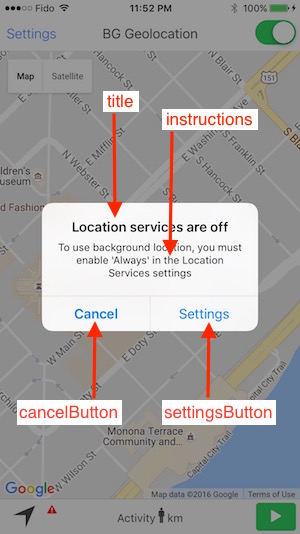
* When you configure the plugin [[locationAuthorizationRequest]] __`Always`__ or __`WhenInUse`__ and the user *changes* the mode in the app's location-services settings or disabled location-services, the plugin will display an Alert dialog directing the user to the **Settings** screen. **`locationAuthorizationAlert`** allows you to configure all the Strings for that Alert popup and accepts an `{}` containing the following keys:
|
|
6
|
-
*
|
|
7
|
-
* 
|
|
8
|
-
*/
|
|
9
|
-
interface LocationAuthorizationAlert {
|
|
10
|
-
/**
|
|
11
|
-
* The title of the alert if user changes, for example, the location-request to `WhenInUse` when you requested `Always`.
|
|
12
|
-
*
|
|
13
|
-
* Defaults to `Location services are off`.
|
|
14
|
-
*/
|
|
15
|
-
titleWhenOff: string;
|
|
16
|
-
/**
|
|
17
|
-
* The title of the alert when user disables location-services or changes the authorization request to `Never`.
|
|
18
|
-
*
|
|
19
|
-
* Defaults to `Background location is not enabled`.
|
|
20
|
-
*/
|
|
21
|
-
titleWhenNotEnabled: string;
|
|
22
|
-
/**
|
|
23
|
-
* The body text of the alert.
|
|
24
|
-
*
|
|
25
|
-
* Defaults to: `To use background location, you must enable {locationAuthorizationRequest} in the Location Services settings`.
|
|
26
|
-
*/
|
|
27
|
-
instructions: string;
|
|
28
|
-
/**
|
|
29
|
-
* Cancel button label.
|
|
30
|
-
*
|
|
31
|
-
* Defaults to `Cancel`.
|
|
32
|
-
*/
|
|
33
|
-
cancelButton: string;
|
|
34
|
-
/**
|
|
35
|
-
* Settings button label.
|
|
36
|
-
*
|
|
37
|
-
* Defaults to `Settings`.
|
|
38
|
-
*/
|
|
39
|
-
settingsButton: string;
|
|
40
|
-
}
|
|
41
|
-
}
|