@transistorsoft/capacitor-background-geolocation 4.9.3 → 4.9.5
This diff represents the content of publicly available package versions that have been released to one of the supported registries. The information contained in this diff is provided for informational purposes only and reflects changes between package versions as they appear in their respective public registries.
- package/android/build.gradle +2 -2
- package/android/libs/com/transistorsoft/tslocationmanager/{3.2.8/tslocationmanager-3.2.8.aar → 3.2.10/tslocationmanager-3.2.10.aar} +0 -0
- package/android/libs/com/transistorsoft/tslocationmanager/3.2.10/tslocationmanager-3.2.10.aar.md5 +1 -0
- package/android/libs/com/transistorsoft/tslocationmanager/3.2.10/tslocationmanager-3.2.10.aar.sha1 +1 -0
- package/android/libs/com/transistorsoft/tslocationmanager/3.2.10/tslocationmanager-3.2.10.aar.sha256 +1 -0
- package/android/libs/com/transistorsoft/tslocationmanager/3.2.10/tslocationmanager-3.2.10.aar.sha512 +1 -0
- package/android/libs/com/transistorsoft/tslocationmanager/{3.2.8/tslocationmanager-3.2.8.pom → 3.2.10/tslocationmanager-3.2.10.pom} +1 -1
- package/android/libs/com/transistorsoft/tslocationmanager/3.2.10/tslocationmanager-3.2.10.pom.md5 +1 -0
- package/android/libs/com/transistorsoft/tslocationmanager/3.2.10/tslocationmanager-3.2.10.pom.sha1 +1 -0
- package/android/libs/com/transistorsoft/tslocationmanager/3.2.10/tslocationmanager-3.2.10.pom.sha256 +1 -0
- package/android/libs/com/transistorsoft/tslocationmanager/3.2.10/tslocationmanager-3.2.10.pom.sha512 +1 -0
- package/android/libs/com/transistorsoft/tslocationmanager/maven-metadata.xml +5 -3
- package/android/libs/com/transistorsoft/tslocationmanager-reverse/{3.2.8/tslocationmanager-reverse-3.2.8.aar → 3.2.10/tslocationmanager-reverse-3.2.10.aar} +0 -0
- package/android/libs/com/transistorsoft/tslocationmanager-reverse/3.2.10/tslocationmanager-reverse-3.2.10.aar.md5 +1 -0
- package/android/libs/com/transistorsoft/tslocationmanager-reverse/3.2.10/tslocationmanager-reverse-3.2.10.aar.sha1 +1 -0
- package/android/libs/com/transistorsoft/tslocationmanager-reverse/3.2.10/tslocationmanager-reverse-3.2.10.aar.sha256 +1 -0
- package/android/libs/com/transistorsoft/tslocationmanager-reverse/3.2.10/tslocationmanager-reverse-3.2.10.aar.sha512 +1 -0
- package/android/libs/com/transistorsoft/tslocationmanager-reverse/{3.2.8/tslocationmanager-reverse-3.2.8.pom → 3.2.10/tslocationmanager-reverse-3.2.10.pom} +1 -1
- package/android/libs/com/transistorsoft/tslocationmanager-reverse/3.2.10/tslocationmanager-reverse-3.2.10.pom.md5 +1 -0
- package/android/libs/com/transistorsoft/tslocationmanager-reverse/3.2.10/tslocationmanager-reverse-3.2.10.pom.sha1 +1 -0
- package/android/libs/com/transistorsoft/tslocationmanager-reverse/3.2.10/tslocationmanager-reverse-3.2.10.pom.sha256 +1 -0
- package/android/libs/com/transistorsoft/tslocationmanager-reverse/3.2.10/tslocationmanager-reverse-3.2.10.pom.sha512 +1 -0
- package/android/libs/com/transistorsoft/tslocationmanager-reverse/maven-metadata.xml +5 -3
- package/dist/declarations/interfaces/Authorization.d.ts +2 -1
- package/dist/declarations/interfaces/Location.d.ts +25 -1
- package/dist/declarations/interfaces/MotionActivityEvent.d.ts +5 -2
- package/dist/declarations/types.d.ts +17 -1
- package/ios/TSLocationManager.xcframework/Info.plist +6 -6
- package/ios/TSLocationManager.xcframework/ios-arm64_armv7/TSLocationManager.framework/Info.plist +0 -0
- package/ios/TSLocationManager.xcframework/ios-arm64_armv7/TSLocationManager.framework/TSLocationManager +0 -0
- package/ios/TSLocationManager.xcframework/ios-arm64_i386_x86_64-simulator/TSLocationManager.framework/Info.plist +0 -0
- package/ios/TSLocationManager.xcframework/ios-arm64_i386_x86_64-simulator/TSLocationManager.framework/TSLocationManager +0 -0
- package/ios/TSLocationManager.xcframework/ios-arm64_i386_x86_64-simulator/TSLocationManager.framework/_CodeSignature/CodeDirectory +0 -0
- package/ios/TSLocationManager.xcframework/ios-arm64_i386_x86_64-simulator/TSLocationManager.framework/_CodeSignature/CodeRequirements-1 +0 -0
- package/ios/TSLocationManager.xcframework/ios-arm64_i386_x86_64-simulator/TSLocationManager.framework/_CodeSignature/CodeResources +1 -1
- package/ios/TSLocationManager.xcframework/ios-arm64_x86_64-maccatalyst/TSLocationManager.framework/Resources/Info.plist +2 -2
- package/ios/TSLocationManager.xcframework/ios-arm64_x86_64-maccatalyst/TSLocationManager.framework/TSLocationManager +0 -0
- package/package.json +1 -1
- package/android/libs/com/transistorsoft/tslocationmanager/3.2.8/tslocationmanager-3.2.8.aar.md5 +0 -1
- package/android/libs/com/transistorsoft/tslocationmanager/3.2.8/tslocationmanager-3.2.8.aar.sha1 +0 -1
- package/android/libs/com/transistorsoft/tslocationmanager/3.2.8/tslocationmanager-3.2.8.aar.sha256 +0 -1
- package/android/libs/com/transistorsoft/tslocationmanager/3.2.8/tslocationmanager-3.2.8.aar.sha512 +0 -1
- package/android/libs/com/transistorsoft/tslocationmanager/3.2.8/tslocationmanager-3.2.8.pom.md5 +0 -1
- package/android/libs/com/transistorsoft/tslocationmanager/3.2.8/tslocationmanager-3.2.8.pom.sha1 +0 -1
- package/android/libs/com/transistorsoft/tslocationmanager/3.2.8/tslocationmanager-3.2.8.pom.sha256 +0 -1
- package/android/libs/com/transistorsoft/tslocationmanager/3.2.8/tslocationmanager-3.2.8.pom.sha512 +0 -1
- package/android/libs/com/transistorsoft/tslocationmanager-reverse/3.2.8/tslocationmanager-reverse-3.2.8.aar.md5 +0 -1
- package/android/libs/com/transistorsoft/tslocationmanager-reverse/3.2.8/tslocationmanager-reverse-3.2.8.aar.sha1 +0 -1
- package/android/libs/com/transistorsoft/tslocationmanager-reverse/3.2.8/tslocationmanager-reverse-3.2.8.aar.sha256 +0 -1
- package/android/libs/com/transistorsoft/tslocationmanager-reverse/3.2.8/tslocationmanager-reverse-3.2.8.aar.sha512 +0 -1
- package/android/libs/com/transistorsoft/tslocationmanager-reverse/3.2.8/tslocationmanager-reverse-3.2.8.pom.md5 +0 -1
- package/android/libs/com/transistorsoft/tslocationmanager-reverse/3.2.8/tslocationmanager-reverse-3.2.8.pom.sha1 +0 -1
- package/android/libs/com/transistorsoft/tslocationmanager-reverse/3.2.8/tslocationmanager-reverse-3.2.8.pom.sha256 +0 -1
- package/android/libs/com/transistorsoft/tslocationmanager-reverse/3.2.8/tslocationmanager-reverse-3.2.8.pom.sha512 +0 -1
- package/dist/declarations/Authorization.d.ts +0 -184
- package/dist/declarations/AuthorizationEvent.d.ts +0 -30
- package/dist/declarations/Config.d.ts +0 -2457
- package/dist/declarations/ConnectivityChangeEvent.d.ts +0 -18
- package/dist/declarations/CurrentPositionRequest.d.ts +0 -45
- package/dist/declarations/DeviceInfo.d.ts +0 -33
- package/dist/declarations/DeviceSettings.d.ts +0 -223
- package/dist/declarations/Geofence.d.ts +0 -255
- package/dist/declarations/GeofenceEvent.d.ts +0 -30
- package/dist/declarations/GeofencesChangeEvent.d.ts +0 -22
- package/dist/declarations/HeartbeatEvent.d.ts +0 -20
- package/dist/declarations/HttpEvent.d.ts +0 -313
- package/dist/declarations/Location.d.ts +0 -225
- package/dist/declarations/LocationAuthorizationAlert.d.ts +0 -41
- package/dist/declarations/Logger.d.ts +0 -359
- package/dist/declarations/MotionActivityEvent.d.ts +0 -31
- package/dist/declarations/MotionChangeEvent.d.ts +0 -15
- package/dist/declarations/Notification.d.ts +0 -491
- package/dist/declarations/PermissionRationale.d.ts +0 -31
- package/dist/declarations/ProviderChangeEvent.d.ts +0 -74
- package/dist/declarations/SQLQuery.d.ts +0 -60
- package/dist/declarations/Sensors.d.ts +0 -31
- package/dist/declarations/State.d.ts +0 -51
- package/dist/declarations/Subscription.d.ts +0 -104
- package/dist/declarations/TransistorAuthorizationToken.d.ts +0 -63
- package/dist/declarations/WatchPositionRequest.d.ts +0 -45
|
@@ -1,491 +0,0 @@
|
|
|
1
|
-
/// <reference path="../types.d.ts" />
|
|
2
|
-
///
|
|
3
|
-
declare module "@transistorsoft/capacitor-background-geolocation" {
|
|
4
|
-
|
|
5
|
-
/**
|
|
6
|
-
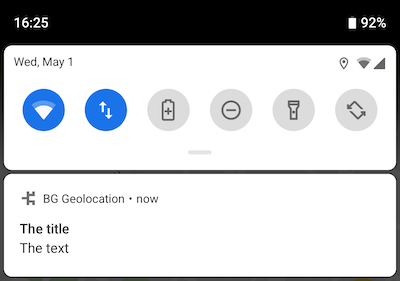
* __[Android only]__ The Android operating system requires a persistent notification when running a foreground service.
|
|
7
|
-
*
|
|
8
|
-
* 
|
|
9
|
-
*
|
|
10
|
-
* @example
|
|
11
|
-
* ```typescript
|
|
12
|
-
* BackgroundGeolocation.ready({
|
|
13
|
-
* notification: {
|
|
14
|
-
* title: "The Title",
|
|
15
|
-
* text: "The Text"
|
|
16
|
-
* }
|
|
17
|
-
* })
|
|
18
|
-
* .
|
|
19
|
-
* .
|
|
20
|
-
* .
|
|
21
|
-
* // To update the notification in real-time, use #setConfig
|
|
22
|
-
* // You need only provide *changed* parameters -- initially configured
|
|
23
|
-
* // parameters will remain unchanged.
|
|
24
|
-
* BackgroundGeolocation.setConfig({
|
|
25
|
-
* notification: {
|
|
26
|
-
* title: "The New Title"
|
|
27
|
-
* }
|
|
28
|
-
* })
|
|
29
|
-
* ```
|
|
30
|
-
*
|
|
31
|
-
* ## Custom Notification Layouts
|
|
32
|
-
*
|
|
33
|
-
* Use the [[layout]] option to provide the name of your own Android Layout XML File. See [Android Custom Notification Layout](github:wiki/Android-Custom-Notification-Layout) for setup instructions.
|
|
34
|
-
*/
|
|
35
|
-
interface Notification {
|
|
36
|
-
/**
|
|
37
|
-
* When running the service with [[foregroundService]]: true, Android requires a persistent notification in the Notification Bar. This will control the **priority** of that notification as well as the position of the notificaiton-bar icon.
|
|
38
|
-
*
|
|
39
|
-
* The following `notificationPriority` values defined as static constants upon the [[BackgroundGeolocation]] object:
|
|
40
|
-
*
|
|
41
|
-
* | Value | Description |
|
|
42
|
-
* |---------------------------------------------------------|---------------------------------------------------------------------------------------------------------|
|
|
43
|
-
* | [[BackgroundGeolocation.NOTIFICATION_PRIORITY_DEFAULT]] | Notification weighted to top of list; notification-bar icon weighted left |
|
|
44
|
-
* | [[BackgroundGeolocation.NOTIFICATION_PRIORITY_HIGH]] | Notification **strongly** weighted to top of list; notification-bar icon **strongly** weighted to left |
|
|
45
|
-
* | [[BackgroundGeolocation.NOTIFICATION_PRIORITY_LOW]] | Notification weighted to bottom of list; notification-bar icon weighted right |
|
|
46
|
-
* | [[BackgroundGeolocation.NOTIFICATION_PRIORITY_MAX]] | Same as `NOTIFICATION_PRIORITY_HIGH` |
|
|
47
|
-
* | [[BackgroundGeolocation.NOTIFICATION_PRIORITY_MIN]] | Notification **strongly** weighted to bottom of list; notification-bar icon **hidden** |
|
|
48
|
-
*
|
|
49
|
-
* @example
|
|
50
|
-
* ```typescript
|
|
51
|
-
* BackgroundGeolocation.ready({
|
|
52
|
-
* foregroundService: true,
|
|
53
|
-
* notification: {
|
|
54
|
-
* priority: BackgroundGeolocation.NOTIFICATION_PRIORITY_MIN
|
|
55
|
-
* });
|
|
56
|
-
* ```
|
|
57
|
-
*/
|
|
58
|
-
priority?: NotificationPriority;
|
|
59
|
-
|
|
60
|
-
/**
|
|
61
|
-
* Configure the Android Foreground Service icon and notification to be displayed __always__. Defaults to `false`.
|
|
62
|
-
*
|
|
63
|
-
* The default behaviour is for the notification to be shown only while the SDK detects the device to be *moving*. Some developers desire to provide full-disclosure to their users when the SDK has been enabled.
|
|
64
|
-
*/
|
|
65
|
-
sticky?: boolean;
|
|
66
|
-
|
|
67
|
-
/**
|
|
68
|
-
* Configure the *title* of the persistent notification in the Notification Bar when running with [[Config.foregroundService]] __`true`__
|
|
69
|
-
* @break
|
|
70
|
-
*
|
|
71
|
-
* Defaults to the application name from `AndroidManifest`. When running the service with [[foregroundService]]: true, Android requires a persistent notification. This will configure the **title** of that notification.
|
|
72
|
-
*/
|
|
73
|
-
title?: string;
|
|
74
|
-
|
|
75
|
-
/**
|
|
76
|
-
* Configure the *text* of the persistent notification in the Notification Bar when running with [[Config.foregroundService]] __`true`__
|
|
77
|
-
* @break
|
|
78
|
-
*
|
|
79
|
-
* Defaults to *"Location service activated"*. When running the service with [[Config.foregroundService]]: true, Android requires a persistent notification. This will configure the **text** of that notification.
|
|
80
|
-
*/
|
|
81
|
-
text?: string;
|
|
82
|
-
|
|
83
|
-
/**
|
|
84
|
-
* Configure the *color* of the persistent notification icon in the Notification Bar when running with [[Config.foregroundService]] __`true`__
|
|
85
|
-
* @break
|
|
86
|
-
*
|
|
87
|
-
* Defaults to `null`. When running the service with [[Config.foregroundService]]: true, Android requires a persistent notification. This will configure the **color** of the notification **icon** (API >= 21).
|
|
88
|
-
*
|
|
89
|
-
* Supported formats are:
|
|
90
|
-
* - `#RRGGBB`
|
|
91
|
-
* - `#AARRGGBB`
|
|
92
|
-
*/
|
|
93
|
-
color?: string;
|
|
94
|
-
|
|
95
|
-
/**
|
|
96
|
-
* Configure the *small icon* of the persistent notification in the Notification Bar when running with [[Config.foregroundService]] __`true`__
|
|
97
|
-
* @break
|
|
98
|
-
*
|
|
99
|
-
* When running the service with [[Config.foregroundService]]: true, Android requires a persistent notification in the Notification Bar. This allows you customize that icon. Defaults to your application icon.
|
|
100
|
-
*
|
|
101
|
-
* ### ⚠️ Warning:
|
|
102
|
-
* - You must specify the **`type`** (`drawable|mipmap`) of resource you wish to use in the following format: `{type}/icon_name`
|
|
103
|
-
* - Do not append the file-extension (eg: `.png`)
|
|
104
|
-
*
|
|
105
|
-
* @example
|
|
106
|
-
* ```typescript
|
|
107
|
-
* // 1. drawable
|
|
108
|
-
* BackgroundGeolocation.ready({
|
|
109
|
-
* notification: {
|
|
110
|
-
* smallIcon: "drawable/my_custom_notification_small_icon"
|
|
111
|
-
* }
|
|
112
|
-
* });
|
|
113
|
-
*
|
|
114
|
-
* // 2. mipmap
|
|
115
|
-
* BackgroundGeolocation.ready({
|
|
116
|
-
* notification: {
|
|
117
|
-
* smallIcon: "mipmap/my_custom_notification_small_icon"
|
|
118
|
-
* }
|
|
119
|
-
* });
|
|
120
|
-
* ```
|
|
121
|
-
*
|
|
122
|
-
* ### ℹ️ See also:
|
|
123
|
-
* - [[largeIcon]]
|
|
124
|
-
*/
|
|
125
|
-
smallIcon?: string;
|
|
126
|
-
|
|
127
|
-
/**
|
|
128
|
-
* Configure the *large icon* of the persistent notification in the Notification Bar when running with [[Config.foregroundService]] __`true`__
|
|
129
|
-
* @break
|
|
130
|
-
*
|
|
131
|
-
* When running the service with [[Config.foregroundService]]: true, Android requires a persistent notification in the Notification Bar. This allows you customize that icon. Defaults to your application icon.
|
|
132
|
-
*
|
|
133
|
-
* ### ⚠️ Warning:
|
|
134
|
-
* - You must specify the **`type`** (`drawable|mipmap`) of resource you wish to use in the following format: `{type}/icon_name`
|
|
135
|
-
* - Do not append the file-extension (eg: `.png`)
|
|
136
|
-
*
|
|
137
|
-
* @example
|
|
138
|
-
* ```typescript
|
|
139
|
-
* // 1. drawable
|
|
140
|
-
* BackgroundGeolocation.ready({
|
|
141
|
-
* notification: {
|
|
142
|
-
* smallIcon: "drawable/my_custom_notification_small_icon"
|
|
143
|
-
* });
|
|
144
|
-
*
|
|
145
|
-
* // 2. mipmap
|
|
146
|
-
* BackgroundGeolocation.ready({
|
|
147
|
-
* notification: {
|
|
148
|
-
* smallIcon: "mipmap/my_custom_notification_small_icon"
|
|
149
|
-
* }
|
|
150
|
-
* });
|
|
151
|
-
* ```
|
|
152
|
-
*
|
|
153
|
-
* ### ℹ️ See also:
|
|
154
|
-
* - [[smallIcon]]
|
|
155
|
-
*/
|
|
156
|
-
largeIcon?: string;
|
|
157
|
-
|
|
158
|
-
/**
|
|
159
|
-
* Specifies the name of your custom Android Layout XML file.
|
|
160
|
-
*
|
|
161
|
-
ℹ️ See [Android Custom Notification Layout](github:wiki/Android-Custom-Notification-Layout) for setup instructions.
|
|
162
|
-
|
|
163
|
-
|
|
164
|
-
|
|
165
|
-
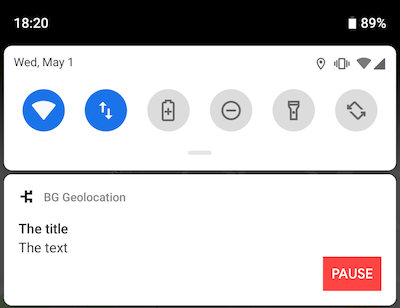
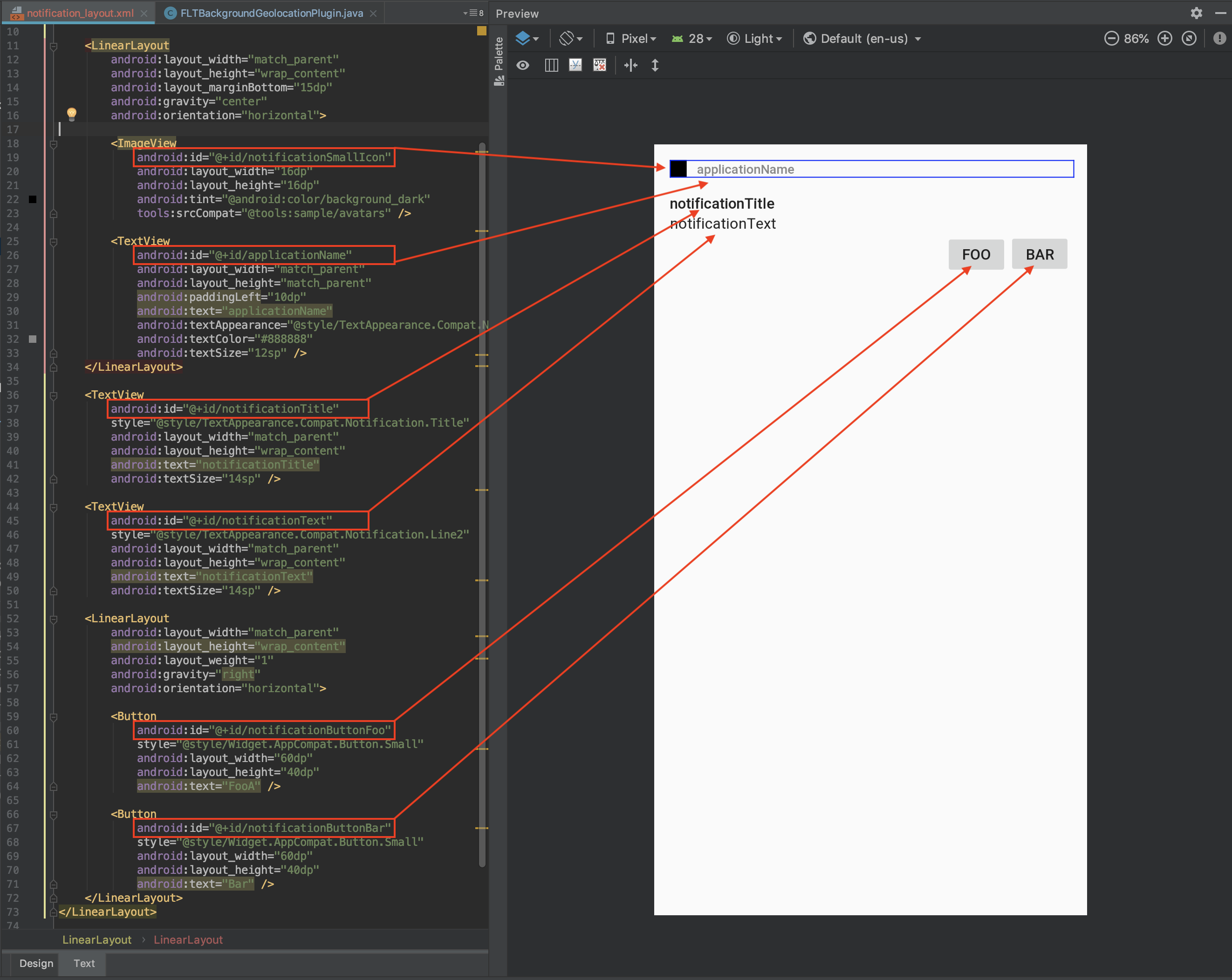
Even if you have no experience with Android Layouts, it doesn't take much to figure out the basics. You'll mostly be adding `<TextView />`, `<ImageView />` and `<Button />` elements. The key thing to be aware of is the `android:id` of these elements and how these are referenced from `BackgroundGeolocation.notification` configuration: your `android:id` **must** be prefixed with the word `notification` (eg: `notificationText`). There is one exception: `applicationName`, which the plugin will automatically render your Android application name.
|
|
166
|
-
|
|
167
|
-
### Layout Special Elements
|
|
168
|
-
|
|
169
|
-
When BackgroundGeolocation renders your custom notification layout, it will be querying for the following elements addressed by their `android:id`. When found, their content will be updated from the corresponding "Data-source":
|
|
170
|
-
|
|
171
|
-
| Layout element `android:id` | Data-source |
|
|
172
|
-
|-------------------------------|-------------------------------------------|
|
|
173
|
-
| `applicationName` | *Application name* from `AndroidManifest` |
|
|
174
|
-
| `notificationTitle` | [[title]] |
|
|
175
|
-
| `notificationText` | [[text]] |
|
|
176
|
-
| `notificationSmallIcon` | [[smallIcon]] |
|
|
177
|
-
| `notificationLargeIcon` | [[largeIcon]] |
|
|
178
|
-
|
|
179
|
-
@example
|
|
180
|
-
* ```typescript
|
|
181
|
-
* BackgroundGeolocation.ready({
|
|
182
|
-
* notification: {
|
|
183
|
-
* layout: "my_notification_layout", // <-- custom layout xml file
|
|
184
|
-
* title: "The Notification Title",
|
|
185
|
-
* text: "The Notification Text",
|
|
186
|
-
* smallIcon: "mipmap/my_small_icon", // <-- defaults to app icon
|
|
187
|
-
* largeIcon: "mipmap/my_large_icon"
|
|
188
|
-
* }
|
|
189
|
-
* });
|
|
190
|
-
* ```
|
|
191
|
-
|
|
192
|
-
### Custom `<TextView />` Elements
|
|
193
|
-
|
|
194
|
-
You can declare your own custom `<TextView />` elements and render data into them using the [[strings]] parameter.
|
|
195
|
-
|
|
196
|
-
@example
|
|
197
|
-
* ```xml
|
|
198
|
-
* <TextView
|
|
199
|
-
* android:id="@+id/myCustomElement" // <-- myCustomElement
|
|
200
|
-
* android:layout_width="match_parent"
|
|
201
|
-
* android:layout_height="wrap_content"
|
|
202
|
-
* android:text="notificationTitle" />
|
|
203
|
-
* ```
|
|
204
|
-
|
|
205
|
-
You can provide data to your custom elements using the [[strings]] configuration parameter:
|
|
206
|
-
|
|
207
|
-
@example
|
|
208
|
-
* ```typescript
|
|
209
|
-
* BackgroundGeolocation.ready({
|
|
210
|
-
* notification: {
|
|
211
|
-
* strings: {
|
|
212
|
-
* myCustomElement: "My Custom Element Text"
|
|
213
|
-
* }
|
|
214
|
-
* }
|
|
215
|
-
* });
|
|
216
|
-
* ```
|
|
217
|
-
|
|
218
|
-
### Custom `<Button />` Elements:
|
|
219
|
-
|
|
220
|
-
You can declare your own custom `<Button />` elements and register click-listeners upon them using the [[actions]] parameter:
|
|
221
|
-
|
|
222
|
-
|
|
223
|
-
@example
|
|
224
|
-
* ```xml
|
|
225
|
-
* <Button
|
|
226
|
-
* android:id="@+id/notificationButtonFoo" // <-- notificationButtonFoo
|
|
227
|
-
* style="@style/Widget.AppCompat.Button.Small"
|
|
228
|
-
* android:layout_width="60dp"
|
|
229
|
-
* android:layout_height="40dp"
|
|
230
|
-
* android:text="Foo" />
|
|
231
|
-
* ```
|
|
232
|
-
|
|
233
|
-
Register listeners for your button using the [[actions]] parameter:
|
|
234
|
-
|
|
235
|
-
@example
|
|
236
|
-
* ```typescript
|
|
237
|
-
* BackgroundGeolocation.ready({
|
|
238
|
-
* notification: {
|
|
239
|
-
* actions: [ // <-- register button listeners
|
|
240
|
-
* "notificationButtonFoo",
|
|
241
|
-
* "notificationButtonBar"
|
|
242
|
-
* ]
|
|
243
|
-
* }
|
|
244
|
-
* });
|
|
245
|
-
*
|
|
246
|
-
* // Listen to custom button clicks:
|
|
247
|
-
* BackgroundGeolocation.onNotificationAction((buttonId) => {
|
|
248
|
-
* console.log("[onNotificationAction] - ", buttonId);
|
|
249
|
-
* switch(buttonId) {
|
|
250
|
-
* case "notificationButtonFoo":
|
|
251
|
-
* break;
|
|
252
|
-
* case "notificationButtonBar':
|
|
253
|
-
* break;
|
|
254
|
-
* }
|
|
255
|
-
* });
|
|
256
|
-
* ```
|
|
257
|
-
|
|
258
|
-
### Sample Layout
|
|
259
|
-
|
|
260
|
-
As a starting-point for your custom layout, copy the following content into your new file:
|
|
261
|
-
|
|
262
|
-
@example
|
|
263
|
-
* ```xml
|
|
264
|
-
* <?xml version="1.0" encoding="utf-8"?>
|
|
265
|
-
* <LinearLayout xmlns:android="http://schemas.android.com/apk/res/android"
|
|
266
|
-
* xmlns:tools="http://schemas.android.com/tools"
|
|
267
|
-
* android:layout_width="match_parent"
|
|
268
|
-
* android:layout_height="135dp"
|
|
269
|
-
* android:gravity="start"
|
|
270
|
-
* android:adjustViewBounds="true"
|
|
271
|
-
* android:orientation="vertical"
|
|
272
|
-
* android:padding="15dp">
|
|
273
|
-
*
|
|
274
|
-
* <LinearLayout
|
|
275
|
-
* android:layout_width="match_parent"
|
|
276
|
-
* android:layout_height="wrap_content"
|
|
277
|
-
* android:layout_marginBottom="15dp"
|
|
278
|
-
* android:gravity="center"
|
|
279
|
-
* android:orientation="horizontal">
|
|
280
|
-
*
|
|
281
|
-
* <ImageView
|
|
282
|
-
* android:id="@+id/notificationSmallIcon"
|
|
283
|
-
* android:layout_width="16dp"
|
|
284
|
-
* android:layout_height="16dp"
|
|
285
|
-
* android:tint="@android:color/background_dark"
|
|
286
|
-
* tools:srcCompat="@tools:sample/avatars" />
|
|
287
|
-
*
|
|
288
|
-
* <TextView
|
|
289
|
-
* android:id="@+id/applicationName"
|
|
290
|
-
* android:layout_width="match_parent"
|
|
291
|
-
* android:layout_height="match_parent"
|
|
292
|
-
* android:paddingLeft="10dp"
|
|
293
|
-
* android:text="applicationName"
|
|
294
|
-
* android:textAppearance="@style/TextAppearance.Compat.Notification.Title"
|
|
295
|
-
* android:textColor="#888888"
|
|
296
|
-
* android:textSize="12sp" />
|
|
297
|
-
* </LinearLayout>
|
|
298
|
-
*
|
|
299
|
-
* <TextView
|
|
300
|
-
* android:id="@+id/notificationTitle"
|
|
301
|
-
* style="@style/TextAppearance.Compat.Notification.Title"
|
|
302
|
-
* android:layout_width="match_parent"
|
|
303
|
-
* android:layout_height="wrap_content"
|
|
304
|
-
* android:text="notificationTitle"
|
|
305
|
-
* android:textSize="14sp" />
|
|
306
|
-
*
|
|
307
|
-
* <TextView
|
|
308
|
-
* android:id="@+id/notificationText"
|
|
309
|
-
* style="@style/TextAppearance.Compat.Notification.Line2"
|
|
310
|
-
* android:layout_width="match_parent"
|
|
311
|
-
* android:layout_height="wrap_content"
|
|
312
|
-
* android:text="notificationText"
|
|
313
|
-
* android:textSize="14sp" />
|
|
314
|
-
*
|
|
315
|
-
* <LinearLayout
|
|
316
|
-
* android:layout_width="match_parent"
|
|
317
|
-
* android:layout_height="wrap_content"
|
|
318
|
-
* android:layout_weight="1"
|
|
319
|
-
* android:gravity="right"
|
|
320
|
-
* android:orientation="horizontal">
|
|
321
|
-
*
|
|
322
|
-
* <Button
|
|
323
|
-
* android:id="@+id/notificationButtonFoo"
|
|
324
|
-
* style="@style/Widget.AppCompat.Button.Small"
|
|
325
|
-
* android:layout_width="60dp"
|
|
326
|
-
* android:layout_height="40dp"
|
|
327
|
-
* android:text="FooA" />
|
|
328
|
-
*
|
|
329
|
-
* <Button
|
|
330
|
-
* android:id="@+id/notificationButtonBar"
|
|
331
|
-
* style="@style/Widget.AppCompat.Button.Small"
|
|
332
|
-
* android:layout_width="60dp"
|
|
333
|
-
* android:layout_height="40dp"
|
|
334
|
-
* android:text="Bar" />
|
|
335
|
-
* </LinearLayout>
|
|
336
|
-
* </LinearLayout>
|
|
337
|
-
* ```
|
|
338
|
-
|
|
339
|
-
|
|
340
|
-
|
|
341
|
-
### Using your custom layout:
|
|
342
|
-
|
|
343
|
-
@example
|
|
344
|
-
* ```typescript
|
|
345
|
-
* BackgroundGeolocation.ready({
|
|
346
|
-
* notification: {
|
|
347
|
-
* title: "The title",
|
|
348
|
-
* text: "The text",
|
|
349
|
-
* layout: "notification_layout",
|
|
350
|
-
* actions: [
|
|
351
|
-
* "notificationButtonFoo", // <-- register button click-listeners
|
|
352
|
-
* "notificationButtonBar"
|
|
353
|
-
* ],
|
|
354
|
-
* strings: {
|
|
355
|
-
* "myCustomTextBox1": "custom TextBox element"
|
|
356
|
-
* }
|
|
357
|
-
* }
|
|
358
|
-
* });
|
|
359
|
-
*
|
|
360
|
-
* // Listen to custom notification button clicks (notification.actions)
|
|
361
|
-
* BackgroundGeolocation.onNotificationAction((buttonId) => {
|
|
362
|
-
* console.log("[onNotificationAction] - ", buttonId);
|
|
363
|
-
* switch(buttonId) {
|
|
364
|
-
* case "notificationButtonFoo":
|
|
365
|
-
* // Handle button click on [Foo]
|
|
366
|
-
* break;
|
|
367
|
-
* case "notificationButtonBar":
|
|
368
|
-
* // Handle button click on [Bar]
|
|
369
|
-
* break;
|
|
370
|
-
* }
|
|
371
|
-
* });
|
|
372
|
-
* ```
|
|
373
|
-
*/
|
|
374
|
-
layout?: string;
|
|
375
|
-
|
|
376
|
-
/**
|
|
377
|
-
* Custom strings to render into `<TextView />` elements of a custom notification [[layout]].
|
|
378
|
-
|
|
379
|
-
ℹ️ See [Android Custom Notification Layout](github:wiki/Android-Custom-Notification-Layout) for setup instructions.
|
|
380
|
-
|
|
381
|
-
You can declare your own custom `<TextView />` elements and render data into them using the `notification.strings` parameter.
|
|
382
|
-
|
|
383
|
-
@example
|
|
384
|
-
* ```xml
|
|
385
|
-
* <TextView
|
|
386
|
-
* android:id="@+id/myCustomElement" // <-- myCustomElement
|
|
387
|
-
* android:layout_width="match_parent"
|
|
388
|
-
* android:layout_height="wrap_content"
|
|
389
|
-
* android:text="notificationTitle" />
|
|
390
|
-
* ```
|
|
391
|
-
|
|
392
|
-
You can provide data to your custom elements using the [[strings]] configuration parameter:
|
|
393
|
-
|
|
394
|
-
@example
|
|
395
|
-
* ```typescript
|
|
396
|
-
* BackgroundGeolocation.ready({
|
|
397
|
-
* notification: {
|
|
398
|
-
* strings: {
|
|
399
|
-
* myCustomElement: "My Custom Element Text"
|
|
400
|
-
* }
|
|
401
|
-
* }
|
|
402
|
-
* });
|
|
403
|
-
* ```
|
|
404
|
-
*/
|
|
405
|
-
strings?: Object;
|
|
406
|
-
/**
|
|
407
|
-
* Declare click listeners for `<Button />` elements of a custom notification [[layout]].
|
|
408
|
-
|
|
409
|
-

|
|
410
|
-
|
|
411
|
-
ℹ️ See [Android Custom Notification Layout](github:wiki/Android-Custom-Notification-Layout) for setup instructions.
|
|
412
|
-
|
|
413
|
-
You can declare your own custom `<Button />` elements and register click-listeners upon them using the [[actions]] parameter:
|
|
414
|
-
|
|
415
|
-
@example
|
|
416
|
-
* ```xml
|
|
417
|
-
* <Button
|
|
418
|
-
* android:id="@+id/notificationButtonPause" // <-- notificationButtonPause
|
|
419
|
-
* style="@style/Widget.AppCompat.Button.Small"
|
|
420
|
-
* android:layout_width="60dp"
|
|
421
|
-
* android:layout_height="40dp"
|
|
422
|
-
* android:text="Foo" />
|
|
423
|
-
* ```
|
|
424
|
-
|
|
425
|
-
Register listeners for your button using `notification.actions`:
|
|
426
|
-
|
|
427
|
-
@example
|
|
428
|
-
* ```typescript
|
|
429
|
-
* BackgroundGeolocation.ready({
|
|
430
|
-
* notification: {
|
|
431
|
-
* actions: [ // <-- register button listeners
|
|
432
|
-
* "notificationButtonPause"
|
|
433
|
-
* ]
|
|
434
|
-
* }
|
|
435
|
-
* });
|
|
436
|
-
*
|
|
437
|
-
* // Listen to custom button clicks:
|
|
438
|
-
* BackgroundGeolocation.onNotificationAction((buttonId) => {
|
|
439
|
-
* console.log("[onNotificationAction] - ", buttonId);
|
|
440
|
-
* switch(buttonId) {
|
|
441
|
-
* case "notificationButtonPause":
|
|
442
|
-
* BackgroundGeolocation.changePace(false);
|
|
443
|
-
* break;
|
|
444
|
-
* .
|
|
445
|
-
* .
|
|
446
|
-
* .
|
|
447
|
-
* }
|
|
448
|
-
* });
|
|
449
|
-
* ```
|
|
450
|
-
*/
|
|
451
|
-
actions?: Object;
|
|
452
|
-
|
|
453
|
-
/**
|
|
454
|
-
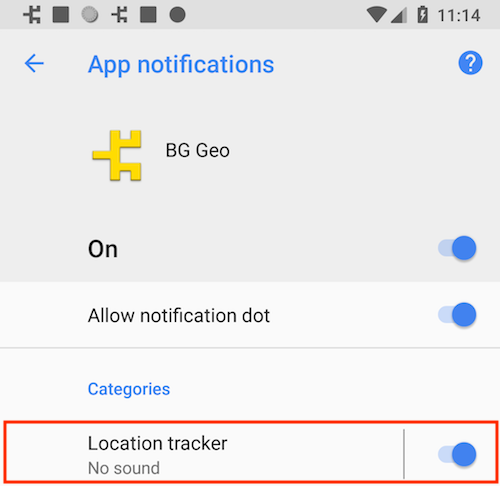
* Configure the name of the plugin's notification-channel used to display the [[Config.foregroundService]] notification.
|
|
455
|
-
* @break
|
|
456
|
-
*
|
|
457
|
-
* On Android O+, the plugin's foreground-service needs to create a "Notification Channel". The name of this channel can be seen in:
|
|
458
|
-
* > `Settings->App & Notifications->Your App.`
|
|
459
|
-
*
|
|
460
|
-
* Defaults to your application's name from `AndroidManifest`.
|
|
461
|
-
*
|
|
462
|
-
* \
|
|
463
|
-
*
|
|
464
|
-
*
|
|
465
|
-
* @example
|
|
466
|
-
* ```typescript
|
|
467
|
-
* BackgroundGeolocation.ready({
|
|
468
|
-
* notification: {
|
|
469
|
-
* channelName: "Location Tracker"
|
|
470
|
-
* }
|
|
471
|
-
* });
|
|
472
|
-
*
|
|
473
|
-
* // or with #setConfig
|
|
474
|
-
* BackgroundGeolocation.setConfig({
|
|
475
|
-
* notification: {
|
|
476
|
-
* channelName: "My new channel name"
|
|
477
|
-
* }
|
|
478
|
-
* });
|
|
479
|
-
* ```
|
|
480
|
-
*/
|
|
481
|
-
channelName?: string;
|
|
482
|
-
|
|
483
|
-
/**
|
|
484
|
-
* Customize the notification channel ID.
|
|
485
|
-
* Defaults to `your.package.name.TSLocationManager`
|
|
486
|
-
*
|
|
487
|
-
* __NOTE__: It is not typically required to change this. Typical use-cases are for users who use an existing Android foreground-service who wish the SDK to share an existing notification and channel.
|
|
488
|
-
*/
|
|
489
|
-
channelId?: string;
|
|
490
|
-
}
|
|
491
|
-
}
|
|
@@ -1,31 +0,0 @@
|
|
|
1
|
-
/// <reference path="../types.d.ts" />
|
|
2
|
-
///
|
|
3
|
-
declare module "@transistorsoft/capacitor-background-geolocation" {
|
|
4
|
-
|
|
5
|
-
/**
|
|
6
|
-
* __[Android only]__ Configuration for showing an android dialog prior to forwarding the user to a permission settings-screen.
|
|
7
|
-
*
|
|
8
|
-
*/
|
|
9
|
-
interface PermissionRationale {
|
|
10
|
-
/**
|
|
11
|
-
* The title of the dialog window.
|
|
12
|
-
*/
|
|
13
|
-
title?: string;
|
|
14
|
-
|
|
15
|
-
/**
|
|
16
|
-
* The body text of the dialog.
|
|
17
|
-
* Provide an explanation of why you need this permission, similar in purpose to iOS' __`NSLocationAlwaysAndWhenInUseUsageDescription`__.
|
|
18
|
-
*/
|
|
19
|
-
message?: string;
|
|
20
|
-
|
|
21
|
-
/**
|
|
22
|
-
* The text to display on the *positive action* button.
|
|
23
|
-
*/
|
|
24
|
-
positiveAction?: string;
|
|
25
|
-
|
|
26
|
-
/**
|
|
27
|
-
* The text to display on the *negative action* button (eg: *Cancel*)
|
|
28
|
-
*/
|
|
29
|
-
negativeAction?: string;
|
|
30
|
-
}
|
|
31
|
-
}
|
|
@@ -1,74 +0,0 @@
|
|
|
1
|
-
/// <reference path="../types.d.ts" />
|
|
2
|
-
|
|
3
|
-
declare module "@transistorsoft/capacitor-background-geolocation" {
|
|
4
|
-
/**
|
|
5
|
-
* The event-object provided to [[BackgroundGeolocation.onProviderChange]]
|
|
6
|
-
*
|
|
7
|
-
* @example
|
|
8
|
-
* ```typescript
|
|
9
|
-
* BackgroundGeolocation.onProviderChange(providerChangeEvent => {
|
|
10
|
-
* console.log("[providerchange] ", provider.enabled, provider.status, provider.network, provider.gps);
|
|
11
|
-
* });
|
|
12
|
-
* ```
|
|
13
|
-
*/
|
|
14
|
-
interface ProviderChangeEvent {
|
|
15
|
-
/**
|
|
16
|
-
* `true` When device location-services are enabled.
|
|
17
|
-
*/
|
|
18
|
-
enabled: boolean;
|
|
19
|
-
/**
|
|
20
|
-
* Authorization status of location-services. For iOS, this will tell you if the user has enabled "Always" or "When in Use" authorization.
|
|
21
|
-
*
|
|
22
|
-
* | Name | Platform |
|
|
23
|
-
* |-----------------------------------------|---------------|
|
|
24
|
-
* | [[AUTHORIZATION_STATUS_NOT_DETERMINED]] | iOS only |
|
|
25
|
-
* | [[AUTHORIZATION_STATUS_RESTRICTED]] | iOS only |
|
|
26
|
-
* | [[AUTHORIZATION_STATUS_DENIED]] | iOS & Android |
|
|
27
|
-
* | [[AUTHORIZATION_STATUS_ALWAYS]] | iOS & Android |
|
|
28
|
-
* | [[AUTHORIZATION_STATUS_WHEN_IN_USE]] | iOS only |
|
|
29
|
-
*
|
|
30
|
-
* ### ℹ️ Note:
|
|
31
|
-
* - When Android location permission is **granted**, `status` == [[AUTHORIZATION_STATUS_ALWAYS]], otherwise [[AUTHORIZATION_STATUS_DENIED]].
|
|
32
|
-
*/
|
|
33
|
-
status: AuthorizationStatus;
|
|
34
|
-
/**
|
|
35
|
-
* `true` if network geolocation provider is available.
|
|
36
|
-
*/
|
|
37
|
-
network: boolean;
|
|
38
|
-
/**
|
|
39
|
-
* `true` if GPS geolocation provider is available.
|
|
40
|
-
*/
|
|
41
|
-
gps: boolean;
|
|
42
|
-
/**
|
|
43
|
-
* __`[iOS 14+]`__ iOS 14 has introduced a new __`[Precise: On]`__ switch on the location authorization dialog allowing users to disable high-accuracy location.
|
|
44
|
-
*
|
|
45
|
-
* This attribute shows the state of that switch:
|
|
46
|
-
* - Enabled: [[BackgroundGeolocation.ACCURACY_AUTHORIZATION_FULL]].
|
|
47
|
-
* - Disabled, [[BackgroundGeolocation.ACCURACY_AUTHORIZATION_REDUCED]].
|
|
48
|
-
*
|
|
49
|
-
* 
|
|
50
|
-
*
|
|
51
|
-
* @example
|
|
52
|
-
*
|
|
53
|
-
* ```javascript
|
|
54
|
-
* BackgroundGeolocation.onProviderChange((event) => {
|
|
55
|
-
* let authorizationStatus = event.authorizationStatus;
|
|
56
|
-
* if (authorizationStatus == BackgroundGeolocation.ACCURACY_AUTHORIZATION_REDUCED) {
|
|
57
|
-
* // Supply "Purpose" key from Info.plist as 1st argument.
|
|
58
|
-
* BackgroundGeolocaiton.requestTemporaryFullAccuracy("Delivery").then((accuracyAuthorization) => {
|
|
59
|
-
* console.log("[requestTemporaryFullAccuracy]: ", accuracyAuthorization);
|
|
60
|
-
* }).catch((error) => {
|
|
61
|
-
* console.warn("[requestTemporaryFullAccuracy] ERROR:", error);
|
|
62
|
-
* });
|
|
63
|
-
* }
|
|
64
|
-
* });
|
|
65
|
-
* ```
|
|
66
|
-
*
|
|
67
|
-
* __See also:__
|
|
68
|
-
* - [[BackgroundGeolocation.requestTemporaryFullAccuracy]]
|
|
69
|
-
* - [What's new in iOS 14 `CoreLocation`](https://levelup.gitconnected.com/whats-new-with-corelocation-in-ios-14-bd28421c95c4)
|
|
70
|
-
*
|
|
71
|
-
*/
|
|
72
|
-
accuracyAuthorization: AccuracyAuthorization;
|
|
73
|
-
}
|
|
74
|
-
}
|
|
@@ -1,60 +0,0 @@
|
|
|
1
|
-
declare module "@transistorsoft/capacitor-background-geolocation" {
|
|
2
|
-
/**
|
|
3
|
-
* Used for selecting a range of records from the SDK"s database.
|
|
4
|
-
* Used with the methods:
|
|
5
|
-
* - [[Logger.getLog]]
|
|
6
|
-
* - [[Logger.emailLog]]
|
|
7
|
-
* - [[Logger.uploadLog]]
|
|
8
|
-
*
|
|
9
|
-
* ```typescript
|
|
10
|
-
* // Constrain results between optionl start/end dates using a SQLQuery
|
|
11
|
-
* let log = await BackgroundGeolocation.logger.getLog({
|
|
12
|
-
* start: Date.parse("2019-10-21 13:00"), // <-- optional HH:mm:ss
|
|
13
|
-
* end: Date.parse("2019-10-22")
|
|
14
|
-
* });
|
|
15
|
-
*
|
|
16
|
-
* // Or just a start date
|
|
17
|
-
* let log = await BackgroundGeolocation.logger.getLog({
|
|
18
|
-
* start: Date.parse("2019-10-21 13:00")
|
|
19
|
-
* });
|
|
20
|
-
*
|
|
21
|
-
* // Or just an end date
|
|
22
|
-
* BackgroundGeolocation.logger.uploadLog("http://my.server.com/users/123/logs", {
|
|
23
|
-
* end: Date.parse("2019-10-21")
|
|
24
|
-
* ));
|
|
25
|
-
*
|
|
26
|
-
* // Select first 100 records from log
|
|
27
|
-
* let Logger = BackgroundGeolocation.logger;
|
|
28
|
-
* Logger.emailLog("foo@bar.com", {
|
|
29
|
-
* order: Logger.ORDER_ASC,
|
|
30
|
-
* limit: 100
|
|
31
|
-
* ));
|
|
32
|
-
*
|
|
33
|
-
* // Select most recent 100 records from log
|
|
34
|
-
* let Logger = BackgroundGeolocation.logger;
|
|
35
|
-
* Logger.emailLog("foo@bar.com", {
|
|
36
|
-
* order: Logger.ORDER_DESC,
|
|
37
|
-
* limit: 100
|
|
38
|
-
* ));
|
|
39
|
-
* ```
|
|
40
|
-
*/
|
|
41
|
-
interface SQLQuery {
|
|
42
|
-
/**
|
|
43
|
-
* Start date of logs to select (unix timestamp)
|
|
44
|
-
*/
|
|
45
|
-
start?:number;
|
|
46
|
-
/**
|
|
47
|
-
* End date of logs to select (unix timestamp)
|
|
48
|
-
*/
|
|
49
|
-
end?:number;
|
|
50
|
-
/**
|
|
51
|
-
* Limit number of records returned.
|
|
52
|
-
*/
|
|
53
|
-
limit?:number;
|
|
54
|
-
/**
|
|
55
|
-
* Order of results [[Logger.ORDER_ASC]] or [[Logger.ORDER_DESC]].
|
|
56
|
-
* `1` = `ASC`; `-1` = `DESC`.
|
|
57
|
-
*/
|
|
58
|
-
order?:SQLQueryOrder;
|
|
59
|
-
}
|
|
60
|
-
}
|
|
@@ -1,31 +0,0 @@
|
|
|
1
|
-
declare module "@transistorsoft/capacitor-background-geolocation" {
|
|
2
|
-
/**
|
|
3
|
-
* Detected device sensors related to motion-detection.
|
|
4
|
-
*/
|
|
5
|
-
interface Sensors {
|
|
6
|
-
/**
|
|
7
|
-
* `ios` | `android`
|
|
8
|
-
*/
|
|
9
|
-
platform: string;
|
|
10
|
-
/**
|
|
11
|
-
* `true` when the device has an accelerometer.
|
|
12
|
-
*/
|
|
13
|
-
accelerometer: boolean;
|
|
14
|
-
/**
|
|
15
|
-
* `true` when the device has a magnetometer (compass).
|
|
16
|
-
*/
|
|
17
|
-
magnetometer: boolean;
|
|
18
|
-
/**
|
|
19
|
-
* `true` when the device has a gyroscope.
|
|
20
|
-
*/
|
|
21
|
-
gyroscope: boolean;
|
|
22
|
-
/**
|
|
23
|
-
* __[Android only]__ `true` when the Android device has significant motion hardware.
|
|
24
|
-
*/
|
|
25
|
-
significant_motion?: boolean;
|
|
26
|
-
/**
|
|
27
|
-
* __[iOS only]__ `true` when the device has an __M7__ motion co-processor (iPhone 5S and up).
|
|
28
|
-
*/
|
|
29
|
-
motion_hardware?: boolean;
|
|
30
|
-
}
|
|
31
|
-
}
|