@transistorsoft/background-geolocation-types 5.0.0-beta.1
This diff represents the content of publicly available package versions that have been released to one of the supported registries. The information contained in this diff is provided for informational purposes only and reflects changes between package versions as they appear in their respective public registries.
- package/LICENSE +21 -0
- package/README.md +137 -0
- package/dist/core/api/BackgroundGeolocation.d.ts +6 -0
- package/dist/core/api/BackgroundGeolocation.js +2 -0
- package/dist/core/api/CurrentPositionRequest.d.ts +44 -0
- package/dist/core/api/CurrentPositionRequest.js +2 -0
- package/dist/core/api/DeviceSettings.d.ts +77 -0
- package/dist/core/api/DeviceSettings.js +2 -0
- package/dist/core/api/Logger.d.ts +421 -0
- package/dist/core/api/Logger.js +2 -0
- package/dist/core/api/State.d.ts +75 -0
- package/dist/core/api/State.js +2 -0
- package/dist/core/config/ActivityConfig.d.ts +271 -0
- package/dist/core/config/ActivityConfig.js +2 -0
- package/dist/core/config/AppConfig.d.ts +599 -0
- package/dist/core/config/AppConfig.js +2 -0
- package/dist/core/config/AuthorizationConfig.d.ts +200 -0
- package/dist/core/config/AuthorizationConfig.js +2 -0
- package/dist/core/config/CompoundConfig.d.ts +19 -0
- package/dist/core/config/CompoundConfig.js +2 -0
- package/dist/core/config/Config.d.ts +149 -0
- package/dist/core/config/Config.js +2 -0
- package/dist/core/config/GeoConfig.d.ts +905 -0
- package/dist/core/config/GeoConfig.js +2 -0
- package/dist/core/config/HttpConfig.d.ts +579 -0
- package/dist/core/config/HttpConfig.js +2 -0
- package/dist/core/config/LocationFilter.d.ts +272 -0
- package/dist/core/config/LocationFilter.js +2 -0
- package/dist/core/config/LoggerConfig.d.ts +319 -0
- package/dist/core/config/LoggerConfig.js +2 -0
- package/dist/core/config/NotificationConfig.d.ts +519 -0
- package/dist/core/config/NotificationConfig.js +2 -0
- package/dist/core/config/PersistenceConfig.d.ts +552 -0
- package/dist/core/config/PersistenceConfig.js +2 -0
- package/dist/core/data/DeviceInfo.d.ts +61 -0
- package/dist/core/data/DeviceInfo.js +2 -0
- package/dist/core/data/Geofence.d.ts +16 -0
- package/dist/core/data/Geofence.js +2 -0
- package/dist/core/data/Location.d.ts +253 -0
- package/dist/core/data/Location.js +2 -0
- package/dist/core/data/Sensors.d.ts +30 -0
- package/dist/core/data/Sensors.js +2 -0
- package/dist/core/events/AuthorizationEvent.d.ts +15 -0
- package/dist/core/events/AuthorizationEvent.js +2 -0
- package/dist/core/events/ConnectivityChangeEvent.d.ts +9 -0
- package/dist/core/events/ConnectivityChangeEvent.js +2 -0
- package/dist/core/events/GeofenceEvent.d.ts +19 -0
- package/dist/core/events/GeofenceEvent.js +2 -0
- package/dist/core/events/GeofencesChangeEvent.d.ts +12 -0
- package/dist/core/events/GeofencesChangeEvent.js +2 -0
- package/dist/core/events/HeadlessEvent.d.ts +12 -0
- package/dist/core/events/HeadlessEvent.js +2 -0
- package/dist/core/events/HeartbeatEvent.d.ts +14 -0
- package/dist/core/events/HeartbeatEvent.js +2 -0
- package/dist/core/events/HttpEvent.d.ts +13 -0
- package/dist/core/events/HttpEvent.js +2 -0
- package/dist/core/events/MotionActivityEvent.d.ts +12 -0
- package/dist/core/events/MotionActivityEvent.js +2 -0
- package/dist/core/events/MotionChangeEvent.d.ts +12 -0
- package/dist/core/events/MotionChangeEvent.js +2 -0
- package/dist/core/events/ProviderChangeEvent.d.ts +17 -0
- package/dist/core/events/ProviderChangeEvent.js +2 -0
- package/dist/core/events/Subscription.d.ts +86 -0
- package/dist/core/events/Subscription.js +2 -0
- package/dist/docs-entry.d.ts +3 -0
- package/dist/docs-entry.js +20 -0
- package/dist/enums/AccuracyAuthorization.d.ts +16 -0
- package/dist/enums/AccuracyAuthorization.js +19 -0
- package/dist/enums/ActivityType.d.ts +28 -0
- package/dist/enums/ActivityType.js +31 -0
- package/dist/enums/AuthorizationStatus.d.ts +20 -0
- package/dist/enums/AuthorizationStatus.js +23 -0
- package/dist/enums/AuthorizationStrategy.d.ts +10 -0
- package/dist/enums/AuthorizationStrategy.js +13 -0
- package/dist/enums/DesiredAccuracy.d.ts +13 -0
- package/dist/enums/DesiredAccuracy.js +16 -0
- package/dist/enums/Event.d.ts +21 -0
- package/dist/enums/Event.js +24 -0
- package/dist/enums/GeofenceAction.d.ts +18 -0
- package/dist/enums/GeofenceAction.js +21 -0
- package/dist/enums/HttpMethod.d.ts +11 -0
- package/dist/enums/HttpMethod.js +14 -0
- package/dist/enums/KalmanProfile.d.ts +30 -0
- package/dist/enums/KalmanProfile.js +33 -0
- package/dist/enums/LocationError.d.ts +23 -0
- package/dist/enums/LocationError.js +26 -0
- package/dist/enums/LocationFilterPolicy.d.ts +108 -0
- package/dist/enums/LocationFilterPolicy.js +111 -0
- package/dist/enums/LogLevel.d.ts +13 -0
- package/dist/enums/LogLevel.js +16 -0
- package/dist/enums/LogLevelName.d.ts +1 -0
- package/dist/enums/LogLevelName.js +15 -0
- package/dist/enums/MotionActivityType.d.ts +14 -0
- package/dist/enums/MotionActivityType.js +17 -0
- package/dist/enums/NotificationPriority.d.ts +22 -0
- package/dist/enums/NotificationPriority.js +25 -0
- package/dist/enums/PersistMode.d.ts +12 -0
- package/dist/enums/PersistMode.js +15 -0
- package/dist/enums/SQLQueryOrder.d.ts +16 -0
- package/dist/enums/SQLQueryOrder.js +17 -0
- package/dist/enums/TrackingMode.d.ts +14 -0
- package/dist/enums/TrackingMode.js +17 -0
- package/dist/enums/TriggerActivity.d.ts +13 -0
- package/dist/enums/TriggerActivity.js +16 -0
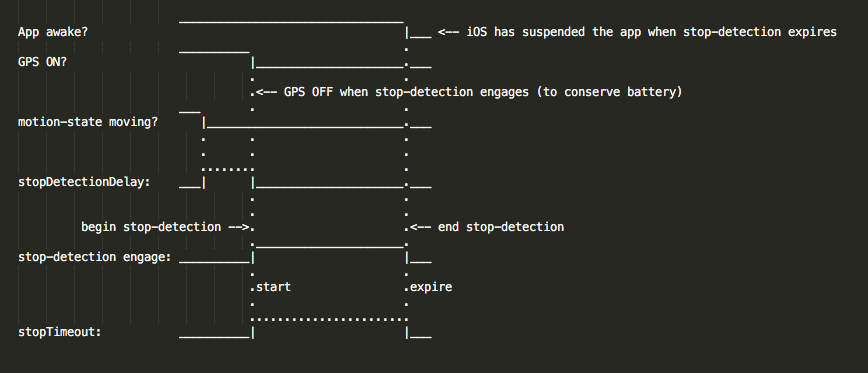
- package/dist/index.d.ts +49 -0
- package/dist/index.js +69 -0
- package/dist/legacy/LegacyConfig.d.ts +24 -0
- package/dist/legacy/LegacyConfig.js +2 -0
- package/package.json +50 -0
|
@@ -0,0 +1,271 @@
|
|
|
1
|
+
import { TriggerActivity } from '../../enums/TriggerActivity';
|
|
2
|
+
/**
|
|
3
|
+
* Activity Recognition configuration.
|
|
4
|
+
*
|
|
5
|
+
* The {@link ActivityConfig} object defines options related to motion and activity detection
|
|
6
|
+
* for the {@link BackgroundGeolocation} SDK. These parameters control how the SDK interprets
|
|
7
|
+
* transitions between *moving* and *stationary* states using platform motion APIs
|
|
8
|
+
* (Android Activity Recognition / iOS Core Motion).
|
|
9
|
+
*
|
|
10
|
+
* __Overview__
|
|
11
|
+
*
|
|
12
|
+
* {@link ActivityConfig} is supplied via {@link Config.activity} when calling
|
|
13
|
+
* {@link BackgroundGeolocation.ready} or {@link BackgroundGeolocation.setConfig}.
|
|
14
|
+
*
|
|
15
|
+
* | Category | Description |
|
|
16
|
+
* |-----------------------|-------------|
|
|
17
|
+
* | Motion Detection | Tune recognition cadence and sensitivity via {@link ActivityConfig.activityRecognitionInterval} *(Android)* and {@link ActivityConfig.minimumActivityRecognitionConfidence} *(Android)*. |
|
|
18
|
+
* | Behavioral Options | Control moving↔stationary transitions with {@link ActivityConfig.disableStopDetection} *(cross-platform behavioral)*, {@link ActivityConfig.stopOnStationary} *(cross-platform behavioral)*, and {@link ActivityConfig.motionTriggerDelay} *(Android)*. |
|
|
19
|
+
* | Motion Updates Toggle | Enable/disable platform activity updates with {@link ActivityConfig.disableMotionActivityUpdates} *(Android & iOS)*. |
|
|
20
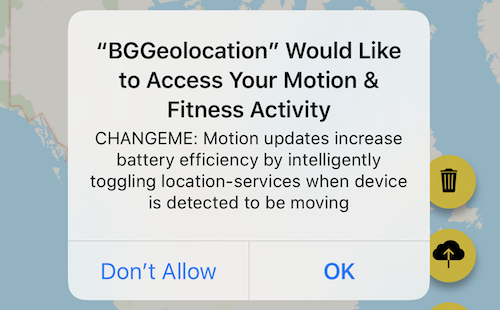
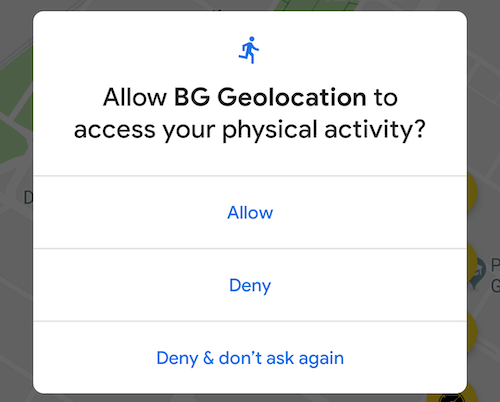
|
+
* | iOS Timing | Fine-tune stop-detection timing with {@link ActivityConfig.stopDetectionDelay} *(iOS)*. |
|
|
21
|
+
*
|
|
22
|
+
* @example
|
|
23
|
+
*
|
|
24
|
+
* ```ts
|
|
25
|
+
* import BackgroundGeolocation, {
|
|
26
|
+
* type Config,
|
|
27
|
+
* type ActivityConfig
|
|
28
|
+
* } from 'react-native-background-geolocation';
|
|
29
|
+
*
|
|
30
|
+
* const activity: ActivityConfig = {
|
|
31
|
+
* // Android: poll activity recognition every 10s
|
|
32
|
+
* activityRecognitionInterval: 10000,
|
|
33
|
+
*
|
|
34
|
+
* // Android: require ≥75% confidence before changing activity
|
|
35
|
+
* minimumActivityRecognitionConfidence: 75,
|
|
36
|
+
*
|
|
37
|
+
* // Cross-platform: enable/disable automatic stop detection
|
|
38
|
+
* disableStopDetection: false,
|
|
39
|
+
*
|
|
40
|
+
* // Cross-platform: automatically stop when stationary
|
|
41
|
+
* stopOnStationary: true,
|
|
42
|
+
*
|
|
43
|
+
* // Android: delay motion-trigger transitions by 30s
|
|
44
|
+
* motionTriggerDelay: 30000,
|
|
45
|
+
*
|
|
46
|
+
* // Android & iOS: disable platform motion activity APIs
|
|
47
|
+
* disableMotionActivityUpdates: false,
|
|
48
|
+
*
|
|
49
|
+
* // iOS: delay stop-detection by 10s
|
|
50
|
+
* stopDetectionDelay: 10000
|
|
51
|
+
* };
|
|
52
|
+
*
|
|
53
|
+
* const config: Config = {
|
|
54
|
+
* activity
|
|
55
|
+
* };
|
|
56
|
+
*
|
|
57
|
+
* await BackgroundGeolocation.ready(config);
|
|
58
|
+
* ```
|
|
59
|
+
*
|
|
60
|
+
* __Migrating from legacy `Config`__
|
|
61
|
+
*
|
|
62
|
+
* Older versions of the SDK placed activity-recognition parameters directly
|
|
63
|
+
* on the root {@link Config} object:
|
|
64
|
+
*
|
|
65
|
+
* ```ts
|
|
66
|
+
* BackgroundGeolocation.ready({
|
|
67
|
+
* activityRecognitionInterval: 10000,
|
|
68
|
+
* disableStopDetection: true,
|
|
69
|
+
* stopOnStationary: true
|
|
70
|
+
* });
|
|
71
|
+
* ```
|
|
72
|
+
*
|
|
73
|
+
* These values are now grouped under {@link ActivityConfig}:
|
|
74
|
+
*
|
|
75
|
+
* ```ts
|
|
76
|
+
* BackgroundGeolocation.ready({
|
|
77
|
+
* activity: {
|
|
78
|
+
* activityRecognitionInterval: 10000,
|
|
79
|
+
* disableStopDetection: true,
|
|
80
|
+
* stopOnStationary: true
|
|
81
|
+
* }
|
|
82
|
+
* });
|
|
83
|
+
* ```
|
|
84
|
+
*
|
|
85
|
+
* __See also__
|
|
86
|
+
* - {@link Config.activity} for where this configuration is supplied.
|
|
87
|
+
*
|
|
88
|
+
* @category Config
|
|
89
|
+
*/
|
|
90
|
+
export interface ActivityConfig {
|
|
91
|
+
/**
|
|
92
|
+
* Interval (ms) between motion-activity updates.
|
|
93
|
+
* Default: `10000`
|
|
94
|
+
*/
|
|
95
|
+
activityRecognitionInterval?: number;
|
|
96
|
+
/**
|
|
97
|
+
* Minimum motion-activity confidence (0–100) required to trigger a state change (Android only).
|
|
98
|
+
* Default: `75`
|
|
99
|
+
*/
|
|
100
|
+
minimumActivityRecognitionConfidence?: number;
|
|
101
|
+
/**
|
|
102
|
+
* Disable motion-activity related stop-detection.
|
|
103
|
+
*
|
|
104
|
+
* __iOS:__
|
|
105
|
+
*
|
|
106
|
+
* Disables the accelerometer-based **Stop-detection System**. When disabled, the plugin will use the default iOS behavior of automatically
|
|
107
|
+
* turning off location-services when the device has stopped for **exactly 15 minutes**. When disabled, you will no longer have control over {@link GeoConfig.stopTimeout}.
|
|
108
|
+
*
|
|
109
|
+
* To *completely* disable automatically turning off iOS location-services, you must also provide {@link GeoConfig.pausesLocationUpdatesAutomatically} __`false`__.
|
|
110
|
+
*
|
|
111
|
+
* @example
|
|
112
|
+
* ```typescript
|
|
113
|
+
* BackgroundGeolocation.ready({
|
|
114
|
+
* disableStopDetection: true,
|
|
115
|
+
* pausesLocationUpdatesAutomatically: false
|
|
116
|
+
* });
|
|
117
|
+
* ```
|
|
118
|
+
*
|
|
119
|
+
* __⚠️ iOS location-services will **never** turn off!__
|
|
120
|
+
*
|
|
121
|
+
* With the above configuration, iOS location-services will never turn off and you could **quickly discharge the battery**. Do **not** do
|
|
122
|
+
* this unless you know *exactly* what you're doing (eg: A jogging app with `[Start workout]` / `[Stop Workout]` buttons
|
|
123
|
+
* executing {@link BackgroundGeolocation.changePace}).
|
|
124
|
+
*
|
|
125
|
+
* __iOS Stop-detection timing__
|
|
126
|
+
*
|
|
127
|
+
* 
|
|
128
|
+
*
|
|
129
|
+
* __Android__
|
|
130
|
+
*
|
|
131
|
+
* Location-services **will never turn OFF** if you set this to **`true`**! It will be purely up to you or the user to execute
|
|
132
|
+
* {@link BackgroundGeolocation.changePace} __`false`__ or {@link BackgroundGeolocation.stop} to turn off location-services.
|
|
133
|
+
*/
|
|
134
|
+
disableStopDetection?: boolean;
|
|
135
|
+
/**
|
|
136
|
+
* Automatically {@link BackgroundGeolocation.stop} when the {@link GeoConfig.stopTimeout} elapses.
|
|
137
|
+
*
|
|
138
|
+
* The plugin can optionally automatically stop tracking when the {@link GeoConfig.stopTimeout} timer elapses. For example, when the plugin
|
|
139
|
+
* first fires {@link BackgroundGeolocation.onMotionChange} into the *moving* state, the next time an *onMotionChange* event occurs
|
|
140
|
+
* into the *stationary* state, the plugin will have automatically called {@link BackgroundGeolocation.stop} upon itself.
|
|
141
|
+
*
|
|
142
|
+
* ⚠️ `stopOnStationary` will **only** occur due to {@link GeoConfig.stopTimeout} timer elapse. It will **not** occur by manually executing
|
|
143
|
+
* {@link BackgroundGeolocation.changePace} __`false`__.
|
|
144
|
+
*
|
|
145
|
+
* @example
|
|
146
|
+
* ```typescript
|
|
147
|
+
* BackgroundGeolocation.ready({
|
|
148
|
+
* stopOnStationary: true,
|
|
149
|
+
* isMoving: true
|
|
150
|
+
* }, (state) => {
|
|
151
|
+
* BackgroundGeolocation.start();
|
|
152
|
+
* });
|
|
153
|
+
* ```
|
|
154
|
+
*/
|
|
155
|
+
stopOnStationary?: boolean;
|
|
156
|
+
/**
|
|
157
|
+
* __`[Android only]`__ Optionally add a delay in milliseconds to trigger Android into the *moving* state when Motion API reports the device is moving (eg: `on_foot`, `in_vehicle`)
|
|
158
|
+
*
|
|
159
|
+
* This can help prevent false-positive motion-triggering when one moves about their home, for example. Only if the Motion API stays in the *moving* state for `motionTriggerDelay` milliseconds will the plugin trigger into the *moving* state and begin tracking the location.
|
|
160
|
+
* If the Motion API returns to the `still` state before `motionTriggerDelay` times-out, the trigger to the *moving* state will be cancelled.
|
|
161
|
+
*
|
|
162
|
+
* @example
|
|
163
|
+
* ```typescript
|
|
164
|
+
* // Delay Android motion-triggering by 30000ms
|
|
165
|
+
* BackgroundGeolocation.ready({
|
|
166
|
+
* motionTriggerDelay: 30000
|
|
167
|
+
* })
|
|
168
|
+
* ```
|
|
169
|
+
*
|
|
170
|
+
* The following `logcat` shows an Android device detecting motion __`on_foot`__ but returning to __`still`__ before __`motionTriggerDelay`__ expires, cancelling the transition to the *moving* state (see `⏰ Cancel OneShot: MOTION_TRIGGER_DELAY`):
|
|
171
|
+
*
|
|
172
|
+
* __Logcat__
|
|
173
|
+
* ```bash
|
|
174
|
+
* 04-08 10:58:03.419 TSLocationManager: ╔═════════════════════════════════════════════
|
|
175
|
+
* 04-08 10:58:03.419 TSLocationManager: ║ Motion Transition Result
|
|
176
|
+
* 04-08 10:58:03.419 TSLocationManager: ╠═════════════════════════════════════════════
|
|
177
|
+
* 04-08 10:58:03.419 TSLocationManager: ╟─ 🔴 EXIT: still
|
|
178
|
+
* 04-08 10:58:03.419 TSLocationManager: ╟─ 🎾 ENTER: on_foot
|
|
179
|
+
* 04-08 10:58:03.419 TSLocationManager: ╚═════════════════════════════════════════════
|
|
180
|
+
* 04-08 10:58:03.416 TSLocationManager: ⏰ Scheduled OneShot: MOTION_TRIGGER_DELAY in 30000ms
|
|
181
|
+
* .
|
|
182
|
+
* . <motionTriggerDelay timer started>
|
|
183
|
+
* .
|
|
184
|
+
* 04-08 10:58:19.385 TSLocationManager: ╔═════════════════════════════════════════════
|
|
185
|
+
* 04-08 10:58:19.385 TSLocationManager: ║ Motion Transition Result
|
|
186
|
+
* 04-08 10:58:19.385 TSLocationManager: ╠═════════════════════════════════════════════
|
|
187
|
+
* 04-08 10:58:19.385 TSLocationManager: ╟─ 🔴 EXIT: on_foot
|
|
188
|
+
* 04-08 10:58:19.385 TSLocationManager: ╟─ 🎾 ENTER: still
|
|
189
|
+
* 04-08 10:58:19.385 TSLocationManager: ╚═════════════════════════════════════════════
|
|
190
|
+
* 04-08 10:58:19.381 TSLocationManager: [c.t.l.s.TSScheduleManager cancelOneShot]
|
|
191
|
+
* 04-08 10:58:19.381 TSLocationManager: ⏰ Cancel OneShot: MOTION_TRIGGER_DELAY <-- timer cancelled
|
|
192
|
+
* ```
|
|
193
|
+
*/
|
|
194
|
+
motionTriggerDelay?: number;
|
|
195
|
+
/**
|
|
196
|
+
* Configures a comma-separated list of motion-activities which are allow to trigger location-tracking.
|
|
197
|
+
*
|
|
198
|
+
* __⚠️ Warning:__ Requires that the user grant your app the "*Motion/Health*" permission.
|
|
199
|
+
*
|
|
200
|
+
*
|
|
201
|
+
* These are the comma-delimited list of [activity-names](https://developers.google.com/android/reference/com/google/android/gms/location/DetectedActivity) returned by the `ActivityRecognition` API which will trigger a state-change from **stationary** to **moving**. By default, the plugin will trigger on **any** of the **moving-states**:
|
|
202
|
+
*
|
|
203
|
+
* | Activity Name |
|
|
204
|
+
* |----------------|
|
|
205
|
+
* | `in_vehicle` |
|
|
206
|
+
* | `on_bicycle` |
|
|
207
|
+
* | `on_foot` |
|
|
208
|
+
* | `running` |
|
|
209
|
+
* | `walking` |
|
|
210
|
+
*
|
|
211
|
+
* See {@link TriggerActivity} for all allowed activity names.
|
|
212
|
+
*
|
|
213
|
+
* If you wish, you can configure the plugin to only engage the **moving** state for vehicles-only by providing just `"in_vehicle"`, for example.
|
|
214
|
+
*
|
|
215
|
+
*
|
|
216
|
+
* @example
|
|
217
|
+
* ```typescript
|
|
218
|
+
* // Only trigger tracking for vehicles
|
|
219
|
+
* BackgroundGeolocation.ready({
|
|
220
|
+
* triggerActivities: "in_vehicle"
|
|
221
|
+
* );
|
|
222
|
+
*
|
|
223
|
+
* // Only trigger tracking for on_foot, walking and running
|
|
224
|
+
* BackgroundGeolocation.ready({
|
|
225
|
+
* triggerActivities: "on_foot, walking, running"
|
|
226
|
+
* );
|
|
227
|
+
* ```
|
|
228
|
+
*/
|
|
229
|
+
triggerActivities?: TriggerActivity[] | TriggerActivity;
|
|
230
|
+
/**
|
|
231
|
+
* Disable the plugin requesting "Motion & Fitness" (ios) or "Physical Activity" (android >= 10) authorization from the User.
|
|
232
|
+
*
|
|
233
|
+
* Defaults to **`false`**. Set to **`true`** to disable asking the user for this permission.
|
|
234
|
+
*
|
|
235
|
+
* __iOS__
|
|
236
|
+
*
|
|
237
|
+
* 
|
|
238
|
+
*
|
|
239
|
+
* The plugin is **HIGHLY** optimized for motion-activity-updates. If you **do** disable this, the plugin *will* drain more battery power. You are **STRONGLY** advised against disabling this. You should explain to your users with an appropriate `NSMotionUsageDescription` in your `Info.plist` file, for example:
|
|
240
|
+
* > "Motion activity detection increases battery efficiency by intelligently toggling location-tracking" off when your device is detected to be stationary.
|
|
241
|
+
*
|
|
242
|
+
* __Android__
|
|
243
|
+
*
|
|
244
|
+
* Android 10+ now requires run-time permission from the user for "Physical Activity".
|
|
245
|
+
*
|
|
246
|
+
* 
|
|
247
|
+
*
|
|
248
|
+
* Traditionally, the `background-geolocation` Android SDK has relied heavily upon the Motion API for determining when to toggle location-services on/off based upon whether the device is *moving* vs *stationary*.
|
|
249
|
+
* However, the Android SDK has a fallback "stationary geofence" mechanism just like iOS, the exit of which will cause the plugin to change to the *moving* state, toggle location-services and begin tracking. This will, of course, require the device moves a distance of typically **200-500 meters** before tracking engages. With the Motion API authorized, the Android SDK typically requires just **a few meters** of movement for tracking to engage.
|
|
250
|
+
*
|
|
251
|
+
* @example
|
|
252
|
+
* ```typescript
|
|
253
|
+
* BackgroundGeolocation.ready({
|
|
254
|
+
* disableMotionActivityUpdates: true
|
|
255
|
+
* });
|
|
256
|
+
* ```
|
|
257
|
+
*/
|
|
258
|
+
disableMotionActivityUpdates?: boolean;
|
|
259
|
+
/**
|
|
260
|
+
* __`[iOS only]`__ Allows the iOS stop-detection system to be delayed from activating.
|
|
261
|
+
*
|
|
262
|
+
* Defaults to **`0`** (no delay). Allows the stop-detection system to be delayed from activating. When the stop-detection system *is* engaged, location-services will be temporarily turned **off** and only the accelerometer is monitored. Stop-detection will only engage if this timer expires. The timer is cancelled if any movement is detected before expiration. If a value of **`0`** is specified, the stop-detection system will engage as soon as the device is detected to be stationary.
|
|
263
|
+
*
|
|
264
|
+
* You can experience the iOS stop-detection system at work by configuring {@link LoggerConfig.debug} __`true`__. After the device stops moving (stopped at a traffic light, for example), the plugin will emit a *Lullabye* sound-effect and local-notifications about "Location-services: OFF / ON".
|
|
265
|
+
*
|
|
266
|
+
* __iOS Stop-detection timing__
|
|
267
|
+
*
|
|
268
|
+
* 
|
|
269
|
+
*/
|
|
270
|
+
stopDetectionDelay?: number;
|
|
271
|
+
}
|