@transistorsoft/background-geolocation-types 5.0.0-beta.1 → 5.0.0-beta.3
This diff represents the content of publicly available package versions that have been released to one of the supported registries. The information contained in this diff is provided for informational purposes only and reflects changes between package versions as they appear in their respective public registries.
- package/dist/core/api/BackgroundGeolocation.d.ts +1676 -1
- package/dist/core/api/TransistorAuthorizationService.d.ts +124 -0
- package/dist/core/config/Config.d.ts +46 -0
- package/dist/core/config/PersistenceConfig.d.ts +1 -1
- package/dist/enums/AccuracyAuthorization.d.ts +5 -0
- package/dist/enums/ActivityType.d.ts +5 -0
- package/dist/enums/AuthorizationStatus.d.ts +4 -0
- package/dist/enums/AuthorizationStrategy.d.ts +4 -0
- package/dist/enums/DesiredAccuracy.d.ts +2 -0
- package/dist/enums/Event.d.ts +7 -0
- package/dist/enums/Event.js +2 -0
- package/dist/enums/GeofenceAction.d.ts +5 -0
- package/dist/enums/HttpMethod.d.ts +2 -0
- package/dist/enums/KalmanProfile.d.ts +2 -0
- package/dist/enums/LocationError.d.ts +5 -0
- package/dist/enums/LocationFilterPolicy.d.ts +2 -0
- package/dist/enums/LocationRequest.d.ts +25 -0
- package/dist/enums/LocationRequest.js +23 -0
- package/dist/enums/LogLevel.d.ts +16 -0
- package/dist/enums/LogLevel.js +12 -1
- package/dist/enums/LogLevelName.d.ts +14 -1
- package/dist/enums/MotionActivityType.d.ts +2 -0
- package/dist/enums/NotificationPriority.d.ts +2 -0
- package/dist/enums/PersistMode.d.ts +2 -0
- package/dist/enums/TrackingMode.d.ts +2 -0
- package/dist/enums/TriggerActivity.d.ts +2 -0
- package/dist/index.d.ts +2 -0
- package/dist/index.js +2 -0
- package/package.json +1 -1
- package/dist/core/config/CompoundConfig.d.ts +0 -19
- /package/dist/core/{config/CompoundConfig.js → api/TransistorAuthorizationService.js} +0 -0
|
@@ -1,6 +1,1681 @@
|
|
|
1
|
+
import type { Logger } from './Logger';
|
|
2
|
+
import type { DeviceSettings } from './DeviceSettings';
|
|
3
|
+
import type { CurrentPositionRequest } from './CurrentPositionRequest';
|
|
4
|
+
import type { Config } from '../config/Config';
|
|
5
|
+
import type { State } from './State';
|
|
6
|
+
import type { Location } from '../data/Location';
|
|
7
|
+
import type { LocationError } from '../../enums/LocationError';
|
|
8
|
+
import type { Geofence } from '../data/Geofence';
|
|
9
|
+
import type { DeviceInfo } from '../data/DeviceInfo';
|
|
10
|
+
import type { Sensors } from '../data/Sensors';
|
|
11
|
+
import type { Subscription } from '../events/Subscription';
|
|
12
|
+
import type { GeofenceEvent } from '../events/GeofenceEvent';
|
|
13
|
+
import type { AuthorizationEvent } from '../events/AuthorizationEvent';
|
|
14
|
+
import type { MotionActivityEvent } from '../events/MotionActivityEvent';
|
|
15
|
+
import type { HeadlessEvent } from '../events/HeadlessEvent';
|
|
16
|
+
import type { HeartbeatEvent } from '../events/HeartbeatEvent';
|
|
17
|
+
import type { GeofencesChangeEvent } from '../events/GeofencesChangeEvent';
|
|
18
|
+
import type { ConnectivityChangeEvent } from '../events/ConnectivityChangeEvent';
|
|
19
|
+
import type { MotionChangeEvent } from '../events/MotionChangeEvent';
|
|
20
|
+
import type { ProviderChangeEvent } from '../events/ProviderChangeEvent';
|
|
21
|
+
import type { HttpEvent } from '../events/HttpEvent';
|
|
22
|
+
import type { AuthorizationStatus } from '../../enums/AuthorizationStatus';
|
|
23
|
+
import type { LogLevel } from '../../enums/LogLevel';
|
|
24
|
+
import type { PersistMode } from '../../enums/PersistMode';
|
|
25
|
+
import type { AccuracyAuthorization } from '../../enums/AccuracyAuthorization';
|
|
1
26
|
/**
|
|
2
|
-
*
|
|
27
|
+
* Payloads for strongly-typed event listeners.
|
|
28
|
+
* @internal @hidden
|
|
29
|
+
*/
|
|
30
|
+
export interface EventPayloads {
|
|
31
|
+
location: Location;
|
|
32
|
+
motionchange: MotionChangeEvent;
|
|
33
|
+
activitychange: MotionActivityEvent;
|
|
34
|
+
geofence: GeofenceEvent;
|
|
35
|
+
geofenceschange: GeofencesChangeEvent;
|
|
36
|
+
http: HttpEvent;
|
|
37
|
+
heartbeat: HeartbeatEvent;
|
|
38
|
+
providerchange: ProviderChangeEvent;
|
|
39
|
+
authorization: AuthorizationEvent;
|
|
40
|
+
connectivitychange: ConnectivityChangeEvent;
|
|
41
|
+
enabledchange: {
|
|
42
|
+
enabled: boolean;
|
|
43
|
+
};
|
|
44
|
+
powersavechange: {
|
|
45
|
+
isPowerSaveMode: boolean;
|
|
46
|
+
};
|
|
47
|
+
schedule: {
|
|
48
|
+
identifier?: string;
|
|
49
|
+
};
|
|
50
|
+
notification: {
|
|
51
|
+
action: string;
|
|
52
|
+
};
|
|
53
|
+
[event: string]: any;
|
|
54
|
+
}
|
|
55
|
+
/**
|
|
56
|
+
* on/once/remove… with typed payloads.
|
|
57
|
+
* @internal @hidden
|
|
58
|
+
*/
|
|
59
|
+
export interface BackgroundGeolocationEvents {
|
|
60
|
+
/**
|
|
61
|
+
* Subscribe to location events.
|
|
62
|
+
*
|
|
63
|
+
* Every location recorded by the SDK is provided to your `callback`, including those from [[onMotionChange]], [[getCurrentPosition]] and [[watchPosition]].
|
|
64
|
+
*
|
|
65
|
+
* @example
|
|
66
|
+
* ```typescript
|
|
67
|
+
* const subscription = BackgroundGeolocation.onLocation((location) => {
|
|
68
|
+
* console.log("[onLocation] success: ", location);
|
|
69
|
+
* }, (error) => {
|
|
70
|
+
* console.log("[onLocation] ERROR: ", error);
|
|
71
|
+
* });
|
|
72
|
+
* ```
|
|
73
|
+
*
|
|
74
|
+
* __Error Codes__
|
|
75
|
+
*
|
|
76
|
+
* If the native location API fails to return a location, the `failure` callback will be provided a [[LocationError]].
|
|
77
|
+
*
|
|
78
|
+
* __⚠️ Note {@link Location.sample|`Location.sample`}:__
|
|
79
|
+
*
|
|
80
|
+
* When performing a {@link onMotionChange} or {@link getCurrentPosition}, the plugin requests **multiple** location *samples* in order to record the most accurate location possible. These *samples* are **not** persisted to the database but they will be provided to your `callback`, for your convenience, since it can take some seconds for the best possible location to arrive.
|
|
81
|
+
*
|
|
82
|
+
* For example, you might use these samples to progressively update the user's position on a map. You can detect these *samples* in your `callback` via `location.sample == true`. If you're manually `POST`ing location to your server, you should ignore these locations.
|
|
83
|
+
*
|
|
84
|
+
* @event location
|
|
85
|
+
*/
|
|
86
|
+
onLocation(cb: (location: Location) => void, onError?: (err: LocationError) => void): Subscription;
|
|
87
|
+
/**
|
|
88
|
+
* Subscribe to __`motionchange`__ events.
|
|
89
|
+
*
|
|
90
|
+
* Your `callback` will be executed each time the device has changed-state between **MOVING** or **STATIONARY**.
|
|
91
|
+
*
|
|
92
|
+
*
|
|
93
|
+
* @example
|
|
94
|
+
* ```typescript
|
|
95
|
+
* const subscription = BackgroundGeolocation.onMotionChange((event:MotionChangeEvent) => {
|
|
96
|
+
* if (event.isMoving) {
|
|
97
|
+
* console.log("[onMotionChange] Device has just started MOVING ", event.location);
|
|
98
|
+
* } else {
|
|
99
|
+
* console.log("[onMotionChange] Device has just STOPPED: ", event.location);
|
|
100
|
+
* }
|
|
101
|
+
* });
|
|
102
|
+
* ```
|
|
103
|
+
*
|
|
104
|
+
* ----------------------------------------------------------------------
|
|
105
|
+
* __⚠️ Warning: `autoSyncThreshold`__
|
|
106
|
+
*
|
|
107
|
+
* If you've configured [[Config.autoSyncThreshold]], it **will be ignored** during a `onMotionChange` event — all queued locations will be uploaded, since:
|
|
108
|
+
* - If an `onMotionChange` event fires **into the *moving* state**, the device may have been sitting dormant for a long period of time. The plugin is *eager* to upload this state-change to the server as soon as possible.
|
|
109
|
+
* - If an `onMotionChange` event fires **into the *stationary* state**, the device may be about to lie dormant for a long period of time. The plugin is *eager* to upload all queued locations to the server before going dormant.
|
|
110
|
+
* ----------------------------------------------------------------------
|
|
111
|
+
*
|
|
112
|
+
* __ℹ️ See also:__
|
|
113
|
+
* - {@link GeoConfig.stopTimeout}
|
|
114
|
+
* - 📘 [Philosophy of Operation](github:wiki/Philosophy-of-Operation)
|
|
115
|
+
*
|
|
116
|
+
* @event motionchange
|
|
117
|
+
*/
|
|
118
|
+
onMotionChange(cb: (event: MotionChangeEvent) => void): Subscription;
|
|
119
|
+
/**
|
|
120
|
+
* Subscribe to Geofence transition events.
|
|
121
|
+
*
|
|
122
|
+
* Your supplied `callback` will be called when any monitored geofence crossing occurs.
|
|
123
|
+
*
|
|
124
|
+
* @example
|
|
125
|
+
* ```typescript
|
|
126
|
+
* const subscription = BackgroundGeolocation.onGeofence((event) => {
|
|
127
|
+
* console.log("[onGeofence] ", event);
|
|
128
|
+
* });
|
|
129
|
+
* ```
|
|
130
|
+
*
|
|
131
|
+
* __ℹ️ See also:
|
|
132
|
+
* - 📘 {@link Geofence | Geofencing Guide}
|
|
133
|
+
*
|
|
134
|
+
* @event geofence
|
|
135
|
+
*/
|
|
136
|
+
onGeofence(cb: (event: GeofenceEvent) => void): Subscription;
|
|
137
|
+
/**
|
|
138
|
+
* Subscribe to changes in actively monitored geofences.
|
|
139
|
+
*
|
|
140
|
+
* Fired when the list of monitored-geofences changed. The BackgroundGeolocation SDK contains powerful geofencing features that allow you to monitor
|
|
141
|
+
* any number of circular geofences you wish (thousands even), in spite of limits imposed by the native platform APIs (**20 for iOS; 100 for Android**).
|
|
142
|
+
*
|
|
143
|
+
* The plugin achieves this by storing your geofences in its database, using a [geospatial query](https://en.wikipedia.org/wiki/Spatial_query) to determine
|
|
144
|
+
* those geofences in proximity (@see {@link GeoConfig.geofenceProximityRadius}), activating only those geofences closest to the device's current location
|
|
145
|
+
* (according to limit imposed by the corresponding platform).
|
|
146
|
+
*
|
|
147
|
+
* When the device is determined to be moving, the plugin periodically queries for geofences in proximity (eg. every minute) using the latest recorded
|
|
148
|
+
* location. This geospatial query is **very fast**, even with tens-of-thousands geofences in the database.
|
|
149
|
+
*
|
|
150
|
+
* It's when this list of monitored geofences *changes*, that the plugin will fire the `onGeofencesChange` event.
|
|
151
|
+
*
|
|
152
|
+
* @example
|
|
153
|
+
* ```typescript
|
|
154
|
+
* const subscription = BackgroundGeolocation.onGeofencesChange((event) => {
|
|
155
|
+
* let on = event.on; //<-- new geofences activated.
|
|
156
|
+
* let off = event.off; //<-- geofences that were just de-activated.
|
|
157
|
+
*
|
|
158
|
+
* // Create map circles
|
|
159
|
+
* on.forEach((geofence) => {
|
|
160
|
+
* createGeofenceMarker(geofence)
|
|
161
|
+
* });
|
|
162
|
+
*
|
|
163
|
+
* // Remove map circles
|
|
164
|
+
* off.forEach((identifier) => {
|
|
165
|
+
* removeGeofenceMarker(identifier);
|
|
166
|
+
* }
|
|
167
|
+
* });
|
|
168
|
+
* ```
|
|
169
|
+
*
|
|
170
|
+
* __ℹ️ See also:__
|
|
171
|
+
* - 📘 {@link Geofence | Geofencing Guide}
|
|
172
|
+
* @event geofenceschange
|
|
173
|
+
*/
|
|
174
|
+
onGeofencesChange(cb: (event: GeofencesChangeEvent) => void): Subscription;
|
|
175
|
+
/**
|
|
176
|
+
* Subscribe to changes in motion activity.
|
|
177
|
+
*
|
|
178
|
+
* Your `callback` will be executed each time the activity-recognition system receives an event (`still, on_foot, in_vehicle, on_bicycle, running`).
|
|
179
|
+
*
|
|
180
|
+
* __Android:__
|
|
181
|
+
* Android {@link MotionActivityEvent.confidence} always reports `100%`.
|
|
182
|
+
*
|
|
183
|
+
* @example
|
|
184
|
+
* ```typescript
|
|
185
|
+
* const subscription = BackgroundGeolocation.onActivityChange((event) => {
|
|
186
|
+
* console.log("[onActivityChange] ", event);
|
|
187
|
+
* });
|
|
188
|
+
* ```
|
|
189
|
+
* @event activitychange
|
|
190
|
+
*/
|
|
191
|
+
onActivityChange(cb: (event: MotionActivityEvent) => void): Subscription;
|
|
192
|
+
/**
|
|
193
|
+
* Subscribe to changes in device's location-services configuration / authorization.
|
|
194
|
+
*
|
|
195
|
+
* Your `callback` fill be executed whenever a change in the state of the device's **Location Services** has been detected. eg: "GPS ON", "WiFi only".
|
|
196
|
+
*
|
|
197
|
+
* @example
|
|
198
|
+
* ```typescript
|
|
199
|
+
* const subscription = BackgroundGeolocation.onProviderChange((event) => {
|
|
200
|
+
* console.log("[onProviderChange: ", event);
|
|
201
|
+
*
|
|
202
|
+
* switch(event.status) {
|
|
203
|
+
* case BackgroundGeolocation.AUTHORIZATION_STATUS_DENIED:
|
|
204
|
+
* // Android & iOS
|
|
205
|
+
* console.log("- Location authorization denied");
|
|
206
|
+
* break;
|
|
207
|
+
* case BackgroundGeolocation.AUTHORIZATION_STATUS_ALWAYS:
|
|
208
|
+
* // Android & iOS
|
|
209
|
+
* console.log("- Location always granted");
|
|
210
|
+
* break;
|
|
211
|
+
* case BackgroundGeolocation.AUTHORIZATION_STATUS_WHEN_IN_USE:
|
|
212
|
+
* // iOS only
|
|
213
|
+
* console.log("- Location WhenInUse granted");
|
|
214
|
+
* break;
|
|
215
|
+
* }
|
|
216
|
+
* });
|
|
217
|
+
* ```
|
|
218
|
+
*
|
|
219
|
+
* __ℹ️ See also:__
|
|
220
|
+
* - You can explicitly request the current state of location-services using [[getProviderState]].
|
|
221
|
+
*
|
|
222
|
+
* __⚠️ Note:__
|
|
223
|
+
* - The plugin always force-fires an {@link onProviderChange} event whenever the app is launched (right after the {@link ready} method is executed), regardless of current state, so you can learn the the current state of location-services with each boot of your application.
|
|
224
|
+
*
|
|
225
|
+
* @event providerchange
|
|
226
|
+
*/
|
|
227
|
+
onProviderChange(cb: (event: ProviderChangeEvent) => void): Subscription;
|
|
228
|
+
/**
|
|
229
|
+
* Subscribe to periodic heartbeat events.
|
|
230
|
+
*
|
|
231
|
+
* Your `callback` will be executed for each {@link AppConfig.heartbeatInterval} while the device is in **stationary** state (**iOS** requires {@link AppConfig.preventSuspend}: true as well).
|
|
232
|
+
*
|
|
233
|
+
* @example
|
|
234
|
+
* ```typescript
|
|
235
|
+
* BackgroundGeolocation.ready({
|
|
236
|
+
* heartbeatInterval: 60,
|
|
237
|
+
* preventSuspend: true // <-- Required for iOS
|
|
238
|
+
* });
|
|
239
|
+
*
|
|
240
|
+
* const subscription = BackgroundGeolocation.onHeartbeat((event) => {
|
|
241
|
+
* console.log("[onHeartbeat] ", event);
|
|
242
|
+
*
|
|
243
|
+
* // You could request a new location if you wish.
|
|
244
|
+
* BackgroundGeolocation.getCurrentPosition({
|
|
245
|
+
* samples: 1,
|
|
246
|
+
* persist: true
|
|
247
|
+
* }).then((location) => {
|
|
248
|
+
* console.log("[getCurrentPosition] ", location);
|
|
249
|
+
* });
|
|
250
|
+
* })
|
|
251
|
+
* ```
|
|
252
|
+
*
|
|
253
|
+
* __⚠️ Note:__
|
|
254
|
+
* - The {@link Location} provided by the {@link HeartbeatEvent} is only the last-known location. The *heartbeat* event does not actively engage location-services. If you wish to get the current location in your `callback`, use {@link getCurrentPosition}.
|
|
255
|
+
* @event heartbeat
|
|
256
|
+
*/
|
|
257
|
+
onHeartbeat(cb: (event: HeartbeatEvent) => void): Subscription;
|
|
258
|
+
/**
|
|
259
|
+
* Subscribe to HTTP responses from your server {@link HttpConfig.url}.
|
|
260
|
+
*
|
|
261
|
+
* @example
|
|
262
|
+
* ```typescript
|
|
263
|
+
* const subscription = BackgroundGeolocation.onHttp((response) => {
|
|
264
|
+
* let status = response.status;
|
|
265
|
+
* let success = response.success;
|
|
266
|
+
* let responseText = response.responseText;
|
|
267
|
+
* console.log("[onHttp] ", response);
|
|
268
|
+
* });
|
|
269
|
+
* ```
|
|
270
|
+
* __ℹ️ See also:__
|
|
271
|
+
* - {@link HttpConfig | HTTP Guide}
|
|
272
|
+
*
|
|
273
|
+
* @event http
|
|
274
|
+
*/
|
|
275
|
+
onHttp(cb: (event: HttpEvent) => void): Subscription;
|
|
276
|
+
/**
|
|
277
|
+
* Subscribe to {@link AppConfig.schedule} events.
|
|
278
|
+
*
|
|
279
|
+
* Your `callback` will be executed each time a {@link AppConfig.schedule} event fires. Your `callback` will be provided with the current {@link State}: **`state.enabled`**
|
|
280
|
+
* will reflect the state according to your {@link AppConfig.schedule}.
|
|
281
|
+
*
|
|
282
|
+
* @example
|
|
283
|
+
* ```typescript
|
|
284
|
+
* const subscription = BackgroundGeolocation.onSchedule((state) => {
|
|
285
|
+
* if (state.enabled) {
|
|
286
|
+
* console.log("[onSchedule] scheduled start tracking");
|
|
287
|
+
* } else {
|
|
288
|
+
* console.log("[onSchedule] scheduled stop tracking");
|
|
289
|
+
* }
|
|
290
|
+
* });
|
|
291
|
+
* ```
|
|
292
|
+
* @event schedule
|
|
293
|
+
*/
|
|
294
|
+
onSchedule(cb: (state: State) => void): Subscription;
|
|
295
|
+
/**
|
|
296
|
+
* Subscribe to changes in network connectivity.
|
|
297
|
+
*
|
|
298
|
+
* Fired when the state of the device's network-connectivity changes (enabled -> disabled and vice-versa). By default, the plugin will automatically fire
|
|
299
|
+
* a `connectivitychange` event with the current state network-connectivity whenever the [[start]] method is executed.
|
|
300
|
+
*
|
|
301
|
+
* ℹ️ The SDK subscribes internally to `connectivitychange` events — if you've configured the SDK's HTTP Service (See [[HttpEvent | HTTP Guide]]) and your app has queued locations,
|
|
302
|
+
* the SDK will automatically initiate uploading to your configured {{@link HttpConfig.url}} when network connectivity is detected.
|
|
303
|
+
*
|
|
304
|
+
* @example
|
|
305
|
+
* ```typescript
|
|
306
|
+
* const subscription = BackgroundGeolocation.onConnectivityChange((event) => {
|
|
307
|
+
* console.log("[onConnectivityChange] ", event);
|
|
308
|
+
* });
|
|
309
|
+
* ```
|
|
310
|
+
* @event connectivitychange
|
|
311
|
+
*/
|
|
312
|
+
onConnectivityChange(cb: (event: ConnectivityChangeEvent) => void): Subscription;
|
|
313
|
+
/**
|
|
314
|
+
* Subscribe to state changes in OS power-saving system.
|
|
315
|
+
*
|
|
316
|
+
* Fired when the state of the operating-system's "Power Saving" mode changes. Your `callback` will be provided with a `bool` showing whether
|
|
317
|
+
* "Power Saving" is **enabled** or **disabled**. Power Saving mode can throttle certain services in the background, such as HTTP requests or GPS.
|
|
318
|
+
*
|
|
319
|
+
* ℹ️ You can manually request the current-state of "Power Saving" mode with the method [[isPowerSaveMode]].
|
|
320
|
+
*
|
|
321
|
+
* __iOS__
|
|
322
|
+
*
|
|
323
|
+
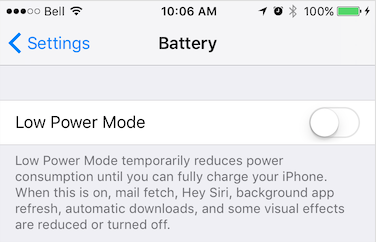
* iOS Power Saving mode can be engaged manually by the user in **Settings -> Battery** or from an automatic OS dialog.
|
|
324
|
+
*
|
|
325
|
+
* 
|
|
326
|
+
*
|
|
327
|
+
* __Android__
|
|
328
|
+
*
|
|
329
|
+
* Android Power Saving mode can be engaged manually by the user in **Settings -> Battery -> Battery Saver** or automatically with a user-specified "threshold" (eg: 15%).
|
|
330
|
+
*
|
|
331
|
+
* 
|
|
332
|
+
*
|
|
333
|
+
* @example
|
|
334
|
+
* ```typescript
|
|
335
|
+
* const subscription = BackgroundGeolocation.onPowerSaveChange((isPowerSaveMode) => {
|
|
336
|
+
* console.log("[onPowerSaveChange: ", isPowerSaveMode);
|
|
337
|
+
* });
|
|
338
|
+
* ```
|
|
339
|
+
* @event powersavechange
|
|
340
|
+
*/
|
|
341
|
+
onPowerSaveChange(cb: (enabled: boolean) => void): Subscription;
|
|
342
|
+
/**
|
|
343
|
+
* Subscribe to changes in plugin [[State.enabled]].
|
|
344
|
+
*
|
|
345
|
+
* Fired when the SDK's {@link State.enabled} changes. For example, executing {@link start} and {@link stop} will cause the `onEnabledChange` event to fire.
|
|
346
|
+
*
|
|
347
|
+
* @example
|
|
348
|
+
* ```typescript
|
|
349
|
+
* const subscription = BackgroundGeolocation.onEnabledChange(isEnabled => {
|
|
350
|
+
* console.log("[onEnabledChanged] isEnabled? ", isEnabled);
|
|
351
|
+
* });
|
|
352
|
+
* ```
|
|
353
|
+
* @event enabledchange
|
|
354
|
+
*/
|
|
355
|
+
onEnabledChange(cb: (enabled: boolean) => void): Subscription;
|
|
356
|
+
/**
|
|
357
|
+
* [__Android-only__] Subscribe to button-clicks of a custom {@link NotificationConfig.layout} on the Android foreground-service notification.
|
|
358
|
+
*/
|
|
359
|
+
onNotificationAction(cb: (buttonId: string) => void): Subscription;
|
|
360
|
+
/**
|
|
361
|
+
* Subscribe to {@link Config.authorization} events.
|
|
362
|
+
*
|
|
363
|
+
* Fired when {@link AuthorizationConfig.refreshUrl} responds, either successfully or not. If successful, {@link AuthorizationEvent.success} will be `true` and {@link AuthorizationEvent.response} will
|
|
364
|
+
* contain the decoded JSON response returned from the server.
|
|
365
|
+
*
|
|
366
|
+
* If authorization failed, {@link AuthorizationEvent.error} will contain the error message.
|
|
367
|
+
*
|
|
368
|
+
* @example
|
|
369
|
+
* ```typescript
|
|
370
|
+
* const subscription = BackgroundGeolocation.onAuthorization((event) => {
|
|
371
|
+
* if (event.success) {
|
|
372
|
+
* console.log("[authorization] ERROR: ", event.error);
|
|
373
|
+
* } else {
|
|
374
|
+
* console.log("[authorization] SUCCESS: ", event.response);
|
|
375
|
+
* }
|
|
376
|
+
* });
|
|
377
|
+
* ```
|
|
378
|
+
* @event authorization
|
|
379
|
+
*/
|
|
380
|
+
onAuthorization(cb: (event: AuthorizationEvent) => void): Subscription;
|
|
381
|
+
/**
|
|
382
|
+
* @deprecated Use strongly-typed helpers above.
|
|
383
|
+
* @hidden
|
|
384
|
+
*/
|
|
385
|
+
addListener(event: string, success: Function, failure?: Function): void;
|
|
386
|
+
/**
|
|
387
|
+
* @deprecated Use Subscription.remove() returned by helpers above.
|
|
388
|
+
* @hidden
|
|
389
|
+
*/
|
|
390
|
+
removeListener(event: string, cb: Function): void;
|
|
391
|
+
/**
|
|
392
|
+
* Removes all event-listeners.
|
|
393
|
+
*
|
|
394
|
+
* Calls [[Subscription.remove]] on all subscriptions.
|
|
395
|
+
*
|
|
396
|
+
* @example
|
|
397
|
+
* ```typescript
|
|
398
|
+
* BackgroundGeolocation.removeListeners();
|
|
399
|
+
* ```
|
|
400
|
+
*/
|
|
401
|
+
removeListeners(): Promise<void>;
|
|
402
|
+
/**
|
|
403
|
+
* Registers a Javascript callback to execute in the Android "Headless" state, where the app has been terminated configured with
|
|
404
|
+
* {@link AppConfig.stopOnTerminate}:false`. The received `event` object contains a `name` (the event name) and `params` (the event data-object).
|
|
405
|
+
*
|
|
406
|
+
* __⚠️ Note Cordova & Capacitor__
|
|
407
|
+
* - Javascript headless callbacks are not supported by Cordova or Capacitor. See [Android Headless Mode](github:wiki/Android-Headless-Mode)
|
|
408
|
+
*
|
|
409
|
+
* __⚠️ Warning:__
|
|
410
|
+
* - You __must__ `registerHeadlessTask` in your application root file (eg: `index.js`).
|
|
411
|
+
*
|
|
412
|
+
* __⚠️ Warning:__
|
|
413
|
+
* - Your `function` __must__ be declared as `async`. You must `await` all work within your task. Your headless-task will automatically be terminated after executing the last line of your function.
|
|
414
|
+
*
|
|
415
|
+
* @example
|
|
416
|
+
* ```typescript
|
|
417
|
+
* const BackgroundGeolocationHeadlessTask = async (event) => {
|
|
418
|
+
* const params = event.params;
|
|
419
|
+
* console.log("[BackgroundGeolocation HeadlessTask] -", event.name, params);
|
|
420
|
+
*
|
|
421
|
+
* switch (event.name) {
|
|
422
|
+
* case "terminate":
|
|
423
|
+
* // Use await for async tasks
|
|
424
|
+
* const location = await BackgroundGeolocation.getCurrentPosition({
|
|
425
|
+
* samples: 1,
|
|
426
|
+
* persist: false
|
|
427
|
+
* });
|
|
428
|
+
* console.log("[BackgroundGeolocation HeadlessTask] - getCurrentPosition:", location);
|
|
429
|
+
* break;
|
|
430
|
+
* }
|
|
431
|
+
* // You must await all work you do in your task.
|
|
432
|
+
* // Headless-tasks are automatically terminated after executing the last line of your function.
|
|
433
|
+
* await doWork();
|
|
434
|
+
* }
|
|
435
|
+
*
|
|
436
|
+
* BackgroundGeolocation.registerHeadlessTask(BackgroundGeolocationHeadlessTask);
|
|
437
|
+
* ```
|
|
438
|
+
*
|
|
439
|
+
* __Debugging__
|
|
440
|
+
*
|
|
441
|
+
* While implementing your headless-task It's crucial to observe your Android logs in a terminal via
|
|
442
|
+
*
|
|
443
|
+
* ```bash
|
|
444
|
+
* $ adb logcat *:S TSLocationManager:V ReactNativeJS:V
|
|
445
|
+
*
|
|
446
|
+
* TSLocationManager: [c.t.r.HeadlessTask onHeadlessEvent] 💀 event: connectivitychange
|
|
447
|
+
* TSLocationManager: [c.t.r.HeadlessTask createReactContextAndScheduleTask] initialize ReactContext
|
|
448
|
+
* TSLocationManager: [c.t.r.HeadlessTask onHeadlessEvent] 💀 event: providerchange
|
|
449
|
+
* TSLocationManager: [c.t.r.HeadlessTask onHeadlessEvent] 💀 event: terminate
|
|
450
|
+
* ReactNativeJS: '[BGGeoHeadlessTask] ', 'connectivitychange', taskId: 1
|
|
451
|
+
* TSLocationManager: [c.t.r.HeadlessTask invokeStartTask] taskId: 1
|
|
452
|
+
* TSLocationManager: [c.t.r.HeadlessTask invokeStartTask] taskId: 2
|
|
453
|
+
* TSLocationManager: [c.t.r.HeadlessTask invokeStartTask] taskId: 3
|
|
454
|
+
* ReactNativeJS: '[BGGeoHeadlessTask] ', 'providerchange', taskId: 2
|
|
455
|
+
* ReactNativeJS: '[BGGeoHeadlessTask] ', 'terminate', taskId: 3
|
|
456
|
+
* TSLocationManager: [c.t.l.u.BackgroundTaskManager$Task start] ⏳ startBackgroundTask: 1
|
|
457
|
+
* TSLocationManager: [c.t.l.u.BackgroundTaskManager$Task start] ⏳ startBackgroundTask: 2
|
|
458
|
+
* ReactNativeJS: *** [doWork] START
|
|
459
|
+
* ReactNativeJS: *** [doWork] START
|
|
460
|
+
* TSLocationManager: [c.t.l.u.BackgroundTaskManager$Task start] ⏳ startBackgroundTask: 3
|
|
461
|
+
* ReactNativeJS: *** [doWork] START
|
|
462
|
+
* .
|
|
463
|
+
* .
|
|
464
|
+
* .
|
|
465
|
+
* ReactNativeJS: *** [doWork] FINISH
|
|
466
|
+
* ReactNativeJS: *** [doWork] FINISH
|
|
467
|
+
* ReactNativeJS: *** [doWork] FINISH
|
|
468
|
+
* TSLocationManager: [c.t.l.u.BackgroundTaskManager$Task stop] ⏳ stopBackgroundTask: 1
|
|
469
|
+
* TSLocationManager: [c.t.l.u.BackgroundTaskManager$Task stop] ⏳ stopBackgroundTask: 2
|
|
470
|
+
* TSLocationManager: [c.t.l.u.BackgroundTaskManager$Task stop] ⏳ stopBackgroundTask: 3
|
|
471
|
+
* TSLocationManager: [c.t.r.HeadlessTask$1 onHeadlessJsTaskFinish] taskId: 1
|
|
472
|
+
* TSLocationManager: [c.t.r.HeadlessTask$1 onHeadlessJsTaskFinish] taskId: 2
|
|
473
|
+
* TSLocationManager: [c.t.r.HeadlessTask$1 onHeadlessJsTaskFinish] taskId: 3
|
|
474
|
+
* ```
|
|
475
|
+
*
|
|
476
|
+
* __ℹ️ See also:__
|
|
477
|
+
* - 📘 [Android Headless Mode](github:wiki/Android-Headless-Mode).
|
|
478
|
+
* - {@link AppConfig.enableHeadless}
|
|
479
|
+
*
|
|
480
|
+
*/
|
|
481
|
+
registerHeadlessTask(callback: (event: HeadlessEvent) => Promise<void>): void;
|
|
482
|
+
}
|
|
483
|
+
/**
|
|
484
|
+
* Core SDK API each adapter (RN/Cap/Cordova) implements.
|
|
485
|
+
* Runtime default export should satisfy this interface.
|
|
486
|
+
* @internal @hidden
|
|
487
|
+
*/
|
|
488
|
+
export interface BackgroundGeolocationAPI extends BackgroundGeolocationEvents {
|
|
489
|
+
/**
|
|
490
|
+
* {@link DeviceSettings} API
|
|
491
|
+
*/
|
|
492
|
+
readonly deviceSettings: DeviceSettings;
|
|
493
|
+
/**
|
|
494
|
+
* {@link Logger} API
|
|
495
|
+
*/
|
|
496
|
+
readonly logger: Logger;
|
|
497
|
+
/**
|
|
498
|
+
*
|
|
499
|
+
* Signal to the plugin that your app is launched and ready, proving the default {@link Config}.
|
|
500
|
+
*
|
|
501
|
+
* The supplied {@link Config} will be applied **only at first install** of your app — for every launch thereafter,
|
|
502
|
+
* the plugin will automatically load its last-known configuration from persistent storage.
|
|
503
|
+
* The plugin always remembers the configuration you apply to it.
|
|
504
|
+
*
|
|
505
|
+
* @example
|
|
506
|
+
* ```typescript
|
|
507
|
+
* BackgroundGeolocation.ready({
|
|
508
|
+
* desiredAccuracy: BackgroundGeolocation.DESIRED_ACCURACY_HIGH,
|
|
509
|
+
* distanceFilter: 10,
|
|
510
|
+
* stopOnTerminate: false,
|
|
511
|
+
* startOnBoot: true,
|
|
512
|
+
* url: "http://your.server.com",
|
|
513
|
+
* headers: {
|
|
514
|
+
* "my-auth-token": "secret-token"
|
|
515
|
+
* }
|
|
516
|
+
* }).then((state) => {
|
|
517
|
+
* console.log("[ready] success", state);
|
|
518
|
+
* });
|
|
519
|
+
* ```
|
|
520
|
+
*
|
|
521
|
+
* __⚠️ Warning:__
|
|
522
|
+
* - You must call __`.ready(confg)`__ **once** and **only** once, each time your app is launched.
|
|
523
|
+
* - Do not hide the call to `.ready(config)` within a view which is loaded only by clicking a UI action. This is particularly important
|
|
524
|
+
* for iOS in the case where the OS relaunches your app in the background when the device is detected to be moving. If you don't ensure that `.ready(config)` is called in this case, tracking will not resume.
|
|
525
|
+
*
|
|
526
|
+
* __The {@link reset} method.__
|
|
527
|
+
*
|
|
528
|
+
* If you wish, you can use the {@link reset} method to reset all {@link Config} options to documented default-values (with optional overrides):
|
|
529
|
+
*
|
|
530
|
+
* __{@link Config.reset}: false__
|
|
531
|
+
*
|
|
532
|
+
* Configuring the plugin with __`reset: false`__ should generally be avoided unless you know *exactly* what it does. People often find this from the *Demo* app. If you do configure `reset: false`, you'll find that your `Config` provided to `.ready` is consumed **only at first launch after install**. Thereafter, the plugin will ignore any changes you've provided there. The only way to change the config then is to use {@link setConfig}.
|
|
533
|
+
*
|
|
534
|
+
* You will especially not want to use `reset: false` during development, while you're fine-tuning your `Config` options.
|
|
535
|
+
*
|
|
536
|
+
* The reason the *Demo* app uses `reset: false` is because it hosts an advanced "*Settings*" screen to tune the `Config` at runtime and we don't want those runtime changes to be overwritten by `.ready(config)` each time the app launches.
|
|
537
|
+
*
|
|
538
|
+
* ⚠️ If you *don't* undestand what __`reset: false`__ does, **NO NOT USE IT**. If you blindly copy/pasted it from the *Demo* app, **REMOVE IT** from your `Config`.
|
|
539
|
+
*
|
|
540
|
+
* @example
|
|
541
|
+
* ```typescript
|
|
542
|
+
* BackgroundGeolocation.reset();
|
|
543
|
+
* // Reset to documented default-values with overrides
|
|
544
|
+
* bgGeo.reset({
|
|
545
|
+
* distanceFilter: 10
|
|
546
|
+
* });
|
|
547
|
+
* ```
|
|
548
|
+
*/
|
|
549
|
+
ready(config: Config): Promise<State>;
|
|
550
|
+
/**
|
|
551
|
+
* Resets the SDK configuration to documented default-values.
|
|
552
|
+
*
|
|
553
|
+
* If an optional {@link Config} is provided, it will be applied *after* the configuration reset.
|
|
554
|
+
*
|
|
555
|
+
*/
|
|
556
|
+
reset(config: Config): Promise<State>;
|
|
557
|
+
/**
|
|
558
|
+
* Enable location + geofence tracking.
|
|
559
|
+
*
|
|
560
|
+
* This is the SDK's power **ON** button. The plugin will initially start into its **stationary** state, fetching an initial location before
|
|
561
|
+
* turning off location services. Android will be monitoring its **Activity Recognition System** while iOS will create a stationary geofence around
|
|
562
|
+
* the current location.
|
|
563
|
+
*
|
|
564
|
+
* __⚠️ Note:__
|
|
565
|
+
* If you've configured a {@link AppConfig.schedule}, this method will override that schedule and engage tracking immediately.
|
|
566
|
+
*
|
|
567
|
+
* @example
|
|
568
|
+
* ```typescript
|
|
569
|
+
* BackgroundGeolocation.start().then((state) => {
|
|
570
|
+
* console.log("[start] success - ", state);
|
|
571
|
+
* });
|
|
572
|
+
* ```
|
|
573
|
+
*
|
|
574
|
+
* __ℹ️ See also:__
|
|
575
|
+
* - {@link stop}
|
|
576
|
+
* - {@link startGeofences}
|
|
577
|
+
* - 📘 [Philosophy of Operation](github:wiki/Philosophy-of-Operation)
|
|
578
|
+
*/
|
|
579
|
+
start(): Promise<State>;
|
|
580
|
+
/**
|
|
581
|
+
* Disable location and geofence monitoring. This is the SDK's power **OFF** button.
|
|
582
|
+
*
|
|
583
|
+
* @example
|
|
584
|
+
* ```typescript
|
|
585
|
+
* BackgroundGeolocation.stop();
|
|
586
|
+
* ```
|
|
587
|
+
*
|
|
588
|
+
* __⚠️ Note:__
|
|
589
|
+
* If you've configured a {@link AppConfig.schedule}, **`#stop`** will **not** halt the Scheduler. You must explicitly {@link stopSchedule} as well:
|
|
590
|
+
*
|
|
591
|
+
* @example
|
|
592
|
+
* ```typescript
|
|
593
|
+
* // Later when you want to stop the Scheduler (eg: user logout)
|
|
594
|
+
* BackgroundGeolocation.stopSchedule();
|
|
595
|
+
* ```
|
|
596
|
+
*/
|
|
597
|
+
stop(): Promise<State>;
|
|
598
|
+
/**
|
|
599
|
+
* Manually toggles the SDK's **motion state** between **stationary** and **moving**.
|
|
600
|
+
*
|
|
601
|
+
* When provided a value of **`true`**, the plugin will engage location-services and begin aggressively tracking the device's location *immediately*,
|
|
602
|
+
* bypassing stationary monitoring.
|
|
603
|
+
*
|
|
604
|
+
* If you were making a "Jogging" application, this would be your **`[Start Workout]`** button to immediately begin location-tracking. Send **`false`**
|
|
605
|
+
* to turn **off** location-services and return the plugin to the **stationary** state.
|
|
606
|
+
*
|
|
607
|
+
* @example
|
|
608
|
+
* ```typescript
|
|
609
|
+
* BackgroundGeolocation.changePace(true); // <-- Location-services ON ("moving" state)
|
|
610
|
+
* BackgroundGeolocation.changePace(false); // <-- Location-services OFF ("stationary" state)
|
|
611
|
+
* ```
|
|
612
|
+
*/
|
|
613
|
+
changePace(isMoving: boolean): Promise<State>;
|
|
614
|
+
/**
|
|
615
|
+
* Engages the geofences-only {@link State.trackingMode}.
|
|
616
|
+
*
|
|
617
|
+
* In this mode, no active location-tracking will occur — only geofences will be monitored. To stop monitoring "geofences" {@link TrackingMode},
|
|
618
|
+
* simply use the usual {@link stop} method.
|
|
619
|
+
*
|
|
620
|
+
* @example
|
|
621
|
+
* ```typescript
|
|
622
|
+
* // Add a geofence.
|
|
623
|
+
* BackgroundGeolocation.addGeofence({
|
|
624
|
+
* notifyOnExit: true,
|
|
625
|
+
* radius: 200,
|
|
626
|
+
* identifier: "ZONE_OF_INTEREST",
|
|
627
|
+
* latitude: 37.234232,
|
|
628
|
+
* longitude: 42.234234
|
|
629
|
+
* });
|
|
630
|
+
*
|
|
631
|
+
* // Listen to geofence events.
|
|
632
|
+
* BackgroundGeolocation.onGeofence((event) => {
|
|
633
|
+
* console.log("[onGeofence] - ", event);
|
|
634
|
+
* });
|
|
635
|
+
*
|
|
636
|
+
* // Configure the plugin
|
|
637
|
+
* BackgroundGeolocation.ready({
|
|
638
|
+
* url: "http://my.server.com",
|
|
639
|
+
* autoSync: true
|
|
640
|
+
* }).then(((state) => {
|
|
641
|
+
* // Start monitoring geofences.
|
|
642
|
+
* BackgroundGeolocation.startGeofences();
|
|
643
|
+
* });
|
|
644
|
+
* ```
|
|
645
|
+
*
|
|
646
|
+
* __ℹ️ See also:__
|
|
647
|
+
* - {@link stop}
|
|
648
|
+
* - 📘 {@link Geofence | Geofencing Guide}
|
|
649
|
+
*/
|
|
650
|
+
startGeofences(): Promise<State>;
|
|
651
|
+
/**
|
|
652
|
+
* Return the current {@link State} of the plugin, including all {@link Config} parameters.
|
|
653
|
+
*
|
|
654
|
+
* @example
|
|
655
|
+
* ```typescript
|
|
656
|
+
* let state = await BackgroundGeolocation.getState();
|
|
657
|
+
* console.log("[state] ", state.enabled, state.trackingMode);
|
|
658
|
+
* ```
|
|
659
|
+
*/
|
|
660
|
+
getState(): Promise<State>;
|
|
661
|
+
/**
|
|
662
|
+
*
|
|
663
|
+
* Re-configure the SDK's {@link Config} parameters. This is the method to use when you wish to *change*
|
|
664
|
+
* the plugin {@link Config} *after* {@link ready} has been executed.
|
|
665
|
+
*
|
|
666
|
+
* The supplied {@link Config} will be appended to the current configuration and applied in realtime.
|
|
667
|
+
*
|
|
668
|
+
* @example
|
|
669
|
+
* ```typescript
|
|
670
|
+
* BackgroundGeolocation.setConfig({
|
|
671
|
+
* desiredAccuracy: Config.DESIRED_ACCURACY_HIGH,
|
|
672
|
+
* distanceFilter: 100.0,
|
|
673
|
+
* stopOnTerminate: false,
|
|
674
|
+
* startOnBoot: true
|
|
675
|
+
* }).then((state) => {
|
|
676
|
+
* console.log("[setConfig] success: ", state);
|
|
677
|
+
* })
|
|
678
|
+
* ```
|
|
679
|
+
*/
|
|
680
|
+
setConfig(config: Partial<Config>): Promise<State>;
|
|
681
|
+
/**
|
|
682
|
+
* Retrieves the current {@link Location}.
|
|
683
|
+
*
|
|
684
|
+
* This method instructs the native code to fetch exactly one location using maximum power & accuracy. The native code will persist the fetched location to
|
|
685
|
+
* its SQLite database just as any other location in addition to POSTing to your configured [[Config.url]].
|
|
686
|
+
* If an error occurs while fetching the location, `catch` will be provided with an [[LocationError]].
|
|
687
|
+
*
|
|
688
|
+
*
|
|
689
|
+
* ### Options
|
|
690
|
+
*
|
|
691
|
+
* See {@link CurrentPositionRequest}.
|
|
692
|
+
*
|
|
693
|
+
* ### Error Codes
|
|
694
|
+
*
|
|
695
|
+
* See {@link LocationError}.
|
|
696
|
+
*
|
|
697
|
+
* @example
|
|
698
|
+
* ```typescript
|
|
699
|
+
* let location = await BackgroundGeolocation.getCurrentPosition({
|
|
700
|
+
* timeout: 30, // 30 second timeout to fetch location
|
|
701
|
+
* maximumAge: 5000, // Accept the last-known-location if not older than 5000 ms.
|
|
702
|
+
* desiredAccuracy: 10, // Try to fetch a location with an accuracy of `10` meters.
|
|
703
|
+
* samples: 3, // How many location samples to attempt.
|
|
704
|
+
* extras: { // Custom meta-data.
|
|
705
|
+
* "route_id": 123
|
|
706
|
+
* }
|
|
707
|
+
* });
|
|
708
|
+
* ```
|
|
709
|
+
* __⚠️ Note:__
|
|
710
|
+
* - While `getCurrentPosition` will receive only **one** {@link Location}, the plugin *does* request **multiple** location samples which will all be provided
|
|
711
|
+
* to the {@link onLocation} event-listener. You can detect these samples via {@link Location.sample} `== true`.
|
|
712
|
+
*/
|
|
713
|
+
getCurrentPosition(options?: CurrentPositionRequest): Promise<Location>;
|
|
714
|
+
/**
|
|
715
|
+
* Start a stream of continuous location-updates. The native code will persist the fetched location to its SQLite database
|
|
716
|
+
* just as any other location (If the SDK is currently [[State.enabled]]) in addition to POSTing to your configured [[Config.url]] (if you've enabled the HTTP features).
|
|
717
|
+
*
|
|
718
|
+
* __⚠️ Warning:__
|
|
719
|
+
* `watchPosition` is **not** recommended for **long term** monitoring in the background — It's primarily designed for use in the foreground **only**. You might use it for fast-updates of the user's current position on the map, for example.
|
|
720
|
+
* The SDK's primary [Philosophy of Operation](github:wiki/Philosophy-of-Operation) **does not require** `watchPosition`.
|
|
721
|
+
*
|
|
722
|
+
* __iOS:__
|
|
723
|
+
* `watchPosition` will continue to run in the background, preventing iOS from suspending your application. Take care to listen to `suspend` event and call {@link stopWatchPosition} if you don't want your app to keep running in the background, consuming battery.
|
|
724
|
+
*
|
|
725
|
+
* @example
|
|
726
|
+
* ```typescript
|
|
727
|
+
* onResume() {
|
|
728
|
+
* // Start watching position while app in foreground.
|
|
729
|
+
* BackgroundGeolocation.watchPosition((location) => {
|
|
730
|
+
* console.log("[watchPosition] -", location);
|
|
731
|
+
* }, (errorCode) => {
|
|
732
|
+
* console.log("[watchPosition] ERROR -", errorCode);
|
|
733
|
+
* }, {
|
|
734
|
+
* interval: 1000
|
|
735
|
+
* })
|
|
736
|
+
* }
|
|
737
|
+
*
|
|
738
|
+
* onSuspend() {
|
|
739
|
+
* // Halt watching position when app goes to background.
|
|
740
|
+
* BackgroundGeolocation.stopWatchPosition();
|
|
741
|
+
* }
|
|
742
|
+
* ```
|
|
743
|
+
*/
|
|
744
|
+
watchPosition(cb: (location: Location) => void, options?: CurrentPositionRequest): Subscription;
|
|
745
|
+
/**
|
|
746
|
+
* Stop watch-position updates initiated from {@link watchPosition}.
|
|
747
|
+
*
|
|
748
|
+
* @example
|
|
749
|
+
* ```typescript
|
|
750
|
+
* onResume() {
|
|
751
|
+
* // Start watching position while app in foreground.
|
|
752
|
+
* BackgroundGeolocation.watchPosition((location) => {
|
|
753
|
+
* console.log("[watchPosition] -", location);
|
|
754
|
+
* }, (errorCode) => {
|
|
755
|
+
* console.log("[watchPosition] ERROR -", errorCode);
|
|
756
|
+
* }, {
|
|
757
|
+
* interval: 1000
|
|
758
|
+
* })
|
|
759
|
+
* }
|
|
760
|
+
*
|
|
761
|
+
* onSuspend() {
|
|
762
|
+
* // Halt watching position when app goes to background.
|
|
763
|
+
* BackgroundGeolocation.stopWatchPosition();
|
|
764
|
+
* }
|
|
765
|
+
* ```
|
|
766
|
+
*
|
|
767
|
+
* __ℹ️ See also:__
|
|
768
|
+
* - {@link watchPosition}
|
|
769
|
+
*/
|
|
770
|
+
stopWatchPosition?(sub?: Subscription): void;
|
|
771
|
+
/**
|
|
772
|
+
* Initialize the `odometer` to `0`.
|
|
773
|
+
*
|
|
774
|
+
* @example
|
|
775
|
+
* ```typescript
|
|
776
|
+
* BackgroundGeolocation.resetOdometer().then((location) => {
|
|
777
|
+
* // This is the location where odometer was set at.
|
|
778
|
+
* console.log("[setOdometer] success: ", location);
|
|
779
|
+
* });
|
|
780
|
+
* ```
|
|
781
|
+
*
|
|
782
|
+
* __⚠️ Note:__
|
|
783
|
+
* - {@link resetOdometer} will internally perform a {@link getCurrentPosition} in order the record to exact location *where* odometer was set.
|
|
784
|
+
* - {@link resetOdometer} is the same as {@link setOdometer|`.setOdometer(0)`}
|
|
785
|
+
*/
|
|
786
|
+
resetOdometer(): Promise<number>;
|
|
787
|
+
/**
|
|
788
|
+
* Initialize the `odometer` to *any* arbitrary value.
|
|
789
|
+
*
|
|
790
|
+
* @example
|
|
791
|
+
* ```typescript
|
|
792
|
+
* BackgroundGeolocation.setOdometer(1234.56).then((location) => {
|
|
793
|
+
* // This is the location where odometer was set at.
|
|
794
|
+
* console.log("[setOdometer] success: ", location);
|
|
795
|
+
* });
|
|
796
|
+
* ```
|
|
797
|
+
*
|
|
798
|
+
* __⚠️ Note:__
|
|
799
|
+
* - {@link setOdometer} will internally perform a {@link getCurrentPosition} in order to record the exact location *where* odometer was set.
|
|
800
|
+
*/
|
|
801
|
+
setOdometer(value: number): Promise<number>;
|
|
802
|
+
/**
|
|
803
|
+
* Retrieve the current distance-traveled ("odometer").
|
|
804
|
+
*
|
|
805
|
+
* The plugin constantly tracks distance traveled, computing the distance between the current location and last and maintaining the sum. To fetch the
|
|
806
|
+
* current **odometer** reading:
|
|
807
|
+
*
|
|
808
|
+
* @example
|
|
809
|
+
* ```typescript
|
|
810
|
+
* let odometer = await BackgroundGeolocation.getOdometer();
|
|
811
|
+
* ```
|
|
812
|
+
*
|
|
813
|
+
* __ℹ️ See also:__
|
|
814
|
+
* - {@link LocationFilter.odometerAccuracyThreshold}.
|
|
815
|
+
* - {@link resetOdometer} / {@link setOdometer}.
|
|
816
|
+
*
|
|
817
|
+
* __⚠️ Warning:__
|
|
818
|
+
* - Odometer calculations are dependent upon the accuracy of received locations. If location accuracy is poor, this will necessarily introduce error into odometer calculations.
|
|
819
|
+
*/
|
|
820
|
+
getOdometer(): Promise<number>;
|
|
821
|
+
/**
|
|
822
|
+
* Retrieves the current state of location-provider authorization.
|
|
823
|
+
*
|
|
824
|
+
* __ℹ️ See also:__
|
|
825
|
+
* - You can also *listen* for changes in location-authorization using the event {@link onProviderChange}.
|
|
826
|
+
*
|
|
827
|
+
* @example
|
|
828
|
+
* ```typescript
|
|
829
|
+
* let providerState = await BackgroundGeolocation.getProviderState();
|
|
830
|
+
* console.log("- Provider state: ", providerState);
|
|
831
|
+
* ```
|
|
832
|
+
*/
|
|
833
|
+
getProviderState(): Promise<ProviderChangeEvent>;
|
|
834
|
+
/**
|
|
835
|
+
* Manually request location permission from the user with the configured {@link GeoConfig.locationAuthorizationRequest}.
|
|
836
|
+
*
|
|
837
|
+
* The method will resolve successful if *either* __`WhenInUse`__ or __`Always`__ is authorized, regardless of {@link GeoConfig.locationAuthorizationRequest}. Otherwise an error will be returned (eg: user denies location permission).
|
|
838
|
+
*
|
|
839
|
+
* If the user has already provided authorization for location-services, the method will resolve successfully immediately.
|
|
840
|
+
*
|
|
841
|
+
* If iOS has *already* presented the location authorization dialog and the user has not currently authorized your desired {@link GeoConfig.locationAuthorizationRequest}, the SDK will present an error dialog offering to direct the user to your app's Settings screen.
|
|
842
|
+
* - To disable this behaviour, see {@link GeoConfig.disableLocationAuthorizationAlert}.
|
|
843
|
+
* - To customize the text on this dialog, see {@link GeoConfig.locationAuthorizationAlert}.
|
|
844
|
+
*
|
|
845
|
+
* __⚠️ Note:__
|
|
846
|
+
* - The SDK will **already request permission** from the user when you execute {@link start}, {@link startGeofences}, {@link getCurrentPosition}, etc. You **do not need to explicitly execute this method** with typical use-cases.
|
|
847
|
+
*
|
|
848
|
+
* @example
|
|
849
|
+
* ```typescript
|
|
850
|
+
* async componentDidMount() {
|
|
851
|
+
* // Listen to onProviderChange to be notified when location authorization changes occur.
|
|
852
|
+
* BackgroundGeolocation.onProviderChange((event) => {
|
|
853
|
+
* console.log('[providerchange]', event);
|
|
854
|
+
* });
|
|
855
|
+
*
|
|
856
|
+
* // First ready the plugin with your configuration.
|
|
857
|
+
* let state = await BackgroundGeolocation.ready({
|
|
858
|
+
* locationAuthorizationRequest: 'Always'
|
|
859
|
+
* });
|
|
860
|
+
*
|
|
861
|
+
* // Manually request permission with configured locationAuthorizationRequest.
|
|
862
|
+
* try {
|
|
863
|
+
* int status = await BackgroundGeolocation.requestPermission();
|
|
864
|
+
* console.log('[requestPermission] success: ', status);
|
|
865
|
+
* } catch(status) {
|
|
866
|
+
* console.warn('[requestPermission] FAILURE: ', status);
|
|
867
|
+
* }
|
|
868
|
+
* }
|
|
869
|
+
* ```
|
|
870
|
+
*
|
|
871
|
+
* __ℹ️ See also:__
|
|
872
|
+
* - {@link GeoConfig.locationAuthorizationRequest}
|
|
873
|
+
* - {@link GeoConfig.disableLocationAuthorizationAlert}
|
|
874
|
+
* - {@link GeoConfig.locationAuthorizationAlert}
|
|
875
|
+
* - {@link AppConfig.backgroundPermissionRationale} (**Android+*)
|
|
876
|
+
* - {@link requestTemporaryFullAccuracy} (*iOS 14+*)
|
|
877
|
+
*/
|
|
878
|
+
requestPermission(): Promise<AuthorizationStatus>;
|
|
879
|
+
/**
|
|
880
|
+
* __`[iOS 14+]`__ iOS 14 has introduced a new __`[Precise: On]`__ switch on the location authorization dialog allowing users to disable high-accuracy location.
|
|
881
|
+
*
|
|
882
|
+
* The method [`requestTemporaryFullAccuracy` (Apple docs)](https://developer.apple.com/documentation/corelocation/cllocationmanager/3600217-requesttemporaryfullaccuracyauth?language=objc) will allow you to present a dialog to the user requesting temporary *full accuracy* for the lifetime of this application run (until terminate).
|
|
883
|
+
*
|
|
884
|
+
* 
|
|
885
|
+
*
|
|
886
|
+
* __Configuration — `Info.plist`__
|
|
887
|
+
*
|
|
888
|
+
* In order to use this method, you must configure your __`Info.plist`__ with the `Dictionary` key:
|
|
889
|
+
* __`Privacy - Location Temporary Usage Description Dictionary`__
|
|
890
|
+
*
|
|
891
|
+
* 
|
|
892
|
+
*
|
|
893
|
+
* The keys of this `Dictionary` (eg: `Delivery`) are supplied as the first argument to the method. The `value` will be printed on the dialog shown to the user, explaing the purpose of your request for full accuracy.
|
|
894
|
+
*
|
|
895
|
+
* If the dialog fails to be presented, an error will be thrown:
|
|
896
|
+
* - The Info.plist file doesn’t have an entry for the given purposeKey value.
|
|
897
|
+
* - The app is already authorized for full accuracy.
|
|
898
|
+
* - The app is in the background.
|
|
899
|
+
*
|
|
900
|
+
* 
|
|
901
|
+
*
|
|
902
|
+
* __Note:__ Android and older versions of iOS `< 14` will return [[BackgroundGeolocation.ACCURACY_AUTHORIZATION_FULL]].
|
|
903
|
+
*
|
|
904
|
+
* @example
|
|
905
|
+
*
|
|
906
|
+
* ```javascript
|
|
907
|
+
* BackgroundGeolocation.onProviderChange((event) => {
|
|
908
|
+
* if (event.accuracyAuthorization == BackgroundGeolocation.ACCURACY_AUTHORIZATION_REDUCED) {
|
|
909
|
+
* // Supply "Purpose" key from Info.plist as 1st argument.
|
|
910
|
+
* BackgroundGeolocation.requestTemporaryFullAccuracy("Delivery").then((accuracyAuthorization) => {
|
|
911
|
+
* if (accuracyAuthorization == BackgroundGeolocation.ACCURACY_AUTHORIZATION_FULL) {
|
|
912
|
+
* console.log('[requestTemporaryFullAccuracy] GRANTED: ', accuracyAuthorization);
|
|
913
|
+
* } else {
|
|
914
|
+
* console.log('[requestTemporaryFullAccuracy] DENIED: ', accuracyAuthorization);
|
|
915
|
+
* }
|
|
916
|
+
* }).catch((error) => {
|
|
917
|
+
* console.warn("[requestTemporaryFullAccuracy] FAILED TO SHOW DIALOG: ", error);
|
|
918
|
+
* });
|
|
919
|
+
* }
|
|
920
|
+
* });
|
|
921
|
+
* ```
|
|
922
|
+
*
|
|
923
|
+
* __See also:__
|
|
924
|
+
* - {@link ProviderChangeEvent.accuracyAuthorization}.
|
|
925
|
+
* - [What's new in iOS 14 `CoreLocation`](https://levelup.gitconnected.com/whats-new-with-corelocation-in-ios-14-bd28421c95c4)
|
|
926
|
+
*
|
|
927
|
+
*/
|
|
928
|
+
requestTemporaryFullAccuracy(purposeKey: string): Promise<AccuracyAuthorization>;
|
|
929
|
+
/**
|
|
930
|
+
* Adds a {@link Geofence} to be monitored by the native Geofencing API.
|
|
931
|
+
*
|
|
932
|
+
* @example
|
|
933
|
+
* ```typescript
|
|
934
|
+
* BackgroundGeolocation.addGeofence({
|
|
935
|
+
* identifier: "Home",
|
|
936
|
+
* radius: 150,
|
|
937
|
+
* latitude: 45.51921926,
|
|
938
|
+
* longitude: -73.61678581,
|
|
939
|
+
* notifyOnEntry: true,
|
|
940
|
+
* notifyOnExit: false,
|
|
941
|
+
* notifyOnDwell: true,
|
|
942
|
+
* loiteringDelay: 30000, // 30 seconds
|
|
943
|
+
* extras: { // Optional arbitrary meta-data
|
|
944
|
+
* zone_id: 1234
|
|
945
|
+
* }
|
|
946
|
+
* }).then((success) => {
|
|
947
|
+
* console.log("[addGeofence] success");
|
|
948
|
+
* }).catch((error) => {
|
|
949
|
+
* console.log("[addGeofence] FAILURE: ", error);
|
|
950
|
+
* });
|
|
951
|
+
* ```
|
|
952
|
+
*
|
|
953
|
+
* __ℹ️ Note:__
|
|
954
|
+
* - If a geofence(s) *already* exists with the configured {@link Geofence.identifier}, the previous one(s) will be **deleted** before the new one is inserted.
|
|
955
|
+
* - When adding *multiple*, it's about **10 times faster** to use {@link addGeofences} instead.
|
|
956
|
+
* - 📘 {@link Geofence | Geofencing Guide}
|
|
957
|
+
*/
|
|
958
|
+
addGeofence(geofence: Geofence): Promise<boolean>;
|
|
959
|
+
/**
|
|
960
|
+
* Adds a list of {@link Geofence} to be monitored by the native Geofencing API.
|
|
961
|
+
*
|
|
962
|
+
* @example
|
|
963
|
+
* ```typescript
|
|
964
|
+
* let geofences = [{
|
|
965
|
+
* identifier: "foo",
|
|
966
|
+
* radius: 200,
|
|
967
|
+
* latitude: 45.51921926,
|
|
968
|
+
* longitude: -73.61678581,
|
|
969
|
+
* notifyOnEntry: true
|
|
970
|
+
* },
|
|
971
|
+
* identifier: "bar",
|
|
972
|
+
* radius: 200,
|
|
973
|
+
* latitude: 45.51921926,
|
|
974
|
+
* longitude: -73.61678581,
|
|
975
|
+
* notifyOnEntry: true
|
|
976
|
+
* }];
|
|
977
|
+
*
|
|
978
|
+
* BackgroundGeolocation.addGeofences(geofences);
|
|
979
|
+
* ```
|
|
980
|
+
*
|
|
981
|
+
* __ℹ️ Note:__
|
|
982
|
+
* - If a geofence(s) *already* exists with the configured {@link Geofence.identifier}, the previous one(s) will be **deleted** before the new one is inserted.
|
|
983
|
+
* - 📘 {@link Geofence | Geofencing Guide}
|
|
984
|
+
* - {@link addGeofence}
|
|
985
|
+
*
|
|
986
|
+
*/
|
|
987
|
+
addGeofences(geofences: Geofence[]): Promise<boolean>;
|
|
988
|
+
/**
|
|
989
|
+
* Removes a {@link Geofence} having the given {@link Geofence.identifier}.
|
|
990
|
+
*
|
|
991
|
+
* @example
|
|
992
|
+
* ```typescript
|
|
993
|
+
* BackgroundGeolocation.removeGeofence("Home").then((success) => {
|
|
994
|
+
* console.log("[removeGeofence] success");
|
|
995
|
+
* }).catch((error) => {
|
|
996
|
+
* console.log("[removeGeofence] FAILURE: ", error);
|
|
997
|
+
* });
|
|
998
|
+
* ```
|
|
999
|
+
*
|
|
1000
|
+
* __ℹ️ See also:__
|
|
1001
|
+
* - 📘 {@link Geofence | Geofencing Guide}
|
|
1002
|
+
*/
|
|
1003
|
+
removeGeofence(identifier: string): Promise<boolean>;
|
|
1004
|
+
/**
|
|
1005
|
+
* Destroy all {@link Geofence}
|
|
1006
|
+
*
|
|
1007
|
+
* @example
|
|
1008
|
+
* ```typescript
|
|
1009
|
+
* BackgroundGeolocation.removeGeofences();
|
|
1010
|
+
* ```
|
|
1011
|
+
*
|
|
1012
|
+
* __ℹ️ See also:__
|
|
1013
|
+
* - 📘 {@link Geofence | Geofencing Guide}
|
|
1014
|
+
*/
|
|
1015
|
+
removeGeofences(identifiers?: string[]): Promise<boolean>;
|
|
1016
|
+
/**
|
|
1017
|
+
* Fetch a list of all {@link Geofence} in the SDK's database. If there are no geofences being monitored, you'll receive an empty `Array`.
|
|
1018
|
+
*
|
|
1019
|
+
* @example
|
|
1020
|
+
* ```typescript
|
|
1021
|
+
* let geofences = await BackgroundGeolocation.getGeofences();
|
|
1022
|
+
* console.log("[getGeofences: ", geofences);
|
|
1023
|
+
* ```
|
|
1024
|
+
* __ℹ️ See also:__
|
|
1025
|
+
* - 📘 {@link Geofence | Geofencing Guide}
|
|
1026
|
+
*/
|
|
1027
|
+
getGeofences(): Promise<Geofence[]>;
|
|
1028
|
+
/**
|
|
1029
|
+
* Fetch a single {@link Geofence} by identifier from the SDK's database.
|
|
1030
|
+
*
|
|
1031
|
+
* @example
|
|
1032
|
+
* ```typescript
|
|
1033
|
+
* let geofence = await BackgroundGeolocation.getGeofence("HOME");
|
|
1034
|
+
* console.log("[getGeofence] ", geofence);
|
|
1035
|
+
* ```
|
|
1036
|
+
*
|
|
1037
|
+
* __ℹ️ See also:__
|
|
1038
|
+
* - 📘 {@link Geofence | Geofencing Guide}
|
|
1039
|
+
*/
|
|
1040
|
+
getGeofence(identifier: string): Promise<Geofence>;
|
|
1041
|
+
/**
|
|
1042
|
+
* Determine if a particular geofence exists in the SDK's database.
|
|
1043
|
+
*
|
|
1044
|
+
* @example
|
|
1045
|
+
* ```typescript
|
|
1046
|
+
* let exists = await BackgroundGeolocation.geofenceExists("HOME");
|
|
1047
|
+
* console.log("[geofenceExists] ", exists);
|
|
1048
|
+
* ```
|
|
1049
|
+
* __ℹ️ See also:__
|
|
1050
|
+
* - 📘 {@link Geofence | Geofencing Guide}
|
|
1051
|
+
*/
|
|
1052
|
+
geofenceExists(identifier: string): Promise<boolean>;
|
|
1053
|
+
/**
|
|
1054
|
+
* Initiate the configured {@link AppConfig.schedule}.
|
|
1055
|
+
*
|
|
1056
|
+
* If a {@link AppConfig.schedule} was configured, this method will initiate that schedule. The plugin will automatically be started or stopped according to
|
|
1057
|
+
* the configured {@link AppConfig.schedule}.
|
|
1058
|
+
*
|
|
1059
|
+
* To halt scheduled tracking, use {@link stopSchedule}.
|
|
1060
|
+
*
|
|
1061
|
+
* @example
|
|
1062
|
+
* ```typescript
|
|
1063
|
+
* BackgroundGeolocation.startSchedule.then((state) => {
|
|
1064
|
+
* console.log("[startSchedule] success: ", state);
|
|
1065
|
+
* })
|
|
1066
|
+
* ```
|
|
1067
|
+
* __ℹ️ See also:__
|
|
1068
|
+
*
|
|
1069
|
+
* - {@link AppConfig.schedule}
|
|
1070
|
+
* - {@link startSchedule}
|
|
1071
|
+
*/
|
|
1072
|
+
startSchedule(): Promise<void>;
|
|
1073
|
+
/**
|
|
1074
|
+
* Halt scheduled tracking.
|
|
1075
|
+
*
|
|
1076
|
+
* @example
|
|
1077
|
+
* ```typescript
|
|
1078
|
+
* BackgroundGeolocation.stopSchedule.then((state) => {
|
|
1079
|
+
* console.log("[stopSchedule] success: ", state);
|
|
1080
|
+
* })
|
|
1081
|
+
* ```
|
|
1082
|
+
*
|
|
1083
|
+
* ⚠️ {@link stopSchedule} will **not** execute {@link stop} if the plugin is currently tracking. You must explicitly execute {@link stop}.
|
|
1084
|
+
*
|
|
1085
|
+
* @example
|
|
1086
|
+
* ```typescript
|
|
1087
|
+
* // Later when you want to stop the Scheduler (eg: user logout)
|
|
1088
|
+
* await BackgroundGeolocation.stopSchedule().then((state) => {
|
|
1089
|
+
* if (state.enabled) {
|
|
1090
|
+
* BackgroundGeolocation.stop();
|
|
1091
|
+
* }
|
|
1092
|
+
* })
|
|
1093
|
+
* ```
|
|
1094
|
+
* __ℹ️ See also:__
|
|
1095
|
+
* - {@link startSchedule}
|
|
1096
|
+
*/
|
|
1097
|
+
stopSchedule(): Promise<void>;
|
|
1098
|
+
/**
|
|
1099
|
+
* Sets the {@link LoggerConfig.logLevel}.
|
|
1100
|
+
*/
|
|
1101
|
+
setLogLevel(level: LogLevel): Promise<void>;
|
|
1102
|
+
setLogPersist(mode: PersistMode): Promise<void>;
|
|
1103
|
+
/**
|
|
1104
|
+
* Returns the device information.
|
|
1105
|
+
* @example
|
|
1106
|
+
* ```typescript
|
|
1107
|
+
* const deviceInfo = await BackgroundGeolocation.getDeviceInfo();
|
|
1108
|
+
* console.log(deviceInfo);
|
|
1109
|
+
* ```
|
|
1110
|
+
*/
|
|
1111
|
+
getDeviceInfo(): Promise<DeviceInfo>;
|
|
1112
|
+
/**
|
|
1113
|
+
* Returns the presence of device sensors *accelerometer*, *gyroscope*, *magnetometer*
|
|
1114
|
+
*
|
|
1115
|
+
* These core {@link Sensors} are used by the motion activity-recognition system -- when any of these sensors are missing from a device (particularly on cheap
|
|
1116
|
+
* Android devices), the performance of the motion activity-recognition system will be **severely** degraded and highly inaccurate.
|
|
1117
|
+
*
|
|
1118
|
+
* @example
|
|
1119
|
+
* ```typescript
|
|
1120
|
+
* let sensors = await BackgroundGeolocation.sensors;
|
|
1121
|
+
* console.log(sensors);
|
|
1122
|
+
* ```
|
|
1123
|
+
*/
|
|
1124
|
+
getSensors(): Promise<Sensors>;
|
|
1125
|
+
/**
|
|
1126
|
+
* Fetches the state of the operating-system's "Power Saving" mode.
|
|
1127
|
+
*
|
|
1128
|
+
* Power Saving mode can throttle certain services in the background, such as HTTP requests or GPS.
|
|
1129
|
+
*
|
|
1130
|
+
* ℹ️ You can listen to changes in the state of "Power Saving" mode from the event {@link onPowerSaveChange}.
|
|
1131
|
+
*
|
|
1132
|
+
* __iOS__
|
|
1133
|
+
*
|
|
1134
|
+
* iOS Power Saving mode can be engaged manually by the user in **Settings -> Battery** or from an automatic OS dialog.
|
|
1135
|
+
*
|
|
1136
|
+
* 
|
|
1137
|
+
*
|
|
1138
|
+
* __Android__
|
|
1139
|
+
*
|
|
1140
|
+
* Android Power Saving mode can be engaged manually by the user in **Settings -> Battery -> Battery Saver** or automatically with a user-specified
|
|
1141
|
+
* "threshold" (eg: 15%).
|
|
1142
|
+
*
|
|
1143
|
+
* 
|
|
1144
|
+
*
|
|
1145
|
+
* @example
|
|
1146
|
+
* ```typescript
|
|
1147
|
+
* let isPowerSaveMode = await BackgroundGeolocation.isPowerSaveMode;
|
|
1148
|
+
* ```
|
|
1149
|
+
*/
|
|
1150
|
+
isPowerSaveMode(): Promise<boolean>;
|
|
1151
|
+
/**
|
|
1152
|
+
* Remove all records in SDK's SQLite database.
|
|
1153
|
+
*
|
|
1154
|
+
* @example
|
|
1155
|
+
* ```typescript
|
|
1156
|
+
* let success = await BackgroundGeolocation.destroyLocations();
|
|
1157
|
+
* ```
|
|
1158
|
+
*/
|
|
1159
|
+
destroyLocations(): Promise<void>;
|
|
1160
|
+
/**
|
|
1161
|
+
* Destroy a single location by {@link Location.uuid}
|
|
1162
|
+
*
|
|
1163
|
+
* @example
|
|
1164
|
+
* ```typescript
|
|
1165
|
+
* await BackgroundGeolocation.destroyLocation(location.uuid);
|
|
1166
|
+
* ```
|
|
1167
|
+
*/
|
|
1168
|
+
destroyLocation(uuid: string): Promise<void>;
|
|
1169
|
+
/**
|
|
1170
|
+
* @hidden
|
|
1171
|
+
* Users can simply call {@link getCurrentPosition} to insert locations on-demand.
|
|
1172
|
+
*/
|
|
1173
|
+
insertLocation(location: Location): Promise<Location>;
|
|
1174
|
+
/**
|
|
1175
|
+
* Retrieve a List of {@link Location} currently stored in the SDK's SQLite database.
|
|
1176
|
+
*
|
|
1177
|
+
* @example
|
|
1178
|
+
* ```typescript
|
|
1179
|
+
* let locations = await BackgroundGeolocation.getLocations();
|
|
1180
|
+
* ```
|
|
1181
|
+
*/
|
|
1182
|
+
getLocations(): Promise<Array<Object>>;
|
|
1183
|
+
/**
|
|
1184
|
+
* Retrieve the count of all locations current stored in the SDK's SQLite database.
|
|
1185
|
+
*
|
|
1186
|
+
* @example
|
|
1187
|
+
* ```typescript
|
|
1188
|
+
* let count = await BackgroundGeolocation.getCount();
|
|
1189
|
+
* ```
|
|
1190
|
+
*/
|
|
1191
|
+
getCount(): Promise<number>;
|
|
1192
|
+
/**
|
|
1193
|
+
* Manually execute upload to configured {@link HttpConfig.url} of all {@link Location} records currently stored in the SDK's SQLite database.
|
|
1194
|
+
*
|
|
1195
|
+
* If the plugin is configured for HTTP with an {@link HttpConfig.url} and {@link HttpConfig.autoSync} `false`, the {@link sync} method will initiate POSTing the locations
|
|
1196
|
+
* currently stored in the native SQLite database to your configured {@link HttpConfig.url}. When your HTTP server returns a response of `200 OK`, that record(s)
|
|
1197
|
+
* in the database will be DELETED.
|
|
1198
|
+
*
|
|
1199
|
+
* If you configured {@link HttpConfig.batchSync} `true`, all the locations will be sent to your server in a single HTTP POST request, otherwise the plugin will
|
|
1200
|
+
* execute an HTTP post for **each** {@link Location} in the database (REST-style). Your callback will be executed and provided with a `List` of all the
|
|
1201
|
+
* locations from the SQLite database. If you configured the plugin for HTTP (by configuring a {@link HttpConfig.url}), your callback will be executed after all
|
|
1202
|
+
* the HTTP request(s) have completed. If the plugin failed to sync to your server (possibly because of no network connection), the failure callback will
|
|
1203
|
+
* be called with an error message. If you are **not** using the HTTP features, {@link sync} will delete all records from its SQLite database.
|
|
1204
|
+
*
|
|
1205
|
+
* @example
|
|
1206
|
+
* ```typescript
|
|
1207
|
+
* BackgroundGeolocation.sync((records) => {
|
|
1208
|
+
* console.log("[sync] success: ", records);
|
|
1209
|
+
* }).catch((error) => {
|
|
1210
|
+
* console.log("[sync] FAILURE: ", error);
|
|
1211
|
+
* });
|
|
1212
|
+
*
|
|
1213
|
+
* ```
|
|
1214
|
+
* ℹ️ For more information, see the [[HttpEvent | HTTP Guide]]
|
|
1215
|
+
*/
|
|
1216
|
+
sync(): Promise<Array<Object>>;
|
|
1217
|
+
/**
|
|
1218
|
+
* Sends a signal to OS that you wish to perform a long-running task.
|
|
1219
|
+
*
|
|
1220
|
+
* The OS will keep your running in the background and not suspend it until you signal completion with the {@link stopBackgroundTask} method. Your callback will be provided with a single parameter `taskId`
|
|
1221
|
+
* which you will send to the {@link stopBackgroundTask} method.
|
|
1222
|
+
*
|
|
1223
|
+
* @example
|
|
1224
|
+
* ```typescript
|
|
1225
|
+
* onLocation(location) {
|
|
1226
|
+
* console.log("[location] ", location);
|
|
1227
|
+
*
|
|
1228
|
+
* // Perform some long-running task (eg: HTTP request)
|
|
1229
|
+
* BackgroundGeolocation.startBackgroundTask().then((taskId) => {
|
|
1230
|
+
* performLongRunningTask.then(() => {
|
|
1231
|
+
* // When your long-running task is complete, signal completion of taskId.
|
|
1232
|
+
* BackgroundGeolocation.stopBackgroundTask(taskId);
|
|
1233
|
+
* }).catch(error) => {
|
|
1234
|
+
* // Be sure to catch errors: never leave you background-task hanging.
|
|
1235
|
+
* console.error(error);
|
|
1236
|
+
* BackgroundGeolocation.stopBackgroundTask();
|
|
1237
|
+
* });
|
|
1238
|
+
* });
|
|
1239
|
+
* }
|
|
1240
|
+
* ```
|
|
1241
|
+
*
|
|
1242
|
+
* __iOS:__
|
|
1243
|
+
* The iOS implementation uses [beginBackgroundTaskWithExpirationHandler](https://developer.apple.com/documentation/uikit/uiapplication/1623031-beginbackgroundtaskwithexpiratio)
|
|
1244
|
+
*
|
|
1245
|
+
* ⚠️ iOS provides **exactly** 180s of background-running time. If your long-running task exceeds this time, the plugin has a fail-safe which will
|
|
1246
|
+
* automatically {@link stopBackgroundTask} your **`taskId`** to prevent the OS from force-killing your application.
|
|
1247
|
+
*
|
|
1248
|
+
* Logging of iOS background tasks looks like this:
|
|
1249
|
+
* ```
|
|
1250
|
+
* ✅-[BackgroundTaskManager createBackgroundTask] 1
|
|
1251
|
+
* .
|
|
1252
|
+
* .
|
|
1253
|
+
* .
|
|
1254
|
+
*
|
|
1255
|
+
* ✅-[BackgroundTaskManager stopBackgroundTask:]_block_invoke 1 OF (
|
|
1256
|
+
* 1
|
|
1257
|
+
* )
|
|
1258
|
+
* ```
|
|
1259
|
+
* __Android:__
|
|
1260
|
+
*
|
|
1261
|
+
* The Android implementation launches a [`WorkManager`](https://developer.android.com/topic/libraries/architecture/workmanager) task.
|
|
1262
|
+
*
|
|
1263
|
+
* ⚠️ The Android plugin imposes a limit of **3 minutes** for your background-task before it automatically `FORCE KILL`s it.
|
|
1264
|
+
*
|
|
1265
|
+
*
|
|
1266
|
+
* Logging for Android background-tasks looks like this (when you see an hourglass ⏳ icon, a foreground-service is active)
|
|
1267
|
+
* ```
|
|
1268
|
+
* I TSLocationManager: [c.t.l.u.BackgroundTaskManager onStartJob] ⏳ startBackgroundTask: 6
|
|
1269
|
+
* .
|
|
1270
|
+
* .
|
|
1271
|
+
* .
|
|
1272
|
+
* I TSLocationManager: [c.t.l.u.BackgroundTaskManager$Task stop] ⏳ stopBackgroundTask: 6
|
|
1273
|
+
* ```
|
|
1274
|
+
*/
|
|
1275
|
+
startBackgroundTask(): Promise<number>;
|
|
1276
|
+
/**
|
|
1277
|
+
* Signal completion of {@link startBackgroundTask}
|
|
1278
|
+
*
|
|
1279
|
+
* Sends a signal to the native OS that your long-running task, addressed by `taskId` provided by {@link startBackgroundTask} is complete and the OS may proceed
|
|
1280
|
+
* to suspend your application if applicable.
|
|
1281
|
+
*
|
|
1282
|
+
* @example
|
|
1283
|
+
* ```typescript
|
|
1284
|
+
* BackgroundGeolocation.startBackgroundTask().then((taskId) => {
|
|
1285
|
+
* // Perform some long-running task (eg: HTTP request)
|
|
1286
|
+
* performLongRunningTask.then(() => {
|
|
1287
|
+
* // When your long-running task is complete, signal completion of taskId.
|
|
1288
|
+
* BackgroundGeolocation.stopBackgroundTask(taskId);
|
|
1289
|
+
* });
|
|
1290
|
+
* });
|
|
1291
|
+
* ```
|
|
1292
|
+
*/
|
|
1293
|
+
stopBackgroundTask(taskId: number): Promise<void>;
|
|
1294
|
+
/**
|
|
1295
|
+
* @private
|
|
1296
|
+
* @hidden
|
|
1297
|
+
* __[Android-only]__ Signals completion of an Android headless-task (see [[Config.enableHeadless]])
|
|
1298
|
+
*/
|
|
1299
|
+
finishHeadlessTask(taskId: string): Promise<number>;
|
|
1300
|
+
}
|
|
1301
|
+
/**
|
|
1302
|
+
* Primary BackgroundGeolocation API
|
|
1303
|
+
*
|
|
1304
|
+
* __Overview__
|
|
1305
|
+
*
|
|
1306
|
+
* The `BackgroundGeolocation` interface defines the **complete, strongly-typed API surface**
|
|
1307
|
+
* for Transistor Software’s Background Geolocation SDK.
|
|
1308
|
+
* This is the main entry-point used by all JavaScript adapters:
|
|
1309
|
+
*
|
|
1310
|
+
* - React Native (`{{pluginName}}`)
|
|
1311
|
+
* - Capacitor
|
|
1312
|
+
* - Cordova
|
|
1313
|
+
*
|
|
1314
|
+
* The API provides:
|
|
1315
|
+
*
|
|
1316
|
+
* - **Configuration** via a single {@link Config} object composed of modular
|
|
1317
|
+
* sub-configs (`GeoConfig`, `HttpConfig`, `PersistenceConfig`, etc)
|
|
1318
|
+
* - **Lifecycle control** (`ready`, `start`, `stop`, `setConfig`, `reset`)
|
|
1319
|
+
* - **Location tracking** (motion-based tracking, `getCurrentPosition`,
|
|
1320
|
+
* `watchPosition`)
|
|
1321
|
+
* - **Geofencing** (`addGeofence`, `onGeofence`, etc)
|
|
1322
|
+
* - **Events subsystem** with fully-typed callbacks (`onLocation`,
|
|
1323
|
+
* `onMotionChange`, `onHttp`, `onProviderChange`, etc)
|
|
1324
|
+
* - **Native services** such as background-tasks, authorization workflows,
|
|
1325
|
+
* scheduling, and device-capability checks
|
|
1326
|
+
* - **Persistence + HTTP** via an internal SQLite buffer and optional
|
|
1327
|
+
* auto-upload system
|
|
1328
|
+
*
|
|
1329
|
+
* __Typed Configuration (Compound Config)__
|
|
1330
|
+
*
|
|
1331
|
+
* Instead of a large “flat” configuration object, the SDK uses a
|
|
1332
|
+
* *compound-configuration model*:
|
|
1333
|
+
*
|
|
1334
|
+
* ```ts
|
|
1335
|
+
* import BackgroundGeolocation, {
|
|
1336
|
+
* Config,
|
|
1337
|
+
* GeoConfig,
|
|
1338
|
+
* HttpConfig
|
|
1339
|
+
* } from "{{pluginName}}";
|
|
1340
|
+
*
|
|
1341
|
+
* const config: Config = {
|
|
1342
|
+
* geolocation: {
|
|
1343
|
+
* desiredAccuracy: BackgroundGeolocation.DesiredAccuracy.High,
|
|
1344
|
+
* distanceFilter: 20
|
|
1345
|
+
* },
|
|
1346
|
+
* http: {
|
|
1347
|
+
* url: "https://example.com/locations",
|
|
1348
|
+
* autoSync: true
|
|
1349
|
+
* },
|
|
1350
|
+
* persistence: {
|
|
1351
|
+
* maxDaysToPersist: 7
|
|
1352
|
+
* }
|
|
1353
|
+
* };
|
|
1354
|
+
*
|
|
1355
|
+
* BackgroundGeolocation.ready(config);
|
|
1356
|
+
* ```
|
|
1357
|
+
*
|
|
1358
|
+
* This structure ensures:
|
|
1359
|
+
*
|
|
1360
|
+
* - **Clear separation of concerns**
|
|
1361
|
+
* - **Type-safe configuration**
|
|
1362
|
+
* - **Automatic backwards-compatibility** with legacy flat keys
|
|
1363
|
+
*
|
|
1364
|
+
* __Typed Enum Namespaces__
|
|
1365
|
+
*
|
|
1366
|
+
* All configuration flags that were previously “magic constants”
|
|
1367
|
+
* (e.g., `LOG_LEVEL_VERBOSE`, `DESIRED_ACCURACY_HIGH`) now live in
|
|
1368
|
+
* strongly-typed namespaces attached to the default export:
|
|
1369
|
+
*
|
|
1370
|
+
* - {@link BackgroundGeolocation.LogLevel}
|
|
1371
|
+
* - {@link BackgroundGeolocation.DesiredAccuracy}
|
|
1372
|
+
* - {@link BackgroundGeolocation.PersistMode}
|
|
1373
|
+
* - {@link BackgroundGeolocation.NotificationPriority}
|
|
1374
|
+
* - {@link BackgroundGeolocation.Event}
|
|
1375
|
+
* - …and more
|
|
1376
|
+
*
|
|
1377
|
+
* These can also be imported individually:
|
|
1378
|
+
*
|
|
1379
|
+
* ```ts
|
|
1380
|
+
* import BackgroundGeolocation, { LogLevel } from "{{pluginName}}";
|
|
1381
|
+
*
|
|
1382
|
+
* BackgroundGeolocation.ready({
|
|
1383
|
+
* logger: {
|
|
1384
|
+
* logLevel: LogLevel.Debug
|
|
1385
|
+
* }
|
|
1386
|
+
* });
|
|
1387
|
+
* ```
|
|
1388
|
+
*
|
|
1389
|
+
* __Event System__
|
|
1390
|
+
*
|
|
1391
|
+
* The SDK exposes a robust, typed event API:
|
|
1392
|
+
*
|
|
1393
|
+
* ```ts
|
|
1394
|
+
* BackgroundGeolocation.onLocation((location) => {
|
|
1395
|
+
* console.log("New location:", location);
|
|
1396
|
+
* });
|
|
1397
|
+
*
|
|
1398
|
+
* BackgroundGeolocation.onMotionChange((event) => {
|
|
1399
|
+
* console.log("Device is moving?", event.isMoving);
|
|
1400
|
+
* });
|
|
1401
|
+
* ```
|
|
1402
|
+
*
|
|
1403
|
+
* All events return **Subscription** objects which must be removed when no longer
|
|
1404
|
+
* needed:
|
|
1405
|
+
*
|
|
1406
|
+
* ```ts
|
|
1407
|
+
* const sub = BackgroundGeolocation.onHttp((e) => { ... });
|
|
1408
|
+
* sub.remove();
|
|
1409
|
+
* ```
|
|
1410
|
+
*
|
|
1411
|
+
* __Native Lifecycle Requirements__
|
|
1412
|
+
*
|
|
1413
|
+
* On both iOS and Android, `BackgroundGeolocation.ready(config)` must be called
|
|
1414
|
+
* **exactly once per app launch**, before calling `start()`.
|
|
1415
|
+
* The SDK automatically restores its last-known configuration from persistent
|
|
1416
|
+
* storage after first install.
|
|
1417
|
+
*
|
|
1418
|
+
* __Philosophy of Operation__
|
|
1419
|
+
*
|
|
1420
|
+
* Transistorsoft’s tracking engine is built around:
|
|
1421
|
+
*
|
|
1422
|
+
* - **Motion-based state transitions** (stationary ↔ moving)
|
|
1423
|
+
* - **Aggressive tracking only when moving**
|
|
1424
|
+
* - **Energy-efficient passive monitoring when stationary**
|
|
1425
|
+
* - **Reliable persistence via SQLite**
|
|
1426
|
+
* - **Automatic retries + batching** for HTTP uploads
|
|
1427
|
+
*
|
|
1428
|
+
* Combined, this enables *battery-efficient*, *high-quality* background tracking
|
|
1429
|
+
* across iOS and Android.
|
|
1430
|
+
*
|
|
1431
|
+
* __Capabilities__
|
|
1432
|
+
*
|
|
1433
|
+
* - High-frequency tracking while the device is moving
|
|
1434
|
+
* - Zero-movement battery preservation
|
|
1435
|
+
* - Geofence monitoring at scale (thousands of geofences)
|
|
1436
|
+
* - Offline storage + sync when network is restored
|
|
1437
|
+
* - Background tasks for long-running operations
|
|
1438
|
+
* - Authorization state + system diagnostics
|
|
1439
|
+
*
|
|
1440
|
+
* __Getting Started__
|
|
1441
|
+
*
|
|
1442
|
+
* ```ts
|
|
1443
|
+
* import BackgroundGeolocation from "{{pluginName}}";
|
|
1444
|
+
*
|
|
1445
|
+
* const state = await BackgroundGeolocation.ready({
|
|
1446
|
+
* geolocation: { distanceFilter: 10 },
|
|
1447
|
+
* http: { url: "https://example.com/locations", autoSync: true }
|
|
1448
|
+
* });
|
|
1449
|
+
*
|
|
1450
|
+
* if (!state.enabled) {
|
|
1451
|
+
* await BackgroundGeolocation.start();
|
|
1452
|
+
* }
|
|
1453
|
+
* ```
|
|
1454
|
+
*
|
|
1455
|
+
* Once `start()` is called, the SDK begins operating according to your
|
|
1456
|
+
* configuration and continues running—even in the background—until you call
|
|
1457
|
+
* `stop()`.
|
|
1458
|
+
*
|
|
3
1459
|
* @category Primary API
|
|
4
1460
|
*/
|
|
5
1461
|
export interface BackgroundGeolocation extends BackgroundGeolocationAPI {
|
|
1462
|
+
/**
|
|
1463
|
+
* __LogLevel__
|
|
1464
|
+
* Controls verbosity of the SDK logger.
|
|
1465
|
+
* Used by LoggerConfig.logLevel.
|
|
1466
|
+
* Values range from silent (`Off`) to extremely verbose (`Verbose`).
|
|
1467
|
+
*
|
|
1468
|
+
* @example
|
|
1469
|
+
* ```ts
|
|
1470
|
+
* BackgroundGeolocation.ready({
|
|
1471
|
+
* logger: {
|
|
1472
|
+
* logLevel: BackgroundGeolocation.LogLevel.Verbose
|
|
1473
|
+
* }
|
|
1474
|
+
* });
|
|
1475
|
+
* ```
|
|
1476
|
+
* @readonly
|
|
1477
|
+
*/
|
|
1478
|
+
LogLevel: typeof import('../../enums/LogLevel').LogLevel;
|
|
1479
|
+
/**
|
|
1480
|
+
* __DesiredAccuracy__
|
|
1481
|
+
* Controls the native location engine’s target accuracy.
|
|
1482
|
+
* Higher accuracy consumes more battery.
|
|
1483
|
+
* Used by GeoConfig.desiredAccuracy.
|
|
1484
|
+
*
|
|
1485
|
+
* @example
|
|
1486
|
+
* ```ts
|
|
1487
|
+
* BackgroundGeolocation.ready({
|
|
1488
|
+
* geolocation: {
|
|
1489
|
+
* desiredAccuracy: BackgroundGeolocation.DesiredAccuracy.High
|
|
1490
|
+
* }
|
|
1491
|
+
* });
|
|
1492
|
+
* ```
|
|
1493
|
+
* @readonly
|
|
1494
|
+
*/
|
|
1495
|
+
DesiredAccuracy: typeof import('../../enums/DesiredAccuracy').DesiredAccuracy;
|
|
1496
|
+
/**
|
|
1497
|
+
* __PersistMode__
|
|
1498
|
+
* Controls which records the SDK persists to SQLite:
|
|
1499
|
+
* locations only, geofences only, both, or none.
|
|
1500
|
+
* Used by PersistenceConfig.persistMode.
|
|
1501
|
+
*
|
|
1502
|
+
* @example
|
|
1503
|
+
* ```ts
|
|
1504
|
+
* BackgroundGeolocation.ready({
|
|
1505
|
+
* persistence: {
|
|
1506
|
+
* persistMode: BackgroundGeolocation.PersistMode.All
|
|
1507
|
+
* }
|
|
1508
|
+
* });
|
|
1509
|
+
* ```
|
|
1510
|
+
* @readonly
|
|
1511
|
+
*/
|
|
1512
|
+
PersistMode: typeof import('../../enums/PersistMode').PersistMode;
|
|
1513
|
+
/**
|
|
1514
|
+
* __AuthorizationStrategy__
|
|
1515
|
+
* Defines how the HTTP service performs authorization.
|
|
1516
|
+
* Includes basic, JWT, and custom strategies.
|
|
1517
|
+
* Used by AuthorizationConfig.strategy.
|
|
1518
|
+
*
|
|
1519
|
+
* @example
|
|
1520
|
+
* ```ts
|
|
1521
|
+
* BackgroundGeolocation.ready({
|
|
1522
|
+
* authorization: {
|
|
1523
|
+
* strategy: BackgroundGeolocation.AuthorizationStrategy.Jwt
|
|
1524
|
+
* }
|
|
1525
|
+
* });
|
|
1526
|
+
* ```
|
|
1527
|
+
* @readonly
|
|
1528
|
+
*/
|
|
1529
|
+
AuthorizationStrategy: typeof import('../../enums/AuthorizationStrategy').AuthorizationStrategy;
|
|
1530
|
+
/**
|
|
1531
|
+
* __LocationFilterPolicy__
|
|
1532
|
+
* Selects the filtering engine policy for noise-reduction and smoothing.
|
|
1533
|
+
* Used by GeoConfig.locationFilter.
|
|
1534
|
+
*
|
|
1535
|
+
* @example
|
|
1536
|
+
* ```ts
|
|
1537
|
+
* BackgroundGeolocation.ready({
|
|
1538
|
+
* geolocation: {
|
|
1539
|
+
* filter: {
|
|
1540
|
+
* policy: BackgroundGeolocation.LocationFilterPolicy.Adjust
|
|
1541
|
+
* }
|
|
1542
|
+
* });
|
|
1543
|
+
* ```
|
|
1544
|
+
* @readonly
|
|
1545
|
+
*/
|
|
1546
|
+
LocationFilterPolicy: typeof import('../../enums/LocationFilterPolicy').LocationFilterPolicy;
|
|
1547
|
+
/**
|
|
1548
|
+
* __KalmanProfile__
|
|
1549
|
+
* Selects a preset tuning profile for the Kalman filter used in the
|
|
1550
|
+
* filtering engine (aggressive, moderate, or relaxed smoothing).
|
|
1551
|
+
*
|
|
1552
|
+
* @example
|
|
1553
|
+
* ```ts
|
|
1554
|
+
* BackgroundGeolocation.ready({
|
|
1555
|
+
* geolocation: {
|
|
1556
|
+
* kalmanProfile: BackgroundGeolocation.KalmanProfile.Aggressive
|
|
1557
|
+
* }
|
|
1558
|
+
* });
|
|
1559
|
+
* ```
|
|
1560
|
+
* @readonly
|
|
1561
|
+
*/
|
|
1562
|
+
KalmanProfile: typeof import('../../enums/KalmanProfile').KalmanProfile;
|
|
1563
|
+
/**
|
|
1564
|
+
* __HttpMethod__
|
|
1565
|
+
* Defines the HTTP method used for uploads (POST, PUT, etc).
|
|
1566
|
+
* Used by HttpConfig.method.
|
|
1567
|
+
*
|
|
1568
|
+
* @example
|
|
1569
|
+
* ```ts
|
|
1570
|
+
* BackgroundGeolocation.ready({
|
|
1571
|
+
* http: {
|
|
1572
|
+
* method: BackgroundGeolocation.HttpMethod.Post
|
|
1573
|
+
* }
|
|
1574
|
+
* });
|
|
1575
|
+
* ```
|
|
1576
|
+
* @readonly
|
|
1577
|
+
*/
|
|
1578
|
+
HttpMethod: typeof import('../../enums/HttpMethod').HttpMethod;
|
|
1579
|
+
/**
|
|
1580
|
+
* __TriggerActivity__
|
|
1581
|
+
* Defines which physical motion activities can trigger motion-detection
|
|
1582
|
+
* transitions (still → moving).
|
|
1583
|
+
* Used by ActivityConfig.triggerActivities.
|
|
1584
|
+
*
|
|
1585
|
+
* @example
|
|
1586
|
+
* ```ts
|
|
1587
|
+
* BackgroundGeolocation.ready({
|
|
1588
|
+
* activity: {
|
|
1589
|
+
* triggerActivities: [
|
|
1590
|
+
* BackgroundGeolocation.TriggerActivity.InVehicle
|
|
1591
|
+
* ]
|
|
1592
|
+
* }
|
|
1593
|
+
* });
|
|
1594
|
+
* ```
|
|
1595
|
+
* @readonly
|
|
1596
|
+
*/
|
|
1597
|
+
TriggerActivity: typeof import('../../enums/TriggerActivity').TriggerActivity;
|
|
1598
|
+
/**
|
|
1599
|
+
* __NotificationPriority__
|
|
1600
|
+
* Controls Android foreground-service notification priority and icon
|
|
1601
|
+
* placement (top, bottom, hidden).
|
|
1602
|
+
* Used by NotificationConfig.priority.
|
|
1603
|
+
*
|
|
1604
|
+
* @example
|
|
1605
|
+
* ```ts
|
|
1606
|
+
* BackgroundGeolocation.ready({
|
|
1607
|
+
* notification: {
|
|
1608
|
+
* priority: BackgroundGeolocation.NotificationPriority.High
|
|
1609
|
+
* }
|
|
1610
|
+
* });
|
|
1611
|
+
* ```
|
|
1612
|
+
* @readonly
|
|
1613
|
+
*/
|
|
1614
|
+
NotificationPriority: typeof import('../../enums/NotificationPriority').NotificationPriority;
|
|
1615
|
+
/**
|
|
1616
|
+
* __Event__
|
|
1617
|
+
* Enumerates all event names emitted by the SDK (location, geofence,
|
|
1618
|
+
* motionchange, heartbeat, etc).
|
|
1619
|
+
*
|
|
1620
|
+
* @readonly
|
|
1621
|
+
*/
|
|
1622
|
+
Event: typeof import('../../enums/Event').Event;
|
|
1623
|
+
/**
|
|
1624
|
+
* __LocationRequest__
|
|
1625
|
+
* Defines the type of permission request made to iOS (Always, WhenInUse,
|
|
1626
|
+
* or Any).
|
|
1627
|
+
* Used by GeoConfig.locationAuthorizationRequest.
|
|
1628
|
+
*
|
|
1629
|
+
* @example
|
|
1630
|
+
* ```ts
|
|
1631
|
+
* BackgroundGeolocation.ready({
|
|
1632
|
+
* geolocation: {
|
|
1633
|
+
* locationAuthorizationRequest: BackgroundGeolocation.LocationRequest.Always
|
|
1634
|
+
* }
|
|
1635
|
+
* });
|
|
1636
|
+
* ```
|
|
1637
|
+
* @readonly
|
|
1638
|
+
*/
|
|
1639
|
+
LocationRequest: typeof import('../../enums/LocationRequest').LocationRequest;
|
|
1640
|
+
/**
|
|
1641
|
+
* __AccuracyAuthorization__
|
|
1642
|
+
* iOS 14+: Indicates whether the user granted full or reduced accuracy.
|
|
1643
|
+
* Used by ProviderChangeEvent.accuracyAuthorization and
|
|
1644
|
+
* requestTemporaryFullAccuracy.
|
|
1645
|
+
*
|
|
1646
|
+
* @example
|
|
1647
|
+
* ```ts
|
|
1648
|
+
* BackgroundGeolocation.onProviderChange((event) => {
|
|
1649
|
+
* if (event.accuracyAuthorization ===
|
|
1650
|
+
* BackgroundGeolocation.AccuracyAuthorization.Reduced) {
|
|
1651
|
+
* // Handle reduced-accuracy case
|
|
1652
|
+
* }
|
|
1653
|
+
* });
|
|
1654
|
+
* ```
|
|
1655
|
+
* @readonly
|
|
1656
|
+
*/
|
|
1657
|
+
AccuracyAuthorization: typeof import('../../enums/AccuracyAuthorization').AccuracyAuthorization;
|
|
1658
|
+
/**
|
|
1659
|
+
* __AuthorizationStatus__
|
|
1660
|
+
* Represents OS-level authorization state for location-services
|
|
1661
|
+
* (Denied, Restricted, Always, WhenInUse).
|
|
1662
|
+
* Returned from requestPermission() and onProviderChange.
|
|
1663
|
+
*
|
|
1664
|
+
* @example
|
|
1665
|
+
* ```ts
|
|
1666
|
+
* const status = await BackgroundGeolocation.requestPermission();
|
|
1667
|
+
* if (status === BackgroundGeolocation.AuthorizationStatus.Always) {
|
|
1668
|
+
* // Good to start tracking
|
|
1669
|
+
* }
|
|
1670
|
+
* ```
|
|
1671
|
+
* @readonly
|
|
1672
|
+
*/
|
|
1673
|
+
AuthorizationStatus: typeof import('../../enums/AuthorizationStatus').AuthorizationStatus;
|
|
1674
|
+
/**
|
|
1675
|
+
* __ActivityType__
|
|
1676
|
+
* iOS-only: Specifies the type of user activity (AutomotiveNavigation,
|
|
1677
|
+
* Fitness, OtherNavigation, etc).
|
|
1678
|
+
* Used by {@link GeoConfig.activityType}.
|
|
1679
|
+
*/
|
|
1680
|
+
ActivityType: typeof import('../../enums/ActivityType').ActivityType;
|
|
6
1681
|
}
|