@tokshare/pick 0.0.0-stage → 0.1.1
This diff represents the content of publicly available package versions that have been released to one of the supported registries. The information contained in this diff is provided for informational purposes only and reflects changes between package versions as they appear in their respective public registries.
- package/LICENSE +21 -0
- package/README.md +177 -2
- package/dist/index.cjs +2449 -0
- package/dist/index.cjs.map +1 -0
- package/dist/index.d.cts +231 -0
- package/dist/index.d.ts +231 -0
- package/dist/index.js +2415 -0
- package/dist/index.js.map +1 -0
- package/dist/picker.global.js +250 -0
- package/dist/react.cjs +157 -0
- package/dist/react.cjs.map +1 -0
- package/dist/react.d.cts +65 -0
- package/dist/react.d.ts +65 -0
- package/dist/react.js +140 -0
- package/dist/react.js.map +1 -0
- package/package.json +80 -4
package/LICENSE
ADDED
|
@@ -0,0 +1,21 @@
|
|
|
1
|
+
MIT License
|
|
2
|
+
|
|
3
|
+
Copyright (c) 2026 Peter Torki (https://petertorki.tech, https://instagram.com/peter_torki)
|
|
4
|
+
|
|
5
|
+
Permission is hereby granted, free of charge, to any person obtaining a copy
|
|
6
|
+
of this software and associated documentation files (the "Software"), to deal
|
|
7
|
+
in the Software without restriction, including without limitation the rights
|
|
8
|
+
to use, copy, modify, merge, publish, distribute, sublicense, and/or sell
|
|
9
|
+
copies of the Software, and to permit persons to whom the Software is
|
|
10
|
+
furnished to do so, subject to the following conditions:
|
|
11
|
+
|
|
12
|
+
The above copyright notice and this permission notice shall be included in all
|
|
13
|
+
copies or substantial portions of the Software.
|
|
14
|
+
|
|
15
|
+
THE SOFTWARE IS PROVIDED "AS IS", WITHOUT WARRANTY OF ANY KIND, EXPRESS OR
|
|
16
|
+
IMPLIED, INCLUDING BUT NOT LIMITED TO THE WARRANTIES OF MERCHANTABILITY,
|
|
17
|
+
FITNESS FOR A PARTICULAR PURPOSE AND NONINFRINGEMENT. IN NO EVENT SHALL THE
|
|
18
|
+
AUTHORS OR COPYRIGHT HOLDERS BE LIABLE FOR ANY CLAIM, DAMAGES OR OTHER
|
|
19
|
+
LIABILITY, WHETHER IN AN ACTION OF CONTRACT, TORT OR OTHERWISE, ARISING FROM,
|
|
20
|
+
OUT OF OR IN CONNECTION WITH THE SOFTWARE OR THE USE OR OTHER DEALINGS IN THE
|
|
21
|
+
SOFTWARE.
|
package/README.md
CHANGED
|
@@ -1,3 +1,178 @@
|
|
|
1
|
-
|
|
1
|
+
<p align="center">
|
|
2
|
+
<img src="https://tokshare-pick.pjturki.workers.dev/media/logo.png" alt="TokShare" width="72" height="72">
|
|
3
|
+
</p>
|
|
2
4
|
|
|
3
|
-
|
|
5
|
+
# @tokshare/pick
|
|
6
|
+
|
|
7
|
+
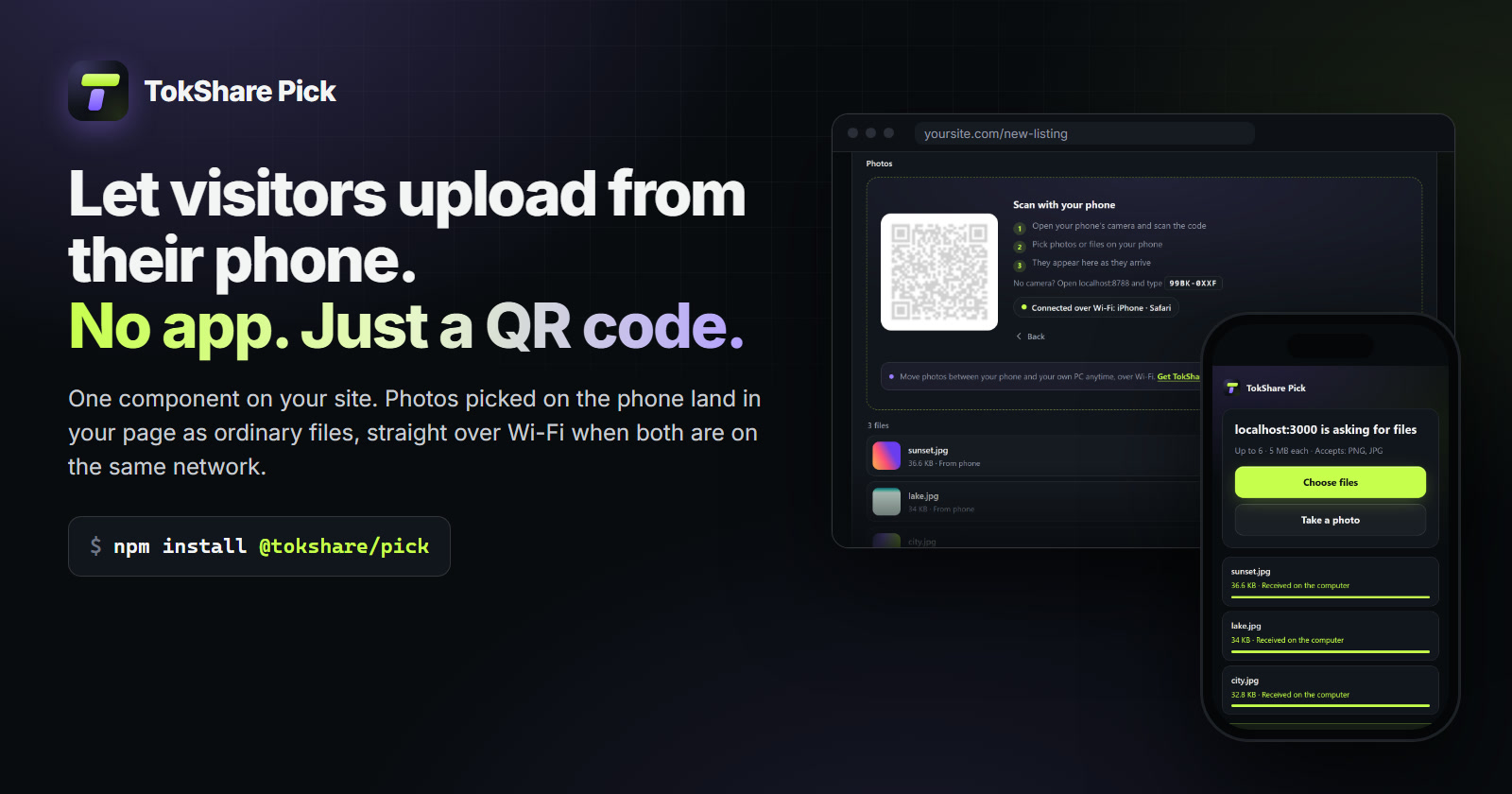
Let visitors send files from their phone to your website: a button, a QR code, and ordinary `File`
|
|
8
|
+
objects in your page. No app on the phone, and straight over Wi-Fi when the phone and the computer are
|
|
9
|
+
on the same network.
|
|
10
|
+
|
|
11
|
+
|
|
12
|
+
|
|
13
|
+
|
|
14
|
+
|
|
15
|
+
```sh
|
|
16
|
+
npm install @tokshare/pick
|
|
17
|
+
```
|
|
18
|
+
|
|
19
|
+
## Upload field (recommended)
|
|
20
|
+
|
|
21
|
+
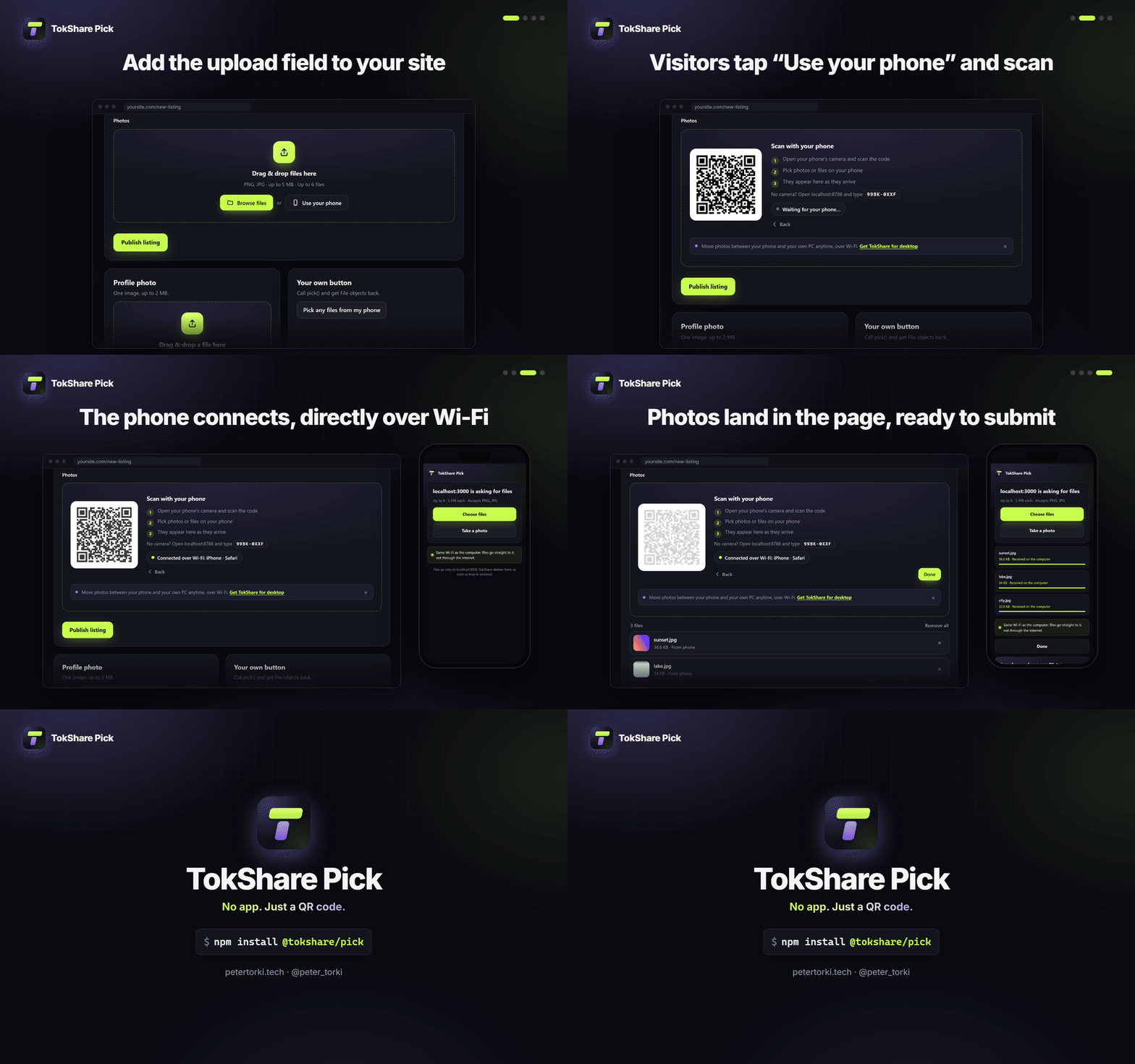
A complete upload field: drop zone, **Browse files**, and **Use your phone**, which opens inside the
|
|
22
|
+
field (QR code, steps, live status). Files from the computer and the phone land in one list with
|
|
23
|
+
thumbnails and remove buttons, and in a real `<input type="file" name>` so your form submits them.
|
|
24
|
+
|
|
25
|
+
```html
|
|
26
|
+
<script src="https://cdn.jsdelivr.net/npm/@tokshare/pick/dist/picker.global.js" data-key="pk_live_…" defer></script>
|
|
27
|
+
|
|
28
|
+
<form method="post" enctype="multipart/form-data">
|
|
29
|
+
<tokshare-pick-field name="photos" accept="image/png,image/jpeg" max-size="5MB" max-files="6" multiple></tokshare-pick-field>
|
|
30
|
+
<button>Publish</button>
|
|
31
|
+
</form>
|
|
32
|
+
```
|
|
33
|
+
|
|
34
|
+
Attributes: `name`, `accept`, `multiple`, `max-files`, `max-size` (`5MB`, `500KB`), `resize` (longest
|
|
35
|
+
side in pixels for photos from the phone), `phone` (`inline`, `modal` or `off`), `locale`, `theme`,
|
|
36
|
+
`label`, `key`, `relay`. The element fires a `files` event with the current `File[]`.
|
|
37
|
+
|
|
38
|
+
From npm: `mountField(element, { key, name, accept, maxFileBytes, multiple })` returns
|
|
39
|
+
`{ files, input, on("change"), remove(file), clear(), destroy() }`, or call `defineFieldElement({ key })`
|
|
40
|
+
to register `<tokshare-pick-field>`. On a page that is itself open on a phone, "Use your phone" is
|
|
41
|
+
hidden (`phoneOnMobile: true` to keep it). `theme: "auto"` matches the page behind the field.
|
|
42
|
+
|
|
43
|
+
## Script tag: a button for an existing input
|
|
44
|
+
|
|
45
|
+
```html
|
|
46
|
+
<script src="https://cdn.jsdelivr.net/npm/@tokshare/pick/dist/picker.global.js" data-key="pk_live_…" defer></script>
|
|
47
|
+
|
|
48
|
+
<input type="file" id="photos" name="photos" accept="image/*" multiple>
|
|
49
|
+
<button type="button" data-tokshare-pick-for="photos">From my phone</button>
|
|
50
|
+
```
|
|
51
|
+
|
|
52
|
+
The button fills the input (firing `input` and `change`), so your form works unchanged. Add
|
|
53
|
+
`data-mode="append"` to add to files already chosen.
|
|
54
|
+
|
|
55
|
+
## npm
|
|
56
|
+
|
|
57
|
+
```sh
|
|
58
|
+
npm install @tokshare/pick
|
|
59
|
+
```
|
|
60
|
+
|
|
61
|
+
```js
|
|
62
|
+
import { pick, open, attach } from "@tokshare/pick";
|
|
63
|
+
|
|
64
|
+
// Promise: the files, or [] if the person cancels.
|
|
65
|
+
const files = await pick({ key: "pk_live_…", accept: "image/*,.pdf", maxFiles: 5 });
|
|
66
|
+
|
|
67
|
+
// Live events.
|
|
68
|
+
const picker = open({ key: "pk_live_…" });
|
|
69
|
+
picker.on("phone", ({ phone }) => console.log("connected", phone.label));
|
|
70
|
+
picker.on("progress", ({ name, sent, total, phase }) => console.log(name, phase, sent / total));
|
|
71
|
+
picker.on("file", (file) => console.log("received", file.name));
|
|
72
|
+
const all = await picker.done;
|
|
73
|
+
|
|
74
|
+
// Fill an existing input.
|
|
75
|
+
const fromPhone = attach(document.querySelector("#avatar"), { key: "pk_live_…" });
|
|
76
|
+
button.addEventListener("click", fromPhone);
|
|
77
|
+
|
|
78
|
+
// Your own UI: no modal; show picker.claimUrl as a QR and picker.code as text.
|
|
79
|
+
const headless = open({ key: "pk_live_…", ui: false });
|
|
80
|
+
headless.on("ready", ({ claimUrl, code }) => render(claimUrl, code));
|
|
81
|
+
```
|
|
82
|
+
|
|
83
|
+
## React
|
|
84
|
+
|
|
85
|
+
`@tokshare/pick/react` (same package, React 17+). Set the key once, then drop components in:
|
|
86
|
+
|
|
87
|
+
```tsx
|
|
88
|
+
import { TokShareProvider, TokSharePick, TokSharePickButton } from "@tokshare/pick/react";
|
|
89
|
+
|
|
90
|
+
export default function App() {
|
|
91
|
+
return (
|
|
92
|
+
<TokShareProvider pickKey="pk_live_…">
|
|
93
|
+
<ListingForm />
|
|
94
|
+
</TokShareProvider>
|
|
95
|
+
);
|
|
96
|
+
}
|
|
97
|
+
|
|
98
|
+
function ListingForm() {
|
|
99
|
+
const [photos, setPhotos] = useState<File[]>([]);
|
|
100
|
+
return (
|
|
101
|
+
<form>
|
|
102
|
+
{/* The full field: drop zone, Browse files, Use your phone. `name` makes a normal submit include the files. */}
|
|
103
|
+
<TokSharePick name="photos" accept="image/png,image/jpeg" maxFiles={6} maxFileBytes="5MB" onChange={setPhotos} />
|
|
104
|
+
|
|
105
|
+
{/* Or just a button: opens the phone window, gives you File[]. Takes every <button> prop. */}
|
|
106
|
+
<TokSharePickButton accept="image/*" onFiles={(files) => setPhotos((all) => [...all, ...files])} className="btn">
|
|
107
|
+
From my phone
|
|
108
|
+
</TokSharePickButton>
|
|
109
|
+
</form>
|
|
110
|
+
);
|
|
111
|
+
}
|
|
112
|
+
```
|
|
113
|
+
|
|
114
|
+
- `pickKey` (React reserves `key`) and `relay`, `locale`, `theme` can go on the provider, or on any component
|
|
115
|
+
instead of a provider.
|
|
116
|
+
- `<TokSharePick>` takes the field's options as props: `name`, `accept`, `multiple`, `maxFiles`,
|
|
117
|
+
`maxFileBytes` (bytes or `"5MB"`), `resize` (longest side for phone photos), `phone` (`"inline"`,
|
|
118
|
+
`"modal"`, `false`), `label`, `strings`, plus `className`, `style`, `onChange(files)`. A ref gives
|
|
119
|
+
`files`, `input`, `remove(file)` and `clear()`. Changing an option rebuilds the field.
|
|
120
|
+
- Your own trigger: `const { pick, open } = useTokSharePick({ accept: "image/*" })`, then
|
|
121
|
+
`const files = await pick()` in a click handler (`[]` if the person cancels).
|
|
122
|
+
- Next.js: the components are client components (`"use client"` is built in); import them anywhere.
|
|
123
|
+
|
|
124
|
+
## Options
|
|
125
|
+
|
|
126
|
+
| Option | Default | |
|
|
127
|
+
|---|---|---|
|
|
128
|
+
| `key` | — | Your publishable key, bound to your site's origins. |
|
|
129
|
+
| `accept` | any | Like `<input accept>`: `"image/*,.pdf"`. Checked on the phone and on the relay, including the file's real type. |
|
|
130
|
+
| `multiple` | `true` | `false` for a single file. |
|
|
131
|
+
| `maxFiles` | 20 | Up to the plan's limit. |
|
|
132
|
+
| `maxFileBytes` | 50 MB | Up to the plan's limit. |
|
|
133
|
+
| `resizeImages` | off | `{ maxDimension: 1600, quality: 0.82 }` shrinks photos on the phone. |
|
|
134
|
+
| `confirmPhone` | `false` | Someone at the computer approves the phone (both show the same number). |
|
|
135
|
+
| `siteName` | your host | Shown on the phone: "*siteName* is asking for files". |
|
|
136
|
+
| `direct` | `true` | When the phone is on the same Wi-Fi as the computer, files go straight to the page over the local network (WebRTC) instead of the cloud: seconds instead of minutes on a slow internet upload. Falls back to the cloud by itself. `false` always uses the cloud. Field attribute `direct="off"`, script tag `data-direct="off"`. |
|
|
137
|
+
| `announce` | `true` | A small line about TokShare for desktop under the phone QR, which visitors can hide. `false` removes it. Field attribute `announce="off"`, script tag `data-announce="off"`. |
|
|
138
|
+
| `locale` | `"auto"` | `"en"` or `"ar"` (right to left). Auto follows `<html lang>`, then the browser. |
|
|
139
|
+
| `theme` | `"auto"` | `"light"`, `"dark"` or `"auto"`. |
|
|
140
|
+
| `strings` | — | Replace any modal text. |
|
|
141
|
+
| `relay` | hosted | Your own relay URL. |
|
|
142
|
+
| `signal` | — | An `AbortSignal` that cancels the picker. |
|
|
143
|
+
|
|
144
|
+
### Direct transfers (same Wi-Fi)
|
|
145
|
+
|
|
146
|
+
The phone and the page set up a WebRTC data channel through the relay. No STUN or TURN servers are
|
|
147
|
+
used, so only local-network addresses (which browsers hide behind random `.local` names) can connect:
|
|
148
|
+
it works on the same network and nowhere else, and neither side learns the other's public IP. The
|
|
149
|
+
relay still approves every file first (count, size, type, usage), and the page checks what arrives
|
|
150
|
+
exactly as the relay checks a cloud upload: the announced size, and contents that match `accept`.
|
|
151
|
+
If the link isn't there or drops mid-file, that file goes through the cloud under the same id. The
|
|
152
|
+
`direct` event (`{ connected }`) and "Connected over Wi-Fi" in the built-in UI show when it's on.
|
|
153
|
+
|
|
154
|
+
Style the modal with CSS variables on `[data-tokshare-pick]`: `--tsp-accent`, `--tsp-accent-text`,
|
|
155
|
+
`--tsp-bg`, `--tsp-text`, `--tsp-muted`, `--tsp-line`, `--tsp-radius`, `--tsp-font`.
|
|
156
|
+
|
|
157
|
+
## Content-Security-Policy
|
|
158
|
+
|
|
159
|
+
Add the relay to `connect-src` (HTTPS and WSS). The modal needs nothing else: it uses a Shadow DOM
|
|
160
|
+
with a constructable stylesheet and draws the QR on a canvas.
|
|
161
|
+
|
|
162
|
+
## Privacy
|
|
163
|
+
|
|
164
|
+
Files travel from the phone to your page directly over the local network when both are on the same
|
|
165
|
+
Wi-Fi, otherwise through TokShare's relay, where they are deleted as soon as your page receives them
|
|
166
|
+
(at most 10 minutes after upload). Contents are never inspected beyond the first bytes
|
|
167
|
+
used to check the file type, and never logged.
|
|
168
|
+
|
|
169
|
+
## Author
|
|
170
|
+
|
|
171
|
+
Made by **Peter Torki**: [petertorki.tech](https://petertorki.tech) ·
|
|
172
|
+
[Instagram @peter_torki](https://instagram.com/peter_torki). Also by Peter:
|
|
173
|
+
[TokShare for desktop](https://tokshare.vercel.app), which moves photos and videos between your phone
|
|
174
|
+
and your own PC over Wi-Fi.
|
|
175
|
+
|
|
176
|
+
## License
|
|
177
|
+
|
|
178
|
+
MIT © 2026 Peter Torki. See [LICENSE](./LICENSE).
|