@todesktop/cli 1.17.0 → 1.18.1
This diff represents the content of publicly available package versions that have been released to one of the supported registries. The information contained in this diff is provided for informational purposes only and reflects changes between package versions as they appear in their respective public registries.
- package/README.md +354 -146
- package/dist/cli.js +226 -251
- package/dist/cli.js.map +3 -3
- package/dist/types.d.ts +19 -0
- package/package.json +15 -52
- package/schemas/schema.json +31 -1
- package/scripts/postinstall.js +0 -19
package/README.md
CHANGED
|
@@ -1,8 +1,10 @@
|
|
|
1
1
|
# ToDesktop CLI
|
|
2
2
|
|
|
3
|
-
The ToDesktop CLI allows you to build and deploy your electron app with native
|
|
3
|
+
The ToDesktop CLI allows you to build and deploy your electron app with native
|
|
4
|
+
installers, auto-updates and code signing included.
|
|
4
5
|
|
|
5
|
-
For more information, visit the project
|
|
6
|
+
For more information, visit the project
|
|
7
|
+
[landing page](https://www.todesktop.com/cli).
|
|
6
8
|
|
|
7
9
|
## Table of contents
|
|
8
10
|
|
|
@@ -32,7 +34,9 @@ You can use the ToDesktop CLI to work with an Electron application in 4 steps:
|
|
|
32
34
|
|
|
33
35
|
### Step 1: Create a ToDesktop application
|
|
34
36
|
|
|
35
|
-
Create a ToDesktop application to link to your Electron application. This is
|
|
37
|
+
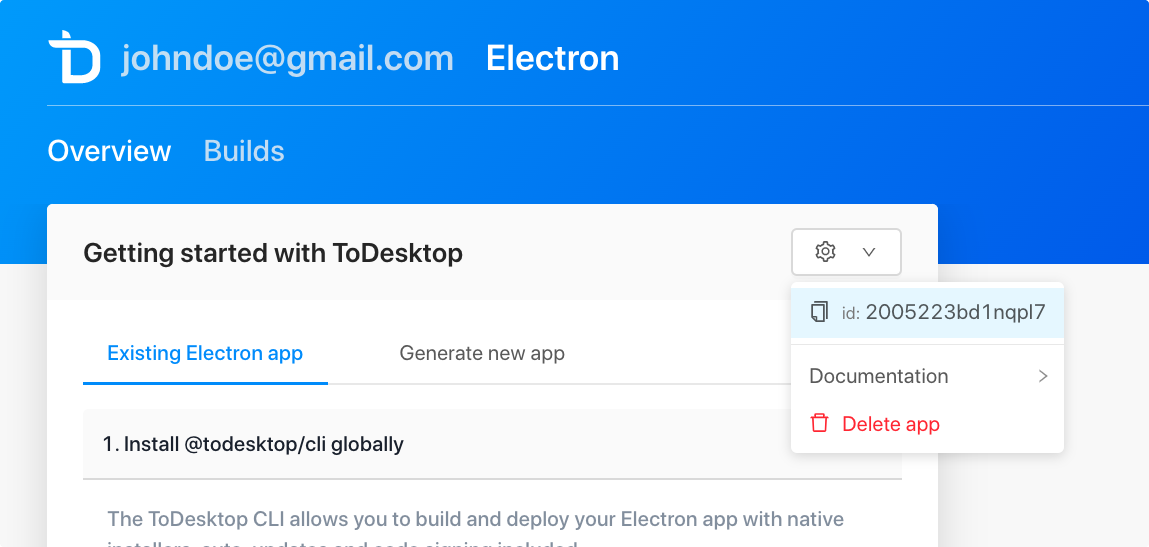
Create a ToDesktop application to link to your Electron application. This is
|
|
38
|
+
currently done via the [web interface](http://app.todesktop.com/). Copy the
|
|
39
|
+
ToDesktop application ID to your clipboard:
|
|
36
40
|
|
|
37
41
|
|
|
38
42
|
|
|
@@ -42,7 +46,7 @@ Create a `todesktop.json` file in the root of your Electron project.
|
|
|
42
46
|
|
|
43
47
|
```json
|
|
44
48
|
{
|
|
45
|
-
"$schema": "https://unpkg.com/@todesktop/cli@1.
|
|
49
|
+
"$schema": "https://unpkg.com/@todesktop/cli@1.18.0/schemas/schema.json",
|
|
46
50
|
"schemaVersion": 1
|
|
47
51
|
"id": "your-todesktop-id",
|
|
48
52
|
"icon": "./desktop-icon.png",
|
|
@@ -50,42 +54,48 @@ Create a `todesktop.json` file in the root of your Electron project.
|
|
|
50
54
|
}
|
|
51
55
|
```
|
|
52
56
|
|
|
53
|
-
Alternatively, you can create a `todesktop.js` file. This allows you to use
|
|
57
|
+
Alternatively, you can create a `todesktop.js` file. This allows you to use
|
|
58
|
+
JavaScript to dynamically generate your configuration. For example:
|
|
54
59
|
|
|
55
60
|
```javascript
|
|
56
|
-
const path = require(
|
|
61
|
+
const path = require('path');
|
|
57
62
|
|
|
58
63
|
module.exports = {
|
|
59
|
-
id: process.env.TODESKTOP_APP_ID ||
|
|
60
|
-
icon: path.join(__dirname,
|
|
64
|
+
id: process.env.TODESKTOP_APP_ID || 'your-default-todesktop-id',
|
|
65
|
+
icon: path.join(__dirname, 'assets', 'desktop-icon.png'),
|
|
61
66
|
schemaVersion: 1,
|
|
62
67
|
};
|
|
63
68
|
```
|
|
64
69
|
|
|
65
|
-
You can also create a `todesktop.ts` file for TypeScript projects with full type
|
|
70
|
+
You can also create a `todesktop.ts` file for TypeScript projects with full type
|
|
71
|
+
checking and IntelliSense:
|
|
66
72
|
|
|
67
73
|
```typescript
|
|
68
|
-
import type { Schema } from
|
|
69
|
-
import path from
|
|
74
|
+
import type { Schema } from '@todesktop/cli';
|
|
75
|
+
import path from 'path';
|
|
70
76
|
|
|
71
77
|
const config: Schema = {
|
|
72
|
-
id: process.env.TODESKTOP_APP_ID ||
|
|
73
|
-
icon: path.join(__dirname,
|
|
78
|
+
id: process.env.TODESKTOP_APP_ID || 'your-default-todesktop-id',
|
|
79
|
+
icon: path.join(__dirname, 'assets', 'desktop-icon.png'),
|
|
74
80
|
schemaVersion: 1,
|
|
75
|
-
nodeVersion:
|
|
81
|
+
nodeVersion: '18.12.1',
|
|
76
82
|
mac: {
|
|
77
|
-
category:
|
|
83
|
+
category: 'public.app-category.productivity',
|
|
78
84
|
},
|
|
79
85
|
};
|
|
80
86
|
|
|
81
87
|
export default config;
|
|
82
88
|
```
|
|
83
89
|
|
|
84
|
-
See
|
|
90
|
+
See
|
|
91
|
+
[Project configuration](#project-configuration-todesktopjson-todesktopjs-or-todesktops)
|
|
92
|
+
for the full list of configuration options.
|
|
85
93
|
|
|
86
94
|
### Step 3: Add @todesktop/runtime as a dependency
|
|
87
95
|
|
|
88
|
-
The ToDesktop
|
|
96
|
+
The ToDesktop
|
|
97
|
+
[runtime package](https://www.npmjs.com/package/@todesktop/runtime) takes care
|
|
98
|
+
of auto-updating, crash reporting, and more.
|
|
89
99
|
|
|
90
100
|
```sh
|
|
91
101
|
npm install @todesktop/runtime
|
|
@@ -93,11 +103,12 @@ npm install @todesktop/runtime
|
|
|
93
103
|
yarn add @todesktop/runtime
|
|
94
104
|
```
|
|
95
105
|
|
|
96
|
-
In your main (background process) script, require the package and call the
|
|
106
|
+
In your main (background process) script, require the package and call the
|
|
107
|
+
`init` function. The key is to call it right at the beginning.
|
|
97
108
|
|
|
98
109
|
```javascript
|
|
99
|
-
const { app, BrowserWindow } = require(
|
|
100
|
-
const todesktop = require(
|
|
110
|
+
const { app, BrowserWindow } = require('electron');
|
|
111
|
+
const todesktop = require('@todesktop/runtime');
|
|
101
112
|
|
|
102
113
|
todesktop.init();
|
|
103
114
|
|
|
@@ -109,7 +120,7 @@ function createWindow() {
|
|
|
109
120
|
});
|
|
110
121
|
|
|
111
122
|
// and load the index.html of the app.
|
|
112
|
-
win.loadFile(
|
|
123
|
+
win.loadFile('index.html');
|
|
113
124
|
}
|
|
114
125
|
|
|
115
126
|
app.whenReady().then(createWindow);
|
|
@@ -117,13 +128,16 @@ app.whenReady().then(createWindow);
|
|
|
117
128
|
|
|
118
129
|
### Step 4: Build your app
|
|
119
130
|
|
|
120
|
-
To build your app, run the following command inside the root of your Electron
|
|
131
|
+
To build your app, run the following command inside the root of your Electron
|
|
132
|
+
project:
|
|
121
133
|
|
|
122
134
|
```sh
|
|
123
135
|
todesktop build
|
|
124
136
|
```
|
|
125
137
|
|
|
126
|
-
When prompted to login, use your email address and the accessToken from our
|
|
138
|
+
When prompted to login, use your email address and the accessToken from our
|
|
139
|
+
dashboard. You can retrieve your access token by clicking on your name in the
|
|
140
|
+
top right corner of the dashboard and selecting "Manage Access Token".
|
|
127
141
|
|
|
128
142
|
Once built, your app can then be downloaded and tested.
|
|
129
143
|
|
|
@@ -153,7 +167,9 @@ The main command:
|
|
|
153
167
|
todesktop build
|
|
154
168
|
```
|
|
155
169
|
|
|
156
|
-
This builds your Electron app with native installers, code signing, and so on
|
|
170
|
+
This builds your Electron app with native installers, code signing, and so on
|
|
171
|
+
baked-in. Once the build has succeeded, you should see the following output in
|
|
172
|
+
your terminal. These are links to the download binaries for each platform:
|
|
157
173
|
|
|
158
174
|
```sh
|
|
159
175
|
> ✅ ToDesktop Quick Start v1.0.0
|
|
@@ -166,35 +182,50 @@ This builds your Electron app with native installers, code signing, and so on ba
|
|
|
166
182
|
|
|
167
183
|
We also support:
|
|
168
184
|
|
|
169
|
-
- `todesktop build --code-sign=false`. Run a build with code-signing and
|
|
170
|
-
|
|
171
|
-
- `todesktop build --
|
|
172
|
-
|
|
173
|
-
- `todesktop build --
|
|
174
|
-
|
|
185
|
+
- `todesktop build --code-sign=false`. Run a build with code-signing and
|
|
186
|
+
notarization disabled. This is handy for testing builds quickly.
|
|
187
|
+
- `todesktop build --config=<path.to.config.file>`. Run a build with a different
|
|
188
|
+
configuration file (e.g., `todesktop.staging.json` or `todesktop.prod.js`).
|
|
189
|
+
- `todesktop build --async`. Run a build in the background. This is handy for CI
|
|
190
|
+
environments.
|
|
191
|
+
- `todesktop build --webhook URL`. Send a POST request to the webhook URL when
|
|
192
|
+
the build is finished. It's especially useful together with the `--async`
|
|
193
|
+
flag.
|
|
194
|
+
- `todesktop build --ignore-extends-errors`. Ignore `id` and `appId` validation
|
|
195
|
+
errors when extending another configuration file (`.json` or `.js`).
|
|
196
|
+
- `todesktop release`. Release a build. This will publish a new download and an
|
|
197
|
+
auto-update for existing users. By default it shows a list of builds for you
|
|
198
|
+
to choose from.
|
|
175
199
|
- Use `todesktop release <id>` to release a specific build by ID.
|
|
176
200
|
- `todesktop release --latest` will release the latest build.
|
|
177
201
|
- Append `--force` to skip the interactive confirmation step.
|
|
178
|
-
- Append `--config=<path.to.config.file>` to use a different configuration
|
|
202
|
+
- Append `--config=<path.to.config.file>` to use a different configuration
|
|
203
|
+
file.
|
|
179
204
|
- `todesktop builds`. View your recent builds.
|
|
180
205
|
- Use `todesktop builds <id>` to view a specific build and its progress.
|
|
181
206
|
- `todesktop builds --latest` will show the latest build and it's progress.
|
|
182
207
|
- `todesktop builds --count=<number>` will show the last `<number>` builds.
|
|
183
208
|
- `todesktop builds --format=json` will output build data in JSON format.
|
|
184
|
-
- Append `--config=<path.to.config.file>` to use a different configuration
|
|
185
|
-
|
|
209
|
+
- Append `--config=<path.to.config.file>` to use a different configuration
|
|
210
|
+
file.
|
|
211
|
+
- Append `--exit` to disable dynamic pagination and exit the process once the
|
|
212
|
+
build data has been displayed.
|
|
186
213
|
- `todesktop logout`. Logs you out.
|
|
187
|
-
- `todesktop smoke-test` Check whether the build works and can be successfully
|
|
214
|
+
- `todesktop smoke-test` Check whether the build works and can be successfully
|
|
215
|
+
updated.
|
|
188
216
|
- Use `todesktop smoke-test <id>` to test a specific build by ID.
|
|
189
217
|
- `todesktop smoke-test --latest` will test the latest build.
|
|
190
|
-
- Append `--config=<path.to.config.file>` to use a different configuration
|
|
218
|
+
- Append `--config=<path.to.config.file>` to use a different configuration
|
|
219
|
+
file.
|
|
191
220
|
- `todesktop whoami`. Prints the email of the account you're signed into.
|
|
192
221
|
- `todesktop --help`. Shows the help documentation.
|
|
193
222
|
- `todesktop --version`. Shows the current version of the CLI.
|
|
194
223
|
|
|
195
224
|
## Automating your builds (CI)
|
|
196
225
|
|
|
197
|
-
You may want to automate builds with your Continuous Integration (CI) provider.
|
|
226
|
+
You may want to automate builds with your Continuous Integration (CI) provider.
|
|
227
|
+
To achieve this, simply set up environment variables for
|
|
228
|
+
`TODESKTOP_ACCESS_TOKEN` and `TODESKTOP_EMAIL` within your CI project.
|
|
198
229
|
|
|
199
230
|
```
|
|
200
231
|
TODESKTOP_ACCESS_TOKEN=accessToken
|
|
@@ -241,25 +272,33 @@ The webhook receives a POST request with the following JSON body:
|
|
|
241
272
|
|
|
242
273
|
## Project configuration (todesktop.json, todesktop.js, or todesktop.ts)
|
|
243
274
|
|
|
244
|
-
This describes all of the possible configuration options in your
|
|
275
|
+
This describes all of the possible configuration options in your
|
|
276
|
+
`todesktop.json`, `todesktop.js`, or `todesktop.ts` file.
|
|
245
277
|
|
|
246
278
|
You can use:
|
|
247
279
|
|
|
248
280
|
- A standard JSON file (`todesktop.json`) for static configuration
|
|
249
|
-
- A JavaScript file (`todesktop.js`) that exports a configuration object for
|
|
250
|
-
|
|
281
|
+
- A JavaScript file (`todesktop.js`) that exports a configuration object for
|
|
282
|
+
dynamic configuration
|
|
283
|
+
- A TypeScript file (`todesktop.ts`) that exports a configuration object with
|
|
284
|
+
full type checking and IntelliSense
|
|
251
285
|
|
|
252
|
-
Using `.js` or `.ts` files allows for dynamic configuration, such as setting
|
|
286
|
+
Using `.js` or `.ts` files allows for dynamic configuration, such as setting
|
|
287
|
+
values based on environment variables or computing paths.
|
|
253
288
|
|
|
254
289
|
**Note:**
|
|
255
290
|
|
|
256
|
-
- Schema validation and IntelliSense for `.json` files are available through the
|
|
257
|
-
|
|
258
|
-
- TypeScript
|
|
291
|
+
- Schema validation and IntelliSense for `.json` files are available through the
|
|
292
|
+
JSON schema (described under [Installation](#installation))
|
|
293
|
+
- TypeScript files (`.ts`) provide full type checking and IntelliSense when
|
|
294
|
+
using the exported `Schema` type from `@todesktop/cli`
|
|
295
|
+
- TypeScript compilation requires a local installation of TypeScript in your
|
|
296
|
+
project
|
|
259
297
|
|
|
260
298
|
To avoid confusion, the following terms will be used throughout this file:
|
|
261
299
|
|
|
262
|
-
- "Project root": this is the parent directory of your `todesktop.json`,
|
|
300
|
+
- "Project root": this is the parent directory of your `todesktop.json`,
|
|
301
|
+
`todesktop.js`, or `todesktop.ts`.
|
|
263
302
|
|
|
264
303
|
### `$schema` - (optional) string
|
|
265
304
|
|
|
@@ -272,7 +311,7 @@ To enable JSON validation and IntelliSense for your `todesktop.json` file in com
|
|
|
272
311
|
- For example, if using a hosted version of the schema:
|
|
273
312
|
```json
|
|
274
313
|
{
|
|
275
|
-
"$schema": "https://unpkg.com/@todesktop/cli@1.
|
|
314
|
+
"$schema": "https://unpkg.com/@todesktop/cli@1.18.0/schemas/schema.json",
|
|
276
315
|
"id": "your-todesktop-id"
|
|
277
316
|
}
|
|
278
317
|
```
|
|
@@ -292,7 +331,10 @@ Example: `["dist/**", "!static/**"]`
|
|
|
292
331
|
|
|
293
332
|
This option allows you to decide which files get uploaded to be built on the ToDesktop servers. By default, all files in your app path are included in your app, except for `node_modules` and `.git`. Dependencies are installed on our build servers as there could be platform-specific postinstall steps.
|
|
294
333
|
|
|
295
|
-
If you wish to include files for the build process but exclude them in the
|
|
334
|
+
If you wish to include files for the build process but exclude them in the
|
|
335
|
+
distribution version of your app then you should use the
|
|
336
|
+
[`filesForDistribution`](#filesForDistribution---optional-array-of-glob-patterns)
|
|
337
|
+
property
|
|
296
338
|
|
|
297
339
|
The files must be within your [`appPath`](#apppath---optional-string).
|
|
298
340
|
|
|
@@ -308,15 +350,20 @@ The following are always included if they exist:
|
|
|
308
350
|
|
|
309
351
|
- Asterisk (`*`) — matches everything except slashes (path separators).
|
|
310
352
|
- A double star or globstar (`**`) — matches zero or more directories.
|
|
311
|
-
- Question mark (`?`) – matches any single character except slashes (path
|
|
312
|
-
|
|
353
|
+
- Question mark (`?`) – matches any single character except slashes (path
|
|
354
|
+
separators).
|
|
355
|
+
- Exclamation mark (`!`) — a glob that starts with an exclamation mark will
|
|
356
|
+
result in any matched files being excluded.
|
|
313
357
|
|
|
314
358
|
Examples:
|
|
315
359
|
|
|
316
|
-
- `src/**/*.js` — matches all files in the src directory (any level of nesting)
|
|
317
|
-
|
|
360
|
+
- `src/**/*.js` — matches all files in the src directory (any level of nesting)
|
|
361
|
+
that have the `.js` extension.
|
|
362
|
+
- `src/*.??` — matches all files in the src directory (only first level of
|
|
363
|
+
nesting) that have a two-character extension.
|
|
318
364
|
|
|
319
|
-
We use the [fast-glob](https://www.npmjs.com/package/fast-glob) library under
|
|
365
|
+
We use the [fast-glob](https://www.npmjs.com/package/fast-glob) library under
|
|
366
|
+
the hood.
|
|
320
367
|
|
|
321
368
|
### `appId` - (optional) string
|
|
322
369
|
|
|
@@ -326,7 +373,8 @@ Example: `com.microsoft.word`
|
|
|
326
373
|
|
|
327
374
|
Your application ID. Omit this unless you know what you're doing. It's used as the [CFBundleIdentifier](https://developer.apple.com/library/ios/documentation/General/Reference/InfoPlistKeyReference/Articles/CoreFoundationKeys.html#//apple_ref/doc/uid/20001431-102070) for MacOS and as the [Application User Model ID](<https://msdn.microsoft.com/en-us/library/windows/desktop/dd378459(v=vs.85).aspx>) for Windows.
|
|
328
375
|
|
|
329
|
-
WARNING: if you have deployed an application with ToDesktop and would like to
|
|
376
|
+
WARNING: if you have deployed an application with ToDesktop and would like to
|
|
377
|
+
change this ID, talk to us first.
|
|
330
378
|
|
|
331
379
|
### `appPath` - (optional) string
|
|
332
380
|
|
|
@@ -336,13 +384,17 @@ Example: `./dist`
|
|
|
336
384
|
|
|
337
385
|
This is the path to your Electron application directory. Omit this unless your project setup is complicated. This is the directory that the CLI uploads.
|
|
338
386
|
|
|
339
|
-
The path can be absolute or a relative path from the project root. The directory
|
|
387
|
+
The path can be absolute or a relative path from the project root. The directory
|
|
388
|
+
it points to must be a valid Electron application directory; i.e.:
|
|
340
389
|
|
|
341
390
|
- It could be ran with the `electron` command; i.e. `npx electron {{appPath}}`.
|
|
342
391
|
- It needs to contain a valid `package.json`.
|
|
343
|
-
- The `package.json` must either have a `main` property pointing to a file in
|
|
392
|
+
- The `package.json` must either have a `main` property pointing to a file in
|
|
393
|
+
the directory or there must be an `index.js` at the root of the directory.
|
|
344
394
|
|
|
345
|
-
Side note: if your `package.json` contains a `postinstall` script which
|
|
395
|
+
Side note: if your `package.json` contains a `postinstall` script which
|
|
396
|
+
references scripts, these must be accessible within the `appPath` directory as
|
|
397
|
+
only the `appPath` is uploaded to our servers.
|
|
346
398
|
|
|
347
399
|
### `bundleWorkspacePackages` - (optional) object
|
|
348
400
|
|
|
@@ -352,6 +404,35 @@ Useful when your application is a monorepo (e.g. pnpm workspaces). You can confi
|
|
|
352
404
|
|
|
353
405
|
- Example: `{"enabled":true}`
|
|
354
406
|
|
|
407
|
+
### `bytenode` - (optional) object
|
|
408
|
+
|
|
409
|
+
Default: `{"enabled":false}`
|
|
410
|
+
|
|
411
|
+
Compile selected source files to .jsc using Bytenode during the build. Provide glob patterns relative to your appPath.
|
|
412
|
+
|
|
413
|
+
> Experimental: This option may change or be removed in a future release.
|
|
414
|
+
|
|
415
|
+
#### `bytenode.enabled` - (optional) boolean
|
|
416
|
+
|
|
417
|
+
Default: `false`
|
|
418
|
+
|
|
419
|
+
Enable Bytenode compilation.
|
|
420
|
+
|
|
421
|
+
#### `bytenode.files` - (required when enabled) array of glob patterns
|
|
422
|
+
|
|
423
|
+
Glob patterns relative to appPath for files to compile to Bytenode.
|
|
424
|
+
|
|
425
|
+
Example:
|
|
426
|
+
|
|
427
|
+
```json
|
|
428
|
+
{
|
|
429
|
+
"bytenode": {
|
|
430
|
+
"enabled": true,
|
|
431
|
+
"files": ["dist/**/*.js", "main.js", "!renderer.js"]
|
|
432
|
+
}
|
|
433
|
+
}
|
|
434
|
+
```
|
|
435
|
+
|
|
355
436
|
### `appProtocolScheme` - (optional) string | string[]
|
|
356
437
|
|
|
357
438
|
Default: no protocol scheme is registered
|
|
@@ -372,7 +453,8 @@ Default: `["**/*.node"]`
|
|
|
372
453
|
|
|
373
454
|
This option allows you to decide which files get unpacked from the asar archive. By default we unpack all native `*.node` files.
|
|
374
455
|
|
|
375
|
-
If you want to unpack only files that are required to be unpacked, you can set
|
|
456
|
+
If you want to unpack only files that are required to be unpacked, you can set
|
|
457
|
+
this property to `false`.
|
|
376
458
|
|
|
377
459
|
You can also specify a list of glob patterns to unpack.
|
|
378
460
|
|
|
@@ -396,13 +478,15 @@ Options for customizing the macOS DMG (disk image) installer.
|
|
|
396
478
|
|
|
397
479
|
#### `dmg.background` - (optional) string
|
|
398
480
|
|
|
399
|
-
Default: `undefined` (if `undefined` then we
|
|
481
|
+
Default: `undefined` (if `undefined` then we
|
|
482
|
+
use [this template](https://i.imgur.com/PUQIhvv.png)).
|
|
400
483
|
|
|
401
484
|
Example: `./mac-dmg-background.tiff`
|
|
402
485
|
|
|
403
486
|
The path to the DMG installer's background image. It must be a `.tiff` file. The resolution of this file determines the resolution of the installer window. Typically, backgrounds are 540x380.
|
|
404
487
|
|
|
405
|
-
You can generate a retina tiff background from png files using the following
|
|
488
|
+
You can generate a retina tiff background from png files using the following
|
|
489
|
+
command:
|
|
406
490
|
|
|
407
491
|
```sh
|
|
408
492
|
tiffutil -cathidpicheck background.png background@2x.png -out background.tiff
|
|
@@ -436,8 +520,10 @@ The title of the produced DMG, which will be shown when mounted (volume name). M
|
|
|
436
520
|
|
|
437
521
|
Customize icon locations. The x and y coordinates refer to the position of the center of the icon (at 1x scale), and do not take the label into account.
|
|
438
522
|
|
|
439
|
-
- `x` number -
|
|
440
|
-
|
|
523
|
+
- `x` number -
|
|
524
|
+
The device-independent pixel offset from the left of the window to the center of the icon.
|
|
525
|
+
- `y` number -
|
|
526
|
+
The device-independent pixel offset from the top of the window to the center of the icon.
|
|
441
527
|
|
|
442
528
|
```
|
|
443
529
|
[
|
|
@@ -460,8 +546,10 @@ The DMG windows position and size. In most cases, you will only want to specify
|
|
|
460
546
|
|
|
461
547
|
- `x` number - The X position relative to left of the screen.
|
|
462
548
|
- `y` number - The Y position relative to top of the screen.
|
|
463
|
-
- `width` number -
|
|
464
|
-
|
|
549
|
+
- `width` number -
|
|
550
|
+
The width. Defaults to background image width or 540.
|
|
551
|
+
- `height` number -
|
|
552
|
+
The height. Defaults to background image height or 380.
|
|
465
553
|
|
|
466
554
|
```
|
|
467
555
|
{
|
|
@@ -476,9 +564,13 @@ Default: `null`.
|
|
|
476
564
|
|
|
477
565
|
Example: `./todesktop.base.json` or `./todesktop.base.js`.
|
|
478
566
|
|
|
479
|
-
This is the path to a base configuration file (`.json` or `.js`). This is
|
|
567
|
+
This is the path to a base configuration file (`.json` or `.js`). This is
|
|
568
|
+
especially useful for configuration sharing between different environments
|
|
569
|
+
(e.g., staging and production). The base configuration file can be a relative
|
|
570
|
+
path from the project root or an absolute path.
|
|
480
571
|
|
|
481
|
-
For more information about how to create a staging version of your app see:
|
|
572
|
+
For more information about how to create a staging version of your app see:
|
|
573
|
+
[How do I create a staging version of my app?](#how-do-i-create-a-staging-version-of-my-app).
|
|
482
574
|
|
|
483
575
|
### `extraContentFiles` - (optional) array of objects
|
|
484
576
|
|
|
@@ -486,9 +578,13 @@ Default: `[]`
|
|
|
486
578
|
|
|
487
579
|
This option allows you specify files to be copied into the application's content directory (`Contents` for MacOS, root directory for Linux and Windows).
|
|
488
580
|
|
|
489
|
-
Each item in the array must be an object, containing a `from` property which is
|
|
581
|
+
Each item in the array must be an object, containing a `from` property which is
|
|
582
|
+
a path to a file or directory. The path can be absolute or a relative path from
|
|
583
|
+
the project root. The files specified must be inside your project root. A
|
|
584
|
+
directory's contents are copied, not the directory itself (see example below).
|
|
490
585
|
|
|
491
|
-
The `to` property is optional. Use it to specify a directory inside the content
|
|
586
|
+
The `to` property is optional. Use it to specify a directory inside the content
|
|
587
|
+
directory to copy the file to.
|
|
492
588
|
|
|
493
589
|
Example:
|
|
494
590
|
|
|
@@ -500,7 +596,11 @@ Example:
|
|
|
500
596
|
]
|
|
501
597
|
```
|
|
502
598
|
|
|
503
|
-
In the example above, `image.png` would be copied to the root of the content
|
|
599
|
+
In the example above, `image.png` would be copied to the root of the content
|
|
600
|
+
directory, whereas `anotherImage.png` would be copied to an `images` directory
|
|
601
|
+
at the root of the content directory. The contents of the `./static` directory
|
|
602
|
+
would be copied to `assets` in the content directory (i.e.
|
|
603
|
+
`./static/example.txt` would be copied to `assets/example.txt`).
|
|
504
604
|
|
|
505
605
|
### `electronMirror` - (optional) string
|
|
506
606
|
|
|
@@ -549,14 +649,21 @@ Example:
|
|
|
549
649
|
]
|
|
550
650
|
```
|
|
551
651
|
|
|
552
|
-
- `ext` String | String[] -
|
|
553
|
-
|
|
554
|
-
- `
|
|
652
|
+
- `ext` String | String[] -
|
|
653
|
+
The extension (minus the leading period). e.g. png.
|
|
654
|
+
- `name` String -
|
|
655
|
+
The name. e.g. PNG. Defaults to value of `ext`.
|
|
656
|
+
- `description` String -
|
|
657
|
+
windows-only. The description.
|
|
555
658
|
- `icon` String - macOS and windows. Icon file name without extension. It points to ico file for Windows and icns for macOS. For example, if the `icon` value is `"icons/py"` then it will look for both `"icons/py.ico"` and `"icons/py.icns"` in your project directory.
|
|
556
|
-
- `mimeType` String -
|
|
557
|
-
-
|
|
558
|
-
- `
|
|
559
|
-
|
|
659
|
+
- `mimeType` String -
|
|
660
|
+
linux-only. The mime-type.
|
|
661
|
+
- `role` = `Default: `Editor`` String -
|
|
662
|
+
macOS-only. The app's role with respect to the type. The value can be `Editor`, `Viewer`, `Shell`, or `None`. Corresponds to `CFBundleTypeRole`.
|
|
663
|
+
- `isPackage` Boolean -
|
|
664
|
+
macOS-only. Whether the document is distributed as a bundle. If set to true, the bundle directory is treated as a file. Corresponds to `LSTypeIsPackage`.
|
|
665
|
+
- `rank` = `Default: `Default`` String -
|
|
666
|
+
macOS-only. Determines how Launch Services ranks this app among the apps that declare themselves editors or viewers of files of this type. The possible values are: `Owner` (this app is the primary creator of files of this type), `Default` (this app is an opener of files of this type; this value is also used if no rank is specified), `Alternate` (this app is a secondary viewer of files of this type), and `None` (this app is never selected to open files of this type, but it accepts drops of files of this type).
|
|
560
667
|
|
|
561
668
|
### `filesForDistribution` - (optional) array of glob patterns
|
|
562
669
|
|
|
@@ -564,7 +671,8 @@ Example: `["!**/node_modules/realm/android/**", "!**/design/**"]`
|
|
|
564
671
|
|
|
565
672
|
This option allows you to explicitly exclude or include certain files in the packaged version of your app. These files are filtered _after_ the build step which happens on the ToDesktop servers.
|
|
566
673
|
|
|
567
|
-
This is often useful for excluding large files which are installed during the
|
|
674
|
+
This is often useful for excluding large files which are installed during the
|
|
675
|
+
build step but are not needed at runtime by your applcation.
|
|
568
676
|
|
|
569
677
|
The following are always excluded if they exist:
|
|
570
678
|
|
|
@@ -586,7 +694,10 @@ Example: `./appIcon.png`
|
|
|
586
694
|
|
|
587
695
|
The path to your application's desktop icon. It must be an ICNS or PNG.
|
|
588
696
|
|
|
589
|
-
Note: to ensure the icon is never missing (e.g. this happens sometimes in
|
|
697
|
+
Note: to ensure the icon is never missing (e.g. this happens sometimes in
|
|
698
|
+
Ubuntu), set the
|
|
699
|
+
[`icon` option](https://www.electronjs.org/docs/api/browser-window#new-browserwindowoptions)
|
|
700
|
+
when creating your `BrowserWindow`s.
|
|
590
701
|
|
|
591
702
|
### `id` - string
|
|
592
703
|
|
|
@@ -620,7 +731,10 @@ The path to your application's Linux desktop icon. It must be an ICNS or PNG.
|
|
|
620
731
|
|
|
621
732
|
Default: The root [`icon`](#icon---string) is used.
|
|
622
733
|
|
|
623
|
-
Note: to ensure the icon is never missing (e.g. this happens sometimes in
|
|
734
|
+
Note: to ensure the icon is never missing (e.g. this happens sometimes in
|
|
735
|
+
Ubuntu), set the
|
|
736
|
+
[`icon` option](https://www.electronjs.org/docs/api/browser-window#new-browserwindowoptions)
|
|
737
|
+
when creating your `BrowserWindow`s.
|
|
624
738
|
|
|
625
739
|
#### `linux.imageVersion` - (optional) string
|
|
626
740
|
|
|
@@ -632,7 +746,10 @@ The version of the Linux image that ToDesktop should use to build your app.
|
|
|
632
746
|
|
|
633
747
|
Linux Changelog:
|
|
634
748
|
|
|
635
|
-
- `0.1.0`: Updated g++ → g++10, gcc → gcc10. WARNING: This compiler has been
|
|
749
|
+
- `0.1.0`: Updated g++ → g++10, gcc → gcc10. WARNING: This compiler has been
|
|
750
|
+
updated to a newer version that is not compatible with older versions of Linux
|
|
751
|
+
like Ubuntu 20.04. You should probably only use this version if you know what
|
|
752
|
+
you're doing.
|
|
636
753
|
- `0.0.11`: Updated git 2.25.1 → 2.47.1 node 18.18.2 → 18.20.5
|
|
637
754
|
|
|
638
755
|
### `linux.noSandbox` - (optional) boolean
|
|
@@ -641,7 +758,8 @@ Default: `true`
|
|
|
641
758
|
|
|
642
759
|
This option allows you to configure whether your app should run in a sandboxed environment.
|
|
643
760
|
|
|
644
|
-
We default this to `true` for compatibility reasons because some Linux
|
|
761
|
+
We default this to `true` for compatibility reasons because some Linux
|
|
762
|
+
distributions do not support unprivileged user namespaces.
|
|
645
763
|
|
|
646
764
|
### `includeSubNodeModules` - (optional) boolean
|
|
647
765
|
|
|
@@ -673,9 +791,11 @@ Example: `public.app-category.productivity`
|
|
|
673
791
|
|
|
674
792
|
The application category type, as shown in the Finder via _View -> Arrange by Application Category_ when viewing the Applications directory.
|
|
675
793
|
|
|
676
|
-
For example, `public.app-category.developer-tools` will set the application
|
|
794
|
+
For example, `public.app-category.developer-tools` will set the application
|
|
795
|
+
category to "Developer Tools".
|
|
677
796
|
|
|
678
|
-
Valid values are listed in
|
|
797
|
+
Valid values are listed in
|
|
798
|
+
[Apple's documentation](https://developer.apple.com/library/ios/documentation/General/Reference/InfoPlistKeyReference/Articles/LaunchServicesKeys.html#//apple_ref/doc/uid/TP40009250-SW8).
|
|
679
799
|
|
|
680
800
|
#### `mac.entitlements` - (optional) string
|
|
681
801
|
|
|
@@ -796,7 +916,9 @@ Example:
|
|
|
796
916
|
}
|
|
797
917
|
```
|
|
798
918
|
|
|
799
|
-
You can also set the version of a `dependency` (or `devDependency`), such as
|
|
919
|
+
You can also set the version of a `dependency` (or `devDependency`), such as
|
|
920
|
+
Electron Builder, to `null`. This will remove Electron Builder from the
|
|
921
|
+
effective `package.json` that ToDesktop will use.
|
|
800
922
|
|
|
801
923
|
```js
|
|
802
924
|
"packageJson": {
|
|
@@ -927,7 +1049,8 @@ Example: `[ "default", { "browser-sandbox": { "interface": "browser-support", "a
|
|
|
927
1049
|
|
|
928
1050
|
The list of [plugs](https://snapcraft.io/docs/reference/interfaces). If list contains `default`, it will be replaced with the default list, so, `["default", "foo"]` can be used to add a custom plug `foo` in addition to the default list.
|
|
929
1051
|
|
|
930
|
-
Additional attributes can be specified using object instead of just name of
|
|
1052
|
+
Additional attributes can be specified using object instead of just name of
|
|
1053
|
+
plug:
|
|
931
1054
|
|
|
932
1055
|
```json
|
|
933
1056
|
[
|
|
@@ -1073,7 +1196,10 @@ Example:
|
|
|
1073
1196
|
}
|
|
1074
1197
|
```
|
|
1075
1198
|
|
|
1076
|
-
When a build is performed for a specific platform (e.g., Windows), the ToDesktop
|
|
1199
|
+
When a build is performed for a specific platform (e.g., Windows), the ToDesktop
|
|
1200
|
+
CLI will first take the global configuration value for a field. If that same
|
|
1201
|
+
field is defined within `platformOverrides.windows`, the platform-specific value
|
|
1202
|
+
will be used instead.
|
|
1077
1203
|
|
|
1078
1204
|
In the example above:
|
|
1079
1205
|
|
|
@@ -1086,23 +1212,32 @@ In the example above:
|
|
|
1086
1212
|
- For Linux builds:
|
|
1087
1213
|
- `appId` will remain `myapp.global.id` (as it's not overridden for Linux).
|
|
1088
1214
|
- `copyright` will be `Copyright © My Company (Linux)`.
|
|
1089
|
-
- For any other properties not specified in the platform override, the global
|
|
1215
|
+
- For any other properties not specified in the platform override, the global
|
|
1216
|
+
value will be used.
|
|
1090
1217
|
|
|
1091
|
-
This is particularly useful for settings like `appId`, `copyright`, or
|
|
1218
|
+
This is particularly useful for settings like `appId`, `copyright`, or
|
|
1219
|
+
platform-specific configurations within the `windows`, `mac`, or `linux` blocks
|
|
1220
|
+
(e.g., `mac.category`, `windows.icon`).
|
|
1092
1221
|
|
|
1093
1222
|
The fields that **cannot** be overridden using `platformOverrides` are:
|
|
1094
1223
|
|
|
1095
1224
|
- `id` (the ToDesktop application ID)
|
|
1096
|
-
- `icon` (the main application icon, though platform-specific icons like
|
|
1225
|
+
- `icon` (the main application icon, though platform-specific icons like
|
|
1226
|
+
`windows.icon` or `mac.icon` _can_ be overridden)
|
|
1097
1227
|
- `schemaVersion`
|
|
1098
1228
|
- `extends`
|
|
1099
1229
|
- `platformOverrides` itself
|
|
1100
1230
|
|
|
1101
1231
|
## Build lifecycle hooks (package.json scripts)
|
|
1102
1232
|
|
|
1103
|
-
Sometimes you want to do something before or during the build process. For
|
|
1233
|
+
Sometimes you want to do something before or during the build process. For
|
|
1234
|
+
example, you might want to run a script before the build starts, or you might
|
|
1235
|
+
want to run a script after the files have been packaged. Our lifecycle hooks
|
|
1236
|
+
provide a way to do this.
|
|
1104
1237
|
|
|
1105
|
-
To specify a script, add a `scripts` property to your `package.json` file. The
|
|
1238
|
+
To specify a script, add a `scripts` property to your `package.json` file. The
|
|
1239
|
+
key is the name of the script (prefixed by `todesktop:`), and the value is the
|
|
1240
|
+
path to the script.
|
|
1106
1241
|
|
|
1107
1242
|
```json
|
|
1108
1243
|
{
|
|
@@ -1131,7 +1266,8 @@ module.exports = async ({ pkgJsonPath, pkgJson, appDir, hookName }) => {
|
|
|
1131
1266
|
|
|
1132
1267
|
Example: `./scripts/beforeBuild.js`.
|
|
1133
1268
|
|
|
1134
|
-
The path to a script that will run before dependencies are rebuilt for target
|
|
1269
|
+
The path to a script that will run before dependencies are rebuilt for target
|
|
1270
|
+
architectures.
|
|
1135
1271
|
|
|
1136
1272
|
Example script:
|
|
1137
1273
|
|
|
@@ -1146,10 +1282,10 @@ module.exports = async ({
|
|
|
1146
1282
|
arch,
|
|
1147
1283
|
hookName,
|
|
1148
1284
|
}) => {
|
|
1149
|
-
if (arch ===
|
|
1150
|
-
process.env.VARIABLE =
|
|
1285
|
+
if (arch === 'arm64') {
|
|
1286
|
+
process.env.VARIABLE = 'value';
|
|
1151
1287
|
} else {
|
|
1152
|
-
process.env.VARIABLE =
|
|
1288
|
+
process.env.VARIABLE = 'alternative-value';
|
|
1153
1289
|
}
|
|
1154
1290
|
};
|
|
1155
1291
|
```
|
|
@@ -1163,11 +1299,11 @@ The path to a script that will be run before the build starts.
|
|
|
1163
1299
|
Example script:
|
|
1164
1300
|
|
|
1165
1301
|
```js
|
|
1166
|
-
const { writeFile } = require(
|
|
1302
|
+
const { writeFile } = require('fs/promises');
|
|
1167
1303
|
|
|
1168
1304
|
// Delete `internal` dependency from package.json
|
|
1169
1305
|
module.exports = async ({ pkgJsonPath, pkgJson, appDir, hookName }) => {
|
|
1170
|
-
delete pkgJson.dependencies[
|
|
1306
|
+
delete pkgJson.dependencies['internal'];
|
|
1171
1307
|
await writeFile(pkgJsonPath, JSON.stringify(pkgJson, null, 2));
|
|
1172
1308
|
};
|
|
1173
1309
|
```
|
|
@@ -1176,9 +1312,12 @@ module.exports = async ({ pkgJsonPath, pkgJson, appDir, hookName }) => {
|
|
|
1176
1312
|
|
|
1177
1313
|
Example: `./scripts/afterPack.js`.
|
|
1178
1314
|
|
|
1179
|
-
The path to a script that will be run after the app has been packed (but
|
|
1315
|
+
The path to a script that will be run after the app has been packed (but
|
|
1316
|
+
_before_ it has been transformed into a distributable installer format and
|
|
1317
|
+
signed).
|
|
1180
1318
|
|
|
1181
|
-
The `afterPack` function also has the following arguments added to it's
|
|
1319
|
+
The `afterPack` function also has the following arguments added to it's
|
|
1320
|
+
signature:
|
|
1182
1321
|
|
|
1183
1322
|
- appPkgName - string - the name of the app package
|
|
1184
1323
|
- appId - string - the app id
|
|
@@ -1186,21 +1325,22 @@ The `afterPack` function also has the following arguments added to it's signatur
|
|
|
1186
1325
|
- outDir - string - the path to the output directory
|
|
1187
1326
|
- appOutDir - string - the path to the app output directory
|
|
1188
1327
|
- packager - object - the packager object
|
|
1189
|
-
- arch - number - the architecture of the app. `ia32 = 0`, `x64 = 1`,
|
|
1328
|
+
- arch - number - the architecture of the app. `ia32 = 0`, `x64 = 1`,
|
|
1329
|
+
`armv7l = 2`, `arm64 = 3`, `universal = 4`.
|
|
1190
1330
|
|
|
1191
1331
|
Example script:
|
|
1192
1332
|
|
|
1193
1333
|
```js
|
|
1194
|
-
const { writeFile } = require(
|
|
1334
|
+
const { writeFile } = require('fs/promises');
|
|
1195
1335
|
|
|
1196
1336
|
// Add a copyright file inside of the app directory on Mac only
|
|
1197
1337
|
module.exports = async ({ appOutDir, packager }) => {
|
|
1198
|
-
if (os.platform() ===
|
|
1338
|
+
if (os.platform() === 'darwin') {
|
|
1199
1339
|
const appName = packager.appInfo.productFilename;
|
|
1200
1340
|
const appPath = path.join(`${appOutDir}`, `${appName}.app`);
|
|
1201
1341
|
await writeFile(
|
|
1202
|
-
path.join(appPath,
|
|
1203
|
-
`Copyright © ${new Date().getFullYear()} ${appName}
|
|
1342
|
+
path.join(appPath, 'copyright.txt'),
|
|
1343
|
+
`Copyright © ${new Date().getFullYear()} ${appName}`,
|
|
1204
1344
|
);
|
|
1205
1345
|
}
|
|
1206
1346
|
};
|
|
@@ -1208,59 +1348,86 @@ module.exports = async ({ appOutDir, packager }) => {
|
|
|
1208
1348
|
|
|
1209
1349
|
## App package.json requirements
|
|
1210
1350
|
|
|
1211
|
-
- Electron must be in your `devDependencies` and it must be a fixed version.
|
|
1212
|
-
|
|
1351
|
+
- Electron must be in your `devDependencies` and it must be a fixed version.
|
|
1352
|
+
I.e. it doesn't start with `^` or `~`.
|
|
1353
|
+
- You must set the
|
|
1354
|
+
[`author` property](https://docs.npmjs.com/files/package.json#people-fields-author-contributors).
|
|
1213
1355
|
|
|
1214
1356
|
### Recommendations for app package.json
|
|
1215
1357
|
|
|
1216
|
-
- You should set the `productName` property. Otherwise, your app name will
|
|
1358
|
+
- You should set the `productName` property. Otherwise, your app name will
|
|
1359
|
+
default to the value of the `name` property.
|
|
1217
1360
|
|
|
1218
1361
|
## FAQs
|
|
1219
1362
|
|
|
1220
1363
|
### One of my dependencies is a private package. How do I safely use it with ToDesktop CLI
|
|
1221
1364
|
|
|
1222
|
-
ToDesktop CLI is similar to Continuous Integration service so you can use the
|
|
1365
|
+
ToDesktop CLI is similar to Continuous Integration service so you can use the
|
|
1366
|
+
guide from here:
|
|
1367
|
+
https://docs.npmjs.com/using-private-packages-in-a-ci-cd-workflow/
|
|
1223
1368
|
|
|
1224
1369
|
To summarize:
|
|
1225
1370
|
|
|
1226
1371
|
1. Create a token using npm: `npm token create --read-only`.
|
|
1227
1372
|
2. In ToDesktop's web UI go to Settings -> Build and Deploy.
|
|
1228
|
-
3. Enter an environment variable key of `NPM_TOKEN` and value should be the
|
|
1229
|
-
|
|
1373
|
+
3. Enter an environment variable key of `NPM_TOKEN` and value should be the
|
|
1374
|
+
token entered above.
|
|
1375
|
+
4. Create an `.npmrc` file in the root of your project with the following
|
|
1376
|
+
contents:
|
|
1230
1377
|
|
|
1231
1378
|
```
|
|
1232
1379
|
//registry.npmjs.org/:_authToken=${NPM_TOKEN}
|
|
1233
1380
|
```
|
|
1234
1381
|
|
|
1235
|
-
Note: **Do not put a token in this file**. You are specifying a literal value of
|
|
1382
|
+
Note: **Do not put a token in this file**. You are specifying a literal value of
|
|
1383
|
+
`${NPM_TOKEN}`. NPM will replace the value for you. 5. Add `.npmrc` to your
|
|
1384
|
+
`appFiles` array `[".npmrc"]` in `todesktop.json`.
|
|
1236
1385
|
|
|
1237
1386
|
### How can I specify a specific yarnVersion for use with my app?
|
|
1238
1387
|
|
|
1239
|
-
By default, ToDesktop uses version `1.x.x` of `Yarn` if a `yarn.lock` file is
|
|
1388
|
+
By default, ToDesktop uses version `1.x.x` of `Yarn` if a `yarn.lock` file is
|
|
1389
|
+
present in your project. You can override this by creating a `.yarnrc.yml` file
|
|
1390
|
+
in your project directory and specifying the `yarnPath` property to point to
|
|
1391
|
+
your specified version of yarn:
|
|
1240
1392
|
|
|
1241
1393
|
```yml
|
|
1242
1394
|
yarnPath: .yarn/releases/yarn-3.1.1.cjs
|
|
1243
1395
|
```
|
|
1244
1396
|
|
|
1245
|
-
This can be done automatically by running `yarn set version x.x.x` from within
|
|
1397
|
+
This can be done automatically by running `yarn set version x.x.x` from within
|
|
1398
|
+
your project directory. This will create a `.yarnrc.yml` file and a
|
|
1399
|
+
corresponding `.yarn/releases/yarn-x.x.x.cjs` that the `yarnPath` property
|
|
1400
|
+
points to. This will also add a `packageManager` field in your `package.json`
|
|
1401
|
+
with a value of `yarn@x.x.x`
|
|
1246
1402
|
|
|
1247
|
-
It's important to ensure that the `.yarn` folder is included in your build. If
|
|
1403
|
+
It's important to ensure that the `.yarn` folder is included in your build. If
|
|
1404
|
+
you had previously changed your `todesktop.json`'s
|
|
1405
|
+
[`appFiles`](#appfiles---optional-array-of-glob-patterns) property from its
|
|
1406
|
+
default glob implementation of `**`, then please ensure that it includes the
|
|
1407
|
+
`.yarn` directory:
|
|
1248
1408
|
|
|
1249
1409
|
Example: `[".yarn/**", ".yarnrc.yml", "...include your other changes here..."]`
|
|
1250
1410
|
|
|
1251
|
-
You will want to exclude the `.yarn` directory in the distribution version of
|
|
1411
|
+
You will want to exclude the `.yarn` directory in the distribution version of
|
|
1412
|
+
your app. You can use the
|
|
1413
|
+
[`filesForDistribution`](#filesForDistribution---optional-array-of-glob-patterns)
|
|
1414
|
+
property to achieve this:
|
|
1252
1415
|
|
|
1253
1416
|
Example: `["!.yarn/**", "!.yarnrc.yml"]`
|
|
1254
1417
|
|
|
1255
1418
|
### How do I create a staging version of my app?
|
|
1256
1419
|
|
|
1257
|
-
ToDesktop CLI supports the concept of a staging version of your app. This is
|
|
1420
|
+
ToDesktop CLI supports the concept of a staging version of your app. This is
|
|
1421
|
+
useful if you want to test your app before releasing it to the public. To create
|
|
1422
|
+
a staging version of your app, you need to do the following:
|
|
1258
1423
|
|
|
1259
1424
|
1. Create a new app in ToDesktop's web UI.
|
|
1260
1425
|
|
|
1261
|
-
2. Create a new configuration file, for example `todesktop.staging.json` or
|
|
1426
|
+
2. Create a new configuration file, for example `todesktop.staging.json` or
|
|
1427
|
+
`todesktop.staging.js`.
|
|
1262
1428
|
|
|
1263
|
-
3. Add the following to your staging configuration file (e.g.,
|
|
1429
|
+
3. Add the following to your staging configuration file (e.g.,
|
|
1430
|
+
`todesktop.staging.json`):
|
|
1264
1431
|
|
|
1265
1432
|
```json
|
|
1266
1433
|
{
|
|
@@ -1288,22 +1455,29 @@ ToDesktop CLI supports the concept of a staging version of your app. This is use
|
|
|
1288
1455
|
}
|
|
1289
1456
|
```
|
|
1290
1457
|
|
|
1291
|
-
Now you can run `npm run todesktop-build` to build the production app. Or you
|
|
1458
|
+
Now you can run `npm run todesktop-build` to build the production app. Or you
|
|
1459
|
+
can run `npm run todesktop-staging-build` to build the staging app.
|
|
1292
1460
|
|
|
1293
1461
|
### I want ToDesktop to compile my typescript/react/whatever on ToDesktop Servers
|
|
1294
1462
|
|
|
1295
|
-
No problem, this can be achieved with a
|
|
1463
|
+
No problem, this can be achieved with a
|
|
1464
|
+
[`postInstall`](https://docs.npmjs.com/cli/v9/using-npm/scripts) script in
|
|
1465
|
+
combination with ToDesktop's `TODESKTOP_CI` and
|
|
1466
|
+
`TODESKTOP_INITIAL_INSTALL_PHASE` environment variables.
|
|
1296
1467
|
|
|
1297
1468
|
| Name | Description |
|
|
1298
1469
|
| --------------------------------- | ------------------------------------------------------------------------------------- |
|
|
1299
1470
|
| `TODESKTOP_CI` | Set to `true` when running on ToDesktop build servers |
|
|
1300
1471
|
| `TODESKTOP_INITIAL_INSTALL_PHASE` | Set to `true` when running the first npm/yarn/pnpm install on ToDesktop build servers |
|
|
1301
1472
|
|
|
1302
|
-
First, let's create a file called `todesktop-postinstall.js` or something
|
|
1473
|
+
First, let's create a file called `todesktop-postinstall.js` or something
|
|
1474
|
+
similar in the root of your app (alongside `pkckage.json`). This file is going
|
|
1475
|
+
to run a script to compile typescript after your dependencies have been
|
|
1476
|
+
installed. It could look something like this
|
|
1303
1477
|
|
|
1304
1478
|
```js
|
|
1305
|
-
const { exec } = require(
|
|
1306
|
-
const { promisify } = require(
|
|
1479
|
+
const { exec } = require('child_process');
|
|
1480
|
+
const { promisify } = require('util');
|
|
1307
1481
|
const execAsync = promisify(exec);
|
|
1308
1482
|
|
|
1309
1483
|
async function postInstall() {
|
|
@@ -1311,12 +1485,12 @@ async function postInstall() {
|
|
|
1311
1485
|
process.env.TODESKTOP_CI && process.env.TODESKTOP_INITIAL_INSTALL_PHASE;
|
|
1312
1486
|
|
|
1313
1487
|
if (firstInstallOnToDesktopServers) {
|
|
1314
|
-
console.log(
|
|
1315
|
-
await execAsync(
|
|
1316
|
-
stdio:
|
|
1488
|
+
console.log('➔ Building typescript on ToDesktop servers');
|
|
1489
|
+
await execAsync('npm run build', {
|
|
1490
|
+
stdio: 'inherit',
|
|
1317
1491
|
});
|
|
1318
1492
|
} else {
|
|
1319
|
-
console.log(
|
|
1493
|
+
console.log('➔ Not on ToDesktop servers... Do nothing.');
|
|
1320
1494
|
}
|
|
1321
1495
|
}
|
|
1322
1496
|
|
|
@@ -1338,13 +1512,27 @@ Next, add the following to your `package.json`:
|
|
|
1338
1512
|
}
|
|
1339
1513
|
```
|
|
1340
1514
|
|
|
1341
|
-
Now, when we build your app on ToDesktop servers, it will also run your custom
|
|
1515
|
+
Now, when we build your app on ToDesktop servers, it will also run your custom
|
|
1516
|
+
`build` script after all dependencies have been installed.
|
|
1342
1517
|
|
|
1343
1518
|
## Changelog
|
|
1344
1519
|
|
|
1520
|
+
### 1.18.0
|
|
1521
|
+
|
|
1522
|
+
#### Minor Changes
|
|
1523
|
+
|
|
1524
|
+
- 0bf6caf: Add support for bytenode compilation
|
|
1525
|
+
|
|
1526
|
+
|
|
1527
|
+
### v1.17.1
|
|
1528
|
+
|
|
1529
|
+
- Fix: `windows.icon` now accepts `.ico` files without triggering schema
|
|
1530
|
+
validation errors.
|
|
1531
|
+
|
|
1345
1532
|
### v1.17.0
|
|
1346
1533
|
|
|
1347
|
-
- Add support for `bundleWorkspacePackages` in config to specify whether the CLI
|
|
1534
|
+
- Add support for `bundleWorkspacePackages` in config to specify whether the CLI
|
|
1535
|
+
bundles workspace packages alongside the app upload.
|
|
1348
1536
|
|
|
1349
1537
|
### v1.15.2
|
|
1350
1538
|
|
|
@@ -1356,9 +1544,11 @@ Now, when we build your app on ToDesktop servers, it will also run your custom `
|
|
|
1356
1544
|
|
|
1357
1545
|
### v1.15.0
|
|
1358
1546
|
|
|
1359
|
-
- Add support for `todesktop.ts` configuration file with full TypeScript type
|
|
1547
|
+
- Add support for `todesktop.ts` configuration file with full TypeScript type
|
|
1548
|
+
checking and IntelliSense.
|
|
1360
1549
|
- Export `Schema` type from `@todesktop/cli` for TypeScript configuration files.
|
|
1361
|
-
- TypeScript compilation uses user's local TypeScript installation (no
|
|
1550
|
+
- TypeScript compilation uses user's local TypeScript installation (no
|
|
1551
|
+
production dependencies added).
|
|
1362
1552
|
|
|
1363
1553
|
### v1.14.0
|
|
1364
1554
|
|
|
@@ -1368,8 +1558,10 @@ Now, when we build your app on ToDesktop servers, it will also run your custom `
|
|
|
1368
1558
|
|
|
1369
1559
|
### v1.13.0
|
|
1370
1560
|
|
|
1371
|
-
- Add support for `platformOverrides` in config to specify platform-specific
|
|
1372
|
-
|
|
1561
|
+
- Add support for `platformOverrides` in config to specify platform-specific
|
|
1562
|
+
overrides for app configuration
|
|
1563
|
+
- Add support for `$schema` in config to enable JSON schema validation and IDE
|
|
1564
|
+
intellisense
|
|
1373
1565
|
|
|
1374
1566
|
### v1.12.5
|
|
1375
1567
|
|
|
@@ -1377,11 +1569,13 @@ Now, when we build your app on ToDesktop servers, it will also run your custom `
|
|
|
1377
1569
|
|
|
1378
1570
|
### v1.12.3
|
|
1379
1571
|
|
|
1380
|
-
- Allow `catalog:` protocol (used by PNPM) for electron dependency version in
|
|
1572
|
+
- Allow `catalog:` protocol (used by PNPM) for electron dependency version in
|
|
1573
|
+
`package.json`.
|
|
1381
1574
|
|
|
1382
1575
|
### v1.12.2
|
|
1383
1576
|
|
|
1384
|
-
- Fix: Update `appFiles` to not error when no `*.js` files are found (but `*.ts`
|
|
1577
|
+
- Fix: Update `appFiles` to not error when no `*.js` files are found (but `*.ts`
|
|
1578
|
+
files are present)
|
|
1385
1579
|
|
|
1386
1580
|
### v1.12.1
|
|
1387
1581
|
|
|
@@ -1389,7 +1583,8 @@ Now, when we build your app on ToDesktop servers, it will also run your custom `
|
|
|
1389
1583
|
|
|
1390
1584
|
### v1.12.0
|
|
1391
1585
|
|
|
1392
|
-
- Add support for custom `updateUrlBase` in config to specify a custom
|
|
1586
|
+
- Add support for custom `updateUrlBase` in config to specify a custom
|
|
1587
|
+
auto-update URL
|
|
1393
1588
|
|
|
1394
1589
|
### v1.11.5
|
|
1395
1590
|
|
|
@@ -1405,15 +1600,19 @@ Now, when we build your app on ToDesktop servers, it will also run your custom `
|
|
|
1405
1600
|
|
|
1406
1601
|
### v1.11.2
|
|
1407
1602
|
|
|
1408
|
-
- Stop erroring in cases where `appId` is not defined in an extended
|
|
1603
|
+
- Stop erroring in cases where `appId` is not defined in an extended
|
|
1604
|
+
`todesktop.json`.
|
|
1409
1605
|
|
|
1410
1606
|
### v1.11.1
|
|
1411
1607
|
|
|
1412
|
-
- You can now specify `linux.imageVersion` to explicitly set the version of the
|
|
1608
|
+
- You can now specify `linux.imageVersion` to explicitly set the version of the
|
|
1609
|
+
Linux image that ToDesktop should use to build your app.
|
|
1413
1610
|
|
|
1414
1611
|
### v1.11.0
|
|
1415
1612
|
|
|
1416
|
-
- Add additional `id` and `appId` validation when extending another
|
|
1613
|
+
- Add additional `id` and `appId` validation when extending another
|
|
1614
|
+
`todesktop.json` file. Can be disabled with the `--ignore-extends-errors`
|
|
1615
|
+
flag.
|
|
1417
1616
|
|
|
1418
1617
|
### v1.10.5
|
|
1419
1618
|
|
|
@@ -1426,7 +1625,8 @@ Now, when we build your app on ToDesktop servers, it will also run your custom `
|
|
|
1426
1625
|
|
|
1427
1626
|
### v1.10.3
|
|
1428
1627
|
|
|
1429
|
-
- Update Readme to include instructions on `todesktop.json` VSCode/Cursor
|
|
1628
|
+
- Update Readme to include instructions on `todesktop.json` VSCode/Cursor
|
|
1629
|
+
validation
|
|
1430
1630
|
|
|
1431
1631
|
### v1.10.2
|
|
1432
1632
|
|
|
@@ -1453,7 +1653,8 @@ Now, when we build your app on ToDesktop servers, it will also run your custom `
|
|
|
1453
1653
|
### v1.9.6
|
|
1454
1654
|
|
|
1455
1655
|
- Add support for `mas.x64ArchFiles` in config.
|
|
1456
|
-
- Fix: Build is only recognised as ongoing if it was created in the last 24
|
|
1656
|
+
- Fix: Build is only recognised as ongoing if it was created in the last 24
|
|
1657
|
+
hours.
|
|
1457
1658
|
- Add support for `mac.entitlementsInherit` in config.
|
|
1458
1659
|
|
|
1459
1660
|
### v1.9.4
|
|
@@ -1464,7 +1665,8 @@ Now, when we build your app on ToDesktop servers, it will also run your custom `
|
|
|
1464
1665
|
|
|
1465
1666
|
- Add support for `mas.entitlements` in config.
|
|
1466
1667
|
- Add support for `mas.entitlementsInherit` in config.
|
|
1467
|
-
- Add support for `mas.provisioningProfile` in config. Removed
|
|
1668
|
+
- Add support for `mas.provisioningProfile` in config. Removed
|
|
1669
|
+
`mac.provisioningProfile` as a result.
|
|
1468
1670
|
|
|
1469
1671
|
### v1.9.2
|
|
1470
1672
|
|
|
@@ -1478,11 +1680,13 @@ Now, when we build your app on ToDesktop servers, it will also run your custom `
|
|
|
1478
1680
|
|
|
1479
1681
|
### v1.9.0
|
|
1480
1682
|
|
|
1481
|
-
- You can now specify `@electron/rebuild` as a custom `rebuildLibrary` in your
|
|
1683
|
+
- You can now specify `@electron/rebuild` as a custom `rebuildLibrary` in your
|
|
1684
|
+
configuration file.
|
|
1482
1685
|
|
|
1483
1686
|
### v1.8.1
|
|
1484
1687
|
|
|
1485
|
-
- Revert support for `yarnVersion` in config. Instead use `.yarnrc.yml` file to
|
|
1688
|
+
- Revert support for `yarnVersion` in config. Instead use `.yarnrc.yml` file to
|
|
1689
|
+
specify yarn version.
|
|
1486
1690
|
|
|
1487
1691
|
### v1.8.0
|
|
1488
1692
|
|
|
@@ -1506,7 +1710,8 @@ Now, when we build your app on ToDesktop servers, it will also run your custom `
|
|
|
1506
1710
|
|
|
1507
1711
|
### v1.7.4
|
|
1508
1712
|
|
|
1509
|
-
- Fix: Linux/Windows platform links no longer have mac/zip/[arch] added to the
|
|
1713
|
+
- Fix: Linux/Windows platform links no longer have mac/zip/[arch] added to the
|
|
1714
|
+
end of the download URL
|
|
1510
1715
|
|
|
1511
1716
|
### v1.7.3
|
|
1512
1717
|
|
|
@@ -1514,7 +1719,8 @@ Now, when we build your app on ToDesktop servers, it will also run your custom `
|
|
|
1514
1719
|
|
|
1515
1720
|
### v1.7.1
|
|
1516
1721
|
|
|
1517
|
-
- Add support for specifying custom `appBuilderLibVersion` in the configuration
|
|
1722
|
+
- Add support for specifying custom `appBuilderLibVersion` in the configuration
|
|
1723
|
+
file
|
|
1518
1724
|
- Show suggestion to run a Smoke Test when releasing an untested build
|
|
1519
1725
|
|
|
1520
1726
|
### v1.7.0
|
|
@@ -1523,7 +1729,8 @@ Now, when we build your app on ToDesktop servers, it will also run your custom `
|
|
|
1523
1729
|
|
|
1524
1730
|
### v1.6.3
|
|
1525
1731
|
|
|
1526
|
-
- Add support for specifying custom `windows.nsisCustomBinary` in the
|
|
1732
|
+
- Add support for specifying custom `windows.nsisCustomBinary` in the
|
|
1733
|
+
configuration file
|
|
1527
1734
|
|
|
1528
1735
|
### v1.6.2
|
|
1529
1736
|
|
|
@@ -1569,7 +1776,8 @@ Now, when we build your app on ToDesktop servers, it will also run your custom `
|
|
|
1569
1776
|
|
|
1570
1777
|
### v1.2.1
|
|
1571
1778
|
|
|
1572
|
-
- Fix: When the build is finished the download link is now an Apple Silicon link
|
|
1779
|
+
- Fix: When the build is finished the download link is now an Apple Silicon link
|
|
1780
|
+
if you are on an Apple Silicon Mac.
|
|
1573
1781
|
|
|
1574
1782
|
### v1.2.0
|
|
1575
1783
|
|