@todesktop/cli 1.12.3 → 1.13.0-0
This diff represents the content of publicly available package versions that have been released to one of the supported registries. The information contained in this diff is provided for informational purposes only and reflects changes between package versions as they appear in their respective public registries.
- package/README.md +213 -122
- package/dist/cli.js +515 -189
- package/dist/cli.js.map +4 -4
- package/package.json +6 -8
- package/schemas/schema.json +452 -107
package/README.md
CHANGED
|
@@ -26,19 +26,6 @@ npm install --location=global @todesktop/cli
|
|
|
26
26
|
yarn global add @todesktop/cli
|
|
27
27
|
```
|
|
28
28
|
|
|
29
|
-
Once installed, you can enable JSON validation and IntelliSense for your configuration files. To do so, please add the following to your VSCode/Cursor workspace settings:
|
|
30
|
-
|
|
31
|
-
```json
|
|
32
|
-
{
|
|
33
|
-
"json.schemas": [
|
|
34
|
-
{
|
|
35
|
-
"fileMatch": ["todesktop.json", "todesktop.*.json"],
|
|
36
|
-
"url": "./node_modules/@todesktop/cli/schemas/schema.json"
|
|
37
|
-
}
|
|
38
|
-
]
|
|
39
|
-
}
|
|
40
|
-
```
|
|
41
|
-
|
|
42
29
|
## Get started
|
|
43
30
|
|
|
44
31
|
You can use the ToDesktop CLI to work with an Electron application in 4 steps:
|
|
@@ -55,9 +42,10 @@ Create a `todesktop.json` file in the root of your Electron project.
|
|
|
55
42
|
|
|
56
43
|
```json
|
|
57
44
|
{
|
|
45
|
+
"$schema": "https://unpkg.com/@todesktop/cli@1.12.5/schemas/schema.json",
|
|
46
|
+
"schemaVersion": 1
|
|
58
47
|
"id": "your-todesktop-id",
|
|
59
48
|
"icon": "./desktop-icon.png",
|
|
60
|
-
"schemaVersion": 1
|
|
61
49
|
}
|
|
62
50
|
```
|
|
63
51
|
|
|
@@ -227,6 +215,31 @@ To avoid confusion, the following terms will be used throughout this file:
|
|
|
227
215
|
|
|
228
216
|
- "Project root": this is the parent directory of your `todesktop.json`.
|
|
229
217
|
|
|
218
|
+
### `$schema` - (optional) string
|
|
219
|
+
|
|
220
|
+
|
|
221
|
+
|
|
222
|
+
Example: `https://unpkg.com/@todesktop/cli@1.12.5/schemas/schema.json`, `./node_modules/@todesktop/cli/schemas/schema.json`
|
|
223
|
+
|
|
224
|
+
To enable JSON validation and IntelliSense for your `todesktop.json` file in compatible code editors, your editor needs to know where the schema file is located. You can add a `$schema` property to the top of your `todesktop.json` file, pointing to a version of the schema. This can be a local path or a hosted URL.
|
|
225
|
+
|
|
226
|
+
- For example, if using a hosted version of the schema:
|
|
227
|
+
```json
|
|
228
|
+
{
|
|
229
|
+
"$schema": "https://unpkg.com/@todesktop/cli@1.12.5/schemas/schema.json", // Example URL
|
|
230
|
+
"id": "your-todesktop-id"
|
|
231
|
+
// ... other configurations
|
|
232
|
+
}
|
|
233
|
+
```
|
|
234
|
+
- Or if ToDesktop CLI is installed locally, you can use a local path:
|
|
235
|
+
```json
|
|
236
|
+
{
|
|
237
|
+
"$schema": "./node_modules/@todesktop/cli/schemas/schema.json",
|
|
238
|
+
"id": "your-todesktop-id"
|
|
239
|
+
// ... other configurations
|
|
240
|
+
}
|
|
241
|
+
```
|
|
242
|
+
|
|
230
243
|
### `appFiles` - (optional) array of glob patterns
|
|
231
244
|
|
|
232
245
|
Default: `["**"]`
|
|
@@ -263,9 +276,9 @@ We use the [fast-glob](https://www.npmjs.com/package/fast-glob) library under th
|
|
|
263
276
|
|
|
264
277
|
### `appId` - (optional) string
|
|
265
278
|
|
|
266
|
-
Default: auto-generated
|
|
279
|
+
Default: auto-generated
|
|
267
280
|
|
|
268
|
-
Example: `com.microsoft.word
|
|
281
|
+
Example: `com.microsoft.word`
|
|
269
282
|
|
|
270
283
|
Your application ID. Omit this unless you know what you're doing. It's used as the [CFBundleIdentifier](https://developer.apple.com/library/ios/documentation/General/Reference/InfoPlistKeyReference/Articles/CoreFoundationKeys.html#//apple_ref/doc/uid/20001431-102070) for MacOS and as the [Application User Model ID](<https://msdn.microsoft.com/en-us/library/windows/desktop/dd378459(v=vs.85).aspx>) for Windows.
|
|
271
284
|
|
|
@@ -273,9 +286,9 @@ WARNING: if you have deployed an application with ToDesktop and would like to ch
|
|
|
273
286
|
|
|
274
287
|
### `appPath` - (optional) string
|
|
275
288
|
|
|
276
|
-
Default:
|
|
289
|
+
Default: `.`
|
|
277
290
|
|
|
278
|
-
Example: `./dist
|
|
291
|
+
Example: `./dist`
|
|
279
292
|
|
|
280
293
|
This is the path to your Electron application directory. Omit this unless your project setup is complicated. This is the directory that the CLI uploads.
|
|
281
294
|
|
|
@@ -289,21 +302,21 @@ Side note: if your `package.json` contains a `postinstall` script which referenc
|
|
|
289
302
|
|
|
290
303
|
### `appProtocolScheme` - (optional) string | string[]
|
|
291
304
|
|
|
292
|
-
Default: no protocol scheme is registered
|
|
305
|
+
Default: no protocol scheme is registered
|
|
293
306
|
|
|
294
|
-
Example: `word
|
|
307
|
+
Example: `word`, `["word", "excel"]`
|
|
295
308
|
|
|
296
309
|
If you want to register a protocol for your application (e.g. `example://`) and or support deeplinking, you will need to use this option. If your desired protocol is `example://`, you would set `"appProtocolScheme": "example"`. NOTE: these features also require additional application logic.
|
|
297
310
|
|
|
298
311
|
### `asar` - (optional) boolean
|
|
299
312
|
|
|
300
|
-
Default: true
|
|
313
|
+
Default: `true`
|
|
301
314
|
|
|
302
315
|
Whether to package your application's source code within an asar archive. You should only turn this off if you have a good reason to.
|
|
303
316
|
|
|
304
317
|
### `asarUnpack` - (optional) boolean or array of glob patterns
|
|
305
318
|
|
|
306
|
-
Default: [
|
|
319
|
+
Default: `["**/*.node"]`
|
|
307
320
|
|
|
308
321
|
This option allows you to decide which files get unpacked from the asar archive. By default we unpack all native `*.node` files.
|
|
309
322
|
|
|
@@ -321,18 +334,20 @@ The build version. Maps to the CFBundleVersion on macOS, and FileVersion metadat
|
|
|
321
334
|
|
|
322
335
|
Default: The `package.json` [productName](#recommendations-for-app-packagejson) / `name`.
|
|
323
336
|
|
|
324
|
-
Example: `Copyright © 1995 Walt Disney
|
|
337
|
+
Example: `Copyright © 1995 Walt Disney`
|
|
325
338
|
|
|
326
339
|
The human-readable copyright line for the app.
|
|
327
340
|
|
|
328
341
|
### `dmg` - (optional) object
|
|
329
342
|
|
|
330
|
-
|
|
343
|
+
Options for customizing the macOS DMG (disk image) installer.
|
|
331
344
|
|
|
332
|
-
|
|
345
|
+
#### `dmg.background` - (optional) string
|
|
333
346
|
|
|
334
347
|
Default: `undefined` (if `undefined` then we use [this template](https://i.imgur.com/PUQIhvv.png)).
|
|
335
348
|
|
|
349
|
+
Example: `./mac-dmg-background.tiff`
|
|
350
|
+
|
|
336
351
|
The path to the DMG installer's background image. It must be a `.tiff` file. The resolution of this file determines the resolution of the installer window. Typically, backgrounds are 540x380.
|
|
337
352
|
|
|
338
353
|
You can generate a retina tiff background from png files using the following command:
|
|
@@ -343,21 +358,27 @@ tiffutil -cathidpicheck background.png background@2x.png -out background.tiff
|
|
|
343
358
|
|
|
344
359
|
#### `dmg.backgroundColor` - (optional) string
|
|
345
360
|
|
|
361
|
+
Default: `#ffffff`
|
|
362
|
+
|
|
346
363
|
The background color (accepts css colors). Defaults to "`#ffffff`" (white) if no background image.
|
|
347
364
|
|
|
348
365
|
#### `dmg.iconSize` - (optional) number
|
|
349
366
|
|
|
367
|
+
Default: `80`
|
|
368
|
+
|
|
350
369
|
The size of all the icons inside the DMG. Defaults to `80`.
|
|
351
370
|
|
|
352
371
|
#### `dmg.iconTextSize` - (optional) number
|
|
353
372
|
|
|
373
|
+
Default: `12`
|
|
374
|
+
|
|
354
375
|
The size of all the icon texts inside the DMG. Defaults to `12`.
|
|
355
376
|
|
|
356
377
|
#### `dmg.title` - (optional) string
|
|
357
378
|
|
|
358
|
-
|
|
379
|
+
Default: ${productName} ${version}
|
|
359
380
|
|
|
360
|
-
|
|
381
|
+
The title of the produced DMG, which will be shown when mounted (volume name). Macro `${productName}`, `${version}` and `${name}` are supported.
|
|
361
382
|
|
|
362
383
|
#### `dmg.contents` - (optional) Array of objects
|
|
363
384
|
|
|
@@ -399,9 +420,7 @@ The DMG windows position and size. In most cases, you will only want to specify
|
|
|
399
420
|
|
|
400
421
|
### `extends` - (optional) string
|
|
401
422
|
|
|
402
|
-
|
|
403
|
-
|
|
404
|
-
Example: `./todesktop.staging.json`.
|
|
423
|
+
Example: `./todesktop.staging.json`
|
|
405
424
|
|
|
406
425
|
This is the path to a base configuration file. This is especially useful for configuration sharing between staging and production builds. The base configuration file can be a relative path from the project root or an absolute path.
|
|
407
426
|
|
|
@@ -409,7 +428,7 @@ For more information about how to create a staging version of your app see: [How
|
|
|
409
428
|
|
|
410
429
|
### `extraContentFiles` - (optional) array of objects
|
|
411
430
|
|
|
412
|
-
Default: `[]
|
|
431
|
+
Default: `[]`
|
|
413
432
|
|
|
414
433
|
This option allows you specify files to be copied into the application's content directory (`Contents` for MacOS, root directory for Linux and Windows).
|
|
415
434
|
|
|
@@ -447,7 +466,7 @@ The version of Electron to use. In most cases you should not specify an `electro
|
|
|
447
466
|
|
|
448
467
|
### `extraResources` - (optional) array of objects
|
|
449
468
|
|
|
450
|
-
Default: `[]
|
|
469
|
+
Default: `[]`
|
|
451
470
|
|
|
452
471
|
Example:
|
|
453
472
|
|
|
@@ -477,14 +496,13 @@ Example:
|
|
|
477
496
|
```
|
|
478
497
|
|
|
479
498
|
- `ext` String | String[] - The extension (minus the leading period). e.g. png.
|
|
480
|
-
- `name` String -
|
|
499
|
+
- `name` String - The name. e.g. PNG. Defaults to value of `ext`.
|
|
481
500
|
- `description` String - windows-only. The description.
|
|
482
|
-
- `icon` String - macOS and windows. Icon file name without extension. It points
|
|
483
|
-
to ico file for Windows and icns for macOS. For example, if the `icon` value is `"icons/py"` then it will look for both `"icons/py.ico"` and `"icons/py.icns"` in your project directory.
|
|
501
|
+
- `icon` String - macOS and windows. Icon file name without extension. It points to ico file for Windows and icns for macOS. For example, if the `icon` value is `"icons/py"` then it will look for both `"icons/py.ico"` and `"icons/py.icns"` in your project directory.
|
|
484
502
|
- `mimeType` String - linux-only. The mime-type.
|
|
485
|
-
- `role` = `Editor
|
|
503
|
+
- `role` = `Default: `Editor`` String - macOS-only. The app's role with respect to the type. The value can be `Editor`, `Viewer`, `Shell`, or `None`. Corresponds to `CFBundleTypeRole`.
|
|
486
504
|
- `isPackage` Boolean - macOS-only. Whether the document is distributed as a bundle. If set to true, the bundle directory is treated as a file. Corresponds to `LSTypeIsPackage`.
|
|
487
|
-
- `rank` = `Default` String macOS-only. Determines how Launch Services ranks this app among the apps that declare themselves editors or viewers of files of this type. The possible values are: `Owner` (this app is the primary creator of files of this type), `Default` (this app is an opener of files of this type; this value is also used if no rank is specified), `Alternate` (this app is a secondary viewer of files of this type), and `None` (this app is never selected to open files of this type, but it accepts drops of files of this type).
|
|
505
|
+
- `rank` = `Default: `Default`` String - macOS-only. Determines how Launch Services ranks this app among the apps that declare themselves editors or viewers of files of this type. The possible values are: `Owner` (this app is the primary creator of files of this type), `Default` (this app is an opener of files of this type; this value is also used if no rank is specified), `Alternate` (this app is a secondary viewer of files of this type), and `None` (this app is never selected to open files of this type, but it accepts drops of files of this type).
|
|
488
506
|
|
|
489
507
|
### `filesForDistribution` - (optional) array of glob patterns
|
|
490
508
|
|
|
@@ -510,7 +528,7 @@ The following are always excluded if they exist:
|
|
|
510
528
|
|
|
511
529
|
### `icon` - string
|
|
512
530
|
|
|
513
|
-
Example: `./appIcon.png
|
|
531
|
+
Example: `./appIcon.png`
|
|
514
532
|
|
|
515
533
|
The path to your application's desktop icon. It must be an ICNS or PNG.
|
|
516
534
|
|
|
@@ -520,42 +538,42 @@ Note: to ensure the icon is never missing (e.g. this happens sometimes in Ubuntu
|
|
|
520
538
|
|
|
521
539
|
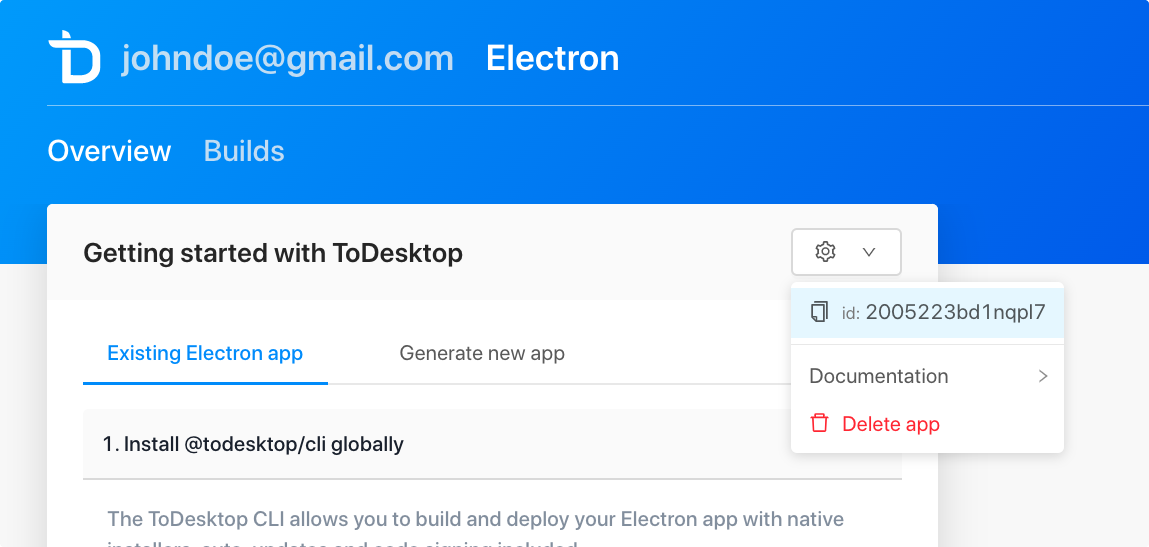
Example: `2005223bd1nqpl7`
|
|
522
540
|
|
|
523
|
-
Your ToDesktop application ID. This is used to identify your app. This would have been generated when you first created your ToDesktop application via the web interface
|
|
541
|
+
Your ToDesktop application ID. This is used to identify your app. This would have been generated when you first created your ToDesktop application via the web interface.
|
|
524
542
|
|
|
525
543
|
|
|
526
544
|
|
|
527
545
|
### `linux` - (optional) object
|
|
528
546
|
|
|
529
|
-
|
|
530
|
-
|
|
531
|
-
Example: `{ "category": "Utility"`.
|
|
547
|
+
Example: `{ "category": "Utility"}`
|
|
532
548
|
|
|
533
549
|
This object contains some options that only apply to the building & releasing for Linux.
|
|
534
550
|
|
|
535
|
-
|
|
551
|
+
Default: We have good default settings for Linux.
|
|
536
552
|
|
|
537
|
-
|
|
553
|
+
#### `linux.category` - (optional) string
|
|
538
554
|
|
|
539
|
-
Example: `Utility
|
|
555
|
+
Example: `Utility`
|
|
540
556
|
|
|
541
557
|
The [application category](https://specifications.freedesktop.org/menu-spec/latest/apa.html#main-category-registry).
|
|
542
558
|
|
|
543
|
-
|
|
559
|
+
Default: undefined
|
|
544
560
|
|
|
545
|
-
|
|
561
|
+
#### `linux.icon` - (optional) string
|
|
546
562
|
|
|
547
|
-
|
|
563
|
+
Example: `./linux-icon.png`
|
|
548
564
|
|
|
549
565
|
The path to your application's Linux desktop icon. It must be an ICNS or PNG.
|
|
550
566
|
|
|
567
|
+
Default: The root [`icon`](#icon---string) is used.
|
|
568
|
+
|
|
551
569
|
Note: to ensure the icon is never missing (e.g. this happens sometimes in Ubuntu), set the [`icon` option](https://www.electronjs.org/docs/api/browser-window#new-browserwindowoptions) when creating your `BrowserWindow`s.
|
|
552
570
|
|
|
553
571
|
#### `linux.imageVersion` - (optional) string
|
|
554
572
|
|
|
555
|
-
Example: `0.1.0`
|
|
556
|
-
|
|
557
573
|
Default: `0.0.11`
|
|
558
574
|
|
|
575
|
+
Example: `0.1.0`
|
|
576
|
+
|
|
559
577
|
The version of the Linux image that ToDesktop should use to build your app.
|
|
560
578
|
|
|
561
579
|
Linux Changelog:
|
|
@@ -580,21 +598,24 @@ Whether to include **all** of the submodules node_modules directories
|
|
|
580
598
|
### `mac` - (optional) object
|
|
581
599
|
|
|
582
600
|
Default: We have good default settings for Mac.
|
|
583
|
-
|
|
601
|
+
|
|
602
|
+
Example: `{ "entitlements": "./entitlements.mac.plist" }`
|
|
584
603
|
|
|
585
604
|
This object contains some options that only apply to the building & releasing for MacOS.
|
|
586
605
|
|
|
587
606
|
#### `mac.additionalBinariesToSign` - (optional) array of strings
|
|
588
607
|
|
|
589
608
|
Default: `[]`
|
|
590
|
-
|
|
609
|
+
|
|
610
|
+
Example: `["./node_modules/example-package/example-file"]`
|
|
591
611
|
|
|
592
612
|
Paths of any extra binaries that need to be signed. These could be files in your own app code or `node_modules`.
|
|
593
613
|
|
|
594
614
|
#### `mac.category` - (optional) string
|
|
595
615
|
|
|
596
616
|
Default: undefined
|
|
597
|
-
|
|
617
|
+
|
|
618
|
+
Example: `public.app-category.productivity`
|
|
598
619
|
|
|
599
620
|
The application category type, as shown in the Finder via _View -> Arrange by Application Category_ when viewing the Applications directory.
|
|
600
621
|
|
|
@@ -605,90 +626,100 @@ Valid values are listed in [Apple's documentation](https://developer.apple.com/l
|
|
|
605
626
|
#### `mac.entitlements` - (optional) string
|
|
606
627
|
|
|
607
628
|
Default: A sane minimal entitlements file we've put together.
|
|
608
|
-
|
|
629
|
+
|
|
630
|
+
Example: `./entitlements.mac.plist`
|
|
609
631
|
|
|
610
632
|
The path to an entitlements file for signing your application. It must be a plist file.
|
|
611
633
|
|
|
612
634
|
#### `mac.entitlementsInherit` - (optional) string
|
|
613
635
|
|
|
614
636
|
Default: No entitlements file is provided by default.
|
|
615
|
-
|
|
637
|
+
|
|
638
|
+
Example: `./entitlementsInherit.mac.plist`
|
|
616
639
|
|
|
617
640
|
The path to a child entitlements file for signing your application. It must be a plist file.
|
|
618
641
|
|
|
619
642
|
#### `mac.extendInfo` - (optional) object
|
|
620
643
|
|
|
621
|
-
Default: `{}
|
|
622
|
-
|
|
644
|
+
Default: `{}`
|
|
645
|
+
|
|
646
|
+
Example: `{ "NSUserNotificationAlertStyle": "alert" }`
|
|
623
647
|
|
|
624
648
|
Extra entries for `Info.plist`.
|
|
625
649
|
|
|
626
650
|
#### `mac.icon` - (optional) string
|
|
627
651
|
|
|
628
|
-
Example: `./mac-icon.png
|
|
629
|
-
|
|
630
|
-
Default: The root [`icon`](#icon---string) is used.
|
|
652
|
+
Example: `./mac-icon.png`
|
|
631
653
|
|
|
632
654
|
The path to your application's Mac desktop icon. It must be an ICNS or PNG.
|
|
633
655
|
|
|
656
|
+
Default: The root [`icon`](#icon---string) is used.
|
|
657
|
+
|
|
634
658
|
#### `mac.requirements` - (optional) string
|
|
635
659
|
|
|
636
|
-
Example: `./requirements.txt`.
|
|
637
660
|
Default: No requirements file is used by default.
|
|
638
661
|
|
|
662
|
+
Example: `./requirements.txt`
|
|
663
|
+
|
|
639
664
|
The path to the [requirements file](https://developer.apple.com/library/archive/documentation/Security/Conceptual/CodeSigningGuide/RequirementLang/RequirementLang.html) used when signing your application.
|
|
640
665
|
|
|
641
666
|
### `mas` - (optional) object
|
|
642
667
|
|
|
643
|
-
|
|
644
|
-
Example: `{ "type": "development" }`.
|
|
668
|
+
Example: `{ "type": "development" }`
|
|
645
669
|
|
|
646
670
|
This object contains options that only apply to building the application for Mac App Store.
|
|
647
671
|
|
|
672
|
+
Default: We use default development settings for Mac App Store.
|
|
673
|
+
|
|
648
674
|
#### `mas.entitlements` - (optional) string
|
|
649
675
|
|
|
650
676
|
Default: No entitlements file is provided by default.
|
|
651
|
-
|
|
677
|
+
|
|
678
|
+
Example: `./entitlements.mas.plist`
|
|
652
679
|
|
|
653
680
|
The path to an entitlements file for signing your application. It must be a plist file.
|
|
654
681
|
|
|
655
682
|
#### `mas.entitlementsInherit` - (optional) string
|
|
656
683
|
|
|
657
684
|
Default: No entitlements file is provided by default.
|
|
658
|
-
|
|
685
|
+
|
|
686
|
+
Example: `./entitlementsInherit.mas.plist`
|
|
659
687
|
|
|
660
688
|
The path to a child entitlements file for signing your application. It must be a plist file.
|
|
661
689
|
|
|
662
690
|
#### `mas.provisioningProfile` - (optional) string
|
|
663
691
|
|
|
664
692
|
Default: No provisioning profile is used by default.
|
|
665
|
-
|
|
693
|
+
|
|
694
|
+
Example: `./mas.provisionprofile`
|
|
666
695
|
|
|
667
696
|
The path to a provisioning profile for authorizing your application.
|
|
668
697
|
|
|
669
698
|
#### `mas.type` - (optional) string
|
|
670
699
|
|
|
671
|
-
Default: `
|
|
672
|
-
|
|
700
|
+
Default: `development`
|
|
701
|
+
|
|
702
|
+
Example: `distribution`
|
|
673
703
|
|
|
674
704
|
Whether to sign app for development or for distribution.
|
|
675
705
|
|
|
676
706
|
### `mas.x64ArchFiles` - (optional) string
|
|
677
707
|
|
|
678
708
|
Default: not defined
|
|
679
|
-
|
|
709
|
+
|
|
710
|
+
Example: `Contents/Resources/foobar/**`
|
|
680
711
|
|
|
681
712
|
Minimatch pattern of paths that are allowed to be x64 binaries in both ASAR files.
|
|
682
713
|
|
|
683
714
|
### `nodeVersion` - string
|
|
684
715
|
|
|
685
|
-
Example: `18.12.1
|
|
716
|
+
Example: `18.12.1`
|
|
686
717
|
|
|
687
718
|
The version of Node.js that ToDesktop should use to build your app.
|
|
688
719
|
|
|
689
720
|
### `npmVersion` - string
|
|
690
721
|
|
|
691
|
-
Example: `9.8.1
|
|
722
|
+
Example: `9.8.1`
|
|
692
723
|
|
|
693
724
|
The version of NPM that ToDesktop should use for installation.
|
|
694
725
|
|
|
@@ -696,6 +727,8 @@ The version of NPM that ToDesktop should use for installation.
|
|
|
696
727
|
|
|
697
728
|
Default: `{}`
|
|
698
729
|
|
|
730
|
+
If you want to override the default `package.json` configuration, use the `packageJson` property. For example, you can use this to override the `productName` or `version` properties.
|
|
731
|
+
|
|
699
732
|
Example:
|
|
700
733
|
|
|
701
734
|
```js
|
|
@@ -709,8 +742,6 @@ Example:
|
|
|
709
742
|
}
|
|
710
743
|
```
|
|
711
744
|
|
|
712
|
-
If you want to override the default `package.json` configuration, use the `packageJson` property. For example, you can use this to override the `productName` or `version` properties.
|
|
713
|
-
|
|
714
745
|
You can also set the version of a `dependency` (or `devDependency`), such as Electron Builder, to `null`. This will remove Electron Builder from the effective `package.json` that ToDesktop will use.
|
|
715
746
|
|
|
716
747
|
```js
|
|
@@ -732,33 +763,33 @@ The package manager to use when installing dependencies. Valid values are `npm`,
|
|
|
732
763
|
|
|
733
764
|
### `pnpmVersion` - string
|
|
734
765
|
|
|
735
|
-
Example: `8.10.5
|
|
766
|
+
Example: `8.10.5`
|
|
736
767
|
|
|
737
768
|
The version of pnpm that ToDesktop should use for installation.
|
|
738
769
|
|
|
739
770
|
### `rebuildLibrary` - (optional) string
|
|
740
771
|
|
|
741
|
-
Default: `app-builder
|
|
772
|
+
Default: `app-builder`
|
|
742
773
|
|
|
743
774
|
The library that ToDesktop should use for rebuilding native modules. Valid values are `app-builder` or `@electron/rebuild`.
|
|
744
775
|
|
|
745
776
|
### `schemaVersion` - number
|
|
746
777
|
|
|
747
|
-
Example: `1
|
|
778
|
+
Example: `1`
|
|
748
779
|
|
|
749
780
|
This is the `todesktop.json` schema version. This must be `1`.
|
|
750
781
|
|
|
751
782
|
### `snap` - (optional) object
|
|
752
783
|
|
|
753
|
-
Example: `{ "confinement": "classic", "grade": "devel" }
|
|
784
|
+
Example: `{ "confinement": "classic", "grade": "devel" }`
|
|
754
785
|
|
|
755
786
|
This object contains some options that only apply to the building for the [Snap Store](https://snapcraft.io/store).
|
|
756
787
|
|
|
757
788
|
#### `snap.after` - (optional) array of strings
|
|
758
789
|
|
|
759
|
-
Default: `["desktop-gtk2"]
|
|
790
|
+
Default: `["desktop-gtk2"]`
|
|
760
791
|
|
|
761
|
-
Example: `["launch-scripts"]
|
|
792
|
+
Example: `["launch-scripts"]`
|
|
762
793
|
|
|
763
794
|
Ensures that all the part names listed are staged before the app part begins its [lifecycle](https://snapcraft.io/docs/parts-lifecycle#heading--steps).
|
|
764
795
|
|
|
@@ -766,79 +797,79 @@ Ensures that all the part names listed are staged before the app part begins its
|
|
|
766
797
|
|
|
767
798
|
Default: See [snap.ts](https://github.com/electron-userland/electron-builder/blob/master/packages/app-builder-lib/templates/snap/snapcraft.yaml#L29).
|
|
768
799
|
|
|
769
|
-
Example: `["-usr/lib/python*"]
|
|
800
|
+
Example: `["-usr/lib/python*"]`
|
|
770
801
|
|
|
771
802
|
Specifies which files from the app part to stage and which to exclude. Individual files, directories, wildcards, globstars, and exclusions are accepted. See [Snapcraft filesets](https://snapcraft.io/docs/snapcraft-filesets) to learn more about the format.
|
|
772
803
|
|
|
773
804
|
#### `snap.assumes` - (optional) string or array of strings
|
|
774
805
|
|
|
775
|
-
Default: `undefined
|
|
806
|
+
Default: `undefined`
|
|
776
807
|
|
|
777
|
-
Example: `snapd2.38
|
|
808
|
+
Example: `snapd2.38`
|
|
778
809
|
|
|
779
810
|
The list of features that must be supported by the core in order for this snap to install. To learn more, see the [Snapcraft docs](https://snapcraft.io/docs/snapcraft-top-level-metadata#heading--assumes).
|
|
780
811
|
|
|
781
812
|
#### `snap.autoStart` - (optional) boolean
|
|
782
813
|
|
|
783
|
-
Default: `false
|
|
814
|
+
Default: `false`
|
|
784
815
|
|
|
785
|
-
Example: `true
|
|
816
|
+
Example: `true`
|
|
786
817
|
|
|
787
818
|
Whether or not the snap should automatically start on login.
|
|
788
819
|
|
|
789
820
|
#### `snap.base` - (optional) string
|
|
790
821
|
|
|
791
|
-
Default: `core18
|
|
822
|
+
Default: `core18`
|
|
792
823
|
|
|
793
|
-
Example: `core20
|
|
824
|
+
Example: `core20`
|
|
794
825
|
|
|
795
826
|
The base snap to use for building this snap.
|
|
796
827
|
|
|
797
828
|
#### `snap.buildPackages` - (optional) array of strings
|
|
798
829
|
|
|
799
|
-
Default: `[]
|
|
830
|
+
Default: `[]`
|
|
800
831
|
|
|
801
|
-
Example: `["libssl-dev", "libssh-dev", "libncursesw5-dev"]
|
|
832
|
+
Example: `["libssl-dev", "libssh-dev", "libncursesw5-dev"]`
|
|
802
833
|
|
|
803
834
|
The list of debian packages needs to be installed for building this snap.
|
|
804
835
|
|
|
805
836
|
#### `snap.confinement` - (optional) string
|
|
806
837
|
|
|
807
|
-
Default: `strict
|
|
838
|
+
Default: `strict`
|
|
808
839
|
|
|
809
|
-
Example: `classic
|
|
840
|
+
Example: `classic`
|
|
810
841
|
|
|
811
842
|
The type of [confinement](https://snapcraft.io/docs/reference/confinement) supported by the snap. `devmode`, `strict`, or `classic`.
|
|
812
843
|
|
|
813
844
|
#### `snap.environment` - (optional) object
|
|
814
845
|
|
|
815
|
-
Default: `{"TMPDIR":
|
|
846
|
+
Default: `{"TMPDIR":"$XDG_RUNTIME_DIR"}`
|
|
816
847
|
|
|
817
|
-
Example: `{"TMPDIR": "$XDG_RUNTIME_DIR"}
|
|
848
|
+
Example: `{"TMPDIR": "$XDG_RUNTIME_DIR"}`
|
|
818
849
|
|
|
819
850
|
The custom environment. If you set this, it will be merged with the default.
|
|
820
851
|
|
|
821
852
|
#### `snap.grade` - (optional) string
|
|
822
853
|
|
|
823
|
-
Default: `stable
|
|
854
|
+
Default: `stable`
|
|
824
855
|
|
|
825
|
-
Example: `devel
|
|
856
|
+
Example: `devel`
|
|
826
857
|
|
|
827
858
|
The quality grade of the snap. It can be either `devel` (i.e. a development version of the snap, so not to be published to the "stable" or "candidate" channels) or `stable` (i.e. a stable release or release candidate, which can be released to all channels).
|
|
828
859
|
|
|
829
860
|
#### `snap.layout` - (optional) object
|
|
830
861
|
|
|
831
|
-
Default: `undefined
|
|
862
|
+
Default: `undefined`
|
|
832
863
|
|
|
833
|
-
Example: `{ "/var/lib/foo": { bind: "$SNAP_DATA/var/lib/foo" } }
|
|
864
|
+
Example: `{ "/var/lib/foo": { "bind": "$SNAP_DATA/var/lib/foo" } }`
|
|
834
865
|
|
|
835
866
|
Specifies any files to make accessible from locations such as `/usr`, `/var`, and `/etc`. See [snap layouts](https://snapcraft.io/docs/snap-layouts) to learn more.
|
|
836
867
|
|
|
837
868
|
#### `snap.plugs` - (optional) array containing strings and or objects
|
|
838
869
|
|
|
839
|
-
Default: `["desktop",
|
|
870
|
+
Default: `["desktop","desktop-legacy","home","x11","unity7","browser-support","network","gsettings","pulseaudio","opengl"]`
|
|
840
871
|
|
|
841
|
-
Example: `[ "default", { "browser-sandbox": { "interface": "browser-support", "allow-sandbox": true } }, "another-simple-plug-name" ]
|
|
872
|
+
Example: `[ "default", { "browser-sandbox": { "interface": "browser-support", "allow-sandbox": true } }, "another-simple-plug-name" ]`
|
|
842
873
|
|
|
843
874
|
The list of [plugs](https://snapcraft.io/docs/reference/interfaces). If list contains `default`, it will be replaced with the default list, so, `["default", "foo"]` can be used to add a custom plug `foo` in addition to the default list.
|
|
844
875
|
|
|
@@ -858,9 +889,9 @@ Additional attributes can be specified using object instead of just name of plug
|
|
|
858
889
|
|
|
859
890
|
#### `snap.stagePackages` - (optional) array of strings
|
|
860
891
|
|
|
861
|
-
Default: `["libasound2",
|
|
892
|
+
Default: `["libasound2","libgconf2-4","libnotify4","libnspr4","libnss3","libpcre3","libpulse0","libxss1","libxtst6"]`
|
|
862
893
|
|
|
863
|
-
Example: `["default", "depends"]
|
|
894
|
+
Example: `["default", "depends"]`
|
|
864
895
|
|
|
865
896
|
The list of Ubuntu packages to use that are needed to support the app part creation. Like `depends` for deb. If list contains `default`, it will be replaced with the default list, so, `["default", "foo"]` can be used to add custom package `foo` in addition to the defaults.
|
|
866
897
|
|
|
@@ -868,50 +899,56 @@ The list of Ubuntu packages to use that are needed to support the app part creat
|
|
|
868
899
|
|
|
869
900
|
Default: The [productName](#recommendations-for-app-packagejson).
|
|
870
901
|
|
|
871
|
-
Example: `The super cat generator
|
|
902
|
+
Example: `The super cat generator`
|
|
872
903
|
|
|
873
904
|
A sentence summarising the snap. Max len. 78 characters, describing the snap in short and simple terms.
|
|
874
905
|
|
|
875
906
|
#### `snap.useTemplateApp` - (optional) boolean
|
|
876
907
|
|
|
877
|
-
Default:
|
|
908
|
+
Default: true if `stagePackages` is not specified.
|
|
878
909
|
|
|
879
|
-
Example: `false
|
|
910
|
+
Example: `false`
|
|
880
911
|
|
|
881
912
|
Whether to use a template snap.
|
|
882
913
|
|
|
883
914
|
### `updateUrlBase` - (optional) string
|
|
884
915
|
|
|
885
916
|
Default: ToDesktop's auto-update URL.
|
|
886
|
-
|
|
917
|
+
|
|
918
|
+
Example: `https://example.com/updates`
|
|
887
919
|
|
|
888
920
|
The URL to check for updates. You should only set this if you want to use your own self-hosted update server instead of ToDesktop's built-in update service. See https://www.github.com/ToDesktop/self-hosted for more information.
|
|
889
921
|
|
|
890
922
|
### `uploadSizeLimit` - (optional) number
|
|
891
923
|
|
|
892
|
-
Default: `20
|
|
893
|
-
|
|
924
|
+
Default: `20`
|
|
925
|
+
|
|
926
|
+
Example: `35`
|
|
894
927
|
|
|
895
928
|
The max upload size (in MB). Before uploading your files to our servers, we check that the total file size is less than this number. If you are accidentally including unneccesary files in your app, check out the `appPath` and `appFiles` options.
|
|
896
929
|
|
|
897
930
|
### `windows` - (optional) object
|
|
898
931
|
|
|
899
|
-
|
|
900
|
-
|
|
901
|
-
Example: `{ "icon": "./icon.ico" }`.
|
|
932
|
+
Example: `{ "icon": "./icon.ico" }`
|
|
902
933
|
|
|
903
934
|
This object contains some options that only apply to the building & releasing for Windows.
|
|
904
935
|
|
|
905
|
-
|
|
936
|
+
Default: We have good default settings for Windows.
|
|
906
937
|
|
|
907
|
-
|
|
938
|
+
#### `windows.icon` - (optional) string
|
|
908
939
|
|
|
909
|
-
|
|
940
|
+
Example: `./icon.ico`
|
|
910
941
|
|
|
911
942
|
The path to your application's Windows desktop icon. It must be an ICO, ICNS, or PNG.
|
|
912
943
|
|
|
944
|
+
Default: The root [`icon`](#icon---string) is used.
|
|
945
|
+
|
|
913
946
|
#### `windows.nsisCustomBinary` - (optional) object
|
|
914
947
|
|
|
948
|
+
Default: `undefined`
|
|
949
|
+
|
|
950
|
+
Allows you to provide your own makensis, such as one with support for debug logging via LogSet and LogText. (Logging also requires option debugLogging = true). It's not recommended to use it for production build.
|
|
951
|
+
|
|
915
952
|
Example:
|
|
916
953
|
|
|
917
954
|
```json
|
|
@@ -922,10 +959,6 @@ Example:
|
|
|
922
959
|
}
|
|
923
960
|
```
|
|
924
961
|
|
|
925
|
-
Default: `undefined`.
|
|
926
|
-
|
|
927
|
-
Allows you to provide your own makensis, such as one with support for debug logging via LogSet and LogText. (Logging also requires option debugLogging = true). It's not recommended to use it for production build.
|
|
928
|
-
|
|
929
962
|
Example of NSIS script which enables install logging:
|
|
930
963
|
|
|
931
964
|
```nsis
|
|
@@ -937,26 +970,80 @@ Example of NSIS script which enables install logging:
|
|
|
937
970
|
|
|
938
971
|
#### `windows.nsisInclude` - (optional) string
|
|
939
972
|
|
|
940
|
-
|
|
973
|
+
Default: `undefined`
|
|
941
974
|
|
|
942
|
-
|
|
975
|
+
Example: `build/installer.nsh`
|
|
943
976
|
|
|
944
977
|
The path to NSIS script to customize installer.
|
|
945
978
|
|
|
946
979
|
#### `windows.publisherName` - (optional) array of strings
|
|
947
980
|
|
|
948
|
-
Example: `["ABC Limited"]`.
|
|
949
|
-
|
|
950
981
|
Default: Default to the common name from your code signing certificate.
|
|
951
982
|
|
|
983
|
+
Example: `["ABC Limited"]`
|
|
984
|
+
|
|
952
985
|
The publisher name, exactly as in your code signing certificate. Several names can be provided. Defaults to common name from your code signing certificate. You should typically not include this property in your configuration unless you wish to transition to a new certificate in the future.
|
|
953
986
|
|
|
954
987
|
### `appBuilderLibVersion` - (optional) string
|
|
955
988
|
|
|
956
|
-
Example: `22.14.13
|
|
989
|
+
Example: `22.14.13`
|
|
957
990
|
|
|
958
991
|
The version of app-builder-lib that ToDesktop should use for building your app. This can be useful if you need to use a specific version that includes certain features or fixes.
|
|
959
992
|
|
|
993
|
+
### `platformOverrides` - (optional) object
|
|
994
|
+
|
|
995
|
+
Default: `{}`
|
|
996
|
+
|
|
997
|
+
This option allows you to specify platform-specific configurations for Windows, macOS, and Linux builds. Most top-level configuration fields available in `todesktop.json` can be overridden within the `windows`, `mac`, or `linux` objects under `platformOverrides`.
|
|
998
|
+
|
|
999
|
+
Example:
|
|
1000
|
+
|
|
1001
|
+
```json
|
|
1002
|
+
{
|
|
1003
|
+
"appId": "myapp.global.id",
|
|
1004
|
+
"platformOverrides": {
|
|
1005
|
+
"windows": {
|
|
1006
|
+
"appId": "myapp.windows.id",
|
|
1007
|
+
"copyright": "Copyright © My Company (Windows)"
|
|
1008
|
+
},
|
|
1009
|
+
"mac": {
|
|
1010
|
+
"appId": "myapp.mac.id",
|
|
1011
|
+
"mac": {
|
|
1012
|
+
"category": "public.app-category.developer-tools"
|
|
1013
|
+
}
|
|
1014
|
+
},
|
|
1015
|
+
"linux": {
|
|
1016
|
+
"copyright": "Copyright © My Company (Linux)"
|
|
1017
|
+
}
|
|
1018
|
+
}
|
|
1019
|
+
}
|
|
1020
|
+
```
|
|
1021
|
+
|
|
1022
|
+
When a build is performed for a specific platform (e.g., Windows), the ToDesktop CLI will first take the global configuration value for a field. If that same field is defined within `platformOverrides.windows`, the platform-specific value will be used instead.
|
|
1023
|
+
|
|
1024
|
+
In the example above:
|
|
1025
|
+
|
|
1026
|
+
- For Windows builds:
|
|
1027
|
+
- `appId` will be `myapp.windows.id`.
|
|
1028
|
+
- `copyright` will be `Copyright © My Company (Windows)`.
|
|
1029
|
+
- For macOS builds:
|
|
1030
|
+
- `appId` will be `myapp.mac.id`.
|
|
1031
|
+
- The `mac.category` will be `public.app-category.developer-tools`.
|
|
1032
|
+
- For Linux builds:
|
|
1033
|
+
- `appId` will remain `myapp.global.id` (as it's not overridden for Linux).
|
|
1034
|
+
- `copyright` will be `Copyright © My Company (Linux)`.
|
|
1035
|
+
- For any other properties not specified in the platform override, the global value will be used.
|
|
1036
|
+
|
|
1037
|
+
This is particularly useful for settings like `appId`, `copyright`, or platform-specific configurations within the `windows`, `mac`, or `linux` blocks (e.g., `mac.category`, `windows.icon`).
|
|
1038
|
+
|
|
1039
|
+
The fields that **cannot** be overridden using `platformOverrides` are:
|
|
1040
|
+
|
|
1041
|
+
- `id` (the ToDesktop application ID)
|
|
1042
|
+
- `icon` (the main application icon, though platform-specific icons like `windows.icon` or `mac.icon` _can_ be overridden)
|
|
1043
|
+
- `schemaVersion`
|
|
1044
|
+
- `extends`
|
|
1045
|
+
- `platformOverrides` itself
|
|
1046
|
+
|
|
960
1047
|
## Build lifecycle hooks (package.json scripts)
|
|
961
1048
|
|
|
962
1049
|
Sometimes you want to do something before or during the build process. For example, you might want to run a script before the build starts, or you might want to run a script after the files have been packaged. Our lifecycle hooks provide a way to do this.
|
|
@@ -1201,6 +1288,10 @@ Now, when we build your app on ToDesktop servers, it will also run your custom `
|
|
|
1201
1288
|
|
|
1202
1289
|
## Changelog
|
|
1203
1290
|
|
|
1291
|
+
### v1.12.5
|
|
1292
|
+
|
|
1293
|
+
- Fix: Removed invalid React Hook call in `BuildCommand` that caused errors.
|
|
1294
|
+
|
|
1204
1295
|
### v1.12.3
|
|
1205
1296
|
|
|
1206
1297
|
- Allow `catalog:` protocol (used by PNPM) for electron dependency version in `package.json`.
|
|
@@ -1332,7 +1423,7 @@ Now, when we build your app on ToDesktop servers, it will also run your custom `
|
|
|
1332
1423
|
|
|
1333
1424
|
### v1.7.4
|
|
1334
1425
|
|
|
1335
|
-
- Fix: Linux/Windows platform links no longer have mac/zip
|
|
1426
|
+
- Fix: Linux/Windows platform links no longer have mac/zip/[arch] added to the end of the download URL
|
|
1336
1427
|
|
|
1337
1428
|
### v1.7.3
|
|
1338
1429
|
|