@thisisamank/noenv-cli 0.0.0-stage → 0.1.1
This diff represents the content of publicly available package versions that have been released to one of the supported registries. The information contained in this diff is provided for informational purposes only and reflects changes between package versions as they appear in their respective public registries.
- package/README.md +57 -2
- package/dist/noenv.js +2062 -0
- package/package.json +41 -4
package/README.md
CHANGED
|
@@ -1,3 +1,58 @@
|
|
|
1
|
-
#
|
|
1
|
+
# @thisisamank/noenv-cli
|
|
2
2
|
|
|
3
|
-
|
|
3
|
+
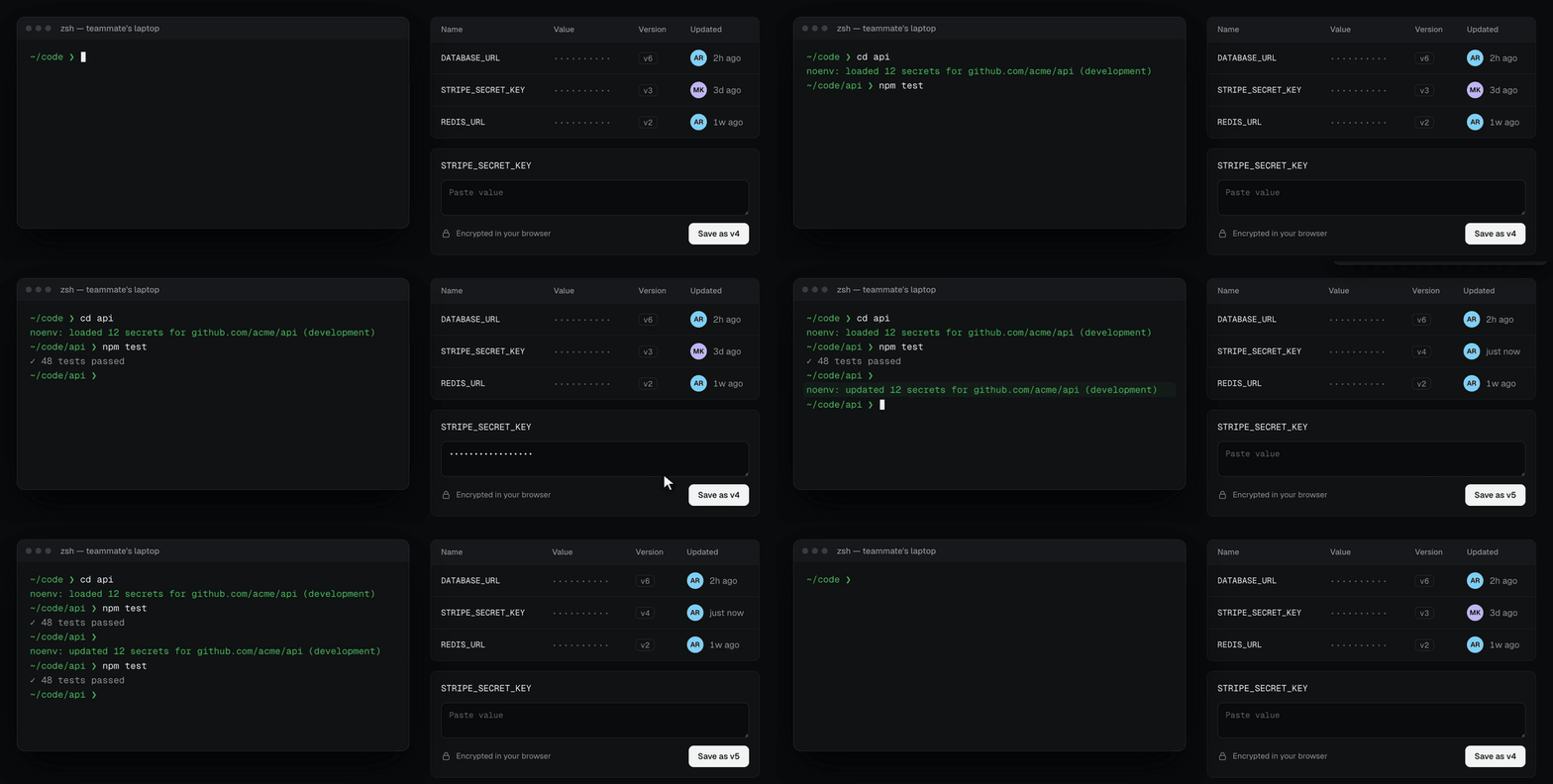
The command-line client for [noenv](https://github.com/thisisamank/noenv): encrypted environment variables that load when you `cd` into a repo, and unload when you leave.
|
|
4
|
+
|
|
5
|
+
|
|
6
|
+
|
|
7
|
+
[Website](https://noenv.thisisamank.in) · [40-second demo](https://noenv.thisisamank.in/assets/tour.mp4)
|
|
8
|
+
|
|
9
|
+
```console
|
|
10
|
+
$ cd ~/code/backend
|
|
11
|
+
noenv: loaded 12 secrets for github.com/acme/backend (development)
|
|
12
|
+
$ npm run dev # your app sees DATABASE_URL, STRIPE_KEY, …
|
|
13
|
+
$ cd .. # and they are gone again
|
|
14
|
+
```
|
|
15
|
+
|
|
16
|
+
You need a noenv server. It runs on your own Cloudflare account; see [deploy noenv](https://github.com/thisisamank/noenv#get-started).
|
|
17
|
+
|
|
18
|
+
## Install
|
|
19
|
+
|
|
20
|
+
```sh
|
|
21
|
+
npm install -g @thisisamank/noenv-cli
|
|
22
|
+
```
|
|
23
|
+
|
|
24
|
+
Requires Node.js 22 or newer.
|
|
25
|
+
|
|
26
|
+
## Connect your shell
|
|
27
|
+
|
|
28
|
+
Add these lines to `~/.zshrc` or `~/.bashrc`, using your server's URL:
|
|
29
|
+
|
|
30
|
+
```sh
|
|
31
|
+
export NOENV_URL="https://<your-worker>.workers.dev"
|
|
32
|
+
eval "$(noenv shell zsh)" # or: noenv shell bash
|
|
33
|
+
```
|
|
34
|
+
|
|
35
|
+
Open a new terminal and `cd` into a git repo. The first time, your browser opens so you can approve the terminal with your passkey.
|
|
36
|
+
|
|
37
|
+
## Commands
|
|
38
|
+
|
|
39
|
+
| Command | What it does |
|
|
40
|
+
|---|---|
|
|
41
|
+
| `noenv status` | Show the server, your account, and the current project |
|
|
42
|
+
| `noenv init` | Create a project for this repo and its first environment |
|
|
43
|
+
| `noenv secret set KEY` | Save a secret (the value is read without echo) |
|
|
44
|
+
| `noenv secret list` | List the secrets in this environment |
|
|
45
|
+
| `noenv secret history KEY` | List the versions of a secret |
|
|
46
|
+
| `noenv secret rollback KEY VERSION` | Restore an older version |
|
|
47
|
+
| `noenv migrate` | Move this repo's `.env` files into noenv |
|
|
48
|
+
| `noenv grant EMAIL ROLE` | Give someone access and share the key |
|
|
49
|
+
| `noenv revoke EMAIL` | Remove someone from this project |
|
|
50
|
+
| `noenv auth` | Sign in again |
|
|
51
|
+
|
|
52
|
+
The repo's git `origin` decides the project. The environment is `development` unless a `.noenv` file in the repo sets `environment = "staging"`, or you set `NOENV_ENVIRONMENT=staging` for one shell.
|
|
53
|
+
|
|
54
|
+
Changes made anywhere (this terminal, the dashboard, or a teammate) load at your next prompt.
|
|
55
|
+
|
|
56
|
+
## Security
|
|
57
|
+
|
|
58
|
+
Values are encrypted and decrypted on your machine. Your key lives in `~/.config/noenv`. The server stores only ciphertext.
|