@teqfw/di 0.20.0 → 0.21.0
This diff represents the content of publicly available package versions that have been released to one of the supported registries. The information contained in this diff is provided for informational purposes only and reflects changes between package versions as they appear in their respective public registries.
- package/README.md +236 -73
- package/RELEASE.md +12 -1
- package/dist/di.cjs.js +50 -50
- package/dist/di.esm.js +50 -50
- package/package.json +15 -7
- package/src/Api/Container/Parser/Chunk.js +23 -0
- package/src/Api/Container/Parser.js +28 -0
- package/src/Api/Container/PostProcessor/Chunk.js +17 -0
- package/src/Api/Container/PostProcessor.js +25 -0
- package/src/Api/Container/PreProcessor/Chunk.js +17 -0
- package/src/Api/Container/PreProcessor.js +23 -0
- package/src/Api/Container.js +61 -0
- package/src/{SpecAnalyser.js → Container/A/Composer/A/SpecParser.js} +11 -7
- package/src/Container/A/Composer.js +70 -0
- package/src/Container/A/Parser/Chunk/Def.js +70 -0
- package/src/Container/Parser.js +48 -0
- package/src/Container/PostProcessor.js +32 -0
- package/src/Container/PreProcessor.js +34 -0
- package/src/{Resolver.js → Container/Resolver.js} +4 -3
- package/src/Container.js +62 -55
- package/src/Defs.js +5 -1
- package/src/{Api/ObjectKey.js → DepId.js} +2 -1
- package/teqfw.json +9 -0
- package/src/Composer.js +0 -68
- package/src/DepId/Parser.mjs +0 -68
- package/src/Parser/Def.js +0 -63
- package/src/Parser/Old.js +0 -108
- package/src/Parser.js +0 -65
- package/src/PreProcessor/Replace.js +0 -48
- package/src/PreProcessor.js +0 -45
- package/src/Spec/Parser.mjs +0 -101
package/README.md
CHANGED
|
@@ -1,102 +1,265 @@
|
|
|
1
1
|
# @teqfw/di
|
|
2
2
|
|
|
3
|
-
|
|
4
|
-
|
|
5
|
-
|
|
6
|
-
|
|
7
|
-
|
|
8
|
-
|
|
9
|
-
|
|
10
|
-
невозможен - это не DI.
|
|
3
|
+
A Dependency Injection container for regular JavaScript is provided, which can be used in both _browser_ and _Node.js_
|
|
4
|
+
applications. This library exclusively supports ES6 modules. The primary objective of this library is late binding with
|
|
5
|
+
_minimal manual configuration_ for the container. All linking instructions are encapsulated within the dependency
|
|
6
|
+
identifiers and source path resolver. Additionally, the container offers the capability to modify object identifiers
|
|
7
|
+
(_preprocessing_) and the created objects (_postprocessing_). These features enable you to more comprehensively
|
|
8
|
+
distribute the necessary functionality across npm packages and reuse npm packages in different projects, following a '
|
|
9
|
+
_modular monolith_' architecture (see the [sample](https://github.com/flancer64/demo-di-app)).
|
|
11
10
|
|
|
12
|
-
|
|
13
|
-
in your projects, dynamically importing ES6-modules from these namespaces, creating new objects from imported
|
|
14
|
-
functions/classes and resolving dependencies in constructors. It uses pure ECMAScript 2015+ (ES6+) and works both for
|
|
15
|
-
modern browsers & nodejs apps. You can share the same code between your frontend (browser) and your backend (nodejs)
|
|
16
|
-
without TypeScript and preprocessors. Code in the browser's debugger will be the same as in your editor. Finally, you
|
|
17
|
-
even can use interfaces in you projects and replace it with implementations.
|
|
11
|
+
## Inversion of Control
|
|
18
12
|
|
|
19
|
-
The
|
|
20
|
-
|
|
13
|
+
The primary motivation for creating this library was the concept that JavaScript is a language in which the entire
|
|
14
|
+
application can be written, both on the front end and the back end. The idea was to enable the use of the same
|
|
15
|
+
JavaScript code seamlessly on both the front end and the back end without requiring any changes, including additional
|
|
16
|
+
transpilation.
|
|
21
17
|
|
|
22
|
-
|
|
18
|
+
The main challenge encountered along this path was static importing. When the entire application can fit into a single
|
|
19
|
+
npm package, all sources can be linked to each other through relative paths. However, if the sources are distributed
|
|
20
|
+
across different npm packages, addressing them becomes problematic:
|
|
23
21
|
|
|
22
|
+
```javascript
|
|
23
|
+
import something from '@vendor/package/src/Module.js'; // backend style
|
|
24
|
+
import something from 'https://domain.com/@vendor/package/src/Module.js'; // frontend style
|
|
24
25
|
```
|
|
25
|
-
|
|
26
|
+
|
|
27
|
+
The inversion of control (IoC) design pattern came to the rescue. In this pattern, any software object with external
|
|
28
|
+
dependencies provides a mechanism for obtaining these dependencies. The external environment, whether it's a test unit
|
|
29
|
+
or an object container, is responsible for creating these dependencies and providing them to the software object.
|
|
30
|
+
|
|
31
|
+
```javascript
|
|
32
|
+
// constructor-based injection
|
|
33
|
+
class Service {
|
|
34
|
+
constructor(config, logger) {}
|
|
35
|
+
}
|
|
26
36
|
```
|
|
27
37
|
|
|
28
|
-
|
|
38
|
+
If all dependencies are added to software objects through a similar mechanism, there is no need to use static imports in
|
|
39
|
+
the source code itself. Now, they can be used without any changes, both on the front end and on the back end.
|
|
29
40
|
|
|
30
|
-
Container
|
|
31
|
-
uses [dynamic import](https://developer.mozilla.org/en-US/docs/Web/JavaScript/Reference/Statements/import#dynamic_imports)
|
|
32
|
-
to load source files. Each file must be a
|
|
33
|
-
valid [ES-module](https://nodejs.org/api/esm.html#esm_modules_ecmascript_modules). Every ES-module forms a namespace for
|
|
34
|
-
all nested components (constants, functions, classes). This namespace must have unique name across all other
|
|
35
|
-
namespaces (ES-modules) in the application - DI container uses these namespaces to lookup for files with sources.
|
|
41
|
+
## Object Container
|
|
36
42
|
|
|
37
|
-
|
|
38
|
-
|
|
39
|
-
|
|
40
|
-
|
|
43
|
+
Many programming languages implement the Dependency Injection pattern. In this pattern, an application typically
|
|
44
|
+
utilizes an object container, responsible for creating all the application's objects and their dependencies. The
|
|
45
|
+
`@teqfw/di` package provides precisely such an object container (`src/Container.js`). This object container is
|
|
46
|
+
initialized and configured at the outset of application execution, after which it assumes responsibility for creating
|
|
47
|
+
the remaining application objects:
|
|
48
|
+
|
|
49
|
+
```javascript
|
|
50
|
+
import Container from '@teqfw/di';
|
|
51
|
+
|
|
52
|
+
const container = new Container();
|
|
53
|
+
const resolver = container.getResolver();
|
|
54
|
+
resolver.addNamespaceRoot('App_', pathApp);
|
|
55
|
+
resolver.addNamespaceRoot('Sample_Lib_', pathLib);
|
|
56
|
+
const app = await container.get('App_Main$');
|
|
57
|
+
```
|
|
58
|
+
|
|
59
|
+
Since JavaScript does not have its own namespaces, similar to packages in Java and namespaces in PHP, the experience of
|
|
60
|
+
[Zend 1](https://framework.zend.com/manual/2.4/en/migration/namespacing-old-classes.html) is used as the basis for
|
|
61
|
+
identifiers.
|
|
62
|
+
|
|
63
|
+
## Namespaces
|
|
64
|
+
|
|
65
|
+
The primary purpose of namespaces is to address code elements within an application. In JavaScript (JS) applications,
|
|
66
|
+
code is organized into npm packages, within which the sources reside in files and directories. Each npm package and its
|
|
67
|
+
root directory can be linked to a namespace:
|
|
68
|
+
|
|
69
|
+
```
|
|
70
|
+
Vendor_Package_ => /home/user/app/node_modules/@vendor/package/src/....
|
|
71
|
+
```
|
|
72
|
+
|
|
73
|
+
This way, you can reference any ES6 module in any npm package:
|
|
74
|
+
|
|
75
|
+
```
|
|
76
|
+
Venodr_Package_Shared_Dto_Service_Save => /home/user/app/node_modules/@vendor/package/src/Shared/Dto/Service/Save.js
|
|
41
77
|
```
|
|
42
78
|
|
|
43
|
-
|
|
79
|
+
Depending on the execution environment, the mapping may be different:
|
|
44
80
|
|
|
45
|
-
```
|
|
46
|
-
|
|
47
|
-
|
|
81
|
+
```
|
|
82
|
+
Vendor_Package_ => /home/user/app/node_modules/@vendor/package/src // Linux style
|
|
83
|
+
Vendor_Package_ => C:\projects\app\node_modules\@vendor\package\src // Window style
|
|
84
|
+
Vendor_Package_ => https://unpkg.com/@vendor/package/src // Web style
|
|
85
|
+
```
|
|
86
|
+
|
|
87
|
+
The source code employs namespaces to reference dependencies, while the object container utilizes a resolver to
|
|
88
|
+
translate the namespace into the corresponding path to the source code file, contingent upon the runtime environment:
|
|
89
|
+
|
|
90
|
+
```
|
|
91
|
+
Venodr_Package_Shared_Dto_Service_Save => /home/user/app/node_modules/@vendor/package/src/Shared/Dto/Service/Save.js
|
|
92
|
+
Venodr_Package_Shared_Dto_Service_Save => C:\projects\app\node_modules\@vendor\package\src\Shared\Dto\Service\Save.js
|
|
93
|
+
Venodr_Package_Shared_Dto_Service_Save => https://unpkg.com/@vendor/package/src/Shared/Dto/Service/Save.js
|
|
48
94
|
```
|
|
49
95
|
|
|
50
|
-
|
|
51
|
-
container:
|
|
96
|
+
## Dependency Specification
|
|
52
97
|
|
|
53
|
-
|
|
54
|
-
|
|
55
|
-
|
|
56
|
-
|
|
98
|
+
JavaScript lacks reflection capabilities similar to Java or PHP. Consequently, to enable the object container to
|
|
99
|
+
comprehend the necessary dependencies for creating a specific object, a distinct convention is employed - a dependency
|
|
100
|
+
specification. A dependency specification is an object where each key represents the identifier of the required
|
|
101
|
+
dependency:
|
|
102
|
+
|
|
103
|
+
```javascript
|
|
104
|
+
class Service {
|
|
105
|
+
constructor(
|
|
106
|
+
{
|
|
107
|
+
App_Config: config,
|
|
108
|
+
App_Logger: logger
|
|
109
|
+
}
|
|
110
|
+
) {}
|
|
57
111
|
}
|
|
58
|
-
```
|
|
112
|
+
```
|
|
59
113
|
|
|
60
|
-
|
|
61
|
-
is a proxy that analyzes requests to `spec` props and creates dependencies on demand (
|
|
62
|
-
see [SpecProxy.mjs](src/Shared/SpecProxy.mjs)). So we can interrupt factory for every unresolved dependency, create
|
|
63
|
-
requested dependency and return it to the factory.
|
|
114
|
+
In the object container, the required object is created as follows:
|
|
64
115
|
|
|
65
|
-
|
|
116
|
+
```javascript
|
|
117
|
+
const App_Config = await container.get('App_Config');
|
|
118
|
+
const App_Logger = await container.get('App_Logger');
|
|
119
|
+
const spec = {App_Config, App_Logger};
|
|
120
|
+
const obj = new Service(spec);
|
|
121
|
+
```
|
|
66
122
|
|
|
67
|
-
|
|
68
|
-
|
|
69
|
-
|
|
70
|
-
|
|
71
|
-
|
|
72
|
-
|
|
73
|
-
|
|
123
|
+
If dependencies are injected into a factory function, it appears as follows:
|
|
124
|
+
|
|
125
|
+
```javascript
|
|
126
|
+
function Factory({App_Config: config, App_Logger: logger}) {
|
|
127
|
+
// perform operations with dependencies and compose the result
|
|
128
|
+
return res;
|
|
129
|
+
}
|
|
130
|
+
```
|
|
131
|
+
|
|
132
|
+
## Es6 export
|
|
133
|
+
|
|
134
|
+
In ES6+, a distinct building block in application development is the act
|
|
135
|
+
of [exporting](https://flancer32.com/es6-export-as-code-brick-b33a8efb3510):
|
|
136
|
+
|
|
137
|
+
```javascript
|
|
138
|
+
export {
|
|
139
|
+
obj1 as default, obj2, obj3
|
|
140
|
+
};
|
|
141
|
+
```
|
|
142
|
+
|
|
143
|
+
Static linking through imports is performed at the level of these building blocks:
|
|
144
|
+
|
|
145
|
+
````javascript
|
|
146
|
+
import obj1 from './mod.js';
|
|
147
|
+
import {obj2} from './mod.js';
|
|
148
|
+
````
|
|
149
|
+
|
|
150
|
+
This implies that the dependency identifier must have the capability to reference not only the ES6 module itself but
|
|
151
|
+
also a specific export within it, as illustrated in this example:
|
|
152
|
+
|
|
153
|
+
```javascript
|
|
154
|
+
const exp = 'Vendor_Package_Module.export';
|
|
155
|
+
const def = 'Vendor_Package_Module.default';
|
|
156
|
+
const obj2 = 'Vendor_Package_Module.obj2';
|
|
157
|
+
```
|
|
158
|
+
|
|
159
|
+
In this case, the dependency declaration in a constructor or factory function could look like this:
|
|
160
|
+
|
|
161
|
+
```javascript
|
|
162
|
+
class Service {
|
|
163
|
+
constructor(
|
|
164
|
+
{
|
|
165
|
+
'App_Config.default': config,
|
|
166
|
+
'App_Util.logger': logger
|
|
167
|
+
}
|
|
168
|
+
) {}
|
|
74
169
|
}
|
|
75
170
|
```
|
|
76
171
|
|
|
77
|
-
|
|
78
|
-
|
|
172
|
+
## Late binding
|
|
173
|
+
|
|
174
|
+
The object container links objects not at the source code level but in runtime mode. In my applications, I have
|
|
175
|
+
encountered two particularly useful runtime object lifecycles:
|
|
176
|
+
|
|
177
|
+
* **Singleton**: It exists in a single instance within the application.
|
|
178
|
+
* **Instance**: A new object is created each time.
|
|
179
|
+
|
|
180
|
+
Since any string can be used as an object key in a dependency specification, various formats can be devised to specify
|
|
181
|
+
the lifecycle of the required dependency. I have personally chosen the following format:
|
|
182
|
+
|
|
183
|
+
```javascript
|
|
184
|
+
const asIs = 'Vendor_Package_Module.default';
|
|
185
|
+
const asSingleton = 'Vendor_Package_Module.default$';
|
|
186
|
+
const asInstance = 'Vendor_Package_Module.default$$';
|
|
187
|
+
```
|
|
188
|
+
|
|
189
|
+
In principle, each package can have its own format for describing the dependencies it uses internally. The
|
|
190
|
+
`TeqFw_Di_Container_Parser` object is responsible for applying the appropriate format within the required namespace.
|
|
191
|
+
|
|
192
|
+
## Transforming the Result
|
|
193
|
+
|
|
194
|
+
Here are the steps for the object container:
|
|
195
|
+
|
|
196
|
+
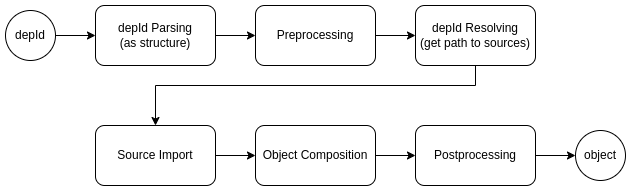
|
|
197
|
+
|
|
198
|
+
There are two stages involved here:
|
|
199
|
+
|
|
200
|
+
* **Preprocessing**: the modification of the dependency identifier
|
|
201
|
+
* **Postprocessing**: the modification of the created object
|
|
202
|
+
|
|
203
|
+
### Preprocessing
|
|
204
|
+
|
|
205
|
+
At times, situations may arise, especially when utilizing various extensions of the core functionality, where it becomes
|
|
206
|
+
necessary to redefine certain objects within the application. For such scenarios, `@teqfw/di` includes a preprocessor:
|
|
207
|
+
|
|
208
|
+
```javascript
|
|
209
|
+
/** @type {TeqFw_Di_Api_Container_PreProcessor} */
|
|
210
|
+
const pre = container.getPreProcessor();
|
|
211
|
+
```
|
|
212
|
+
|
|
213
|
+
You can add handlers (chunks) to the preprocessor that are capable of modifying the initial `depId`:
|
|
214
|
+
|
|
215
|
+
```javascript
|
|
216
|
+
/** @type {TeqFw_Di_Api_Container_PreProcessor_Chunk} */
|
|
217
|
+
const replace = new ReplaceChunk(); // some implementation of the interface
|
|
218
|
+
pre.addChunk(replace);
|
|
219
|
+
```
|
|
220
|
+
|
|
221
|
+
The preprocessor calls the handlers sequentially and can, for example, replace a dependency from the base npm package
|
|
222
|
+
(`App_Base_Mod_Api_Service_Auth`) with another dependency from one of the npm packages (`Auth_Password_Mod_Service` or
|
|
223
|
+
`OAuth2_Mod_Service`), depending on the npm packages included in the application compilation.
|
|
224
|
+
|
|
225
|
+
By using such replacements, you can implement the core functionality in one npm package, while in other npm packages,
|
|
226
|
+
you can implement the additional functionality required by the core package.
|
|
79
227
|
|
|
228
|
+
### Postprocessing
|
|
80
229
|
|
|
230
|
+
Since the container creates all objects in the application, it can also perform additional actions on newly created
|
|
231
|
+
objects, such as adding extra functionality to them in the form of a wrapper.
|
|
81
232
|
|
|
82
|
-
|
|
83
|
-
|
|
84
|
-
|
|
85
|
-
|
|
86
|
-
|
|
87
|
-
|
|
88
|
-
|
|
89
|
-
|
|
90
|
-
|
|
91
|
-
|
|
92
|
-
|
|
93
|
-
|
|
94
|
-
|
|
95
|
-
|
|
96
|
-
|
|
97
|
-
|
|
98
|
-
|
|
99
|
-
</script>
|
|
233
|
+
`@teqfw/di` enables you to add individual handlers to the post-processing stage and modify the result. For example, you
|
|
234
|
+
can wrap a finished object or perform various operations on it:
|
|
235
|
+
|
|
236
|
+
```javascript
|
|
237
|
+
// ./PostChunk.js
|
|
238
|
+
/**
|
|
239
|
+
* @implements TeqFw_Di_Api_Container_PostProcessor_Chunk
|
|
240
|
+
*/
|
|
241
|
+
export default {
|
|
242
|
+
modify: function (obj, originalId, stack) {
|
|
243
|
+
if (originalId.wrappers.indexOf('proxy') !== -1)
|
|
244
|
+
return new Proxy(obj, {
|
|
245
|
+
get: async function (base, name) { /* do something */ }
|
|
246
|
+
});
|
|
247
|
+
else return obj;
|
|
248
|
+
}
|
|
249
|
+
};
|
|
100
250
|
```
|
|
101
251
|
|
|
102
|
-
|
|
252
|
+
```javascript
|
|
253
|
+
// ./main.js
|
|
254
|
+
import postChunk from './PostChunk.mjs';
|
|
255
|
+
|
|
256
|
+
container.getPostProcessor().addChunk(postChunk);
|
|
257
|
+
```
|
|
258
|
+
|
|
259
|
+
## Resume
|
|
260
|
+
|
|
261
|
+
`@teqfw/di` offers Dependency Injection for regular JavaScript with minimal manual configuration, supporting both
|
|
262
|
+
browser and Node.js environments. Its use of late binding and an object container in JavaScript applications, along with
|
|
263
|
+
the ability to modify the behavior of created objects (via pseudo-interfaces and wrappers), allows you to apply
|
|
264
|
+
architectural solutions from other languages (such as Java, PHP, C#) and fully harness the capabilities of npm packages
|
|
265
|
+
and ES6 modules in JavaScript applications, particularly in the Node.js environment.
|
package/RELEASE.md
CHANGED
|
@@ -1,5 +1,16 @@
|
|
|
1
1
|
# @teqfw/di releases
|
|
2
2
|
|
|
3
|
+
## 0.21.0
|
|
4
|
+
|
|
5
|
+
* Restructured modules in the package.
|
|
6
|
+
* Documentation update.
|
|
7
|
+
|
|
8
|
+
## 0.20.1
|
|
9
|
+
|
|
10
|
+
* Changed regex for parameter extraction in the Spec Analyzer.
|
|
11
|
+
* Removed leading namespace separator in the Resolver.
|
|
12
|
+
* Added `teqfw.json` descriptor to add npm-package to DI container as a sources root in `teqfw/web`.
|
|
13
|
+
|
|
3
14
|
## 0.20.0
|
|
4
15
|
|
|
5
16
|
* Fully redesigned package with simplified composition of objects in the container. Spec Analyzer is used instead of a
|
|
@@ -34,4 +45,4 @@
|
|
|
34
45
|
* docs for plugin's teq-descriptor (see in `main` branch);
|
|
35
46
|
* use object notation instead of array notation in namespace replacement statements of
|
|
36
47
|
teq-descriptor (`@teqfw/di.replace` node format is changed in `./teqfw.json`);
|
|
37
|
-
* array is used as a container for upline dependencies in
|
|
48
|
+
* array is used as a container for upline dependencies in the 'SpecProxy' (object was);
|