@tencentcloud/sdk-mcp 1.3.9 → 1.4.0
This diff represents the content of publicly available package versions that have been released to one of the supported registries. The information contained in this diff is provided for informational purposes only and reflects changes between package versions as they appear in their respective public registries.
- package/index.js +1 -1
- package/index.js.map +1 -1
- package/package.json +2 -2
- package/resource/doc/{tuicallkit/android/faq.md → callkit/faq/android-faq.md} +75 -308
- package/resource/doc/{tuicallkit/faq/common/error_code.md → callkit/faq/common/error-code.md} +2 -2
- package/resource/doc/{tuicallkit/flutter/faq.md → callkit/faq/flutter-faq.md} +83 -315
- package/resource/doc/{tuicallkit/iOS/faq.md → callkit/faq/ios-faq.md} +76 -313
- package/resource/doc/{tuicallkit/vue/faq.md → callkit/faq/web-faq.md} +78 -311
- package/resource/doc/callkit/preset/android/api.md +330 -0
- package/resource/doc/{tuicallkit → callkit/preset}/android/integration.md +63 -420
- package/resource/doc/callkit/preset/flutter/api.md +401 -0
- package/resource/doc/{tuicallkit → callkit/preset}/flutter/integration.md +53 -273
- package/resource/doc/callkit/preset/ios/api.md +282 -0
- package/resource/doc/{tuicallkit/iOS → callkit/preset/ios}/integration.md +39 -120
- package/resource/doc/callkit/preset/react/api.md +600 -0
- package/resource/doc/{tuicallkit → callkit/preset}/react/integration.md +6 -6
- package/resource/doc/callkit/preset/vue/api.md +600 -0
- package/resource/doc/{tuicallkit → callkit/preset}/vue/integration.md +5 -5
- package/resource/doc/{chatuikit → chatkit}/android/faq.md +29 -37
- package/resource/doc/{chatuikit → chatkit}/android/features/theme.md +22 -166
- package/resource/doc/{chatuikit → chatkit}/android/integration.md +30 -126
- package/resource/doc/chatkit/faq/android_sdk/client-api.md +280 -0
- package/resource/doc/{chatuikit → chatkit}/faq/common/product.md +4 -17
- package/resource/doc/{chatuikit → chatkit}/faq/common/server.md +1 -2
- package/resource/doc/chatkit/faq/flutter_sdk/client-api.md +183 -0
- package/resource/doc/{chatuikit → chatkit}/faq/flutter_sdk/faq.md +3 -3
- package/resource/doc/chatkit/faq/ios_sdk/client-api.md +279 -0
- package/resource/doc/{chatuikit → chatkit}/faq/web_sdk/error_code.md +1 -1
- package/resource/doc/{chatuikit → chatkit}/faq/web_sdk/faq.md +4 -4
- package/resource/doc/{chatuikit → chatkit}/flutter/features/theme.md +22 -166
- package/resource/doc/{chatuikit → chatkit}/flutter/integration.md +20 -95
- package/resource/doc/{chatuikit/iOS → chatkit/ios}/faq.md +29 -37
- package/resource/doc/{chatuikit/iOS → chatkit/ios}/features/theme.md +27 -176
- package/resource/doc/{chatuikit/iOS → chatkit/ios}/integration.md +78 -280
- package/resource/doc/{chatuikit/vue → chatkit/react}/components/avatar.md +0 -1
- package/resource/doc/{chatuikit → chatkit}/react/components/chat-header.md +7 -12
- package/resource/doc/{chatuikit → chatkit}/react/components/chat-setting.md +10 -17
- package/resource/doc/{chatuikit → chatkit}/react/components/chat.md +1 -1
- package/resource/doc/{chatuikit → chatkit}/react/components/component-list.md +0 -1
- package/resource/doc/{chatuikit → chatkit}/react/components/contact-list.md +122 -703
- package/resource/doc/chatkit/react/components/conversation-actions.md +174 -0
- package/resource/doc/chatkit/react/components/conversation-list.md +333 -0
- package/resource/doc/chatkit/react/components/conversation-preview.md +116 -0
- package/resource/doc/chatkit/react/components/conversation-search.md +57 -0
- package/resource/doc/{chatuikit → chatkit}/react/components/message-input.md +36 -186
- package/resource/doc/{chatuikit → chatkit}/react/components/message-list.md +21 -113
- package/resource/doc/chatkit/react/components/search.md +282 -0
- package/resource/doc/{chatuikit → chatkit}/react/components/tuikit.md +5 -26
- package/resource/doc/{chatuikit → chatkit}/react/integration.md +37 -104
- package/resource/doc/{chatuikit/react → chatkit/vue}/components/avatar.md +0 -1
- package/resource/doc/{chatuikit → chatkit}/vue/components/chat-header.md +7 -13
- package/resource/doc/{chatuikit → chatkit}/vue/components/chat-setting.md +13 -18
- package/resource/doc/{chatuikit → chatkit}/vue/components/chat.md +1 -2
- package/resource/doc/{chatuikit → chatkit}/vue/components/component-list.md +0 -1
- package/resource/doc/chatkit/vue/components/contact-list.md +271 -0
- package/resource/doc/chatkit/vue/components/conversation-actions.md +228 -0
- package/resource/doc/{chatuikit → chatkit}/vue/components/conversation-list.md +42 -316
- package/resource/doc/chatkit/vue/components/conversation-preview.md +213 -0
- package/resource/doc/chatkit/vue/components/conversation-search.md +50 -0
- package/resource/doc/{chatuikit → chatkit}/vue/components/message-input.md +1 -23
- package/resource/doc/{chatuikit → chatkit}/vue/components/message-list.md +23 -134
- package/resource/doc/{chatuikit → chatkit}/vue/components/search.md +73 -640
- package/resource/doc/chatkit/vue/components/tuikit.md +45 -0
- package/resource/doc/{chatuikit → chatkit}/vue/components/userpicker.md +4 -4
- package/resource/doc/{chatuikit → chatkit}/vue/faq.md +1 -1
- package/resource/doc/{chatuikit → chatkit}/vue/integration.md +53 -121
- package/resource/doc/livekit/core-sdk/live/android/api-reference/AudioEffectStore.md +283 -0
- package/resource/doc/livekit/core-sdk/live/android/api-reference/BarrageStore.md +148 -0
- package/resource/doc/livekit/core-sdk/live/android/api-reference/BattleStore.md +316 -0
- package/resource/doc/livekit/core-sdk/live/android/api-reference/CameraView.md +57 -0
- package/resource/doc/livekit/core-sdk/live/android/api-reference/CoGuestStore.md +419 -0
- package/resource/doc/livekit/core-sdk/live/android/api-reference/CoHostStore.md +325 -0
- package/resource/doc/livekit/core-sdk/live/android/api-reference/DeviceStore.md +436 -0
- package/resource/doc/livekit/core-sdk/live/android/api-reference/GiftStore.md +165 -0
- package/resource/doc/livekit/core-sdk/live/android/api-reference/LikeStore.md +49 -0
- package/resource/doc/livekit/core-sdk/live/android/api-reference/LiveAudienceStore.md +239 -0
- package/resource/doc/livekit/core-sdk/live/android/api-reference/LiveCoreView.md +74 -0
- package/resource/doc/livekit/core-sdk/live/android/api-reference/LiveSeatStore.md +417 -0
- package/resource/doc/livekit/core-sdk/live/android/api-reference/LoginStore.md +207 -0
- package/resource/doc/livekit/{live → core-sdk/live}/android/live-audience-list.md +17 -88
- package/resource/doc/livekit/{live → core-sdk/live}/android/live-audio-effect.md +34 -192
- package/resource/doc/livekit/{live → core-sdk/live}/android/live-barrage.md +26 -139
- package/resource/doc/livekit/{live → core-sdk/live}/android/live-base-beauty.md +16 -99
- package/resource/doc/livekit/{live → core-sdk/live}/android/live-co-guest-interaction.md +54 -161
- package/resource/doc/livekit/{live → core-sdk/live}/android/live-gift.md +75 -455
- package/resource/doc/livekit/{live → core-sdk/live}/android/live-host-interaction.md +91 -338
- package/resource/doc/livekit/{live → core-sdk/live}/android/live-integration.md +108 -492
- package/resource/doc/livekit/{live → core-sdk/live}/android/live-live-list.md +27 -165
- package/resource/doc/livekit/core-sdk/live/flutter/api-reference/AudioEffectStore.md +279 -0
- package/resource/doc/livekit/core-sdk/live/flutter/api-reference/BarrageStore.md +158 -0
- package/resource/doc/livekit/core-sdk/live/flutter/api-reference/BaseBeautyStore.md +155 -0
- package/resource/doc/livekit/core-sdk/live/flutter/api-reference/BattleStore.md +304 -0
- package/resource/doc/livekit/core-sdk/live/flutter/api-reference/CoGuestStore.md +394 -0
- package/resource/doc/livekit/core-sdk/live/flutter/api-reference/CoHostStore.md +303 -0
- package/resource/doc/livekit/core-sdk/live/flutter/api-reference/DeviceStore.md +410 -0
- package/resource/doc/livekit/core-sdk/live/flutter/api-reference/GiftStore.md +160 -0
- package/resource/doc/livekit/core-sdk/live/flutter/api-reference/LikeStore.md +51 -0
- package/resource/doc/livekit/core-sdk/live/flutter/api-reference/LiveAudienceStore.md +231 -0
- package/resource/doc/livekit/core-sdk/live/flutter/api-reference/LiveCoreView.md +143 -0
- package/resource/doc/livekit/core-sdk/live/flutter/api-reference/LiveSeatStore.md +375 -0
- package/resource/doc/livekit/core-sdk/live/flutter/api-reference/LoginStore.md +170 -0
- package/resource/doc/livekit/{live → core-sdk/live}/flutter/live-audience-list.md +13 -91
- package/resource/doc/livekit/{live → core-sdk/live}/flutter/live-audio-effect.md +34 -177
- package/resource/doc/livekit/{live → core-sdk/live}/flutter/live-barrage.md +18 -102
- package/resource/doc/livekit/{live → core-sdk/live}/flutter/live-base-beauty.md +24 -164
- package/resource/doc/livekit/{live → core-sdk/live}/flutter/live-co-guest-interaction.md +56 -161
- package/resource/doc/livekit/{live → core-sdk/live}/flutter/live-gift.md +66 -460
- package/resource/doc/livekit/{live → core-sdk/live}/flutter/live-host-interaction.md +117 -364
- package/resource/doc/livekit/{live → core-sdk/live}/flutter/live-integration.md +160 -543
- package/resource/doc/livekit/{live → core-sdk/live}/flutter/live-live-list.md +22 -161
- package/resource/doc/livekit/core-sdk/live/ios/api-reference/AudioEffectStore.md +287 -0
- package/resource/doc/livekit/core-sdk/live/ios/api-reference/BarrageStore.md +165 -0
- package/resource/doc/livekit/core-sdk/live/ios/api-reference/BaseBeautyStore.md +143 -0
- package/resource/doc/livekit/core-sdk/live/ios/api-reference/BattleStore.md +298 -0
- package/resource/doc/livekit/core-sdk/live/ios/api-reference/CoGuestStore.md +349 -0
- package/resource/doc/livekit/core-sdk/live/ios/api-reference/CoHostStore.md +297 -0
- package/resource/doc/livekit/core-sdk/live/ios/api-reference/DeviceStore.md +471 -0
- package/resource/doc/livekit/core-sdk/live/ios/api-reference/GiftStore.md +179 -0
- package/resource/doc/livekit/core-sdk/live/ios/api-reference/LikeStore.md +49 -0
- package/resource/doc/livekit/core-sdk/live/ios/api-reference/LiveAudienceStore.md +238 -0
- package/resource/doc/livekit/core-sdk/live/ios/api-reference/LiveCoreView.md +74 -0
- package/resource/doc/livekit/core-sdk/live/ios/api-reference/LiveSeatStore.md +412 -0
- package/resource/doc/livekit/core-sdk/live/ios/api-reference/LoginStore.md +173 -0
- package/resource/doc/livekit/{live → core-sdk/live}/ios/live-audience-list.md +23 -96
- package/resource/doc/livekit/{live → core-sdk/live}/ios/live-audio-effect.md +33 -195
- package/resource/doc/livekit/{live → core-sdk/live}/ios/live-barrage.md +35 -150
- package/resource/doc/livekit/{live → core-sdk/live}/ios/live-base-beauty.md +20 -105
- package/resource/doc/livekit/{live → core-sdk/live}/ios/live-co-guest-interaction.md +35 -140
- package/resource/doc/livekit/{live → core-sdk/live}/ios/live-gift.md +77 -457
- package/resource/doc/livekit/{live → core-sdk/live}/ios/live-host-interaction.md +70 -317
- package/resource/doc/livekit/{live → core-sdk/live}/ios/live-integration.md +90 -473
- package/resource/doc/livekit/{live → core-sdk/live}/ios/live-live-list.md +28 -163
- package/resource/doc/livekit/{voice → core-sdk/voice}/android/voice-audience-list.md +17 -88
- package/resource/doc/livekit/{voice → core-sdk/voice}/android/voice-audio-effect.md +34 -192
- package/resource/doc/livekit/{voice → core-sdk/voice}/android/voice-barrage.md +26 -139
- package/resource/doc/livekit/{voice → core-sdk/voice}/android/voice-co-guest-interaction.md +53 -262
- package/resource/doc/livekit/{voice → core-sdk/voice}/android/voice-gift.md +75 -455
- package/resource/doc/livekit/{voice → core-sdk/voice}/android/voice-host-interaction.md +60 -272
- package/resource/doc/livekit/{voice → core-sdk/voice}/android/voice-integration.md +63 -440
- package/resource/doc/livekit/{voice → core-sdk/voice}/android/voice-room-list.md +23 -151
- package/resource/doc/livekit/{voice → core-sdk/voice}/flutter/voice-audience-list.md +13 -91
- package/resource/doc/livekit/{voice → core-sdk/voice}/flutter/voice-audio-effect.md +34 -177
- package/resource/doc/livekit/{voice → core-sdk/voice}/flutter/voice-barrage.md +18 -102
- package/resource/doc/livekit/{voice → core-sdk/voice}/flutter/voice-co-guest-interaction.md +44 -201
- package/resource/doc/livekit/{voice → core-sdk/voice}/flutter/voice-gift.md +66 -460
- package/resource/doc/livekit/{voice → core-sdk/voice}/flutter/voice-integration.md +57 -419
- package/resource/doc/livekit/{voice → core-sdk/voice}/flutter/voice-room-list.md +24 -157
- package/resource/doc/livekit/{voice → core-sdk/voice}/ios/voice-audience-list.md +23 -96
- package/resource/doc/livekit/{voice → core-sdk/voice}/ios/voice-audio-effect.md +33 -195
- package/resource/doc/livekit/{voice → core-sdk/voice}/ios/voice-barrage.md +35 -150
- package/resource/doc/livekit/{voice → core-sdk/voice}/ios/voice-co-guest-interaction.md +45 -254
- package/resource/doc/livekit/{voice → core-sdk/voice}/ios/voice-gift.md +77 -457
- package/resource/doc/livekit/{voice → core-sdk/voice}/ios/voice-host-interaction.md +52 -261
- package/resource/doc/livekit/core-sdk/voice/ios/voice-integration.md +478 -0
- package/resource/doc/livekit/{voice → core-sdk/voice}/ios/voice-room-list.md +36 -167
- package/resource/doc/livekit/{voice → core-sdk/voice}/uni-app/voice-audience-list.md +15 -45
- package/resource/doc/livekit/{voice → core-sdk/voice}/uni-app/voice-audio-effect.md +23 -137
- package/resource/doc/livekit/{voice → core-sdk/voice}/uni-app/voice-barrage.md +25 -131
- package/resource/doc/livekit/{voice → core-sdk/voice}/uni-app/voice-co-guest-interaction.md +70 -366
- package/resource/doc/livekit/{voice → core-sdk/voice}/uni-app/voice-gift.md +70 -424
- package/resource/doc/livekit/core-sdk/voice/uni-app/voice-integration.md +323 -0
- package/resource/doc/livekit/{voice → core-sdk/voice}/uni-app/voice-room-list.md +24 -116
- package/resource/doc/livekit/faq/common/{error_code.md → error-code.md} +2 -3
- package/resource/doc/livekit/preset/live/vue/api-reference/index.md +780 -0
- package/resource/doc/livekit/preset/live/vue/components/barrage.md +291 -0
- package/resource/doc/livekit/{live → preset/live}/vue/components/co-guest-panel.md +9 -48
- package/resource/doc/livekit/{live → preset/live}/vue/components/live-audience-list.md +27 -145
- package/resource/doc/livekit/{live → preset/live}/vue/components/live-scene-panel.md +13 -76
- package/resource/doc/livekit/{live → preset/live}/vue/components/live-view.md +33 -224
- package/resource/doc/livekit/preset/live/vue/components/stream-mixer.md +211 -0
- package/resource/doc/livekit/preset/live/vue/faq.md +1 -0
- package/resource/doc/livekit/preset/live/vue/live-list-integration.md +244 -0
- package/resource/doc/livekit/preset/live/vue/live-player-desk-integration.md +301 -0
- package/resource/doc/livekit/preset/live/vue/live-player-h5-integration.md +307 -0
- package/resource/doc/livekit/preset/live/vue/live-pusher-integration.md +754 -0
- package/resource/doc/roomkit/android/features/call-user-to-room.md +234 -0
- package/resource/doc/roomkit/android/features/room-participant-state.md +850 -0
- package/resource/doc/roomkit/android/features/room-state.md +358 -0
- package/resource/doc/roomkit/android/features/schedule-room.md +336 -0
- package/resource/doc/roomkit/android/integration.md +433 -0
- package/resource/doc/roomkit/{common/error_code.md → faq/common/error-code.md} +1 -1
- package/resource/doc/roomkit/flutter/features/call-user-to-room.md +228 -0
- package/resource/doc/roomkit/flutter/features/room-participant-state.md +796 -0
- package/resource/doc/roomkit/flutter/features/room-state.md +324 -0
- package/resource/doc/roomkit/flutter/features/schedule-room.md +324 -0
- package/resource/doc/roomkit/flutter/integration.md +405 -0
- package/resource/doc/roomkit/ios/features/call-user-to-room.md +226 -0
- package/resource/doc/roomkit/ios/features/room-participant-state.md +821 -0
- package/resource/doc/roomkit/ios/features/room-state.md +320 -0
- package/resource/doc/roomkit/ios/features/schedule-room.md +318 -0
- package/resource/doc/roomkit/ios/integration.md +384 -0
- package/resource/doc/roomkit/vue/faq.md +1 -0
- package/resource/doc/roomkit/vue/features/call-user-to-room.md +17 -53
- package/resource/doc/roomkit/vue/features/device-detection.md +30 -48
- package/resource/doc/roomkit/vue/features/device-state.md +24 -44
- package/resource/doc/roomkit/vue/features/free-beauty-panel.md +13 -36
- package/resource/doc/roomkit/vue/features/room-chat.md +31 -89
- package/resource/doc/roomkit/vue/features/room-participant-state.md +28 -50
- package/resource/doc/roomkit/vue/features/room-state.md +25 -36
- package/resource/doc/roomkit/vue/features/room-view.md +30 -127
- package/resource/doc/roomkit/vue/features/schedule-room.md +9 -40
- package/resource/doc/roomkit/vue/features/screen-share.md +22 -90
- package/resource/doc/roomkit/vue/features/virtual-background.md +13 -34
- package/resource/doc/roomkit/vue/integration.md +21 -80
- package/resource/doc/rtcengine/faq/common/userSig.md +17 -141
- package/resource/doc/rtcengine/faq/web/web.md +15 -22
- package/resource/doc/rtcengine/web/api.md +17 -21
- package/resource/doc/rtcengine/web/how_to_integrated_web_sdk.md +4 -10
- package/resource/doc/rtcengine/web/how_to_run_web_sdk_demo.md +4 -8
- package/resource/doc/rtcengine/web/plugin/20-advanced-customized-capture-rendering.md +3 -3
- package/resource/doc/rtcengine/web/plugin/21-advanced-auto-play-policy.md +2 -3
- package/resource/doc/rtcengine/web/plugin/22-advanced-audio-mixer.md +6 -6
- package/resource/doc/rtcengine/web/plugin/23-advanced-support-detection.md +2 -2
- package/resource/doc/rtcengine/web/plugin/24-advanced-network-quality.md +2 -4
- package/resource/doc/rtcengine/web/plugin/25-advanced-device-change.md +1 -2
- package/resource/doc/rtcengine/web/plugin/26-advanced-publish-cdn-stream.md +2 -6
- package/resource/doc/rtcengine/web/plugin/27-advanced-small-stream.md +13 -14
- package/resource/doc/rtcengine/web/plugin/28-advanced-beauty.md +10 -90
- package/resource/doc/rtcengine/web/plugin/31-advanced-plugins-overview.md +5 -8
- package/resource/doc/rtcengine/web/plugin/34-advanced-proxy.md +31 -35
- package/resource/doc/rtcengine/web/plugin/35-advanced-ai-denoiser.md +0 -2
- package/resource/doc/rtcengine/web/plugin/36-advanced-virtual-background.md +7 -49
- package/resource/doc/rtcengine/web/plugin/37-advanced-voice-changer.md +1 -1
- package/resource/doc/rtcengine/web/plugin/39-advanced-video-decoder.md +0 -3
- package/resource/doc/rtcengine/web/plugin/40-advanced-video-mixer.md +20 -20
- package/resource/doc/rtcengine/web/plugin/41-advanced-small-stream-auto-switcher.md +1 -1
- package/resource/doc/rtcengine/web/plugin/42-advanced-realtime-transcriber.md +4 -4
- package/resource/doc/rtcengine/web/plugin/43-advanced-face-detection.md +3 -3
- package/resource/doc/trtc/C++/ITRTCCloud.md +718 -2847
- package/resource/doc/trtc/C++/ITRTCStatistics.md +53 -308
- package/resource/doc/trtc/C++/ITXAudioEffectManager.md +207 -1041
- package/resource/doc/trtc/C++/ITXDeviceManager.md +127 -768
- package/resource/doc/trtc/C++/TRTCCloudCallback.md +634 -2259
- package/resource/doc/trtc/C++/TRTCTypeDef.md +726 -3465
- package/resource/doc/trtc/C++/TXLiteAVCode.md +117 -916
- package/resource/doc/trtc/android/TRTCCloud.md +638 -2612
- package/resource/doc/trtc/android/TRTCCloudDef.md +769 -3697
- package/resource/doc/trtc/android/TRTCCloudListener.md +609 -2070
- package/resource/doc/trtc/android/TRTCStatistics.md +48 -278
- package/resource/doc/trtc/android/TXAudioEffectManager.md +207 -1049
- package/resource/doc/trtc/android/TXBeautyManager.md +127 -704
- package/resource/doc/trtc/android/TXDeviceManager.md +51 -318
- package/resource/doc/trtc/android/TXLiteAVCode.md +115 -900
- package/resource/doc/trtc/iOS/TRTCCloud.md +726 -2930
- package/resource/doc/trtc/iOS/TRTCCloudDelegate.md +580 -2099
- package/resource/doc/trtc/iOS/TRTCStatistics.md +48 -278
- package/resource/doc/trtc/iOS/TXAudioEffectManager.md +179 -896
- package/resource/doc/trtc/iOS/TXBeautyManager.md +128 -710
- package/resource/doc/trtc/iOS/TXDeviceManager.md +129 -772
- package/resource/doc/trtc/iOS/TXLiteAVCode.md +117 -915
- package/resource/doc/trtc/iOS/TXLiveSDKTypeDef.md +747 -3559
- package/server.js +1 -5
- package/server.js.map +1 -1
- package/tools/call/get_callkit_api.js +32 -0
- package/tools/call/get_callkit_api.js.map +1 -0
- package/tools/call/get_native_call_uikit_integration.js +34 -0
- package/tools/call/get_native_call_uikit_integration.js.map +1 -0
- package/tools/call/{get-web-call-integration.js → get_web_call_uikit_integration.js} +13 -8
- package/tools/call/get_web_call_uikit_integration.js.map +1 -0
- package/tools/chat/get_native_chat_uikit_feature_detail.js +34 -0
- package/tools/chat/get_native_chat_uikit_feature_detail.js.map +1 -0
- package/tools/chat/get_native_chat_uikit_integration.js +45 -0
- package/tools/chat/get_native_chat_uikit_integration.js.map +1 -0
- package/tools/chat/get_web_chat_uikit_component_detail.js +34 -0
- package/tools/chat/get_web_chat_uikit_component_detail.js.map +1 -0
- package/tools/chat/get_web_chat_uikit_integration.js +45 -0
- package/tools/chat/get_web_chat_uikit_integration.js.map +1 -0
- package/tools/common/get_faq.js +265 -0
- package/tools/common/get_faq.js.map +1 -0
- package/tools/common/{get-usersig.js → get_usersig.js} +6 -3
- package/tools/common/get_usersig.js.map +1 -0
- package/tools/common/present_framework_choice.js +63 -0
- package/tools/common/present_framework_choice.js.map +1 -0
- package/tools/definitions/get_callkit_api_def.js +28 -0
- package/tools/definitions/get_callkit_api_def.js.map +1 -0
- package/tools/definitions/get_faq_def.js +18 -19
- package/tools/definitions/get_faq_def.js.map +1 -1
- package/tools/definitions/get_native_call_uikit_integration_def.js +15 -34
- package/tools/definitions/get_native_call_uikit_integration_def.js.map +1 -1
- package/tools/definitions/get_native_chat_uikit_feature_detail_def.js +31 -0
- package/tools/definitions/get_native_chat_uikit_feature_detail_def.js.map +1 -0
- package/tools/definitions/get_native_chat_uikit_integration_def.js +16 -41
- package/tools/definitions/get_native_chat_uikit_integration_def.js.map +1 -1
- package/tools/definitions/get_native_livekit_core_features_def.js +33 -0
- package/tools/definitions/get_native_livekit_core_features_def.js.map +1 -0
- package/tools/definitions/get_native_livekit_core_integration_def.js +33 -0
- package/tools/definitions/get_native_livekit_core_integration_def.js.map +1 -0
- package/tools/definitions/get_native_trtc_sdk_docs_def.js +32 -0
- package/tools/definitions/get_native_trtc_sdk_docs_def.js.map +1 -0
- package/tools/definitions/get_usersig_def.js +17 -24
- package/tools/definitions/get_usersig_def.js.map +1 -1
- package/tools/definitions/get_web_call_uikit_integration_def.js +15 -7
- package/tools/definitions/get_web_call_uikit_integration_def.js.map +1 -1
- package/tools/definitions/get_web_chat_uikit_component_detail_def.js +17 -49
- package/tools/definitions/get_web_chat_uikit_component_detail_def.js.map +1 -1
- package/tools/definitions/get_web_chat_uikit_integration_def.js +16 -19
- package/tools/definitions/get_web_chat_uikit_integration_def.js.map +1 -1
- package/tools/definitions/get_web_live_uikit_integration_def.js +13 -18
- package/tools/definitions/get_web_live_uikit_integration_def.js.map +1 -1
- package/tools/definitions/get_web_livekit_api_def.js +27 -0
- package/tools/definitions/get_web_livekit_api_def.js.map +1 -0
- package/tools/definitions/get_web_livekit_component_detail_def.js +29 -0
- package/tools/definitions/get_web_livekit_component_detail_def.js.map +1 -0
- package/tools/definitions/get_web_room_uikit_integration_def.js +13 -46
- package/tools/definitions/get_web_room_uikit_integration_def.js.map +1 -1
- package/tools/definitions/get_web_roomkit_feature_detail_def.js +30 -0
- package/tools/definitions/get_web_roomkit_feature_detail_def.js.map +1 -0
- package/tools/definitions/get_web_trtc_sdk_api_def.js +25 -0
- package/tools/definitions/get_web_trtc_sdk_api_def.js.map +1 -0
- package/tools/definitions/get_web_trtc_sdk_integration_def.js +25 -0
- package/tools/definitions/get_web_trtc_sdk_integration_def.js.map +1 -0
- package/tools/definitions/get_web_trtc_sdk_plugin_def.js +25 -0
- package/tools/definitions/get_web_trtc_sdk_plugin_def.js.map +1 -0
- package/tools/definitions/present_framework_choice_def.js +23 -12
- package/tools/definitions/present_framework_choice_def.js.map +1 -1
- package/tools/index.js +47 -61
- package/tools/index.js.map +1 -1
- package/tools/live/get_native_livekit_core_features.js +65 -0
- package/tools/live/get_native_livekit_core_features.js.map +1 -0
- package/tools/live/get_native_livekit_core_integration.js +59 -0
- package/tools/live/get_native_livekit_core_integration.js.map +1 -0
- package/tools/live/get_web_live_uikit_integration.js +48 -0
- package/tools/live/get_web_live_uikit_integration.js.map +1 -0
- package/tools/live/get_web_livekit_api.js +32 -0
- package/tools/live/get_web_livekit_api.js.map +1 -0
- package/tools/live/get_web_livekit_component_detail.js +34 -0
- package/tools/live/get_web_livekit_component_detail.js.map +1 -0
- package/tools/room/{get-web-room-integration.js → get_web_room_uikit_integration.js} +13 -14
- package/tools/room/get_web_room_uikit_integration.js.map +1 -0
- package/tools/room/{get-web-room-feature-detail.js → get_web_roomkit_feature_detail.js} +30 -31
- package/tools/room/get_web_roomkit_feature_detail.js.map +1 -0
- package/tools/rtcengine/get_web_trtc_sdk_api.js +31 -0
- package/tools/rtcengine/get_web_trtc_sdk_api.js.map +1 -0
- package/tools/rtcengine/get_web_trtc_sdk_integration.js +31 -0
- package/tools/rtcengine/get_web_trtc_sdk_integration.js.map +1 -0
- package/tools/rtcengine/get_web_trtc_sdk_plugin.js +31 -0
- package/tools/rtcengine/get_web_trtc_sdk_plugin.js.map +1 -0
- package/tools/trtc/get_native_trtc_sdk_docs.js +73 -0
- package/tools/trtc/get_native_trtc_sdk_docs.js.map +1 -0
- package/utils/generate-structured-result.js +61 -17
- package/utils/generate-structured-result.js.map +1 -1
- package/utils/report-cls-client.js +12 -1
- package/utils/report-cls-client.js.map +1 -1
- package/utils/report-es-client.js +1 -1
- package/resource/doc/chatuikit/android/workflow.md +0 -713
- package/resource/doc/chatuikit/faq/android_sdk/client-api.md +0 -1376
- package/resource/doc/chatuikit/faq/flutter_sdk/client-api.md +0 -860
- package/resource/doc/chatuikit/faq/ios_sdk/client-api.md +0 -1371
- package/resource/doc/chatuikit/flutter/workflow.md +0 -816
- package/resource/doc/chatuikit/iOS/workflow.md +0 -0
- package/resource/doc/chatuikit/react/components/conversation-list.md +0 -765
- package/resource/doc/chatuikit/react/components/search.md +0 -885
- package/resource/doc/chatuikit/react/create-group.md +0 -22
- package/resource/doc/chatuikit/react/init.md +0 -25
- package/resource/doc/chatuikit/react/workflow.md +0 -254
- package/resource/doc/chatuikit/uniapp-app/faq.md +0 -0
- package/resource/doc/chatuikit/uniapp-app/integration.md +0 -619
- package/resource/doc/chatuikit/uniapp-app/workflow.md +0 -576
- package/resource/doc/chatuikit/vue/components/contact-list.md +0 -679
- package/resource/doc/chatuikit/vue/components/tuikit.md +0 -110
- package/resource/doc/chatuikit/vue/create-group.md +0 -26
- package/resource/doc/chatuikit/vue/init.md +0 -35
- package/resource/doc/chatuikit/vue/workflow.md +0 -395
- package/resource/doc/livekit/live/android/workflow.md +0 -322
- package/resource/doc/livekit/live/flutter/workflow.md +0 -353
- package/resource/doc/livekit/live/ios/workflow.md +0 -352
- package/resource/doc/livekit/live/vue/components/barrage.md +0 -615
- package/resource/doc/livekit/live/vue/components/stream-mixer.md +0 -442
- package/resource/doc/livekit/live/vue/faq.md +0 -0
- package/resource/doc/livekit/live/vue/live-list-integration.md +0 -195
- package/resource/doc/livekit/live/vue/live-player-desk-integration.md +0 -293
- package/resource/doc/livekit/live/vue/live-player-h5-integration.md +0 -381
- package/resource/doc/livekit/live/vue/live-pusher-integration.md +0 -598
- package/resource/doc/livekit/live/vue/states/live-state.md +0 -2656
- package/resource/doc/livekit/live/vue/workflow.md +0 -219
- package/resource/doc/livekit/voice/android/workflow.md +0 -333
- package/resource/doc/livekit/voice/flutter/workflow.md +0 -359
- package/resource/doc/livekit/voice/ios/voice-integration.md +0 -853
- package/resource/doc/livekit/voice/ios/workflow.md +0 -358
- package/resource/doc/livekit/voice/uni-app/voice-integration.md +0 -613
- package/resource/doc/livekit/voice/uni-app/workflow.md +0 -369
- package/resource/doc/native_live/android/V2TXLiveCode_api_android.md +0 -334
- package/resource/doc/native_live/android/V2TXLiveDef_api_android.md +0 -434
- package/resource/doc/native_live/android/V2TXLivePlayerObserver_api_android.md +0 -685
- package/resource/doc/native_live/android/V2TXLivePlayer_api_android.md +0 -712
- package/resource/doc/native_live/android/V2TXLivePremier_api_android.md +0 -284
- package/resource/doc/native_live/android/V2TXLivePusherObserver_api_android.md +0 -849
- package/resource/doc/native_live/android/V2TXLivePusher_api_android.md +0 -1046
- package/resource/doc/native_live/flutter/V2TXLiveCode_api_flutter.md +0 -460
- package/resource/doc/native_live/flutter/V2TXLiveDef_api_flutter.md +0 -558
- package/resource/doc/native_live/flutter/V2TXLivePlayerObserver_api_flutter.md +0 -879
- package/resource/doc/native_live/flutter/V2TXLivePlayer_api_flutter.md +0 -668
- package/resource/doc/native_live/flutter/V2TXLivePremier_api_flutter.md +0 -456
- package/resource/doc/native_live/flutter/V2TXLivePusherObserver_api_flutter.md +0 -332
- package/resource/doc/native_live/flutter/V2TXLivePusher_api_flutter.md +0 -748
- package/resource/doc/native_live/iOS/V2TXLiveCode_api_iOS.md +0 -328
- package/resource/doc/native_live/iOS/V2TXLiveDef_api_iOS.md +0 -505
- package/resource/doc/native_live/iOS/V2TXLivePlayerObserver_api_iOS.md +0 -507
- package/resource/doc/native_live/iOS/V2TXLivePlayer_api_iOS.md +0 -676
- package/resource/doc/native_live/iOS/V2TXLivePremier_api_iOS.md +0 -284
- package/resource/doc/native_live/iOS/V2TXLivePusherObserver_api_iOS.md +0 -820
- package/resource/doc/native_live/iOS/V2TXLivePusher_api_iOS.md +0 -1065
- package/resource/doc/roomkit/vue/features/workflow.md +0 -553
- package/resource/doc/roomkit/vue/workflow.md +0 -733
- package/resource/doc/tuicallkit/android/workflow.md +0 -432
- package/resource/doc/tuicallkit/faq/android_sdk/call-observer-api.md +0 -786
- package/resource/doc/tuicallkit/faq/android_sdk/callkit-api.md +0 -663
- package/resource/doc/tuicallkit/faq/flutter_sdk/call-define-api.md +0 -932
- package/resource/doc/tuicallkit/faq/flutter_sdk/call-observer-api.md +0 -926
- package/resource/doc/tuicallkit/faq/flutter_sdk/callkit-api.md +0 -452
- package/resource/doc/tuicallkit/faq/ios_sdk/call-observer-api.md +0 -779
- package/resource/doc/tuicallkit/faq/ios_sdk/callkit-api.md +0 -635
- package/resource/doc/tuicallkit/flutter/workflow.md +0 -331
- package/resource/doc/tuicallkit/react/api.md +0 -1512
- package/resource/doc/tuicallkit/react/faq.md +0 -986
- package/resource/doc/tuicallkit/vue/api.md +0 -1512
- package/tools/call/get-native-call-integration.js +0 -43
- package/tools/call/get-native-call-integration.js.map +0 -1
- package/tools/call/get-web-call-api.js +0 -27
- package/tools/call/get-web-call-api.js.map +0 -1
- package/tools/call/get-web-call-integration.js.map +0 -1
- package/tools/chat/get-native-chat-feature-detail.js +0 -30
- package/tools/chat/get-native-chat-feature-detail.js.map +0 -1
- package/tools/chat/get-native-chat-integration.js +0 -45
- package/tools/chat/get-native-chat-integration.js.map +0 -1
- package/tools/chat/get-web-chat-component-detail.js +0 -31
- package/tools/chat/get-web-chat-component-detail.js.map +0 -1
- package/tools/chat/get-web-chat-integration.js +0 -45
- package/tools/chat/get-web-chat-integration.js.map +0 -1
- package/tools/chat/get-web-chat-uikit-init.js +0 -28
- package/tools/chat/get-web-chat-uikit-init.js.map +0 -1
- package/tools/chat/get-web-create-group-doc.js +0 -28
- package/tools/chat/get-web-create-group-doc.js.map +0 -1
- package/tools/common/get-faq.js +0 -91
- package/tools/common/get-faq.js.map +0 -1
- package/tools/common/get-usersig.js.map +0 -1
- package/tools/common/present-framework-choice.js +0 -16
- package/tools/common/present-framework-choice.js.map +0 -1
- package/tools/common/present-scenario-choice.js +0 -16
- package/tools/common/present-scenario-choice.js.map +0 -1
- package/tools/common/record-prompt.js +0 -55
- package/tools/common/record-prompt.js.map +0 -1
- package/tools/common/record-result.js +0 -60
- package/tools/common/record-result.js.map +0 -1
- package/tools/definitions/get_native_chat_feature_detail_def.js +0 -32
- package/tools/definitions/get_native_chat_feature_detail_def.js.map +0 -1
- package/tools/definitions/get_native_live_api_def.js +0 -22
- package/tools/definitions/get_native_live_api_def.js.map +0 -1
- package/tools/definitions/get_native_live_uikit_extra_features_def.js +0 -109
- package/tools/definitions/get_native_live_uikit_extra_features_def.js.map +0 -1
- package/tools/definitions/get_native_live_uikit_integration_def.js +0 -75
- package/tools/definitions/get_native_live_uikit_integration_def.js.map +0 -1
- package/tools/definitions/get_native_live_uikit_interaction_def.js +0 -63
- package/tools/definitions/get_native_live_uikit_interaction_def.js.map +0 -1
- package/tools/definitions/get_trtc_native_api_def.js +0 -17
- package/tools/definitions/get_trtc_native_api_def.js.map +0 -1
- package/tools/definitions/get_web_call_uikit_api_def.js +0 -23
- package/tools/definitions/get_web_call_uikit_api_def.js.map +0 -1
- package/tools/definitions/get_web_chat_uikit_init_def.js +0 -23
- package/tools/definitions/get_web_chat_uikit_init_def.js.map +0 -1
- package/tools/definitions/get_web_create_group_doc_def.js +0 -18
- package/tools/definitions/get_web_create_group_doc_def.js.map +0 -1
- package/tools/definitions/get_web_live_state_detail_def.js +0 -19
- package/tools/definitions/get_web_live_state_detail_def.js.map +0 -1
- package/tools/definitions/get_web_live_uikit_component_detail_def.js +0 -27
- package/tools/definitions/get_web_live_uikit_component_detail_def.js.map +0 -1
- package/tools/definitions/get_web_room_feature_detail_def.js +0 -92
- package/tools/definitions/get_web_room_feature_detail_def.js.map +0 -1
- package/tools/definitions/present_scenario_choice_def.js +0 -53
- package/tools/definitions/present_scenario_choice_def.js.map +0 -1
- package/tools/definitions/record_prompt_def.js +0 -58
- package/tools/definitions/record_prompt_def.js.map +0 -1
- package/tools/definitions/record_result_def.js +0 -46
- package/tools/definitions/record_result_def.js.map +0 -1
- package/tools/live/get-native-live-uikit-integration.js +0 -177
- package/tools/live/get-native-live-uikit-integration.js.map +0 -1
- package/tools/live/get-web-live-component-detail.js +0 -31
- package/tools/live/get-web-live-component-detail.js.map +0 -1
- package/tools/live/get-web-live-state-detail.js +0 -31
- package/tools/live/get-web-live-state-detail.js.map +0 -1
- package/tools/live/get-web-live-uikit-integration.js +0 -52
- package/tools/live/get-web-live-uikit-integration.js.map +0 -1
- package/tools/live/get_native_live_uikit_extra_features.js +0 -105
- package/tools/live/get_native_live_uikit_extra_features.js.map +0 -1
- package/tools/live/get_native_live_uikit_interaction.js +0 -194
- package/tools/live/get_native_live_uikit_interaction.js.map +0 -1
- package/tools/native_live/get-native-live-api.js +0 -31
- package/tools/native_live/get-native-live-api.js.map +0 -1
- package/tools/room/get-web-room-feature-detail.js.map +0 -1
- package/tools/room/get-web-room-integration.js.map +0 -1
- package/tools/rtcengine/get-rtcengine-web-sdk-integration.js +0 -28
- package/tools/rtcengine/get-rtcengine-web-sdk-integration.js.map +0 -1
- package/tools/rtcengine/get-trtc-sdk-faq.js +0 -32
- package/tools/rtcengine/get-trtc-sdk-faq.js.map +0 -1
- package/tools/rtcengine/get-trtc-web-sdk-api.js +0 -28
- package/tools/rtcengine/get-trtc-web-sdk-api.js.map +0 -1
- package/tools/rtcengine/get-trtc-web-sdk-faq.js +0 -30
- package/tools/rtcengine/get-trtc-web-sdk-faq.js.map +0 -1
- package/tools/rtcengine/get-trtc-web-sdk-integration.js +0 -29
- package/tools/rtcengine/get-trtc-web-sdk-integration.js.map +0 -1
- package/tools/rtcengine/get-trtc-web-sdk-plugin.js +0 -45
- package/tools/rtcengine/get-trtc-web-sdk-plugin.js.map +0 -1
- package/tools/trtc/get-trtc-native-api.js +0 -31
- package/tools/trtc/get-trtc-native-api.js.map +0 -1
- package/utils/handle-component-name.js +0 -33
- package/utils/handle-component-name.js.map +0 -1
- /package/resource/doc/{rtcengine/web → callkit/core-sdk}/.gitkeep +0 -0
- /package/resource/doc/{chatuikit → chatkit}/faq/common/server_error_code.md +0 -0
- /package/resource/doc/{chatuikit → chatkit}/flutter/faq.md +0 -0
- /package/resource/doc/{chatuikit → chatkit}/react/faq.md +0 -0
|
@@ -3,511 +3,116 @@
|
|
|
3
3
|
## 概述
|
|
4
4
|
`TRTCCloudListener.java` 是腾讯云实时音视频(TRTC SDK ) Android 平台的事件回调接口文档。
|
|
5
5
|
|
|
6
|
-
|
|
7
6
|
## TRTCVideoRenderListener
|
|
8
|
-
|
|
9
|
-
|
|
10
|
-
|
|
11
|
-
|
|
12
|
-
<td rowspan="1" colSpan="1" >描述</td>
|
|
13
|
-
</tr>
|
|
14
|
-
|
|
15
|
-
<tr>
|
|
16
|
-
<td rowspan="1" colSpan="1" >[onRenderVideoFrame](https://write.woa.com/document/87029920275542016)</td>
|
|
17
|
-
|
|
18
|
-
<td rowspan="1" colSpan="1" >自定义视频渲染回调。</td>
|
|
19
|
-
</tr>
|
|
20
|
-
</table>
|
|
21
|
-
|
|
7
|
+
| 函数列表 | 描述 |
|
|
8
|
+
| --- | --- |
|
|
9
|
+
| onRenderVideoFrame | 自定义视频渲染回调。 |
|
|
22
10
|
|
|
23
11
|
## TRTCVideoFrameListener
|
|
24
|
-
|
|
25
|
-
|
|
26
|
-
|
|
27
|
-
|
|
28
|
-
|
|
29
|
-
</tr>
|
|
30
|
-
|
|
31
|
-
<tr>
|
|
32
|
-
<td rowspan="1" colSpan="1" >[onGLContextCreated](https://write.woa.com/document/87029920275542016)</td>
|
|
33
|
-
|
|
34
|
-
<td rowspan="1" colSpan="1" >SDK 内部 OpenGL 环境已经创建的通知。</td>
|
|
35
|
-
</tr>
|
|
36
|
-
|
|
37
|
-
<tr>
|
|
38
|
-
<td rowspan="1" colSpan="1" >[onProcessVideoFrame](https://write.woa.com/document/87029920275542016)</td>
|
|
39
|
-
|
|
40
|
-
<td rowspan="1" colSpan="1" >用于对接第三方美颜组件的视频处理回调。</td>
|
|
41
|
-
</tr>
|
|
42
|
-
|
|
43
|
-
<tr>
|
|
44
|
-
<td rowspan="1" colSpan="1" >[onGLContextDestory](https://write.woa.com/document/87029920275542016)</td>
|
|
45
|
-
|
|
46
|
-
<td rowspan="1" colSpan="1" >SDK 内部 OpenGL 环境被销毁的通知。</td>
|
|
47
|
-
</tr>
|
|
48
|
-
</table>
|
|
49
|
-
|
|
12
|
+
| 函数列表 | 描述 |
|
|
13
|
+
| --- | --- |
|
|
14
|
+
| onGLContextCreated | SDK 内部 OpenGL 环境已经创建的通知。 |
|
|
15
|
+
| onProcessVideoFrame | 用于对接第三方美颜组件的视频处理回调。 |
|
|
16
|
+
| onGLContextDestory | SDK 内部 OpenGL 环境被销毁的通知。 |
|
|
50
17
|
|
|
51
18
|
## TRTCAudioFrameListener
|
|
52
|
-
|
|
53
|
-
|
|
54
|
-
|
|
55
|
-
|
|
56
|
-
|
|
57
|
-
|
|
58
|
-
|
|
59
|
-
|
|
60
|
-
<td rowspan="1" colSpan="1" >[onCapturedAudioFrame](https://write.woa.com/document/87029920275542016)</td>
|
|
61
|
-
|
|
62
|
-
<td rowspan="1" colSpan="1" >本地采集并经过音频模块前处理后的音频数据回调。</td>
|
|
63
|
-
</tr>
|
|
64
|
-
|
|
65
|
-
<tr>
|
|
66
|
-
<td rowspan="1" colSpan="1" >[onLocalProcessedAudioFrame](https://write.woa.com/document/87029920275542016)</td>
|
|
67
|
-
|
|
68
|
-
<td rowspan="1" colSpan="1" >本地采集并经过音频模块前处理、音效处理和混 BGM 后的音频数据回调。</td>
|
|
69
|
-
</tr>
|
|
70
|
-
|
|
71
|
-
<tr>
|
|
72
|
-
<td rowspan="1" colSpan="1" >[onRemoteUserAudioFrame](https://write.woa.com/document/87029920275542016)</td>
|
|
73
|
-
|
|
74
|
-
<td rowspan="1" colSpan="1" >混音前的每一路远程用户的音频数据。</td>
|
|
75
|
-
</tr>
|
|
76
|
-
|
|
77
|
-
<tr>
|
|
78
|
-
<td rowspan="1" colSpan="1" >[onMixedPlayAudioFrame](https://write.woa.com/document/87029920275542016)</td>
|
|
79
|
-
|
|
80
|
-
<td rowspan="1" colSpan="1" >将各路待播放音频混合之后并在最终提交系统播放之前的数据回调。</td>
|
|
81
|
-
</tr>
|
|
82
|
-
|
|
83
|
-
<tr>
|
|
84
|
-
<td rowspan="1" colSpan="1" >[onMixedAllAudioFrame](https://write.woa.com/document/87029920275542016)</td>
|
|
85
|
-
|
|
86
|
-
<td rowspan="1" colSpan="1" >SDK 所有音频混合后的音频数据(包括采集到的和待播放的)。</td>
|
|
87
|
-
</tr>
|
|
88
|
-
|
|
89
|
-
<tr>
|
|
90
|
-
<td rowspan="1" colSpan="1" >[onVoiceEarMonitorAudioFrame](https://write.woa.com/document/87029920275542016)</td>
|
|
91
|
-
|
|
92
|
-
<td rowspan="1" colSpan="1" >耳返的音频数据。</td>
|
|
93
|
-
</tr>
|
|
94
|
-
</table>
|
|
95
|
-
|
|
19
|
+
| 函数列表 | 描述 |
|
|
20
|
+
| --- | --- |
|
|
21
|
+
| onCapturedAudioFrame | 本地采集并经过音频模块前处理后的音频数据回调。 |
|
|
22
|
+
| onLocalProcessedAudioFrame | 本地采集并经过音频模块前处理、音效处理和混 BGM 后的音频数据回调。 |
|
|
23
|
+
| onRemoteUserAudioFrame | 混音前的每一路远程用户的音频数据。 |
|
|
24
|
+
| onMixedPlayAudioFrame | 将各路待播放音频混合之后并在最终提交系统播放之前的数据回调。 |
|
|
25
|
+
| onMixedAllAudioFrame | SDK 所有音频混合后的音频数据(包括采集到的和待播放的)。 |
|
|
26
|
+
| onVoiceEarMonitorAudioFrame | 耳返的音频数据。 |
|
|
96
27
|
|
|
97
28
|
## TRTCLogListener
|
|
98
|
-
|
|
99
|
-
|
|
100
|
-
|
|
101
|
-
|
|
102
|
-
<td rowspan="1" colSpan="1" >描述</td>
|
|
103
|
-
</tr>
|
|
104
|
-
|
|
105
|
-
<tr>
|
|
106
|
-
<td rowspan="1" colSpan="1" >[onLog](https://write.woa.com/document/87029920275542016)</td>
|
|
107
|
-
|
|
108
|
-
<td rowspan="1" colSpan="1" >本地 LOG 的打印回调。</td>
|
|
109
|
-
</tr>
|
|
110
|
-
</table>
|
|
111
|
-
|
|
29
|
+
| 函数列表 | 描述 |
|
|
30
|
+
| --- | --- |
|
|
31
|
+
| onLog | 本地 LOG 的打印回调。 |
|
|
112
32
|
|
|
113
33
|
## TRTCCloudListener
|
|
114
|
-
|
|
115
|
-
|
|
116
|
-
|
|
117
|
-
|
|
118
|
-
|
|
119
|
-
|
|
120
|
-
|
|
121
|
-
|
|
122
|
-
|
|
123
|
-
|
|
124
|
-
|
|
125
|
-
|
|
126
|
-
|
|
127
|
-
|
|
128
|
-
|
|
129
|
-
|
|
130
|
-
|
|
131
|
-
|
|
132
|
-
|
|
133
|
-
|
|
134
|
-
|
|
135
|
-
|
|
136
|
-
|
|
137
|
-
|
|
138
|
-
|
|
139
|
-
|
|
140
|
-
|
|
141
|
-
|
|
142
|
-
|
|
143
|
-
|
|
144
|
-
|
|
145
|
-
|
|
146
|
-
|
|
147
|
-
|
|
148
|
-
|
|
149
|
-
|
|
150
|
-
|
|
151
|
-
|
|
152
|
-
|
|
153
|
-
|
|
154
|
-
|
|
155
|
-
|
|
156
|
-
|
|
157
|
-
|
|
158
|
-
|
|
159
|
-
|
|
160
|
-
|
|
161
|
-
|
|
162
|
-
|
|
163
|
-
|
|
164
|
-
|
|
165
|
-
|
|
166
|
-
|
|
167
|
-
|
|
168
|
-
|
|
169
|
-
|
|
170
|
-
|
|
171
|
-
|
|
172
|
-
<td rowspan="1" colSpan="1" >更改跨房主播上行能力的结果回调。</td>
|
|
173
|
-
</tr>
|
|
174
|
-
|
|
175
|
-
<tr>
|
|
176
|
-
<td rowspan="1" colSpan="1" >[onRemoteUserEnterRoom](https://write.woa.com/document/87029920275542016)</td>
|
|
177
|
-
|
|
178
|
-
<td rowspan="1" colSpan="1" >有用户加入当前房间。</td>
|
|
179
|
-
</tr>
|
|
180
|
-
|
|
181
|
-
<tr>
|
|
182
|
-
<td rowspan="1" colSpan="1" >[onRemoteUserLeaveRoom](https://write.woa.com/document/87029920275542016)</td>
|
|
183
|
-
|
|
184
|
-
<td rowspan="1" colSpan="1" >有用户离开当前房间。</td>
|
|
185
|
-
</tr>
|
|
186
|
-
|
|
187
|
-
<tr>
|
|
188
|
-
<td rowspan="1" colSpan="1" >[onUserVideoAvailable](https://write.woa.com/document/87029920275542016)</td>
|
|
189
|
-
|
|
190
|
-
<td rowspan="1" colSpan="1" >某远端用户发布/取消了主路视频画面。</td>
|
|
191
|
-
</tr>
|
|
192
|
-
|
|
193
|
-
<tr>
|
|
194
|
-
<td rowspan="1" colSpan="1" >[onUserSubStreamAvailable](https://write.woa.com/document/87029920275542016)</td>
|
|
195
|
-
|
|
196
|
-
<td rowspan="1" colSpan="1" >某远端用户发布/取消了辅路视频画面。</td>
|
|
197
|
-
</tr>
|
|
198
|
-
|
|
199
|
-
<tr>
|
|
200
|
-
<td rowspan="1" colSpan="1" >[onUserAudioAvailable](https://write.woa.com/document/87029920275542016)</td>
|
|
201
|
-
|
|
202
|
-
<td rowspan="1" colSpan="1" >某远端用户发布/取消了自己的音频。</td>
|
|
203
|
-
</tr>
|
|
204
|
-
|
|
205
|
-
<tr>
|
|
206
|
-
<td rowspan="1" colSpan="1" >[onFirstVideoFrame](https://write.woa.com/document/87029920275542016)</td>
|
|
207
|
-
|
|
208
|
-
<td rowspan="1" colSpan="1" >SDK 开始渲染自己本地或远端用户的首帧画面。</td>
|
|
209
|
-
</tr>
|
|
210
|
-
|
|
211
|
-
<tr>
|
|
212
|
-
<td rowspan="1" colSpan="1" >[onFirstAudioFrame](https://write.woa.com/document/87029920275542016)</td>
|
|
213
|
-
|
|
214
|
-
<td rowspan="1" colSpan="1" >SDK 开始播放远端用户的首帧音频。</td>
|
|
215
|
-
</tr>
|
|
216
|
-
|
|
217
|
-
<tr>
|
|
218
|
-
<td rowspan="1" colSpan="1" >[onSendFirstLocalVideoFrame](https://write.woa.com/document/87029920275542016)</td>
|
|
219
|
-
|
|
220
|
-
<td rowspan="1" colSpan="1" >自己本地的首个视频帧已被发布出去。</td>
|
|
221
|
-
</tr>
|
|
222
|
-
|
|
223
|
-
<tr>
|
|
224
|
-
<td rowspan="1" colSpan="1" >[onSendFirstLocalAudioFrame](https://write.woa.com/document/87029920275542016)</td>
|
|
225
|
-
|
|
226
|
-
<td rowspan="1" colSpan="1" >自己本地的首个音频帧已被发布出去。</td>
|
|
227
|
-
</tr>
|
|
228
|
-
|
|
229
|
-
<tr>
|
|
230
|
-
<td rowspan="1" colSpan="1" >[onRemoteVideoStatusUpdated](https://write.woa.com/document/87029920275542016)</td>
|
|
231
|
-
|
|
232
|
-
<td rowspan="1" colSpan="1" >远端视频状态变化的事件回调。</td>
|
|
233
|
-
</tr>
|
|
234
|
-
|
|
235
|
-
<tr>
|
|
236
|
-
<td rowspan="1" colSpan="1" >[onRemoteAudioStatusUpdated](https://write.woa.com/document/87029920275542016)</td>
|
|
237
|
-
|
|
238
|
-
<td rowspan="1" colSpan="1" >远端音频状态变化的事件回调。</td>
|
|
239
|
-
</tr>
|
|
240
|
-
|
|
241
|
-
<tr>
|
|
242
|
-
<td rowspan="1" colSpan="1" >[onUserVideoSizeChanged](https://write.woa.com/document/87029920275542016)</td>
|
|
243
|
-
|
|
244
|
-
<td rowspan="1" colSpan="1" >用户视频大小发生改变回调。</td>
|
|
245
|
-
</tr>
|
|
246
|
-
|
|
247
|
-
<tr>
|
|
248
|
-
<td rowspan="1" colSpan="1" >[onNetworkQuality](https://write.woa.com/document/87029920275542016)</td>
|
|
249
|
-
|
|
250
|
-
<td rowspan="1" colSpan="1" >网络质量的实时统计回调。</td>
|
|
251
|
-
</tr>
|
|
252
|
-
|
|
253
|
-
<tr>
|
|
254
|
-
<td rowspan="1" colSpan="1" >[onStatistics](https://write.woa.com/document/87029920275542016)</td>
|
|
255
|
-
|
|
256
|
-
<td rowspan="1" colSpan="1" >音视频技术指标的实时统计回调。</td>
|
|
257
|
-
</tr>
|
|
258
|
-
|
|
259
|
-
<tr>
|
|
260
|
-
<td rowspan="1" colSpan="1" >[onSpeedTestResult](https://write.woa.com/document/87029920275542016)</td>
|
|
261
|
-
|
|
262
|
-
<td rowspan="1" colSpan="1" >网速测试的结果回调。</td>
|
|
263
|
-
</tr>
|
|
264
|
-
|
|
265
|
-
<tr>
|
|
266
|
-
<td rowspan="1" colSpan="1" >[onConnectionLost](https://write.woa.com/document/87029920275542016)</td>
|
|
267
|
-
|
|
268
|
-
<td rowspan="1" colSpan="1" >SDK 与云端的连接已经断开。</td>
|
|
269
|
-
</tr>
|
|
270
|
-
|
|
271
|
-
<tr>
|
|
272
|
-
<td rowspan="1" colSpan="1" >[onTryToReconnect](https://write.woa.com/document/87029920275542016)</td>
|
|
273
|
-
|
|
274
|
-
<td rowspan="1" colSpan="1" >SDK 正在尝试重新连接到云端。</td>
|
|
275
|
-
</tr>
|
|
276
|
-
|
|
277
|
-
<tr>
|
|
278
|
-
<td rowspan="1" colSpan="1" >[onConnectionRecovery](https://write.woa.com/document/87029920275542016)</td>
|
|
279
|
-
|
|
280
|
-
<td rowspan="1" colSpan="1" >SDK 与云端的连接已经恢复。</td>
|
|
281
|
-
</tr>
|
|
282
|
-
|
|
283
|
-
<tr>
|
|
284
|
-
<td rowspan="1" colSpan="1" >[onCameraDidReady](https://write.woa.com/document/87029920275542016)</td>
|
|
285
|
-
|
|
286
|
-
<td rowspan="1" colSpan="1" >摄像头准备就绪。</td>
|
|
287
|
-
</tr>
|
|
288
|
-
|
|
289
|
-
<tr>
|
|
290
|
-
<td rowspan="1" colSpan="1" >[onMicDidReady](https://write.woa.com/document/87029920275542016)</td>
|
|
291
|
-
|
|
292
|
-
<td rowspan="1" colSpan="1" >麦克风准备就绪。</td>
|
|
293
|
-
</tr>
|
|
294
|
-
|
|
295
|
-
<tr>
|
|
296
|
-
<td rowspan="1" colSpan="1" >[onAudioRouteChanged](https://write.woa.com/document/87029920275542016)</td>
|
|
297
|
-
|
|
298
|
-
<td rowspan="1" colSpan="1" >当前音频路由发生变化(仅适用于移动设备)。</td>
|
|
299
|
-
</tr>
|
|
300
|
-
|
|
301
|
-
<tr>
|
|
302
|
-
<td rowspan="1" colSpan="1" >[onUserVoiceVolume](https://write.woa.com/document/87029920275542016)</td>
|
|
303
|
-
|
|
304
|
-
<td rowspan="1" colSpan="1" >音量大小的反馈回调。</td>
|
|
305
|
-
</tr>
|
|
306
|
-
|
|
307
|
-
<tr>
|
|
308
|
-
<td rowspan="1" colSpan="1" >[onRecvCustomCmdMsg](https://write.woa.com/document/87029920275542016)</td>
|
|
309
|
-
|
|
310
|
-
<td rowspan="1" colSpan="1" >收到自定义消息的事件回调。</td>
|
|
311
|
-
</tr>
|
|
312
|
-
|
|
313
|
-
<tr>
|
|
314
|
-
<td rowspan="1" colSpan="1" >[onMissCustomCmdMsg](https://write.woa.com/document/87029920275542016)</td>
|
|
315
|
-
|
|
316
|
-
<td rowspan="1" colSpan="1" >自定义消息丢失的事件回调。</td>
|
|
317
|
-
</tr>
|
|
318
|
-
|
|
319
|
-
<tr>
|
|
320
|
-
<td rowspan="1" colSpan="1" >[onRecvSEIMsg](https://write.woa.com/document/87029920275542016)</td>
|
|
321
|
-
|
|
322
|
-
<td rowspan="1" colSpan="1" >收到 SEI 消息的回调。</td>
|
|
323
|
-
</tr>
|
|
324
|
-
|
|
325
|
-
<tr>
|
|
326
|
-
<td rowspan="1" colSpan="1" >[onStartPublishing](https://write.woa.com/document/87029920275542016)</td>
|
|
327
|
-
|
|
328
|
-
<td rowspan="1" colSpan="1" >开始向腾讯云直播 CDN 上发布音视频流的事件回调。</td>
|
|
329
|
-
</tr>
|
|
330
|
-
|
|
331
|
-
<tr>
|
|
332
|
-
<td rowspan="1" colSpan="1" >[onStopPublishing](https://write.woa.com/document/87029920275542016)</td>
|
|
333
|
-
|
|
334
|
-
<td rowspan="1" colSpan="1" >停止向腾讯云直播 CDN 上发布音视频流的事件回调。</td>
|
|
335
|
-
</tr>
|
|
336
|
-
|
|
337
|
-
<tr>
|
|
338
|
-
<td rowspan="1" colSpan="1" >[onStartPublishCDNStream](https://write.woa.com/document/87029920275542016)</td>
|
|
339
|
-
|
|
340
|
-
<td rowspan="1" colSpan="1" >开始向非腾讯云 CDN 上发布音视频流的事件回调。</td>
|
|
341
|
-
</tr>
|
|
342
|
-
|
|
343
|
-
<tr>
|
|
344
|
-
<td rowspan="1" colSpan="1" >[onStopPublishCDNStream](https://write.woa.com/document/87029920275542016)</td>
|
|
345
|
-
|
|
346
|
-
<td rowspan="1" colSpan="1" >停止向非腾讯云 CDN 上发布音视频流的事件回调。</td>
|
|
347
|
-
</tr>
|
|
348
|
-
|
|
349
|
-
<tr>
|
|
350
|
-
<td rowspan="1" colSpan="1" >[onSetMixTranscodingConfig](https://write.woa.com/document/87029920275542016)</td>
|
|
351
|
-
|
|
352
|
-
<td rowspan="1" colSpan="1" >设置云端混流的排版布局和转码参数的事件回调。</td>
|
|
353
|
-
</tr>
|
|
354
|
-
|
|
355
|
-
<tr>
|
|
356
|
-
<td rowspan="1" colSpan="1" >[onStartPublishMediaStream](https://write.woa.com/document/87029920275542016)</td>
|
|
357
|
-
|
|
358
|
-
<td rowspan="1" colSpan="1" >开始发布媒体流的事件回调。</td>
|
|
359
|
-
</tr>
|
|
360
|
-
|
|
361
|
-
<tr>
|
|
362
|
-
<td rowspan="1" colSpan="1" >[onUpdatePublishMediaStream](https://write.woa.com/document/87029920275542016)</td>
|
|
363
|
-
|
|
364
|
-
<td rowspan="1" colSpan="1" >更新媒体流的事件回调。</td>
|
|
365
|
-
</tr>
|
|
366
|
-
|
|
367
|
-
<tr>
|
|
368
|
-
<td rowspan="1" colSpan="1" >[onStopPublishMediaStream](https://write.woa.com/document/87029920275542016)</td>
|
|
369
|
-
|
|
370
|
-
<td rowspan="1" colSpan="1" >停止媒体流的事件回调。</td>
|
|
371
|
-
</tr>
|
|
372
|
-
|
|
373
|
-
<tr>
|
|
374
|
-
<td rowspan="1" colSpan="1" >[onCdnStreamStateChanged](https://write.woa.com/document/87029920275542016)</td>
|
|
375
|
-
|
|
376
|
-
<td rowspan="1" colSpan="1" >RTMP/RTMPS 推流状态发生改变回调。</td>
|
|
377
|
-
</tr>
|
|
378
|
-
|
|
379
|
-
<tr>
|
|
380
|
-
<td rowspan="1" colSpan="1" >[onScreenCaptureStarted](https://write.woa.com/document/87029920275542016)</td>
|
|
381
|
-
|
|
382
|
-
<td rowspan="1" colSpan="1" >屏幕分享开启的事件回调。</td>
|
|
383
|
-
</tr>
|
|
384
|
-
|
|
385
|
-
<tr>
|
|
386
|
-
<td rowspan="1" colSpan="1" >[onScreenCapturePaused](https://write.woa.com/document/87029920275542016)</td>
|
|
387
|
-
|
|
388
|
-
<td rowspan="1" colSpan="1" >屏幕分享暂停的事件回调。</td>
|
|
389
|
-
</tr>
|
|
390
|
-
|
|
391
|
-
<tr>
|
|
392
|
-
<td rowspan="1" colSpan="1" >[onScreenCaptureResumed](https://write.woa.com/document/87029920275542016)</td>
|
|
393
|
-
|
|
394
|
-
<td rowspan="1" colSpan="1" >屏幕分享恢复的事件回调。</td>
|
|
395
|
-
</tr>
|
|
396
|
-
|
|
397
|
-
<tr>
|
|
398
|
-
<td rowspan="1" colSpan="1" >[onScreenCaptureStopped](https://write.woa.com/document/87029920275542016)</td>
|
|
399
|
-
|
|
400
|
-
<td rowspan="1" colSpan="1" >屏幕分享停止的事件回调。</td>
|
|
401
|
-
</tr>
|
|
402
|
-
|
|
403
|
-
<tr>
|
|
404
|
-
<td rowspan="1" colSpan="1" >[onLocalRecordBegin](https://write.woa.com/document/87029920275542016)</td>
|
|
405
|
-
|
|
406
|
-
<td rowspan="1" colSpan="1" >本地录制任务已经开始的事件回调。</td>
|
|
407
|
-
</tr>
|
|
408
|
-
|
|
409
|
-
<tr>
|
|
410
|
-
<td rowspan="1" colSpan="1" >[onLocalRecording](https://write.woa.com/document/87029920275542016)</td>
|
|
411
|
-
|
|
412
|
-
<td rowspan="1" colSpan="1" >本地录制任务正在进行中的进展事件回调。</td>
|
|
413
|
-
</tr>
|
|
414
|
-
|
|
415
|
-
<tr>
|
|
416
|
-
<td rowspan="1" colSpan="1" >[onLocalRecordFragment](https://write.woa.com/document/87029920275542016)</td>
|
|
417
|
-
|
|
418
|
-
<td rowspan="1" colSpan="1" >本地录制分片的事件回调。</td>
|
|
419
|
-
</tr>
|
|
420
|
-
|
|
421
|
-
<tr>
|
|
422
|
-
<td rowspan="1" colSpan="1" >[onLocalRecordComplete](https://write.woa.com/document/87029920275542016)</td>
|
|
423
|
-
|
|
424
|
-
<td rowspan="1" colSpan="1" >本地录制任务已经结束的事件回调。</td>
|
|
425
|
-
</tr>
|
|
426
|
-
|
|
427
|
-
<tr>
|
|
428
|
-
<td rowspan="1" colSpan="1" >[onSnapshotComplete](https://write.woa.com/document/87029920275542016)</td>
|
|
429
|
-
|
|
430
|
-
<td rowspan="1" colSpan="1" >本地截图完成的事件回调。</td>
|
|
431
|
-
</tr>
|
|
432
|
-
|
|
433
|
-
<tr>
|
|
434
|
-
<td rowspan="1" colSpan="1" >[onUserEnter](https://write.woa.com/document/87029920275542016)</td>
|
|
435
|
-
|
|
436
|
-
<td rowspan="1" colSpan="1" >有主播加入当前房间(已废弃)。</td>
|
|
437
|
-
</tr>
|
|
438
|
-
|
|
439
|
-
<tr>
|
|
440
|
-
<td rowspan="1" colSpan="1" >[onUserExit](https://write.woa.com/document/87029920275542016)</td>
|
|
441
|
-
|
|
442
|
-
<td rowspan="1" colSpan="1" >有主播离开当前房间(已废弃)。</td>
|
|
443
|
-
</tr>
|
|
444
|
-
|
|
445
|
-
<tr>
|
|
446
|
-
<td rowspan="1" colSpan="1" >[onAudioEffectFinished](https://write.woa.com/document/87029920275542016)</td>
|
|
447
|
-
|
|
448
|
-
<td rowspan="1" colSpan="1" >音效播放已结束(已废弃)。</td>
|
|
449
|
-
</tr>
|
|
450
|
-
|
|
451
|
-
<tr>
|
|
452
|
-
<td rowspan="1" colSpan="1" >[onSpeedTest](https://write.woa.com/document/87029920275542016)</td>
|
|
453
|
-
|
|
454
|
-
<td rowspan="1" colSpan="1" >服务器测速的结果回调(已废弃)。</td>
|
|
455
|
-
</tr>
|
|
456
|
-
</table>
|
|
457
|
-
|
|
34
|
+
| 函数列表 | 描述 |
|
|
35
|
+
| --- | --- |
|
|
36
|
+
| onError | 错误事件回调。 |
|
|
37
|
+
| onWarning | 警告事件回调。 |
|
|
38
|
+
| onEnterRoom | 进入房间成功与否的事件回调。 |
|
|
39
|
+
| onExitRoom | 离开房间的事件回调。 |
|
|
40
|
+
| onSwitchRole | 切换角色的事件回调。 |
|
|
41
|
+
| onSwitchRoom | 切换房间的结果回调。 |
|
|
42
|
+
| onConnectOtherRoom | 请求跨房通话的结果回调。 |
|
|
43
|
+
| onDisConnectOtherRoom | 结束跨房通话的结果回调。 |
|
|
44
|
+
| onUpdateOtherRoomForwardMode | 更改跨房主播上行能力的结果回调。 |
|
|
45
|
+
| onRemoteUserEnterRoom | 有用户加入当前房间。 |
|
|
46
|
+
| onRemoteUserLeaveRoom | 有用户离开当前房间。 |
|
|
47
|
+
| onUserVideoAvailable | 某远端用户发布/取消了主路视频画面。 |
|
|
48
|
+
| onUserSubStreamAvailable | 某远端用户发布/取消了辅路视频画面。 |
|
|
49
|
+
| onUserAudioAvailable | 某远端用户发布/取消了自己的音频。 |
|
|
50
|
+
| onFirstVideoFrame | SDK 开始渲染自己本地或远端用户的首帧画面。 |
|
|
51
|
+
| onFirstAudioFrame | SDK 开始播放远端用户的首帧音频。 |
|
|
52
|
+
| onSendFirstLocalVideoFrame | 自己本地的首个视频帧已被发布出去。 |
|
|
53
|
+
| onSendFirstLocalAudioFrame | 自己本地的首个音频帧已被发布出去。 |
|
|
54
|
+
| onRemoteVideoStatusUpdated | 远端视频状态变化的事件回调。 |
|
|
55
|
+
| onRemoteAudioStatusUpdated | 远端音频状态变化的事件回调。 |
|
|
56
|
+
| onUserVideoSizeChanged | 用户视频大小发生改变回调。 |
|
|
57
|
+
| onNetworkQuality | 网络质量的实时统计回调。 |
|
|
58
|
+
| onStatistics | 音视频技术指标的实时统计回调。 |
|
|
59
|
+
| onSpeedTestResult | 网速测试的结果回调。 |
|
|
60
|
+
| onConnectionLost | SDK 与云端的连接已经断开。 |
|
|
61
|
+
| onTryToReconnect | SDK 正在尝试重新连接到云端。 |
|
|
62
|
+
| onConnectionRecovery | SDK 与云端的连接已经恢复。 |
|
|
63
|
+
| onCameraDidReady | 摄像头准备就绪。 |
|
|
64
|
+
| onMicDidReady | 麦克风准备就绪。 |
|
|
65
|
+
| onAudioRouteChanged | 当前音频路由发生变化(仅适用于移动设备)。 |
|
|
66
|
+
| onUserVoiceVolume | 音量大小的反馈回调。 |
|
|
67
|
+
| onRecvCustomCmdMsg | 收到自定义消息的事件回调。 |
|
|
68
|
+
| onMissCustomCmdMsg | 自定义消息丢失的事件回调。 |
|
|
69
|
+
| onRecvSEIMsg | 收到 SEI 消息的回调。 |
|
|
70
|
+
| onStartPublishing | 开始向腾讯云直播 CDN 上发布音视频流的事件回调。 |
|
|
71
|
+
| onStopPublishing | 停止向腾讯云直播 CDN 上发布音视频流的事件回调。 |
|
|
72
|
+
| onStartPublishCDNStream | 开始向非腾讯云 CDN 上发布音视频流的事件回调。 |
|
|
73
|
+
| onStopPublishCDNStream | 停止向非腾讯云 CDN 上发布音视频流的事件回调。 |
|
|
74
|
+
| onSetMixTranscodingConfig | 设置云端混流的排版布局和转码参数的事件回调。 |
|
|
75
|
+
| onStartPublishMediaStream | 开始发布媒体流的事件回调。 |
|
|
76
|
+
| onUpdatePublishMediaStream | 更新媒体流的事件回调。 |
|
|
77
|
+
| onStopPublishMediaStream | 停止媒体流的事件回调。 |
|
|
78
|
+
| onCdnStreamStateChanged | RTMP/RTMPS 推流状态发生改变回调。 |
|
|
79
|
+
| onScreenCaptureStarted | 屏幕分享开启的事件回调。 |
|
|
80
|
+
| onScreenCapturePaused | 屏幕分享暂停的事件回调。 |
|
|
81
|
+
| onScreenCaptureResumed | 屏幕分享恢复的事件回调。 |
|
|
82
|
+
| onScreenCaptureStopped | 屏幕分享停止的事件回调。 |
|
|
83
|
+
| onLocalRecordBegin | 本地录制任务已经开始的事件回调。 |
|
|
84
|
+
| onLocalRecording | 本地录制任务正在进行中的进展事件回调。 |
|
|
85
|
+
| onLocalRecordFragment | 本地录制分片的事件回调。 |
|
|
86
|
+
| onLocalRecordComplete | 本地录制任务已经结束的事件回调。 |
|
|
87
|
+
| onSnapshotComplete | 本地截图完成的事件回调。 |
|
|
88
|
+
| onUserEnter | 有主播加入当前房间(已废弃)。 |
|
|
89
|
+
| onUserExit | 有主播离开当前房间(已废弃)。 |
|
|
90
|
+
| onAudioEffectFinished | 音效播放已结束(已废弃)。 |
|
|
91
|
+
| onSpeedTest | 服务器测速的结果回调(已废弃)。 |
|
|
458
92
|
|
|
459
93
|
## onRenderVideoFrame
|
|
460
94
|
|
|
461
|
-
|
|
462
|
-
|
|
463
95
|
#### 自定义视频渲染回调。
|
|
464
96
|
|
|
465
97
|
当您设置了本地或者远端的视频自定义渲染回调之后,SDK 就会将原本要交给渲染控件进行渲染的视频帧通过此回调接口抛送给您,以便于您进行自定义渲染。
|
|
466
|
-
|
|
467
|
-
|
|
468
|
-
|
|
469
|
-
|
|
470
|
-
|
|
471
|
-
</tr>
|
|
472
|
-
|
|
473
|
-
<tr>
|
|
474
|
-
<td rowspan="1" colSpan="1" >frame</td>
|
|
475
|
-
|
|
476
|
-
<td rowspan="1" colSpan="1" >待渲染的视频帧信息。</td>
|
|
477
|
-
</tr>
|
|
478
|
-
|
|
479
|
-
<tr>
|
|
480
|
-
<td rowspan="1" colSpan="1" >streamType</td>
|
|
481
|
-
|
|
482
|
-
<td rowspan="1" colSpan="1" >频流类型:主路(Main)一般用于承载摄像头画面,辅路(Sub)一般用于承载屏幕分享画面。</td>
|
|
483
|
-
</tr>
|
|
484
|
-
|
|
485
|
-
<tr>
|
|
486
|
-
<td rowspan="1" colSpan="1" >userId</td>
|
|
487
|
-
|
|
488
|
-
<td rowspan="1" colSpan="1" >视频源的 userId,如果是本地视频回调(setLocalVideoRenderDelegate),该参数可以忽略。</td>
|
|
489
|
-
</tr>
|
|
490
|
-
</table>
|
|
491
|
-
|
|
98
|
+
| 参数 | 描述 |
|
|
99
|
+
| --- | --- |
|
|
100
|
+
| frame | 待渲染的视频帧信息。 |
|
|
101
|
+
| streamType | 频流类型:主路(Main)一般用于承载摄像头画面,辅路(Sub)一般用于承载屏幕分享画面。 |
|
|
102
|
+
| userId | 视频源的 userId,如果是本地视频回调(setLocalVideoRenderDelegate),该参数可以忽略。 |
|
|
492
103
|
|
|
493
104
|
## onGLContextCreated
|
|
494
105
|
|
|
495
|
-
|
|
496
|
-
|
|
497
106
|
#### SDK 内部 OpenGL 环境已经创建的通知。
|
|
498
107
|
|
|
499
108
|
## onProcessVideoFrame
|
|
500
109
|
|
|
501
|
-
|
|
502
|
-
|
|
503
110
|
#### 用于对接第三方美颜组件的视频处理回调。
|
|
504
111
|
|
|
505
112
|
如果您选购了第三方美颜组件,就需要在 TRTCCloud 中设置第三方美颜回调,之后 TRTC 就会将原本要进行预处理的视频帧通过此回调接口抛送给您。
|
|
506
113
|
|
|
507
114
|
之后您就可以将 TRTC 抛出的视频帧交给第三方美颜组件进行图像处理,由于抛出的数据是可读且可写的,因此第三方美颜的处理结果也可以同步给 TRTC 进行后续的编码和发送。
|
|
508
115
|
|
|
509
|
-
|
|
510
|
-
|
|
511
116
|
情况一:美颜组件自身会产生新的纹理。
|
|
512
117
|
|
|
513
118
|
如果您使用的美颜组件会在处理图像的过程中产生一帧全新的纹理(用于承载处理后的图像),那请您在回调函数中将 dstFrame.textureId 设置为新纹理的 ID:
|
|
@@ -530,8 +135,6 @@ private final TRTCVideoFrameListener mVideoFrameListener = new TRTCVideoFrameLis
|
|
|
530
135
|
};
|
|
531
136
|
```
|
|
532
137
|
|
|
533
|
-
|
|
534
|
-
|
|
535
138
|
情况二:美颜组件需要您提供目标纹理。
|
|
536
139
|
|
|
537
140
|
如果您使用的第三方美颜模块并不生成新的纹理,而是需要您设置给该模块一个输入纹理和一个输出纹理,则可以考虑如下方案:
|
|
@@ -541,44 +144,23 @@ int onProcessVideoFrame(TRTCCloudDef.TRTCVideoFrame srcFrame, TRTCCloudDef.TRTCV
|
|
|
541
144
|
return 0;
|
|
542
145
|
}
|
|
543
146
|
```
|
|
544
|
-
|
|
545
|
-
|
|
546
|
-
|
|
547
|
-
|
|
548
|
-
<td rowspan="1" colSpan="1" >描述</td>
|
|
549
|
-
</tr>
|
|
550
|
-
|
|
551
|
-
<tr>
|
|
552
|
-
<td rowspan="1" colSpan="1" >dstFrame</td>
|
|
553
|
-
|
|
554
|
-
<td rowspan="1" colSpan="1" >用于接收第三方美颜处理过的视频画面。</td>
|
|
555
|
-
</tr>
|
|
556
|
-
|
|
557
|
-
<tr>
|
|
558
|
-
<td rowspan="1" colSpan="1" >srcFrame</td>
|
|
559
|
-
|
|
560
|
-
<td rowspan="1" colSpan="1" >用于承载 TRTC 采集到的摄像头画面。</td>
|
|
561
|
-
</tr>
|
|
562
|
-
</table>
|
|
563
|
-
|
|
147
|
+
| 参数 | 描述 |
|
|
148
|
+
| --- | --- |
|
|
149
|
+
| dstFrame | 用于接收第三方美颜处理过的视频画面。 |
|
|
150
|
+
| srcFrame | 用于承载 TRTC 采集到的摄像头画面。 |
|
|
564
151
|
|
|
565
152
|
> **注意**
|
|
566
|
-
>
|
|
153
|
+
>
|
|
567
154
|
|
|
568
155
|
> 目前仅支持 OpenGL 纹理方案( PC 仅支持 TRTCVideoBufferType_Buffer 格式)。
|
|
569
|
-
>
|
|
570
|
-
|
|
156
|
+
>
|
|
571
157
|
|
|
572
158
|
## onGLContextDestory
|
|
573
159
|
|
|
574
|
-
|
|
575
|
-
|
|
576
160
|
#### SDK 内部 OpenGL 环境被销毁的通知。
|
|
577
161
|
|
|
578
162
|
## onCapturedAudioFrame
|
|
579
163
|
|
|
580
|
-
|
|
581
|
-
|
|
582
164
|
#### 本地采集并经过音频模块前处理后的音频数据回调。
|
|
583
165
|
|
|
584
166
|
当您设置完音频数据自定义回调之后,SDK 内部会把刚采集到并经过前处理(ANS、AEC、AGC)之后的数据,以 PCM 格式的形式通过本接口回调给您。
|
|
@@ -588,38 +170,24 @@ int onProcessVideoFrame(TRTCCloudDef.TRTCVideoFrame srcFrame, TRTCCloudDef.TRTCV
|
|
|
588
170
|
|
|
589
171
|
- 以 TRTC 默认的音频录制格式48000采样率、单声道、16采样点位宽为例,字节帧长为 ` 48000 × 0.02s × 1 × 16bit = 15360bit = 1920字节 `。
|
|
590
172
|
|
|
591
|
-
|
|
592
|
-
|
|
593
|
-
|
|
594
|
-
|
|
595
|
-
<td rowspan="1" colSpan="1" >描述</td>
|
|
596
|
-
</tr>
|
|
597
|
-
|
|
598
|
-
<tr>
|
|
599
|
-
<td rowspan="1" colSpan="1" >frame</td>
|
|
600
|
-
|
|
601
|
-
<td rowspan="1" colSpan="1" >PCM 格式的音频数据帧。</td>
|
|
602
|
-
</tr>
|
|
603
|
-
</table>
|
|
604
|
-
|
|
173
|
+
| 参数 | 描述 |
|
|
174
|
+
| --- | --- |
|
|
175
|
+
| frame | PCM 格式的音频数据帧。 |
|
|
605
176
|
|
|
606
177
|
> **注意**
|
|
607
|
-
>
|
|
178
|
+
>
|
|
608
179
|
|
|
609
180
|
> 1. 请不要在此回调函数中做任何耗时操作,由于 SDK 每隔 20ms 就要处理一帧音频数据,如果您的处理时间超过 20ms,就会导致声音异常。
|
|
610
|
-
>
|
|
181
|
+
>
|
|
611
182
|
|
|
612
183
|
> 2. 此接口回调出的音频数据是可读写的,也就是说您可以在回调函数中同步修改音频数据,但请保证处理耗时。
|
|
613
|
-
>
|
|
184
|
+
>
|
|
614
185
|
|
|
615
186
|
> 3. 此接口回调出的音频数据已经经过了前处理(ANS、AEC、AGC),但**不包含**背景音、音效、混响等前处理效果,延迟较低。
|
|
616
|
-
>
|
|
617
|
-
|
|
187
|
+
>
|
|
618
188
|
|
|
619
189
|
## onLocalProcessedAudioFrame
|
|
620
190
|
|
|
621
|
-
|
|
622
|
-
|
|
623
191
|
#### 本地采集并经过音频模块前处理、音效处理和混 BGM 后的音频数据回调。
|
|
624
192
|
|
|
625
193
|
当您设置完音频数据自定义回调之后,SDK 内部会把刚采集到并经过前处理、音效处理和混 BGM 之后的数据,在最终进行网络编码之前,以 PCM 格式的形式通过本接口回调给您。
|
|
@@ -629,48 +197,29 @@ int onProcessVideoFrame(TRTCCloudDef.TRTCVideoFrame srcFrame, TRTCCloudDef.TRTCV
|
|
|
629
197
|
|
|
630
198
|
- 以 TRTC 默认的音频录制格式48000采样率、单声道、16采样点位宽为例,字节帧长为` 48000 × 0.02s × 1 × 16bit = 15360bit = 1920字节 `。
|
|
631
199
|
|
|
632
|
-
|
|
633
|
-
|
|
634
|
-
|
|
635
200
|
特殊说明:
|
|
636
201
|
|
|
637
202
|
您可以通过设置接口中的 ` TRTCAudioFrame.extraData ` 字段,达到传输信令的目的。由于音频帧头部的数据块不能太大,建议您写入 ` extraData ` 时,尽量将信令控制在几个字节的大小,如果超过 100 个字节,写入的数据不会被发送。
|
|
638
203
|
|
|
639
|
-
|
|
640
|
-
|
|
641
|
-
|
|
642
|
-
|
|
643
|
-
<tr>
|
|
644
|
-
<td rowspan="1" colSpan="1" >参数</td>
|
|
645
|
-
|
|
646
|
-
<td rowspan="1" colSpan="1" >描述</td>
|
|
647
|
-
</tr>
|
|
648
|
-
|
|
649
|
-
<tr>
|
|
650
|
-
<td rowspan="1" colSpan="1" >frame</td>
|
|
651
|
-
|
|
652
|
-
<td rowspan="1" colSpan="1" >PCM 格式的音频数据帧。</td>
|
|
653
|
-
</tr>
|
|
654
|
-
</table>
|
|
655
|
-
|
|
204
|
+
房间内其他用户可以通过 TRTCAudioFrameListener 中的 ` onRemoteUserAudioFrame ` 中的 ` TRTCAudioFrame.extraData ` 字段回调接收数据。
|
|
205
|
+
| 参数 | 描述 |
|
|
206
|
+
| --- | --- |
|
|
207
|
+
| frame | PCM 格式的音频数据帧。 |
|
|
656
208
|
|
|
657
209
|
> **注意**
|
|
658
|
-
>
|
|
210
|
+
>
|
|
659
211
|
|
|
660
212
|
> 1. 请不要在此回调函数中做任何耗时操作,由于 SDK 每隔 20ms 就要处理一帧音频数据,如果您的处理时间超过 20ms,就会导致声音异常。
|
|
661
|
-
>
|
|
213
|
+
>
|
|
662
214
|
|
|
663
215
|
> 2. 此接口回调出的音频数据是可读写的,也就是说您可以在回调函数中同步修改音频数据,但请保证处理耗时。
|
|
664
|
-
>
|
|
665
|
-
|
|
666
|
-
> 3. 此接口回调出的数据已经经过了前处理(ANS、AEC、AGC)、音效和混 BGM 处理,声音的延迟相比于 [onCapturedAudioFrame](https://write.woa.com/document/87029920275542016) 要高一些。
|
|
667
|
-
>
|
|
216
|
+
>
|
|
668
217
|
|
|
218
|
+
> 3. 此接口回调出的数据已经经过了前处理(ANS、AEC、AGC)、音效和混 BGM 处理,声音的延迟相比于 onCapturedAudioFrame 要高一些。
|
|
219
|
+
>
|
|
669
220
|
|
|
670
221
|
## onRemoteUserAudioFrame
|
|
671
222
|
|
|
672
|
-
|
|
673
|
-
|
|
674
223
|
#### 混音前的每一路远程用户的音频数据。
|
|
675
224
|
|
|
676
225
|
当您设置完音频数据自定义回调之后,SDK 内部会把远端的每一路原始数据,在最终混音之前,以 PCM 格式的形式通过本接口回调给您。
|
|
@@ -680,1801 +229,791 @@ int onProcessVideoFrame(TRTCCloudDef.TRTCVideoFrame srcFrame, TRTCCloudDef.TRTCV
|
|
|
680
229
|
|
|
681
230
|
- 以 TRTC 默认的音频录制格式48000采样率、单声道、16采样点位宽为例,字节帧长为` 48000 × 0.02s × 1 × 16bit = 15360bit = 1920字节 `。
|
|
682
231
|
|
|
683
|
-
|
|
684
|
-
|
|
685
|
-
|
|
686
|
-
|
|
687
|
-
<td rowspan="1" colSpan="1" >描述</td>
|
|
688
|
-
</tr>
|
|
689
|
-
|
|
690
|
-
<tr>
|
|
691
|
-
<td rowspan="1" colSpan="1" >frame</td>
|
|
692
|
-
|
|
693
|
-
<td rowspan="1" colSpan="1" >PCM 格式的音频数据帧。</td>
|
|
694
|
-
</tr>
|
|
695
|
-
|
|
696
|
-
<tr>
|
|
697
|
-
<td rowspan="1" colSpan="1" >userId</td>
|
|
698
|
-
|
|
699
|
-
<td rowspan="1" colSpan="1" >用户标识。</td>
|
|
700
|
-
</tr>
|
|
701
|
-
</table>
|
|
702
|
-
|
|
232
|
+
| 参数 | 描述 |
|
|
233
|
+
| --- | --- |
|
|
234
|
+
| frame | PCM 格式的音频数据帧。 |
|
|
235
|
+
| userId | 用户标识。 |
|
|
703
236
|
|
|
704
237
|
> **注意**
|
|
705
|
-
>
|
|
238
|
+
>
|
|
706
239
|
|
|
707
240
|
> 此接口回调出的音频数据是只读的,不支持修改。
|
|
708
|
-
>
|
|
709
|
-
|
|
241
|
+
>
|
|
710
242
|
|
|
711
243
|
## onMixedPlayAudioFrame
|
|
712
244
|
|
|
245
|
+
#### 将各路待播放音频混合之后并在最终提交系统播放之前的数据回调。
|
|
713
246
|
|
|
247
|
+
当您设置完音频数据自定义回调之后,SDK 内部会把各路待播放的音频混合之后的音频数据,在提交系统播放之前,以 PCM 格式的形式通过本接口回调给您。
|
|
248
|
+
- 此接口回调出的音频时间帧长固定为0.02s,格式为 PCM 格式。
|
|
714
249
|
|
|
715
|
-
|
|
716
|
-
|
|
717
|
-
当您设置完音频数据自定义回调之后,SDK 内部会把各路待播放的音频混合之后的音频数据,在提交系统播放之前,以 PCM 格式的形式通过本接口回调给您。
|
|
718
|
-
- 此接口回调出的音频时间帧长固定为0.02s,格式为 PCM 格式。
|
|
719
|
-
|
|
720
|
-
- 由时间帧长转化为字节帧长的公式为 ` 采样率 × 时间帧长 × 声道数 × 采样点位宽 `。
|
|
721
|
-
|
|
722
|
-
- 以 TRTC 默认的音频录制格式48000采样率、单声道、16采样点位宽为例,字节帧长为 ` 48000 × 0.02s × 1 × 16bit = 15360bit = 1920字节 `。
|
|
723
|
-
|
|
724
|
-
<table>
|
|
725
|
-
<tr>
|
|
726
|
-
<td rowspan="1" colSpan="1" >参数</td>
|
|
727
|
-
|
|
728
|
-
<td rowspan="1" colSpan="1" >描述</td>
|
|
729
|
-
</tr>
|
|
730
|
-
|
|
731
|
-
<tr>
|
|
732
|
-
<td rowspan="1" colSpan="1" >frame</td>
|
|
733
|
-
|
|
734
|
-
<td rowspan="1" colSpan="1" >PCM 格式的音频数据帧。</td>
|
|
735
|
-
</tr>
|
|
736
|
-
</table>
|
|
737
|
-
|
|
738
|
-
|
|
739
|
-
> **注意**
|
|
740
|
-
>
|
|
741
|
-
|
|
742
|
-
> 1. 请不要在此回调函数中做任何耗时操作,由于 SDK 每隔 20ms 就要处理一帧音频数据,如果您的处理时间超过 20ms,就会导致声音异常。
|
|
743
|
-
>
|
|
744
|
-
|
|
745
|
-
> 2. 此接口回调出的音频数据是可读写的,也就是说您可以在回调函数中同步修改音频数据,但请保证处理耗时。
|
|
746
|
-
>
|
|
747
|
-
|
|
748
|
-
> 3. 此接口回调出的是对各路待播放音频数据的混合,但其中并不包含耳返的音频数据。
|
|
749
|
-
>
|
|
750
|
-
|
|
751
|
-
|
|
752
|
-
## onMixedAllAudioFrame
|
|
753
|
-
|
|
754
|
-
|
|
755
|
-
|
|
756
|
-
#### SDK 所有音频混合后的音频数据(包括采集到的和待播放的)。
|
|
757
|
-
|
|
758
|
-
当您设置完音频数据自定义回调之后,SDK 内部会把所有采集到的和待播放的音频数据混合起来,以 PCM 格式的形式通过本接口回调给您,便于您进行自定义录制。
|
|
759
|
-
- 此接口回调出的音频时间帧长固定为0.02s,格式为 PCM 格式。
|
|
760
|
-
|
|
761
|
-
- 由时间帧长转化为字节帧长的公式为 ` 采样率 × 时间帧长 × 声道数 × 采样点位宽 `。
|
|
762
|
-
|
|
763
|
-
- 以 TRTC 默认的音频录制格式48000采样率、单声道、16采样点位宽为例,字节帧长为 ` 48000 × 0.02s × 1 × 16bit = 15360bit = 1920字节 `。
|
|
764
|
-
|
|
765
|
-
<table>
|
|
766
|
-
<tr>
|
|
767
|
-
<td rowspan="1" colSpan="1" >参数</td>
|
|
768
|
-
|
|
769
|
-
<td rowspan="1" colSpan="1" >描述</td>
|
|
770
|
-
</tr>
|
|
771
|
-
|
|
772
|
-
<tr>
|
|
773
|
-
<td rowspan="1" colSpan="1" >frame</td>
|
|
774
|
-
|
|
775
|
-
<td rowspan="1" colSpan="1" >PCM 格式的音频数据帧。</td>
|
|
776
|
-
</tr>
|
|
777
|
-
</table>
|
|
778
|
-
|
|
779
|
-
|
|
780
|
-
> **注意**
|
|
781
|
-
>
|
|
782
|
-
|
|
783
|
-
> 1. 此接口回调出的是SDK所有音频数据的混合数据,包括:经过 3A 前处理、特效叠加以及背景音乐混音后的本地音频,所有远端音频,但不包括耳返音频。
|
|
784
|
-
>
|
|
785
|
-
|
|
786
|
-
> 2. 此接口回调出的音频数据不支持修改。
|
|
787
|
-
>
|
|
788
|
-
|
|
789
|
-
|
|
790
|
-
## onVoiceEarMonitorAudioFrame
|
|
791
|
-
|
|
792
|
-
|
|
793
|
-
|
|
794
|
-
#### 耳返的音频数据。
|
|
795
|
-
|
|
796
|
-
当您设置完音频数据自定义回调之后,SDK 内部会把耳返的音频数据在播放之前以 PCM 格式的形式通过本接口回调给您。
|
|
797
|
-
- 此接口回调出的音频时间帧长不固定,格式为 PCM 格式。
|
|
798
|
-
|
|
799
|
-
- 由时间帧长转化为字节帧长的公式为 ` 采样率 × 时间帧长 × 声道数 × 采样点位宽 `。
|
|
800
|
-
|
|
801
|
-
- 以 TRTC 默认的音频录制格式 48000 采样率、单声道、16采样点位宽为例,0.02s 的音频数据字节帧长为 ` 48000 × 0.02s × 1 × 16bit = 15360bit = 1920字节 `。
|
|
802
|
-
|
|
803
|
-
<table>
|
|
804
|
-
<tr>
|
|
805
|
-
<td rowspan="1" colSpan="1" >参数</td>
|
|
806
|
-
|
|
807
|
-
<td rowspan="1" colSpan="1" >描述</td>
|
|
808
|
-
</tr>
|
|
809
|
-
|
|
810
|
-
<tr>
|
|
811
|
-
<td rowspan="1" colSpan="1" >frame</td>
|
|
812
|
-
|
|
813
|
-
<td rowspan="1" colSpan="1" >PCM 格式的音频数据帧。</td>
|
|
814
|
-
</tr>
|
|
815
|
-
</table>
|
|
816
|
-
|
|
817
|
-
|
|
818
|
-
> **注意**
|
|
819
|
-
>
|
|
820
|
-
|
|
821
|
-
> 1. 请不要在此回调函数中做任何耗时操作,否则会导致声音异常。
|
|
822
|
-
>
|
|
823
|
-
|
|
824
|
-
> 2. 此接口回调出的音频数据是可读写的,也就是说您可以在回调函数中同步修改音频数据,但请保证处理耗时。
|
|
825
|
-
>
|
|
826
|
-
|
|
827
|
-
|
|
828
|
-
## onLog
|
|
829
|
-
|
|
830
|
-
|
|
831
|
-
|
|
832
|
-
#### 本地 LOG 的打印回调。
|
|
833
|
-
|
|
834
|
-
如果您希望捕获 SDK 的本地日志打印行为,可以通过设置日志回调,让 SDK 将要打印的日志都通过本回调接口抛送给您。
|
|
835
|
-
<table>
|
|
836
|
-
<tr>
|
|
837
|
-
<td rowspan="1" colSpan="1" >参数</td>
|
|
838
|
-
|
|
839
|
-
<td rowspan="1" colSpan="1" >描述</td>
|
|
840
|
-
</tr>
|
|
841
|
-
|
|
842
|
-
<tr>
|
|
843
|
-
<td rowspan="1" colSpan="1" >level</td>
|
|
844
|
-
|
|
845
|
-
<td rowspan="1" colSpan="1" >日志等级请参见 [TRTC_LOG_LEVEL](https://write.woa.com/document/87029993616093184)。</td>
|
|
846
|
-
</tr>
|
|
847
|
-
|
|
848
|
-
<tr>
|
|
849
|
-
<td rowspan="1" colSpan="1" >log</td>
|
|
850
|
-
|
|
851
|
-
<td rowspan="1" colSpan="1" >日志内容。</td>
|
|
852
|
-
</tr>
|
|
853
|
-
|
|
854
|
-
<tr>
|
|
855
|
-
<td rowspan="1" colSpan="1" >module</td>
|
|
856
|
-
|
|
857
|
-
<td rowspan="1" colSpan="1" >保留字段,暂无具体意义,目前为固定值 ` TXLiteAVSDK `。</td>
|
|
858
|
-
</tr>
|
|
859
|
-
</table>
|
|
860
|
-
|
|
861
|
-
|
|
862
|
-
## onError
|
|
863
|
-
|
|
864
|
-
|
|
865
|
-
|
|
866
|
-
#### 错误事件回调。
|
|
867
|
-
|
|
868
|
-
错误事件,表示 SDK 抛出的不可恢复的错误,例如进入房间失败或设备开启失败等。
|
|
869
|
-
|
|
870
|
-
参考文档:[错误码表](https://cloud.tencent.com/document/product/647/38308)
|
|
871
|
-
<table>
|
|
872
|
-
<tr>
|
|
873
|
-
<td rowspan="1" colSpan="1" >参数</td>
|
|
874
|
-
|
|
875
|
-
<td rowspan="1" colSpan="1" >描述</td>
|
|
876
|
-
</tr>
|
|
877
|
-
|
|
878
|
-
<tr>
|
|
879
|
-
<td rowspan="1" colSpan="1" >errCode</td>
|
|
880
|
-
|
|
881
|
-
<td rowspan="1" colSpan="1" >错误码</td>
|
|
882
|
-
</tr>
|
|
883
|
-
|
|
884
|
-
<tr>
|
|
885
|
-
<td rowspan="1" colSpan="1" >errMsg</td>
|
|
886
|
-
|
|
887
|
-
<td rowspan="1" colSpan="1" >错误信息</td>
|
|
888
|
-
</tr>
|
|
889
|
-
|
|
890
|
-
<tr>
|
|
891
|
-
<td rowspan="1" colSpan="1" >extInfo</td>
|
|
892
|
-
|
|
893
|
-
<td rowspan="1" colSpan="1" >扩展信息字段,个别错误码可能会带额外的信息帮助定位问题</td>
|
|
894
|
-
</tr>
|
|
895
|
-
</table>
|
|
896
|
-
|
|
897
|
-
|
|
898
|
-
## onWarning
|
|
899
|
-
|
|
900
|
-
|
|
901
|
-
|
|
902
|
-
#### 警告事件回调。
|
|
903
|
-
|
|
904
|
-
警告事件,表示 SDK 抛出的提示性问题,例如视频出现卡顿或 CPU 使用率太高等。
|
|
905
|
-
|
|
906
|
-
参考文档:[错误码表](https://cloud.tencent.com/document/product/647/38308)
|
|
907
|
-
<table>
|
|
908
|
-
<tr>
|
|
909
|
-
<td rowspan="1" colSpan="1" >参数</td>
|
|
910
|
-
|
|
911
|
-
<td rowspan="1" colSpan="1" >描述</td>
|
|
912
|
-
</tr>
|
|
913
|
-
|
|
914
|
-
<tr>
|
|
915
|
-
<td rowspan="1" colSpan="1" >extInfo</td>
|
|
916
|
-
|
|
917
|
-
<td rowspan="1" colSpan="1" >扩展信息字段,个别警告码可能会带额外的信息帮助定位问题</td>
|
|
918
|
-
</tr>
|
|
919
|
-
|
|
920
|
-
<tr>
|
|
921
|
-
<td rowspan="1" colSpan="1" >warningCode</td>
|
|
922
|
-
|
|
923
|
-
<td rowspan="1" colSpan="1" >警告码</td>
|
|
924
|
-
</tr>
|
|
925
|
-
|
|
926
|
-
<tr>
|
|
927
|
-
<td rowspan="1" colSpan="1" >warningMsg</td>
|
|
928
|
-
|
|
929
|
-
<td rowspan="1" colSpan="1" >警告信息</td>
|
|
930
|
-
</tr>
|
|
931
|
-
</table>
|
|
932
|
-
|
|
933
|
-
|
|
934
|
-
## onEnterRoom
|
|
935
|
-
|
|
936
|
-
|
|
937
|
-
|
|
938
|
-
#### 进入房间成功与否的事件回调。
|
|
939
|
-
|
|
940
|
-
调用 TRTCCloud 中的 [enterRoom](https://write.woa.com/document/87029900866228224) 接口执行进房操作后,会收到来自 [TRTCCloudListener](https://write.woa.com/document/87029920275542016) 的 ` onEnterRoom(result) ` 回调:
|
|
941
|
-
- 如果加入成功,回调 result 会是一个正数(result > 0),代表进入房间所消耗的时间,单位是毫秒(ms)。
|
|
942
|
-
|
|
943
|
-
- 如果加入失败,回调 result 会是一个负数(result < 0),代表失败原因的错误码。
|
|
944
|
-
|
|
945
|
-
|
|
946
|
-
进房失败的错误码含义请参见[错误码表](https://cloud.tencent.com/document/product/647/38308)。
|
|
947
|
-
<table>
|
|
948
|
-
<tr>
|
|
949
|
-
<td rowspan="1" colSpan="1" >参数</td>
|
|
950
|
-
|
|
951
|
-
<td rowspan="1" colSpan="1" >描述</td>
|
|
952
|
-
</tr>
|
|
953
|
-
|
|
954
|
-
<tr>
|
|
955
|
-
<td rowspan="1" colSpan="1" >result</td>
|
|
956
|
-
|
|
957
|
-
<td rowspan="1" colSpan="1" >result > 0 时为进房耗时(ms),result < 0 时为进房错误码。</td>
|
|
958
|
-
</tr>
|
|
959
|
-
</table>
|
|
960
|
-
|
|
961
|
-
|
|
962
|
-
> **注意**
|
|
963
|
-
>
|
|
964
|
-
|
|
965
|
-
> 1. 在 Ver6.6 之前的版本,只有进房成功会抛出 ` onEnterRoom(result) ` 回调,进房失败由 [onError](https://write.woa.com/document/87029920275542016) 回调抛出。
|
|
966
|
-
>
|
|
967
|
-
|
|
968
|
-
> 2. 在 Ver6.6 之后的版本:无论进房成功或失败,均会抛出 ` onEnterRoom(result) ` 回调,同时进房失败也会有 [onError](https://write.woa.com/document/87029920275542016) 回调抛出。
|
|
969
|
-
>
|
|
970
|
-
|
|
971
|
-
|
|
972
|
-
## onExitRoom
|
|
973
|
-
|
|
974
|
-
|
|
975
|
-
|
|
976
|
-
#### 离开房间的事件回调。
|
|
977
|
-
|
|
978
|
-
调用 TRTCCloud 中的 [exitRoom](https://write.woa.com/document/87029900866228224) 接口会执行退出房间的相关逻辑,例如释放音视频设备资源和编解码器资源等。
|
|
979
|
-
|
|
980
|
-
待 SDK 占用的所有资源释放完毕后,SDK 会抛出 ` onExitRoom() ` 回调通知到您。
|
|
981
|
-
|
|
982
|
-
|
|
983
|
-
|
|
984
|
-
如果您要再次调用 [enterRoom](https://write.woa.com/document/87029900866228224) 或者切换到其他的音视频 SDK,请等待 ` onExitRoom ` 回调到来后再执行相关操作。否则可能会遇到例如摄像头、麦克风设备被强占等各种异常问题。
|
|
985
|
-
<table>
|
|
986
|
-
<tr>
|
|
987
|
-
<td rowspan="1" colSpan="1" >参数</td>
|
|
988
|
-
|
|
989
|
-
<td rowspan="1" colSpan="1" >描述</td>
|
|
990
|
-
</tr>
|
|
991
|
-
|
|
992
|
-
<tr>
|
|
993
|
-
<td rowspan="1" colSpan="1" >reason</td>
|
|
994
|
-
|
|
995
|
-
<td rowspan="1" colSpan="1" >离开房间原因,0:主动调用 exitRoom 退出房间;1:被服务器移出当前房间;2:当前房间整个被解散 3: 服务器状态异常。</td>
|
|
996
|
-
</tr>
|
|
997
|
-
</table>
|
|
998
|
-
|
|
999
|
-
|
|
1000
|
-
## onSwitchRole
|
|
1001
|
-
|
|
1002
|
-
|
|
1003
|
-
|
|
1004
|
-
#### 切换角色的事件回调。
|
|
1005
|
-
|
|
1006
|
-
调用 TRTCCloud 中的 [switchRole](https://write.woa.com/document/87029900866228224) 接口会切换主播和观众的角色,该操作会伴随一个线路切换的过程,待 SDK 切换完成后,会抛出 ` onSwitchRole() ` 事件回调。
|
|
1007
|
-
<table>
|
|
1008
|
-
<tr>
|
|
1009
|
-
<td rowspan="1" colSpan="1" >参数</td>
|
|
1010
|
-
|
|
1011
|
-
<td rowspan="1" colSpan="1" >描述</td>
|
|
1012
|
-
</tr>
|
|
1013
|
-
|
|
1014
|
-
<tr>
|
|
1015
|
-
<td rowspan="1" colSpan="1" >errCode</td>
|
|
1016
|
-
|
|
1017
|
-
<td rowspan="1" colSpan="1" >错误码,ERR_NULL 代表切换成功,其他请参见[错误码](https://cloud.tencent.com/document/product/647/32257)。</td>
|
|
1018
|
-
</tr>
|
|
1019
|
-
|
|
1020
|
-
<tr>
|
|
1021
|
-
<td rowspan="1" colSpan="1" >errMsg</td>
|
|
1022
|
-
|
|
1023
|
-
<td rowspan="1" colSpan="1" >错误信息。</td>
|
|
1024
|
-
</tr>
|
|
1025
|
-
</table>
|
|
1026
|
-
|
|
1027
|
-
|
|
1028
|
-
## onSwitchRoom
|
|
1029
|
-
|
|
1030
|
-
|
|
1031
|
-
|
|
1032
|
-
#### 切换房间的结果回调。
|
|
1033
|
-
|
|
1034
|
-
调用 TRTCCloud 中的 [switchRoom](https://write.woa.com/document/87029900866228224) 接口可以让用户快速地从一个房间切换到另一个房间,待 SDK 切换完成后,会抛出 ` onSwitchRoom() ` 事件回调。
|
|
1035
|
-
<table>
|
|
1036
|
-
<tr>
|
|
1037
|
-
<td rowspan="1" colSpan="1" >参数</td>
|
|
1038
|
-
|
|
1039
|
-
<td rowspan="1" colSpan="1" >描述</td>
|
|
1040
|
-
</tr>
|
|
1041
|
-
|
|
1042
|
-
<tr>
|
|
1043
|
-
<td rowspan="1" colSpan="1" >errCode</td>
|
|
1044
|
-
|
|
1045
|
-
<td rowspan="1" colSpan="1" >错误码,ERR_NULL 代表切换成功,其他请参见[错误码](https://cloud.tencent.com/document/product/647/32257)。</td>
|
|
1046
|
-
</tr>
|
|
1047
|
-
|
|
1048
|
-
<tr>
|
|
1049
|
-
<td rowspan="1" colSpan="1" >errMsg</td>
|
|
1050
|
-
|
|
1051
|
-
<td rowspan="1" colSpan="1" >错误信息。</td>
|
|
1052
|
-
</tr>
|
|
1053
|
-
</table>
|
|
1054
|
-
|
|
1055
|
-
|
|
1056
|
-
## onConnectOtherRoom
|
|
1057
|
-
|
|
1058
|
-
|
|
1059
|
-
|
|
1060
|
-
#### 请求跨房通话的结果回调。
|
|
1061
|
-
|
|
1062
|
-
调用 TRTCCloud 中的 [connectOtherRoom](https://write.woa.com/document/87029900866228224) 接口会将两个不同房间中的主播拉通视频通话,也就是所谓的“主播PK”功能。
|
|
1063
|
-
|
|
1064
|
-
调用者会收到 ` onConnectOtherRoom() ` 回调来获知跨房通话是否成功。
|
|
1065
|
-
<table>
|
|
1066
|
-
<tr>
|
|
1067
|
-
<td rowspan="1" colSpan="1" >参数</td>
|
|
1068
|
-
|
|
1069
|
-
<td rowspan="1" colSpan="1" >描述</td>
|
|
1070
|
-
</tr>
|
|
1071
|
-
|
|
1072
|
-
<tr>
|
|
1073
|
-
<td rowspan="1" colSpan="1" >errCode</td>
|
|
1074
|
-
|
|
1075
|
-
<td rowspan="1" colSpan="1" >错误码,ERR_NULL 代表切换成功,其他请参见[错误码](https://cloud.tencent.com/document/product/647/32257)。</td>
|
|
1076
|
-
</tr>
|
|
1077
|
-
|
|
1078
|
-
<tr>
|
|
1079
|
-
<td rowspan="1" colSpan="1" >errMsg</td>
|
|
1080
|
-
|
|
1081
|
-
<td rowspan="1" colSpan="1" >错误信息。</td>
|
|
1082
|
-
</tr>
|
|
1083
|
-
|
|
1084
|
-
<tr>
|
|
1085
|
-
<td rowspan="1" colSpan="1" >userId</td>
|
|
1086
|
-
|
|
1087
|
-
<td rowspan="1" colSpan="1" >要跨房通话的另一个房间中的主播的用户 ID。</td>
|
|
1088
|
-
</tr>
|
|
1089
|
-
</table>
|
|
1090
|
-
|
|
1091
|
-
|
|
1092
|
-
## onDisConnectOtherRoom
|
|
1093
|
-
|
|
1094
|
-
|
|
1095
|
-
|
|
1096
|
-
#### 结束跨房通话的结果回调。
|
|
1097
|
-
|
|
1098
|
-
调用 TRTCCloud 中的 disConnectOtherRoom 接口会结束两个不同房间中的主播视频通话,也就是所谓的“主播PK”功能。
|
|
1099
|
-
|
|
1100
|
-
调用者会收到 ` onDisconnectOtherRoom() ` 回调来获知结束跨房通话是否成功。
|
|
1101
|
-
<table>
|
|
1102
|
-
<tr>
|
|
1103
|
-
<td rowspan="1" colSpan="1" >参数</td>
|
|
1104
|
-
|
|
1105
|
-
<td rowspan="1" colSpan="1" >描述</td>
|
|
1106
|
-
</tr>
|
|
1107
|
-
|
|
1108
|
-
<tr>
|
|
1109
|
-
<td rowspan="1" colSpan="1" >errCode</td>
|
|
1110
|
-
|
|
1111
|
-
<td rowspan="1" colSpan="1" >错误码,ERR_NULL 代表成功,其他请参见[错误码](https://cloud.tencent.com/document/product/647/32257)。</td>
|
|
1112
|
-
</tr>
|
|
1113
|
-
|
|
1114
|
-
<tr>
|
|
1115
|
-
<td rowspan="1" colSpan="1" >errMsg</td>
|
|
1116
|
-
|
|
1117
|
-
<td rowspan="1" colSpan="1" >错误信息。</td>
|
|
1118
|
-
</tr>
|
|
1119
|
-
</table>
|
|
1120
|
-
|
|
1121
|
-
|
|
1122
|
-
## onUpdateOtherRoomForwardMode
|
|
1123
|
-
|
|
1124
|
-
|
|
1125
|
-
|
|
1126
|
-
#### 更改跨房主播上行能力的结果回调。
|
|
1127
|
-
|
|
1128
|
-
调用 TRTCCloud 中的 [updateOtherRoomForwardMode](https://write.woa.com/document/87029900866228224) 接口会限制跨房主播在本房间内的上行能力,禁止或允许跨房主播发布音频/主路视频/辅路视频,该行为会影响房间内的所有用户。
|
|
1129
|
-
|
|
1130
|
-
调用者会收到 ` onUpdateOtherRoomForwardMode() ` 回调来获知更改跨房主播上行能力是否成功。
|
|
1131
|
-
<table>
|
|
1132
|
-
<tr>
|
|
1133
|
-
<td rowspan="1" colSpan="1" >参数</td>
|
|
1134
|
-
|
|
1135
|
-
<td rowspan="1" colSpan="1" >描述</td>
|
|
1136
|
-
</tr>
|
|
1137
|
-
|
|
1138
|
-
<tr>
|
|
1139
|
-
<td rowspan="1" colSpan="1" >errCode</td>
|
|
1140
|
-
|
|
1141
|
-
<td rowspan="1" colSpan="1" >错误码,ERR_NULL 代表成功,其他请参见[错误码](https://cloud.tencent.com/document/product/647/32257)。</td>
|
|
1142
|
-
</tr>
|
|
1143
|
-
|
|
1144
|
-
<tr>
|
|
1145
|
-
<td rowspan="1" colSpan="1" >errMsg</td>
|
|
1146
|
-
|
|
1147
|
-
<td rowspan="1" colSpan="1" >错误信息。</td>
|
|
1148
|
-
</tr>
|
|
1149
|
-
</table>
|
|
1150
|
-
|
|
1151
|
-
|
|
1152
|
-
## onRemoteUserEnterRoom
|
|
1153
|
-
|
|
1154
|
-
|
|
1155
|
-
|
|
1156
|
-
#### 有用户加入当前房间。
|
|
1157
|
-
|
|
1158
|
-
出于性能方面的考虑,在 TRTC 两种不同的应用场景(即 ` AppScene `,在 [enterRoom](https://write.woa.com/document/87029900866228224) 时通过第二个参数指定)下,该通知的行为会有差别:
|
|
1159
|
-
- 直播类场景([TRTC_APP_SCENE_LIVE](https://write.woa.com/document/87029993616093184) 和 [TRTC_APP_SCENE_VOICE_CHATROOM](https://write.woa.com/document/87029993616093184)):该场景下的用户区分主播和观众两种角色,只有主播进入房间时才会触发该通知,观众进入房间时不会触发该通知。
|
|
1160
|
-
|
|
1161
|
-
- 通话类场景([TRTC_APP_SCENE_VIDEOCALL](https://write.woa.com/document/87029993616093184) 和 [TRTC_APP_SCENE_AUDIOCALL](https://write.woa.com/document/87029993616093184)):该场景下的用户没有角色的区分(可认为都是主播),任何用户进入房间都会触发该通知。
|
|
1162
|
-
|
|
1163
|
-
<table>
|
|
1164
|
-
<tr>
|
|
1165
|
-
<td rowspan="1" colSpan="1" >参数</td>
|
|
1166
|
-
|
|
1167
|
-
<td rowspan="1" colSpan="1" >描述</td>
|
|
1168
|
-
</tr>
|
|
1169
|
-
|
|
1170
|
-
<tr>
|
|
1171
|
-
<td rowspan="1" colSpan="1" >userId</td>
|
|
1172
|
-
|
|
1173
|
-
<td rowspan="1" colSpan="1" >远端用户的用户标识。</td>
|
|
1174
|
-
</tr>
|
|
1175
|
-
</table>
|
|
1176
|
-
|
|
1177
|
-
|
|
1178
|
-
> **注意**
|
|
1179
|
-
>
|
|
1180
|
-
|
|
1181
|
-
> 1. 事件回调 ` onRemoteUserEnterRoom ` 和 [onRemoteUserLeaveRoom](https://write.woa.com/document/87029920275542016) 只适用于维护当前房间里的“用户列表”,有此事件回调不代表一定有视频画面。
|
|
1182
|
-
>
|
|
1183
|
-
|
|
1184
|
-
> 2. 如果需要显示远程画面,请监听代表某个用户是否有视频画面的 [onUserVideoAvailable](https://write.woa.com/document/87029920275542016) 事件回调。
|
|
1185
|
-
>
|
|
1186
|
-
|
|
1187
|
-
|
|
1188
|
-
## onRemoteUserLeaveRoom
|
|
1189
|
-
|
|
1190
|
-
|
|
1191
|
-
|
|
1192
|
-
#### 有用户离开当前房间。
|
|
1193
|
-
|
|
1194
|
-
与 [onRemoteUserEnterRoom](https://write.woa.com/document/87029920275542016) 相对应,在两种不同的应用场景(即 AppScene,在 [enterRoom](https://write.woa.com/document/87029900866228224) 时通过第二个参数指定)下,该通知的行为会有差别:
|
|
1195
|
-
- 直播类场景([TRTC_APP_SCENE_LIVE](https://write.woa.com/document/87029993616093184) 和 [TRTC_APP_SCENE_VOICE_CHATROOM](https://write.woa.com/document/87029993616093184)):该场景下的用户区分主播和观众两种角色,只有主播离开房间时才会触发该通知,观众离开房间时不会触发该通知。
|
|
1196
|
-
|
|
1197
|
-
- 通话类场景([TRTC_APP_SCENE_VIDEOCALL](https://write.woa.com/document/87029993616093184) 和 [TRTC_APP_SCENE_AUDIOCALL](https://write.woa.com/document/87029993616093184)):该场景下的用户没有角色的区分(可认为都是主播),任何用户离开房间都会触发该通知。
|
|
1198
|
-
|
|
1199
|
-
<table>
|
|
1200
|
-
<tr>
|
|
1201
|
-
<td rowspan="1" colSpan="1" >参数</td>
|
|
1202
|
-
|
|
1203
|
-
<td rowspan="1" colSpan="1" >描述</td>
|
|
1204
|
-
</tr>
|
|
1205
|
-
|
|
1206
|
-
<tr>
|
|
1207
|
-
<td rowspan="1" colSpan="1" >reason</td>
|
|
1208
|
-
|
|
1209
|
-
<td rowspan="1" colSpan="1" >离开原因,0表示用户主动退出房间,1表示用户超时退出,2表示被移出房间,3表示主播因切换到观众退出房间。</td>
|
|
1210
|
-
</tr>
|
|
1211
|
-
|
|
1212
|
-
<tr>
|
|
1213
|
-
<td rowspan="1" colSpan="1" >userId</td>
|
|
1214
|
-
|
|
1215
|
-
<td rowspan="1" colSpan="1" >远端用户的用户标识。</td>
|
|
1216
|
-
</tr>
|
|
1217
|
-
</table>
|
|
1218
|
-
|
|
1219
|
-
|
|
1220
|
-
## onUserVideoAvailable
|
|
1221
|
-
|
|
1222
|
-
|
|
1223
|
-
|
|
1224
|
-
#### 某远端用户发布/取消了主路视频画面。
|
|
1225
|
-
|
|
1226
|
-
**主路画面** 一般被用于承载摄像头画面。当您收到 ` onUserVideoAvailable(userId, true) ` 通知时,表示该路画面已经有可播放的视频帧到达。
|
|
1227
|
-
|
|
1228
|
-
此时,您需要调用 [startRemoteView](https://write.woa.com/document/87029900866228224) 接口订阅该用户的远程画面,订阅成功后,您会继续收到该用户的首帧画面渲染回调 ` onFirstVideoFrame(userId) `。
|
|
1229
|
-
|
|
1230
|
-
|
|
1231
|
-
|
|
1232
|
-
当您收到 ` onUserVideoAvailable(userId, false) ` 通知时,表示该路远程画面已经被关闭,关闭的原因可能是该用户调用了 [muteLocalVideo](https://write.woa.com/document/87029900866228224) 或 [stopLocalPreview](https://write.woa.com/document/87029900866228224)。
|
|
1233
|
-
<table>
|
|
1234
|
-
<tr>
|
|
1235
|
-
<td rowspan="1" colSpan="1" >参数</td>
|
|
1236
|
-
|
|
1237
|
-
<td rowspan="1" colSpan="1" >描述</td>
|
|
1238
|
-
</tr>
|
|
1239
|
-
|
|
1240
|
-
<tr>
|
|
1241
|
-
<td rowspan="1" colSpan="1" >available</td>
|
|
1242
|
-
|
|
1243
|
-
<td rowspan="1" colSpan="1" >该用户是否发布(或取消发布)了主路视频画面,true:发布;false:取消发布。</td>
|
|
1244
|
-
</tr>
|
|
1245
|
-
|
|
1246
|
-
<tr>
|
|
1247
|
-
<td rowspan="1" colSpan="1" >userId</td>
|
|
1248
|
-
|
|
1249
|
-
<td rowspan="1" colSpan="1" >远端用户的用户标识。</td>
|
|
1250
|
-
</tr>
|
|
1251
|
-
</table>
|
|
1252
|
-
|
|
1253
|
-
|
|
1254
|
-
## onUserSubStreamAvailable
|
|
1255
|
-
|
|
1256
|
-
|
|
1257
|
-
|
|
1258
|
-
#### 某远端用户发布/取消了辅路视频画面。
|
|
1259
|
-
|
|
1260
|
-
“辅路画面”一般被用于承载屏幕分享的画面。当您收到 ` onUserSubStreamAvailable(userId, true) ` 通知时,表示该路画面已经有可播放的视频帧到达。
|
|
1261
|
-
|
|
1262
|
-
此时,您需要调用 [startRemoteView](https://write.woa.com/document/87029900866228224) 接口订阅该用户的远程画面,订阅成功后,您会继续收到该用户的首帧画面渲染回调 ` onFirstVideoFrame(userId) `。
|
|
1263
|
-
<table>
|
|
1264
|
-
<tr>
|
|
1265
|
-
<td rowspan="1" colSpan="1" >参数</td>
|
|
1266
|
-
|
|
1267
|
-
<td rowspan="1" colSpan="1" >描述</td>
|
|
1268
|
-
</tr>
|
|
1269
|
-
|
|
1270
|
-
<tr>
|
|
1271
|
-
<td rowspan="1" colSpan="1" >available</td>
|
|
1272
|
-
|
|
1273
|
-
<td rowspan="1" colSpan="1" >该用户是否发布(或取消发布)了辅路视频画面,true: 发布;false:取消发布。</td>
|
|
1274
|
-
</tr>
|
|
1275
|
-
|
|
1276
|
-
<tr>
|
|
1277
|
-
<td rowspan="1" colSpan="1" >userId</td>
|
|
1278
|
-
|
|
1279
|
-
<td rowspan="1" colSpan="1" >远端用户的用户标识。</td>
|
|
1280
|
-
</tr>
|
|
1281
|
-
</table>
|
|
1282
|
-
|
|
1283
|
-
|
|
1284
|
-
> **注意**
|
|
1285
|
-
>
|
|
1286
|
-
|
|
1287
|
-
> 显示辅路画面使用的函数是 [startRemoteView](https://write.woa.com/document/87029900866228224) 而非 startRemoteSubStreamView,startRemoteSubStreamView 已经被废弃。
|
|
1288
|
-
>
|
|
1289
|
-
|
|
1290
|
-
|
|
1291
|
-
## onUserAudioAvailable
|
|
1292
|
-
|
|
1293
|
-
|
|
1294
|
-
|
|
1295
|
-
#### 某远端用户发布/取消了自己的音频。
|
|
1296
|
-
|
|
1297
|
-
当您收到 ` onUserAudioAvailable(userId, true) ` 通知时,表示该用户发布了自己的声音,此时 SDK 的表现为:
|
|
1298
|
-
- 在自动订阅模式下,您无需做任何操作,SDK 会自动播放该用户的声音。
|
|
1299
|
-
|
|
1300
|
-
- 在手动订阅模式下,您可以通过 [muteRemoteAudio](https://write.woa.com/document/87029900866228224)(userid, false) 来播放该用户的声音。
|
|
1301
|
-
|
|
1302
|
-
<table>
|
|
1303
|
-
<tr>
|
|
1304
|
-
<td rowspan="1" colSpan="1" >参数</td>
|
|
1305
|
-
|
|
1306
|
-
<td rowspan="1" colSpan="1" >描述</td>
|
|
1307
|
-
</tr>
|
|
1308
|
-
|
|
1309
|
-
<tr>
|
|
1310
|
-
<td rowspan="1" colSpan="1" >available</td>
|
|
1311
|
-
|
|
1312
|
-
<td rowspan="1" colSpan="1" >该用户是否发布(或取消发布)了自己的音频,true: 发布;false:取消发布。</td>
|
|
1313
|
-
</tr>
|
|
1314
|
-
|
|
1315
|
-
<tr>
|
|
1316
|
-
<td rowspan="1" colSpan="1" >userId</td>
|
|
1317
|
-
|
|
1318
|
-
<td rowspan="1" colSpan="1" >远端用户的用户标识。</td>
|
|
1319
|
-
</tr>
|
|
1320
|
-
</table>
|
|
1321
|
-
|
|
1322
|
-
|
|
1323
|
-
> **注意**
|
|
1324
|
-
>
|
|
1325
|
-
|
|
1326
|
-
> SDK 默认使用自动订阅模式,您可以通过 [setDefaultStreamRecvMode](https://write.woa.com/document/87029900866228224) 设置为手动订阅,但需要在您进入房间之前调用才生效。
|
|
1327
|
-
>
|
|
1328
|
-
|
|
1329
|
-
|
|
1330
|
-
## onFirstVideoFrame
|
|
1331
|
-
|
|
1332
|
-
|
|
1333
|
-
|
|
1334
|
-
#### SDK 开始渲染自己本地或远端用户的首帧画面。
|
|
1335
|
-
|
|
1336
|
-
SDK 会在渲染自己本地或远端用户的首帧画面时抛出该事件,您可以通过回调事件中的 userId 参数来判断事件来自于“本地”还是来自于“远端”。
|
|
1337
|
-
- 如果 userId 为空值,代表 SDK 已经开始渲染自己本地的视频画面,不过前提是您已经调用了 [startLocalPreview](https://write.woa.com/document/87029900866228224) 或 [startScreenCapture](https://write.woa.com/document/87029900866228224)。
|
|
1338
|
-
|
|
1339
|
-
- 如果 userId 不为空,代表 SDK 已经开始渲染远端用户的视频画面,不过前提是您已经调用了 [startRemoteView](https://write.woa.com/document/87029900866228224) 订阅了该用户的视频画面。
|
|
1340
|
-
|
|
1341
|
-
<table>
|
|
1342
|
-
<tr>
|
|
1343
|
-
<td rowspan="1" colSpan="1" >参数</td>
|
|
1344
|
-
|
|
1345
|
-
<td rowspan="1" colSpan="1" >描述</td>
|
|
1346
|
-
</tr>
|
|
1347
|
-
|
|
1348
|
-
<tr>
|
|
1349
|
-
<td rowspan="1" colSpan="1" >height</td>
|
|
1350
|
-
|
|
1351
|
-
<td rowspan="1" colSpan="1" >画面的高度。</td>
|
|
1352
|
-
</tr>
|
|
1353
|
-
|
|
1354
|
-
<tr>
|
|
1355
|
-
<td rowspan="1" colSpan="1" >streamType</td>
|
|
1356
|
-
|
|
1357
|
-
<td rowspan="1" colSpan="1" >视频流类型:主路(Main)一般用于承载摄像头画面,辅路(Sub)一般用于承载屏幕分享画面。</td>
|
|
1358
|
-
</tr>
|
|
1359
|
-
|
|
1360
|
-
<tr>
|
|
1361
|
-
<td rowspan="1" colSpan="1" >userId</td>
|
|
1362
|
-
|
|
1363
|
-
<td rowspan="1" colSpan="1" >本地或远端的用户标识,如果 userId 为空值代表自己本地的首帧画面已到来,userId 不为空则代表远端用户的首帧画面已到来。</td>
|
|
1364
|
-
</tr>
|
|
1365
|
-
|
|
1366
|
-
<tr>
|
|
1367
|
-
<td rowspan="1" colSpan="1" >width</td>
|
|
1368
|
-
|
|
1369
|
-
<td rowspan="1" colSpan="1" >画面的宽度。</td>
|
|
1370
|
-
</tr>
|
|
1371
|
-
</table>
|
|
1372
|
-
|
|
1373
|
-
|
|
1374
|
-
> **注意**
|
|
1375
|
-
>
|
|
1376
|
-
|
|
1377
|
-
> 1. 只有当您调用了 [startLocalPreview](https://write.woa.com/document/87029900866228224) 或 [startScreenCapture](https://write.woa.com/document/87029900866228224) 之后,才会触发自己本地的首帧画面事件回调。
|
|
1378
|
-
>
|
|
1379
|
-
|
|
1380
|
-
> 2. 只有当您调用了 [startRemoteView](https://write.woa.com/document/87029900866228224) 或 startRemoteSubStreamView 之后,才会触发远端用户的首帧画面事件回调。
|
|
1381
|
-
>
|
|
1382
|
-
|
|
1383
|
-
|
|
1384
|
-
## onFirstAudioFrame
|
|
1385
|
-
|
|
1386
|
-
|
|
1387
|
-
|
|
1388
|
-
#### SDK 开始播放远端用户的首帧音频。
|
|
1389
|
-
|
|
1390
|
-
SDK 会在播放远端用户的首帧音频时抛出该事件,本地音频的首帧事件暂不抛出。
|
|
1391
|
-
<table>
|
|
1392
|
-
<tr>
|
|
1393
|
-
<td rowspan="1" colSpan="1" >参数</td>
|
|
1394
|
-
|
|
1395
|
-
<td rowspan="1" colSpan="1" >描述</td>
|
|
1396
|
-
</tr>
|
|
1397
|
-
|
|
1398
|
-
<tr>
|
|
1399
|
-
<td rowspan="1" colSpan="1" >userId</td>
|
|
1400
|
-
|
|
1401
|
-
<td rowspan="1" colSpan="1" >远端用户的用户标识。</td>
|
|
1402
|
-
</tr>
|
|
1403
|
-
</table>
|
|
1404
|
-
|
|
1405
|
-
|
|
1406
|
-
## onSendFirstLocalVideoFrame
|
|
1407
|
-
|
|
1408
|
-
|
|
1409
|
-
|
|
1410
|
-
#### 自己本地的首个视频帧已被发布出去。
|
|
1411
|
-
|
|
1412
|
-
当您成功进入房间并通过 [startLocalPreview](https://write.woa.com/document/87029900866228224) 或 [startScreenCapture](https://write.woa.com/document/87029900866228224) 开启本地视频采集之后(开启采集和进入房间的先后顺序无影响),SDK 就会开始进行视频编码,并通过自身的网络模块向云端发布自己本地的视频数据。当 SDK 成功地向云端送出自己的第一帧视频数据帧以后,就会抛出 ` onSendFirstLocalVideoFrame ` 事件回调。
|
|
1413
|
-
<table>
|
|
1414
|
-
<tr>
|
|
1415
|
-
<td rowspan="1" colSpan="1" >参数</td>
|
|
1416
|
-
|
|
1417
|
-
<td rowspan="1" colSpan="1" >描述</td>
|
|
1418
|
-
</tr>
|
|
1419
|
-
|
|
1420
|
-
<tr>
|
|
1421
|
-
<td rowspan="1" colSpan="1" >streamType</td>
|
|
1422
|
-
|
|
1423
|
-
<td rowspan="1" colSpan="1" >视频流类型:主路(Main)一般用于承载摄像头画面,辅路(Sub)一般用于承载屏幕分享画面。</td>
|
|
1424
|
-
</tr>
|
|
1425
|
-
</table>
|
|
1426
|
-
|
|
1427
|
-
|
|
1428
|
-
## onSendFirstLocalAudioFrame
|
|
1429
|
-
|
|
1430
|
-
|
|
1431
|
-
|
|
1432
|
-
#### 自己本地的首个音频帧已被发布出去。
|
|
1433
|
-
|
|
1434
|
-
当您成功进入房间并通过 [startLocalAudio](https://write.woa.com/document/87029900866228224) 开启本地音频采集之后(开启采集和进入房间的先后顺序无影响),SDK 就会开始进行音频编码,并通过自身的网络模块向云端发布自己本地的音频数据。当 SDK 成功地向云端送出自己的第一帧音频数据帧以后,就会抛出 ` onSendFirstLocalAudioFrame ` 事件回调。
|
|
1435
|
-
|
|
1436
|
-
## onRemoteVideoStatusUpdated
|
|
1437
|
-
|
|
1438
|
-
|
|
1439
|
-
|
|
1440
|
-
#### 远端视频状态变化的事件回调。
|
|
1441
|
-
|
|
1442
|
-
您可以通过此事件回调获取远端每一路画面的播放状态(包括 Playing、Loading 和 Stopped 三种状态),从而进行相应的 UI 展示。
|
|
1443
|
-
<table>
|
|
1444
|
-
<tr>
|
|
1445
|
-
<td rowspan="1" colSpan="1" >参数</td>
|
|
1446
|
-
|
|
1447
|
-
<td rowspan="1" colSpan="1" >描述</td>
|
|
1448
|
-
</tr>
|
|
1449
|
-
|
|
1450
|
-
<tr>
|
|
1451
|
-
<td rowspan="1" colSpan="1" >extrainfo</td>
|
|
1452
|
-
|
|
1453
|
-
<td rowspan="1" colSpan="1" >额外信息。</td>
|
|
1454
|
-
</tr>
|
|
1455
|
-
|
|
1456
|
-
<tr>
|
|
1457
|
-
<td rowspan="1" colSpan="1" >reason</td>
|
|
1458
|
-
|
|
1459
|
-
<td rowspan="1" colSpan="1" >视频状态改变的原因。</td>
|
|
1460
|
-
</tr>
|
|
1461
|
-
|
|
1462
|
-
<tr>
|
|
1463
|
-
<td rowspan="1" colSpan="1" >status</td>
|
|
1464
|
-
|
|
1465
|
-
<td rowspan="1" colSpan="1" >视频状态:包括 Playing、Loading 和 Stopped 三种状态。</td>
|
|
1466
|
-
</tr>
|
|
1467
|
-
|
|
1468
|
-
<tr>
|
|
1469
|
-
<td rowspan="1" colSpan="1" >streamType</td>
|
|
1470
|
-
|
|
1471
|
-
<td rowspan="1" colSpan="1" >视频流类型:主路(Main)一般用于承载摄像头画面,辅路(Sub)一般用于承载屏幕分享画面。</td>
|
|
1472
|
-
</tr>
|
|
1473
|
-
|
|
1474
|
-
<tr>
|
|
1475
|
-
<td rowspan="1" colSpan="1" >userId</td>
|
|
1476
|
-
|
|
1477
|
-
<td rowspan="1" colSpan="1" >用户标识。</td>
|
|
1478
|
-
</tr>
|
|
1479
|
-
</table>
|
|
1480
|
-
|
|
1481
|
-
|
|
1482
|
-
## onRemoteAudioStatusUpdated
|
|
1483
|
-
|
|
1484
|
-
|
|
1485
|
-
|
|
1486
|
-
#### 远端音频状态变化的事件回调。
|
|
1487
|
-
|
|
1488
|
-
您可以通过此事件回调获取远端每一路音频的播放状态(包括 Playing、Loading 和 Stopped 三种状态),从而进行相应的 UI 展示。
|
|
1489
|
-
<table>
|
|
1490
|
-
<tr>
|
|
1491
|
-
<td rowspan="1" colSpan="1" >参数</td>
|
|
1492
|
-
|
|
1493
|
-
<td rowspan="1" colSpan="1" >描述</td>
|
|
1494
|
-
</tr>
|
|
1495
|
-
|
|
1496
|
-
<tr>
|
|
1497
|
-
<td rowspan="1" colSpan="1" >extrainfo</td>
|
|
1498
|
-
|
|
1499
|
-
<td rowspan="1" colSpan="1" >额外信息。</td>
|
|
1500
|
-
</tr>
|
|
1501
|
-
|
|
1502
|
-
<tr>
|
|
1503
|
-
<td rowspan="1" colSpan="1" >reason</td>
|
|
1504
|
-
|
|
1505
|
-
<td rowspan="1" colSpan="1" >音频状态改变的原因。</td>
|
|
1506
|
-
</tr>
|
|
1507
|
-
|
|
1508
|
-
<tr>
|
|
1509
|
-
<td rowspan="1" colSpan="1" >status</td>
|
|
1510
|
-
|
|
1511
|
-
<td rowspan="1" colSpan="1" >音频状态:包括 Playing、Loading 和 Stopped 三种状态。</td>
|
|
1512
|
-
</tr>
|
|
1513
|
-
|
|
1514
|
-
<tr>
|
|
1515
|
-
<td rowspan="1" colSpan="1" >userId</td>
|
|
1516
|
-
|
|
1517
|
-
<td rowspan="1" colSpan="1" >用户标识。</td>
|
|
1518
|
-
</tr>
|
|
1519
|
-
</table>
|
|
1520
|
-
|
|
1521
|
-
|
|
1522
|
-
## onUserVideoSizeChanged
|
|
1523
|
-
|
|
1524
|
-
|
|
1525
|
-
|
|
1526
|
-
#### 用户视频大小发生改变回调。
|
|
1527
|
-
|
|
1528
|
-
当您收到 ` onUserVideoSizeChanged(userId, streamType, newWidth, newHeight) ` 通知时,表示该路画面大小发生了调整,调整的原因可能是该用户调用了 [setVideoEncoderParam](https://write.woa.com/document/87029900866228224) 或者 [setSubStreamEncoderParam](https://write.woa.com/document/87029900866228224) 重新设置了画面尺寸。
|
|
1529
|
-
<table>
|
|
1530
|
-
<tr>
|
|
1531
|
-
<td rowspan="1" colSpan="1" >参数</td>
|
|
1532
|
-
|
|
1533
|
-
<td rowspan="1" colSpan="1" >描述</td>
|
|
1534
|
-
</tr>
|
|
1535
|
-
|
|
1536
|
-
<tr>
|
|
1537
|
-
<td rowspan="1" colSpan="1" >newHeight</td>
|
|
1538
|
-
|
|
1539
|
-
<td rowspan="1" colSpan="1" >视频流的高度(像素)。</td>
|
|
1540
|
-
</tr>
|
|
1541
|
-
|
|
1542
|
-
<tr>
|
|
1543
|
-
<td rowspan="1" colSpan="1" >newWidth</td>
|
|
1544
|
-
|
|
1545
|
-
<td rowspan="1" colSpan="1" >视频流的宽度(像素)。</td>
|
|
1546
|
-
</tr>
|
|
1547
|
-
|
|
1548
|
-
<tr>
|
|
1549
|
-
<td rowspan="1" colSpan="1" >streamType</td>
|
|
1550
|
-
|
|
1551
|
-
<td rowspan="1" colSpan="1" >视频流类型:主路(Main)一般用于承载摄像头画面,辅路(Sub)一般用于承载屏幕分享画面。</td>
|
|
1552
|
-
</tr>
|
|
1553
|
-
|
|
1554
|
-
<tr>
|
|
1555
|
-
<td rowspan="1" colSpan="1" >userId</td>
|
|
1556
|
-
|
|
1557
|
-
<td rowspan="1" colSpan="1" >用户标识。</td>
|
|
1558
|
-
</tr>
|
|
1559
|
-
</table>
|
|
1560
|
-
|
|
1561
|
-
|
|
1562
|
-
## onNetworkQuality
|
|
1563
|
-
|
|
1564
|
-
|
|
1565
|
-
|
|
1566
|
-
#### 网络质量的实时统计回调。
|
|
1567
|
-
|
|
1568
|
-
该统计回调每间隔2秒抛出一次,用于通知 SDK 感知到的当前网络的上行和下行质量。
|
|
1569
|
-
|
|
1570
|
-
SDK 会使用一组内嵌的自研算法对当前网络的延迟高低、带宽大小以及稳定情况进行评估,并计算出一个评估结果:如果评估结果为 1(Excellent) 代表当前的网络情况非常好,如果评估结果为 6(Down)代表当前网络无法支撑 TRTC 的正常通话。
|
|
1571
|
-
<table>
|
|
1572
|
-
<tr>
|
|
1573
|
-
<td rowspan="1" colSpan="1" >参数</td>
|
|
1574
|
-
|
|
1575
|
-
<td rowspan="1" colSpan="1" >描述</td>
|
|
1576
|
-
</tr>
|
|
1577
|
-
|
|
1578
|
-
<tr>
|
|
1579
|
-
<td rowspan="1" colSpan="1" >localQuality</td>
|
|
1580
|
-
|
|
1581
|
-
<td rowspan="1" colSpan="1" >上行网络质量。</td>
|
|
1582
|
-
</tr>
|
|
1583
|
-
|
|
1584
|
-
<tr>
|
|
1585
|
-
<td rowspan="1" colSpan="1" >remoteQuality</td>
|
|
1586
|
-
|
|
1587
|
-
<td rowspan="1" colSpan="1" >下行网络质量,代表数据流历经“远端->云端->本端”这样一条完整的传输链路后,最终在本端统计到的数据质量。因此,这里的下行网络质量代表的是远端上行链路与本端下行链路共同影响的结果。</td>
|
|
1588
|
-
</tr>
|
|
1589
|
-
</table>
|
|
1590
|
-
|
|
1591
|
-
|
|
1592
|
-
> **注意**
|
|
1593
|
-
>
|
|
1594
|
-
|
|
1595
|
-
> 暂时无法通过该接口单独判定远端用户的上行质量。
|
|
1596
|
-
>
|
|
1597
|
-
|
|
1598
|
-
|
|
1599
|
-
## onStatistics
|
|
1600
|
-
|
|
1601
|
-
|
|
1602
|
-
|
|
1603
|
-
#### 音视频技术指标的实时统计回调。
|
|
1604
|
-
|
|
1605
|
-
该统计回调每间隔2秒抛出一次,用于通知 SDK 内部音频、视频以及网络相关的专业技术指标,这些信息在 [TRTCStatistics](https://write.woa.com/document/87029938343555072) 均有罗列:
|
|
1606
|
-
- 视频统计信息:视频的分辨率(resolution)、帧率(FPS)和比特率(bitrate)等信息。
|
|
1607
|
-
|
|
1608
|
-
- 音频统计信息:音频的采样率(samplerate)、声道(channel)和比特率(bitrate)等信息。
|
|
1609
|
-
|
|
1610
|
-
- 网络统计信息:SDK 和云端一次往返(SDK > Cloud > SDK)的网络耗时(rtt)、丢包率(loss)、上行流量(sentBytes)和下行流量(receivedBytes)等信息。
|
|
1611
|
-
|
|
1612
|
-
<table>
|
|
1613
|
-
<tr>
|
|
1614
|
-
<td rowspan="1" colSpan="1" >参数</td>
|
|
1615
|
-
|
|
1616
|
-
<td rowspan="1" colSpan="1" >描述</td>
|
|
1617
|
-
</tr>
|
|
1618
|
-
|
|
1619
|
-
<tr>
|
|
1620
|
-
<td rowspan="1" colSpan="1" >statistics</td>
|
|
1621
|
-
|
|
1622
|
-
<td rowspan="1" colSpan="1" >统计数据,包括自己本地的统计信息和远端用户的统计信息,详情请参考 [TRTCStatistics](https://write.woa.com/document/87029938343555072)。</td>
|
|
1623
|
-
</tr>
|
|
1624
|
-
</table>
|
|
1625
|
-
|
|
1626
|
-
|
|
1627
|
-
> **注意**
|
|
1628
|
-
>
|
|
1629
|
-
|
|
1630
|
-
> 如果您只需要获知当前网络质量的好坏,并不需要花太多时间研究本统计回调,更推荐您使用 [onNetworkQuality](https://write.woa.com/document/87029920275542016) 来解决问题。
|
|
1631
|
-
>
|
|
1632
|
-
|
|
1633
|
-
|
|
1634
|
-
## onSpeedTestResult
|
|
1635
|
-
|
|
1636
|
-
|
|
1637
|
-
|
|
1638
|
-
#### 网速测试的结果回调。
|
|
1639
|
-
|
|
1640
|
-
该统计回调由 [startSpeedTest](https://write.woa.com/document/87029900866228224) 触发。
|
|
1641
|
-
<table>
|
|
1642
|
-
<tr>
|
|
1643
|
-
<td rowspan="1" colSpan="1" >参数</td>
|
|
1644
|
-
|
|
1645
|
-
<td rowspan="1" colSpan="1" >描述</td>
|
|
1646
|
-
</tr>
|
|
1647
|
-
|
|
1648
|
-
<tr>
|
|
1649
|
-
<td rowspan="1" colSpan="1" >result</td>
|
|
1650
|
-
|
|
1651
|
-
<td rowspan="1" colSpan="1" >网速测试结果,包括丢包、往返延迟、上下行的带宽速率,详情请参见 [TRTCSpeedTestResult](https://write.woa.com/document/87029993616093184)。</td>
|
|
1652
|
-
</tr>
|
|
1653
|
-
</table>
|
|
1654
|
-
|
|
1655
|
-
|
|
1656
|
-
## onConnectionLost
|
|
1657
|
-
|
|
1658
|
-
|
|
1659
|
-
|
|
1660
|
-
#### SDK 与云端的连接已经断开。
|
|
1661
|
-
|
|
1662
|
-
SDK 会在跟云端的连接断开时抛出此事件回调,导致断开的原因大多是网络不可用或者网络切换所致,例如用户在通话中走进电梯时就可能会遇到此事件。
|
|
1663
|
-
|
|
1664
|
-
在抛出此事件之后,SDK 会努力跟云端重新建立连接,重连过程中会抛出 [onTryToReconnect](https://write.woa.com/document/87029920275542016),连接恢复后会抛出 [onConnectionRecovery](https://write.woa.com/document/87029920275542016) 。
|
|
1665
|
-
|
|
1666
|
-
所以,SDK 会在如下三个连接相关的事件中按如下规律切换:
|
|
1667
|
-
|
|
1668
|
-
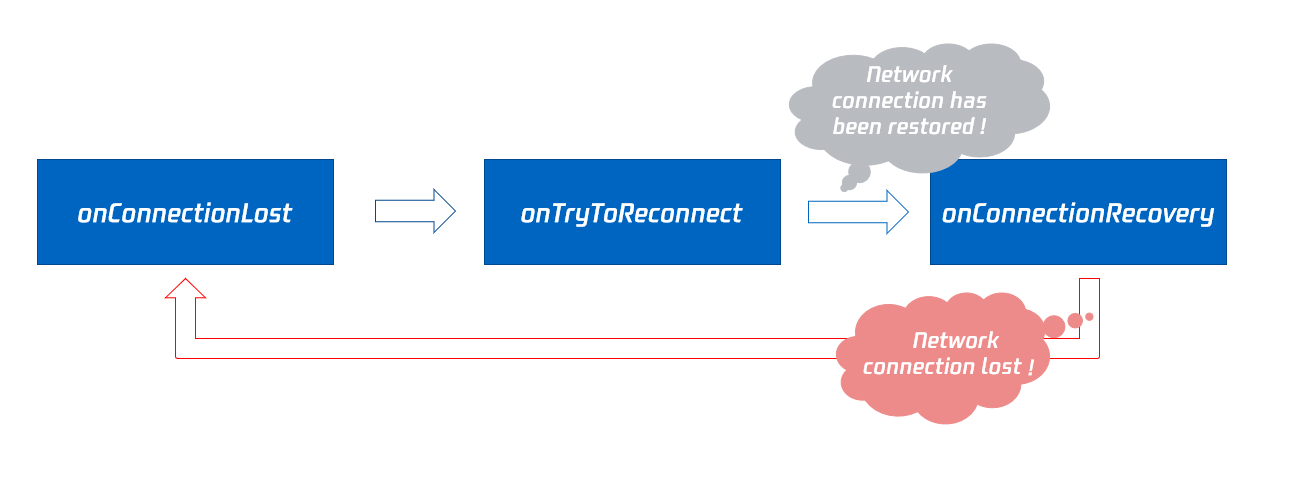
|
|
1669
|
-
|
|
1670
|
-
## onTryToReconnect
|
|
1671
|
-
|
|
1672
|
-
|
|
1673
|
-
|
|
1674
|
-
#### SDK 正在尝试重新连接到云端。
|
|
1675
|
-
|
|
1676
|
-
SDK 会在跟云端的连接断开时抛出 [onConnectionLost](https://write.woa.com/document/87029920275542016),之后会努力跟云端重新建立连接并抛出本事件,连接恢复后会抛出 [onConnectionRecovery](https://write.woa.com/document/87029920275542016)。
|
|
1677
|
-
|
|
1678
|
-
## onConnectionRecovery
|
|
1679
|
-
|
|
1680
|
-
|
|
1681
|
-
|
|
1682
|
-
#### SDK 与云端的连接已经恢复。
|
|
1683
|
-
|
|
1684
|
-
SDK 会在跟云端的连接断开时抛出 [onConnectionLost](https://write.woa.com/document/87029920275542016),之后会努力跟云端重新建立连接并抛出 [onTryToReconnect](https://write.woa.com/document/87029920275542016),连接恢复后会抛出本事件回调。
|
|
1685
|
-
|
|
1686
|
-
## onCameraDidReady
|
|
1687
|
-
|
|
1688
|
-
|
|
1689
|
-
|
|
1690
|
-
#### 摄像头准备就绪。
|
|
1691
|
-
|
|
1692
|
-
当您调用 [startLocalPreview](https://write.woa.com/document/87029900866228224) 之后,SDK 会尝试启动摄像头,如果摄像头能够启动成功就会抛出本事件。
|
|
1693
|
-
|
|
1694
|
-
如果启动失败,大概率是因为当前应用没有获得访问摄像头的权限,或者摄像头当前正在被其他程序独占使用中。
|
|
1695
|
-
|
|
1696
|
-
您可以通过捕获 [onError](https://write.woa.com/document/87029920275542016) 事件回调获知这些异常情况并通过 UI 界面提示用户。
|
|
1697
|
-
|
|
1698
|
-
## onMicDidReady
|
|
1699
|
-
|
|
1700
|
-
|
|
1701
|
-
|
|
1702
|
-
#### 麦克风准备就绪。
|
|
1703
|
-
|
|
1704
|
-
当您调用 [startLocalAudio](https://write.woa.com/document/87029900866228224) 之后,SDK 会尝试启动麦克风,如果麦克风能够启动成功就会抛出本事件。
|
|
1705
|
-
|
|
1706
|
-
如果启动失败,大概率是因为当前应用没有获得访问麦克风的权限,或者麦克风当前正在被其他程序独占使用中。
|
|
1707
|
-
|
|
1708
|
-
您可以通过捕获 [onError](https://write.woa.com/document/87029920275542016) 事件回调获知这些异常情况并通过 UI 界面提示用户。
|
|
1709
|
-
|
|
1710
|
-
## onAudioRouteChanged
|
|
1711
|
-
|
|
1712
|
-
|
|
1713
|
-
|
|
1714
|
-
#### 当前音频路由发生变化(仅适用于移动设备)。
|
|
1715
|
-
|
|
1716
|
-
所谓“音频路由”,是指声音是从手机的扬声器还是从听筒中播放出来,音频路由变化也就是声音的播放位置发生了变化。
|
|
1717
|
-
- 当音频路由为听筒时,声音比较小,只有将耳朵凑近才能听清楚,隐私性较好,适合用于接听电话。
|
|
1718
|
-
|
|
1719
|
-
- 当音频路由为扬声器时,声音比较大,不用将手机贴脸也能听清,因此可以实现“免提”的功能。
|
|
1720
|
-
|
|
1721
|
-
- 当音频路由为有线耳机。
|
|
1722
|
-
|
|
1723
|
-
- 当音频路由为蓝牙耳机。
|
|
1724
|
-
|
|
1725
|
-
- 当音频路由为USB专业声卡设备。
|
|
1726
|
-
|
|
1727
|
-
<table>
|
|
1728
|
-
<tr>
|
|
1729
|
-
<td rowspan="1" colSpan="1" >参数</td>
|
|
1730
|
-
|
|
1731
|
-
<td rowspan="1" colSpan="1" >描述</td>
|
|
1732
|
-
</tr>
|
|
1733
|
-
|
|
1734
|
-
<tr>
|
|
1735
|
-
<td rowspan="1" colSpan="1" >fromRoute</td>
|
|
1736
|
-
|
|
1737
|
-
<td rowspan="1" colSpan="1" >变更前的音频路由。</td>
|
|
1738
|
-
</tr>
|
|
1739
|
-
|
|
1740
|
-
<tr>
|
|
1741
|
-
<td rowspan="1" colSpan="1" >route</td>
|
|
1742
|
-
|
|
1743
|
-
<td rowspan="1" colSpan="1" >音频路由,即声音由哪里输出(扬声器、听筒)。</td>
|
|
1744
|
-
</tr>
|
|
1745
|
-
</table>
|
|
1746
|
-
|
|
1747
|
-
|
|
1748
|
-
## onUserVoiceVolume
|
|
1749
|
-
|
|
1750
|
-
|
|
1751
|
-
|
|
1752
|
-
#### 音量大小的反馈回调。
|
|
1753
|
-
|
|
1754
|
-
SDK 可以评估每一路音频的音量大小,并每隔一段时间抛出该事件回调,您可以根据音量大小在 UI 上做出相应的提示,例如` 波形图 `或` 音量槽 `。
|
|
1755
|
-
|
|
1756
|
-
要完成这个功能, 您需要先调用 [enableAudioVolumeEvaluation](https://write.woa.com/document/87029900866228224) 开启这个能力并设定事件抛出的时间间隔。
|
|
1757
|
-
|
|
1758
|
-
需要补充说明的是,无论当前房间中是否有人说话,SDK 都会按照您设定的时间间隔定时抛出此事件回调。
|
|
1759
|
-
<table>
|
|
1760
|
-
<tr>
|
|
1761
|
-
<td rowspan="1" colSpan="1" >参数</td>
|
|
1762
|
-
|
|
1763
|
-
<td rowspan="1" colSpan="1" >描述</td>
|
|
1764
|
-
</tr>
|
|
1765
|
-
|
|
1766
|
-
<tr>
|
|
1767
|
-
<td rowspan="1" colSpan="1" >totalVolume</td>
|
|
1768
|
-
|
|
1769
|
-
<td rowspan="1" colSpan="1" >所有远端用户的总音量大小,取值范围 [0, 100]。</td>
|
|
1770
|
-
</tr>
|
|
1771
|
-
|
|
1772
|
-
<tr>
|
|
1773
|
-
<td rowspan="1" colSpan="1" >userVolumes</td>
|
|
1774
|
-
|
|
1775
|
-
<td rowspan="1" colSpan="1" >是一个数组,用于承载所有正在说话的用户的音量大小,取值范围 [0, 100]。</td>
|
|
1776
|
-
</tr>
|
|
1777
|
-
</table>
|
|
1778
|
-
|
|
1779
|
-
|
|
1780
|
-
> **注意**
|
|
1781
|
-
>
|
|
1782
|
-
|
|
1783
|
-
> userVolumes 为一个数组,对于数组中的每一个元素,当 userId 为空时表示本地麦克风采集的音量大小,当 userId 不为空时代表远端用户的音量大小。
|
|
1784
|
-
>
|
|
1785
|
-
|
|
1786
|
-
|
|
1787
|
-
## onRecvCustomCmdMsg
|
|
1788
|
-
|
|
1789
|
-
|
|
1790
|
-
|
|
1791
|
-
#### 收到自定义消息的事件回调。
|
|
1792
|
-
|
|
1793
|
-
当房间中的某个用户使用 [sendCustomCmdMsg](https://write.woa.com/document/87029900866228224) 发送自定义 UDP 消息时,房间中的其他用户可以通过 ` onRecvCustomCmdMsg ` 事件回调接收到该条消息。
|
|
1794
|
-
<table>
|
|
1795
|
-
<tr>
|
|
1796
|
-
<td rowspan="1" colSpan="1" >参数</td>
|
|
1797
|
-
|
|
1798
|
-
<td rowspan="1" colSpan="1" >描述</td>
|
|
1799
|
-
</tr>
|
|
1800
|
-
|
|
1801
|
-
<tr>
|
|
1802
|
-
<td rowspan="1" colSpan="1" >cmdID</td>
|
|
1803
|
-
|
|
1804
|
-
<td rowspan="1" colSpan="1" >命令 ID。</td>
|
|
1805
|
-
</tr>
|
|
1806
|
-
|
|
1807
|
-
<tr>
|
|
1808
|
-
<td rowspan="1" colSpan="1" >message</td>
|
|
1809
|
-
|
|
1810
|
-
<td rowspan="1" colSpan="1" >消息数据。</td>
|
|
1811
|
-
</tr>
|
|
250
|
+
- 由时间帧长转化为字节帧长的公式为 ` 采样率 × 时间帧长 × 声道数 × 采样点位宽 `。
|
|
1812
251
|
|
|
1813
|
-
|
|
1814
|
-
<td rowspan="1" colSpan="1" >seq</td>
|
|
252
|
+
- 以 TRTC 默认的音频录制格式48000采样率、单声道、16采样点位宽为例,字节帧长为 ` 48000 × 0.02s × 1 × 16bit = 15360bit = 1920字节 `。
|
|
1815
253
|
|
|
1816
|
-
|
|
1817
|
-
|
|
254
|
+
| 参数 | 描述 |
|
|
255
|
+
| --- | --- |
|
|
256
|
+
| frame | PCM 格式的音频数据帧。 |
|
|
1818
257
|
|
|
1819
|
-
|
|
1820
|
-
|
|
258
|
+
> **注意**
|
|
259
|
+
>
|
|
1821
260
|
|
|
1822
|
-
|
|
1823
|
-
|
|
1824
|
-
</table>
|
|
261
|
+
> 1. 请不要在此回调函数中做任何耗时操作,由于 SDK 每隔 20ms 就要处理一帧音频数据,如果您的处理时间超过 20ms,就会导致声音异常。
|
|
262
|
+
>
|
|
1825
263
|
|
|
264
|
+
> 2. 此接口回调出的音频数据是可读写的,也就是说您可以在回调函数中同步修改音频数据,但请保证处理耗时。
|
|
265
|
+
>
|
|
1826
266
|
|
|
1827
|
-
|
|
267
|
+
> 3. 此接口回调出的是对各路待播放音频数据的混合,但其中并不包含耳返的音频数据。
|
|
268
|
+
>
|
|
1828
269
|
|
|
270
|
+
## onMixedAllAudioFrame
|
|
1829
271
|
|
|
272
|
+
#### SDK 所有音频混合后的音频数据(包括采集到的和待播放的)。
|
|
1830
273
|
|
|
1831
|
-
|
|
274
|
+
当您设置完音频数据自定义回调之后,SDK 内部会把所有采集到的和待播放的音频数据混合起来,以 PCM 格式的形式通过本接口回调给您,便于您进行自定义录制。
|
|
275
|
+
- 此接口回调出的音频时间帧长固定为0.02s,格式为 PCM 格式。
|
|
1832
276
|
|
|
1833
|
-
|
|
277
|
+
- 由时间帧长转化为字节帧长的公式为 ` 采样率 × 时间帧长 × 声道数 × 采样点位宽 `。
|
|
1834
278
|
|
|
1835
|
-
|
|
1836
|
-
<table>
|
|
1837
|
-
<tr>
|
|
1838
|
-
<td rowspan="1" colSpan="1" >参数</td>
|
|
279
|
+
- 以 TRTC 默认的音频录制格式48000采样率、单声道、16采样点位宽为例,字节帧长为 ` 48000 × 0.02s × 1 × 16bit = 15360bit = 1920字节 `。
|
|
1839
280
|
|
|
1840
|
-
|
|
1841
|
-
|
|
281
|
+
| 参数 | 描述 |
|
|
282
|
+
| --- | --- |
|
|
283
|
+
| frame | PCM 格式的音频数据帧。 |
|
|
1842
284
|
|
|
1843
|
-
|
|
1844
|
-
|
|
285
|
+
> **注意**
|
|
286
|
+
>
|
|
1845
287
|
|
|
1846
|
-
|
|
1847
|
-
|
|
288
|
+
> 1. 此接口回调出的是SDK所有音频数据的混合数据,包括:经过 3A 前处理、特效叠加以及背景音乐混音后的本地音频,所有远端音频,但不包括耳返音频。
|
|
289
|
+
>
|
|
1848
290
|
|
|
1849
|
-
|
|
1850
|
-
|
|
291
|
+
> 2. 此接口回调出的音频数据不支持修改。
|
|
292
|
+
>
|
|
1851
293
|
|
|
1852
|
-
|
|
1853
|
-
</tr>
|
|
294
|
+
## onVoiceEarMonitorAudioFrame
|
|
1854
295
|
|
|
1855
|
-
|
|
1856
|
-
<td rowspan="1" colSpan="1" >missed</td>
|
|
296
|
+
#### 耳返的音频数据。
|
|
1857
297
|
|
|
1858
|
-
|
|
1859
|
-
|
|
298
|
+
当您设置完音频数据自定义回调之后,SDK 内部会把耳返的音频数据在播放之前以 PCM 格式的形式通过本接口回调给您。
|
|
299
|
+
- 此接口回调出的音频时间帧长不固定,格式为 PCM 格式。
|
|
1860
300
|
|
|
1861
|
-
|
|
1862
|
-
<td rowspan="1" colSpan="1" >userId</td>
|
|
301
|
+
- 由时间帧长转化为字节帧长的公式为 ` 采样率 × 时间帧长 × 声道数 × 采样点位宽 `。
|
|
1863
302
|
|
|
1864
|
-
|
|
1865
|
-
</tr>
|
|
1866
|
-
</table>
|
|
303
|
+
- 以 TRTC 默认的音频录制格式 48000 采样率、单声道、16采样点位宽为例,0.02s 的音频数据字节帧长为 ` 48000 × 0.02s × 1 × 16bit = 15360bit = 1920字节 `。
|
|
1867
304
|
|
|
305
|
+
| 参数 | 描述 |
|
|
306
|
+
| --- | --- |
|
|
307
|
+
| frame | PCM 格式的音频数据帧。 |
|
|
1868
308
|
|
|
1869
309
|
> **注意**
|
|
1870
|
-
>
|
|
310
|
+
>
|
|
1871
311
|
|
|
1872
|
-
>
|
|
1873
|
-
>
|
|
312
|
+
> 1. 请不要在此回调函数中做任何耗时操作,否则会导致声音异常。
|
|
313
|
+
>
|
|
1874
314
|
|
|
315
|
+
> 2. 此接口回调出的音频数据是可读写的,也就是说您可以在回调函数中同步修改音频数据,但请保证处理耗时。
|
|
316
|
+
>
|
|
1875
317
|
|
|
1876
|
-
##
|
|
318
|
+
## onLog
|
|
1877
319
|
|
|
320
|
+
#### 本地 LOG 的打印回调。
|
|
1878
321
|
|
|
322
|
+
如果您希望捕获 SDK 的本地日志打印行为,可以通过设置日志回调,让 SDK 将要打印的日志都通过本回调接口抛送给您。
|
|
323
|
+
| 参数 | 描述 |
|
|
324
|
+
| --- | --- |
|
|
325
|
+
| level | 日志等级请参见 TRTC_LOG_LEVEL。 |
|
|
326
|
+
| log | 日志内容。 |
|
|
327
|
+
| module | 保留字段,暂无具体意义,目前为固定值 ` TXLiteAVSDK `。 |
|
|
1879
328
|
|
|
1880
|
-
|
|
329
|
+
## onError
|
|
1881
330
|
|
|
1882
|
-
|
|
1883
|
-
<table>
|
|
1884
|
-
<tr>
|
|
1885
|
-
<td rowspan="1" colSpan="1" >参数</td>
|
|
331
|
+
#### 错误事件回调。
|
|
1886
332
|
|
|
1887
|
-
|
|
1888
|
-
</tr>
|
|
333
|
+
错误事件,表示 SDK 抛出的不可恢复的错误,例如进入房间失败或设备开启失败等。
|
|
1889
334
|
|
|
1890
|
-
|
|
1891
|
-
|
|
335
|
+
参考文档:[错误码表](https://cloud.tencent.com/document/product/647/38308)
|
|
336
|
+
| 参数 | 描述 |
|
|
337
|
+
| --- | --- |
|
|
338
|
+
| errCode | 错误码 |
|
|
339
|
+
| errMsg | 错误信息 |
|
|
340
|
+
| extInfo | 扩展信息字段,个别错误码可能会带额外的信息帮助定位问题 |
|
|
1892
341
|
|
|
1893
|
-
|
|
1894
|
-
</tr>
|
|
342
|
+
## onWarning
|
|
1895
343
|
|
|
1896
|
-
|
|
1897
|
-
<td rowspan="1" colSpan="1" >userId</td>
|
|
344
|
+
#### 警告事件回调。
|
|
1898
345
|
|
|
1899
|
-
|
|
1900
|
-
</tr>
|
|
1901
|
-
</table>
|
|
346
|
+
警告事件,表示 SDK 抛出的提示性问题,例如视频出现卡顿或 CPU 使用率太高等。
|
|
1902
347
|
|
|
348
|
+
参考文档:[错误码表](https://cloud.tencent.com/document/product/647/38308)
|
|
349
|
+
| 参数 | 描述 |
|
|
350
|
+
| --- | --- |
|
|
351
|
+
| extInfo | 扩展信息字段,个别警告码可能会带额外的信息帮助定位问题 |
|
|
352
|
+
| warningCode | 警告码 |
|
|
353
|
+
| warningMsg | 警告信息 |
|
|
1903
354
|
|
|
1904
|
-
##
|
|
355
|
+
## onEnterRoom
|
|
1905
356
|
|
|
357
|
+
#### 进入房间成功与否的事件回调。
|
|
1906
358
|
|
|
359
|
+
调用 TRTCCloud 中的 enterRoom 接口执行进房操作后,会收到来自 TRTCCloudListener 的 ` onEnterRoom(result) ` 回调:
|
|
360
|
+
- 如果加入成功,回调 result 会是一个正数(result > 0),代表进入房间所消耗的时间,单位是毫秒(ms)。
|
|
1907
361
|
|
|
1908
|
-
|
|
362
|
+
- 如果加入失败,回调 result 会是一个负数(result < 0),代表失败原因的错误码。
|
|
1909
363
|
|
|
1910
|
-
|
|
364
|
+
进房失败的错误码含义请参见[错误码表](https://cloud.tencent.com/document/product/647/38308)。
|
|
365
|
+
| 参数 | 描述 |
|
|
366
|
+
| --- | --- |
|
|
367
|
+
| result | result > 0 时为进房耗时(ms),result < 0 时为进房错误码。 |
|
|
1911
368
|
|
|
1912
|
-
|
|
1913
|
-
|
|
1914
|
-
<tr>
|
|
1915
|
-
<td rowspan="1" colSpan="1" >参数</td>
|
|
369
|
+
> **注意**
|
|
370
|
+
>
|
|
1916
371
|
|
|
1917
|
-
|
|
1918
|
-
|
|
372
|
+
> 1. 在 Ver6.6 之前的版本,只有进房成功会抛出 ` onEnterRoom(result) ` 回调,进房失败由 onError 回调抛出。
|
|
373
|
+
>
|
|
1919
374
|
|
|
1920
|
-
|
|
1921
|
-
|
|
375
|
+
> 2. 在 Ver6.6 之后的版本:无论进房成功或失败,均会抛出 ` onEnterRoom(result) ` 回调,同时进房失败也会有 onError 回调抛出。
|
|
376
|
+
>
|
|
1922
377
|
|
|
1923
|
-
|
|
1924
|
-
</tr>
|
|
378
|
+
## onExitRoom
|
|
1925
379
|
|
|
1926
|
-
|
|
1927
|
-
<td rowspan="1" colSpan="1" >errMsg</td>
|
|
380
|
+
#### 离开房间的事件回调。
|
|
1928
381
|
|
|
1929
|
-
|
|
1930
|
-
</tr>
|
|
1931
|
-
</table>
|
|
382
|
+
调用 TRTCCloud 中的 exitRoom 接口会执行退出房间的相关逻辑,例如释放音视频设备资源和编解码器资源等。
|
|
1932
383
|
|
|
384
|
+
待 SDK 占用的所有资源释放完毕后,SDK 会抛出 ` onExitRoom() ` 回调通知到您。
|
|
1933
385
|
|
|
1934
|
-
|
|
386
|
+
如果您要再次调用 enterRoom 或者切换到其他的音视频 SDK,请等待 ` onExitRoom ` 回调到来后再执行相关操作。否则可能会遇到例如摄像头、麦克风设备被强占等各种异常问题。
|
|
387
|
+
| 参数 | 描述 |
|
|
388
|
+
| --- | --- |
|
|
389
|
+
| reason | 离开房间原因,0:主动调用 exitRoom 退出房间;1:被服务器移出当前房间;2:当前房间整个被解散 3: 服务器状态异常。 |
|
|
1935
390
|
|
|
391
|
+
## onSwitchRole
|
|
1936
392
|
|
|
393
|
+
#### 切换角色的事件回调。
|
|
1937
394
|
|
|
1938
|
-
|
|
395
|
+
调用 TRTCCloud 中的 switchRole 接口会切换主播和观众的角色,该操作会伴随一个线路切换的过程,待 SDK 切换完成后,会抛出 ` onSwitchRole() ` 事件回调。
|
|
396
|
+
| 参数 | 描述 |
|
|
397
|
+
| --- | --- |
|
|
398
|
+
| errCode | 错误码,ERR_NULL 代表切换成功,其他请参见[错误码](https://cloud.tencent.com/document/product/647/32257)。 |
|
|
399
|
+
| errMsg | 错误信息。 |
|
|
1939
400
|
|
|
1940
|
-
|
|
401
|
+
## onSwitchRoom
|
|
1941
402
|
|
|
1942
|
-
|
|
1943
|
-
<table>
|
|
1944
|
-
<tr>
|
|
1945
|
-
<td rowspan="1" colSpan="1" >参数</td>
|
|
403
|
+
#### 切换房间的结果回调。
|
|
1946
404
|
|
|
1947
|
-
|
|
1948
|
-
|
|
405
|
+
调用 TRTCCloud 中的 switchRoom 接口可以让用户快速地从一个房间切换到另一个房间,待 SDK 切换完成后,会抛出 ` onSwitchRoom() ` 事件回调。
|
|
406
|
+
| 参数 | 描述 |
|
|
407
|
+
| --- | --- |
|
|
408
|
+
| errCode | 错误码,ERR_NULL 代表切换成功,其他请参见[错误码](https://cloud.tencent.com/document/product/647/32257)。 |
|
|
409
|
+
| errMsg | 错误信息。 |
|
|
1949
410
|
|
|
1950
|
-
|
|
1951
|
-
<td rowspan="1" colSpan="1" >err</td>
|
|
411
|
+
## onConnectOtherRoom
|
|
1952
412
|
|
|
1953
|
-
|
|
1954
|
-
</tr>
|
|
413
|
+
#### 请求跨房通话的结果回调。
|
|
1955
414
|
|
|
1956
|
-
|
|
1957
|
-
<td rowspan="1" colSpan="1" >errMsg</td>
|
|
415
|
+
调用 TRTCCloud 中的 connectOtherRoom 接口会将两个不同房间中的主播拉通视频通话,也就是所谓的“主播PK”功能。
|
|
1958
416
|
|
|
1959
|
-
|
|
1960
|
-
|
|
1961
|
-
|
|
417
|
+
调用者会收到 ` onConnectOtherRoom() ` 回调来获知跨房通话是否成功。
|
|
418
|
+
| 参数 | 描述 |
|
|
419
|
+
| --- | --- |
|
|
420
|
+
| errCode | 错误码,ERR_NULL 代表切换成功,其他请参见[错误码](https://cloud.tencent.com/document/product/647/32257)。 |
|
|
421
|
+
| errMsg | 错误信息。 |
|
|
422
|
+
| userId | 要跨房通话的另一个房间中的主播的用户 ID。 |
|
|
1962
423
|
|
|
424
|
+
## onDisConnectOtherRoom
|
|
1963
425
|
|
|
1964
|
-
|
|
426
|
+
#### 结束跨房通话的结果回调。
|
|
1965
427
|
|
|
428
|
+
调用 TRTCCloud 中的 disConnectOtherRoom 接口会结束两个不同房间中的主播视频通话,也就是所谓的“主播PK”功能。
|
|
1966
429
|
|
|
430
|
+
调用者会收到 ` onDisconnectOtherRoom() ` 回调来获知结束跨房通话是否成功。
|
|
431
|
+
| 参数 | 描述 |
|
|
432
|
+
| --- | --- |
|
|
433
|
+
| errCode | 错误码,ERR_NULL 代表成功,其他请参见[错误码](https://cloud.tencent.com/document/product/647/32257)。 |
|
|
434
|
+
| errMsg | 错误信息。 |
|
|
1967
435
|
|
|
1968
|
-
|
|
436
|
+
## onUpdateOtherRoomForwardMode
|
|
1969
437
|
|
|
1970
|
-
|
|
1971
|
-
<table>
|
|
1972
|
-
<tr>
|
|
1973
|
-
<td rowspan="1" colSpan="1" >参数</td>
|
|
438
|
+
#### 更改跨房主播上行能力的结果回调。
|
|
1974
439
|
|
|
1975
|
-
|
|
1976
|
-
</tr>
|
|
440
|
+
调用 TRTCCloud 中的 updateOtherRoomForwardMode 接口会限制跨房主播在本房间内的上行能力,禁止或允许跨房主播发布音频/主路视频/辅路视频,该行为会影响房间内的所有用户。
|
|
1977
441
|
|
|
1978
|
-
|
|
1979
|
-
|
|
442
|
+
调用者会收到 ` onUpdateOtherRoomForwardMode() ` 回调来获知更改跨房主播上行能力是否成功。
|
|
443
|
+
| 参数 | 描述 |
|
|
444
|
+
| --- | --- |
|
|
445
|
+
| errCode | 错误码,ERR_NULL 代表成功,其他请参见[错误码](https://cloud.tencent.com/document/product/647/32257)。 |
|
|
446
|
+
| errMsg | 错误信息。 |
|
|
1980
447
|
|
|
1981
|
-
|
|
1982
|
-
</tr>
|
|
448
|
+
## onRemoteUserEnterRoom
|
|
1983
449
|
|
|
1984
|
-
|
|
1985
|
-
<td rowspan="1" colSpan="1" >errMsg</td>
|
|
450
|
+
#### 有用户加入当前房间。
|
|
1986
451
|
|
|
1987
|
-
|
|
1988
|
-
|
|
1989
|
-
</table>
|
|
452
|
+
出于性能方面的考虑,在 TRTC 两种不同的应用场景(即 ` AppScene `,在 enterRoom 时通过第二个参数指定)下,该通知的行为会有差别:
|
|
453
|
+
- 直播类场景(TRTC_APP_SCENE_LIVE 和 TRTC_APP_SCENE_VOICE_CHATROOM):该场景下的用户区分主播和观众两种角色,只有主播进入房间时才会触发该通知,观众进入房间时不会触发该通知。
|
|
1990
454
|
|
|
455
|
+
- 通话类场景(TRTC_APP_SCENE_VIDEOCALL 和 TRTC_APP_SCENE_AUDIOCALL):该场景下的用户没有角色的区分(可认为都是主播),任何用户进入房间都会触发该通知。
|
|
1991
456
|
|
|
1992
|
-
|
|
1993
|
-
|
|
457
|
+
| 参数 | 描述 |
|
|
458
|
+
| --- | --- |
|
|
459
|
+
| userId | 远端用户的用户标识。 |
|
|
1994
460
|
|
|
1995
|
-
>
|
|
1996
|
-
>
|
|
461
|
+
> **注意**
|
|
462
|
+
>
|
|
1997
463
|
|
|
464
|
+
> 1. 事件回调 ` onRemoteUserEnterRoom ` 和 onRemoteUserLeaveRoom 只适用于维护当前房间里的“用户列表”,有此事件回调不代表一定有视频画面。
|
|
465
|
+
>
|
|
1998
466
|
|
|
1999
|
-
|
|
467
|
+
> 2. 如果需要显示远程画面,请监听代表某个用户是否有视频画面的 onUserVideoAvailable 事件回调。
|
|
468
|
+
>
|
|
2000
469
|
|
|
470
|
+
## onRemoteUserLeaveRoom
|
|
2001
471
|
|
|
472
|
+
#### 有用户离开当前房间。
|
|
2002
473
|
|
|
2003
|
-
|
|
474
|
+
与 onRemoteUserEnterRoom 相对应,在两种不同的应用场景(即 AppScene,在 enterRoom 时通过第二个参数指定)下,该通知的行为会有差别:
|
|
475
|
+
- 直播类场景(TRTC_APP_SCENE_LIVE 和 TRTC_APP_SCENE_VOICE_CHATROOM):该场景下的用户区分主播和观众两种角色,只有主播离开房间时才会触发该通知,观众离开房间时不会触发该通知。
|
|
2004
476
|
|
|
2005
|
-
|
|
2006
|
-
<table>
|
|
2007
|
-
<tr>
|
|
2008
|
-
<td rowspan="1" colSpan="1" >参数</td>
|
|
477
|
+
- 通话类场景(TRTC_APP_SCENE_VIDEOCALL 和 TRTC_APP_SCENE_AUDIOCALL):该场景下的用户没有角色的区分(可认为都是主播),任何用户离开房间都会触发该通知。
|
|
2009
478
|
|
|
2010
|
-
|
|
2011
|
-
|
|
479
|
+
| 参数 | 描述 |
|
|
480
|
+
| --- | --- |
|
|
481
|
+
| reason | 离开原因,0表示用户主动退出房间,1表示用户超时退出,2表示被移出房间,3表示主播因切换到观众退出房间。 |
|
|
482
|
+
| userId | 远端用户的用户标识。 |
|
|
2012
483
|
|
|
2013
|
-
|
|
2014
|
-
<td rowspan="1" colSpan="1" >err</td>
|
|
484
|
+
## onUserVideoAvailable
|
|
2015
485
|
|
|
2016
|
-
|
|
2017
|
-
</tr>
|
|
486
|
+
#### 某远端用户发布/取消了主路视频画面。
|
|
2018
487
|
|
|
2019
|
-
|
|
2020
|
-
<td rowspan="1" colSpan="1" >errMsg</td>
|
|
488
|
+
**主路画面** 一般被用于承载摄像头画面。当您收到 ` onUserVideoAvailable(userId, true) ` 通知时,表示该路画面已经有可播放的视频帧到达。
|
|
2021
489
|
|
|
2022
|
-
|
|
2023
|
-
</tr>
|
|
2024
|
-
</table>
|
|
490
|
+
此时,您需要调用 startRemoteView 接口订阅该用户的远程画面,订阅成功后,您会继续收到该用户的首帧画面渲染回调 ` onFirstVideoFrame(userId) `。
|
|
2025
491
|
|
|
492
|
+
当您收到 ` onUserVideoAvailable(userId, false) ` 通知时,表示该路远程画面已经被关闭,关闭的原因可能是该用户调用了 muteLocalVideo 或 stopLocalPreview。
|
|
493
|
+
| 参数 | 描述 |
|
|
494
|
+
| --- | --- |
|
|
495
|
+
| available | 该用户是否发布(或取消发布)了主路视频画面,true:发布;false:取消发布。 |
|
|
496
|
+
| userId | 远端用户的用户标识。 |
|
|
2026
497
|
|
|
2027
|
-
##
|
|
498
|
+
## onUserSubStreamAvailable
|
|
2028
499
|
|
|
500
|
+
#### 某远端用户发布/取消了辅路视频画面。
|
|
2029
501
|
|
|
502
|
+
“辅路画面”一般被用于承载屏幕分享的画面。当您收到 ` onUserSubStreamAvailable(userId, true) ` 通知时,表示该路画面已经有可播放的视频帧到达。
|
|
2030
503
|
|
|
2031
|
-
|
|
504
|
+
此时,您需要调用 startRemoteView 接口订阅该用户的远程画面,订阅成功后,您会继续收到该用户的首帧画面渲染回调 ` onFirstVideoFrame(userId) `。
|
|
505
|
+
| 参数 | 描述 |
|
|
506
|
+
| --- | --- |
|
|
507
|
+
| available | 该用户是否发布(或取消发布)了辅路视频画面,true: 发布;false:取消发布。 |
|
|
508
|
+
| userId | 远端用户的用户标识。 |
|
|
2032
509
|
|
|
2033
|
-
|
|
2034
|
-
|
|
2035
|
-
<tr>
|
|
2036
|
-
<td rowspan="1" colSpan="1" >参数</td>
|
|
510
|
+
> **注意**
|
|
511
|
+
>
|
|
2037
512
|
|
|
2038
|
-
|
|
2039
|
-
|
|
513
|
+
> 显示辅路画面使用的函数是 startRemoteView 而非 startRemoteSubStreamView,startRemoteSubStreamView 已经被废弃。
|
|
514
|
+
>
|
|
2040
515
|
|
|
2041
|
-
|
|
2042
|
-
<td rowspan="1" colSpan="1" >err</td>
|
|
516
|
+
## onUserAudioAvailable
|
|
2043
517
|
|
|
2044
|
-
|
|
2045
|
-
</tr>
|
|
518
|
+
#### 某远端用户发布/取消了自己的音频。
|
|
2046
519
|
|
|
2047
|
-
|
|
2048
|
-
|
|
520
|
+
当您收到 ` onUserAudioAvailable(userId, true) ` 通知时,表示该用户发布了自己的声音,此时 SDK 的表现为:
|
|
521
|
+
- 在自动订阅模式下,您无需做任何操作,SDK 会自动播放该用户的声音。
|
|
2049
522
|
|
|
2050
|
-
|
|
2051
|
-
</tr>
|
|
2052
|
-
</table>
|
|
523
|
+
- 在手动订阅模式下,您可以通过 muteRemoteAudio(userid, false) 来播放该用户的声音。
|
|
2053
524
|
|
|
525
|
+
| 参数 | 描述 |
|
|
526
|
+
| --- | --- |
|
|
527
|
+
| available | 该用户是否发布(或取消发布)了自己的音频,true: 发布;false:取消发布。 |
|
|
528
|
+
| userId | 远端用户的用户标识。 |
|
|
2054
529
|
|
|
2055
|
-
|
|
530
|
+
> **注意**
|
|
531
|
+
>
|
|
2056
532
|
|
|
533
|
+
> SDK 默认使用自动订阅模式,您可以通过 setDefaultStreamRecvMode 设置为手动订阅,但需要在您进入房间之前调用才生效。
|
|
534
|
+
>
|
|
2057
535
|
|
|
536
|
+
## onFirstVideoFrame
|
|
2058
537
|
|
|
2059
|
-
####
|
|
538
|
+
#### SDK 开始渲染自己本地或远端用户的首帧画面。
|
|
2060
539
|
|
|
2061
|
-
|
|
2062
|
-
|
|
2063
|
-
<tr>
|
|
2064
|
-
<td rowspan="1" colSpan="1" >参数</td>
|
|
540
|
+
SDK 会在渲染自己本地或远端用户的首帧画面时抛出该事件,您可以通过回调事件中的 userId 参数来判断事件来自于“本地”还是来自于“远端”。
|
|
541
|
+
- 如果 userId 为空值,代表 SDK 已经开始渲染自己本地的视频画面,不过前提是您已经调用了 startLocalPreview 或 startScreenCapture。
|
|
2065
542
|
|
|
2066
|
-
|
|
2067
|
-
</tr>
|
|
543
|
+
- 如果 userId 不为空,代表 SDK 已经开始渲染远端用户的视频画面,不过前提是您已经调用了 startRemoteView 订阅了该用户的视频画面。
|
|
2068
544
|
|
|
2069
|
-
|
|
2070
|
-
|
|
545
|
+
| 参数 | 描述 |
|
|
546
|
+
| --- | --- |
|
|
547
|
+
| height | 画面的高度。 |
|
|
548
|
+
| streamType | 视频流类型:主路(Main)一般用于承载摄像头画面,辅路(Sub)一般用于承载屏幕分享画面。 |
|
|
549
|
+
| userId | 本地或远端的用户标识,如果 userId 为空值代表自己本地的首帧画面已到来,userId 不为空则代表远端用户的首帧画面已到来。 |
|
|
550
|
+
| width | 画面的宽度。 |
|
|
2071
551
|
|
|
2072
|
-
|
|
2073
|
-
|
|
552
|
+
> **注意**
|
|
553
|
+
>
|
|
2074
554
|
|
|
2075
|
-
|
|
2076
|
-
|
|
555
|
+
> 1. 只有当您调用了 startLocalPreview 或 startScreenCapture 之后,才会触发自己本地的首帧画面事件回调。
|
|
556
|
+
>
|
|
2077
557
|
|
|
2078
|
-
|
|
2079
|
-
|
|
558
|
+
> 2. 只有当您调用了 startRemoteView 或 startRemoteSubStreamView 之后,才会触发远端用户的首帧画面事件回调。
|
|
559
|
+
>
|
|
2080
560
|
|
|
2081
|
-
|
|
2082
|
-
<td rowspan="1" colSpan="1" >message</td>
|
|
561
|
+
## onFirstAudioFrame
|
|
2083
562
|
|
|
2084
|
-
|
|
2085
|
-
</tr>
|
|
563
|
+
#### SDK 开始播放远端用户的首帧音频。
|
|
2086
564
|
|
|
2087
|
-
|
|
2088
|
-
|
|
565
|
+
SDK 会在播放远端用户的首帧音频时抛出该事件,本地音频的首帧事件暂不抛出。
|
|
566
|
+
| 参数 | 描述 |
|
|
567
|
+
| --- | --- |
|
|
568
|
+
| userId | 远端用户的用户标识。 |
|
|
2089
569
|
|
|
2090
|
-
|
|
2091
|
-
</tr>
|
|
2092
|
-
</table>
|
|
570
|
+
## onSendFirstLocalVideoFrame
|
|
2093
571
|
|
|
572
|
+
#### 自己本地的首个视频帧已被发布出去。
|
|
2094
573
|
|
|
2095
|
-
|
|
574
|
+
当您成功进入房间并通过 startLocalPreview 或 startScreenCapture 开启本地视频采集之后(开启采集和进入房间的先后顺序无影响),SDK 就会开始进行视频编码,并通过自身的网络模块向云端发布自己本地的视频数据。当 SDK 成功地向云端送出自己的第一帧视频数据帧以后,就会抛出 ` onSendFirstLocalVideoFrame ` 事件回调。
|
|
575
|
+
| 参数 | 描述 |
|
|
576
|
+
| --- | --- |
|
|
577
|
+
| streamType | 视频流类型:主路(Main)一般用于承载摄像头画面,辅路(Sub)一般用于承载屏幕分享画面。 |
|
|
2096
578
|
|
|
579
|
+
## onSendFirstLocalAudioFrame
|
|
2097
580
|
|
|
581
|
+
#### 自己本地的首个音频帧已被发布出去。
|
|
2098
582
|
|
|
2099
|
-
|
|
583
|
+
当您成功进入房间并通过 startLocalAudio 开启本地音频采集之后(开启采集和进入房间的先后顺序无影响),SDK 就会开始进行音频编码,并通过自身的网络模块向云端发布自己本地的音频数据。当 SDK 成功地向云端送出自己的第一帧音频数据帧以后,就会抛出 ` onSendFirstLocalAudioFrame ` 事件回调。
|
|
2100
584
|
|
|
2101
|
-
|
|
2102
|
-
<table>
|
|
2103
|
-
<tr>
|
|
2104
|
-
<td rowspan="1" colSpan="1" >参数</td>
|
|
585
|
+
## onRemoteVideoStatusUpdated
|
|
2105
586
|
|
|
2106
|
-
|
|
2107
|
-
</tr>
|
|
587
|
+
#### 远端视频状态变化的事件回调。
|
|
2108
588
|
|
|
2109
|
-
|
|
2110
|
-
|
|
589
|
+
您可以通过此事件回调获取远端每一路画面的播放状态(包括 Playing、Loading 和 Stopped 三种状态),从而进行相应的 UI 展示。
|
|
590
|
+
| 参数 | 描述 |
|
|
591
|
+
| --- | --- |
|
|
592
|
+
| extrainfo | 额外信息。 |
|
|
593
|
+
| reason | 视频状态改变的原因。 |
|
|
594
|
+
| status | 视频状态:包括 Playing、Loading 和 Stopped 三种状态。 |
|
|
595
|
+
| streamType | 视频流类型:主路(Main)一般用于承载摄像头画面,辅路(Sub)一般用于承载屏幕分享画面。 |
|
|
596
|
+
| userId | 用户标识。 |
|
|
2111
597
|
|
|
2112
|
-
|
|
2113
|
-
</tr>
|
|
598
|
+
## onRemoteAudioStatusUpdated
|
|
2114
599
|
|
|
2115
|
-
|
|
2116
|
-
<td rowspan="1" colSpan="1" >extraInfo</td>
|
|
600
|
+
#### 远端音频状态变化的事件回调。
|
|
2117
601
|
|
|
2118
|
-
|
|
2119
|
-
|
|
602
|
+
您可以通过此事件回调获取远端每一路音频的播放状态(包括 Playing、Loading 和 Stopped 三种状态),从而进行相应的 UI 展示。
|
|
603
|
+
| 参数 | 描述 |
|
|
604
|
+
| --- | --- |
|
|
605
|
+
| extrainfo | 额外信息。 |
|
|
606
|
+
| reason | 音频状态改变的原因。 |
|
|
607
|
+
| status | 音频状态:包括 Playing、Loading 和 Stopped 三种状态。 |
|
|
608
|
+
| userId | 用户标识。 |
|
|
2120
609
|
|
|
2121
|
-
|
|
2122
|
-
<td rowspan="1" colSpan="1" >message</td>
|
|
610
|
+
## onUserVideoSizeChanged
|
|
2123
611
|
|
|
2124
|
-
|
|
2125
|
-
</tr>
|
|
612
|
+
#### 用户视频大小发生改变回调。
|
|
2126
613
|
|
|
2127
|
-
|
|
2128
|
-
|
|
614
|
+
当您收到 ` onUserVideoSizeChanged(userId, streamType, newWidth, newHeight) ` 通知时,表示该路画面大小发生了调整,调整的原因可能是该用户调用了 setVideoEncoderParam 或者 setSubStreamEncoderParam 重新设置了画面尺寸。
|
|
615
|
+
| 参数 | 描述 |
|
|
616
|
+
| --- | --- |
|
|
617
|
+
| newHeight | 视频流的高度(像素)。 |
|
|
618
|
+
| newWidth | 视频流的宽度(像素)。 |
|
|
619
|
+
| streamType | 视频流类型:主路(Main)一般用于承载摄像头画面,辅路(Sub)一般用于承载屏幕分享画面。 |
|
|
620
|
+
| userId | 用户标识。 |
|
|
2129
621
|
|
|
2130
|
-
|
|
2131
|
-
</tr>
|
|
2132
|
-
</table>
|
|
622
|
+
## onNetworkQuality
|
|
2133
623
|
|
|
624
|
+
#### 网络质量的实时统计回调。
|
|
2134
625
|
|
|
2135
|
-
|
|
626
|
+
该统计回调每间隔2秒抛出一次,用于通知 SDK 感知到的当前网络的上行和下行质量。
|
|
2136
627
|
|
|
628
|
+
SDK 会使用一组内嵌的自研算法对当前网络的延迟高低、带宽大小以及稳定情况进行评估,并计算出一个评估结果:如果评估结果为 1(Excellent) 代表当前的网络情况非常好,如果评估结果为 6(Down)代表当前网络无法支撑 TRTC 的正常通话。
|
|
629
|
+
| 参数 | 描述 |
|
|
630
|
+
| --- | --- |
|
|
631
|
+
| localQuality | 上行网络质量。 |
|
|
632
|
+
| remoteQuality | 下行网络质量,代表数据流历经“远端->云端->本端”这样一条完整的传输链路后,最终在本端统计到的数据质量。因此,这里的下行网络质量代表的是远端上行链路与本端下行链路共同影响的结果。 |
|
|
2137
633
|
|
|
634
|
+
> **注意**
|
|
635
|
+
>
|
|
2138
636
|
|
|
2139
|
-
|
|
637
|
+
> 暂时无法通过该接口单独判定远端用户的上行质量。
|
|
638
|
+
>
|
|
2140
639
|
|
|
2141
|
-
|
|
2142
|
-
<table>
|
|
2143
|
-
<tr>
|
|
2144
|
-
<td rowspan="1" colSpan="1" >参数</td>
|
|
640
|
+
## onStatistics
|
|
2145
641
|
|
|
2146
|
-
|
|
2147
|
-
</tr>
|
|
642
|
+
#### 音视频技术指标的实时统计回调。
|
|
2148
643
|
|
|
2149
|
-
|
|
2150
|
-
|
|
644
|
+
该统计回调每间隔2秒抛出一次,用于通知 SDK 内部音频、视频以及网络相关的专业技术指标,这些信息在 TRTCStatistics 均有罗列:
|
|
645
|
+
- 视频统计信息:视频的分辨率(resolution)、帧率(FPS)和比特率(bitrate)等信息。
|
|
2151
646
|
|
|
2152
|
-
|
|
2153
|
-
</tr>
|
|
647
|
+
- 音频统计信息:音频的采样率(samplerate)、声道(channel)和比特率(bitrate)等信息。
|
|
2154
648
|
|
|
2155
|
-
|
|
2156
|
-
<td rowspan="1" colSpan="1" >extraInfo</td>
|
|
649
|
+
- 网络统计信息:SDK 和云端一次往返(SDK > Cloud > SDK)的网络耗时(rtt)、丢包率(loss)、上行流量(sentBytes)和下行流量(receivedBytes)等信息。
|
|
2157
650
|
|
|
2158
|
-
|
|
2159
|
-
|
|
651
|
+
| 参数 | 描述 |
|
|
652
|
+
| --- | --- |
|
|
653
|
+
| statistics | 统计数据,包括自己本地的统计信息和远端用户的统计信息,详情请参考 TRTCStatistics。 |
|
|
2160
654
|
|
|
2161
|
-
|
|
2162
|
-
|
|
655
|
+
> **注意**
|
|
656
|
+
>
|
|
2163
657
|
|
|
2164
|
-
|
|
2165
|
-
|
|
658
|
+
> 如果您只需要获知当前网络质量的好坏,并不需要花太多时间研究本统计回调,更推荐您使用 onNetworkQuality 来解决问题。
|
|
659
|
+
>
|
|
2166
660
|
|
|
2167
|
-
|
|
2168
|
-
<td rowspan="1" colSpan="1" >taskId</td>
|
|
661
|
+
## onSpeedTestResult
|
|
2169
662
|
|
|
2170
|
-
|
|
2171
|
-
</tr>
|
|
2172
|
-
</table>
|
|
663
|
+
#### 网速测试的结果回调。
|
|
2173
664
|
|
|
665
|
+
该统计回调由 startSpeedTest 触发。
|
|
666
|
+
| 参数 | 描述 |
|
|
667
|
+
| --- | --- |
|
|
668
|
+
| result | 网速测试结果,包括丢包、往返延迟、上下行的带宽速率,详情请参见 TRTCSpeedTestResult。 |
|
|
2174
669
|
|
|
2175
|
-
##
|
|
670
|
+
## onConnectionLost
|
|
2176
671
|
|
|
672
|
+
#### SDK 与云端的连接已经断开。
|
|
2177
673
|
|
|
674
|
+
SDK 会在跟云端的连接断开时抛出此事件回调,导致断开的原因大多是网络不可用或者网络切换所致,例如用户在通话中走进电梯时就可能会遇到此事件。
|
|
2178
675
|
|
|
2179
|
-
|
|
676
|
+
在抛出此事件之后,SDK 会努力跟云端重新建立连接,重连过程中会抛出 onTryToReconnect,连接恢复后会抛出 onConnectionRecovery 。
|
|
2180
677
|
|
|
2181
|
-
|
|
678
|
+
所以,SDK 会在如下三个连接相关的事件中按如下规律切换:
|
|
2182
679
|
|
|
2183
|
-
|
|
2184
|
-
<table>
|
|
2185
|
-
<tr>
|
|
2186
|
-
<td rowspan="1" colSpan="1" >参数</td>
|
|
680
|
+
## onTryToReconnect
|
|
2187
681
|
|
|
2188
|
-
|
|
2189
|
-
</tr>
|
|
682
|
+
#### SDK 正在尝试重新连接到云端。
|
|
2190
683
|
|
|
2191
|
-
|
|
2192
|
-
<td rowspan="1" colSpan="1" >cdnUrl</td>
|
|
684
|
+
SDK 会在跟云端的连接断开时抛出 onConnectionLost,之后会努力跟云端重新建立连接并抛出本事件,连接恢复后会抛出 onConnectionRecovery。
|
|
2193
685
|
|
|
2194
|
-
|
|
2195
|
-
</tr>
|
|
686
|
+
## onConnectionRecovery
|
|
2196
687
|
|
|
2197
|
-
|
|
2198
|
-
<td rowspan="1" colSpan="1" >code</td>
|
|
688
|
+
#### SDK 与云端的连接已经恢复。
|
|
2199
689
|
|
|
2200
|
-
|
|
2201
|
-
</tr>
|
|
690
|
+
SDK 会在跟云端的连接断开时抛出 onConnectionLost,之后会努力跟云端重新建立连接并抛出 onTryToReconnect,连接恢复后会抛出本事件回调。
|
|
2202
691
|
|
|
2203
|
-
|
|
2204
|
-
<td rowspan="1" colSpan="1" >extraInfo</td>
|
|
692
|
+
## onCameraDidReady
|
|
2205
693
|
|
|
2206
|
-
|
|
2207
|
-
</tr>
|
|
694
|
+
#### 摄像头准备就绪。
|
|
2208
695
|
|
|
2209
|
-
|
|
2210
|
-
<td rowspan="1" colSpan="1" >message</td>
|
|
696
|
+
当您调用 startLocalPreview 之后,SDK 会尝试启动摄像头,如果摄像头能够启动成功就会抛出本事件。
|
|
2211
697
|
|
|
2212
|
-
|
|
2213
|
-
</tr>
|
|
698
|
+
如果启动失败,大概率是因为当前应用没有获得访问摄像头的权限,或者摄像头当前正在被其他程序独占使用中。
|
|
2214
699
|
|
|
2215
|
-
|
|
2216
|
-
<td rowspan="1" colSpan="1" >status</td>
|
|
700
|
+
您可以通过捕获 onError 事件回调获知这些异常情况并通过 UI 界面提示用户。
|
|
2217
701
|
|
|
2218
|
-
|
|
2219
|
-
</tr>
|
|
2220
|
-
</table>
|
|
702
|
+
## onMicDidReady
|
|
2221
703
|
|
|
704
|
+
#### 麦克风准备就绪。
|
|
2222
705
|
|
|
2223
|
-
|
|
706
|
+
当您调用 startLocalAudio 之后,SDK 会尝试启动麦克风,如果麦克风能够启动成功就会抛出本事件。
|
|
2224
707
|
|
|
708
|
+
如果启动失败,大概率是因为当前应用没有获得访问麦克风的权限,或者麦克风当前正在被其他程序独占使用中。
|
|
2225
709
|
|
|
710
|
+
您可以通过捕获 onError 事件回调获知这些异常情况并通过 UI 界面提示用户。
|
|
2226
711
|
|
|
2227
|
-
|
|
712
|
+
## onAudioRouteChanged
|
|
2228
713
|
|
|
2229
|
-
|
|
714
|
+
#### 当前音频路由发生变化(仅适用于移动设备)。
|
|
2230
715
|
|
|
2231
|
-
|
|
716
|
+
所谓“音频路由”,是指声音是从手机的扬声器还是从听筒中播放出来,音频路由变化也就是声音的播放位置发生了变化。
|
|
717
|
+
- 当音频路由为听筒时,声音比较小,只有将耳朵凑近才能听清楚,隐私性较好,适合用于接听电话。
|
|
2232
718
|
|
|
719
|
+
- 当音频路由为扬声器时,声音比较大,不用将手机贴脸也能听清,因此可以实现“免提”的功能。
|
|
2233
720
|
|
|
721
|
+
- 当音频路由为有线耳机。
|
|
2234
722
|
|
|
2235
|
-
|
|
723
|
+
- 当音频路由为蓝牙耳机。
|
|
2236
724
|
|
|
2237
|
-
|
|
725
|
+
- 当音频路由为USB专业声卡设备。
|
|
2238
726
|
|
|
2239
|
-
|
|
727
|
+
| 参数 | 描述 |
|
|
728
|
+
| --- | --- |
|
|
729
|
+
| fromRoute | 变更前的音频路由。 |
|
|
730
|
+
| route | 音频路由,即声音由哪里输出(扬声器、听筒)。 |
|
|
2240
731
|
|
|
732
|
+
## onUserVoiceVolume
|
|
2241
733
|
|
|
734
|
+
#### 音量大小的反馈回调。
|
|
2242
735
|
|
|
2243
|
-
|
|
736
|
+
SDK 可以评估每一路音频的音量大小,并每隔一段时间抛出该事件回调,您可以根据音量大小在 UI 上做出相应的提示,例如` 波形图 `或` 音量槽 `。
|
|
2244
737
|
|
|
2245
|
-
|
|
738
|
+
要完成这个功能, 您需要先调用 enableAudioVolumeEvaluation 开启这个能力并设定事件抛出的时间间隔。
|
|
2246
739
|
|
|
2247
|
-
|
|
740
|
+
需要补充说明的是,无论当前房间中是否有人说话,SDK 都会按照您设定的时间间隔定时抛出此事件回调。
|
|
741
|
+
| 参数 | 描述 |
|
|
742
|
+
| --- | --- |
|
|
743
|
+
| totalVolume | 所有远端用户的总音量大小,取值范围 [0, 100]。 |
|
|
744
|
+
| userVolumes | 是一个数组,用于承载所有正在说话的用户的音量大小,取值范围 [0, 100]。 |
|
|
2248
745
|
|
|
746
|
+
> **注意**
|
|
747
|
+
>
|
|
2249
748
|
|
|
749
|
+
> userVolumes 为一个数组,对于数组中的每一个元素,当 userId 为空时表示本地麦克风采集的音量大小,当 userId 不为空时代表远端用户的音量大小。
|
|
750
|
+
>
|
|
2250
751
|
|
|
2251
|
-
|
|
752
|
+
## onRecvCustomCmdMsg
|
|
2252
753
|
|
|
2253
|
-
|
|
2254
|
-
<table>
|
|
2255
|
-
<tr>
|
|
2256
|
-
<td rowspan="1" colSpan="1" >参数</td>
|
|
754
|
+
#### 收到自定义消息的事件回调。
|
|
2257
755
|
|
|
2258
|
-
|
|
2259
|
-
|
|
756
|
+
当房间中的某个用户使用 sendCustomCmdMsg 发送自定义 UDP 消息时,房间中的其他用户可以通过 ` onRecvCustomCmdMsg ` 事件回调接收到该条消息。
|
|
757
|
+
| 参数 | 描述 |
|
|
758
|
+
| --- | --- |
|
|
759
|
+
| cmdID | 命令 ID。 |
|
|
760
|
+
| message | 消息数据。 |
|
|
761
|
+
| seq | 消息序号。 |
|
|
762
|
+
| userId | 用户标识。 |
|
|
2260
763
|
|
|
2261
|
-
|
|
2262
|
-
<td rowspan="1" colSpan="1" >reason</td>
|
|
764
|
+
## onMissCustomCmdMsg
|
|
2263
765
|
|
|
2264
|
-
|
|
2265
|
-
</tr>
|
|
2266
|
-
</table>
|
|
766
|
+
#### 自定义消息丢失的事件回调。
|
|
2267
767
|
|
|
768
|
+
当您使用 sendCustomCmdMsg 发送自定义 UDP 消息时,即使设置了可靠传输(reliable),也无法确 100% 不丢失,只是丢消息概率极低,能满足常规可靠性要求。
|
|
2268
769
|
|
|
2269
|
-
|
|
770
|
+
在发送端设置了可靠运输(reliable)后,SDK 都会通过此回调通知过去时间段内(通常为5s)传输途中丢失的自定义消息数量统计信息。
|
|
771
|
+
| 参数 | 描述 |
|
|
772
|
+
| --- | --- |
|
|
773
|
+
| cmdID | 命令 ID。 |
|
|
774
|
+
| errCode | 错误码。 |
|
|
775
|
+
| missed | 丢失的消息数量。 |
|
|
776
|
+
| userId | 用户标识。 |
|
|
2270
777
|
|
|
778
|
+
> **注意**
|
|
779
|
+
>
|
|
2271
780
|
|
|
781
|
+
> 只有在发送端设置了可靠传输(reliable),接收方才能收到消息的丢失回调。
|
|
782
|
+
>
|
|
2272
783
|
|
|
2273
|
-
|
|
784
|
+
## onRecvSEIMsg
|
|
2274
785
|
|
|
2275
|
-
|
|
2276
|
-
<table>
|
|
2277
|
-
<tr>
|
|
2278
|
-
<td rowspan="1" colSpan="1" >参数</td>
|
|
786
|
+
#### 收到 SEI 消息的回调。
|
|
2279
787
|
|
|
2280
|
-
|
|
2281
|
-
|
|
788
|
+
当房间中的某个用户使用 sendSEIMsg 借助视频数据帧发送 SEI 消息时,房间中的其他用户可以通过 ` onRecvSEIMsg ` 事件回调接收到该条消息。
|
|
789
|
+
| 参数 | 描述 |
|
|
790
|
+
| --- | --- |
|
|
791
|
+
| message | 数据。 |
|
|
792
|
+
| userId | 用户标识。 |
|
|
2282
793
|
|
|
2283
|
-
|
|
2284
|
-
<td rowspan="1" colSpan="1" >errCode</td>
|
|
794
|
+
## onStartPublishing
|
|
2285
795
|
|
|
2286
|
-
|
|
2287
|
-
</tr>
|
|
796
|
+
#### 开始向腾讯云直播 CDN 上发布音视频流的事件回调。
|
|
2288
797
|
|
|
2289
|
-
|
|
2290
|
-
<td rowspan="1" colSpan="1" >storagePath</td>
|
|
798
|
+
当您调用 startPublishing 开始向腾讯云直播 CDN 上发布音视频流时,SDK 会立刻将这一指令同步给云端服务器。
|
|
2291
799
|
|
|
2292
|
-
|
|
2293
|
-
|
|
2294
|
-
|
|
800
|
+
随后 SDK 会收到来自云端服务器的处理结果,并将指令的执行结果通过本事件回调通知给您。
|
|
801
|
+
| 参数 | 描述 |
|
|
802
|
+
| --- | --- |
|
|
803
|
+
| err | 0表示成功,其余值表示失败,详见[错误码](https://cloud.tencent.com/document/product/647/32257)。 |
|
|
804
|
+
| errMsg | 具体错误原因。 |
|
|
2295
805
|
|
|
806
|
+
## onStopPublishing
|
|
2296
807
|
|
|
2297
|
-
|
|
808
|
+
#### 停止向腾讯云直播 CDN 上发布音视频流的事件回调。
|
|
2298
809
|
|
|
810
|
+
当您调用 stopPublishing 停止向腾讯云直播 CDN 上发布音视频流时,SDK 会立刻将这一指令同步给云端服务器。
|
|
2299
811
|
|
|
812
|
+
随后 SDK 会收到来自云端服务器的处理结果,并将指令的执行结果通过本事件回调通知给您。
|
|
813
|
+
| 参数 | 描述 |
|
|
814
|
+
| --- | --- |
|
|
815
|
+
| err | 0表示成功,其余值表示失败,详见[错误码](https://cloud.tencent.com/document/product/647/32257)。 |
|
|
816
|
+
| errMsg | 具体错误原因。 |
|
|
2300
817
|
|
|
2301
|
-
|
|
818
|
+
## onStartPublishCDNStream
|
|
2302
819
|
|
|
2303
|
-
|
|
820
|
+
#### 开始向非腾讯云 CDN 上发布音视频流的事件回调。
|
|
2304
821
|
|
|
2305
|
-
|
|
822
|
+
当您调用 startPublishCDNStream 开始向非腾讯云直播 CDN 上发布音视频流时,SDK 会立刻将这一指令同步给云端服务器。随后 SDK 会收到来自云端服务器的处理结果,并将指令的执行结果通过本事件回调通知给您。
|
|
823
|
+
| 参数 | 描述 |
|
|
824
|
+
| --- | --- |
|
|
825
|
+
| err | 0表示成功,其余值表示失败,详见[错误码](https://cloud.tencent.com/document/product/647/32257)。 |
|
|
826
|
+
| errMsg | 具体错误原因。 |
|
|
2306
827
|
|
|
2307
|
-
|
|
2308
|
-
|
|
2309
|
-
<tr>
|
|
2310
|
-
<td rowspan="1" colSpan="1" >参数</td>
|
|
828
|
+
> **注意**
|
|
829
|
+
>
|
|
2311
830
|
|
|
2312
|
-
|
|
2313
|
-
|
|
831
|
+
> 当您收到成功的事件回调时,只是说明您的发布指令已经同步到腾讯云后台服务器,但如果目标 CDN 厂商的服务器不接收该条视频流,依然可能导致发布失败。
|
|
832
|
+
>
|
|
2314
833
|
|
|
2315
|
-
|
|
2316
|
-
<td rowspan="1" colSpan="1" >duration</td>
|
|
834
|
+
## onStopPublishCDNStream
|
|
2317
835
|
|
|
2318
|
-
|
|
2319
|
-
</tr>
|
|
836
|
+
#### 停止向非腾讯云 CDN 上发布音视频流的事件回调。
|
|
2320
837
|
|
|
2321
|
-
|
|
2322
|
-
|
|
838
|
+
当您调用 stopPublishCDNStream 开始向非腾讯云直播 CDN 上发布音视频流时,SDK 会立刻将这一指令同步给云端服务器。随后 SDK 会收到来自云端服务器的处理结果,并将指令的执行结果通过本事件回调通知给您。
|
|
839
|
+
| 参数 | 描述 |
|
|
840
|
+
| --- | --- |
|
|
841
|
+
| err | 0表示成功,其余值表示失败,详见[错误码](https://cloud.tencent.com/document/product/647/32257)。 |
|
|
842
|
+
| errMsg | 具体错误原因。 |
|
|
2323
843
|
|
|
2324
|
-
|
|
2325
|
-
</tr>
|
|
2326
|
-
</table>
|
|
844
|
+
## onSetMixTranscodingConfig
|
|
2327
845
|
|
|
846
|
+
#### 设置云端混流的排版布局和转码参数的事件回调。
|
|
2328
847
|
|
|
2329
|
-
|
|
848
|
+
当您调用 setMixTranscodingConfig 调整云端混流的排版布局和转码参数时,SDK 会立刻将这一调整指令同步给云端服务器。随后 SDK 会收到来自云端服务器的处理结果,并将指令的执行结果通过本事件回调通知给您。
|
|
849
|
+
| 参数 | 描述 |
|
|
850
|
+
| --- | --- |
|
|
851
|
+
| err | 错误码:0表示成功,其余值表示失败,详见[错误码](https://cloud.tencent.com/document/product/647/32257)。 |
|
|
852
|
+
| errMsg | 具体的错误原因。 |
|
|
2330
853
|
|
|
854
|
+
## onStartPublishMediaStream
|
|
2331
855
|
|
|
856
|
+
#### 开始发布媒体流的事件回调。
|
|
2332
857
|
|
|
2333
|
-
|
|
858
|
+
当您调用 startPublishMediaStream 开始向 TRTC 后台服务发布媒体流时,SDK 会立刻将这一指令同步给云端服务器,随后 SDK 会收到来自云端服务器的处理结果,并将指令的执行结果通过本事件回调通知给您。
|
|
859
|
+
| 参数 | 描述 |
|
|
860
|
+
| --- | --- |
|
|
861
|
+
| code | 回调结果,0 表示成功,其余值表示失败,详见[错误码](https://cloud.tencent.com/document/product/647/32257)。 |
|
|
862
|
+
| extraInfo | 扩展信息字段,个别错误码可能会带额外的信息帮助定位问题。<br>当 code 返回值为 ERR_SERVER_PROCESS_FAILED 时,意味着服务器无法处理您的请求,此时可使用"error_code"做为 key 获取到服务器返回的错误码,具体的错误码以及建议处理措施说明如下:<br>- 2000: 参数错误,建议检查请求参数<br>- 2001: 未开通直播服务,建议去直播控制台开通直播服务<br>- 2021: 未开通转推第三方服务,建议联系产品开通转推第三方服务<br>- 3000: 服务器内部错误,建议重试<br>- 4006: 同一个任务并发冲突,上一个 startPublishMediaStream 任务服务器还在处理中,建议延迟重试<br>- 4007: 同一个任务已经通过 startPublishMediaStream 启动成功,建议使用返回的 taskId 调用 updatePublishMediaStream 接口更新任务<br>- 5001: 资源受限,建议延迟重试 |
|
|
863
|
+
| message | 具体回调信息。 |
|
|
864
|
+
| taskId | 当请求成功时,TRTC 后台会在回调中提供给您这项任务的 taskId,后续您可以通过该 taskId 结合 updatePublishMediaStream 和 stopPublishMediaStream 进行更新和停止。 |
|
|
2334
865
|
|
|
2335
|
-
|
|
2336
|
-
<table>
|
|
2337
|
-
<tr>
|
|
2338
|
-
<td rowspan="1" colSpan="1" >参数</td>
|
|
866
|
+
## onUpdatePublishMediaStream
|
|
2339
867
|
|
|
2340
|
-
|
|
2341
|
-
</tr>
|
|
868
|
+
#### 更新媒体流的事件回调。
|
|
2342
869
|
|
|
2343
|
-
|
|
2344
|
-
|
|
870
|
+
当您调用媒体流发布接口 (updatePublishMediaStream) 开始向 TRTC 后台服务更新媒体流时,SDK 会立刻将这一指令同步给云端服务器,随后 SDK 会收到来自云端服务器的处理结果,并将指令的执行结果通过本事件回调通知给您。
|
|
871
|
+
| 参数 | 描述 |
|
|
872
|
+
| --- | --- |
|
|
873
|
+
| code | 回调结果,0 表示成功,其余值表示失败,详见[错误码](https://cloud.tencent.com/document/product/647/32257)。 |
|
|
874
|
+
| extraInfo | 扩展信息字段,个别错误码可能会带额外的信息帮助定位问题。<br>当 code 返回值为 ERR_SERVER_PROCESS_FAILED 时,意味着服务器无法处理您的请求,此时可使用"error_code"做为 key 获取到服务器返回的错误码,具体的错误码以及建议处理措施说明如下:<br>- 2000: 参数错误,建议检查请求参数<br>- 2001: 未开通直播服务,建议去直播控制台开通直播服务<br>- 2002: 找不到任务,建议调用 startPublishMediaStream 接口重新启动任务<br>- 2018: 并发请求乱序,建议使用最新混流参数重试<br>- 2021: 未开通转推第三方服务,建议联系产品开通转推第三方服务<br>- 3000: 服务器内部错误,建议重试<br>- 4003: 任务正在退出中,建议先调用 stopPublishMediaStream 接口停止任务,再调用 startPublishMediaStream 接口启动任务 |
|
|
875
|
+
| message | 具体回调信息。 |
|
|
876
|
+
| taskId | 您调用媒体流发布接口 (updatePublishMediaStream) 时传入的 taskId,会通过此回调再带回给您,用于标识该回调属于哪一次更新请求。 |
|
|
2345
877
|
|
|
2346
|
-
|
|
2347
|
-
</tr>
|
|
2348
|
-
</table>
|
|
878
|
+
## onStopPublishMediaStream
|
|
2349
879
|
|
|
880
|
+
#### 停止媒体流的事件回调。
|
|
2350
881
|
|
|
2351
|
-
|
|
882
|
+
当您调用停止发布媒体流 (stopPublishMediaStream) 开始向 TRTC 后台服务停止媒体流时,SDK 会立刻将这一指令同步给云端服务器,随后 SDK 会收到来自云端服务器的处理结果,并将指令的执行结果通过本事件回调通知给您。
|
|
883
|
+
| 参数 | 描述 |
|
|
884
|
+
| --- | --- |
|
|
885
|
+
| code | 回调结果,0 表示成功,其余值表示失败,详见[错误码](https://cloud.tencent.com/document/product/647/32257)。 |
|
|
886
|
+
| extraInfo | 扩展信息字段,个别错误码可能会带额外的信息帮助定位问题。<br>当 code 返回值为 ERR_SERVER_PROCESS_FAILED 时,意味着服务器无法处理您的请求,此时可使用"error_code"做为 key 获取到服务器返回的错误码,具体的错误码以及建议处理措施说明如下:<br>- 2000: 参数错误,建议检查请求参数<br>- 2002: 找不到任务,无需处理<br>- 3000: 服务器内部错误,建议重试<br>- 4003: 任务正在退出中,无需处理 |
|
|
887
|
+
| message | 具体回调信息。 |
|
|
888
|
+
| taskId | 您调用停止发布媒体流 (stopPublishMediaStream) 时传入的 taskId,会通过此回调再带回给您,用于标识该回调属于哪一次停止请求。 |
|
|
2352
889
|
|
|
890
|
+
## onCdnStreamStateChanged
|
|
2353
891
|
|
|
892
|
+
#### RTMP/RTMPS 推流状态发生改变回调。
|
|
2354
893
|
|
|
2355
|
-
|
|
894
|
+
当您调用 startPublishMediaStream 开始向 TRTC 后台服务发布媒体流时,SDK 会立刻将这一指令同步给云端服务。
|
|
2356
895
|
|
|
2357
|
-
|
|
2358
|
-
|
|
2359
|
-
|
|
2360
|
-
|
|
896
|
+
若您在目标推流配置 (TRTCPublishTarget) 设置了向腾讯或者第三方 CDN 上发布音视频流的 URL 配置,则具体 RTMP 或者 RTMPS 推流状态将通过此回调同步给您。
|
|
897
|
+
| 参数 | 描述 |
|
|
898
|
+
| --- | --- |
|
|
899
|
+
| cdnUrl | 您调用 startPublishMediaStream 时通过目标推流配置 (TRTCPublishTarget) 传入的 url,在推流状态变更时,会通过此回调同步给您。 |
|
|
900
|
+
| code | 推流结果,0 表示成功,其余值表示出错,详见[错误码](https://cloud.tencent.com/document/product/647/32257)。 |
|
|
901
|
+
| extraInfo | 扩展信息字段,个别错误码可能会带额外的信息帮助定位问题。 |
|
|
902
|
+
| message | 具体推流信息。 |
|
|
903
|
+
| status | 推流状态。<br>- 0:推流未开始或者已结束。在您调用 stopPublishMediaStream 时会返回该状态。<br>- 1:正在连接 TRTC 服务器和 CDN 服务器。若无法立刻成功,TRTC 后台服务会多次重试尝试推流,并返回该状态(5s回调一次)。如成功进行推流,则进入状态 2;如服务器出错或 60 秒内未成功推流,则进入状态 4。<br>- 2:CDN 推流正在进行。在成功推流后,会返回该状态。<br>- 3:TRTC 服务器和 CDN 服务器推流中断,正在恢复。当 CDN 出现异常,或推流短暂中断时,TRTC 后台服务会自动尝试恢复推流,并返回该状态(5s回调一次)。如成功恢复推流,则进入状态 2;如服务器出错或 60 秒内未成功恢复,则进入状态 4。<br>- 4:TRTC 服务器和 CDN 服务器推流中断,且恢复或连接超时。即此时推流失败,您可以再次调用 updatePublishMediaStream 尝试推流。<br>- 5:正在断开 TRTC 服务器和 CDN 服务器。在您调用 stopPublishMediaStream 时,TRTC 后台服务会依次同步状态 5 和状态 0。 |
|
|
2361
904
|
|
|
2362
|
-
|
|
2363
|
-
</tr>
|
|
905
|
+
## onScreenCaptureStarted
|
|
2364
906
|
|
|
2365
|
-
|
|
2366
|
-
<td rowspan="1" colSpan="1" >errCode</td>
|
|
907
|
+
#### 屏幕分享开启的事件回调。
|
|
2367
908
|
|
|
2368
|
-
|
|
2369
|
-
</tr>
|
|
909
|
+
当您通过 startScreenCapture 等相关接口启动屏幕分享时,SDK 便会抛出此事件回调。
|
|
2370
910
|
|
|
2371
|
-
|
|
2372
|
-
<td rowspan="1" colSpan="1" >storagePath</td>
|
|
911
|
+
## onScreenCapturePaused
|
|
2373
912
|
|
|
2374
|
-
|
|
2375
|
-
</tr>
|
|
2376
|
-
</table>
|
|
913
|
+
#### 屏幕分享暂停的事件回调。
|
|
2377
914
|
|
|
915
|
+
当您通过 pauseScreenCapture 暂停屏幕分享时,SDK 便会抛出此事件回调。
|
|
2378
916
|
|
|
2379
|
-
##
|
|
917
|
+
## onScreenCaptureResumed
|
|
2380
918
|
|
|
919
|
+
#### 屏幕分享恢复的事件回调。
|
|
2381
920
|
|
|
921
|
+
当您通过 resumeScreenCapture 恢复屏幕分享时,SDK 便会抛出此事件回调。
|
|
2382
922
|
|
|
2383
|
-
|
|
2384
|
-
<table>
|
|
2385
|
-
<tr>
|
|
2386
|
-
<td rowspan="1" colSpan="1" >参数</td>
|
|
923
|
+
## onScreenCaptureStopped
|
|
2387
924
|
|
|
2388
|
-
|
|
2389
|
-
</tr>
|
|
925
|
+
#### 屏幕分享停止的事件回调。
|
|
2390
926
|
|
|
2391
|
-
|
|
2392
|
-
|
|
927
|
+
当您通过 stopScreenCapture 停止屏幕分享时,SDK 便会抛出此事件回调。
|
|
928
|
+
| 参数 | 描述 |
|
|
929
|
+
| --- | --- |
|
|
930
|
+
| reason | 停止原因,0:用户主动停止;1:屏幕窗口关闭导致停止;2:表示屏幕分享的显示屏状态变更(如接口被拔出、投影模式变更等)。 |
|
|
2393
931
|
|
|
2394
|
-
|
|
2395
|
-
</tr>
|
|
932
|
+
## onLocalRecordBegin
|
|
2396
933
|
|
|
2397
|
-
|
|
2398
|
-
<td rowspan="1" colSpan="1" >data</td>
|
|
934
|
+
#### 本地录制任务已经开始的事件回调。
|
|
2399
935
|
|
|
2400
|
-
|
|
2401
|
-
|
|
936
|
+
当您调用 startLocalRecording 启动本地媒体录制任务时,SDK 会抛出该事件回调,用于通知您录制任务是否已经顺利启动。
|
|
937
|
+
| 参数 | 描述 |
|
|
938
|
+
| --- | --- |
|
|
939
|
+
| errCode | 状态码。<br>- 0:录制任务启动成功。<br>- -1:内部错误导致录制任务启动失败。<br>- -2:文件后缀名有误(例如不支持的录制格式)。<br>- -6:录制已经启动,需要先停止录制。<br>- -7:录制文件已存在,需要先删除文件。<br>- -8:录制目录无写入权限,请检查目录权限问题。 |
|
|
940
|
+
| storagePath | 录制文件存储路径。 |
|
|
2402
941
|
|
|
2403
|
-
|
|
2404
|
-
<td rowspan="1" colSpan="1" >format</td>
|
|
942
|
+
## onLocalRecording
|
|
2405
943
|
|
|
2406
|
-
|
|
2407
|
-
</tr>
|
|
944
|
+
#### 本地录制任务正在进行中的进展事件回调。
|
|
2408
945
|
|
|
2409
|
-
|
|
2410
|
-
<td rowspan="1" colSpan="1" >height</td>
|
|
946
|
+
当您调用 startLocalRecording 成功启动本地媒体录制任务后,SDK 会定时地抛出本事件回调。
|
|
2411
947
|
|
|
2412
|
-
|
|
2413
|
-
</tr>
|
|
948
|
+
您可通过捕获该事件回调来获知录制任务的健康状况。
|
|
2414
949
|
|
|
2415
|
-
|
|
2416
|
-
|
|
950
|
+
您可以在 startLocalRecording 时设定本事件回调的抛出间隔。
|
|
951
|
+
| 参数 | 描述 |
|
|
952
|
+
| --- | --- |
|
|
953
|
+
| duration | 已经录制的累计时长,单位毫秒。 |
|
|
954
|
+
| storagePath | 录制文件存储路径。 |
|
|
2417
955
|
|
|
2418
|
-
|
|
2419
|
-
</tr>
|
|
956
|
+
## onLocalRecordFragment
|
|
2420
957
|
|
|
2421
|
-
|
|
2422
|
-
<td rowspan="1" colSpan="1" >type</td>
|
|
958
|
+
#### 本地录制分片的事件回调。
|
|
2423
959
|
|
|
2424
|
-
|
|
2425
|
-
|
|
960
|
+
当您开启分片录制时,每完成一个分片,都会通过此接口回调。
|
|
961
|
+
| 参数 | 描述 |
|
|
962
|
+
| --- | --- |
|
|
963
|
+
| storagePath | 分片文件存储路径。 |
|
|
2426
964
|
|
|
2427
|
-
|
|
2428
|
-
<td rowspan="1" colSpan="1" >userId</td>
|
|
965
|
+
## onLocalRecordComplete
|
|
2429
966
|
|
|
2430
|
-
|
|
2431
|
-
</tr>
|
|
967
|
+
#### 本地录制任务已经结束的事件回调。
|
|
2432
968
|
|
|
2433
|
-
|
|
2434
|
-
|
|
969
|
+
当您调用 stopLocalRecording 停止本地媒体录制任务时,SDK 会抛出该事件回调,用于通知您录制任务的最终结果。
|
|
970
|
+
| 参数 | 描述 |
|
|
971
|
+
| --- | --- |
|
|
972
|
+
| errCode | 状态码。<br>- 0:结束录制任务成功。<br>- -1:录制失败。<br>- -2:切换分辨率或横竖屏导致录制结束。<br>- -3:录制时间太短,或未采集到任何视频或音频数据,请检查录制时长,或是否已开启音、视频采集。 |
|
|
973
|
+
| storagePath | 录制文件存储路径。 |
|
|
2435
974
|
|
|
2436
|
-
|
|
2437
|
-
</tr>
|
|
2438
|
-
</table>
|
|
975
|
+
## onSnapshotComplete
|
|
2439
976
|
|
|
977
|
+
#### 本地截图完成的事件回调。
|
|
978
|
+
| 参数 | 描述 |
|
|
979
|
+
| --- | --- |
|
|
980
|
+
| bmp | 截图结果,如果 bmp 为 null 代表本次截图操作失败。 |
|
|
981
|
+
| data | 截图数据,为 nullptr 表示截图失败。 |
|
|
982
|
+
| format | 截图数据格式,目前只支持 TRTCVideoPixelFormat_BGRA32。 |
|
|
983
|
+
| height | 截图画面的高度。 |
|
|
984
|
+
| length | 截图数据长度,对于BGRA32而言,` length = width * height * 4 `。 |
|
|
985
|
+
| type | 视频流类型。 |
|
|
986
|
+
| userId | 用户标识,如果 userId 为空字符串,则代表截取的是本地画面。 |
|
|
987
|
+
| width | 截图画面的宽度。 |
|
|
2440
988
|
|
|
2441
989
|
> **注意**
|
|
2442
|
-
>
|
|
990
|
+
>
|
|
2443
991
|
|
|
2444
992
|
> 全平台 C++ 接口和 Java 接口在参数上是不一样的,C++ 接口用 7 个参数描述一个截图画面,Java 接口只用一个 Bitmap 描述一个截图画面。
|
|
2445
|
-
>
|
|
2446
|
-
|
|
993
|
+
>
|
|
2447
994
|
|
|
2448
995
|
## onUserEnter
|
|
2449
996
|
|
|
2450
|
-
|
|
2451
|
-
|
|
2452
997
|
#### 有主播加入当前房间(已废弃)。
|
|
2453
998
|
|
|
2454
|
-
@deprecated 新版本开始不推荐使用,建议使用
|
|
999
|
+
@deprecated 新版本开始不推荐使用,建议使用 onRemoteUserEnterRoom 替代之。
|
|
2455
1000
|
|
|
2456
1001
|
## onUserExit
|
|
2457
1002
|
|
|
2458
|
-
|
|
2459
|
-
|
|
2460
1003
|
#### 有主播离开当前房间(已废弃)。
|
|
2461
1004
|
|
|
2462
|
-
@deprecated 新版本开始不推荐使用,建议使用
|
|
1005
|
+
@deprecated 新版本开始不推荐使用,建议使用 onRemoteUserLeaveRoom 替代之。
|
|
2463
1006
|
|
|
2464
1007
|
## onAudioEffectFinished
|
|
2465
1008
|
|
|
2466
|
-
|
|
2467
|
-
|
|
2468
1009
|
#### 音效播放已结束(已废弃)。
|
|
2469
1010
|
|
|
2470
|
-
@deprecated 新版本开始不推荐使用,建议使用
|
|
1011
|
+
@deprecated 新版本开始不推荐使用,建议使用 TXAudioEffectManager 接口替代之。
|
|
2471
1012
|
|
|
2472
|
-
新的接口中不再区分背景音乐和音效,而是统一用
|
|
1013
|
+
新的接口中不再区分背景音乐和音效,而是统一用 startPlayMusic 取代之。
|
|
2473
1014
|
|
|
2474
1015
|
## onSpeedTest
|
|
2475
1016
|
|
|
2476
|
-
|
|
2477
|
-
|
|
2478
1017
|
#### 服务器测速的结果回调(已废弃)。
|
|
2479
1018
|
|
|
2480
|
-
@deprecated 新版本开始不推荐使用,建议使用
|
|
1019
|
+
@deprecated 新版本开始不推荐使用,建议使用 onSpeedTestResult 接口替代之。
|