@tencentcloud/sdk-mcp 1.3.4 → 1.3.6
This diff represents the content of publicly available package versions that have been released to one of the supported registries. The information contained in this diff is provided for informational purposes only and reflects changes between package versions as they appear in their respective public registries.
- package/index.js +4 -4
- package/index.js.map +1 -1
- package/package.json +1 -1
- package/resource/doc/chatuikit/android/features/theme.md +363 -0
- package/resource/doc/chatuikit/{android/client_api_android.md → faq/android_sdk/client-api.md} +0 -1
- package/resource/doc/chatuikit/faq/{native_sdk/faq.md → common/product.md} +8 -0
- package/resource/doc/chatuikit/faq/flutter_sdk/faq.md +54 -0
- package/resource/doc/chatuikit/faq/web_sdk/faq.md +1 -1
- package/resource/doc/chatuikit/flutter/features/theme.md +379 -0
- package/resource/doc/chatuikit/flutter/workflow.md +816 -0
- package/resource/doc/chatuikit/iOS/features/theme.md +416 -0
- package/resource/doc/chatuikit/iOS/workflow.md +0 -0
- package/resource/doc/chatuikit/react/components/chat-setting.md +124 -0
- package/resource/doc/chatuikit/react/components/contact-list.md +1331 -0
- package/resource/doc/chatuikit/react/components/search.md +885 -0
- package/resource/doc/chatuikit/vue/components/chat-setting.md +88 -0
- package/resource/doc/chatuikit/vue/components/contact-list.md +679 -0
- package/resource/doc/chatuikit/vue/components/search.md +1384 -0
- package/resource/doc/livekit/live/android/workflow.md +137 -4
- package/resource/doc/livekit/live/flutter/live-audience-list.md +337 -0
- package/resource/doc/livekit/live/flutter/live-audio-effect.md +739 -0
- package/resource/doc/livekit/live/flutter/live-barrage.md +578 -0
- package/resource/doc/livekit/live/flutter/live-base-beauty.md +484 -0
- package/resource/doc/livekit/live/flutter/live-co-guest-interaction.md +606 -0
- package/resource/doc/livekit/live/flutter/live-gift.md +812 -0
- package/resource/doc/livekit/live/flutter/live-host-interaction.md +1113 -0
- package/resource/doc/livekit/live/flutter/live-integration.md +1029 -0
- package/resource/doc/livekit/live/flutter/live-live-list.md +861 -0
- package/resource/doc/livekit/live/ios/live-audience-list.md +335 -0
- package/resource/doc/livekit/live/ios/live-audio-effect.md +373 -0
- package/resource/doc/livekit/live/ios/live-barrage.md +529 -0
- package/resource/doc/livekit/live/ios/live-base-beauty.md +237 -0
- package/resource/doc/livekit/live/ios/live-co-guest-interaction.md +483 -0
- package/resource/doc/livekit/live/ios/live-gift.md +785 -0
- package/resource/doc/livekit/live/ios/live-host-interaction.md +743 -0
- package/resource/doc/livekit/live/ios/live-integration.md +822 -0
- package/resource/doc/livekit/live/ios/live-live-list.md +535 -0
- package/resource/doc/livekit/live/ios/workflow.md +352 -0
- package/resource/doc/rtcengine/faq/web/web.md +2 -2
- package/resource/doc/rtcengine/web/how_to_integrated_web_sdk.md +2 -2
- package/resource/doc/rtcengine/web/plugin/20-advanced-customized-capture-rendering.md +84 -0
- package/resource/doc/rtcengine/web/plugin/21-advanced-auto-play-policy.md +86 -0
- package/resource/doc/rtcengine/web/plugin/22-advanced-audio-mixer.md +220 -0
- package/resource/doc/rtcengine/web/plugin/23-advanced-support-detection.md +217 -0
- package/resource/doc/rtcengine/web/plugin/24-advanced-network-quality.md +137 -0
- package/resource/doc/rtcengine/web/plugin/25-advanced-device-change.md +97 -0
- package/resource/doc/rtcengine/web/plugin/26-advanced-publish-cdn-stream.md +453 -0
- package/resource/doc/rtcengine/web/plugin/27-advanced-small-stream.md +180 -0
- package/resource/doc/rtcengine/web/plugin/28-advanced-beauty.md +349 -0
- package/resource/doc/rtcengine/web/plugin/29-advanced-water-mark.md +149 -0
- package/resource/doc/rtcengine/web/plugin/30-advanced-cross-room-link.md +96 -0
- package/resource/doc/rtcengine/web/plugin/31-advanced-plugins-overview.md +405 -0
- package/resource/doc/rtcengine/web/plugin/34-advanced-proxy.md +244 -0
- package/resource/doc/rtcengine/web/plugin/35-advanced-ai-denoiser.md +84 -0
- package/resource/doc/rtcengine/web/plugin/36-advanced-virtual-background.md +202 -0
- package/resource/doc/rtcengine/web/plugin/37-advanced-voice-changer.md +98 -0
- package/resource/doc/rtcengine/web/plugin/38-advanced-basic-beauty.md +95 -0
- package/resource/doc/rtcengine/web/plugin/39-advanced-video-decoder.md +33 -0
- package/resource/doc/rtcengine/web/plugin/40-advanced-video-mixer.md +380 -0
- package/resource/doc/rtcengine/web/plugin/41-advanced-small-stream-auto-switcher.md +91 -0
- package/resource/doc/rtcengine/web/plugin/42-advanced-realtime-transcriber.md +314 -0
- package/resource/doc/rtcengine/web/plugin/43-advanced-face-detection.md +180 -0
- package/resource/doc/tuicallkit/android/workflow.md +0 -0
- package/resource/doc/tuicallkit/flutter/integration.md +510 -0
- package/resource/doc/tuicallkit/flutter/workflow.md +331 -0
- package/tools/call/get-native-call-integration.js +27 -11
- package/tools/call/get-native-call-integration.js.map +1 -1
- package/tools/chat/get-native-chat-feature-detail.js +30 -0
- package/tools/chat/get-native-chat-feature-detail.js.map +1 -0
- package/tools/chat/get-native-chat-integration.js +30 -12
- package/tools/chat/get-native-chat-integration.js.map +1 -1
- package/tools/common/get-faq.js +2 -4
- package/tools/common/get-faq.js.map +1 -1
- package/tools/definitions/get_native_call_uikit_integration_def.js +16 -6
- package/tools/definitions/get_native_call_uikit_integration_def.js.map +1 -1
- package/tools/definitions/get_native_chat_feature_detail_def.js +32 -0
- package/tools/definitions/get_native_chat_feature_detail_def.js.map +1 -0
- package/tools/definitions/get_native_chat_uikit_integration_def.js +18 -6
- package/tools/definitions/get_native_chat_uikit_integration_def.js.map +1 -1
- package/tools/definitions/{get_native_live_extra_features_def.js → get_native_live_uikit_extra_features_def.js} +3 -3
- package/tools/definitions/get_native_live_uikit_extra_features_def.js.map +1 -0
- package/tools/definitions/{get_native_live_interaction_def.js → get_native_live_uikit_interaction_def.js} +3 -3
- package/tools/definitions/get_native_live_uikit_interaction_def.js.map +1 -0
- package/tools/definitions/get_web_chat_uikit_component_detail_def.js +46 -7
- package/tools/definitions/get_web_chat_uikit_component_detail_def.js.map +1 -1
- package/tools/index.js +6 -4
- package/tools/index.js.map +1 -1
- package/tools/live/{get_native_live_extra_features.js → get_native_live_uikit_extra_features.js} +4 -4
- package/tools/live/get_native_live_uikit_extra_features.js.map +1 -0
- package/tools/live/{get_native_live_interaction.js → get_native_live_uikit_interaction.js} +4 -4
- package/tools/live/get_native_live_uikit_interaction.js.map +1 -0
- package/tools/rtcengine/get-trtc-web-sdk-faq.js +1 -1
- package/tools/rtcengine/get-trtc-web-sdk-plugin.js +45 -0
- package/tools/rtcengine/get-trtc-web-sdk-plugin.js.map +1 -0
- package/utils/handle-component-name.js +0 -16
- package/utils/handle-component-name.js.map +1 -1
- package/utils/report-cls-client.js +1 -1
- package/utils/report-es-client.js +1 -1
- package/resource/doc/chatuikit/android/integrate_tuichat_only_android.md +0 -382
- package/resource/doc/chatuikit/android/ui_api_android.md +0 -418
- package/resource/doc/chatuikit/iOS/integrate_tuichat_only_iOS.md +0 -993
- package/resource/doc/chatuikit/iOS/ui_api_iOS.md +0 -526
- package/resource/doc/tuicallkit/flutter/how_to_integrated_flutter_callkit.md +0 -226
- package/resource/doc/tuicallkit/flutter/how_to_run_flutter_callkit_demo.md +0 -101
- package/resource/doc/tuicallkit/iOS/how_to_run_iOS_callkit_demo.md +0 -98
- package/tools/definitions/get_native_live_extra_features_def.js.map +0 -1
- package/tools/definitions/get_native_live_interaction_def.js.map +0 -1
- package/tools/live/get_native_live_extra_features.js.map +0 -1
- package/tools/live/get_native_live_interaction.js.map +0 -1
- /package/resource/doc/chatuikit/android/{integrate_tuikit_android.md → integration.md} +0 -0
- /package/resource/doc/{tuicallkit/android/.gitkeep → chatuikit/android/workflow.md} +0 -0
- /package/resource/doc/chatuikit/{flutter/client_api_Flutter.md → faq/flutter_sdk/client-api.md} +0 -0
- /package/resource/doc/chatuikit/{iOS/client_api_iOS.md → faq/ios_sdk/client-api.md} +0 -0
- /package/resource/doc/chatuikit/flutter/{integrate_tuikit_Flutter.md → integration.md} +0 -0
- /package/resource/doc/chatuikit/iOS/{integrate_tuikit_iOS.md → integration.md} +0 -0
- /package/resource/doc/chatuikit/react/components/{chatheader.md → chat-header.md} +0 -0
- /package/resource/doc/chatuikit/vue/components/{chatheader.md → chat-header.md} +0 -0
- /package/resource/doc/tuicallkit/android/{how_to_integrated_android_callkit.md → integration.md} +0 -0
- /package/resource/doc/tuicallkit/{android/api_TUICallObserver.md → faq/android_sdk/call-observer-api.md} +0 -0
- /package/resource/doc/tuicallkit/{android/api_TUICallKit.md → faq/android_sdk/callkit-api.md} +0 -0
- /package/resource/doc/tuicallkit/{flutter/api_TUICallDefine.md → faq/flutter_sdk/call-define-api.md} +0 -0
- /package/resource/doc/tuicallkit/{flutter/api_TUICallObserver.md → faq/flutter_sdk/call-observer-api.md} +0 -0
- /package/resource/doc/tuicallkit/{flutter/api_TUICallKit.md → faq/flutter_sdk/callkit-api.md} +0 -0
- /package/resource/doc/tuicallkit/{iOS/api_TUICallObserver.md → faq/ios_sdk/call-observer-api.md} +0 -0
- /package/resource/doc/tuicallkit/{iOS/api_TUICallKit.md → faq/ios_sdk/callkit-api.md} +0 -0
- /package/resource/doc/tuicallkit/iOS/{how_to_integrated_iOS_callkit.md → integration.md} +0 -0
|
@@ -0,0 +1,510 @@
|
|
|
1
|
+
本文将介绍如何快速接入 TUICallKit 组件。您可以在 10 分钟内完成以下关键步骤,最终获得一个功能完备的音视频通话界面。
|
|
2
|
+
|
|
3
|
+
|
|
4
|
+
|
|
5
|
+
|
|
6
|
+
## 准备工作
|
|
7
|
+
|
|
8
|
+
### 环境要求
|
|
9
|
+
|
|
10
|
+
Flutter 3.24.0、Dart 3.5.0 及以上版本。
|
|
11
|
+
|
|
12
|
+
### 开通服务
|
|
13
|
+
|
|
14
|
+
在使用腾讯云提供的音视频服务前,您需要前往控制台,为应用开通音视频服务。具体步骤详细参见 [开通服务](https://write.woa.com/document/139743928960860160)。开通服务后,请记录`SDKAppID` 和`SDKSecretKey`,在后续的步骤([登录](https://write.woa.com/#8495693e-91ce-41ac-92ee-728b33a7714b))中会用到。
|
|
15
|
+
|
|
16
|
+
## 快速接入
|
|
17
|
+
|
|
18
|
+
### 步骤1:导入插件
|
|
19
|
+
|
|
20
|
+
在工程的根目录下,通过命令行执行以下命令安装 [tencent_calls_uikit](https://pub.dev/packages/tencent_calls_uikit) 插件。
|
|
21
|
+
``` bash
|
|
22
|
+
flutter pub add tencent_calls_uikit
|
|
23
|
+
```
|
|
24
|
+
|
|
25
|
+
### 步骤2:工程配置
|
|
26
|
+
- 原生工程配置:
|
|
27
|
+
|
|
28
|
+
|
|
29
|
+
|
|
30
|
+
|
|
31
|
+
【Android】
|
|
32
|
+
1. 由于 SDK 内部使用了 Java 反射机制(或特性),需要将部分 SDK 类加入不进行混淆处理的名单。
|
|
33
|
+
|
|
34
|
+
- 请在工程的`android/app/build.gradle` 文件中配置并开启混淆规则:
|
|
35
|
+
|
|
36
|
+
``` java
|
|
37
|
+
android {
|
|
38
|
+
......
|
|
39
|
+
buildTypes {
|
|
40
|
+
release {
|
|
41
|
+
......
|
|
42
|
+
isMinifyEnabled = true
|
|
43
|
+
proguardFiles getDefaultProguardFile('proguard-android.txt'), 'proguard-rules.pro'
|
|
44
|
+
}
|
|
45
|
+
}
|
|
46
|
+
}
|
|
47
|
+
```
|
|
48
|
+
- 在工程的 `android/app` 目录下创建 `proguard-rules.pro` 文件,并在其中添加如下代码:
|
|
49
|
+
|
|
50
|
+
``` java
|
|
51
|
+
-keep class com.tencent.** { *; }
|
|
52
|
+
```
|
|
53
|
+
2. 在工程的 `android/app/build.gradle `文件中配置开启 Multidex 支持。
|
|
54
|
+
|
|
55
|
+
``` java
|
|
56
|
+
android {
|
|
57
|
+
......
|
|
58
|
+
defaultConfig {
|
|
59
|
+
......
|
|
60
|
+
multiDexEnabled true
|
|
61
|
+
}
|
|
62
|
+
}
|
|
63
|
+
```
|
|
64
|
+
|
|
65
|
+
【iOS】
|
|
66
|
+
|
|
67
|
+
因为 TUICallKit 需要使用音视频功能,您必须获取麦克风和摄像头的授权。
|
|
68
|
+
|
|
69
|
+
授权操作方法:在您的 iOS 工程的 `Info.plist` 文件中,在顶级 `<dict>` 元素下添加以下两项。
|
|
70
|
+
``` java
|
|
71
|
+
<key>NSCameraUsageDescription</key>
|
|
72
|
+
<string>CallingApp需要访问您的相机权限,开启后录制的视频才会有画面</string>
|
|
73
|
+
<key>NSMicrophoneUsageDescription</key>
|
|
74
|
+
<string>CallingApp需要访问您的麦克风权限,开启后录制的视频才会有声音</string>
|
|
75
|
+
```
|
|
76
|
+
|
|
77
|
+
- Flutter 工程配置
|
|
78
|
+
|
|
79
|
+
|
|
80
|
+
在 Flutter 应用框架的 navigatorObservers 中添加 TUICallKit.navigatorObserver,以下是使用 MaterialApp 框架的示例代码:
|
|
81
|
+
|
|
82
|
+
``` java
|
|
83
|
+
import 'package:tencent_calls_uikit/tencent_calls_uikit.dart';
|
|
84
|
+
|
|
85
|
+
......
|
|
86
|
+
|
|
87
|
+
class XXX extends StatelessWidget {
|
|
88
|
+
const XXX({super.key});
|
|
89
|
+
|
|
90
|
+
@override
|
|
91
|
+
Widget build(BuildContext context) {
|
|
92
|
+
return MaterialApp(
|
|
93
|
+
navigatorObservers: [TUICallKit.navigatorObserver],
|
|
94
|
+
......
|
|
95
|
+
);
|
|
96
|
+
}
|
|
97
|
+
}
|
|
98
|
+
```
|
|
99
|
+
|
|
100
|
+
### 步骤3:登录
|
|
101
|
+
|
|
102
|
+
在您的项目中添加如下代码,调用 `login` 接口完成插件的登录。此步骤至关重要:只有成功登录后,您才能正常使用 TUICallKit 提供的各项功能。
|
|
103
|
+
|
|
104
|
+
|
|
105
|
+
``` java
|
|
106
|
+
import 'package:tencent_calls_uikit/tencent_calls_uikit.dart';
|
|
107
|
+
import 'package:tencent_calls_uikit/debug/generate_test_user_sig.dart';
|
|
108
|
+
......
|
|
109
|
+
|
|
110
|
+
final String userId = 'xxxxx'; // 请替换为您的 UserId
|
|
111
|
+
final int sdkAppId = 0; // 请替换为第一步在控制台得到的 SDKAppID
|
|
112
|
+
final String secretKey = 'xxxx'; // 请替换为第一步在控制台得到的 SecretKey
|
|
113
|
+
|
|
114
|
+
void login() async {
|
|
115
|
+
String userSig = GenerateTestUserSig.genTestSig(userID, sdkAppID, secretKey);
|
|
116
|
+
CompletionHandler result = await TUICallKit.instance.login(sdkAppID, userID, userSig);
|
|
117
|
+
if (result.errorCode == 0) {
|
|
118
|
+
print('Login success');
|
|
119
|
+
} else {
|
|
120
|
+
print('Login failed: ${result.errorCode} ${result.errorMessage}');
|
|
121
|
+
}
|
|
122
|
+
}
|
|
123
|
+
```
|
|
124
|
+
<table>
|
|
125
|
+
<tr>
|
|
126
|
+
<td rowspan="1" colSpan="1" >参数</td>
|
|
127
|
+
|
|
128
|
+
<td rowspan="1" colSpan="1" >类型</td>
|
|
129
|
+
|
|
130
|
+
<td rowspan="1" colSpan="1" >说明</td>
|
|
131
|
+
</tr>
|
|
132
|
+
|
|
133
|
+
<tr>
|
|
134
|
+
<td rowspan="1" colSpan="1" >userId</td>
|
|
135
|
+
|
|
136
|
+
<td rowspan="1" colSpan="1" >String</td>
|
|
137
|
+
|
|
138
|
+
<td rowspan="1" colSpan="1" >客户根据自己的业务自定义用户 ID,只允许包含大小写英文字母(a-z A-Z)、数字(0-9)及下划线和连词符。</td>
|
|
139
|
+
</tr>
|
|
140
|
+
|
|
141
|
+
<tr>
|
|
142
|
+
<td rowspan="1" colSpan="1" >sdkAppId</td>
|
|
143
|
+
|
|
144
|
+
<td rowspan="1" colSpan="1" >int</td>
|
|
145
|
+
|
|
146
|
+
<td rowspan="1" colSpan="1" >在 [实时音视频 TRTC 控制台](https://console.cloud.tencent.com/trtc) 创建的音视频应用的唯一标识。</td>
|
|
147
|
+
</tr>
|
|
148
|
+
|
|
149
|
+
<tr>
|
|
150
|
+
<td rowspan="1" colSpan="1" >secretKey</td>
|
|
151
|
+
|
|
152
|
+
<td rowspan="1" colSpan="1" >String</td>
|
|
153
|
+
|
|
154
|
+
<td rowspan="1" colSpan="1" >在 [实时音视频 TRTC 控制台](https://console.cloud.tencent.com/trtc) 创建的音视频应用的 SDKSecretKey。</td>
|
|
155
|
+
</tr>
|
|
156
|
+
|
|
157
|
+
<tr>
|
|
158
|
+
<td rowspan="1" colSpan="1" >userSig</td>
|
|
159
|
+
|
|
160
|
+
<td rowspan="1" colSpan="1" >String</td>
|
|
161
|
+
|
|
162
|
+
<td rowspan="1" colSpan="1" >一种安全保护签名,用于对用户进行登录鉴权认证,确认用户是否真实,阻止恶意攻击者盗用您的云服务使用权。</td>
|
|
163
|
+
</tr>
|
|
164
|
+
</table>
|
|
165
|
+
|
|
166
|
+
|
|
167
|
+
> **说明:**
|
|
168
|
+
>
|
|
169
|
+
> - **开发环境**:如果您在本地开发调试阶段,可以采用本地 `GenerateTestUserSig.genTestSig`函数生成 userSig。该方法中 secretKey 很容易被反编译逆向破解,一旦您的密钥泄露,攻击者就可以盗用您的腾讯云流量。
|
|
170
|
+
> - **生产环境**:如果您的项目要发布上线,请采用 [服务端生成 UserSig](https://write.woa.com/document/86735811695435776) 的方式。
|
|
171
|
+
|
|
172
|
+
|
|
173
|
+
### 步骤4:设置昵称和头像 [可选]
|
|
174
|
+
|
|
175
|
+
首次登录的用户没有头像和昵称信息,您可以通过 [setSelfInfo](https://write.woa.com/document/94733520019521536) 接口设置头像和昵称:
|
|
176
|
+
|
|
177
|
+
|
|
178
|
+
|
|
179
|
+
|
|
180
|
+
|
|
181
|
+
|
|
182
|
+
【Flutter(Dart)】
|
|
183
|
+
``` swift
|
|
184
|
+
import 'package:tencent_calls_uikit/tencent_calls_uikit.dart';
|
|
185
|
+
|
|
186
|
+
void _setSelfInfo() {
|
|
187
|
+
String nickname = "jack"
|
|
188
|
+
String avatar = "https:/****/user_avatar.png"
|
|
189
|
+
CompletionHandler result = TUICallKit.instance.setSelfInfo(nickname, avatar);
|
|
190
|
+
}
|
|
191
|
+
```
|
|
192
|
+
<table>
|
|
193
|
+
<tr>
|
|
194
|
+
<td rowspan="1" colSpan="1" >参数</td>
|
|
195
|
+
|
|
196
|
+
<td rowspan="1" colSpan="1" >类型</td>
|
|
197
|
+
|
|
198
|
+
<td rowspan="1" colSpan="1" >说明</td>
|
|
199
|
+
</tr>
|
|
200
|
+
|
|
201
|
+
<tr>
|
|
202
|
+
<td rowspan="1" colSpan="1" >nickname</td>
|
|
203
|
+
|
|
204
|
+
<td rowspan="1" colSpan="1" >String</td>
|
|
205
|
+
|
|
206
|
+
<td rowspan="1" colSpan="1" >目标用户的昵称。</td>
|
|
207
|
+
</tr>
|
|
208
|
+
|
|
209
|
+
<tr>
|
|
210
|
+
<td rowspan="1" colSpan="1" >avatar</td>
|
|
211
|
+
|
|
212
|
+
<td rowspan="1" colSpan="1" >String</td>
|
|
213
|
+
|
|
214
|
+
<td rowspan="1" colSpan="1" >目标用户的头像。</td>
|
|
215
|
+
</tr>
|
|
216
|
+
</table>
|
|
217
|
+
|
|
218
|
+
|
|
219
|
+
### 步骤5:发起通话
|
|
220
|
+
|
|
221
|
+
拨打方可以通过调用 `calls` 函数,并指定媒体类型和被叫方用户 ID 列表,来发起语音或视频通话。`calls` 接口同时支持一对一通话和多人通话。当 userIdList 中包含一个 userId 时,为一对一通话;当 userIdList 包含多个 userId 时,则为多人通话。
|
|
222
|
+
|
|
223
|
+
|
|
224
|
+
``` java
|
|
225
|
+
import 'package:tencent_calls_uikit/tencent_calls_uikit.dart';
|
|
226
|
+
......
|
|
227
|
+
|
|
228
|
+
void _call() {
|
|
229
|
+
List<String> participantIds = ['vince'];
|
|
230
|
+
CallMediaType mediaType = CallMediaType.audio;
|
|
231
|
+
CallParams callParams = CallParams();
|
|
232
|
+
TUICallKit.instance.calls(participantIds, mediaType, callParams);
|
|
233
|
+
}
|
|
234
|
+
```
|
|
235
|
+
<table>
|
|
236
|
+
<tr>
|
|
237
|
+
<td rowspan="1" colSpan="1" >参数</td>
|
|
238
|
+
|
|
239
|
+
<td rowspan="1" colSpan="1" >类型</td>
|
|
240
|
+
|
|
241
|
+
<td rowspan="1" colSpan="1" >说明</td>
|
|
242
|
+
</tr>
|
|
243
|
+
|
|
244
|
+
<tr>
|
|
245
|
+
<td rowspan="1" colSpan="1" >userIdList</td>
|
|
246
|
+
|
|
247
|
+
<td rowspan="1" colSpan="1" >List<String></td>
|
|
248
|
+
|
|
249
|
+
<td rowspan="1" colSpan="1" >目标用户的 userId 列表。</td>
|
|
250
|
+
</tr>
|
|
251
|
+
|
|
252
|
+
<tr>
|
|
253
|
+
<td rowspan="1" colSpan="1" >mediaType</td>
|
|
254
|
+
|
|
255
|
+
<td rowspan="1" colSpan="1" >CallMediaType</td>
|
|
256
|
+
|
|
257
|
+
<td rowspan="1" colSpan="1" >通话的媒体类型,例如视频通话、语音通话。</td>
|
|
258
|
+
</tr>
|
|
259
|
+
|
|
260
|
+
<tr>
|
|
261
|
+
<td rowspan="1" colSpan="1" >params</td>
|
|
262
|
+
|
|
263
|
+
<td rowspan="1" colSpan="1" >CallParams</td>
|
|
264
|
+
|
|
265
|
+
<td rowspan="1" colSpan="1" >通话扩展参数,例如房间号、通话邀请超时时间等。</td>
|
|
266
|
+
</tr>
|
|
267
|
+
</table>
|
|
268
|
+
|
|
269
|
+
|
|
270
|
+
### 步骤6:接听通话
|
|
271
|
+
|
|
272
|
+
接听端完成登录后,拨打端发起通话,接收端就可以收到通话邀请,同时伴随铃声和振动。
|
|
273
|
+
|
|
274
|
+
## 更多功能
|
|
275
|
+
|
|
276
|
+
### 开启悬浮窗功能
|
|
277
|
+
|
|
278
|
+
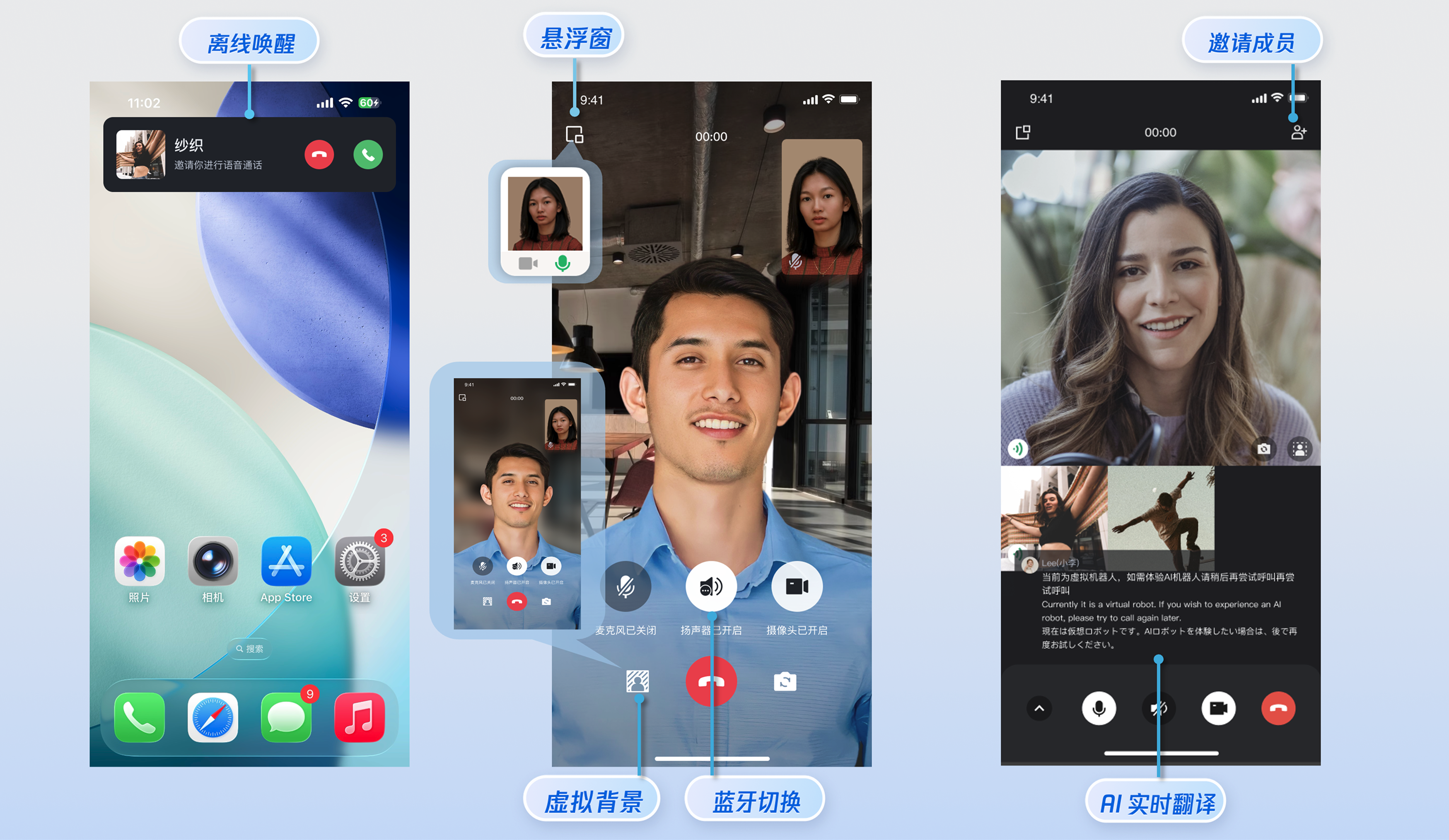
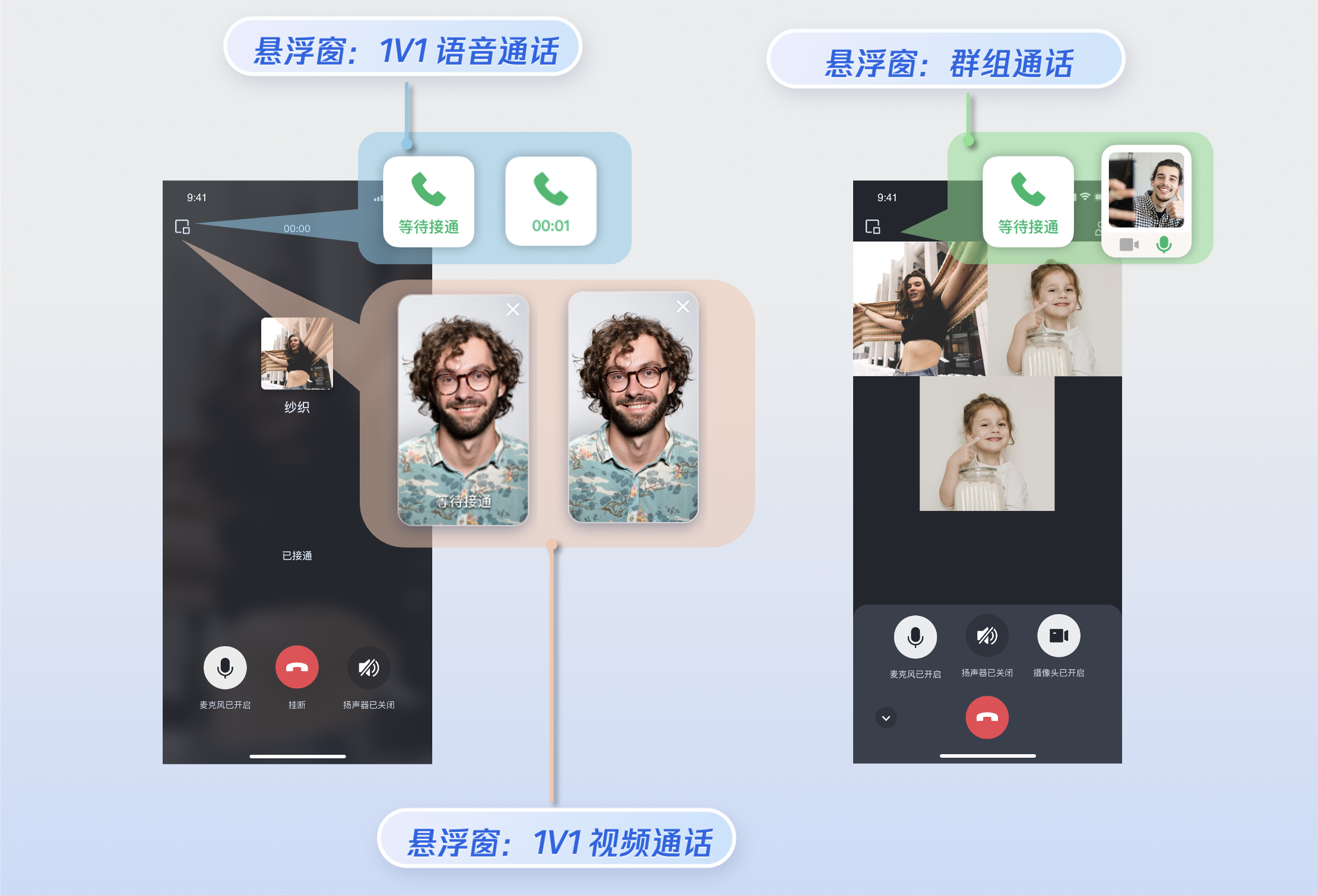
您可以通过调用 [enableFloatWindow](https://write.woa.com/document/94733520019521536) 开启/关闭悬浮窗功能,在初始化 TUICallKit 组件时启用该功能,默认状态为关闭(false)。可通过点击通话界面左上角的悬浮窗按钮,将通话界面缩小为悬浮窗形式。
|
|
279
|
+
|
|
280
|
+
|
|
281
|
+
|
|
282
|
+
|
|
283
|
+
|
|
284
|
+
``` java
|
|
285
|
+
import 'package:tencent_calls_uikit/tencent_calls_uikit.dart';
|
|
286
|
+
......
|
|
287
|
+
|
|
288
|
+
void _enableFloatWindow() {
|
|
289
|
+
TUICallKit.instance.enableFloatWindow(true);
|
|
290
|
+
}
|
|
291
|
+
```
|
|
292
|
+
|
|
293
|
+
**详情:**默认为 false,通话界面左上角的悬浮窗按钮隐藏,设置为 true 后显示。
|
|
294
|
+
|
|
295
|
+
### 开启来电横幅
|
|
296
|
+
|
|
297
|
+
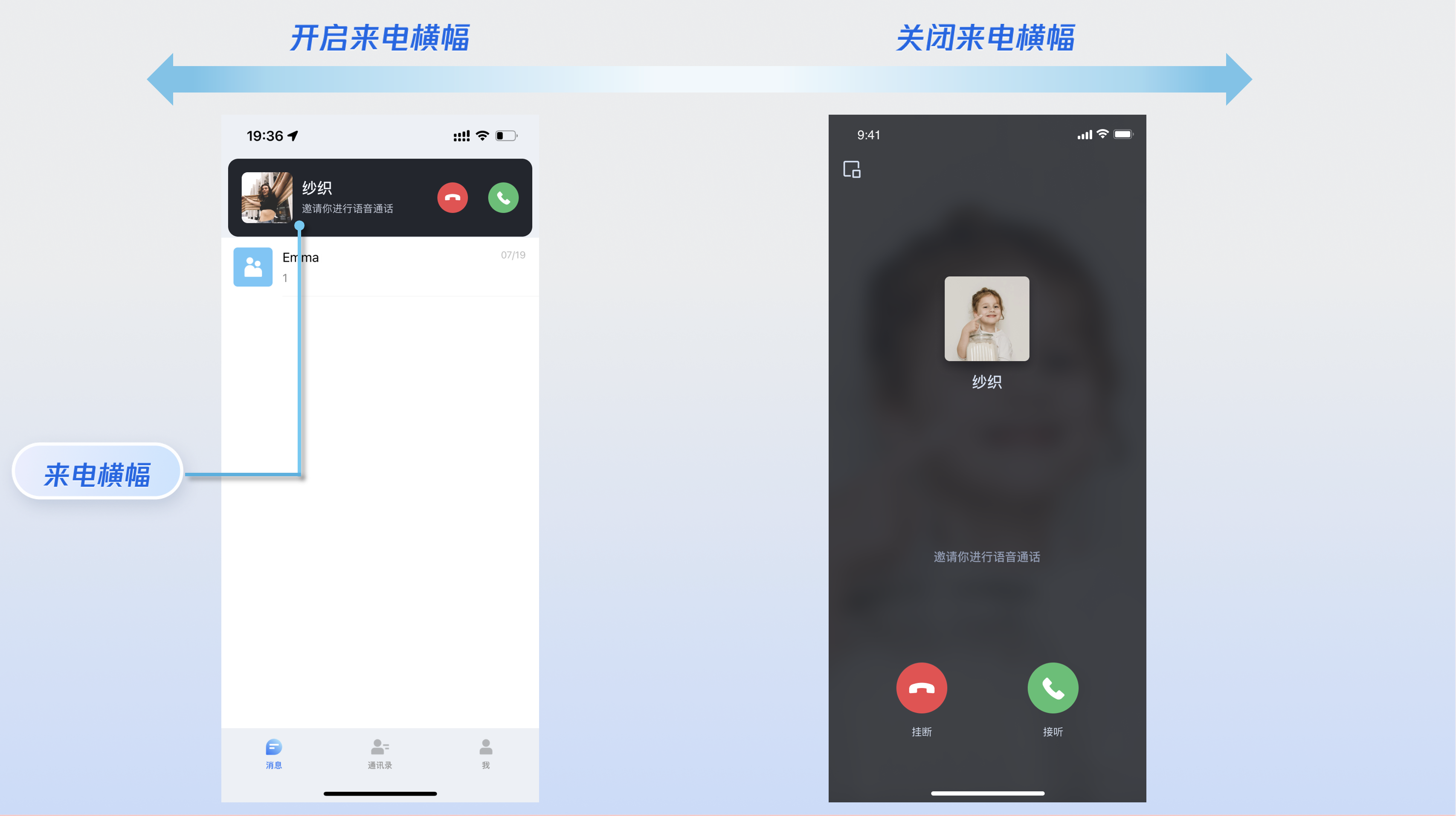
您可以通过调用 `enableIncomingBanner` 开启/关闭来电横幅显示,该功能默认为关闭状态(false)。当被叫端收到来电时,默认展示全屏通话等待界面。启用此功能后,将首先显示一个横幅通知,然后根据需要切换到全屏通话界面。请注意,显示来电横幅需要授予悬浮窗权限,具体的显示策略将根据权限设置及应用当前是否在前台或后台运行来决定。
|
|
298
|
+
|
|
299
|
+
|
|
300
|
+
|
|
301
|
+
|
|
302
|
+
|
|
303
|
+
``` java
|
|
304
|
+
import 'package:tencent_calls_uikit/tencent_calls_uikit.dart';
|
|
305
|
+
......
|
|
306
|
+
|
|
307
|
+
void _enableFloatWindow() {
|
|
308
|
+
TUICallKit.instance.enableIncomingBanner(true);
|
|
309
|
+
}
|
|
310
|
+
```
|
|
311
|
+
|
|
312
|
+
**详情:**默认为 false,被叫端收到邀请后默认弹出全屏通话等待界面。开启后先展示一个横幅,然后根据需要拉起全屏通话界面。
|
|
313
|
+
|
|
314
|
+
### 多人通话
|
|
315
|
+
|
|
316
|
+
主叫方使用 `calls` 方法发起通话时,若被叫用户列表超过一人,则自动视为群组通话。其他成员可通过 `join` 方法加入该多人通话。
|
|
317
|
+
|
|
318
|
+
**发起多人通话:**使用 `calls` 方法发起通话时,若被叫用户列表(`userIdList`)超过一人,则自动视为群组通话。
|
|
319
|
+
|
|
320
|
+
|
|
321
|
+
``` java
|
|
322
|
+
|
|
323
|
+
import 'package:tencent_calls_uikit/tencent_calls_uikit.dart';
|
|
324
|
+
......
|
|
325
|
+
|
|
326
|
+
void _call() {
|
|
327
|
+
List<String> participantIds = ['vince','mike'];
|
|
328
|
+
CallMediaType mediaType = CallMediaType.audio;
|
|
329
|
+
CallParams callParams = CallParams();
|
|
330
|
+
TUICallKit.instance.calls(participantIds, mediaType, callParams);
|
|
331
|
+
}
|
|
332
|
+
```
|
|
333
|
+
<table>
|
|
334
|
+
<tr>
|
|
335
|
+
<td rowspan="1" colSpan="1" >参数</td>
|
|
336
|
+
|
|
337
|
+
<td rowspan="1" colSpan="1" >类型</td>
|
|
338
|
+
|
|
339
|
+
<td rowspan="1" colSpan="1" >说明</td>
|
|
340
|
+
</tr>
|
|
341
|
+
|
|
342
|
+
<tr>
|
|
343
|
+
<td rowspan="1" colSpan="1" >userIdList</td>
|
|
344
|
+
|
|
345
|
+
<td rowspan="1" colSpan="1" >List<String></td>
|
|
346
|
+
|
|
347
|
+
<td rowspan="1" colSpan="1" >目标用户的 userId 列表。</td>
|
|
348
|
+
</tr>
|
|
349
|
+
|
|
350
|
+
<tr>
|
|
351
|
+
<td rowspan="1" colSpan="1" >mediaType</td>
|
|
352
|
+
|
|
353
|
+
<td rowspan="1" colSpan="1" >CallMediaType</td>
|
|
354
|
+
|
|
355
|
+
<td rowspan="1" colSpan="1" >通话的媒体类型,例如视频通话、语音通话。</td>
|
|
356
|
+
</tr>
|
|
357
|
+
|
|
358
|
+
<tr>
|
|
359
|
+
<td rowspan="1" colSpan="1" >params</td>
|
|
360
|
+
|
|
361
|
+
<td rowspan="1" colSpan="1" >CallParams</td>
|
|
362
|
+
|
|
363
|
+
<td rowspan="1" colSpan="1" >通话扩展参数,例如房间号、通话邀请超时时间,离线推送自定义内容等。</td>
|
|
364
|
+
</tr>
|
|
365
|
+
</table>
|
|
366
|
+
|
|
367
|
+
|
|
368
|
+
**加入多人通话:**可使用 `join` 方法加入指定的群组通话。
|
|
369
|
+
|
|
370
|
+
|
|
371
|
+
``` java
|
|
372
|
+
import 'package:tencent_calls_uikit/tencent_calls_uikit.dart';
|
|
373
|
+
|
|
374
|
+
void join() {
|
|
375
|
+
String callId = "123456";
|
|
376
|
+
TUICallKit.instance.join(callId);
|
|
377
|
+
}
|
|
378
|
+
```
|
|
379
|
+
<table>
|
|
380
|
+
<tr>
|
|
381
|
+
<td rowspan="1" colSpan="1" >参数</td>
|
|
382
|
+
|
|
383
|
+
<td rowspan="1" colSpan="1" >类型</td>
|
|
384
|
+
|
|
385
|
+
<td rowspan="1" colSpan="1" >说明</td>
|
|
386
|
+
</tr>
|
|
387
|
+
|
|
388
|
+
<tr>
|
|
389
|
+
<td rowspan="1" colSpan="1" >callId</td>
|
|
390
|
+
|
|
391
|
+
<td rowspan="1" colSpan="1" >String</td>
|
|
392
|
+
|
|
393
|
+
<td rowspan="1" colSpan="1" >此次通话的唯一标识。</td>
|
|
394
|
+
</tr>
|
|
395
|
+
</table>
|
|
396
|
+
|
|
397
|
+
|
|
398
|
+
### 语言设置
|
|
399
|
+
- **支持的语言:**目前支持**简体中文、英文和日文,**默认语言为**英文 。**
|
|
400
|
+
|
|
401
|
+
- **切换语言:**TUICallKit 不提供单独的语言切换接口。其界面语言将自动跟随当前应用程序根组件(如 MaterialApp 或 CupertinoApp)所使用的语言设置而切换。 您只需更改应用根组件的语言配置即可实现通话界面的语言切换。
|
|
402
|
+
|
|
403
|
+
|
|
404
|
+
> **说明:**
|
|
405
|
+
>
|
|
406
|
+
|
|
407
|
+
> 如需设置其他语言,请[联系我们](https://cloud.tencent.com/document/product/647/19906)获取协助。
|
|
408
|
+
>
|
|
409
|
+
|
|
410
|
+
|
|
411
|
+
### 铃声设置
|
|
412
|
+
|
|
413
|
+
您可通过以下方式设置默认铃声、来电静音模式:
|
|
414
|
+
- **设置默认铃声:**如果您通过源码依赖 TUICallKit 组件,您可以替换铃声资源文件([发起呼叫时的铃音](https://github.com/Tencent-RTC/TUICallKit/blob/main/Flutter/assets/audios/phone_dialing.mp3)、[接到呼叫时的铃音](https://github.com/Tencent-RTC/TUICallKit/blob/main/Flutter/assets/audios/phone_ringing.mp3))设置默认铃声。
|
|
415
|
+
|
|
416
|
+
- **来电静音模式:**您可以通过 [enableMuteMode](https://write.woa.com/document/94733520019521536) 设置静音模式。
|
|
417
|
+
|
|
418
|
+
|
|
419
|
+
|
|
420
|
+
``` java
|
|
421
|
+
import 'package:tencent_calls_uikit/tencent_calls_uikit.dart';
|
|
422
|
+
......
|
|
423
|
+
|
|
424
|
+
void _setCallingBell() {
|
|
425
|
+
TUICallKit.instance.enableMuteMode(true);
|
|
426
|
+
}
|
|
427
|
+
```
|
|
428
|
+
|
|
429
|
+
**详情:**开启后,收到通话请求,不会播放来电铃声。
|
|
430
|
+
|
|
431
|
+
|
|
432
|
+
## 自定义您的 UI
|
|
433
|
+
|
|
434
|
+
### 替换图标按钮
|
|
435
|
+
|
|
436
|
+
您可以直接替换 [assets/images](https://github.com/Tencent-RTC/TUICallKit/tree/main/Flutter/assets/images) 文件夹下的图标,以确保整个 App 中的图标色调风格保持一致。以下列出了基本的功能按钮,您可以替换对应的图标以适配自己的业务场景。
|
|
437
|
+
|
|
438
|
+
|
|
439
|
+
|
|
440
|
+
|
|
441
|
+
|
|
442
|
+
|
|
443
|
+
|
|
444
|
+
常用图标文件名列表
|
|
445
|
+
<table>
|
|
446
|
+
<tr>
|
|
447
|
+
<td rowspan="1" colSpan="1" >图标</td>
|
|
448
|
+
|
|
449
|
+
<td rowspan="1" colSpan="1" >文件名称</td>
|
|
450
|
+
|
|
451
|
+
<td rowspan="1" colSpan="1" >说明</td>
|
|
452
|
+
</tr>
|
|
453
|
+
|
|
454
|
+
<tr>
|
|
455
|
+
<td rowspan="1" colSpan="1" ></td>
|
|
456
|
+
|
|
457
|
+
<td rowspan="1" colSpan="1" >dialing.png</td>
|
|
458
|
+
|
|
459
|
+
<td rowspan="1" colSpan="1" >接听来电图标</td>
|
|
460
|
+
</tr>
|
|
461
|
+
|
|
462
|
+
<tr>
|
|
463
|
+
<td rowspan="1" colSpan="1" ><br></td>
|
|
464
|
+
|
|
465
|
+
<td rowspan="1" colSpan="1" >hangup.png</td>
|
|
466
|
+
|
|
467
|
+
<td rowspan="1" colSpan="1" >挂断通话图标</td>
|
|
468
|
+
</tr>
|
|
469
|
+
|
|
470
|
+
<tr>
|
|
471
|
+
<td rowspan="1" colSpan="1" ><br></td>
|
|
472
|
+
|
|
473
|
+
<td rowspan="1" colSpan="1" >mute_on.png</td>
|
|
474
|
+
|
|
475
|
+
<td rowspan="1" colSpan="1" >关闭麦克风图标</td>
|
|
476
|
+
</tr>
|
|
477
|
+
|
|
478
|
+
<tr>
|
|
479
|
+
<td rowspan="1" colSpan="1" ><br></td>
|
|
480
|
+
|
|
481
|
+
<td rowspan="1" colSpan="1" >handsfree.png</td>
|
|
482
|
+
|
|
483
|
+
<td rowspan="1" colSpan="1" >关闭扬声器图标</td>
|
|
484
|
+
</tr>
|
|
485
|
+
|
|
486
|
+
<tr>
|
|
487
|
+
<td rowspan="1" colSpan="1" ><br></td>
|
|
488
|
+
|
|
489
|
+
<td rowspan="1" colSpan="1" >camera_off.png</td>
|
|
490
|
+
|
|
491
|
+
<td rowspan="1" colSpan="1" >关闭摄像头图标</td>
|
|
492
|
+
</tr>
|
|
493
|
+
|
|
494
|
+
<tr>
|
|
495
|
+
<td rowspan="1" colSpan="1" ><br></td>
|
|
496
|
+
|
|
497
|
+
<td rowspan="1" colSpan="1" >add_user.png</td>
|
|
498
|
+
|
|
499
|
+
<td rowspan="1" colSpan="1" >通话过程中邀请用户图标</td>
|
|
500
|
+
</tr>
|
|
501
|
+
</table>
|
|
502
|
+
|
|
503
|
+
|
|
504
|
+
## 常见问题
|
|
505
|
+
|
|
506
|
+
如果您在接入和使用中遇到问题,请参见 [常见问题](https://write.woa.com/document/98788861869330432)。
|
|
507
|
+
|
|
508
|
+
## 交流与反馈
|
|
509
|
+
|
|
510
|
+
如果您在使用过程中,有任何意见或建议,请[联系我们](https://cloud.tencent.com/document/product/647/19906)。
|