@tencentcloud/sdk-mcp 1.3.2 → 1.3.3
This diff represents the content of publicly available package versions that have been released to one of the supported registries. The information contained in this diff is provided for informational purposes only and reflects changes between package versions as they appear in their respective public registries.
- package/package.json +1 -1
- package/resource/doc/livekit/live/android/live-audience-list.md +335 -0
- package/resource/doc/livekit/live/android/live-audio-effect.md +384 -0
- package/resource/doc/livekit/live/android/live-barrage.md +569 -0
- package/resource/doc/livekit/live/android/live-base-beauty.md +265 -0
- package/resource/doc/livekit/live/android/live-co-guest-interaction.md +600 -0
- package/resource/doc/livekit/live/android/live-gift.md +833 -0
- package/resource/doc/livekit/live/android/live-host-interaction.md +810 -0
- package/resource/doc/livekit/live/android/live-integration.md +883 -0
- package/resource/doc/livekit/live/android/live-live-list.md +657 -0
- package/resource/doc/livekit/live/android/workflow.md +189 -0
- package/tools/common/record-prompt.js +2 -2
- package/tools/common/record-prompt.js.map +1 -1
- package/tools/definitions/get_native_live_extra_features_def.js +109 -0
- package/tools/definitions/get_native_live_extra_features_def.js.map +1 -0
- package/tools/definitions/get_native_live_interaction_def.js +115 -0
- package/tools/definitions/get_native_live_interaction_def.js.map +1 -0
- package/tools/definitions/get_native_live_uikit_integration_def.js +50 -0
- package/tools/definitions/get_native_live_uikit_integration_def.js.map +1 -0
- package/tools/definitions/record_prompt_def.js +1 -1
- package/tools/definitions/record_prompt_def.js.map +1 -1
- package/tools/index.js +6 -0
- package/tools/index.js.map +1 -1
- package/tools/live/get-native-live-uikit-integration.js +101 -0
- package/tools/live/get-native-live-uikit-integration.js.map +1 -0
- package/tools/live/get-web-live-component-detail.js +1 -1
- package/tools/live/get-web-live-component-detail.js.map +1 -1
- package/tools/live/get-web-live-state-detail.js +1 -1
- package/tools/live/get-web-live-state-detail.js.map +1 -1
- package/tools/live/get-web-live-uikit-integration.js +6 -6
- package/tools/live/get-web-live-uikit-integration.js.map +1 -1
- package/tools/live/get_native_live_extra_features.js +105 -0
- package/tools/live/get_native_live_extra_features.js.map +1 -0
- package/tools/live/get_native_live_interaction.js +101 -0
- package/tools/live/get_native_live_interaction.js.map +1 -0
- package/utils/generate-structured-result.js +1 -1
- package/utils/report-cls-client.js +1 -1
- package/utils/report-es-client.js +1 -1
- /package/resource/doc/livekit/{vue → live/vue}/components/barrage.md +0 -0
- /package/resource/doc/livekit/{vue → live/vue}/components/co-guest-panel.md +0 -0
- /package/resource/doc/livekit/{vue → live/vue}/components/live-audience-list.md +0 -0
- /package/resource/doc/livekit/{vue → live/vue}/components/live-scene-panel.md +0 -0
- /package/resource/doc/livekit/{vue → live/vue}/components/live-view.md +0 -0
- /package/resource/doc/livekit/{vue → live/vue}/components/stream-mixer.md +0 -0
- /package/resource/doc/livekit/{vue → live/vue}/faq.md +0 -0
- /package/resource/doc/livekit/{vue → live/vue}/live-list-integration.md +0 -0
- /package/resource/doc/livekit/{vue → live/vue}/live-player-desk-integration.md +0 -0
- /package/resource/doc/livekit/{vue → live/vue}/live-player-h5-integration.md +0 -0
- /package/resource/doc/livekit/{vue → live/vue}/live-pusher-integration.md +0 -0
- /package/resource/doc/livekit/{vue → live/vue}/states/live-state.md +0 -0
- /package/resource/doc/livekit/{vue → live/vue}/workflow.md +0 -0
package/package.json
CHANGED
|
@@ -0,0 +1,335 @@
|
|
|
1
|
+
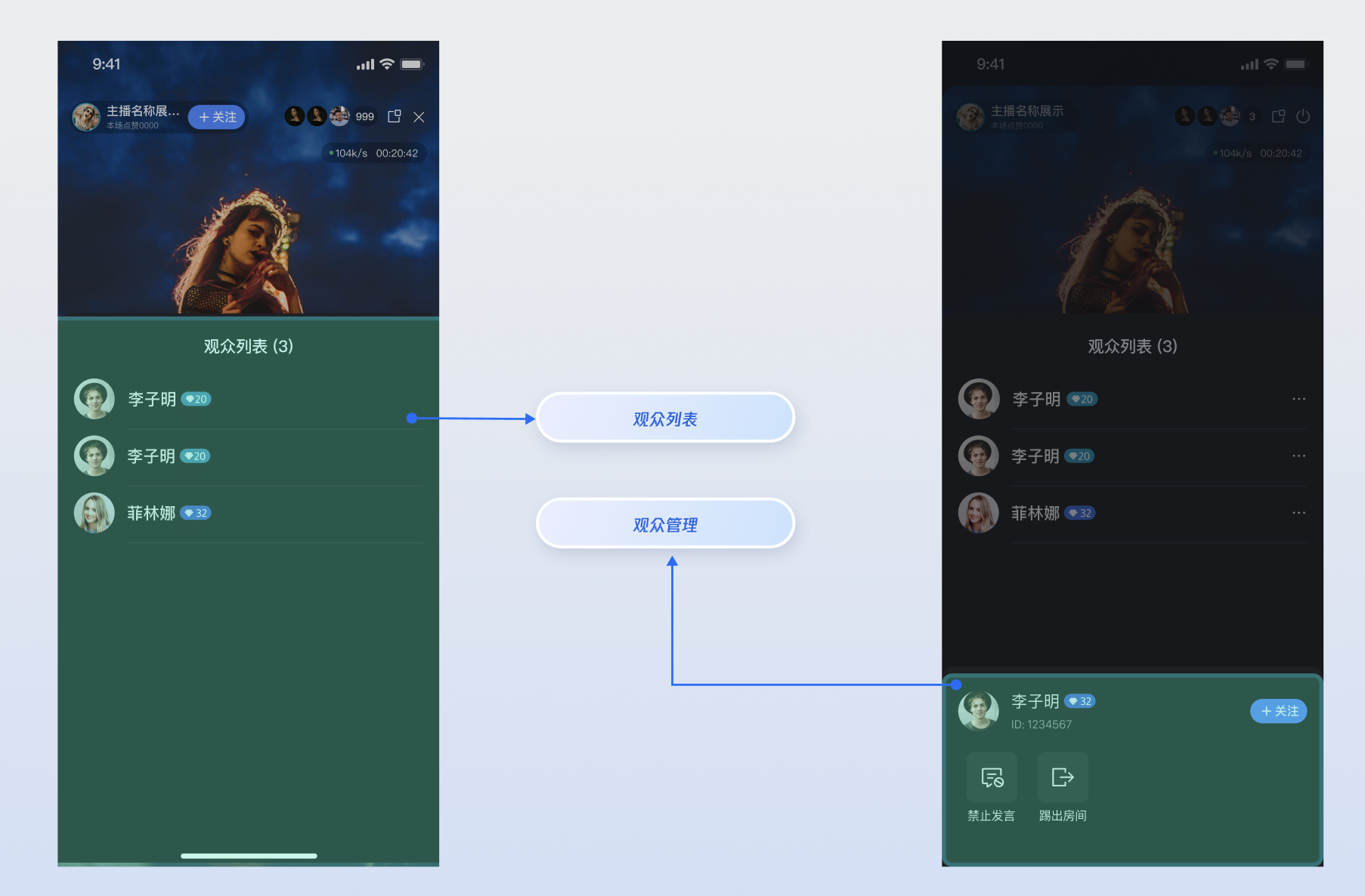
`LiveAudienceStore` 是 `AtomicXCore` 中专门负责管理直播间观众信息的模块。通过`LiveAudienceStore`,您可以为您的直播应用构建一套完整的观众列表及管理系统。
|
|
2
|
+
|
|
3
|
+
|
|
4
|
+
|
|
5
|
+
|
|
6
|
+
## 核心功能
|
|
7
|
+
- **实时观众列表**:获取并展示当前在直播间内的所有观众信息。
|
|
8
|
+
|
|
9
|
+
- **观众人数统计**:实时获取当前直播间的准确观众总数。
|
|
10
|
+
|
|
11
|
+
- **观众动态监听**:通过事件订阅,实时感知观众的加入和离开。
|
|
12
|
+
|
|
13
|
+
- **管理员权限**:主播可以将普通观众设为管理员,或撤销其管理员身份。
|
|
14
|
+
|
|
15
|
+
- **房间管理**:主播或管理员可以将任意普通观众请出(踢出)直播间。
|
|
16
|
+
|
|
17
|
+
|
|
18
|
+
## 核心概念
|
|
19
|
+
|
|
20
|
+
在开始集成之前,我们先通过下表了解一下 LiveAudienceStore 相关的几个核心概念:
|
|
21
|
+
<table>
|
|
22
|
+
<tr>
|
|
23
|
+
<td rowspan="1" colSpan="1" >**核心概念**</td>
|
|
24
|
+
|
|
25
|
+
<td rowspan="1" colSpan="1" >**类型**</td>
|
|
26
|
+
|
|
27
|
+
<td rowspan="1" colSpan="1" >**核心职责与描述**</td>
|
|
28
|
+
</tr>
|
|
29
|
+
|
|
30
|
+
<tr>
|
|
31
|
+
<td rowspan="1" colSpan="1" >`LiveUserInfo`</td>
|
|
32
|
+
|
|
33
|
+
<td rowspan="1" colSpan="1" >data class</td>
|
|
34
|
+
|
|
35
|
+
<td rowspan="1" colSpan="1" >代表一个观众(用户)的基础信息模型。它包含了用户的唯一标识 (`userID`)、昵称 (`userName`) 和头像地址 (`avatarURL`)。</td>
|
|
36
|
+
</tr>
|
|
37
|
+
|
|
38
|
+
<tr>
|
|
39
|
+
<td rowspan="1" colSpan="1" >`LiveAudienceState`</td>
|
|
40
|
+
|
|
41
|
+
<td rowspan="1" colSpan="1" >data class</td>
|
|
42
|
+
|
|
43
|
+
<td rowspan="1" colSpan="1" >代表观众模块的当前状态。其核心属性 `audienceList` 是一个 StateFlow,存储了观众列表的实时状态;`audienceCount` 则代表当前观众总数的实时状态。</td>
|
|
44
|
+
</tr>
|
|
45
|
+
|
|
46
|
+
<tr>
|
|
47
|
+
<td rowspan="1" colSpan="1" >`LiveAudienceListener`</td>
|
|
48
|
+
|
|
49
|
+
<td rowspan="1" colSpan="1" >abstract class</td>
|
|
50
|
+
|
|
51
|
+
<td rowspan="1" colSpan="1" >代表观众动态的实时事件。分为 `onAudienceJoined` (观众加入) 和 `onAudienceLeft` (观众离开) 两种,用于实现对观众列表的增量更新。</td>
|
|
52
|
+
</tr>
|
|
53
|
+
|
|
54
|
+
<tr>
|
|
55
|
+
<td rowspan="1" colSpan="1" >`LiveAudienceStore`</td>
|
|
56
|
+
|
|
57
|
+
<td rowspan="1" colSpan="1" >abstract class</td>
|
|
58
|
+
|
|
59
|
+
<td rowspan="1" colSpan="1" >这是与观众列表功能交互的核心管理类。通过它,您可以获取观众列表快照、执行管理操作,并通过订阅其 `LiveAudienceListener` 来接收实时动态。</td>
|
|
60
|
+
</tr>
|
|
61
|
+
</table>
|
|
62
|
+
|
|
63
|
+
|
|
64
|
+
## 实现指南
|
|
65
|
+
|
|
66
|
+
### 步骤1:组件集成
|
|
67
|
+
|
|
68
|
+
请参考 [开始直播](https://write.woa.com/document/191126372105478144) 集成 **AtomicXCore**,完成接入。
|
|
69
|
+
|
|
70
|
+
### 步骤2:初始化并获取观众列表
|
|
71
|
+
|
|
72
|
+
获取一个与当前直播间 liveID 绑定的 `LiveAudienceStore` 实例,并主动拉取一次当前的观众列表,用于首次展示。
|
|
73
|
+
``` kotlin
|
|
74
|
+
import kotlinx.coroutines.*
|
|
75
|
+
import kotlinx.coroutines.flow.*
|
|
76
|
+
import io.trtc.tuikit.atomicxcore.api.CompletionHandler
|
|
77
|
+
import io.trtc.tuikit.atomicxcore.api.live.LiveAudienceStore
|
|
78
|
+
import io.trtc.tuikit.atomicxcore.api.live.LiveUserInfo
|
|
79
|
+
|
|
80
|
+
class AudienceManager(
|
|
81
|
+
private val liveId: String
|
|
82
|
+
) {
|
|
83
|
+
private val audienceStore: LiveAudienceStore = LiveAudienceStore.create(liveId)
|
|
84
|
+
private val scope = CoroutineScope(Dispatchers.Main)
|
|
85
|
+
|
|
86
|
+
// 对外暴露【全量】观众列表的状态流,方便UI层订阅
|
|
87
|
+
private val _audienceList = MutableStateFlow<List<LiveUserInfo>>(emptyList())
|
|
88
|
+
val audienceList: StateFlow<List<LiveUserInfo>> = _audienceList.asStateFlow()
|
|
89
|
+
|
|
90
|
+
// 对外暴露观众总数的状态流
|
|
91
|
+
private val _audienceCount = MutableStateFlow(0)
|
|
92
|
+
val audienceCount: StateFlow<Int> = _audienceCount.asStateFlow()
|
|
93
|
+
|
|
94
|
+
init {
|
|
95
|
+
// 1. 订阅状态和事件,实现见下一节
|
|
96
|
+
subscribeToAudienceState()
|
|
97
|
+
subscribeToAudienceEvents()
|
|
98
|
+
|
|
99
|
+
// 2. 主动拉取首屏数据
|
|
100
|
+
fetchInitialAudienceList()
|
|
101
|
+
}
|
|
102
|
+
|
|
103
|
+
/// 主动获取一次观众列表快照
|
|
104
|
+
private fun fetchInitialAudienceList() {
|
|
105
|
+
audienceStore.fetchAudienceList(object : CompletionHandler {
|
|
106
|
+
override fun onSuccess() {
|
|
107
|
+
println("首次拉取观众列表成功")
|
|
108
|
+
// 成功后,数据会通过下面的 state 订阅通道自动更新
|
|
109
|
+
}
|
|
110
|
+
|
|
111
|
+
override fun onFailure(code: Int, desc: String) {
|
|
112
|
+
println("首次拉取观众列表失败: $desc")
|
|
113
|
+
}
|
|
114
|
+
})
|
|
115
|
+
}
|
|
116
|
+
|
|
117
|
+
// ... 后续代码
|
|
118
|
+
}
|
|
119
|
+
```
|
|
120
|
+
|
|
121
|
+
### 步骤3:监听观众列表状态与实时动态
|
|
122
|
+
|
|
123
|
+
订阅 `audienceStore` 的 `liveAudienceState` 和添加 `LiveAudienceListener`,以接收全量列表快照和实时的观众进出事件,从而驱动UI更新。
|
|
124
|
+
``` kotlin
|
|
125
|
+
class AudienceManager {
|
|
126
|
+
/// 订阅 state,用于获取观众总数和列表快照
|
|
127
|
+
private fun subscribeToAudienceState() {
|
|
128
|
+
scope.launch {
|
|
129
|
+
// audienceList 是一个全量快照
|
|
130
|
+
audienceStore.liveAudienceState.audienceList.collect { audienceList ->
|
|
131
|
+
_audienceList.value = audienceList
|
|
132
|
+
}
|
|
133
|
+
}
|
|
134
|
+
|
|
135
|
+
scope.launch {
|
|
136
|
+
// audienceCount 是实时总数
|
|
137
|
+
audienceStore.liveAudienceState.audienceCount.collect { count ->
|
|
138
|
+
_audienceCount.value = count
|
|
139
|
+
}
|
|
140
|
+
}
|
|
141
|
+
}
|
|
142
|
+
|
|
143
|
+
/// 订阅 event,用于处理观众的实时进出事件
|
|
144
|
+
private fun subscribeToAudienceEvents() {
|
|
145
|
+
audienceStore.addLiveAudienceListener(object : LiveAudienceListener() {
|
|
146
|
+
override fun onAudienceJoined(newAudience: LiveUserInfo) {
|
|
147
|
+
println("观众 ${newAudience.userName} 加入了直播间")
|
|
148
|
+
// 增量更新:在当前列表末尾添加新观众
|
|
149
|
+
val currentList = _audienceList.value.toMutableList()
|
|
150
|
+
if (!currentList.any { it.userID == newAudience.userID }) {
|
|
151
|
+
currentList.add(newAudience)
|
|
152
|
+
_audienceList.value = currentList
|
|
153
|
+
}
|
|
154
|
+
}
|
|
155
|
+
|
|
156
|
+
override fun onAudienceLeft(departedAudience: LiveUserInfo) {
|
|
157
|
+
println("观众 ${departedAudience.userName} 离开了直播间")
|
|
158
|
+
// 增量更新:从当前列表中移除离开的观众
|
|
159
|
+
val currentList = _audienceList.value.toMutableList()
|
|
160
|
+
currentList.removeAll { it.userID == departedAudience.userID }
|
|
161
|
+
_audienceList.value = currentList
|
|
162
|
+
}
|
|
163
|
+
})
|
|
164
|
+
}
|
|
165
|
+
}
|
|
166
|
+
```
|
|
167
|
+
|
|
168
|
+
### 步骤4:管理观众(踢人与设置管理员)
|
|
169
|
+
|
|
170
|
+
作为主播或管理员,对直播间内的观众进行管理操作。
|
|
171
|
+
|
|
172
|
+
#### 4.1 将观众踢出直播间
|
|
173
|
+
|
|
174
|
+
调用 `kickUserOutOfRoom` 接口可以将指定用户请出直播间。
|
|
175
|
+
``` kotlin
|
|
176
|
+
class AudienceManager {
|
|
177
|
+
fun kick(userId: String) {
|
|
178
|
+
audienceStore.kickUserOutOfRoom(userId, object : CompletionHandler {
|
|
179
|
+
override fun onSuccess() {
|
|
180
|
+
println("成功将用户 $userId 踢出房间")
|
|
181
|
+
// 踢出成功后,您会收到 onAudienceLeft 事件
|
|
182
|
+
}
|
|
183
|
+
|
|
184
|
+
override fun onFailure(code: Int, desc: String) {
|
|
185
|
+
println("踢出用户 $userId 失败: $desc")
|
|
186
|
+
}
|
|
187
|
+
})
|
|
188
|
+
}
|
|
189
|
+
}
|
|
190
|
+
```
|
|
191
|
+
|
|
192
|
+
#### 4.2 设置/撤销管理员
|
|
193
|
+
|
|
194
|
+
通过 `setAdministrator` 和 `revokeAdministrator` 接口可以管理用户的管理员身份。
|
|
195
|
+
``` kotlin
|
|
196
|
+
class AudienceManager {
|
|
197
|
+
/// 将用户设为管理员
|
|
198
|
+
fun promoteToAdmin(userId: String) {
|
|
199
|
+
audienceStore.setAdministrator(userId, object : CompletionHandler {
|
|
200
|
+
override fun onSuccess() {
|
|
201
|
+
println("成功将用户 $userId 设为管理员")
|
|
202
|
+
}
|
|
203
|
+
|
|
204
|
+
override fun onFailure(code: Int, desc: String) {
|
|
205
|
+
println("设置管理员失败: $desc")
|
|
206
|
+
}
|
|
207
|
+
})
|
|
208
|
+
}
|
|
209
|
+
|
|
210
|
+
/// 撤销用户的管理员身份
|
|
211
|
+
fun revokeAdmin(userId: String) {
|
|
212
|
+
audienceStore.revokeAdministrator(userId, object : CompletionHandler {
|
|
213
|
+
override fun onSuccess() {
|
|
214
|
+
println("成功撤销用户 $userId 的管理员身份")
|
|
215
|
+
}
|
|
216
|
+
|
|
217
|
+
override fun onFailure(code: Int, desc: String) {
|
|
218
|
+
println("撤销管理员失败: $desc")
|
|
219
|
+
}
|
|
220
|
+
})
|
|
221
|
+
}
|
|
222
|
+
}
|
|
223
|
+
```
|
|
224
|
+
|
|
225
|
+
## 功能进阶
|
|
226
|
+
|
|
227
|
+
### 在弹幕区展示观众入场欢迎语
|
|
228
|
+
|
|
229
|
+
当有新观众进入直播间时,弹幕/聊天区域会在本地自动显示一条欢迎消息,例如:"欢迎 [用户昵称] 进入直播间"。
|
|
230
|
+
|
|
231
|
+
#### 实现方式
|
|
232
|
+
|
|
233
|
+
我们通过添加 `LiveAudienceStore` 的观众加入事件监听器(`LiveAudienceListener.onAudienceJoined`)来获取新观众加入的实时通知。一旦事件触发,我们便提取出新观众的昵称信息,然后立即调用 `BarrageStore` 的本地插入接口 `appendLocalTip`。
|
|
234
|
+
``` kotlin
|
|
235
|
+
import io.trtc.tuikit.atomicxcore.api.live.LiveAudienceListener
|
|
236
|
+
import io.trtc.tuikit.atomicxcore.api.live.LiveAudienceStore
|
|
237
|
+
import io.trtc.tuikit.atomicxcore.api.live.LiveUserInfo
|
|
238
|
+
import io.trtc.tuikit.atomicxcore.api.barrage.Barrage
|
|
239
|
+
import io.trtc.tuikit.atomicxcore.api.barrage.BarrageStore
|
|
240
|
+
import io.trtc.tuikit.atomicxcore.api.barrage.BarrageType
|
|
241
|
+
|
|
242
|
+
class LiveRoomManager(
|
|
243
|
+
private val liveId: String
|
|
244
|
+
) {
|
|
245
|
+
|
|
246
|
+
init {
|
|
247
|
+
// 初始化两个核心管理器
|
|
248
|
+
setupWelcomeMessageFlow()
|
|
249
|
+
}
|
|
250
|
+
|
|
251
|
+
private fun setupWelcomeMessageFlow() {
|
|
252
|
+
// 1. 获取 LiveAudienceStore 的实例
|
|
253
|
+
val audienceStore = LiveAudienceStore.create(liveId)
|
|
254
|
+
|
|
255
|
+
// 2. 获取 BarrageStore 的实例 (得益于内部机制,这会是同一个实例)
|
|
256
|
+
val barrageStore = BarrageStore.create(liveId)
|
|
257
|
+
|
|
258
|
+
// 3. 订阅观众事件
|
|
259
|
+
audienceStore.addLiveAudienceListener(object : LiveAudienceListener() {
|
|
260
|
+
override fun onAudienceJoined(audience: LiveUserInfo) {
|
|
261
|
+
// 4. 创建一条本地提示消息
|
|
262
|
+
val welcomeTip = Barrage().apply {
|
|
263
|
+
liveID = liveId
|
|
264
|
+
messageType = BarrageType.TEXT
|
|
265
|
+
textContent = "欢迎 ${audience.userName} 进入直播间!"
|
|
266
|
+
}
|
|
267
|
+
|
|
268
|
+
// 5. 调用 BarrageStore 的接口将其插入弹幕列表
|
|
269
|
+
barrageStore.appendLocalTip(welcomeTip)
|
|
270
|
+
}
|
|
271
|
+
})
|
|
272
|
+
}
|
|
273
|
+
}
|
|
274
|
+
```
|
|
275
|
+
|
|
276
|
+
## API 文档
|
|
277
|
+
|
|
278
|
+
关于 [LiveAudienceStore](https://tencent-rtc.github.io/TUIKit_Android/-atomic-x%20-core%20-a-p-i/io.trtc.tuikit.atomicxcore.api.live/-live-audience-store/index.html) 及其相关类的所有公开接口、属性和方法的详细信息,请参阅随 [AtomicX Core](https://tencent-rtc.github.io/TUIKit_Android/index.html) 框架的官方 API 文档。本文档使用到的相关 Store 如下:
|
|
279
|
+
<table>
|
|
280
|
+
<tr>
|
|
281
|
+
<td rowspan="1" colSpan="1" >Store/Component</td>
|
|
282
|
+
|
|
283
|
+
<td rowspan="1" colSpan="1" >功能描述</td>
|
|
284
|
+
|
|
285
|
+
<td rowspan="1" colSpan="1" >API 文档</td>
|
|
286
|
+
</tr>
|
|
287
|
+
|
|
288
|
+
<tr>
|
|
289
|
+
<td rowspan="1" colSpan="1" >LiveCoreView</td>
|
|
290
|
+
|
|
291
|
+
<td rowspan="1" colSpan="1" >直播视频流展示与交互的核心视图组件:负责视频流渲染和视图挂件处理,支持主播直播、观众连麦、主播连线等场景。</td>
|
|
292
|
+
|
|
293
|
+
<td rowspan="1" colSpan="1" >[API 文档](https://tencent-rtc.github.io/TUIKit_Android/-atomic-x%20-core%20-a-p-i/io.trtc.tuikit.atomicxcore.api.view/-live-core-view/index.html)</td>
|
|
294
|
+
</tr>
|
|
295
|
+
|
|
296
|
+
<tr>
|
|
297
|
+
<td rowspan="1" colSpan="1" >LiveAudienceStore</td>
|
|
298
|
+
|
|
299
|
+
<td rowspan="1" colSpan="1" >观众管理:获取实时观众列表(ID / 名称 / 头像),统计观众数量,监听观众进出事件。</td>
|
|
300
|
+
|
|
301
|
+
<td rowspan="1" colSpan="1" >[API 文档](https://tencent-rtc.github.io/TUIKit_Android/-atomic-x%20-core%20-a-p-i/io.trtc.tuikit.atomicxcore.api.view/-live-core-view/index.html)</td>
|
|
302
|
+
</tr>
|
|
303
|
+
|
|
304
|
+
<tr>
|
|
305
|
+
<td rowspan="1" colSpan="1" >BarrageStore</td>
|
|
306
|
+
|
|
307
|
+
<td rowspan="1" colSpan="1" >弹幕功能:发送文本 / 自定义弹幕,维护弹幕列表,实时监听弹幕状态。</td>
|
|
308
|
+
|
|
309
|
+
<td rowspan="1" colSpan="1" >[API 文档](https://tencent-rtc.github.io/TUIKit_Android/-atomic-x%20-core%20-a-p-i/io.trtc.tuikit.atomicxcore.api.barrage/-barrage-store/index.html)</td>
|
|
310
|
+
</tr>
|
|
311
|
+
</table>
|
|
312
|
+
|
|
313
|
+
|
|
314
|
+
## 常见问题
|
|
315
|
+
|
|
316
|
+
### `LiveAudienceState` 中的在线人数(`audienceCount`)是如何更新的?时机和频率是怎样的?
|
|
317
|
+
|
|
318
|
+
`audienceCount` 的更新并非总是实时的,其机制如下:
|
|
319
|
+
- **主动进出房间**: 当用户主动加入或正常退出直播间时,在线人数的变更通知会即时触发。您会很快在 `LiveAudienceState` 中观察到 `audienceCount` 的变化。
|
|
320
|
+
|
|
321
|
+
- **异常掉线**: 当用户因网络问题、应用崩溃等原因异常掉线时,系统需要通过心跳机制来判断其真实状态。只有当该用户连续 90 秒没有心跳后,系统才会判定其为离线,并触发人数变更通知。
|
|
322
|
+
|
|
323
|
+
- **更新机制与频率控制:**
|
|
324
|
+
|
|
325
|
+
- 无论是即时触发还是延迟触发,所有的人数变更通知都是以消息的形式在房间内广播的。
|
|
326
|
+
|
|
327
|
+
- 房间内每秒的消息总量有上限,单房间消息频控是**每秒 40 条消息**。
|
|
328
|
+
|
|
329
|
+
- **关键点: 在"弹幕风暴"或礼物刷屏等消息流量极高的场景下,如果房间内的消息速率超过了 40条/秒 的阈值,为了保证核心消息(例如弹幕)的送达,人数变更的消息可能会被频控策略丢弃**。
|
|
330
|
+
|
|
331
|
+
|
|
332
|
+
**这对开发者意味着什么?**
|
|
333
|
+
|
|
334
|
+
|
|
335
|
+
`audienceCount` 是一个非常接近实时的**高精度估算值**,但在极端高并发场景下,它可能存在短暂的延迟或数据丢失。因此,我们建议您将其用于**UI展示**,而不应作为计费、统计等需要绝对精准场景的唯一依据。
|