@tencentcloud/sdk-mcp 1.3.1 → 1.3.3
This diff represents the content of publicly available package versions that have been released to one of the supported registries. The information contained in this diff is provided for informational purposes only and reflects changes between package versions as they appear in their respective public registries.
- package/index.js +5 -1
- package/index.js.map +1 -1
- package/package.json +1 -1
- package/resource/doc/chatuikit/faq/web_sdk/faq.md +117 -0
- package/resource/doc/chatuikit/flutter/client_api_Flutter.md +100 -179
- package/resource/doc/chatuikit/flutter/faq.md +17 -112
- package/resource/doc/chatuikit/flutter/integrate_tuikit_Flutter.md +272 -1281
- package/resource/doc/livekit/live/android/live-audience-list.md +335 -0
- package/resource/doc/livekit/live/android/live-audio-effect.md +384 -0
- package/resource/doc/livekit/live/android/live-barrage.md +569 -0
- package/resource/doc/livekit/live/android/live-base-beauty.md +265 -0
- package/resource/doc/livekit/live/android/live-co-guest-interaction.md +600 -0
- package/resource/doc/livekit/live/android/live-gift.md +833 -0
- package/resource/doc/livekit/live/android/live-host-interaction.md +810 -0
- package/resource/doc/livekit/live/android/live-integration.md +883 -0
- package/resource/doc/livekit/live/android/live-live-list.md +657 -0
- package/resource/doc/livekit/live/android/workflow.md +189 -0
- package/resource/doc/roomkit/vue/features/call-user-to-room.md +256 -0
- package/resource/doc/roomkit/vue/features/device-detection.md +388 -0
- package/resource/doc/roomkit/vue/features/device-state.md +480 -0
- package/resource/doc/roomkit/vue/features/free-beauty-panel.md +238 -0
- package/resource/doc/roomkit/vue/features/room-chat.md +427 -0
- package/resource/doc/roomkit/vue/features/room-participant-state.md +407 -0
- package/resource/doc/roomkit/vue/features/room-state.md +291 -0
- package/resource/doc/roomkit/vue/features/room-view.md +338 -0
- package/resource/doc/roomkit/vue/features/schedule-room.md +349 -0
- package/resource/doc/roomkit/vue/features/screen-share.md +333 -0
- package/resource/doc/roomkit/vue/features/virtual-background.md +281 -0
- package/resource/doc/roomkit/vue/features/workflow.md +553 -0
- package/resource/doc/roomkit/vue/integration.md +479 -0
- package/resource/doc/roomkit/vue/workflow.md +487 -0
- package/resource/doc/tuicallkit/react/api.md +16 -0
- package/resource/doc/tuicallkit/vue/api.md +16 -0
- package/tools/common/record-prompt.js +2 -2
- package/tools/common/record-prompt.js.map +1 -1
- package/tools/definitions/get_native_live_extra_features_def.js +109 -0
- package/tools/definitions/get_native_live_extra_features_def.js.map +1 -0
- package/tools/definitions/get_native_live_interaction_def.js +115 -0
- package/tools/definitions/get_native_live_interaction_def.js.map +1 -0
- package/tools/definitions/get_native_live_uikit_integration_def.js +50 -0
- package/tools/definitions/get_native_live_uikit_integration_def.js.map +1 -0
- package/tools/definitions/get_web_live_uikit_integration_def.js +1 -1
- package/tools/definitions/get_web_room_feature_detail_def.js +95 -0
- package/tools/definitions/get_web_room_feature_detail_def.js.map +1 -0
- package/tools/definitions/get_web_room_uikit_integration_def.js +44 -0
- package/tools/definitions/get_web_room_uikit_integration_def.js.map +1 -0
- package/tools/definitions/record_prompt_def.js +1 -1
- package/tools/definitions/record_prompt_def.js.map +1 -1
- package/tools/index.js +10 -2
- package/tools/index.js.map +1 -1
- package/tools/live/get-native-live-uikit-integration.js +101 -0
- package/tools/live/get-native-live-uikit-integration.js.map +1 -0
- package/tools/live/get-web-live-component-detail.js +1 -1
- package/tools/live/get-web-live-component-detail.js.map +1 -1
- package/tools/live/get-web-live-state-detail.js +1 -1
- package/tools/live/get-web-live-state-detail.js.map +1 -1
- package/tools/live/get-web-live-uikit-integration.js +6 -6
- package/tools/live/get-web-live-uikit-integration.js.map +1 -1
- package/tools/live/get_native_live_extra_features.js +105 -0
- package/tools/live/get_native_live_extra_features.js.map +1 -0
- package/tools/live/get_native_live_interaction.js +101 -0
- package/tools/live/get_native_live_interaction.js.map +1 -0
- package/tools/room/get-web-room-feature-detail.js +68 -0
- package/tools/room/get-web-room-feature-detail.js.map +1 -0
- package/tools/room/get-web-room-integration.js +43 -0
- package/tools/room/get-web-room-integration.js.map +1 -0
- package/utils/generate-structured-result.js +1 -1
- package/utils/report-cls-client.js +1 -1
- package/utils/report-es-client.js +1 -1
- package/resource/doc/roomkit/vue/states/device-state.md +0 -316
- package/resource/doc/roomkit/vue/states/login-state.md +0 -51
- package/resource/doc/roomkit/vue/states/room-list-state.md +0 -287
- package/resource/doc/roomkit/vue/states/room-participant-state.md +0 -307
- package/tools/definitions/get_web_room_state_detail_def.js +0 -19
- package/tools/definitions/get_web_room_state_detail_def.js.map +0 -1
- package/tools/room/get-web-room-state-detail.js +0 -31
- package/tools/room/get-web-room-state-detail.js.map +0 -1
- /package/resource/doc/livekit/{vue → live/vue}/components/barrage.md +0 -0
- /package/resource/doc/livekit/{vue → live/vue}/components/co-guest-panel.md +0 -0
- /package/resource/doc/livekit/{vue → live/vue}/components/live-audience-list.md +0 -0
- /package/resource/doc/livekit/{vue → live/vue}/components/live-scene-panel.md +0 -0
- /package/resource/doc/livekit/{vue → live/vue}/components/live-view.md +0 -0
- /package/resource/doc/livekit/{vue → live/vue}/components/stream-mixer.md +0 -0
- /package/resource/doc/livekit/{vue → live/vue}/faq.md +0 -0
- /package/resource/doc/livekit/{vue → live/vue}/live-list-integration.md +0 -0
- /package/resource/doc/livekit/{vue → live/vue}/live-player-desk-integration.md +0 -0
- /package/resource/doc/livekit/{vue → live/vue}/live-player-h5-integration.md +0 -0
- /package/resource/doc/livekit/{vue → live/vue}/live-pusher-integration.md +0 -0
- /package/resource/doc/livekit/{vue → live/vue}/states/live-state.md +0 -0
- /package/resource/doc/livekit/{vue → live/vue}/workflow.md +0 -0
package/index.js
CHANGED
|
@@ -5,10 +5,14 @@ import { ServerConfig } from './server-config.js';
|
|
|
5
5
|
// 启动服务器
|
|
6
6
|
async function main() {
|
|
7
7
|
ServerConfig.getInstance();
|
|
8
|
+
const { SDKAppID } = ServerConfig.getInstance().getConfig();
|
|
9
|
+
if (isNaN(SDKAppID)) {
|
|
10
|
+
throw new Error('您没有配置 SDKAppID 或者配置的 SDKAppID 不合法,请通过 MCP 的 env 参数配置正确的 SDKAppID。');
|
|
11
|
+
}
|
|
8
12
|
const server = createServer();
|
|
9
13
|
const transport = new StdioServerTransport();
|
|
10
14
|
await server.connect(transport);
|
|
11
|
-
console.
|
|
15
|
+
console.log('RTC Official MCP Server running on stdio');
|
|
12
16
|
}
|
|
13
17
|
main().catch((error) => {
|
|
14
18
|
console.error('Server error:', error);
|
package/index.js.map
CHANGED
|
@@ -1 +1 @@
|
|
|
1
|
-
{"version":3,"file":"index.js","sourceRoot":"","sources":["../src/index.ts"],"names":[],"mappings":";AAEA,OAAO,EAAE,oBAAoB,EAAE,MAAM,2CAA2C,CAAC;AACjF,OAAO,EAAE,YAAY,EAAE,MAAM,aAAa,CAAC;AAC3C,OAAO,EAAE,YAAY,EAAE,MAAM,oBAAoB,CAAC;AAElD,QAAQ;AACR,KAAK,UAAU,IAAI;IACjB,YAAY,CAAC,WAAW,EAAE,CAAC;IAC3B,MAAM,MAAM,GAAc,YAAY,EAAE,CAAC;IACzC,MAAM,SAAS,GAAG,IAAI,oBAAoB,EAAE,CAAC;IAC7C,MAAM,MAAM,CAAC,OAAO,CAAC,SAAS,CAAC,CAAC;IAChC,OAAO,CAAC,
|
|
1
|
+
{"version":3,"file":"index.js","sourceRoot":"","sources":["../src/index.ts"],"names":[],"mappings":";AAEA,OAAO,EAAE,oBAAoB,EAAE,MAAM,2CAA2C,CAAC;AACjF,OAAO,EAAE,YAAY,EAAE,MAAM,aAAa,CAAC;AAC3C,OAAO,EAAE,YAAY,EAAE,MAAM,oBAAoB,CAAC;AAElD,QAAQ;AACR,KAAK,UAAU,IAAI;IACjB,YAAY,CAAC,WAAW,EAAE,CAAC;IAC3B,MAAM,EAAE,QAAQ,EAAE,GAAG,YAAY,CAAC,WAAW,EAAE,CAAC,SAAS,EAAE,CAAC;IAC5D,IAAI,KAAK,CAAC,QAAQ,CAAC,EAAE,CAAC;QACpB,MAAM,IAAI,KAAK,CAAC,mEAAmE,CAAC,CAAC;IACvF,CAAC;IACD,MAAM,MAAM,GAAc,YAAY,EAAE,CAAC;IACzC,MAAM,SAAS,GAAG,IAAI,oBAAoB,EAAE,CAAC;IAC7C,MAAM,MAAM,CAAC,OAAO,CAAC,SAAS,CAAC,CAAC;IAChC,OAAO,CAAC,GAAG,CAAC,0CAA0C,CAAC,CAAC;AAC1D,CAAC;AAED,IAAI,EAAE,CAAC,KAAK,CAAC,CAAC,KAAK,EAAE,EAAE;IACrB,OAAO,CAAC,KAAK,CAAC,eAAe,EAAE,KAAK,CAAC,CAAC;IACtC,OAAO,CAAC,IAAI,CAAC,CAAC,CAAC,CAAC;AAClB,CAAC,CAAC,CAAC"}
|
package/package.json
CHANGED
|
@@ -173,3 +173,120 @@ promise.then(function(imResponse) {
|
|
|
173
173
|
|
|
174
174
|
### Q: SDK 如何删除会话历史消息?
|
|
175
175
|
**A:** SDK 提供了 `clearHistoryMessage` API 用来情况会话历史消息,具体文档可参考:https://cloud.tencent.com/document/product/269/84438。
|
|
176
|
+
|
|
177
|
+
### Q: Chat SDK 和 Chat Engine 如何获取加群申请未处理个数,以及如何处理进群申请?
|
|
178
|
+
**A:** 根据客户使用的场景,分别从 Chat SDK 和 Chat Engine 两个途径给解决方案,当用户查询此类问题是,请根据实际场景给出准确解答。
|
|
179
|
+
**场景一 客户集成的是无 UI Chat SDK 时解决方案如下:**
|
|
180
|
+
- 初始化时获取群组申请列表 API:[getGroupApplicationList](https://web.sdk.qcloud.com/im/doc/v3/zh-cn/SDK.html#getGroupApplicationList)
|
|
181
|
+
- 初始化时获取加群申请未处理个数:根据 getGroupApplicationList 返回的列表数据,applicationType = 0 是加群申请的个数。
|
|
182
|
+
``` typescript
|
|
183
|
+
let unhandledCount = 0;
|
|
184
|
+
let promise = chat.getGroupApplicationList();
|
|
185
|
+
promise.then(function(imResponse) {
|
|
186
|
+
const { applicationList } = imResponse.data;
|
|
187
|
+
applicationList.forEach((item) => {
|
|
188
|
+
// item.applicant - 申请者 userID
|
|
189
|
+
// item.applicantNick - 申请者昵称
|
|
190
|
+
// item.groupID - 群 ID
|
|
191
|
+
// item.groupName - 群名称
|
|
192
|
+
// item.applicationType - 申请类型:0 加群申请,2 邀请进群申请
|
|
193
|
+
// item.userID - applicationType = 2时,是被邀请用户的 userID
|
|
194
|
+
// item.note - 附言信息,邀请加群暂不支持,返回为空字符串
|
|
195
|
+
if (item.applicationType === 0) {
|
|
196
|
+
unhandledCount++;
|
|
197
|
+
}
|
|
198
|
+
});
|
|
199
|
+
}).catch(function(imError) {});
|
|
200
|
+
```
|
|
201
|
+
- 在线时收到进群申请时更新进群申请的未读个数,需要通过监听 [MESSAGE_RECEIVED](https://web.sdk.qcloud.com/im/doc/v3/zh-cn/module-EVENT.html#.MESSAGE_RECEIVED) 事件。
|
|
202
|
+
```typescript
|
|
203
|
+
// Message 数据结构详情请参考 https://web.sdk.qcloud.com/im/doc/v3/zh-cn/Message.html
|
|
204
|
+
let unhandledCount = 0;
|
|
205
|
+
let onMessageReceived = function(event) {
|
|
206
|
+
const messageList = event.data;
|
|
207
|
+
messageList.forEach((message) => {
|
|
208
|
+
if (message?.type === 'TIMGroupSystemNoticeElem') {
|
|
209
|
+
if (message.payload?.operationType === 1) {
|
|
210
|
+
unhandledCount++;
|
|
211
|
+
}
|
|
212
|
+
}
|
|
213
|
+
})
|
|
214
|
+
};
|
|
215
|
+
chat.on(TencentCloudChat.EVENT.MESSAGE_RECEIVED, onMessageReceived);
|
|
216
|
+
```
|
|
217
|
+
- 处理进群申请 API:[handleGroupApplication](https://web.sdk.qcloud.com/im/doc/v3/zh-cn/SDK.html#handleGroupApplication)
|
|
218
|
+
```typescript
|
|
219
|
+
// 通过获取未决列表处理加群申请
|
|
220
|
+
let promise = chat.getGroupApplicationList();
|
|
221
|
+
promise.then(function(imResponse) {
|
|
222
|
+
const { applicationList } = imResponse.data;
|
|
223
|
+
applicationList.forEach((item) => {
|
|
224
|
+
if (item.applicationType === 0) {
|
|
225
|
+
chat.handleGroupApplication({
|
|
226
|
+
handleAction: 'Agree',
|
|
227
|
+
application: {...item},
|
|
228
|
+
});
|
|
229
|
+
}
|
|
230
|
+
});
|
|
231
|
+
}).catch(function(imError) {});
|
|
232
|
+
```
|
|
233
|
+
|
|
234
|
+
**场景二 客户集成的是含 UI Chat UIKit 或者集成的 ChatEngine 时解决方案如下:**
|
|
235
|
+
- 初始化时获取群组申请列表 API:[getGroupApplicationList](https://web.sdk.qcloud.com/im/doc/chat-engine-lite/ITUIGroupService.html#getGroupApplicationList)
|
|
236
|
+
- 初始化时获取加群申请未处理个数:根据 getGroupApplicationList 返回的列表数据,applicationType = 0 是加群申请的个数。
|
|
237
|
+
``` typescript
|
|
238
|
+
import { TUIGroupService } from '@tencentcloud/chat-uikit-engine-lite';
|
|
239
|
+
let unhandledCount = 0;
|
|
240
|
+
let promise = TUIGroupService.getGroupApplicationList();
|
|
241
|
+
promise.then(function(imResponse) {
|
|
242
|
+
const { applicationList } = imResponse.data;
|
|
243
|
+
applicationList.forEach((item) => {
|
|
244
|
+
// item.applicant - 申请者 userID
|
|
245
|
+
// item.applicantNick - 申请者昵称
|
|
246
|
+
// item.groupID - 群 ID
|
|
247
|
+
// item.groupName - 群名称
|
|
248
|
+
// item.applicationType - 申请类型:0 加群申请,2 邀请进群申请
|
|
249
|
+
// item.userID - applicationType = 2时,是被邀请用户的 userID
|
|
250
|
+
// item.note - 附言信息,邀请加群暂不支持,返回为空字符串
|
|
251
|
+
if (item.applicationType === 0) {
|
|
252
|
+
unhandledCount++;
|
|
253
|
+
}
|
|
254
|
+
});
|
|
255
|
+
}).catch(function(imError) {});
|
|
256
|
+
```
|
|
257
|
+
- 在线时收到进群申请时更新进群申请的未读个数,需要通过 TUIStore 监听 [GroupStore](https://web.sdk.qcloud.com/im/doc/chat-engine-lite/global.html#GroupStore) 提供的 groupSystemNoticeList key。
|
|
258
|
+
```typescript
|
|
259
|
+
// Message 数据结构详情请参考 https://web.sdk.qcloud.com/im/doc/v3/zh-cn/Message.html
|
|
260
|
+
import { TUIStore, StoreName } from '@tencentcloud/chat-uikit-engine-lite';
|
|
261
|
+
let unhandledCount = 0;
|
|
262
|
+
let onGroupSystemNoticeListUpdated = function(messageList = []) {
|
|
263
|
+
messageList.forEach((message) => {
|
|
264
|
+
if (message?.type === 'TIMGroupSystemNoticeElem') {
|
|
265
|
+
if (message.payload?.operationType === 1) {
|
|
266
|
+
unhandledCount++;
|
|
267
|
+
}
|
|
268
|
+
}
|
|
269
|
+
})
|
|
270
|
+
}
|
|
271
|
+
TUIStore.watch(StoreName.GRP, {
|
|
272
|
+
groupSystemNoticeList: onGroupSystemNoticeListUpdated,
|
|
273
|
+
})
|
|
274
|
+
|
|
275
|
+
```
|
|
276
|
+
- 处理进群申请 API:[handleGroupApplication](https://web.sdk.qcloud.com/im/doc/chat-engine-lite/ITUIGroupService.html#handleGroupApplication)
|
|
277
|
+
```typescript
|
|
278
|
+
import { TUIGroupService } from '@tencentcloud/chat-uikit-engine-lite';
|
|
279
|
+
// 通过获取未决列表处理加群申请
|
|
280
|
+
let promise = TUIGroupService.getGroupApplicationList();
|
|
281
|
+
promise.then(function(imResponse) {
|
|
282
|
+
const { applicationList } = imResponse.data;
|
|
283
|
+
applicationList.forEach((item) => {
|
|
284
|
+
if (item.applicationType === 0) {
|
|
285
|
+
TUIGroupService.handleGroupApplication({
|
|
286
|
+
handleAction: 'Agree',
|
|
287
|
+
application: {...item},
|
|
288
|
+
});
|
|
289
|
+
}
|
|
290
|
+
});
|
|
291
|
+
}).catch(function(imError) {});
|
|
292
|
+
```
|
|
@@ -1,10 +1,3 @@
|
|
|
1
|
-
> **温馨提示:**
|
|
2
|
-
>
|
|
3
|
-
|
|
4
|
-
> 即时通信 IM 为您准备了 Flutter 的 API 调用示例,您可以访问 [GitHub](https://github.com/TencentCloud/chat-sdk-flutter/tree/main/example) 获取源码。
|
|
5
|
-
>
|
|
6
|
-
|
|
7
|
-
|
|
8
1
|
## 初始化登录接口
|
|
9
2
|
|
|
10
3
|
初始化并成功登录,是正常使用腾讯云 IM 服务的前提。
|
|
@@ -92,76 +85,6 @@
|
|
|
92
85
|
|
|
93
86
|
<td rowspan="1" colSpan="1" >离线推送模块</td>
|
|
94
87
|
</tr>
|
|
95
|
-
|
|
96
|
-
<tr>
|
|
97
|
-
<td rowspan="1" colSpan="1" >[getSignalingManager](https://pub.dev/documentation/tencent_cloud_chat_sdk/latest/manager_v2_tim_manager/V2TIMManager/getSignalingManager.html)</td>
|
|
98
|
-
|
|
99
|
-
<td rowspan="1" colSpan="1" >信令模块</td>
|
|
100
|
-
</tr>
|
|
101
|
-
</table>
|
|
102
|
-
|
|
103
|
-
|
|
104
|
-
## 信令接口
|
|
105
|
-
<table>
|
|
106
|
-
<tr>
|
|
107
|
-
<td rowspan="1" colSpan="1" >API</td>
|
|
108
|
-
|
|
109
|
-
<td rowspan="1" colSpan="1" >描述</td>
|
|
110
|
-
</tr>
|
|
111
|
-
|
|
112
|
-
<tr>
|
|
113
|
-
<td rowspan="1" colSpan="1" >[addSignalingListener](https://pub.dev/documentation/tencent_cloud_chat_sdk/latest/manager_v2_tim_signaling_manager/V2TIMSignalingManager/addSignalingListener.html)</td>
|
|
114
|
-
|
|
115
|
-
<td rowspan="1" colSpan="1" >添加信令监听</td>
|
|
116
|
-
</tr>
|
|
117
|
-
|
|
118
|
-
<tr>
|
|
119
|
-
<td rowspan="1" colSpan="1" >[removeSignalingListener](https://pub.dev/documentation/tencent_cloud_chat_sdk/latest/manager_v2_tim_signaling_manager/V2TIMSignalingManager/removeSignalingListener.html)</td>
|
|
120
|
-
|
|
121
|
-
<td rowspan="1" colSpan="1" >移除信令监听</td>
|
|
122
|
-
</tr>
|
|
123
|
-
|
|
124
|
-
<tr>
|
|
125
|
-
<td rowspan="1" colSpan="1" >[invite](https://pub.dev/documentation/tencent_cloud_chat_sdk/latest/manager_v2_tim_signaling_manager/V2TIMSignalingManager/invite.html)</td>
|
|
126
|
-
|
|
127
|
-
<td rowspan="1" colSpan="1" >邀请某个人</td>
|
|
128
|
-
</tr>
|
|
129
|
-
|
|
130
|
-
<tr>
|
|
131
|
-
<td rowspan="1" colSpan="1" >[inviteInGroup](https://pub.dev/documentation/tencent_cloud_chat_sdk/latest/manager_v2_tim_signaling_manager/V2TIMSignalingManager/inviteInGroup.html)</td>
|
|
132
|
-
|
|
133
|
-
<td rowspan="1" colSpan="1" >邀请群内的某些人</td>
|
|
134
|
-
</tr>
|
|
135
|
-
|
|
136
|
-
<tr>
|
|
137
|
-
<td rowspan="1" colSpan="1" >[cancel](https://pub.dev/documentation/tencent_cloud_chat_sdk/latest/manager_v2_tim_signaling_manager/V2TIMSignalingManager/cancel.html)</td>
|
|
138
|
-
|
|
139
|
-
<td rowspan="1" colSpan="1" >邀请方取消邀请</td>
|
|
140
|
-
</tr>
|
|
141
|
-
|
|
142
|
-
<tr>
|
|
143
|
-
<td rowspan="1" colSpan="1" >[accept](https://pub.dev/documentation/tencent_cloud_chat_sdk/latest/manager_v2_tim_signaling_manager/V2TIMSignalingManager/accept.html)</td>
|
|
144
|
-
|
|
145
|
-
<td rowspan="1" colSpan="1" >接收方接受邀请</td>
|
|
146
|
-
</tr>
|
|
147
|
-
|
|
148
|
-
<tr>
|
|
149
|
-
<td rowspan="1" colSpan="1" >[reject](https://pub.dev/documentation/tencent_cloud_chat_sdk/latest/manager_v2_tim_signaling_manager/V2TIMSignalingManager/reject.html)</td>
|
|
150
|
-
|
|
151
|
-
<td rowspan="1" colSpan="1" >接收方拒绝邀请</td>
|
|
152
|
-
</tr>
|
|
153
|
-
|
|
154
|
-
<tr>
|
|
155
|
-
<td rowspan="1" colSpan="1" >[getSignalingInfo](https://pub.dev/documentation/tencent_cloud_chat_sdk/latest/manager_v2_tim_signaling_manager/V2TIMSignalingManager/getSignalingInfo.html)</td>
|
|
156
|
-
|
|
157
|
-
<td rowspan="1" colSpan="1" >获取信令信息</td>
|
|
158
|
-
</tr>
|
|
159
|
-
|
|
160
|
-
<tr>
|
|
161
|
-
<td rowspan="1" colSpan="1" >[addInvitedSignaling](https://pub.dev/documentation/tencent_cloud_chat_sdk/latest/manager_v2_tim_signaling_manager/V2TIMSignalingManager/addInvitedSignaling.html)</td>
|
|
162
|
-
|
|
163
|
-
<td rowspan="1" colSpan="1" >创建一个信令请求</td>
|
|
164
|
-
</tr>
|
|
165
88
|
</table>
|
|
166
89
|
|
|
167
90
|
|
|
@@ -429,6 +352,72 @@
|
|
|
429
352
|
</table>
|
|
430
353
|
|
|
431
354
|
|
|
355
|
+
## 会话列表相关接口
|
|
356
|
+
|
|
357
|
+
会话列表,即登录微信或 QQ 后首屏看到的列表,亦被称作消息列表,包含会话节点、会话名称、群名称、最后一条消息以及未读消息数等元素。
|
|
358
|
+
<table>
|
|
359
|
+
<tr>
|
|
360
|
+
<td rowspan="1" colSpan="1" >API</td>
|
|
361
|
+
|
|
362
|
+
<td rowspan="1" colSpan="1" >描述</td>
|
|
363
|
+
</tr>
|
|
364
|
+
|
|
365
|
+
<tr>
|
|
366
|
+
<td rowspan="1" colSpan="1" >[addConversationListener](https://pub.dev/documentation/tencent_cloud_chat_sdk/latest/manager_v2_tim_conversation_manager/V2TIMConversationManager/addConversationListener.html)</td>
|
|
367
|
+
|
|
368
|
+
<td rowspan="1" colSpan="1" >添加关系链监听器</td>
|
|
369
|
+
</tr>
|
|
370
|
+
|
|
371
|
+
<tr>
|
|
372
|
+
<td rowspan="1" colSpan="1" >[removeConversationListener](https://pub.dev/documentation/tencent_cloud_chat_sdk/latest/manager_v2_tim_conversation_manager/V2TIMConversationManager/removeConversationListener.html)</td>
|
|
373
|
+
|
|
374
|
+
<td rowspan="1" colSpan="1" >移除关系链监听器</td>
|
|
375
|
+
</tr>
|
|
376
|
+
|
|
377
|
+
<tr>
|
|
378
|
+
<td rowspan="1" colSpan="1" >[getConversationList](https://pub.dev/documentation/tencent_cloud_chat_sdk/latest/manager_v2_tim_conversation_manager/V2TIMConversationManager/getConversationList.html)</td>
|
|
379
|
+
|
|
380
|
+
<td rowspan="1" colSpan="1" >获取会话列表</td>
|
|
381
|
+
</tr>
|
|
382
|
+
|
|
383
|
+
<tr>
|
|
384
|
+
<td rowspan="1" colSpan="1" >[getConversationListByConversationIds](https://pub.dev/documentation/tencent_cloud_chat_sdk/latest/manager_v2_tim_conversation_manager/V2TIMConversationManager/getConversationListByConversationIds.html)</td>
|
|
385
|
+
|
|
386
|
+
<td rowspan="1" colSpan="1" >通过会话ID获取指定会话列表</td>
|
|
387
|
+
</tr>
|
|
388
|
+
|
|
389
|
+
<tr>
|
|
390
|
+
<td rowspan="1" colSpan="1" >[pinConversation](https://pub.dev/documentation/tencent_cloud_chat_sdk/latest/manager_v2_tim_conversation_manager/V2TIMConversationManager/pinConversation.html)</td>
|
|
391
|
+
|
|
392
|
+
<td rowspan="1" colSpan="1" >会话置顶</td>
|
|
393
|
+
</tr>
|
|
394
|
+
|
|
395
|
+
<tr>
|
|
396
|
+
<td rowspan="1" colSpan="1" >[getTotalUnreadMessageCount](https://pub.dev/documentation/tencent_cloud_chat_sdk/latest/manager_v2_tim_conversation_manager/V2TIMConversationManager/getTotalUnreadMessageCount.html)</td>
|
|
397
|
+
|
|
398
|
+
<td rowspan="1" colSpan="1" >获取会话未读总数</td>
|
|
399
|
+
</tr>
|
|
400
|
+
|
|
401
|
+
<tr>
|
|
402
|
+
<td rowspan="1" colSpan="1" >[getConversation](https://pub.dev/documentation/tencent_cloud_chat_sdk/latest/manager_v2_tim_conversation_manager/V2TIMConversationManager/getConversation.html)</td>
|
|
403
|
+
|
|
404
|
+
<td rowspan="1" colSpan="1" >获取指定会话</td>
|
|
405
|
+
</tr>
|
|
406
|
+
|
|
407
|
+
<tr>
|
|
408
|
+
<td rowspan="1" colSpan="1" >[deleteConversation](https://pub.dev/documentation/tencent_cloud_chat_sdk/latest/manager_v2_tim_conversation_manager/V2TIMConversationManager/deleteConversation.html)</td>
|
|
409
|
+
|
|
410
|
+
<td rowspan="1" colSpan="1" >删除会话</td>
|
|
411
|
+
</tr>
|
|
412
|
+
|
|
413
|
+
<tr>
|
|
414
|
+
<td rowspan="1" colSpan="1" >[setConversationDraft](https://pub.dev/documentation/tencent_cloud_chat_sdk/latest/manager_v2_tim_conversation_manager/V2TIMConversationManager/setConversationDraft.html)</td>
|
|
415
|
+
|
|
416
|
+
<td rowspan="1" colSpan="1" >设置会话草稿</td>
|
|
417
|
+
</tr>
|
|
418
|
+
</table>
|
|
419
|
+
|
|
420
|
+
|
|
432
421
|
## 群组相关接口
|
|
433
422
|
|
|
434
423
|
腾讯云 IM SDK 支持五种预设的群组类型,每种类型都有其适用场景:
|
|
@@ -649,72 +638,6 @@
|
|
|
649
638
|
</table>
|
|
650
639
|
|
|
651
640
|
|
|
652
|
-
## 会话列表相关接口
|
|
653
|
-
|
|
654
|
-
会话列表,即登录微信或 QQ 后首屏看到的列表,包含会话节点、会话名称、群名称、最后一条消息以及未读消息数等元素。
|
|
655
|
-
<table>
|
|
656
|
-
<tr>
|
|
657
|
-
<td rowspan="1" colSpan="1" >API</td>
|
|
658
|
-
|
|
659
|
-
<td rowspan="1" colSpan="1" >描述</td>
|
|
660
|
-
</tr>
|
|
661
|
-
|
|
662
|
-
<tr>
|
|
663
|
-
<td rowspan="1" colSpan="1" >[addConversationListener](https://pub.dev/documentation/tencent_cloud_chat_sdk/latest/manager_v2_tim_conversation_manager/V2TIMConversationManager/addConversationListener.html)</td>
|
|
664
|
-
|
|
665
|
-
<td rowspan="1" colSpan="1" >添加关系链监听器</td>
|
|
666
|
-
</tr>
|
|
667
|
-
|
|
668
|
-
<tr>
|
|
669
|
-
<td rowspan="1" colSpan="1" >[removeConversationListener](https://pub.dev/documentation/tencent_cloud_chat_sdk/latest/manager_v2_tim_conversation_manager/V2TIMConversationManager/removeConversationListener.html)</td>
|
|
670
|
-
|
|
671
|
-
<td rowspan="1" colSpan="1" >移除关系链监听器</td>
|
|
672
|
-
</tr>
|
|
673
|
-
|
|
674
|
-
<tr>
|
|
675
|
-
<td rowspan="1" colSpan="1" >[getConversationList](https://pub.dev/documentation/tencent_cloud_chat_sdk/latest/manager_v2_tim_conversation_manager/V2TIMConversationManager/getConversationList.html)</td>
|
|
676
|
-
|
|
677
|
-
<td rowspan="1" colSpan="1" >获取会话列表</td>
|
|
678
|
-
</tr>
|
|
679
|
-
|
|
680
|
-
<tr>
|
|
681
|
-
<td rowspan="1" colSpan="1" >[getConversationListByConversationIds](https://pub.dev/documentation/tencent_cloud_chat_sdk/latest/manager_v2_tim_conversation_manager/V2TIMConversationManager/getConversationListByConversationIds.html)</td>
|
|
682
|
-
|
|
683
|
-
<td rowspan="1" colSpan="1" >通过会话ID获取指定会话列表</td>
|
|
684
|
-
</tr>
|
|
685
|
-
|
|
686
|
-
<tr>
|
|
687
|
-
<td rowspan="1" colSpan="1" >[pinConversation](https://pub.dev/documentation/tencent_cloud_chat_sdk/latest/manager_v2_tim_conversation_manager/V2TIMConversationManager/pinConversation.html)</td>
|
|
688
|
-
|
|
689
|
-
<td rowspan="1" colSpan="1" >会话置顶</td>
|
|
690
|
-
</tr>
|
|
691
|
-
|
|
692
|
-
<tr>
|
|
693
|
-
<td rowspan="1" colSpan="1" >[getTotalUnreadMessageCount](https://pub.dev/documentation/tencent_cloud_chat_sdk/latest/manager_v2_tim_conversation_manager/V2TIMConversationManager/getTotalUnreadMessageCount.html)</td>
|
|
694
|
-
|
|
695
|
-
<td rowspan="1" colSpan="1" >获取会话未读总数</td>
|
|
696
|
-
</tr>
|
|
697
|
-
|
|
698
|
-
<tr>
|
|
699
|
-
<td rowspan="1" colSpan="1" >[getConversation](https://pub.dev/documentation/tencent_cloud_chat_sdk/latest/manager_v2_tim_conversation_manager/V2TIMConversationManager/getConversation.html)</td>
|
|
700
|
-
|
|
701
|
-
<td rowspan="1" colSpan="1" >获取指定会话</td>
|
|
702
|
-
</tr>
|
|
703
|
-
|
|
704
|
-
<tr>
|
|
705
|
-
<td rowspan="1" colSpan="1" >[deleteConversation](https://pub.dev/documentation/tencent_cloud_chat_sdk/latest/manager_v2_tim_conversation_manager/V2TIMConversationManager/deleteConversation.html)</td>
|
|
706
|
-
|
|
707
|
-
<td rowspan="1" colSpan="1" >删除会话</td>
|
|
708
|
-
</tr>
|
|
709
|
-
|
|
710
|
-
<tr>
|
|
711
|
-
<td rowspan="1" colSpan="1" >[setConversationDraft](https://pub.dev/documentation/tencent_cloud_chat_sdk/latest/manager_v2_tim_conversation_manager/V2TIMConversationManager/setConversationDraft.html)</td>
|
|
712
|
-
|
|
713
|
-
<td rowspan="1" colSpan="1" >设置会话草稿</td>
|
|
714
|
-
</tr>
|
|
715
|
-
</table>
|
|
716
|
-
|
|
717
|
-
|
|
718
641
|
## 用户资料相关接口
|
|
719
642
|
|
|
720
643
|
包含查询用户资料、修改个人资料以及屏蔽某人消息(即把某用户加入黑名单中)的相关接口。
|
|
@@ -769,42 +692,6 @@
|
|
|
769
692
|
</table>
|
|
770
693
|
|
|
771
694
|
|
|
772
|
-
## 离线推送相关接口
|
|
773
|
-
|
|
774
|
-
如果想要在 App 切后台时依然能够实时收到 IM 消息,可以使用离线推送服务。由于大陆境内尚没有统一的推送服务,Android 的离线推送需要针对不同厂商的手机进行 [逐一适配](https://cloud.tencent.com/document/product/269/75428)。
|
|
775
|
-
<table>
|
|
776
|
-
<tr>
|
|
777
|
-
<td rowspan="1" colSpan="1" >API</td>
|
|
778
|
-
|
|
779
|
-
<td rowspan="1" colSpan="1" >描述</td>
|
|
780
|
-
</tr>
|
|
781
|
-
|
|
782
|
-
<tr>
|
|
783
|
-
<td rowspan="1" colSpan="1" >[setAPNSListener](https://pub.dev/documentation/tencent_cloud_chat_sdk/latest/manager_v2_tim_manager/V2TIMManager/setAPNSListener.html)</td>
|
|
784
|
-
|
|
785
|
-
<td rowspan="1" colSpan="1" >设置苹果系统离线推送专用监听器</td>
|
|
786
|
-
</tr>
|
|
787
|
-
|
|
788
|
-
<tr>
|
|
789
|
-
<td rowspan="1" colSpan="1" >[doBackground](https://pub.dev/documentation/tencent_cloud_chat_sdk/latest/manager_v2_tim_offline_push_manager/V2TIMOfflinePushManager/doBackground.html)</td>
|
|
790
|
-
|
|
791
|
-
<td rowspan="1" colSpan="1" >设置离线推送配置信息</td>
|
|
792
|
-
</tr>
|
|
793
|
-
|
|
794
|
-
<tr>
|
|
795
|
-
<td rowspan="1" colSpan="1" >[doForeground](https://pub.dev/documentation/tencent_cloud_chat_sdk/latest/manager_v2_tim_offline_push_manager/V2TIMOfflinePushManager/doForeground.html)</td>
|
|
796
|
-
|
|
797
|
-
<td rowspan="1" colSpan="1" >设置离线推送配置信息</td>
|
|
798
|
-
</tr>
|
|
799
|
-
|
|
800
|
-
<tr>
|
|
801
|
-
<td rowspan="1" colSpan="1" >[setOfflinePushConfig](https://pub.dev/documentation/tencent_cloud_chat_sdk/latest/manager_v2_tim_offline_push_manager/V2TIMOfflinePushManager/setOfflinePushConfig.html)</td>
|
|
802
|
-
|
|
803
|
-
<td rowspan="1" colSpan="1" >设置离线推送配置信息</td>
|
|
804
|
-
</tr>
|
|
805
|
-
</table>
|
|
806
|
-
|
|
807
|
-
|
|
808
695
|
## 好友管理相关接口
|
|
809
696
|
|
|
810
697
|
腾讯云 IM 在收发消息时默认不检查是不是好友关系,您可以在 [**控制台**](https://console.cloud.tencent.com/im) > **功能配置 **> **登录与消息 **> **好友关系检查**中开启"发送单聊消息检查关系链"开关,并使用如下接口增删好友和管理好友列表。
|
|
@@ -937,3 +824,37 @@
|
|
|
937
824
|
</table>
|
|
938
825
|
|
|
939
826
|
|
|
827
|
+
## 离线推送相关接口
|
|
828
|
+
|
|
829
|
+
如果您希望应用切到后台时依然能够稳定接收 IM 消息,建议您使用 [推送服务(Push)](https://cloud.tencent.com/document/product/269/100621),其全面覆盖主流厂商通道、最快3分钟即可实现一键式集成,支持丰富多样的推送方式和消息全链路统计分析能力,保障精准送达、服务安全稳定,助您轻松提升用户留存和互动活跃度。若您希望自行实现离线推送能力,也可参考 [自集成推送](https://cloud.tencent.com/document/product/269/75428) 指引逐一适配每个设备厂商的推送服务,将用到以下接口。
|
|
830
|
+
<table>
|
|
831
|
+
<tr>
|
|
832
|
+
<td rowspan="1" colSpan="1" >API</td>
|
|
833
|
+
|
|
834
|
+
<td rowspan="1" colSpan="1" >描述</td>
|
|
835
|
+
</tr>
|
|
836
|
+
|
|
837
|
+
<tr>
|
|
838
|
+
<td rowspan="1" colSpan="1" >[setAPNSListener](https://pub.dev/documentation/tencent_cloud_chat_sdk/latest/manager_v2_tim_manager/V2TIMManager/setAPNSListener.html)</td>
|
|
839
|
+
|
|
840
|
+
<td rowspan="1" colSpan="1" >设置苹果系统离线推送专用监听器</td>
|
|
841
|
+
</tr>
|
|
842
|
+
|
|
843
|
+
<tr>
|
|
844
|
+
<td rowspan="1" colSpan="1" >[doBackground](https://pub.dev/documentation/tencent_cloud_chat_sdk/latest/manager_v2_tim_offline_push_manager/V2TIMOfflinePushManager/doBackground.html)</td>
|
|
845
|
+
|
|
846
|
+
<td rowspan="1" colSpan="1" >设置离线推送配置信息</td>
|
|
847
|
+
</tr>
|
|
848
|
+
|
|
849
|
+
<tr>
|
|
850
|
+
<td rowspan="1" colSpan="1" >[doForeground](https://pub.dev/documentation/tencent_cloud_chat_sdk/latest/manager_v2_tim_offline_push_manager/V2TIMOfflinePushManager/doForeground.html)</td>
|
|
851
|
+
|
|
852
|
+
<td rowspan="1" colSpan="1" >设置离线推送配置信息</td>
|
|
853
|
+
</tr>
|
|
854
|
+
|
|
855
|
+
<tr>
|
|
856
|
+
<td rowspan="1" colSpan="1" >[setOfflinePushConfig](https://pub.dev/documentation/tencent_cloud_chat_sdk/latest/manager_v2_tim_offline_push_manager/V2TIMOfflinePushManager/setOfflinePushConfig.html)</td>
|
|
857
|
+
|
|
858
|
+
<td rowspan="1" colSpan="1" >设置离线推送配置信息</td>
|
|
859
|
+
</tr>
|
|
860
|
+
</table>
|
|
@@ -1,117 +1,22 @@
|
|
|
1
|
-
|
|
1
|
+
---
|
|
2
|
+
product: 'Chat'
|
|
3
|
+
tech_stack: 'flutter_native_sdk'
|
|
4
|
+
framework: 'flutter'
|
|
5
|
+
title: 'flutter uikit 集成和常见问题解决方案'
|
|
6
|
+
keywords: ['flutter', '初始化', '组件', '集成', 'TUIKit']
|
|
7
|
+
---
|
|
8
|
+
**重要提醒**:
|
|
9
|
+
- Agent 必须严格按照接口的示例代码输出结果
|
|
2
10
|
|
|
3
|
-
TUIKit
|
|
11
|
+
# Flutter TUIKit 集成与常见问题解决方案
|
|
4
12
|
|
|
5
|
-
|
|
13
|
+
## 模块一:常见问题解决方案 (Topic: Question)
|
|
6
14
|
|
|
7
|
-
|
|
15
|
+
### Q: flutter chat sdk 或 uikit 中如何设置消息免打扰?
|
|
8
16
|
|
|
9
|
-
|
|
17
|
+
**A:** flutter chat 中消息免打扰相关的API:
|
|
18
|
+
- 设置单聊消息免打扰选项 [setC2CReceiveMessageOpt](https://pub.dev/documentation/tencent_cloud_chat_sdk/latest/manager_v2_tim_message_manager/V2TIMMessageManager/setC2CReceiveMessageOpt.html)。
|
|
19
|
+
- 查询单聊消息免打扰选项 [getC2CReceiveMessageOpt](https://pub.dev/documentation/tencent_cloud_chat_sdk/latest/manager_v2_tim_message_manager/V2TIMMessageManager/setC2CReceiveMessageOpt.html)。
|
|
20
|
+
- 设置群聊消息免打扰选项 [setGroupReceiveMessageOpt](https://pub.dev/documentation/tencent_cloud_chat_sdk/latest/manager_v2_tim_message_manager/V2TIMMessageManager/setGroupReceiveMessageOpt.html)。
|
|
10
21
|
|
|
11
|
-
|
|
12
|
-
1. 查看是否没有登录成功就进行收发消息等其他操作;
|
|
13
|
-
|
|
14
|
-
2. 查看是否登录时被其它终端踢掉,IM SDK 默认一个账号仅能在一个终端上登录。处理方式请参考 [多终端同时登录](https://cloud.tencent.com/document/product/269/3665#.E5.A4.9A.E7.AB.AF.E7.99.BB.E5.BD.95) 文档;
|
|
15
|
-
|
|
16
|
-
3. Android 请关注库文件是否未能全部加载,或是使用过程中被系统回收。
|
|
17
|
-
|
|
18
|
-
|
|
19
|
-
### code: 6205 desc: QALSERVICE not ready?
|
|
20
|
-
|
|
21
|
-
在初始化后调用了 `stopQALService` 导致此错误,可以参考客户分享的 [配置方法](https://blog.csdn.net/qq_16131393/article/details/54895733)。
|
|
22
|
-
|
|
23
|
-
### 发送表情,消息列表显示为空、或者乱码?
|
|
24
|
-
|
|
25
|
-
即时通信 IM 不提供表情包,具体的解析需要自己对齐。
|
|
26
|
-
表情使用方式有两种方式:
|
|
27
|
-
- 一种是使用 TIMFaceElem 中的 index,标识表情的索引,例如 Android 和 iOS 两端都有同一套表情图,索引2为笑脸,index=2 就表示笑脸,两端发送和接收都显示同一张索引表情图片即可。
|
|
28
|
-
|
|
29
|
-
- 另一种是使用 TIMFaceElem 中的 data,例如表情图片是由字符串命名,smile 表示笑脸,可在 data 中存储 smile,iOS 和 Android 两端都通过 data 作为 key 找到对应表情图片进行显示。
|
|
30
|
-
|
|
31
|
-
|
|
32
|
-
另外也可以两个字段都使用,如 data 表示哪一套表情,index 表示这套表情的哪个索引,可以实现类似 QQ 的多种不同表情效果。甚至可以在 data 数据中存储更为复杂的数据结构,只要多端解析规则一致即可。
|
|
33
|
-
|
|
34
|
-
|
|
35
|
-
### 有时进行操作时返回错误码:10002?
|
|
36
|
-
|
|
37
|
-
在需要进行服务端验证的操作时,如果网络异常、超时或者票据切换失败,就会返回此状态码,遇到此状态码时稍后重试即可。
|
|
38
|
-
|
|
39
|
-
### 收发消息时,收到错误码 6200 或 6201?
|
|
40
|
-
|
|
41
|
-
返回此状态码时,是客户端在网络离线、超时或无网络访问时出现,6200 的定义为请求时没有网络,6201 的定义为响应时没有网络,遇到此状态码时,请检查网络或等待网络恢复后重试。
|
|
42
|
-
|
|
43
|
-
### 收发消息时返回错误码:20003?
|
|
44
|
-
|
|
45
|
-
请检查用户账号(UserID)是否已在腾讯云导入,当 UserID 无效或 UserID 未导入腾讯即时通信 IM 时,会返回此错误码。
|
|
46
|
-
|
|
47
|
-
### 语音消息播放语音时返回错误码:6010?
|
|
48
|
-
|
|
49
|
-
通常情况是语音消息超过了漫游保存有效期,请求失败导致,可 [延长漫游消息时间](https://cloud.tencent.com/document/product/269/38656#.E5.8E.86.E5.8F.B2.E6.B6.88.E6.81.AF.E5.AD.98.E5.82.A8.E6.97.B6.E9.95.BF.E9.85.8D.E7.BD.AE) 或获取语音文件到本地播放(已过期的文件无法恢复)。但不同版本的 SDK 支持延长历史消息存储时长的消息类型不同,详情请参见 [消息存储](https://cloud.tencent.com/document/product/269/3571#MsgType)。
|
|
50
|
-
|
|
51
|
-
### 账号鉴权时返回错误码 70001 或 70003 或 70009 或 70013?
|
|
52
|
-
|
|
53
|
-
这些状态码对应的原因是 UserID 与 UserSig 不匹配,请检查 UserID 及 UserSig 的有效性。其中,70001 定义为 UserSig 已过期,70003 定义为 UserSig 被截断导致校验失败,70009 定义为 UserSig 验证失败(可能是因为生成 UserSig 时混用了其他 SDKAppID 的密钥或私钥导致),70013 定义为 UserID 不匹配。
|
|
54
|
-
|
|
55
|
-
### Web 端使用 IM SDK 时返回错误码-2或-5?
|
|
56
|
-
- -2:Web 端请求服务器失败,通常为网络问题,Web 端使用 HTTP Long Polling 方式向服务端请求,网络存在问题时会返回此状态码,请检查网络或重试。
|
|
57
|
-
|
|
58
|
-
- -5:登录操作未完成,SDK 未获取到服务器返回的 a2key 和 tinyID 时,直接调用其它接口会出现“tinyid或a2为空”的错误提示信息和-5的错误码。
|
|
59
|
-
|
|
60
|
-
|
|
61
|
-
### 在 armeabi 平台上 SDK 报"java.lang.UnsatisfiedLinkError: No implementation found for"错误该如何处理?
|
|
62
|
-
|
|
63
|
-
拷贝 imsdk 的 aar 里面的 jni/armeabi-v7a/libImSDK.so 到源码工程的 src/main/jniLibs/armeabi 目录里,并在 build.gradle 中加载即可。
|
|
64
|
-
|
|
65
|
-
### 上架 App Store 时,出现 x86_64, i386 架构错误该如何解决?
|
|
66
|
-
|
|
67
|
-
该问题是由于 App Store 不支持 x86_64, i386 架构引起的,具体解决方法如下:
|
|
68
|
-
1. 清空项目编译缓存:
|
|
69
|
-
选择**Product**>**clean**,按住Alt变成 clean build Folder...,等待操作完成。
|
|
70
|
-
|
|
71
|
-
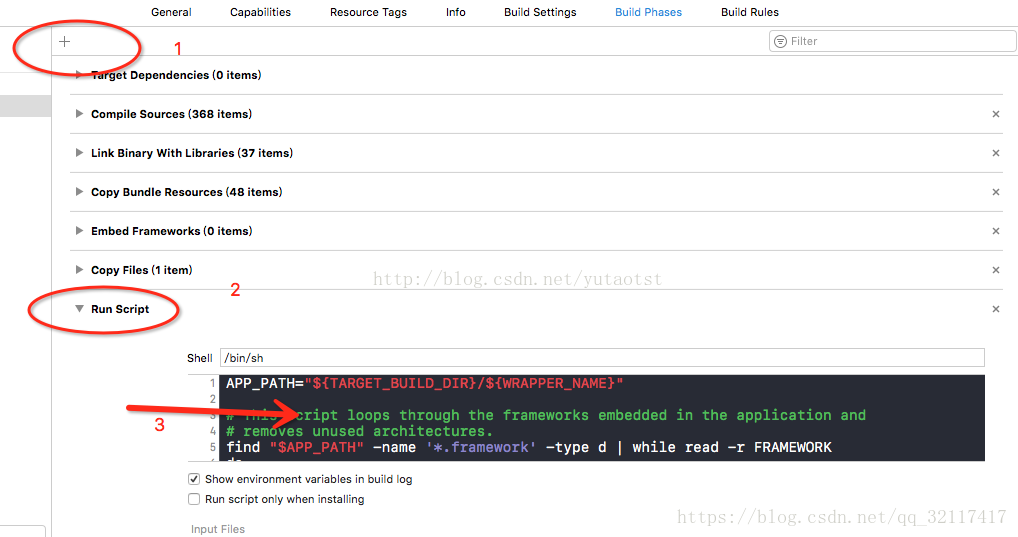
2. 剔除 App Store 不支持的 x86_64 和 i386 架构:
|
|
72
|
-
a. 选择**TARGETS**>**Build Phases**。
|
|
73
|
-
b. 单击加号,选择**New Run Script Phase**。
|
|
74
|
-
c. 添加如下代码:
|
|
75
|
-
|
|
76
|
-
``` bash
|
|
77
|
-
APP_PATH="${TARGET_BUILD_DIR}/${WRAPPER_NAME}"
|
|
78
|
-
|
|
79
|
-
# This script loops through the frameworks embedded in the application and
|
|
80
|
-
|
|
81
|
-
# removes unused architectures.
|
|
82
|
-
|
|
83
|
-
find "$APP_PATH" -name '*.framework' -type d | while read -r FRAMEWORK
|
|
84
|
-
do
|
|
85
|
-
FRAMEWORK_EXECUTABLE_NAME=$(defaults read "$FRAMEWORK/Info.plist" CFBundleExecutable)
|
|
86
|
-
FRAMEWORK_EXECUTABLE_PATH="$FRAMEWORK/$FRAMEWORK_EXECUTABLE_NAME"
|
|
87
|
-
echo "Executable is $FRAMEWORK_EXECUTABLE_PATH"
|
|
88
|
-
|
|
89
|
-
EXTRACTED_ARCHS=()
|
|
90
|
-
|
|
91
|
-
for ARCH in $ARCHS
|
|
92
|
-
do
|
|
93
|
-
echo "Extracting $ARCH from $FRAMEWORK_EXECUTABLE_NAME"
|
|
94
|
-
lipo -extract "$ARCH" "$FRAMEWORK_EXECUTABLE_PATH" -o "$FRAMEWORK_EXECUTABLE_PATH-$ARCH"
|
|
95
|
-
EXTRACTED_ARCHS+=("$FRAMEWORK_EXECUTABLE_PATH-$ARCH")
|
|
96
|
-
done
|
|
97
|
-
|
|
98
|
-
echo "Merging extracted architectures: ${ARCHS}"
|
|
99
|
-
lipo -o "$FRAMEWORK_EXECUTABLE_PATH-merged" -create "${EXTRACTED_ARCHS[@]}"
|
|
100
|
-
rm "${EXTRACTED_ARCHS[@]}"
|
|
101
|
-
|
|
102
|
-
echo "Replacing original executable with thinned version"
|
|
103
|
-
rm "$FRAMEWORK_EXECUTABLE_PATH"
|
|
104
|
-
mv "$FRAMEWORK_EXECUTABLE_PATH-merged" "$FRAMEWORK_EXECUTABLE_PATH"
|
|
105
|
-
|
|
106
|
-
done
|
|
107
|
-
```
|
|
108
|
-
|
|
109
|
-
|
|
110
|
-
3. 重新打包上传。
|
|
111
|
-
|
|
112
|
-
|
|
113
|
-
### IM 各端 Demo/TUIKit 工程中演示用的表情包,开发者是否可以直接使用?
|
|
114
|
-
|
|
115
|
-
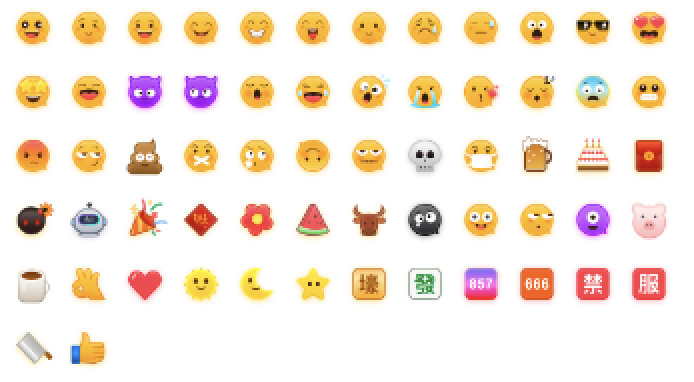
为了尊重版权,IM Demo/TUIKit 工程中默认不包含大表情元素切图。在正式上线商用前,请您替换为自己设计或拥有版权的其他表情包。请注意,下图所示的**默认小黄脸表情包版权属于腾讯云**,您可以通过升级至 [IM 企业版套餐](https://buy.cloud.tencent.com/avc) 免费使用该表情包。
|
|
116
|
-
|
|
117
|
-
|
|
22
|
+
消息免打扰无 UI 文档: https://cloud.tencent.com/document/product/269/75355
|