@tencentcloud/sdk-mcp 1.2.9 → 1.3.1
This diff represents the content of publicly available package versions that have been released to one of the supported registries. The information contained in this diff is provided for informational purposes only and reflects changes between package versions as they appear in their respective public registries.
- package/package.json +2 -2
- package/resource/doc/chatuikit/faq/common/server.md +54 -0
- package/resource/doc/chatuikit/faq/web_sdk/faq.md +60 -0
- package/resource/doc/chatuikit/react/integration.md +516 -48
- package/resource/doc/chatuikit/react/workflow.md +254 -0
- package/resource/doc/chatuikit/uniapp-app/faq.md +0 -0
- package/resource/doc/chatuikit/uniapp-app/integration.md +619 -0
- package/resource/doc/chatuikit/uniapp-app/workflow.md +576 -0
- package/resource/doc/chatuikit/vue/integration.md +511 -129
- package/resource/doc/chatuikit/vue/workflow.md +395 -0
- package/resource/doc/livekit/vue/components/co-guest-panel.md +5 -5
- package/resource/doc/livekit/vue/components/live-view.md +16 -49
- package/resource/doc/livekit/vue/{components/live-list.md → live-list-integration.md} +13 -44
- package/resource/doc/livekit/vue/live-player-desk-integration.md +293 -0
- package/resource/doc/livekit/vue/{components/live-player.md → live-player-h5-integration.md} +118 -110
- package/resource/doc/livekit/vue/{components/broadcast.md → live-pusher-integration.md} +77 -82
- package/resource/doc/livekit/vue/workflow.md +219 -0
- package/resource/doc/trtc/C++/ITRTCCloud.md +4131 -0
- package/resource/doc/trtc/C++/ITRTCStatistics.md +326 -0
- package/resource/doc/trtc/C++/ITXAudioEffectManager.md +1306 -0
- package/resource/doc/trtc/C++/ITXDeviceManager.md +1029 -0
- package/resource/doc/trtc/C++/TRTCCloudCallback.md +2743 -0
- package/resource/doc/trtc/C++/TRTCTypeDef.md +3703 -0
- package/resource/doc/trtc/C++/TXLiteAVCode.md +930 -0
- package/resource/doc/trtc/android/TRTCCloud.md +3832 -0
- package/resource/doc/trtc/android/TRTCCloudDef.md +3945 -0
- package/resource/doc/trtc/android/TRTCCloudListener.md +2480 -0
- package/resource/doc/trtc/android/TRTCStatistics.md +296 -0
- package/resource/doc/trtc/android/TXAudioEffectManager.md +1344 -0
- package/resource/doc/trtc/android/TXBeautyManager.md +980 -0
- package/resource/doc/trtc/android/TXDeviceManager.md +441 -0
- package/resource/doc/trtc/android/TXLiteAVCode.md +914 -0
- package/resource/doc/trtc/iOS/TRTCCloud.md +4256 -0
- package/resource/doc/trtc/iOS/TRTCCloudDelegate.md +2580 -0
- package/resource/doc/trtc/iOS/TRTCStatistics.md +296 -0
- package/resource/doc/trtc/iOS/TXAudioEffectManager.md +1117 -0
- package/resource/doc/trtc/iOS/TXBeautyManager.md +986 -0
- package/resource/doc/trtc/iOS/TXDeviceManager.md +1025 -0
- package/resource/doc/trtc/iOS/TXLiteAVCode.md +929 -0
- package/resource/doc/trtc/iOS/TXLiveSDKTypeDef.md +3798 -0
- package/tools/chat/get-web-chat-integration.js +31 -14
- package/tools/chat/get-web-chat-integration.js.map +1 -1
- package/tools/definitions/get_faq_def.js +4 -0
- package/tools/definitions/get_faq_def.js.map +1 -1
- package/tools/definitions/get_trtc_native_api_def.js +17 -0
- package/tools/definitions/get_trtc_native_api_def.js.map +1 -0
- package/tools/definitions/get_web_chat_uikit_integration_def.js +18 -11
- package/tools/definitions/get_web_chat_uikit_integration_def.js.map +1 -1
- package/tools/definitions/get_web_live_uikit_component_detail_def.js +9 -3
- package/tools/definitions/get_web_live_uikit_component_detail_def.js.map +1 -1
- package/tools/definitions/get_web_live_uikit_integration_def.js +32 -0
- package/tools/definitions/get_web_live_uikit_integration_def.js.map +1 -0
- package/tools/definitions/present_framework_choice_def.js +1 -1
- package/tools/definitions/record_result_def.js +1 -1
- package/tools/definitions/record_result_def.js.map +1 -1
- package/tools/index.js +6 -4
- package/tools/index.js.map +1 -1
- package/tools/live/get-web-live-uikit-integration.js +52 -0
- package/tools/live/get-web-live-uikit-integration.js.map +1 -0
- package/tools/trtc/get-trtc-native-api.js +31 -0
- package/tools/trtc/get-trtc-native-api.js.map +1 -0
- package/utils/generate-structured-result.js +34 -0
- package/utils/generate-structured-result.js.map +1 -0
- package/utils/handle-component-name.js +0 -8
- package/utils/handle-component-name.js.map +1 -1
- package/utils/report-cls-client.js +1 -1
- package/utils/report-es-client.js +1 -1
- package/resource/doc/chatuikit/react/chat_window_integration.md +0 -83
- package/resource/doc/chatuikit/vue/chat_window_integration.md +0 -131
- package/tools/chat/get-web-chat-window-integration.js +0 -28
- package/tools/chat/get-web-chat-window-integration.js.map +0 -1
- package/tools/definitions/get_web_chat_window_integration_def.js +0 -26
- package/tools/definitions/get_web_chat_window_integration_def.js.map +0 -1
|
@@ -1,30 +1,91 @@
|
|
|
1
|
-
|
|
2
|
-
* **React 版本限制:** 创建项目时 react 和 react-dom 的版本必须选用 `18.2.0`,禁止选用 react 19。
|
|
3
|
-
* **React UIKit 版本限制:** 必须使用 `@tencentcloud/chat-uikit-react` 3.0.0 以上的 latest 版本。
|
|
4
|
-
* **严格按照文档步骤和说明集成:** 在集成组件时必须按照文档步骤和说明进行。
|
|
5
|
-
* **严格使用文档中的示例代码:** 创建文件时必须严格使用文档中的示例代码填充文件,Chat 组件的 PlaceholderEmpty 属性不需要填写。
|
|
6
|
-
* **打开默认会话:** 必须使用 `setActiveConversation` 打开 `C2Cadministrator` 会话。
|
|
7
|
-
* **调用工具获取 userSig:** 必须先按照文档下载和集成 TUIKit 代码后,再自动生成测试 userID 并调用工具 `get_usersig` 获取 userSig,userID 不需要拼接时间戳,避免动态计算出错。
|
|
8
|
-
* **账号信息填写:** 获取到 userSig 后把 SDKAppID、userID、 userSig 自动填写到代码中。
|
|
9
|
-
* **禁止创建用户信息配置文件:** 不得自动创建填写 SDKAppID、userID、userSig 的 config 目录或文件。
|
|
1
|
+
TUIKit 是基于腾讯云 Chat SDK 的一款 vue3 UI 组件库,它提供了一些通用的 UI 组件,包含会话、聊天、群组等功能。本文介绍如何快速集成 TUIKit 并实现核心功能。
|
|
10
2
|
|
|
11
|
-
|
|
3
|
+
> **推荐使用更高效的 AI 集成助手**
|
|
4
|
+
>
|
|
12
5
|
|
|
13
|
-
|
|
6
|
+
> 我们为您提供了全新的 AI 集成方式,只需要简单描述您的需求,即可**自动生成集成代码**,大幅提升开发效率。
|
|
7
|
+
>
|
|
14
8
|
|
|
15
|
-
|
|
9
|
+
> [点击这里,立即体验 AI 集成](https://cloud.tencent.com/document/product/269/124481)
|
|
10
|
+
>
|
|
16
11
|
|
|
17
|
-
you can use vite or rsbuild to create a react project.
|
|
18
12
|
|
|
19
|
-
|
|
13
|
+
|
|
20
14
|
|
|
21
|
-
use npm or pnpm to install @tencentcloud/chat-uikit-react
|
|
22
15
|
|
|
23
|
-
##
|
|
16
|
+
## 关键概念
|
|
24
17
|
|
|
25
|
-
|
|
18
|
+
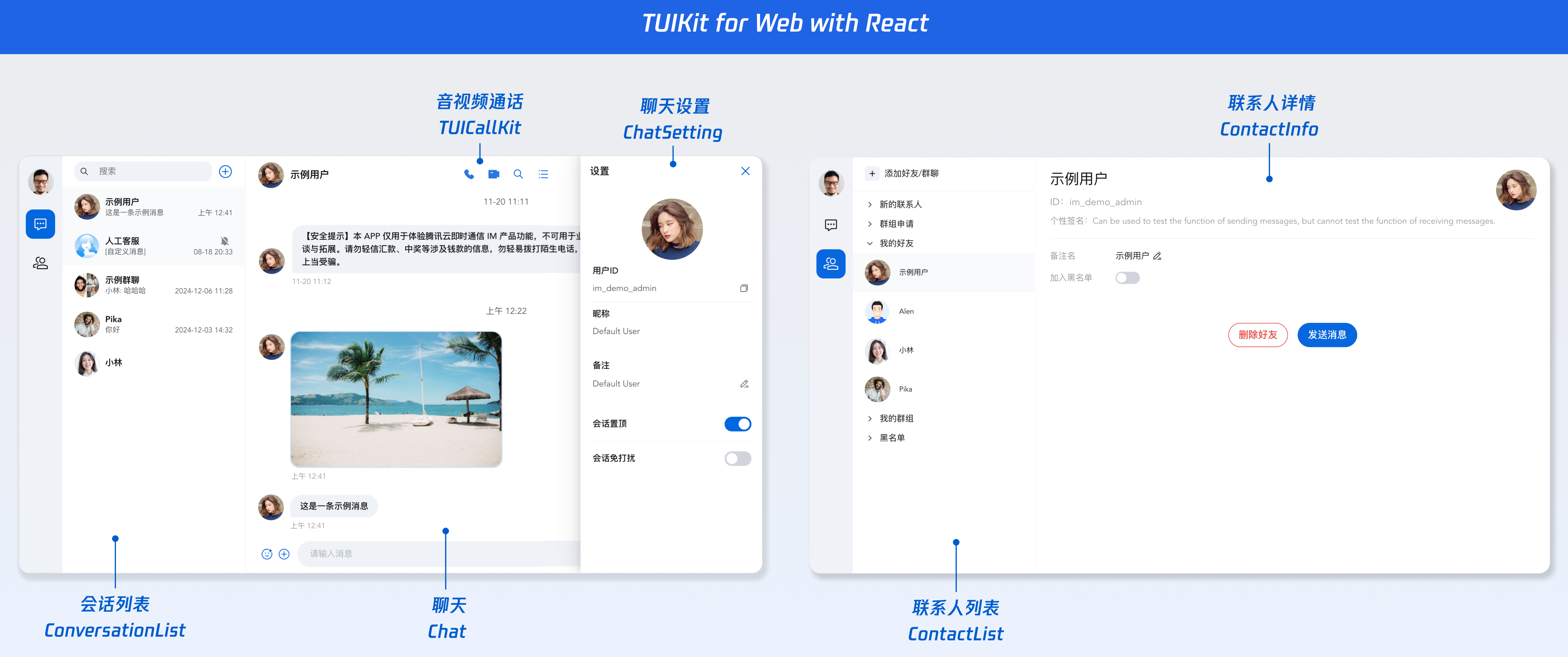
chat-uikit-react 主要分为 ConversationList、Chat、MessageList、ChatHeader、MessageInput、ChatSetting、Search、Contact 等核心 UI 组件,每个 UI 组件负责展示不同的内容。
|
|
19
|
+
1. ConversationList 提供会话列表组件。
|
|
26
20
|
|
|
27
|
-
|
|
21
|
+
2. Chat 提供会话的容器组件。
|
|
22
|
+
|
|
23
|
+
3. MessageList 提供会话的消息列表组件。
|
|
24
|
+
|
|
25
|
+
4. ChatHeader 提供会话的头部信息组件。
|
|
26
|
+
|
|
27
|
+
5. MessageInput 提供输入框组件。
|
|
28
|
+
|
|
29
|
+
6. ChatSetting 提供单聊和群聊的管理组件。
|
|
30
|
+
|
|
31
|
+
7. Search 提供云端搜索组件。
|
|
32
|
+
|
|
33
|
+
8. Contact 提供联系人组件。
|
|
34
|
+
|
|
35
|
+
|
|
36
|
+
## 前提条件
|
|
37
|
+
- Node.js v18 版本及以上,建议使用当前的 LTS v22 版本
|
|
38
|
+
|
|
39
|
+
- React v18 版本
|
|
40
|
+
|
|
41
|
+
- TypeScript@^5.0.0
|
|
42
|
+
|
|
43
|
+
|
|
44
|
+
## 创建项目
|
|
45
|
+
|
|
46
|
+
创建一个新的名为 **chat-example** 的 React 项目(创建项目时选择 **React 18**,并且使用 TypeScript 模板),并按照脚手架提示完成项目的初始化。
|
|
47
|
+
|
|
48
|
+
|
|
49
|
+
【shell】
|
|
50
|
+
``` bash
|
|
51
|
+
npm create rsbuild@latest
|
|
52
|
+
# 初始化脚手架项目
|
|
53
|
+
cd chat-example
|
|
54
|
+
npm i
|
|
55
|
+
npm run dev
|
|
56
|
+
```
|
|
57
|
+
|
|
58
|
+
## 下载并导入组件
|
|
59
|
+
|
|
60
|
+
### 步骤 1. 安装依赖
|
|
61
|
+
|
|
62
|
+
通过 npm 方式下载 [chat-uikit-react](https://www.npmjs.com/package/@tencentcloud/chat-uikit-react) 并在项目中使用。
|
|
63
|
+
|
|
64
|
+
|
|
65
|
+
【shell】
|
|
66
|
+
``` bash
|
|
67
|
+
npm i @tencentcloud/chat-uikit-react
|
|
68
|
+
```
|
|
69
|
+
|
|
70
|
+
### 步骤 2. 引入组件
|
|
71
|
+
|
|
72
|
+
> **注意:**
|
|
73
|
+
>
|
|
74
|
+
> - 以下代码中未填入 `SDKAppID`、`userID` 和 `userSig`,需在 [步骤3](https://write.woa.com/#e0579535-1fc9-4344-8878-ed25ced85819) 中获取相关信息后进行替换。
|
|
75
|
+
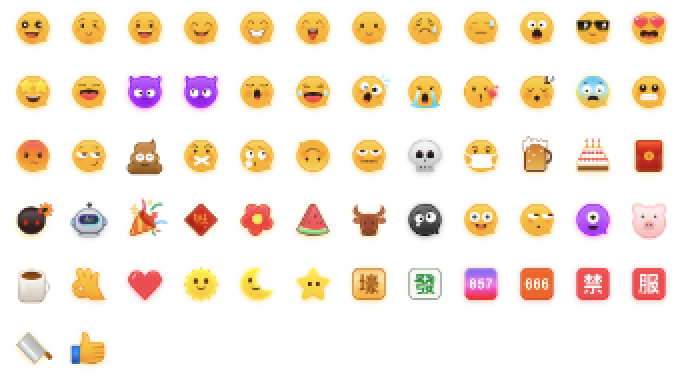
> - 为了尊重版权,IM Demo/TUIKit 工程中默认不包含大表情元素切图。正式上线商用前请您替换为自己设计或拥有版权的其他表情包。下图所示默认的**小黄脸表情包版权归腾讯云所有**,可以有偿授权使用,如需获得授权您可以通过升级至 [IM 企业版套餐](https://buy.cloud.tencent.com/avc) 免费使用该表情包。
|
|
76
|
+
|
|
77
|
+
|
|
78
|
+
|
|
79
|
+
|
|
80
|
+
|
|
81
|
+
复制以下 `App.tsx` 代码并替换原有的 `src/App.tsx` 中的内容。
|
|
82
|
+
|
|
83
|
+
|
|
84
|
+
|
|
85
|
+
|
|
86
|
+
【src/App.tsx】
|
|
87
|
+
``` typescript
|
|
88
|
+
import { useEffect, useLayoutEffect, useState, useMemo } from "react";
|
|
28
89
|
import {
|
|
29
90
|
UIKitProvider,
|
|
30
91
|
useLoginState,
|
|
@@ -34,52 +95,459 @@ import {
|
|
|
34
95
|
ChatHeader,
|
|
35
96
|
MessageList,
|
|
36
97
|
MessageInput,
|
|
98
|
+
ContactList,
|
|
99
|
+
ContactInfo,
|
|
100
|
+
ChatSetting,
|
|
101
|
+
Search,
|
|
102
|
+
VariantType,
|
|
103
|
+
Avatar,
|
|
104
|
+
useUIKit,
|
|
37
105
|
useConversationListState,
|
|
38
106
|
} from "@tencentcloud/chat-uikit-react";
|
|
107
|
+
import { IconChat, IconUsergroup, IconBulletpoint, IconSearch } from "@tencentcloud/uikit-base-component-react";
|
|
108
|
+
import './App.css';
|
|
109
|
+
|
|
110
|
+
function App() {
|
|
111
|
+
// 语言支持 en-US(default) / zh-CN / ja-JP / ko-KR / zh-TW
|
|
112
|
+
// 主题支持 light(default) / dark
|
|
113
|
+
return (
|
|
114
|
+
<UIKitProvider theme={'light'} language={'zh-CN'}>
|
|
115
|
+
<ChatApp />
|
|
116
|
+
</UIKitProvider>
|
|
117
|
+
);
|
|
118
|
+
}
|
|
39
119
|
|
|
40
120
|
function ChatApp() {
|
|
41
|
-
const
|
|
121
|
+
const [activeTab, setActiveTab] = useState<'conversations' | 'contacts'>('conversations');
|
|
122
|
+
const [isChatSettingShow, setIsChatSettingShow] = useState(false);
|
|
123
|
+
const [isSearchInChatShow, setIsSearchInChatShow] = useState(false);
|
|
42
124
|
|
|
125
|
+
const { language, theme } = useUIKit();
|
|
126
|
+
|
|
127
|
+
const isDark = theme === 'dark';
|
|
128
|
+
|
|
129
|
+
const texts = useMemo(() =>
|
|
130
|
+
language === 'zh-CN'
|
|
131
|
+
? { emptyTitle: '暂无会话', emptySub: '选择一个会话开始聊天', error: '请检查 SDKAppID, userID, userSig, 通过开发人员工具(F12)查看具体的错误信息', loading: '登录中...' }
|
|
132
|
+
: { emptyTitle: 'No conversation', emptySub: 'Select a conversation to start chatting', error: 'Please check the SDKAppID, userID, and userSig. View the specific error information through the developer tools (F12).', loading: 'Logging in...'},
|
|
133
|
+
[language]
|
|
134
|
+
);
|
|
135
|
+
|
|
136
|
+
const { status } = useLoginState({
|
|
137
|
+
SDKAppID: 0, // number 类型
|
|
138
|
+
userID: '', // string 类型
|
|
139
|
+
userSig: '', // string 类型
|
|
140
|
+
});
|
|
141
|
+
|
|
142
|
+
const { setActiveConversation, activeConversation } = useConversationListState();
|
|
143
|
+
|
|
144
|
+
// 初始化默认会话 可删除
|
|
43
145
|
useEffect(() => {
|
|
44
|
-
|
|
45
|
-
|
|
46
|
-
|
|
146
|
+
if (status === LoginStatus.SUCCESS) {
|
|
147
|
+
const userID = 'administrator';
|
|
148
|
+
const conversationID = `C2C${userID}`;
|
|
149
|
+
setActiveConversation(conversationID);
|
|
150
|
+
}
|
|
151
|
+
}, [status, setActiveConversation]);
|
|
152
|
+
|
|
153
|
+
// 切换会话时自动关闭侧边栏
|
|
154
|
+
useLayoutEffect(() => {
|
|
155
|
+
setIsChatSettingShow(false);
|
|
156
|
+
setIsSearchInChatShow(false);
|
|
157
|
+
}, [activeConversation?.conversationID]);
|
|
158
|
+
|
|
159
|
+
if (status === LoginStatus.ERROR) {
|
|
160
|
+
return (
|
|
161
|
+
<div className="loading-container">
|
|
162
|
+
<div className="loading-spinner"></div>
|
|
163
|
+
<div className="loading-text">{texts.error}</div>
|
|
164
|
+
</div>
|
|
165
|
+
);
|
|
166
|
+
}
|
|
167
|
+
|
|
168
|
+
if (status !== LoginStatus.SUCCESS) {
|
|
169
|
+
return (
|
|
170
|
+
<div className="loading-container">
|
|
171
|
+
<div className="loading-spinner"></div>
|
|
172
|
+
<div className="loading-text">{texts.loading}</div>
|
|
173
|
+
</div>
|
|
174
|
+
);
|
|
175
|
+
}
|
|
47
176
|
|
|
48
177
|
return (
|
|
49
|
-
<div
|
|
50
|
-
|
|
51
|
-
<
|
|
52
|
-
|
|
53
|
-
|
|
54
|
-
|
|
55
|
-
|
|
178
|
+
<div className={`chat-layout ${isDark ? 'dark' : ''}`}>
|
|
179
|
+
{/* 左侧导航 */}
|
|
180
|
+
<SideTab activeTab={activeTab} onTabChange={setActiveTab} />
|
|
181
|
+
|
|
182
|
+
{/* 中间列表 会话列表-联系人列表 */}
|
|
183
|
+
<div className="conversation-list-panel">
|
|
184
|
+
{activeTab === 'conversations' ? <ConversationList /> : <ContactList className="contact-list" />}
|
|
185
|
+
</div>
|
|
186
|
+
|
|
187
|
+
{/* 右侧聊天 */}
|
|
188
|
+
{activeTab === 'conversations' && (
|
|
189
|
+
<Chat
|
|
190
|
+
className="chat-content-panel"
|
|
191
|
+
PlaceholderEmpty={
|
|
192
|
+
<div className="empty-placeholder">
|
|
193
|
+
<div className="empty-icon">💬</div>
|
|
194
|
+
<div className="empty-title">{texts.emptyTitle}</div>
|
|
195
|
+
<div className="empty-subtitle">{texts.emptySub}</div>
|
|
196
|
+
</div>
|
|
197
|
+
}
|
|
198
|
+
>
|
|
199
|
+
<ChatHeader
|
|
200
|
+
ChatHeaderRight={
|
|
201
|
+
<div className="header-actions">
|
|
202
|
+
<button
|
|
203
|
+
className="icon-button"
|
|
204
|
+
onClick={() => setIsSearchInChatShow(!isSearchInChatShow)}
|
|
205
|
+
>
|
|
206
|
+
<IconSearch size="20px" />
|
|
207
|
+
</button>
|
|
208
|
+
<button
|
|
209
|
+
className="icon-button"
|
|
210
|
+
onClick={() => setIsChatSettingShow(!isChatSettingShow)}
|
|
211
|
+
>
|
|
212
|
+
<IconBulletpoint size="20px" />
|
|
213
|
+
</button>
|
|
214
|
+
</div>
|
|
215
|
+
}
|
|
216
|
+
/>
|
|
217
|
+
<MessageList />
|
|
218
|
+
<MessageInput />
|
|
219
|
+
{/* 聊天设置侧边栏 */}
|
|
220
|
+
{isChatSettingShow && (
|
|
221
|
+
<div className="chat-sidebar">
|
|
222
|
+
<div className="chat-sidebar-header">
|
|
223
|
+
<span className="chat-sidebar-title">设置</span>
|
|
224
|
+
<button
|
|
225
|
+
className="icon-button"
|
|
226
|
+
onClick={() => setIsChatSettingShow(false)}
|
|
227
|
+
>
|
|
228
|
+
✕
|
|
229
|
+
</button>
|
|
230
|
+
</div>
|
|
231
|
+
<ChatSetting />
|
|
232
|
+
</div>
|
|
233
|
+
)}
|
|
234
|
+
|
|
235
|
+
{/* 会话内搜索侧边栏 */}
|
|
236
|
+
{isSearchInChatShow && (
|
|
237
|
+
<div className="chat-sidebar">
|
|
238
|
+
<div className="chat-sidebar-header">
|
|
239
|
+
<span className="chat-sidebar-title">群搜索</span>
|
|
240
|
+
<button
|
|
241
|
+
className="icon-button"
|
|
242
|
+
onClick={() => setIsSearchInChatShow(false)}
|
|
243
|
+
>
|
|
244
|
+
✕
|
|
245
|
+
</button>
|
|
246
|
+
</div>
|
|
247
|
+
<Search variant={VariantType.EMBEDDED} />
|
|
248
|
+
</div>
|
|
249
|
+
)}
|
|
250
|
+
</Chat>
|
|
251
|
+
)}
|
|
252
|
+
|
|
253
|
+
{/* 联系人详情 */}
|
|
254
|
+
{activeTab === 'contacts' && (
|
|
255
|
+
<ContactInfo
|
|
256
|
+
className="contact-detail-panel"
|
|
257
|
+
onSendMessage={() => setActiveTab('conversations')}
|
|
258
|
+
onEnterGroup={() => setActiveTab('conversations')}
|
|
259
|
+
/>
|
|
260
|
+
)}
|
|
56
261
|
</div>
|
|
57
262
|
);
|
|
58
263
|
}
|
|
59
264
|
|
|
60
|
-
|
|
61
|
-
|
|
62
|
-
|
|
63
|
-
|
|
64
|
-
|
|
65
|
-
|
|
66
|
-
|
|
67
|
-
|
|
68
|
-
|
|
69
|
-
|
|
265
|
+
// SideTab 组件:左侧导航栏
|
|
266
|
+
interface SideTabProps {
|
|
267
|
+
activeTab: 'conversations' | 'contacts';
|
|
268
|
+
onTabChange: (tab: 'conversations' | 'contacts') => void;
|
|
269
|
+
}
|
|
270
|
+
|
|
271
|
+
function SideTab({ activeTab, onTabChange }: SideTabProps) {
|
|
272
|
+
const { theme } = useUIKit();
|
|
273
|
+
const { loginUserInfo } = useLoginState();
|
|
274
|
+
const isDark = theme === 'dark';
|
|
70
275
|
|
|
71
|
-
if (status !== LoginStatus.SUCCESS) {
|
|
72
|
-
return <div>Loading...</div>
|
|
73
|
-
}
|
|
74
|
-
|
|
75
|
-
// Language support zh-CN(default) / en-US / ja-JP / ko-KR / zh-TW
|
|
76
|
-
// Theme support light(default) / dark
|
|
77
276
|
return (
|
|
78
|
-
<
|
|
79
|
-
|
|
80
|
-
|
|
277
|
+
<div className={`side-tab ${isDark ? 'dark' : ''}`}>
|
|
278
|
+
{/* 用户头像 */}
|
|
279
|
+
<div className="avatar-wrapper">
|
|
280
|
+
<Avatar src={loginUserInfo?.avatarUrl} />
|
|
281
|
+
<div className="tooltip">
|
|
282
|
+
<div className="tooltip-name">{loginUserInfo?.userName || loginUserInfo?.userId || '未命名'}</div>
|
|
283
|
+
<div className="tooltip-id">ID: {loginUserInfo?.userId}</div>
|
|
284
|
+
</div>
|
|
285
|
+
</div>
|
|
286
|
+
|
|
287
|
+
{/* Tab 切换 */}
|
|
288
|
+
<div className="tabs">
|
|
289
|
+
<div
|
|
290
|
+
className={`tab-item ${activeTab === 'conversations' ? 'active' : ''}`}
|
|
291
|
+
onClick={() => onTabChange('conversations')}
|
|
292
|
+
title="会话"
|
|
293
|
+
>
|
|
294
|
+
<IconChat size="24px" />
|
|
295
|
+
</div>
|
|
296
|
+
|
|
297
|
+
<div
|
|
298
|
+
className={`tab-item ${activeTab === 'contacts' ? 'active' : ''}`}
|
|
299
|
+
onClick={() => onTabChange('contacts')}
|
|
300
|
+
title="联系人"
|
|
301
|
+
>
|
|
302
|
+
<IconUsergroup size="24px" />
|
|
303
|
+
</div>
|
|
304
|
+
</div>
|
|
305
|
+
</div>
|
|
81
306
|
);
|
|
82
307
|
}
|
|
83
308
|
|
|
84
309
|
export default App;
|
|
85
310
|
```
|
|
311
|
+
|
|
312
|
+
复制以下 `App.css` 代码并替换同级目录的 `src/App.css` 样式文件。
|
|
313
|
+
|
|
314
|
+
|
|
315
|
+
|
|
316
|
+
|
|
317
|
+
【src/App.css】
|
|
318
|
+
``` java
|
|
319
|
+
|
|
320
|
+
body{margin:0;padding:0;font-family:Inter,Avenir,Helvetica,Arial,sans-serif;background:linear-gradient(135deg,#667eea 0%,#764ba2 100%);min-height:100vh;box-sizing:border-box;}#root{height:100vh;display:flex;justify-content:center;align-items:center;}.chat-layout{height:60vh;aspect-ratio:16 / 9;margin:0 auto;display:flex;border-radius:16px;box-shadow:0 20px 60px rgba(0,0,0,0.3),0 0 0 1px rgba(255,255,255,0.1);overflow:hidden;backdrop-filter:blur(10px);}@media (max-width:1920px){.chat-layout{height:80vh;}}.conversation-list-panel{width:300px;display:flex;flex-direction:column;border-right:1px solid var(--uikit-theme-light-stroke-color-primary);overflow:hidden;}.dark .conversation-list-panel{border-right:1px solid var(--uikit-theme-dark-stroke-color-primary);}.contact-list{border-radius:0;}.chat-content-panel{flex:1;border-left:1px solid var(--uikit-theme-light-stroke-color-primary);}.dark .chat-content-panel{border-left:1px solid var(--uikit-theme-dark-stroke-color-primary);}.contact-detail-panel{flex:1;}.icon-button{padding:4px 6px;display:flex;align-items:center;justify-content:center;border:none;background:transparent;border-radius:4px;font-size:20px;color:var(--uikit-theme-light-text-color-link);cursor:pointer;transition:background-color 0.2s;}.dark .icon-button{color:var(--uikit-theme-dark-text-color-link);}.icon-button:hover{background-color:var(--uikit-theme-light-button-color-secondary-hover);}.dark .icon-button:hover{background-color:var(--uikit-theme-dark-button-color-secondary-hover);}.icon-button:active{background-color:var(--uikit-theme-light-button-color-secondary-active);}.dark .icon-button:active{background-color:var(--uikit-theme-dark-button-color-secondary-active);}.header-actions{display:flex;gap:8px;margin-left:8px;color:var(--uikit-theme-light-text-color-link);}.dark .header-actions{color:var(--uikit-theme-dark-text-color-link);}.message-toolbar{display:flex;justify-content:space-between;align-items:center;}.message-toolbar-actions{display:flex;align-items:center;gap:12px;}.chat-sidebar{position:absolute;right:0;top:0;bottom:0;min-width:300px;max-width:400px;display:flex;flex-direction:column;background-color:var(--uikit-theme-light-bg-color-operate);box-shadow:-2px 0 8px rgba(0,0,0,0.04),-4px 0 16px rgba(0,0,0,0.06),-8px 0 32px rgba(0,0,0,0.08);overflow:auto;z-index:1000;}.dark .chat-sidebar{background-color:var(--uikit-theme-dark-bg-color-operate);box-shadow:-2px 0 8px rgba(0,0,0,0.2),-4px 0 16px rgba(0,0,0,0.3),-8px 0 32px rgba(0,0,0,0.4),-1px 0 0 rgba(255,255,255,0.08);}.chat-sidebar-header{position:sticky;top:0;display:flex;align-items:center;justify-content:space-between;padding:12px 16px;background-color:var(--uikit-theme-light-bg-color-operate);border-bottom:1px solid var(--uikit-theme-light-stroke-color-primary);z-index:10;}.dark .chat-sidebar-header{background-color:var(--uikit-theme-dark-bg-color-operate);border-bottom:1px solid var(--uikit-theme-dark-stroke-color-primary);}.chat-sidebar-title{font-size:16px;font-weight:500;color:var(--uikit-theme-light-text-color-primary);}.dark .chat-sidebar-title{color:var(--uikit-theme-dark-text-color-primary);}.empty-placeholder{flex:1;display:flex;flex-direction:column;align-items:center;justify-content:center;gap:12px;background-color:var(--uikit-theme-light-bg-color-operate);border-left:1px solid var(--uikit-theme-light-stroke-color-primary);color:#adb5bd;}.dark .empty-placeholder{background-color:var(--uikit-theme-dark-bg-color-operate);border-left:1px solid var(--uikit-theme-dark-stroke-color-primary);}.empty-icon{font-size:64px;opacity:0.3;}.empty-title{font-size:16px;font-weight:600;color:#6c757d;}.empty-subtitle{font-size:14px;color:#868e96;}.loading-container{display:flex;flex-direction:column;align-items:center;justify-content:center;height:100vh;gap:24px;}.loading-spinner{width:60px;height:60px;border:4px solid rgba(255,255,255,0.2);border-top-color:#ffffff;border-radius:50%;animation:spin 1s cubic-bezier(0.68,-0.55,0.265,1.55) infinite;box-shadow:0 4px 12px rgba(0,0,0,0.15);}.loading-text{color:#ffffff;font-size:18px;font-weight:500;letter-spacing:0.5px;animation:pulse 2s ease-in-out infinite;}@keyframes spin{0%{transform:rotate(0deg);}100%{transform:rotate(360deg);}}@keyframes pulse{0%,100%{opacity:1;}50%{opacity:0.6;}}.icon-image-effort{display:none;}.side-tab{width:72px;height:100%;background:var(--uikit-theme-light-bg-color-function);display:flex;flex-direction:column;align-items:center;padding:20px 0;transition:background 0.3s;}.side-tab.dark{background:var(--uikit-theme-dark-bg-color-function);}.avatar-wrapper{position:relative;margin-bottom:24px;cursor:pointer;}.avatar-wrapper:hover .tui-avatar{transform:scale(1.05);box-shadow:0 4px 12px rgba(0,0,0,0.15);}.tooltip{position:absolute;left:60px;top:50%;transform:translateY(-50%);padding:8px 12px;background:rgba(0,0,0,0.85);color:#fff;border-radius:6px;white-space:nowrap;opacity:0;visibility:hidden;pointer-events:none;transition:all 0.3s;z-index:1000;}.tooltip::before{content:'';position:absolute;left:-6px;top:50%;transform:translateY(-50%);border:6px solid transparent;border-right-color:rgba(0,0,0,0.85);}.avatar-wrapper:hover .tooltip{opacity:1;visibility:visible;}.tooltip-name{font-size:14px;font-weight:500;margin-bottom:4px;}.tooltip-id{font-size:12px;opacity:0.8;}.tabs{display:flex;flex-direction:column;gap:16px;}.tab-item{width:48px;height:48px;display:flex;align-items:center;justify-content:center;border-radius:12px;cursor:pointer;transition:all 0.3s;color:var(--uikit-theme-light-text-color-primary);}.dark .tab-item{color:var(--uikit-theme-dark-text-color-primary);}.tab-item:hover{background:rgba(0,0,0,0.05);}.tab-item.active{background:var(--uikit-theme-light-button-color-primary-default);color:var(--uikit-theme-light-text-color-button);}.dark .tab-item.active{background:var(--uikit-theme-dark-button-color-primary-default);color:var(--uikit-theme-dark-text-color-button);}.call-kit{position:fixed !important;top:50%;left:50%;z-index:999;transform:translate(-50%,-50%);max-width:800px;max-height:600px;}
|
|
321
|
+
```
|
|
322
|
+
|
|
323
|
+
### 步骤 3. 获取 SDKAppID、userID 和 userSig
|
|
324
|
+
|
|
325
|
+
在步骤2复制的 `App.tsx` 代码中,登录鉴权信息是空缺的,您还需要在 `useLoginState hook` 中填写您的腾讯云应用的鉴权信息,如下所示:
|
|
326
|
+
``` java
|
|
327
|
+
const { status } = useLoginState({
|
|
328
|
+
SDKAppID: 0, // number 类型
|
|
329
|
+
userID: '', // string 类型
|
|
330
|
+
userSig: '', // string 类型
|
|
331
|
+
});
|
|
332
|
+
```
|
|
333
|
+
<table>
|
|
334
|
+
<tr>
|
|
335
|
+
<td rowspan="1" colSpan="1" >参数</td>
|
|
336
|
+
|
|
337
|
+
<td rowspan="1" colSpan="1" >类型</td>
|
|
338
|
+
|
|
339
|
+
<td rowspan="1" colSpan="1" >说明</td>
|
|
340
|
+
</tr>
|
|
341
|
+
|
|
342
|
+
<tr>
|
|
343
|
+
<td rowspan="1" colSpan="1" >SDKAppID</td>
|
|
344
|
+
|
|
345
|
+
<td rowspan="1" colSpan="1" >Number</td>
|
|
346
|
+
|
|
347
|
+
<td rowspan="1" colSpan="1" >SDKAppID 是腾讯云 IM 客户应用的唯一标识。您可以在 [即时通信 IM 控制台](https://console.cloud.tencent.com/im) 创建新应用,获取 SDKAppID 。<br>**说明:**<br>SDKAppID 是腾讯云 IM 客户应用的唯一标识。我们建议每一个独立的 App 都申请一个新的 SDKAppID。不同 SDKAppID 之间的消息是天然隔离的,不能互通。<br></td>
|
|
348
|
+
</tr>
|
|
349
|
+
|
|
350
|
+
<tr>
|
|
351
|
+
<td rowspan="1" colSpan="1" >userID</td>
|
|
352
|
+
|
|
353
|
+
<td rowspan="1" colSpan="1" >String</td>
|
|
354
|
+
|
|
355
|
+
<td rowspan="1" colSpan="1" >用户的唯一标识符,由您定义,只能包含大小写字母(a-z,A-Z)、数字(0-9)、下划线和连字符。</td>
|
|
356
|
+
</tr>
|
|
357
|
+
|
|
358
|
+
<tr>
|
|
359
|
+
<td rowspan="1" colSpan="1" >userSig</td>
|
|
360
|
+
|
|
361
|
+
<td rowspan="1" colSpan="1" >String</td>
|
|
362
|
+
|
|
363
|
+
<td rowspan="1" colSpan="1" >用户登录即时通信 IM 的密码,其本质是对 UserID 等信息加密后得到的密文。<br>**说明:**<br>- 开发环境:快速跑通 Demo,可以通过 [即时通信 IM 控制台](https://console.cloud.tencent.com/im) 获取 UserSig。<br>- 生产环境:将 UserSig 的计算代码集成到您的服务端,并提供面向项目的接口, 正确的 UserSig 签发方式请参见 [服务端生成 UserSig](https://cloud.tencent.com/document/product/269/32688)。<br></td>
|
|
364
|
+
</tr>
|
|
365
|
+
</table>
|
|
366
|
+
|
|
367
|
+
|
|
368
|
+
> **注意:**
|
|
369
|
+
>
|
|
370
|
+
|
|
371
|
+
> 本文示例代码采用从 [即时通信 IM 控制台](https://console.cloud.tencent.com/im) 获取 UserSig 的方案,**该方法仅适合本地跑通功能调试**。 正确的 UserSig 签发方式请参见 [服务端生成 UserSig](https://cloud.tencent.com/document/product/269/32688)。
|
|
372
|
+
>
|
|
373
|
+
|
|
374
|
+
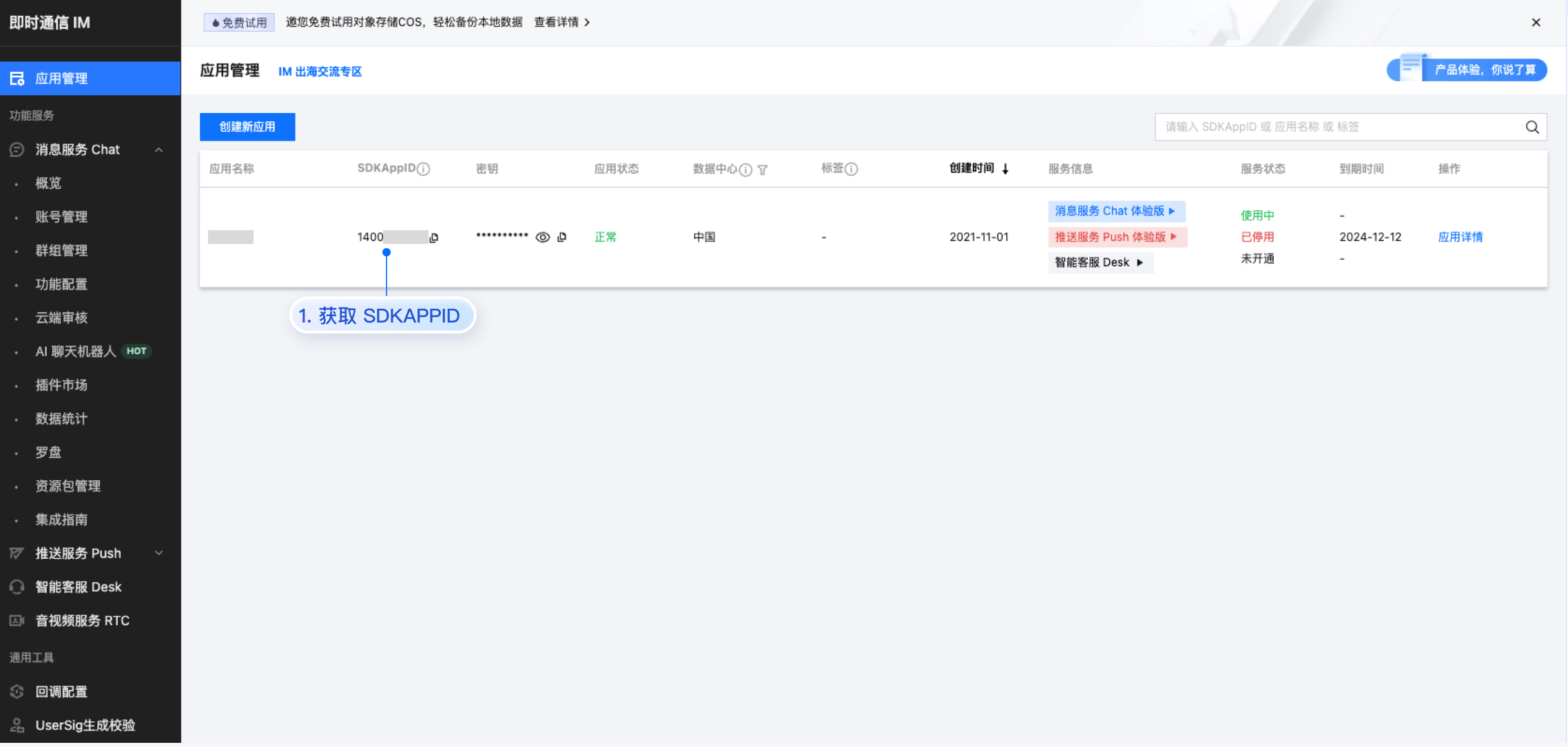
- SDKAppID:在 [即时通信 IM 控制台 > 应用管理](https://console.cloud.tencent.com/im) 单击**创建新应用**,获取 SDKAppID。
|
|
375
|
+
|
|
376
|
+
|
|
377
|
+
|
|
378
|
+
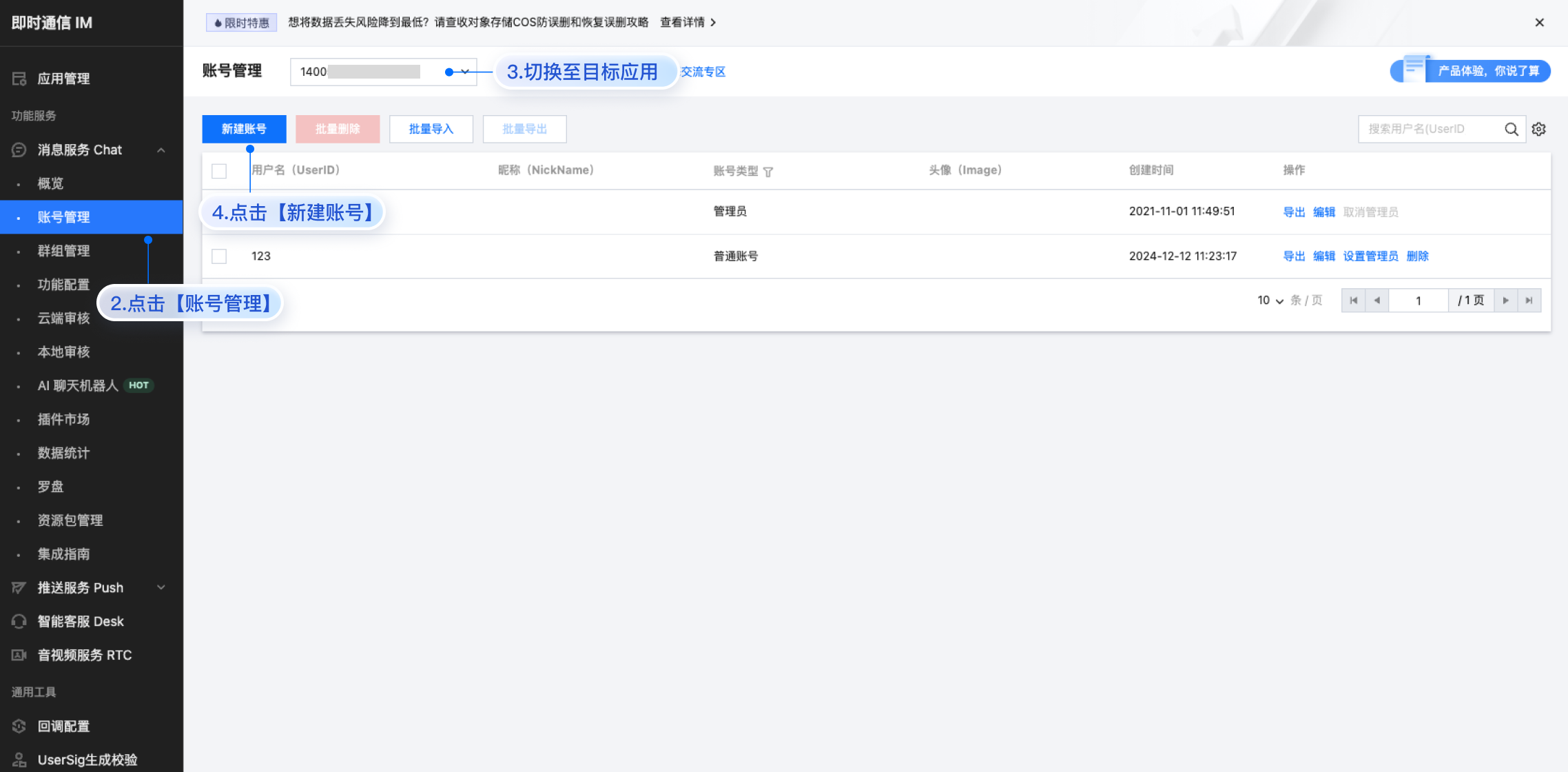
- userID:单击 [即时通信 IM 控制台 > 消息服务 Chat > 账号管理](https://console.cloud.tencent.com/im/account-management),切换至目标应用所在账号,您可以创建 2~3 个账号用于体验单聊、群聊的功能。
|
|
379
|
+
|
|
380
|
+
|
|
381
|
+
|
|
382
|
+
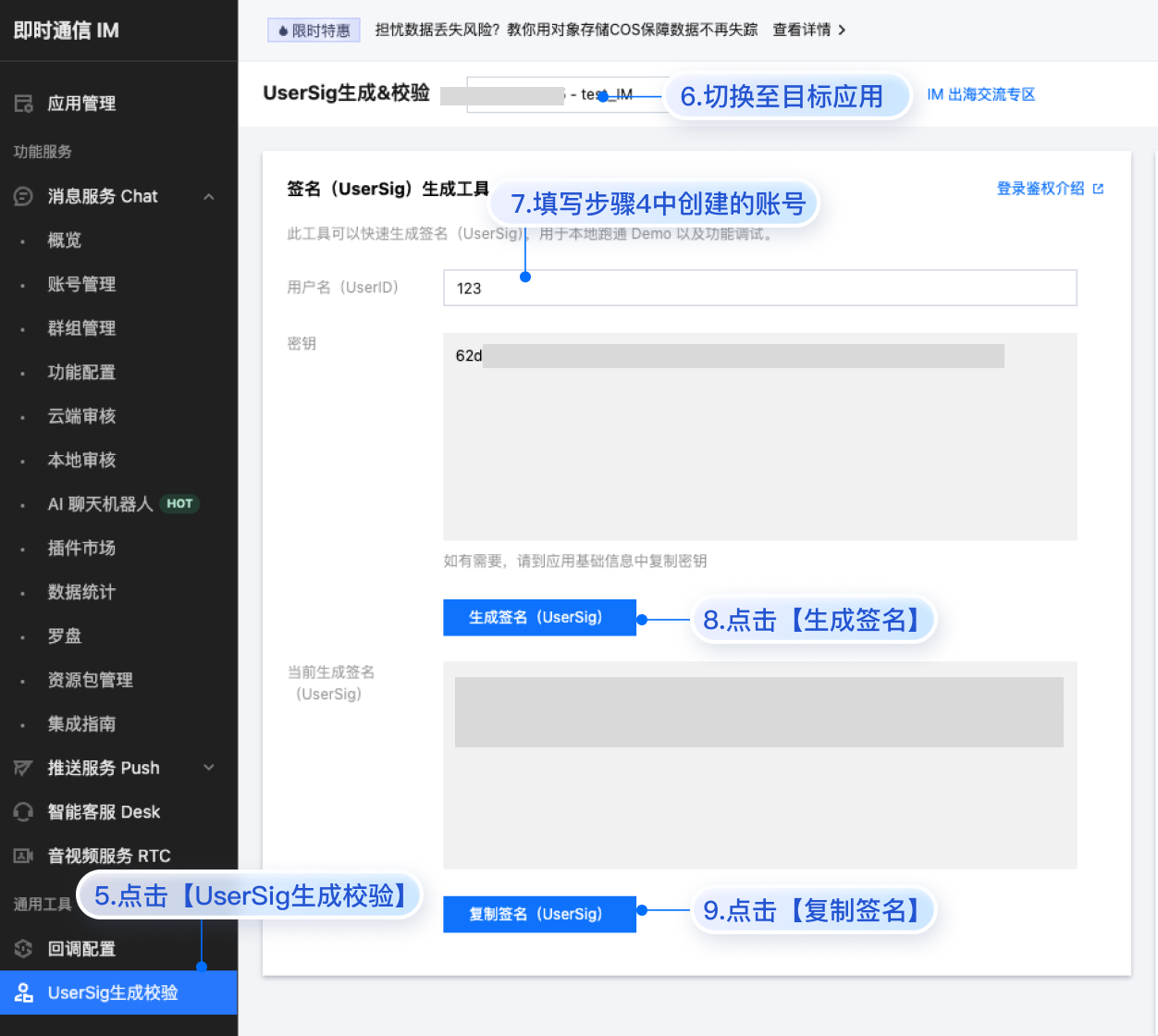
- userSig:单击 [即时通信 IM 控制台 > 开发工具 > UserSig生成校验](https://console.cloud.tencent.com/im/tool-usersig),切换至目标应用所在账号,填写创建的 userID,即可生成 userSig。
|
|
383
|
+
|
|
384
|
+
|
|
385
|
+
|
|
386
|
+
|
|
387
|
+
## 运行和测试
|
|
388
|
+
|
|
389
|
+
填入登录鉴权信息后即可运行项目开始体验。
|
|
390
|
+
|
|
391
|
+
|
|
392
|
+
【shell】
|
|
393
|
+
``` bash
|
|
394
|
+
npm run dev
|
|
395
|
+
```
|
|
396
|
+
|
|
397
|
+
> **注意:**
|
|
398
|
+
>
|
|
399
|
+
> - 请确保 [步骤3](https://write.woa.com/#step3) 代码中 SDKAppID、userID 和 userSig 均已成功替换,如未替换将会导致项目表现异常。
|
|
400
|
+
> - userID 和 userSig 为一一对应关系,具体参见 [生成 UserSig(用户鉴权)](https://write.woa.com/document/107052240244191232)。
|
|
401
|
+
> - 如遇到项目启动失败,请检查 开发环境要求 是否满足。
|
|
402
|
+
|
|
403
|
+
|
|
404
|
+
## 集成更多高级特性
|
|
405
|
+
|
|
406
|
+
### 音视频通话
|
|
407
|
+
|
|
408
|
+
> **说明:**
|
|
409
|
+
>
|
|
410
|
+
|
|
411
|
+
> TUICallKit 是腾讯云推出一款音视频通话 UI 组件,通过集成该组件,您只需要编写几行代码就可以在聊天应用中体验音视频通话功能。
|
|
412
|
+
>
|
|
413
|
+
|
|
414
|
+
> 更多详细信息可参考:[音视频通话-开通服务](https://write.woa.com/document/140130594134605824)。
|
|
415
|
+
>
|
|
416
|
+
|
|
417
|
+
1. 安装 `@trtc/calls-uikit-react` 依赖
|
|
418
|
+
|
|
419
|
+
``` bash
|
|
420
|
+
npm install @trtc/calls-uikit-react
|
|
421
|
+
```
|
|
422
|
+
2. 从 `@trtc/calls-uikit-react` 导出 `TUICallKit`,并挂载到 DOM 节点上。
|
|
423
|
+
|
|
424
|
+
|
|
425
|
+
在 `src/App.tsx` 文件中继续补充下面的代码:
|
|
426
|
+
|
|
427
|
+
``` typescript
|
|
428
|
+
// src/App.tsx
|
|
429
|
+
import { TUICallKit } from '@trtc/calls-uikit-react';
|
|
430
|
+
|
|
431
|
+
function App() {
|
|
432
|
+
return (
|
|
433
|
+
<UIKitProvider>
|
|
434
|
+
// 导入 TUICallKit 并添加到代码中
|
|
435
|
+
<TUICallKit className="call-kit" />
|
|
436
|
+
<ChatApp />
|
|
437
|
+
</UIKitProvider>
|
|
438
|
+
);
|
|
439
|
+
}
|
|
440
|
+
```
|
|
441
|
+
3. 在 `<ChatHeader />` 上启用 `enableCall` 属性
|
|
442
|
+
|
|
443
|
+
``` java
|
|
444
|
+
<ChatHeader enableCall={true} />
|
|
445
|
+
```
|
|
446
|
+
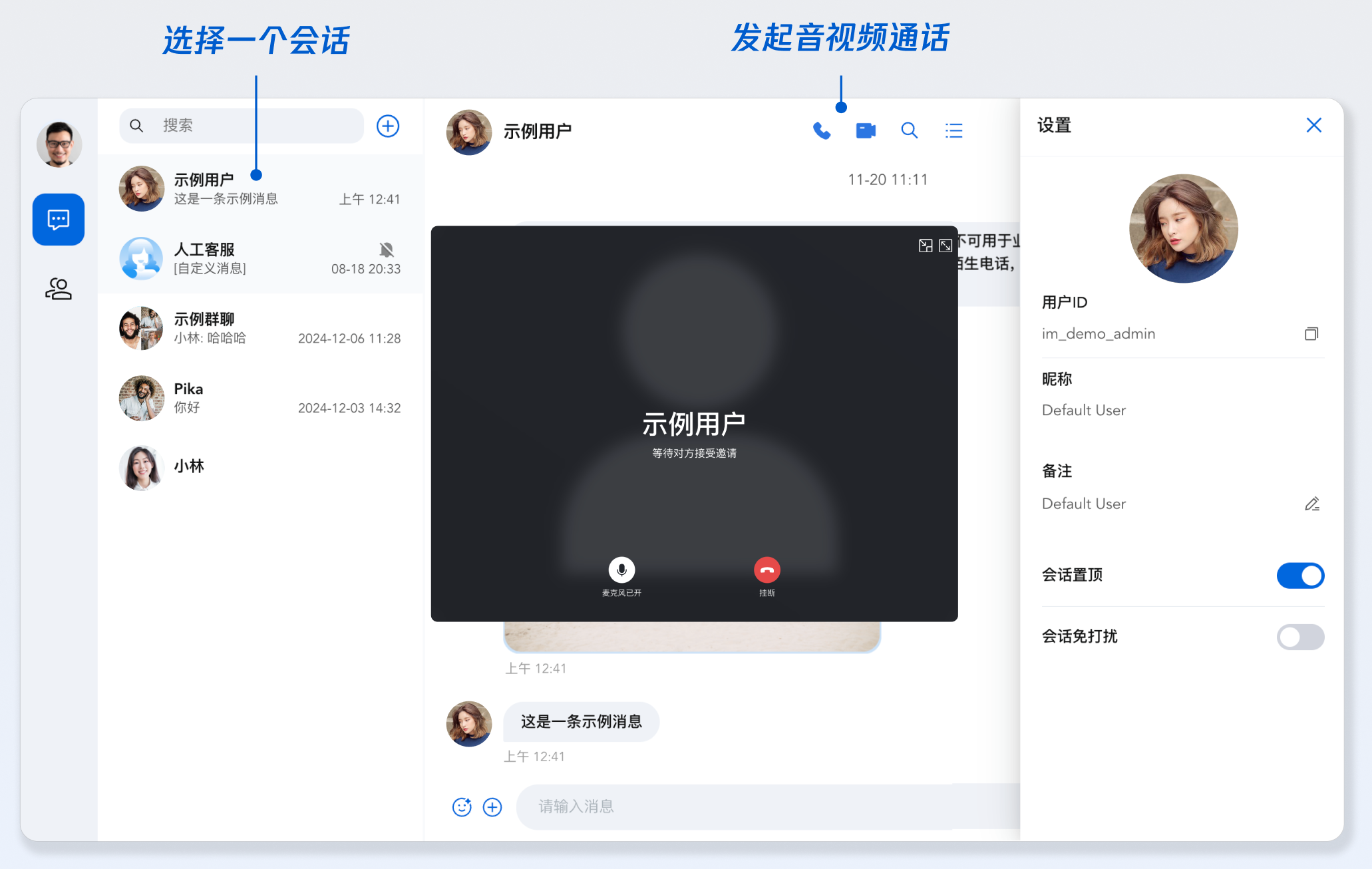
4. 拨打语音通话
|
|
447
|
+
|
|
448
|
+
|
|
449
|
+
|
|
450
|
+
|
|
451
|
+
### 云端搜索
|
|
452
|
+
|
|
453
|
+
> **说明:**
|
|
454
|
+
>
|
|
455
|
+
|
|
456
|
+
> 搜索,在客服、社交、在线教育、在线医疗、OA 等场景下是刚需功能,可帮助用户快速查找群组、用户、消息,提升产品使用体验和用户粘性。
|
|
457
|
+
>
|
|
458
|
+
|
|
459
|
+
> 由于 Web 平台本地存储特殊性等原因,Vue **无法实现本地搜索**,为了更好的满足对于搜索能力的需求,推出了**云端搜索能力**。**云端搜索功能支持全局搜索和会话内搜索,同时支持搜索群组、用户和消息。**
|
|
460
|
+
>
|
|
461
|
+
|
|
462
|
+
> 此功能属于增值服务,需要您购买云端搜索插件,请点击 [购买](https://console.cloud.tencent.com/im/plugin/TUICloudSearch)。
|
|
463
|
+
>
|
|
464
|
+
|
|
465
|
+
|
|
466
|
+
云端搜索在“步骤 2”中已经默认集成,如果需要关闭云端搜索功能,请参考以下代码:
|
|
467
|
+
1. 注释 `ChatHeader` 中 `ChatHeaderRight` 属性,和会话内搜索侧边栏相关的代码
|
|
468
|
+
|
|
469
|
+
``` typescript
|
|
470
|
+
|
|
471
|
+
<ChatHeader enableCall={true}
|
|
472
|
+
ChatHeaderRight={
|
|
473
|
+
<div className="header-actions">
|
|
474
|
+
<button
|
|
475
|
+
className="icon-button"
|
|
476
|
+
onClick={() => setIsSearchInChatShow(!isSearchInChatShow)}
|
|
477
|
+
>
|
|
478
|
+
<IconSearch size="20px" />
|
|
479
|
+
</button>
|
|
480
|
+
{/* <button
|
|
481
|
+
className="icon-button"
|
|
482
|
+
onClick={() => setIsChatSettingShow(!isChatSettingShow)}
|
|
483
|
+
>
|
|
484
|
+
<IconBulletpoint size="20px" />
|
|
485
|
+
</button> */}
|
|
486
|
+
</div>
|
|
487
|
+
}
|
|
488
|
+
/>
|
|
489
|
+
```
|
|
490
|
+
|
|
491
|
+
## 常见问题
|
|
492
|
+
|
|
493
|
+
### 什么是 UserSig?如何生成 UserSig?
|
|
494
|
+
|
|
495
|
+
UserSig 是用户登录即时通信 IM 的密码,其本质是对 UserID 等信息加密后得到的密文。UserSig 签发方式是需将 UserSig 的计算代码集成到您的服务端,并提供面向项目的接口,在需要 UserSig 时由您的项目向业务服务器发起请求获取动态 UserSig。更多详情请参见 [服务端生成 UserSig](https://cloud.tencent.com/document/product/269/32688)。
|
|
496
|
+
|
|
497
|
+
> **注意:**
|
|
498
|
+
>
|
|
499
|
+
|
|
500
|
+
> 本文示例代码采用在 [即时通信 IM 控制台](https://console.cloud.tencent.com/im) 获取 UserSig 的方案,**该方法仅适合本地跑通功能调试**。 正确的 UserSig 签发方式请参见[服务端生成 UserSig](https://cloud.tencent.com/document/product/269/32688)。
|
|
501
|
+
>
|
|
502
|
+
|
|
503
|
+
|
|
504
|
+
### 是否支持 react 17/19 版本?
|
|
505
|
+
|
|
506
|
+
目前不支持 17.x/19.x 版本,仅支持 React v18。
|
|
507
|
+
|
|
508
|
+
### 我能不能使用第三方组件库,例如 Ant-Design?
|
|
509
|
+
|
|
510
|
+
核心组件之间的粘连代码可以使用其他组件库,这一点在示例代码中也可以看到,例如您可以将 `<ChatSetting />` 封装成全屏抽屉组件。但是核心组件内部已经存在的组件暂时不支持修改。
|
|
511
|
+
``` typescript
|
|
512
|
+
import { Drawer } from 'antd';
|
|
513
|
+
|
|
514
|
+
const [isChatSettingShow, setIsChatSettingShow] = useState(false);
|
|
515
|
+
|
|
516
|
+
function onChatSettingClose() {
|
|
517
|
+
setIsChatSettingShow(false);
|
|
518
|
+
}
|
|
519
|
+
|
|
520
|
+
<Drawer
|
|
521
|
+
title="设置"
|
|
522
|
+
onClose={onClose}
|
|
523
|
+
open={isChatSettingShow}
|
|
524
|
+
>
|
|
525
|
+
<ChatSetting />
|
|
526
|
+
</Drawer>
|
|
527
|
+
```
|
|
528
|
+
|
|
529
|
+
## 参考信息
|
|
530
|
+
|
|
531
|
+
### 相关文档
|
|
532
|
+
- [自定义组件 - UIKitProvider](https://write.woa.com/document/157860913203511296)
|
|
533
|
+
|
|
534
|
+
- [自定义组件 - ConversationList](https://write.woa.com/document/157860932619919360)
|
|
535
|
+
|
|
536
|
+
- [自定义组件 - MessageList](https://write.woa.com/document/181344255270170624)
|
|
537
|
+
|
|
538
|
+
- [自定义组件 - MessageInput](https://write.woa.com/document/181344257863962624)
|
|
539
|
+
|
|
540
|
+
- [自定义组件 - ContactList](https://write.woa.com/document/181344260082749440)
|
|
541
|
+
|
|
542
|
+
- [自定义组件 - Search](https://write.woa.com/document/181344262590197760)
|
|
543
|
+
|
|
544
|
+
- [自定义组件 - ChatSetting](https://write.woa.com/document/187957510151921664)
|
|
545
|
+
|
|
546
|
+
- [chat-uikit-react npm](https://www.npmjs.com/package/@tencentcloud/chat-uikit-react)
|
|
547
|
+
|
|
548
|
+
- [GitHub Demo](https://github.com/TencentCloud/chat-uikit-react)
|
|
549
|
+
|
|
550
|
+
|
|
551
|
+
## 联系我们
|
|
552
|
+
|
|
553
|
+
如遇任何问题,可联系 [官网售后](https://cloud.tencent.com/act/event/connect-service#/) 反馈,享有专业工程师的支持,解决您的难题。
|