@tencentcloud/sdk-mcp 1.2.8 → 1.3.0
This diff represents the content of publicly available package versions that have been released to one of the supported registries. The information contained in this diff is provided for informational purposes only and reflects changes between package versions as they appear in their respective public registries.
- package/package.json +1 -1
- package/resource/doc/chatuikit/faq/common/server.md +54 -0
- package/resource/doc/chatuikit/faq/web_sdk/faq.md +60 -0
- package/resource/doc/livekit/vue/components/co-guest-panel.md +5 -5
- package/resource/doc/livekit/vue/components/live-view.md +16 -49
- package/resource/doc/livekit/vue/{components/live-list.md → live-list-integration.md} +13 -44
- package/resource/doc/livekit/vue/live-player-desk-integration.md +293 -0
- package/resource/doc/livekit/vue/{components/live-player.md → live-player-h5-integration.md} +118 -110
- package/resource/doc/livekit/vue/{components/broadcast.md → live-pusher-integration.md} +77 -82
- package/resource/doc/livekit/vue/workflow.md +219 -0
- package/resource/doc/native_live/android/V2TXLiveCode_api_android.md +334 -0
- package/resource/doc/native_live/android/V2TXLiveDef_api_android.md +434 -0
- package/resource/doc/native_live/android/V2TXLivePlayerObserver_api_android.md +685 -0
- package/resource/doc/native_live/android/V2TXLivePlayer_api_android.md +712 -0
- package/resource/doc/native_live/android/V2TXLivePremier_api_android.md +284 -0
- package/resource/doc/native_live/android/V2TXLivePusherObserver_api_android.md +849 -0
- package/resource/doc/native_live/android/V2TXLivePusher_api_android.md +1046 -0
- package/resource/doc/native_live/flutter/V2TXLiveCode_api_flutter.md +460 -0
- package/resource/doc/native_live/flutter/V2TXLiveDef_api_flutter.md +558 -0
- package/resource/doc/native_live/flutter/V2TXLivePlayerObserver_api_flutter.md +879 -0
- package/resource/doc/native_live/flutter/V2TXLivePlayer_api_flutter.md +668 -0
- package/resource/doc/native_live/flutter/V2TXLivePremier_api_flutter.md +456 -0
- package/resource/doc/native_live/flutter/V2TXLivePusherObserver_api_flutter.md +332 -0
- package/resource/doc/native_live/flutter/V2TXLivePusher_api_flutter.md +748 -0
- package/resource/doc/native_live/iOS/V2TXLiveCode_api_iOS.md +328 -0
- package/resource/doc/native_live/iOS/V2TXLiveDef_api_iOS.md +505 -0
- package/resource/doc/native_live/iOS/V2TXLivePlayerObserver_api_iOS.md +507 -0
- package/resource/doc/native_live/iOS/V2TXLivePlayer_api_iOS.md +676 -0
- package/resource/doc/native_live/iOS/V2TXLivePremier_api_iOS.md +284 -0
- package/resource/doc/native_live/iOS/V2TXLivePusherObserver_api_iOS.md +820 -0
- package/resource/doc/native_live/iOS/V2TXLivePusher_api_iOS.md +1065 -0
- package/resource/doc/trtc/C++/ITRTCCloud.md +4131 -0
- package/resource/doc/trtc/C++/ITRTCStatistics.md +326 -0
- package/resource/doc/trtc/C++/ITXAudioEffectManager.md +1306 -0
- package/resource/doc/trtc/C++/ITXDeviceManager.md +1029 -0
- package/resource/doc/trtc/C++/TRTCCloudCallback.md +2743 -0
- package/resource/doc/trtc/C++/TRTCTypeDef.md +3703 -0
- package/resource/doc/trtc/C++/TXLiteAVCode.md +930 -0
- package/resource/doc/trtc/android/TRTCCloud.md +3832 -0
- package/resource/doc/trtc/android/TRTCCloudDef.md +3945 -0
- package/resource/doc/trtc/android/TRTCCloudListener.md +2480 -0
- package/resource/doc/trtc/android/TRTCStatistics.md +296 -0
- package/resource/doc/trtc/android/TXAudioEffectManager.md +1344 -0
- package/resource/doc/trtc/android/TXBeautyManager.md +980 -0
- package/resource/doc/trtc/android/TXDeviceManager.md +441 -0
- package/resource/doc/trtc/android/TXLiteAVCode.md +914 -0
- package/resource/doc/trtc/iOS/TRTCCloud.md +4256 -0
- package/resource/doc/trtc/iOS/TRTCCloudDelegate.md +2580 -0
- package/resource/doc/trtc/iOS/TRTCStatistics.md +296 -0
- package/resource/doc/trtc/iOS/TXAudioEffectManager.md +1117 -0
- package/resource/doc/trtc/iOS/TXBeautyManager.md +986 -0
- package/resource/doc/trtc/iOS/TXDeviceManager.md +1025 -0
- package/resource/doc/trtc/iOS/TXLiteAVCode.md +929 -0
- package/resource/doc/trtc/iOS/TXLiveSDKTypeDef.md +3798 -0
- package/tools/definitions/get_faq_def.js +4 -0
- package/tools/definitions/get_faq_def.js.map +1 -1
- package/tools/definitions/get_native_live_api_def.js +22 -0
- package/tools/definitions/get_native_live_api_def.js.map +1 -0
- package/tools/definitions/get_trtc_native_api_def.js +17 -0
- package/tools/definitions/get_trtc_native_api_def.js.map +1 -0
- package/tools/definitions/get_web_live_uikit_component_detail_def.js +9 -3
- package/tools/definitions/get_web_live_uikit_component_detail_def.js.map +1 -1
- package/tools/definitions/get_web_live_uikit_integration_def.js +32 -0
- package/tools/definitions/get_web_live_uikit_integration_def.js.map +1 -0
- package/tools/index.js +8 -0
- package/tools/index.js.map +1 -1
- package/tools/live/get-web-live-uikit-integration.js +52 -0
- package/tools/live/get-web-live-uikit-integration.js.map +1 -0
- package/tools/native_live/get-native-live-api.js +31 -0
- package/tools/native_live/get-native-live-api.js.map +1 -0
- package/tools/trtc/get-trtc-native-api.js +31 -0
- package/tools/trtc/get-trtc-native-api.js.map +1 -0
- package/utils/generate-structured-result.js +34 -0
- package/utils/generate-structured-result.js.map +1 -0
- package/utils/handle-component-name.js +0 -8
- package/utils/handle-component-name.js.map +1 -1
- package/utils/report-cls-client.js +1 -1
- package/utils/report-es-client.js +1 -1
|
@@ -1,72 +1,28 @@
|
|
|
1
|
-
|
|
1
|
+
本文将介绍如何接入 TUILiveKit Demo 的**主播开播页**,指导您将我们提供的开播页面集成到您的项目中,同时介绍如何对直播页面的样式、布局、以及功能进行自定义修改。
|
|
2
2
|
|
|
3
|
-
##
|
|
4
|
-
|
|
5
|
-
<tr>
|
|
6
|
-
<td rowspan="1" colSpan="1" >**功能分类**</td>
|
|
7
|
-
|
|
8
|
-
<td rowspan="1" colSpan="1" >**具体能力**</td>
|
|
9
|
-
</tr>
|
|
10
|
-
|
|
11
|
-
<tr>
|
|
12
|
-
<td rowspan="1" colSpan="1" >**视频源控制**</td>
|
|
13
|
-
|
|
14
|
-
<td rowspan="1" colSpan="1" >支持摄像头、屏幕共享、图片等多种元素合流。同时,组件内置了强大的画布编辑能力,支持对元素进行旋转、移动、缩放、镜像、层级调整等操作,让您的直播画面更具创意和专业性</td>
|
|
15
|
-
</tr>
|
|
16
|
-
|
|
17
|
-
<tr>
|
|
18
|
-
<td rowspan="1" colSpan="1" >**连麦功能**</td>
|
|
19
|
-
|
|
20
|
-
<td rowspan="1" colSpan="1" >支持主播与观众实时音视频互动,并提供了九宫格、1v6、浮窗等多种连麦布局,轻松应对各类互动场景</td>
|
|
21
|
-
</tr>
|
|
22
|
-
|
|
23
|
-
<tr>
|
|
24
|
-
<td rowspan="1" colSpan="1" >**观众互动**</td>
|
|
25
|
-
|
|
26
|
-
<td rowspan="1" colSpan="1" >集成实时弹幕、礼物、点赞等功能,增强主播与观众的粘性</td>
|
|
27
|
-
</tr>
|
|
3
|
+
## 功能展示
|
|
4
|
+
- **横屏开播**
|
|
28
5
|
|
|
29
|
-
|
|
30
|
-
<td rowspan="1" colSpan="1" >**横竖屏开播**</td>
|
|
6
|
+
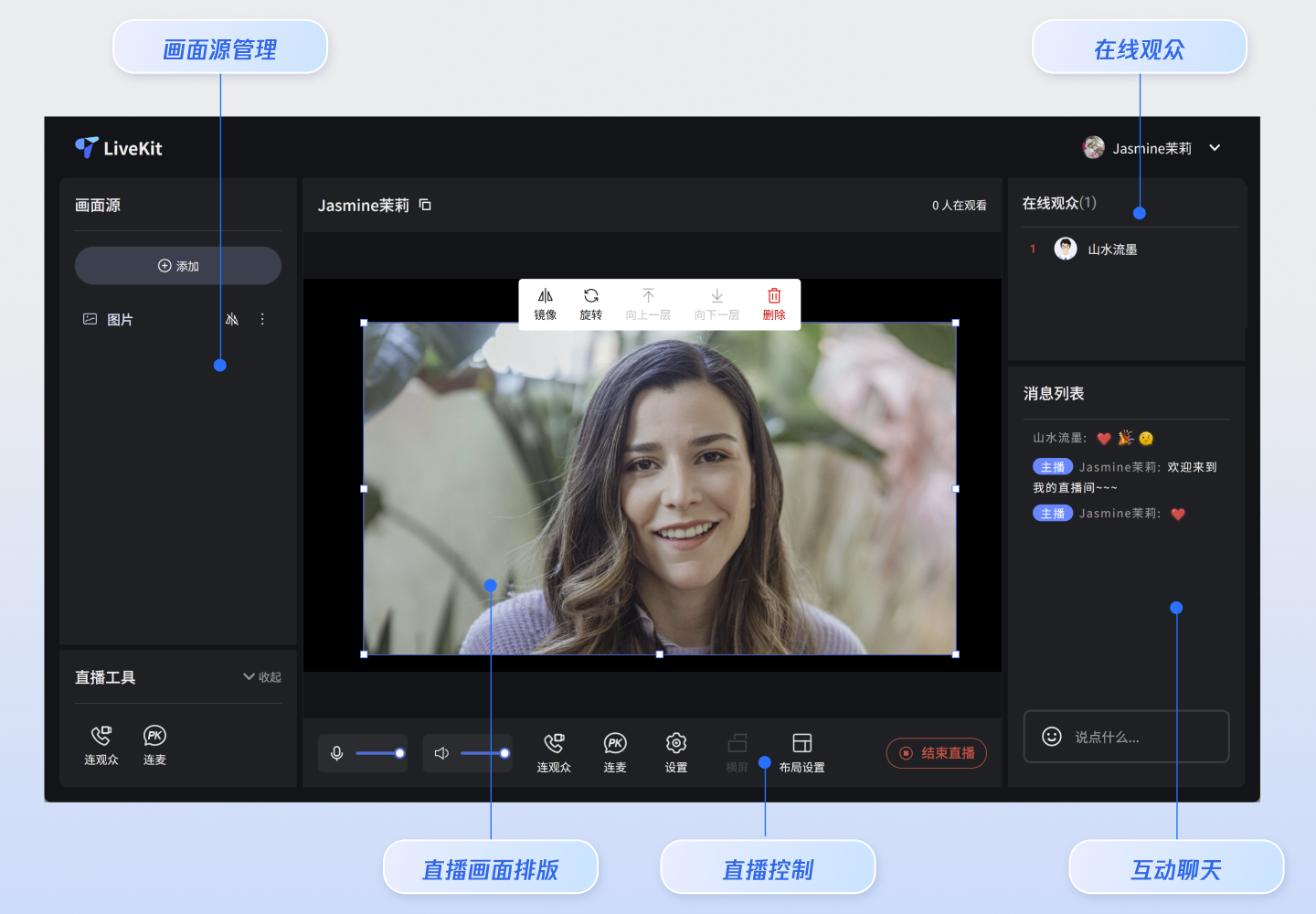
|
|
31
7
|
|
|
32
|
-
|
|
33
|
-
</tr>
|
|
8
|
+
- **竖屏开播**
|
|
34
9
|
|
|
35
|
-
|
|
36
|
-
<td rowspan="1" colSpan="1" >**观众管理**</td>
|
|
10
|
+
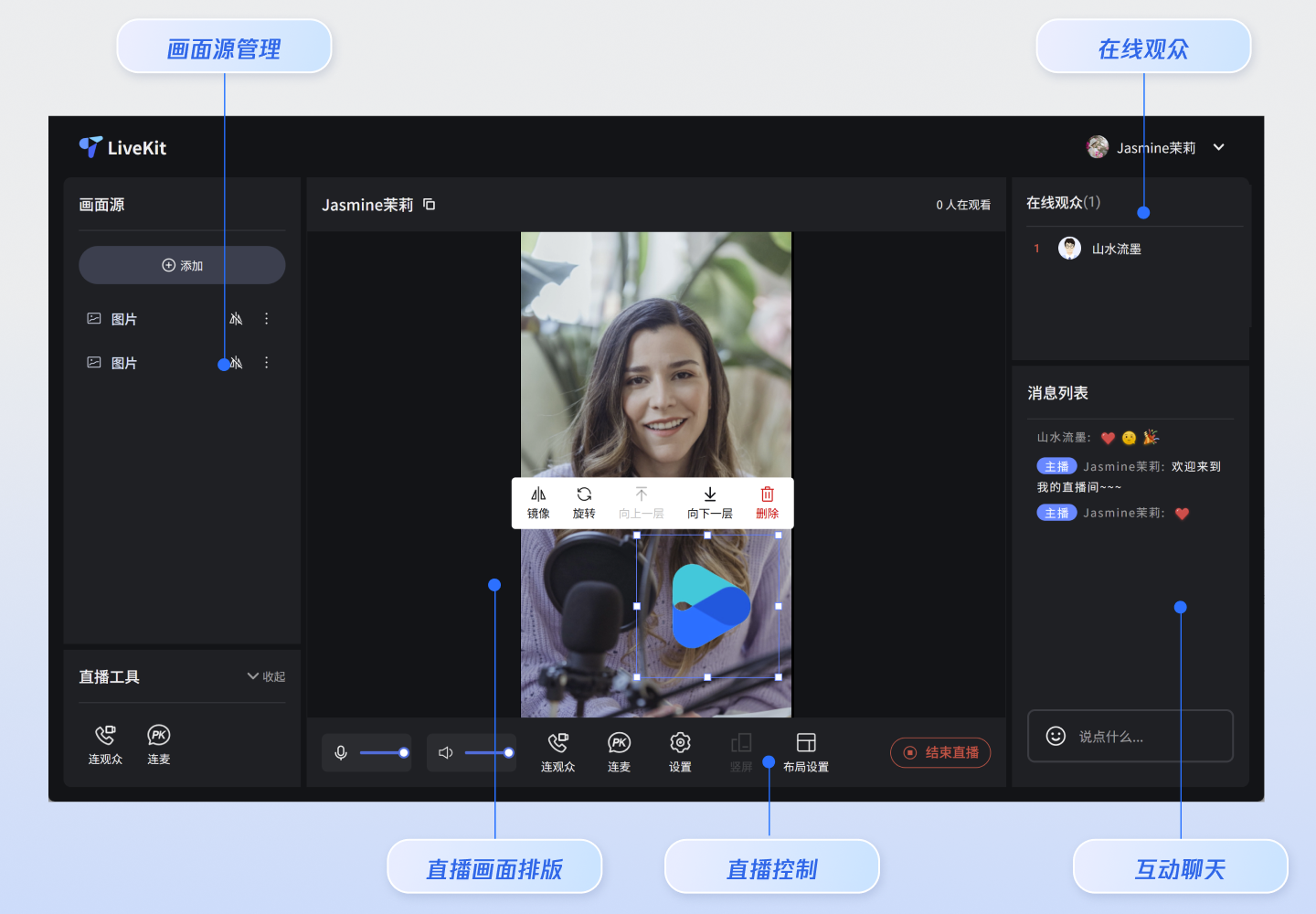
|
|
37
11
|
|
|
38
|
-
<td rowspan="1" colSpan="1" >便捷的观众列表与禁言管理</td>
|
|
39
|
-
</tr>
|
|
40
|
-
</table>
|
|
41
12
|
|
|
13
|
+
## 功能概览
|
|
14
|
+
- **画面源管理**:支持添加多个摄像头、屏幕分享、窗口分享和本地图片。
|
|
42
15
|
|
|
43
|
-
|
|
44
|
-
|
|
45
|
-
主播开播页面提供默认行为和风格,但如果默认行为和样式不能完全满足您的需求,自定义 UI 可见本文中**自由定制**部分。如下图主播开播页面功能展示主要包含**素材管理、直播工具、音视频控制、画面源输出、素材编辑工具、弹幕聊天、观众列表**。
|
|
46
|
-
<table>
|
|
47
|
-
<tr>
|
|
48
|
-
<td rowspan="1" colSpan="1" >**横屏开播**</td>
|
|
49
|
-
</tr>
|
|
50
|
-
|
|
51
|
-
<tr>
|
|
52
|
-
<td rowspan="1" colSpan="1" ><br>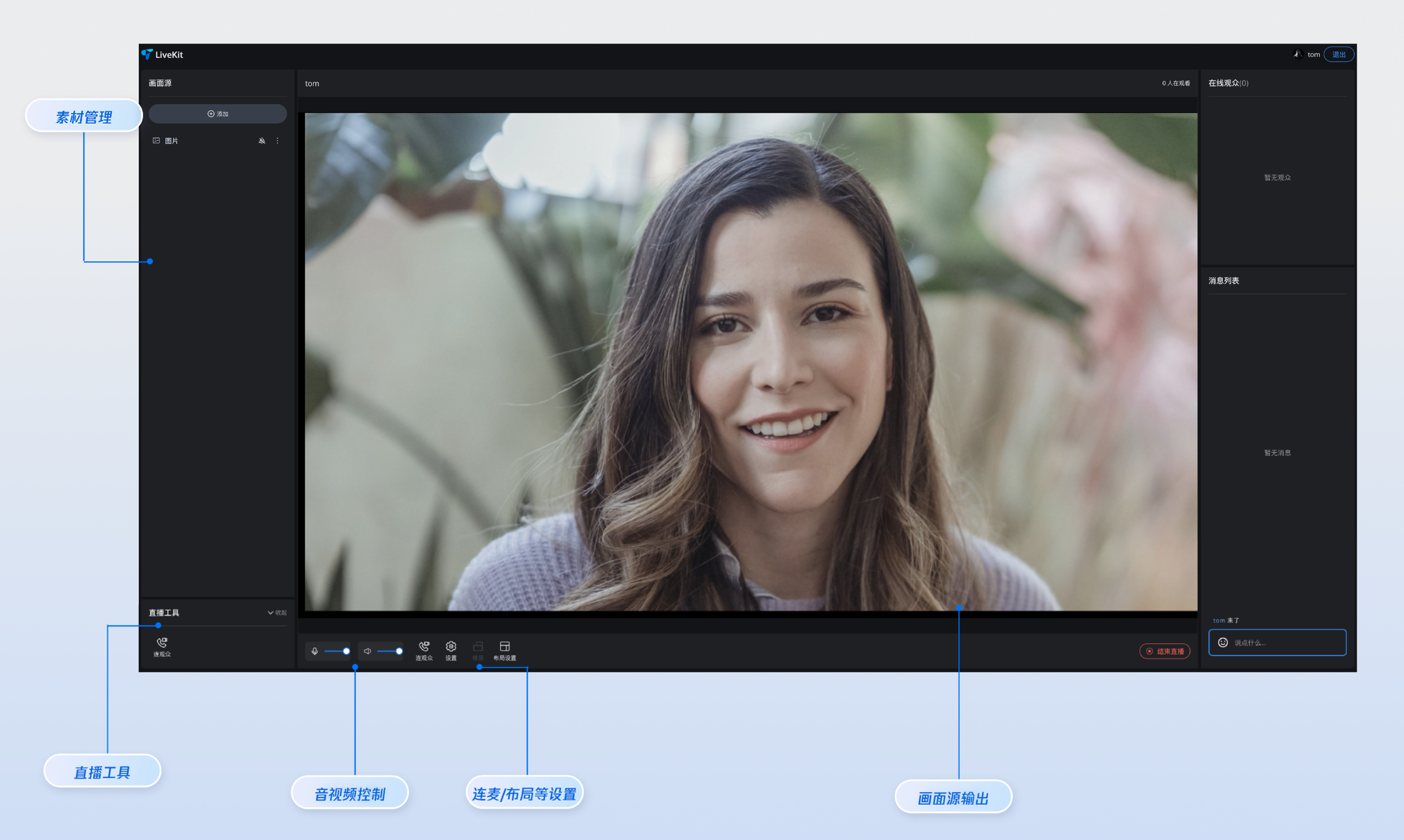</td>
|
|
53
|
-
</tr>
|
|
54
|
-
</table>
|
|
16
|
+
- **直播画面排版**:支持对画面源拖拽、缩放,支持通过快捷菜单对画面源设置镜像、旋转和层级调整。
|
|
55
17
|
|
|
56
|
-
|
|
57
|
-
<tr>
|
|
58
|
-
<td rowspan="1" colSpan="1" >**竖屏开播**</td>
|
|
59
|
-
</tr>
|
|
18
|
+
- **观众连麦**:支持房间内观众连麦,内置多种连麦布局。
|
|
60
19
|
|
|
61
|
-
|
|
62
|
-
<td rowspan="1" colSpan="1" ><br>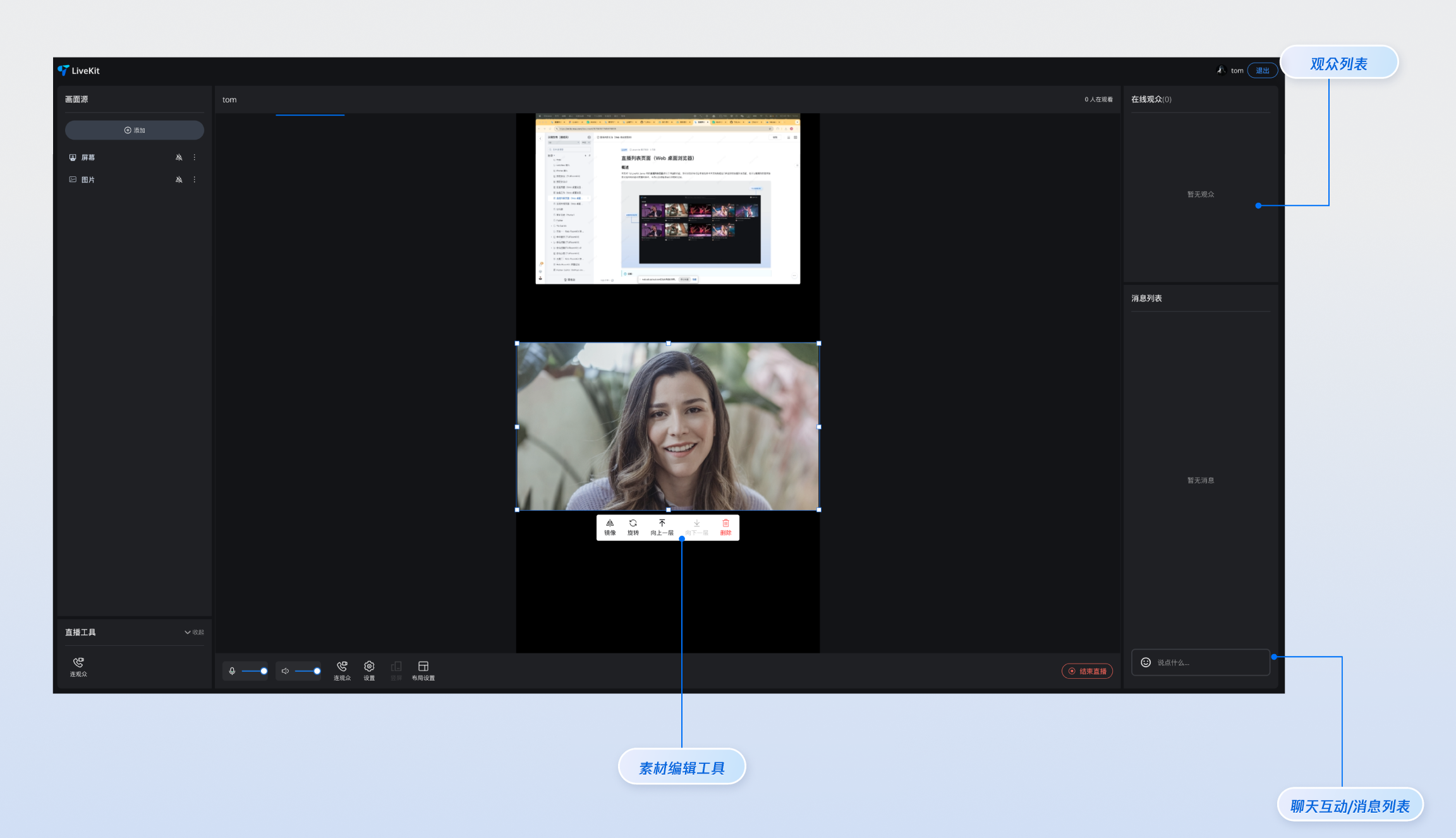</td>
|
|
63
|
-
</tr>
|
|
64
|
-
</table>
|
|
20
|
+
- **主播PK**:支持主播跨房连线、PK。
|
|
65
21
|
|
|
22
|
+
- **互动聊天**:支持收发文字和表情消息,聊天互动。
|
|
66
23
|
|
|
67
|
-
|
|
24
|
+
- **观众管理**:支持对观众禁言、踢出直播间等操作。
|
|
68
25
|
|
|
69
|
-
如果您想要提前体验下直播功能,可以在 [在线体验](https://write.woa.com/document/193874503063744512) 中使用 [在线开播网站](https://web.sdk.qcloud.com/trtc/livekit/pusher/index.html) 快速开启一场直播进行体验,同时您也可以使用 [在线观看网站](https://web.sdk.qcloud.com/trtc/livekit/player/index.html) 来观看一场直播。
|
|
70
26
|
|
|
71
27
|
## 快速接入
|
|
72
28
|
|
|
@@ -81,19 +37,19 @@
|
|
|
81
37
|
|
|
82
38
|
【npm】
|
|
83
39
|
``` bash
|
|
84
|
-
npm install tuikit-atomicx-vue3
|
|
40
|
+
npm install tuikit-atomicx-vue3 @tencentcloud/uikit-base-component-vue3 --save
|
|
85
41
|
```
|
|
86
42
|
|
|
87
43
|
|
|
88
44
|
【pnpm】
|
|
89
45
|
``` bash
|
|
90
|
-
pnpm add tuikit-atomicx-vue3
|
|
46
|
+
pnpm add tuikit-atomicx-vue3 @tencentcloud/livekit-web-vue3 @tencentcloud/uikit-base-component-vue3
|
|
91
47
|
```
|
|
92
48
|
|
|
93
49
|
|
|
94
50
|
【yarn】
|
|
95
51
|
``` bash
|
|
96
|
-
yarn add tuikit-atomicx-vue3
|
|
52
|
+
yarn add tuikit-atomicx-vue3 @tencentcloud/livekit-web-vue3 @tencentcloud/uikit-base-component-vue3
|
|
97
53
|
```
|
|
98
54
|
|
|
99
55
|
### 步骤3:主播开播页面接入
|
|
@@ -115,7 +71,7 @@ yarn add tuikit-atomicx-vue3@latest @tencentcloud/livekit-web-vue3tuikit-atomicx
|
|
|
115
71
|
<div class="left-panel">
|
|
116
72
|
<LiveScenePanel />
|
|
117
73
|
<div class="tools-section">
|
|
118
|
-
<CoGuestButton />
|
|
74
|
+
<!-- <CoGuestButton /> -->
|
|
119
75
|
</div>
|
|
120
76
|
</div>
|
|
121
77
|
|
|
@@ -123,7 +79,8 @@ yarn add tuikit-atomicx-vue3@latest @tencentcloud/livekit-web-vue3tuikit-atomicx
|
|
|
123
79
|
<div class="center-panel">
|
|
124
80
|
<StreamMixer />
|
|
125
81
|
<div class="live-controls">
|
|
126
|
-
<button @click="handleStartLive">开始直播</button>
|
|
82
|
+
<button v-if="!currentLive?.liveId" @click="handleStartLive">开始直播</button>
|
|
83
|
+
<button v-else @click="handleStopLive">停止直播</button>
|
|
127
84
|
</div>
|
|
128
85
|
</div>
|
|
129
86
|
|
|
@@ -133,15 +90,15 @@ yarn add tuikit-atomicx-vue3@latest @tencentcloud/livekit-web-vue3tuikit-atomicx
|
|
|
133
90
|
<BarrageList />
|
|
134
91
|
<BarrageInput />
|
|
135
92
|
</div>
|
|
136
|
-
|
|
93
|
+
|
|
137
94
|
<!-- 底部:主播操作 -->
|
|
138
|
-
<div class="bottom-panel">
|
|
139
|
-
|
|
95
|
+
<!-- <div class="bottom-panel">
|
|
96
|
+
<MicVolumeSetting /> // 媒体设置能力请参考本文高级功能集成部分
|
|
140
97
|
<SpeakerVolumeSetting />
|
|
141
98
|
<CoGuestButton /> // 连麦观众能力请参考本文高级功能集成部分
|
|
142
99
|
<OrientationSwitch /> // 布局设置请参考本文高级功能集成部分
|
|
143
|
-
<LayoutSwitch />
|
|
144
|
-
</div
|
|
100
|
+
<LayoutSwitch /> // 横竖屏推流能力请参考本文高级功能集成部分
|
|
101
|
+
</div>-->
|
|
145
102
|
</div>
|
|
146
103
|
</div>
|
|
147
104
|
</UIKitProvider>
|
|
@@ -149,6 +106,7 @@ yarn add tuikit-atomicx-vue3@latest @tencentcloud/livekit-web-vue3tuikit-atomicx
|
|
|
149
106
|
|
|
150
107
|
<script setup lang="ts">
|
|
151
108
|
import { onMounted } from 'vue';
|
|
109
|
+
import { UIKitProvider } from '@tencentcloud/uikit-base-component-vue3';
|
|
152
110
|
import {
|
|
153
111
|
LiveScenePanel,
|
|
154
112
|
StreamMixer,
|
|
@@ -157,12 +115,11 @@ import {
|
|
|
157
115
|
BarrageInput,
|
|
158
116
|
useLiveListState,
|
|
159
117
|
useLiveAudienceState,
|
|
160
|
-
useLoginState
|
|
118
|
+
useLoginState,
|
|
161
119
|
} from 'tuikit-atomicx-vue3';
|
|
162
|
-
import { UIKitProvider } from '@tencentcloud/uikit-base-component-vue3';
|
|
163
120
|
|
|
164
|
-
const { login } = useLoginState();
|
|
165
|
-
const { createLive } = useLiveListState();
|
|
121
|
+
const { login, setSelfInfo } = useLoginState();
|
|
122
|
+
const { createLive, currentLive, endLive } = useLiveListState();
|
|
166
123
|
const { audienceCount } = useLiveAudienceState();
|
|
167
124
|
const liveName = '我的直播间';
|
|
168
125
|
|
|
@@ -171,6 +128,14 @@ const handleStartLive = async () => {
|
|
|
171
128
|
liveId: 'my-live-room',
|
|
172
129
|
liveName: liveName,
|
|
173
130
|
});
|
|
131
|
+
await setSelfInfo({
|
|
132
|
+
userName: '我的名字/昵称', // 用户名
|
|
133
|
+
avatarUrl: '', // 头像 URL 地址
|
|
134
|
+
});
|
|
135
|
+
};
|
|
136
|
+
|
|
137
|
+
const handleStopLive = async () => {
|
|
138
|
+
await endLive();
|
|
174
139
|
};
|
|
175
140
|
|
|
176
141
|
async function initLogin() {
|
|
@@ -191,16 +156,40 @@ onMounted(async () => {
|
|
|
191
156
|
|
|
192
157
|
</script>
|
|
193
158
|
|
|
194
|
-
<style
|
|
159
|
+
<style>
|
|
160
|
+
html,body,#app {height: 100%;width: 100%;margin: 0;padding: 0;}
|
|
161
|
+
</style>
|
|
162
|
+
<style scoped>
|
|
163
|
+
.custom-live-pusher,.left-panel{flex-direction:column;display:flex}.custom-live-pusher,.live-title{color:var(--text-color-primary)}.live-controls,.tools-section,.top-controls{backdrop-filter:blur(10px)}*{box-sizing:border-box;margin:0;padding:0}:global(::before){box-sizing:border-box;margin:0;padding:0}.layout-label,.template-options{margin-bottom:16px}:global(body){line-height:1.6;color:var(--text-color-primary);background:var(--bg-color-default)}.custom-live-pusher{height:100vh;width:100vw;background:linear-gradient(135deg,var(--bg-color-default) 0,var(--bg-color-function) 100%);overflow:hidden}.top-controls{display:flex;justify-content:space-between;align-items:center;padding:12px 20px;background:var(--bg-color-operate);border-bottom:1px solid var(--stroke-color-primary);z-index:100;min-height:60px}.live-title{font-size:18px;font-weight:600;text-shadow:0 2px 4px var(--shadow-color)}.audience-count{font-size:14px;color:var(--text-color-error);background:var(--uikit-color-red-1);padding:6px 12px;border-radius:20px;border:1px solid var(--uikit-color-red-3)}.live-controls,.tools-section{background:var(--bg-color-operate)}.main-content{display:flex;flex:1;height:calc(100vh - 60px);gap:16px;padding:16px;overflow:hidden}.left-panel{width:280px;gap:16px;flex-shrink:0}.tools-section{border-radius:12px;padding:16px;border:1px solid var(--stroke-color-primary)}.center-panel{display:flex;flex-direction:column;flex:1;gap:16px;min-width:0}.live-controls{display:flex;justify-content:space-between;align-items:center;padding:16px;border-radius:12px;border:1px solid var(--stroke-color-primary);gap:16px}.live-controls button{background:linear-gradient(135deg,var(--text-color-error) 0,var(--uikit-color-red-5) 100%);color:var(--text-color-button);border:none;padding:12px 32px;border-radius:25px;font-size:16px;font-weight:600;cursor:pointer;box-shadow:0 4px 15px var(--shadow-color)}.right-panel{display:flex;flex-direction:column;width:320px;gap:16px;flex-shrink:0}.center-panel>*,.left-panel>*,.right-panel>*{background:var(--bg-color-operate);border-radius:12px;border:1px solid var(--stroke-color-primary);overflow:hidden}.left-panel>*,.right-panel>*{padding:16px}.custom-icon-container,.device-setting{padding:8px 12px;background:var(--bg-color-function)}.center-panel>:first-child{flex:1;min-height:300px;padding:0;border:2px solid var(--stroke-color-secondary)}.bottom-panel,.device-setting{align-items:center;display:flex}.custom-icon-container:hover,.option-card:hover{border-color:var(--stroke-color-primary);background:var(--list-color-hover)}.bottom-panel{gap:16px;flex:1}.device-setting{gap:8px;border-radius:8px;border:1px solid var(--stroke-color-secondary)}.device-icon{cursor:pointer;color:var(--text-color-primary);transition:color .2s}.device-icon:hover{color:var(--text-color-link)}.device-slider{width:80px}.custom-icon-container{display:flex;align-items:center;gap:6px;border-radius:8px;border:1px solid var(--stroke-color-secondary);cursor:pointer;transition:.2s;position:relative}.custom-icon-container.disabled{opacity:.5;cursor:not-allowed}.custom-icon-container.disabled:hover{background:var(--bg-color-function);border-color:var(--stroke-color-secondary)}.custom-icon{width:16px;height:16px;display:inline-block;background-size:contain;background-repeat:no-repeat;background-position:center}.horizontal-icon{background-image:url("data:image/svg+xml,%3Csvg xmlns='http://www.w3.org/2000/svg' viewBox='0 0 24 24' fill='none' stroke='currentColor' stroke-width='2'%3E%3Crect x='3' y='6' width='18' height='12' rx='2'/%3E%3Cpath d='M7 10h10'/%3E%3C/svg%3E")}.portrait-icon{background-image:url("data:image/svg+xml,%3Csvg xmlns='http://www.w3.org/2000/svg' viewBox='0 0 24 24' fill='none' stroke='currentColor' stroke-width='2'%3E%3Crect x='6' y='3' width='12' height='18' rx='2'/%3E%3Cpath d='M10 7h4'/%3E%3C/svg%3E")}.layout-icon{background-image:url("data:image/svg+xml,%3Csvg xmlns='http://www.w3.org/2000/svg' viewBox='0 0 24 24' fill='none' stroke='currentColor' stroke-width='2'%3E%3Crect x='3' y='3' width='7' height='7'/%3E%3Crect x='14' y='3' width='7' height='7'/%3E%3Crect x='14' y='14' width='7' height='7'/%3E%3Crect x='3' y='14' width='7' height='7'/%3E%3C/svg%3E")}.co-guest-icon{background-image:url("data:image/svg+xml,%3Csvg xmlns='http://www.w3.org/2000/svg' viewBox='0 0 24 24' fill='none' stroke='currentColor' stroke-width='2'%3E%3Cpath d='M17 21v-2a4 4 0 0 0-4-4H5a4 4 0 0 0-4 4v2'/%3E%3Ccircle cx='9' cy='7' r='4'/%3E%3Cpath d='M23 21v-2a4 4 0 0 0-3-3.87'/%3E%3Cpath d='M16 3.13a4 4 0 0 1 0 7.75'/%3E%3C/svg%3E")}.custom-text{font-size:12px;color:var(--text-color-secondary);white-space:nowrap}.unread-count{position:absolute;top:-4px;right:-4px;background:var(--text-color-error);color:var(--text-color-button);border-radius:10px;padding:2px 6px;font-size:10px;font-weight:600;min-width:16px;text-align:center;line-height:1}.layout-label,.option-info h4{color:var(--text-color-primary)}.layout-dialog{max-width:600px}.layout-label{font-size:16px;font-weight:600}.options-grid{display:grid;grid-template-columns:repeat(auto-fit,minmax(120px,1fr));gap:12px}.option-card{padding:16px;background:var(--bg-color-function);border:2px solid var(--stroke-color-secondary);border-radius:8px;cursor:pointer;transition:.2s;text-align:center}.option-card.active{border-color:var(--text-color-link);background:var(--bg-color-operate)}.option-info h4{margin:8px 0 0;font-size:12px}.option-icon{width:32px;height:32px;margin:0 auto;color:var(--text-color-secondary)}.co-guest-dialog{max-width:500px}.co-guest-panel{min-height:300px}
|
|
164
|
+
</style>
|
|
195
165
|
```
|
|
196
166
|
|
|
197
167
|
### 步骤4:开启直播
|
|
198
168
|
|
|
199
|
-
|
|
169
|
+
开启您的第一场直播。
|
|
200
170
|
``` bash
|
|
201
171
|
npm run dev
|
|
202
172
|
```
|
|
203
173
|
|
|
174
|
+
### 步骤5:观看直播
|
|
175
|
+
- **方式一:(推荐)**
|
|
176
|
+
|
|
177
|
+
|
|
178
|
+
通过我们提供的 [在线观看网站](https://web.sdk.qcloud.com/trtc/livekit/player/index.html),立刻观看您开启的直播。
|
|
179
|
+
|
|
180
|
+
- **方式二:**
|
|
181
|
+
|
|
182
|
+
|
|
183
|
+
集成我们提供的 [观众观看(Web 桌面浏览器)](https://write.woa.com/document/185968222948704256)或者 [观众观看(H5 移动端浏览器)](https://write.woa.com/document/188483856012668928) 页面,观看直播。
|
|
184
|
+
|
|
185
|
+
|
|
186
|
+
> **重要提示:**
|
|
187
|
+
>
|
|
188
|
+
|
|
189
|
+
> 请使用不同的**用户 ID** 登录观看: 开播端和观看端必须使用**不同**的用户 ID,否则后登录的设备会强制先登录的设备下线(即“被踢下线”)。
|
|
190
|
+
>
|
|
191
|
+
|
|
192
|
+
|
|
204
193
|
## 高级功能集成
|
|
205
194
|
|
|
206
195
|
|
|
@@ -300,7 +289,7 @@ watch(outputVolume, (newVal) => {
|
|
|
300
289
|
<script setup lang="ts">
|
|
301
290
|
import { ref, watch } from 'vue';
|
|
302
291
|
import { useUIKit, TUIToast, TOAST_TYPE } from '@tencentcloud/uikit-base-component-vue3';
|
|
303
|
-
import {
|
|
292
|
+
import { useLiveListState, LiveOrientation, LiveStatus } from 'tuikit-atomicx-vue3';
|
|
304
293
|
|
|
305
294
|
const { t } = useUIKit();
|
|
306
295
|
|
|
@@ -313,7 +302,7 @@ enum TUISeatLayoutTemplate {
|
|
|
313
302
|
PortraitFixed_6v6 = 802,
|
|
314
303
|
}
|
|
315
304
|
|
|
316
|
-
const { currentLive, localLiveStatus, updateLiveInfo } =
|
|
305
|
+
const { currentLive, localLiveStatus, updateLiveInfo } = useLiveListState();
|
|
317
306
|
const currentOrientation = ref(LiveOrientation.Portrait);
|
|
318
307
|
|
|
319
308
|
watch(
|
|
@@ -413,11 +402,11 @@ const handleCoGuest = () => {
|
|
|
413
402
|
import { ref, computed, watch } from 'vue';
|
|
414
403
|
import { TUIErrorCode, } from '@tencentcloud/tuiroom-engine-js';
|
|
415
404
|
import { useUIKit, TUIDialog, TUIToast, TOAST_TYPE } from '@tencentcloud/uikit-base-component-vue3';
|
|
416
|
-
import { LiveStatus,
|
|
405
|
+
import { LiveStatus, useLiveListState } from 'tuikit-atomicx-vue3';
|
|
417
406
|
import { TUISeatLayoutTemplate } from '../types/LivePusher';
|
|
418
407
|
|
|
419
408
|
const { t } = useUIKit();
|
|
420
|
-
const { localLiveStatus, currentLive, updateLiveInfo } =
|
|
409
|
+
const { localLiveStatus, currentLive, updateLiveInfo } = useLiveListState();
|
|
421
410
|
|
|
422
411
|
watch(
|
|
423
412
|
localLiveStatus,
|
|
@@ -522,7 +511,7 @@ function handleCancel() {
|
|
|
522
511
|
</tr>
|
|
523
512
|
|
|
524
513
|
<tr>
|
|
525
|
-
<td rowspan="1" colSpan="1"
|
|
514
|
+
<td rowspan="1" colSpan="1" >**素材管理**</td>
|
|
526
515
|
|
|
527
516
|
<td rowspan="1" colSpan="1" >自定义素材管理区域展示</td>
|
|
528
517
|
|
|
@@ -530,7 +519,7 @@ function handleCancel() {
|
|
|
530
519
|
</tr>
|
|
531
520
|
|
|
532
521
|
<tr>
|
|
533
|
-
<td rowspan="1" colSpan="1"
|
|
522
|
+
<td rowspan="1" colSpan="1" >**直播工具**</td>
|
|
534
523
|
|
|
535
524
|
<td rowspan="1" colSpan="1" >自定义直播工具信息展示</td>
|
|
536
525
|
|
|
@@ -538,7 +527,7 @@ function handleCancel() {
|
|
|
538
527
|
</tr>
|
|
539
528
|
|
|
540
529
|
<tr>
|
|
541
|
-
<td rowspan="1" colSpan="1"
|
|
530
|
+
<td rowspan="1" colSpan="1" >**在线观众**</td>
|
|
542
531
|
|
|
543
532
|
<td rowspan="1" colSpan="1" >自定义观众信息展示</td>
|
|
544
533
|
|
|
@@ -546,7 +535,7 @@ function handleCancel() {
|
|
|
546
535
|
</tr>
|
|
547
536
|
|
|
548
537
|
<tr>
|
|
549
|
-
<td rowspan="1" colSpan="1"
|
|
538
|
+
<td rowspan="1" colSpan="1" >**消息列表**</td>
|
|
550
539
|
|
|
551
540
|
<td rowspan="1" colSpan="1" >自定义消息弹幕区域展示</td>
|
|
552
541
|
|
|
@@ -598,6 +587,12 @@ function handleCancel() {
|
|
|
598
587
|
|
|
599
588
|
<td rowspan="1" colSpan="1" >[直播列表](https://write.woa.com/document/185968224430342144)</td>
|
|
600
589
|
</tr>
|
|
601
|
-
</table>
|
|
602
590
|
|
|
591
|
+
<tr>
|
|
592
|
+
<td rowspan="1" colSpan="1" >**UI 自定义**</td>
|
|
603
593
|
|
|
594
|
+
<td rowspan="1" colSpan="1" >更详细的 UI 组件自定义指引。</td>
|
|
595
|
+
|
|
596
|
+
<td rowspan="1" colSpan="1" >[概述](https://write.woa.com/document/177815913198854144)</td>
|
|
597
|
+
</tr>
|
|
598
|
+
</table>
|
|
@@ -0,0 +1,219 @@
|
|
|
1
|
+
# Web Live TUIKit 代码生成工作流指令 (Vue)
|
|
2
|
+
|
|
3
|
+
**【指令目的】**: 为 Agent 提供实现 Vue Web Live TUIKit 核心功能的 **代码生成蓝图**,并指导 Agent **优先使用工具实时获取的最新文档内容**。
|
|
4
|
+
|
|
5
|
+
**💡 特别提醒:**
|
|
6
|
+
1. **当用户需求包含【直播列表】、【开播页】和【观看页】时,Agent 必须在生成的代码中增加一个**【主播和观众身份入口选择】**的页面或逻辑,以便用户使用不同的 UserID 进行测试**。
|
|
7
|
+
2. **当用户需要实现申请上麦相关功能时需要调用** `get_web_live_state_detail` **来获取 liveKit 客户端 API 实现相关功能**。
|
|
8
|
+
|
|
9
|
+
---
|
|
10
|
+
|
|
11
|
+
## 📦 UIKit 版本与依赖说明
|
|
12
|
+
|
|
13
|
+
### 推荐版本
|
|
14
|
+
```json
|
|
15
|
+
{
|
|
16
|
+
"tuikit-atomicx-vue3": "latest",
|
|
17
|
+
"@tencentcloud/uikit-base-component-vue3": "latest",
|
|
18
|
+
}
|
|
19
|
+
```
|
|
20
|
+
|
|
21
|
+
### 自动依赖安装流程
|
|
22
|
+
Agent 在生成代码后,**必须自动执行**以下步骤:
|
|
23
|
+
|
|
24
|
+
1. **检测依赖完整性**:检查 `package.json` 是否包含所有必需依赖
|
|
25
|
+
2. **自动安装依赖**:执行 `npm install` 或 `pnpm install`
|
|
26
|
+
3. **验证安装**:确认依赖安装成功后再提示用户运行项目
|
|
27
|
+
|
|
28
|
+
### esbuild 问题解决方案
|
|
29
|
+
在 `package.josn` 中增加以下内容,`resolutions` 兼容 `yarn`,`overrides` 兼容 `npm` 和 `pnpm`
|
|
30
|
+
```json
|
|
31
|
+
{
|
|
32
|
+
"resolutions": {
|
|
33
|
+
"esbuild": "npm:esbuild-wasm@latest"
|
|
34
|
+
},
|
|
35
|
+
"overrides": {
|
|
36
|
+
"esbuild": "npm:esbuild-wasm@latest"
|
|
37
|
+
}
|
|
38
|
+
}
|
|
39
|
+
```
|
|
40
|
+
---
|
|
41
|
+
|
|
42
|
+
## 🔐 测试凭证自动生成
|
|
43
|
+
|
|
44
|
+
### UserSig 自动获取工作流
|
|
45
|
+
|
|
46
|
+
在生成代码前,Agent **必须**:
|
|
47
|
+
|
|
48
|
+
1. **调用 `get_usersig` MCP 工具**自动生成测试账号信息
|
|
49
|
+
2. **生成测试 UserID**:
|
|
50
|
+
- 主播 UserID: 格式为 live001 或 host001
|
|
51
|
+
- 观众 UserID: 格式为 user001 或 viewer001
|
|
52
|
+
3. **嵌入代码**:将生成的 SDKAppID、userID(主播和观众)、userSig 直接写入代码中的配置区域
|
|
53
|
+
4. **安全提示**:在代码注释中明确标注这是测试凭证,生产环境必须后端生成
|
|
54
|
+
|
|
55
|
+
---
|
|
56
|
+
|
|
57
|
+
## ⚙️ 代码生成核心工作流 (LLM 行动指南)
|
|
58
|
+
|
|
59
|
+
Agent,本工具已为您**实时获取**了用户所需功能(Goals)对应的最新文档内容,并将其内容附在了**本指令下方**(在 `llm_code_generation_instructions_md` 字段中)。
|
|
60
|
+
|
|
61
|
+
### 严格执行步骤:
|
|
62
|
+
|
|
63
|
+
#### 步骤 0: 前置准备(自动化)
|
|
64
|
+
```
|
|
65
|
+
a. 调用 get_usersig 工具生成测试凭证
|
|
66
|
+
- 主播 userID: 使用 `live001` 格式
|
|
67
|
+
- 观众 userID: 使用 `user001` 格式
|
|
68
|
+
|
|
69
|
+
b. 检查并准备项目环境
|
|
70
|
+
- 验证 package.json 中的依赖版本
|
|
71
|
+
- 如缺少依赖,自动添加到 dependencies
|
|
72
|
+
|
|
73
|
+
c. 执行依赖安装
|
|
74
|
+
- 运行 npm install 或 pnpm install
|
|
75
|
+
- 等待安装完成并检查是否有错误
|
|
76
|
+
```
|
|
77
|
+
|
|
78
|
+
#### 步骤 1: 选择功能模块
|
|
79
|
+
根据用户提出的具体功能需求,从以下功能块中选择对应的指令。
|
|
80
|
+
|
|
81
|
+
#### 步骤 2: 使用实时文档
|
|
82
|
+
**必须优先且唯一**使用本工具返回结果中**提供的实时文档内容**(而非自行访问 URL)来生成 Vue 代码片段。
|
|
83
|
+
|
|
84
|
+
---
|
|
85
|
+
|
|
86
|
+
## 🎯 功能实现指令
|
|
87
|
+
|
|
88
|
+
### 1. 实现直播列表页 (`liveList`)
|
|
89
|
+
|
|
90
|
+
**目标组件**: `liveList`
|
|
91
|
+
|
|
92
|
+
**代码生成指令**:
|
|
93
|
+
- 生成 Vue 组件结构,引入 `liveList`
|
|
94
|
+
- **自动注入测试凭证**:在组件初始化时使用自动生成的**观众** `SDKAppID`、`userID`、`userSig`
|
|
95
|
+
- **核心逻辑**: 参考本工具返回结果中实时获取的文档内容,提取最新的 API 调用和示例代码
|
|
96
|
+
|
|
97
|
+
**依赖组件**: `liveList`
|
|
98
|
+
|
|
99
|
+
**生成后操作**:
|
|
100
|
+
```bash
|
|
101
|
+
# Agent 自动执行
|
|
102
|
+
npm install # 安装依赖
|
|
103
|
+
npm run dev # 启动开发服务器
|
|
104
|
+
```
|
|
105
|
+
|
|
106
|
+
---
|
|
107
|
+
|
|
108
|
+
### 2. 实现 PC 直播观看页 (`livePlayer` & `barrage`)
|
|
109
|
+
|
|
110
|
+
**目标组件**: `livePlayer`, `barrage`
|
|
111
|
+
|
|
112
|
+
**代码生成指令**:
|
|
113
|
+
- 根据实时文档的示例代码生成观看页
|
|
114
|
+
- **自动注入测试凭证**:在播放器初始化时配置**观众**测试账号
|
|
115
|
+
- **核心逻辑**: 参考本工具返回结果中实时获取的文档内容,必须按照文档的步骤集成 `livePlayer` 和 `barrage`(弹幕),并展示如何监听视频流状态
|
|
116
|
+
- **交互优化**: 添加加载状态、错误处理、重连机制
|
|
117
|
+
|
|
118
|
+
**依赖组件**: `livePlayer`, `barrage`
|
|
119
|
+
|
|
120
|
+
---
|
|
121
|
+
|
|
122
|
+
### 3. 实现 H5 直播观看页 (`livePlayer` & `barrage`)
|
|
123
|
+
|
|
124
|
+
**目标组件**: `livePlayer`, `barrage`
|
|
125
|
+
|
|
126
|
+
**代码生成指令**:
|
|
127
|
+
- 根据实时文档的示例代码生成观看页
|
|
128
|
+
- **自动注入测试凭证**:在播放器初始化时配置**观众**测试账号
|
|
129
|
+
- **核心逻辑**: 参考本工具返回结果中实时获取的文档内容,必须按照文档的步骤集成 `livePlayer` 和 `barrage`(弹幕),并展示如何监听视频流状态
|
|
130
|
+
- **交互优化**: 添加加载状态、错误处理、重连机制
|
|
131
|
+
|
|
132
|
+
**依赖组件**: `livePlayer`, `barrage`
|
|
133
|
+
|
|
134
|
+
---
|
|
135
|
+
|
|
136
|
+
### 4. 实现直播开播页 (`livePusher`)
|
|
137
|
+
|
|
138
|
+
**目标组件**: `livePusher`
|
|
139
|
+
|
|
140
|
+
**代码生成指令**:
|
|
141
|
+
- 根据实时文档的示例代码生成开播页
|
|
142
|
+
- **自动注入测试凭证**:在推流器初始化时配置**主播**测试账号
|
|
143
|
+
- **核心逻辑**: 参考本工具返回结果中实时获取的文档内容,必须包含 Vue 逻辑来处理摄像头和麦克风的**权限请求和开关控制**
|
|
144
|
+
- **设备检测**: 自动检测可用的摄像头和麦克风设备
|
|
145
|
+
- **错误处理**: 处理权限拒绝、设备不可用等异常情况
|
|
146
|
+
|
|
147
|
+
**依赖组件**: `livePusher`
|
|
148
|
+
|
|
149
|
+
---
|
|
150
|
+
|
|
151
|
+
### 5. 实现直播连麦功能 (`CoGuestPanel`)
|
|
152
|
+
|
|
153
|
+
**目标组件**: `CoGuestPanel`
|
|
154
|
+
|
|
155
|
+
**代码生成指令**:
|
|
156
|
+
- 根据实时文档的示例代码生成连麦相关的复杂组件或逻辑模块
|
|
157
|
+
- **自动注入测试凭证**:为主播和连麦观众分别配置测试账号
|
|
158
|
+
- **核心逻辑**: 参考本工具返回结果中实时获取的文档内容,代码应展示如何使用 `CoGuestPanel` 管理连麦申请,并协调推流/播放器的逻辑切换
|
|
159
|
+
- **状态管理**: 处理连麦邀请、接受、拒绝、断开等状态流转
|
|
160
|
+
- **多人连麦**: 支持多人同时连麦的场景
|
|
161
|
+
|
|
162
|
+
**依赖组件**: `CoGuestPanel`, `livePusher`, `livePlayer`
|
|
163
|
+
```
|
|
164
|
+
|
|
165
|
+
---
|
|
166
|
+
|
|
167
|
+
## 🔄 完整自动化流程总结
|
|
168
|
+
|
|
169
|
+
```mermaid
|
|
170
|
+
graph TD
|
|
171
|
+
A[接收用户需求] --> B[调用 get_web_live_uikit_integration 获取最新文档]
|
|
172
|
+
B --> C[检查 package.json 依赖]
|
|
173
|
+
C --> D[自动添加缺失依赖]
|
|
174
|
+
D --> E[执行 npm install]
|
|
175
|
+
E --> F[根据实时文档生成代码]
|
|
176
|
+
F --> G[调用 get_usersig 生成测试凭证]
|
|
177
|
+
G --> H[注入测试凭证到代码]
|
|
178
|
+
H --> I[添加安全注释和提示]
|
|
179
|
+
I --> J[启动开发服务器]
|
|
180
|
+
J --> K[输出测试信息给用户]
|
|
181
|
+
```
|
|
182
|
+
|
|
183
|
+
---
|
|
184
|
+
|
|
185
|
+
## 📋 Agent 检查清单
|
|
186
|
+
|
|
187
|
+
在完成代码生成后,Agent 必须确认:
|
|
188
|
+
|
|
189
|
+
- [x] 已调用 `get_usersig` 生成测试凭证
|
|
190
|
+
- [x] 已将凭证嵌入代码配置区域
|
|
191
|
+
- [x] 已在代码中添加安全警告注释
|
|
192
|
+
- [x] 已检查 `package.json` 依赖完整性
|
|
193
|
+
- [x] 已自动执行 `npm install`
|
|
194
|
+
- [x] 已验证依赖安装成功
|
|
195
|
+
- [x] 已使用实时文档内容(非外部 URL)
|
|
196
|
+
- [x] 已添加错误处理和日志输出
|
|
197
|
+
- [x] 已为用户提供测试账号信息
|
|
198
|
+
- [x] 已提示用户运行 `npm run dev`
|
|
199
|
+
|
|
200
|
+
---
|
|
201
|
+
|
|
202
|
+
## 🚨 安全提醒(必须包含在生成的代码注释中)
|
|
203
|
+
|
|
204
|
+
```javascript
|
|
205
|
+
/**
|
|
206
|
+
* ⚠️ 重要安全提示
|
|
207
|
+
*
|
|
208
|
+
* 1. 当前使用的 userSig 是通过开发工具自动生成的测试凭证
|
|
209
|
+
* 2. userSig 有效期为 7 天,过期后需要重新生成
|
|
210
|
+
* 3. ❌ 生产环境严禁在前端生成 userSig
|
|
211
|
+
* 4. ✅ 正式上线前,必须在后端服务生成 userSig
|
|
212
|
+
* 5. 参考文档: https://cloud.tencent.com/document/product/647/17275
|
|
213
|
+
*
|
|
214
|
+
* SDKAppID 和 secretKey 获取位置:
|
|
215
|
+
* - IM 应用: https://console.cloud.tencent.com/im
|
|
216
|
+
* - TRTC 应用: https://console.cloud.tencent.com/trtc
|
|
217
|
+
*/
|
|
218
|
+
```
|
|
219
|
+
|