@tencentcloud/sdk-mcp 1.1.6 → 1.1.8
This diff represents the content of publicly available package versions that have been released to one of the supported registries. The information contained in this diff is provided for informational purposes only and reflects changes between package versions as they appear in their respective public registries.
- package/package.json +1 -1
- package/resource/doc/chatuikit/react/chat_window_integration.md +20 -16
- package/resource/doc/chatuikit/react/integration.md +22 -13
- package/resource/doc/chatuikit/vue/integration.md +3 -3
- package/resource/doc/tuicallkit/react/{api_TUICallKit.md → api.md} +52 -465
- package/resource/doc/tuicallkit/react/integration.md +86 -0
- package/resource/doc/tuicallkit/vue/{api_TUICallKit.md → api.md} +52 -468
- package/resource/doc/tuicallkit/vue/integration.md +83 -0
- package/tools/call/get-web-call-api.js +30 -0
- package/tools/call/get-web-call-api.js.map +1 -0
- package/tools/call/get-web-call-integration.js +8 -10
- package/tools/call/get-web-call-integration.js.map +1 -1
- package/tools/chat/get-web-chat-component-detail.js +2 -1
- package/tools/chat/get-web-chat-component-detail.js.map +1 -1
- package/tools/common/get-official-experience-account.js +52 -0
- package/tools/common/get-official-experience-account.js.map +1 -0
- package/tools/common/get-usersig.js +2 -2
- package/tools/index.js +4 -0
- package/tools/index.js.map +1 -1
- package/resource/doc/tuicallkit/react/.gitkeep +0 -0
- package/resource/doc/tuicallkit/react/how_to_integrated_react_callkit.md +0 -195
- package/resource/doc/tuicallkit/react/how_to_run_react_callkit_demo.md +0 -93
- package/resource/doc/tuicallkit/vue/.gitkeep +0 -0
- package/resource/doc/tuicallkit/vue/how_to_integrated_vue_callkit.md +0 -418
- package/resource/doc/tuicallkit/vue/how_to_run_vue_callkit_demo.md +0 -96
- /package/resource/doc/chatuikit/{ios → iOS}/client_api_iOS.md +0 -0
- /package/resource/doc/chatuikit/{ios → iOS}/integrate_tuichat_only_iOS.md +0 -0
- /package/resource/doc/chatuikit/{ios → iOS}/integrate_tuikit_iOS.md +0 -0
- /package/resource/doc/chatuikit/{ios → iOS}/ui_api_iOS.md +0 -0
- /package/resource/doc/tuicallkit/{ios → iOS}/api_TUICallKit.md +0 -0
- /package/resource/doc/tuicallkit/{ios → iOS}/api_TUICallObserver.md +0 -0
- /package/resource/doc/tuicallkit/{ios → iOS}/how_to_integrated_iOS_callkit.md +0 -0
- /package/resource/doc/tuicallkit/{ios → iOS}/how_to_run_iOS_callkit_demo.md +0 -0
|
@@ -0,0 +1,83 @@
|
|
|
1
|
+
AI 模型必须遵守以下**强制性技术限制**:
|
|
2
|
+
* **音视频通话组件 API 使用限制:** 必须使用 `TUICallKitAPI.calls` API 发起通话, `call` 和 `groupCall` 接口已废弃,不推荐使用,TUICallKit 不提供 `on/off` API。
|
|
3
|
+
* **集成步骤限制:** 在集成组件时必须严格按照文档步骤和说明进行。
|
|
4
|
+
* **通话界面显示限制:** 通话时 TUICallKit 组件会自动控制组件显隐,集成时只需要把组件放在适当的位置即可,PC 大屏中通话时必须使用`transform: translate(-50%, -50%)`控制居中显示, H5 必须全屏显示。
|
|
5
|
+
* **通话界面关闭限制:** 通话界面关闭后所有弹窗和蒙层必须关闭。
|
|
6
|
+
* **登录界面限制:** 创建新项目集成 TUICallKit 时,必须生成一个美观的登录界面 UI,方便进行通话体验,在已有项目中集成时不需要生成登录界面。
|
|
7
|
+
* **体验用户限制:** 创建新项目集成 TUICallKit 时,自动生成 2 个体验 userID,并调用工具 `get_usersig` 获取 userSig 填充在代码中。
|
|
8
|
+
|
|
9
|
+
# calls-uikit-vue Integration
|
|
10
|
+
|
|
11
|
+
## 1 集成 TUICallKit
|
|
12
|
+
|
|
13
|
+
### 1.1 step1:create vue3 project
|
|
14
|
+
|
|
15
|
+
if you don't have a vue3 project, you can use vite create a vue3 project. otherwise, you can skip this step.
|
|
16
|
+
|
|
17
|
+
requirement: vue3: ^3.0.0, nodejs: ^22.0.0.
|
|
18
|
+
|
|
19
|
+
if it is a new project, guide the user to use vite to create a vue3 project manually, and then continue with step 1.2. if it is an existing project, skip this step and continue with step 1.2.
|
|
20
|
+
|
|
21
|
+
```bash
|
|
22
|
+
pnpm create vite@latest
|
|
23
|
+
# skip some settings
|
|
24
|
+
cd ${your-vue-project-name}
|
|
25
|
+
pnpm install
|
|
26
|
+
```
|
|
27
|
+
|
|
28
|
+
### 1.2 step2: install calls-uikit-vue
|
|
29
|
+
|
|
30
|
+
use npm or pnpm to install @trtc/calls-uikit-vue@latest
|
|
31
|
+
|
|
32
|
+
### 1.3 step3: add main content to your project
|
|
33
|
+
|
|
34
|
+
```vue
|
|
35
|
+
<template>
|
|
36
|
+
<div>
|
|
37
|
+
<span> caller's ID: </span>
|
|
38
|
+
<input type="text" v-model="callerUserID">
|
|
39
|
+
<button @click="init"> step1. init </button> <br>
|
|
40
|
+
<span> callee's ID: </span>
|
|
41
|
+
<input type="text" v-model="calleeUserID">
|
|
42
|
+
<button @click="call"> step2. call </button>
|
|
43
|
+
<Teleport to="body">
|
|
44
|
+
<TUICallKit style="
|
|
45
|
+
position: fixed;
|
|
46
|
+
top: 50%;
|
|
47
|
+
left: 50%;
|
|
48
|
+
transform: translate(-50%, -50%) !important;
|
|
49
|
+
z-index: 1000;"
|
|
50
|
+
/>
|
|
51
|
+
</Teleport>
|
|
52
|
+
</div>
|
|
53
|
+
</template>
|
|
54
|
+
<script setup>
|
|
55
|
+
import { ref } from 'vue';
|
|
56
|
+
import { TUICallKit, TUICallKitAPI, CallMediaType } from "@trtc/calls-uikit-vue";
|
|
57
|
+
|
|
58
|
+
const callerUserID = ref('');
|
|
59
|
+
const calleeUserID = ref('');
|
|
60
|
+
const SDKAppID = 0; // TODO: Replace with your SDKAppID (Notice: SDKAppID is of type number)
|
|
61
|
+
const userSig = ''; // TODO: Replace with your userSig
|
|
62
|
+
|
|
63
|
+
// init TUICallKit
|
|
64
|
+
const init = async () => {
|
|
65
|
+
await TUICallKitAPI.init({
|
|
66
|
+
userID: callerUserID.value,
|
|
67
|
+
userSig,
|
|
68
|
+
SDKAppID,
|
|
69
|
+
});
|
|
70
|
+
}
|
|
71
|
+
|
|
72
|
+
// Start a video call
|
|
73
|
+
const call = async () => {
|
|
74
|
+
await TUICallKitAPI.calls({
|
|
75
|
+
userIDList: [calleeUserID.value],
|
|
76
|
+
type: CallMediaType.VIDEO,
|
|
77
|
+
});
|
|
78
|
+
};
|
|
79
|
+
</script>
|
|
80
|
+
```
|
|
81
|
+
|
|
82
|
+
## 重要提醒
|
|
83
|
+
如果需要自定义实现 TUICallKit 的更多能力,请使用工具 `get_web_call_api` 获取 TUICallKit 客户端 API 文档。
|
|
@@ -0,0 +1,30 @@
|
|
|
1
|
+
import { z } from 'zod';
|
|
2
|
+
import { getDocContent } from '../../utils/get-doc-content.js';
|
|
3
|
+
import { aegisClient } from '../../utils/aegis-client.js';
|
|
4
|
+
const description = `
|
|
5
|
+
This is a tool specifically designed to provide the CallKit component API. Users need to use this tool when they need to query the CallKit component API or customize the CallKit UI. | 这是一个专门负责提供 TUICallKit 组件 API 的工具,当用户需要查询 CallKit 组件 API 或者需要自定义 CallKit UI 界面 时需要调用这个工具:\n
|
|
6
|
+
1. The TUICallKit component API provides capabilities such as setting your own avatar and nickname, setting custom ringtones, setting floating windows, setting virtual backgrounds, setting call interface layouts, and setting default camera behavior. | 1. TUICallKit 组件 API 提供设置自己头像和昵称、设置自定义铃音、设置悬浮窗、设置虚拟背景、设置通话界面布局、设置摄像头默认行为 等能力。\n
|
|
7
|
+
2. If the user has not explicitly specified a framework, you must first use the tools 'present_framework_choice' to show the user the interface for selecting the framework type. | 3. 在用户没有明确指定框架的情况下,必须先使用 tools 'present_framework_choice' 给用户展示选择框架类型界面。\n
|
|
8
|
+
`;
|
|
9
|
+
function getResultText(params) {
|
|
10
|
+
const { framework = '' } = params;
|
|
11
|
+
aegisClient.report({
|
|
12
|
+
name: 'get_web_call_uikit_api',
|
|
13
|
+
ext2: framework,
|
|
14
|
+
});
|
|
15
|
+
return getDocContent(['tuicallkit', `${framework}`, 'api.md']);
|
|
16
|
+
}
|
|
17
|
+
const registryGetWebCallKitAPITool = (mcpServer) => {
|
|
18
|
+
mcpServer.tool('get_web_call_uikit_api', description, {
|
|
19
|
+
framework: z.enum(['react', 'vue']).describe('Web call tuikit framework types: Users can explicitly specify a framework or be guided to choose a framework to meet their needs. Currently supported frameworks include: React and Vue. | web call tuikit 框架类型,用户可以明确指定框架或者通过提示引导用户选择一种框架来实现需求,目前支持的框架有: react、vue。'),
|
|
20
|
+
}, (params) => ({
|
|
21
|
+
content: [
|
|
22
|
+
{
|
|
23
|
+
type: 'text',
|
|
24
|
+
text: getResultText(params),
|
|
25
|
+
}
|
|
26
|
+
]
|
|
27
|
+
}));
|
|
28
|
+
};
|
|
29
|
+
export { registryGetWebCallKitAPITool };
|
|
30
|
+
//# sourceMappingURL=get-web-call-api.js.map
|
|
@@ -0,0 +1 @@
|
|
|
1
|
+
{"version":3,"file":"get-web-call-api.js","sourceRoot":"","sources":["../../../src/tools/call/get-web-call-api.ts"],"names":[],"mappings":"AACA,OAAO,EAAE,CAAC,EAAE,MAAM,KAAK,CAAC;AACxB,OAAO,EAAE,aAAa,EAAE,MAAM,gCAAgC,CAAC;AAC/D,OAAO,EAAE,WAAW,EAAE,MAAM,6BAA6B,CAAC;AAE1D,MAAM,WAAW,GAAG;;;;CAInB,CAAC;AAEF,SAAS,aAAa,CAAC,MAA2B;IAChD,MAAM,EAAE,SAAS,GAAG,EAAE,EAAE,GAAG,MAAM,CAAC;IAChC,WAAW,CAAC,MAAM,CAAC;QACnB,IAAI,EAAE,wBAAwB;QAC9B,IAAI,EAAE,SAAS;KAChB,CAAC,CAAC;IACH,OAAO,aAAa,CAAC,CAAC,YAAY,EAAE,GAAG,SAAS,EAAE,EAAE,QAAQ,CAAC,CAAC,CAAC;AACjE,CAAC;AAED,MAAM,4BAA4B,GAAG,CAAC,SAAoB,EAAE,EAAE;IAC5D,SAAS,CAAC,IAAI,CACZ,wBAAwB,EACxB,WAAW,EACX;QACE,SAAS,EAAE,CAAC,CAAC,IAAI,CAAC,CAAC,OAAO,EAAE,KAAK,CAAC,CAAC,CAAC,QAAQ,CAAC,sQAAsQ,CAAC;KACrT,EAAE,CAAC,MAAM,EAAE,EAAE,CAAC,CAAC;QACd,OAAO,EAAE;YACP;gBACE,IAAI,EAAE,MAAM;gBACZ,IAAI,EAAE,aAAa,CAAC,MAAM,CAAC;aAC5B;SACF;KACF,CAAC,CAAC,CAAC;AACR,CAAC,CAAC;AACF,OAAO,EAAE,4BAA4B,EAAE,CAAC"}
|
|
@@ -2,25 +2,23 @@ import { z } from 'zod';
|
|
|
2
2
|
import { getDocContent } from '../../utils/get-doc-content.js';
|
|
3
3
|
import { aegisClient } from '../../utils/aegis-client.js';
|
|
4
4
|
const description = `
|
|
5
|
-
This is a tool specifically designed for creating
|
|
6
|
-
1.
|
|
7
|
-
2. The
|
|
8
|
-
3.
|
|
5
|
+
This is a tool specifically designed for creating Web PC or H5 audio and video calling applications using TUCallKit. Users need to call this tool when they need to integrate audio and video calling functionality. | 这是一个专门负责用 TUICallKit 创建 web PC 或 H5 音视频通话应用的工具,当用户需要集成音视频通话时需要调用这个工具:\n
|
|
6
|
+
1. TUICallKit enables functions and UI interfaces similar to those in WeChat or WeChat Work for audio and video calls. | 1. TUICallKit 能够实现一个功能和 UI 界面类似微信(WeChat)或者企业微信(企微)中音视频通话的能力。\n
|
|
7
|
+
2. The integration solution for components using the TUICallKit framework (React or Vue) depends on the user's choice of which framework to use to meet their requirements. | 2. TUICallKit react、vue 两种框架的组件集成方案,需要根据用户的选择决策使用哪一种框架来实现需求。\n
|
|
8
|
+
3. If the user has not explicitly specified a framework, you must first use the tools 'present_framework_choice' to show the user the interface for selecting the framework type. | 3. 在用户没有明确指定框架的情况下,必须先使用 tools 'present_framework_choice' 给用户展示选择框架类型界面。\n
|
|
9
|
+
4. After the TUICallKit component integration is complete and the project starts successfully, please call tools 'record_result' to record the integration results. | 4. 在 TUICallKit 组件集成完成且项目启动成功后,请调用 tools 'record_result' 记录集成结果。\n
|
|
9
10
|
`;
|
|
10
11
|
function getResultText(params) {
|
|
11
|
-
const {
|
|
12
|
+
const { framework = '' } = params;
|
|
12
13
|
aegisClient.report({
|
|
13
14
|
name: 'get_web_call_uikit_integration',
|
|
14
|
-
ext1: sdkAppId,
|
|
15
15
|
ext2: framework,
|
|
16
16
|
});
|
|
17
|
-
return getDocContent(['tuicallkit', `${framework}
|
|
17
|
+
return getDocContent(['tuicallkit', `${framework}`, 'integration.md']);
|
|
18
18
|
}
|
|
19
19
|
const registryGetWebCallIntegrationTool = (mcpServer) => {
|
|
20
20
|
mcpServer.tool('get_web_call_uikit_integration', description, {
|
|
21
|
-
framework: z.enum(['react', 'vue']).describe('
|
|
22
|
-
sdkAppId: z.string().optional().describe(`Your application's SDKAppID. | 您的应用的 SDKAppID。`),
|
|
23
|
-
// secretKey: z.string().describe(`The secretKey of your SDKAppID. |您的 SDKAppID 的 secretKey。`),
|
|
21
|
+
framework: z.enum(['react', 'vue']).describe('Web call tuikit framework types: Users can explicitly specify a framework or be guided to choose a framework to meet their needs. Currently supported frameworks include: React and Vue. | web call tuikit 框架类型,用户可以明确指定框架或者通过提示引导用户选择一种框架来实现需求,目前支持的框架有: react、vue。'),
|
|
24
22
|
}, (params) => ({
|
|
25
23
|
content: [
|
|
26
24
|
{
|
|
@@ -1 +1 @@
|
|
|
1
|
-
{"version":3,"file":"get-web-call-integration.js","sourceRoot":"","sources":["../../../src/tools/call/get-web-call-integration.ts"],"names":[],"mappings":"AACA,OAAO,EAAE,CAAC,EAAE,MAAM,KAAK,CAAC;AACxB,OAAO,EAAE,aAAa,EAAE,MAAM,gCAAgC,CAAC;AAC/D,OAAO,EAAE,WAAW,EAAE,MAAM,6BAA6B,CAAC;AAE1D,MAAM,WAAW,GAAG
|
|
1
|
+
{"version":3,"file":"get-web-call-integration.js","sourceRoot":"","sources":["../../../src/tools/call/get-web-call-integration.ts"],"names":[],"mappings":"AACA,OAAO,EAAE,CAAC,EAAE,MAAM,KAAK,CAAC;AACxB,OAAO,EAAE,aAAa,EAAE,MAAM,gCAAgC,CAAC;AAC/D,OAAO,EAAE,WAAW,EAAE,MAAM,6BAA6B,CAAC;AAE1D,MAAM,WAAW,GAAG;;;;;;CAMnB,CAAC;AAEF,SAAS,aAAa,CAAC,MAA2B;IAChD,MAAM,EAAE,SAAS,GAAG,EAAE,EAAE,GAAG,MAAM,CAAC;IAChC,WAAW,CAAC,MAAM,CAAC;QACnB,IAAI,EAAE,gCAAgC;QACtC,IAAI,EAAE,SAAS;KAChB,CAAC,CAAC;IACH,OAAO,aAAa,CAAC,CAAC,YAAY,EAAE,GAAG,SAAS,EAAE,EAAE,gBAAgB,CAAC,CAAC,CAAC;AACzE,CAAC;AAED,MAAM,iCAAiC,GAAG,CAAC,SAAoB,EAAE,EAAE;IACjE,SAAS,CAAC,IAAI,CACZ,gCAAgC,EAChC,WAAW,EACX;QACE,SAAS,EAAE,CAAC,CAAC,IAAI,CAAC,CAAC,OAAO,EAAE,KAAK,CAAC,CAAC,CAAC,QAAQ,CAAC,sQAAsQ,CAAC;KACrT,EAAE,CAAC,MAAM,EAAE,EAAE,CAAC,CAAC;QACd,OAAO,EAAE;YACP;gBACE,IAAI,EAAE,MAAM;gBACZ,IAAI,EAAE,aAAa,CAAC,MAAM,CAAC;aAC5B;SACF;KACF,CAAC,CAAC,CAAC;AACR,CAAC,CAAC;AACF,OAAO,EAAE,iCAAiC,EAAE,CAAC"}
|
|
@@ -4,7 +4,8 @@ import { aegisClient } from '../../utils/aegis-client.js';
|
|
|
4
4
|
import { handleFramework } from '../../utils/handle-framework.js';
|
|
5
5
|
import { handleComponentName } from '../../utils/handle-component-name.js';
|
|
6
6
|
const description = `
|
|
7
|
-
|
|
7
|
+
|
|
8
|
+
This is a tool specifically designed to provide detailed descriptions of UIKit components for online chat applications. Through this tool, you will obtain the following: | 这是一个专门负责提供 web 聊天应用 UIKit 组件详情说明的工具,通过工具您获得以下内容:\n
|
|
8
9
|
1. The tool provides detailed instructions and examples for components such as the TUIKit component list overview, conversation list component, chat component, chat header component, message list component, message input component, and avatar component. | 1. 工具提供了 TUIKit 组件列表概览、会话列表组件、聊天组件、聊天头部组件、消息列表组件、消息输入组件、头像组件等组件的详细使用说明和示例。 \n
|
|
9
10
|
2. The tool provides detailed usage examples and case studies for Chat TUIKit components in both React and Vue frameworks. Users can choose the component details for one of the frameworks according to their needs. | 2. 工具提供 react、vue 两种框架的 Chat TUIKit 组件详细用法和案例,根据用户的需要选择其中一个框架的组件详情。\n
|
|
10
11
|
3. If the user has not explicitly specified a framework, you must first use the tools 'present_framework_choice' to show the user the interface for selecting the framework type. | 3. 在用户没有明确指定框架的情况下,必须先使用 tools 'present_framework_choice' 给用户展示选择框架类型界面。\n
|
|
@@ -1 +1 @@
|
|
|
1
|
-
{"version":3,"file":"get-web-chat-component-detail.js","sourceRoot":"","sources":["../../../src/tools/chat/get-web-chat-component-detail.ts"],"names":[],"mappings":"AACA,OAAO,EAAE,CAAC,EAAE,MAAM,KAAK,CAAC;AACxB,OAAO,EAAE,aAAa,EAAE,MAAM,gCAAgC,CAAC;AAC/D,OAAO,EAAE,WAAW,EAAE,MAAM,6BAA6B,CAAC;AAC1D,OAAO,EAAE,eAAe,EAAE,MAAM,iCAAiC,CAAC;AAClE,OAAO,EAAE,mBAAmB,EAAE,MAAM,sCAAsC,CAAC;AAE3E,MAAM,WAAW,GAAG
|
|
1
|
+
{"version":3,"file":"get-web-chat-component-detail.js","sourceRoot":"","sources":["../../../src/tools/chat/get-web-chat-component-detail.ts"],"names":[],"mappings":"AACA,OAAO,EAAE,CAAC,EAAE,MAAM,KAAK,CAAC;AACxB,OAAO,EAAE,aAAa,EAAE,MAAM,gCAAgC,CAAC;AAC/D,OAAO,EAAE,WAAW,EAAE,MAAM,6BAA6B,CAAC;AAC1D,OAAO,EAAE,eAAe,EAAE,MAAM,iCAAiC,CAAC;AAClE,OAAO,EAAE,mBAAmB,EAAE,MAAM,sCAAsC,CAAC;AAE3E,MAAM,WAAW,GAAG;;;;;;CAMnB,CAAC;AAEF,SAAS,aAAa,CAAC,MAA2B;IAChD,MAAM,EAAE,SAAS,EAAE,aAAa,GAAG,EAAE,EAAE,GAAG,MAAM,CAAC;IACjD,WAAW,CAAC,MAAM,CAAC;QACjB,IAAI,EAAE,qCAAqC;QAC3C,IAAI,EAAE,aAAa;QACnB,IAAI,EAAE,SAAS;KAChB,CAAC,CAAC;IACH,OAAO,aAAa,CAAC,CAAC,WAAW,EAAE,GAAG,eAAe,CAAC,SAAS,CAAC,EAAE,EAAE,YAAY,EAAE,GAAG,mBAAmB,CAAC,aAAa,CAAC,KAAK,CAAC,CAAC,CAAC;AACjI,CAAC;AAED,MAAM,qCAAqC,GAAG,CAAC,SAAoB,EAAE,EAAE;IACrE,SAAS,CAAC,IAAI,CACZ,qCAAqC,EACrC,WAAW,EACX;QACE,SAAS,EAAE,CAAC,CAAC,IAAI,CAAC,CAAC,OAAO,EAAE,KAAK,CAAC,CAAC,CAAC,QAAQ,CAAC,+IAA+I,CAAC;QAC7L,aAAa,EAAE,CAAC,CAAC,MAAM,EAAE,CAAC,QAAQ,CAAC,kHAAkH,CAAC;KACvJ,EAAE,CAAC,MAAM,EAAE,EAAE,CAAC,CAAC;QACd,OAAO,EAAE;YACP;gBACE,IAAI,EAAE,MAAM;gBACZ,IAAI,EAAE,aAAa,CAAC,MAAM,CAAC;aAC5B;SACF;KACF,CAAC,CAAC,CAAC;AACR,CAAC,CAAC;AACF,OAAO,EAAE,qCAAqC,EAAE,CAAC"}
|
|
@@ -0,0 +1,52 @@
|
|
|
1
|
+
import * as https from 'https';
|
|
2
|
+
import { aegisClient } from '../../utils/aegis-client.js';
|
|
3
|
+
const description = `
|
|
4
|
+
It is only invoked when the user has not configured an SDKAppID or explicitly requested an experience account, making it convenient to quickly experience the integration of TUIKit with MCP. | 仅在用户没有配置 SDKAppID 或明确要求获取体验账号时才调用,方便快速体验 MCP 集成 TUIKit。
|
|
5
|
+
Precautions: | 注意事项:\n
|
|
6
|
+
1. Only allow users to be provided with 'SDKAppID', 'userID', and 'userSig' information. | 1. 只允许给用户提供 'SDKAppID'、'userID'、'userSig' 信息。
|
|
7
|
+
`;
|
|
8
|
+
function getOfficialExperienceAccount(url) {
|
|
9
|
+
return new Promise((resolve, reject) => {
|
|
10
|
+
https.get(url, (res) => {
|
|
11
|
+
let data = '';
|
|
12
|
+
res.on('data', (chunk) => {
|
|
13
|
+
data += chunk;
|
|
14
|
+
});
|
|
15
|
+
res.on('end', () => {
|
|
16
|
+
try {
|
|
17
|
+
resolve(JSON.parse(data));
|
|
18
|
+
}
|
|
19
|
+
catch (e) {
|
|
20
|
+
resolve(data);
|
|
21
|
+
}
|
|
22
|
+
});
|
|
23
|
+
}).on('error', (err) => {
|
|
24
|
+
reject(err);
|
|
25
|
+
});
|
|
26
|
+
});
|
|
27
|
+
}
|
|
28
|
+
const registryGetOfficialExperienceAccountTool = (mcpServer) => {
|
|
29
|
+
mcpServer.tool('get-official-experience-account', description, {}, async () => {
|
|
30
|
+
const result = await getOfficialExperienceAccount('https://demos3w.trtc.tencent-cloud.com/prod/base/v1/auth_users/none_auth');
|
|
31
|
+
const { sdkAppId, userId, userSig } = result?.data || {};
|
|
32
|
+
aegisClient.report({
|
|
33
|
+
name: 'get-official-experience-account',
|
|
34
|
+
ext1: sdkAppId,
|
|
35
|
+
ext2: userId,
|
|
36
|
+
});
|
|
37
|
+
return {
|
|
38
|
+
content: [
|
|
39
|
+
{
|
|
40
|
+
type: 'text',
|
|
41
|
+
text: JSON.stringify({
|
|
42
|
+
'SDKAppID': sdkAppId,
|
|
43
|
+
'userID': `${userId}`,
|
|
44
|
+
'userSig': `${userSig}`,
|
|
45
|
+
}),
|
|
46
|
+
}
|
|
47
|
+
]
|
|
48
|
+
};
|
|
49
|
+
});
|
|
50
|
+
};
|
|
51
|
+
export { registryGetOfficialExperienceAccountTool };
|
|
52
|
+
//# sourceMappingURL=get-official-experience-account.js.map
|
|
@@ -0,0 +1 @@
|
|
|
1
|
+
{"version":3,"file":"get-official-experience-account.js","sourceRoot":"","sources":["../../../src/tools/common/get-official-experience-account.ts"],"names":[],"mappings":"AACA,OAAO,KAAK,KAAK,MAAM,OAAO,CAAC;AAC/B,OAAO,EAAE,WAAW,EAAE,MAAM,6BAA6B,CAAC;AAE1D,MAAM,WAAW,GAAG;;;;CAInB,CAAC;AAEF,SAAS,4BAA4B,CAAC,GAAW;IAC/C,OAAO,IAAI,OAAO,CAAC,CAAC,OAAO,EAAE,MAAM,EAAE,EAAE;QACrC,KAAK,CAAC,GAAG,CAAC,GAAG,EAAE,CAAC,GAAG,EAAE,EAAE;YACrB,IAAI,IAAI,GAAG,EAAE,CAAC;YACd,GAAG,CAAC,EAAE,CAAC,MAAM,EAAE,CAAC,KAAK,EAAE,EAAE;gBACrB,IAAI,IAAI,KAAK,CAAC;YAClB,CAAC,CAAC,CAAC;YACH,GAAG,CAAC,EAAE,CAAC,KAAK,EAAE,GAAG,EAAE;gBACjB,IAAI,CAAC;oBACH,OAAO,CAAC,IAAI,CAAC,KAAK,CAAC,IAAI,CAAC,CAAC,CAAC;gBAC5B,CAAC;gBAAC,OAAO,CAAC,EAAE,CAAC;oBACX,OAAO,CAAC,IAAI,CAAC,CAAC;gBAChB,CAAC;YACH,CAAC,CAAC,CAAC;QACL,CAAC,CAAC,CAAC,EAAE,CAAC,OAAO,EAAE,CAAC,GAAG,EAAE,EAAE;YACnB,MAAM,CAAC,GAAG,CAAC,CAAC;QAChB,CAAC,CAAC,CAAC;IACL,CAAC,CAAC,CAAC;AACL,CAAC;AAED,MAAM,wCAAwC,GAAG,CAAC,SAAoB,EAAE,EAAE;IACxE,SAAS,CAAC,IAAI,CACZ,iCAAiC,EACjC,WAAW,EACX,EAAE,EAAE,KAAK,IAAI,EAAE;QACb,MAAM,MAAM,GAAO,MAAM,4BAA4B,CAAC,0EAA0E,CAAC,CAAC;QAClI,MAAM,EAAE,QAAQ,EAAE,MAAM,EAAE,OAAO,EAAE,GAAG,MAAM,EAAE,IAAI,IAAI,EAAE,CAAC;QACzD,WAAW,CAAC,MAAM,CAAC;YACjB,IAAI,EAAE,iCAAiC;YACvC,IAAI,EAAE,QAAQ;YACd,IAAI,EAAE,MAAM;SACb,CAAC,CAAC;QACH,OAAO;YACL,OAAO,EAAE;gBACP;oBACE,IAAI,EAAE,MAAM;oBACZ,IAAI,EAAE,IAAI,CAAC,SAAS,CAAC;wBACnB,UAAU,EAAE,QAAQ;wBACpB,QAAQ,EAAE,GAAG,MAAM,EAAE;wBACrB,SAAS,EAAE,GAAG,OAAO,EAAE;qBACxB,CAAC;iBACH;aACF;SACF,CAAC;IACJ,CAAC,CAAC,CAAC;AACP,CAAC,CAAC;AAEF,OAAO,EAAE,wCAAwC,EAAE,CAAC"}
|
|
@@ -2,8 +2,8 @@ import { z } from 'zod';
|
|
|
2
2
|
import { generateUserSig } from '../../utils/generate-usersig.js';
|
|
3
3
|
import { aegisClient } from '../../utils/aegis-client.js';
|
|
4
4
|
const description = `
|
|
5
|
-
|
|
6
|
-
1.
|
|
5
|
+
Prioritizes the use of the user-configured SDKAppID and secretKey to generate the userSig for user login. Applicable scenarios: | 优先使用用户配置的 SDKAppID 和 secretKey,生成用户登录的 userSig,适用场景:\n
|
|
6
|
+
1. Users wish to generate their own configured SDKAppID, userSig. | 1. 用户希望生成自己配置的 SDKAppID 用户 userSig。 \n
|
|
7
7
|
2. Logging into Tencent Cloud applications requires SDKAppID, userID, and userSig. | 2. 登录腾讯云应用需要 SDKAppID、userID、userSig\n
|
|
8
8
|
Precautions: | 注意事项:\n
|
|
9
9
|
1. ExpirationTime is optional, with a default value of 7 days. | 1. expireTime 可选,默认值为 7 天\n
|
package/tools/index.js
CHANGED
|
@@ -3,6 +3,7 @@ import { registryPresentFrameworkChoiceTool } from './common/present-framework-c
|
|
|
3
3
|
import { registryRecordPromptTool } from './common/record-prompt.js';
|
|
4
4
|
import { registryRecordResultTool } from './common/record-result.js';
|
|
5
5
|
import { registryGetUserSigTool } from './common/get-usersig.js';
|
|
6
|
+
import { registryGetOfficialExperienceAccountTool } from './common/get-official-experience-account.js';
|
|
6
7
|
// chat
|
|
7
8
|
import { registryGetWebChatIntegrationTool } from './chat/get-web-chat-integration.js';
|
|
8
9
|
import { registryGetWebChatWindowIntegrationTool } from './chat/get-web-chat-window-integration.js';
|
|
@@ -13,6 +14,7 @@ import { registryGetNativeChatIntegrationTool } from './chat/get-native-chat-int
|
|
|
13
14
|
import { registryGetChatFaqTool } from './chat/get-chat-faq.js';
|
|
14
15
|
// call
|
|
15
16
|
import { registryGetWebCallIntegrationTool } from './call/get-web-call-integration.js';
|
|
17
|
+
import { registryGetWebCallKitAPITool } from './call/get-web-call-api.js';
|
|
16
18
|
import { registryGetNativeCallIntegrationTool } from './call/get-native-call-integration.js';
|
|
17
19
|
import { registryGetCallFaqTool } from './call/get-call-faq.js';
|
|
18
20
|
// rtcengine
|
|
@@ -30,6 +32,7 @@ function registryTools(mcpServer) {
|
|
|
30
32
|
registryRecordPromptTool(mcpServer);
|
|
31
33
|
registryRecordResultTool(mcpServer);
|
|
32
34
|
registryGetUserSigTool(mcpServer);
|
|
35
|
+
registryGetOfficialExperienceAccountTool(mcpServer);
|
|
33
36
|
// chat
|
|
34
37
|
registryGetWebChatIntegrationTool(mcpServer);
|
|
35
38
|
registryGetWebChatWindowIntegrationTool(mcpServer);
|
|
@@ -40,6 +43,7 @@ function registryTools(mcpServer) {
|
|
|
40
43
|
registryGetChatFaqTool(mcpServer);
|
|
41
44
|
// call
|
|
42
45
|
registryGetWebCallIntegrationTool(mcpServer);
|
|
46
|
+
registryGetWebCallKitAPITool(mcpServer);
|
|
43
47
|
registryGetNativeCallIntegrationTool(mcpServer);
|
|
44
48
|
registryGetCallFaqTool(mcpServer);
|
|
45
49
|
// rtcengine
|
package/tools/index.js.map
CHANGED
|
@@ -1 +1 @@
|
|
|
1
|
-
{"version":3,"file":"index.js","sourceRoot":"","sources":["../../src/tools/index.ts"],"names":[],"mappings":"AACA,SAAS;AACT,OAAO,EAAE,kCAAkC,EAAE,MAAM,sCAAsC,CAAC;AAC1F,OAAO,EAAE,wBAAwB,EAAE,MAAM,2BAA2B,CAAC;AACrE,OAAO,EAAE,wBAAwB,EAAE,MAAM,2BAA2B,CAAC;AACrE,OAAO,EAAE,sBAAsB,EAAE,MAAM,yBAAyB,CAAC;AACjE,OAAO;AACP,OAAO,EAAE,iCAAiC,EAAE,MAAM,oCAAoC,CAAC;AACvF,OAAO,EAAE,uCAAuC,EAAE,MAAM,2CAA2C,CAAC;AACpG,OAAO,EAAE,qCAAqC,EAAE,MAAM,yCAAyC,CAAC;AAChG,OAAO,EAAE,0BAA0B,EAAE,MAAM,mCAAmC,CAAC;AAC/E,0EAA0E;AAC1E,OAAO,EAAE,oCAAoC,EAAE,MAAM,uCAAuC,CAAC;AAC7F,OAAO,EAAE,sBAAsB,EAAE,MAAM,wBAAwB,CAAC;AAChE,OAAO;AACP,OAAO,EAAE,iCAAiC,EAAE,MAAM,oCAAoC,CAAC;AACvF,OAAO,EAAE,oCAAoC,EAAE,MAAM,uCAAuC,CAAC;AAC7F,OAAO,EAAE,sBAAsB,EAAE,MAAM,wBAAwB,CAAC;AAChE,YAAY;AACZ,OAAO,EAAE,4BAA4B,EAAE,MAAM,qCAAqC,CAAC;AACnF,OAAO,EAAE,8CAA8C,EAAE,MAAM,wDAAwD,CAAC;AACxH,OAAO,EAAE,yCAAyC,EAAE,MAAM,mDAAmD,CAAC;AAC9G,OAAO;AACP,OAAO,EAAE,qCAAqC,EAAE,MAAM,yCAAyC,CAAC;AAChG,OAAO,EAAE,iCAAiC,EAAE,MAAM,qCAAqC,CAAC;AACxF,OAAO;AACP,OAAO,EAAE,iCAAiC,EAAE,MAAM,qCAAqC,CAAC;AAGxF,SAAS,aAAa,CAAC,SAAoB;IACzC,SAAS;IACT,kCAAkC,CAAC,SAAS,CAAC,CAAC;IAC9C,wBAAwB,CAAC,SAAS,CAAC,CAAC;IACpC,wBAAwB,CAAC,SAAS,CAAC,CAAC;IACpC,sBAAsB,CAAC,SAAS,CAAC,CAAC;IAClC,OAAO;IACP,iCAAiC,CAAC,SAAS,CAAC,CAAC;IAC7C,uCAAuC,CAAC,SAAS,CAAC,CAAC;IACnD,qCAAqC,CAAC,SAAS,CAAC,CAAC;IACjD,0BAA0B,CAAC,SAAS,CAAC,CAAC;IACtC,2CAA2C;IAC3C,oCAAoC,CAAC,SAAS,CAAC,CAAC;IAChD,sBAAsB,CAAC,SAAS,CAAC,CAAC;IAClC,OAAO;IACP,iCAAiC,CAAC,SAAS,CAAC,CAAC;IAC7C,oCAAoC,CAAC,SAAS,CAAC,CAAC;IAChD,sBAAsB,CAAC,SAAS,CAAC,CAAC;IAClC,YAAY;IACZ,4BAA4B,CAAC,SAAS,CAAC,CAAC;IACxC,8CAA8C,CAAC,SAAS,CAAC,CAAC;IAC1D,yCAAyC,CAAC,SAAS,CAAC,CAAC;IACrD,OAAO;IACP,qCAAqC,CAAC,SAAS,CAAC,CAAC;IACjD,iCAAiC,CAAC,SAAS,CAAC,CAAC;IAC7C,OAAO;IACP,iCAAiC,CAAC,SAAS,CAAC,CAAC;AAC/C,CAAC;AAED,OAAO,EACL,aAAa,GACd,CAAA"}
|
|
1
|
+
{"version":3,"file":"index.js","sourceRoot":"","sources":["../../src/tools/index.ts"],"names":[],"mappings":"AACA,SAAS;AACT,OAAO,EAAE,kCAAkC,EAAE,MAAM,sCAAsC,CAAC;AAC1F,OAAO,EAAE,wBAAwB,EAAE,MAAM,2BAA2B,CAAC;AACrE,OAAO,EAAE,wBAAwB,EAAE,MAAM,2BAA2B,CAAC;AACrE,OAAO,EAAE,sBAAsB,EAAE,MAAM,yBAAyB,CAAC;AACjE,OAAO,EAAE,wCAAwC,EAAE,MAAM,6CAA6C,CAAC;AACvG,OAAO;AACP,OAAO,EAAE,iCAAiC,EAAE,MAAM,oCAAoC,CAAC;AACvF,OAAO,EAAE,uCAAuC,EAAE,MAAM,2CAA2C,CAAC;AACpG,OAAO,EAAE,qCAAqC,EAAE,MAAM,yCAAyC,CAAC;AAChG,OAAO,EAAE,0BAA0B,EAAE,MAAM,mCAAmC,CAAC;AAC/E,0EAA0E;AAC1E,OAAO,EAAE,oCAAoC,EAAE,MAAM,uCAAuC,CAAC;AAC7F,OAAO,EAAE,sBAAsB,EAAE,MAAM,wBAAwB,CAAC;AAChE,OAAO;AACP,OAAO,EAAE,iCAAiC,EAAE,MAAM,oCAAoC,CAAC;AACvF,OAAO,EAAE,4BAA4B,EAAE,MAAM,4BAA4B,CAAC;AAC1E,OAAO,EAAE,oCAAoC,EAAE,MAAM,uCAAuC,CAAC;AAC7F,OAAO,EAAE,sBAAsB,EAAE,MAAM,wBAAwB,CAAC;AAChE,YAAY;AACZ,OAAO,EAAE,4BAA4B,EAAE,MAAM,qCAAqC,CAAC;AACnF,OAAO,EAAE,8CAA8C,EAAE,MAAM,wDAAwD,CAAC;AACxH,OAAO,EAAE,yCAAyC,EAAE,MAAM,mDAAmD,CAAC;AAC9G,OAAO;AACP,OAAO,EAAE,qCAAqC,EAAE,MAAM,yCAAyC,CAAC;AAChG,OAAO,EAAE,iCAAiC,EAAE,MAAM,qCAAqC,CAAC;AACxF,OAAO;AACP,OAAO,EAAE,iCAAiC,EAAE,MAAM,qCAAqC,CAAC;AAGxF,SAAS,aAAa,CAAC,SAAoB;IACzC,SAAS;IACT,kCAAkC,CAAC,SAAS,CAAC,CAAC;IAC9C,wBAAwB,CAAC,SAAS,CAAC,CAAC;IACpC,wBAAwB,CAAC,SAAS,CAAC,CAAC;IACpC,sBAAsB,CAAC,SAAS,CAAC,CAAC;IAClC,wCAAwC,CAAC,SAAS,CAAC,CAAC;IACpD,OAAO;IACP,iCAAiC,CAAC,SAAS,CAAC,CAAC;IAC7C,uCAAuC,CAAC,SAAS,CAAC,CAAC;IACnD,qCAAqC,CAAC,SAAS,CAAC,CAAC;IACjD,0BAA0B,CAAC,SAAS,CAAC,CAAC;IACtC,2CAA2C;IAC3C,oCAAoC,CAAC,SAAS,CAAC,CAAC;IAChD,sBAAsB,CAAC,SAAS,CAAC,CAAC;IAClC,OAAO;IACP,iCAAiC,CAAC,SAAS,CAAC,CAAC;IAC7C,4BAA4B,CAAC,SAAS,CAAC,CAAC;IACxC,oCAAoC,CAAC,SAAS,CAAC,CAAC;IAChD,sBAAsB,CAAC,SAAS,CAAC,CAAC;IAClC,YAAY;IACZ,4BAA4B,CAAC,SAAS,CAAC,CAAC;IACxC,8CAA8C,CAAC,SAAS,CAAC,CAAC;IAC1D,yCAAyC,CAAC,SAAS,CAAC,CAAC;IACrD,OAAO;IACP,qCAAqC,CAAC,SAAS,CAAC,CAAC;IACjD,iCAAiC,CAAC,SAAS,CAAC,CAAC;IAC7C,OAAO;IACP,iCAAiC,CAAC,SAAS,CAAC,CAAC;AAC/C,CAAC;AAED,OAAO,EACL,aAAa,GACd,CAAA"}
|
|
File without changes
|
|
@@ -1,195 +0,0 @@
|
|
|
1
|
-
本文将介绍如何快速完成 TUICallKit 组件的接入,您将在10分钟内完成以下几个关键步骤,并最终得到一个包含完备 UI 界面的视频通话功能。
|
|
2
|
-
|
|
3
|
-

|
|
4
|
-
|
|
5
|
-
## 环境准备
|
|
6
|
-
- React version 18+。
|
|
7
|
-
|
|
8
|
-
- [Node.js](https://nodejs.org/en/) version 16+。
|
|
9
|
-
|
|
10
|
-
- Modern browser, supporting WebRTC APIs。
|
|
11
|
-
|
|
12
|
-
|
|
13
|
-
## 步骤一:开通服务
|
|
14
|
-
|
|
15
|
-
请参见 [开通服务](https://write.woa.com/document/139743928960860160),获取 `SDKAppID、SecretKey`,它们将在 [初始化 TUICallKit 组件](https://write.woa.com/document/130513425899630592) 作为**必填参数**使用。
|
|
16
|
-
|
|
17
|
-
## 步骤二:下载 TUICallKit 组件
|
|
18
|
-
1. 下载 [@tencentcloud/call-uikit-react](https://www.npmjs.com/package/@tencentcloud/call-uikit-react) 组件。
|
|
19
|
-
|
|
20
|
-
|
|
21
|
-
|
|
22
|
-
【shell】
|
|
23
|
-
``` bash
|
|
24
|
-
npm install @tencentcloud/call-uikit-react
|
|
25
|
-
```
|
|
26
|
-
2. 将`debug`目录复制到您的项目目录`src/debug`,本地生成 userSig 时需要使用。
|
|
27
|
-
|
|
28
|
-
|
|
29
|
-
|
|
30
|
-
|
|
31
|
-
|
|
32
|
-
【MacOS】
|
|
33
|
-
``` bash
|
|
34
|
-
cp -r node_modules/@tencentcloud/call-uikit-react/debug ./src
|
|
35
|
-
```
|
|
36
|
-
|
|
37
|
-
|
|
38
|
-
【Windows】
|
|
39
|
-
``` bash
|
|
40
|
-
xcopy node_modules\@tencentcloud\call-uikit-react\debug .\src\debug /i /e
|
|
41
|
-
```
|
|
42
|
-
|
|
43
|
-
|
|
44
|
-
## 步骤三:初始化 TUICallKit 组件
|
|
45
|
-
|
|
46
|
-
您可以选择在 `/src/App.tsx` 文件引入示例代码。
|
|
47
|
-
1. 引入 call-uikit 相关 API 对象。
|
|
48
|
-
|
|
49
|
-
``` tsx
|
|
50
|
-
import { useState } from 'react';
|
|
51
|
-
import { TUICallKit, TUICallKitServer, TUICallType } from "@tencentcloud/call-uikit-react";
|
|
52
|
-
import * as GenerateTestUserSig from "./debug/GenerateTestUserSig-es"; // Refer to Step 3
|
|
53
|
-
```
|
|
54
|
-
2. 引入[<TUICallKit />](https://cloud.tencent.com/document/product/647/81015#tuicallkit),该组件包含通话时的完整 UI 交互。
|
|
55
|
-
|
|
56
|
-
``` javascript
|
|
57
|
-
return (
|
|
58
|
-
<>
|
|
59
|
-
<span> caller's ID: </span>
|
|
60
|
-
<input type="text" placeholder='input caller userID' value={callerUserID} onChange={(event) => setCallerUserID(event.target.value)} />
|
|
61
|
-
<button onClick={init}> step1. init </button> <br />
|
|
62
|
-
<span> callee's ID: </span>
|
|
63
|
-
<input type="text" placeholder='input callee userID' value={calleeUserID} onChange={(event) => setCalleeUserID(event.target.value)} />
|
|
64
|
-
<button onClick={call}> step2. call </button>
|
|
65
|
-
|
|
66
|
-
{/* 【1】Import the TUICallKit component: Call interface UI */}
|
|
67
|
-
<TUICallKit />
|
|
68
|
-
</>
|
|
69
|
-
);
|
|
70
|
-
```
|
|
71
|
-
3. 调用 [TUICallKitServer.init](https://cloud.tencent.com/document/product/647/81015#init) API 登录组件,需要在代码中**填写 **`SDKAppID、SecretKey`** 两个参数。**
|
|
72
|
-
|
|
73
|
-
``` javascript
|
|
74
|
-
const SDKAppID = 0; // TODO: Replace with your SDKAppID (Notice: SDKAppID is of type number)
|
|
75
|
-
const SDKSecretKey = ''; // TODO: Replace with your SDKSecretKey
|
|
76
|
-
|
|
77
|
-
const [callerUserID, setCallerUserID] = useState('');
|
|
78
|
-
const [calleeUserID, setCalleeUserID] = useState('');
|
|
79
|
-
|
|
80
|
-
//【2】Initialize the TUICallKit component
|
|
81
|
-
const init = async () => {
|
|
82
|
-
const { userSig } = GenerateTestUserSig.genTestUserSig({
|
|
83
|
-
userID: callerUserID,
|
|
84
|
-
SDKAppID,
|
|
85
|
-
SecretKey: SDKSecretKey,
|
|
86
|
-
});
|
|
87
|
-
await TUICallKitServer.init({
|
|
88
|
-
userID: callerUserID,
|
|
89
|
-
userSig,
|
|
90
|
-
SDKAppID,
|
|
91
|
-
});
|
|
92
|
-
alert('TUICallKit init succeed');
|
|
93
|
-
}
|
|
94
|
-
```
|
|
95
|
-
<table>
|
|
96
|
-
<tr>
|
|
97
|
-
<td rowspan="1" colSpan="1" >**参数**</td>
|
|
98
|
-
|
|
99
|
-
<td rowspan="1" colSpan="1" >**类型**</td>
|
|
100
|
-
|
|
101
|
-
<td rowspan="1" colSpan="1" >**说明**</td>
|
|
102
|
-
</tr>
|
|
103
|
-
|
|
104
|
-
<tr>
|
|
105
|
-
<td rowspan="1" colSpan="1" >userID</td>
|
|
106
|
-
|
|
107
|
-
<td rowspan="1" colSpan="1" >String</td>
|
|
108
|
-
|
|
109
|
-
<td rowspan="1" colSpan="1" >**用户的唯一标识符**,由您定义,只允许包含大小写英文字母(a-z A-Z)、数字(0-9)及下划线和连词符。</td>
|
|
110
|
-
</tr>
|
|
111
|
-
|
|
112
|
-
<tr>
|
|
113
|
-
<td rowspan="1" colSpan="1" >SDKAppID</td>
|
|
114
|
-
|
|
115
|
-
<td rowspan="1" colSpan="1" >Number</td>
|
|
116
|
-
|
|
117
|
-
<td rowspan="1" colSpan="1" >在 [Tencent RTC 控制台](https://console.cloud.tencent.com/trtc) 创建的音视频应用的唯一标识。</td>
|
|
118
|
-
</tr>
|
|
119
|
-
|
|
120
|
-
<tr>
|
|
121
|
-
<td rowspan="1" colSpan="1" >SDKSecretKey</td>
|
|
122
|
-
|
|
123
|
-
<td rowspan="1" colSpan="1" >String</td>
|
|
124
|
-
|
|
125
|
-
<td rowspan="1" colSpan="1" >在 [Tencent RTC 控制台](https://console.cloud.tencent.com/trtc) 创建的音视频应用的 SecretKey。</td>
|
|
126
|
-
</tr>
|
|
127
|
-
|
|
128
|
-
<tr>
|
|
129
|
-
<td rowspan="1" colSpan="1" >userSig</td>
|
|
130
|
-
|
|
131
|
-
<td rowspan="1" colSpan="1" >String</td>
|
|
132
|
-
|
|
133
|
-
<td rowspan="1" colSpan="1" >一种安全保护签名,用于对用户进行登录鉴权认证,确认用户是否真实,阻止恶意攻击者盗用您的云服务使用权。</td>
|
|
134
|
-
</tr>
|
|
135
|
-
</table>
|
|
136
|
-
|
|
137
|
-
|
|
138
|
-
> **userSig 说明:**
|
|
139
|
-
>
|
|
140
|
-
> - **开发环境**:如果您正在本地跑通 Demo、开发调试,可以采用 `debug` 文件中的 `genTestUserSig`(参考步骤3.2)函数生成 userSig。该方法中 SDKSecretKey 很容易被反编译逆向破解,一旦您的密钥泄露,攻击者就可以盗用您的腾讯云流量。
|
|
141
|
-
> - **生产环境**:如果您的项目要发布上线,请采用 [服务端生成 UserSig](https://trtc.io/document/35166) 的方式。
|
|
142
|
-
|
|
143
|
-
|
|
144
|
-
## 步骤四:拨打您的第一通电话
|
|
145
|
-
1. 调用 [TUICallKitServer.calls API](https://cloud.tencent.com/document/product/647/81015#calls) 拨打通话。
|
|
146
|
-
|
|
147
|
-
``` javascript
|
|
148
|
-
//【3】Make a 1v1 video call
|
|
149
|
-
const call = async () => {
|
|
150
|
-
await TUICallKitServer.calls({
|
|
151
|
-
userIDList: [calleeUserID],
|
|
152
|
-
type: TUICallType.VIDEO_CALL,
|
|
153
|
-
});
|
|
154
|
-
};
|
|
155
|
-
```
|
|
156
|
-
2. 运行项目。
|
|
157
|
-
|
|
158
|
-
|
|
159
|
-
> **警告:**
|
|
160
|
-
>
|
|
161
|
-
|
|
162
|
-
> **本地环境请在 localhost 协议下访问,公网体验请在 HTTPS 协议下访问,具体参见 **[网络访问协议说明](https://web.sdk.qcloud.com/trtc/webrtc/doc/zh-cn/tutorial-05-info-browser.html#h2-3)**。**
|
|
163
|
-
>
|
|
164
|
-
|
|
165
|
-
3. 打开两个浏览器页面,输入不同的 userID(由您定义) 单击`step1. init`登录(主叫方和被叫方)。
|
|
166
|
-
|
|
167
|
-
|
|
168
|
-
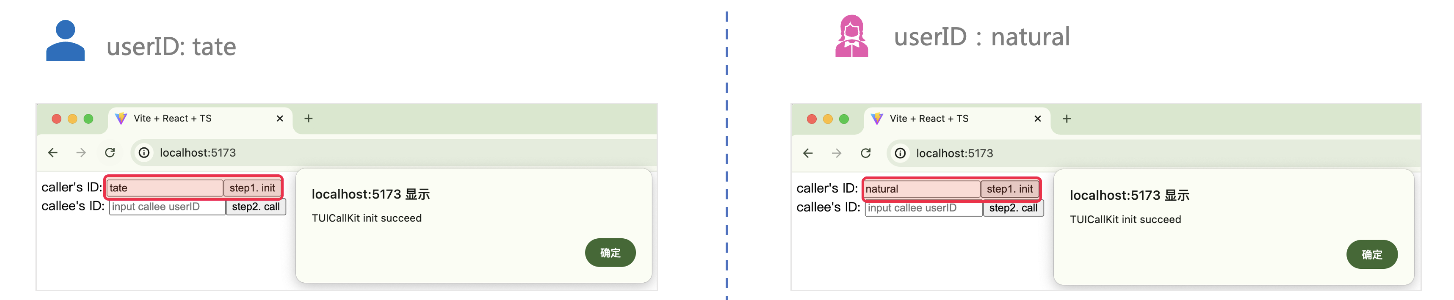
|
|
169
|
-
|
|
170
|
-
4. 两个 userID 都登录成功后,单击`step2. call `拨打通话,如果您有通话问题,参见 [常见问题](https://cloud.tencent.com/document/product/647/78769)。
|
|
171
|
-
|
|
172
|
-
|
|
173
|
-
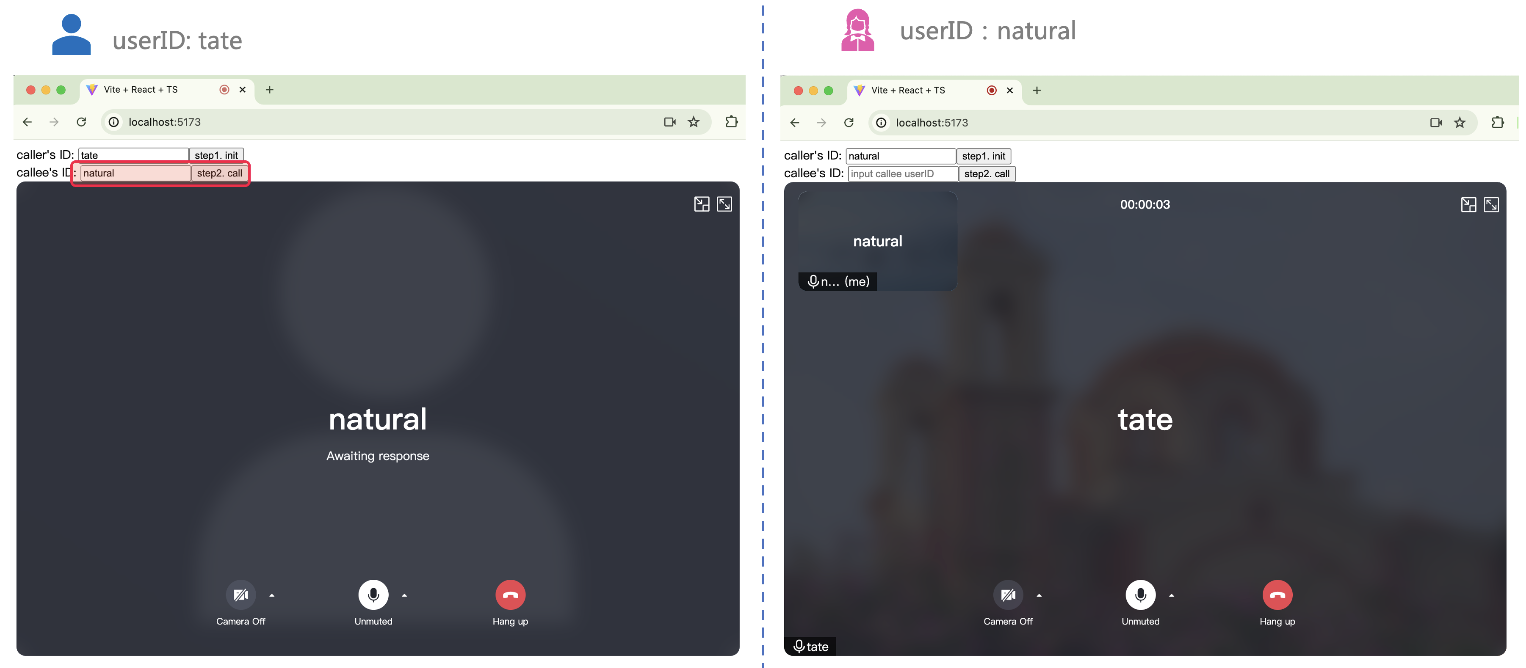
|
|
174
|
-
|
|
175
|
-
|
|
176
|
-
## 更多特性
|
|
177
|
-
- [设置昵称、头像](https://write.woa.com/document/140283367112228864)
|
|
178
|
-
|
|
179
|
-
- [群组通话](https://write.woa.com/document/139754159113613312)
|
|
180
|
-
|
|
181
|
-
- [悬浮窗](https://write.woa.com/document/139754324095582208)
|
|
182
|
-
|
|
183
|
-
- [自定义铃声](https://write.woa.com/document/139754575448756224)
|
|
184
|
-
|
|
185
|
-
- [监听通话状态、组件回调事件](https://write.woa.com/document/139754708026372096)
|
|
186
|
-
|
|
187
|
-
- [设置分辨率、填充模式](https://write.woa.com/document/140283358174851072)
|
|
188
|
-
|
|
189
|
-
- [界面定制](https://write.woa.com/document/90292932030300160)
|
|
190
|
-
|
|
191
|
-
|
|
192
|
-
## 常见问题
|
|
193
|
-
- 如果您的接入和使用中遇到问题,请参见 [常见问题](https://cloud.tencent.com/document/product/647/78769)。
|
|
194
|
-
|
|
195
|
-
- 了解更多详情您可 [腾讯云通信官方社群](https://zhiliao.qq.com/) 进行咨询和反馈。
|
|
@@ -1,93 +0,0 @@
|
|
|
1
|
-
本文将介绍如何快速实现音视频通话演示。您将在10分钟内完成以下关键步骤,并最终获得一个具有全面用户界面的视频通话功能。
|
|
2
|
-
|
|
3
|
-

|
|
4
|
-
|
|
5
|
-
## 环境准备
|
|
6
|
-
- Node.js, 如果没有,[请点击下载。](https://nodejs.org/en)
|
|
7
|
-
|
|
8
|
-
- Modern browser, supporting WebRTC API.
|
|
9
|
-
|
|
10
|
-
|
|
11
|
-
## 步骤一:下载 Demo
|
|
12
|
-
1. 打开终端,克隆仓库。
|
|
13
|
-
|
|
14
|
-
``` bash
|
|
15
|
-
git clone
|
|
16
|
-
```
|
|
17
|
-
2. 安装依赖。
|
|
18
|
-
|
|
19
|
-
|
|
20
|
-
|
|
21
|
-
|
|
22
|
-
|
|
23
|
-
【React】
|
|
24
|
-
``` bash
|
|
25
|
-
cd ./TUICallKit/Web/basic-react
|
|
26
|
-
```
|
|
27
|
-
|
|
28
|
-
|
|
29
|
-
【Vue3】
|
|
30
|
-
``` bash
|
|
31
|
-
cd ./TUICallKit/Web/basic-vue3
|
|
32
|
-
```
|
|
33
|
-
|
|
34
|
-
``` bash
|
|
35
|
-
npm install
|
|
36
|
-
```
|
|
37
|
-
|
|
38
|
-
## 步骤二:配置 Demo
|
|
39
|
-
1. [点击进入开通服务页面](https://trtc.io/document/59832?platform=android&product=call),获取`SDKAppID、SecretKey`**。**
|
|
40
|
-
|
|
41
|
-
2. 填写 `SDKAPPID、SecretKey`。
|
|
42
|
-
|
|
43
|
-
|
|
44
|
-
|
|
45
|
-
|
|
46
|
-
【React】
|
|
47
|
-
|
|
48
|
-
文件路径:`TUICallKit/Web/basic-react/src/debug/GenerateTestUserSig-es.js`
|
|
49
|
-
|
|
50
|
-
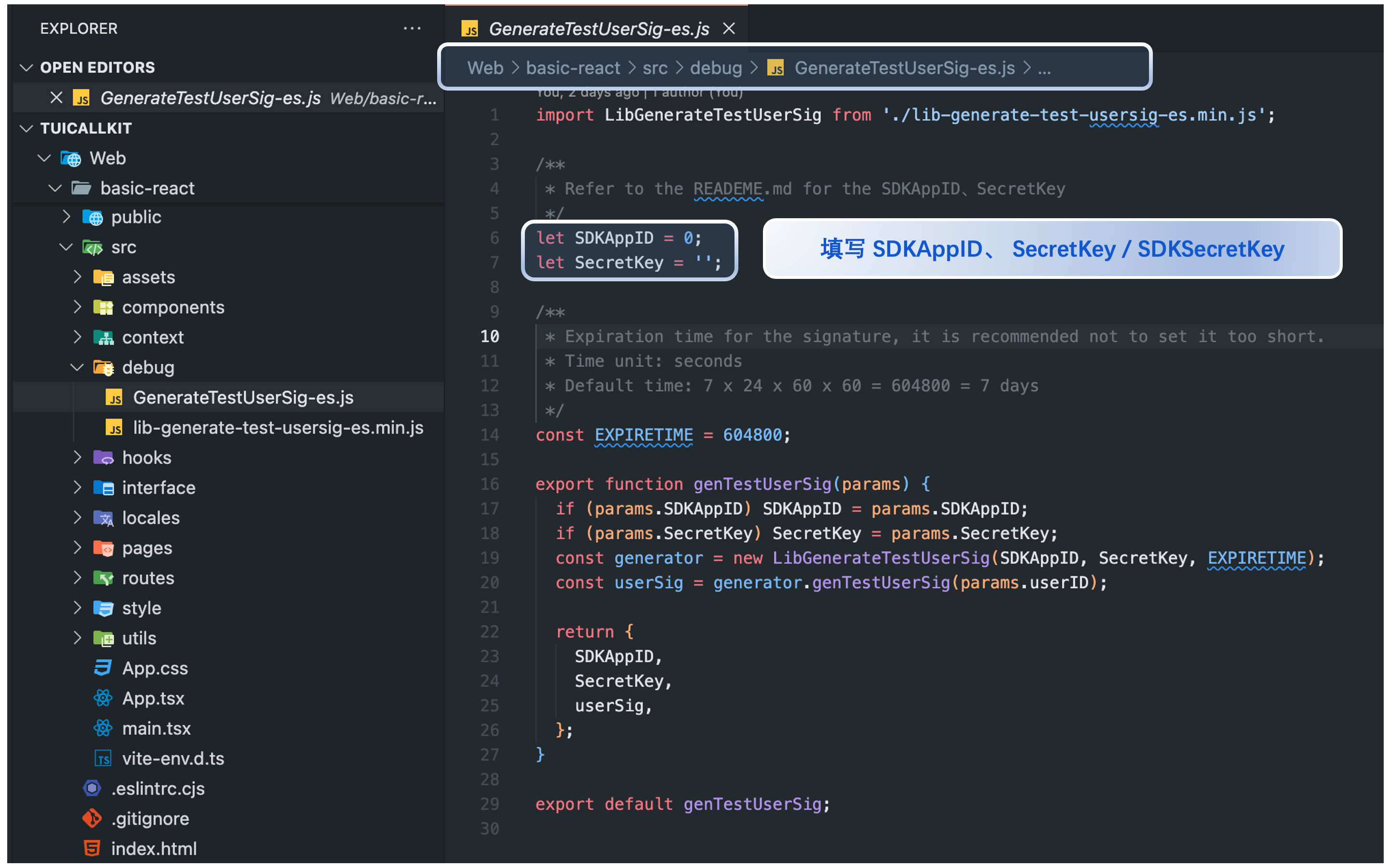
|
|
51
|
-
|
|
52
|
-
【Vue3】
|
|
53
|
-
|
|
54
|
-
文件路径:`TUICallKit/Web/basic-vue3/src/debug/GenerateTestUserSig-es.js`
|
|
55
|
-
|
|
56
|
-
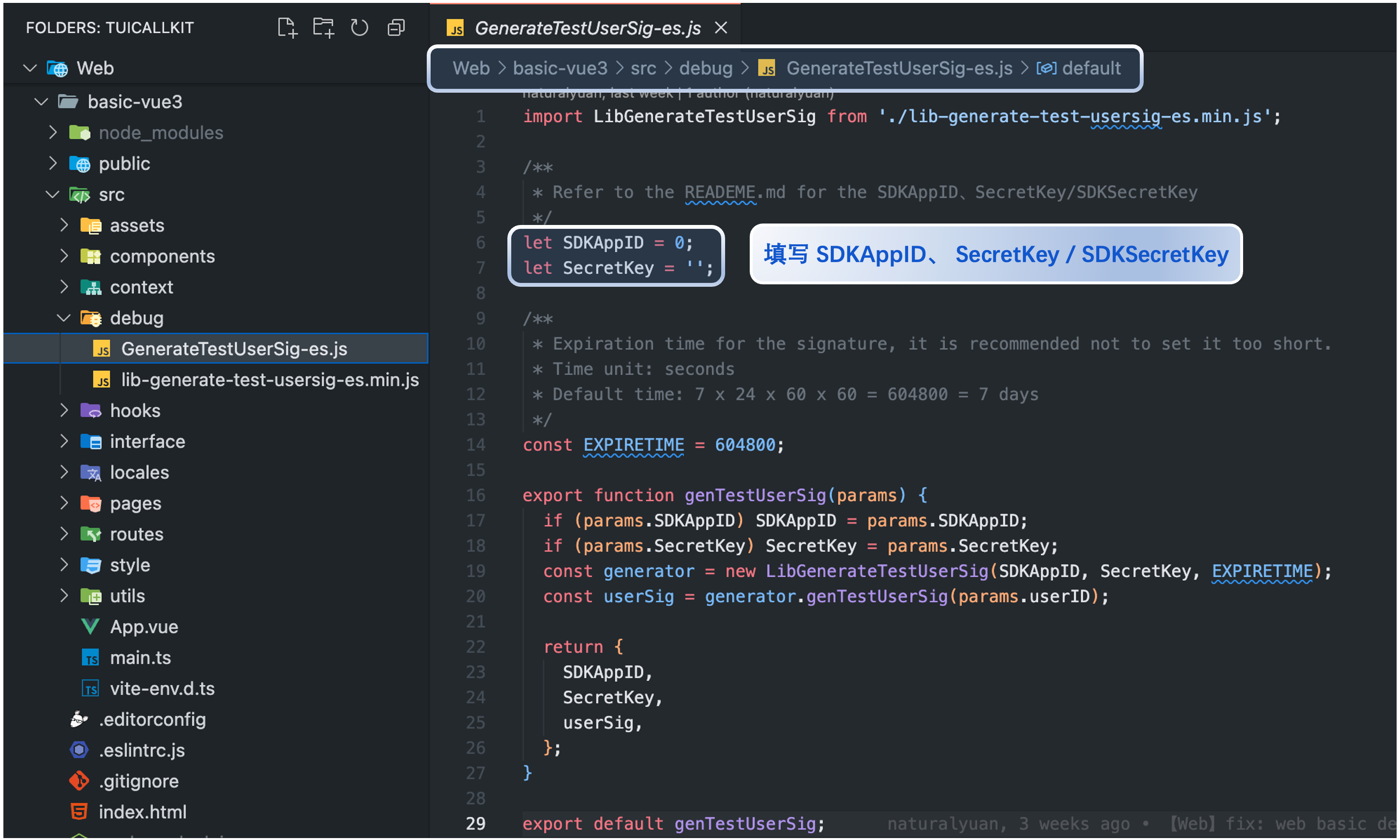
|
|
57
|
-
|
|
58
|
-
|
|
59
|
-
## 步骤三:运行 Demo
|
|
60
|
-
|
|
61
|
-
打开终端,复制示例命令运行 Demo。
|
|
62
|
-
|
|
63
|
-
|
|
64
|
-
|
|
65
|
-
|
|
66
|
-
【TUICallKit/Web/basic-react】
|
|
67
|
-
``` bash
|
|
68
|
-
npm run dev
|
|
69
|
-
```
|
|
70
|
-
|
|
71
|
-
|
|
72
|
-
【TUICallKit/Web/basic-vue3】
|
|
73
|
-
``` bash
|
|
74
|
-
npm run dev
|
|
75
|
-
```
|
|
76
|
-
|
|
77
|
-
> **警告:**
|
|
78
|
-
>
|
|
79
|
-
|
|
80
|
-
> **本地环境请在 localhost 协议下访问,公网体验请在 HTTPS 协议下访问,具体参见 **[网络访问协议说明](https://web.sdk.qcloud.com/trtc/webrtc/doc/en/tutorial-05-info-browser.html#h2-3)**。**
|
|
81
|
-
>
|
|
82
|
-
|
|
83
|
-
|
|
84
|
-
## 步骤四:拨打您的第一通电话
|
|
85
|
-
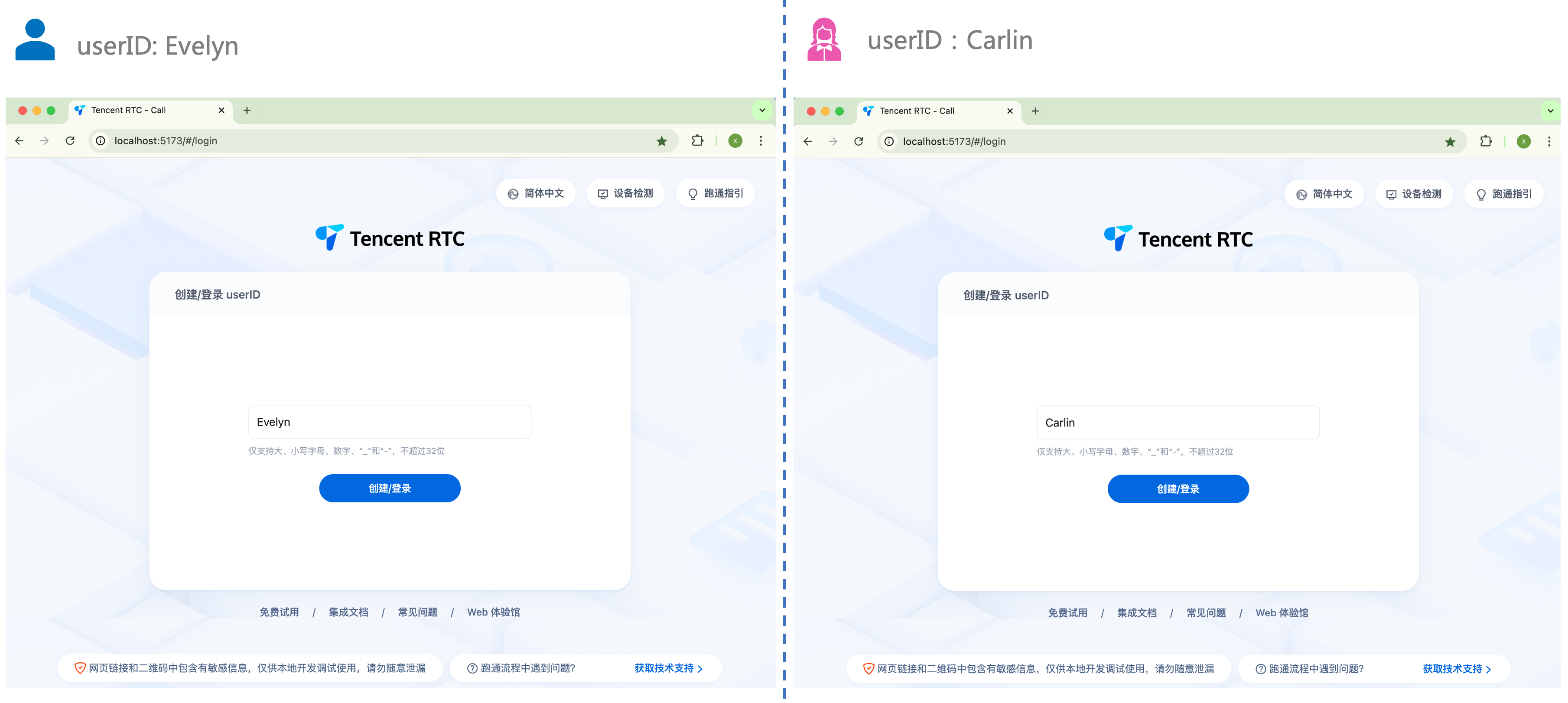
1. 打开浏览器页面,输入项目运行地址,登录 userID(由您定义)。
|
|
86
|
-
|
|
87
|
-
|
|
88
|
-
|
|
89
|
-
|
|
90
|
-
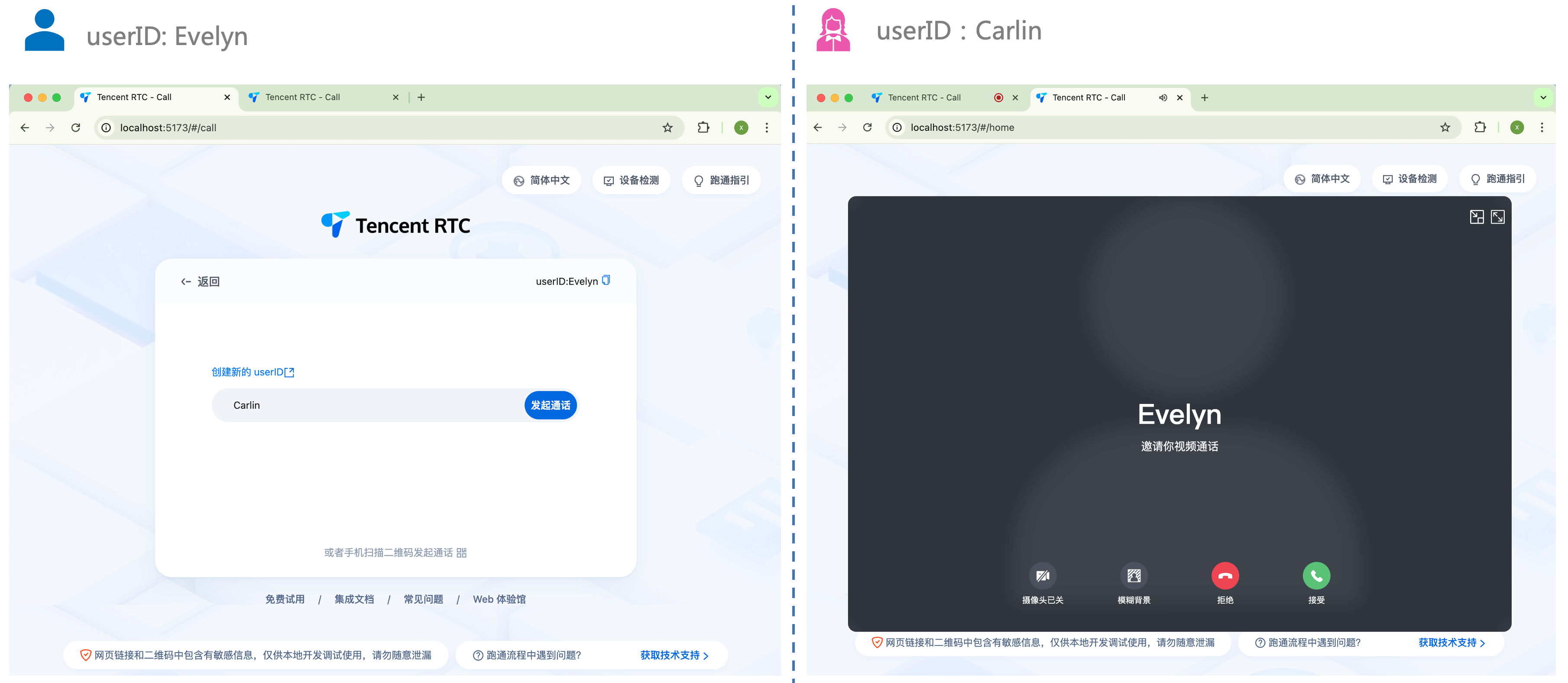
2. 输入被叫方的 userID,单击 `发起通话` 体验您的第一通话。
|
|
91
|
-
|
|
92
|
-
|
|
93
|
-
|
|
File without changes
|