@tencentcloud/sdk-mcp 1.1.3 → 1.1.6
This diff represents the content of publicly available package versions that have been released to one of the supported registries. The information contained in this diff is provided for informational purposes only and reflects changes between package versions as they appear in their respective public registries.
- package/README.md +5 -1
- package/index.js +2 -0
- package/index.js.map +1 -1
- package/libs/TLSSigAPIv2.d.ts +134 -0
- package/libs/TLSSigAPIv2.js +243 -0
- package/package.json +1 -1
- package/resource/doc/chatuikit/react/chat_window_integration.md +78 -0
- package/resource/doc/chatuikit/react/integration.md +9 -2
- package/resource/doc/chatuikit/vue/chat_window_integration.md +130 -0
- package/resource/doc/chatuikit/vue/integration.md +5 -44
- package/resource/doc/livekit/vue/components/barrage.md +3 -3
- package/resource/doc/livekit/vue/components/broadcast.md +603 -0
- package/resource/doc/livekit/vue/components/co-guest-panel.md +127 -0
- package/resource/doc/livekit/vue/components/live-audience-list.md +282 -0
- package/resource/doc/livekit/vue/components/live-list.md +5 -6
- package/resource/doc/livekit/vue/components/live-player.md +5 -6
- package/resource/doc/livekit/vue/components/live-scene-panel.md +193 -0
- package/resource/doc/livekit/vue/components/live-view.md +6 -6
- package/resource/doc/livekit/vue/components/stream-mixer.md +442 -0
- package/resource/doc/roomkit/{states → vue/states}/device-state.md +3 -3
- package/resource/doc/roomkit/{states → vue/states}/login-state.md +3 -3
- package/resource/doc/roomkit/{states → vue/states}/room-list-state.md +3 -3
- package/resource/doc/roomkit/{states → vue/states}/room-participant-state.md +3 -3
- package/resource/doc/rtcengine/web/how_to_integrated_web_rtc_engine.md +1 -0
- package/resource/doc/tuicallkit/vue/api_TUICallKit.md +3 -0
- package/resource/doc/tuicallkit/vue/how_to_integrated_vue_callkit.md +3 -0
- package/resource/doc/tuicallkit/vue/how_to_run_vue_callkit_demo.md +3 -0
- package/server-config.js +34 -0
- package/server-config.js.map +1 -0
- package/tools/chat/get-chat-faq.js +2 -3
- package/tools/chat/get-chat-faq.js.map +1 -1
- package/tools/chat/get-native-chat-integration.js +4 -4
- package/tools/chat/get-web-chat-component-detail.js +3 -3
- package/tools/chat/get-web-chat-integration.js +10 -10
- package/tools/chat/get-web-chat-integration.js.map +1 -1
- package/tools/chat/get-web-chat-uikit-init.js +2 -2
- package/tools/chat/get-web-chat-uikit-init.js.map +1 -1
- package/tools/chat/get-web-chat-window-integration.js +36 -0
- package/tools/chat/get-web-chat-window-integration.js.map +1 -0
- package/tools/common/get-usersig.js +30 -26
- package/tools/common/get-usersig.js.map +1 -1
- package/tools/common/record-prompt.js +5 -5
- package/tools/common/record-result.js +7 -6
- package/tools/common/record-result.js.map +1 -1
- package/tools/index.js +10 -5
- package/tools/index.js.map +1 -1
- package/tools/live/get-web-live-component-detail.js +4 -6
- package/tools/live/get-web-live-component-detail.js.map +1 -1
- package/tools/live/get-web-live-state-detail.js +6 -6
- package/tools/live/get-web-live-state-detail.js.map +1 -1
- package/tools/room/get-web-room-state-detail.js +6 -6
- package/tools/room/get-web-room-state-detail.js.map +1 -1
- package/tools/rtcengine/get-rtcengine-web-sdk-integration-guide.js +34 -0
- package/tools/rtcengine/get-rtcengine-web-sdk-integration-guide.js.map +1 -0
- package/tools/rtcengine/{get-rtcenigne-faq.js → get-trtc-web-sdk-faq.js} +5 -5
- package/tools/rtcengine/get-trtc-web-sdk-faq.js.map +1 -0
- package/tools/rtcengine/get-trtc-web-sdk-integration-guide.js +35 -0
- package/tools/rtcengine/get-trtc-web-sdk-integration-guide.js.map +1 -0
- package/utils/generate-usersig.js +7 -9
- package/utils/generate-usersig.js.map +1 -1
- package/utils/get-doc-content.js +0 -1
- package/utils/get-doc-content.js.map +1 -1
- package/utils/handle-component-name.js +53 -17
- package/utils/handle-component-name.js.map +1 -1
- package/utils/handle-state-name.js +29 -0
- package/utils/handle-state-name.js.map +1 -0
- package/libs/lib-generate-test-usersig-es.min.d.ts +0 -6
- package/libs/lib-generate-test-usersig-es.min.js +0 -2
- package/resource/doc/livekit/vue/components/states/live-state.md +0 -2656
- package/tools/rtcengine/get-rtcengine-integration-guide.js +0 -32
- package/tools/rtcengine/get-rtcengine-integration-guide.js.map +0 -1
- package/tools/rtcengine/get-rtcenigne-faq.js.map +0 -1
- /package/resource/doc/chatuikit/react/{login.md → init.md} +0 -0
|
@@ -0,0 +1,603 @@
|
|
|
1
|
+
本文对 TUILiveKit 组件中的**主播开播页面**进行了详细的介绍,您可以在已有项目中直接参考本文档集成我们开发好的主播开播页面,也可以根据您的需求按照文档中的内容对页面的样式,布局以及功能项进行深度的定制。
|
|
2
|
+
|
|
3
|
+
## 功能概览
|
|
4
|
+
<table>
|
|
5
|
+
<tr>
|
|
6
|
+
<td rowspan="1" colSpan="1" >**功能分类**</td>
|
|
7
|
+
|
|
8
|
+
<td rowspan="1" colSpan="1" >**具体能力**</td>
|
|
9
|
+
</tr>
|
|
10
|
+
|
|
11
|
+
<tr>
|
|
12
|
+
<td rowspan="1" colSpan="1" >**视频源控制**</td>
|
|
13
|
+
|
|
14
|
+
<td rowspan="1" colSpan="1" >支持摄像头、屏幕共享、图片等多种元素合流。同时,组件内置了强大的画布编辑能力,支持对元素进行旋转、移动、缩放、镜像、层级调整等操作,让您的直播画面更具创意和专业性</td>
|
|
15
|
+
</tr>
|
|
16
|
+
|
|
17
|
+
<tr>
|
|
18
|
+
<td rowspan="1" colSpan="1" >**连麦功能**</td>
|
|
19
|
+
|
|
20
|
+
<td rowspan="1" colSpan="1" >支持主播与观众实时音视频互动,并提供了九宫格、1v6、浮窗等多种连麦布局,轻松应对各类互动场景</td>
|
|
21
|
+
</tr>
|
|
22
|
+
|
|
23
|
+
<tr>
|
|
24
|
+
<td rowspan="1" colSpan="1" >**观众互动**</td>
|
|
25
|
+
|
|
26
|
+
<td rowspan="1" colSpan="1" >集成实时弹幕、礼物、点赞等功能,增强主播与观众的粘性</td>
|
|
27
|
+
</tr>
|
|
28
|
+
|
|
29
|
+
<tr>
|
|
30
|
+
<td rowspan="1" colSpan="1" >**横竖屏开播**</td>
|
|
31
|
+
|
|
32
|
+
<td rowspan="1" colSpan="1" >满足不同场景的直播需求</td>
|
|
33
|
+
</tr>
|
|
34
|
+
|
|
35
|
+
<tr>
|
|
36
|
+
<td rowspan="1" colSpan="1" >**观众管理**</td>
|
|
37
|
+
|
|
38
|
+
<td rowspan="1" colSpan="1" >便捷的观众列表与禁言管理</td>
|
|
39
|
+
</tr>
|
|
40
|
+
</table>
|
|
41
|
+
|
|
42
|
+
|
|
43
|
+
## 功能展示
|
|
44
|
+
|
|
45
|
+
主播开播页面提供默认行为和风格,但如果默认行为和样式不能完全满足您的需求,自定义 UI 可见本文中**自由定制**部分。如下图主播开播页面功能展示主要包含**素材管理、直播工具、音视频控制、画面源输出、素材编辑工具、弹幕聊天、观众列表**。
|
|
46
|
+
<table>
|
|
47
|
+
<tr>
|
|
48
|
+
<td rowspan="1" colSpan="1" >**横屏开播**</td>
|
|
49
|
+
</tr>
|
|
50
|
+
|
|
51
|
+
<tr>
|
|
52
|
+
<td rowspan="1" colSpan="1" ><br>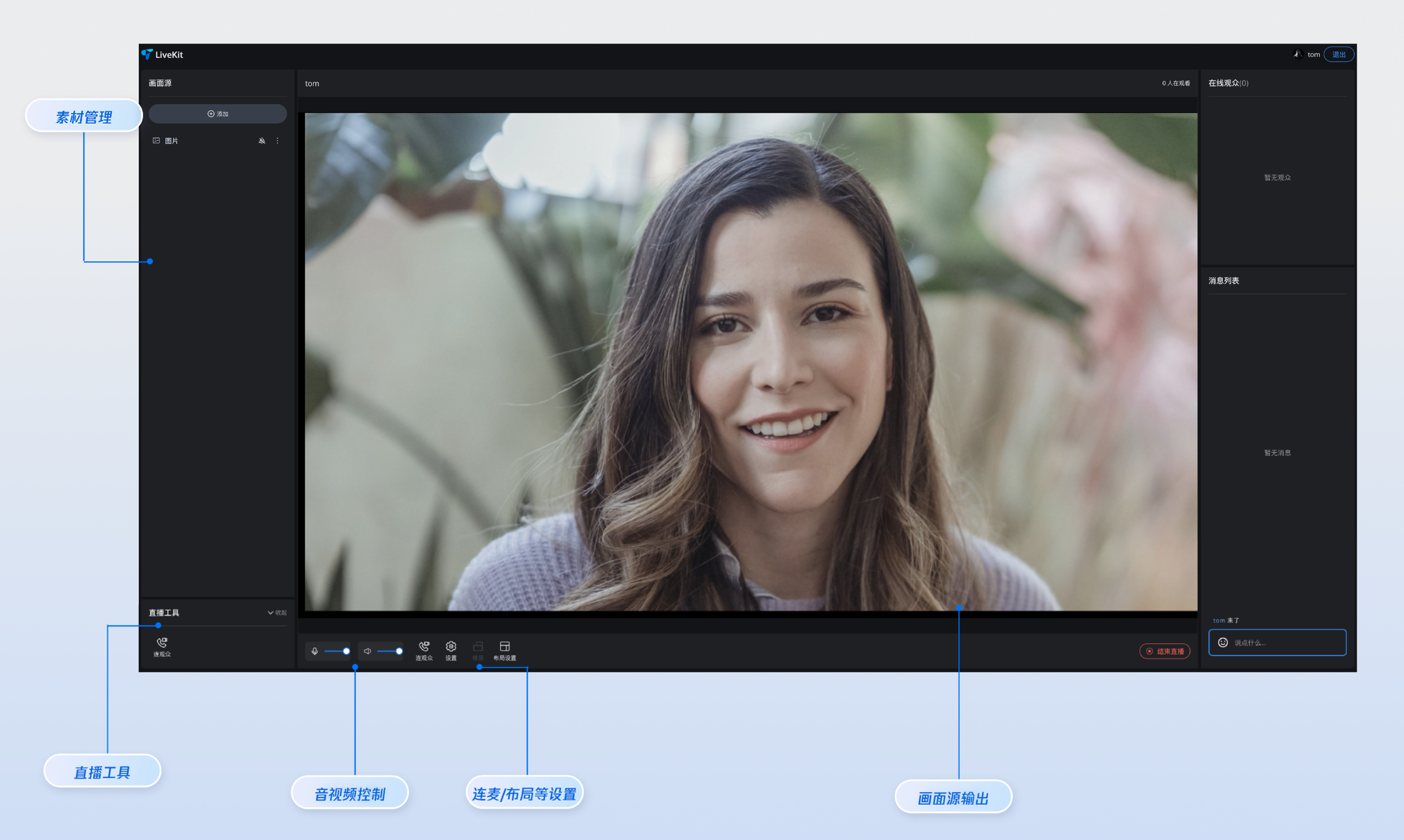</td>
|
|
53
|
+
</tr>
|
|
54
|
+
</table>
|
|
55
|
+
|
|
56
|
+
<table>
|
|
57
|
+
<tr>
|
|
58
|
+
<td rowspan="1" colSpan="1" >**竖屏开播**</td>
|
|
59
|
+
</tr>
|
|
60
|
+
|
|
61
|
+
<tr>
|
|
62
|
+
<td rowspan="1" colSpan="1" ><br>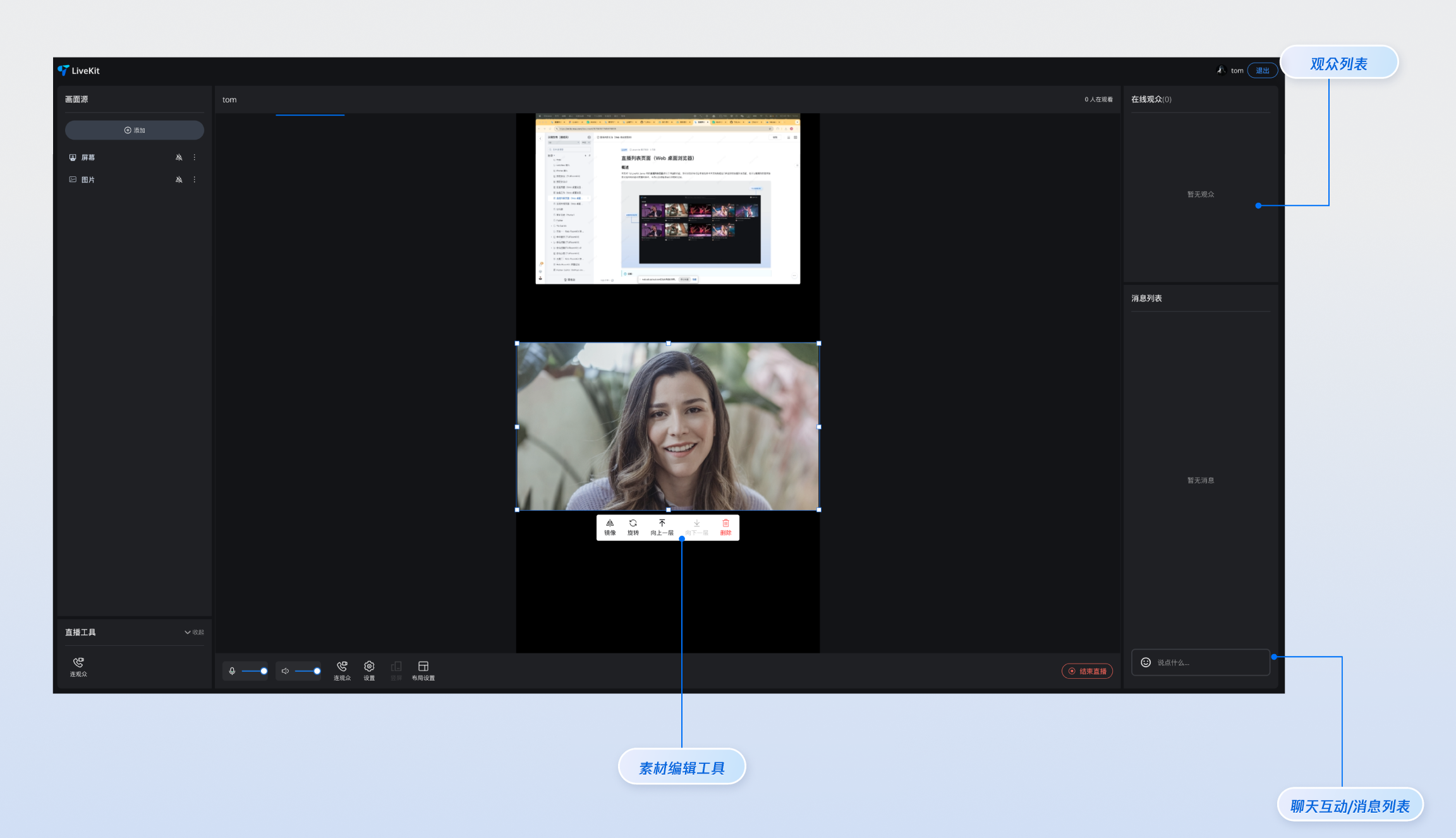</td>
|
|
63
|
+
</tr>
|
|
64
|
+
</table>
|
|
65
|
+
|
|
66
|
+
|
|
67
|
+
## 快速体验
|
|
68
|
+
|
|
69
|
+
如果您想要提前体验下直播功能,可以在 [在线体验](https://write.woa.com/document/193874503063744512) 中使用 [在线开播网站](https://web.sdk.qcloud.com/trtc/livekit/pusher/index.html) 快速开启一场直播进行体验,同时您也可以使用 [在线观看网站](https://web.sdk.qcloud.com/trtc/livekit/player/index.html) 来观看一场直播。
|
|
70
|
+
|
|
71
|
+
## 快速接入
|
|
72
|
+
|
|
73
|
+
### 步骤1:环境配置及开通服务
|
|
74
|
+
|
|
75
|
+
在进行快速接入之前,您需要参见 [准备工作](https://write.woa.com/document/188228825253294080),满足相关环境配置及开通对应服务。
|
|
76
|
+
|
|
77
|
+
### 步骤2: 安装依赖
|
|
78
|
+
|
|
79
|
+
|
|
80
|
+
|
|
81
|
+
|
|
82
|
+
【npm】
|
|
83
|
+
``` bash
|
|
84
|
+
npm install tuikit-atomicx-vue3@latest @tencentcloud/uikit-base-component-vue3 --save
|
|
85
|
+
```
|
|
86
|
+
|
|
87
|
+
|
|
88
|
+
【pnpm】
|
|
89
|
+
``` bash
|
|
90
|
+
pnpm add tuikit-atomicx-vue3@latest @tencentcloud/livekit-web-vue3tuikit-atomicx-vue3@latest @tencentcloud/uikit-base-component-vue3
|
|
91
|
+
```
|
|
92
|
+
|
|
93
|
+
|
|
94
|
+
【yarn】
|
|
95
|
+
``` bash
|
|
96
|
+
yarn add tuikit-atomicx-vue3@latest @tencentcloud/livekit-web-vue3tuikit-atomicx-vue3@latest @tencentcloud/uikit-base-component-vue3
|
|
97
|
+
```
|
|
98
|
+
|
|
99
|
+
### 步骤3:主播开播页面接入
|
|
100
|
+
|
|
101
|
+
在您的项目下创建 `live-pusher.vue` 文件,通过复制如下代码至您新建的 `live-pusher.vue` 文件中集成完整的**主播开播页面**。
|
|
102
|
+
``` typescript
|
|
103
|
+
<template>
|
|
104
|
+
<UIKitProvider language="zh-CN" theme="dark">
|
|
105
|
+
<div class="custom-live-pusher">
|
|
106
|
+
<!-- 顶部控制栏 -->
|
|
107
|
+
<div class="top-controls">
|
|
108
|
+
<div class="live-title">{{ liveName }}</div>
|
|
109
|
+
<div class="audience-count">{{ audienceCount }} 人观看</div>
|
|
110
|
+
</div>
|
|
111
|
+
|
|
112
|
+
<!-- 主要内容区 -->
|
|
113
|
+
<div class="main-content">
|
|
114
|
+
<!-- 左侧:视频源和工具 -->
|
|
115
|
+
<div class="left-panel">
|
|
116
|
+
<LiveScenePanel />
|
|
117
|
+
<div class="tools-section">
|
|
118
|
+
<CoGuestButton />
|
|
119
|
+
</div>
|
|
120
|
+
</div>
|
|
121
|
+
|
|
122
|
+
<!-- 中央:直播画面 -->
|
|
123
|
+
<div class="center-panel">
|
|
124
|
+
<StreamMixer />
|
|
125
|
+
<div class="live-controls">
|
|
126
|
+
<button @click="handleStartLive">开始直播</button>
|
|
127
|
+
</div>
|
|
128
|
+
</div>
|
|
129
|
+
|
|
130
|
+
<!-- 右侧:观众互动 -->
|
|
131
|
+
<div class="right-panel">
|
|
132
|
+
<LiveAudienceList />
|
|
133
|
+
<BarrageList />
|
|
134
|
+
<BarrageInput />
|
|
135
|
+
</div>
|
|
136
|
+
|
|
137
|
+
<!-- 底部:主播操作 -->
|
|
138
|
+
<div class="bottom-panel">
|
|
139
|
+
<!-- <MicVolumeSetting /> // 媒体设置能力请参考本文高级功能集成部分
|
|
140
|
+
<SpeakerVolumeSetting />
|
|
141
|
+
<CoGuestButton /> // 连麦观众能力请参考本文高级功能集成部分
|
|
142
|
+
<OrientationSwitch /> // 布局设置请参考本文高级功能集成部分
|
|
143
|
+
<LayoutSwitch /> --> // 横竖屏推流能力请参考本文高级功能集成部分
|
|
144
|
+
</div>
|
|
145
|
+
</div>
|
|
146
|
+
</div>
|
|
147
|
+
</UIKitProvider>
|
|
148
|
+
</template>
|
|
149
|
+
|
|
150
|
+
<script setup lang="ts">
|
|
151
|
+
import { onMounted } from 'vue';
|
|
152
|
+
import {
|
|
153
|
+
LiveScenePanel,
|
|
154
|
+
StreamMixer,
|
|
155
|
+
LiveAudienceList,
|
|
156
|
+
BarrageList,
|
|
157
|
+
BarrageInput,
|
|
158
|
+
useLiveListState,
|
|
159
|
+
useLiveAudienceState,
|
|
160
|
+
useLoginState
|
|
161
|
+
} from 'tuikit-atomicx-vue3';
|
|
162
|
+
import { UIKitProvider } from '@tencentcloud/uikit-base-component-vue3';
|
|
163
|
+
|
|
164
|
+
const { login } = useLoginState();
|
|
165
|
+
const { createLive } = useLiveListState();
|
|
166
|
+
const { audienceCount } = useLiveAudienceState();
|
|
167
|
+
const liveName = '我的直播间';
|
|
168
|
+
|
|
169
|
+
const handleStartLive = async () => {
|
|
170
|
+
await createLive({
|
|
171
|
+
liveId: 'my-live-room',
|
|
172
|
+
liveName: liveName,
|
|
173
|
+
});
|
|
174
|
+
};
|
|
175
|
+
|
|
176
|
+
async function initLogin() {
|
|
177
|
+
try {
|
|
178
|
+
await login({
|
|
179
|
+
sdkAppId: 0, // SDKAppID, 可以参考步骤 1 获取
|
|
180
|
+
userId: '', // UserID, 可以参考步骤 1 获取
|
|
181
|
+
userSig: '', // userSig, 可以参考步骤 1 获取
|
|
182
|
+
});
|
|
183
|
+
} catch (error) {
|
|
184
|
+
console.error('登录失败:', error);
|
|
185
|
+
}
|
|
186
|
+
}
|
|
187
|
+
|
|
188
|
+
onMounted(async () => {
|
|
189
|
+
await initLogin();
|
|
190
|
+
});
|
|
191
|
+
|
|
192
|
+
</script>
|
|
193
|
+
|
|
194
|
+
<style scoped>:global(::before){box-sizing:border-box;margin:0;padding:0}:global(body){line-height:1.6;color:var(--text-color-primary);background:var(--bg-color-default)}.custom-live-pusher{display:flex;flex-direction:column;height:100vh;width:100vw;background:linear-gradient(135deg,var(--bg-color-default) 0,var(--bg-color-function) 100%);color:var(--text-color-primary);overflow:hidden}.top-controls{display:flex;justify-content:space-between;align-items:center;padding:12px 20px;background:var(--bg-color-operate);backdrop-filter:blur(10px);border-bottom:1px solid var(--stroke-color-primary);z-index:100;min-height:60px}.live-title{font-size:18px;font-weight:600;color:var(--text-color-primary);text-shadow:0 2px 4px var(--shadow-color)}.audience-count{font-size:14px;color:var(--text-color-error);background:var(--uikit-color-red-1);padding:6px 12px;border-radius:20px;border:1px solid var(--uikit-color-red-3)}.main-content{display:flex;flex:1;height:calc(100vh - 60px);gap:16px;padding:16px;overflow:hidden}.left-panel{display:flex;flex-direction:column;width:280px;gap:16px;flex-shrink:0}.tools-section{background:var(--bg-color-operate);border-radius:12px;padding:16px;border:1px solid var(--stroke-color-primary);backdrop-filter:blur(10px)}.center-panel{display:flex;flex-direction:column;flex:1;gap:16px;min-width:0}.live-controls{display:flex;justify-content:space-between;align-items:center;padding:16px;background:var(--bg-color-operate);border-radius:12px;border:1px solid var(--stroke-color-primary);backdrop-filter:blur(10px);gap:16px}.live-controls button{background:linear-gradient(135deg,var(--text-color-error) 0,var(--uikit-color-red-5) 100%);color:var(--text-color-button);border:none;padding:12px 32px;border-radius:25px;font-size:16px;font-weight:600;cursor:pointer;box-shadow:0 4px 15px var(--shadow-color)}.right-panel{display:flex;flex-direction:column;width:320px;gap:16px;flex-shrink:0}.center-panel>*,.left-panel>*,.right-panel>*{background:var(--bg-color-operate);border-radius:12px;border:1px solid var(--stroke-color-primary);backdrop-filter:blur(10px);overflow:hidden}.left-panel>*{padding:16px}.right-panel>*{padding:16px}.center-panel>:first-child{flex:1;min-height:300px;padding:0;background:var(--uikit-color-black-1);border:2px solid var(--stroke-color-secondary)}.bottom-panel{display:flex;align-items:center;gap:16px;flex:1}.device-setting{display:flex;align-items:center;gap:8px;padding:8px 12px;background:var(--bg-color-function);border-radius:8px;border:1px solid var(--stroke-color-secondary)}.device-icon{cursor:pointer;color:var(--text-color-primary);transition:color .2s ease}.device-icon:hover{color:var(--text-color-link)}.device-slider{width:80px}.custom-icon-container{display:flex;align-items:center;gap:6px;padding:8px 12px;background:var(--bg-color-function);border-radius:8px;border:1px solid var(--stroke-color-secondary);cursor:pointer;transition:all .2s ease;position:relative}.custom-icon-container:hover{background:var(--list-color-hover);border-color:var(--stroke-color-primary)}.custom-icon-container.disabled{opacity:.5;cursor:not-allowed}.custom-icon-container.disabled:hover{background:var(--bg-color-function);border-color:var(--stroke-color-secondary)}.custom-icon{width:16px;height:16px;display:inline-block;background-size:contain;background-repeat:no-repeat;background-position:center}.horizontal-icon{background-image:url("data:image/svg+xml,%3Csvg xmlns='http://www.w3.org/2000/svg' viewBox='0 0 24 24' fill='none' stroke='currentColor' stroke-width='2'%3E%3Crect x='3' y='6' width='18' height='12' rx='2'/%3E%3Cpath d='M7 10h10'/%3E%3C/svg%3E")}.portrait-icon{background-image:url("data:image/svg+xml,%3Csvg xmlns='http://www.w3.org/2000/svg' viewBox='0 0 24 24' fill='none' stroke='currentColor' stroke-width='2'%3E%3Crect x='6' y='3' width='12' height='18' rx='2'/%3E%3Cpath d='M10 7h4'/%3E%3C/svg%3E")}.layout-icon{background-image:url("data:image/svg+xml,%3Csvg xmlns='http://www.w3.org/2000/svg' viewBox='0 0 24 24' fill='none' stroke='currentColor' stroke-width='2'%3E%3Crect x='3' y='3' width='7' height='7'/%3E%3Crect x='14' y='3' width='7' height='7'/%3E%3Crect x='14' y='14' width='7' height='7'/%3E%3Crect x='3' y='14' width='7' height='7'/%3E%3C/svg%3E")}.co-guest-icon{background-image:url("data:image/svg+xml,%3Csvg xmlns='http://www.w3.org/2000/svg' viewBox='0 0 24 24' fill='none' stroke='currentColor' stroke-width='2'%3E%3Cpath d='M17 21v-2a4 4 0 0 0-4-4H5a4 4 0 0 0-4 4v2'/%3E%3Ccircle cx='9' cy='7' r='4'/%3E%3Cpath d='M23 21v-2a4 4 0 0 0-3-3.87'/%3E%3Cpath d='M16 3.13a4 4 0 0 1 0 7.75'/%3E%3C/svg%3E")}.custom-text{font-size:12px;color:var(--text-color-secondary);white-space:nowrap}.unread-count{position:absolute;top:-4px;right:-4px;background:var(--text-color-error);color:var(--text-color-button);border-radius:10px;padding:2px 6px;font-size:10px;font-weight:600;min-width:16px;text-align:center;line-height:1}.layout-dialog{max-width:600px}.layout-label{font-size:16px;font-weight:600;color:var(--text-color-primary);margin-bottom:16px}.template-options{margin-bottom:16px}.options-grid{display:grid;grid-template-columns:repeat(auto-fit,minmax(120px,1fr));gap:12px}.option-card{padding:16px;background:var(--bg-color-function);border:2px solid var(--stroke-color-secondary);border-radius:8px;cursor:pointer;transition:all .2s ease;text-align:center}.option-card:hover{border-color:var(--stroke-color-primary);background:var(--list-color-hover)}.option-card.active{border-color:var(--text-color-link);background:var(--bg-color-operate)}.option-info h4{margin:8px 0 0 0;font-size:12px;color:var(--text-color-primary)}.option-icon{width:32px;height:32px;margin:0 auto;color:var(--text-color-secondary)}.co-guest-dialog{max-width:500px}.co-guest-panel{min-height:300px}</style>
|
|
195
|
+
```
|
|
196
|
+
|
|
197
|
+
### 步骤4:开启直播
|
|
198
|
+
|
|
199
|
+
开启您的第一次主播开播。
|
|
200
|
+
``` bash
|
|
201
|
+
npm run dev
|
|
202
|
+
```
|
|
203
|
+
|
|
204
|
+
## 高级功能集成
|
|
205
|
+
|
|
206
|
+
|
|
207
|
+
|
|
208
|
+
【支持媒体设置能力】
|
|
209
|
+
|
|
210
|
+
若您需要支持媒体设置能力,包括设置扬声器、麦克风音量大小等内容,请参考如下代码示例复制到`live-pusher.vue `文件中即可。
|
|
211
|
+
``` typescript
|
|
212
|
+
<template>
|
|
213
|
+
<!-- MicVolumeSetting 麦克风设置 -->
|
|
214
|
+
<div class="device-setting">
|
|
215
|
+
<IconAudio :size="16" :audioVolume="audioVolume" :isMuted="microphoneStatus === DeviceStatus.Off" @click="switchMicrophoneStatus" />
|
|
216
|
+
<TUISlider v-if="microphoneStatus !== DeviceStatus.Off" v-model="microphoneVolume" class="device-slider" :min="0" :max="100" @change="handleMicrophoneVolumeChange" />
|
|
217
|
+
<TUISlider v-else class="device-slider" :min="0" :max="100" disabled />
|
|
218
|
+
</div>
|
|
219
|
+
<!-- SpeakerVolumeSetting 扬声器设置 -->
|
|
220
|
+
<div class="device-setting">
|
|
221
|
+
<TUIIcon class="device-icon" :icon="speakerIsOn ? IconSpeakerOn : IconSpeakerOff" @click="switchSpeaker(!speakerIsOn)" />
|
|
222
|
+
<TUISlider v-if="speakerIsOn" v-model="speakerVolume" class="device-slider" :min="0" :max="100" @change="handleSpeakerVolumeChange" />
|
|
223
|
+
</div>
|
|
224
|
+
</template>
|
|
225
|
+
|
|
226
|
+
<script lang="ts" setup>
|
|
227
|
+
import { ref, watch } from 'vue';
|
|
228
|
+
import { TUIIcon, TUISlider, IconSpeakerOn, IconSpeakerOff, IconAudio } from '@tencentcloud/uikit-base-component-vue3';
|
|
229
|
+
import { DeviceStatus, useDeviceState } from 'tuikit-atomicx-vue3';
|
|
230
|
+
|
|
231
|
+
const {
|
|
232
|
+
captureVolume,
|
|
233
|
+
setCaptureVolume,
|
|
234
|
+
microphoneStatus,
|
|
235
|
+
openLocalMicrophone,
|
|
236
|
+
closeLocalMicrophone,
|
|
237
|
+
audioVolume,
|
|
238
|
+
} = useDeviceState();
|
|
239
|
+
const { outputVolume, setOutputVolume } = useDeviceState();
|
|
240
|
+
|
|
241
|
+
const microphoneVolume = ref(captureVolume.value);
|
|
242
|
+
const speakerVolume = ref(outputVolume.value);
|
|
243
|
+
const speakerIsOn = ref(true);
|
|
244
|
+
const templateSpeakerVolume = ref(outputVolume.value);
|
|
245
|
+
|
|
246
|
+
const handleMicrophoneVolumeChange = (value: number) => {
|
|
247
|
+
if (value !== captureVolume.value) {
|
|
248
|
+
setCaptureVolume(value);
|
|
249
|
+
}
|
|
250
|
+
};
|
|
251
|
+
|
|
252
|
+
const switchMicrophoneStatus = () => {
|
|
253
|
+
if (microphoneStatus.value === DeviceStatus.On) {
|
|
254
|
+
closeLocalMicrophone();
|
|
255
|
+
} else {
|
|
256
|
+
openLocalMicrophone();
|
|
257
|
+
}
|
|
258
|
+
};
|
|
259
|
+
|
|
260
|
+
const switchSpeaker = (open: boolean) => {
|
|
261
|
+
speakerIsOn.value = open;
|
|
262
|
+
if (!open) {
|
|
263
|
+
templateSpeakerVolume.value = outputVolume.value;
|
|
264
|
+
setOutputVolume(0);
|
|
265
|
+
} else {
|
|
266
|
+
setOutputVolume(templateSpeakerVolume.value);
|
|
267
|
+
}
|
|
268
|
+
};
|
|
269
|
+
|
|
270
|
+
const handleSpeakerVolumeChange = (value: number) => {
|
|
271
|
+
if (value !== outputVolume.value) {
|
|
272
|
+
setOutputVolume(value);
|
|
273
|
+
}
|
|
274
|
+
};
|
|
275
|
+
|
|
276
|
+
watch(captureVolume, (newVal) => {
|
|
277
|
+
microphoneVolume.value = newVal;
|
|
278
|
+
});
|
|
279
|
+
|
|
280
|
+
watch(outputVolume, (newVal) => {
|
|
281
|
+
speakerVolume.value = newVal;
|
|
282
|
+
});
|
|
283
|
+
</script>
|
|
284
|
+
|
|
285
|
+
```
|
|
286
|
+
|
|
287
|
+
【支持横竖屏推流能力】
|
|
288
|
+
|
|
289
|
+
若您需要支持横竖屏推流能力,包括设置切换横竖屏等内容,请参考如下代码示例复制到`live-pusher.vue `文件中即可。
|
|
290
|
+
``` typescript
|
|
291
|
+
<template>
|
|
292
|
+
<!-- LayoutSwitch 横竖屏推流设置 -->
|
|
293
|
+
<div class="custom-icon-container":class="{ 'disabled': localLiveStatus === LiveStatus.Live }" @click="handleOrientationSwitch">
|
|
294
|
+
<span v-if="currentOrientation === LiveOrientation.Landscape" class="custom-icon horizontal-icon" />
|
|
295
|
+
<span v-else class="custom-icon portrait-icon"/>
|
|
296
|
+
<span class="custom-text co-guest-text">{{ currentOrientation === LiveOrientation.Portrait ? t('Portrait') : t('Landscape')}}</span>
|
|
297
|
+
</div>
|
|
298
|
+
</template>
|
|
299
|
+
|
|
300
|
+
<script setup lang="ts">
|
|
301
|
+
import { ref, watch } from 'vue';
|
|
302
|
+
import { useUIKit, TUIToast, TOAST_TYPE } from '@tencentcloud/uikit-base-component-vue3';
|
|
303
|
+
import { useLiveState, LiveOrientation, LiveStatus } from 'tuikit-atomicx-vue3';
|
|
304
|
+
|
|
305
|
+
const { t } = useUIKit();
|
|
306
|
+
|
|
307
|
+
enum TUISeatLayoutTemplate {
|
|
308
|
+
LandscapeDynamic_1v3 = 200,
|
|
309
|
+
PortraitDynamic_Grid9 = 600,
|
|
310
|
+
PortraitDynamic_1v6 = 601,
|
|
311
|
+
PortraitFixed_Grid9 = 800,
|
|
312
|
+
PortraitFixed_1v6 = 801,
|
|
313
|
+
PortraitFixed_6v6 = 802,
|
|
314
|
+
}
|
|
315
|
+
|
|
316
|
+
const { currentLive, localLiveStatus, updateLiveInfo } = useLiveState();
|
|
317
|
+
const currentOrientation = ref(LiveOrientation.Portrait);
|
|
318
|
+
|
|
319
|
+
watch(
|
|
320
|
+
() => currentLive.value?.layoutTemplate,
|
|
321
|
+
(newVal) => {
|
|
322
|
+
if (newVal === TUISeatLayoutTemplate.LandscapeDynamic_1v3) {
|
|
323
|
+
currentOrientation.value = LiveOrientation.Landscape;
|
|
324
|
+
} else {
|
|
325
|
+
currentOrientation.value = LiveOrientation.Portrait;
|
|
326
|
+
}
|
|
327
|
+
},
|
|
328
|
+
{ immediate: true },
|
|
329
|
+
);
|
|
330
|
+
|
|
331
|
+
const handleOrientationSwitch = () => {
|
|
332
|
+
if (localLiveStatus.value === LiveStatus.Live) {
|
|
333
|
+
TUIToast({
|
|
334
|
+
message: t('Cannot switch orientation during live streaming'),
|
|
335
|
+
type: TOAST_TYPE.ERROR,
|
|
336
|
+
});
|
|
337
|
+
return;
|
|
338
|
+
}
|
|
339
|
+
if (currentOrientation.value === LiveOrientation.Portrait) {
|
|
340
|
+
updateLiveInfo({ layoutTemplate: TUISeatLayoutTemplate.LandscapeDynamic_1v3 });
|
|
341
|
+
} else {
|
|
342
|
+
updateLiveInfo({ layoutTemplate: TUISeatLayoutTemplate.PortraitDynamic_Grid9 });
|
|
343
|
+
}
|
|
344
|
+
};
|
|
345
|
+
</script>
|
|
346
|
+
|
|
347
|
+
|
|
348
|
+
```
|
|
349
|
+
|
|
350
|
+
【支持连观众能力】
|
|
351
|
+
|
|
352
|
+
若您需要支持观众连麦能力,包括设置连麦申请、连麦管理等内容,请参考如下代码示例复制到`live-pusher.vue `文件中即可。
|
|
353
|
+
``` typescript
|
|
354
|
+
<template>
|
|
355
|
+
<!-- CoGuestSetting 观众连麦设置 -->
|
|
356
|
+
<div class="custom-icon-container" @click="handleCoGuest">
|
|
357
|
+
<span v-if="receivedCoGuestUserList.length > 0" class="unread-count">{{ receivedCoGuestUserList.length }}</span>
|
|
358
|
+
<span class="custom-icon co-guest-icon" />
|
|
359
|
+
<span class="custom-text co-guest-text">{{ t('CoGuest') }}</span>
|
|
360
|
+
</div>
|
|
361
|
+
<TUIDialog :title="t('CoGuest')" :visible="coGuestPanelVisible" :customClasses="['co-guest-dialog']" @close="coGuestPanelVisible = false" @confirm="coGuestPanelVisible = false" @cancel="coGuestPanelVisible = false">
|
|
362
|
+
<CoGuestPanel class="co-guest-panel" />
|
|
363
|
+
<template #footer>
|
|
364
|
+
<div />
|
|
365
|
+
</template>
|
|
366
|
+
</TUIDialog>
|
|
367
|
+
</template>
|
|
368
|
+
|
|
369
|
+
<script lang="ts" setup>
|
|
370
|
+
import { ref } from 'vue';
|
|
371
|
+
import { useUIKit, TUIDialog } from '@tencentcloud/uikit-base-component-vue3';
|
|
372
|
+
import { CoGuestPanel, useCoGuestState } from 'tuikit-atomicx-vue3';
|
|
373
|
+
|
|
374
|
+
const { t } = useUIKit();
|
|
375
|
+
const { receivedCoGuestUserList } = useCoGuestState();
|
|
376
|
+
|
|
377
|
+
const coGuestPanelVisible = ref(false);
|
|
378
|
+
|
|
379
|
+
const handleCoGuest = () => {
|
|
380
|
+
coGuestPanelVisible.value = true;
|
|
381
|
+
};
|
|
382
|
+
</script>
|
|
383
|
+
```
|
|
384
|
+
|
|
385
|
+
【支持布局设置能力】
|
|
386
|
+
|
|
387
|
+
若您需要支持视频流切换布局能力,包括设置**动态宫格布局、静态宫格布局、静态小窗布局、浮动小窗布局**等内容,请参考如下代码示例复制到`live-pusher.vue `文件中即可。
|
|
388
|
+
``` typescript
|
|
389
|
+
<template>
|
|
390
|
+
<!-- OrientationSwitch 布局设置 -->
|
|
391
|
+
<div class="custom-icon-container" @click="handleSwitchLayout">
|
|
392
|
+
<span class="custom-icon layout-icon" />
|
|
393
|
+
<span class="custom-text setting-text">{{ t('Layout Settings') }}</span>
|
|
394
|
+
</div>
|
|
395
|
+
<TUIDialog :customClasses="['layout-dialog']":title="t('Layout Settings')" :visible="layoutSwitchVisible" @close="handleCancel" @confirm="handleConfirm" @cancel="handleCancel">
|
|
396
|
+
<div class="layout-label"> {{ t('Audience Layout') }}</div>
|
|
397
|
+
<div class="template-options">
|
|
398
|
+
<div class="options-grid">
|
|
399
|
+
<template v-for="template in layoutOptions" :key="template.id">
|
|
400
|
+
<div class="option-card" :class="{ active: selectedTemplate === template.templateId }" @click="selectTemplate(template.templateId)">
|
|
401
|
+
<div class="option-info">
|
|
402
|
+
<component :is="template.icon" v-if="template.icon" class="option-icon"/>
|
|
403
|
+
<h4>{{ template.label }}</h4>
|
|
404
|
+
</div>
|
|
405
|
+
</div>
|
|
406
|
+
</template>
|
|
407
|
+
</div>
|
|
408
|
+
</div>
|
|
409
|
+
</TUIDialog>
|
|
410
|
+
</template>
|
|
411
|
+
|
|
412
|
+
<script lang="ts" setup>
|
|
413
|
+
import { ref, computed, watch } from 'vue';
|
|
414
|
+
import { TUIErrorCode, } from '@tencentcloud/tuiroom-engine-js';
|
|
415
|
+
import { useUIKit, TUIDialog, TUIToast, TOAST_TYPE } from '@tencentcloud/uikit-base-component-vue3';
|
|
416
|
+
import { LiveStatus, useLiveState } from 'tuikit-atomicx-vue3';
|
|
417
|
+
import { TUISeatLayoutTemplate } from '../types/LivePusher';
|
|
418
|
+
|
|
419
|
+
const { t } = useUIKit();
|
|
420
|
+
const { localLiveStatus, currentLive, updateLiveInfo } = useLiveState();
|
|
421
|
+
|
|
422
|
+
watch(
|
|
423
|
+
localLiveStatus,
|
|
424
|
+
() => {
|
|
425
|
+
if (localLiveStatus.value === LiveStatus.IDLE) {
|
|
426
|
+
updateLiveInfo({ layoutTemplate: TUISeatLayoutTemplate.PortraitDynamic_Grid9 });
|
|
427
|
+
}
|
|
428
|
+
},
|
|
429
|
+
{ immediate: true },
|
|
430
|
+
);
|
|
431
|
+
|
|
432
|
+
const layoutSwitchVisible = ref(false);
|
|
433
|
+
|
|
434
|
+
const handleSwitchLayout = () => {
|
|
435
|
+
layoutSwitchVisible.value = true;
|
|
436
|
+
};
|
|
437
|
+
|
|
438
|
+
const portraitLayoutOptions = computed(() => [
|
|
439
|
+
{
|
|
440
|
+
id: 'PortraitDynamic_Grid9',
|
|
441
|
+
templateId: TUISeatLayoutTemplate.PortraitDynamic_Grid9,
|
|
442
|
+
label: t('Dynamic Grid9 Layout'),
|
|
443
|
+
},
|
|
444
|
+
{
|
|
445
|
+
id: 'PortraitFixed_1v6',
|
|
446
|
+
templateId: TUISeatLayoutTemplate.PortraitFixed_1v6,
|
|
447
|
+
label: t('Fixed 1v6 Layout'),
|
|
448
|
+
},
|
|
449
|
+
{
|
|
450
|
+
id: 'PortraitFixed_Grid9',
|
|
451
|
+
templateId: TUISeatLayoutTemplate.PortraitFixed_Grid9,
|
|
452
|
+
label: t('Fixed Grid9 Layout'),
|
|
453
|
+
},
|
|
454
|
+
{
|
|
455
|
+
id: 'PortraitDynamic_1v6',
|
|
456
|
+
templateId: TUISeatLayoutTemplate.PortraitDynamic_1v6,
|
|
457
|
+
label: t('Dynamic 1v6 Layout'),
|
|
458
|
+
},
|
|
459
|
+
]);
|
|
460
|
+
|
|
461
|
+
const horizontalLayoutOptions = computed(() => [
|
|
462
|
+
{
|
|
463
|
+
id: 'LandscapeDynamic_1v3',
|
|
464
|
+
templateId: TUISeatLayoutTemplate.LandscapeDynamic_1v3,
|
|
465
|
+
label: t('Landscape Template'),
|
|
466
|
+
},
|
|
467
|
+
]);
|
|
468
|
+
|
|
469
|
+
const layoutOptions = computed(() => {
|
|
470
|
+
if (currentLive.value && currentLive.value?.layoutTemplate >= 200 && currentLive.value?.layoutTemplate <= 599) {
|
|
471
|
+
return horizontalLayoutOptions.value;
|
|
472
|
+
}
|
|
473
|
+
return portraitLayoutOptions.value;
|
|
474
|
+
});
|
|
475
|
+
|
|
476
|
+
const selectedTemplate = ref<TUISeatLayoutTemplate | null>(currentLive.value?.layoutTemplate ?? null);
|
|
477
|
+
|
|
478
|
+
function selectTemplate(template: TUISeatLayoutTemplate) {
|
|
479
|
+
selectedTemplate.value = template;
|
|
480
|
+
}
|
|
481
|
+
|
|
482
|
+
watch(() => currentLive.value?.layoutTemplate, (newVal) => {
|
|
483
|
+
if (newVal) {
|
|
484
|
+
selectedTemplate.value = newVal;
|
|
485
|
+
}
|
|
486
|
+
});
|
|
487
|
+
|
|
488
|
+
async function handleConfirm() {
|
|
489
|
+
if (selectedTemplate.value) {
|
|
490
|
+
try {
|
|
491
|
+
await updateLiveInfo({ layoutTemplate: selectedTemplate.value });
|
|
492
|
+
layoutSwitchVisible.value = false;
|
|
493
|
+
} catch (error: any) {
|
|
494
|
+
let errorMessage = t('Layout switch failed');
|
|
495
|
+
if (error.code === TUIErrorCode.ERR_FREQ_LIMIT) {
|
|
496
|
+
errorMessage = t('Operation too frequent, please try again later');
|
|
497
|
+
}
|
|
498
|
+
TUIToast({ type: TOAST_TYPE.ERROR, message: errorMessage });
|
|
499
|
+
}
|
|
500
|
+
} else {
|
|
501
|
+
layoutSwitchVisible.value = false;
|
|
502
|
+
}
|
|
503
|
+
}
|
|
504
|
+
|
|
505
|
+
function handleCancel() {
|
|
506
|
+
selectedTemplate.value = currentLive.value?.layoutTemplate ?? null;
|
|
507
|
+
layoutSwitchVisible.value = false;
|
|
508
|
+
}
|
|
509
|
+
</script>
|
|
510
|
+
```
|
|
511
|
+
|
|
512
|
+
## 自由定制
|
|
513
|
+
|
|
514
|
+
根据上述功能展示图,我们同样支持您根据项目需求对**主播开播页面**进行 UI 定制的能力。除了页面 UI 布局调整,我们也支持您对**颜色主题、字体、圆角、按钮、图标、输入框、弹框等**内容进行**增加、删除、修改**等操作,满足您的 UI 定制需要。
|
|
515
|
+
<table>
|
|
516
|
+
<tr>
|
|
517
|
+
<td rowspan="1" colSpan="1" >**类别**</td>
|
|
518
|
+
|
|
519
|
+
<td rowspan="1" colSpan="1" >**功能**</td>
|
|
520
|
+
|
|
521
|
+
<td rowspan="1" colSpan="1" >**描述**</td>
|
|
522
|
+
</tr>
|
|
523
|
+
|
|
524
|
+
<tr>
|
|
525
|
+
<td rowspan="1" colSpan="1" >**1.素材管理**</td>
|
|
526
|
+
|
|
527
|
+
<td rowspan="1" colSpan="1" >自定义素材管理区域展示</td>
|
|
528
|
+
|
|
529
|
+
<td rowspan="1" colSpan="1" >**支持:**<br>- **调整展示 Icon 的大小、颜色或对 Icon 进行替换**</td>
|
|
530
|
+
</tr>
|
|
531
|
+
|
|
532
|
+
<tr>
|
|
533
|
+
<td rowspan="1" colSpan="1" >**2.直播工具**</td>
|
|
534
|
+
|
|
535
|
+
<td rowspan="1" colSpan="1" >自定义直播工具信息展示</td>
|
|
536
|
+
|
|
537
|
+
<td rowspan="1" colSpan="1" >**支持:**<br>- **调整展示 Icon 的大小、颜色或对 Icon 进行替换**</td>
|
|
538
|
+
</tr>
|
|
539
|
+
|
|
540
|
+
<tr>
|
|
541
|
+
<td rowspan="1" colSpan="1" >**3.在线观众**</td>
|
|
542
|
+
|
|
543
|
+
<td rowspan="1" colSpan="1" >自定义观众信息展示</td>
|
|
544
|
+
|
|
545
|
+
<td rowspan="1" colSpan="1" >**支持:**<br>- **展示/隐藏观众等级**<br>- **观众信息字体、颜色 UI 自定义设置**<br>- **替换为您需要的 Icon 风格**</td>
|
|
546
|
+
</tr>
|
|
547
|
+
|
|
548
|
+
<tr>
|
|
549
|
+
<td rowspan="1" colSpan="1" >**4.消息列表**</td>
|
|
550
|
+
|
|
551
|
+
<td rowspan="1" colSpan="1" >自定义消息弹幕区域展示</td>
|
|
552
|
+
|
|
553
|
+
<td rowspan="1" colSpan="1" >**支持:**<br>- **展示/隐藏聊天输入区域**<br>- **支持 UI 定制聊天气泡风格、定制观众等级等内容**</td>
|
|
554
|
+
</tr>
|
|
555
|
+
</table>
|
|
556
|
+
|
|
557
|
+
|
|
558
|
+
### 颜色主题
|
|
559
|
+
|
|
560
|
+
参见**步骤3**中代码示例,您可以使用操作 theme 的值来实现您切换颜色主题。
|
|
561
|
+
``` java
|
|
562
|
+
<UIKitProvider theme="dark"> // theme 传入 dark 时,界面整体颜色主题为黑色
|
|
563
|
+
xxx // theme 传入 light 时,界面整体颜色主题为白色
|
|
564
|
+
</UIKitProvider>
|
|
565
|
+
```
|
|
566
|
+
|
|
567
|
+
### 按钮 Button / 图标 Icon
|
|
568
|
+
|
|
569
|
+
若您需要对按钮 Button 或图标 Icon 等其他控件进行新增或替换等 UI 定制,您可以通过如下方式实现,以`live-pusher.vue `文件中的按钮和图标为例,您可以参考下图找到对应按钮或图标的指定位置源码,对当前部分的控件进行**增加、删除、替换**等 UI 定制操作。
|
|
570
|
+
|
|
571
|
+
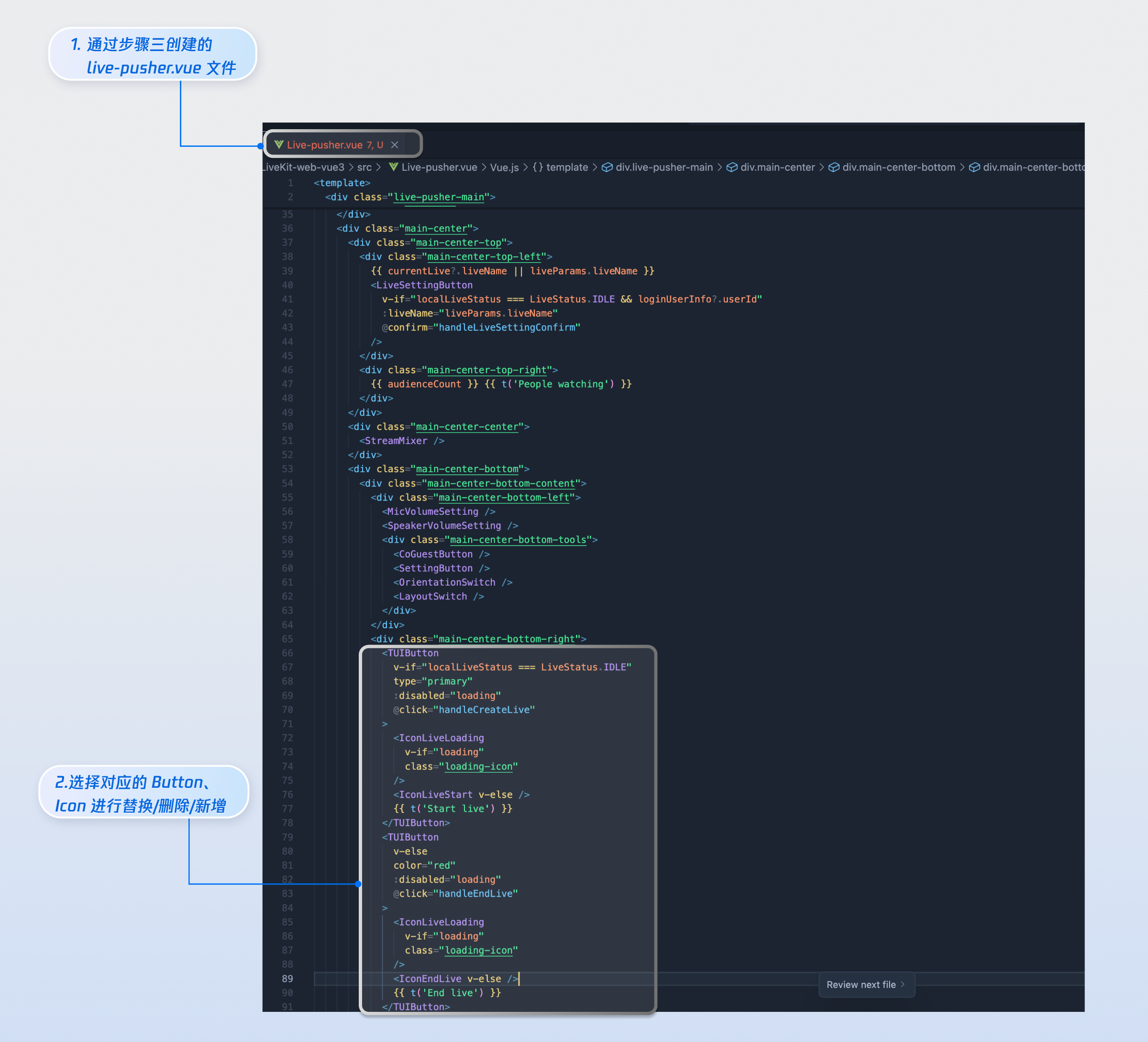
|
|
572
|
+
|
|
573
|
+
|
|
574
|
+
## 下一步
|
|
575
|
+
|
|
576
|
+
恭喜您,现在您已经成功集成了** 主播开播页面 **。接下来,您可以实现**观众观看页**、**直播列表页**等内容,可参考下表:
|
|
577
|
+
<table>
|
|
578
|
+
<tr>
|
|
579
|
+
<td rowspan="1" colSpan="1" >**功能**</td>
|
|
580
|
+
|
|
581
|
+
<td rowspan="1" colSpan="1" >**描述**</td>
|
|
582
|
+
|
|
583
|
+
<td rowspan="1" colSpan="1" >**集成指引**</td>
|
|
584
|
+
</tr>
|
|
585
|
+
|
|
586
|
+
<tr>
|
|
587
|
+
<td rowspan="1" colSpan="1" >**观众观看**</td>
|
|
588
|
+
|
|
589
|
+
<td rowspan="1" colSpan="1" >实现观众进入主播的直播间后观看直播,实现观众连麦 、直播间信息、在线观众、弹幕显示等功能</td>
|
|
590
|
+
|
|
591
|
+
<td rowspan="1" colSpan="1" >[观众观看](https://write.woa.com/document/185968222948704256)</td>
|
|
592
|
+
</tr>
|
|
593
|
+
|
|
594
|
+
<tr>
|
|
595
|
+
<td rowspan="1" colSpan="1" >**直播列表**</td>
|
|
596
|
+
|
|
597
|
+
<td rowspan="1" colSpan="1" >展示直播列表界面和功能,包含直播列表,房间信息展示功能</td>
|
|
598
|
+
|
|
599
|
+
<td rowspan="1" colSpan="1" >[直播列表](https://write.woa.com/document/185968224430342144)</td>
|
|
600
|
+
</tr>
|
|
601
|
+
</table>
|
|
602
|
+
|
|
603
|
+
|