@tencentcloud/sdk-mcp 1.1.2 → 1.1.5
This diff represents the content of publicly available package versions that have been released to one of the supported registries. The information contained in this diff is provided for informational purposes only and reflects changes between package versions as they appear in their respective public registries.
- package/index.js +2 -0
- package/index.js.map +1 -1
- package/libs/TLSSigAPIv2.d.ts +134 -0
- package/libs/TLSSigAPIv2.js +243 -0
- package/package.json +1 -1
- package/resource/doc/chatuikit/react/chat_window_integration.md +78 -0
- package/resource/doc/chatuikit/react/integration.md +9 -2
- package/resource/doc/chatuikit/vue/chat_window_integration.md +130 -0
- package/resource/doc/chatuikit/vue/integration.md +5 -44
- package/resource/doc/livekit/vue/components/barrage.md +3 -3
- package/resource/doc/livekit/vue/components/broadcast.md +603 -0
- package/resource/doc/livekit/vue/components/co-guest-panel.md +127 -0
- package/resource/doc/livekit/vue/components/live-audience-list.md +282 -0
- package/resource/doc/livekit/vue/components/live-list.md +5 -6
- package/resource/doc/livekit/vue/components/live-player.md +5 -6
- package/resource/doc/livekit/vue/components/live-scene-panel.md +193 -0
- package/resource/doc/livekit/vue/components/live-view.md +6 -6
- package/resource/doc/livekit/vue/components/stream-mixer.md +442 -0
- package/resource/doc/roomkit/{states → vue/states}/device-state.md +3 -3
- package/resource/doc/roomkit/{states → vue/states}/login-state.md +3 -3
- package/resource/doc/roomkit/{states → vue/states}/room-list-state.md +3 -3
- package/resource/doc/roomkit/{states → vue/states}/room-participant-state.md +3 -3
- package/resource/doc/rtcengine/web/how_to_integrated_web_rtc_engine.md +1 -0
- package/resource/doc/tuicallkit/vue/api_TUICallKit.md +3 -0
- package/resource/doc/tuicallkit/vue/how_to_integrated_vue_callkit.md +3 -0
- package/resource/doc/tuicallkit/vue/how_to_run_vue_callkit_demo.md +3 -0
- package/server-config.js +34 -0
- package/server-config.js.map +1 -0
- package/tools/chat/get-chat-faq.js +2 -3
- package/tools/chat/get-chat-faq.js.map +1 -1
- package/tools/chat/get-native-chat-integration.js +4 -4
- package/tools/chat/get-web-chat-component-detail.js +3 -3
- package/tools/chat/get-web-chat-integration.js +10 -10
- package/tools/chat/get-web-chat-integration.js.map +1 -1
- package/tools/chat/get-web-chat-uikit-init.js +2 -2
- package/tools/chat/get-web-chat-uikit-init.js.map +1 -1
- package/tools/chat/get-web-chat-window-integration.js +36 -0
- package/tools/chat/get-web-chat-window-integration.js.map +1 -0
- package/tools/common/get-usersig.js +30 -26
- package/tools/common/get-usersig.js.map +1 -1
- package/tools/common/record-prompt.js +5 -5
- package/tools/common/record-result.js +7 -6
- package/tools/common/record-result.js.map +1 -1
- package/tools/index.js +10 -5
- package/tools/index.js.map +1 -1
- package/tools/live/get-web-live-component-detail.js +4 -6
- package/tools/live/get-web-live-component-detail.js.map +1 -1
- package/tools/live/get-web-live-state-detail.js +6 -6
- package/tools/live/get-web-live-state-detail.js.map +1 -1
- package/tools/room/get-web-room-state-detail.js +6 -6
- package/tools/room/get-web-room-state-detail.js.map +1 -1
- package/tools/rtcengine/get-rtcengine-web-sdk-integration-guide.js +34 -0
- package/tools/rtcengine/get-rtcengine-web-sdk-integration-guide.js.map +1 -0
- package/tools/rtcengine/{get-rtcenigne-faq.js → get-trtc-web-sdk-faq.js} +5 -5
- package/tools/rtcengine/get-trtc-web-sdk-faq.js.map +1 -0
- package/tools/rtcengine/get-trtc-web-sdk-integration-guide.js +35 -0
- package/tools/rtcengine/get-trtc-web-sdk-integration-guide.js.map +1 -0
- package/utils/generate-usersig.js +7 -9
- package/utils/generate-usersig.js.map +1 -1
- package/utils/get-doc-content.js +0 -1
- package/utils/get-doc-content.js.map +1 -1
- package/utils/handle-component-name.js +53 -17
- package/utils/handle-component-name.js.map +1 -1
- package/utils/handle-state-name.js +29 -0
- package/utils/handle-state-name.js.map +1 -0
- package/libs/lib-generate-test-usersig-es.min.d.ts +0 -6
- package/libs/lib-generate-test-usersig-es.min.js +0 -2
- package/resource/doc/livekit/vue/components/atomicx-core.md +0 -2656
- package/resource/doc/livekit/vue/components/chat-barrage.md +0 -615
- package/resource/doc/livekit/vue/components/state.md +0 -2656
- package/tools/rtcengine/get-rtcengine-integration-guide.js +0 -32
- package/tools/rtcengine/get-rtcengine-integration-guide.js.map +0 -1
- package/tools/rtcengine/get-rtcenigne-faq.js.map +0 -1
- /package/resource/doc/chatuikit/react/{login.md → init.md} +0 -0
- /package/resource/doc/livekit/vue/{components/states → states}/live-state.md +0 -0
|
@@ -1,615 +0,0 @@
|
|
|
1
|
-
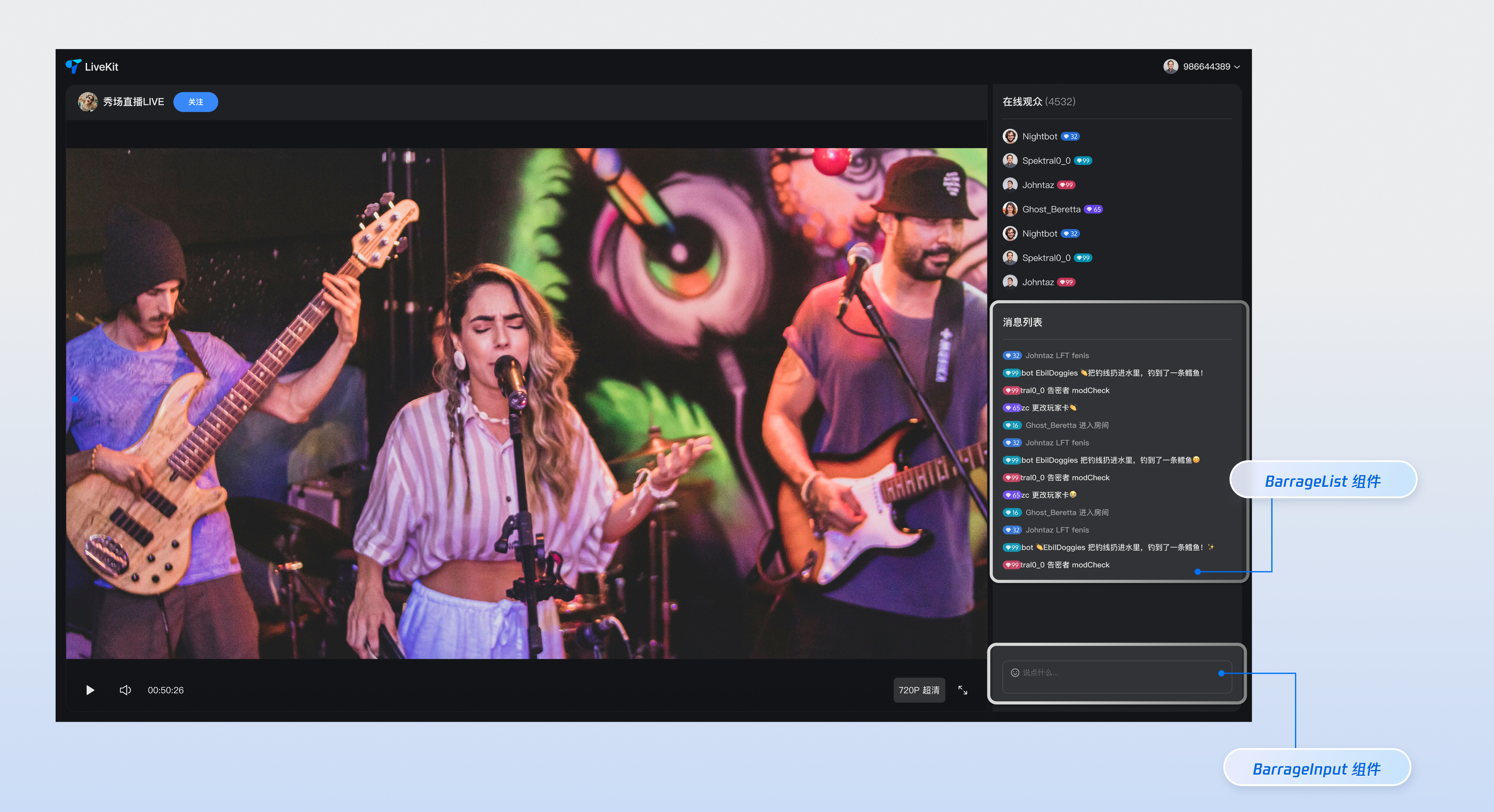
本文对**弹幕组件**进行了详细的介绍,其中包含**弹幕消息组件(BarrageList)**和**消息发送组件(BarrageInput)。**您可以在已有项目中直接参考本文示例集成我们开发好的整体组件,也可以根据您的需求按照文档中的组件自定义部分对样式,布局进行深度的定制。
|
|
2
|
-
|
|
3
|
-
|
|
4
|
-
|
|
5
|
-
|
|
6
|
-
## 组件构成
|
|
7
|
-
<table>
|
|
8
|
-
<tr>
|
|
9
|
-
<td rowspan="1" colSpan="1" >**组件名称**</td>
|
|
10
|
-
|
|
11
|
-
<td rowspan="1" colSpan="1" >**具体内容**</td>
|
|
12
|
-
</tr>
|
|
13
|
-
|
|
14
|
-
<tr>
|
|
15
|
-
<td rowspan="1" colSpan="1" >**弹幕消息组件(BarrageList)**</td>
|
|
16
|
-
|
|
17
|
-
<td rowspan="1" colSpan="1" >负责实时展示和管理弹幕消息流的组件,提供**消息列表渲染、时间聚合、用户交互和响应式适配**等完整的消息展示解决方案。</td>
|
|
18
|
-
</tr>
|
|
19
|
-
|
|
20
|
-
<tr>
|
|
21
|
-
<td rowspan="1" colSpan="1" >**消息发送组件(BarrageInput)**</td>
|
|
22
|
-
|
|
23
|
-
<td rowspan="1" colSpan="1" >提供富文本编辑和消息发送功能的输入组件,集成**表情选择器、字符限制、状态管理和跨平台适配**,为用户提供流畅的消息输入体验。</td>
|
|
24
|
-
</tr>
|
|
25
|
-
</table>
|
|
26
|
-
|
|
27
|
-
|
|
28
|
-
## 组件接入
|
|
29
|
-
|
|
30
|
-
### 步骤1:环境配置及开通服务
|
|
31
|
-
|
|
32
|
-
在进行快速接入之前,您需要参考[准备工作](https://write.woa.com/document/185222107981008896),满足相关环境配置及开通对应服务。
|
|
33
|
-
|
|
34
|
-
### 步骤2:安装依赖
|
|
35
|
-
|
|
36
|
-
|
|
37
|
-
|
|
38
|
-
|
|
39
|
-
【npm】
|
|
40
|
-
``` bash
|
|
41
|
-
npm install tuikit-atomicx-vue3 @tencentcloud/uikit-base-component-vue3 --save
|
|
42
|
-
```
|
|
43
|
-
|
|
44
|
-
|
|
45
|
-
【pnpm】
|
|
46
|
-
``` bash
|
|
47
|
-
pnpm add tuikit-atomicx-vue3 @tencentcloud/uikit-base-component-vue3
|
|
48
|
-
```
|
|
49
|
-
|
|
50
|
-
|
|
51
|
-
【yarn】
|
|
52
|
-
``` bash
|
|
53
|
-
yarn add tuikit-atomicx-vue3 @tencentcloud/uikit-base-component-vue3
|
|
54
|
-
```
|
|
55
|
-
|
|
56
|
-
### 步骤3:集成弹幕组件
|
|
57
|
-
|
|
58
|
-
在您的项目中引入并使用弹幕组件,可直接复制如下示例至您的项目中展示**完整的直播间弹幕消息组件以及消息发送组件**。
|
|
59
|
-
``` typescript
|
|
60
|
-
<template>
|
|
61
|
-
<UIKitProvider theme="dark" language="zh-CN">
|
|
62
|
-
<div class="app">
|
|
63
|
-
<div class="chat-container">
|
|
64
|
-
<div class="chat-content">
|
|
65
|
-
<BarrageList class="barrage-list" />
|
|
66
|
-
</div>
|
|
67
|
-
<div class="chat-input">
|
|
68
|
-
<BarrageInput class="barrage-input" />
|
|
69
|
-
</div>
|
|
70
|
-
</div>
|
|
71
|
-
</div>
|
|
72
|
-
</UIKitProvider>
|
|
73
|
-
</template>
|
|
74
|
-
|
|
75
|
-
<script setup lang="ts">
|
|
76
|
-
import { onMounted, ref } from 'vue';
|
|
77
|
-
import { UIKitProvider } from '@tencentcloud/uikit-base-component-vue3';
|
|
78
|
-
import { BarrageList, BarrageInput, useLoginState, useLiveState } from 'tuikit-atomicx-vue3';
|
|
79
|
-
|
|
80
|
-
const { login, loginUserInfo } = useLoginState();
|
|
81
|
-
const { joinLive } = useLiveState();
|
|
82
|
-
|
|
83
|
-
async function initLogin() {
|
|
84
|
-
try {
|
|
85
|
-
await login({
|
|
86
|
-
sdkAppId: 0, // SDKAppID, 可以参考步骤 1 获取
|
|
87
|
-
userId: '', // UserID, 可以参考步骤 1 获取
|
|
88
|
-
userSig: '', // userSig, 可以参考步骤 1 获取
|
|
89
|
-
});
|
|
90
|
-
} catch (error) {
|
|
91
|
-
console.error('登录失败:', error);
|
|
92
|
-
}
|
|
93
|
-
}
|
|
94
|
-
|
|
95
|
-
onMounted(async () => {
|
|
96
|
-
await initLogin();
|
|
97
|
-
await joinLive({
|
|
98
|
-
liveId: '输入对应直播间 LiveId', // 输入对应 liveId 进入直播间
|
|
99
|
-
});
|
|
100
|
-
});
|
|
101
|
-
</script>
|
|
102
|
-
|
|
103
|
-
<style scoped>.app{width:100vw;height:100vh;display:flex;justify-content:center;align-items:center;padding:20px;box-sizing:border-box}.chat-container{width:100%;max-width:500px;height:600px;border-radius:16px;display:flex;flex-direction:column;overflow:hidden}.chat-content{flex:1;overflow:hidden}.barrage-list{width:100%;height:100%}.chat-input{background-color:var(--bg-color-dialog);padding:16px}.barrage-input{width:100%}</style>
|
|
104
|
-
```
|
|
105
|
-
|
|
106
|
-
## 自定义组件
|
|
107
|
-
|
|
108
|
-
**弹幕消息组件**分别为用户自定义需求提供了丰富且多维度的`Props` 接口,允许用户自定义功能或自定义 UI 等,具体参数内容如下表所示。
|
|
109
|
-
|
|
110
|
-
> **说明:**
|
|
111
|
-
>
|
|
112
|
-
|
|
113
|
-
> 若您需要直接了解弹幕消息组件(BarrageList)的自定义的详细内容可快速跳转如下链接:[弹幕消息组件自定义](https://write.woa.com/#872b809d-0251-49c3-8b4c-4c97b2801bdf);
|
|
114
|
-
>
|
|
115
|
-
|
|
116
|
-
> 若您需要直接了解消息发送组件(BarrageInput)的自定义的详细内容可快速跳转如下链接:[消息发送组件自定义](https://write.woa.com/#566ae5d7-6c69-4ba1-858a-bf839428b171);
|
|
117
|
-
>
|
|
118
|
-
|
|
119
|
-
|
|
120
|
-
### 弹幕消息组件(BarrageList)自定义
|
|
121
|
-
|
|
122
|
-
#### **Props**
|
|
123
|
-
<table>
|
|
124
|
-
<tr>
|
|
125
|
-
<td rowspan="1" colSpan="1" >**参数名**</td>
|
|
126
|
-
|
|
127
|
-
<td rowspan="1" colSpan="1" >**参数类型**</td>
|
|
128
|
-
|
|
129
|
-
<td rowspan="1" colSpan="1" >**默认值**</td>
|
|
130
|
-
|
|
131
|
-
<td rowspan="1" colSpan="1" >**说明**</td>
|
|
132
|
-
</tr>
|
|
133
|
-
|
|
134
|
-
<tr>
|
|
135
|
-
<td rowspan="1" colSpan="1" >messageAggregationTime</td>
|
|
136
|
-
|
|
137
|
-
<td rowspan="1" colSpan="1" >Number</td>
|
|
138
|
-
|
|
139
|
-
<td rowspan="1" colSpan="1" >300</td>
|
|
140
|
-
|
|
141
|
-
<td rowspan="1" colSpan="1" >消息分组的最大时间间隔(秒)。</td>
|
|
142
|
-
</tr>
|
|
143
|
-
|
|
144
|
-
<tr>
|
|
145
|
-
<td rowspan="1" colSpan="1" >filter</td>
|
|
146
|
-
|
|
147
|
-
<td rowspan="1" colSpan="1" >(message: IMessageModel) => boolean</td>
|
|
148
|
-
|
|
149
|
-
<td rowspan="1" colSpan="1" >-</td>
|
|
150
|
-
|
|
151
|
-
<td rowspan="1" colSpan="1" >用于筛选消息的函数。</td>
|
|
152
|
-
</tr>
|
|
153
|
-
|
|
154
|
-
<tr>
|
|
155
|
-
<td rowspan="1" colSpan="1" >Message</td>
|
|
156
|
-
|
|
157
|
-
<td rowspan="1" colSpan="1" >Component</td>
|
|
158
|
-
|
|
159
|
-
<td rowspan="1" colSpan="1" >Message</td>
|
|
160
|
-
|
|
161
|
-
<td rowspan="1" colSpan="1" >自定义消息组件。</td>
|
|
162
|
-
</tr>
|
|
163
|
-
|
|
164
|
-
<tr>
|
|
165
|
-
<td rowspan="1" colSpan="1" >MessageTimeDivider</td>
|
|
166
|
-
|
|
167
|
-
<td rowspan="1" colSpan="1" >Component</td>
|
|
168
|
-
|
|
169
|
-
<td rowspan="1" colSpan="1" >MessageTimeDivider</td>
|
|
170
|
-
|
|
171
|
-
<td rowspan="1" colSpan="1" >自定义消息时间分割线组件。</td>
|
|
172
|
-
</tr>
|
|
173
|
-
|
|
174
|
-
<tr>
|
|
175
|
-
<td rowspan="1" colSpan="1" >LocalNoticeMessage</td>
|
|
176
|
-
|
|
177
|
-
<td rowspan="1" colSpan="1" >Component</td>
|
|
178
|
-
|
|
179
|
-
<td rowspan="1" colSpan="1" >LocalNoticeMessage</td>
|
|
180
|
-
|
|
181
|
-
<td rowspan="1" colSpan="1" >自定义本地通知消息组件。</td>
|
|
182
|
-
</tr>
|
|
183
|
-
|
|
184
|
-
<tr>
|
|
185
|
-
<td rowspan="1" colSpan="1" >containerStyle</td>
|
|
186
|
-
|
|
187
|
-
<td rowspan="1" colSpan="1" >CSSProperties</td>
|
|
188
|
-
|
|
189
|
-
<td rowspan="1" colSpan="1" >-</td>
|
|
190
|
-
|
|
191
|
-
<td rowspan="1" colSpan="1" >自定义消息列表容器样式。</td>
|
|
192
|
-
</tr>
|
|
193
|
-
|
|
194
|
-
<tr>
|
|
195
|
-
<td rowspan="1" colSpan="1" >itemStyle</td>
|
|
196
|
-
|
|
197
|
-
<td rowspan="1" colSpan="1" >CSSProperties</td>
|
|
198
|
-
|
|
199
|
-
<td rowspan="1" colSpan="1" >-</td>
|
|
200
|
-
|
|
201
|
-
<td rowspan="1" colSpan="1" >自定义单条消息项样式。</td>
|
|
202
|
-
</tr>
|
|
203
|
-
|
|
204
|
-
<tr>
|
|
205
|
-
<td rowspan="1" colSpan="1" >height</td>
|
|
206
|
-
|
|
207
|
-
<td rowspan="1" colSpan="1" >String</td>
|
|
208
|
-
|
|
209
|
-
<td rowspan="1" colSpan="1" >-</td>
|
|
210
|
-
|
|
211
|
-
<td rowspan="1" colSpan="1" >组件高度,支持CSS单位。</td>
|
|
212
|
-
</tr>
|
|
213
|
-
|
|
214
|
-
<tr>
|
|
215
|
-
<td rowspan="1" colSpan="1" >style</td>
|
|
216
|
-
|
|
217
|
-
<td rowspan="1" colSpan="1" >CSSProperties</td>
|
|
218
|
-
|
|
219
|
-
<td rowspan="1" colSpan="1" >-</td>
|
|
220
|
-
|
|
221
|
-
<td rowspan="1" colSpan="1" >指定根元素样式的自定义样式。</td>
|
|
222
|
-
</tr>
|
|
223
|
-
</table>
|
|
224
|
-
|
|
225
|
-
|
|
226
|
-
如上表所示,弹幕消息组件的 Props 自定义部分由三块内容组成,分别为**组件属性、可替换子组件、自定义样式,**具体内容如下表所示。
|
|
227
|
-
<table>
|
|
228
|
-
<tr>
|
|
229
|
-
<td rowspan="1" colSpan="1" >**内容**</td>
|
|
230
|
-
|
|
231
|
-
<td rowspan="1" colSpan="1" >**参数**</td>
|
|
232
|
-
</tr>
|
|
233
|
-
|
|
234
|
-
<tr>
|
|
235
|
-
<td rowspan="1" colSpan="1" >**组件属性**</td>
|
|
236
|
-
|
|
237
|
-
<td rowspan="1" colSpan="1" >`filter`、`messageAggregationTime`</td>
|
|
238
|
-
</tr>
|
|
239
|
-
|
|
240
|
-
<tr>
|
|
241
|
-
<td rowspan="1" colSpan="1" >**可替换子组件**</td>
|
|
242
|
-
|
|
243
|
-
<td rowspan="1" colSpan="1" >`Message`、`MessageTimeDivider`、`LocalNoticeMessage`</td>
|
|
244
|
-
</tr>
|
|
245
|
-
|
|
246
|
-
<tr>
|
|
247
|
-
<td rowspan="1" colSpan="1" >**自定义样式**</td>
|
|
248
|
-
|
|
249
|
-
<td rowspan="1" colSpan="1" >`ContainerStyle`、`ItemStyle`、`height`、`style`</td>
|
|
250
|
-
</tr>
|
|
251
|
-
</table>
|
|
252
|
-
|
|
253
|
-
|
|
254
|
-
#### 消息筛选
|
|
255
|
-
|
|
256
|
-
通过设置 `filter` 参数,您可以灵活地控制弹幕消息组件中显示的消息内容。
|
|
257
|
-
``` typescript
|
|
258
|
-
<BarrageList :filter="(message) => message.type === 'TIMTextElem'" />
|
|
259
|
-
```
|
|
260
|
-
|
|
261
|
-
#### 消息聚合时间
|
|
262
|
-
|
|
263
|
-
通过设置 `messageAggregationTime` 参数,您可以控制消息分组的时间间隔。
|
|
264
|
-
``` typescript
|
|
265
|
-
<BarrageList :messageAggregationTime="300" />
|
|
266
|
-
```
|
|
267
|
-
|
|
268
|
-
#### 自定义样式
|
|
269
|
-
|
|
270
|
-
弹幕消息组件提供了 `containerStyle`、`itemStyle`、`自定义子组件` 等内容,用于自定义组件样式。
|
|
271
|
-
1. 要自定义消息列表容器样式,您可以给 `containerStyle` 属性传递一个样式对象。
|
|
272
|
-
|
|
273
|
-
|
|
274
|
-
**示例:自定义容器内边距**
|
|
275
|
-
|
|
276
|
-
``` typescript
|
|
277
|
-
<BarrageList :containerStyle="{ padding: '0px' }" />
|
|
278
|
-
```
|
|
279
|
-
2. 要自定义单条消息样式,您可以给 `itemStyle` 属性传递一个样式对象。
|
|
280
|
-
|
|
281
|
-
|
|
282
|
-
**示例:自定义消息项间距和边框及消息气泡颜色**
|
|
283
|
-
|
|
284
|
-
``` typescript
|
|
285
|
-
<BarrageList :itemStyle="{ borderRadius: '10px', background: '#1C66e5', padding: '10px', boxSizing: 'border-box'}" />
|
|
286
|
-
```
|
|
287
|
-
3. 弹幕消息组件支持自定义消息展示组件,您可以完全控制消息的渲染方式。
|
|
288
|
-
|
|
289
|
-
|
|
290
|
-
**示例:自定义消息组件**
|
|
291
|
-
|
|
292
|
-
``` typescript
|
|
293
|
-
// MyCustomMessage.vue
|
|
294
|
-
<template>
|
|
295
|
-
<div class="custom-message">
|
|
296
|
-
<div class="message-header">
|
|
297
|
-
<span class="user-name">{{ getUserName(message) }}</span>
|
|
298
|
-
<span class="message-time">{{ formatTime(message.time) }}</span>
|
|
299
|
-
</div>
|
|
300
|
-
<div class="message-content">
|
|
301
|
-
{{ getMessageText(message) }}
|
|
302
|
-
</div>
|
|
303
|
-
</div>
|
|
304
|
-
</template>
|
|
305
|
-
|
|
306
|
-
<script setup lang="ts">
|
|
307
|
-
interface SimpleMessage {
|
|
308
|
-
id: string;
|
|
309
|
-
from: string;
|
|
310
|
-
nick?: string;
|
|
311
|
-
nameCard?: string;
|
|
312
|
-
time: number;
|
|
313
|
-
type: string;
|
|
314
|
-
content: string;
|
|
315
|
-
avatar?: string;
|
|
316
|
-
}
|
|
317
|
-
|
|
318
|
-
interface Props {
|
|
319
|
-
message: SimpleMessage;
|
|
320
|
-
isLastInChunk?: boolean;
|
|
321
|
-
}
|
|
322
|
-
|
|
323
|
-
const props = defineProps<Props>();
|
|
324
|
-
|
|
325
|
-
const formatTime = (timestamp: number) => {
|
|
326
|
-
return new Date(timestamp * 1000).toLocaleTimeString('zh-CN', {
|
|
327
|
-
hour: '2-digit',
|
|
328
|
-
minute: '2-digit'
|
|
329
|
-
});
|
|
330
|
-
};
|
|
331
|
-
|
|
332
|
-
const getUserName = (message: SimpleMessage) => {
|
|
333
|
-
return message.nameCard || message.nick || message.from || '匿名用户';
|
|
334
|
-
};
|
|
335
|
-
|
|
336
|
-
const getMessageText = (message: SimpleMessage) => {
|
|
337
|
-
if (message.type === 'text') {
|
|
338
|
-
return message.content || '';
|
|
339
|
-
} else if (message.type === 'image') {
|
|
340
|
-
return '[图片消息]';
|
|
341
|
-
} else if (message.type === 'emoji') {
|
|
342
|
-
return '[表情消息]';
|
|
343
|
-
}
|
|
344
|
-
return '[其他类型消息]';
|
|
345
|
-
};
|
|
346
|
-
</script>
|
|
347
|
-
|
|
348
|
-
<style scoped>.custom-message{background:linear-gradient(135deg,#667eea 0%,#764ba2 100%);color:white;padding:12px;border-radius:12px;margin:4px 0;box-shadow:0 2px 8px rgba(0,0,0,0.1);transition:transform 0.2s ease}.custom-message:hover{transform:translateY(-2px)}.message-header{display:flex;justify-content:space-between;align-items:center;margin-bottom:8px;font-size:12px;opacity:0.9}.user-name{font-weight:500;max-width:120px;overflow:hidden;text-overflow:ellipsis;white-space:nowrap}.message-time{font-size:11px;opacity:0.7}.message-content{font-size:14px;line-height:1.4;word-break:break-word}</style>
|
|
349
|
-
|
|
350
|
-
// 在 弹幕消息组件 中使用
|
|
351
|
-
<template>
|
|
352
|
-
<BarrageList :Message="MyCustomMessage" />
|
|
353
|
-
</template>
|
|
354
|
-
|
|
355
|
-
<script setup lang="ts">
|
|
356
|
-
import MyCustomMessage from "./MyCustomMessage.vue";
|
|
357
|
-
</script>
|
|
358
|
-
```
|
|
359
|
-
<table>
|
|
360
|
-
<tr>
|
|
361
|
-
<td rowspan="2" colSpan="1" >**修改前**</td>
|
|
362
|
-
|
|
363
|
-
<td rowspan="1" colSpan="3" >**修改后**</td>
|
|
364
|
-
</tr>
|
|
365
|
-
|
|
366
|
-
<tr>
|
|
367
|
-
<td rowspan="1" colSpan="1" >**自定义容器内边距**</td>
|
|
368
|
-
|
|
369
|
-
<td rowspan="1" colSpan="1" >**自定义消息项间距和边框**</td>
|
|
370
|
-
|
|
371
|
-
<td rowspan="1" colSpan="1" >**自定义消息组件**</td>
|
|
372
|
-
</tr>
|
|
373
|
-
|
|
374
|
-
<tr>
|
|
375
|
-
<td rowspan="1" colSpan="1" ><br>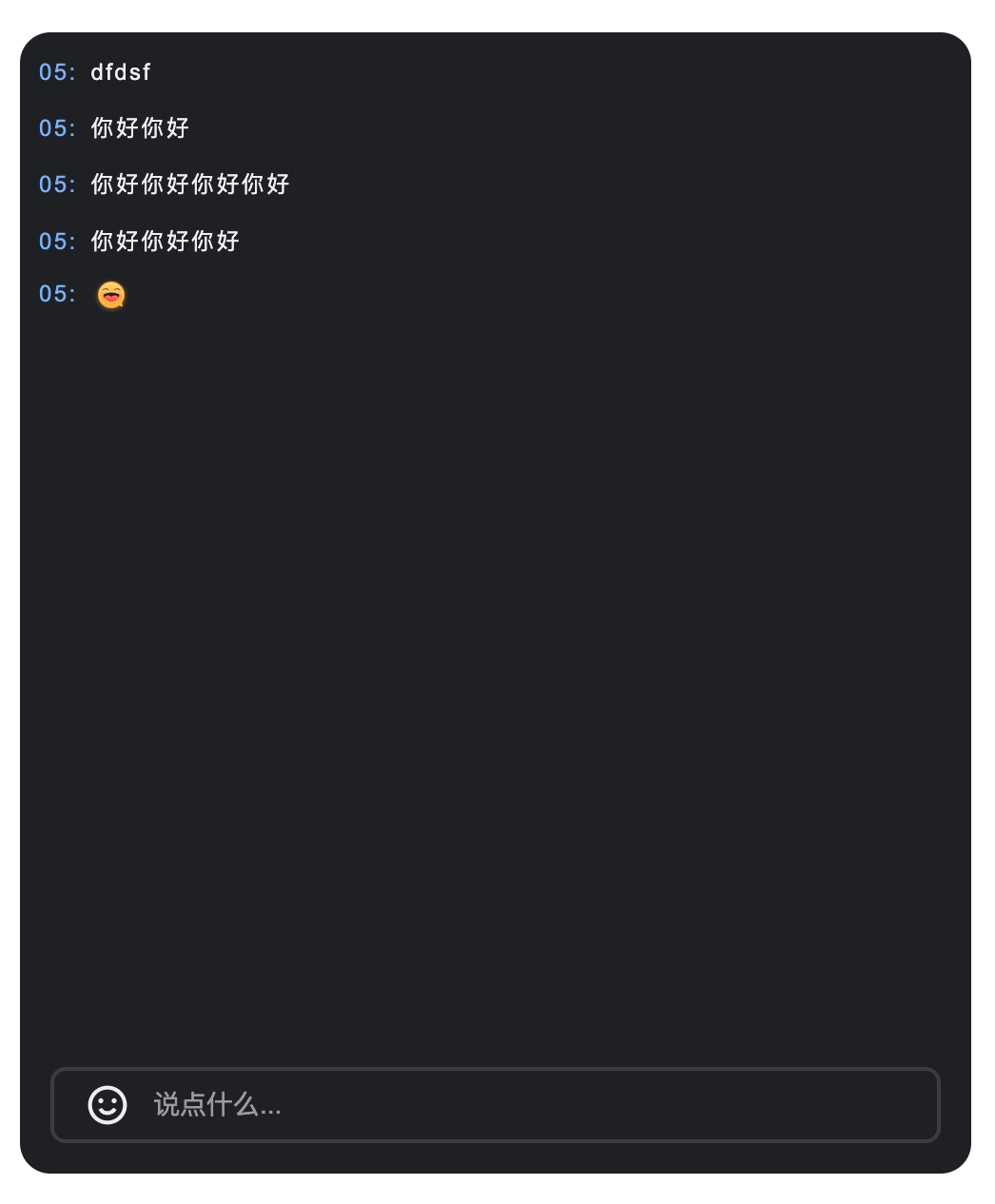</td>
|
|
376
|
-
|
|
377
|
-
<td rowspan="1" colSpan="1" ><br>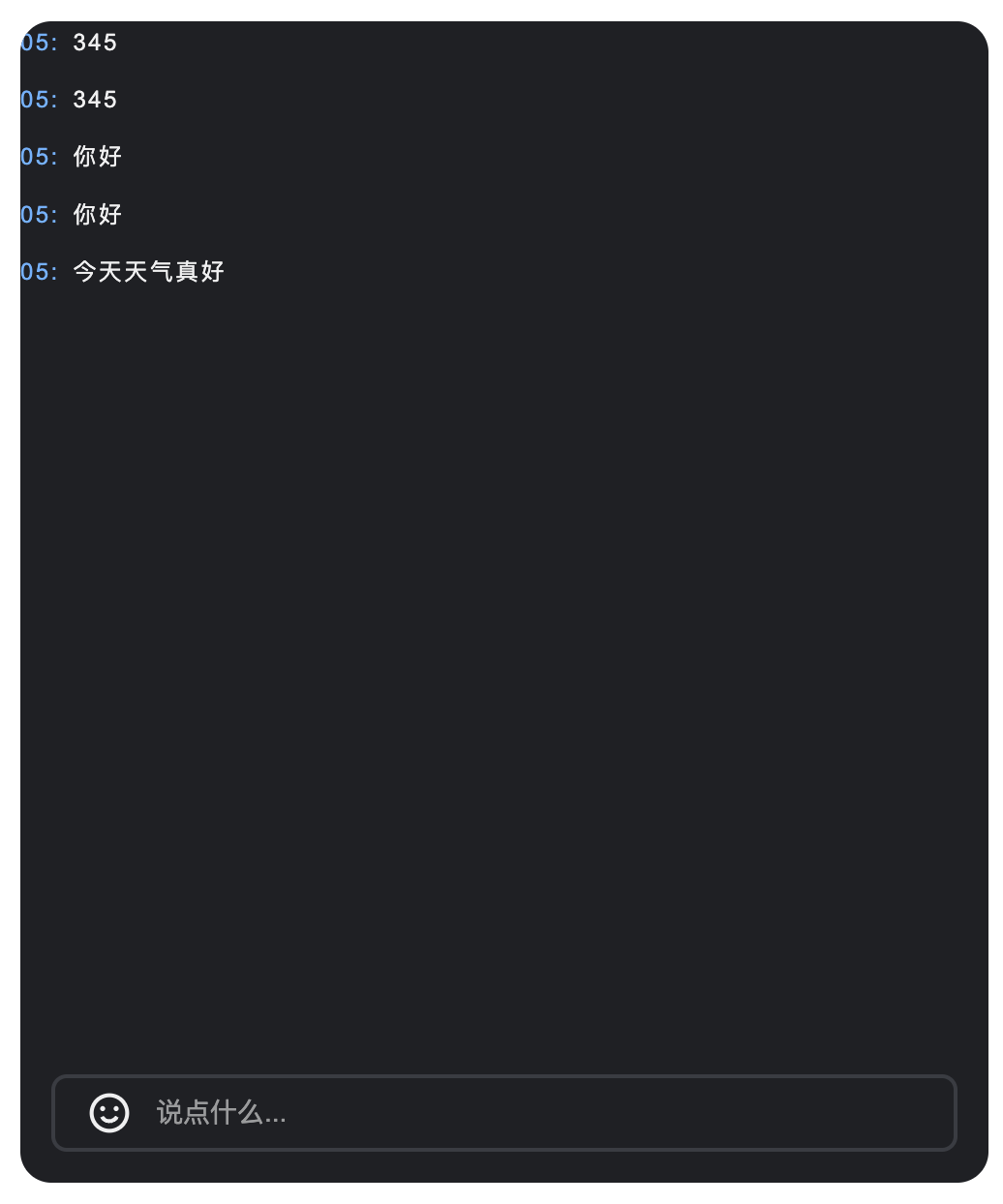</td>
|
|
378
|
-
|
|
379
|
-
<td rowspan="1" colSpan="1" ><br>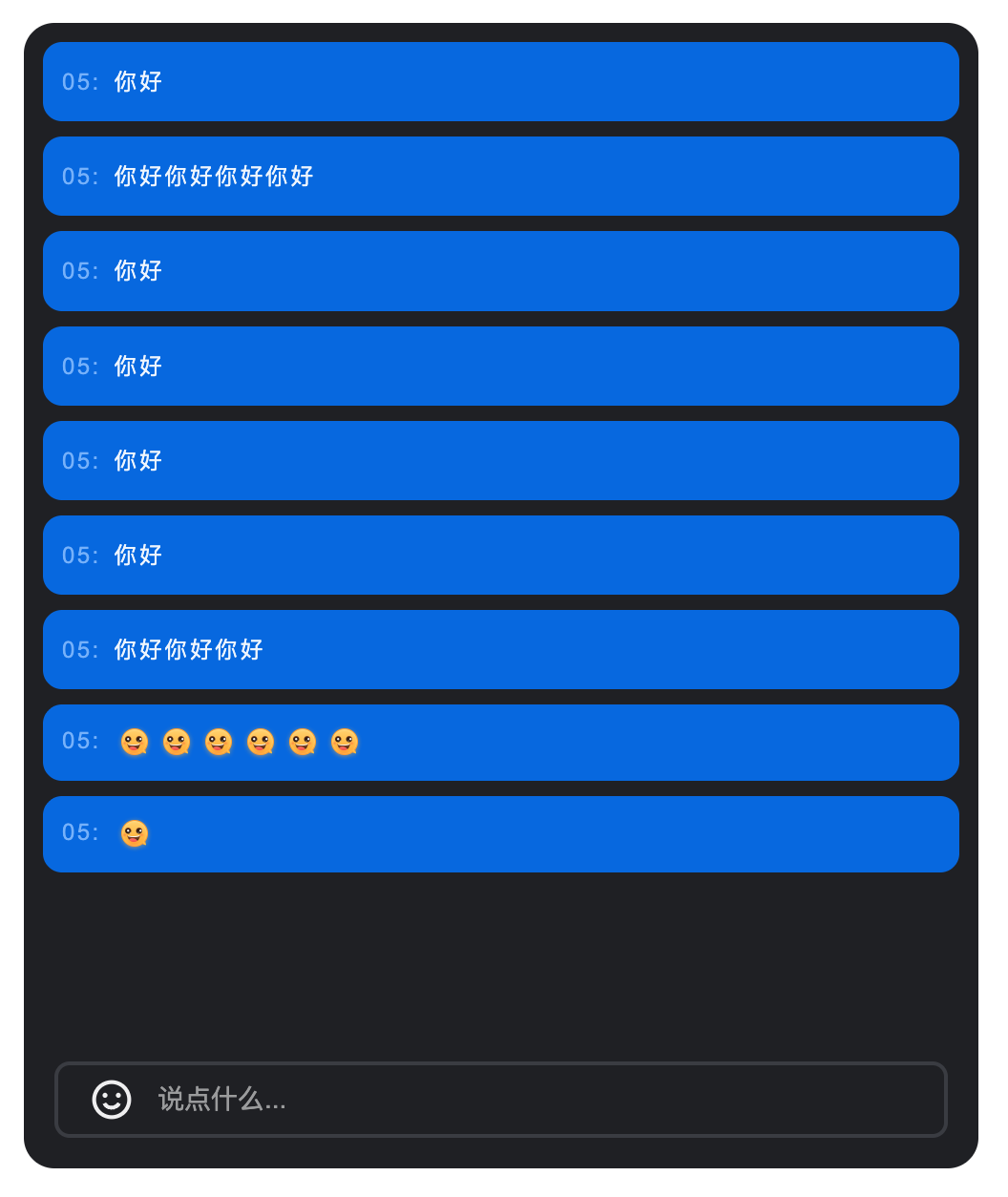</td>
|
|
380
|
-
|
|
381
|
-
<td rowspan="1" colSpan="1" ><br>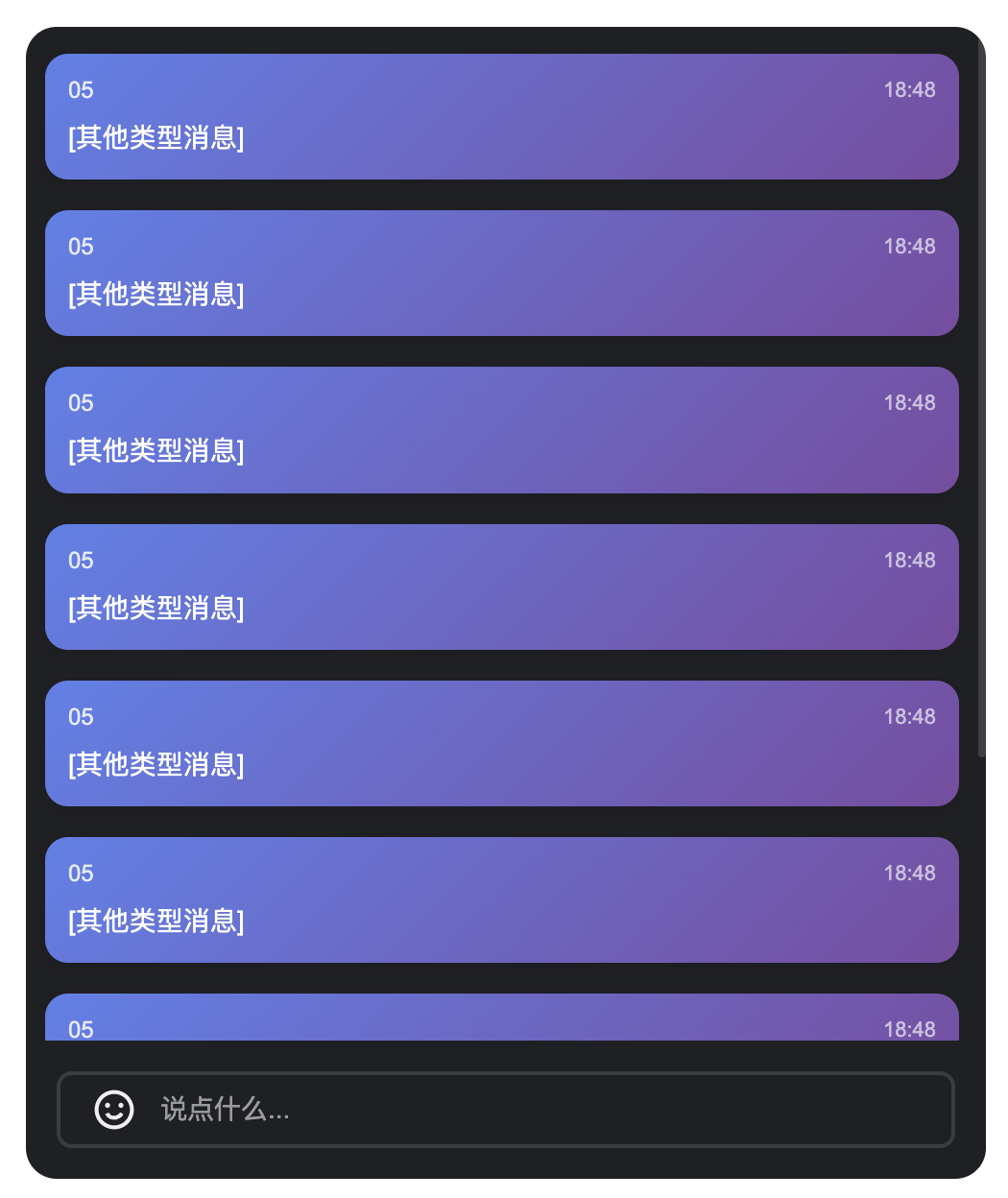</td>
|
|
382
|
-
</tr>
|
|
383
|
-
</table>
|
|
384
|
-
|
|
385
|
-
|
|
386
|
-
### 消息发送组件(BarrageInput)自定义
|
|
387
|
-
|
|
388
|
-
#### **Props**
|
|
389
|
-
<table>
|
|
390
|
-
<tr>
|
|
391
|
-
<td rowspan="1" colSpan="1" >**参数名**</td>
|
|
392
|
-
|
|
393
|
-
<td rowspan="1" colSpan="1" >**类型**</td>
|
|
394
|
-
|
|
395
|
-
<td rowspan="1" colSpan="1" >**默认值**</td>
|
|
396
|
-
|
|
397
|
-
<td rowspan="1" colSpan="1" >**说明**</td>
|
|
398
|
-
</tr>
|
|
399
|
-
|
|
400
|
-
<tr>
|
|
401
|
-
<td rowspan="1" colSpan="1" >containerClass</td>
|
|
402
|
-
|
|
403
|
-
<td rowspan="1" colSpan="1" >String</td>
|
|
404
|
-
|
|
405
|
-
<td rowspan="1" colSpan="1" >''</td>
|
|
406
|
-
|
|
407
|
-
<td rowspan="1" colSpan="1" >自定义容器的 CSS 类名。</td>
|
|
408
|
-
</tr>
|
|
409
|
-
|
|
410
|
-
<tr>
|
|
411
|
-
<td rowspan="1" colSpan="1" >containerStyle</td>
|
|
412
|
-
|
|
413
|
-
<td rowspan="1" colSpan="1" >Record<br></td>
|
|
414
|
-
|
|
415
|
-
<td rowspan="1" colSpan="1" >{}</td>
|
|
416
|
-
|
|
417
|
-
<td rowspan="1" colSpan="1" >自定义容器的内联样式。</td>
|
|
418
|
-
</tr>
|
|
419
|
-
|
|
420
|
-
<tr>
|
|
421
|
-
<td rowspan="1" colSpan="1" >width</td>
|
|
422
|
-
|
|
423
|
-
<td rowspan="1" colSpan="1" >String</td>
|
|
424
|
-
|
|
425
|
-
<td rowspan="1" colSpan="1" >-</td>
|
|
426
|
-
|
|
427
|
-
<td rowspan="1" colSpan="1" >组件宽度,支持CSS单位。</td>
|
|
428
|
-
</tr>
|
|
429
|
-
|
|
430
|
-
<tr>
|
|
431
|
-
<td rowspan="1" colSpan="1" >height</td>
|
|
432
|
-
|
|
433
|
-
<td rowspan="1" colSpan="1" >String</td>
|
|
434
|
-
|
|
435
|
-
<td rowspan="1" colSpan="1" >-</td>
|
|
436
|
-
|
|
437
|
-
<td rowspan="1" colSpan="1" >组件高度,支持CSS单位。</td>
|
|
438
|
-
</tr>
|
|
439
|
-
|
|
440
|
-
<tr>
|
|
441
|
-
<td rowspan="1" colSpan="1" >minHeight</td>
|
|
442
|
-
|
|
443
|
-
<td rowspan="1" colSpan="1" >String</td>
|
|
444
|
-
|
|
445
|
-
<td rowspan="1" colSpan="1" >'40px'</td>
|
|
446
|
-
|
|
447
|
-
<td rowspan="1" colSpan="1" >组件最小高度,支持CSS单位。</td>
|
|
448
|
-
</tr>
|
|
449
|
-
|
|
450
|
-
<tr>
|
|
451
|
-
<td rowspan="1" colSpan="1" >maxHeight</td>
|
|
452
|
-
|
|
453
|
-
<td rowspan="1" colSpan="1" >String</td>
|
|
454
|
-
|
|
455
|
-
<td rowspan="1" colSpan="1" >'140px'</td>
|
|
456
|
-
|
|
457
|
-
<td rowspan="1" colSpan="1" >组件最大高度,支持CSS单位。</td>
|
|
458
|
-
</tr>
|
|
459
|
-
|
|
460
|
-
<tr>
|
|
461
|
-
<td rowspan="1" colSpan="1" >placeholder</td>
|
|
462
|
-
|
|
463
|
-
<td rowspan="1" colSpan="1" >String</td>
|
|
464
|
-
|
|
465
|
-
<td rowspan="1" colSpan="1" >-</td>
|
|
466
|
-
|
|
467
|
-
<td rowspan="1" colSpan="1" >输入框占位符文本。</td>
|
|
468
|
-
</tr>
|
|
469
|
-
|
|
470
|
-
<tr>
|
|
471
|
-
<td rowspan="1" colSpan="1" >disabled</td>
|
|
472
|
-
|
|
473
|
-
<td rowspan="1" colSpan="1" >Boolean</td>
|
|
474
|
-
|
|
475
|
-
<td rowspan="1" colSpan="1" >false</td>
|
|
476
|
-
|
|
477
|
-
<td rowspan="1" colSpan="1" >是否禁用输入框。</td>
|
|
478
|
-
</tr>
|
|
479
|
-
|
|
480
|
-
<tr>
|
|
481
|
-
<td rowspan="1" colSpan="1" >autoFocus</td>
|
|
482
|
-
|
|
483
|
-
<td rowspan="1" colSpan="1" >Boolean</td>
|
|
484
|
-
|
|
485
|
-
<td rowspan="1" colSpan="1" >true</td>
|
|
486
|
-
|
|
487
|
-
<td rowspan="1" colSpan="1" >是否自动聚焦到输入框。</td>
|
|
488
|
-
</tr>
|
|
489
|
-
|
|
490
|
-
<tr>
|
|
491
|
-
<td rowspan="1" colSpan="1" >maxLength</td>
|
|
492
|
-
|
|
493
|
-
<td rowspan="1" colSpan="1" >Number</td>
|
|
494
|
-
|
|
495
|
-
<td rowspan="1" colSpan="1" >80</td>
|
|
496
|
-
|
|
497
|
-
<td rowspan="1" colSpan="1" >输入内容的最大字符数限制。</td>
|
|
498
|
-
</tr>
|
|
499
|
-
</table>
|
|
500
|
-
|
|
501
|
-
|
|
502
|
-
#### **Events**
|
|
503
|
-
<table>
|
|
504
|
-
<tr>
|
|
505
|
-
<td rowspan="1" colSpan="1" >**事件名**</td>
|
|
506
|
-
|
|
507
|
-
<td rowspan="1" colSpan="1" >**参数**</td>
|
|
508
|
-
|
|
509
|
-
<td rowspan="1" colSpan="1" >**说明**</td>
|
|
510
|
-
</tr>
|
|
511
|
-
|
|
512
|
-
<tr>
|
|
513
|
-
<td rowspan="1" colSpan="1" >focus</td>
|
|
514
|
-
|
|
515
|
-
<td rowspan="1" colSpan="1" >-</td>
|
|
516
|
-
|
|
517
|
-
<td rowspan="1" colSpan="1" >输入框获得焦点时触发。</td>
|
|
518
|
-
</tr>
|
|
519
|
-
|
|
520
|
-
<tr>
|
|
521
|
-
<td rowspan="1" colSpan="1" >blur</td>
|
|
522
|
-
|
|
523
|
-
<td rowspan="1" colSpan="1" >-</td>
|
|
524
|
-
|
|
525
|
-
<td rowspan="1" colSpan="1" >输入框失去焦点时触发。</td>
|
|
526
|
-
</tr>
|
|
527
|
-
</table>
|
|
528
|
-
|
|
529
|
-
|
|
530
|
-
如上表所示,消息发送组件的 Props 自定义部分由三块内容组成,分别为**尺寸控制、输入限制、自定义样式,**具体内容如下表所示。
|
|
531
|
-
<table>
|
|
532
|
-
<tr>
|
|
533
|
-
<td rowspan="1" colSpan="1" >**内容**</td>
|
|
534
|
-
|
|
535
|
-
<td rowspan="1" colSpan="1" >**参数**</td>
|
|
536
|
-
</tr>
|
|
537
|
-
|
|
538
|
-
<tr>
|
|
539
|
-
<td rowspan="1" colSpan="1" >**尺寸控制**</td>
|
|
540
|
-
|
|
541
|
-
<td rowspan="1" colSpan="1" >`width`、`height`、`minHeight`、`minWidth`</td>
|
|
542
|
-
</tr>
|
|
543
|
-
|
|
544
|
-
<tr>
|
|
545
|
-
<td rowspan="1" colSpan="1" >**输入限制**</td>
|
|
546
|
-
|
|
547
|
-
<td rowspan="1" colSpan="1" >`maxLength`</td>
|
|
548
|
-
</tr>
|
|
549
|
-
|
|
550
|
-
<tr>
|
|
551
|
-
<td rowspan="1" colSpan="1" >**自定义样式**</td>
|
|
552
|
-
|
|
553
|
-
<td rowspan="1" colSpan="1" >`ContainerStyle`、`ContainerClass`</td>
|
|
554
|
-
</tr>
|
|
555
|
-
</table>
|
|
556
|
-
|
|
557
|
-
|
|
558
|
-
#### 尺寸控制
|
|
559
|
-
|
|
560
|
-
通过设置 `width`、`height`、`minHeight`、`maxHeight` 参数,您可以灵活地控制 **BarrageInput** 的尺寸。
|
|
561
|
-
``` typescript
|
|
562
|
-
<BarrageInput width="400px" height="60px" minHeight="40px" maxHeight="120px" />
|
|
563
|
-
```
|
|
564
|
-
|
|
565
|
-
#### 输入限制
|
|
566
|
-
|
|
567
|
-
通过设置 `maxLength` 参数,您可以控制输入内容的最大字符数。
|
|
568
|
-
``` typescript
|
|
569
|
-
<BarrageInput :maxLength="100" />
|
|
570
|
-
```
|
|
571
|
-
|
|
572
|
-
#### 自定义样式
|
|
573
|
-
|
|
574
|
-
消息发送组件提供了 `containerStyle`、`containerClass` 属性,用于自定义组件样式。
|
|
575
|
-
1. 若需要自定义输入框容器样式,您可以给 `containerStyle` 属性传递一个样式对象。
|
|
576
|
-
|
|
577
|
-
|
|
578
|
-
**示例:自定义容器背景和边框圆角**
|
|
579
|
-
|
|
580
|
-
``` typescript
|
|
581
|
-
<BarrageInput :containerStyle="{ backgroundColor: '#a8abb2', borderRadius: '0 0', boxShadow: '0 2px 8px rgba(0,0,0,0.1)'}" />
|
|
582
|
-
```
|
|
583
|
-
2. 若需要自定义输入框容器类名,您可以给 `containerClass` 属性传递一个类名字符串。
|
|
584
|
-
|
|
585
|
-
|
|
586
|
-
**示例:自定义容器类名**
|
|
587
|
-
|
|
588
|
-
``` typescript
|
|
589
|
-
<template>
|
|
590
|
-
<BarrageInput containerClass="my-custom-input-container" />
|
|
591
|
-
</template>
|
|
592
|
-
|
|
593
|
-
<style>.my-custom-input-container {background: linear-gradient(135deg, #667eea 0%, #764ba2 100%);border: none;border-radius: 20px;padding: 8px 20px;}.my-custom-input-container:focus-within {box-shadow: 0 0 0 3px rgba(102, 126, 234, 0.3);}</style>
|
|
594
|
-
```
|
|
595
|
-
<table>
|
|
596
|
-
<tr>
|
|
597
|
-
<td rowspan="2" colSpan="1" >**修改前**</td>
|
|
598
|
-
|
|
599
|
-
<td rowspan="1" colSpan="2" >**修改后**</td>
|
|
600
|
-
</tr>
|
|
601
|
-
|
|
602
|
-
<tr>
|
|
603
|
-
<td rowspan="1" colSpan="1" >**自定义容器背景和边框圆角**</td>
|
|
604
|
-
|
|
605
|
-
<td rowspan="1" colSpan="1" >**自定义消息项间距和边框**</td>
|
|
606
|
-
</tr>
|
|
607
|
-
|
|
608
|
-
<tr>
|
|
609
|
-
<td rowspan="1" colSpan="1" ><br>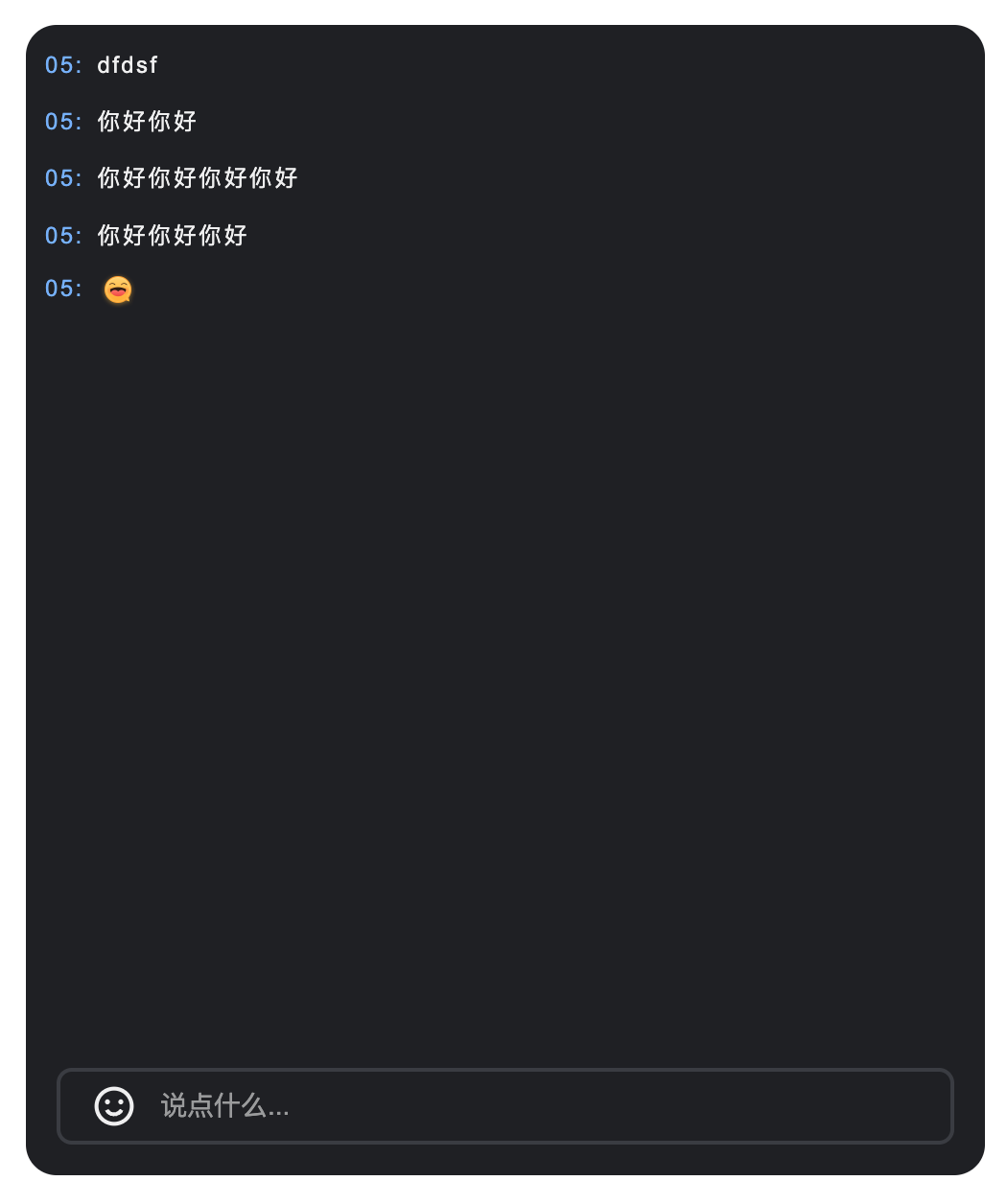</td>
|
|
610
|
-
|
|
611
|
-
<td rowspan="1" colSpan="1" ><br>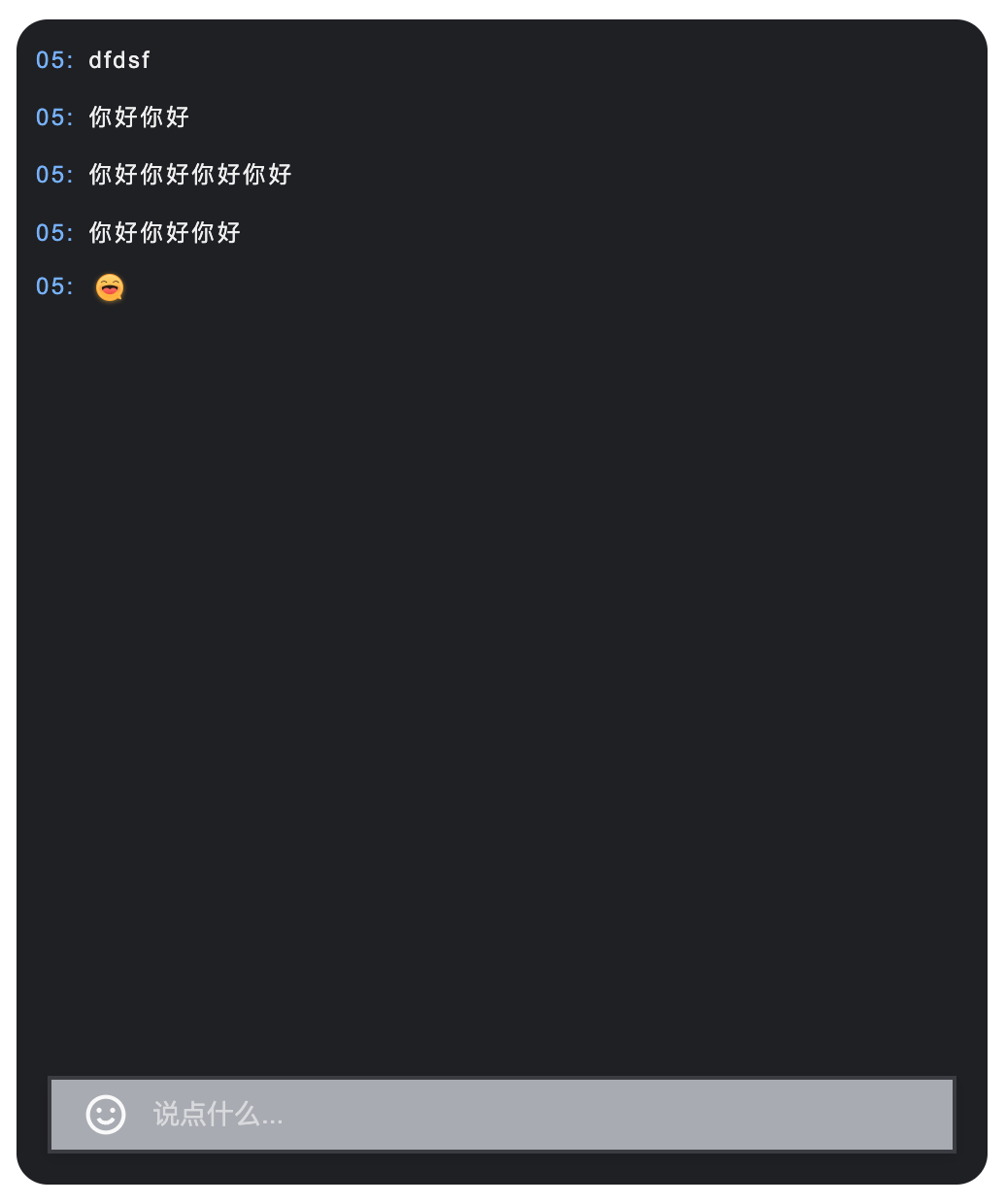</td>
|
|
612
|
-
|
|
613
|
-
<td rowspan="1" colSpan="1" ><br>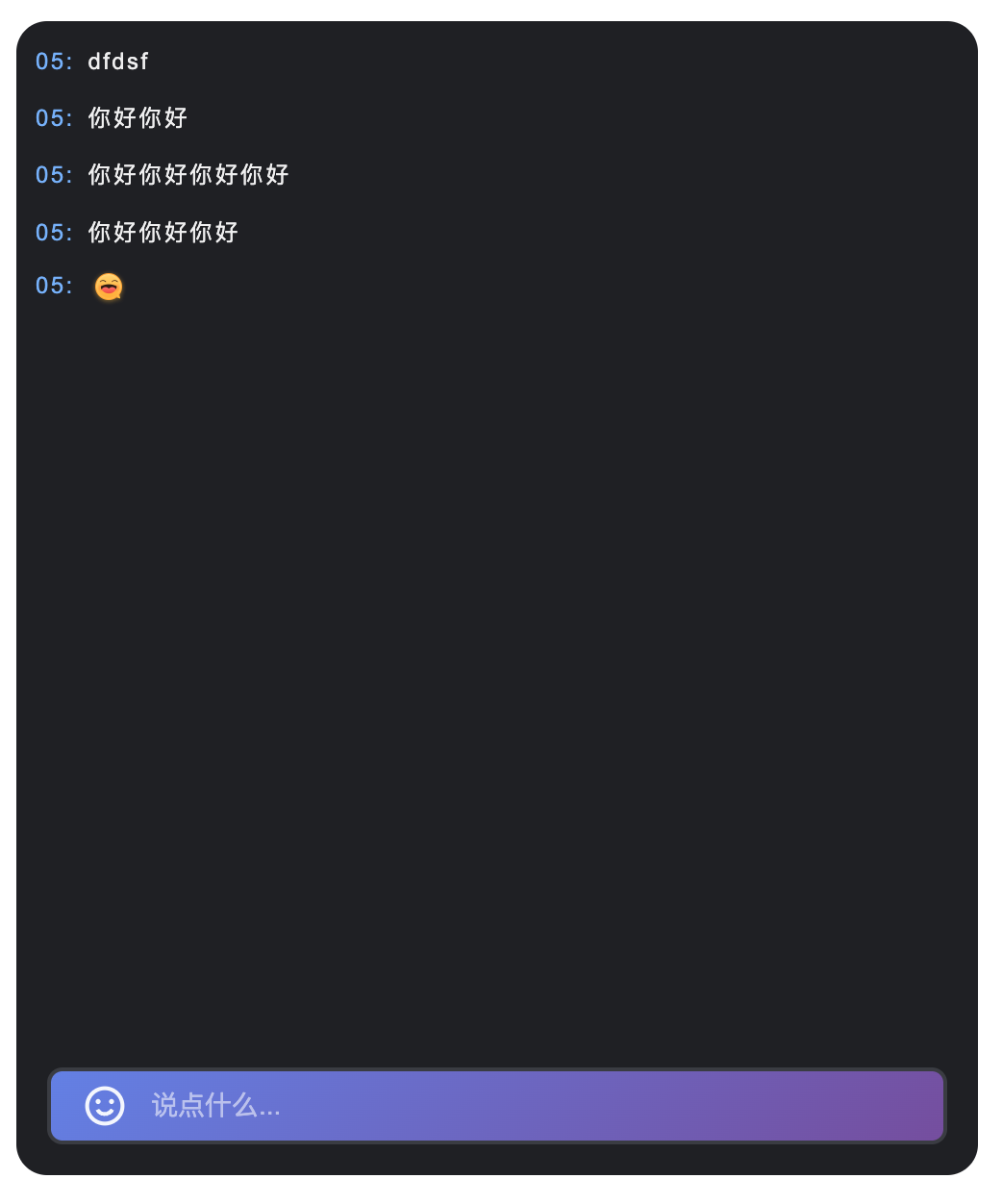</td>
|
|
614
|
-
</tr>
|
|
615
|
-
</table>
|