@tencentcloud/sdk-mcp 1.1.0 → 1.1.2
This diff represents the content of publicly available package versions that have been released to one of the supported registries. The information contained in this diff is provided for informational purposes only and reflects changes between package versions as they appear in their respective public registries.
- package/package.json +1 -1
- package/resource/doc/livekit/vue/components/atomicx-core.md +2656 -0
- package/resource/doc/livekit/vue/components/barrage.md +615 -0
- package/resource/doc/livekit/vue/components/chat-barrage.md +615 -0
- package/resource/doc/livekit/vue/components/live-list.md +227 -0
- package/resource/doc/livekit/vue/components/live-player.md +374 -0
- package/resource/doc/livekit/vue/components/live-view.md +427 -0
- package/resource/doc/livekit/vue/components/state.md +2656 -0
- package/resource/doc/livekit/vue/components/states/live-state.md +2656 -0
- package/resource/doc/roomkit/states/device-state.md +316 -0
- package/resource/doc/roomkit/states/login-state.md +51 -0
- package/resource/doc/roomkit/states/room-list-state.md +287 -0
- package/resource/doc/roomkit/states/room-participant-state.md +307 -0
- package/tools/index.js +10 -0
- package/tools/index.js.map +1 -1
- package/tools/live/get-web-live-component-detail.js +35 -0
- package/tools/live/get-web-live-component-detail.js.map +1 -0
- package/tools/live/get-web-live-state-detail.js +33 -0
- package/tools/live/get-web-live-state-detail.js.map +1 -0
- package/tools/room/get-web-room-state-detail.js +33 -0
- package/tools/room/get-web-room-state-detail.js.map +1 -0
- package/utils/get-doc-content.js +1 -0
- package/utils/get-doc-content.js.map +1 -1
- package/utils/handle-component-name.js +9 -0
- package/utils/handle-component-name.js.map +1 -1
|
@@ -0,0 +1,427 @@
|
|
|
1
|
+
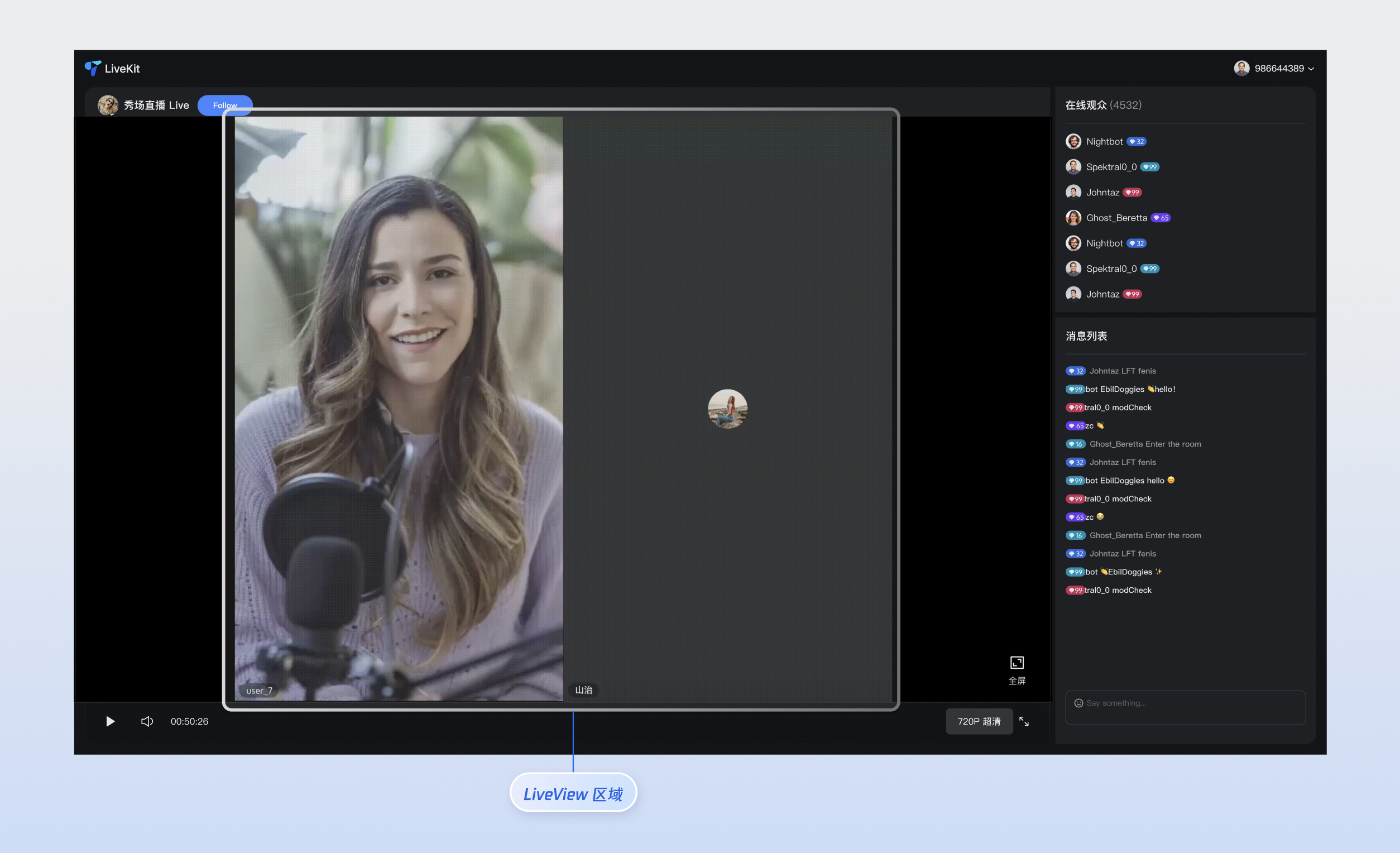
本文对 TUILiveKit **直播视频组件(LiveView)** 进行了详细的介绍,您可以在已有项目中直接参考本文示例集成我们开发好的组件,也可以根据您的需求按照文档中的组件定制化部分对样式,布局进行深度的定制。
|
|
2
|
+
|
|
3
|
+
|
|
4
|
+
|
|
5
|
+
|
|
6
|
+
## 核心功能
|
|
7
|
+
<table>
|
|
8
|
+
<tr>
|
|
9
|
+
<td rowspan="1" colSpan="1" >**功能分类**</td>
|
|
10
|
+
|
|
11
|
+
<td rowspan="1" colSpan="1" >**具体能力**</td>
|
|
12
|
+
</tr>
|
|
13
|
+
|
|
14
|
+
<tr>
|
|
15
|
+
<td rowspan="1" colSpan="1" >**智能流切换**</td>
|
|
16
|
+
|
|
17
|
+
<td rowspan="1" colSpan="1" >LiveView 能够根据当前用户的身份(观众或连麦者)自动切换流类型。<br>- 观众模式: 组件将播放超低延迟视频流,确保数百万观众都能流畅观看,同时大幅节省流量成本。<br>- 连线模式: 组件会自动切换到实时音视频流,提供毫秒级的超低延迟,保证连线用户之间实时、清晰的互动体验。</td>
|
|
18
|
+
</tr>
|
|
19
|
+
|
|
20
|
+
<tr>
|
|
21
|
+
<td rowspan="1" colSpan="1" >**可定制化 UI**</td>
|
|
22
|
+
|
|
23
|
+
<td rowspan="1" colSpan="1" >为了满足多样化的业务场景,LiveView 提供组件 UI 自定义插槽,让您能够完全掌控连麦用户的视频流区域,重写其 UI 展示,灵活定义连麦用户的头像、昵称、状态等信息,轻松打造符合您品牌风格的独特视觉体验。</td>
|
|
24
|
+
</tr>
|
|
25
|
+
</table>
|
|
26
|
+
|
|
27
|
+
|
|
28
|
+
## 组件接入
|
|
29
|
+
|
|
30
|
+
### 步骤1:环境配置及开通服务
|
|
31
|
+
|
|
32
|
+
在进行快速接入之前,您需要参考 [准备工作](https://write.woa.com/document/185222107981008896),满足相关环境配置及开通对应服务。
|
|
33
|
+
|
|
34
|
+
### 步骤2: 安装依赖
|
|
35
|
+
|
|
36
|
+
|
|
37
|
+
|
|
38
|
+
|
|
39
|
+
【npm】
|
|
40
|
+
``` bash
|
|
41
|
+
npm install tuikit-atomicx-vue3 @tencentcloud/uikit-base-component-vue3 --save
|
|
42
|
+
```
|
|
43
|
+
|
|
44
|
+
|
|
45
|
+
【pnpm】
|
|
46
|
+
``` bash
|
|
47
|
+
pnpm add tuikit-atomicx-vue3 @tencentcloud/uikit-base-component-vue3
|
|
48
|
+
```
|
|
49
|
+
|
|
50
|
+
|
|
51
|
+
【yarn】
|
|
52
|
+
``` bash
|
|
53
|
+
yarn add tuikit-atomicx-vue3 @tencentcloud/uikit-base-component-vue3
|
|
54
|
+
```
|
|
55
|
+
|
|
56
|
+
### 步骤3:加入直播间并进行连麦
|
|
57
|
+
|
|
58
|
+
在您的项目中引入并使用 LiveView,可直接复制如下代码示例至您的项目中加入对应直播间进行连麦。
|
|
59
|
+
``` typescript
|
|
60
|
+
<template>
|
|
61
|
+
<UIKitProvider theme="dark" language="zh-CN">
|
|
62
|
+
<div class="app">
|
|
63
|
+
<LiveView />
|
|
64
|
+
</div>
|
|
65
|
+
</UIKitProvider>
|
|
66
|
+
</template>
|
|
67
|
+
|
|
68
|
+
<script setup lang="ts">
|
|
69
|
+
import { onMounted } from 'vue';
|
|
70
|
+
import { UIKitProvider } from '@tencentcloud/uikit-base-component-vue3';
|
|
71
|
+
import { LiveView, useLoginState, useLiveState, useCoGuestState } from 'tuikit-atomicx-vue3';
|
|
72
|
+
|
|
73
|
+
const { login } = useLoginState();
|
|
74
|
+
const { joinLive } = useLiveState();
|
|
75
|
+
const { sendCoGuestRequest } = useCoGuestState();
|
|
76
|
+
|
|
77
|
+
async function initLogin() {
|
|
78
|
+
try {
|
|
79
|
+
await login({
|
|
80
|
+
sdkAppId: 0, // SDKAppID, 可以参考步骤 1 获取
|
|
81
|
+
userId: '', // UserID, 可以参考步骤 1 获取
|
|
82
|
+
userSig: '', // userSig, 可以参考步骤 1 获取
|
|
83
|
+
});
|
|
84
|
+
} catch (error) {
|
|
85
|
+
console.error('登录失败:', error);
|
|
86
|
+
}
|
|
87
|
+
}
|
|
88
|
+
|
|
89
|
+
onMounted(async () => {
|
|
90
|
+
await initLogin();
|
|
91
|
+
await joinLive({
|
|
92
|
+
liveId: '已经存在的直播间 Id', // 观众进入直播间之后, LiveView 自动播放超低延时流
|
|
93
|
+
})
|
|
94
|
+
await sendCoGuestRequest(); // 观众端通过调用相应方法即可加入直播间并根据需要上下麦,观众成功上麦之后,LiveView 自动播放实时音视频流
|
|
95
|
+
});
|
|
96
|
+
</script>
|
|
97
|
+
|
|
98
|
+
<style>.app {width: 100vw; height: 100vh; display: flex; justify-content: center; align-items: center}</style>
|
|
99
|
+
```
|
|
100
|
+
|
|
101
|
+
## 组件定制化
|
|
102
|
+
|
|
103
|
+
LiveView 提供了灵活的组件自定义插槽,该插槽支持您根据自己需求调整头像、昵称、状态等元素的样式与布局,也支持定制视频流区域连麦 UI。下列分别给出插槽使用示例
|
|
104
|
+
|
|
105
|
+
#### 组件插槽
|
|
106
|
+
<table>
|
|
107
|
+
<tr>
|
|
108
|
+
<td rowspan="1" colSpan="1" >**名称**</td>
|
|
109
|
+
|
|
110
|
+
<td rowspan="1" colSpan="1" >**参数**</td>
|
|
111
|
+
|
|
112
|
+
<td rowspan="1" colSpan="1" >**说明**</td>
|
|
113
|
+
</tr>
|
|
114
|
+
|
|
115
|
+
<tr>
|
|
116
|
+
<td rowspan="1" colSpan="1" >seatViewUI</td>
|
|
117
|
+
|
|
118
|
+
<td rowspan="1" colSpan="1" >seatInfo: SeatInfo</td>
|
|
119
|
+
|
|
120
|
+
<td rowspan="1" colSpan="1" >自定义麦位的显示 UI</td>
|
|
121
|
+
</tr>
|
|
122
|
+
</table>
|
|
123
|
+
|
|
124
|
+
``` java
|
|
125
|
+
// seatViewUI 插槽使用示例
|
|
126
|
+
<LiveView>
|
|
127
|
+
<CustomSeatViewUI #seatViewUI></CustomSeatViewUI>
|
|
128
|
+
</LiveView>
|
|
129
|
+
```
|
|
130
|
+
1. `SeatInfo` 定义了直播房间中每个麦位的基本信息和状态:
|
|
131
|
+
|
|
132
|
+
<table>
|
|
133
|
+
<tr>
|
|
134
|
+
<td rowspan="1" colSpan="1" >参数</td>
|
|
135
|
+
|
|
136
|
+
<td rowspan="1" colSpan="1" >类型</td>
|
|
137
|
+
|
|
138
|
+
<td rowspan="1" colSpan="1" >属性</td>
|
|
139
|
+
|
|
140
|
+
<td rowspan="1" colSpan="1" >说明</td>
|
|
141
|
+
</tr>
|
|
142
|
+
|
|
143
|
+
<tr>
|
|
144
|
+
<td rowspan="1" colSpan="1" >index</td>
|
|
145
|
+
|
|
146
|
+
<td rowspan="1" colSpan="1" >number</td>
|
|
147
|
+
|
|
148
|
+
<td rowspan="1" colSpan="1" >必填</td>
|
|
149
|
+
|
|
150
|
+
<td rowspan="1" colSpan="1" >麦位的索引号,从0开始递增,用于标识麦位在房间中的位置。</td>
|
|
151
|
+
</tr>
|
|
152
|
+
|
|
153
|
+
<tr>
|
|
154
|
+
<td rowspan="1" colSpan="1" >isLocked</td>
|
|
155
|
+
|
|
156
|
+
<td rowspan="1" colSpan="1" >boolean</td>
|
|
157
|
+
|
|
158
|
+
<td rowspan="1" colSpan="1" >必填</td>
|
|
159
|
+
|
|
160
|
+
<td rowspan="1" colSpan="1" >麦位锁定状态,true 表示麦位被锁定,其他用户无法进入;false 表示麦位开放。</td>
|
|
161
|
+
</tr>
|
|
162
|
+
|
|
163
|
+
<tr>
|
|
164
|
+
<td rowspan="1" colSpan="1" >userInfo</td>
|
|
165
|
+
|
|
166
|
+
<td rowspan="1" colSpan="1" >SeatUserInfo</td>
|
|
167
|
+
|
|
168
|
+
<td rowspan="1" colSpan="1" >非必填</td>
|
|
169
|
+
|
|
170
|
+
<td rowspan="1" colSpan="1" >当前坐在该麦位上的用户信息,如果麦位为空则为 `undefined`。</td>
|
|
171
|
+
</tr>
|
|
172
|
+
|
|
173
|
+
<tr>
|
|
174
|
+
<td rowspan="1" colSpan="1" >region</td>
|
|
175
|
+
|
|
176
|
+
<td rowspan="1" colSpan="1" >RegionInfo</td>
|
|
177
|
+
|
|
178
|
+
<td rowspan="1" colSpan="1" >非必填</td>
|
|
179
|
+
|
|
180
|
+
<td rowspan="1" colSpan="1" >麦位在视频画布中的显示区域信息,用于多路视频布局。</td>
|
|
181
|
+
</tr>
|
|
182
|
+
</table>
|
|
183
|
+
|
|
184
|
+
``` typescript
|
|
185
|
+
interface SeatInfo {
|
|
186
|
+
index: number; // 麦位索引
|
|
187
|
+
isLocked: boolean; // 麦位是否被锁定
|
|
188
|
+
userInfo?: SeatUserInfo; // 麦位上的用户信息(可选)
|
|
189
|
+
region?: RegionInfo; // 麦位在画布中的区域信息(可选)
|
|
190
|
+
}
|
|
191
|
+
```
|
|
192
|
+
2. `SeatUserInfo` 定义了直播房间中每个麦位上的用户详细信息:
|
|
193
|
+
|
|
194
|
+
<table>
|
|
195
|
+
<tr>
|
|
196
|
+
<td rowspan="1" colSpan="1" >参数</td>
|
|
197
|
+
|
|
198
|
+
<td rowspan="1" colSpan="1" >类型</td>
|
|
199
|
+
|
|
200
|
+
<td rowspan="1" colSpan="1" >属性</td>
|
|
201
|
+
|
|
202
|
+
<td rowspan="1" colSpan="1" >说明</td>
|
|
203
|
+
</tr>
|
|
204
|
+
|
|
205
|
+
<tr>
|
|
206
|
+
<td rowspan="1" colSpan="1" >roomId</td>
|
|
207
|
+
|
|
208
|
+
<td rowspan="1" colSpan="1" >string</td>
|
|
209
|
+
|
|
210
|
+
<td rowspan="1" colSpan="1" >必填</td>
|
|
211
|
+
|
|
212
|
+
<td rowspan="1" colSpan="1" >当前直播房间的唯一标识符,用于区分不同的直播房间。</td>
|
|
213
|
+
</tr>
|
|
214
|
+
|
|
215
|
+
<tr>
|
|
216
|
+
<td rowspan="1" colSpan="1" >userId</td>
|
|
217
|
+
|
|
218
|
+
<td rowspan="1" colSpan="1" >string</td>
|
|
219
|
+
|
|
220
|
+
<td rowspan="1" colSpan="1" >必填</td>
|
|
221
|
+
|
|
222
|
+
<td rowspan="1" colSpan="1" >用户的唯一标识符,在整个系统中保持唯一性。</td>
|
|
223
|
+
</tr>
|
|
224
|
+
|
|
225
|
+
<tr>
|
|
226
|
+
<td rowspan="1" colSpan="1" >userName</td>
|
|
227
|
+
|
|
228
|
+
<td rowspan="1" colSpan="1" >string</td>
|
|
229
|
+
|
|
230
|
+
<td rowspan="1" colSpan="1" >必填</td>
|
|
231
|
+
|
|
232
|
+
<td rowspan="1" colSpan="1" >用户在直播中显示的名称,支持中文、英文等字符。</td>
|
|
233
|
+
</tr>
|
|
234
|
+
|
|
235
|
+
<tr>
|
|
236
|
+
<td rowspan="1" colSpan="1" >avatarUrl</td>
|
|
237
|
+
|
|
238
|
+
<td rowspan="1" colSpan="1" >string</td>
|
|
239
|
+
|
|
240
|
+
<td rowspan="1" colSpan="1" >必填</td>
|
|
241
|
+
|
|
242
|
+
<td rowspan="1" colSpan="1" >用户头像的完整URL地址,支持 HTTPS 协议。</td>
|
|
243
|
+
</tr>
|
|
244
|
+
|
|
245
|
+
<tr>
|
|
246
|
+
<td rowspan="1" colSpan="1" >microphoneStatus</td>
|
|
247
|
+
|
|
248
|
+
<td rowspan="1" colSpan="1" >DeviceStatus</td>
|
|
249
|
+
|
|
250
|
+
<td rowspan="1" colSpan="1" >必填</td>
|
|
251
|
+
|
|
252
|
+
<td rowspan="1" colSpan="1" >麦克风的当前状态。</td>
|
|
253
|
+
</tr>
|
|
254
|
+
|
|
255
|
+
<tr>
|
|
256
|
+
<td rowspan="1" colSpan="1" >microphoneStatusReason</td>
|
|
257
|
+
|
|
258
|
+
<td rowspan="1" colSpan="1" >DeviceStatusReason</td>
|
|
259
|
+
|
|
260
|
+
<td rowspan="1" colSpan="1" >必填</td>
|
|
261
|
+
|
|
262
|
+
<td rowspan="1" colSpan="1" >麦克风状态变更的原因,用于区分是用户主动操作还是管理员操作。</td>
|
|
263
|
+
</tr>
|
|
264
|
+
|
|
265
|
+
<tr>
|
|
266
|
+
<td rowspan="1" colSpan="1" >cameraStatus</td>
|
|
267
|
+
|
|
268
|
+
<td rowspan="1" colSpan="1" >DeviceStatus</td>
|
|
269
|
+
|
|
270
|
+
<td rowspan="1" colSpan="1" >必填</td>
|
|
271
|
+
|
|
272
|
+
<td rowspan="1" colSpan="1" >摄像头的当前状态。</td>
|
|
273
|
+
</tr>
|
|
274
|
+
|
|
275
|
+
<tr>
|
|
276
|
+
<td rowspan="1" colSpan="1" >cameraStatusReason</td>
|
|
277
|
+
|
|
278
|
+
<td rowspan="1" colSpan="1" >DeviceStatusReason</td>
|
|
279
|
+
|
|
280
|
+
<td rowspan="1" colSpan="1" >必填</td>
|
|
281
|
+
|
|
282
|
+
<td rowspan="1" colSpan="1" >摄像头状态变更的原因,用于区分是用户主动操作还是管理员操作。</td>
|
|
283
|
+
</tr>
|
|
284
|
+
</table>
|
|
285
|
+
|
|
286
|
+
``` typescript
|
|
287
|
+
interface SeatUserInfo {
|
|
288
|
+
roomId: string; // 直播房间ID
|
|
289
|
+
userId: string; // 用户唯一标识
|
|
290
|
+
userName: string; // 用户显示名称
|
|
291
|
+
avatarUrl: string; // 用户头像URL
|
|
292
|
+
microphoneStatus: DeviceStatus; // 麦克风状态
|
|
293
|
+
allowOpenMicrophone: boolean; // 是否允许打开麦克风
|
|
294
|
+
cameraStatus: DeviceStatus; // 摄像头状态
|
|
295
|
+
allowOpenCamera: boolean; // 是否允许打开摄像头
|
|
296
|
+
}
|
|
297
|
+
|
|
298
|
+
export type SeatUserInfo = {
|
|
299
|
+
liveId: string; // 直播房间ID
|
|
300
|
+
userId: string; // 用户唯一标识
|
|
301
|
+
userName: string; // 用户显示名称
|
|
302
|
+
avatarUrl: string; // 用户头像URL
|
|
303
|
+
microphoneStatus: DeviceStatus; // 麦克风状态
|
|
304
|
+
microphoneStatusReason: DeviceStatusReason; // 麦克风状态变更原因
|
|
305
|
+
cameraStatus: DeviceStatus; // 摄像头状态
|
|
306
|
+
cameraStatusReason: DeviceStatusReason; // 摄像头状态变更原因
|
|
307
|
+
}
|
|
308
|
+
```
|
|
309
|
+
3. `RegionInfo` 定义了麦位在视频画布中的显示区域和层级信息:
|
|
310
|
+
|
|
311
|
+
<table>
|
|
312
|
+
<tr>
|
|
313
|
+
<td rowspan="1" colSpan="1" >参数</td>
|
|
314
|
+
|
|
315
|
+
<td rowspan="1" colSpan="1" >类型</td>
|
|
316
|
+
|
|
317
|
+
<td rowspan="1" colSpan="1" >属性</td>
|
|
318
|
+
|
|
319
|
+
<td rowspan="1" colSpan="1" >说明</td>
|
|
320
|
+
</tr>
|
|
321
|
+
|
|
322
|
+
<tr>
|
|
323
|
+
<td rowspan="1" colSpan="1" >x</td>
|
|
324
|
+
|
|
325
|
+
<td rowspan="1" colSpan="1" >number</td>
|
|
326
|
+
|
|
327
|
+
<td rowspan="1" colSpan="1" >必填</td>
|
|
328
|
+
|
|
329
|
+
<td rowspan="1" colSpan="1" >区域左上角相对于画布左上角的X坐标(像素值)。</td>
|
|
330
|
+
</tr>
|
|
331
|
+
|
|
332
|
+
<tr>
|
|
333
|
+
<td rowspan="1" colSpan="1" >y</td>
|
|
334
|
+
|
|
335
|
+
<td rowspan="1" colSpan="1" >number</td>
|
|
336
|
+
|
|
337
|
+
<td rowspan="1" colSpan="1" >必填</td>
|
|
338
|
+
|
|
339
|
+
<td rowspan="1" colSpan="1" >区域左上角相对于画布左上角的Y坐标(像素值)。</td>
|
|
340
|
+
</tr>
|
|
341
|
+
|
|
342
|
+
<tr>
|
|
343
|
+
<td rowspan="1" colSpan="1" >w</td>
|
|
344
|
+
|
|
345
|
+
<td rowspan="1" colSpan="1" >number</td>
|
|
346
|
+
|
|
347
|
+
<td rowspan="1" colSpan="1" >必填</td>
|
|
348
|
+
|
|
349
|
+
<td rowspan="1" colSpan="1" >区域的宽度(像素值),必须大于0。</td>
|
|
350
|
+
</tr>
|
|
351
|
+
|
|
352
|
+
<tr>
|
|
353
|
+
<td rowspan="1" colSpan="1" >h</td>
|
|
354
|
+
|
|
355
|
+
<td rowspan="1" colSpan="1" >number</td>
|
|
356
|
+
|
|
357
|
+
<td rowspan="1" colSpan="1" >必填</td>
|
|
358
|
+
|
|
359
|
+
<td rowspan="1" colSpan="1" >区域的高度(像素值),必须大于0。</td>
|
|
360
|
+
</tr>
|
|
361
|
+
|
|
362
|
+
<tr>
|
|
363
|
+
<td rowspan="1" colSpan="1" >zOrder</td>
|
|
364
|
+
|
|
365
|
+
<td rowspan="1" colSpan="1" >number</td>
|
|
366
|
+
|
|
367
|
+
<td rowspan="1" colSpan="1" >必填</td>
|
|
368
|
+
|
|
369
|
+
<td rowspan="1" colSpan="1" >层级顺序,数值越大越靠前显示,用于处理重叠区域的显示优先级。</td>
|
|
370
|
+
</tr>
|
|
371
|
+
</table>
|
|
372
|
+
|
|
373
|
+
``` typescript
|
|
374
|
+
interface RegionInfo {
|
|
375
|
+
x: number; // 区域左上角X坐标
|
|
376
|
+
y: number; // 区域左上角Y坐标
|
|
377
|
+
w: number; // 区域宽度
|
|
378
|
+
h: number; // 区域高度
|
|
379
|
+
zOrder: number; // 层级顺序
|
|
380
|
+
}
|
|
381
|
+
```
|
|
382
|
+
|
|
383
|
+
#### 自定义插槽示例
|
|
384
|
+
|
|
385
|
+
为了更好地让您体验及理解 LiveView 组件的 seatViewUI 插槽定制化能力,我们提供了**直播连麦场景**示例供您参考,您可以参考上述**步骤3**将如下代码增量复制至您的项目中实现类似场景的效果。
|
|
386
|
+
``` typescript
|
|
387
|
+
<template>
|
|
388
|
+
<LiveView>
|
|
389
|
+
<template #seatViewUI="{ userInfo }">
|
|
390
|
+
<div
|
|
391
|
+
class="live-stream-view"
|
|
392
|
+
:class="{ 'is-anchor': isAnchor(userInfo), 'is-guest': !isAnchor(userInfo) }"
|
|
393
|
+
>
|
|
394
|
+
<!-- 视频流区域 -->
|
|
395
|
+
<div class="video-area">
|
|
396
|
+
<!-- 视频流会自动渲染 -->
|
|
397
|
+
</div>
|
|
398
|
+
|
|
399
|
+
<!-- 用户信息覆盖层 -->
|
|
400
|
+
<div class="user-overlay">
|
|
401
|
+
<div class="user-badge" :class="{ 'anchor-badge': isAnchor(userInfo) }">
|
|
402
|
+
{{ isAnchor(userInfo) ? '主播' : '观众' }}
|
|
403
|
+
</div>
|
|
404
|
+
<div class="user-name">{{ userInfo.userName }}</div>
|
|
405
|
+
<div class="device-status">
|
|
406
|
+
<span :class="['mic', userInfo.microphoneStatus]"></span>
|
|
407
|
+
<span :class="['camera', userInfo.cameraStatus]"></span>
|
|
408
|
+
</div>
|
|
409
|
+
</div>
|
|
410
|
+
</div>
|
|
411
|
+
</template>
|
|
412
|
+
</LiveView>
|
|
413
|
+
</template>
|
|
414
|
+
|
|
415
|
+
<script setup lang="ts">
|
|
416
|
+
import { LiveView } from 'tuikit-atomicx-vue3';
|
|
417
|
+
import type { SeatUserInfo } from 'tuikit-atomicx-vue3';
|
|
418
|
+
|
|
419
|
+
// 判断是否为主播(根据业务逻辑)
|
|
420
|
+
const isAnchor = (userInfo: SeatUserInfo) => {
|
|
421
|
+
// 这里可以根据用户ID、角色等判断
|
|
422
|
+
return userInfo.userId.includes('anchor') || userInfo.userName.includes('主播');
|
|
423
|
+
};
|
|
424
|
+
</script>
|
|
425
|
+
|
|
426
|
+
<style scoped>.live-stream-view{position:relative;width:100%;height:100%;border-radius:8px;overflow:hidden}.live-stream-view.is-anchor{border:3px solid #ff6b35;box-shadow:0 0 20px rgba(255,107,53,.3)}.live-stream-view.is-guest{border:1px solid #ddd}.video-area{width:100%;height:100%;background:#000}.user-overlay{position:absolute;bottom:0;left:0;right:0;background:linear-gradient(transparent,rgba(0,0,0,.8));padding:10px;color:#fff}.user-badge{display:inline-block;padding:2px 8px;border-radius:10px;font-size:12px;margin-bottom:5px;background:#666}.anchor-badge{background:#ff6b35;color:#fff}.user-name{font-weight:700;margin-bottom:5px}.device-status span{margin-right:5px;opacity:.8}.device-status .camera.Off,.device-status .mic.Off{opacity:.3}</style>
|
|
427
|
+
```
|