@tencentcloud/sdk-mcp 1.0.7 → 1.0.9
This diff represents the content of publicly available package versions that have been released to one of the supported registries. The information contained in this diff is provided for informational purposes only and reflects changes between package versions as they appear in their respective public registries.
- package/package.json +1 -1
- package/resource/doc/chatuikit/react/components/chat.md +38 -0
- package/resource/doc/chatuikit/react/components/chatheader.md +153 -0
- package/resource/doc/chatuikit/react/components/conversation-list.md +765 -0
- package/resource/doc/chatuikit/react/components/message-input.md +799 -0
- package/resource/doc/chatuikit/react/components/message-list.md +385 -0
- package/resource/doc/chatuikit/react/components/tuikit.md +64 -0
- package/resource/doc/chatuikit/react/create-group.md +22 -0
- package/resource/doc/chatuikit/react/login.md +25 -0
- package/resource/doc/chatuikit/vue/components/MessageInput.md +546 -0
- package/resource/doc/chatuikit/vue/components/avatar.md +105 -0
- package/resource/doc/chatuikit/vue/components/chat.md +38 -0
- package/resource/doc/chatuikit/vue/components/chatheader.md +153 -0
- package/resource/doc/chatuikit/vue/components/component-list.md +90 -0
- package/resource/doc/chatuikit/vue/components/conversation-list.md +590 -0
- package/resource/doc/chatuikit/vue/components/login.md +29 -0
- package/resource/doc/chatuikit/vue/components/message-input.md +546 -0
- package/resource/doc/chatuikit/vue/components/message-list.md +548 -0
- package/resource/doc/chatuikit/vue/components/tuikit.md +110 -0
- package/resource/doc/chatuikit/vue/components/userpicker.md +256 -0
- package/resource/doc/chatuikit/vue/create-group.md +26 -0
- package/resource/doc/chatuikit/vue/integration.md +218 -0
- package/resource/doc/chatuikit/vue/login.md +29 -0
- package/resource/doc/chatuikit/vue3/components/MessageList.md +385 -0
- package/resource/doc/chatuikit/vue3/integration.md +7 -4
- package/tools/call/get-native-call-integration-guide.js +2 -2
- package/tools/call/get-native-call-integration-guide.js.map +1 -1
- package/tools/call/get-native-call-integration.js +35 -0
- package/tools/call/get-native-call-integration.js.map +1 -0
- package/tools/call/get-web-call-integration-guide.js +4 -4
- package/tools/call/get-web-call-integration-guide.js.map +1 -1
- package/tools/call/get-web-call-integration.js +34 -0
- package/tools/call/get-web-call-integration.js.map +1 -0
- package/tools/chat/auto-create-group.js +44 -0
- package/tools/chat/auto-create-group.js.map +1 -0
- package/tools/chat/create-group.js +29 -0
- package/tools/chat/create-group.js.map +1 -0
- package/tools/chat/get-native-chat-integration-guide.js +2 -2
- package/tools/chat/get-native-chat-integration-guide.js.map +1 -1
- package/tools/chat/get-native-chat-integration.js +33 -0
- package/tools/chat/get-native-chat-integration.js.map +1 -0
- package/tools/chat/get-web-chat-component-detail.js +8 -5
- package/tools/chat/get-web-chat-component-detail.js.map +1 -1
- package/tools/chat/get-web-chat-integration-guide.js +16 -8
- package/tools/chat/get-web-chat-integration-guide.js.map +1 -1
- package/tools/chat/get-web-chat-integration.js +36 -0
- package/tools/chat/get-web-chat-integration.js.map +1 -0
- package/tools/chat/get-web-chat-uikit-login.js +30 -0
- package/tools/chat/get-web-chat-uikit-login.js.map +1 -0
- package/tools/common/present-framework-choice.js +9 -18
- package/tools/common/present-framework-choice.js.map +1 -1
- package/tools/common/record-prompt.js +3 -3
- package/tools/common/record-prompt.js.map +1 -1
- package/tools/common/record-result.js +6 -6
- package/tools/common/record-result.js.map +1 -1
- package/tools/index.js +12 -8
- package/tools/index.js.map +1 -1
- package/utils/handle-component-name.js +12 -0
- package/utils/handle-component-name.js.map +1 -0
- package/utils/handle-framework.js +9 -0
- package/utils/handle-framework.js.map +1 -0
- package/@tencent/aegis-node-sdk/CHANGELOG.md +0 -8
- package/@tencent/aegis-node-sdk/LICENSE +0 -21
- package/@tencent/aegis-node-sdk/README.md +0 -562
- package/@tencent/aegis-node-sdk/lib/aegis.min.js +0 -1
- package/@tencent/aegis-node-sdk/lib/packages/core/src/constant/config.d.ts +0 -14
- package/@tencent/aegis-node-sdk/lib/packages/core/src/constant/global.d.ts +0 -1
- package/@tencent/aegis-node-sdk/lib/packages/core/src/constant/index.d.ts +0 -9
- package/@tencent/aegis-node-sdk/lib/packages/core/src/constant/report-ignore.d.ts +0 -2
- package/@tencent/aegis-node-sdk/lib/packages/core/src/core.d.ts +0 -85
- package/@tencent/aegis-node-sdk/lib/packages/core/src/hooks/afterRequestHooks.d.ts +0 -3
- package/@tencent/aegis-node-sdk/lib/packages/core/src/hooks/beforeRequestHooks.d.ts +0 -9
- package/@tencent/aegis-node-sdk/lib/packages/core/src/hooks/modifyRequestHooks.d.ts +0 -3
- package/@tencent/aegis-node-sdk/lib/packages/core/src/index.d.ts +0 -9
- package/@tencent/aegis-node-sdk/lib/packages/core/src/interface/config.d.ts +0 -62
- package/@tencent/aegis-node-sdk/lib/packages/core/src/interface/env.d.ts +0 -11
- package/@tencent/aegis-node-sdk/lib/packages/core/src/interface/index.d.ts +0 -4
- package/@tencent/aegis-node-sdk/lib/packages/core/src/interface/log.d.ts +0 -130
- package/@tencent/aegis-node-sdk/lib/packages/core/src/interface/send.d.ts +0 -34
- package/@tencent/aegis-node-sdk/lib/packages/core/src/pipes/format.d.ts +0 -2
- package/@tencent/aegis-node-sdk/lib/packages/core/src/pipes/index.d.ts +0 -18
- package/@tencent/aegis-node-sdk/lib/packages/core/src/pipes/length-limit.d.ts +0 -8
- package/@tencent/aegis-node-sdk/lib/packages/core/src/pipes/pv.d.ts +0 -8
- package/@tencent/aegis-node-sdk/lib/packages/core/src/pipes/remove-payload.d.ts +0 -2
- package/@tencent/aegis-node-sdk/lib/packages/core/src/pipes/repeat-limit.d.ts +0 -4
- package/@tencent/aegis-node-sdk/lib/packages/core/src/pipes/report.d.ts +0 -10
- package/@tencent/aegis-node-sdk/lib/packages/core/src/pipes/sample.d.ts +0 -3
- package/@tencent/aegis-node-sdk/lib/packages/core/src/pipes/throttle.d.ts +0 -3
- package/@tencent/aegis-node-sdk/lib/packages/core/src/pipes/trace/index.d.ts +0 -34
- package/@tencent/aegis-node-sdk/lib/packages/core/src/pipes/trace/jwt.d.ts +0 -12
- package/@tencent/aegis-node-sdk/lib/packages/core/src/pipes/trace/ot-js.d.ts +0 -14
- package/@tencent/aegis-node-sdk/lib/packages/core/src/pipes/trace/uuid.d.ts +0 -2
- package/@tencent/aegis-node-sdk/lib/packages/core/src/pipes/whitelist.d.ts +0 -12
- package/@tencent/aegis-node-sdk/lib/packages/core/src/pipes/write-before.d.ts +0 -3
- package/@tencent/aegis-node-sdk/lib/packages/core/src/plugin.d.ts +0 -33
- package/@tencent/aegis-node-sdk/lib/packages/core/src/polyfill.d.ts +0 -0
- package/@tencent/aegis-node-sdk/lib/packages/core/src/util/destroy.d.ts +0 -2
- package/@tencent/aegis-node-sdk/lib/packages/core/src/util/event-emitter.d.ts +0 -18
- package/@tencent/aegis-node-sdk/lib/packages/core/src/util/index.d.ts +0 -60
- package/@tencent/aegis-node-sdk/lib/packages/node-sdk/src/index.d.ts +0 -15
- package/@tencent/aegis-node-sdk/lib/packages/node-sdk/src/interface/selector.d.ts +0 -5
- package/@tencent/aegis-node-sdk/lib/packages/node-sdk/src/pipes/batch-report-pipe.d.ts +0 -6
- package/@tencent/aegis-node-sdk/lib/packages/node-sdk/src/protocol/protocol_base.d.ts +0 -18
- package/@tencent/aegis-node-sdk/lib/packages/node-sdk/src/protocol/protocol_http.d.ts +0 -12
- package/@tencent/aegis-node-sdk/lib/packages/node-sdk/src/selector/ip_selector.d.ts +0 -10
- package/@tencent/aegis-node-sdk/lib/packages/node-sdk/src/selector/polaris_selector.d.ts +0 -20
- package/@tencent/aegis-node-sdk/lib/packages/node-sdk/src/selector/selector_base.d.ts +0 -27
- package/@tencent/aegis-node-sdk/lib/packages/node-sdk/src/util/eval_require.d.ts +0 -2
- package/@tencent/aegis-node-sdk/package.json +0 -19
- package/@tencent/polaris/README.md +0 -407
- package/@tencent/polaris/dist/consumer/health.d.ts +0 -126
- package/@tencent/polaris/dist/consumer/health.js +0 -283
- package/@tencent/polaris/dist/consumer/health.js.map +0 -1
- package/@tencent/polaris/dist/consumer/index.d.ts +0 -120
- package/@tencent/polaris/dist/consumer/index.js +0 -348
- package/@tencent/polaris/dist/consumer/index.js.map +0 -1
- package/@tencent/polaris/dist/consumer/monitor.d.ts +0 -145
- package/@tencent/polaris/dist/consumer/monitor.js +0 -343
- package/@tencent/polaris/dist/consumer/monitor.js.map +0 -1
- package/@tencent/polaris/dist/consumer/selector.d.ts +0 -73
- package/@tencent/polaris/dist/consumer/selector.js +0 -316
- package/@tencent/polaris/dist/consumer/selector.js.map +0 -1
- package/@tencent/polaris/dist/errors.d.ts +0 -373
- package/@tencent/polaris/dist/errors.js +0 -154
- package/@tencent/polaris/dist/errors.js.map +0 -1
- package/@tencent/polaris/dist/global.d.ts +0 -16
- package/@tencent/polaris/dist/global.js +0 -18
- package/@tencent/polaris/dist/global.js.map +0 -1
- package/@tencent/polaris/dist/index.d.ts +0 -62
- package/@tencent/polaris/dist/index.js +0 -145
- package/@tencent/polaris/dist/index.js.map +0 -1
- package/@tencent/polaris/dist/instance.d.ts +0 -109
- package/@tencent/polaris/dist/instance.js +0 -38
- package/@tencent/polaris/dist/instance.js.map +0 -1
- package/@tencent/polaris/dist/limiter/bucket.d.ts +0 -51
- package/@tencent/polaris/dist/limiter/bucket.js +0 -152
- package/@tencent/polaris/dist/limiter/bucket.js.map +0 -1
- package/@tencent/polaris/dist/limiter/index.d.ts +0 -73
- package/@tencent/polaris/dist/limiter/index.js +0 -149
- package/@tencent/polaris/dist/limiter/index.js.map +0 -1
- package/@tencent/polaris/dist/limiter/ratelimit.d.ts +0 -27
- package/@tencent/polaris/dist/limiter/ratelimit.js +0 -134
- package/@tencent/polaris/dist/limiter/ratelimit.js.map +0 -1
- package/@tencent/polaris/dist/limiter/ratelimiter/base.d.ts +0 -17
- package/@tencent/polaris/dist/limiter/ratelimiter/base.js +0 -15
- package/@tencent/polaris/dist/limiter/ratelimiter/base.js.map +0 -1
- package/@tencent/polaris/dist/limiter/ratelimiter/global.d.ts +0 -59
- package/@tencent/polaris/dist/limiter/ratelimiter/global.js +0 -397
- package/@tencent/polaris/dist/limiter/ratelimiter/global.js.map +0 -1
- package/@tencent/polaris/dist/limiter/ratelimiter/index.d.ts +0 -3
- package/@tencent/polaris/dist/limiter/ratelimiter/index.js +0 -19
- package/@tencent/polaris/dist/limiter/ratelimiter/index.js.map +0 -1
- package/@tencent/polaris/dist/limiter/ratelimiter/local.d.ts +0 -17
- package/@tencent/polaris/dist/limiter/ratelimiter/local.js +0 -52
- package/@tencent/polaris/dist/limiter/ratelimiter/local.js.map +0 -1
- package/@tencent/polaris/dist/location.d.ts +0 -48
- package/@tencent/polaris/dist/location.js +0 -67
- package/@tencent/polaris/dist/location.js.map +0 -1
- package/@tencent/polaris/dist/logging.d.ts +0 -106
- package/@tencent/polaris/dist/logging.js +0 -130
- package/@tencent/polaris/dist/logging.js.map +0 -1
- package/@tencent/polaris/dist/metadata.d.ts +0 -78
- package/@tencent/polaris/dist/metadata.js +0 -119
- package/@tencent/polaris/dist/metadata.js.map +0 -1
- package/@tencent/polaris/dist/plugins/breaker/polaris.d.ts +0 -47
- package/@tencent/polaris/dist/plugins/breaker/polaris.js +0 -162
- package/@tencent/polaris/dist/plugins/breaker/polaris.js.map +0 -1
- package/@tencent/polaris/dist/plugins/lb/base.d.ts +0 -24
- package/@tencent/polaris/dist/plugins/lb/base.js +0 -32
- package/@tencent/polaris/dist/plugins/lb/base.js.map +0 -1
- package/@tencent/polaris/dist/plugins/lb/edf.d.ts +0 -24
- package/@tencent/polaris/dist/plugins/lb/edf.js +0 -77
- package/@tencent/polaris/dist/plugins/lb/edf.js.map +0 -1
- package/@tencent/polaris/dist/plugins/lb/hashring.d.ts +0 -24
- package/@tencent/polaris/dist/plugins/lb/hashring.js +0 -53
- package/@tencent/polaris/dist/plugins/lb/hashring.js.map +0 -1
- package/@tencent/polaris/dist/plugins/lb/sticky.d.ts +0 -31
- package/@tencent/polaris/dist/plugins/lb/sticky.js +0 -88
- package/@tencent/polaris/dist/plugins/lb/sticky.js.map +0 -1
- package/@tencent/polaris/dist/plugins/lb/swrr.d.ts +0 -25
- package/@tencent/polaris/dist/plugins/lb/swrr.js +0 -72
- package/@tencent/polaris/dist/plugins/lb/swrr.js.map +0 -1
- package/@tencent/polaris/dist/plugins/lb/wr.d.ts +0 -17
- package/@tencent/polaris/dist/plugins/lb/wr.js +0 -50
- package/@tencent/polaris/dist/plugins/lb/wr.js.map +0 -1
- package/@tencent/polaris/dist/plugins/lb/wrr.d.ts +0 -19
- package/@tencent/polaris/dist/plugins/lb/wrr.js +0 -81
- package/@tencent/polaris/dist/plugins/lb/wrr.js.map +0 -1
- package/@tencent/polaris/dist/plugins/logging/console.d.ts +0 -10
- package/@tencent/polaris/dist/plugins/logging/console.js +0 -38
- package/@tencent/polaris/dist/plugins/logging/console.js.map +0 -1
- package/@tencent/polaris/dist/plugins/naming/local-server/index.d.ts +0 -32
- package/@tencent/polaris/dist/plugins/naming/local-server/index.js +0 -88
- package/@tencent/polaris/dist/plugins/naming/local-server/index.js.map +0 -1
- package/@tencent/polaris/dist/plugins/naming/polaris-server/adapter/base.d.ts +0 -124
- package/@tencent/polaris/dist/plugins/naming/polaris-server/adapter/base.js +0 -398
- package/@tencent/polaris/dist/plugins/naming/polaris-server/adapter/base.js.map +0 -1
- package/@tencent/polaris/dist/plugins/naming/polaris-server/adapter/discover.d.ts +0 -27
- package/@tencent/polaris/dist/plugins/naming/polaris-server/adapter/discover.js +0 -287
- package/@tencent/polaris/dist/plugins/naming/polaris-server/adapter/discover.js.map +0 -1
- package/@tencent/polaris/dist/plugins/naming/polaris-server/adapter/index.d.ts +0 -15
- package/@tencent/polaris/dist/plugins/naming/polaris-server/adapter/index.js +0 -43
- package/@tencent/polaris/dist/plugins/naming/polaris-server/adapter/index.js.map +0 -1
- package/@tencent/polaris/dist/plugins/naming/polaris-server/adapter/monitor.d.ts +0 -28
- package/@tencent/polaris/dist/plugins/naming/polaris-server/adapter/monitor.js +0 -249
- package/@tencent/polaris/dist/plugins/naming/polaris-server/adapter/monitor.js.map +0 -1
- package/@tencent/polaris/dist/plugins/naming/polaris-server/adapter/ratelimit.d.ts +0 -19
- package/@tencent/polaris/dist/plugins/naming/polaris-server/adapter/ratelimit.js +0 -222
- package/@tencent/polaris/dist/plugins/naming/polaris-server/adapter/ratelimit.js.map +0 -1
- package/@tencent/polaris/dist/plugins/naming/polaris-server/connector/grpc/bidi.d.ts +0 -26
- package/@tencent/polaris/dist/plugins/naming/polaris-server/connector/grpc/bidi.js +0 -99
- package/@tencent/polaris/dist/plugins/naming/polaris-server/connector/grpc/bidi.js.map +0 -1
- package/@tencent/polaris/dist/plugins/naming/polaris-server/connector/grpc/index.d.ts +0 -60
- package/@tencent/polaris/dist/plugins/naming/polaris-server/connector/grpc/index.js +0 -259
- package/@tencent/polaris/dist/plugins/naming/polaris-server/connector/grpc/index.js.map +0 -1
- package/@tencent/polaris/dist/plugins/naming/polaris-server/connector/grpc/pb/discover.proto +0 -24
- package/@tencent/polaris/dist/plugins/naming/polaris-server/connector/grpc/pb/monitor.proto +0 -18
- package/@tencent/polaris/dist/plugins/naming/polaris-server/connector/grpc/pb/ratelimit.proto +0 -12
- package/@tencent/polaris/dist/plugins/naming/polaris-server/connector/http/index.d.ts +0 -39
- package/@tencent/polaris/dist/plugins/naming/polaris-server/connector/http/index.js +0 -115
- package/@tencent/polaris/dist/plugins/naming/polaris-server/connector/http/index.js.map +0 -1
- package/@tencent/polaris/dist/plugins/naming/polaris-server/discover-pb/api.proto +0 -24
- package/@tencent/polaris/dist/plugins/naming/polaris-server/discover-pb/client.proto +0 -22
- package/@tencent/polaris/dist/plugins/naming/polaris-server/discover-pb/model.proto +0 -28
- package/@tencent/polaris/dist/plugins/naming/polaris-server/discover-pb/ratelimit.proto +0 -80
- package/@tencent/polaris/dist/plugins/naming/polaris-server/discover-pb/request.proto +0 -18
- package/@tencent/polaris/dist/plugins/naming/polaris-server/discover-pb/response.proto +0 -65
- package/@tencent/polaris/dist/plugins/naming/polaris-server/discover-pb/routing.proto +0 -66
- package/@tencent/polaris/dist/plugins/naming/polaris-server/discover-pb/service.proto +0 -95
- package/@tencent/polaris/dist/plugins/naming/polaris-server/discover-pb/types.d.ts +0 -1568
- package/@tencent/polaris/dist/plugins/naming/polaris-server/index.d.ts +0 -36
- package/@tencent/polaris/dist/plugins/naming/polaris-server/index.js +0 -51
- package/@tencent/polaris/dist/plugins/naming/polaris-server/index.js.map +0 -1
- package/@tencent/polaris/dist/plugins/naming/polaris-server/monitor-pb/api.proto +0 -18
- package/@tencent/polaris/dist/plugins/naming/polaris-server/monitor-pb/circuitbreak.proto +0 -67
- package/@tencent/polaris/dist/plugins/naming/polaris-server/monitor-pb/request.proto +0 -82
- package/@tencent/polaris/dist/plugins/naming/polaris-server/monitor-pb/response.proto +0 -11
- package/@tencent/polaris/dist/plugins/naming/polaris-server/monitor-pb/sdkcache.proto +0 -46
- package/@tencent/polaris/dist/plugins/naming/polaris-server/monitor-pb/sdkconfiguration.proto +0 -16
- package/@tencent/polaris/dist/plugins/naming/polaris-server/monitor-pb/sdktoken.proto +0 -10
- package/@tencent/polaris/dist/plugins/naming/polaris-server/monitor-pb/types.d.ts +0 -1102
- package/@tencent/polaris/dist/plugins/naming/polaris-server/pool.d.ts +0 -29
- package/@tencent/polaris/dist/plugins/naming/polaris-server/pool.js +0 -77
- package/@tencent/polaris/dist/plugins/naming/polaris-server/pool.js.map +0 -1
- package/@tencent/polaris/dist/plugins/naming/polaris-server/ratelimit-pb/api.proto +0 -12
- package/@tencent/polaris/dist/plugins/naming/polaris-server/ratelimit-pb/ratelimit.proto +0 -28
- package/@tencent/polaris/dist/plugins/naming/polaris-server/ratelimit-pb/types.d.ts +0 -395
- package/@tencent/polaris/dist/plugins/naming/polaris-server/rules.d.ts +0 -13
- package/@tencent/polaris/dist/plugins/naming/polaris-server/rules.js +0 -116
- package/@tencent/polaris/dist/plugins/naming/polaris-server/rules.js.map +0 -1
- package/@tencent/polaris/dist/plugins/naming/polaris-server/types.d.ts +0 -67
- package/@tencent/polaris/dist/plugins/naming/polaris-server/types.js +0 -67
- package/@tencent/polaris/dist/plugins/naming/polaris-server/types.js.map +0 -1
- package/@tencent/polaris/dist/plugins/naming/polaris-server/utils.d.ts +0 -99
- package/@tencent/polaris/dist/plugins/naming/polaris-server/utils.js +0 -217
- package/@tencent/polaris/dist/plugins/naming/polaris-server/utils.js.map +0 -1
- package/@tencent/polaris/dist/plugins/registry/memory.d.ts +0 -10
- package/@tencent/polaris/dist/plugins/registry/memory.js +0 -50
- package/@tencent/polaris/dist/plugins/registry/memory.js.map +0 -1
- package/@tencent/polaris/dist/plugins/router/polaris/nearby.d.ts +0 -51
- package/@tencent/polaris/dist/plugins/router/polaris/nearby.js +0 -145
- package/@tencent/polaris/dist/plugins/router/polaris/nearby.js.map +0 -1
- package/@tencent/polaris/dist/plugins/router/polaris/rule.d.ts +0 -11
- package/@tencent/polaris/dist/plugins/router/polaris/rule.js +0 -174
- package/@tencent/polaris/dist/plugins/router/polaris/rule.js.map +0 -1
- package/@tencent/polaris/dist/plugins/router/trpc/canary.d.ts +0 -25
- package/@tencent/polaris/dist/plugins/router/trpc/canary.js +0 -36
- package/@tencent/polaris/dist/plugins/router/trpc/canary.js.map +0 -1
- package/@tencent/polaris/dist/plugins/router/trpc/env.d.ts +0 -10
- package/@tencent/polaris/dist/plugins/router/trpc/env.js +0 -34
- package/@tencent/polaris/dist/plugins/router/trpc/env.js.map +0 -1
- package/@tencent/polaris/dist/plugins/router/trpc/set.d.ts +0 -56
- package/@tencent/polaris/dist/plugins/router/trpc/set.js +0 -106
- package/@tencent/polaris/dist/plugins/router/trpc/set.js.map +0 -1
- package/@tencent/polaris/dist/plugins/shaping/unirate.d.ts +0 -31
- package/@tencent/polaris/dist/plugins/shaping/unirate.js +0 -124
- package/@tencent/polaris/dist/plugins/shaping/unirate.js.map +0 -1
- package/@tencent/polaris/dist/plugins/shaping/warmup.d.ts +0 -61
- package/@tencent/polaris/dist/plugins/shaping/warmup.js +0 -171
- package/@tencent/polaris/dist/plugins/shaping/warmup.js.map +0 -1
- package/@tencent/polaris/dist/plugins/weight/polaris.d.ts +0 -23
- package/@tencent/polaris/dist/plugins/weight/polaris.js +0 -159
- package/@tencent/polaris/dist/plugins/weight/polaris.js.map +0 -1
- package/@tencent/polaris/dist/plugins.d.ts +0 -619
- package/@tencent/polaris/dist/plugins.js +0 -91
- package/@tencent/polaris/dist/plugins.js.map +0 -1
- package/@tencent/polaris/dist/polaris.d.ts +0 -33
- package/@tencent/polaris/dist/polaris.js +0 -59
- package/@tencent/polaris/dist/polaris.js.map +0 -1
- package/@tencent/polaris/dist/provider/index.d.ts +0 -102
- package/@tencent/polaris/dist/provider/index.js +0 -168
- package/@tencent/polaris/dist/provider/index.js.map +0 -1
- package/@tencent/polaris/dist/registry.d.ts +0 -174
- package/@tencent/polaris/dist/registry.js +0 -660
- package/@tencent/polaris/dist/registry.js.map +0 -1
- package/@tencent/polaris/dist/rules.d.ts +0 -163
- package/@tencent/polaris/dist/rules.js +0 -24
- package/@tencent/polaris/dist/rules.js.map +0 -1
- package/@tencent/polaris/dist/scripts/postinstall.d.ts +0 -1
- package/@tencent/polaris/dist/scripts/postinstall.js +0 -71
- package/@tencent/polaris/dist/scripts/postinstall.js.map +0 -1
- package/@tencent/polaris/dist/service.d.ts +0 -18
- package/@tencent/polaris/dist/service.js +0 -3
- package/@tencent/polaris/dist/service.js.map +0 -1
- package/@tencent/polaris/dist/skeleton.d.ts +0 -87
- package/@tencent/polaris/dist/skeleton.js +0 -282
- package/@tencent/polaris/dist/skeleton.js.map +0 -1
- package/@tencent/polaris/dist/utils.d.ts +0 -36
- package/@tencent/polaris/dist/utils.js +0 -74
- package/@tencent/polaris/dist/utils.js.map +0 -1
- package/@tencent/polaris/dist/weak.d.ts +0 -11
- package/@tencent/polaris/dist/weak.js +0 -44
- package/@tencent/polaris/dist/weak.js.map +0 -1
- package/@tencent/polaris/package.json +0 -114
- package/resource/doc/chatuikit/react/integrate_tuichat_only_react.md +0 -185
- package/resource/doc/chatuikit/react/integrate_tuichat_react.md +0 -212
- package/resource/doc/chatuikit/vue/integrate_tuichat_only_vue.md +0 -149
- package/resource/doc/chatuikit/vue/integrate_tuichat_vue.md +0 -248
- package/streamableHttp.js +0 -74
- package/streamableHttp.js.map +0 -1
- /package/resource/doc/chatuikit/{iOS → ios}/client_api_iOS.md +0 -0
- /package/resource/doc/chatuikit/{iOS → ios}/integrate_tuichat_only_iOS.md +0 -0
- /package/resource/doc/chatuikit/{iOS → ios}/integrate_tuikit_iOS.md +0 -0
- /package/resource/doc/chatuikit/{iOS → ios}/ui_api_iOS.md +0 -0
- /package/resource/doc/tuicallkit/{iOS → ios}/api_TUICallKit.md +0 -0
- /package/resource/doc/tuicallkit/{iOS → ios}/api_TUICallObserver.md +0 -0
- /package/resource/doc/tuicallkit/{iOS → ios}/how_to_integrated_iOS_callkit.md +0 -0
- /package/resource/doc/tuicallkit/{iOS → ios}/how_to_run_iOS_callkit_demo.md +0 -0
|
@@ -1,185 +0,0 @@
|
|
|
1
|
-
## 适用场景
|
|
2
|
-
|
|
3
|
-
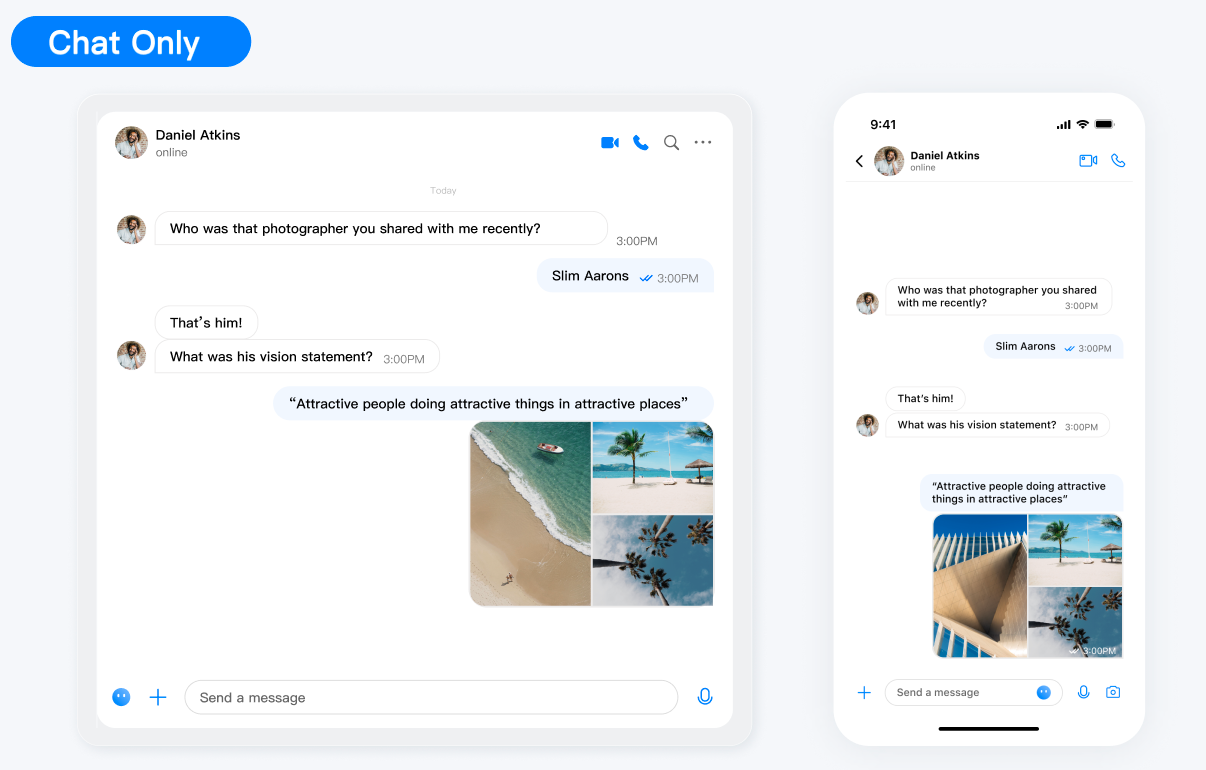
Web & H5 平台,独立集成私信聊天(1V1)或者群聊(Group),例如房产中介咨询、电商在线客服、保险远程定损等。
|
|
4
|
-
|
|
5
|
-
|
|
6
|
-
|
|
7
|
-
|
|
8
|
-
## 开发环境要求
|
|
9
|
-
- React ≥ v18.0 (17.x 版本不支持)
|
|
10
|
-
|
|
11
|
-
- TypeScript
|
|
12
|
-
|
|
13
|
-
- node(node.js ≥ 16.0.0)
|
|
14
|
-
|
|
15
|
-
- npm(版本请与 node 版本匹配)
|
|
16
|
-
|
|
17
|
-
|
|
18
|
-
## chat-uikit-react 集成
|
|
19
|
-
|
|
20
|
-
### 步骤1:创建项目
|
|
21
|
-
1. 创建一个新的 React 项目,您可自行选择是否需要使用 ts 模板。
|
|
22
|
-
|
|
23
|
-
|
|
24
|
-
|
|
25
|
-
【shell】
|
|
26
|
-
``` bash
|
|
27
|
-
npx create-react-app sample-chat --template typescript
|
|
28
|
-
```
|
|
29
|
-
2. 创建项目完成后,切换到项目所在目录。
|
|
30
|
-
|
|
31
|
-
|
|
32
|
-
|
|
33
|
-
【shell】
|
|
34
|
-
``` bash
|
|
35
|
-
cd sample-chat
|
|
36
|
-
```
|
|
37
|
-
|
|
38
|
-
### 步骤2:下载 chat-uikit-react 组件
|
|
39
|
-
|
|
40
|
-
通过 npm 方式下载 [chat-uikit-react](https://www.npmjs.com/package/@tencentcloud/chat-uikit-react) 并在项目中使用。
|
|
41
|
-
|
|
42
|
-
|
|
43
|
-
【shell】
|
|
44
|
-
``` bash
|
|
45
|
-
npm i @tencentcloud/chat-uikit-react @tencentcloud/uikit-base-component-react
|
|
46
|
-
```
|
|
47
|
-
|
|
48
|
-
### 步骤3:引入 chat-uikit-react 组件,创建并打开会话进行聊天
|
|
49
|
-
|
|
50
|
-
> **注意:**
|
|
51
|
-
>
|
|
52
|
-
|
|
53
|
-
> 以下代码中未填入 `SDKAppID`、`userID` 和 `userSig`,需在 [步骤4](https://write.woa.com/#step4) 中获取相关信息后进行替换。
|
|
54
|
-
>
|
|
55
|
-
|
|
56
|
-
|
|
57
|
-
> **说明:**
|
|
58
|
-
>
|
|
59
|
-
> - 关于群聊:
|
|
60
|
-
> - 可以通过调用 API [createC2CConversation](https://write.woa.com/document/157860942511771648) 来创建单聊。
|
|
61
|
-
> - 可以通过调用 API [createGroupConversation](https://write.woa.com/document/157860942511771648) 来创建群聊。
|
|
62
|
-
> - 进入聊天的方式:
|
|
63
|
-
> - 通过调用 API [setActiveConversation](https://write.woa.com/document/157860942511771648),传入 conversationID 进入聊天页面。
|
|
64
|
-
|
|
65
|
-
|
|
66
|
-
替换 App.tsx 中的内容,或者您可以新建一个组件引入。
|
|
67
|
-
``` javascript
|
|
68
|
-
import React from 'react';
|
|
69
|
-
import {
|
|
70
|
-
Chat,
|
|
71
|
-
ChatHeader,
|
|
72
|
-
MessageList,
|
|
73
|
-
MessageInput,
|
|
74
|
-
ChatSetting,
|
|
75
|
-
Search,
|
|
76
|
-
VariantType,
|
|
77
|
-
useUIOpenControlState,
|
|
78
|
-
useLoginState,
|
|
79
|
-
useConversationListState,
|
|
80
|
-
} from '@tencentcloud/chat-uikit-react';
|
|
81
|
-
import { UIKitProvider } from '@tencentcloud/uikit-base-component-react';
|
|
82
|
-
|
|
83
|
-
const config = {
|
|
84
|
-
SDKAppID: 0, // 您的 SDKAppID, 参考步骤4
|
|
85
|
-
userID: 'test-user1', // 您登录的 UserID, 参考步骤4
|
|
86
|
-
userSig: '', // 您的 userSig, 参考步骤4
|
|
87
|
-
}
|
|
88
|
-
|
|
89
|
-
export default function App() {
|
|
90
|
-
// 语言支持 en-US(default) / zh-CN / ja-JP / ko-KR / zh-TW
|
|
91
|
-
// 主题支持 light(default) / dark
|
|
92
|
-
const { isChatSettingOpen, isChatSearchOpen } = useUIOpenControlState();
|
|
93
|
-
const { setActiveConversation, createC2CConversation } = useConversationListState();
|
|
94
|
-
const { login } = useLoginState();
|
|
95
|
-
login(config).then(() => {
|
|
96
|
-
const userID = 'test-user2'; // userID: 消息接收方的 userID
|
|
97
|
-
createC2CConversation(userID).then((conversation) => {
|
|
98
|
-
setActiveConversation(conversation.conversationID);
|
|
99
|
-
})
|
|
100
|
-
}).catch(() => {});
|
|
101
|
-
return (
|
|
102
|
-
<div style={{display: 'flex', height: '100vh'}}>
|
|
103
|
-
<UIKitProvider language='en-US' theme='light'>
|
|
104
|
-
<Chat>
|
|
105
|
-
<ChatHeader />
|
|
106
|
-
<MessageList />
|
|
107
|
-
<MessageInput />
|
|
108
|
-
</Chat>
|
|
109
|
-
{isChatSettingOpen && <ChatSetting />}
|
|
110
|
-
{isChatSearchOpen && <Search style={{ minWidth: '300px'}} variant={VariantType.EMBEDDED} />}
|
|
111
|
-
</UIKitProvider>
|
|
112
|
-
</div>
|
|
113
|
-
);
|
|
114
|
-
}
|
|
115
|
-
```
|
|
116
|
-
|
|
117
|
-
### 步骤4:获取 SDKAppID、userID 和 userSig
|
|
118
|
-
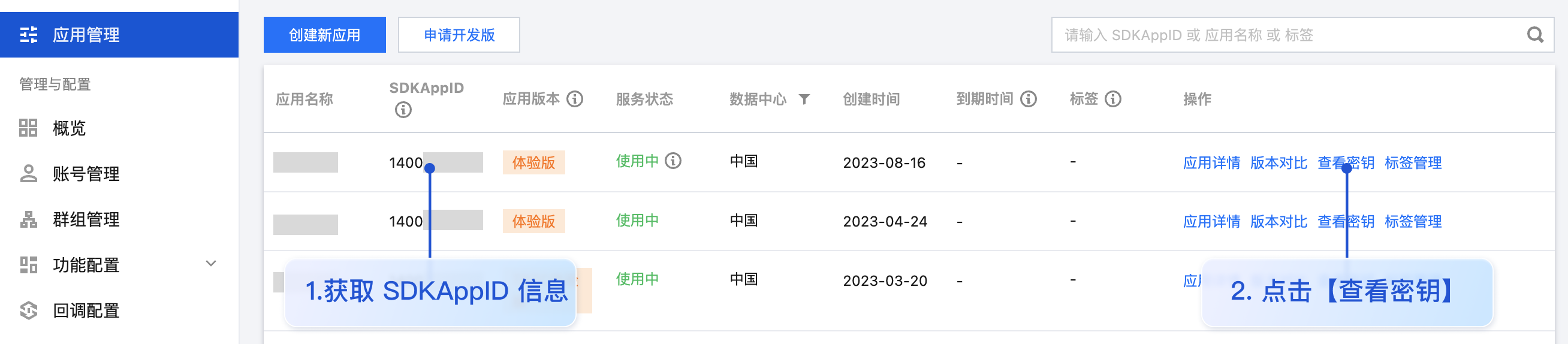
- SDKAppID:SDKAppID 是腾讯云 IM 服务区分客户账号的唯一标识。我们建议每一个独立的 App 都申请一个新的 SDKAppID。不同 SDKAppID 之间的消息是天然隔离的,不能互通。
|
|
119
|
-
|
|
120
|
-
|
|
121
|
-
您可以在 [即时通信 IM 控制台](https://console.cloud.tencent.com/im) 查看所有的 SDKAppID,单击**创建新应用**,可以创建新的 SDKAppID。
|
|
122
|
-
|
|
123
|
-
|
|
124
|
-
|
|
125
|
-
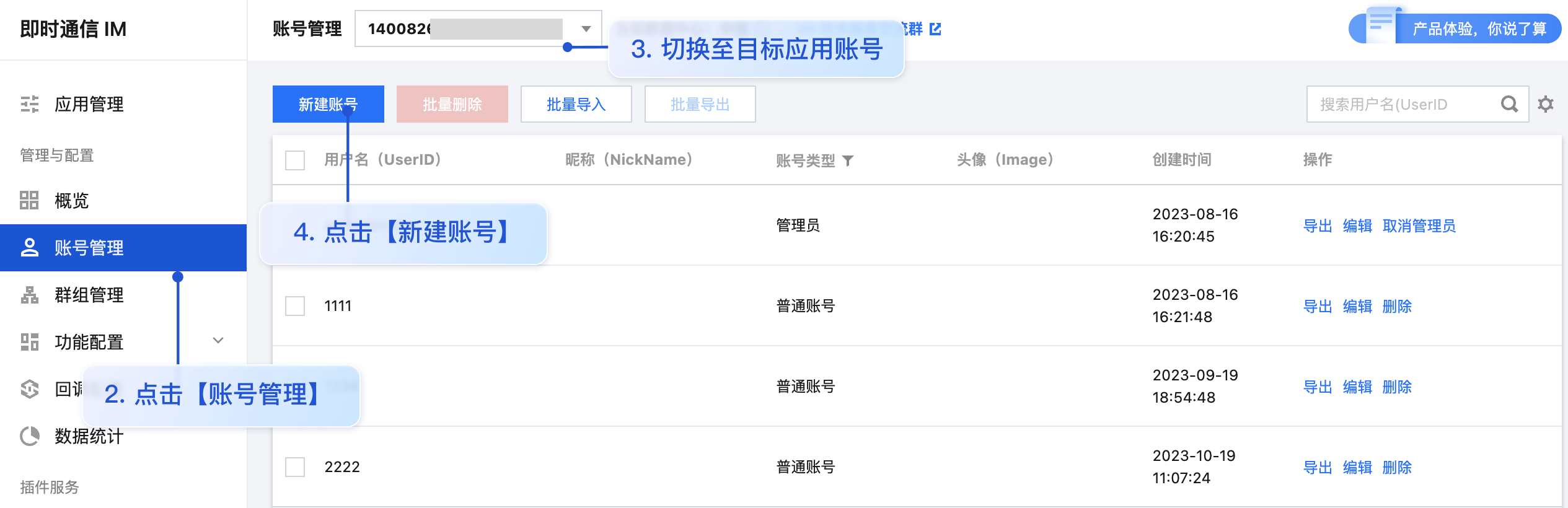
- userID:可通过单击 [即时通信 IM 控制台 > 账号管理](https://console.cloud.tencent.com/im/account-management),切换至目标应用所在账号,即可创建账号并获取 userID。**您可以创建两个或多个 userID 便于体验聊天。**
|
|
126
|
-
|
|
127
|
-
|
|
128
|
-
**例如:创建 test-user1、test-user2 两个账号**
|
|
129
|
-
|
|
130
|
-
|
|
131
|
-
|
|
132
|
-
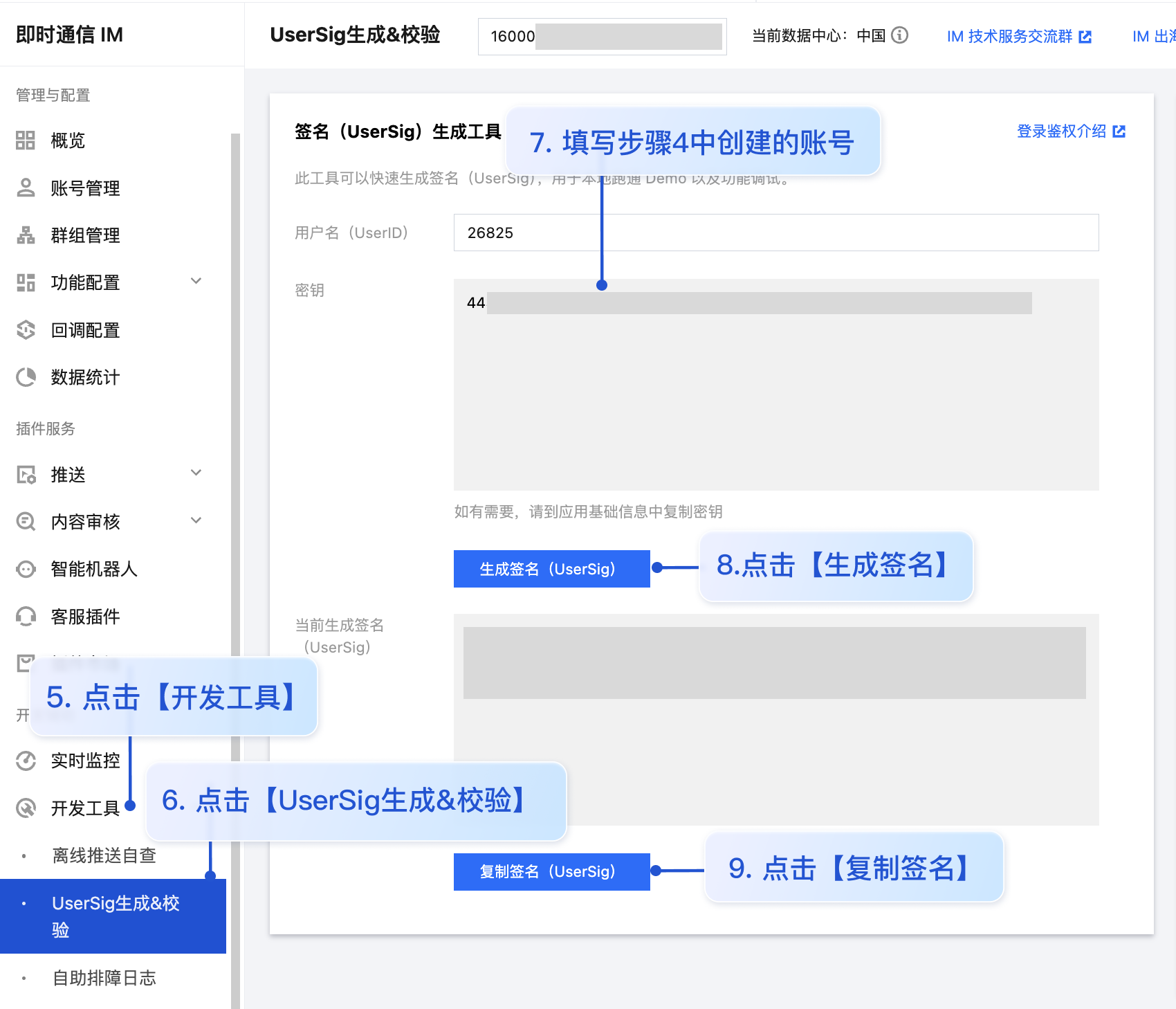
- userSig:可单击 [即时通信 IM 控制台 > 开发工具 > UserSig生成&校验](https://console.cloud.tencent.com/im/tool-usersig),填写创建的 UserID,即可生成 UserSig。
|
|
133
|
-
|
|
134
|
-
|
|
135
|
-
|
|
136
|
-
|
|
137
|
-
### 步骤5:启动项目
|
|
138
|
-
|
|
139
|
-
|
|
140
|
-
【shell】
|
|
141
|
-
``` bash
|
|
142
|
-
npm run start
|
|
143
|
-
```
|
|
144
|
-
|
|
145
|
-
> **注意:**
|
|
146
|
-
>
|
|
147
|
-
> 1. 请确保 [步骤3](https://write.woa.com/#step3) 代码中 SDKAppID、userID 和 userSig 均已成功替换,如未替换将会导致项目表现异常。
|
|
148
|
-
> 2. userID 和 userSig 为一一对应关系,具体参见 [生成 UserSig](https://console.cloud.tencent.com/im/tool-usersig)。
|
|
149
|
-
> 3. 如遇到项目启动失败,请检查 开发环境要求 是否满足。
|
|
150
|
-
|
|
151
|
-
|
|
152
|
-
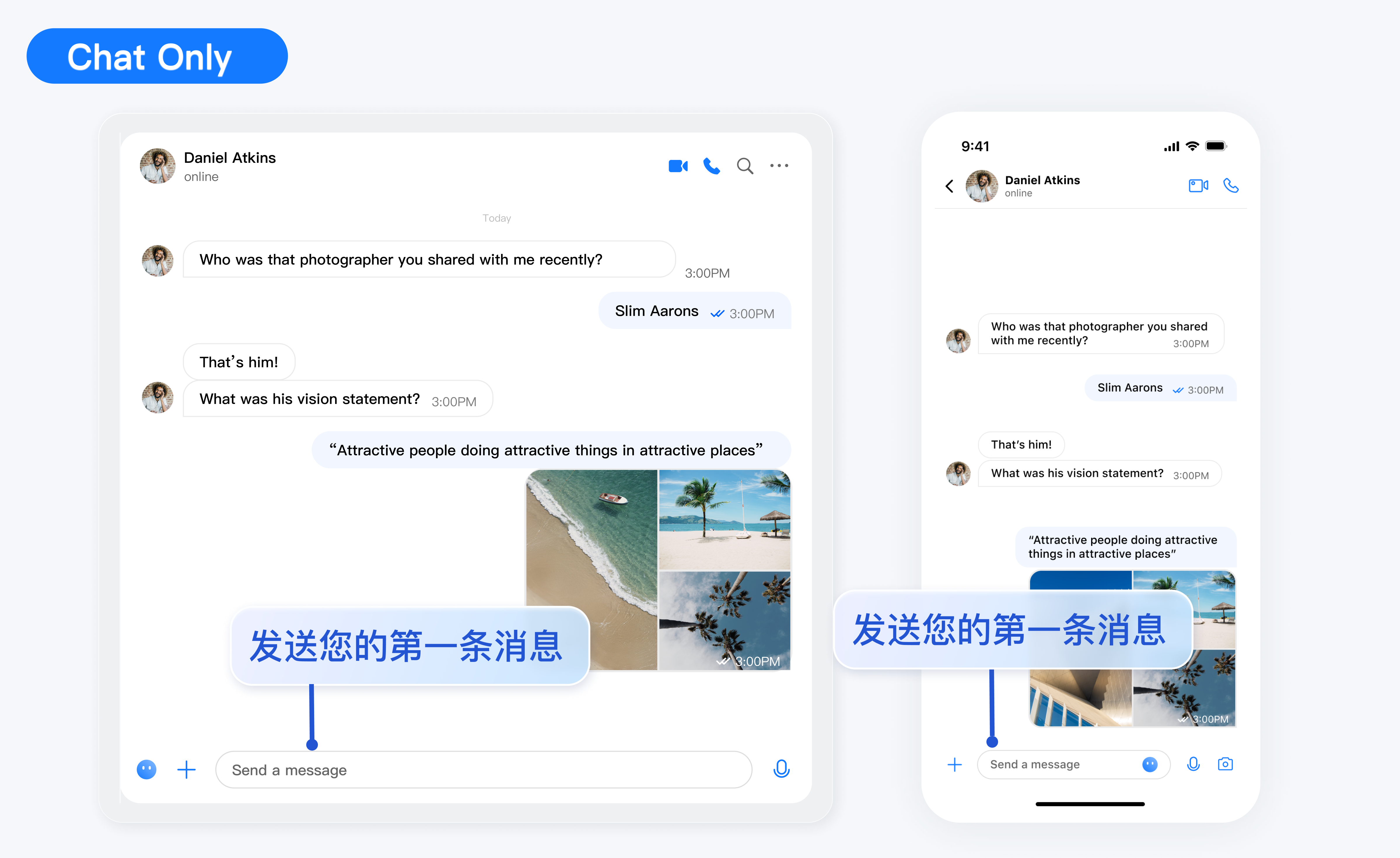
### 步骤6:发送您的第一条消息
|
|
153
|
-
|
|
154
|
-
在输入框输入消息,按下 **enter **键发送。
|
|
155
|
-
|
|
156
|
-
|
|
157
|
-
|
|
158
|
-
|
|
159
|
-
## 常见问题
|
|
160
|
-
|
|
161
|
-
#### 什么是 UserSig?
|
|
162
|
-
|
|
163
|
-
UserSig 是用户登录即时通信 IM 的密码,其本质是对 UserID 等信息加密后得到的密文。
|
|
164
|
-
|
|
165
|
-
#### 如何生成 UserSig?
|
|
166
|
-
|
|
167
|
-
UserSig 签发方式是将 UserSig 的计算代码集成到您的服务端,并提供面向项目的接口,在需要 UserSig 时由您的项目向业务服务器发起请求获取动态 UserSig。更多详情请参见 [服务端生成 UserSig](https://cloud.tencent.com/document/product/269/32688)。
|
|
168
|
-
|
|
169
|
-
> **注意:**
|
|
170
|
-
>
|
|
171
|
-
|
|
172
|
-
> 本文示例代码采用的获取 UserSig 的方案是在客户端代码中配置 SECRETKEY,该方法中 SECRETKEY 很容易被反编译逆向破解,一旦您的密钥泄露,攻击者就可以盗用您的腾讯云流量,因此**该方法仅适合本地跑通功能调试**。 正确的 UserSig 签发方式请参见上文。
|
|
173
|
-
>
|
|
174
|
-
|
|
175
|
-
|
|
176
|
-
#### 是否支持 react 17.x 版本?
|
|
177
|
-
|
|
178
|
-
目前不支持 17.x 版本,仅支持 React ≥ v18.0。
|
|
179
|
-
|
|
180
|
-
## 参考文档
|
|
181
|
-
- [chat-uikit-react npm](https://www.npmjs.com/package/@tencentcloud/chat-uikit-react)
|
|
182
|
-
|
|
183
|
-
- [Demo源码及跑通示例](https://github.com/TencentCloud/chat-uikit-react)
|
|
184
|
-
|
|
185
|
-
|
|
@@ -1,212 +0,0 @@
|
|
|
1
|
-
## chat-uikit-react 介绍
|
|
2
|
-
|
|
3
|
-
chat-uikit-react 是基于腾讯云 Chat SDK 的一款 react UI 组件库,它提供了一些通用的 UI 组件,包含会话、聊天、群组等功能。基于这些精心设计的 UI 组件,您可以快速构建优雅的、可靠的、可扩展的 Chat 应用。 chat-uikit-react 界面效果如下图所示:
|
|
4
|
-
|
|
5
|
-
您可以在线体验:
|
|
6
|
-
- [Web Demo](https://web.sdk.qcloud.com/im/demo/react/index.html?scene=social)
|
|
7
|
-
|
|
8
|
-
- [H5 Demo](https://trtc.io/demo/homepage/#/detail?scene=messenger)
|
|
9
|
-
|
|
10
|
-
|
|
11
|
-
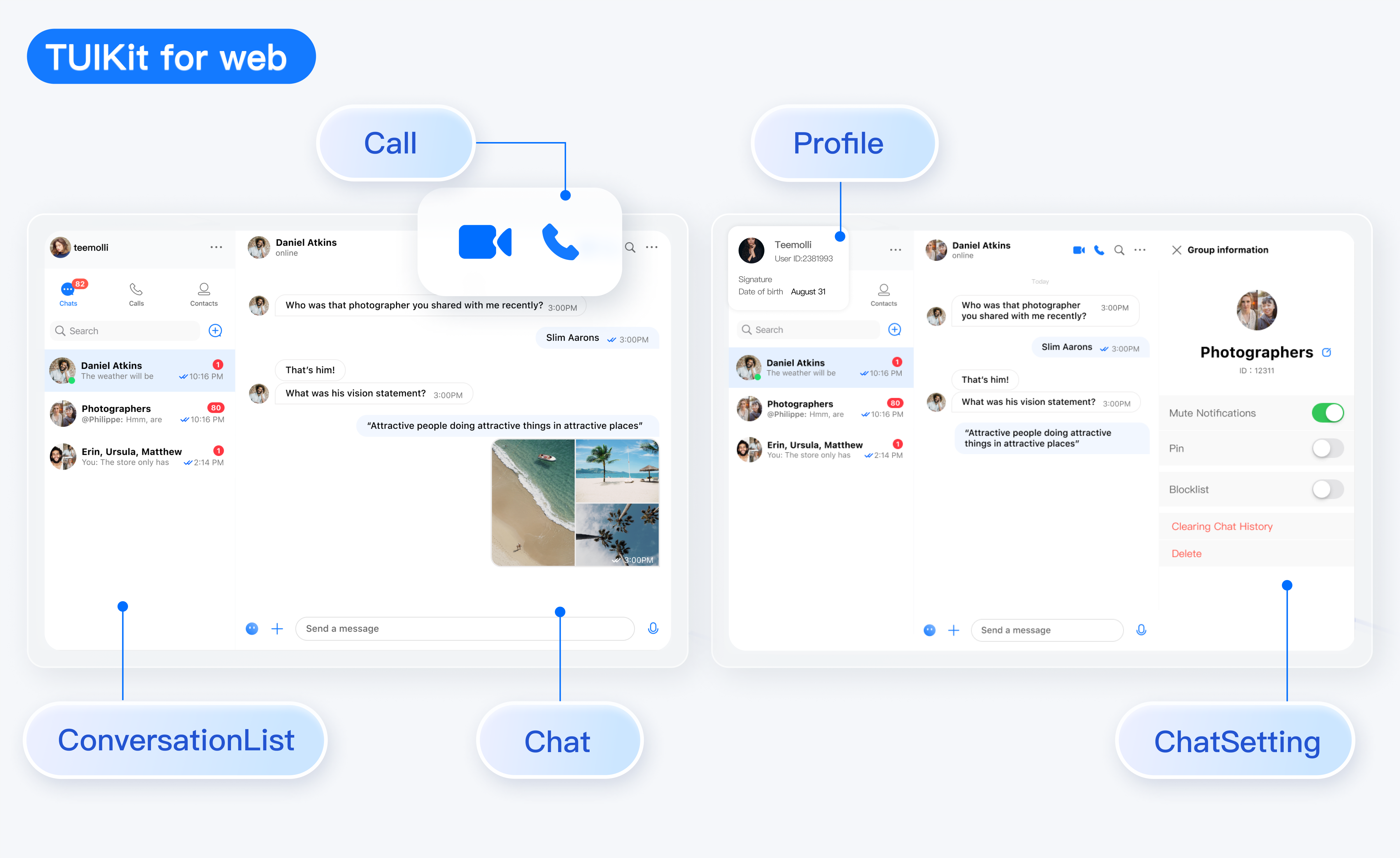
**TUIKit Web 端**界面效果如下图所示:
|
|
12
|
-
|
|
13
|
-
|
|
14
|
-
|
|
15
|
-
|
|
16
|
-
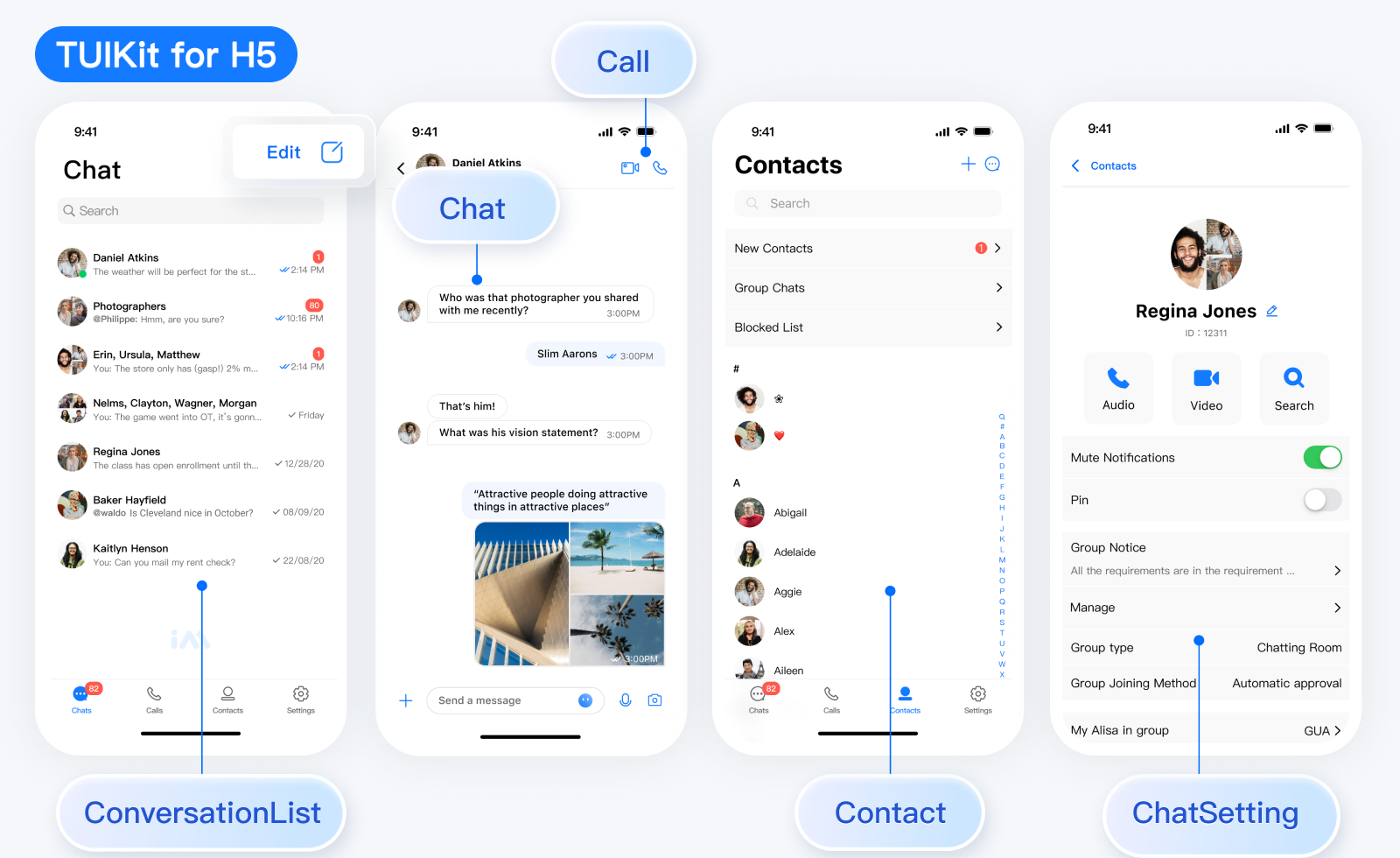
**TUIKit H5 端**界面效果如下图所示:
|
|
17
|
-
|
|
18
|
-
|
|
19
|
-
|
|
20
|
-
|
|
21
|
-
## 开发环境要求
|
|
22
|
-
- React v18
|
|
23
|
-
|
|
24
|
-
- TypeScript
|
|
25
|
-
|
|
26
|
-
- Node.js ≥ v18
|
|
27
|
-
|
|
28
|
-
- npm(版本请与 node 版本匹配)
|
|
29
|
-
|
|
30
|
-
|
|
31
|
-
## chat-uikit-react 集成
|
|
32
|
-
|
|
33
|
-
### 步骤1:创建项目
|
|
34
|
-
|
|
35
|
-
创建一个新的名为 **chat-app** 的 React 项目(创建项目时选择 React 18,并且建议使用 TypeScript 模板),并按照提示跑通脚手架初始项目。
|
|
36
|
-
|
|
37
|
-
|
|
38
|
-
【shell】
|
|
39
|
-
``` bash
|
|
40
|
-
npm create rsbuild@latest
|
|
41
|
-
```
|
|
42
|
-
|
|
43
|
-
### 步骤2:下载 chat-uikit-react 组件
|
|
44
|
-
|
|
45
|
-
通过 npm 方式下载 [chat-uikit-react](https://www.npmjs.com/package/@tencentcloud/chat-uikit-react) 并在项目中使用。
|
|
46
|
-
|
|
47
|
-
|
|
48
|
-
【shell】
|
|
49
|
-
``` bash
|
|
50
|
-
npm i @tencentcloud/chat-uikit-react
|
|
51
|
-
```
|
|
52
|
-
|
|
53
|
-
### 步骤3:引入 chat-uikit-react 组件
|
|
54
|
-
|
|
55
|
-
> **注意:**
|
|
56
|
-
>
|
|
57
|
-
> - 以下代码中未填入 `SDKAppID`、`userID` 和 `userSig`,需在 [步骤4](https://write.woa.com/#step4) 中获取相关信息后进行替换。
|
|
58
|
-
> - 为了尊重表情符号设计的版权,Demo/UIKit 项目不包括大型表情元素的剪切图。请在正式商业发布之前,用您自己设计或拥有版权的表情包替换它们。默认的小黄脸表情包由腾讯云拥有版权,并可以收费授权。如果您希望获得授权,请提交工单与我们联系。
|
|
59
|
-
|
|
60
|
-
|
|
61
|
-
替换 App.tsx 中的内容,或者您可以新建一个组件引入。
|
|
62
|
-
``` typescript
|
|
63
|
-
import {
|
|
64
|
-
UIKitProvider,
|
|
65
|
-
useLoginState,
|
|
66
|
-
LoginStatus,
|
|
67
|
-
ConversationList,
|
|
68
|
-
Chat,
|
|
69
|
-
ChatHeader,
|
|
70
|
-
MessageList,
|
|
71
|
-
MessageInput,
|
|
72
|
-
useUIOpenControlState,
|
|
73
|
-
ChatSetting,
|
|
74
|
-
Search,
|
|
75
|
-
VariantType,
|
|
76
|
-
ContactList,
|
|
77
|
-
ContactInfo,
|
|
78
|
-
} from "@tencentcloud/chat-uikit-react";
|
|
79
|
-
import { useState } from "react";
|
|
80
|
-
|
|
81
|
-
function App() {
|
|
82
|
-
const { isChatSettingOpen, isChatSearchOpen } = useUIOpenControlState();
|
|
83
|
-
const [activeTab, setActiveTab] = useState('chats');
|
|
84
|
-
|
|
85
|
-
const { status } = useLoginState({
|
|
86
|
-
SDKAppID: 0, // 参考步骤 4
|
|
87
|
-
userID: '', // 参考步骤 4
|
|
88
|
-
userSig: '', // 参考步骤 4
|
|
89
|
-
})
|
|
90
|
-
|
|
91
|
-
if (status !== LoginStatus.SUCCESS) {
|
|
92
|
-
return <div>Loading...</div>
|
|
93
|
-
}
|
|
94
|
-
|
|
95
|
-
// 语言支持 en-US(default) / zh-CN / ja-JP / ko-KR / zh-TW
|
|
96
|
-
// 主题支持 light(default) / dark
|
|
97
|
-
return (
|
|
98
|
-
<UIKitProvider>
|
|
99
|
-
<div style={{ height: '100vh', width: '100vw', display: 'flex', flexDirection: 'row' }}>
|
|
100
|
-
<ul>
|
|
101
|
-
<li onClick={() => {setActiveTab('chats')}}>chats</li>
|
|
102
|
-
<li onClick={() => {setActiveTab('contacts')}}>contact</li>
|
|
103
|
-
</ul>
|
|
104
|
-
{
|
|
105
|
-
activeTab === 'chats' && (
|
|
106
|
-
<>
|
|
107
|
-
<ConversationList style={{ minWidth: '300px', maxWidth: '350px' }}/>
|
|
108
|
-
<Chat PlaceholderEmpty="No messages yet">
|
|
109
|
-
<ChatHeader />
|
|
110
|
-
<MessageList />
|
|
111
|
-
<MessageInput />
|
|
112
|
-
</Chat>
|
|
113
|
-
{isChatSettingOpen && <ChatSetting />}
|
|
114
|
-
{isChatSearchOpen && <Search style={{ minWidth: '300px'}} variant={VariantType.EMBEDDED} />}
|
|
115
|
-
</>
|
|
116
|
-
)
|
|
117
|
-
}
|
|
118
|
-
{
|
|
119
|
-
activeTab === 'contacts' && (
|
|
120
|
-
<>
|
|
121
|
-
<ContactList style={{ minWidth: '300px', maxWidth: '350px' }}/>
|
|
122
|
-
<ContactInfo
|
|
123
|
-
PlaceholderEmpty="No contact yet"
|
|
124
|
-
onSendMessage={() => {setActiveTab('chats')}}
|
|
125
|
-
onEnterGroup={() => {setActiveTab('chats')}}
|
|
126
|
-
/>
|
|
127
|
-
</>
|
|
128
|
-
)
|
|
129
|
-
}
|
|
130
|
-
</div>
|
|
131
|
-
</UIKitProvider>
|
|
132
|
-
);
|
|
133
|
-
}
|
|
134
|
-
|
|
135
|
-
export default App;
|
|
136
|
-
```
|
|
137
|
-
|
|
138
|
-
### 步骤4:获取 SDKAppID、userID 和 userSig
|
|
139
|
-
- SDKAppID:SDKAppID 是腾讯云 IM 服务区分客户账号的唯一标识。我们建议每一个独立的 App 都申请一个新的 SDKAppID。不同 SDKAppID 之间的消息是天然隔离的,不能互通。
|
|
140
|
-
|
|
141
|
-
|
|
142
|
-
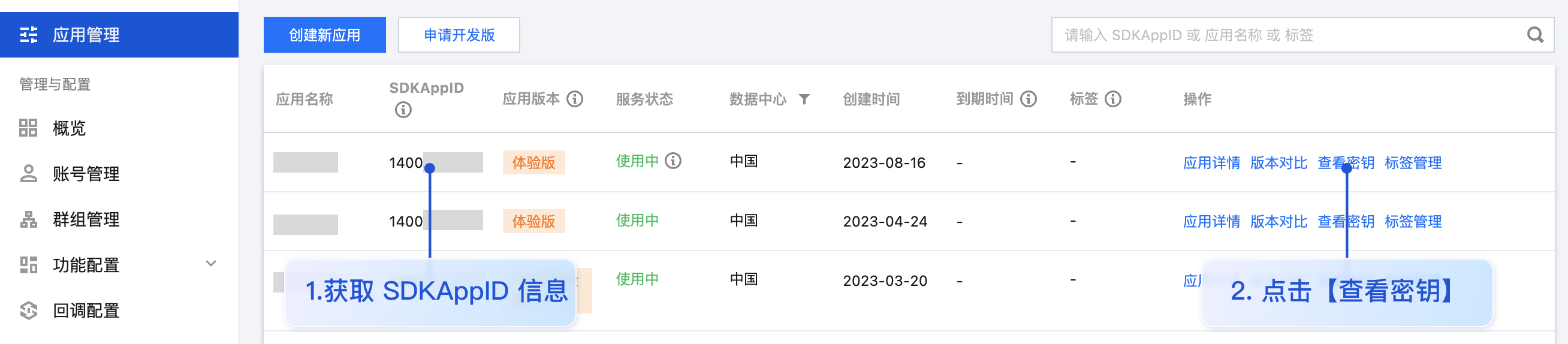
您可以在 [即时通信 IM 控制台](https://console.cloud.tencent.com/im) 查看所有的 SDKAppID,单击**创建新应用**,可以创建新的 SDKAppID。
|
|
143
|
-
|
|
144
|
-
|
|
145
|
-
|
|
146
|
-
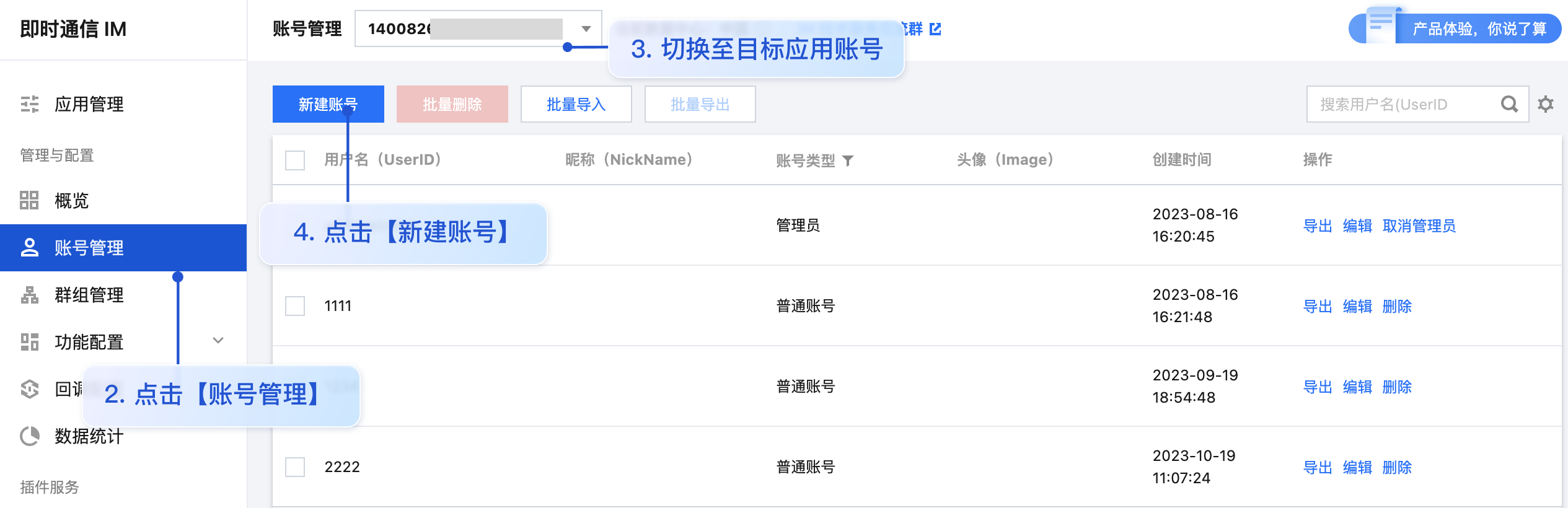
- userID:可通过单击 [ 即时通信 IM 控制台 -【账号管理】](https://console.cloud.tencent.com/im/account-management),切换至目标应用所在账号,即可创建账号并获取 userID。
|
|
147
|
-
|
|
148
|
-
|
|
149
|
-
|
|
150
|
-
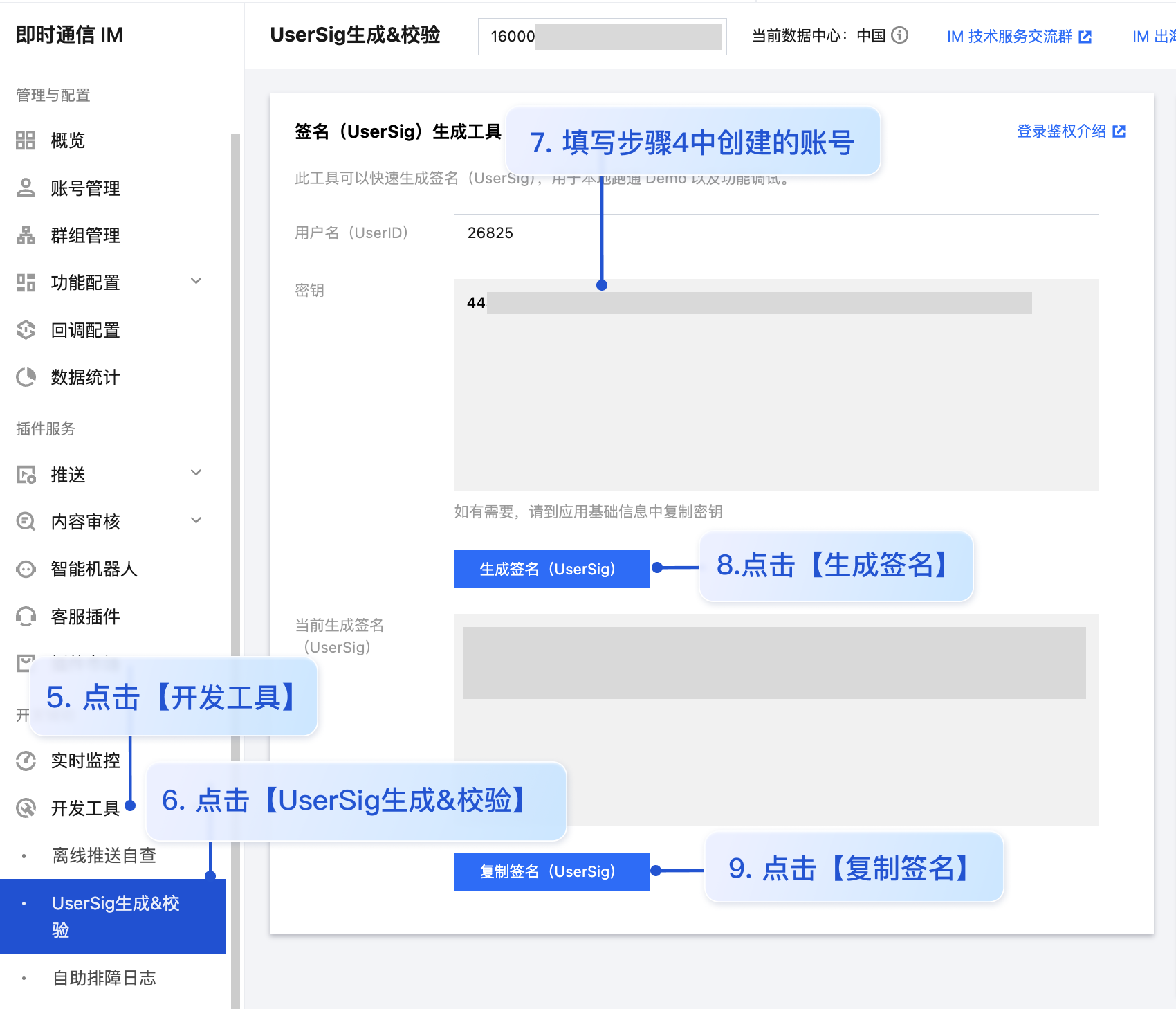
- userSig:可单击 [ 即时通信 IM 控制台 > 开发工具 > UserSig生成&校验](https://console.cloud.tencent.com/im/tool-usersig),填写创建的 userID,即可生成 userSig。
|
|
151
|
-
|
|
152
|
-
|
|
153
|
-
|
|
154
|
-
|
|
155
|
-
### 步骤5:启动项目
|
|
156
|
-
|
|
157
|
-
|
|
158
|
-
【shell】
|
|
159
|
-
``` bash
|
|
160
|
-
npm run dev
|
|
161
|
-
```
|
|
162
|
-
|
|
163
|
-
> **注意:**
|
|
164
|
-
>
|
|
165
|
-
> 1. 请确保 [步骤3](https://write.woa.com/#step3) 代码中 SDKAppID、userID 和 userSig 均已成功替换,如未替换将会导致项目表现异常。
|
|
166
|
-
> 2. userID 和 userSig 为一一对应关系,具体参见 [生成 UserSig(用户鉴权)](https://write.woa.com/document/107052240244191232)。
|
|
167
|
-
> 3. 如遇到项目启动失败,请检查 开发环境要求 是否满足。
|
|
168
|
-
|
|
169
|
-
|
|
170
|
-
### 步骤6:发送您的第一条消息
|
|
171
|
-
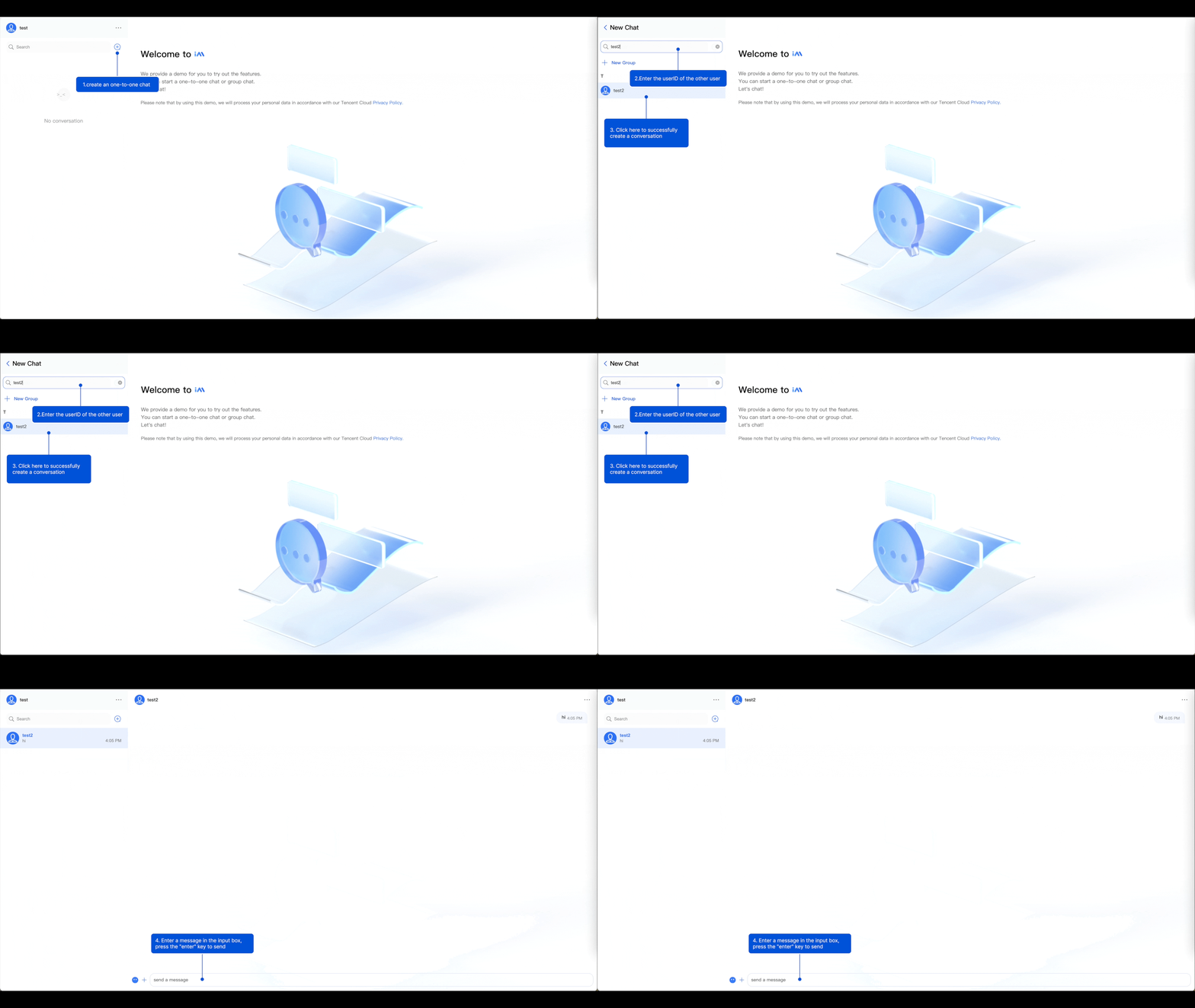
1. 项目启动成功后,单击 **+ **图标,创建会话。
|
|
172
|
-
|
|
173
|
-
2. 在输入框中搜索另一个用户的 userID(参考:[步骤4 -> 创建账号并获取 userID](https://write.woa.com/#step4))。
|
|
174
|
-
|
|
175
|
-
3. 单击用户头像发起会话。
|
|
176
|
-
|
|
177
|
-
4. 在输入框输入消息,按下 **Enter **键发送。
|
|
178
|
-
|
|
179
|
-
|
|
180
|
-
|
|
181
|
-
|
|
182
|
-
## 常见问题
|
|
183
|
-
|
|
184
|
-
#### 什么是 UserSig?
|
|
185
|
-
|
|
186
|
-
UserSig 是用户登录即时通信 IM 的密码,其本质是对 UserID 等信息加密后得到的密文。
|
|
187
|
-
|
|
188
|
-
#### 如何生成 UserSig?
|
|
189
|
-
|
|
190
|
-
UserSig 签发方式是将 UserSig 的计算代码集成到您的服务端,并提供面向项目的接口,在需要 UserSig 时由您的项目向业务服务器发起请求获取动态 UserSig。更多详情请参见 [服务端生成 UserSig](https://cloud.tencent.com/document/product/269/32688)。
|
|
191
|
-
|
|
192
|
-
> **注意:**
|
|
193
|
-
>
|
|
194
|
-
|
|
195
|
-
> 本文示例代码采用的获取 UserSig 的方案是在客户端代码中配置 SECRETKEY,该方法中 SECRETKEY 很容易被反编译逆向破解,一旦您的密钥泄露,攻击者就可以盗用您的腾讯云流量,因此**该方法仅适合本地跑通功能调试**。 正确的 UserSig 签发方式请参见上文。
|
|
196
|
-
>
|
|
197
|
-
|
|
198
|
-
|
|
199
|
-
#### 是否支持 react 17.x 版本?
|
|
200
|
-
|
|
201
|
-
目前不支持 17.x 版本,仅支持 React v18。
|
|
202
|
-
|
|
203
|
-
## 相关文档
|
|
204
|
-
|
|
205
|
-
## 参考文档
|
|
206
|
-
|
|
207
|
-
#### UIKit 相关:
|
|
208
|
-
- [chat-uikit-react npm](https://www.npmjs.com/package/@tencentcloud/chat-uikit-react)
|
|
209
|
-
|
|
210
|
-
- [Demo 跑通示例](https://github.com/TencentCloud/chat-uikit-react)
|
|
211
|
-
|
|
212
|
-
|
|
@@ -1,149 +0,0 @@
|
|
|
1
|
-
## 适用场景
|
|
2
|
-
|
|
3
|
-
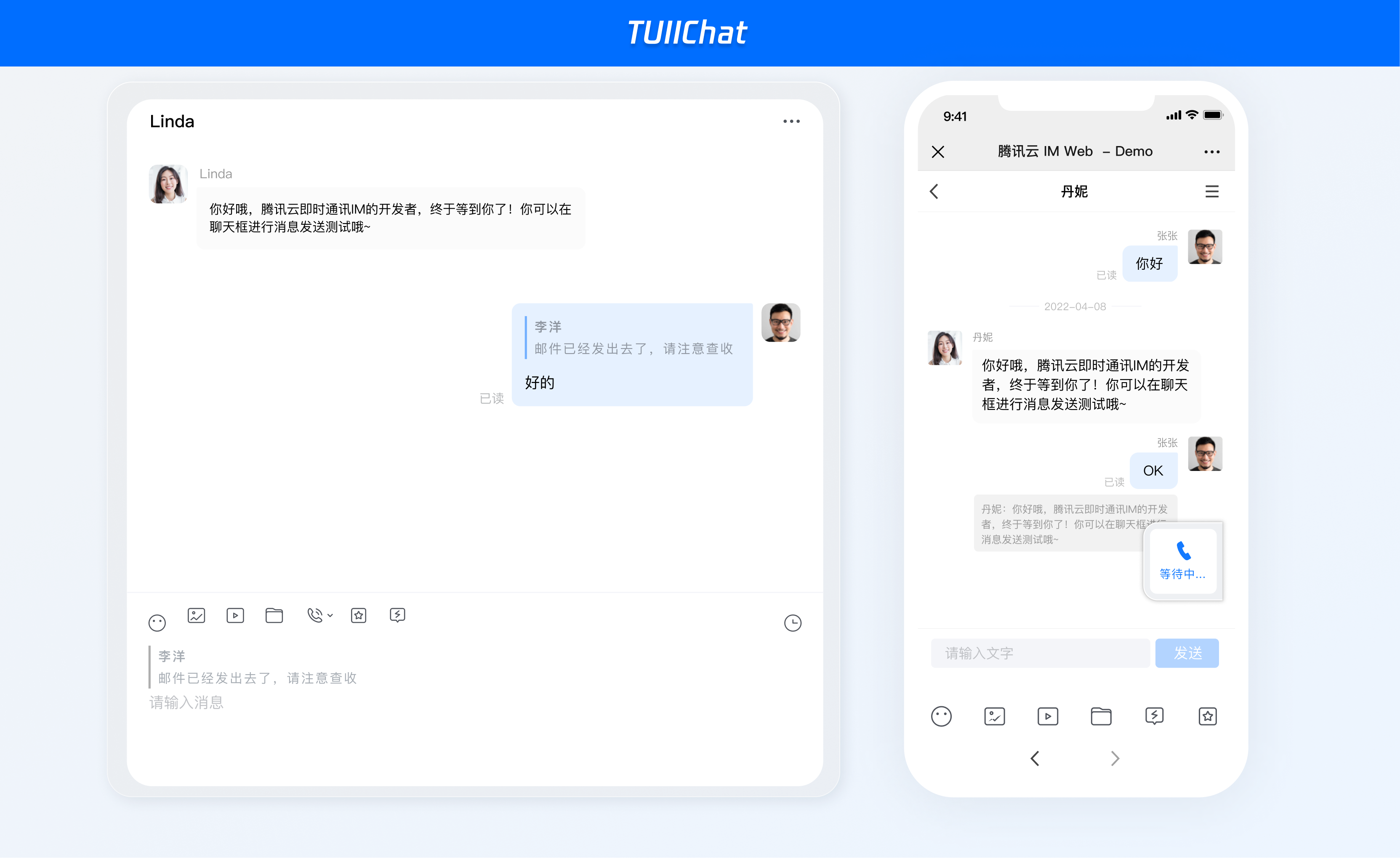
Web & H5 平台,独立集成私信聊天(1V1)或者群聊(Group),例如房产中介咨询、电商在线客服、保险远程定损等。
|
|
4
|
-
|
|
5
|
-
|
|
6
|
-
|
|
7
|
-
|
|
8
|
-
## 开发环境要求
|
|
9
|
-
- vue3
|
|
10
|
-
|
|
11
|
-
- TypeScript
|
|
12
|
-
|
|
13
|
-
- node(node.js ≥ 16.0.0)
|
|
14
|
-
|
|
15
|
-
- npm(版本请与 node 版本匹配)
|
|
16
|
-
|
|
17
|
-
|
|
18
|
-
## 集成指引
|
|
19
|
-
|
|
20
|
-
### 步骤1:创建项目
|
|
21
|
-
1. 创建一个新的名称为 **chat-example** 的 Vue3 项目,您可自行选择是否需要使用 ts 模板。
|
|
22
|
-
|
|
23
|
-
|
|
24
|
-
|
|
25
|
-
【shell】
|
|
26
|
-
``` bash
|
|
27
|
-
npm create vite@latest
|
|
28
|
-
```
|
|
29
|
-
2. 创建项目完成后,切换到项目所在目录。
|
|
30
|
-
|
|
31
|
-
|
|
32
|
-
|
|
33
|
-
【shell】
|
|
34
|
-
``` bash
|
|
35
|
-
cd chat-example
|
|
36
|
-
npm install
|
|
37
|
-
```
|
|
38
|
-
|
|
39
|
-
### 步骤2:下载 chat-uikit-vue3 组件
|
|
40
|
-
|
|
41
|
-
|
|
42
|
-
【shell】
|
|
43
|
-
``` bash
|
|
44
|
-
npm i @tencentcloud/chat-uikit-vue3
|
|
45
|
-
```
|
|
46
|
-
|
|
47
|
-
### 步骤3:仅引入 Chat 相关组件
|
|
48
|
-
|
|
49
|
-
##### 在 App.vue 页面中实现以下代码,即可快速搭建聊天界面并开启指定会话:
|
|
50
|
-
|
|
51
|
-
> **说明:**
|
|
52
|
-
>
|
|
53
|
-
|
|
54
|
-
> conversationID:会话 ID。会话ID组成方式如下:
|
|
55
|
-
>
|
|
56
|
-
> - C2C${userID}(单聊),例如 `C2C123456`
|
|
57
|
-
> - GROUP${groupID}(群聊),例如 `GROUP123456`
|
|
58
|
-
|
|
59
|
-
``` javascript
|
|
60
|
-
<template>
|
|
61
|
-
<div class="app">
|
|
62
|
-
<UIKitProvider>
|
|
63
|
-
<Chat style="flex: 1;">
|
|
64
|
-
<ChatHeader />
|
|
65
|
-
<MessageList />
|
|
66
|
-
<MessageInput />
|
|
67
|
-
</Chat>
|
|
68
|
-
</UIKitProvider>
|
|
69
|
-
</div>
|
|
70
|
-
</template>
|
|
71
|
-
<script lang="ts" setup>
|
|
72
|
-
import {
|
|
73
|
-
Chat,
|
|
74
|
-
MessageList,
|
|
75
|
-
MessageInput,
|
|
76
|
-
ChatHeader,
|
|
77
|
-
UIKitProvider,
|
|
78
|
-
useLoginState,
|
|
79
|
-
useConversationListState,
|
|
80
|
-
} from '@tencentcloud/chat-uikit-vue3';
|
|
81
|
-
const config = {
|
|
82
|
-
sdkAppId : 0, // SDKAppID, 可以参考步骤 4 获取
|
|
83
|
-
userId: 'xxx', // UserID, 可以参考步骤 4 获取
|
|
84
|
-
userSig: 'xxx', // userSig, 可以参考步骤 4 获取
|
|
85
|
-
}
|
|
86
|
-
|
|
87
|
-
const { login } = useLoginState();
|
|
88
|
-
const { setActiveConversation } = useConversationListState();
|
|
89
|
-
const conversationID="YOUR_CONVERSATIONID"; // 参考说明设置您需要的会话 ID。
|
|
90
|
-
|
|
91
|
-
login({
|
|
92
|
-
...config,
|
|
93
|
-
useUploadPlugin: true
|
|
94
|
-
})
|
|
95
|
-
.then(() => {
|
|
96
|
-
setActiveConversation(conversationID)
|
|
97
|
-
})
|
|
98
|
-
.catch(() => {});
|
|
99
|
-
</script>
|
|
100
|
-
<style lang="scss">
|
|
101
|
-
.app {
|
|
102
|
-
width: 100vw;
|
|
103
|
-
height: 100vh;
|
|
104
|
-
display: flex;
|
|
105
|
-
}
|
|
106
|
-
</style>
|
|
107
|
-
```
|
|
108
|
-
|
|
109
|
-
### 步骤4:获取 SDKAppID、userID 和 userSig
|
|
110
|
-
- SDKAppID:SDKAppID 是腾讯云 IM 服务区分客户账号的唯一标识。我们建议每一个独立的 App 都申请一个新的 SDKAppID。不同 SDKAppID 之间的消息是天然隔离的,不能互通。
|
|
111
|
-
|
|
112
|
-
|
|
113
|
-
您可以在 [即时通信 IM 控制台](https://console.cloud.tencent.com/im) 查看所有的 SDKAppID,单击**创建新应用**,可以创建新的 SDKAppID。
|
|
114
|
-
|
|
115
|
-
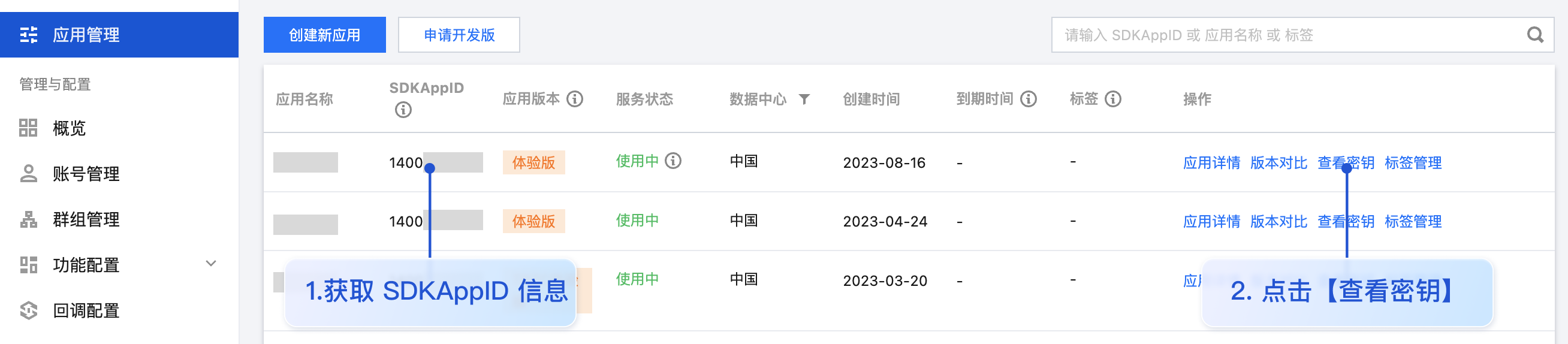
|
|
116
|
-
|
|
117
|
-
- userID:可通过单击 [ 即时通信 IM 控制台 -【账号管理】](https://console.cloud.tencent.com/im/account-management),切换至目标应用所在账号,即可创建账号并获取 userID。
|
|
118
|
-
|
|
119
|
-
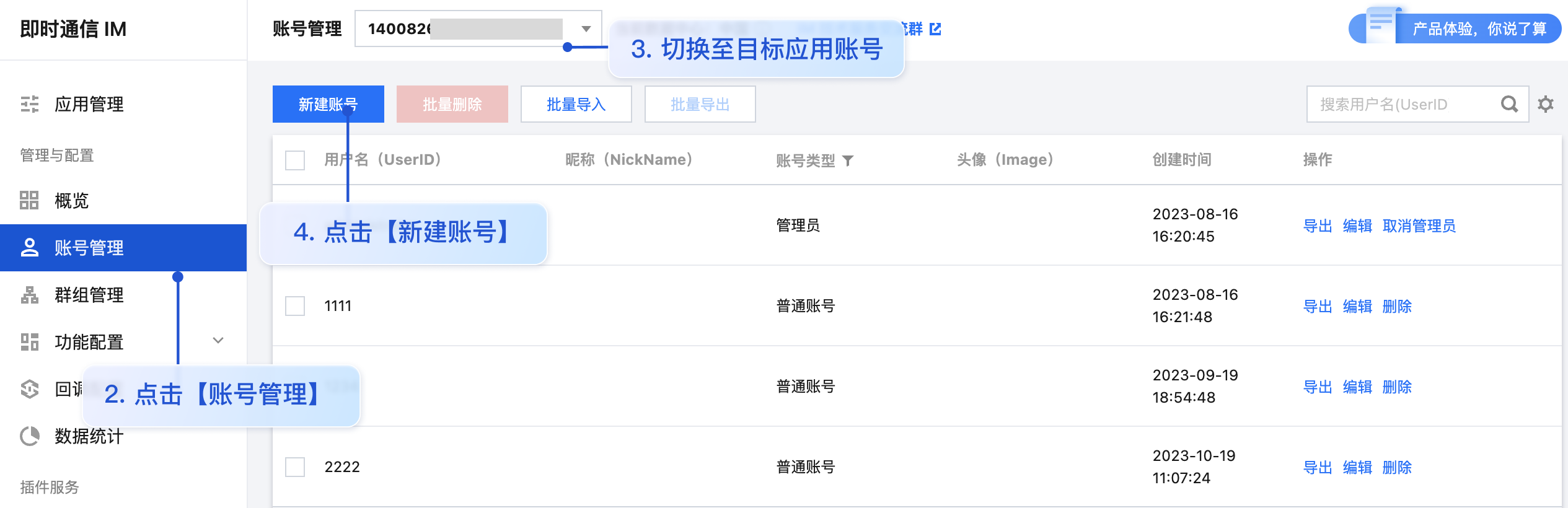
|
|
120
|
-
|
|
121
|
-
- userSig:可单击 [ 即时通信 IM 控制台 > 开发工具 > UserSig生成&校验](https://console.cloud.tencent.com/im/tool-usersig),填写创建的 userID,即可生成 userSig。
|
|
122
|
-
|
|
123
|
-
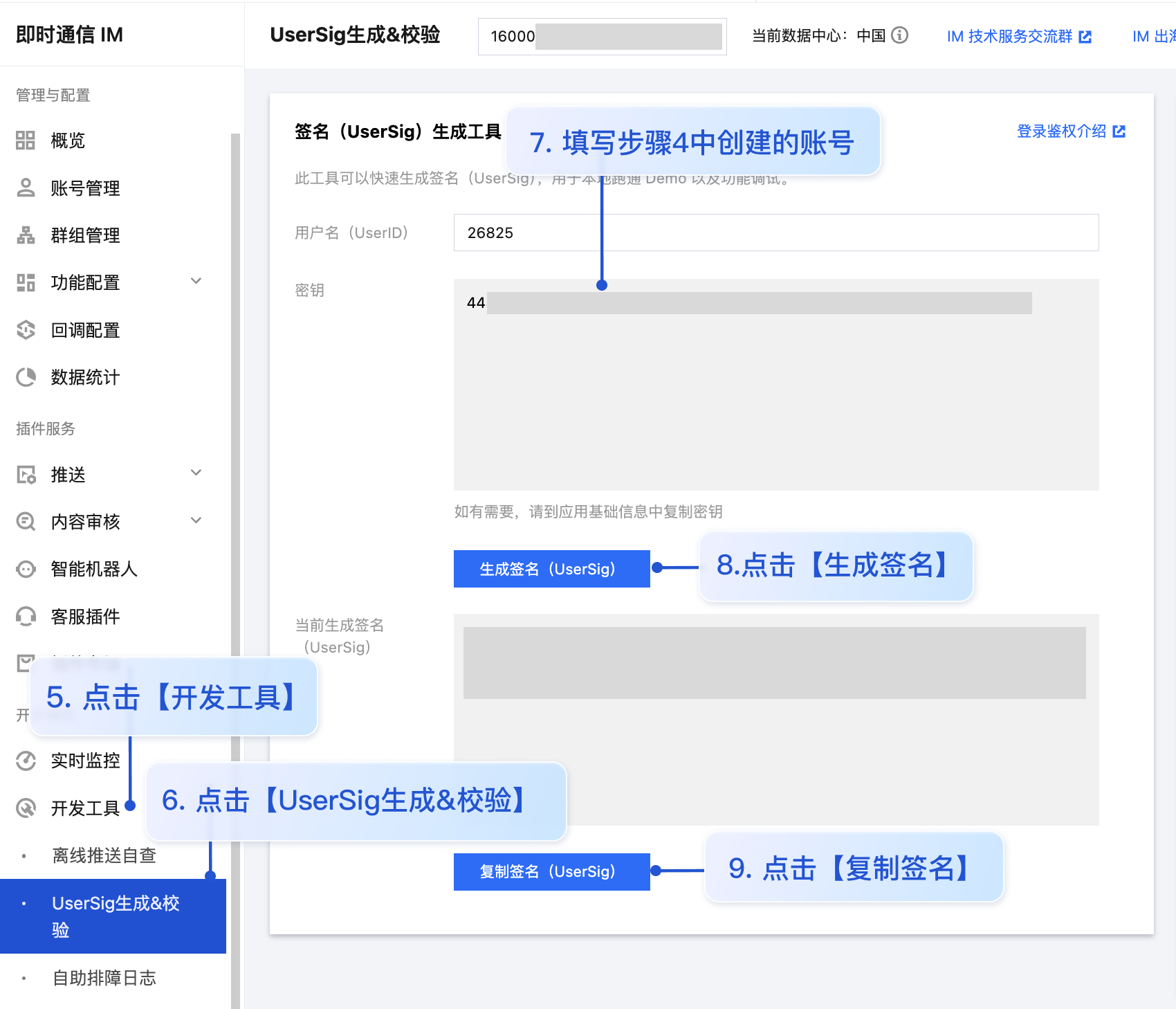
|
|
124
|
-
|
|
125
|
-
|
|
126
|
-
### 步骤5:启动项目
|
|
127
|
-
|
|
128
|
-
|
|
129
|
-
【shell】
|
|
130
|
-
``` bash
|
|
131
|
-
npm run dev
|
|
132
|
-
```
|
|
133
|
-
|
|
134
|
-
> **注意:**
|
|
135
|
-
>
|
|
136
|
-
> 1. 请确保 [步骤3](https://write.woa.com/#step3) 代码中 SDKAppID、userID 和 userSig 均已成功替换,如未替换将会导致项目表现异常。
|
|
137
|
-
> 2. userID 和 userSig 为一一对应关系,具体参见 生成 UserSig。
|
|
138
|
-
> 3. 如遇到项目启动失败,请检查 开发环境要求 是否满足。
|
|
139
|
-
|
|
140
|
-
|
|
141
|
-
## 相关文档
|
|
142
|
-
- [chat-uikit-vue3 npm](https://www.npmjs.com/package/@tencentcloud/chat-uikit-vue3)
|
|
143
|
-
|
|
144
|
-
- [github Demo](https://github.com/Tencent-RTC/TUIKit_Vue3/tree/main/demos/rtcube-vite-vue3)
|
|
145
|
-
|
|
146
|
-
|
|
147
|
-
## 交流与反馈
|
|
148
|
-
|
|
149
|
-
如遇任何问题,可联系 [官网售后](https://cloud.tencent.com/act/event/connect-service#/) 反馈,享有专业工程师的支持,解决您的难题。
|