@tencentcloud/ai-desk-customer-vue 1.5.1 → 1.5.3
This diff represents the content of publicly available package versions that have been released to one of the supported registries. The information contained in this diff is provided for informational purposes only and reflects changes between package versions as they appear in their respective public registries.
- package/CHANGELOG.md +14 -0
- package/README.md +316 -71
- package/components/CustomerServiceChat/emoji-config/index.ts +3 -2
- package/components/CustomerServiceChat/index-web.vue +17 -4
- package/components/CustomerServiceChat/message-input/index-web.vue +9 -2
- package/components/CustomerServiceChat/message-input/message-input-editor-web.vue +11 -0
- package/components/CustomerServiceChat/message-input/message-input-quote/index.vue +31 -6
- package/components/CustomerServiceChat/message-input-toolbar/file-upload/index.vue +14 -1
- package/components/CustomerServiceChat/message-input-toolbar/image-upload/index.vue +26 -2
- package/components/CustomerServiceChat/message-input-toolbar/video-upload/index.vue +14 -1
- package/components/CustomerServiceChat/message-list/bottom-quick-order/index.vue +201 -0
- package/components/CustomerServiceChat/message-list/index-web.vue +46 -0
- package/components/CustomerServiceChat/message-list/message-elements/message-desk/message-desk-elements/marked.ts +6 -1
- package/components/CustomerServiceChat/message-list/message-elements/message-desk/message-desk-elements/message-desk.vue +1 -1
- package/components/CustomerServiceChat/message-list/message-elements/message-desk/message-desk-elements/message-product-card.vue +140 -87
- package/components/CustomerServiceChat/message-list/message-elements/message-quote/index-web.vue +18 -9
- package/components/CustomerServiceChat/style/h5.scss +1 -0
- package/components/CustomerServiceChat/utils/sendMessage.ts +5 -0
- package/constant.ts +3 -3
- package/interface.ts +15 -1
- package/locales/en/TUIChat.ts +2 -1
- package/locales/en/aidesk.ts +4 -1
- package/locales/fil/TUIChat.ts +1 -0
- package/locales/fil/aidesk.ts +3 -0
- package/locales/id/TUIChat.ts +161 -160
- package/locales/id/aidesk.ts +3 -0
- package/locales/ja/TUIChat.ts +162 -161
- package/locales/ja/aidesk.ts +3 -0
- package/locales/ms/TUIChat.ts +162 -161
- package/locales/ms/aidesk.ts +3 -0
- package/locales/ru/TUIChat.ts +155 -154
- package/locales/ru/aidesk.ts +3 -0
- package/locales/th/TUIChat.ts +162 -161
- package/locales/th/aidesk.ts +3 -0
- package/locales/vi/TUIChat.ts +153 -152
- package/locales/vi/aidesk.ts +3 -0
- package/locales/zh_cn/TUIChat.ts +1 -0
- package/locales/zh_cn/aidesk.ts +3 -0
- package/locales/zh_tw/TUIChat.ts +1 -0
- package/locales/zh_tw/aidesk.ts +3 -0
- package/package.json +4 -6
- package/server.ts +42 -7
- package/utils/utils.ts +60 -0
package/CHANGELOG.md
CHANGED
package/README.md
CHANGED
|
@@ -1,10 +1,10 @@
|
|
|
1
1
|
## 介绍
|
|
2
2
|
|
|
3
|
-
智能客服用户端 Web UIKit。使用此 UIKit,您可以在一天内将智能客服的能力集成到您的 Web 或 Hybrid
|
|
3
|
+
智能客服用户端 Web UIKit。使用此 UIKit,您可以在一天内将智能客服的能力集成到您的 Web 或 Hybrid 项目。极简接入,用智能客服为您的产品增收提效,提升用户满意度和付费转化。
|
|
4
4
|
|
|
5
5
|
## 效果展示
|
|
6
6
|
|
|
7
|
-

|
|
8
8
|
|
|
9
9
|
|
|
10
10
|
## 开发环境要求
|
|
@@ -81,7 +81,7 @@ npm i @vue/composition-api unplugin-vue2-script-setup vue@2.6.14 vue-template-co
|
|
|
81
81
|
> **说明:**
|
|
82
82
|
>
|
|
83
83
|
|
|
84
|
-
> Vite 需要[**Node.js**](https://nodejs.org/en/)** 版本 18+,20+。**当您的包管理器发出警告时,请注意升级您的 Node 版本,详情请参考 [
|
|
84
|
+
> Vite 需要[**Node.js**](https://nodejs.org/en/)** 版本 18+,20+。**当您的包管理器发出警告时,请注意升级您的 Node 版本,详情请参考 [Vite 官网](https://cn.vitejs.dev/guide/)。
|
|
85
85
|
>
|
|
86
86
|
|
|
87
87
|
|
|
@@ -176,7 +176,7 @@ xcopy .\node_modules\@tencentcloud\ai-desk-customer-vue .\src\ai-desk-customer-v
|
|
|
176
176
|
``` javascript
|
|
177
177
|
<template>
|
|
178
178
|
<CustomerServiceChat
|
|
179
|
-
|
|
179
|
+
:style="{ width: '600px', height: '80vh', margin: '10px auto', boxShadow: '0 11px 20px #ccc' }"
|
|
180
180
|
/>
|
|
181
181
|
</template>
|
|
182
182
|
<script setup lang="ts">
|
|
@@ -199,7 +199,7 @@ onMounted(() => {
|
|
|
199
199
|
<template>
|
|
200
200
|
<div id="app">
|
|
201
201
|
<CustomerServiceChat
|
|
202
|
-
|
|
202
|
+
:style="{ width: '600px', height: '80vh', margin: '10px auto', boxShadow: '0 11px 20px #ccc' }"
|
|
203
203
|
/>
|
|
204
204
|
</div>
|
|
205
205
|
</template>
|
|
@@ -225,7 +225,7 @@ onMounted(() => {
|
|
|
225
225
|
<template>
|
|
226
226
|
<div id="app">
|
|
227
227
|
<CustomerServiceChat
|
|
228
|
-
|
|
228
|
+
:style="{ width: '600px', height: '80vh', margin: '10px auto', boxShadow: '0 11px 20px #ccc' }"
|
|
229
229
|
/>
|
|
230
230
|
</div>
|
|
231
231
|
</template>
|
|
@@ -282,11 +282,12 @@ export * from "@vue/composition-api";
|
|
|
282
282
|
### 步骤4: 获取 SDKAppID 、userID 、 userSig
|
|
283
283
|
|
|
284
284
|
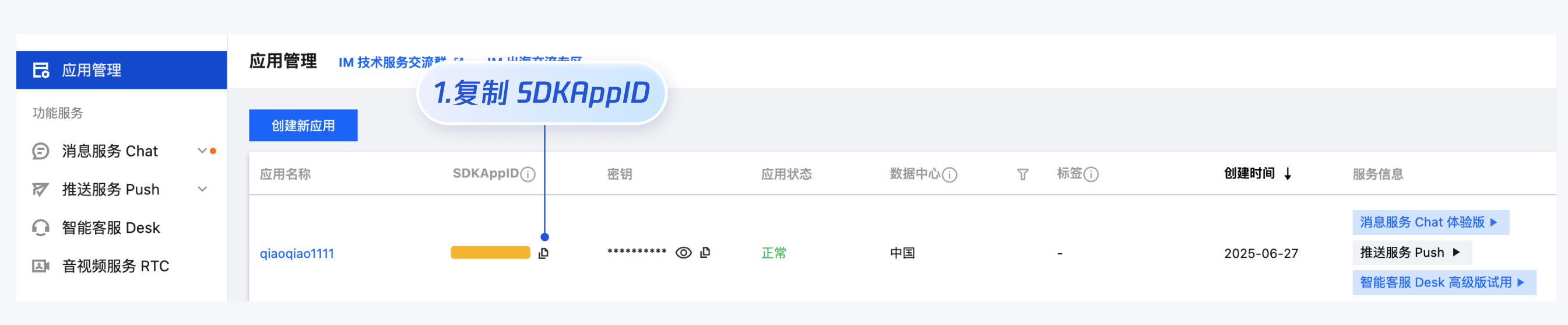
设置`App.vue`中的 `SDKAppID`、`userID`、`userSig` 。
|
|
285
|
-
- SDKAppID 信息,可在 [即时通信 IM 控制台](https://console.cloud.tencent.com/im) 单击**应用管理** >
|
|
285
|
+
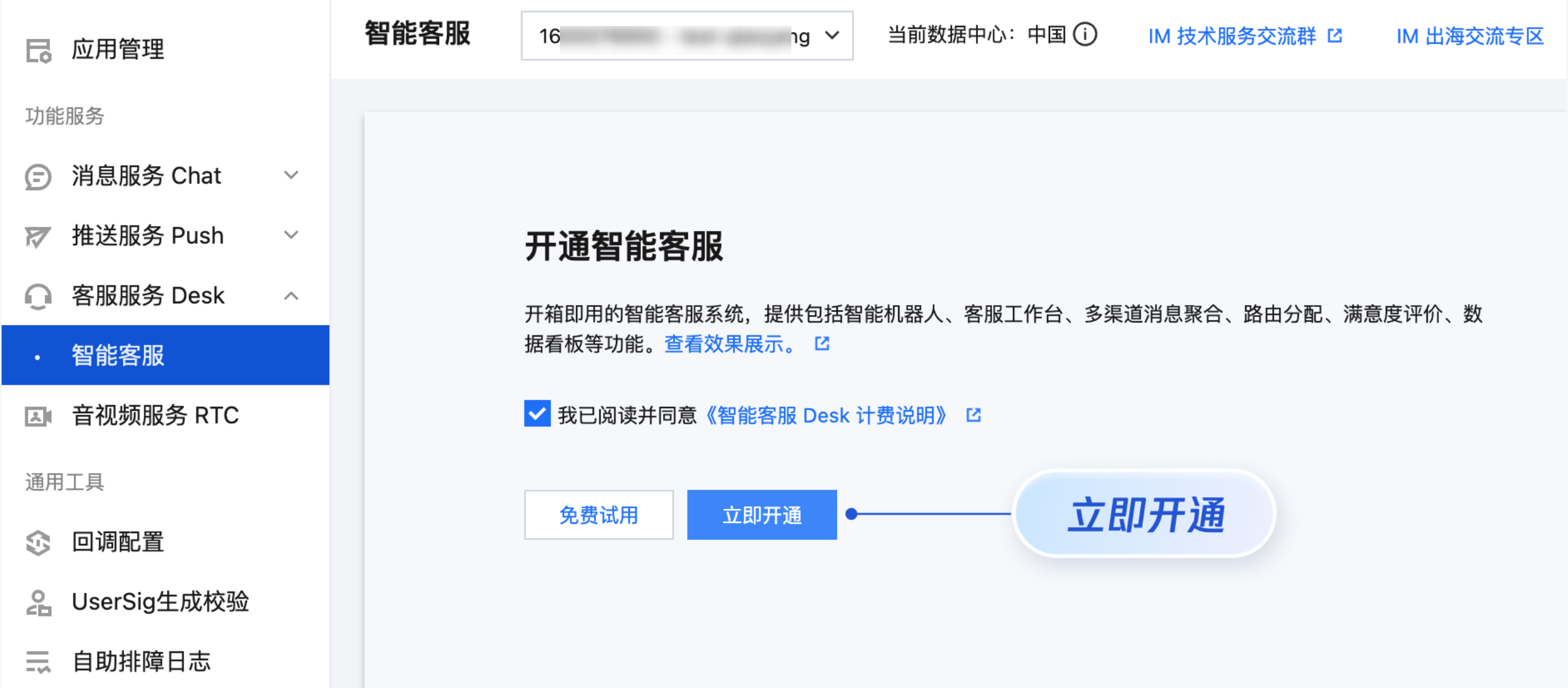
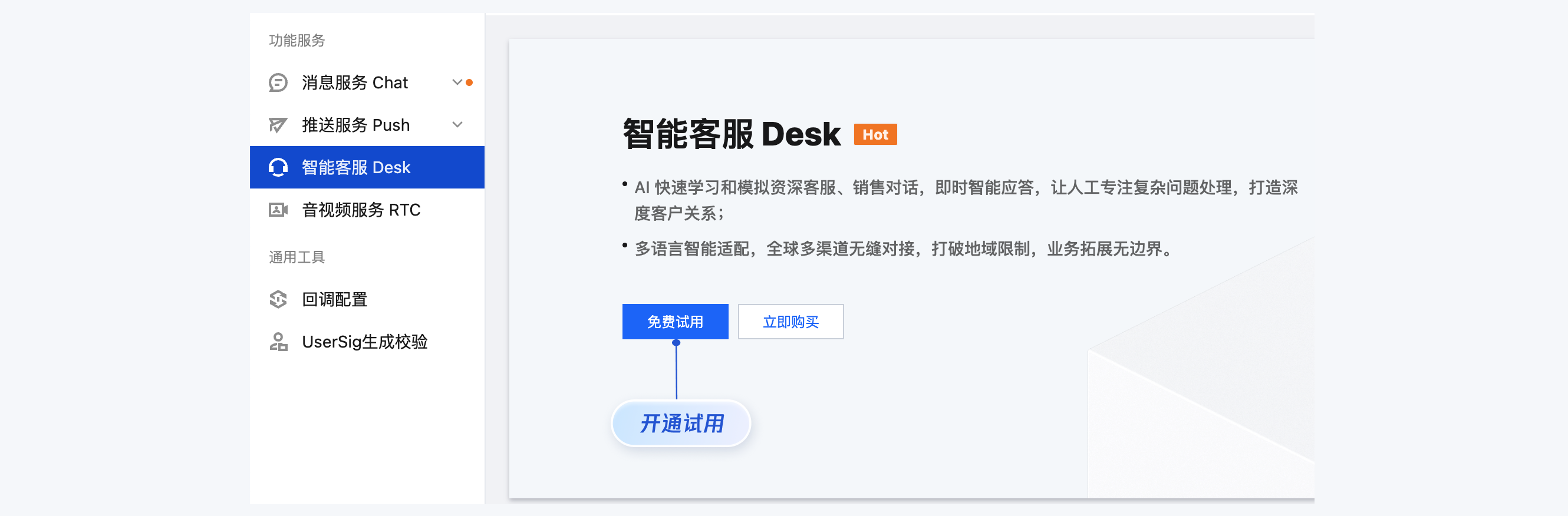
- SDKAppID 信息,可在 [即时通信 IM 控制台](https://console.cloud.tencent.com/im) 单击**应用管理** > **创建新应用**,并选择**智能客服 Desk**, [开通智能客服](https://console.cloud.tencent.com/im/ai-desk) 后获取。
|
|
286
286
|
|
|
287
|
-
|
|
288
287
|
|
|
289
|
-
|
|
288
|
+
|
|
289
|
+
|
|
290
|
+
|
|
290
291
|
|
|
291
292
|
- userID 信息,可本地生成一个随机的字符串,例如 test-1234。
|
|
292
293
|
|
|
@@ -359,7 +360,7 @@ npm run dev
|
|
|
359
360
|
|
|
360
361
|
### 国际化界面语言
|
|
361
362
|
|
|
362
|
-
|
|
363
|
+
UIKit 支持以下界面语言:
|
|
363
364
|
<table>
|
|
364
365
|
<tr>
|
|
365
366
|
<td rowspan="1" colSpan="1" >语言代码(userLang)</td>
|
|
@@ -432,22 +433,24 @@ npm run dev
|
|
|
432
433
|
如果您的业务需要出海,且用户语言以英语为主,可在引入智能客服时设置`userLang="en"`。如果您不指定`userLang`, UIKit 会使用浏览器设置的语言。
|
|
433
434
|
``` javascript
|
|
434
435
|
<template>
|
|
435
|
-
|
|
436
|
-
|
|
437
|
-
|
|
436
|
+
<CustomerServiceChat
|
|
437
|
+
:style="{ width: '600px', height: '80vh', margin: '10px auto', boxShadow: '0 11px 20px #ccc' }"
|
|
438
|
+
userLang="en"
|
|
439
|
+
/>
|
|
438
440
|
</template>
|
|
439
441
|
```
|
|
440
442
|
|
|
441
443
|
如果您需要支持动态切换用户语言,可使用`TUICustomerServer.changeLanguage`接口,并通过切换 页面/组件 key 的方式,实现语言动态修改与展示。
|
|
442
444
|
``` javascript
|
|
443
445
|
<template>
|
|
444
|
-
|
|
445
|
-
|
|
446
|
-
|
|
447
|
-
|
|
446
|
+
<CustomerServiceChat
|
|
447
|
+
:style="{ width: '600px', height: '80vh', margin: '10px auto', boxShadow: '0 11px 20px #ccc' }"
|
|
448
|
+
:key="locale"
|
|
449
|
+
:userLang="locale"
|
|
450
|
+
/>
|
|
448
451
|
</template>
|
|
449
452
|
<script setup lang="ts">
|
|
450
|
-
import TUICustomerServer, { CustomerServiceChat }
|
|
453
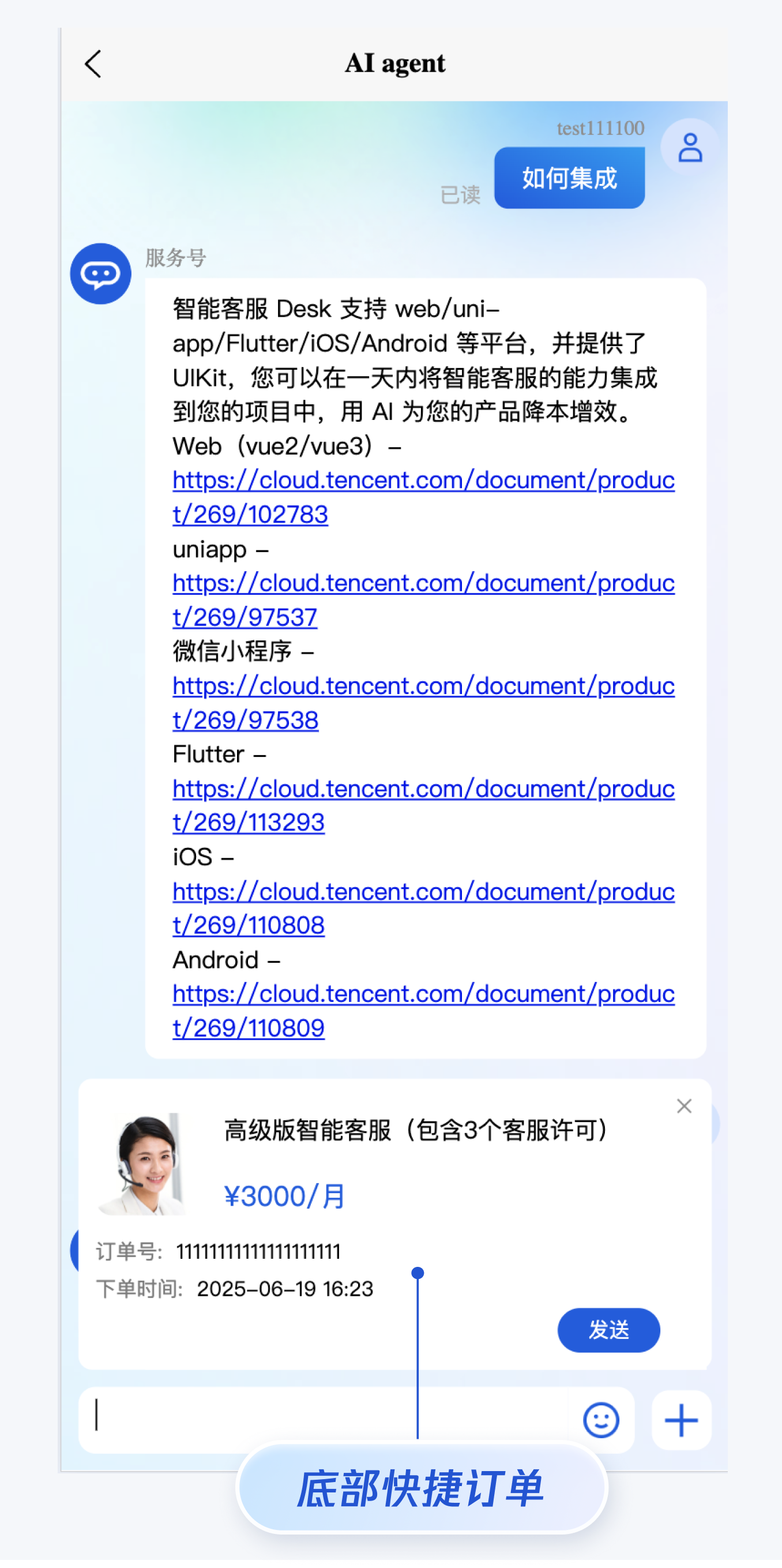
|
+
import TUICustomerServer, { CustomerServiceChat } from './ai-desk-customer-vue';
|
|
451
454
|
import { onMounted, ref } from "vue";
|
|
452
455
|
|
|
453
456
|
const locale = ref('en');
|
|
@@ -462,79 +465,321 @@ const changeLanguage = (language: string) => {
|
|
|
462
465
|
</style>
|
|
463
466
|
```
|
|
464
467
|
|
|
465
|
-
###
|
|
468
|
+
### 用户端带昵称和头像登录
|
|
469
|
+
|
|
470
|
+
如果人工客服在工作台接待用户咨询时,希望能看到用户的昵称、头像等信息以提升沟通效率,效果如下图所示:
|
|
471
|
+
|
|
472
|
+

|
|
466
473
|
|
|
467
|
-
|
|
474
|
+
|
|
475
|
+
请使用 `initWithProfile` 接口初始化,传入昵称和头像即可。
|
|
476
|
+
``` javascript
|
|
477
|
+
TUICustomerServer.initWithProfile({
|
|
478
|
+
SDKAppID,
|
|
479
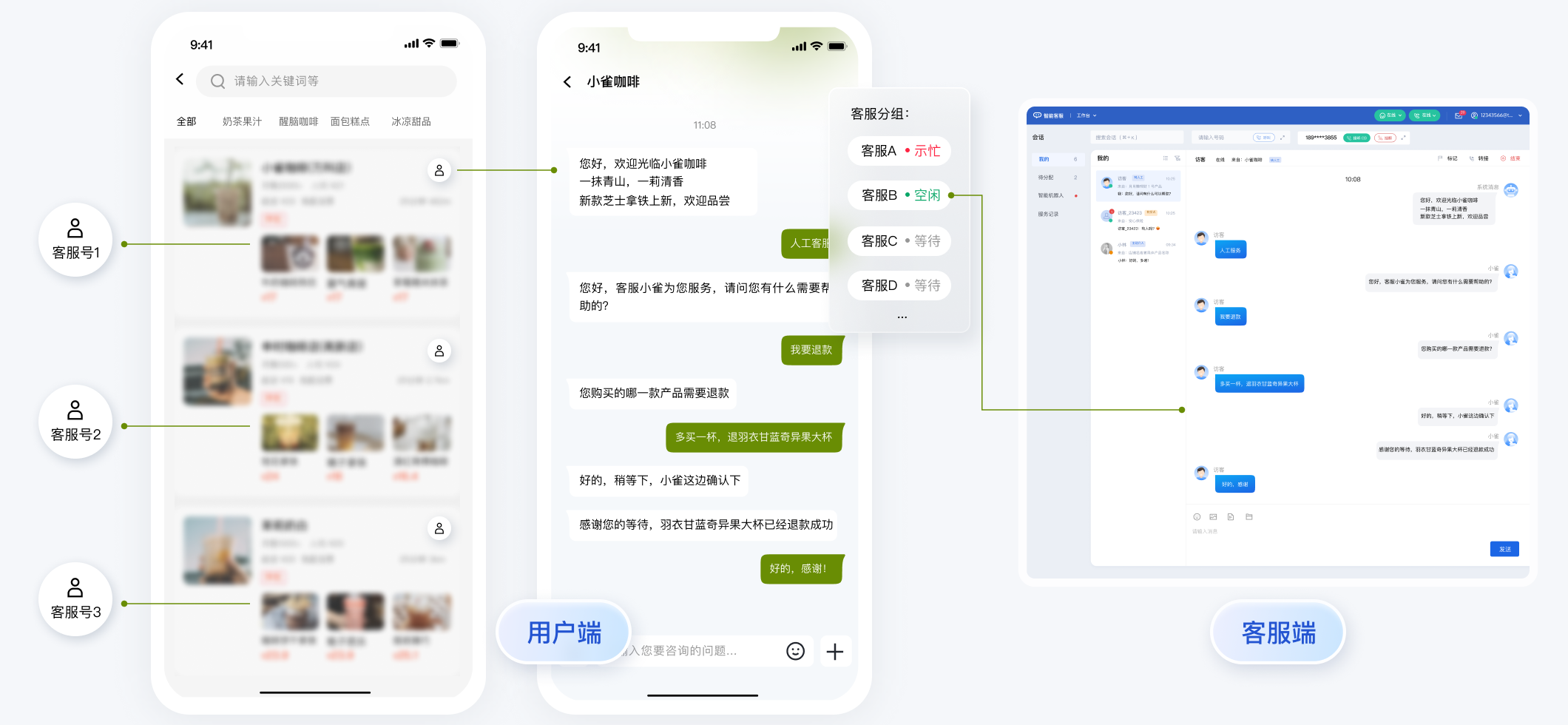
|
+
userID,
|
|
480
|
+
userSig,
|
|
481
|
+
nickName: '张三 1852010****',
|
|
482
|
+
avatar: 'https://im.sdk.qcloud.com/download/tuikit-resource/avatar/avatar_3.png'
|
|
483
|
+
})
|
|
484
|
+
```
|
|
485
|
+
|
|
486
|
+
### 工具栏快捷按钮
|
|
487
|
+
|
|
488
|
+
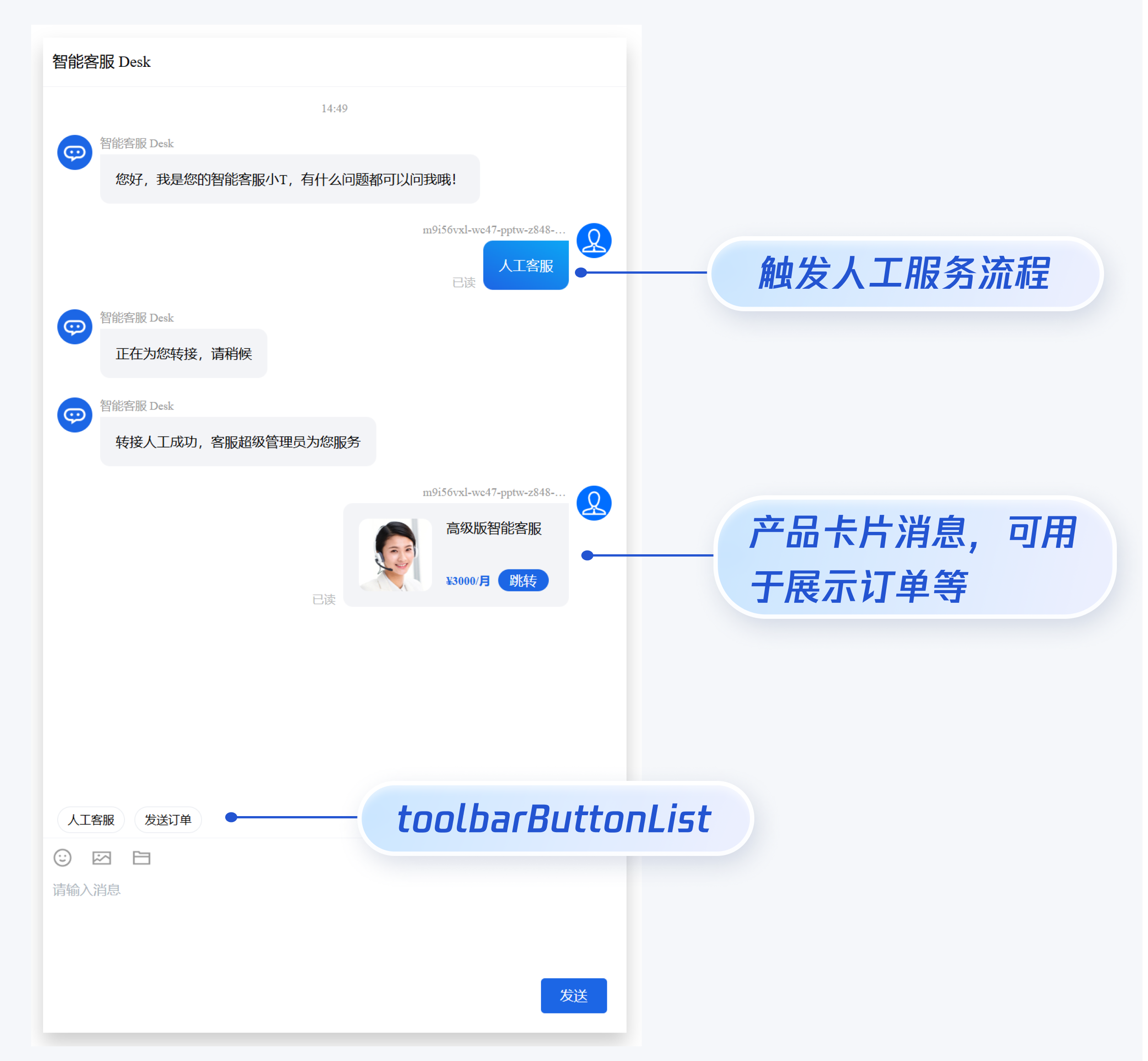
如果您想实现输入框上方增加快捷按钮,方便用户使用,例如增加“人工客服”,“发送订单消息”等,可在引入智能客服时设置 `toolbarButtonList`。效果如下所示:
|
|
468
489
|
|
|
469
490
|
|
|
470
491
|
|
|
492
|
+
|
|
493
|
+
`toolbarButtonList` 是一个包含了一个或多个配置的数组,配置的描述如下:
|
|
494
|
+
<table>
|
|
495
|
+
<tr>
|
|
496
|
+
<td rowspan="1" colSpan="1" >参数</td>
|
|
497
|
+
|
|
498
|
+
<td rowspan="1" colSpan="1" >类型</td>
|
|
499
|
+
|
|
500
|
+
<td rowspan="1" colSpan="1" >是否必填</td>
|
|
501
|
+
|
|
502
|
+
<td rowspan="1" colSpan="1" >说明</td>
|
|
503
|
+
</tr>
|
|
504
|
+
|
|
505
|
+
<tr>
|
|
506
|
+
<td rowspan="1" colSpan="1" >title</td>
|
|
507
|
+
|
|
508
|
+
<td rowspan="1" colSpan="1" >String</td>
|
|
509
|
+
|
|
510
|
+
<td rowspan="1" colSpan="1" >Yes</td>
|
|
511
|
+
|
|
512
|
+
<td rowspan="1" colSpan="1" >button 标题。</td>
|
|
513
|
+
</tr>
|
|
514
|
+
|
|
515
|
+
<tr>
|
|
516
|
+
<td rowspan="1" colSpan="1" >icon</td>
|
|
517
|
+
|
|
518
|
+
<td rowspan="1" colSpan="1" >String</td>
|
|
519
|
+
|
|
520
|
+
<td rowspan="1" colSpan="1" >No</td>
|
|
521
|
+
|
|
522
|
+
<td rowspan="1" colSpan="1" >button 图标 url。</td>
|
|
523
|
+
</tr>
|
|
524
|
+
|
|
525
|
+
<tr>
|
|
526
|
+
<td rowspan="1" colSpan="1" >isPreset</td>
|
|
527
|
+
|
|
528
|
+
<td rowspan="1" colSpan="1" >Number</td>
|
|
529
|
+
|
|
530
|
+
<td rowspan="1" colSpan="1" >Yes</td>
|
|
531
|
+
|
|
532
|
+
<td rowspan="1" colSpan="1" >- 1:客服组件内置功能。<br>- 0:非内置功能。</td>
|
|
533
|
+
</tr>
|
|
534
|
+
|
|
535
|
+
<tr>
|
|
536
|
+
<td rowspan="1" colSpan="1" >presetId</td>
|
|
537
|
+
|
|
538
|
+
<td rowspan="1" colSpan="1" >String</td>
|
|
539
|
+
|
|
540
|
+
<td rowspan="1" colSpan="1" >No</td>
|
|
541
|
+
|
|
542
|
+
<td rowspan="1" colSpan="1" >当 isPreset 为 1 时,可选值如下:<br>- humanService:人工服务。<br>- serviceRating:服务评价。<br>- endHumanService:结束对话。</td>
|
|
543
|
+
</tr>
|
|
544
|
+
|
|
545
|
+
<tr>
|
|
546
|
+
<td rowspan="1" colSpan="1" >isEnabled</td>
|
|
547
|
+
|
|
548
|
+
<td rowspan="1" colSpan="1" >Number</td>
|
|
549
|
+
|
|
550
|
+
<td rowspan="1" colSpan="1" >Yes</td>
|
|
551
|
+
|
|
552
|
+
<td rowspan="1" colSpan="1" >- 1:渲染。<br>- 0:不渲染。</td>
|
|
553
|
+
</tr>
|
|
554
|
+
|
|
555
|
+
<tr>
|
|
556
|
+
<td rowspan="1" colSpan="1" >content</td>
|
|
557
|
+
|
|
558
|
+
<td rowspan="1" colSpan="1" >String</td>
|
|
559
|
+
|
|
560
|
+
<td rowspan="1" colSpan="1" >No</td>
|
|
561
|
+
|
|
562
|
+
<td rowspan="1" colSpan="1" >当 isPreset 为 0 时,填入文本内容或者 url。</td>
|
|
563
|
+
</tr>
|
|
564
|
+
|
|
565
|
+
<tr>
|
|
566
|
+
<td rowspan="1" colSpan="1" >type</td>
|
|
567
|
+
|
|
568
|
+
<td rowspan="1" colSpan="1" >Number</td>
|
|
569
|
+
|
|
570
|
+
<td rowspan="1" colSpan="1" >Yes</td>
|
|
571
|
+
|
|
572
|
+
<td rowspan="1" colSpan="1" >- 1:点击 button 后客服组件发送 content 对应的文本。<br>- 2:点击 button 后客服组件打开 content 对应的 url(小程序打开 url 可能会受限,请提前参考相关文档解决)。</td>
|
|
573
|
+
</tr>
|
|
574
|
+
</table>
|
|
575
|
+
|
|
471
576
|
``` javascript
|
|
472
577
|
<template>
|
|
473
|
-
|
|
474
|
-
|
|
475
|
-
|
|
578
|
+
<CustomerServiceChat
|
|
579
|
+
:style="{ width: '600px', height: '80vh', margin: '10px auto', boxShadow: '0 11px 20px #ccc' }"
|
|
580
|
+
:toolbarButtonList="toolbarButtonList"
|
|
581
|
+
/>
|
|
476
582
|
</template>
|
|
477
583
|
<script setup lang="ts">
|
|
478
|
-
import TUICustomerServer, { CustomerServiceChat }
|
|
479
|
-
import {
|
|
480
|
-
|
|
481
|
-
const toolbarButtonList =
|
|
482
|
-
{
|
|
483
|
-
|
|
484
|
-
|
|
485
|
-
|
|
486
|
-
|
|
487
|
-
|
|
488
|
-
|
|
489
|
-
|
|
490
|
-
|
|
491
|
-
|
|
492
|
-
|
|
493
|
-
|
|
494
|
-
|
|
495
|
-
|
|
496
|
-
|
|
497
|
-
|
|
498
|
-
|
|
499
|
-
|
|
500
|
-
|
|
501
|
-
|
|
584
|
+
import TUICustomerServer, { CustomerServiceChat } from './ai-desk-customer-vue';
|
|
585
|
+
import { onMounted } from 'vue';
|
|
586
|
+
|
|
587
|
+
const toolbarButtonList = [
|
|
588
|
+
{"title":"人工服务","icon":"https://tccc-im-agent-avatar-1258344699.cos.ap-nanjing.myqcloud.com/toolbar_button_1.png","type":1,"content":"","isPreset":1,"presetId":"humanService","isEnabled":1},
|
|
589
|
+
{"title":"服务评价","icon":"https://tccc-im-agent-avatar-sg-1258344699.cos.ap-singapore.myqcloud.com/toolbar_button_2.png","type":1,"content":"","isPreset":1,"presetId":"serviceRating","isEnabled":1},
|
|
590
|
+
{"title":"结束对话","icon":"https://tccc-im-agent-avatar-sg-1258344699.cos.ap-singapore.myqcloud.com/toolbar_button_3.png","type":1,"content":"","isPreset":1,"presetId":"endHumanService","isEnabled":1},
|
|
591
|
+
{"type":1,"title":"智能客服","content":"智能客服","isPreset":0,"isEnabled":1}
|
|
592
|
+
];
|
|
593
|
+
|
|
594
|
+
onMounted(() => {
|
|
595
|
+
const SDKAppID = 0; // Your SDKAppID,即开通了智能客服 Desk 的应用 ID
|
|
596
|
+
const userID = ''; // Your userID,可复用您 app 的账号体系,或随机生成
|
|
597
|
+
const userSig = ''; // Your userSig,接入阶段可控制台生成,生产阶段请务必由服务端生成
|
|
598
|
+
TUICustomerServer.init(SDKAppID, userID, userSig);
|
|
599
|
+
});
|
|
600
|
+
</script>
|
|
601
|
+
<style scoped>
|
|
602
|
+
</style>
|
|
603
|
+
```
|
|
604
|
+
|
|
605
|
+
### 底部快捷订单
|
|
606
|
+
|
|
607
|
+
> **说明:**
|
|
608
|
+
>
|
|
609
|
+
|
|
610
|
+
> 请升级 [ai-desk-customer-vue](https://www.npmjs.com/package/@tencentcloud/ai-desk-customer-vue) 到 v1.5.2 或更高版本。
|
|
611
|
+
>
|
|
612
|
+
|
|
613
|
+
|
|
614
|
+
如果您想实现打开客服会话时在聊天区域底部展示快捷订单,可以配置 `bottomQuickOrder`,效果如下所示:
|
|
615
|
+
|
|
616
|
+
|
|
617
|
+
|
|
618
|
+
|
|
619
|
+
`bottomQuickOrder` 的参数描述如下:
|
|
620
|
+
<table>
|
|
621
|
+
<tr>
|
|
622
|
+
<td rowspan="1" colSpan="1" >参数</td>
|
|
623
|
+
|
|
624
|
+
<td rowspan="1" colSpan="1" >类型</td>
|
|
625
|
+
|
|
626
|
+
<td rowspan="1" colSpan="1" >是否必填</td>
|
|
627
|
+
|
|
628
|
+
<td rowspan="1" colSpan="1" >说明</td>
|
|
629
|
+
</tr>
|
|
630
|
+
|
|
631
|
+
<tr>
|
|
632
|
+
<td rowspan="1" colSpan="1" >header</td>
|
|
633
|
+
|
|
634
|
+
<td rowspan="1" colSpan="1" >String</td>
|
|
635
|
+
|
|
636
|
+
<td rowspan="1" colSpan="1" >Yes</td>
|
|
637
|
+
|
|
638
|
+
<td rowspan="1" colSpan="1" >订单标题,对应上图的“智能客服高级版”。</td>
|
|
639
|
+
</tr>
|
|
640
|
+
|
|
641
|
+
<tr>
|
|
642
|
+
<td rowspan="1" colSpan="1" >desc</td>
|
|
643
|
+
|
|
644
|
+
<td rowspan="1" colSpan="1" >String</td>
|
|
645
|
+
|
|
646
|
+
<td rowspan="1" colSpan="1" >Yes</td>
|
|
647
|
+
|
|
648
|
+
<td rowspan="1" colSpan="1" >订单描述,对应上图的“3000/月”。</td>
|
|
649
|
+
</tr>
|
|
650
|
+
|
|
651
|
+
<tr>
|
|
652
|
+
<td rowspan="1" colSpan="1" >pic</td>
|
|
653
|
+
|
|
654
|
+
<td rowspan="1" colSpan="1" >String</td>
|
|
655
|
+
|
|
656
|
+
<td rowspan="1" colSpan="1" >No</td>
|
|
657
|
+
|
|
658
|
+
<td rowspan="1" colSpan="1" >订单图片 url。</td>
|
|
659
|
+
</tr>
|
|
660
|
+
|
|
661
|
+
<tr>
|
|
662
|
+
<td rowspan="1" colSpan="1" >url</td>
|
|
663
|
+
|
|
664
|
+
<td rowspan="1" colSpan="1" >String</td>
|
|
665
|
+
|
|
666
|
+
<td rowspan="1" colSpan="1" >Yes</td>
|
|
667
|
+
|
|
668
|
+
<td rowspan="1" colSpan="1" >当客服坐席收到订单消息时,点击可打开此 url 对应的页面。</td>
|
|
669
|
+
</tr>
|
|
670
|
+
|
|
671
|
+
<tr>
|
|
672
|
+
<td rowspan="1" colSpan="1" >customField</td>
|
|
673
|
+
|
|
674
|
+
<td rowspan="1" colSpan="1" >Array</td>
|
|
675
|
+
|
|
676
|
+
<td rowspan="1" colSpan="1" >No</td>
|
|
677
|
+
|
|
678
|
+
<td rowspan="1" colSpan="1" >自定义配置,例如“订单号”,“订单时间”等信息。</td>
|
|
679
|
+
</tr>
|
|
680
|
+
</table>
|
|
681
|
+
|
|
682
|
+
``` javascript
|
|
683
|
+
<template>
|
|
684
|
+
<CustomerServiceChat
|
|
685
|
+
:style="{ width: '600px', height: '80vh', margin: '10px auto', boxShadow: '0 11px 20px #ccc' }"
|
|
686
|
+
:bottomQuickOrder="bottomQuickOrder"
|
|
687
|
+
/>
|
|
688
|
+
</template>
|
|
689
|
+
<script setup lang="ts">
|
|
690
|
+
import TUICustomerServer, { CustomerServiceChat } from './ai-desk-customer-vue';
|
|
691
|
+
import { onMounted } from 'vue';
|
|
692
|
+
|
|
693
|
+
const bottomQuickOrder = {
|
|
694
|
+
header: "高级版智能客服(包含3个客服许可)",
|
|
695
|
+
desc: "¥3000/月",
|
|
696
|
+
pic: "https://cloudcache.tencent-cloud.com/qcloud/portal/kit/images/presale.a4955999.jpeg",
|
|
697
|
+
url: 'https://cloud.tencent.com/document/product/269/97537',
|
|
698
|
+
customField: [
|
|
699
|
+
{
|
|
700
|
+
name: '订单号',
|
|
701
|
+
value: '11111111111111111111'
|
|
502
702
|
},
|
|
503
|
-
|
|
504
|
-
|
|
505
|
-
|
|
506
|
-
to: '@customer_service_account',
|
|
507
|
-
conversationType: 'C2C',
|
|
508
|
-
payload: {
|
|
509
|
-
data: JSON.stringify({
|
|
510
|
-
src: '22',
|
|
511
|
-
customerServicePlugin: 0,
|
|
512
|
-
content: {
|
|
513
|
-
desc: "¥3000/月",
|
|
514
|
-
header: "高级版智能客服",
|
|
515
|
-
pic: "https://cloudcache.tencent-cloud.com/qcloud/portal/kit/images/presale.a4955999.jpeg",
|
|
516
|
-
url: "https://cloud.tencent.com/document/product/269/116070"
|
|
517
|
-
}
|
|
518
|
-
}),
|
|
519
|
-
}
|
|
520
|
-
});
|
|
703
|
+
{
|
|
704
|
+
name: '下单时间',
|
|
705
|
+
value: '2025-07-02 16:23'
|
|
521
706
|
}
|
|
522
|
-
|
|
523
|
-
|
|
707
|
+
]
|
|
708
|
+
};
|
|
709
|
+
|
|
710
|
+
onMounted(() => {
|
|
711
|
+
const SDKAppID = 0; // Your SDKAppID,即开通了智能客服 Desk 的应用 ID
|
|
712
|
+
const userID = ''; // Your userID,可复用您 app 的账号体系,或随机生成
|
|
713
|
+
const userSig = ''; // Your userSig,接入阶段可控制台生成,生产阶段请务必由服务端生成
|
|
714
|
+
TUICustomerServer.init(SDKAppID, userID, userSig);
|
|
715
|
+
});
|
|
524
716
|
</script>
|
|
525
|
-
<style scoped
|
|
717
|
+
<style scoped>
|
|
526
718
|
</style>
|
|
527
719
|
```
|
|
528
720
|
|
|
721
|
+
### 多客服号
|
|
722
|
+
|
|
723
|
+
> **说明:**
|
|
724
|
+
>
|
|
725
|
+
|
|
726
|
+
> 请升级 [ai-desk-customer-vue](https://www.npmjs.com/package/@tencentcloud/ai-desk-customer-vue) 到 v1.5.3 或更高版本。
|
|
727
|
+
>
|
|
728
|
+
|
|
729
|
+
|
|
730
|
+
如果您的应用内需要多个客服号,为用户提供专属客服功能,以提高服务质量和响应速度,可用 UIKit 提供的多客服号功能实现。效果如下所示:
|
|
731
|
+
|
|
732
|
+
|
|
733
|
+
|
|
734
|
+
``` javascript
|
|
735
|
+
// 1. 初始化前将业务侧自定义的客服号 ID 传递给 UIKit
|
|
736
|
+
// 自定义客服号请使用 restapi - https://cloud.tencent.com/document/product/269/111798
|
|
737
|
+
TUICustomerServer.setCustomerServiceIDList(['customerServiceID_001', 'customerServiceID_002', 'customerServiceID_003']);
|
|
738
|
+
// 2. 初始化时,带上要发起会话的客服号 ID,比如 'customerServiceID_002'
|
|
739
|
+
// 如果不带上要发起会话的客服号 ID,则 UIKit 默认使用多客服号列表的第 1 个元素
|
|
740
|
+
TUICustomerServer.initWithProfile({
|
|
741
|
+
SDKAppID,
|
|
742
|
+
userID,
|
|
743
|
+
userSig,
|
|
744
|
+
nickName: '张三 1562010****',
|
|
745
|
+
avatar: 'your avatar url',
|
|
746
|
+
customerServiceID: 'customerServiceID_002',
|
|
747
|
+
});
|
|
748
|
+
```
|
|
749
|
+
|
|
750
|
+
### 用户端主动结束人工会话
|
|
751
|
+
|
|
752
|
+
> **说明:**
|
|
753
|
+
>
|
|
754
|
+
|
|
755
|
+
> 用户端可以通过发送自定义消息的方式实现主动结束会话,适用于以下 3 种情况:
|
|
756
|
+
>
|
|
757
|
+
> 1. 用户转人工触发排队,发送此消息可以结束排队。
|
|
758
|
+
> 2. 客服接待方式为手动接待,用户转人工分配客服成功后等待客服确认接待,发送此消息可以结束等待。
|
|
759
|
+
> 3. 用户转人工且成功接入人工客服,发送此消息可以结束本次会话。
|
|
760
|
+
|
|
761
|
+
``` javascript
|
|
762
|
+
TUICustomerServer.sendCustomMessage({
|
|
763
|
+
to: '@customer_service_account',
|
|
764
|
+
conversationType: 'C2C',
|
|
765
|
+
payload: {
|
|
766
|
+
data: JSON.stringify({
|
|
767
|
+
src: '27',
|
|
768
|
+
customerServicePlugin: 0,
|
|
769
|
+
}),
|
|
770
|
+
},
|
|
771
|
+
}, { onlineUserOnly: true });
|
|
772
|
+
```
|
|
773
|
+
|
|
529
774
|
## 常见问题
|
|
530
775
|
|
|
531
776
|
##### 什么是 UserSig?如何生成 UserSig?
|
|
532
777
|
|
|
533
778
|
UserSig 是用户登录即时通信 IM 的密码,其本质是对 UserID 等信息加密后得到的密文。
|
|
534
779
|
|
|
535
|
-
UserSig 签发方式是将 UserSig 的计算代码集成到您的服务端,并提供面向项目的接口,在需要 UserSig 时由您的项目向业务服务器发起请求获取动态 UserSig。更多详情请参见 [服务端生成 UserSig](https://cloud.tencent.com/document/product/269/32688#
|
|
780
|
+
UserSig 签发方式是将 UserSig 的计算代码集成到您的服务端,并提供面向项目的接口,在需要 UserSig 时由您的项目向业务服务器发起请求获取动态 UserSig。更多详情请参见 [服务端生成 UserSig](https://cloud.tencent.com/document/product/269/32688#formal)。
|
|
536
781
|
|
|
537
|
-
#####
|
|
782
|
+
##### JS 工程如何接入 TUIKit 组件?
|
|
538
783
|
|
|
539
784
|
UIKit 仅支持 ts 环境运行,您可以通过渐进式配置 typescript 来使您项目中已有的 js 代码 与 UIKit 中 ts 代码共存。
|
|
540
785
|
|
|
@@ -551,7 +796,7 @@ vue add typescript
|
|
|
551
796
|
|
|
552
797
|
**完成以上步骤后,请重新运行项目!**
|
|
553
798
|
|
|
554
|
-
【
|
|
799
|
+
【Vite】
|
|
555
800
|
|
|
556
801
|
请在您 vite 创建的工程根目录执行:
|
|
557
802
|
``` bash
|
|
@@ -2,9 +2,10 @@ import { TUITranslateService } from '@tencentcloud/chat-uikit-engine';
|
|
|
2
2
|
import { CUSTOM_BASIC_EMOJI_URL, CUSTOM_BIG_EMOJI_URL, CUSTOM_BASIC_EMOJI_URL_MAPPING, CUSTOM_BIG_EMOJI_GROUP_LIST } from './custom-emoji';
|
|
3
3
|
import { DEFAULT_BASIC_EMOJI_URL, BIG_EMOJI_GROUP_LIST, DEFAULT_BASIC_EMOJI_URL_MAPPING, BASIC_EMOJI_NAME_TO_KEY_MAPPING, DEFAULT_BIG_EMOJI_URL } from './default-emoji';
|
|
4
4
|
import { default as emojiCNLocales } from './locales/zh_cn';
|
|
5
|
+
import { default as emojiENLocales } from './locales/en';
|
|
5
6
|
import { IEmojiGroupList } from '../../../interface';
|
|
6
7
|
import { EMOJI_TYPE } from '../../../constant';
|
|
7
|
-
import
|
|
8
|
+
import state from '../../../utils/state.js';
|
|
8
9
|
|
|
9
10
|
const hasCustomBasicEmoji = CUSTOM_BASIC_EMOJI_URL && Object.keys(CUSTOM_BASIC_EMOJI_URL_MAPPING).length;
|
|
10
11
|
|
|
@@ -32,7 +33,7 @@ const EMOJI_GROUP_LIST: IEmojiGroupList = [
|
|
|
32
33
|
*/
|
|
33
34
|
const convertKeyToEmojiName = (key: string): string => {
|
|
34
35
|
// WeChat does not support emoji translation
|
|
35
|
-
return
|
|
36
|
+
return state.get('currentLanguage') == 'zh' ? emojiCNLocales[key] : emojiENLocales[key];
|
|
36
37
|
};
|
|
37
38
|
|
|
38
39
|
/**
|
|
@@ -17,9 +17,12 @@
|
|
|
17
17
|
:class="['tui-chat-message-list', !isPC && 'tui-chat-h5-message-list']"
|
|
18
18
|
@handleEditor="handleEditor"
|
|
19
19
|
@closeInputToolBar="() => changeToolbarDisplayType('none')"
|
|
20
|
+
:bottomQuickOrder="props.bottomQuickOrder"
|
|
21
|
+
:showBottomQuickOrder="showBottomQuickOrder"
|
|
22
|
+
@closeBottomQuickOrder="closeBottomQuickOrder"
|
|
20
23
|
/>
|
|
21
24
|
<MessageToolbarButton
|
|
22
|
-
v-if="!
|
|
25
|
+
v-if="!isH5 || (!Boolean(quoteMessage) && !showBottomQuickOrder)"
|
|
23
26
|
:toolbarButtonList="props.toolbarButtonList"
|
|
24
27
|
/>
|
|
25
28
|
<MessageInputToolbar
|
|
@@ -95,16 +98,16 @@ import MessageInput from './message-input/index-web.vue';
|
|
|
95
98
|
import MessageInputToolbar from './message-input-toolbar/index-web.vue';
|
|
96
99
|
import EmojiDialog from './message-input-toolbar/emoji-dialog-mobile/emoji-dialog-mobile.vue';
|
|
97
100
|
import { isH5, isPC } from '../../utils/env';
|
|
98
|
-
import { ToolbarButtonModel, ToolbarDisplayType, InputToolbarModel } from '../../interface';
|
|
101
|
+
import { ToolbarButtonModel, ToolbarDisplayType, InputToolbarModel, QuickOrderModel } from '../../interface';
|
|
99
102
|
import { isSupportedLang } from '../../utils/';
|
|
100
103
|
import Log from '../../utils/logger';
|
|
101
104
|
import MessageToolbarButton from './message-toolbar-button/index.vue';
|
|
102
105
|
import TUILocales from '../../locales';
|
|
103
106
|
import { Toast, TOAST_TYPE } from '../common/Toast/index-web';
|
|
104
107
|
import state from '../../utils/state.js';
|
|
105
|
-
import { switchReadStatus } from '../../utils/utils';
|
|
108
|
+
import { switchReadStatus,isNonEmptyObject } from '../../utils/utils';
|
|
106
109
|
|
|
107
|
-
const { ref, onMounted, onUnmounted, computed
|
|
110
|
+
const { ref, onMounted, onUnmounted, computed } = vue;
|
|
108
111
|
|
|
109
112
|
interface IProps {
|
|
110
113
|
canCloseChat?: boolean;
|
|
@@ -125,6 +128,7 @@ interface IProps {
|
|
|
125
128
|
inputToolbarList?: InputToolbarModel[];
|
|
126
129
|
showReadStatus?: number;
|
|
127
130
|
showTyping?: number;
|
|
131
|
+
bottomQuickOrder?: QuickOrderModel;
|
|
128
132
|
}
|
|
129
133
|
|
|
130
134
|
const emits = defineEmits(['closeChat']);
|
|
@@ -139,6 +143,7 @@ const emojiOpen = ref(false);
|
|
|
139
143
|
const toolShowH5 = ref(false);
|
|
140
144
|
const languages = Object.keys(TUILocales);
|
|
141
145
|
const quoteMessage = ref<IMessageModel>();
|
|
146
|
+
const showBottomQuickOrder = ref(false);
|
|
142
147
|
const props = withDefaults(defineProps<IProps>(), {
|
|
143
148
|
canCloseChat: true,
|
|
144
149
|
SDKAppID: 0,
|
|
@@ -211,6 +216,7 @@ const initLanguage = () => {
|
|
|
211
216
|
language = navigatorLang;
|
|
212
217
|
}
|
|
213
218
|
}
|
|
219
|
+
state.set('currentLanguage', language);
|
|
214
220
|
TUITranslateService.changeLanguage(language);
|
|
215
221
|
}
|
|
216
222
|
|
|
@@ -247,6 +253,9 @@ try {
|
|
|
247
253
|
setAvatarNickName();
|
|
248
254
|
setShowReadStatus();
|
|
249
255
|
setShowTyping();
|
|
256
|
+
if (isNonEmptyObject(props.bottomQuickOrder)) {
|
|
257
|
+
showBottomQuickOrder.value = true;
|
|
258
|
+
}
|
|
250
259
|
} catch (e) {
|
|
251
260
|
console.log(e)
|
|
252
261
|
}
|
|
@@ -389,6 +398,10 @@ function onQuoteMessageUpdated(options?: {
|
|
|
389
398
|
quoteMessage.value = undefined;
|
|
390
399
|
}
|
|
391
400
|
}
|
|
401
|
+
|
|
402
|
+
function closeBottomQuickOrder() {
|
|
403
|
+
showBottomQuickOrder.value = false;
|
|
404
|
+
}
|
|
392
405
|
</script>
|
|
393
406
|
|
|
394
407
|
<style scoped lang="scss" src="./style/index.scss">
|
|
@@ -1,6 +1,8 @@
|
|
|
1
1
|
<template>
|
|
2
2
|
<div class="message-input-wrapper">
|
|
3
|
-
<MessageInputQuote
|
|
3
|
+
<MessageInputQuote
|
|
4
|
+
@getQuoteMessageCloudCustomData="getQuoteMessageCloudCustomData"
|
|
5
|
+
/>
|
|
4
6
|
<div
|
|
5
7
|
:class="[
|
|
6
8
|
'message-input-container',
|
|
@@ -96,6 +98,7 @@ const editor = ref<InstanceType<typeof MessageInputEditor>>();
|
|
|
96
98
|
const currentConversation = ref<IConversationModel>();
|
|
97
99
|
const h5Dialog = ref<HTMLElement>();
|
|
98
100
|
const showSendButton = ref(false);
|
|
101
|
+
let quoteMessageCloudCustomData:string = '';
|
|
99
102
|
|
|
100
103
|
onMounted(() => {
|
|
101
104
|
// document.addEventListener('click', handleClick);
|
|
@@ -136,13 +139,17 @@ const sendMessage = async () => {
|
|
|
136
139
|
}
|
|
137
140
|
return editor;
|
|
138
141
|
});
|
|
139
|
-
await sendMessages(editorContentList, currentConversation.value);
|
|
142
|
+
await sendMessages(editorContentList, currentConversation.value, quoteMessageCloudCustomData);
|
|
140
143
|
// 注意这里不要 emit 'sendMessage',避免写出死循环
|
|
141
144
|
emit('messageSent');
|
|
142
145
|
editor.value?.resetEditor();
|
|
143
146
|
showSendButton.value = false;
|
|
144
147
|
};
|
|
145
148
|
|
|
149
|
+
const getQuoteMessageCloudCustomData = (cloudCustomData: string) => {
|
|
150
|
+
quoteMessageCloudCustomData = cloudCustomData;
|
|
151
|
+
};
|
|
152
|
+
|
|
146
153
|
const insertEmoji = (emoji: any) => {
|
|
147
154
|
editor.value?.addEmoji(emoji);
|
|
148
155
|
showSendButton.value = true;
|
|
@@ -121,6 +121,17 @@ function onQuoteMessageUpdated(options?: {
|
|
|
121
121
|
type: string;
|
|
122
122
|
}) {
|
|
123
123
|
currentQuoteMessage.value = options;
|
|
124
|
+
if (options && options.message) {
|
|
125
|
+
focusEditor();
|
|
126
|
+
}
|
|
127
|
+
}
|
|
128
|
+
|
|
129
|
+
function focusEditor() {
|
|
130
|
+
if (isH5 && editorDom.value) {
|
|
131
|
+
editorDom.value.focus();
|
|
132
|
+
} else if (editor) {
|
|
133
|
+
editor.commands.focus()
|
|
134
|
+
}
|
|
124
135
|
}
|
|
125
136
|
|
|
126
137
|
onMounted(() => {
|