@tencentcloud/ai-desk-customer-vue 1.0.0 → 1.0.1
This diff represents the content of publicly available package versions that have been released to one of the supported registries. The information contained in this diff is provided for informational purposes only and reflects changes between package versions as they appear in their respective public registries.
- package/CHANGELOG.md +6 -0
- package/README.md +177 -84
- package/components/CustomerServiceChat/message-list/message-elements/message-desk/message-desk-elements/styles/common.scss +1 -1
- package/components/CustomerServiceChat/message-toolbar-button/index.vue +8 -2
- package/index.ts +3 -1
- package/package.json +1 -1
- package/server.ts +47 -22
package/CHANGELOG.md
CHANGED
package/README.md
CHANGED
|
@@ -177,37 +177,11 @@ xcopy .\node_modules\@tencentcloud\ai-desk-customer-vue .\src\ai-desk-customer-v
|
|
|
177
177
|
<template>
|
|
178
178
|
<CustomerServiceChat
|
|
179
179
|
:style="{ width: '600px', height: '80vh', margin: '10px auto', boxShadow: '0 11px 20px #ccc' }"
|
|
180
|
-
:toolbarButtonList="toolbarButtonList"
|
|
181
180
|
/>
|
|
182
181
|
</template>
|
|
183
182
|
<script setup lang="ts">
|
|
184
|
-
import TUICustomerServer from './ai-desk-customer-vue
|
|
185
|
-
import {
|
|
186
|
-
import { onMounted, ref } from "vue";
|
|
187
|
-
import TUIChatEngine, { TUIChatService } from "@tencentcloud/chat-uikit-engine";
|
|
188
|
-
|
|
189
|
-
// 配置工具栏 button list,例如【转人工】
|
|
190
|
-
const toolbarButtonList = ref([
|
|
191
|
-
{
|
|
192
|
-
title: '转人工',
|
|
193
|
-
renderCondition: () => {
|
|
194
|
-
// return true 即渲染,您可以在这里控制 button 显隐时机
|
|
195
|
-
return true;
|
|
196
|
-
},
|
|
197
|
-
clickEvent: () => {
|
|
198
|
-
// 点击 button 后的回调
|
|
199
|
-
if (TUIChatEngine.isReady()) {
|
|
200
|
-
TUIChatService.sendTextMessage({
|
|
201
|
-
to: '@customer_service_account',
|
|
202
|
-
conversationType: TUIChatEngine.TYPES.CONV_C2C,
|
|
203
|
-
payload: {
|
|
204
|
-
text: '转人工'
|
|
205
|
-
}
|
|
206
|
-
});
|
|
207
|
-
}
|
|
208
|
-
}
|
|
209
|
-
}
|
|
210
|
-
]);
|
|
183
|
+
import TUICustomerServer, { CustomerServiceChat } from './ai-desk-customer-vue';
|
|
184
|
+
import { onMounted } from "vue";
|
|
211
185
|
|
|
212
186
|
onMounted(() => {
|
|
213
187
|
const SDKAppID = 0; // Your SDKAppID,即开通了智能客服 Desk 的应用 ID
|
|
@@ -226,40 +200,14 @@ onMounted(() => {
|
|
|
226
200
|
<div id="app">
|
|
227
201
|
<CustomerServiceChat
|
|
228
202
|
:style="{ width: '600px', height: '80vh', margin: '10px auto', boxShadow: '0 11px 20px #ccc' }"
|
|
229
|
-
:toolbarButtonList="toolbarButtonList"
|
|
230
203
|
/>
|
|
231
204
|
</div>
|
|
232
205
|
</template>
|
|
233
206
|
<script lang="ts" setup>
|
|
234
|
-
import TUICustomerServer from './ai-desk-customer-vue
|
|
235
|
-
import { CustomerServiceChat } from './ai-desk-customer-vue';
|
|
207
|
+
import TUICustomerServer, { CustomerServiceChat } from './ai-desk-customer-vue';
|
|
236
208
|
import vue from './ai-desk-customer-vue/adapter-vue';
|
|
237
|
-
import TUIChatEngine, { TUIChatService } from "@tencentcloud/chat-uikit-engine";
|
|
238
|
-
|
|
239
|
-
const { ref, onMounted } = vue;
|
|
240
209
|
|
|
241
|
-
|
|
242
|
-
const toolbarButtonList = ref([
|
|
243
|
-
{
|
|
244
|
-
title: '转人工',
|
|
245
|
-
renderCondition: () => {
|
|
246
|
-
// return true 即渲染,您可以在这里控制 button 显隐时机
|
|
247
|
-
return true;
|
|
248
|
-
},
|
|
249
|
-
clickEvent: () => {
|
|
250
|
-
// 点击 button 后的回调
|
|
251
|
-
if (TUIChatEngine.isReady()) {
|
|
252
|
-
TUIChatService.sendTextMessage({
|
|
253
|
-
to: '@customer_service_account',
|
|
254
|
-
conversationType: TUIChatEngine.TYPES.CONV_C2C,
|
|
255
|
-
payload: {
|
|
256
|
-
text: '转人工'
|
|
257
|
-
}
|
|
258
|
-
});
|
|
259
|
-
}
|
|
260
|
-
}
|
|
261
|
-
}
|
|
262
|
-
]);
|
|
210
|
+
const { onMounted } = vue;
|
|
263
211
|
|
|
264
212
|
onMounted(() => {
|
|
265
213
|
const SDKAppID = 0; // Your SDKAppID
|
|
@@ -278,40 +226,14 @@ onMounted(() => {
|
|
|
278
226
|
<div id="app">
|
|
279
227
|
<CustomerServiceChat
|
|
280
228
|
:style="{ width: '600px', height: '80vh', margin: '10px auto', boxShadow: '0 11px 20px #ccc' }"
|
|
281
|
-
:toolbarButtonList="toolbarButtonList"
|
|
282
229
|
/>
|
|
283
230
|
</div>
|
|
284
231
|
</template>
|
|
285
232
|
<script lang="ts" setup>
|
|
286
|
-
import TUICustomerServer from './ai-desk-customer-vue
|
|
287
|
-
import { CustomerServiceChat } from './ai-desk-customer-vue';
|
|
233
|
+
import TUICustomerServer, { CustomerServiceChat } from './ai-desk-customer-vue';
|
|
288
234
|
import vue from './ai-desk-customer-vue/adapter-vue';
|
|
289
|
-
import TUIChatEngine, { TUIChatService } from "@tencentcloud/chat-uikit-engine";
|
|
290
235
|
|
|
291
|
-
const {
|
|
292
|
-
|
|
293
|
-
// 配置工具栏 button list,例如【转人工】
|
|
294
|
-
const toolbarButtonList = ref([
|
|
295
|
-
{
|
|
296
|
-
title: '转人工',
|
|
297
|
-
renderCondition: () => {
|
|
298
|
-
// return true 即渲染,您可以在这里控制 button 显隐时机
|
|
299
|
-
return true;
|
|
300
|
-
},
|
|
301
|
-
clickEvent: () => {
|
|
302
|
-
// 点击 button 后的回调
|
|
303
|
-
if (TUIChatEngine.isReady()) {
|
|
304
|
-
TUIChatService.sendTextMessage({
|
|
305
|
-
to: '@customer_service_account',
|
|
306
|
-
conversationType: TUIChatEngine.TYPES.CONV_C2C,
|
|
307
|
-
payload: {
|
|
308
|
-
text: '转人工'
|
|
309
|
-
}
|
|
310
|
-
});
|
|
311
|
-
}
|
|
312
|
-
}
|
|
313
|
-
}
|
|
314
|
-
]);
|
|
236
|
+
const { onMounted } = vue;
|
|
315
237
|
|
|
316
238
|
onMounted(() => {
|
|
317
239
|
const SDKAppID = 0; // Your SDKAppID
|
|
@@ -433,6 +355,177 @@ npm run serve
|
|
|
433
355
|
npm run dev
|
|
434
356
|
```
|
|
435
357
|
|
|
358
|
+
## 高级特性
|
|
359
|
+
|
|
360
|
+
### 国际化界面语言
|
|
361
|
+
|
|
362
|
+
从 v1.0.0 起,UIKit 支持以下界面语言:
|
|
363
|
+
<table>
|
|
364
|
+
<tr>
|
|
365
|
+
<td rowspan="1" colSpan="1" >语言代码(userLang)</td>
|
|
366
|
+
|
|
367
|
+
<td rowspan="1" colSpan="1" >语言</td>
|
|
368
|
+
</tr>
|
|
369
|
+
|
|
370
|
+
<tr>
|
|
371
|
+
<td rowspan="1" colSpan="1" >zh_cn</td>
|
|
372
|
+
|
|
373
|
+
<td rowspan="1" colSpan="1" >简体中文</td>
|
|
374
|
+
</tr>
|
|
375
|
+
|
|
376
|
+
<tr>
|
|
377
|
+
<td rowspan="1" colSpan="1" >en</td>
|
|
378
|
+
|
|
379
|
+
<td rowspan="1" colSpan="1" >英文</td>
|
|
380
|
+
</tr>
|
|
381
|
+
|
|
382
|
+
<tr>
|
|
383
|
+
<td rowspan="1" colSpan="1" >zh_tw</td>
|
|
384
|
+
|
|
385
|
+
<td rowspan="1" colSpan="1" >繁体中文</td>
|
|
386
|
+
</tr>
|
|
387
|
+
|
|
388
|
+
<tr>
|
|
389
|
+
<td rowspan="1" colSpan="1" >ja</td>
|
|
390
|
+
|
|
391
|
+
<td rowspan="1" colSpan="1" >日语</td>
|
|
392
|
+
</tr>
|
|
393
|
+
|
|
394
|
+
<tr>
|
|
395
|
+
<td rowspan="1" colSpan="1" >id</td>
|
|
396
|
+
|
|
397
|
+
<td rowspan="1" colSpan="1" >印尼语</td>
|
|
398
|
+
</tr>
|
|
399
|
+
|
|
400
|
+
<tr>
|
|
401
|
+
<td rowspan="1" colSpan="1" >ms</td>
|
|
402
|
+
|
|
403
|
+
<td rowspan="1" colSpan="1" >马来语</td>
|
|
404
|
+
</tr>
|
|
405
|
+
|
|
406
|
+
<tr>
|
|
407
|
+
<td rowspan="1" colSpan="1" >vi</td>
|
|
408
|
+
|
|
409
|
+
<td rowspan="1" colSpan="1" >越南语</td>
|
|
410
|
+
</tr>
|
|
411
|
+
|
|
412
|
+
<tr>
|
|
413
|
+
<td rowspan="1" colSpan="1" >th</td>
|
|
414
|
+
|
|
415
|
+
<td rowspan="1" colSpan="1" >泰语</td>
|
|
416
|
+
</tr>
|
|
417
|
+
|
|
418
|
+
<tr>
|
|
419
|
+
<td rowspan="1" colSpan="1" >fil</td>
|
|
420
|
+
|
|
421
|
+
<td rowspan="1" colSpan="1" >菲律宾语</td>
|
|
422
|
+
</tr>
|
|
423
|
+
|
|
424
|
+
<tr>
|
|
425
|
+
<td rowspan="1" colSpan="1" >ru</td>
|
|
426
|
+
|
|
427
|
+
<td rowspan="1" colSpan="1" >俄语</td>
|
|
428
|
+
</tr>
|
|
429
|
+
</table>
|
|
430
|
+
|
|
431
|
+
|
|
432
|
+
如果您的业务需要出海,且用户语言以英语为主,可在引入智能客服时设置`userLang="en"`。如果您不指定`userLang`, UIKit 会使用浏览器设置的语言。
|
|
433
|
+
``` javascript
|
|
434
|
+
<template>
|
|
435
|
+
<CustomerServiceChat style="height: 100%;"
|
|
436
|
+
userLang="en"
|
|
437
|
+
/>
|
|
438
|
+
</template>
|
|
439
|
+
```
|
|
440
|
+
|
|
441
|
+
如果您需要支持动态切换用户语言,可使用`TUICustomerServer.changeLanguage`接口,并通过切换 页面/组件 key 的方式,实现语言动态修改与展示。
|
|
442
|
+
``` javascript
|
|
443
|
+
<template>
|
|
444
|
+
<CustomerServiceChat style="height: 100%;"
|
|
445
|
+
:key="locale"
|
|
446
|
+
:userLang="locale"
|
|
447
|
+
/>
|
|
448
|
+
</template>
|
|
449
|
+
<script setup lang="ts">
|
|
450
|
+
import TUICustomerServer, { CustomerServiceChat } from '../../ai-desk-customer-uniapp';
|
|
451
|
+
import { onMounted, ref } from "vue";
|
|
452
|
+
|
|
453
|
+
const locale = ref('en');
|
|
454
|
+
|
|
455
|
+
const changeLanguage = (language: string) => {
|
|
456
|
+
TUICustomerServer.changeLanguage(language).then(() => {
|
|
457
|
+
locale.value = language;
|
|
458
|
+
});
|
|
459
|
+
}
|
|
460
|
+
</script>
|
|
461
|
+
<style scoped lang="scss">
|
|
462
|
+
</style>
|
|
463
|
+
```
|
|
464
|
+
|
|
465
|
+
### 工具栏快捷 button
|
|
466
|
+
|
|
467
|
+
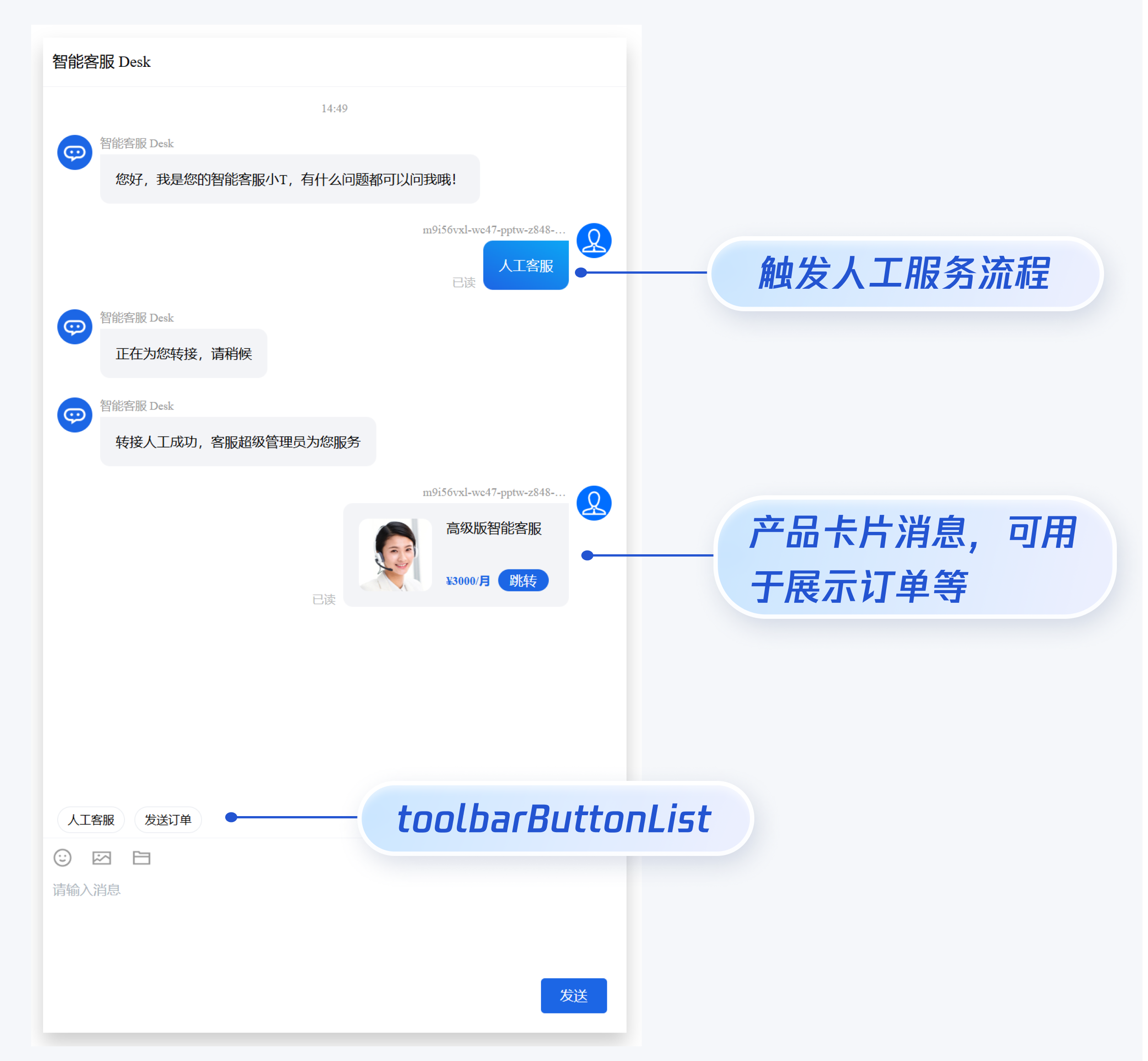
如果您想实现输入框上方增加快捷 button,方便用户使用,比如增加“人工客服”,“发送订单消息”等,可在引入智能客服时设置 `toolbarButtonList`。效果如下所示:
|
|
468
|
+
|
|
469
|
+
|
|
470
|
+
|
|
471
|
+
``` javascript
|
|
472
|
+
<template>
|
|
473
|
+
<CustomerServiceChat style="height: 100%;"
|
|
474
|
+
:toolbarButtonList="toolbarButtonList"
|
|
475
|
+
/>
|
|
476
|
+
</template>
|
|
477
|
+
<script setup lang="ts">
|
|
478
|
+
import TUICustomerServer, { CustomerServiceChat } from '../../ai-desk-customer-uniapp';
|
|
479
|
+
import { ref } from "vue";
|
|
480
|
+
|
|
481
|
+
const toolbarButtonList = ref([
|
|
482
|
+
{
|
|
483
|
+
title: '人工客服',
|
|
484
|
+
renderCondition: () => {
|
|
485
|
+
return true;
|
|
486
|
+
},
|
|
487
|
+
clickEvent: () => {
|
|
488
|
+
// 点击 button 后的回调
|
|
489
|
+
TUICustomerServer.sendTextMessage({
|
|
490
|
+
to: '@customer_service_account',
|
|
491
|
+
conversationType: 'C2C',
|
|
492
|
+
payload: {
|
|
493
|
+
text: '人工客服'
|
|
494
|
+
}
|
|
495
|
+
});
|
|
496
|
+
}
|
|
497
|
+
},
|
|
498
|
+
{
|
|
499
|
+
title: '发送订单',
|
|
500
|
+
renderCondition: () => {
|
|
501
|
+
return true;
|
|
502
|
+
},
|
|
503
|
+
clickEvent: () => {
|
|
504
|
+
// 点击 button 后的回调
|
|
505
|
+
TUICustomerServer.sendCustomMessage({
|
|
506
|
+
to: '@customer_service_account',
|
|
507
|
+
conversationType: 'C2C',
|
|
508
|
+
payload: {
|
|
509
|
+
data: JSON.stringify({
|
|
510
|
+
src: '22',
|
|
511
|
+
customerServicePlugin: 0,
|
|
512
|
+
content: {
|
|
513
|
+
desc: "¥3000/月",
|
|
514
|
+
header: "高级版智能客服",
|
|
515
|
+
pic: "https://cloudcache.tencent-cloud.com/qcloud/portal/kit/images/presale.a4955999.jpeg",
|
|
516
|
+
url: "https://cloud.tencent.com/document/product/269/116070"
|
|
517
|
+
}
|
|
518
|
+
}),
|
|
519
|
+
}
|
|
520
|
+
});
|
|
521
|
+
}
|
|
522
|
+
}
|
|
523
|
+
]);
|
|
524
|
+
</script>
|
|
525
|
+
<style scoped lang="scss">
|
|
526
|
+
</style>
|
|
527
|
+
```
|
|
528
|
+
|
|
436
529
|
## 常见问题
|
|
437
530
|
|
|
438
531
|
##### 什么是 UserSig?如何生成 UserSig?
|
|
@@ -1,7 +1,7 @@
|
|
|
1
1
|
<template>
|
|
2
2
|
<div class="toolbar-button-container">
|
|
3
3
|
<template v-for="(item, index) in props.toolbarButtonList">
|
|
4
|
-
<div v-if="item
|
|
4
|
+
<div v-if="shouldRender(item)" :key="index"
|
|
5
5
|
:class="['toolbar-button', isH5 ? 'toolbar-button-h5' : '']" @click="onClick(index)">
|
|
6
6
|
<Icon v-if="item.icon" class="toolbar-button-icon" :file="item.icon" width="18px" height="18px"/>
|
|
7
7
|
<div class="toolbar-button-text">
|
|
@@ -26,7 +26,13 @@ const props = withDefaults(defineProps<IProps>(), {
|
|
|
26
26
|
});
|
|
27
27
|
|
|
28
28
|
function onClick(index: number) {
|
|
29
|
-
props.toolbarButtonList[index].clickEvent
|
|
29
|
+
if (typeof props.toolbarButtonList[index].clickEvent === 'function') {
|
|
30
|
+
props.toolbarButtonList[index].clickEvent();
|
|
31
|
+
}
|
|
32
|
+
}
|
|
33
|
+
|
|
34
|
+
function shouldRender(item: ToolbarButtonModel) {
|
|
35
|
+
return typeof item.renderCondition === 'function' ? item.renderCondition() : false;
|
|
30
36
|
}
|
|
31
37
|
|
|
32
38
|
</script>
|
package/index.ts
CHANGED
package/package.json
CHANGED
package/server.ts
CHANGED
|
@@ -9,22 +9,25 @@ import TUIChatEngine, {
|
|
|
9
9
|
TUIChatService,
|
|
10
10
|
TUIConversationService,
|
|
11
11
|
IMessageModel,
|
|
12
|
-
TUITranslateService
|
|
12
|
+
TUITranslateService,
|
|
13
|
+
SendMessageParams,
|
|
14
|
+
SendMessageOptions,
|
|
13
15
|
} from '@tencentcloud/chat-uikit-engine';
|
|
14
16
|
import Log from './utils/logger';
|
|
15
17
|
import { version } from './package.json'
|
|
16
18
|
import { Toast, TOAST_TYPE } from "./components/common/Toast/index-web";
|
|
17
19
|
|
|
18
20
|
export default class TUICustomerServer {
|
|
19
|
-
|
|
21
|
+
private isLoggedIn: boolean;
|
|
20
22
|
static instance: TUICustomerServer;
|
|
21
23
|
private customerServiceAccounts: any[];
|
|
22
|
-
|
|
24
|
+
private loggedInUserID: string;
|
|
23
25
|
constructor() {
|
|
24
26
|
TUICore.registerService(TUIConstants.TUICustomerServicePlugin.SERVICE.NAME, this);
|
|
25
27
|
TUICore.registerExtension(TUIConstants.TUIContact.EXTENSION.CONTACT_LIST.EXT_ID, this);
|
|
26
28
|
this.customerServiceAccounts = ['@customer_service_account'];
|
|
27
|
-
|
|
29
|
+
this.isLoggedIn = false;
|
|
30
|
+
this.loggedInUserID = '';
|
|
28
31
|
}
|
|
29
32
|
|
|
30
33
|
static getInstance(): TUICustomerServer {
|
|
@@ -34,7 +37,7 @@ export default class TUICustomerServer {
|
|
|
34
37
|
return TUICustomerServer.instance;
|
|
35
38
|
}
|
|
36
39
|
|
|
37
|
-
|
|
40
|
+
private loginCustomerUIKit(SDKAppID:number, userID:string, userSig:string) {
|
|
38
41
|
clearChatStorage(SDKAppID, userID);
|
|
39
42
|
TUIChatEngine.login({
|
|
40
43
|
SDKAppID,
|
|
@@ -43,41 +46,63 @@ export default class TUICustomerServer {
|
|
|
43
46
|
useUploadPlugin: true,
|
|
44
47
|
}).then(() => {
|
|
45
48
|
Log.i(`login success. userID:${userID}`);
|
|
46
|
-
|
|
49
|
+
this.isLoggedIn = true;
|
|
50
|
+
this.loggedInUserID = userID;
|
|
47
51
|
TUIConversationService.switchConversation('C2C@customer_service_account');
|
|
48
52
|
TUIChatEngine.chat.callExperimentalAPI('isFeatureEnabledForStat', Math.pow(2, 42));
|
|
49
53
|
})
|
|
50
|
-
|
|
51
|
-
|
|
52
|
-
|
|
53
|
-
|
|
54
|
-
|
|
55
|
-
|
|
56
|
-
|
|
57
|
-
|
|
54
|
+
.catch((error) => {
|
|
55
|
+
Toast({
|
|
56
|
+
message: TUITranslateService.t('TUIChat.登录失败'),
|
|
57
|
+
type: TOAST_TYPE.ERROR,
|
|
58
|
+
duration: 30000,
|
|
59
|
+
});
|
|
60
|
+
Log.l(error);
|
|
61
|
+
})
|
|
58
62
|
}
|
|
59
63
|
|
|
60
|
-
|
|
61
|
-
|
|
64
|
+
/**
|
|
65
|
+
* init
|
|
66
|
+
*/
|
|
67
|
+
public init(SDKAppID:number, userID:string, userSig:string) {
|
|
68
|
+
Log.l(`TUICustomerServer.init version:${version} SDKAppID:${SDKAppID} userID:${userID} isLoggedIn:${this.isLoggedIn} loggedInUserID:${this.loggedInUserID}`);
|
|
62
69
|
// Backward compatibility, the new version executes the init operation by default in index.ts
|
|
63
|
-
if (
|
|
64
|
-
if (
|
|
70
|
+
if (this.isLoggedIn) {
|
|
71
|
+
if (this.loggedInUserID === userID) {
|
|
65
72
|
return;
|
|
66
73
|
}
|
|
67
|
-
|
|
74
|
+
this.unInit().finally(() => {
|
|
75
|
+
this.isLoggedIn = false;
|
|
68
76
|
this.loginCustomerUIKit(SDKAppID, userID, userSig);
|
|
69
77
|
});
|
|
70
78
|
} else {
|
|
71
|
-
TUICustomerServer.isInitialized = true;
|
|
72
79
|
// Execute call server when native plugin TUICallKit exists
|
|
73
80
|
this.loginCustomerUIKit(SDKAppID, userID, userSig);
|
|
74
81
|
}
|
|
75
82
|
}
|
|
76
83
|
|
|
77
|
-
public
|
|
84
|
+
public unInit() {
|
|
78
85
|
return TUIChatEngine.logout();
|
|
79
86
|
}
|
|
80
87
|
|
|
88
|
+
public sendTextMessage(options: SendMessageParams, sendMessageOptions?: SendMessageOptions) {
|
|
89
|
+
return TUIChatService.sendTextMessage(options, sendMessageOptions);
|
|
90
|
+
}
|
|
91
|
+
|
|
92
|
+
public sendCustomMessage(options: SendMessageParams, sendMessageOptions?: SendMessageOptions) {
|
|
93
|
+
return TUIChatService.sendCustomMessage(options, sendMessageOptions);
|
|
94
|
+
};
|
|
95
|
+
|
|
96
|
+
public changeLanguage(language: string) {
|
|
97
|
+
return TUITranslateService.changeLanguage(language).then(() => {
|
|
98
|
+
Log.i(`language changed to ${language}`);
|
|
99
|
+
});
|
|
100
|
+
}
|
|
101
|
+
|
|
102
|
+
public getLoggedInUserID() {
|
|
103
|
+
return this.loggedInUserID;
|
|
104
|
+
}
|
|
105
|
+
|
|
81
106
|
// Determine if the current session is a customer service session
|
|
82
107
|
public isCustomerConversation(conversationID: string) {
|
|
83
108
|
const userID = (conversationID && conversationID.slice(3)) || '';
|
|
@@ -125,7 +150,7 @@ export default class TUICustomerServer {
|
|
|
125
150
|
triggeredContent: typeof params.robotLang === 'undefined' ? undefined : { language: params.robotLang }
|
|
126
151
|
}),
|
|
127
152
|
},
|
|
128
|
-
}, { onlineUserOnly: true});
|
|
153
|
+
}, { onlineUserOnly: true });
|
|
129
154
|
}
|
|
130
155
|
}
|
|
131
156
|
}
|