@tencentcloud/ai-desk-customer-vue 0.7.0 → 1.0.1
This diff represents the content of publicly available package versions that have been released to one of the supported registries. The information contained in this diff is provided for informational purposes only and reflects changes between package versions as they appear in their respective public registries.
- package/CHANGELOG.md +10 -2
- package/README.md +246 -50
- package/components/CustomerServiceChat/chat-header/index-web.vue +2 -2
- package/components/CustomerServiceChat/index-web.vue +71 -11
- package/components/CustomerServiceChat/message-input/message-input-editor-web.vue +7 -1
- package/components/CustomerServiceChat/message-input-toolbar/emoji-dialog-mobile/emoji-dialog-mobile.vue +2 -1
- package/components/CustomerServiceChat/message-input-toolbar/emoji-picker/emoji-picker-dialog.vue +2 -1
- package/components/CustomerServiceChat/message-input-toolbar/emoji-picker/index.vue +2 -1
- package/components/CustomerServiceChat/message-input-toolbar/file-upload/index.vue +3 -2
- package/components/CustomerServiceChat/message-input-toolbar/image-upload/index.vue +4 -3
- package/components/CustomerServiceChat/message-input-toolbar/index-web.vue +2 -2
- package/components/CustomerServiceChat/message-input-toolbar/video-upload/index.vue +2 -2
- package/components/CustomerServiceChat/message-list/message-elements/message-bubble-web.vue +19 -0
- package/components/CustomerServiceChat/message-list/message-elements/message-custom.vue +6 -2
- package/components/CustomerServiceChat/message-list/message-elements/message-desk/message-desk-elements/marked.ts +4 -0
- package/components/CustomerServiceChat/message-list/message-elements/message-desk/message-desk-elements/message-branch.vue +13 -4
- package/components/CustomerServiceChat/message-list/message-elements/message-desk/message-desk-elements/message-multi-form/component-mobile/input-mobile.vue +4 -2
- package/components/CustomerServiceChat/message-list/message-elements/message-desk/message-desk-elements/message-multi-form/component-mobile/radios-mobile.vue +4 -2
- package/components/CustomerServiceChat/message-list/message-elements/message-desk/message-desk-elements/message-multi-form/component-pc/input-pc.vue +4 -2
- package/components/CustomerServiceChat/message-list/message-elements/message-desk/message-desk-elements/message-multi-form/component-pc/radio-pc.vue +5 -3
- package/components/CustomerServiceChat/message-list/message-elements/message-desk/message-desk-elements/message-multi-form/form-mobile.vue +6 -4
- package/components/CustomerServiceChat/message-list/message-elements/message-desk/message-desk-elements/message-multi-form/form-pc.vue +5 -3
- package/components/CustomerServiceChat/message-list/message-elements/message-desk/message-desk-elements/message-product-card.vue +21 -11
- package/components/CustomerServiceChat/message-list/message-elements/message-desk/message-desk-elements/message-rating/message-rating-number.vue +6 -6
- package/components/CustomerServiceChat/message-list/message-elements/message-desk/message-desk-elements/message-rating/message-rating-star.vue +14 -14
- package/components/CustomerServiceChat/message-list/message-elements/message-desk/message-desk-elements/message-robot-welcome.vue +2 -6
- package/components/CustomerServiceChat/message-list/message-elements/message-desk/message-desk-elements/message-single-form/form-input.vue +6 -4
- package/components/CustomerServiceChat/message-list/message-elements/message-desk/message-desk-elements/styles/common.scss +1 -1
- package/components/CustomerServiceChat/message-list/message-elements/message-location.vue +2 -1
- package/components/CustomerServiceChat/message-list/message-elements/message-text.vue +1 -1
- package/components/CustomerServiceChat/message-list/message-elements/message-thinking.vue +2 -2
- package/components/CustomerServiceChat/message-list/message-tool/index-web.vue +1 -1
- package/components/CustomerServiceChat/message-list/message-tool/message-revoked.vue +1 -0
- package/components/CustomerServiceChat/message-list/scroll-button/index.vue +3 -1
- package/components/CustomerServiceChat/message-toolbar-button/index.vue +10 -4
- package/components/common/Dialog/index.vue +2 -2
- package/components/common/ImagePreviewer/index-web.vue +2 -2
- package/constant.ts +14 -0
- package/excluded-list.txt +0 -1
- package/index.ts +4 -7
- package/locales/en/TUIChat.ts +158 -0
- package/locales/en/aidesk.ts +16 -0
- package/locales/en/component.ts +6 -0
- package/locales/en/index.ts +26 -0
- package/locales/en/time.ts +37 -0
- package/locales/fil/TUIChat.ts +160 -0
- package/locales/fil/aidesk.ts +16 -0
- package/locales/fil/component.ts +6 -0
- package/locales/fil/index.ts +25 -0
- package/locales/fil/time.ts +18 -0
- package/locales/id/TUIChat.ts +164 -0
- package/locales/id/aidesk.ts +16 -0
- package/locales/id/component.ts +6 -0
- package/locales/id/index.ts +26 -0
- package/locales/id/time.ts +19 -0
- package/locales/index.ts +30 -0
- package/locales/ja/TUIChat.ts +165 -0
- package/locales/ja/aidesk.ts +16 -0
- package/locales/ja/component.ts +6 -0
- package/locales/ja/index.ts +26 -0
- package/locales/ja/time.ts +18 -0
- package/locales/ms/TUIChat.ts +165 -0
- package/locales/ms/aidesk.ts +16 -0
- package/locales/ms/component.ts +6 -0
- package/locales/ms/index.ts +26 -0
- package/locales/ms/time.ts +18 -0
- package/locales/ru/TUIChat.ts +158 -0
- package/locales/ru/aidesk.ts +16 -0
- package/locales/ru/component.ts +7 -0
- package/locales/ru/index.ts +26 -0
- package/locales/ru/time.ts +30 -0
- package/locales/th/TUIChat.ts +165 -0
- package/locales/th/aidesk.ts +16 -0
- package/locales/th/component.ts +6 -0
- package/locales/th/index.ts +26 -0
- package/locales/th/time.ts +18 -0
- package/locales/vi/TUIChat.ts +156 -0
- package/locales/vi/aidesk.ts +16 -0
- package/locales/vi/component.ts +6 -0
- package/locales/vi/index.ts +26 -0
- package/locales/vi/time.ts +18 -0
- package/locales/zh_cn/TUIChat.ts +158 -0
- package/locales/zh_cn/aidesk.ts +17 -0
- package/locales/zh_cn/component.ts +6 -0
- package/locales/zh_cn/index.ts +26 -0
- package/locales/zh_cn/time.ts +37 -0
- package/locales/zh_tw/TUIChat.ts +158 -0
- package/locales/zh_tw/aidesk.ts +16 -0
- package/locales/zh_tw/component.ts +6 -0
- package/locales/zh_tw/index.ts +26 -0
- package/locales/zh_tw/time.ts +37 -0
- package/package.json +2 -2
- package/server.ts +54 -17
- package/utils/index.ts +6 -16
- package/utils/utils.ts +4 -5
package/CHANGELOG.md
CHANGED
|
@@ -1,5 +1,13 @@
|
|
|
1
|
-
## [1.0.
|
|
1
|
+
## [1.0.1] (2025-4-16)
|
|
2
2
|
|
|
3
3
|
### Features
|
|
4
|
+
- 简化接入。
|
|
5
|
+
- TUICustomerServer 新增 sendTextMessage/sendCustomMessage/changeLanguage 等接口。
|
|
4
6
|
|
|
5
|
-
|
|
7
|
+
## [1.0.0] (2025-4-10)
|
|
8
|
+
|
|
9
|
+
### Features
|
|
10
|
+
- 国际化语言,支持简体中文、繁体中文、英语、日语、马来西亚语、印尼语、越南语、泰语、俄语、菲律宾语。
|
|
11
|
+
- 登录失败和账号被踢出增加提示。
|
|
12
|
+
- 优化样式和移动端 H5 适配。
|
|
13
|
+
- 优化交互体验。
|
package/README.md
CHANGED
|
@@ -4,7 +4,7 @@
|
|
|
4
4
|
|
|
5
5
|
## 效果展示
|
|
6
6
|
|
|
7
|
-

|
|
8
8
|
|
|
9
9
|
|
|
10
10
|
## 开发环境要求
|
|
@@ -29,14 +29,14 @@
|
|
|
29
29
|
|
|
30
30
|
【vue-cli】
|
|
31
31
|
|
|
32
|
-
>
|
|
33
|
-
>
|
|
34
|
-
|
|
35
|
-
>
|
|
36
|
-
>
|
|
32
|
+
> **说明:**
|
|
33
|
+
>
|
|
34
|
+
> 1. 请确保您的`@vue/cli`版本在 **5.0.0** 以上,您可使用以下示例代码升级`@vue/cli`版本至 v5.0.8。
|
|
35
|
+
> 2. 如果您的项目由较低版本的`@vue/cli`创建,集成 UIKit 后运行项目如有报错,请查阅[常见问题](https://cloud.tencent.com/document/product/269/102783#04a7d474-e04a-4765-910f-9bbfe4e3ced9)解决。
|
|
37
36
|
|
|
38
37
|
|
|
39
38
|
使用 vue-cli 方式创建项目, 配置 Vue2 / Vue3 + TypeScript + sass。
|
|
39
|
+
|
|
40
40
|
如果您尚未安装 vue-cli 或者 vue-cli 版本低于 5.0.0 ,可以在 terminal 或 cmd 中采用如下方式进行安装:
|
|
41
41
|
|
|
42
42
|
|
|
@@ -79,10 +79,10 @@ npm i @vue/composition-api unplugin-vue2-script-setup vue@2.6.14 vue-template-co
|
|
|
79
79
|
【vite】
|
|
80
80
|
|
|
81
81
|
> **说明:**
|
|
82
|
-
>
|
|
82
|
+
>
|
|
83
83
|
|
|
84
84
|
> Vite 需要[**Node.js**](https://nodejs.org/en/)** 版本 18+,20+。**当您的包管理器发出警告时,请注意升级您的 Node 版本,详情请参考 [vite 官网](https://cn.vitejs.dev/guide/)。
|
|
85
|
-
>
|
|
85
|
+
>
|
|
86
86
|
|
|
87
87
|
|
|
88
88
|
使用 vite 方式创建项目,按照下图选项配置 Vue + TypeScript 。
|
|
@@ -134,13 +134,13 @@ echo. > src\style.css
|
|
|
134
134
|
|
|
135
135
|
【shell】
|
|
136
136
|
``` bash
|
|
137
|
-
npm i @tencentcloud/ai-desk-customer-vue
|
|
137
|
+
npm i @tencentcloud/ai-desk-customer-vue@latest
|
|
138
138
|
```
|
|
139
139
|
|
|
140
140
|
|
|
141
141
|
【shell】
|
|
142
142
|
``` bash
|
|
143
|
-
mkdir -p ./src/ai-desk-customer-vue && rsync -av --exclude={'node_modules','
|
|
143
|
+
mkdir -p ./src/ai-desk-customer-vue && rsync -av --exclude={'node_modules','excluded-list.txt'} ./node_modules/@tencentcloud/ai-desk-customer-vue/ ./src/ai-desk-customer-vue
|
|
144
144
|
```
|
|
145
145
|
|
|
146
146
|
【Windows 端】
|
|
@@ -148,7 +148,7 @@ mkdir -p ./src/ai-desk-customer-vue && rsync -av --exclude={'node_modules','pack
|
|
|
148
148
|
|
|
149
149
|
【shell】
|
|
150
150
|
``` bash
|
|
151
|
-
npm i @tencentcloud/ai-desk-customer-vue
|
|
151
|
+
npm i @tencentcloud/ai-desk-customer-vue@latest
|
|
152
152
|
```
|
|
153
153
|
|
|
154
154
|
|
|
@@ -164,10 +164,10 @@ xcopy .\node_modules\@tencentcloud\ai-desk-customer-vue .\src\ai-desk-customer-v
|
|
|
164
164
|
##### 例如:在 App.vue 页面中实现以下代码,即可快速搭建客服咨询界面(以下示例代码同时支持 Web 端与 H5 端):
|
|
165
165
|
|
|
166
166
|
> **说明:**
|
|
167
|
-
>
|
|
167
|
+
>
|
|
168
168
|
|
|
169
169
|
> 以下示例代码使用了 setup 语法,如果您的项目没有使用 setup 语法,请按照 Vue3/Vue2 的标准方式注册组件。
|
|
170
|
-
>
|
|
170
|
+
>
|
|
171
171
|
|
|
172
172
|
|
|
173
173
|
|
|
@@ -176,14 +176,19 @@ xcopy .\node_modules\@tencentcloud\ai-desk-customer-vue .\src\ai-desk-customer-v
|
|
|
176
176
|
``` javascript
|
|
177
177
|
<template>
|
|
178
178
|
<CustomerServiceChat
|
|
179
|
-
|
|
180
|
-
|
|
181
|
-
userSig=""
|
|
182
|
-
:style="{ width: '600px', height: '80vh', margin: '10px auto', boxShadow: '0 11px 20px #ccc' }"
|
|
183
|
-
/>
|
|
179
|
+
:style="{ width: '600px', height: '80vh', margin: '10px auto', boxShadow: '0 11px 20px #ccc' }"
|
|
180
|
+
/>
|
|
184
181
|
</template>
|
|
185
182
|
<script setup lang="ts">
|
|
186
|
-
|
|
183
|
+
import TUICustomerServer, { CustomerServiceChat } from './ai-desk-customer-vue';
|
|
184
|
+
import { onMounted } from "vue";
|
|
185
|
+
|
|
186
|
+
onMounted(() => {
|
|
187
|
+
const SDKAppID = 0; // Your SDKAppID,即开通了智能客服 Desk 的应用 ID
|
|
188
|
+
const userID = ''; // Your userID,可复用您 app 的账号体系,或随机生成
|
|
189
|
+
const userSig = ''; // Your userSig,接入阶段可控制台生成,生产阶段请务必由服务端生成
|
|
190
|
+
TUICustomerServer.init(SDKAppID, userID, userSig);
|
|
191
|
+
});
|
|
187
192
|
</script>
|
|
188
193
|
<style scoped>
|
|
189
194
|
</style>
|
|
@@ -194,20 +199,24 @@ xcopy .\node_modules\@tencentcloud\ai-desk-customer-vue .\src\ai-desk-customer-v
|
|
|
194
199
|
<template>
|
|
195
200
|
<div id="app">
|
|
196
201
|
<CustomerServiceChat
|
|
197
|
-
|
|
198
|
-
userID=""
|
|
199
|
-
userSig=""
|
|
200
|
-
:style="{ width: '600px', height: '80vh', margin: '10px auto', boxShadow: '0 11px 20px #ccc' }"
|
|
202
|
+
:style="{ width: '600px', height: '80vh', margin: '10px auto', boxShadow: '0 11px 20px #ccc' }"
|
|
201
203
|
/>
|
|
202
204
|
</div>
|
|
203
205
|
</template>
|
|
204
206
|
<script lang="ts" setup>
|
|
205
|
-
import { CustomerServiceChat } from
|
|
207
|
+
import TUICustomerServer, { CustomerServiceChat } from './ai-desk-customer-vue';
|
|
208
|
+
import vue from './ai-desk-customer-vue/adapter-vue';
|
|
209
|
+
|
|
210
|
+
const { onMounted } = vue;
|
|
211
|
+
|
|
212
|
+
onMounted(() => {
|
|
213
|
+
const SDKAppID = 0; // Your SDKAppID
|
|
214
|
+
const userID = ''; // Your userID
|
|
215
|
+
const userSig = ''; // Your userSig
|
|
216
|
+
TUICustomerServer.init(SDKAppID, userID, userSig);
|
|
217
|
+
});
|
|
206
218
|
</script>
|
|
207
219
|
<style lang="scss">
|
|
208
|
-
body {
|
|
209
|
-
margin: 0;
|
|
210
|
-
}
|
|
211
220
|
</style>
|
|
212
221
|
```
|
|
213
222
|
|
|
@@ -216,23 +225,27 @@ body {
|
|
|
216
225
|
<template>
|
|
217
226
|
<div id="app">
|
|
218
227
|
<CustomerServiceChat
|
|
219
|
-
|
|
220
|
-
userID=""
|
|
221
|
-
userSig=""
|
|
222
|
-
:style="{ width: '600px', height: '80vh', margin: '10px auto', boxShadow: '0 11px 20px #ccc' }"
|
|
228
|
+
:style="{ width: '600px', height: '80vh', margin: '10px auto', boxShadow: '0 11px 20px #ccc' }"
|
|
223
229
|
/>
|
|
224
230
|
</div>
|
|
225
231
|
</template>
|
|
226
232
|
<script lang="ts" setup>
|
|
227
|
-
import { CustomerServiceChat } from
|
|
233
|
+
import TUICustomerServer, { CustomerServiceChat } from './ai-desk-customer-vue';
|
|
234
|
+
import vue from './ai-desk-customer-vue/adapter-vue';
|
|
235
|
+
|
|
236
|
+
const { onMounted } = vue;
|
|
237
|
+
|
|
238
|
+
onMounted(() => {
|
|
239
|
+
const SDKAppID = 0; // Your SDKAppID
|
|
240
|
+
const userID = ''; // Your userID
|
|
241
|
+
const userSig = ''; // Your userSig
|
|
242
|
+
TUICustomerServer.init(SDKAppID, userID, userSig);
|
|
243
|
+
});
|
|
228
244
|
</script>
|
|
229
245
|
<style lang="scss">
|
|
230
|
-
body {
|
|
231
|
-
margin: 0;
|
|
232
|
-
}
|
|
233
246
|
</style>
|
|
234
247
|
```
|
|
235
|
-
1. 在 `main.ts/
|
|
248
|
+
1. 在 `main.ts/main.js `中引入 VueCompositionAPI。
|
|
236
249
|
|
|
237
250
|
``` javascript
|
|
238
251
|
import VueCompositionAPI from "@vue/composition-api";
|
|
@@ -268,18 +281,18 @@ export * from "@vue/composition-api";
|
|
|
268
281
|
|
|
269
282
|
### 步骤4: 获取 SDKAppID 、userID 、 userSig
|
|
270
283
|
|
|
271
|
-
设置`
|
|
272
|
-
- SDKAppID
|
|
284
|
+
设置`App.vue`中的 `SDKAppID`、`userID`、`userSig` 。
|
|
285
|
+
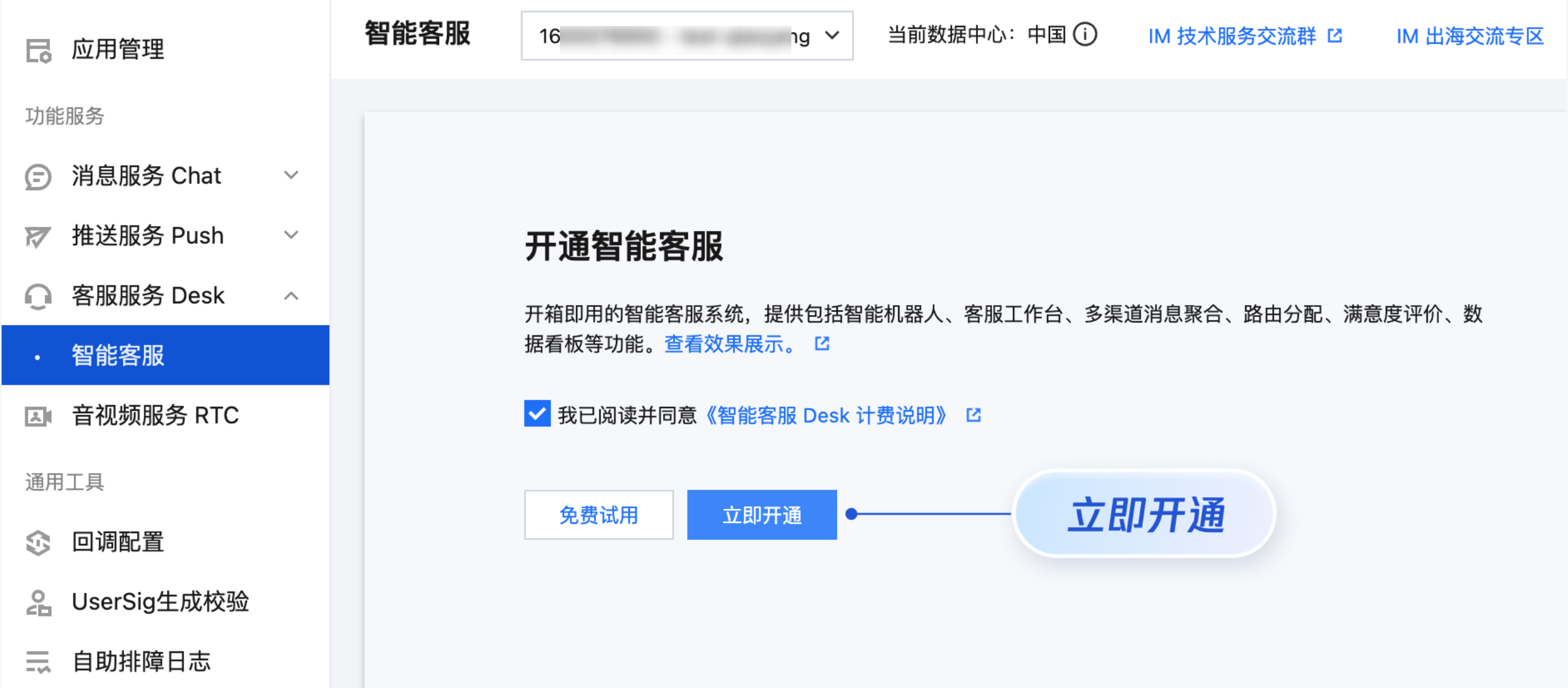
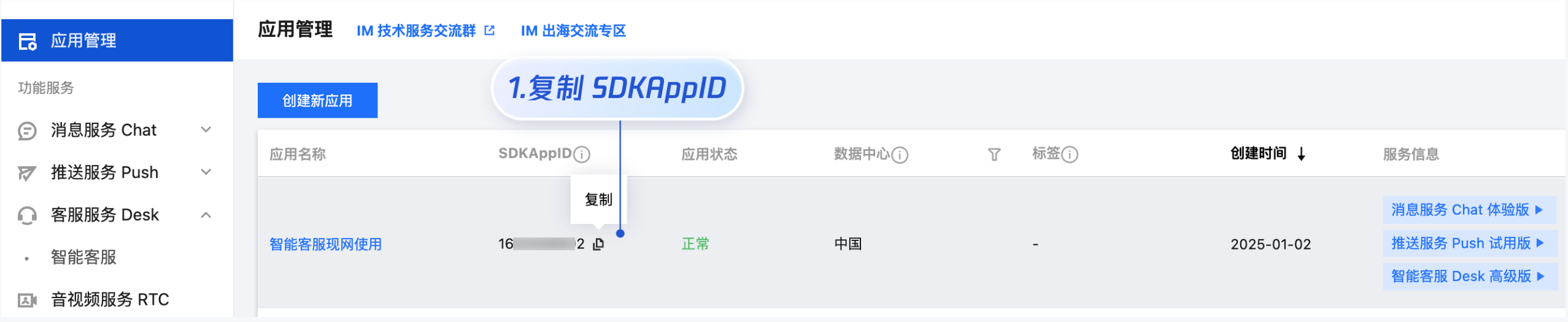
- SDKAppID 信息,可在 [即时通信 IM 控制台](https://console.cloud.tencent.com/im) 单击**应用管理** > **创建新应用**,并选择**客服服务 Desk** > **智能客服**, [开通智能客服](https://console.cloud.tencent.com/im/ai-desk) 后获取。
|
|
273
286
|
|
|
274
|
-
|
|
287
|
+
|
|
275
288
|
|
|
276
|
-
|
|
289
|
+
|
|
277
290
|
|
|
278
|
-
|
|
291
|
+
- userID 信息,可本地生成一个随机的字符串,例如 test-1234。
|
|
279
292
|
|
|
280
|
-
- userSig 信息,可单击 [
|
|
293
|
+
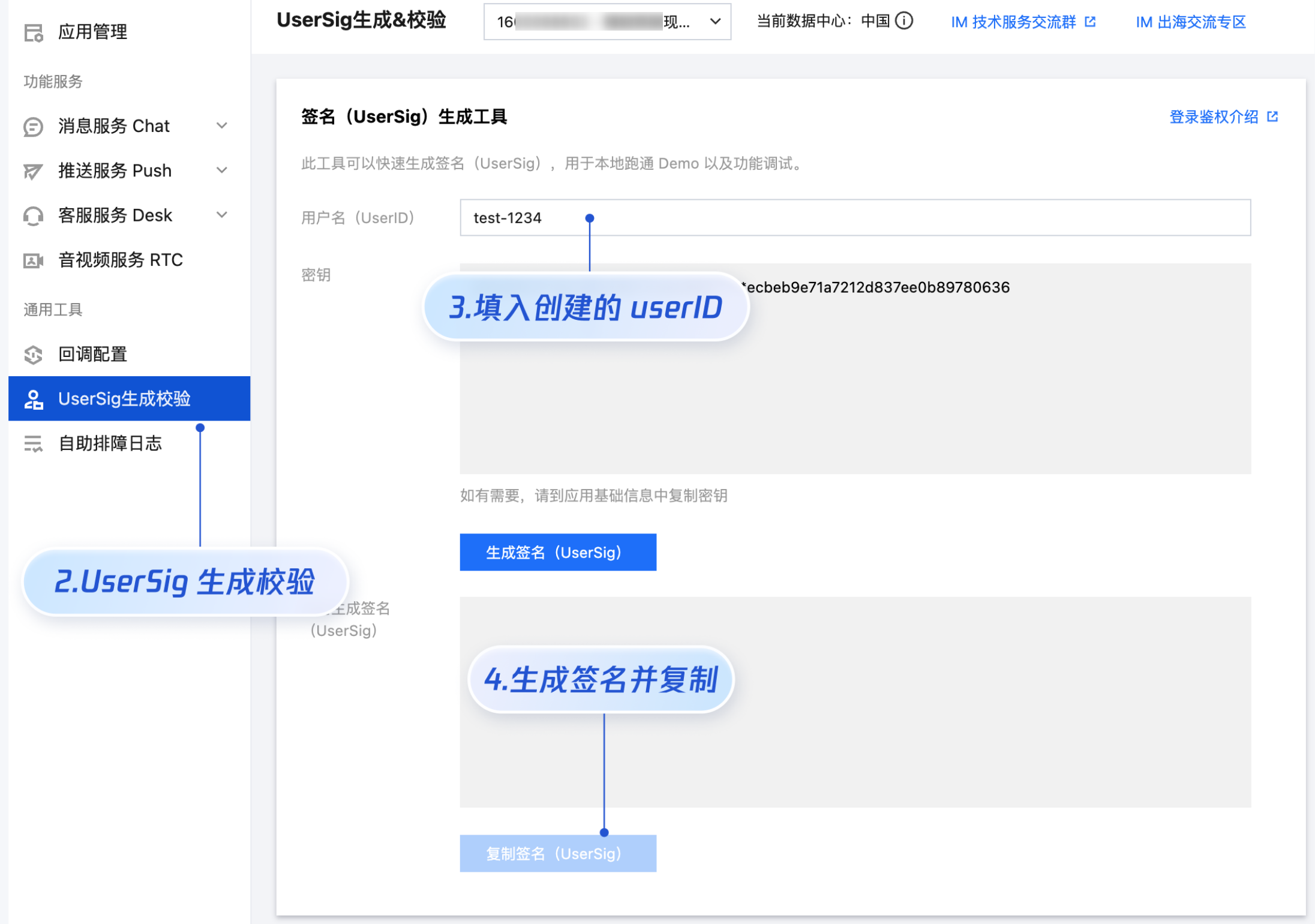
- userSig 信息,可单击 [即时通信 IM 控制台 > UserSig生成校验](https://console.cloud.tencent.com/im/tool-usersig),填写创建的 userID,即可生成 userSig。
|
|
281
294
|
|
|
282
|
-
|
|
295
|
+
|
|
283
296
|
|
|
284
297
|
|
|
285
298
|
### 步骤5:启动项目,发起您的第一条客服咨询
|
|
@@ -291,15 +304,15 @@ export * from "@vue/composition-api";
|
|
|
291
304
|
【vue-cli】
|
|
292
305
|
|
|
293
306
|
> **说明:**
|
|
294
|
-
>
|
|
307
|
+
>
|
|
295
308
|
|
|
296
309
|
> 由于 vue-cli 默认开启 webpack 全局 overlay 报错信息提示,为了您有更好的体验,**建议您关闭全局 overlay 报错提示。**
|
|
297
|
-
>
|
|
310
|
+
>
|
|
298
311
|
|
|
299
312
|
> 在 vue.config.js 中添加以下代码
|
|
300
|
-
>
|
|
313
|
+
>
|
|
301
314
|
|
|
302
|
-
>
|
|
315
|
+
>
|
|
303
316
|
|
|
304
317
|
【webpack4及以上】
|
|
305
318
|
> `module.exports = defineConfig({`
|
|
@@ -316,10 +329,10 @@ export * from "@vue/composition-api";
|
|
|
316
329
|
> ` overlay: false,`
|
|
317
330
|
> ` },`
|
|
318
331
|
> `};`
|
|
319
|
-
>
|
|
332
|
+
>
|
|
320
333
|
|
|
321
334
|
> 在 tsconfig.json 中关闭 ai-desk-customer-vue 的ts检测。
|
|
322
|
-
>
|
|
335
|
+
>
|
|
323
336
|
> `{`
|
|
324
337
|
> ` "exclude": [`
|
|
325
338
|
> ` "node_modules",`
|
|
@@ -342,6 +355,177 @@ npm run serve
|
|
|
342
355
|
npm run dev
|
|
343
356
|
```
|
|
344
357
|
|
|
358
|
+
## 高级特性
|
|
359
|
+
|
|
360
|
+
### 国际化界面语言
|
|
361
|
+
|
|
362
|
+
从 v1.0.0 起,UIKit 支持以下界面语言:
|
|
363
|
+
<table>
|
|
364
|
+
<tr>
|
|
365
|
+
<td rowspan="1" colSpan="1" >语言代码(userLang)</td>
|
|
366
|
+
|
|
367
|
+
<td rowspan="1" colSpan="1" >语言</td>
|
|
368
|
+
</tr>
|
|
369
|
+
|
|
370
|
+
<tr>
|
|
371
|
+
<td rowspan="1" colSpan="1" >zh_cn</td>
|
|
372
|
+
|
|
373
|
+
<td rowspan="1" colSpan="1" >简体中文</td>
|
|
374
|
+
</tr>
|
|
375
|
+
|
|
376
|
+
<tr>
|
|
377
|
+
<td rowspan="1" colSpan="1" >en</td>
|
|
378
|
+
|
|
379
|
+
<td rowspan="1" colSpan="1" >英文</td>
|
|
380
|
+
</tr>
|
|
381
|
+
|
|
382
|
+
<tr>
|
|
383
|
+
<td rowspan="1" colSpan="1" >zh_tw</td>
|
|
384
|
+
|
|
385
|
+
<td rowspan="1" colSpan="1" >繁体中文</td>
|
|
386
|
+
</tr>
|
|
387
|
+
|
|
388
|
+
<tr>
|
|
389
|
+
<td rowspan="1" colSpan="1" >ja</td>
|
|
390
|
+
|
|
391
|
+
<td rowspan="1" colSpan="1" >日语</td>
|
|
392
|
+
</tr>
|
|
393
|
+
|
|
394
|
+
<tr>
|
|
395
|
+
<td rowspan="1" colSpan="1" >id</td>
|
|
396
|
+
|
|
397
|
+
<td rowspan="1" colSpan="1" >印尼语</td>
|
|
398
|
+
</tr>
|
|
399
|
+
|
|
400
|
+
<tr>
|
|
401
|
+
<td rowspan="1" colSpan="1" >ms</td>
|
|
402
|
+
|
|
403
|
+
<td rowspan="1" colSpan="1" >马来语</td>
|
|
404
|
+
</tr>
|
|
405
|
+
|
|
406
|
+
<tr>
|
|
407
|
+
<td rowspan="1" colSpan="1" >vi</td>
|
|
408
|
+
|
|
409
|
+
<td rowspan="1" colSpan="1" >越南语</td>
|
|
410
|
+
</tr>
|
|
411
|
+
|
|
412
|
+
<tr>
|
|
413
|
+
<td rowspan="1" colSpan="1" >th</td>
|
|
414
|
+
|
|
415
|
+
<td rowspan="1" colSpan="1" >泰语</td>
|
|
416
|
+
</tr>
|
|
417
|
+
|
|
418
|
+
<tr>
|
|
419
|
+
<td rowspan="1" colSpan="1" >fil</td>
|
|
420
|
+
|
|
421
|
+
<td rowspan="1" colSpan="1" >菲律宾语</td>
|
|
422
|
+
</tr>
|
|
423
|
+
|
|
424
|
+
<tr>
|
|
425
|
+
<td rowspan="1" colSpan="1" >ru</td>
|
|
426
|
+
|
|
427
|
+
<td rowspan="1" colSpan="1" >俄语</td>
|
|
428
|
+
</tr>
|
|
429
|
+
</table>
|
|
430
|
+
|
|
431
|
+
|
|
432
|
+
如果您的业务需要出海,且用户语言以英语为主,可在引入智能客服时设置`userLang="en"`。如果您不指定`userLang`, UIKit 会使用浏览器设置的语言。
|
|
433
|
+
``` javascript
|
|
434
|
+
<template>
|
|
435
|
+
<CustomerServiceChat style="height: 100%;"
|
|
436
|
+
userLang="en"
|
|
437
|
+
/>
|
|
438
|
+
</template>
|
|
439
|
+
```
|
|
440
|
+
|
|
441
|
+
如果您需要支持动态切换用户语言,可使用`TUICustomerServer.changeLanguage`接口,并通过切换 页面/组件 key 的方式,实现语言动态修改与展示。
|
|
442
|
+
``` javascript
|
|
443
|
+
<template>
|
|
444
|
+
<CustomerServiceChat style="height: 100%;"
|
|
445
|
+
:key="locale"
|
|
446
|
+
:userLang="locale"
|
|
447
|
+
/>
|
|
448
|
+
</template>
|
|
449
|
+
<script setup lang="ts">
|
|
450
|
+
import TUICustomerServer, { CustomerServiceChat } from '../../ai-desk-customer-uniapp';
|
|
451
|
+
import { onMounted, ref } from "vue";
|
|
452
|
+
|
|
453
|
+
const locale = ref('en');
|
|
454
|
+
|
|
455
|
+
const changeLanguage = (language: string) => {
|
|
456
|
+
TUICustomerServer.changeLanguage(language).then(() => {
|
|
457
|
+
locale.value = language;
|
|
458
|
+
});
|
|
459
|
+
}
|
|
460
|
+
</script>
|
|
461
|
+
<style scoped lang="scss">
|
|
462
|
+
</style>
|
|
463
|
+
```
|
|
464
|
+
|
|
465
|
+
### 工具栏快捷 button
|
|
466
|
+
|
|
467
|
+
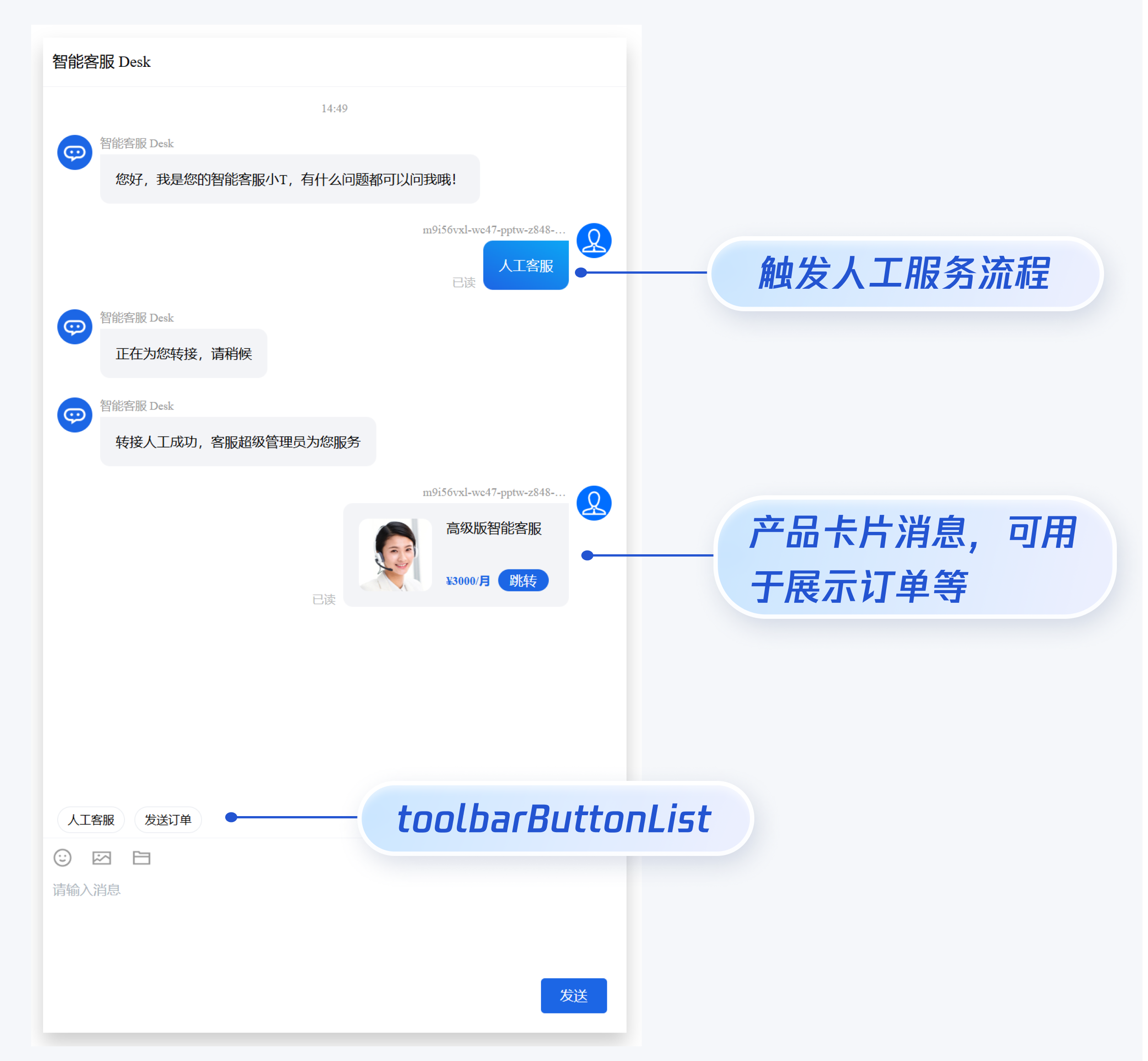
如果您想实现输入框上方增加快捷 button,方便用户使用,比如增加“人工客服”,“发送订单消息”等,可在引入智能客服时设置 `toolbarButtonList`。效果如下所示:
|
|
468
|
+
|
|
469
|
+
|
|
470
|
+
|
|
471
|
+
``` javascript
|
|
472
|
+
<template>
|
|
473
|
+
<CustomerServiceChat style="height: 100%;"
|
|
474
|
+
:toolbarButtonList="toolbarButtonList"
|
|
475
|
+
/>
|
|
476
|
+
</template>
|
|
477
|
+
<script setup lang="ts">
|
|
478
|
+
import TUICustomerServer, { CustomerServiceChat } from '../../ai-desk-customer-uniapp';
|
|
479
|
+
import { ref } from "vue";
|
|
480
|
+
|
|
481
|
+
const toolbarButtonList = ref([
|
|
482
|
+
{
|
|
483
|
+
title: '人工客服',
|
|
484
|
+
renderCondition: () => {
|
|
485
|
+
return true;
|
|
486
|
+
},
|
|
487
|
+
clickEvent: () => {
|
|
488
|
+
// 点击 button 后的回调
|
|
489
|
+
TUICustomerServer.sendTextMessage({
|
|
490
|
+
to: '@customer_service_account',
|
|
491
|
+
conversationType: 'C2C',
|
|
492
|
+
payload: {
|
|
493
|
+
text: '人工客服'
|
|
494
|
+
}
|
|
495
|
+
});
|
|
496
|
+
}
|
|
497
|
+
},
|
|
498
|
+
{
|
|
499
|
+
title: '发送订单',
|
|
500
|
+
renderCondition: () => {
|
|
501
|
+
return true;
|
|
502
|
+
},
|
|
503
|
+
clickEvent: () => {
|
|
504
|
+
// 点击 button 后的回调
|
|
505
|
+
TUICustomerServer.sendCustomMessage({
|
|
506
|
+
to: '@customer_service_account',
|
|
507
|
+
conversationType: 'C2C',
|
|
508
|
+
payload: {
|
|
509
|
+
data: JSON.stringify({
|
|
510
|
+
src: '22',
|
|
511
|
+
customerServicePlugin: 0,
|
|
512
|
+
content: {
|
|
513
|
+
desc: "¥3000/月",
|
|
514
|
+
header: "高级版智能客服",
|
|
515
|
+
pic: "https://cloudcache.tencent-cloud.com/qcloud/portal/kit/images/presale.a4955999.jpeg",
|
|
516
|
+
url: "https://cloud.tencent.com/document/product/269/116070"
|
|
517
|
+
}
|
|
518
|
+
}),
|
|
519
|
+
}
|
|
520
|
+
});
|
|
521
|
+
}
|
|
522
|
+
}
|
|
523
|
+
]);
|
|
524
|
+
</script>
|
|
525
|
+
<style scoped lang="scss">
|
|
526
|
+
</style>
|
|
527
|
+
```
|
|
528
|
+
|
|
345
529
|
## 常见问题
|
|
346
530
|
|
|
347
531
|
##### 什么是 UserSig?如何生成 UserSig?
|
|
@@ -374,6 +558,18 @@ vue add typescript
|
|
|
374
558
|
npm install -D typescript
|
|
375
559
|
```
|
|
376
560
|
|
|
561
|
+
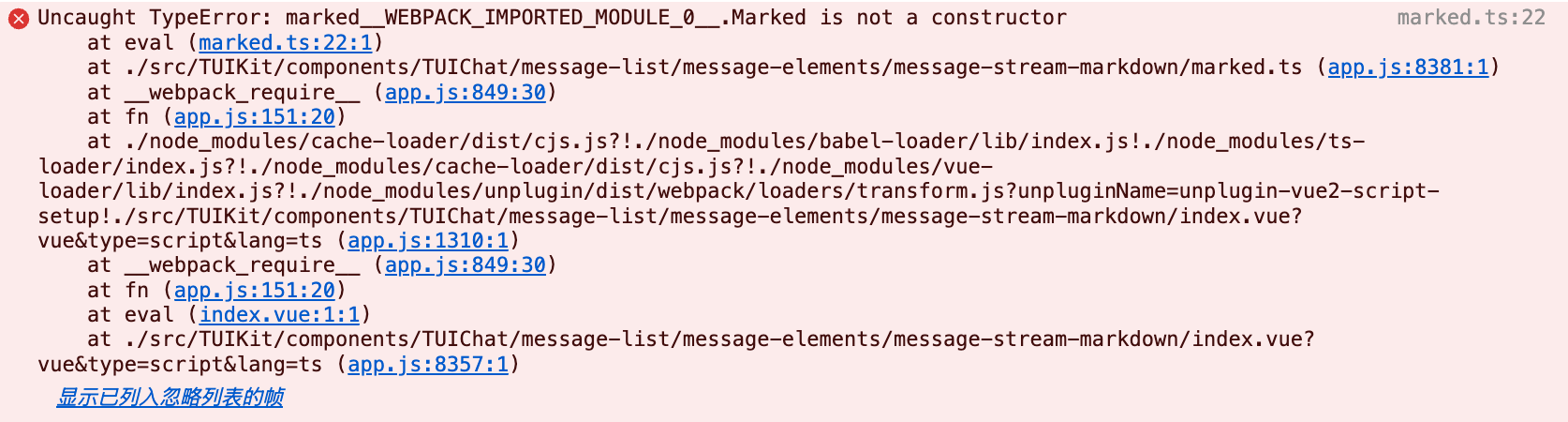
##### 运行报错:Uncaught TypeError: marked__WEBPACK_IMPORTED_MODULE_0_ Marked is not a constructor
|
|
562
|
+
|
|
563
|
+
如果您运行过程中出现如下错误,说明您当前 Vue CLI 构建的项目环境版本较低,需要降低 uikit 中使用的 marked 版本至 5.1.2。
|
|
564
|
+
|
|
565
|
+
|
|
566
|
+
|
|
567
|
+
|
|
568
|
+
请在您项目的 根目录 使用以下脚本降低 marked 版本:
|
|
569
|
+
``` bash
|
|
570
|
+
npm i marked@5.1.2 --legacy-peer-deps
|
|
571
|
+
```
|
|
572
|
+
|
|
377
573
|
##### 编译报错 node_modules/marked/lib/marked.esm.js: Class private methods are not enabled.
|
|
378
574
|
|
|
379
575
|
如果您运行过程中出现如下错误,说明您当前使用的 marked 版本过低,请升级 marked 版本至 6.0.0。
|
|
@@ -388,4 +584,4 @@ npm i marked@6.0.0 --legacy-peer-deps
|
|
|
388
584
|
|
|
389
585
|
## 交流与反馈
|
|
390
586
|
|
|
391
|
-
[点此进入 IM 社群](https://zhiliao.qq.com/s/c5GY7HIM62CK),享有专业工程师的支持,解决您的难题。
|
|
587
|
+
[点此进入 IM 社群](https://zhiliao.qq.com/s/c5GY7HIM62CK),享有专业工程师的支持,解决您的难题。
|
|
@@ -11,7 +11,7 @@
|
|
|
11
11
|
<div class="chat-header-container">
|
|
12
12
|
<Icon v-if="!isPC" style="width:32px;" :file="customerAvatarMobile" />
|
|
13
13
|
<div :class="['chat-header-content', !isPC && 'chat-header-h5-content']">
|
|
14
|
-
{{ isPC? currentConversationName :'Hi,我是'+ currentConversationName }}
|
|
14
|
+
{{ isPC? currentConversationName : TUITranslateService.t('AIDesk.Hi,我是') + currentConversationName }}
|
|
15
15
|
</div>
|
|
16
16
|
</div>
|
|
17
17
|
</div>
|
|
@@ -31,7 +31,7 @@ import { isPC } from '../../../utils/env';
|
|
|
31
31
|
const { ref, onMounted, onUnmounted } = vue;
|
|
32
32
|
|
|
33
33
|
interface IProps {
|
|
34
|
-
canCloseChat
|
|
34
|
+
canCloseChat?: boolean;
|
|
35
35
|
}
|
|
36
36
|
|
|
37
37
|
const emits = defineEmits(['closeChat']);
|
|
@@ -38,8 +38,8 @@
|
|
|
38
38
|
'tui-chat-message-input',
|
|
39
39
|
!isPC && 'tui-chat-h5-message-input'
|
|
40
40
|
]"
|
|
41
|
-
:isMuted="
|
|
42
|
-
:muteText="
|
|
41
|
+
:isMuted="isMuted"
|
|
42
|
+
:muteText="muteText"
|
|
43
43
|
:placeholder="TUITranslateService.t('TUIChat.请输入消息')"
|
|
44
44
|
:inputToolbarDisplayType="inputToolbarDisplayType"
|
|
45
45
|
@changeToolbarDisplayType="changeToolbarDisplayType"
|
|
@@ -76,26 +76,28 @@
|
|
|
76
76
|
<script lang="ts" setup>
|
|
77
77
|
import vue from '../../adapter-vue';
|
|
78
78
|
import {
|
|
79
|
-
|
|
79
|
+
IMessageModel,
|
|
80
|
+
StoreName,
|
|
81
|
+
TUIChatEngine,
|
|
80
82
|
TUIConversationService,
|
|
81
83
|
TUIStore,
|
|
82
|
-
|
|
83
|
-
IMessageModel,
|
|
84
|
-
TUIChatEngine
|
|
84
|
+
TUITranslateService
|
|
85
85
|
} from '@tencentcloud/chat-uikit-engine';
|
|
86
|
-
import TUICore, {
|
|
86
|
+
import TUICore, {TUIConstants, TUILogin} from '@tencentcloud/tui-core';
|
|
87
87
|
import ChatHeader from './chat-header/index-web.vue';
|
|
88
88
|
import MessageList from './message-list/index-web.vue';
|
|
89
89
|
import MessageInput from './message-input/index-web.vue';
|
|
90
90
|
import MessageInputToolbar from './message-input-toolbar/index-web.vue';
|
|
91
91
|
import EmojiDialog from './message-input-toolbar/emoji-dialog-mobile/emoji-dialog-mobile.vue';
|
|
92
|
-
import { isPC
|
|
93
|
-
import {
|
|
94
|
-
import {
|
|
92
|
+
import {isH5, isPC} from '../../utils/env';
|
|
93
|
+
import {ToolbarButtonModel, ToolbarDisplayType} from '../../interface';
|
|
94
|
+
import {isSupportedLang} from '../../utils/';
|
|
95
95
|
import Log from '../../utils/logger';
|
|
96
96
|
import MessageToolbarButton from './message-toolbar-button/index.vue';
|
|
97
|
+
import TUILocales from '../../locales';
|
|
98
|
+
import { Toast, TOAST_TYPE } from '../common/Toast/index-web';
|
|
97
99
|
|
|
98
|
-
const { ref, onMounted, onUnmounted, computed } = vue;
|
|
100
|
+
const { ref, onMounted, onUnmounted, computed, nextTick } = vue;
|
|
99
101
|
|
|
100
102
|
interface IProps {
|
|
101
103
|
canCloseChat?: boolean;
|
|
@@ -103,6 +105,7 @@ interface IProps {
|
|
|
103
105
|
userID?:string;
|
|
104
106
|
userSig?:string;
|
|
105
107
|
robotLang?:string;
|
|
108
|
+
userLang?:string;
|
|
106
109
|
toolbarButtonList?:ToolbarButtonModel[];
|
|
107
110
|
}
|
|
108
111
|
|
|
@@ -111,15 +114,19 @@ const emits = defineEmits(['closeChat']);
|
|
|
111
114
|
const currentConversationID = ref();
|
|
112
115
|
const inputToolbarDisplayType = ref<ToolbarDisplayType>('none');
|
|
113
116
|
const messageInputRef = ref();
|
|
117
|
+
const isMuted = ref(false);
|
|
118
|
+
const muteText = ref('');
|
|
114
119
|
const messageListRef = ref<InstanceType<typeof MessageList>>();
|
|
115
120
|
const emojiOpen = ref(false);
|
|
116
121
|
const toolShowH5 = ref(false);
|
|
122
|
+
const langauges = Object.keys(TUILocales);
|
|
117
123
|
const props = withDefaults(defineProps<IProps>(), {
|
|
118
124
|
canCloseChat: true,
|
|
119
125
|
SDKAppID: 0,
|
|
120
126
|
userID: '',
|
|
121
127
|
userSig: '',
|
|
122
128
|
robotLang: '',
|
|
129
|
+
userLang:'',
|
|
123
130
|
toolbarButtonList:() => [] as ToolbarButtonModel[]
|
|
124
131
|
});
|
|
125
132
|
|
|
@@ -135,10 +142,49 @@ const loginCustomerUIKit = () => {
|
|
|
135
142
|
TUIConversationService.switchConversation(conversationID);
|
|
136
143
|
TUIChatEngine.chat.callExperimentalAPI('isFeatureEnabledForStat', Math.pow(2, 42));
|
|
137
144
|
}).catch((error) => {
|
|
145
|
+
Toast({
|
|
146
|
+
message: TUITranslateService.t('TUIChat.登录失败'),
|
|
147
|
+
type: TOAST_TYPE.ERROR,
|
|
148
|
+
duration: 30000,
|
|
149
|
+
});
|
|
138
150
|
console.log(error);
|
|
139
151
|
})
|
|
140
152
|
}
|
|
141
153
|
|
|
154
|
+
const convertLanguageToLowercase = (language) => {
|
|
155
|
+
let lowercase = language.toLowerCase();
|
|
156
|
+
if (lowercase === 'zh-cn' || lowercase === 'zh_cn') {
|
|
157
|
+
lowercase = 'zh';
|
|
158
|
+
} else if (lowercase === 'zh-tw' || lowercase === 'zh-hk') {
|
|
159
|
+
lowercase = 'zh_tw';
|
|
160
|
+
}
|
|
161
|
+
return lowercase;
|
|
162
|
+
}
|
|
163
|
+
|
|
164
|
+
const initLanguage = () => {
|
|
165
|
+
Log.i(`initLanguage ${props.userLang}`);
|
|
166
|
+
TUITranslateService.provideLanguages({ ...TUILocales });
|
|
167
|
+
TUITranslateService.useI18n();
|
|
168
|
+
let language;
|
|
169
|
+
if (props.userLang !== '') {
|
|
170
|
+
let userLang = convertLanguageToLowercase(props.userLang);
|
|
171
|
+
if (!langauges.includes(userLang)) {
|
|
172
|
+
Log.w(`userLang:${props.userLang} is not supported`);
|
|
173
|
+
language = 'en';
|
|
174
|
+
} else {
|
|
175
|
+
language = userLang;
|
|
176
|
+
}
|
|
177
|
+
} else {
|
|
178
|
+
let navigatorLang = convertLanguageToLowercase(navigator.language);
|
|
179
|
+
if (!langauges.includes(navigatorLang)) {
|
|
180
|
+
language = 'en';
|
|
181
|
+
} else {
|
|
182
|
+
language = navigatorLang;
|
|
183
|
+
}
|
|
184
|
+
}
|
|
185
|
+
TUITranslateService.changeLanguage(language);
|
|
186
|
+
}
|
|
187
|
+
|
|
142
188
|
try {
|
|
143
189
|
const userContext = TUILogin.getContext();
|
|
144
190
|
if(userContext.userID == '' && props.SDKAppID!==0 && props.userID!=='' && props.userSig!==''){
|
|
@@ -147,6 +193,7 @@ try {
|
|
|
147
193
|
Log.w(`robotLang:${props.robotLang} is not supported`);
|
|
148
194
|
}
|
|
149
195
|
}
|
|
196
|
+
initLanguage();
|
|
150
197
|
} catch (e) {
|
|
151
198
|
console.log(e)
|
|
152
199
|
}
|
|
@@ -155,12 +202,18 @@ onMounted(() => {
|
|
|
155
202
|
TUIStore.watch(StoreName.CONV, {
|
|
156
203
|
currentConversationID: onCurrentConversationIDUpdate,
|
|
157
204
|
});
|
|
205
|
+
TUIStore.watch(StoreName.USER, {
|
|
206
|
+
kickedOut: onKickedOut
|
|
207
|
+
});
|
|
158
208
|
});
|
|
159
209
|
|
|
160
210
|
onUnmounted(() => {
|
|
161
211
|
TUIStore.unwatch(StoreName.CONV, {
|
|
162
212
|
currentConversationID: onCurrentConversationIDUpdate,
|
|
163
213
|
});
|
|
214
|
+
TUIStore.unwatch(StoreName.USER, {
|
|
215
|
+
kickedOut: onKickedOut
|
|
216
|
+
});
|
|
164
217
|
});
|
|
165
218
|
|
|
166
219
|
const isInputToolbarShow = computed<boolean>(() => {
|
|
@@ -211,6 +264,13 @@ function scrollToLatestMessage() {
|
|
|
211
264
|
messageListRef.value?.scrollToLatestMessage();
|
|
212
265
|
}
|
|
213
266
|
|
|
267
|
+
function onKickedOut(type: string) {
|
|
268
|
+
if (type) {
|
|
269
|
+
isMuted.value = true;
|
|
270
|
+
muteText.value = TUITranslateService.t('TUIChat.账号被强制下线');
|
|
271
|
+
}
|
|
272
|
+
}
|
|
273
|
+
|
|
214
274
|
function onCurrentConversationIDUpdate(conversationID: string) {
|
|
215
275
|
if (!conversationID) {
|
|
216
276
|
return;
|
|
@@ -759,7 +759,6 @@ defineExpose({
|
|
|
759
759
|
overflow: hidden;
|
|
760
760
|
|
|
761
761
|
.message-input-editor-area {
|
|
762
|
-
overflow: auto;
|
|
763
762
|
user-select: text;
|
|
764
763
|
hyphens: auto;
|
|
765
764
|
word-break: keep-all;
|
|
@@ -878,4 +877,11 @@ defineExpose({
|
|
|
878
877
|
pointer-events: none;
|
|
879
878
|
}
|
|
880
879
|
}
|
|
880
|
+
|
|
881
|
+
.message-input-mute {
|
|
882
|
+
color: #721c24;
|
|
883
|
+
background-color: #f8d7da;
|
|
884
|
+
border-color: #f5c6cb;
|
|
885
|
+
text-align: center;
|
|
886
|
+
}
|
|
881
887
|
</style>
|
|
@@ -17,7 +17,7 @@
|
|
|
17
17
|
</ul>
|
|
18
18
|
<div class="sendButtonContainer">
|
|
19
19
|
<div class="sendButton" @click="sendMessage">
|
|
20
|
-
|
|
20
|
+
{{ TUITranslateService.t("发送") }}
|
|
21
21
|
</div>
|
|
22
22
|
</div>
|
|
23
23
|
</div>
|
|
@@ -32,6 +32,7 @@ import {
|
|
|
32
32
|
TUIStore,
|
|
33
33
|
StoreName,
|
|
34
34
|
IConversationModel,
|
|
35
|
+
TUITranslateService,
|
|
35
36
|
SendMessageParams,
|
|
36
37
|
} from '@tencentcloud/chat-uikit-engine';
|
|
37
38
|
import {
|
package/components/CustomerServiceChat/message-input-toolbar/emoji-picker/emoji-picker-dialog.vue
CHANGED
|
@@ -61,7 +61,7 @@
|
|
|
61
61
|
class="send-btn"
|
|
62
62
|
@click="sendMessage"
|
|
63
63
|
>
|
|
64
|
-
|
|
64
|
+
{{ TUITranslateService.t("发送") }}
|
|
65
65
|
</li>
|
|
66
66
|
</ul>
|
|
67
67
|
</div>
|
|
@@ -74,6 +74,7 @@ import {
|
|
|
74
74
|
StoreName,
|
|
75
75
|
IConversationModel,
|
|
76
76
|
SendMessageParams,
|
|
77
|
+
TUITranslateService
|
|
77
78
|
} from '@tencentcloud/chat-uikit-engine';
|
|
78
79
|
import Icon from '../../../common/Icon.vue';
|
|
79
80
|
import faceIcon from '../../../../assets/face.png';
|