@tencentcloud/ai-desk-customer-vue 0.1.5 → 0.2.0
This diff represents the content of publicly available package versions that have been released to one of the supported registries. The information contained in this diff is provided for informational purposes only and reflects changes between package versions as they appear in their respective public registries.
- package/README.md +390 -9
- package/adapter-vue-web.ts +19 -41
- package/components/CustomerServiceChat/message-list/message-elements/message-desk/message-desk-elements/marked.ts +27 -0
- package/components/CustomerServiceChat/message-list/message-elements/message-desk/message-desk-elements/message-rich-text.vue +9 -58
- package/components/CustomerServiceChat/message-list/message-elements/message-desk/message-desk-elements/message-stream.vue +9 -29
- package/components/CustomerServiceChat/message-list/message-elements/message-desk/message-desk-elements/styles/common.scss +62 -0
- package/components/CustomerServiceChat/message-list/style/web.scss +0 -1
- package/package.json +5 -6
package/README.md
CHANGED
|
@@ -1,12 +1,393 @@
|
|
|
1
|
-
##
|
|
2
|
-
@tencentcloud/ai-desk-customer-vue 和 @tencentcloud/ai-desk-customer-uniapp 是基于 uikit 的客服插件,专为企业客服人员设计,用于为客户提供咨询解答服务。它具备丰富的功能,如消息快速回复、自动回复、访客信息查看、营销数据分析、客户管理等,并且支持多渠道接入,可以实现多样化集成。 在电商行业中,客服插件的功能更加贴合电商行业的特点,例如购物车信息互通、链接自动识别、多店铺管理等功能。它具有以下优势:
|
|
3
|
-
- 提高客服效率:客服插件可以快速回复客户的问题,并且支持自动回复功能,可以大大减少客服人员的工作量;
|
|
4
|
-
- 提升客户体验:客服插件可以实时显示客户信息,方便客服人员了解客户需求,提供更加精准的服务,提升客户体验;
|
|
5
|
-
- 加强客户管理:客服插件可以记录客户的历史对话内容,方便了解客户的需求和反馈,提升客户管理水平;
|
|
6
|
-
- 优化营销策略:客服插件可以收集客户的意见和建议,帮助企业优化营销策略,提升营销效果。
|
|
1
|
+
## 介绍
|
|
7
2
|
|
|
3
|
+
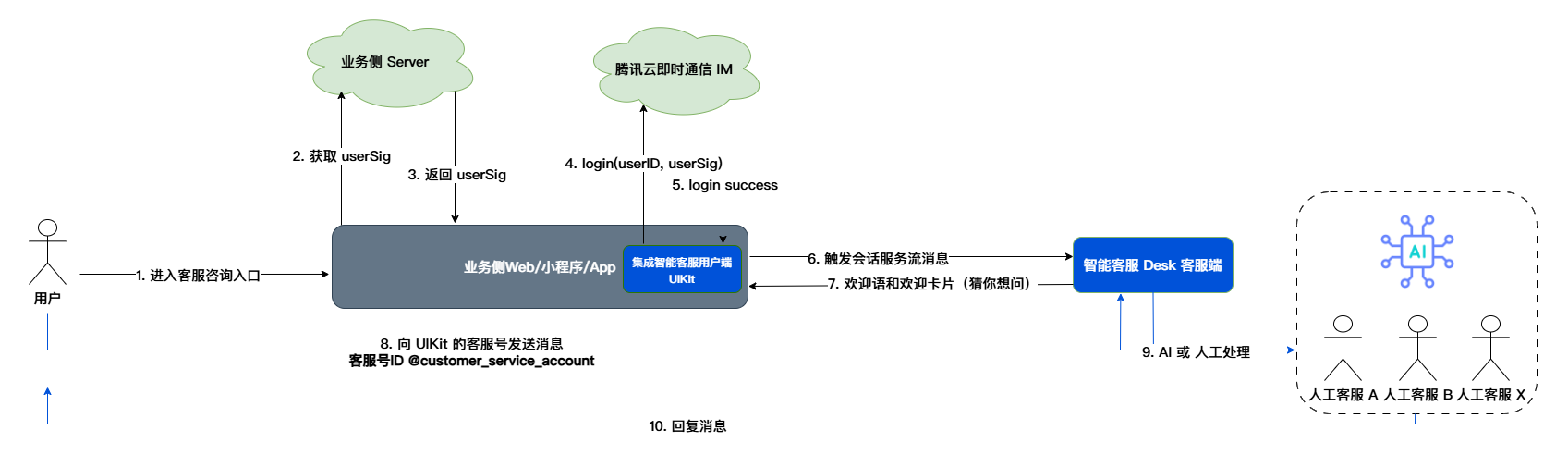
智能客服用户端 Web UIKit。使用此 UIKit,您可以在一天内将智能客服的能力集成到您的 Web 或 Hybrid 项目。极简接入,用 AI 为您的产品降本增效。其流程如下图所示:
|
|
8
4
|
|
|
9
|
-
|
|
5
|
+
|
|
10
6
|
|
|
11
|
-
|
|
12
|
-
|
|
7
|
+
|
|
8
|
+
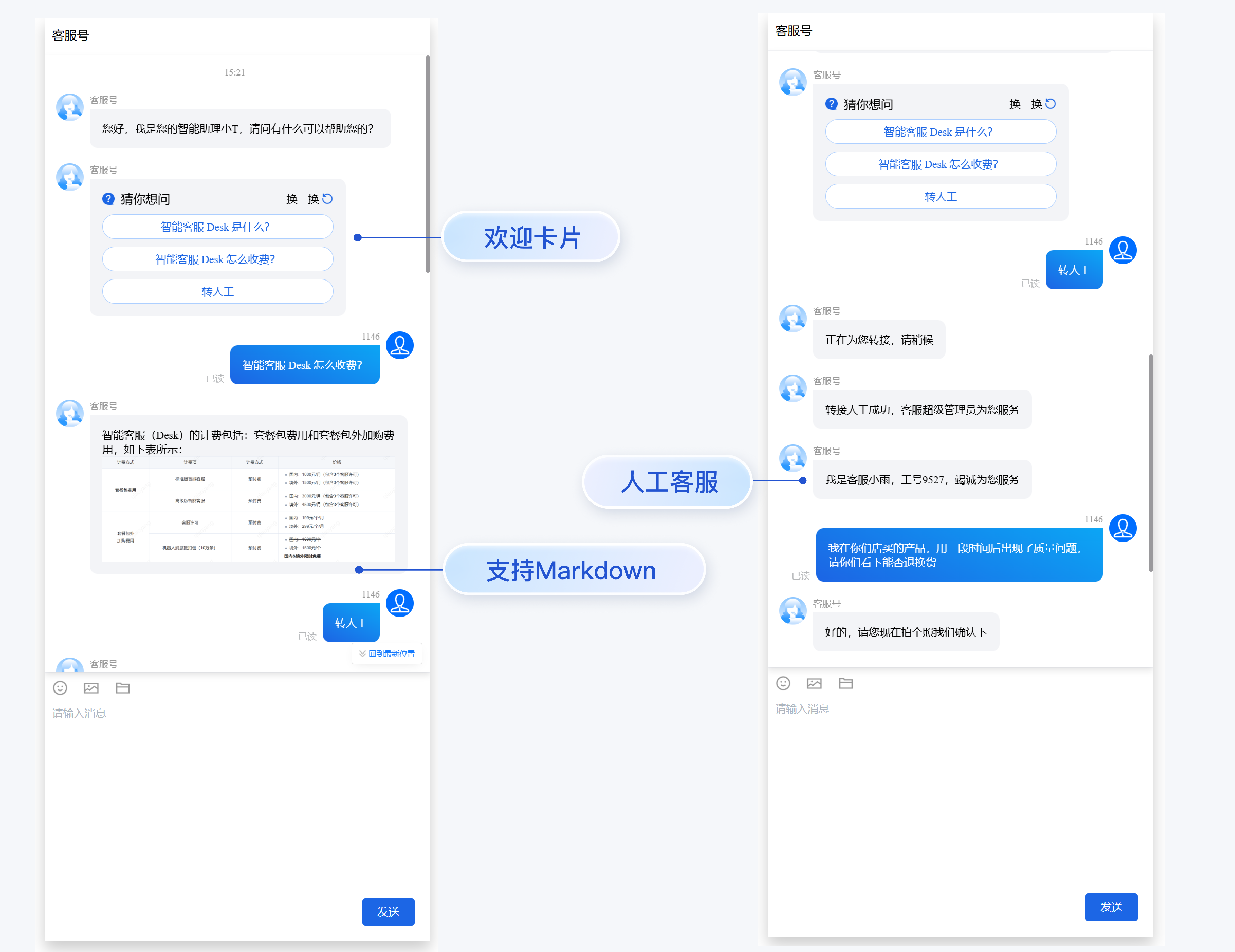
## 效果展示
|
|
9
|
+
|
|
10
|
+
|
|
11
|
+
|
|
12
|
+
|
|
13
|
+
## 开发环境要求
|
|
14
|
+
- Vue ( 全面支持 Vue2 & Vue3 , 请您在下方接入时选择您所匹配的 Vue 版本接入指引进行接入)
|
|
15
|
+
|
|
16
|
+
- TypeScript (如果您是 js 项目, 请参见 [常见问题- js 工程如何接入 TUIKit 组件](https://cloud.tencent.com/document/product/269/68493#dbce298f-6d21-4221-86fc-12b0153eaef8) 进行配置 ts 渐进式支持)
|
|
17
|
+
|
|
18
|
+
- sass(sass-loader 版本 ≤ 10.1.1)
|
|
19
|
+
|
|
20
|
+
- node(node.js ≥ 16.0.0)
|
|
21
|
+
|
|
22
|
+
- npm(版本请与 node 版本匹配)
|
|
23
|
+
|
|
24
|
+
|
|
25
|
+
## UIKit 源码集成
|
|
26
|
+
|
|
27
|
+
### 步骤1:创建项目
|
|
28
|
+
|
|
29
|
+
支持使用 webpack 或 vite 创建项目工程,配置 Vue3 / Vue2 + TypeScript + sass。以下是几种项目工程搭建示例:
|
|
30
|
+
|
|
31
|
+
|
|
32
|
+
|
|
33
|
+
【vue-cli】
|
|
34
|
+
|
|
35
|
+
> **注意:**
|
|
36
|
+
>
|
|
37
|
+
|
|
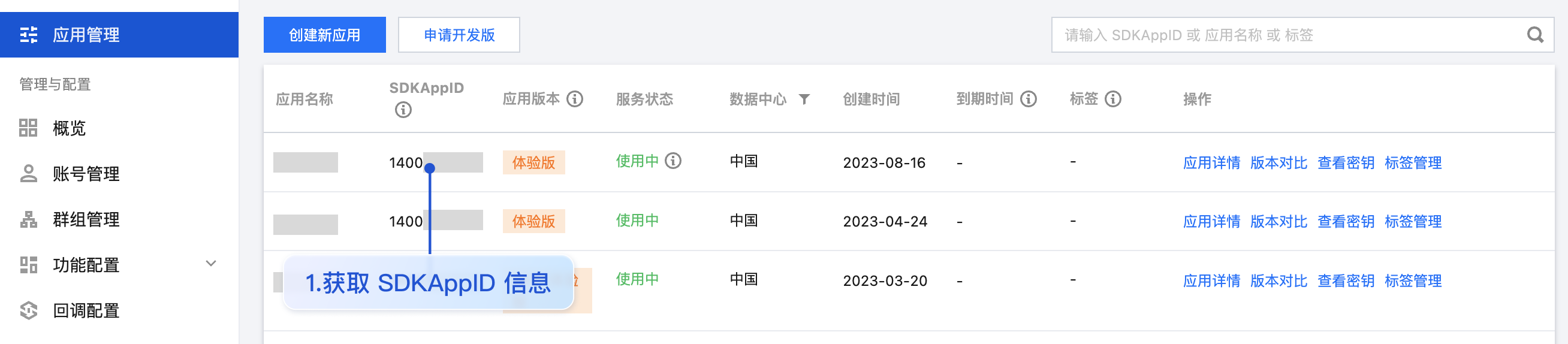
38
|
+
> 请您务必保证您的** @vue/cli 版本在 5.0.0** 以上,您可使用以下示例代码升级您的 @vue/cli 版本至 v5.0.8。
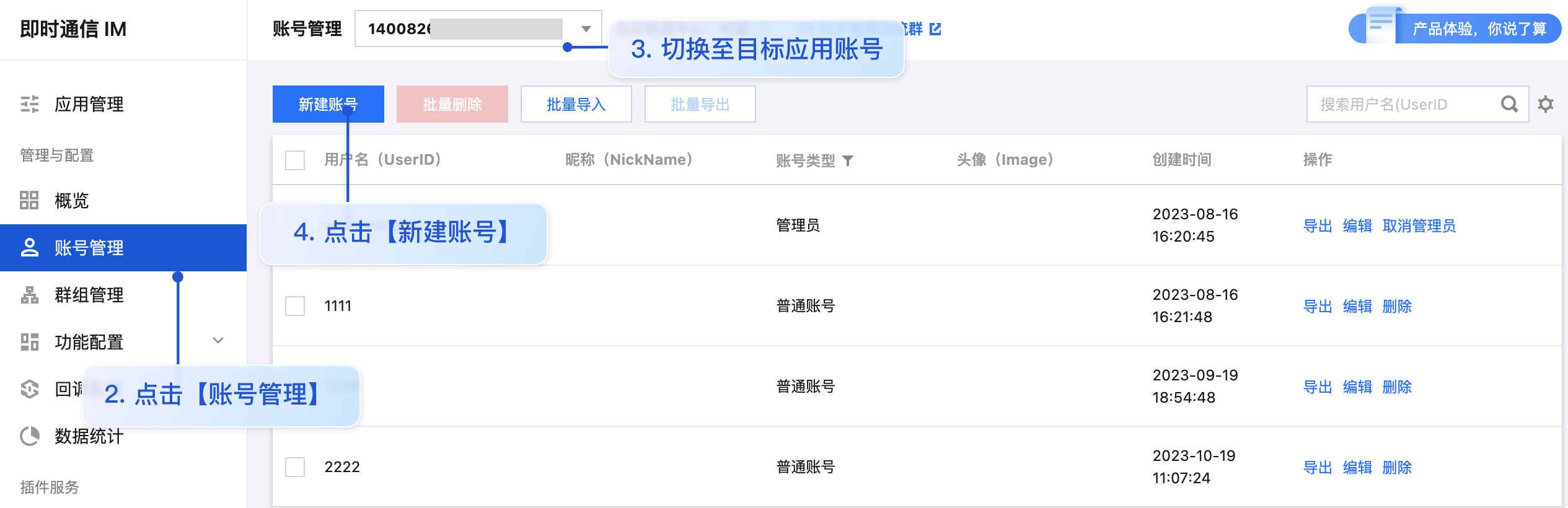
|
|
39
|
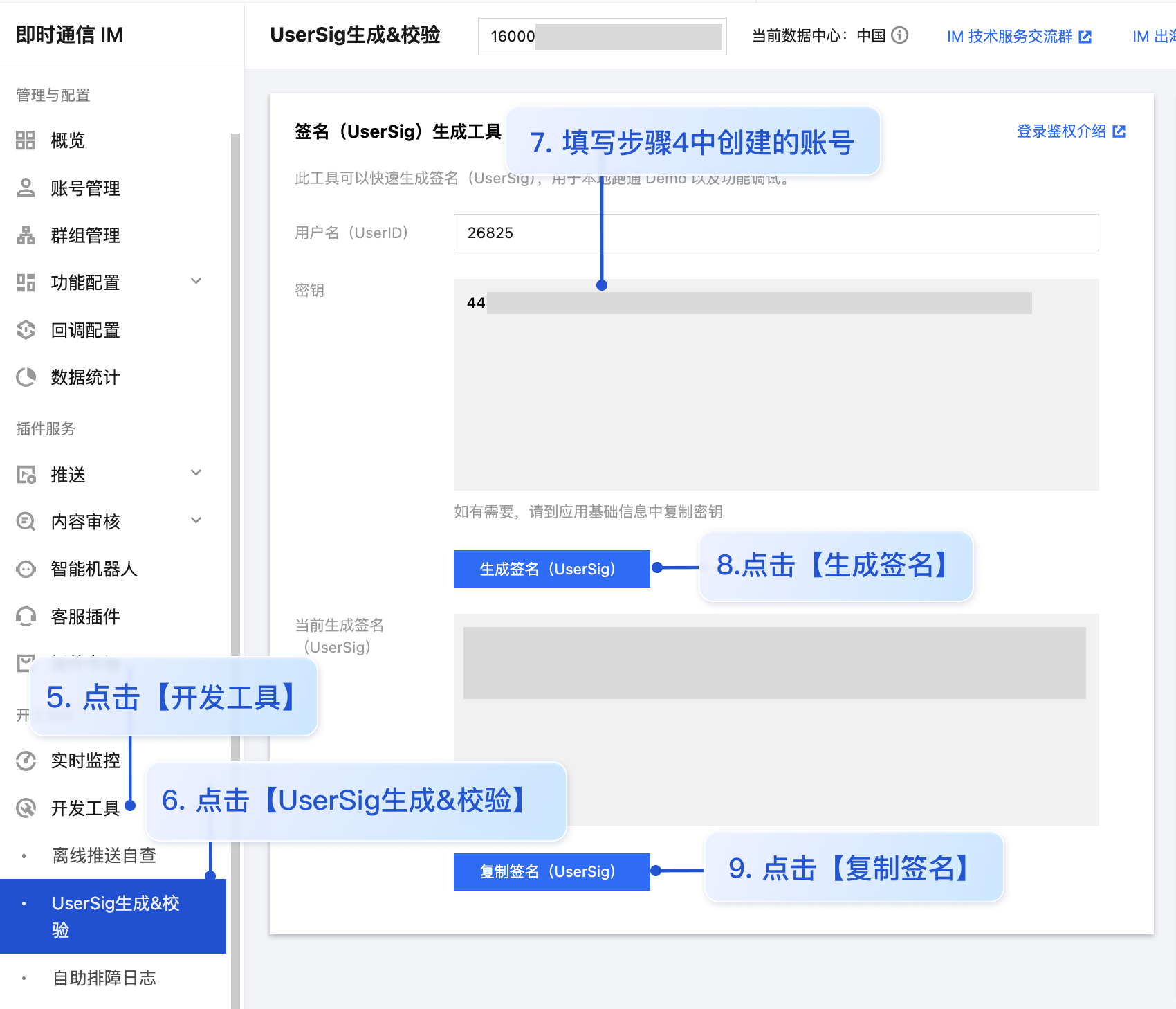
+
>
|
|
40
|
+
|
|
41
|
+
|
|
42
|
+
使用 vue-cli 方式创建项目, 配置 Vue2 / Vue3 + TypeScript + sass。
|
|
43
|
+
如果您尚未安装 vue-cli 或者 vue-cli 版本低于 5.0.0 ,可以在 terminal 或 cmd 中采用如下方式进行安装:
|
|
44
|
+
|
|
45
|
+
|
|
46
|
+
【shell】
|
|
47
|
+
``` bash
|
|
48
|
+
npm install -g @vue/cli@5.0.8 sass sass-loader@10.1.1
|
|
49
|
+
```
|
|
50
|
+
|
|
51
|
+
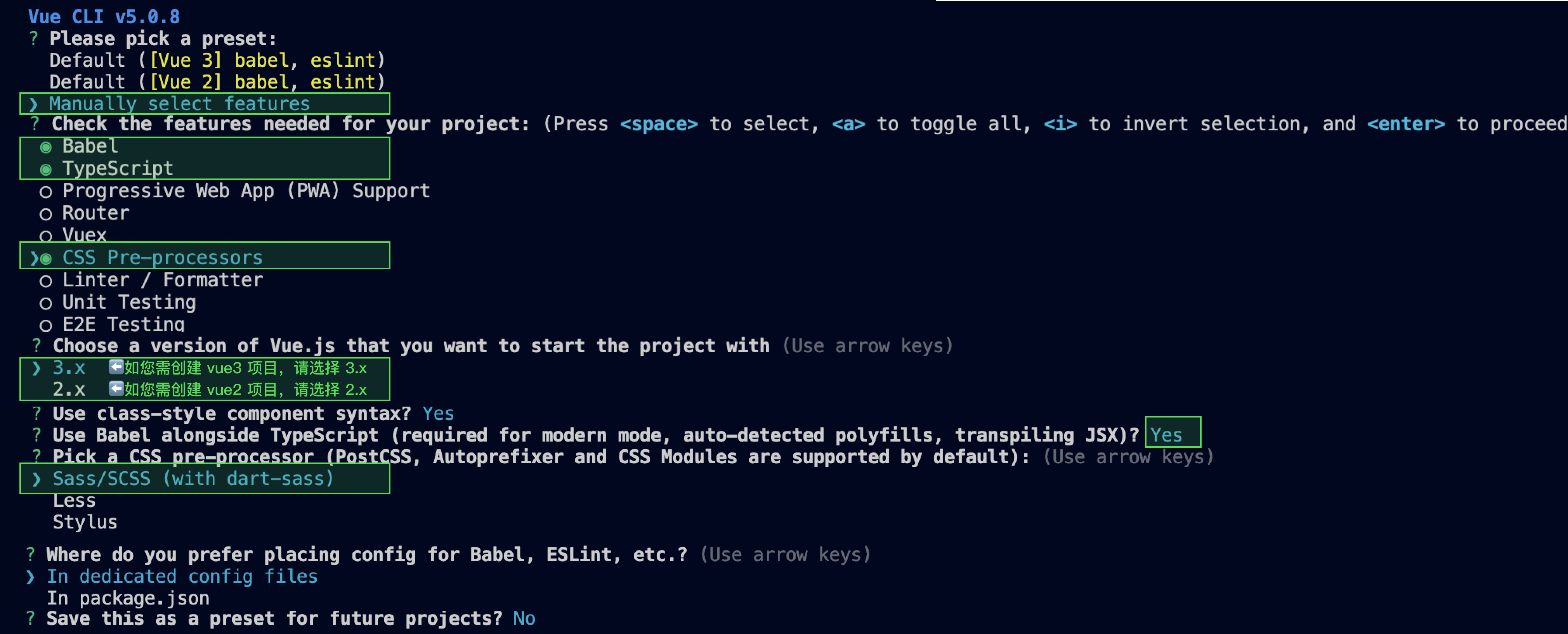
通过 vue-cli 创建项目,并选择下图中所选配置项。
|
|
52
|
+
|
|
53
|
+
|
|
54
|
+
【shell】
|
|
55
|
+
``` bash
|
|
56
|
+
vue create ai-desk-example
|
|
57
|
+
```
|
|
58
|
+
|
|
59
|
+
请务必保证按照如下配置选择:
|
|
60
|
+
|
|
61
|
+
|
|
62
|
+
|
|
63
|
+
创建完成后,切换到项目所在目录:
|
|
64
|
+
``` bash
|
|
65
|
+
cd ai-desk-example
|
|
66
|
+
```
|
|
67
|
+
|
|
68
|
+
如果您是 vue2 项目,请根据您所使用的 Vue 版本进行以下相应的环境配置, vue3 项目请忽略。
|
|
69
|
+
|
|
70
|
+
|
|
71
|
+
|
|
72
|
+
【vue2.7】
|
|
73
|
+
``` bash
|
|
74
|
+
npm i vue@2.7.9 vue-template-compiler@2.7.9
|
|
75
|
+
```
|
|
76
|
+
|
|
77
|
+
【vue2.6及以下】
|
|
78
|
+
``` bash
|
|
79
|
+
npm i @vue/composition-api unplugin-vue2-script-setup vue@2.6.14 vue-template-compiler@2.6.14
|
|
80
|
+
```
|
|
81
|
+
|
|
82
|
+
【vite】
|
|
83
|
+
|
|
84
|
+
> **说明:**
|
|
85
|
+
>
|
|
86
|
+
|
|
87
|
+
> Vite 需要[**Node.js**](https://nodejs.org/en/)** 版本 18+,20+。**当您的包管理器发出警告时,请注意升级您的 Node 版本,详情请参考 [vite 官网](https://cn.vitejs.dev/guide/)。
|
|
88
|
+
>
|
|
89
|
+
|
|
90
|
+
|
|
91
|
+
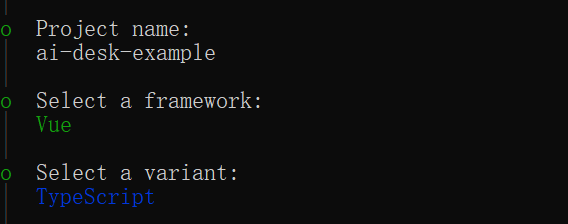
使用 vite 方式创建项目,按照下图选项配置 Vue + TypeScript 。
|
|
92
|
+
``` bash
|
|
93
|
+
npm create vite@latest
|
|
94
|
+
```
|
|
95
|
+
|
|
96
|
+
|
|
97
|
+
|
|
98
|
+
|
|
99
|
+
之后切换到项目目录,安装项目依赖:
|
|
100
|
+
``` bash
|
|
101
|
+
cd ai-desk-example
|
|
102
|
+
npm install
|
|
103
|
+
```
|
|
104
|
+
|
|
105
|
+
安装插件所需 sass 环境依赖:
|
|
106
|
+
``` bash
|
|
107
|
+
npm i -D sass sass-loader
|
|
108
|
+
```
|
|
109
|
+
|
|
110
|
+
> **说明:**
|
|
111
|
+
>
|
|
112
|
+
|
|
113
|
+
> 请删除 **src/style.css** 内的项目默认样式,避免样式问题。
|
|
114
|
+
>
|
|
115
|
+
|
|
116
|
+
|
|
117
|
+
### 步骤2:下载 UI 组件
|
|
118
|
+
|
|
119
|
+
通过 npm 方式下载 UI 组件,并将 UI 组件复制到自己工程的 src 目录下:
|
|
120
|
+
|
|
121
|
+
|
|
122
|
+
|
|
123
|
+
【macOS 端】
|
|
124
|
+
|
|
125
|
+
|
|
126
|
+
【shell】
|
|
127
|
+
``` bash
|
|
128
|
+
npm i @tencentcloud/ai-desk-customer-vue
|
|
129
|
+
```
|
|
130
|
+
|
|
131
|
+
|
|
132
|
+
【shell】
|
|
133
|
+
``` bash
|
|
134
|
+
mkdir -p ./src/ai-desk-customer-vue && rsync -av --exclude={'node_modules','package.json','excluded-list.txt','srcipt'} ./node_modules/@tencentcloud/ai-desk-customer-vue/ ./src/ai-desk-customer-vue
|
|
135
|
+
```
|
|
136
|
+
|
|
137
|
+
【Windows 端】
|
|
138
|
+
|
|
139
|
+
|
|
140
|
+
【shell】
|
|
141
|
+
``` bash
|
|
142
|
+
npm i @tencentcloud/ai-desk-customer-vue
|
|
143
|
+
```
|
|
144
|
+
|
|
145
|
+
|
|
146
|
+
【shell】
|
|
147
|
+
``` bash
|
|
148
|
+
xcopy .\node_modules\@tencentcloud\ai-desk-customer-vue .\src\ai-desk-customer-vue /i /e /exclude:.\node_modules\@tencentcloud\ai-desk-customer-vue\excluded-list.txt
|
|
149
|
+
```
|
|
150
|
+
|
|
151
|
+
### 步骤3:引入 UI 组件
|
|
152
|
+
|
|
153
|
+
##### 在需要展示的页面,引入 UI 的组件即可使用。
|
|
154
|
+
|
|
155
|
+
##### 例如:在 App.vue 页面中实现以下代码,即可快速搭建客服咨询界面(以下示例代码同时支持 Web 端与 H5 端):
|
|
156
|
+
|
|
157
|
+
> **说明:**
|
|
158
|
+
>
|
|
159
|
+
|
|
160
|
+
> 以下示例代码使用了 setup 语法,如果您的项目没有使用 setup 语法,请按照 Vue3/Vue2 的标准方式注册组件。
|
|
161
|
+
>
|
|
162
|
+
|
|
163
|
+
|
|
164
|
+
|
|
165
|
+
|
|
166
|
+
【vue3】
|
|
167
|
+
``` javascript
|
|
168
|
+
<template>
|
|
169
|
+
<CustomerServiceChat
|
|
170
|
+
:SDKAppID=""
|
|
171
|
+
userID=""
|
|
172
|
+
userSig=""
|
|
173
|
+
:style="{ width: '600px', height: '970px', margin: '10px auto', boxShadow: '0 11px 20px #ccc' }"
|
|
174
|
+
/>
|
|
175
|
+
</template>
|
|
176
|
+
<script setup lang="ts">
|
|
177
|
+
import { CustomerServiceChat } from './ai-desk-customer-vue';
|
|
178
|
+
</script>
|
|
179
|
+
<style scoped>
|
|
180
|
+
</style>
|
|
181
|
+
```
|
|
182
|
+
|
|
183
|
+
【vue2.7】
|
|
184
|
+
``` javascript
|
|
185
|
+
<template>
|
|
186
|
+
<div id="app">
|
|
187
|
+
<CustomerServiceChat
|
|
188
|
+
:SDKAppID=""
|
|
189
|
+
userID=""
|
|
190
|
+
userSig=""
|
|
191
|
+
:style="{ width: '600px', height: '970px', margin: '10px auto', boxShadow: '0 11px 20px #ccc' }"
|
|
192
|
+
/>
|
|
193
|
+
</div>
|
|
194
|
+
</template>
|
|
195
|
+
<script lang="ts" setup>
|
|
196
|
+
import { CustomerServiceChat } from "./ai-desk-customer-vue";
|
|
197
|
+
</script>
|
|
198
|
+
<style lang="scss">
|
|
199
|
+
body {
|
|
200
|
+
margin: 0;
|
|
201
|
+
}
|
|
202
|
+
</style>
|
|
203
|
+
```
|
|
204
|
+
|
|
205
|
+
【vue2.6及以下】
|
|
206
|
+
``` javascript
|
|
207
|
+
<template>
|
|
208
|
+
<div id="app">
|
|
209
|
+
<CustomerServiceChat
|
|
210
|
+
:SDKAppID=""
|
|
211
|
+
userID=""
|
|
212
|
+
userSig=""
|
|
213
|
+
:style="{ width: '600px', height: '970px', margin: '10px auto', boxShadow: '0 11px 20px #ccc' }"
|
|
214
|
+
/>
|
|
215
|
+
</div>
|
|
216
|
+
</template>
|
|
217
|
+
<script lang="ts" setup>
|
|
218
|
+
import { CustomerServiceChat } from "./ai-desk-customer-vue";
|
|
219
|
+
</script>
|
|
220
|
+
<style lang="scss">
|
|
221
|
+
body {
|
|
222
|
+
margin: 0;
|
|
223
|
+
}
|
|
224
|
+
</style>
|
|
225
|
+
```
|
|
226
|
+
1. 安装支持 composition-api 以及 script setup 的相关依赖,以及 vue2.6 相关依赖。
|
|
227
|
+
|
|
228
|
+
``` javascript
|
|
229
|
+
npm i @vue/composition-api unplugin-vue2-script-setup vue@2.6.14 vue-template-compiler@2.6.14
|
|
230
|
+
```
|
|
231
|
+
2. 在 `main.ts/mian.js `中引入 VueCompositionAPI。
|
|
232
|
+
|
|
233
|
+
``` javascript
|
|
234
|
+
import VueCompositionAPI from "@vue/composition-api";
|
|
235
|
+
Vue.use(VueCompositionAPI);
|
|
236
|
+
```
|
|
237
|
+
3. 在 `vue.config.js `中增加,若没有该文件请新建。
|
|
238
|
+
|
|
239
|
+
``` javascript
|
|
240
|
+
const ScriptSetup = require("unplugin-vue2-script-setup/webpack").default;
|
|
241
|
+
module.exports = {
|
|
242
|
+
parallel: false, // disable thread-loader, which is not compactible with this plugin
|
|
243
|
+
configureWebpack: {
|
|
244
|
+
plugins: [
|
|
245
|
+
ScriptSetup({
|
|
246
|
+
/* options */
|
|
247
|
+
}),
|
|
248
|
+
],
|
|
249
|
+
},
|
|
250
|
+
chainWebpack(config) {
|
|
251
|
+
// disable type check and let `vue-tsc` handles it
|
|
252
|
+
config.plugins.delete("fork-ts-checker");
|
|
253
|
+
},
|
|
254
|
+
};
|
|
255
|
+
```
|
|
256
|
+
4. 在 `src/ai-desk-customer-vue/adapter-vue.ts` 文件最后, 替换导出源:
|
|
257
|
+
|
|
258
|
+
``` javascript
|
|
259
|
+
// 初始写法
|
|
260
|
+
export * from "vue";
|
|
261
|
+
// 替换为
|
|
262
|
+
export * from "@vue/composition-api";
|
|
263
|
+
```
|
|
264
|
+
|
|
265
|
+
### 步骤4: 获取 SDKAppID 、userID 、 userSig
|
|
266
|
+
|
|
267
|
+
设置` App.vue `中 CustomerServiceChat 组件的 props 属性 SDKAppID、userID、userSig 。
|
|
268
|
+
- SDKAppID 信息,可通过 [即时通信 IM 控制台](https://console.cloud.tencent.com/im) 获取:
|
|
269
|
+
|
|
270
|
+
|
|
271
|
+
|
|
272
|
+
- userID 信息,可通过单击 [ 即时通信 IM 控制台 -【账号管理】](https://console.cloud.tencent.com/im/account-management),切换至目标应用所在账号,即可创建账号并获取 userID。
|
|
273
|
+
|
|
274
|
+
|
|
275
|
+
|
|
276
|
+
- userSig 信息,可单击 [ 即时通信 IM 控制台 > 开发工具 > UserSig生成&校验](https://console.cloud.tencent.com/im/tool-usersig),填写创建的 userID,即可生成 userSig。
|
|
277
|
+
|
|
278
|
+
|
|
279
|
+
|
|
280
|
+
|
|
281
|
+
### 步骤5:启动项目,发起您的第一条客服咨询
|
|
282
|
+
|
|
283
|
+
执行以下命令启动项目:
|
|
284
|
+
|
|
285
|
+
|
|
286
|
+
|
|
287
|
+
【vue-cli】
|
|
288
|
+
|
|
289
|
+
> **说明:**
|
|
290
|
+
>
|
|
291
|
+
|
|
292
|
+
> 由于 vue-cli 默认开启 webpack 全局 overlay 报错信息提示,为了您有更好的体验,**建议您关闭全局 overlay 报错提示。**
|
|
293
|
+
>
|
|
294
|
+
|
|
295
|
+
> 在 vue.config.js 中添加以下代码
|
|
296
|
+
>
|
|
297
|
+
|
|
298
|
+
>
|
|
299
|
+
|
|
300
|
+
【webpack4及以上】
|
|
301
|
+
> `module.exports = defineConfig({`
|
|
302
|
+
> ` devServer: {`
|
|
303
|
+
> ` client: {`
|
|
304
|
+
> ` overlay: false,`
|
|
305
|
+
> ` },`
|
|
306
|
+
> ` },`
|
|
307
|
+
> `});`
|
|
308
|
+
|
|
309
|
+
【webpack3】
|
|
310
|
+
> `module.exports = {`
|
|
311
|
+
> ` devServer: {`
|
|
312
|
+
> ` overlay: false,`
|
|
313
|
+
> ` },`
|
|
314
|
+
> `};`
|
|
315
|
+
>
|
|
316
|
+
|
|
317
|
+
> 在 tsconfig.json 中关闭 ai-desk-customer-vue 的ts检测。
|
|
318
|
+
>
|
|
319
|
+
> `{`
|
|
320
|
+
> ` "compilerOptions": {`
|
|
321
|
+
> ` ...`
|
|
322
|
+
> ` "preserveValueImports": false,`
|
|
323
|
+
> ` "importsNotUsedAsValues": "preserve",`
|
|
324
|
+
> ` "noImplicitAny": false,`
|
|
325
|
+
> ` },`
|
|
326
|
+
> ` "exclude": [`
|
|
327
|
+
> ` "node_modules",`
|
|
328
|
+
> ` "src/ai-desk-customer-vue",`
|
|
329
|
+
> ` ]`
|
|
330
|
+
> `}`
|
|
331
|
+
|
|
332
|
+
|
|
333
|
+
|
|
334
|
+
【shell】
|
|
335
|
+
``` bash
|
|
336
|
+
npm run serve
|
|
337
|
+
```
|
|
338
|
+
|
|
339
|
+
【vite】
|
|
340
|
+
|
|
341
|
+
|
|
342
|
+
【shell】
|
|
343
|
+
``` bash
|
|
344
|
+
npm run dev
|
|
345
|
+
```
|
|
346
|
+
|
|
347
|
+
## 常见问题
|
|
348
|
+
|
|
349
|
+
##### 什么是 UserSig?如何生成 UserSig?
|
|
350
|
+
|
|
351
|
+
UserSig 是用户登录即时通信 IM 的密码,其本质是对 UserID 等信息加密后得到的密文。
|
|
352
|
+
|
|
353
|
+
UserSig 签发方式是将 UserSig 的计算代码集成到您的服务端,并提供面向项目的接口,在需要 UserSig 时由您的项目向业务服务器发起请求获取动态 UserSig。更多详情请参见 [服务端生成 UserSig](https://cloud.tencent.com/document/product/269/32688#GeneratingdynamicUserSig)。
|
|
354
|
+
|
|
355
|
+
##### js 工程如何接入 TUIKit 组件?
|
|
356
|
+
|
|
357
|
+
UIKit 仅支持 ts 环境运行,您可以通过渐进式配置 typescript 来使您项目中已有的 js 代码 与 UIKit 中 ts 代码共存。
|
|
358
|
+
|
|
359
|
+
|
|
360
|
+
|
|
361
|
+
【vue-cli】
|
|
362
|
+
|
|
363
|
+
请在您 vue-cli 脚手架创建的工程根目录执行:
|
|
364
|
+
``` bash
|
|
365
|
+
vue add typescript
|
|
366
|
+
```
|
|
367
|
+
|
|
368
|
+
之后按照如下进行配置项进行选择(为了保证能同时支持原有 js 代码 与 UIKit 中 ts 代码,请您务必严格按照以下五个选项进行配置)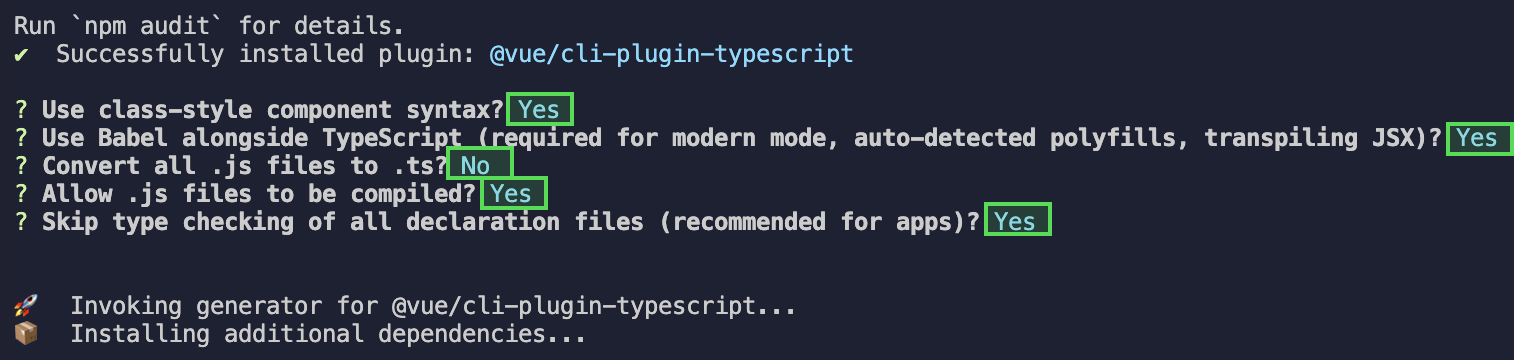
|
|
369
|
+
|
|
370
|
+
**完成以上步骤后,请重新运行项目!**
|
|
371
|
+
|
|
372
|
+
【vite】
|
|
373
|
+
|
|
374
|
+
请在您 vite 创建的工程根目录执行:
|
|
375
|
+
``` bash
|
|
376
|
+
npm install -D typescript
|
|
377
|
+
```
|
|
378
|
+
|
|
379
|
+
##### 编译报错 node_modules/marked/lib/marked.esm.js: Class private methods are not enabled.
|
|
380
|
+
|
|
381
|
+
如果您运行过程中出现如下错误,说明您当前使用的 marked 版本过低,请升级 marked 版本至 6.0.0。
|
|
382
|
+
|
|
383
|
+

|
|
384
|
+
|
|
385
|
+
|
|
386
|
+
请在您项目的根目录使用以下脚本升级 marked 版本:
|
|
387
|
+
``` bash
|
|
388
|
+
npm i marked@6.0.0 --legacy-peer-deps
|
|
389
|
+
```
|
|
390
|
+
|
|
391
|
+
## 交流与反馈
|
|
392
|
+
|
|
393
|
+
[点此进入 IM 社群](https://zhiliao.qq.com/s/c5GY7HIM62CK),享有专业工程师的支持,解决您的难题。
|
package/adapter-vue-web.ts
CHANGED
|
@@ -1,12 +1,8 @@
|
|
|
1
|
-
|
|
2
|
-
import
|
|
3
|
-
import * as VueApi from '@vue/composition-api';
|
|
1
|
+
import * as Vue from 'vue';
|
|
2
|
+
import { TUIGlobal } from '@tencentcloud/universal-api';
|
|
4
3
|
|
|
5
|
-
let VueBasic: any = {
|
|
6
|
-
default: {},
|
|
7
|
-
};
|
|
8
|
-
VueBasic = _Vue ? _Vue : VueBasic;
|
|
9
4
|
let vueVersion: number;
|
|
5
|
+
let framework = 'vue2';
|
|
10
6
|
let createVNode = (
|
|
11
7
|
arg1: any,
|
|
12
8
|
arg2: any,
|
|
@@ -17,57 +13,39 @@ let render = (arg1: any, arg2: any) => {
|
|
|
17
13
|
return;
|
|
18
14
|
};
|
|
19
15
|
|
|
20
|
-
let defineProps = () => {
|
|
21
|
-
return;
|
|
22
|
-
};
|
|
23
|
-
|
|
24
|
-
let defineEmits = () => {
|
|
25
|
-
return;
|
|
26
|
-
};
|
|
27
|
-
|
|
28
|
-
let withDefaults = (arg: any) => {
|
|
29
|
-
return arg;
|
|
30
|
-
};
|
|
31
|
-
|
|
32
16
|
try {
|
|
33
17
|
if (
|
|
34
|
-
(
|
|
35
|
-
&& (
|
|
18
|
+
(Vue as any)?.default?.version
|
|
19
|
+
&& (Vue as any)?.default?.version?.startsWith('2.7.')
|
|
36
20
|
) {
|
|
37
21
|
// >= Vue 2.7.0
|
|
38
22
|
vueVersion = 2.7;
|
|
23
|
+
TUIGlobal.Vue = (Vue as any)?.getCurrentInstance()?.appContext?.app;
|
|
39
24
|
} else if (
|
|
40
|
-
(
|
|
41
|
-
&& (
|
|
25
|
+
(Vue as any)?.default?.version
|
|
26
|
+
&& (Vue as any)?.default?.version?.startsWith('2.')
|
|
42
27
|
) {
|
|
43
28
|
// < Vue 2.7.0
|
|
44
29
|
vueVersion = 2;
|
|
30
|
+
TUIGlobal.Vue = (Vue as any).default;
|
|
45
31
|
} else {
|
|
46
32
|
// >= Vue 3.0.0
|
|
47
33
|
vueVersion = 3;
|
|
48
|
-
|
|
49
|
-
|
|
50
|
-
|
|
51
|
-
|
|
52
|
-
withDefaults = (VueBasic as any)?.withDefaults;
|
|
34
|
+
framework = 'vue3';
|
|
35
|
+
createVNode = (Vue as any)?.createVNode;
|
|
36
|
+
render = (Vue as any)?.render;
|
|
37
|
+
TUIGlobal.Vue = (Vue as any)?.getCurrentInstance()?.appContext?.app;
|
|
53
38
|
// exportedAPIOrigin = Vue;
|
|
54
39
|
}
|
|
55
40
|
} catch (error: any) {
|
|
56
41
|
// >= Vue 3.0.0
|
|
57
42
|
vueVersion = 3;
|
|
58
|
-
|
|
59
|
-
|
|
60
|
-
|
|
61
|
-
|
|
62
|
-
withDefaults = (VueBasic as any)?.withDefaults;
|
|
43
|
+
framework = 'vue3';
|
|
44
|
+
createVNode = (Vue as any)?.createVNode;
|
|
45
|
+
render = (Vue as any)?.render;
|
|
46
|
+
TUIGlobal.Vue = (Vue as any)?.getCurrentInstance()?.appContext?.app;
|
|
63
47
|
}
|
|
64
48
|
console.warn(`[adapter-vue]: vue version is ${vueVersion}`);
|
|
49
|
+
export { vueVersion, framework, render, createVNode };
|
|
65
50
|
|
|
66
|
-
|
|
67
|
-
|
|
68
|
-
if (vueVersion === 2) {
|
|
69
|
-
vue = VueApi;
|
|
70
|
-
}
|
|
71
|
-
|
|
72
|
-
export { vueVersion, render, createVNode, defineProps, defineEmits, withDefaults };
|
|
73
|
-
export { vue };
|
|
51
|
+
export * from 'vue';
|
|
@@ -0,0 +1,27 @@
|
|
|
1
|
+
import {Marked} from 'marked';
|
|
2
|
+
|
|
3
|
+
export const marked = new Marked(
|
|
4
|
+
{mangle: false, headerIds: false},
|
|
5
|
+
{
|
|
6
|
+
renderer: {
|
|
7
|
+
image(this: any, href: string | null, title: string | null, text: string) {
|
|
8
|
+
const safeHref = encodeURIComponent(href || '');
|
|
9
|
+
return `<div
|
|
10
|
+
class="image-container"
|
|
11
|
+
onclick="onMarkdownImageClicked('${safeHref}')"
|
|
12
|
+
style="cursor:pointer;" >
|
|
13
|
+
<img src="${href}" alt="${text}"/>
|
|
14
|
+
</div>
|
|
15
|
+
`;
|
|
16
|
+
},
|
|
17
|
+
link(this: any, href: string | null, title: string | null, text: string) {
|
|
18
|
+
return `<a target="_blank" rel="noreferrer noopenner" class="message-marked_link" href="${href || ''}" title="${title}">${text}</a>`;
|
|
19
|
+
},
|
|
20
|
+
},
|
|
21
|
+
},
|
|
22
|
+
);
|
|
23
|
+
|
|
24
|
+
export const parseMarkdown = (text: string) => {
|
|
25
|
+
let ret = marked.parse(text);
|
|
26
|
+
return typeof ret === 'string' ? ret : '';
|
|
27
|
+
};
|
|
@@ -2,8 +2,8 @@
|
|
|
2
2
|
<div>
|
|
3
3
|
<div>
|
|
4
4
|
<div
|
|
5
|
-
class="
|
|
6
|
-
v-html="
|
|
5
|
+
class="message-marked"
|
|
6
|
+
v-html="parsedContent"
|
|
7
7
|
/>
|
|
8
8
|
<div v-if="image" class="rich-image-previewer" @click="closeImage">
|
|
9
9
|
<img
|
|
@@ -13,18 +13,14 @@
|
|
|
13
13
|
}"
|
|
14
14
|
:src="imageSrc"
|
|
15
15
|
/>
|
|
16
|
-
|
|
17
|
-
</div>
|
|
16
|
+
</div>
|
|
18
17
|
</div>
|
|
19
|
-
|
|
20
18
|
</div>
|
|
21
|
-
|
|
22
|
-
|
|
23
19
|
</template>
|
|
24
20
|
|
|
25
21
|
<script lang="ts">
|
|
26
22
|
import vue from '../../../../../../adapter-vue';
|
|
27
|
-
import {
|
|
23
|
+
import { parseMarkdown } from "./marked";
|
|
28
24
|
import { customerServicePayloadType } from '../../../../../../interface';
|
|
29
25
|
const { computed,ref } = vue;
|
|
30
26
|
interface Props {
|
|
@@ -43,34 +39,13 @@ export default {
|
|
|
43
39
|
const image = ref(false);
|
|
44
40
|
const imageSrc = ref('');
|
|
45
41
|
const imageList = [];
|
|
46
|
-
const
|
|
47
|
-
const rendererMD = new marked.Renderer();
|
|
48
|
-
marked.setOptions({
|
|
49
|
-
renderer: rendererMD,
|
|
50
|
-
gfm: true,
|
|
51
|
-
breaks: true,
|
|
52
|
-
pedantic: false,
|
|
53
|
-
sanitize: false,
|
|
54
|
-
smartLists: true,
|
|
55
|
-
smartypants: false,
|
|
56
|
-
});
|
|
42
|
+
const parsedContent = computed(() => {
|
|
57
43
|
// @ts-ignore
|
|
58
|
-
window.
|
|
44
|
+
window.onMarkdownImageClicked = function(href:string) {
|
|
59
45
|
image.value = !image.value;
|
|
60
|
-
imageSrc.value = href;
|
|
61
|
-
|
|
46
|
+
imageSrc.value = decodeURIComponent(href);
|
|
62
47
|
}
|
|
63
|
-
|
|
64
|
-
|
|
65
|
-
rendererMD.image = (href, title, text) => {
|
|
66
|
-
return `
|
|
67
|
-
<div onclick="handleImageClick(event,'${href}')">
|
|
68
|
-
<img src="${href}" alt="${text}" style="max-width: 100%;">
|
|
69
|
-
</div>
|
|
70
|
-
`
|
|
71
|
-
}
|
|
72
|
-
let richtext = marked.parse(props.payload.content);
|
|
73
|
-
return richtext;
|
|
48
|
+
return parseMarkdown(props.payload.content);
|
|
74
49
|
});
|
|
75
50
|
|
|
76
51
|
const closeImage = () => {
|
|
@@ -78,10 +53,9 @@ export default {
|
|
|
78
53
|
imageSrc.value = '';
|
|
79
54
|
}
|
|
80
55
|
|
|
81
|
-
|
|
82
56
|
return {
|
|
83
57
|
props,
|
|
84
|
-
|
|
58
|
+
parsedContent,
|
|
85
59
|
image,
|
|
86
60
|
imageSrc,
|
|
87
61
|
closeImage,
|
|
@@ -91,29 +65,6 @@ export default {
|
|
|
91
65
|
};
|
|
92
66
|
</script>
|
|
93
67
|
<style lang="scss">
|
|
94
|
-
.rich-text {
|
|
95
|
-
div,
|
|
96
|
-
ul,
|
|
97
|
-
ol,
|
|
98
|
-
dt,
|
|
99
|
-
dd,
|
|
100
|
-
li,
|
|
101
|
-
dl,
|
|
102
|
-
h1,
|
|
103
|
-
h2,
|
|
104
|
-
h3,
|
|
105
|
-
h4,
|
|
106
|
-
p,
|
|
107
|
-
img,
|
|
108
|
-
a {
|
|
109
|
-
max-width: 100%;
|
|
110
|
-
}
|
|
111
|
-
|
|
112
|
-
a {
|
|
113
|
-
color: blue;
|
|
114
|
-
}
|
|
115
|
-
}
|
|
116
|
-
|
|
117
68
|
.rich-image-previewer {
|
|
118
69
|
position: fixed;
|
|
119
70
|
z-index: 101;
|
|
@@ -1,6 +1,7 @@
|
|
|
1
1
|
<template>
|
|
2
2
|
<div class="message-stream">
|
|
3
|
-
|
|
3
|
+
<pre :class="['message-marked']" v-html="displayedContent" />
|
|
4
|
+
<span
|
|
4
5
|
v-if="!isFinished"
|
|
5
6
|
class="blinking-cursor"
|
|
6
7
|
/>
|
|
@@ -10,6 +11,8 @@
|
|
|
10
11
|
<script lang="ts">
|
|
11
12
|
import vue from '../../../../../../adapter-vue';
|
|
12
13
|
import { customerServicePayloadType } from '../../../../../../interface';
|
|
14
|
+
import { parseMarkdown } from './marked'
|
|
15
|
+
|
|
13
16
|
const { ref, watchEffect, onBeforeUnmount, onMounted } = vue;
|
|
14
17
|
|
|
15
18
|
interface Props {
|
|
@@ -27,36 +30,19 @@ export default {
|
|
|
27
30
|
const content = ref<string>('');
|
|
28
31
|
const displayedContent = ref<string>('');
|
|
29
32
|
const isFinished = ref<boolean>(false);
|
|
30
|
-
let intervalId: number | null = null;
|
|
31
33
|
let currentIndex = 0;
|
|
32
34
|
|
|
33
|
-
const updateDisplayedContent = () => {
|
|
34
|
-
if (intervalId) {
|
|
35
|
-
clearInterval(intervalId);
|
|
36
|
-
}
|
|
37
|
-
// @ts-ignore
|
|
38
|
-
intervalId = setInterval(() => {
|
|
39
|
-
if (currentIndex < content.value.length) {
|
|
40
|
-
displayedContent.value += content.value[currentIndex];
|
|
41
|
-
currentIndex++;
|
|
42
|
-
} else {
|
|
43
|
-
clearInterval(intervalId!);
|
|
44
|
-
intervalId = null;
|
|
45
|
-
}
|
|
46
|
-
}, 50);
|
|
47
|
-
};
|
|
48
|
-
|
|
49
35
|
onMounted(() => {
|
|
50
36
|
content.value = props?.payload?.chunks?.join('') ?? '';
|
|
51
|
-
displayedContent.value = content.value;
|
|
52
|
-
currentIndex =
|
|
37
|
+
displayedContent.value = parseMarkdown(content.value);
|
|
38
|
+
currentIndex = displayedContent.value.length;
|
|
53
39
|
});
|
|
54
40
|
|
|
55
41
|
watchEffect(() => {
|
|
56
42
|
const newContent = props?.payload?.chunks?.join('') ?? '';
|
|
57
|
-
|
|
58
|
-
|
|
59
|
-
|
|
43
|
+
const parsedContent = parseMarkdown(newContent);
|
|
44
|
+
if (parsedContent.length > currentIndex) {
|
|
45
|
+
displayedContent.value = parsedContent;
|
|
60
46
|
}
|
|
61
47
|
});
|
|
62
48
|
|
|
@@ -64,12 +50,6 @@ export default {
|
|
|
64
50
|
isFinished.value = props?.payload?.isFinished === 1;
|
|
65
51
|
});
|
|
66
52
|
|
|
67
|
-
onBeforeUnmount(() => {
|
|
68
|
-
if (intervalId) {
|
|
69
|
-
clearInterval(intervalId);
|
|
70
|
-
}
|
|
71
|
-
});
|
|
72
|
-
|
|
73
53
|
return {
|
|
74
54
|
content,
|
|
75
55
|
props,
|
|
@@ -114,3 +114,65 @@
|
|
|
114
114
|
}
|
|
115
115
|
}
|
|
116
116
|
}
|
|
117
|
+
|
|
118
|
+
.message-marked {
|
|
119
|
+
overflow: hidden;
|
|
120
|
+
word-break: break-word;
|
|
121
|
+
white-space: normal;
|
|
122
|
+
display: flex;
|
|
123
|
+
flex-direction: column;
|
|
124
|
+
justify-content: flex-start;
|
|
125
|
+
margin: 0;
|
|
126
|
+
padding: 0;
|
|
127
|
+
|
|
128
|
+
.message-marked_code-container {
|
|
129
|
+
display: flex;
|
|
130
|
+
flex-direction: column;
|
|
131
|
+
justify-content: flex-start;
|
|
132
|
+
border-radius: 9px;
|
|
133
|
+
margin: 0 0 10px;
|
|
134
|
+
padding: 1em;
|
|
135
|
+
overflow: hidden;
|
|
136
|
+
}
|
|
137
|
+
|
|
138
|
+
.message-marked_code-header {
|
|
139
|
+
display: flex;
|
|
140
|
+
justify-content: space-between;
|
|
141
|
+
}
|
|
142
|
+
|
|
143
|
+
.message-marked_code-content {
|
|
144
|
+
overflow: auto;
|
|
145
|
+
}
|
|
146
|
+
|
|
147
|
+
body, div, ul, ol, dt, dd, li, dl, h1, h2, h3, h4, p {
|
|
148
|
+
margin: 0 0 1em;
|
|
149
|
+
}
|
|
150
|
+
|
|
151
|
+
ul,ol,li {
|
|
152
|
+
list-style: disc;
|
|
153
|
+
list-style-type: disc;
|
|
154
|
+
}
|
|
155
|
+
|
|
156
|
+
ul,ol {
|
|
157
|
+
padding-left: 40px;
|
|
158
|
+
display: flex;
|
|
159
|
+
flex-direction: column;
|
|
160
|
+
justify-content: flex-start;
|
|
161
|
+
}
|
|
162
|
+
|
|
163
|
+
li {
|
|
164
|
+
padding: 0 0 5px;
|
|
165
|
+
margin: 0;
|
|
166
|
+
}
|
|
167
|
+
|
|
168
|
+
img {
|
|
169
|
+
overflow: hidden;
|
|
170
|
+
object-fit: contain;
|
|
171
|
+
max-width: 100%;
|
|
172
|
+
}
|
|
173
|
+
|
|
174
|
+
a {
|
|
175
|
+
color: #0052d9;
|
|
176
|
+
cursor: pointer;
|
|
177
|
+
}
|
|
178
|
+
}
|
package/package.json
CHANGED
|
@@ -1,6 +1,6 @@
|
|
|
1
1
|
{
|
|
2
2
|
"name": "@tencentcloud/ai-desk-customer-vue",
|
|
3
|
-
"version": "0.
|
|
3
|
+
"version": "0.2.0",
|
|
4
4
|
"description": "chat uikit ai-desk-customer",
|
|
5
5
|
"main": "index",
|
|
6
6
|
"keywords": [
|
|
@@ -21,10 +21,10 @@
|
|
|
21
21
|
"publish:uniapp": "cd ../tui-customer-service-plugin-uniapp && ls && npm publish --access public"
|
|
22
22
|
},
|
|
23
23
|
"dependencies": {
|
|
24
|
-
"@tencentcloud/chat-uikit-engine": "
|
|
25
|
-
"@tencentcloud/tui-core": "
|
|
24
|
+
"@tencentcloud/chat-uikit-engine": "latest",
|
|
25
|
+
"@tencentcloud/tui-core": "latest",
|
|
26
26
|
"@tencentcloud/tui-emoji-plugin": "latest",
|
|
27
|
-
"@tencentcloud/universal-api": "
|
|
27
|
+
"@tencentcloud/universal-api": "latest",
|
|
28
28
|
"@tiptap/core": "2.0.0-beta.220",
|
|
29
29
|
"@tiptap/extension-document": "2.0.0-beta.220",
|
|
30
30
|
"@tiptap/extension-image": "2.0.0-beta.220",
|
|
@@ -35,10 +35,9 @@
|
|
|
35
35
|
"@tiptap/pm": "2.0.0-beta.220",
|
|
36
36
|
"@tiptap/suggestion": "2.0.0-beta.220",
|
|
37
37
|
"@types/lodash": "^4.14.202",
|
|
38
|
-
"@vue/composition-api": "^1.0.0-rc.1",
|
|
39
38
|
"dayjs": "^1.11.10",
|
|
40
39
|
"lodash": "^4.17.21",
|
|
41
|
-
"marked": "
|
|
40
|
+
"marked": "^6.0.0",
|
|
42
41
|
"mp-html": "^2.5.0",
|
|
43
42
|
"vue-clipboard3": "2.0.0"
|
|
44
43
|
},
|