@tencent-rtc/mcp 1.3.9 → 1.4.1
This diff represents the content of publicly available package versions that have been released to one of the supported registries. The information contained in this diff is provided for informational purposes only and reflects changes between package versions as they appear in their respective public registries.
- package/package.json +2 -2
- package/resource/doc/{tuicallkit/iOS/faq.md → callkit/faq/android-faq.md} +10 -22
- package/resource/doc/{tuicallkit/android/faq.md → callkit/faq/flutter-faq.md} +10 -22
- package/resource/doc/{tuicallkit/flutter/faq.md → callkit/faq/ios-faq.md} +10 -22
- package/resource/doc/callkit/preset/android/api.md +296 -0
- package/resource/doc/{tuicallkit → callkit/preset}/android/integration.md +53 -365
- package/resource/doc/callkit/preset/flutter/api.md +410 -0
- package/resource/doc/{tuicallkit → callkit/preset}/flutter/integration.md +35 -97
- package/resource/doc/callkit/preset/ios/api.md +80 -0
- package/resource/doc/{tuicallkit/iOS → callkit/preset/ios}/integration.md +37 -118
- package/resource/doc/callkit/preset/react/api.md +501 -0
- package/resource/doc/{tuicallkit → callkit/preset}/react/integration.md +5 -20
- package/resource/doc/callkit/preset/vue/api.md +501 -0
- package/resource/doc/{tuicallkit → callkit/preset}/vue/integration.md +4 -19
- package/resource/doc/{chatuikit → chatkit}/android/faq.md +29 -38
- package/resource/doc/{chatuikit → chatkit}/android/features/theme.md +22 -166
- package/resource/doc/{chatuikit → chatkit}/android/integration.md +28 -121
- package/resource/doc/chatkit/faq/android_sdk/client-api.md +281 -0
- package/resource/doc/{chatuikit → chatkit}/faq/common/product.md +0 -1
- package/resource/doc/{chatuikit → chatkit}/faq/common/server.md +1 -1
- package/resource/doc/chatkit/faq/flutter_sdk/client-api.md +199 -0
- package/resource/doc/{chatuikit → chatkit}/faq/flutter_sdk/faq.md +3 -3
- package/resource/doc/chatkit/faq/ios_sdk/client-api.md +235 -0
- package/resource/doc/{chatuikit → chatkit}/faq/web_sdk/faq.md +3 -3
- package/resource/doc/{chatuikit → chatkit}/flutter/features/theme.md +22 -166
- package/resource/doc/{chatuikit → chatkit}/flutter/integration.md +18 -87
- package/resource/doc/{chatuikit/iOS → chatkit/ios}/faq.md +29 -38
- package/resource/doc/{chatuikit/iOS → chatkit/ios}/features/theme.md +27 -176
- package/resource/doc/{chatuikit/iOS → chatkit/ios}/integration.md +47 -165
- package/resource/doc/{chatuikit → chatkit}/react/components/avatar.md +0 -33
- package/resource/doc/{chatuikit → chatkit}/react/components/chat-header.md +8 -49
- package/resource/doc/{chatuikit → chatkit}/react/components/chat-setting.md +6 -35
- package/resource/doc/{chatuikit → chatkit}/react/components/chat.md +0 -6
- package/resource/doc/{chatuikit → chatkit}/react/components/component-list.md +0 -11
- package/resource/doc/{chatuikit → chatkit}/react/components/contact-list.md +96 -502
- package/resource/doc/chatkit/react/components/conversation-actions.md +174 -0
- package/resource/doc/chatkit/react/components/conversation-list.md +333 -0
- package/resource/doc/chatkit/react/components/conversation-preview.md +118 -0
- package/resource/doc/chatkit/react/components/conversation-search.md +60 -0
- package/resource/doc/{chatuikit → chatkit}/react/components/message-input.md +36 -337
- package/resource/doc/{chatuikit → chatkit}/react/components/message-list.md +20 -212
- package/resource/doc/chatkit/react/components/search.md +243 -0
- package/resource/doc/{chatuikit → chatkit}/react/components/tuikit.md +1 -47
- package/resource/doc/{chatuikit → chatkit}/react/integration.md +21 -81
- package/resource/doc/{chatuikit → chatkit}/vue/components/avatar.md +0 -33
- package/resource/doc/{chatuikit → chatkit}/vue/components/chat-header.md +7 -48
- package/resource/doc/{chatuikit → chatkit}/vue/components/chat-setting.md +3 -5
- package/resource/doc/{chatuikit → chatkit}/vue/components/chat.md +0 -5
- package/resource/doc/{chatuikit → chatkit}/vue/components/component-list.md +0 -15
- package/resource/doc/chatkit/vue/components/contact-list.md +271 -0
- package/resource/doc/chatkit/vue/components/conversation-actions.md +228 -0
- package/resource/doc/{chatuikit → chatkit}/vue/components/conversation-list.md +42 -492
- package/resource/doc/chatkit/vue/components/conversation-preview.md +213 -0
- package/resource/doc/chatkit/vue/components/conversation-search.md +50 -0
- package/resource/doc/{chatuikit → chatkit}/vue/components/message-input.md +2 -223
- package/resource/doc/{chatuikit → chatkit}/vue/components/message-list.md +23 -252
- package/resource/doc/{chatuikit → chatkit}/vue/components/search.md +73 -640
- package/resource/doc/{chatuikit → chatkit}/vue/components/tuikit.md +7 -21
- package/resource/doc/{chatuikit → chatkit}/vue/components/userpicker.md +3 -62
- package/resource/doc/{chatuikit → chatkit}/vue/faq.md +1 -1
- package/resource/doc/{chatuikit → chatkit}/vue/integration.md +22 -23
- package/resource/doc/livekit/{live → core-sdk/live}/android/live-audience-list.md +18 -89
- package/resource/doc/livekit/{live → core-sdk/live}/android/live-audio-effect.md +34 -192
- package/resource/doc/livekit/{live → core-sdk/live}/android/live-barrage.md +28 -141
- package/resource/doc/livekit/{live → core-sdk/live}/android/live-base-beauty.md +20 -112
- package/resource/doc/livekit/{live → core-sdk/live}/android/live-co-guest-interaction.md +59 -193
- package/resource/doc/livekit/{live → core-sdk/live}/android/live-gift.md +75 -455
- package/resource/doc/livekit/{live → core-sdk/live}/android/live-host-interaction.md +94 -344
- package/resource/doc/livekit/{live → core-sdk/live}/android/live-integration.md +107 -515
- package/resource/doc/livekit/{live → core-sdk/live}/android/live-live-list.md +33 -173
- package/resource/doc/livekit/{live → core-sdk/live}/flutter/live-audience-list.md +14 -93
- package/resource/doc/livekit/{live → core-sdk/live}/flutter/live-audio-effect.md +34 -179
- package/resource/doc/livekit/{live → core-sdk/live}/flutter/live-barrage.md +19 -107
- package/resource/doc/livekit/{live → core-sdk/live}/flutter/live-base-beauty.md +24 -166
- package/resource/doc/livekit/{live → core-sdk/live}/flutter/live-co-guest-interaction.md +56 -163
- package/resource/doc/livekit/{live → core-sdk/live}/flutter/live-gift.md +69 -443
- package/resource/doc/livekit/{live → core-sdk/live}/flutter/live-host-interaction.md +117 -364
- package/resource/doc/livekit/{live → core-sdk/live}/flutter/live-integration.md +107 -492
- package/resource/doc/livekit/{live → core-sdk/live}/flutter/live-live-list.md +23 -165
- package/resource/doc/livekit/{live → core-sdk/live}/ios/live-audience-list.md +35 -111
- package/resource/doc/livekit/{live → core-sdk/live}/ios/live-audio-effect.md +35 -193
- package/resource/doc/livekit/{live → core-sdk/live}/ios/live-barrage.md +31 -144
- package/resource/doc/livekit/{live → core-sdk/live}/ios/live-base-beauty.md +24 -116
- package/resource/doc/livekit/{live → core-sdk/live}/ios/live-co-guest-interaction.md +37 -171
- package/resource/doc/livekit/{live → core-sdk/live}/ios/live-gift.md +79 -459
- package/resource/doc/livekit/{live → core-sdk/live}/ios/live-host-interaction.md +69 -320
- package/resource/doc/livekit/{live → core-sdk/live}/ios/live-integration.md +85 -502
- package/resource/doc/livekit/{live → core-sdk/live}/ios/live-live-list.md +32 -169
- package/resource/doc/livekit/{voice → core-sdk/voice}/android/voice-audience-list.md +18 -89
- package/resource/doc/livekit/{voice → core-sdk/voice}/android/voice-audio-effect.md +34 -192
- package/resource/doc/livekit/{voice → core-sdk/voice}/android/voice-barrage.md +28 -141
- package/resource/doc/livekit/{voice → core-sdk/voice}/android/voice-co-guest-interaction.md +50 -259
- package/resource/doc/livekit/{voice → core-sdk/voice}/android/voice-gift.md +75 -455
- package/resource/doc/livekit/{voice → core-sdk/voice}/android/voice-host-interaction.md +51 -265
- package/resource/doc/livekit/{voice → core-sdk/voice}/android/voice-integration.md +61 -427
- package/resource/doc/livekit/{voice → core-sdk/voice}/android/voice-room-list.md +33 -173
- package/resource/doc/livekit/{voice → core-sdk/voice}/flutter/voice-co-guest-interaction.md +44 -203
- package/resource/doc/livekit/{voice → core-sdk/voice}/flutter/voice-integration.md +56 -416
- package/resource/doc/livekit/{voice → core-sdk/voice}/ios/voice-audience-list.md +35 -111
- package/resource/doc/livekit/{voice → core-sdk/voice}/ios/voice-audio-effect.md +35 -193
- package/resource/doc/livekit/{voice → core-sdk/voice}/ios/voice-barrage.md +31 -144
- package/resource/doc/livekit/{voice → core-sdk/voice}/ios/voice-co-guest-interaction.md +43 -252
- package/resource/doc/livekit/{voice → core-sdk/voice}/ios/voice-gift.md +79 -459
- package/resource/doc/livekit/{voice → core-sdk/voice}/ios/voice-host-interaction.md +46 -264
- package/resource/doc/livekit/{voice → core-sdk/voice}/ios/voice-integration.md +61 -445
- package/resource/doc/livekit/{voice → core-sdk/voice}/ios/voice-room-list.md +32 -169
- package/resource/doc/livekit/faq/common/{error_code.md → error-code.md} +2 -2
- package/resource/doc/livekit/preset/live/vue/api-reference/index.md +780 -0
- package/resource/doc/livekit/preset/live/vue/components/barrage.md +291 -0
- package/resource/doc/livekit/{live → preset/live}/vue/components/co-guest-panel.md +10 -49
- package/resource/doc/livekit/{live → preset/live}/vue/components/live-audience-list.md +26 -144
- package/resource/doc/livekit/{live → preset/live}/vue/components/live-scene-panel.md +12 -75
- package/resource/doc/livekit/{live → preset/live}/vue/components/live-view.md +36 -227
- package/resource/doc/livekit/preset/live/vue/components/stream-mixer.md +215 -0
- package/resource/doc/livekit/preset/live/vue/faq.md +1 -0
- package/resource/doc/livekit/preset/live/vue/live-list-integration.md +241 -0
- package/resource/doc/livekit/preset/live/vue/live-player-desk-integration.md +299 -0
- package/resource/doc/livekit/preset/live/vue/live-player-h5-integration.md +300 -0
- package/resource/doc/livekit/preset/live/vue/live-pusher-integration.md +743 -0
- package/resource/doc/roomkit/vue/faq.md +1 -0
- package/resource/doc/roomkit/vue/features/call-user-to-room.md +17 -53
- package/resource/doc/roomkit/vue/features/device-detection.md +30 -48
- package/resource/doc/roomkit/vue/features/device-state.md +24 -44
- package/resource/doc/roomkit/vue/features/free-beauty-panel.md +13 -36
- package/resource/doc/roomkit/vue/features/room-chat.md +31 -89
- package/resource/doc/roomkit/vue/features/room-participant-state.md +28 -50
- package/resource/doc/roomkit/vue/features/room-state.md +25 -34
- package/resource/doc/roomkit/vue/features/room-view.md +30 -125
- package/resource/doc/roomkit/vue/features/schedule-room.md +9 -40
- package/resource/doc/roomkit/vue/features/screen-share.md +22 -90
- package/resource/doc/roomkit/vue/features/virtual-background.md +13 -29
- package/resource/doc/roomkit/vue/integration.md +21 -76
- package/resource/doc/rtcengine/faq/common/error_code.md +1 -0
- package/resource/doc/rtcengine/faq/web/web.md +14 -24
- package/resource/doc/rtcengine/web/api.md +1 -3
- package/resource/doc/rtcengine/web/how_to_integrated_web_sdk.md +3 -10
- package/resource/doc/rtcengine/web/how_to_run_web_sdk_demo.md +1 -5
- package/resource/doc/rtcengine/web/plugin/20-advanced-customized-capture-rendering.md +1 -2
- package/resource/doc/rtcengine/web/plugin/21-advanced-auto-play-policy.md +2 -4
- package/resource/doc/rtcengine/web/plugin/23-advanced-support-detection.md +3 -5
- package/resource/doc/rtcengine/web/plugin/24-advanced-network-quality.md +1 -7
- package/resource/doc/rtcengine/web/plugin/25-advanced-device-change.md +0 -2
- package/resource/doc/rtcengine/web/plugin/26-advanced-publish-cdn-stream.md +4 -8
- package/resource/doc/rtcengine/web/plugin/27-advanced-small-stream.md +11 -11
- package/resource/doc/rtcengine/web/plugin/28-advanced-beauty.md +12 -88
- package/resource/doc/rtcengine/web/plugin/31-advanced-plugins-overview.md +5 -5
- package/resource/doc/rtcengine/web/plugin/34-advanced-proxy.md +30 -37
- package/resource/doc/rtcengine/web/plugin/36-advanced-virtual-background.md +13 -90
- package/resource/doc/rtcengine/web/plugin/37-advanced-voice-changer.md +1 -2
- package/resource/doc/rtcengine/web/plugin/39-advanced-video-decoder.md +1 -2
- package/resource/doc/rtcengine/web/plugin/40-advanced-video-mixer.md +19 -19
- package/resource/doc/rtcengine/web/plugin/41-advanced-small-stream-auto-switcher.md +1 -1
- package/resource/doc/rtcengine/web/plugin/42-advanced-realtime-transcriber.md +4 -5
- package/resource/doc/rtcengine/web/plugin/43-advanced-face-detection.md +3 -3
- package/resource/doc/trtc/C++/ITRTCCloud.md +686 -2835
- package/resource/doc/trtc/C++/ITRTCStatistics.md +53 -308
- package/resource/doc/trtc/C++/ITXAudioEffectManager.md +202 -1022
- package/resource/doc/trtc/C++/ITXDeviceManager.md +126 -767
- package/resource/doc/trtc/C++/TRTCCloudCallback.md +579 -2147
- package/resource/doc/trtc/C++/TRTCTypeDef.md +703 -3378
- package/resource/doc/trtc/C++/TXLiteAVCode.md +116 -908
- package/resource/doc/trtc/android/TRTCCloud.md +606 -2573
- package/resource/doc/trtc/android/TRTCCloudDef.md +752 -3640
- package/resource/doc/trtc/android/TRTCCloudListener.md +581 -2008
- package/resource/doc/trtc/android/TRTCStatistics.md +48 -278
- package/resource/doc/trtc/android/TXAudioEffectManager.md +202 -1022
- package/resource/doc/trtc/android/TXBeautyManager.md +127 -704
- package/resource/doc/trtc/android/TXDeviceManager.md +51 -318
- package/resource/doc/trtc/android/TXLiteAVCode.md +114 -892
- package/resource/doc/trtc/iOS/TRTCCloud.md +694 -2904
- package/resource/doc/trtc/iOS/TRTCCloudDef.md +726 -3498
- package/resource/doc/trtc/iOS/TRTCCloudDelegate.md +543 -2028
- package/resource/doc/trtc/iOS/TRTCStatistics.md +48 -278
- package/resource/doc/trtc/iOS/TXAudioEffectManager.md +174 -877
- package/resource/doc/trtc/iOS/TXBeautyManager.md +128 -710
- package/resource/doc/trtc/iOS/TXDeviceManager.md +129 -772
- package/resource/doc/trtc/iOS/TXLiteAVCode.md +117 -915
- package/server.js +1 -5
- package/server.js.map +1 -1
- package/tools/call/get_callkit_api.js +32 -0
- package/tools/call/get_callkit_api.js.map +1 -0
- package/tools/call/get_native_call_uikit_integration.js +34 -0
- package/tools/call/get_native_call_uikit_integration.js.map +1 -0
- package/tools/call/{get-web-call-integration.js → get_web_call_uikit_integration.js} +13 -8
- package/tools/call/get_web_call_uikit_integration.js.map +1 -0
- package/tools/chat/get_native_chat_uikit_feature_detail.js +34 -0
- package/tools/chat/get_native_chat_uikit_feature_detail.js.map +1 -0
- package/tools/chat/get_native_chat_uikit_integration.js +45 -0
- package/tools/chat/get_native_chat_uikit_integration.js.map +1 -0
- package/tools/chat/get_web_chat_uikit_component_detail.js +34 -0
- package/tools/chat/get_web_chat_uikit_component_detail.js.map +1 -0
- package/tools/chat/get_web_chat_uikit_integration.js +45 -0
- package/tools/chat/get_web_chat_uikit_integration.js.map +1 -0
- package/tools/common/get_faq.js +265 -0
- package/tools/common/get_faq.js.map +1 -0
- package/tools/common/{get-usersig.js → get_usersig.js} +6 -3
- package/tools/common/get_usersig.js.map +1 -0
- package/tools/common/present_framework_choice.js +63 -0
- package/tools/common/present_framework_choice.js.map +1 -0
- package/tools/common/record_skill_session.js +58 -0
- package/tools/common/record_skill_session.js.map +1 -0
- package/tools/definitions/get_callkit_api_def.js +29 -0
- package/tools/definitions/get_callkit_api_def.js.map +1 -0
- package/tools/definitions/get_faq_def.js +17 -18
- package/tools/definitions/get_faq_def.js.map +1 -1
- package/tools/definitions/get_native_call_uikit_integration_def.js +15 -34
- package/tools/definitions/get_native_call_uikit_integration_def.js.map +1 -1
- package/tools/definitions/get_native_chat_uikit_feature_detail_def.js +31 -0
- package/tools/definitions/get_native_chat_uikit_feature_detail_def.js.map +1 -0
- package/tools/definitions/get_native_chat_uikit_integration_def.js +16 -41
- package/tools/definitions/get_native_chat_uikit_integration_def.js.map +1 -1
- package/tools/definitions/get_native_livekit_core_features_def.js +34 -0
- package/tools/definitions/get_native_livekit_core_features_def.js.map +1 -0
- package/tools/definitions/get_native_livekit_core_integration_def.js +34 -0
- package/tools/definitions/get_native_livekit_core_integration_def.js.map +1 -0
- package/tools/definitions/get_native_trtc_sdk_docs_def.js +32 -0
- package/tools/definitions/get_native_trtc_sdk_docs_def.js.map +1 -0
- package/tools/definitions/get_usersig_def.js +17 -22
- package/tools/definitions/get_usersig_def.js.map +1 -1
- package/tools/definitions/get_web_call_uikit_integration_def.js +15 -7
- package/tools/definitions/get_web_call_uikit_integration_def.js.map +1 -1
- package/tools/definitions/get_web_chat_uikit_component_detail_def.js +17 -49
- package/tools/definitions/get_web_chat_uikit_component_detail_def.js.map +1 -1
- package/tools/definitions/get_web_chat_uikit_integration_def.js +16 -19
- package/tools/definitions/get_web_chat_uikit_integration_def.js.map +1 -1
- package/tools/definitions/get_web_live_uikit_integration_def.js +15 -18
- package/tools/definitions/get_web_live_uikit_integration_def.js.map +1 -1
- package/tools/definitions/get_web_livekit_api_def.js +30 -0
- package/tools/definitions/get_web_livekit_api_def.js.map +1 -0
- package/tools/definitions/get_web_livekit_component_detail_def.js +32 -0
- package/tools/definitions/get_web_livekit_component_detail_def.js.map +1 -0
- package/tools/definitions/get_web_room_uikit_integration_def.js +15 -46
- package/tools/definitions/get_web_room_uikit_integration_def.js.map +1 -1
- package/tools/definitions/get_web_roomkit_feature_detail_def.js +31 -0
- package/tools/definitions/get_web_roomkit_feature_detail_def.js.map +1 -0
- package/tools/definitions/get_web_trtc_sdk_api_def.js +27 -0
- package/tools/definitions/get_web_trtc_sdk_api_def.js.map +1 -0
- package/tools/definitions/get_web_trtc_sdk_integration_def.js +27 -0
- package/tools/definitions/get_web_trtc_sdk_integration_def.js.map +1 -0
- package/tools/definitions/get_web_trtc_sdk_plugin_def.js +27 -0
- package/tools/definitions/get_web_trtc_sdk_plugin_def.js.map +1 -0
- package/tools/definitions/present_framework_choice_def.js +24 -12
- package/tools/definitions/present_framework_choice_def.js.map +1 -1
- package/tools/definitions/record_skill_session_def.js +31 -0
- package/tools/definitions/record_skill_session_def.js.map +1 -0
- package/tools/index.js +49 -61
- package/tools/index.js.map +1 -1
- package/tools/live/get_native_livekit_core_features.js +65 -0
- package/tools/live/get_native_livekit_core_features.js.map +1 -0
- package/tools/live/get_native_livekit_core_integration.js +59 -0
- package/tools/live/get_native_livekit_core_integration.js.map +1 -0
- package/tools/live/get_web_live_uikit_integration.js +48 -0
- package/tools/live/get_web_live_uikit_integration.js.map +1 -0
- package/tools/live/get_web_livekit_api.js +32 -0
- package/tools/live/get_web_livekit_api.js.map +1 -0
- package/tools/live/get_web_livekit_component_detail.js +34 -0
- package/tools/live/get_web_livekit_component_detail.js.map +1 -0
- package/tools/room/{get-web-room-integration.js → get_web_room_uikit_integration.js} +13 -14
- package/tools/room/get_web_room_uikit_integration.js.map +1 -0
- package/tools/room/{get-web-room-feature-detail.js → get_web_roomkit_feature_detail.js} +30 -31
- package/tools/room/get_web_roomkit_feature_detail.js.map +1 -0
- package/tools/rtcengine/get_web_trtc_sdk_api.js +31 -0
- package/tools/rtcengine/get_web_trtc_sdk_api.js.map +1 -0
- package/tools/rtcengine/get_web_trtc_sdk_integration.js +31 -0
- package/tools/rtcengine/get_web_trtc_sdk_integration.js.map +1 -0
- package/tools/rtcengine/get_web_trtc_sdk_plugin.js +31 -0
- package/tools/rtcengine/get_web_trtc_sdk_plugin.js.map +1 -0
- package/tools/trtc/get_native_trtc_sdk_docs.js +73 -0
- package/tools/trtc/get_native_trtc_sdk_docs.js.map +1 -0
- package/utils/generate-structured-result.js +61 -17
- package/utils/generate-structured-result.js.map +1 -1
- package/utils/report-cls-client.js +21 -1
- package/utils/report-cls-client.js.map +1 -1
- package/utils/report-es-client.js +2 -2
- package/resource/doc/chatuikit/android/workflow.md +0 -713
- package/resource/doc/chatuikit/faq/android_sdk/client-api.md +0 -1371
- package/resource/doc/chatuikit/faq/flutter_sdk/client-api.md +0 -932
- package/resource/doc/chatuikit/faq/ios_sdk/client-api.md +0 -1119
- package/resource/doc/chatuikit/flutter/workflow.md +0 -941
- package/resource/doc/chatuikit/react/components/conversation-list.md +0 -1017
- package/resource/doc/chatuikit/react/components/search.md +0 -745
- package/resource/doc/chatuikit/react/create-group.md +0 -23
- package/resource/doc/chatuikit/react/init.md +0 -26
- package/resource/doc/chatuikit/react/workflow.md +0 -258
- package/resource/doc/chatuikit/vue/components/contact-list.md +0 -679
- package/resource/doc/chatuikit/vue/create-group.md +0 -25
- package/resource/doc/chatuikit/vue/init.md +0 -40
- package/resource/doc/chatuikit/vue/workflow.md +0 -395
- package/resource/doc/livekit/live/android/workflow.md +0 -320
- package/resource/doc/livekit/live/flutter/workflow.md +0 -353
- package/resource/doc/livekit/live/ios/workflow.md +0 -454
- package/resource/doc/livekit/live/vue/components/barrage.md +0 -616
- package/resource/doc/livekit/live/vue/components/stream-mixer.md +0 -446
- package/resource/doc/livekit/live/vue/faq.md +0 -0
- package/resource/doc/livekit/live/vue/live-list-integration.md +0 -200
- package/resource/doc/livekit/live/vue/live-player-desk-integration.md +0 -269
- package/resource/doc/livekit/live/vue/live-player-h5-integration.md +0 -269
- package/resource/doc/livekit/live/vue/live-pusher-integration.md +0 -595
- package/resource/doc/livekit/live/vue/states/live-state.md +0 -3591
- package/resource/doc/livekit/live/vue/workflow.md +0 -218
- package/resource/doc/native_live/android/V2TXLiveCode_api_android.md +0 -312
- package/resource/doc/native_live/android/V2TXLiveDef_api_android.md +0 -430
- package/resource/doc/native_live/android/V2TXLivePlayerObserver_api_android.md +0 -679
- package/resource/doc/native_live/android/V2TXLivePlayer_api_android.md +0 -671
- package/resource/doc/native_live/android/V2TXLivePremier_api_android.md +0 -271
- package/resource/doc/native_live/android/V2TXLivePusherObserver_api_android.md +0 -849
- package/resource/doc/native_live/android/V2TXLivePusher_api_android.md +0 -1046
- package/resource/doc/native_live/flutter/V2TXLiveCode_api_flutter.md +0 -460
- package/resource/doc/native_live/flutter/V2TXLiveDef_api_flutter.md +0 -558
- package/resource/doc/native_live/flutter/V2TXLivePlayerObserver_api_flutter.md +0 -865
- package/resource/doc/native_live/flutter/V2TXLivePlayer_api_flutter.md +0 -657
- package/resource/doc/native_live/flutter/V2TXLivePremier_api_flutter.md +0 -437
- package/resource/doc/native_live/flutter/V2TXLivePusherObserver_api_flutter.md +0 -335
- package/resource/doc/native_live/flutter/V2TXLivePusher_api_flutter.md +0 -748
- package/resource/doc/native_live/iOS/V2TXLiveCode_api_iOS.md +0 -327
- package/resource/doc/native_live/iOS/V2TXLiveDef_api_iOS.md +0 -507
- package/resource/doc/native_live/iOS/V2TXLivePlayerObserver_api_iOS.md +0 -507
- package/resource/doc/native_live/iOS/V2TXLivePlayer_api_iOS.md +0 -659
- package/resource/doc/native_live/iOS/V2TXLivePremier_api_iOS.md +0 -284
- package/resource/doc/native_live/iOS/V2TXLivePusherObserver_api_iOS.md +0 -814
- package/resource/doc/native_live/iOS/V2TXLivePusher_api_iOS.md +0 -1000
- package/resource/doc/roomkit/vue/features/workflow.md +0 -553
- package/resource/doc/roomkit/vue/workflow.md +0 -733
- package/resource/doc/tuicallkit/android/workflow.md +0 -441
- package/resource/doc/tuicallkit/faq/android_sdk/call-observer-api.md +0 -784
- package/resource/doc/tuicallkit/faq/android_sdk/callkit-api.md +0 -610
- package/resource/doc/tuicallkit/faq/flutter_sdk/call-define-api.md +0 -938
- package/resource/doc/tuicallkit/faq/flutter_sdk/call-observer-api.md +0 -897
- package/resource/doc/tuicallkit/faq/flutter_sdk/callkit-api.md +0 -469
- package/resource/doc/tuicallkit/faq/ios_sdk/call-observer-api.md +0 -781
- package/resource/doc/tuicallkit/faq/ios_sdk/callkit-api.md +0 -398
- package/resource/doc/tuicallkit/flutter/workflow.md +0 -331
- package/resource/doc/tuicallkit/react/api.md +0 -1404
- package/resource/doc/tuicallkit/vue/api.md +0 -1406
- package/resource/doc/tuicallkit/vue/faq.md +0 -36
- package/tools/call/get-native-call-integration.js +0 -43
- package/tools/call/get-native-call-integration.js.map +0 -1
- package/tools/call/get-web-call-api.js +0 -27
- package/tools/call/get-web-call-api.js.map +0 -1
- package/tools/call/get-web-call-integration.js.map +0 -1
- package/tools/chat/get-native-chat-feature-detail.js +0 -30
- package/tools/chat/get-native-chat-feature-detail.js.map +0 -1
- package/tools/chat/get-native-chat-integration.js +0 -45
- package/tools/chat/get-native-chat-integration.js.map +0 -1
- package/tools/chat/get-web-chat-component-detail.js +0 -31
- package/tools/chat/get-web-chat-component-detail.js.map +0 -1
- package/tools/chat/get-web-chat-integration.js +0 -45
- package/tools/chat/get-web-chat-integration.js.map +0 -1
- package/tools/chat/get-web-chat-uikit-init.js +0 -28
- package/tools/chat/get-web-chat-uikit-init.js.map +0 -1
- package/tools/chat/get-web-create-group-doc.js +0 -28
- package/tools/chat/get-web-create-group-doc.js.map +0 -1
- package/tools/common/get-faq.js +0 -91
- package/tools/common/get-faq.js.map +0 -1
- package/tools/common/get-usersig.js.map +0 -1
- package/tools/common/present-framework-choice.js +0 -16
- package/tools/common/present-framework-choice.js.map +0 -1
- package/tools/common/present-scenario-choice.js +0 -16
- package/tools/common/present-scenario-choice.js.map +0 -1
- package/tools/common/record-prompt.js +0 -55
- package/tools/common/record-prompt.js.map +0 -1
- package/tools/common/record-result.js +0 -60
- package/tools/common/record-result.js.map +0 -1
- package/tools/definitions/get_native_chat_feature_detail_def.js +0 -32
- package/tools/definitions/get_native_chat_feature_detail_def.js.map +0 -1
- package/tools/definitions/get_native_live_api_def.js +0 -23
- package/tools/definitions/get_native_live_api_def.js.map +0 -1
- package/tools/definitions/get_native_live_uikit_extra_features_def.js +0 -87
- package/tools/definitions/get_native_live_uikit_extra_features_def.js.map +0 -1
- package/tools/definitions/get_native_live_uikit_integration_def.js +0 -75
- package/tools/definitions/get_native_live_uikit_integration_def.js.map +0 -1
- package/tools/definitions/get_native_live_uikit_interaction_def.js +0 -63
- package/tools/definitions/get_native_live_uikit_interaction_def.js.map +0 -1
- package/tools/definitions/get_trtc_native_api_def.js +0 -16
- package/tools/definitions/get_trtc_native_api_def.js.map +0 -1
- package/tools/definitions/get_web_call_uikit_api_def.js +0 -23
- package/tools/definitions/get_web_call_uikit_api_def.js.map +0 -1
- package/tools/definitions/get_web_chat_uikit_init_def.js +0 -23
- package/tools/definitions/get_web_chat_uikit_init_def.js.map +0 -1
- package/tools/definitions/get_web_create_group_doc_def.js +0 -18
- package/tools/definitions/get_web_create_group_doc_def.js.map +0 -1
- package/tools/definitions/get_web_live_state_detail_def.js +0 -19
- package/tools/definitions/get_web_live_state_detail_def.js.map +0 -1
- package/tools/definitions/get_web_live_uikit_component_detail_def.js +0 -27
- package/tools/definitions/get_web_live_uikit_component_detail_def.js.map +0 -1
- package/tools/definitions/get_web_room_feature_detail_def.js +0 -92
- package/tools/definitions/get_web_room_feature_detail_def.js.map +0 -1
- package/tools/definitions/get_web_room_state_detail_def.js +0 -19
- package/tools/definitions/get_web_room_state_detail_def.js.map +0 -1
- package/tools/definitions/present_scenario_choice_def.js +0 -53
- package/tools/definitions/present_scenario_choice_def.js.map +0 -1
- package/tools/definitions/record_prompt_def.js +0 -58
- package/tools/definitions/record_prompt_def.js.map +0 -1
- package/tools/definitions/record_result_def.js +0 -46
- package/tools/definitions/record_result_def.js.map +0 -1
- package/tools/live/get-native-live-uikit-integration.js +0 -177
- package/tools/live/get-native-live-uikit-integration.js.map +0 -1
- package/tools/live/get-web-live-component-detail.js +0 -31
- package/tools/live/get-web-live-component-detail.js.map +0 -1
- package/tools/live/get-web-live-state-detail.js +0 -31
- package/tools/live/get-web-live-state-detail.js.map +0 -1
- package/tools/live/get-web-live-uikit-integration.js +0 -52
- package/tools/live/get-web-live-uikit-integration.js.map +0 -1
- package/tools/live/get_native_live_uikit_extra_features.js +0 -105
- package/tools/live/get_native_live_uikit_extra_features.js.map +0 -1
- package/tools/live/get_native_live_uikit_interaction.js +0 -194
- package/tools/live/get_native_live_uikit_interaction.js.map +0 -1
- package/tools/native_live/get-native-live-api.js +0 -31
- package/tools/native_live/get-native-live-api.js.map +0 -1
- package/tools/room/get-web-room-feature-detail.js.map +0 -1
- package/tools/room/get-web-room-integration.js.map +0 -1
- package/tools/rtcengine/get-rtcengine-web-sdk-integration.js +0 -28
- package/tools/rtcengine/get-rtcengine-web-sdk-integration.js.map +0 -1
- package/tools/rtcengine/get-trtc-sdk-faq.js +0 -32
- package/tools/rtcengine/get-trtc-sdk-faq.js.map +0 -1
- package/tools/rtcengine/get-trtc-web-sdk-api.js +0 -28
- package/tools/rtcengine/get-trtc-web-sdk-api.js.map +0 -1
- package/tools/rtcengine/get-trtc-web-sdk-faq.js +0 -30
- package/tools/rtcengine/get-trtc-web-sdk-faq.js.map +0 -1
- package/tools/rtcengine/get-trtc-web-sdk-integration.js +0 -29
- package/tools/rtcengine/get-trtc-web-sdk-integration.js.map +0 -1
- package/tools/rtcengine/get-trtc-web-sdk-plugin.js +0 -45
- package/tools/rtcengine/get-trtc-web-sdk-plugin.js.map +0 -1
- package/tools/trtc/get-trtc-native-api.js +0 -31
- package/tools/trtc/get-trtc-native-api.js.map +0 -1
- package/utils/handle-component-name.js +0 -33
- package/utils/handle-component-name.js.map +0 -1
- /package/resource/doc/{chatuikit/iOS/workflow.md → callkit/core-sdk/.gitkeep} +0 -0
- /package/resource/doc/{tuicallkit/faq/common/error_code.md → callkit/faq/common/error-code.md} +0 -0
- /package/resource/doc/{tuicallkit/react/faq.md → callkit/faq/web-faq.md} +0 -0
- /package/resource/doc/{chatuikit → chatkit}/faq/common/server_error_code.md +0 -0
- /package/resource/doc/{chatuikit → chatkit}/faq/web_sdk/error_code.md +0 -0
- /package/resource/doc/{chatuikit → chatkit}/flutter/faq.md +0 -0
- /package/resource/doc/{chatuikit → chatkit}/react/faq.md +0 -0
- /package/resource/doc/roomkit/faq/common/{error_code.md → error-code.md} +0 -0
|
@@ -2,547 +2,123 @@
|
|
|
2
2
|
## Overview
|
|
3
3
|
`TRTCCloudDelegate.h` provides the event callback interface for TRTC Real-Time Communication (TRTC SDK) on iOS.
|
|
4
4
|
|
|
5
|
-
|
|
6
5
|
## TRTCCloudDelegate
|
|
7
|
-
|
|
8
|
-
|
|
9
|
-
|
|
10
|
-
|
|
11
|
-
|
|
12
|
-
|
|
13
|
-
|
|
14
|
-
|
|
15
|
-
|
|
16
|
-
|
|
17
|
-
|
|
18
|
-
|
|
19
|
-
|
|
20
|
-
|
|
21
|
-
|
|
22
|
-
|
|
23
|
-
|
|
24
|
-
|
|
25
|
-
|
|
26
|
-
|
|
27
|
-
|
|
28
|
-
|
|
29
|
-
|
|
30
|
-
|
|
31
|
-
|
|
32
|
-
|
|
33
|
-
|
|
34
|
-
|
|
35
|
-
|
|
36
|
-
|
|
37
|
-
|
|
38
|
-
|
|
39
|
-
|
|
40
|
-
|
|
41
|
-
|
|
42
|
-
|
|
43
|
-
|
|
44
|
-
|
|
45
|
-
|
|
46
|
-
|
|
47
|
-
|
|
48
|
-
|
|
49
|
-
|
|
50
|
-
|
|
51
|
-
|
|
52
|
-
|
|
53
|
-
|
|
54
|
-
|
|
55
|
-
|
|
56
|
-
|
|
57
|
-
|
|
58
|
-
|
|
59
|
-
|
|
60
|
-
|
|
61
|
-
|
|
62
|
-
|
|
63
|
-
|
|
64
|
-
|
|
65
|
-
|
|
66
|
-
|
|
67
|
-
|
|
68
|
-
<tr>
|
|
69
|
-
<td rowspan="1" colSpan="1" >[onRemoteUserEnterRoom:](https://write.woa.com/document/87029742770499584)</td>
|
|
70
|
-
|
|
71
|
-
<td rowspan="1" colSpan="1" >A user has joined the current room</td>
|
|
72
|
-
</tr>
|
|
73
|
-
|
|
74
|
-
<tr>
|
|
75
|
-
<td rowspan="1" colSpan="1" >[onRemoteUserLeaveRoom:reason:](https://write.woa.com/document/87029742770499584)</td>
|
|
76
|
-
|
|
77
|
-
<td rowspan="1" colSpan="1" >A user has left the current room</td>
|
|
78
|
-
</tr>
|
|
79
|
-
|
|
80
|
-
<tr>
|
|
81
|
-
<td rowspan="1" colSpan="1" >[onUserVideoAvailable:available:](https://write.woa.com/document/87029742770499584)</td>
|
|
82
|
-
|
|
83
|
-
<td rowspan="1" colSpan="1" >A remote user has started/stopped publishing the main video stream</td>
|
|
84
|
-
</tr>
|
|
85
|
-
|
|
86
|
-
<tr>
|
|
87
|
-
<td rowspan="1" colSpan="1" >[onUserSubStreamAvailable:available:](https://write.woa.com/document/87029742770499584)</td>
|
|
88
|
-
|
|
89
|
-
<td rowspan="1" colSpan="1" >A remote user has started/stopped publishing the auxiliary video stream</td>
|
|
90
|
-
</tr>
|
|
91
|
-
|
|
92
|
-
<tr>
|
|
93
|
-
<td rowspan="1" colSpan="1" >[onUserAudioAvailable:available:](https://write.woa.com/document/87029742770499584)</td>
|
|
94
|
-
|
|
95
|
-
<td rowspan="1" colSpan="1" >A remote user has started/stopped publishing their audio</td>
|
|
96
|
-
</tr>
|
|
97
|
-
|
|
98
|
-
<tr>
|
|
99
|
-
<td rowspan="1" colSpan="1" >[onFirstVideoFrame:streamType:width:height:](https://write.woa.com/document/87029742770499584)</td>
|
|
100
|
-
|
|
101
|
-
<td rowspan="1" colSpan="1" >The SDK has started rendering the first frame of the local or remote user's video</td>
|
|
102
|
-
</tr>
|
|
103
|
-
|
|
104
|
-
<tr>
|
|
105
|
-
<td rowspan="1" colSpan="1" >[onFirstAudioFrame:](https://write.woa.com/document/87029742770499584)</td>
|
|
106
|
-
|
|
107
|
-
<td rowspan="1" colSpan="1" >The SDK has started playing the remote user's first audio frame</td>
|
|
108
|
-
</tr>
|
|
109
|
-
|
|
110
|
-
<tr>
|
|
111
|
-
<td rowspan="1" colSpan="1" >[onSendFirstLocalVideoFrame:](https://write.woa.com/document/87029742770499584)</td>
|
|
112
|
-
|
|
113
|
-
<td rowspan="1" colSpan="1" >The first local video frame has been published</td>
|
|
114
|
-
</tr>
|
|
115
|
-
|
|
116
|
-
<tr>
|
|
117
|
-
<td rowspan="1" colSpan="1" >[onSendFirstLocalAudioFrame](https://write.woa.com/document/87029742770499584)</td>
|
|
118
|
-
|
|
119
|
-
<td rowspan="1" colSpan="1" >The first local audio frame has been published</td>
|
|
120
|
-
</tr>
|
|
121
|
-
|
|
122
|
-
<tr>
|
|
123
|
-
<td rowspan="1" colSpan="1" >[onRemoteVideoStatusUpdated:streamType:streamStatus:reason:extrainfo:](https://write.woa.com/document/87029742770499584)</td>
|
|
124
|
-
|
|
125
|
-
<td rowspan="1" colSpan="1" >Event callback for remote video status changes</td>
|
|
126
|
-
</tr>
|
|
127
|
-
|
|
128
|
-
<tr>
|
|
129
|
-
<td rowspan="1" colSpan="1" >[onRemoteAudioStatusUpdated:streamStatus:reason:extrainfo:](https://write.woa.com/document/87029742770499584)</td>
|
|
130
|
-
|
|
131
|
-
<td rowspan="1" colSpan="1" >Event callback for remote audio status changes</td>
|
|
132
|
-
</tr>
|
|
133
|
-
|
|
134
|
-
<tr>
|
|
135
|
-
<td rowspan="1" colSpan="1" >[onUserVideoSizeChanged:streamType:newWidth:newHeight:](https://write.woa.com/document/87029742770499584)</td>
|
|
136
|
-
|
|
137
|
-
<td rowspan="1" colSpan="1" >Callback for changes in user video size</td>
|
|
138
|
-
</tr>
|
|
139
|
-
|
|
140
|
-
<tr>
|
|
141
|
-
<td rowspan="1" colSpan="1" >[onNetworkQuality:remoteQuality:](https://write.woa.com/document/87029742770499584)</td>
|
|
142
|
-
|
|
143
|
-
<td rowspan="1" colSpan="1" >Real-time statistics callback for network quality</td>
|
|
144
|
-
</tr>
|
|
145
|
-
|
|
146
|
-
<tr>
|
|
147
|
-
<td rowspan="1" colSpan="1" >[onStatistics:](https://write.woa.com/document/87029742770499584)</td>
|
|
148
|
-
|
|
149
|
-
<td rowspan="1" colSpan="1" >Real-time statistics callback for audio and video technical indicators</td>
|
|
150
|
-
</tr>
|
|
151
|
-
|
|
152
|
-
<tr>
|
|
153
|
-
<td rowspan="1" colSpan="1" >[onSpeedTestResult:](https://write.woa.com/document/87029742770499584)</td>
|
|
154
|
-
|
|
155
|
-
<td rowspan="1" colSpan="1" >Callback for internet speed test results</td>
|
|
156
|
-
</tr>
|
|
157
|
-
|
|
158
|
-
<tr>
|
|
159
|
-
<td rowspan="1" colSpan="1" >[onConnectionLost](https://write.woa.com/document/87029742770499584)</td>
|
|
160
|
-
|
|
161
|
-
<td rowspan="1" colSpan="1" >The connection between the SDK and the cloud has been disconnected.</td>
|
|
162
|
-
</tr>
|
|
163
|
-
|
|
164
|
-
<tr>
|
|
165
|
-
<td rowspan="1" colSpan="1" >[onTryToReconnect](https://write.woa.com/document/87029742770499584)</td>
|
|
166
|
-
|
|
167
|
-
<td rowspan="1" colSpan="1" >The SDK is trying to reconnect to the cloud.</td>
|
|
168
|
-
</tr>
|
|
169
|
-
|
|
170
|
-
<tr>
|
|
171
|
-
<td rowspan="1" colSpan="1" >[onConnectionRecovery](https://write.woa.com/document/87029742770499584)</td>
|
|
172
|
-
|
|
173
|
-
<td rowspan="1" colSpan="1" >The connection between the SDK and the cloud has been restored.</td>
|
|
174
|
-
</tr>
|
|
175
|
-
|
|
176
|
-
<tr>
|
|
177
|
-
<td rowspan="1" colSpan="1" >[onCameraDidReady](https://write.woa.com/document/87029742770499584)</td>
|
|
178
|
-
|
|
179
|
-
<td rowspan="1" colSpan="1" >Camera is ready</td>
|
|
180
|
-
</tr>
|
|
181
|
-
|
|
182
|
-
<tr>
|
|
183
|
-
<td rowspan="1" colSpan="1" >[onMicDidReady](https://write.woa.com/document/87029742770499584)</td>
|
|
184
|
-
|
|
185
|
-
<td rowspan="1" colSpan="1" >Microphone is ready</td>
|
|
186
|
-
</tr>
|
|
187
|
-
|
|
188
|
-
<tr>
|
|
189
|
-
<td rowspan="1" colSpan="1" >[onAudioRouteChanged:fromRoute:](https://write.woa.com/document/87029742770499584)</td>
|
|
190
|
-
|
|
191
|
-
<td rowspan="1" colSpan="1" >Current audio routing has changed (applicable only to mobile devices)</td>
|
|
192
|
-
</tr>
|
|
193
|
-
|
|
194
|
-
<tr>
|
|
195
|
-
<td rowspan="1" colSpan="1" >[onUserVoiceVolume:totalVolume:](https://write.woa.com/document/87029742770499584)</td>
|
|
196
|
-
|
|
197
|
-
<td rowspan="1" colSpan="1" >Callback for volume feedback</td>
|
|
198
|
-
</tr>
|
|
199
|
-
|
|
200
|
-
<tr>
|
|
201
|
-
<td rowspan="1" colSpan="1" >[onDevice:type:stateChanged:](https://write.woa.com/document/87029742770499584)</td>
|
|
202
|
-
|
|
203
|
-
<td rowspan="1" colSpan="1" >Local device connection status has changed (applicable only to desktop systems)</td>
|
|
204
|
-
</tr>
|
|
205
|
-
|
|
206
|
-
<tr>
|
|
207
|
-
<td rowspan="1" colSpan="1" >[onAudioDeviceCaptureVolumeChanged:muted:](https://write.woa.com/document/87029742770499584)</td>
|
|
208
|
-
|
|
209
|
-
<td rowspan="1" colSpan="1" >Current system mic capture volume has changed</td>
|
|
210
|
-
</tr>
|
|
211
|
-
|
|
212
|
-
<tr>
|
|
213
|
-
<td rowspan="1" colSpan="1" >[onAudioDevicePlayoutVolumeChanged:muted:](https://write.woa.com/document/87029742770499584)</td>
|
|
214
|
-
|
|
215
|
-
<td rowspan="1" colSpan="1" >Current system playback volume has changed</td>
|
|
216
|
-
</tr>
|
|
217
|
-
|
|
218
|
-
<tr>
|
|
219
|
-
<td rowspan="1" colSpan="1" >[onSystemAudioLoopbackError:](https://write.woa.com/document/87029742770499584)</td>
|
|
220
|
-
|
|
221
|
-
<td rowspan="1" colSpan="1" >Event callback for successfully turning on system sound acquisition (applicable only to desktop systems)</td>
|
|
222
|
-
</tr>
|
|
223
|
-
|
|
224
|
-
<tr>
|
|
225
|
-
<td rowspan="1" colSpan="1" >[onRecvCustomCmdMsgUserId:cmdID:seq:message:](https://write.woa.com/document/87029742770499584)</td>
|
|
226
|
-
|
|
227
|
-
<td rowspan="1" colSpan="1" >Receipt of a custom Definition message</td>
|
|
228
|
-
</tr>
|
|
229
|
-
|
|
230
|
-
<tr>
|
|
231
|
-
<td rowspan="1" colSpan="1" >[onMissCustomCmdMsgUserId:cmdID:errCode:missed:](https://write.woa.com/document/87029742770499584)</td>
|
|
232
|
-
|
|
233
|
-
<td rowspan="1" colSpan="1" >Event callback for lost custom Definition messages</td>
|
|
234
|
-
</tr>
|
|
235
|
-
|
|
236
|
-
<tr>
|
|
237
|
-
<td rowspan="1" colSpan="1" >[onRecvSEIMsg:message:](https://write.woa.com/document/87029742770499584)</td>
|
|
238
|
-
|
|
239
|
-
<td rowspan="1" colSpan="1" >Callback for receiving SEI message</td>
|
|
240
|
-
</tr>
|
|
241
|
-
|
|
242
|
-
<tr>
|
|
243
|
-
<td rowspan="1" colSpan="1" >[onStartPublishing:errMsg:](https://write.woa.com/document/87029742770499584)</td>
|
|
244
|
-
|
|
245
|
-
<td rowspan="1" colSpan="1" >Event callback for starting to publish audio and video streams to Tencent CSS CDN</td>
|
|
246
|
-
</tr>
|
|
247
|
-
|
|
248
|
-
<tr>
|
|
249
|
-
<td rowspan="1" colSpan="1" >[onStopPublishing:errMsg:](https://write.woa.com/document/87029742770499584)</td>
|
|
250
|
-
|
|
251
|
-
<td rowspan="1" colSpan="1" >Event callback for stopping the publishing of audio and video streams to Tencent CSS CDN</td>
|
|
252
|
-
</tr>
|
|
253
|
-
|
|
254
|
-
<tr>
|
|
255
|
-
<td rowspan="1" colSpan="1" >[onStartPublishCDNStream:errMsg:](https://write.woa.com/document/87029742770499584)</td>
|
|
256
|
-
|
|
257
|
-
<td rowspan="1" colSpan="1" >Event callback for starting to publish audio and video streams to a non-Tencent Cloud CDN</td>
|
|
258
|
-
</tr>
|
|
259
|
-
|
|
260
|
-
<tr>
|
|
261
|
-
<td rowspan="1" colSpan="1" >[onStopPublishCDNStream:errMsg:](https://write.woa.com/document/87029742770499584)</td>
|
|
262
|
-
|
|
263
|
-
<td rowspan="1" colSpan="1" >Event callback for stopping the publishing of audio and video streams to a non-Tencent Cloud CDN</td>
|
|
264
|
-
</tr>
|
|
265
|
-
|
|
266
|
-
<tr>
|
|
267
|
-
<td rowspan="1" colSpan="1" >[onSetMixTranscodingConfig:errMsg:](https://write.woa.com/document/87029742770499584)</td>
|
|
268
|
-
|
|
269
|
-
<td rowspan="1" colSpan="1" >Event callback for setting the layout and transcoding parameters of Cloud Mixed Streaming</td>
|
|
270
|
-
</tr>
|
|
271
|
-
|
|
272
|
-
<tr>
|
|
273
|
-
<td rowspan="1" colSpan="1" >[onStartPublishMediaStream:code:message:extraInfo:](https://write.woa.com/document/87029742770499584)</td>
|
|
274
|
-
|
|
275
|
-
<td rowspan="1" colSpan="1" >Event callback for starting to publish the media stream</td>
|
|
276
|
-
</tr>
|
|
277
|
-
|
|
278
|
-
<tr>
|
|
279
|
-
<td rowspan="1" colSpan="1" >[onUpdatePublishMediaStream:code:message:extraInfo:](https://write.woa.com/document/87029742770499584)</td>
|
|
280
|
-
|
|
281
|
-
<td rowspan="1" colSpan="1" >Event callback for updating the media stream</td>
|
|
282
|
-
</tr>
|
|
283
|
-
|
|
284
|
-
<tr>
|
|
285
|
-
<td rowspan="1" colSpan="1" >[onStopPublishMediaStream:code:message:extraInfo:](https://write.woa.com/document/87029742770499584)</td>
|
|
286
|
-
|
|
287
|
-
<td rowspan="1" colSpan="1" >Event callback for stopping the media stream</td>
|
|
288
|
-
</tr>
|
|
289
|
-
|
|
290
|
-
<tr>
|
|
291
|
-
<td rowspan="1" colSpan="1" >[onCdnStreamStateChanged:status:code:msg:extraInfo:](https://write.woa.com/document/87029742770499584)</td>
|
|
292
|
-
|
|
293
|
-
<td rowspan="1" colSpan="1" >RTMP/RTMPS streaming status change callback</td>
|
|
294
|
-
</tr>
|
|
295
|
-
|
|
296
|
-
<tr>
|
|
297
|
-
<td rowspan="1" colSpan="1" >[onScreenCaptureStarted](https://write.woa.com/document/87029742770499584)</td>
|
|
298
|
-
|
|
299
|
-
<td rowspan="1" colSpan="1" >Event callback for starting screen sharing</td>
|
|
300
|
-
</tr>
|
|
301
|
-
|
|
302
|
-
<tr>
|
|
303
|
-
<td rowspan="1" colSpan="1" >[onScreenCapturePaused:](https://write.woa.com/document/87029742770499584)</td>
|
|
304
|
-
|
|
305
|
-
<td rowspan="1" colSpan="1" >Event callback for pausing screen sharing</td>
|
|
306
|
-
</tr>
|
|
307
|
-
|
|
308
|
-
<tr>
|
|
309
|
-
<td rowspan="1" colSpan="1" >[onScreenCaptureResumed:](https://write.woa.com/document/87029742770499584)</td>
|
|
310
|
-
|
|
311
|
-
<td rowspan="1" colSpan="1" >Event callback for resuming screen sharing</td>
|
|
312
|
-
</tr>
|
|
313
|
-
|
|
314
|
-
<tr>
|
|
315
|
-
<td rowspan="1" colSpan="1" >[onScreenCaptureStoped:](https://write.woa.com/document/87029742770499584)</td>
|
|
316
|
-
|
|
317
|
-
<td rowspan="1" colSpan="1" >Event callback for stopping screen sharing</td>
|
|
318
|
-
</tr>
|
|
319
|
-
|
|
320
|
-
<tr>
|
|
321
|
-
<td rowspan="1" colSpan="1" >[onLocalRecordBegin:storagePath:](https://write.woa.com/document/87029742770499584)</td>
|
|
322
|
-
|
|
323
|
-
<td rowspan="1" colSpan="1" >Event callback for the local recording task that has started</td>
|
|
324
|
-
</tr>
|
|
325
|
-
|
|
326
|
-
<tr>
|
|
327
|
-
<td rowspan="1" colSpan="1" >[onLocalRecording:storagePath:](https://write.woa.com/document/87029742770499584)</td>
|
|
328
|
-
|
|
329
|
-
<td rowspan="1" colSpan="1" >Progress event callback for an ongoing local recording task</td>
|
|
330
|
-
</tr>
|
|
331
|
-
|
|
332
|
-
<tr>
|
|
333
|
-
<td rowspan="1" colSpan="1" >[onLocalRecordFragment:](https://write.woa.com/document/87029742770499584)</td>
|
|
334
|
-
|
|
335
|
-
<td rowspan="1" colSpan="1" >Event callback for local recording shard</td>
|
|
336
|
-
</tr>
|
|
337
|
-
|
|
338
|
-
<tr>
|
|
339
|
-
<td rowspan="1" colSpan="1" >[onLocalRecordComplete:storagePath:](https://write.woa.com/document/87029742770499584)</td>
|
|
340
|
-
|
|
341
|
-
<td rowspan="1" colSpan="1" >Event callback for the local recording task that has ended</td>
|
|
342
|
-
</tr>
|
|
343
|
-
|
|
344
|
-
<tr>
|
|
345
|
-
<td rowspan="1" colSpan="1" >[onUserEnter:](https://write.woa.com/document/87029742770499584)</td>
|
|
346
|
-
|
|
347
|
-
<td rowspan="1" colSpan="1" >A host has joined the current room (deprecated)</td>
|
|
348
|
-
</tr>
|
|
349
|
-
|
|
350
|
-
<tr>
|
|
351
|
-
<td rowspan="1" colSpan="1" >[onUserExit:reason:](https://write.woa.com/document/87029742770499584)</td>
|
|
352
|
-
|
|
353
|
-
<td rowspan="1" colSpan="1" >A host has left the current room (deprecated)</td>
|
|
354
|
-
</tr>
|
|
355
|
-
|
|
356
|
-
<tr>
|
|
357
|
-
<td rowspan="1" colSpan="1" >[onAudioEffectFinished:code:](https://write.woa.com/document/87029742770499584)</td>
|
|
358
|
-
|
|
359
|
-
<td rowspan="1" colSpan="1" >Sound effect playback has ended (deprecated)</td>
|
|
360
|
-
</tr>
|
|
361
|
-
</table>
|
|
362
|
-
|
|
6
|
+
| Function List | Description |
|
|
7
|
+
| --- | --- |
|
|
8
|
+
| onError:errMsg:extInfo: | Error event callback |
|
|
9
|
+
| onWarning:warningMsg:extInfo: | Warning event callback |
|
|
10
|
+
| onEnterRoom: | Event callback for room entry success or failure |
|
|
11
|
+
| onExitRoom: | Event callback for leaving the room |
|
|
12
|
+
| onSwitchRole:errMsg: | Event callback for switching roles |
|
|
13
|
+
| onSwitchRoom:errMsg: | Event callback for switching rooms result |
|
|
14
|
+
| onConnectOtherRoom:errCode:errMsg: | Event callback for cross-room communication request result |
|
|
15
|
+
| onDisconnectOtherRoom:errMsg: | Event callback for ending cross-room communication result |
|
|
16
|
+
| onUpdateOtherRoomForwardMode:errMsg: | Event callback for modifying cross-room broadcaster uplink capability result |
|
|
17
|
+
| onRemoteUserEnterRoom: | A user has joined the current room |
|
|
18
|
+
| onRemoteUserLeaveRoom:reason: | A user has left the current room |
|
|
19
|
+
| onUserVideoAvailable:available: | A remote user has started/stopped publishing the main video stream |
|
|
20
|
+
| onUserSubStreamAvailable:available: | A remote user has started/stopped publishing the auxiliary video stream |
|
|
21
|
+
| onUserAudioAvailable:available: | A remote user has started/stopped publishing their audio |
|
|
22
|
+
| onFirstVideoFrame:streamType:width:height: | The SDK has started rendering the first frame of the local or remote user's video |
|
|
23
|
+
| onFirstAudioFrame: | The SDK has started playing the remote user's first audio frame |
|
|
24
|
+
| onSendFirstLocalVideoFrame: | The first local video frame has been published |
|
|
25
|
+
| onSendFirstLocalAudioFrame | The first local audio frame has been published |
|
|
26
|
+
| onRemoteVideoStatusUpdated:streamType:streamStatus:reason:extrainfo: | Event callback for remote video status changes |
|
|
27
|
+
| onRemoteAudioStatusUpdated:streamStatus:reason:extrainfo: | Event callback for remote audio status changes |
|
|
28
|
+
| onUserVideoSizeChanged:streamType:newWidth:newHeight: | Callback for changes in user video size |
|
|
29
|
+
| onNetworkQuality:remoteQuality: | Real-time statistics callback for network quality |
|
|
30
|
+
| onStatistics: | Real-time statistics callback for audio and video technical indicators |
|
|
31
|
+
| onSpeedTestResult: | Callback for internet speed test results |
|
|
32
|
+
| onConnectionLost | The connection between the SDK and the cloud has been disconnected. |
|
|
33
|
+
| onTryToReconnect | The SDK is trying to reconnect to the cloud. |
|
|
34
|
+
| onConnectionRecovery | The connection between the SDK and the cloud has been restored. |
|
|
35
|
+
| onCameraDidReady | Camera is ready |
|
|
36
|
+
| onMicDidReady | Microphone is ready |
|
|
37
|
+
| onAudioRouteChanged:fromRoute: | Current audio routing has changed (applicable only to mobile devices) |
|
|
38
|
+
| onUserVoiceVolume:totalVolume: | Callback for volume feedback |
|
|
39
|
+
| onDevice:type:stateChanged: | Local device connection status has changed (applicable only to desktop systems) |
|
|
40
|
+
| onAudioDeviceCaptureVolumeChanged:muted: | Current system mic capture volume has changed |
|
|
41
|
+
| onAudioDevicePlayoutVolumeChanged:muted: | Current system playback volume has changed |
|
|
42
|
+
| onSystemAudioLoopbackError: | Event callback for successfully turning on system sound acquisition (applicable only to desktop systems) |
|
|
43
|
+
| onRecvCustomCmdMsgUserId:cmdID:seq:message: | Receipt of a custom Definition message |
|
|
44
|
+
| onMissCustomCmdMsgUserId:cmdID:errCode:missed: | Event callback for lost custom Definition messages |
|
|
45
|
+
| onRecvSEIMsg:message: | Callback for receiving SEI message |
|
|
46
|
+
| onStartPublishing:errMsg: | Event callback for starting to publish audio and video streams to Tencent CSS CDN |
|
|
47
|
+
| onStopPublishing:errMsg: | Event callback for stopping the publishing of audio and video streams to Tencent CSS CDN |
|
|
48
|
+
| onStartPublishCDNStream:errMsg: | Event callback for starting to publish audio and video streams to a non-Tencent Cloud CDN |
|
|
49
|
+
| onStopPublishCDNStream:errMsg: | Event callback for stopping the publishing of audio and video streams to a non-Tencent Cloud CDN |
|
|
50
|
+
| onSetMixTranscodingConfig:errMsg: | Event callback for setting the layout and transcoding parameters of Cloud Mixed Streaming |
|
|
51
|
+
| onStartPublishMediaStream:code:message:extraInfo: | Event callback for starting to publish the media stream |
|
|
52
|
+
| onUpdatePublishMediaStream:code:message:extraInfo: | Event callback for updating the media stream |
|
|
53
|
+
| onStopPublishMediaStream:code:message:extraInfo: | Event callback for stopping the media stream |
|
|
54
|
+
| onCdnStreamStateChanged:status:code:msg:extraInfo: | RTMP/RTMPS streaming status change callback |
|
|
55
|
+
| onScreenCaptureStarted | Event callback for starting screen sharing |
|
|
56
|
+
| onScreenCapturePaused: | Event callback for pausing screen sharing |
|
|
57
|
+
| onScreenCaptureResumed: | Event callback for resuming screen sharing |
|
|
58
|
+
| onScreenCaptureStoped: | Event callback for stopping screen sharing |
|
|
59
|
+
| onLocalRecordBegin:storagePath: | Event callback for the local recording task that has started |
|
|
60
|
+
| onLocalRecording:storagePath: | Progress event callback for an ongoing local recording task |
|
|
61
|
+
| onLocalRecordFragment: | Event callback for local recording shard |
|
|
62
|
+
| onLocalRecordComplete:storagePath: | Event callback for the local recording task that has ended |
|
|
63
|
+
| onUserEnter: | A host has joined the current room (deprecated) |
|
|
64
|
+
| onUserExit:reason: | A host has left the current room (deprecated) |
|
|
65
|
+
| onAudioEffectFinished:code: | Sound effect playback has ended (deprecated) |
|
|
363
66
|
|
|
364
67
|
## TRTCVideoRenderDelegate
|
|
365
|
-
|
|
366
|
-
|
|
367
|
-
|
|
368
|
-
|
|
369
|
-
<td rowspan="1" colSpan="1" >Description</td>
|
|
370
|
-
</tr>
|
|
371
|
-
|
|
372
|
-
<tr>
|
|
373
|
-
<td rowspan="1" colSpan="1" >[onRenderVideoFrame:userId:streamType:](https://write.woa.com/document/87029742770499584)</td>
|
|
374
|
-
|
|
375
|
-
<td rowspan="1" colSpan="1" >Self-definition video rendering callback</td>
|
|
376
|
-
</tr>
|
|
377
|
-
</table>
|
|
378
|
-
|
|
68
|
+
| Function List | Description |
|
|
69
|
+
| --- | --- |
|
|
70
|
+
| onRenderVideoFrame:userId:streamType: | Self-definition video rendering callback |
|
|
379
71
|
|
|
380
72
|
## TRTCVideoFrameDelegate
|
|
381
|
-
|
|
382
|
-
|
|
383
|
-
|
|
384
|
-
|
|
385
|
-
|
|
386
|
-
</tr>
|
|
387
|
-
|
|
388
|
-
<tr>
|
|
389
|
-
<td rowspan="1" colSpan="1" >[onGLContextCreated](https://write.woa.com/document/87029742770499584)</td>
|
|
390
|
-
|
|
391
|
-
<td rowspan="1" colSpan="1" >Notification that the SDK's internal OpenGL environment has been created</td>
|
|
392
|
-
</tr>
|
|
393
|
-
|
|
394
|
-
<tr>
|
|
395
|
-
<td rowspan="1" colSpan="1" >[onProcessVideoFrame:dstFrame:](https://write.woa.com/document/87029742770499584)</td>
|
|
396
|
-
|
|
397
|
-
<td rowspan="1" colSpan="1" >Video processing callback for integrating third-party beauty components</td>
|
|
398
|
-
</tr>
|
|
399
|
-
|
|
400
|
-
<tr>
|
|
401
|
-
<td rowspan="1" colSpan="1" >[onGLContextDestory](https://write.woa.com/document/87029742770499584)</td>
|
|
402
|
-
|
|
403
|
-
<td rowspan="1" colSpan="1" >Notification that the SDK's internal OpenGL environment has been destroyed</td>
|
|
404
|
-
</tr>
|
|
405
|
-
</table>
|
|
406
|
-
|
|
73
|
+
| Function List | Description |
|
|
74
|
+
| --- | --- |
|
|
75
|
+
| onGLContextCreated | Notification that the SDK's internal OpenGL environment has been created |
|
|
76
|
+
| onProcessVideoFrame:dstFrame: | Video processing callback for integrating third-party beauty components |
|
|
77
|
+
| onGLContextDestory | Notification that the SDK's internal OpenGL environment has been destroyed |
|
|
407
78
|
|
|
408
79
|
## TRTCAudioFrameDelegate
|
|
409
|
-
|
|
410
|
-
|
|
411
|
-
|
|
412
|
-
|
|
413
|
-
|
|
414
|
-
|
|
415
|
-
|
|
416
|
-
|
|
417
|
-
<td rowspan="1" colSpan="1" >[onCapturedAudioFrame:](https://write.woa.com/document/87029742770499584)</td>
|
|
418
|
-
|
|
419
|
-
<td rowspan="1" colSpan="1" >Local audio data callback after preprocessing by the audio module</td>
|
|
420
|
-
</tr>
|
|
421
|
-
|
|
422
|
-
<tr>
|
|
423
|
-
<td rowspan="1" colSpan="1" >[onLocalProcessedAudioFrame:](https://write.woa.com/document/87029742770499584)</td>
|
|
424
|
-
|
|
425
|
-
<td rowspan="1" colSpan="1" >Local audio data callback after preprocessing, sound-effect processing, and mixing BGM by the audio module</td>
|
|
426
|
-
</tr>
|
|
427
|
-
|
|
428
|
-
<tr>
|
|
429
|
-
<td rowspan="1" colSpan="1" >[onRemoteUserAudioFrame:userId:](https://write.woa.com/document/87029742770499584)</td>
|
|
430
|
-
|
|
431
|
-
<td rowspan="1" colSpan="1" >Audio data of each remote user before mixing</td>
|
|
432
|
-
</tr>
|
|
433
|
-
|
|
434
|
-
<tr>
|
|
435
|
-
<td rowspan="1" colSpan="1" >[onMixedPlayAudioFrame:](https://write.woa.com/document/87029742770499584)</td>
|
|
436
|
-
|
|
437
|
-
<td rowspan="1" colSpan="1" >Callback of mixed audio data before final submission to the system for playback</td>
|
|
438
|
-
</tr>
|
|
439
|
-
|
|
440
|
-
<tr>
|
|
441
|
-
<td rowspan="1" colSpan="1" >[onMixedAllAudioFrame:](https://write.woa.com/document/87029742770499584)</td>
|
|
442
|
-
|
|
443
|
-
<td rowspan="1" colSpan="1" >Audio data mixed by the SDK (including collected and to-be-played audio)</td>
|
|
444
|
-
</tr>
|
|
445
|
-
|
|
446
|
-
<tr>
|
|
447
|
-
<td rowspan="1" colSpan="1" >[onVoiceEarMonitorAudioFrame:](https://write.woa.com/document/87029742770499584)</td>
|
|
448
|
-
|
|
449
|
-
<td rowspan="1" colSpan="1" >Audio data for ear return</td>
|
|
450
|
-
</tr>
|
|
451
|
-
</table>
|
|
452
|
-
|
|
80
|
+
| Function List | Description |
|
|
81
|
+
| --- | --- |
|
|
82
|
+
| onCapturedAudioFrame: | Local audio data callback after preprocessing by the audio module |
|
|
83
|
+
| onLocalProcessedAudioFrame: | Local audio data callback after preprocessing, sound-effect processing, and mixing BGM by the audio module |
|
|
84
|
+
| onRemoteUserAudioFrame:userId: | Audio data of each remote user before mixing |
|
|
85
|
+
| onMixedPlayAudioFrame: | Callback of mixed audio data before final submission to the system for playback |
|
|
86
|
+
| onMixedAllAudioFrame: | Audio data mixed by the SDK (including collected and to-be-played audio) |
|
|
87
|
+
| onVoiceEarMonitorAudioFrame: | Audio data for ear return |
|
|
453
88
|
|
|
454
89
|
## TRTCLogDelegate
|
|
455
|
-
|
|
456
|
-
|
|
457
|
-
|
|
458
|
-
|
|
459
|
-
<td rowspan="1" colSpan="1" >Description</td>
|
|
460
|
-
</tr>
|
|
461
|
-
|
|
462
|
-
<tr>
|
|
463
|
-
<td rowspan="1" colSpan="1" >[onLog:LogLevel:WhichModule:](https://write.woa.com/document/87029742770499584)</td>
|
|
464
|
-
|
|
465
|
-
<td rowspan="1" colSpan="1" >Local LOG printing callback</td>
|
|
466
|
-
</tr>
|
|
467
|
-
</table>
|
|
468
|
-
|
|
90
|
+
| Function List | Description |
|
|
91
|
+
| --- | --- |
|
|
92
|
+
| onLog:LogLevel:WhichModule: | Local LOG printing callback |
|
|
469
93
|
|
|
470
94
|
## onError:errMsg:extInfo:
|
|
471
95
|
|
|
472
|
-
|
|
473
|
-
|
|
474
96
|
#### Error event callback
|
|
475
97
|
|
|
476
98
|
Error events indicate unrecoverable errors thrown by the SDK, such as room entry failure or device startup failure.
|
|
477
99
|
|
|
478
100
|
Reference document: [Error Code Table](https://cloud.tencent.com/document/product/647/38308)
|
|
479
|
-
|
|
480
|
-
|
|
481
|
-
|
|
482
|
-
|
|
483
|
-
|
|
484
|
-
</tr>
|
|
485
|
-
|
|
486
|
-
<tr>
|
|
487
|
-
<td rowspan="1" colSpan="1" >errCode</td>
|
|
488
|
-
|
|
489
|
-
<td rowspan="1" colSpan="1" >Error Code</td>
|
|
490
|
-
</tr>
|
|
491
|
-
|
|
492
|
-
<tr>
|
|
493
|
-
<td rowspan="1" colSpan="1" >errMsg</td>
|
|
494
|
-
|
|
495
|
-
<td rowspan="1" colSpan="1" >Error Message</td>
|
|
496
|
-
</tr>
|
|
497
|
-
|
|
498
|
-
<tr>
|
|
499
|
-
<td rowspan="1" colSpan="1" >extInfo</td>
|
|
500
|
-
|
|
501
|
-
<td rowspan="1" colSpan="1" >Expand Information Field, some error codes may carry additional information to help pinpoint issues</td>
|
|
502
|
-
</tr>
|
|
503
|
-
</table>
|
|
504
|
-
|
|
101
|
+
| Parameters | Description |
|
|
102
|
+
| --- | --- |
|
|
103
|
+
| errCode | Error Code |
|
|
104
|
+
| errMsg | Error Message |
|
|
105
|
+
| extInfo | Expand Information Field, some error codes may carry additional information to help pinpoint issues |
|
|
505
106
|
|
|
506
107
|
## onWarning:warningMsg:extInfo:
|
|
507
108
|
|
|
508
|
-
|
|
509
|
-
|
|
510
109
|
#### Warning event callback
|
|
511
110
|
|
|
512
111
|
Warning events indicate prompt issues thrown by the SDK, such as video stuttering or high CPU utilization.
|
|
513
112
|
|
|
514
113
|
Reference document: [Error Code Table](https://cloud.tencent.com/document/product/647/38308)
|
|
515
|
-
|
|
516
|
-
|
|
517
|
-
|
|
518
|
-
|
|
519
|
-
|
|
520
|
-
</tr>
|
|
521
|
-
|
|
522
|
-
<tr>
|
|
523
|
-
<td rowspan="1" colSpan="1" >extInfo</td>
|
|
524
|
-
|
|
525
|
-
<td rowspan="1" colSpan="1" >Expand Information Field, some warning codes may carry additional information to help pinpoint issues</td>
|
|
526
|
-
</tr>
|
|
527
|
-
|
|
528
|
-
<tr>
|
|
529
|
-
<td rowspan="1" colSpan="1" >warningCode</td>
|
|
530
|
-
|
|
531
|
-
<td rowspan="1" colSpan="1" >Warning Codes</td>
|
|
532
|
-
</tr>
|
|
533
|
-
|
|
534
|
-
<tr>
|
|
535
|
-
<td rowspan="1" colSpan="1" >warningMsg</td>
|
|
536
|
-
|
|
537
|
-
<td rowspan="1" colSpan="1" >Warning Information</td>
|
|
538
|
-
</tr>
|
|
539
|
-
</table>
|
|
540
|
-
|
|
114
|
+
| Parameters | Description |
|
|
115
|
+
| --- | --- |
|
|
116
|
+
| extInfo | Expand Information Field, some warning codes may carry additional information to help pinpoint issues |
|
|
117
|
+
| warningCode | Warning Codes |
|
|
118
|
+
| warningMsg | Warning Information |
|
|
541
119
|
|
|
542
120
|
## onEnterRoom:
|
|
543
121
|
|
|
544
|
-
|
|
545
|
-
|
|
546
122
|
#### Event callback for room entry success or failure
|
|
547
123
|
|
|
548
124
|
After calling the enterRoom() interface in TRTCCloud for the room entry operation, you will receive the onEnterRoom(result) callback from TRTCCloudDelegate:
|
|
@@ -550,121 +126,55 @@ After calling the enterRoom() interface in TRTCCloud for the room entry operatio
|
|
|
550
126
|
|
|
551
127
|
- If the entry fails, the result will be a negative number (result < 0), representing the error code of the failure reason.
|
|
552
128
|
|
|
553
|
-
|
|
554
129
|
For the meaning of error codes of room entry failure, please see [Error Code Table](https://cloud.tencent.com/document/product/647/38308).
|
|
555
|
-
|
|
556
|
-
|
|
557
|
-
<
|
|
558
|
-
|
|
559
|
-
<td rowspan="1" colSpan="1" >Description</td>
|
|
560
|
-
</tr>
|
|
561
|
-
|
|
562
|
-
<tr>
|
|
563
|
-
<td rowspan="1" colSpan="1" >result</td>
|
|
564
|
-
|
|
565
|
-
<td rowspan="1" colSpan="1" >When result > 0, it means the time taken to enter the room (ms). When result < 0, it means the error code for entering the room.</td>
|
|
566
|
-
</tr>
|
|
567
|
-
</table>
|
|
568
|
-
|
|
130
|
+
| Parameters | Description |
|
|
131
|
+
| --- | --- |
|
|
132
|
+
| result | When result > 0, it means the time taken to enter the room (ms). When result < 0, it means the error code for entering the room. |
|
|
569
133
|
|
|
570
134
|
> **Note**
|
|
571
|
-
>
|
|
135
|
+
>
|
|
572
136
|
|
|
573
137
|
> 1. In versions before Ver6.6, only successful room entry would throw the onEnterRoom(result) callback; failure would be thrown by the onError() callback.
|
|
574
|
-
>
|
|
138
|
+
>
|
|
575
139
|
|
|
576
140
|
> 2. In versions after Ver6.6: regardless of success or failure, the onEnterRoom(result) callback will be thrown, and room entry failure will also throw the onError() callback.
|
|
577
|
-
>
|
|
578
|
-
|
|
141
|
+
>
|
|
579
142
|
|
|
580
143
|
## onExitRoom:
|
|
581
144
|
|
|
582
|
-
|
|
583
|
-
|
|
584
145
|
#### Event callback for leaving the room
|
|
585
146
|
|
|
586
147
|
Calling the exitRoom interface in TRTCCloud will execute the related logic of leaving the room, such as releasing audio/video device resources and codec resources.
|
|
587
148
|
|
|
588
149
|
After all resources occupied by the SDK are released, the SDK will trigger the onExitRoom() callback to notify you.
|
|
589
150
|
|
|
590
|
-
|
|
591
|
-
|
|
592
151
|
If you want to call enterRoom again or switch to another audio and video SDK, please wait for the onExitRoom callback before performing related operations. Otherwise, you may encounter various abnormal issues, such as the camera and microphone equipment being forcibly occupied.
|
|
593
|
-
|
|
594
|
-
|
|
595
|
-
|
|
596
|
-
|
|
597
|
-
<td rowspan="1" colSpan="1" >Description</td>
|
|
598
|
-
</tr>
|
|
599
|
-
|
|
600
|
-
<tr>
|
|
601
|
-
<td rowspan="1" colSpan="1" >reason</td>
|
|
602
|
-
|
|
603
|
-
<td rowspan="1" colSpan="1" >Reasons for leaving the room: 0: Actively call exitRoom to leave the room; 1: Kicked out of the current room by the server; 2: The entire current room is dissolved.</td>
|
|
604
|
-
</tr>
|
|
605
|
-
</table>
|
|
606
|
-
|
|
152
|
+
| Parameters | Description |
|
|
153
|
+
| --- | --- |
|
|
154
|
+
| reason | Reasons for leaving the room: 0: Actively call exitRoom to leave the room; 1: Kicked out of the current room by the server; 2: The entire current room is dissolved. |
|
|
607
155
|
|
|
608
156
|
## onSwitchRole:errMsg:
|
|
609
157
|
|
|
610
|
-
|
|
611
|
-
|
|
612
158
|
#### Event callback for switching roles
|
|
613
159
|
|
|
614
160
|
Calling the switchRole() interface in TRTCCloud will switch the roles of anchor and audience. This operation will involve a circuit switching process, and once the SDK completes the switch, it will trigger the onSwitchRole() event callback.
|
|
615
|
-
|
|
616
|
-
|
|
617
|
-
|
|
618
|
-
|
|
619
|
-
<td rowspan="1" colSpan="1" >Description</td>
|
|
620
|
-
</tr>
|
|
621
|
-
|
|
622
|
-
<tr>
|
|
623
|
-
<td rowspan="1" colSpan="1" >errCode</td>
|
|
624
|
-
|
|
625
|
-
<td rowspan="1" colSpan="1" >Error Code, ERR_NULL represents successful switching. For others, please refer to [ Error Code ](https://cloud.tencent.com/document/product/647/32257).</td>
|
|
626
|
-
</tr>
|
|
627
|
-
|
|
628
|
-
<tr>
|
|
629
|
-
<td rowspan="1" colSpan="1" >errMsg</td>
|
|
630
|
-
|
|
631
|
-
<td rowspan="1" colSpan="1" >Error message.</td>
|
|
632
|
-
</tr>
|
|
633
|
-
</table>
|
|
634
|
-
|
|
161
|
+
| Parameters | Description |
|
|
162
|
+
| --- | --- |
|
|
163
|
+
| errCode | Error Code, ERR_NULL represents successful switching. For others, please refer to [ Error Code ](https://cloud.tencent.com/document/product/647/32257). |
|
|
164
|
+
| errMsg | Error message. |
|
|
635
165
|
|
|
636
166
|
## onSwitchRoom:errMsg:
|
|
637
167
|
|
|
638
|
-
|
|
639
|
-
|
|
640
168
|
#### Event callback for switching rooms result
|
|
641
169
|
|
|
642
170
|
Calling the switchRoom() interface in TRTCCloud allows the user to quickly switch from one room to another. After the SDK completes the switch, it will trigger the onSwitchRoom() event callback.
|
|
643
|
-
|
|
644
|
-
|
|
645
|
-
|
|
646
|
-
|
|
647
|
-
<td rowspan="1" colSpan="1" >Description</td>
|
|
648
|
-
</tr>
|
|
649
|
-
|
|
650
|
-
<tr>
|
|
651
|
-
<td rowspan="1" colSpan="1" >errCode</td>
|
|
652
|
-
|
|
653
|
-
<td rowspan="1" colSpan="1" >Error Code, ERR_NULL represents successful switching. For others, please refer to [ Error Code ](https://cloud.tencent.com/document/product/647/32257).</td>
|
|
654
|
-
</tr>
|
|
655
|
-
|
|
656
|
-
<tr>
|
|
657
|
-
<td rowspan="1" colSpan="1" >errMsg</td>
|
|
658
|
-
|
|
659
|
-
<td rowspan="1" colSpan="1" >Error message.</td>
|
|
660
|
-
</tr>
|
|
661
|
-
</table>
|
|
662
|
-
|
|
171
|
+
| Parameters | Description |
|
|
172
|
+
| --- | --- |
|
|
173
|
+
| errCode | Error Code, ERR_NULL represents successful switching. For others, please refer to [ Error Code ](https://cloud.tencent.com/document/product/647/32257). |
|
|
174
|
+
| errMsg | Error message. |
|
|
663
175
|
|
|
664
176
|
## onConnectOtherRoom:errCode:errMsg:
|
|
665
177
|
|
|
666
|
-
|
|
667
|
-
|
|
668
178
|
#### Event callback for cross-room communication request result
|
|
669
179
|
|
|
670
180
|
Calling the connectOtherRoom() interface in TRTCCloud will initiate a video call between broadcasters in two different rooms, which is the so-called “Host PK” feature.
|
|
@@ -672,49 +182,22 @@ Calling the connectOtherRoom() interface in TRTCCloud will initiate a video call
|
|
|
672
182
|
The caller will receive the onConnectOtherRoom() callback to learn whether the cross-room communication is successful
|
|
673
183
|
|
|
674
184
|
If successful, all users in both rooms will receive the onUserVideoAvailable() callback from the PK anchor in the other room.
|
|
675
|
-
|
|
676
|
-
|
|
677
|
-
|
|
678
|
-
|
|
679
|
-
|
|
680
|
-
</tr>
|
|
681
|
-
|
|
682
|
-
<tr>
|
|
683
|
-
<td rowspan="1" colSpan="1" >errCode</td>
|
|
684
|
-
|
|
685
|
-
<td rowspan="1" colSpan="1" >Error Code, ERR_NULL represents successful switching. For others, please refer to [ Error Code ](https://cloud.tencent.com/document/product/647/32257).</td>
|
|
686
|
-
</tr>
|
|
687
|
-
|
|
688
|
-
<tr>
|
|
689
|
-
<td rowspan="1" colSpan="1" >errMsg</td>
|
|
690
|
-
|
|
691
|
-
<td rowspan="1" colSpan="1" >Error message.</td>
|
|
692
|
-
</tr>
|
|
693
|
-
|
|
694
|
-
<tr>
|
|
695
|
-
<td rowspan="1" colSpan="1" >userId</td>
|
|
696
|
-
|
|
697
|
-
<td rowspan="1" colSpan="1" >User ID of the anchor in the other room for cross-room communication.</td>
|
|
698
|
-
</tr>
|
|
699
|
-
</table>
|
|
700
|
-
|
|
185
|
+
| Parameters | Description |
|
|
186
|
+
| --- | --- |
|
|
187
|
+
| errCode | Error Code, ERR_NULL represents successful switching. For others, please refer to [ Error Code ](https://cloud.tencent.com/document/product/647/32257). |
|
|
188
|
+
| errMsg | Error message. |
|
|
189
|
+
| userId | User ID of the anchor in the other room for cross-room communication. |
|
|
701
190
|
|
|
702
191
|
## onDisconnectOtherRoom:errMsg:
|
|
703
192
|
|
|
704
|
-
|
|
705
|
-
|
|
706
193
|
#### Event callback for ending cross-room communication result
|
|
707
194
|
|
|
708
195
|
## onUpdateOtherRoomForwardMode:errMsg:
|
|
709
196
|
|
|
710
|
-
|
|
711
|
-
|
|
712
197
|
#### Event callback for modifying cross-room broadcaster uplink capability result
|
|
713
198
|
|
|
714
199
|
## onRemoteUserEnterRoom:
|
|
715
200
|
|
|
716
|
-
|
|
717
|
-
|
|
718
201
|
#### A user has joined the current room
|
|
719
202
|
|
|
720
203
|
For performance considerations, the behavior of this notification differs in two different TRTC application scenarios (i.e., AppScene, specified by the second parameter when calling enterRoom):
|
|
@@ -722,35 +205,21 @@ For performance considerations, the behavior of this notification differs in two
|
|
|
722
205
|
|
|
723
206
|
- Call scenarios (TRTCAppSceneVideoCall and TRTCAppSceneAudioCall): In this scenario, there is no role distinction among users (they can all be considered anchors). This notification is triggered when any user enters the room.
|
|
724
207
|
|
|
725
|
-
|
|
726
|
-
|
|
727
|
-
|
|
728
|
-
|
|
729
|
-
<td rowspan="1" colSpan="1" >Description</td>
|
|
730
|
-
</tr>
|
|
731
|
-
|
|
732
|
-
<tr>
|
|
733
|
-
<td rowspan="1" colSpan="1" >userId</td>
|
|
734
|
-
|
|
735
|
-
<td rowspan="1" colSpan="1" >User Identifier of the remote user.</td>
|
|
736
|
-
</tr>
|
|
737
|
-
</table>
|
|
738
|
-
|
|
208
|
+
| Parameters | Description |
|
|
209
|
+
| --- | --- |
|
|
210
|
+
| userId | User Identifier of the remote user. |
|
|
739
211
|
|
|
740
212
|
> **Note**
|
|
741
|
-
>
|
|
213
|
+
>
|
|
742
214
|
|
|
743
215
|
> 1. The event callbacks onRemoteUserEnterRoom and onRemoteUserLeaveRoom are only applicable for maintaining the "user list" in the current room. The presence of these callbacks does not necessarily imply video streams.
|
|
744
|
-
>
|
|
216
|
+
>
|
|
745
217
|
|
|
746
218
|
> 2. To display the remote screen, please listen for the onUserVideoAvailable() event callback, which indicates whether a specific user has video footage.
|
|
747
|
-
>
|
|
748
|
-
|
|
219
|
+
>
|
|
749
220
|
|
|
750
221
|
## onRemoteUserLeaveRoom:reason:
|
|
751
222
|
|
|
752
|
-
|
|
753
|
-
|
|
754
223
|
#### A user has left the current room
|
|
755
224
|
|
|
756
225
|
Corresponding to onRemoteUserEnterRoom, the behavior of this notification differs in two different application scenarios (i.e., AppScene, specified by the second parameter when calling enterRoom):
|
|
@@ -758,1438 +227,619 @@ Corresponding to onRemoteUserEnterRoom, the behavior of this notification differ
|
|
|
758
227
|
|
|
759
228
|
- Call scenarios (TRTCAppSceneVideoCall and TRTCAppSceneAudioCall): In this scenario, there is no role distinction among users. This notification is triggered when any user leaves.
|
|
760
229
|
|
|
761
|
-
|
|
762
|
-
|
|
763
|
-
|
|
764
|
-
|
|
765
|
-
<td rowspan="1" colSpan="1" >Description</td>
|
|
766
|
-
</tr>
|
|
767
|
-
|
|
768
|
-
<tr>
|
|
769
|
-
<td rowspan="1" colSpan="1" >reason</td>
|
|
770
|
-
|
|
771
|
-
<td rowspan="1" colSpan="1" >Reason for leaving: 0 indicates the user left the room voluntarily, 1 indicates a timeout exit, 2 indicates the user was kicked out of the room, and 3 indicates the anchor switched to audience mode and left the room.</td>
|
|
772
|
-
</tr>
|
|
773
|
-
|
|
774
|
-
<tr>
|
|
775
|
-
<td rowspan="1" colSpan="1" >userId</td>
|
|
776
|
-
|
|
777
|
-
<td rowspan="1" colSpan="1" >User Identifier of the remote user.</td>
|
|
778
|
-
</tr>
|
|
779
|
-
</table>
|
|
780
|
-
|
|
230
|
+
| Parameters | Description |
|
|
231
|
+
| --- | --- |
|
|
232
|
+
| reason | Reason for leaving: 0 indicates the user left the room voluntarily, 1 indicates a timeout exit, 2 indicates the user was kicked out of the room, and 3 indicates the anchor switched to audience mode and left the room. |
|
|
233
|
+
| userId | User Identifier of the remote user. |
|
|
781
234
|
|
|
782
235
|
## onUserVideoAvailable:available:
|
|
783
236
|
|
|
784
|
-
|
|
785
|
-
|
|
786
237
|
#### A remote user has started/stopped publishing the main video stream
|
|
787
238
|
|
|
788
239
|
**Main Road Picture** is generally used to carry the camera feed. When you receive the onUserVideoAvailable(userId, YES) notification, it means that playable video frames have arrived for this stream.
|
|
789
240
|
|
|
790
|
-
At this point, you need to call the
|
|
791
|
-
|
|
792
|
-
|
|
793
|
-
|
|
794
|
-
When you receive the onUserVideoAvailable(userId, NO) notification, it means that the remote screen has been closed. The reason may be that the user called [muteLocalVideo](https://write.woa.com/document/87029727163494400) or [stopLocalPreview](https://write.woa.com/document/87029727163494400).
|
|
795
|
-
<table>
|
|
796
|
-
<tr>
|
|
797
|
-
<td rowspan="1" colSpan="1" >Parameters</td>
|
|
798
|
-
|
|
799
|
-
<td rowspan="1" colSpan="1" >Description</td>
|
|
800
|
-
</tr>
|
|
801
|
-
|
|
802
|
-
<tr>
|
|
803
|
-
<td rowspan="1" colSpan="1" >available</td>
|
|
804
|
-
|
|
805
|
-
<td rowspan="1" colSpan="1" >Whether the user has published (or unpublished) the main road video feed. YES: Publish; NO: Unpublish.</td>
|
|
806
|
-
</tr>
|
|
807
|
-
|
|
808
|
-
<tr>
|
|
809
|
-
<td rowspan="1" colSpan="1" >userId</td>
|
|
810
|
-
|
|
811
|
-
<td rowspan="1" colSpan="1" >User Identifier of the remote user.</td>
|
|
812
|
-
</tr>
|
|
813
|
-
</table>
|
|
241
|
+
At this point, you need to call the startRemoteView interface to subscribe to the user's remote screen. Upon successful subscription, you will continue to receive the user's first frame rendering callback onFirstVideoFrame(userId).
|
|
814
242
|
|
|
243
|
+
When you receive the onUserVideoAvailable(userId, NO) notification, it means that the remote screen has been closed. The reason may be that the user called muteLocalVideo or stopLocalPreview.
|
|
244
|
+
| Parameters | Description |
|
|
245
|
+
| --- | --- |
|
|
246
|
+
| available | Whether the user has published (or unpublished) the main road video feed. YES: Publish; NO: Unpublish. |
|
|
247
|
+
| userId | User Identifier of the remote user. |
|
|
815
248
|
|
|
816
249
|
## onUserSubStreamAvailable:available:
|
|
817
250
|
|
|
818
|
-
|
|
819
|
-
|
|
820
251
|
#### A remote user has started/stopped publishing the auxiliary video stream
|
|
821
252
|
|
|
822
253
|
"Auxiliary Road Picture" is generally used to carry the screen sharing feed. When you receive the onUserSubStreamAvailable(userId, YES) notification, it means that playable video frames have arrived for this stream.
|
|
823
254
|
|
|
824
|
-
At this point, you need to call the
|
|
825
|
-
|
|
826
|
-
|
|
827
|
-
|
|
828
|
-
|
|
829
|
-
<td rowspan="1" colSpan="1" >Description</td>
|
|
830
|
-
</tr>
|
|
831
|
-
|
|
832
|
-
<tr>
|
|
833
|
-
<td rowspan="1" colSpan="1" >available</td>
|
|
834
|
-
|
|
835
|
-
<td rowspan="1" colSpan="1" >Whether the user has published (or unpublished) the auxiliary road video feed. YES: Publish; NO: Unpublish.</td>
|
|
836
|
-
</tr>
|
|
837
|
-
|
|
838
|
-
<tr>
|
|
839
|
-
<td rowspan="1" colSpan="1" >userId</td>
|
|
840
|
-
|
|
841
|
-
<td rowspan="1" colSpan="1" >User Identifier of the remote user.</td>
|
|
842
|
-
</tr>
|
|
843
|
-
</table>
|
|
844
|
-
|
|
255
|
+
At this point, you need to call the startRemoteView interface to subscribe to the user's remote screen. Upon successful subscription, you will continue to receive the user's first frame rendering callback onFirstVideoFrame(userId).
|
|
256
|
+
| Parameters | Description |
|
|
257
|
+
| --- | --- |
|
|
258
|
+
| available | Whether the user has published (or unpublished) the auxiliary road video feed. YES: Publish; NO: Unpublish. |
|
|
259
|
+
| userId | User Identifier of the remote user. |
|
|
845
260
|
|
|
846
261
|
> **Note**
|
|
847
|
-
>
|
|
848
|
-
|
|
849
|
-
> The function used to display the auxiliary road picture is [startRemoteView](https://write.woa.com/document/87029727163494400), not startRemoteSubStreamView. The latter has been deprecated.
|
|
850
|
-
>
|
|
262
|
+
>
|
|
851
263
|
|
|
264
|
+
> The function used to display the auxiliary road picture is startRemoteView, not startRemoteSubStreamView. The latter has been deprecated.
|
|
265
|
+
>
|
|
852
266
|
|
|
853
267
|
## onUserAudioAvailable:available:
|
|
854
268
|
|
|
855
|
-
|
|
856
|
-
|
|
857
269
|
#### A remote user has started/stopped publishing their audio
|
|
858
270
|
|
|
859
271
|
When you receive the onUserAudioAvailable(userId, YES) notification, it means that the user has published their audio. In this case, the SDK performs as follows:
|
|
860
272
|
- In Automatic Subscription Mode, you do not need to take any action; the SDK will automatically play the user's audio.
|
|
861
273
|
|
|
862
|
-
- In manual subscription mode, you can play the user's audio by calling
|
|
274
|
+
- In manual subscription mode, you can play the user's audio by calling muteRemoteAudio(userid, NO).
|
|
863
275
|
|
|
864
|
-
|
|
865
|
-
|
|
866
|
-
|
|
276
|
+
| Parameters | Description |
|
|
277
|
+
| --- | --- |
|
|
278
|
+
| available | Whether the user has published (or unpublished) their audio, YES: Published; NO: Unpublished. |
|
|
279
|
+
| userId | User Identifier of the remote user. |
|
|
867
280
|
|
|
868
|
-
|
|
869
|
-
|
|
281
|
+
> **Note**
|
|
282
|
+
>
|
|
870
283
|
|
|
871
|
-
|
|
872
|
-
|
|
284
|
+
> The SDK uses automatic subscription mode by default. You can set it to manual subscription by calling setDefaultStreamRecvMode, but this must be done before you enter the room.
|
|
285
|
+
>
|
|
873
286
|
|
|
874
|
-
|
|
875
|
-
</tr>
|
|
287
|
+
## onFirstVideoFrame:streamType:width:height:
|
|
876
288
|
|
|
877
|
-
|
|
878
|
-
<td rowspan="1" colSpan="1" >userId</td>
|
|
289
|
+
#### The SDK has started rendering the first frame of the local or remote user's video
|
|
879
290
|
|
|
880
|
-
|
|
881
|
-
|
|
882
|
-
</table>
|
|
291
|
+
The SDK triggers this event when rendering the first video frame of the local or remote user. You can use the userId parameter in the callback event to determine whether the event is from "Local" or "Remote".
|
|
292
|
+
- If userId is empty, it means the SDK has started rendering your local video footage, but you must have called startLocalPreview or startScreenCapture.
|
|
883
293
|
|
|
294
|
+
- If userId is not empty, it means the SDK has started rendering the remote user's video footage. However, you must have called startRemoteView to subscribe to the user's video footage.
|
|
884
295
|
|
|
885
|
-
|
|
886
|
-
|
|
887
|
-
|
|
888
|
-
|
|
889
|
-
|
|
890
|
-
|
|
891
|
-
|
|
892
|
-
## onFirstVideoFrame:streamType:width:height:
|
|
893
|
-
|
|
894
|
-
|
|
895
|
-
|
|
896
|
-
#### The SDK has started rendering the first frame of the local or remote user's video
|
|
897
|
-
|
|
898
|
-
The SDK triggers this event when rendering the first video frame of the local or remote user. You can use the userId parameter in the callback event to determine whether the event is from "Local" or "Remote".
|
|
899
|
-
- If userId is empty, it means the SDK has started rendering your local video footage, but you must have called [startLocalPreview](https://write.woa.com/document/87029727163494400) or [startScreenCapture](https://write.woa.com/document/87029727163494400).
|
|
900
|
-
|
|
901
|
-
- If userId is not empty, it means the SDK has started rendering the remote user's video footage. However, you must have called [startRemoteView](https://write.woa.com/document/87029727163494400) to subscribe to the user's video footage.
|
|
902
|
-
|
|
903
|
-
<table>
|
|
904
|
-
<tr>
|
|
905
|
-
<td rowspan="1" colSpan="1" >Parameters</td>
|
|
906
|
-
|
|
907
|
-
<td rowspan="1" colSpan="1" >Description</td>
|
|
908
|
-
</tr>
|
|
909
|
-
|
|
910
|
-
<tr>
|
|
911
|
-
<td rowspan="1" colSpan="1" >height</td>
|
|
912
|
-
|
|
913
|
-
<td rowspan="1" colSpan="1" >Height of the video footage.</td>
|
|
914
|
-
</tr>
|
|
915
|
-
|
|
916
|
-
<tr>
|
|
917
|
-
<td rowspan="1" colSpan="1" >streamType</td>
|
|
918
|
-
|
|
919
|
-
<td rowspan="1" colSpan="1" >Video stream type: Main is generally used for carrying camera footage, while Sub is generally used for carrying screen sharing footage.</td>
|
|
920
|
-
</tr>
|
|
921
|
-
|
|
922
|
-
<tr>
|
|
923
|
-
<td rowspan="1" colSpan="1" >userId</td>
|
|
924
|
-
|
|
925
|
-
<td rowspan="1" colSpan="1" >The user identifier of local or remote. If userId is empty, it means your local first video frame has arrived. If userId is not empty, it means the remote user's first video frame has arrived.</td>
|
|
926
|
-
</tr>
|
|
927
|
-
|
|
928
|
-
<tr>
|
|
929
|
-
<td rowspan="1" colSpan="1" >width</td>
|
|
930
|
-
|
|
931
|
-
<td rowspan="1" colSpan="1" >Width of the video footage.</td>
|
|
932
|
-
</tr>
|
|
933
|
-
</table>
|
|
934
|
-
|
|
935
|
-
|
|
936
|
-
> **Note**
|
|
937
|
-
>
|
|
938
|
-
|
|
939
|
-
> 1. The local first video frame event callback is triggered only after you call [startLocalPreview](https://write.woa.com/document/87029727163494400) or [startScreenCapture](https://write.woa.com/document/87029727163494400).
|
|
940
|
-
>
|
|
941
|
-
|
|
942
|
-
> 2. The remote user's first video frame event callback is triggered only after you call [startRemoteView](https://write.woa.com/document/87029727163494400) or startRemoteSubStreamView.
|
|
943
|
-
>
|
|
944
|
-
|
|
945
|
-
|
|
946
|
-
## onFirstAudioFrame:
|
|
947
|
-
|
|
948
|
-
|
|
949
|
-
|
|
950
|
-
#### The SDK has started playing the remote user's first audio frame
|
|
951
|
-
|
|
952
|
-
The SDK will throw this event when playing the remote user's first frame of audio. The first frame event of local audio is not thrown for now.
|
|
953
|
-
<table>
|
|
954
|
-
<tr>
|
|
955
|
-
<td rowspan="1" colSpan="1" >Parameters</td>
|
|
956
|
-
|
|
957
|
-
<td rowspan="1" colSpan="1" >Description</td>
|
|
958
|
-
</tr>
|
|
959
|
-
|
|
960
|
-
<tr>
|
|
961
|
-
<td rowspan="1" colSpan="1" >userId</td>
|
|
962
|
-
|
|
963
|
-
<td rowspan="1" colSpan="1" >User Identifier of the remote user.</td>
|
|
964
|
-
</tr>
|
|
965
|
-
</table>
|
|
966
|
-
|
|
967
|
-
|
|
968
|
-
## onSendFirstLocalVideoFrame:
|
|
969
|
-
|
|
970
|
-
|
|
971
|
-
|
|
972
|
-
#### The first local video frame has been published
|
|
973
|
-
|
|
974
|
-
After successfully joining the room and starting local video capture via [startLocalPreview](https://write.woa.com/document/87029727163494400) or [startScreenCapture](https://write.woa.com/document/87029727163494400) (the order of starting capture and joining the room does not matter), the SDK will start video encoding and publish the local video data to the cloud using its network module. Once the SDK successfully sends the first frame of local video data to the cloud, the onSendFirstLocalVideoFrame event callback will be triggered.
|
|
975
|
-
<table>
|
|
976
|
-
<tr>
|
|
977
|
-
<td rowspan="1" colSpan="1" >Parameters</td>
|
|
978
|
-
|
|
979
|
-
<td rowspan="1" colSpan="1" >Description</td>
|
|
980
|
-
</tr>
|
|
981
|
-
|
|
982
|
-
<tr>
|
|
983
|
-
<td rowspan="1" colSpan="1" >streamType</td>
|
|
984
|
-
|
|
985
|
-
<td rowspan="1" colSpan="1" >Video stream type: Main is generally used for carrying camera footage, while Sub is generally used for carrying screen sharing footage.</td>
|
|
986
|
-
</tr>
|
|
987
|
-
</table>
|
|
988
|
-
|
|
989
|
-
|
|
990
|
-
## onSendFirstLocalAudioFrame
|
|
991
|
-
|
|
992
|
-
|
|
993
|
-
|
|
994
|
-
#### The first local audio frame has been published
|
|
995
|
-
|
|
996
|
-
After successfully joining the room and starting local audio capture via [startLocalAudio](https://write.woa.com/document/87029727163494400) (the order of starting capture and joining the room does not matter), the SDK will start audio encoding and publish the local audio data to the cloud using its network module. Once the SDK successfully sends the first frame of local audio data to the cloud, the onSendFirstLocalAudioFrame event callback will be triggered.
|
|
997
|
-
|
|
998
|
-
## onRemoteVideoStatusUpdated:streamType:streamStatus:reason:extrainfo:
|
|
999
|
-
|
|
1000
|
-
|
|
1001
|
-
|
|
1002
|
-
#### Event callback for remote video status changes
|
|
1003
|
-
|
|
1004
|
-
You can use this event callback to obtain the playback status of each remote video stream (including three states: Playing, Loading, and Stopped) for corresponding UI display.
|
|
1005
|
-
<table>
|
|
1006
|
-
<tr>
|
|
1007
|
-
<td rowspan="1" colSpan="1" >Parameters</td>
|
|
1008
|
-
|
|
1009
|
-
<td rowspan="1" colSpan="1" >Description</td>
|
|
1010
|
-
</tr>
|
|
1011
|
-
|
|
1012
|
-
<tr>
|
|
1013
|
-
<td rowspan="1" colSpan="1" >extrainfo</td>
|
|
1014
|
-
|
|
1015
|
-
<td rowspan="1" colSpan="1" >Additional Information.</td>
|
|
1016
|
-
</tr>
|
|
1017
|
-
|
|
1018
|
-
<tr>
|
|
1019
|
-
<td rowspan="1" colSpan="1" >reason</td>
|
|
1020
|
-
|
|
1021
|
-
<td rowspan="1" colSpan="1" >Reasons for video status changes.</td>
|
|
1022
|
-
</tr>
|
|
1023
|
-
|
|
1024
|
-
<tr>
|
|
1025
|
-
<td rowspan="1" colSpan="1" >status</td>
|
|
1026
|
-
|
|
1027
|
-
<td rowspan="1" colSpan="1" >Video Status: Including Playing, Loading, and Stopped states.</td>
|
|
1028
|
-
</tr>
|
|
1029
|
-
|
|
1030
|
-
<tr>
|
|
1031
|
-
<td rowspan="1" colSpan="1" >streamType</td>
|
|
1032
|
-
|
|
1033
|
-
<td rowspan="1" colSpan="1" >Video stream type: Main is generally used for carrying camera footage, while Sub is generally used for carrying screen sharing footage.</td>
|
|
1034
|
-
</tr>
|
|
1035
|
-
|
|
1036
|
-
<tr>
|
|
1037
|
-
<td rowspan="1" colSpan="1" >userId</td>
|
|
1038
|
-
|
|
1039
|
-
<td rowspan="1" colSpan="1" >User identifier.</td>
|
|
1040
|
-
</tr>
|
|
1041
|
-
</table>
|
|
1042
|
-
|
|
1043
|
-
|
|
1044
|
-
## onRemoteAudioStatusUpdated:streamStatus:reason:extrainfo:
|
|
1045
|
-
|
|
1046
|
-
|
|
1047
|
-
|
|
1048
|
-
#### Event callback for remote audio status changes
|
|
1049
|
-
|
|
1050
|
-
You can use this event callback to obtain the playback status of each remote audio stream (including three states: Playing, Loading, and Stopped) for corresponding UI display.
|
|
1051
|
-
<table>
|
|
1052
|
-
<tr>
|
|
1053
|
-
<td rowspan="1" colSpan="1" >Parameters</td>
|
|
1054
|
-
|
|
1055
|
-
<td rowspan="1" colSpan="1" >Description</td>
|
|
1056
|
-
</tr>
|
|
1057
|
-
|
|
1058
|
-
<tr>
|
|
1059
|
-
<td rowspan="1" colSpan="1" >extrainfo</td>
|
|
1060
|
-
|
|
1061
|
-
<td rowspan="1" colSpan="1" >Additional Information.</td>
|
|
1062
|
-
</tr>
|
|
1063
|
-
|
|
1064
|
-
<tr>
|
|
1065
|
-
<td rowspan="1" colSpan="1" >reason</td>
|
|
1066
|
-
|
|
1067
|
-
<td rowspan="1" colSpan="1" >Reasons for audio status changes.</td>
|
|
1068
|
-
</tr>
|
|
1069
|
-
|
|
1070
|
-
<tr>
|
|
1071
|
-
<td rowspan="1" colSpan="1" >status</td>
|
|
1072
|
-
|
|
1073
|
-
<td rowspan="1" colSpan="1" >Audio Status: Including Playing, Loading, and Stopped states.</td>
|
|
1074
|
-
</tr>
|
|
1075
|
-
|
|
1076
|
-
<tr>
|
|
1077
|
-
<td rowspan="1" colSpan="1" >userId</td>
|
|
1078
|
-
|
|
1079
|
-
<td rowspan="1" colSpan="1" >User identifier.</td>
|
|
1080
|
-
</tr>
|
|
1081
|
-
</table>
|
|
1082
|
-
|
|
1083
|
-
|
|
1084
|
-
## onUserVideoSizeChanged:streamType:newWidth:newHeight:
|
|
1085
|
-
|
|
1086
|
-
|
|
1087
|
-
|
|
1088
|
-
#### Callback for changes in user video size
|
|
1089
|
-
|
|
1090
|
-
When you receive the onUserVideoSizeChanged(userId, streamtype, newWidth, newHeight) notification, it indicates that the video size has changed, possibly because the user has called setVideoEncoderParam or setSubStreamEncoderParam to reset the video dimensions.
|
|
1091
|
-
<table>
|
|
1092
|
-
<tr>
|
|
1093
|
-
<td rowspan="1" colSpan="1" >Parameters</td>
|
|
1094
|
-
|
|
1095
|
-
<td rowspan="1" colSpan="1" >Description</td>
|
|
1096
|
-
</tr>
|
|
1097
|
-
|
|
1098
|
-
<tr>
|
|
1099
|
-
<td rowspan="1" colSpan="1" >newHeight</td>
|
|
1100
|
-
|
|
1101
|
-
<td rowspan="1" colSpan="1" >The height of the video stream (in pixels).</td>
|
|
1102
|
-
</tr>
|
|
1103
|
-
|
|
1104
|
-
<tr>
|
|
1105
|
-
<td rowspan="1" colSpan="1" >newWidth</td>
|
|
1106
|
-
|
|
1107
|
-
<td rowspan="1" colSpan="1" >The width of the video stream (in pixels).</td>
|
|
1108
|
-
</tr>
|
|
1109
|
-
|
|
1110
|
-
<tr>
|
|
1111
|
-
<td rowspan="1" colSpan="1" >streamType</td>
|
|
1112
|
-
|
|
1113
|
-
<td rowspan="1" colSpan="1" >Video stream type: Main is generally used for carrying camera footage, while Sub is generally used for carrying screen sharing footage.</td>
|
|
1114
|
-
</tr>
|
|
1115
|
-
|
|
1116
|
-
<tr>
|
|
1117
|
-
<td rowspan="1" colSpan="1" >userId</td>
|
|
1118
|
-
|
|
1119
|
-
<td rowspan="1" colSpan="1" >User identifier.</td>
|
|
1120
|
-
</tr>
|
|
1121
|
-
</table>
|
|
1122
|
-
|
|
1123
|
-
|
|
1124
|
-
## onNetworkQuality:remoteQuality:
|
|
1125
|
-
|
|
1126
|
-
|
|
1127
|
-
|
|
1128
|
-
#### Real-time statistics callback for network quality
|
|
1129
|
-
|
|
1130
|
-
This statistical callback is thrown every 2 seconds to notify the SDK of the perceived current network's uplink and downlink quality.
|
|
1131
|
-
|
|
1132
|
-
The SDK uses a set of proprietary algorithms to assess the current network's latency, bandwidth, and stability, and calculates an evaluation result: An evaluation result of 1 (Excellent) indicates that the current network condition is very good, while a result of 6 (Down) indicates that the current network cannot support normal calls on TRTC.
|
|
1133
|
-
<table>
|
|
1134
|
-
<tr>
|
|
1135
|
-
<td rowspan="1" colSpan="1" >Parameters</td>
|
|
1136
|
-
|
|
1137
|
-
<td rowspan="1" colSpan="1" >Description</td>
|
|
1138
|
-
</tr>
|
|
1139
|
-
|
|
1140
|
-
<tr>
|
|
1141
|
-
<td rowspan="1" colSpan="1" >localQuality</td>
|
|
1142
|
-
|
|
1143
|
-
<td rowspan="1" colSpan="1" >Uplink network quality.</td>
|
|
1144
|
-
</tr>
|
|
1145
|
-
|
|
1146
|
-
<tr>
|
|
1147
|
-
<td rowspan="1" colSpan="1" >remoteQuality</td>
|
|
1148
|
-
|
|
1149
|
-
<td rowspan="1" colSpan="1" >Downlink network quality, represents the data quality finally gathered at the client-end after the data stream travels through a complete transmission link from "remote-end -> cloud -> client-end". Thus, the downlink network quality represents the result influenced by both the remote uplink and the client downlink.</td>
|
|
1150
|
-
</tr>
|
|
1151
|
-
</table>
|
|
1152
|
-
|
|
1153
|
-
|
|
1154
|
-
> **Note**
|
|
1155
|
-
>
|
|
1156
|
-
|
|
1157
|
-
> It is temporarily impossible to assess the remote user's uplink quality through this interface alone.
|
|
1158
|
-
>
|
|
1159
|
-
|
|
1160
|
-
|
|
1161
|
-
## onStatistics:
|
|
1162
|
-
|
|
1163
|
-
|
|
1164
|
-
|
|
1165
|
-
#### Real-time statistics callback for audio and video technical indicators
|
|
1166
|
-
|
|
1167
|
-
This statistical callback is thrown every 2 seconds, notifying the SDK internal audio, video, and network-related technical indicators. This information is listed in [TRTCStatistics](https://write.woa.com/document/87029770633089024):
|
|
1168
|
-
- Video statistical information: Video resolution, frame rate (FPS), and bitrate information.
|
|
1169
|
-
|
|
1170
|
-
- Audio statistical information: Audio sample rate, channel, and bitrate information.
|
|
1171
|
-
|
|
1172
|
-
- Network Statistics: Network Latency (RTT), Packet Loss Rate (loss), Upstream Traffic (sentBytes), Downstream Traffic (receivedBytes), and other information from a round-trip (SDK > Cloud > SDK).
|
|
1173
|
-
|
|
1174
|
-
<table>
|
|
1175
|
-
<tr>
|
|
1176
|
-
<td rowspan="1" colSpan="1" >Parameters</td>
|
|
1177
|
-
|
|
1178
|
-
<td rowspan="1" colSpan="1" >Description</td>
|
|
1179
|
-
</tr>
|
|
1180
|
-
|
|
1181
|
-
<tr>
|
|
1182
|
-
<td rowspan="1" colSpan="1" >statistics</td>
|
|
1183
|
-
|
|
1184
|
-
<td rowspan="1" colSpan="1" >Statistics including local and remote user statistics, for details refer to [TRTCStatistics](https://write.woa.com/document/87029770633089024).</td>
|
|
1185
|
-
</tr>
|
|
1186
|
-
</table>
|
|
1187
|
-
|
|
1188
|
-
|
|
1189
|
-
> **Note**
|
|
1190
|
-
>
|
|
1191
|
-
|
|
1192
|
-
> If you just need to know the current network quality and do not want to spend too much time studying this statistical callback, it is recommended to use [onNetworkQuality](https://write.woa.com/document/87029742770499584) to solve the problem.
|
|
1193
|
-
>
|
|
1194
|
-
|
|
1195
|
-
|
|
1196
|
-
## onSpeedTestResult:
|
|
1197
|
-
|
|
1198
|
-
|
|
1199
|
-
|
|
1200
|
-
#### Callback for internet speed test results
|
|
1201
|
-
|
|
1202
|
-
This statistical callback is triggered by [startSpeedTest:](https://write.woa.com/document/87029727163494400).
|
|
1203
|
-
<table>
|
|
1204
|
-
<tr>
|
|
1205
|
-
<td rowspan="1" colSpan="1" >Parameters</td>
|
|
1206
|
-
|
|
1207
|
-
<td rowspan="1" colSpan="1" >Description</td>
|
|
1208
|
-
</tr>
|
|
1209
|
-
|
|
1210
|
-
<tr>
|
|
1211
|
-
<td rowspan="1" colSpan="1" >result</td>
|
|
1212
|
-
|
|
1213
|
-
<td rowspan="1" colSpan="1" >Internet Speed Test results, including packet loss, round-trip delay, upstream and downstream bandwidth rates; for details, refer to [TRTCSpeedTestResult](https://write.woa.com/document/87029873782558720).</td>
|
|
1214
|
-
</tr>
|
|
1215
|
-
</table>
|
|
1216
|
-
|
|
1217
|
-
|
|
1218
|
-
## onConnectionLost
|
|
1219
|
-
|
|
1220
|
-
|
|
1221
|
-
|
|
1222
|
-
#### The connection between the SDK and the cloud has been disconnected.
|
|
1223
|
-
|
|
1224
|
-
The SDK will throw this event callback when the connection to the cloud is disconnected. The main reasons for disconnection are network unavailability or network switching, such as when the user enters an elevator during a call.
|
|
1225
|
-
|
|
1226
|
-
After throwing this event, the SDK will attempt to re-establish the connection with the cloud. During the reconnection process, it will throw [onTryToReconnect](https://write.woa.com/document/87029742770499584), and once the connection is restored, it will throw [onConnectionRecovery](https://write.woa.com/document/87029742770499584).
|
|
1227
|
-
|
|
1228
|
-
Thus, the SDK will switch among the following three connection-related events in the following manner:
|
|
1229
|
-
|
|
1230
|
-
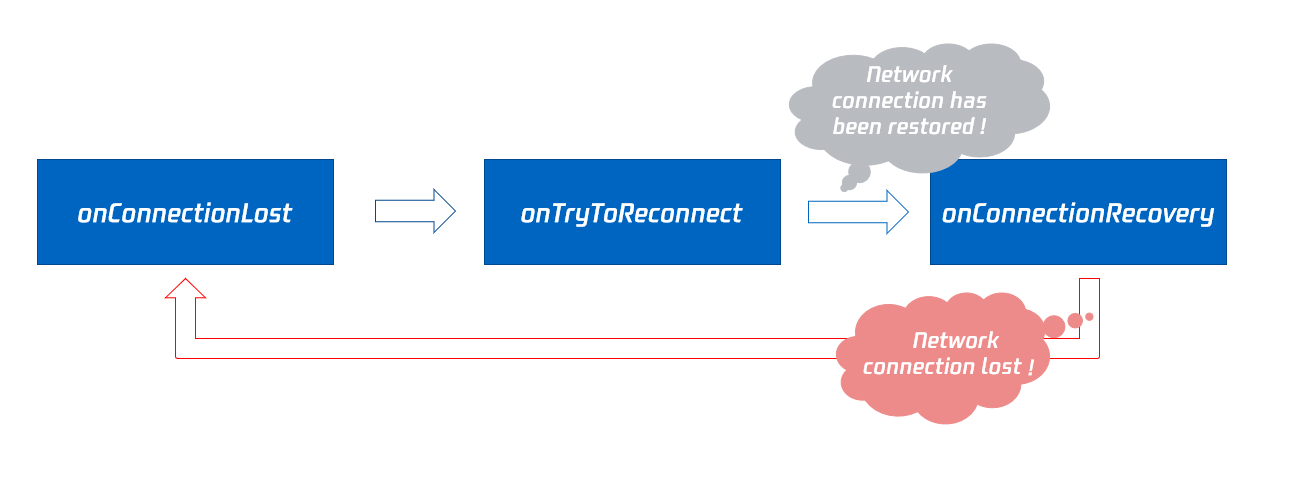
|
|
1231
|
-
|
|
1232
|
-
## onTryToReconnect
|
|
1233
|
-
|
|
1234
|
-
|
|
1235
|
-
|
|
1236
|
-
#### The SDK is trying to reconnect to the cloud.
|
|
1237
|
-
|
|
1238
|
-
The SDK will throw [onConnectionLost](https://write.woa.com/document/87029742770499584) when the connection to the cloud is disconnected, then it will attempt to re-establish the connection with the cloud and throw this event. Once the connection is restored, it will throw [onConnectionRecovery](https://write.woa.com/document/87029742770499584).
|
|
1239
|
-
|
|
1240
|
-
## onConnectionRecovery
|
|
1241
|
-
|
|
1242
|
-
|
|
1243
|
-
|
|
1244
|
-
#### The connection between the SDK and the cloud has been restored.
|
|
1245
|
-
|
|
1246
|
-
The SDK will throw [onConnectionLost](https://write.woa.com/document/87029742770499584) when the connection to the cloud is disconnected. It will then attempt to re-establish the connection and throw [onTryToReconnect](https://write.woa.com/document/87029742770499584). Once the connection is restored, this event callback will be triggered.
|
|
1247
|
-
|
|
1248
|
-
## onCameraDidReady
|
|
1249
|
-
|
|
1250
|
-
|
|
1251
|
-
|
|
1252
|
-
#### Camera is ready
|
|
1253
|
-
|
|
1254
|
-
When you call startLocalPreivew, the SDK will attempt to enable the camera. If successful, this event will be thrown.
|
|
1255
|
-
|
|
1256
|
-
If enabling the camera fails, it is most likely because the current application does not have access permissions to the camera or the camera is currently being used exclusively by another application.
|
|
1257
|
-
|
|
1258
|
-
You can capture the [onError](https://write.woa.com/document/87029742770499584) event callback to understand these exceptional conditions and prompt users through the UI interface.
|
|
1259
|
-
|
|
1260
|
-
## onMicDidReady
|
|
1261
|
-
|
|
1262
|
-
|
|
1263
|
-
|
|
1264
|
-
#### Microphone is ready
|
|
1265
|
-
|
|
1266
|
-
When you call [startLocalAudio](https://write.woa.com/document/87029727163494400), the SDK will attempt to enable the microphone. If successful, this event will be thrown.
|
|
1267
|
-
|
|
1268
|
-
If enabling the microphone fails, it is most likely because the current application does not have access permissions to the microphone or the microphone is currently being used exclusively by another application.
|
|
1269
|
-
|
|
1270
|
-
You can capture the [onError](https://write.woa.com/document/87029742770499584) event callback to understand these exceptional conditions and prompt users through the UI interface.
|
|
1271
|
-
|
|
1272
|
-
## onAudioRouteChanged:fromRoute:
|
|
1273
|
-
|
|
1274
|
-
|
|
1275
|
-
|
|
1276
|
-
#### Current audio routing has changed (applicable only to mobile devices)
|
|
1277
|
-
|
|
1278
|
-
The term "Audio Routing" refers to whether the sound is played through the phone's speaker or receiver. A change in audio routing means a change in the playback location of the sound.
|
|
1279
|
-
- When the audio routing is set to receiver, the sound is quieter, and you need to bring the phone close to your ear to hear clearly. This offers better privacy and is suitable for phone calls.
|
|
1280
|
-
|
|
1281
|
-
- When the audio routing is set to speaker, the sound is louder, allowing for clear listening without holding the phone to your face, thus enabling the "hands-free" feature.
|
|
1282
|
-
|
|
1283
|
-
- When the audio routing is set to wired headphones.
|
|
1284
|
-
|
|
1285
|
-
- When the audio routing is set to Bluetooth headphones.
|
|
1286
|
-
|
|
1287
|
-
- When the audio routing is set to USB professional sound card device.
|
|
1288
|
-
|
|
1289
|
-
<table>
|
|
1290
|
-
<tr>
|
|
1291
|
-
<td rowspan="1" colSpan="1" >Parameters</td>
|
|
1292
|
-
|
|
1293
|
-
<td rowspan="1" colSpan="1" >Description</td>
|
|
1294
|
-
</tr>
|
|
1295
|
-
|
|
1296
|
-
<tr>
|
|
1297
|
-
<td rowspan="1" colSpan="1" >fromRoute</td>
|
|
1298
|
-
|
|
1299
|
-
<td rowspan="1" colSpan="1" >Audio routing before the change.</td>
|
|
1300
|
-
</tr>
|
|
1301
|
-
|
|
1302
|
-
<tr>
|
|
1303
|
-
<td rowspan="1" colSpan="1" >route</td>
|
|
1304
|
-
|
|
1305
|
-
<td rowspan="1" colSpan="1" >Audio routing, which refers to where the sound is output (speaker, receiver).</td>
|
|
1306
|
-
</tr>
|
|
1307
|
-
</table>
|
|
1308
|
-
|
|
1309
|
-
|
|
1310
|
-
## onUserVoiceVolume:totalVolume:
|
|
1311
|
-
|
|
1312
|
-
|
|
1313
|
-
|
|
1314
|
-
#### Callback for volume feedback
|
|
1315
|
-
|
|
1316
|
-
The SDK can assess the volume of each audio stream and periodically trigger this event callback. You can provide corresponding UI indications based on the volume, such as `waveform chart` or `volume slider`.
|
|
1317
|
-
|
|
1318
|
-
To implement this feature, you need to call [enableAudioVolumeEvaluation](https://write.woa.com/document/87029727163494400) to enable this capability and set the time interval for event triggers.
|
|
1319
|
-
|
|
1320
|
-
It is important to note that, regardless of whether anyone is speaking in the current room, the SDK will periodically trigger this event callback at the interval you set.
|
|
1321
|
-
<table>
|
|
1322
|
-
<tr>
|
|
1323
|
-
<td rowspan="1" colSpan="1" >Parameters</td>
|
|
1324
|
-
|
|
1325
|
-
<td rowspan="1" colSpan="1" >Description</td>
|
|
1326
|
-
</tr>
|
|
1327
|
-
|
|
1328
|
-
<tr>
|
|
1329
|
-
<td rowspan="1" colSpan="1" >totalVolume</td>
|
|
1330
|
-
|
|
1331
|
-
<td rowspan="1" colSpan="1" >The total volume level of all remote users, with a range of 0 to 100.</td>
|
|
1332
|
-
</tr>
|
|
1333
|
-
|
|
1334
|
-
<tr>
|
|
1335
|
-
<td rowspan="1" colSpan="1" >userVolumes</td>
|
|
1336
|
-
|
|
1337
|
-
<td rowspan="1" colSpan="1" >It is an array that holds the volume levels of all speaking users, with a range of 0 to 100.</td>
|
|
1338
|
-
</tr>
|
|
1339
|
-
</table>
|
|
1340
|
-
|
|
1341
|
-
|
|
1342
|
-
> **Note**
|
|
1343
|
-
>
|
|
1344
|
-
|
|
1345
|
-
> userVolumes is an array. For each element in the array, if the userId is empty, it represents the volume level collected by the local microphone. If the userId is not empty, it represents the volume level of remote users.
|
|
1346
|
-
>
|
|
1347
|
-
|
|
1348
|
-
|
|
1349
|
-
## onDevice:type:stateChanged:
|
|
1350
|
-
|
|
1351
|
-
|
|
1352
|
-
|
|
1353
|
-
#### Local device connection status has changed (applicable only to desktop systems)
|
|
1354
|
-
|
|
1355
|
-
When local devices (including camera, microphone, and speaker) are plugged in or unplugged, the SDK will trigger this event callback.
|
|
1356
|
-
<table>
|
|
1357
|
-
<tr>
|
|
1358
|
-
<td rowspan="1" colSpan="1" >Parameters</td>
|
|
1359
|
-
|
|
1360
|
-
<td rowspan="1" colSpan="1" >Description</td>
|
|
1361
|
-
</tr>
|
|
1362
|
-
|
|
1363
|
-
<tr>
|
|
1364
|
-
<td rowspan="1" colSpan="1" >deviceId</td>
|
|
1365
|
-
|
|
1366
|
-
<td rowspan="1" colSpan="1" >Device ID.</td>
|
|
1367
|
-
</tr>
|
|
1368
|
-
|
|
1369
|
-
<tr>
|
|
1370
|
-
<td rowspan="1" colSpan="1" >deviceType</td>
|
|
1371
|
-
|
|
1372
|
-
<td rowspan="1" colSpan="1" >Device Type.</td>
|
|
1373
|
-
</tr>
|
|
1374
|
-
|
|
1375
|
-
<tr>
|
|
1376
|
-
<td rowspan="1" colSpan="1" >state</td>
|
|
1377
|
-
|
|
1378
|
-
<td rowspan="1" colSpan="1" >On/Off status, 0: Device disconnected; 1: Device connected.</td>
|
|
1379
|
-
</tr>
|
|
1380
|
-
</table>
|
|
1381
|
-
|
|
1382
|
-
|
|
1383
|
-
## onAudioDeviceCaptureVolumeChanged:muted:
|
|
1384
|
-
|
|
1385
|
-
|
|
1386
|
-
|
|
1387
|
-
#### Current system mic capture volume has changed
|
|
1388
|
-
|
|
1389
|
-
On desktop operating systems like Mac or Windows, users can find the sound settings panel in the settings center and set the microphone's capture volume level.
|
|
1390
|
-
|
|
1391
|
-
The larger the microphone capture volume set by the user, the larger the original volume of the sound captured by the microphone will be; conversely, the smaller it will be.
|
|
1392
|
-
|
|
1393
|
-
On some models of keyboards and laptops, users can also mute the microphone by pressing the `Disable Microphone` button (the icon is a `Microphone` with a slash representing disable).
|
|
1394
|
-
|
|
1395
|
-
|
|
1396
|
-
|
|
1397
|
-
When the user sets the microphone capture volume of the operating system through the system settings interface or shortcut keys on the keyboard, the SDK will trigger this event.
|
|
1398
|
-
<table>
|
|
1399
|
-
<tr>
|
|
1400
|
-
<td rowspan="1" colSpan="1" >Parameters</td>
|
|
1401
|
-
|
|
1402
|
-
<td rowspan="1" colSpan="1" >Description</td>
|
|
1403
|
-
</tr>
|
|
1404
|
-
|
|
1405
|
-
<tr>
|
|
1406
|
-
<td rowspan="1" colSpan="1" >muted</td>
|
|
1407
|
-
|
|
1408
|
-
<td rowspan="1" colSpan="1" >Is the microphone disabled by the user: YES - Disabled, NO - Enabled.</td>
|
|
1409
|
-
</tr>
|
|
1410
|
-
|
|
1411
|
-
<tr>
|
|
1412
|
-
<td rowspan="1" colSpan="1" >volume</td>
|
|
1413
|
-
|
|
1414
|
-
<td rowspan="1" colSpan="1" >System capture volume, range 0 - 100, can be adjusted by dragging on the sound settings panel of the system.</td>
|
|
1415
|
-
</tr>
|
|
1416
|
-
</table>
|
|
1417
|
-
|
|
1418
|
-
|
|
1419
|
-
> **Note**
|
|
1420
|
-
>
|
|
1421
|
-
|
|
1422
|
-
> You need to call the [enableAudioVolumeEvaluation](https://write.woa.com/document/87029727163494400) interface and set the interval greater than 0 to enable this event callback, set the interval to 0 to disable this event callback.
|
|
1423
|
-
>
|
|
1424
|
-
|
|
1425
|
-
|
|
1426
|
-
## onAudioDevicePlayoutVolumeChanged:muted:
|
|
1427
|
-
|
|
1428
|
-
|
|
1429
|
-
|
|
1430
|
-
#### Current system playback volume has changed
|
|
1431
|
-
|
|
1432
|
-
On desktop operating systems like Mac or Windows, users can find the sound settings panel in the settings center and set the system playback volume.
|
|
1433
|
-
|
|
1434
|
-
On some models of keyboards and laptops, users can also mute the system by pressing the "Mute" button (the icon is a speaker with a slash representing disable).
|
|
1435
|
-
|
|
1436
|
-
|
|
1437
|
-
|
|
1438
|
-
When the user sets the system playback volume through the system settings interface or shortcut keys on the keyboard, the SDK will trigger this event.
|
|
1439
|
-
<table>
|
|
1440
|
-
<tr>
|
|
1441
|
-
<td rowspan="1" colSpan="1" >Parameters</td>
|
|
1442
|
-
|
|
1443
|
-
<td rowspan="1" colSpan="1" >Description</td>
|
|
1444
|
-
</tr>
|
|
1445
|
-
|
|
1446
|
-
<tr>
|
|
1447
|
-
<td rowspan="1" colSpan="1" >muted</td>
|
|
1448
|
-
|
|
1449
|
-
<td rowspan="1" colSpan="1" >Is the system muted by the user: YES - Muted, NO - Unmuted.</td>
|
|
1450
|
-
</tr>
|
|
1451
|
-
|
|
1452
|
-
<tr>
|
|
1453
|
-
<td rowspan="1" colSpan="1" >volume</td>
|
|
1454
|
-
|
|
1455
|
-
<td rowspan="1" colSpan="1" >System playback volume, range 0 - 100. Users can adjust it by dragging on the system's sound settings panel.</td>
|
|
1456
|
-
</tr>
|
|
1457
|
-
</table>
|
|
1458
|
-
|
|
1459
|
-
|
|
1460
|
-
> **Note**
|
|
1461
|
-
>
|
|
1462
|
-
|
|
1463
|
-
> You need to call the [enableAudioVolumeEvaluation](https://write.woa.com/document/87029727163494400) interface and set the interval greater than 0 to enable this event callback, set the interval to 0 to disable this event callback.
|
|
1464
|
-
>
|
|
1465
|
-
|
|
1466
|
-
|
|
1467
|
-
## onSystemAudioLoopbackError:
|
|
1468
|
-
|
|
1469
|
-
|
|
1470
|
-
|
|
1471
|
-
#### Event callback for successfully turning on system sound acquisition (applicable only to desktop systems)
|
|
1472
|
-
|
|
1473
|
-
On macOS, you can call [startSystemAudioLoopback](https://write.woa.com/document/87029727163494400) to install an audio driver on the current system, allowing the SDK to capture the sound played by the macOS system.
|
|
1474
|
-
|
|
1475
|
-
On Windows, you can call [startSystemAudioLoopback](https://write.woa.com/document/87029727163494400) to let the SDK capture the sound played by the Windows system.
|
|
1476
|
-
|
|
1477
|
-
When used for film teaching or music live streaming, the teacher can use this feature to allow the SDK to capture the sound played in the movie, so that students in the same room can hear the movie's sound.
|
|
1478
|
-
|
|
1479
|
-
The SDK will throw an event callback with the result of whether the system sound capture was successfully enabled, and you need to pay attention to the error code in the parameters.
|
|
1480
|
-
<table>
|
|
1481
|
-
<tr>
|
|
1482
|
-
<td rowspan="1" colSpan="1" >Parameters</td>
|
|
1483
|
-
|
|
1484
|
-
<td rowspan="1" colSpan="1" >Description</td>
|
|
1485
|
-
</tr>
|
|
1486
|
-
|
|
1487
|
-
<tr>
|
|
1488
|
-
<td rowspan="1" colSpan="1" >err</td>
|
|
1489
|
-
|
|
1490
|
-
<td rowspan="1" colSpan="1" >ERR_NULL indicates success, any other value indicates failure.</td>
|
|
1491
|
-
</tr>
|
|
1492
|
-
</table>
|
|
1493
|
-
|
|
1494
|
-
|
|
1495
|
-
## onRecvCustomCmdMsgUserId:cmdID:seq:message:
|
|
1496
|
-
|
|
1497
|
-
|
|
1498
|
-
|
|
1499
|
-
#### Receipt of a custom Definition message
|
|
1500
|
-
|
|
1501
|
-
When a user in a room uses [sendCustomCmdMsg](https://write.woa.com/document/87029727163494400) to send a Definition UDP Message, other users in the room can receive the message through the onRecvCustomCmdMsg event callback.
|
|
1502
|
-
<table>
|
|
1503
|
-
<tr>
|
|
1504
|
-
<td rowspan="1" colSpan="1" >Parameters</td>
|
|
1505
|
-
|
|
1506
|
-
<td rowspan="1" colSpan="1" >Description</td>
|
|
1507
|
-
</tr>
|
|
1508
|
-
|
|
1509
|
-
<tr>
|
|
1510
|
-
<td rowspan="1" colSpan="1" >cmdID</td>
|
|
1511
|
-
|
|
1512
|
-
<td rowspan="1" colSpan="1" >Command ID.</td>
|
|
1513
|
-
</tr>
|
|
1514
|
-
|
|
1515
|
-
<tr>
|
|
1516
|
-
<td rowspan="1" colSpan="1" >message</td>
|
|
1517
|
-
|
|
1518
|
-
<td rowspan="1" colSpan="1" >Message Data.</td>
|
|
1519
|
-
</tr>
|
|
1520
|
-
|
|
1521
|
-
<tr>
|
|
1522
|
-
<td rowspan="1" colSpan="1" >seq</td>
|
|
1523
|
-
|
|
1524
|
-
<td rowspan="1" colSpan="1" >Message serial number.</td>
|
|
1525
|
-
</tr>
|
|
1526
|
-
|
|
1527
|
-
<tr>
|
|
1528
|
-
<td rowspan="1" colSpan="1" >userId</td>
|
|
1529
|
-
|
|
1530
|
-
<td rowspan="1" colSpan="1" >User identifier.</td>
|
|
1531
|
-
</tr>
|
|
1532
|
-
</table>
|
|
1533
|
-
|
|
1534
|
-
|
|
1535
|
-
## onMissCustomCmdMsgUserId:cmdID:errCode:missed:
|
|
1536
|
-
|
|
1537
|
-
|
|
1538
|
-
|
|
1539
|
-
#### Event callback for lost custom Definition messages
|
|
1540
|
-
|
|
1541
|
-
When you use [sendCustomCmdMsg](https://write.woa.com/document/87029727163494400) to send a Definition UDP message, even if reliable transmission is set, it cannot guarantee 100% message delivery, but the probability of message loss is very low and meets conventional reliability requirements.
|
|
1542
|
-
|
|
1543
|
-
After setting reliable transmission on the sender side, the SDK will notify the number of lost Definition messages during the past time period (usually 5 seconds) through this callback.
|
|
1544
|
-
<table>
|
|
1545
|
-
<tr>
|
|
1546
|
-
<td rowspan="1" colSpan="1" >Parameters</td>
|
|
1547
|
-
|
|
1548
|
-
<td rowspan="1" colSpan="1" >Description</td>
|
|
1549
|
-
</tr>
|
|
1550
|
-
|
|
1551
|
-
<tr>
|
|
1552
|
-
<td rowspan="1" colSpan="1" >cmdID</td>
|
|
1553
|
-
|
|
1554
|
-
<td rowspan="1" colSpan="1" >Command ID.</td>
|
|
1555
|
-
</tr>
|
|
1556
|
-
|
|
1557
|
-
<tr>
|
|
1558
|
-
<td rowspan="1" colSpan="1" >errCode</td>
|
|
1559
|
-
|
|
1560
|
-
<td rowspan="1" colSpan="1" >Error code.</td>
|
|
1561
|
-
</tr>
|
|
1562
|
-
|
|
1563
|
-
<tr>
|
|
1564
|
-
<td rowspan="1" colSpan="1" >missed</td>
|
|
1565
|
-
|
|
1566
|
-
<td rowspan="1" colSpan="1" >Number of lost messages.</td>
|
|
1567
|
-
</tr>
|
|
1568
|
-
|
|
1569
|
-
<tr>
|
|
1570
|
-
<td rowspan="1" colSpan="1" >userId</td>
|
|
1571
|
-
|
|
1572
|
-
<td rowspan="1" colSpan="1" >User identifier.</td>
|
|
1573
|
-
</tr>
|
|
1574
|
-
</table>
|
|
1575
|
-
|
|
296
|
+
| Parameters | Description |
|
|
297
|
+
| --- | --- |
|
|
298
|
+
| height | Height of the video footage. |
|
|
299
|
+
| streamType | Video stream type: Main is generally used for carrying camera footage, while Sub is generally used for carrying screen sharing footage. |
|
|
300
|
+
| userId | The user identifier of local or remote. If userId is empty, it means your local first video frame has arrived. If userId is not empty, it means the remote user's first video frame has arrived. |
|
|
301
|
+
| width | Width of the video footage. |
|
|
1576
302
|
|
|
1577
303
|
> **Note**
|
|
1578
|
-
>
|
|
1579
|
-
|
|
1580
|
-
> Only if reliable transmission is set on the sender side can the receiver receive the message loss callback.
|
|
1581
|
-
>
|
|
1582
|
-
|
|
1583
|
-
|
|
1584
|
-
## onRecvSEIMsg:message:
|
|
1585
|
-
|
|
1586
|
-
|
|
1587
|
-
|
|
1588
|
-
#### Callback for receiving SEI message
|
|
1589
|
-
|
|
1590
|
-
When a user in the room sends an SEI message through the video frame using [sendSEIMsg](https://write.woa.com/document/87029727163494400), other users in the room can receive the message via the onRecvSEIMsg event callback.
|
|
1591
|
-
<table>
|
|
1592
|
-
<tr>
|
|
1593
|
-
<td rowspan="1" colSpan="1" >Parameters</td>
|
|
1594
|
-
|
|
1595
|
-
<td rowspan="1" colSpan="1" >Description</td>
|
|
1596
|
-
</tr>
|
|
1597
|
-
|
|
1598
|
-
<tr>
|
|
1599
|
-
<td rowspan="1" colSpan="1" >message</td>
|
|
1600
|
-
|
|
1601
|
-
<td rowspan="1" colSpan="1" >Data.</td>
|
|
1602
|
-
</tr>
|
|
1603
|
-
|
|
1604
|
-
<tr>
|
|
1605
|
-
<td rowspan="1" colSpan="1" >userId</td>
|
|
1606
|
-
|
|
1607
|
-
<td rowspan="1" colSpan="1" >User identifier.</td>
|
|
1608
|
-
</tr>
|
|
1609
|
-
</table>
|
|
1610
|
-
|
|
1611
|
-
|
|
1612
|
-
## onStartPublishing:errMsg:
|
|
1613
|
-
|
|
1614
|
-
|
|
1615
|
-
|
|
1616
|
-
#### Event callback for starting to publish audio and video streams to Tencent CSS CDN
|
|
1617
|
-
|
|
1618
|
-
When you call startPublishing to start publishing audio and video streams to the Tencent CSS CDN, the SDK will immediately synchronize this command to the cloud server.
|
|
1619
|
-
|
|
1620
|
-
The SDK will then receive the processing results from the cloud server and notify you of the execution results of the command through this event callback.
|
|
1621
|
-
<table>
|
|
1622
|
-
<tr>
|
|
1623
|
-
<td rowspan="1" colSpan="1" >Parameters</td>
|
|
1624
|
-
|
|
1625
|
-
<td rowspan="1" colSpan="1" >Description</td>
|
|
1626
|
-
</tr>
|
|
1627
|
-
|
|
1628
|
-
<tr>
|
|
1629
|
-
<td rowspan="1" colSpan="1" >err</td>
|
|
1630
|
-
|
|
1631
|
-
<td rowspan="1" colSpan="1" >0 indicates success, other values indicate failure.</td>
|
|
1632
|
-
</tr>
|
|
1633
|
-
|
|
1634
|
-
<tr>
|
|
1635
|
-
<td rowspan="1" colSpan="1" >errMsg</td>
|
|
1636
|
-
|
|
1637
|
-
<td rowspan="1" colSpan="1" >Specific error reasons.</td>
|
|
1638
|
-
</tr>
|
|
1639
|
-
</table>
|
|
1640
|
-
|
|
1641
|
-
|
|
1642
|
-
## onStopPublishing:errMsg:
|
|
1643
|
-
|
|
1644
|
-
|
|
1645
|
-
|
|
1646
|
-
#### Event callback for stopping the publishing of audio and video streams to Tencent CSS CDN
|
|
1647
|
-
|
|
1648
|
-
When you call stopPublishing to stop publishing audio and video streams to the Tencent CSS CDN, the SDK will immediately synchronize this command to the cloud server.
|
|
1649
|
-
|
|
1650
|
-
The SDK will then receive the processing results from the cloud server and notify you of the execution results of the command through this event callback.
|
|
1651
|
-
<table>
|
|
1652
|
-
<tr>
|
|
1653
|
-
<td rowspan="1" colSpan="1" >Parameters</td>
|
|
1654
|
-
|
|
1655
|
-
<td rowspan="1" colSpan="1" >Description</td>
|
|
1656
|
-
</tr>
|
|
1657
|
-
|
|
1658
|
-
<tr>
|
|
1659
|
-
<td rowspan="1" colSpan="1" >err</td>
|
|
1660
|
-
|
|
1661
|
-
<td rowspan="1" colSpan="1" >0 indicates success, other values indicate failure.</td>
|
|
1662
|
-
</tr>
|
|
1663
|
-
|
|
1664
|
-
<tr>
|
|
1665
|
-
<td rowspan="1" colSpan="1" >errMsg</td>
|
|
1666
|
-
|
|
1667
|
-
<td rowspan="1" colSpan="1" >Specific error reasons.</td>
|
|
1668
|
-
</tr>
|
|
1669
|
-
</table>
|
|
1670
|
-
|
|
1671
|
-
|
|
1672
|
-
## onStartPublishCDNStream:errMsg:
|
|
1673
|
-
|
|
1674
|
-
|
|
1675
|
-
|
|
1676
|
-
#### Event callback for starting to publish audio and video streams to a non-Tencent Cloud CDN
|
|
1677
|
-
|
|
1678
|
-
When you call startPublishCDNStream to start publishing audio and video streams to a non-Tencent CSS CDN, the SDK will immediately synchronize this command to the cloud server. The SDK will then receive the processing results from the cloud server and notify you of the execution results of the command through this event callback.
|
|
1679
|
-
<table>
|
|
1680
|
-
<tr>
|
|
1681
|
-
<td rowspan="1" colSpan="1" >Parameters</td>
|
|
1682
|
-
|
|
1683
|
-
<td rowspan="1" colSpan="1" >Description</td>
|
|
1684
|
-
</tr>
|
|
1685
|
-
|
|
1686
|
-
<tr>
|
|
1687
|
-
<td rowspan="1" colSpan="1" >err</td>
|
|
1688
|
-
|
|
1689
|
-
<td rowspan="1" colSpan="1" >0 indicates success, other values indicate failure.</td>
|
|
1690
|
-
</tr>
|
|
304
|
+
>
|
|
1691
305
|
|
|
1692
|
-
|
|
1693
|
-
|
|
306
|
+
> 1. The local first video frame event callback is triggered only after you call startLocalPreview or startScreenCapture.
|
|
307
|
+
>
|
|
1694
308
|
|
|
1695
|
-
|
|
1696
|
-
|
|
1697
|
-
</table>
|
|
309
|
+
> 2. The remote user's first video frame event callback is triggered only after you call startRemoteView or startRemoteSubStreamView.
|
|
310
|
+
>
|
|
1698
311
|
|
|
312
|
+
## onFirstAudioFrame:
|
|
1699
313
|
|
|
1700
|
-
|
|
1701
|
-
>
|
|
314
|
+
#### The SDK has started playing the remote user's first audio frame
|
|
1702
315
|
|
|
1703
|
-
|
|
1704
|
-
|
|
316
|
+
The SDK will throw this event when playing the remote user's first frame of audio. The first frame event of local audio is not thrown for now.
|
|
317
|
+
| Parameters | Description |
|
|
318
|
+
| --- | --- |
|
|
319
|
+
| userId | User Identifier of the remote user. |
|
|
1705
320
|
|
|
321
|
+
## onSendFirstLocalVideoFrame:
|
|
1706
322
|
|
|
1707
|
-
|
|
323
|
+
#### The first local video frame has been published
|
|
1708
324
|
|
|
325
|
+
After successfully joining the room and starting local video capture via startLocalPreview or startScreenCapture (the order of starting capture and joining the room does not matter), the SDK will start video encoding and publish the local video data to the cloud using its network module. Once the SDK successfully sends the first frame of local video data to the cloud, the onSendFirstLocalVideoFrame event callback will be triggered.
|
|
326
|
+
| Parameters | Description |
|
|
327
|
+
| --- | --- |
|
|
328
|
+
| streamType | Video stream type: Main is generally used for carrying camera footage, while Sub is generally used for carrying screen sharing footage. |
|
|
1709
329
|
|
|
330
|
+
## onSendFirstLocalAudioFrame
|
|
1710
331
|
|
|
1711
|
-
####
|
|
332
|
+
#### The first local audio frame has been published
|
|
1712
333
|
|
|
1713
|
-
|
|
1714
|
-
<table>
|
|
1715
|
-
<tr>
|
|
1716
|
-
<td rowspan="1" colSpan="1" >Parameters</td>
|
|
334
|
+
After successfully joining the room and starting local audio capture via startLocalAudio (the order of starting capture and joining the room does not matter), the SDK will start audio encoding and publish the local audio data to the cloud using its network module. Once the SDK successfully sends the first frame of local audio data to the cloud, the onSendFirstLocalAudioFrame event callback will be triggered.
|
|
1717
335
|
|
|
1718
|
-
|
|
1719
|
-
</tr>
|
|
336
|
+
## onRemoteVideoStatusUpdated:streamType:streamStatus:reason:extrainfo:
|
|
1720
337
|
|
|
1721
|
-
|
|
1722
|
-
<td rowspan="1" colSpan="1" >err</td>
|
|
338
|
+
#### Event callback for remote video status changes
|
|
1723
339
|
|
|
1724
|
-
|
|
1725
|
-
|
|
340
|
+
You can use this event callback to obtain the playback status of each remote video stream (including three states: Playing, Loading, and Stopped) for corresponding UI display.
|
|
341
|
+
| Parameters | Description |
|
|
342
|
+
| --- | --- |
|
|
343
|
+
| extrainfo | Additional Information. |
|
|
344
|
+
| reason | Reasons for video status changes. |
|
|
345
|
+
| status | Video Status: Including Playing, Loading, and Stopped states. |
|
|
346
|
+
| streamType | Video stream type: Main is generally used for carrying camera footage, while Sub is generally used for carrying screen sharing footage. |
|
|
347
|
+
| userId | User identifier. |
|
|
1726
348
|
|
|
1727
|
-
|
|
1728
|
-
<td rowspan="1" colSpan="1" >errMsg</td>
|
|
349
|
+
## onRemoteAudioStatusUpdated:streamStatus:reason:extrainfo:
|
|
1729
350
|
|
|
1730
|
-
|
|
1731
|
-
</tr>
|
|
1732
|
-
</table>
|
|
351
|
+
#### Event callback for remote audio status changes
|
|
1733
352
|
|
|
353
|
+
You can use this event callback to obtain the playback status of each remote audio stream (including three states: Playing, Loading, and Stopped) for corresponding UI display.
|
|
354
|
+
| Parameters | Description |
|
|
355
|
+
| --- | --- |
|
|
356
|
+
| extrainfo | Additional Information. |
|
|
357
|
+
| reason | Reasons for audio status changes. |
|
|
358
|
+
| status | Audio Status: Including Playing, Loading, and Stopped states. |
|
|
359
|
+
| userId | User identifier. |
|
|
1734
360
|
|
|
1735
|
-
##
|
|
361
|
+
## onUserVideoSizeChanged:streamType:newWidth:newHeight:
|
|
1736
362
|
|
|
363
|
+
#### Callback for changes in user video size
|
|
1737
364
|
|
|
365
|
+
When you receive the onUserVideoSizeChanged(userId, streamtype, newWidth, newHeight) notification, it indicates that the video size has changed, possibly because the user has called setVideoEncoderParam or setSubStreamEncoderParam to reset the video dimensions.
|
|
366
|
+
| Parameters | Description |
|
|
367
|
+
| --- | --- |
|
|
368
|
+
| newHeight | The height of the video stream (in pixels). |
|
|
369
|
+
| newWidth | The width of the video stream (in pixels). |
|
|
370
|
+
| streamType | Video stream type: Main is generally used for carrying camera footage, while Sub is generally used for carrying screen sharing footage. |
|
|
371
|
+
| userId | User identifier. |
|
|
1738
372
|
|
|
1739
|
-
|
|
373
|
+
## onNetworkQuality:remoteQuality:
|
|
1740
374
|
|
|
1741
|
-
|
|
1742
|
-
<table>
|
|
1743
|
-
<tr>
|
|
1744
|
-
<td rowspan="1" colSpan="1" >Parameters</td>
|
|
375
|
+
#### Real-time statistics callback for network quality
|
|
1745
376
|
|
|
1746
|
-
|
|
1747
|
-
</tr>
|
|
377
|
+
This statistical callback is thrown every 2 seconds to notify the SDK of the perceived current network's uplink and downlink quality.
|
|
1748
378
|
|
|
1749
|
-
|
|
1750
|
-
|
|
379
|
+
The SDK uses a set of proprietary algorithms to assess the current network's latency, bandwidth, and stability, and calculates an evaluation result: An evaluation result of 1 (Excellent) indicates that the current network condition is very good, while a result of 6 (Down) indicates that the current network cannot support normal calls on TRTC.
|
|
380
|
+
| Parameters | Description |
|
|
381
|
+
| --- | --- |
|
|
382
|
+
| localQuality | Uplink network quality. |
|
|
383
|
+
| remoteQuality | Downlink network quality, represents the data quality finally gathered at the client-end after the data stream travels through a complete transmission link from "remote-end -> cloud -> client-end". Thus, the downlink network quality represents the result influenced by both the remote uplink and the client downlink. |
|
|
1751
384
|
|
|
1752
|
-
|
|
1753
|
-
|
|
385
|
+
> **Note**
|
|
386
|
+
>
|
|
1754
387
|
|
|
1755
|
-
|
|
1756
|
-
|
|
388
|
+
> It is temporarily impossible to assess the remote user's uplink quality through this interface alone.
|
|
389
|
+
>
|
|
1757
390
|
|
|
1758
|
-
|
|
1759
|
-
</tr>
|
|
1760
|
-
</table>
|
|
391
|
+
## onStatistics:
|
|
1761
392
|
|
|
393
|
+
#### Real-time statistics callback for audio and video technical indicators
|
|
1762
394
|
|
|
1763
|
-
|
|
395
|
+
This statistical callback is thrown every 2 seconds, notifying the SDK internal audio, video, and network-related technical indicators. This information is listed in TRTCStatistics:
|
|
396
|
+
- Video statistical information: Video resolution, frame rate (FPS), and bitrate information.
|
|
1764
397
|
|
|
398
|
+
- Audio statistical information: Audio sample rate, channel, and bitrate information.
|
|
1765
399
|
|
|
400
|
+
- Network Statistics: Network Latency (RTT), Packet Loss Rate (loss), Upstream Traffic (sentBytes), Downstream Traffic (receivedBytes), and other information from a round-trip (SDK > Cloud > SDK).
|
|
1766
401
|
|
|
1767
|
-
|
|
402
|
+
| Parameters | Description |
|
|
403
|
+
| --- | --- |
|
|
404
|
+
| statistics | Statistics including local and remote user statistics, for details refer to TRTCStatistics. |
|
|
1768
405
|
|
|
1769
|
-
|
|
1770
|
-
|
|
1771
|
-
<tr>
|
|
1772
|
-
<td rowspan="1" colSpan="1" >Parameters</td>
|
|
406
|
+
> **Note**
|
|
407
|
+
>
|
|
1773
408
|
|
|
1774
|
-
|
|
1775
|
-
|
|
409
|
+
> If you just need to know the current network quality and do not want to spend too much time studying this statistical callback, it is recommended to use onNetworkQuality to solve the problem.
|
|
410
|
+
>
|
|
1776
411
|
|
|
1777
|
-
|
|
1778
|
-
<td rowspan="1" colSpan="1" >code</td>
|
|
412
|
+
## onSpeedTestResult:
|
|
1779
413
|
|
|
1780
|
-
|
|
1781
|
-
</tr>
|
|
414
|
+
#### Callback for internet speed test results
|
|
1782
415
|
|
|
1783
|
-
|
|
1784
|
-
|
|
416
|
+
This statistical callback is triggered by startSpeedTest:.
|
|
417
|
+
| Parameters | Description |
|
|
418
|
+
| --- | --- |
|
|
419
|
+
| result | Internet Speed Test results, including packet loss, round-trip delay, upstream and downstream bandwidth rates; for details, refer to TRTCSpeedTestResult. |
|
|
1785
420
|
|
|
1786
|
-
|
|
1787
|
-
</tr>
|
|
421
|
+
## onConnectionLost
|
|
1788
422
|
|
|
1789
|
-
|
|
1790
|
-
<td rowspan="1" colSpan="1" >message</td>
|
|
423
|
+
#### The connection between the SDK and the cloud has been disconnected.
|
|
1791
424
|
|
|
1792
|
-
|
|
1793
|
-
</tr>
|
|
425
|
+
The SDK will throw this event callback when the connection to the cloud is disconnected. The main reasons for disconnection are network unavailability or network switching, such as when the user enters an elevator during a call.
|
|
1794
426
|
|
|
1795
|
-
|
|
1796
|
-
<td rowspan="1" colSpan="1" >taskId</td>
|
|
427
|
+
After throwing this event, the SDK will attempt to re-establish the connection with the cloud. During the reconnection process, it will throw onTryToReconnect, and once the connection is restored, it will throw onConnectionRecovery.
|
|
1797
428
|
|
|
1798
|
-
|
|
1799
|
-
</tr>
|
|
1800
|
-
</table>
|
|
429
|
+
Thus, the SDK will switch among the following three connection-related events in the following manner:
|
|
1801
430
|
|
|
431
|
+
## onTryToReconnect
|
|
1802
432
|
|
|
1803
|
-
|
|
433
|
+
#### The SDK is trying to reconnect to the cloud.
|
|
1804
434
|
|
|
435
|
+
The SDK will throw onConnectionLost when the connection to the cloud is disconnected, then it will attempt to re-establish the connection with the cloud and throw this event. Once the connection is restored, it will throw onConnectionRecovery.
|
|
1805
436
|
|
|
437
|
+
## onConnectionRecovery
|
|
1806
438
|
|
|
1807
|
-
####
|
|
439
|
+
#### The connection between the SDK and the cloud has been restored.
|
|
1808
440
|
|
|
1809
|
-
|
|
1810
|
-
<table>
|
|
1811
|
-
<tr>
|
|
1812
|
-
<td rowspan="1" colSpan="1" >Parameters</td>
|
|
441
|
+
The SDK will throw onConnectionLost when the connection to the cloud is disconnected. It will then attempt to re-establish the connection and throw onTryToReconnect. Once the connection is restored, this event callback will be triggered.
|
|
1813
442
|
|
|
1814
|
-
|
|
1815
|
-
</tr>
|
|
443
|
+
## onCameraDidReady
|
|
1816
444
|
|
|
1817
|
-
|
|
1818
|
-
<td rowspan="1" colSpan="1" >code</td>
|
|
445
|
+
#### Camera is ready
|
|
1819
446
|
|
|
1820
|
-
|
|
1821
|
-
</tr>
|
|
447
|
+
When you call startLocalPreivew, the SDK will attempt to enable the camera. If successful, this event will be thrown.
|
|
1822
448
|
|
|
1823
|
-
|
|
1824
|
-
<td rowspan="1" colSpan="1" >extraInfo</td>
|
|
449
|
+
If enabling the camera fails, it is most likely because the current application does not have access permissions to the camera or the camera is currently being used exclusively by another application.
|
|
1825
450
|
|
|
1826
|
-
|
|
1827
|
-
</tr>
|
|
451
|
+
You can capture the onError event callback to understand these exceptional conditions and prompt users through the UI interface.
|
|
1828
452
|
|
|
1829
|
-
|
|
1830
|
-
<td rowspan="1" colSpan="1" >message</td>
|
|
453
|
+
## onMicDidReady
|
|
1831
454
|
|
|
1832
|
-
|
|
1833
|
-
</tr>
|
|
455
|
+
#### Microphone is ready
|
|
1834
456
|
|
|
1835
|
-
|
|
1836
|
-
<td rowspan="1" colSpan="1" >taskId</td>
|
|
457
|
+
When you call startLocalAudio, the SDK will attempt to enable the microphone. If successful, this event will be thrown.
|
|
1837
458
|
|
|
1838
|
-
|
|
1839
|
-
</tr>
|
|
1840
|
-
</table>
|
|
459
|
+
If enabling the microphone fails, it is most likely because the current application does not have access permissions to the microphone or the microphone is currently being used exclusively by another application.
|
|
1841
460
|
|
|
461
|
+
You can capture the onError event callback to understand these exceptional conditions and prompt users through the UI interface.
|
|
1842
462
|
|
|
1843
|
-
##
|
|
463
|
+
## onAudioRouteChanged:fromRoute:
|
|
1844
464
|
|
|
465
|
+
#### Current audio routing has changed (applicable only to mobile devices)
|
|
1845
466
|
|
|
467
|
+
The term "Audio Routing" refers to whether the sound is played through the phone's speaker or receiver. A change in audio routing means a change in the playback location of the sound.
|
|
468
|
+
- When the audio routing is set to receiver, the sound is quieter, and you need to bring the phone close to your ear to hear clearly. This offers better privacy and is suitable for phone calls.
|
|
1846
469
|
|
|
1847
|
-
|
|
470
|
+
- When the audio routing is set to speaker, the sound is louder, allowing for clear listening without holding the phone to your face, thus enabling the "hands-free" feature.
|
|
1848
471
|
|
|
1849
|
-
When
|
|
1850
|
-
<table>
|
|
1851
|
-
<tr>
|
|
1852
|
-
<td rowspan="1" colSpan="1" >Parameters</td>
|
|
472
|
+
- When the audio routing is set to wired headphones.
|
|
1853
473
|
|
|
1854
|
-
|
|
1855
|
-
</tr>
|
|
474
|
+
- When the audio routing is set to Bluetooth headphones.
|
|
1856
475
|
|
|
1857
|
-
|
|
1858
|
-
<td rowspan="1" colSpan="1" >code</td>
|
|
476
|
+
- When the audio routing is set to USB professional sound card device.
|
|
1859
477
|
|
|
1860
|
-
|
|
1861
|
-
|
|
478
|
+
| Parameters | Description |
|
|
479
|
+
| --- | --- |
|
|
480
|
+
| fromRoute | Audio routing before the change. |
|
|
481
|
+
| route | Audio routing, which refers to where the sound is output (speaker, receiver). |
|
|
1862
482
|
|
|
1863
|
-
|
|
1864
|
-
<td rowspan="1" colSpan="1" >extraInfo</td>
|
|
483
|
+
## onUserVoiceVolume:totalVolume:
|
|
1865
484
|
|
|
1866
|
-
|
|
1867
|
-
</tr>
|
|
485
|
+
#### Callback for volume feedback
|
|
1868
486
|
|
|
1869
|
-
|
|
1870
|
-
<td rowspan="1" colSpan="1" >message</td>
|
|
487
|
+
The SDK can assess the volume of each audio stream and periodically trigger this event callback. You can provide corresponding UI indications based on the volume, such as `waveform chart` or `volume slider`.
|
|
1871
488
|
|
|
1872
|
-
|
|
1873
|
-
</tr>
|
|
489
|
+
To implement this feature, you need to call enableAudioVolumeEvaluation to enable this capability and set the time interval for event triggers.
|
|
1874
490
|
|
|
1875
|
-
|
|
1876
|
-
|
|
491
|
+
It is important to note that, regardless of whether anyone is speaking in the current room, the SDK will periodically trigger this event callback at the interval you set.
|
|
492
|
+
| Parameters | Description |
|
|
493
|
+
| --- | --- |
|
|
494
|
+
| totalVolume | The total volume level of all remote users, with a range of 0 to 100. |
|
|
495
|
+
| userVolumes | It is an array that holds the volume levels of all speaking users, with a range of 0 to 100. |
|
|
1877
496
|
|
|
1878
|
-
|
|
1879
|
-
|
|
1880
|
-
</table>
|
|
497
|
+
> **Note**
|
|
498
|
+
>
|
|
1881
499
|
|
|
500
|
+
> userVolumes is an array. For each element in the array, if the userId is empty, it represents the volume level collected by the local microphone. If the userId is not empty, it represents the volume level of remote users.
|
|
501
|
+
>
|
|
1882
502
|
|
|
1883
|
-
##
|
|
503
|
+
## onDevice:type:stateChanged:
|
|
1884
504
|
|
|
505
|
+
#### Local device connection status has changed (applicable only to desktop systems)
|
|
1885
506
|
|
|
507
|
+
When local devices (including camera, microphone, and speaker) are plugged in or unplugged, the SDK will trigger this event callback.
|
|
508
|
+
| Parameters | Description |
|
|
509
|
+
| --- | --- |
|
|
510
|
+
| deviceId | Device ID. |
|
|
511
|
+
| deviceType | Device Type. |
|
|
512
|
+
| state | On/Off status, 0: Device disconnected; 1: Device connected. |
|
|
1886
513
|
|
|
1887
|
-
|
|
514
|
+
## onAudioDeviceCaptureVolumeChanged:muted:
|
|
1888
515
|
|
|
1889
|
-
|
|
516
|
+
#### Current system mic capture volume has changed
|
|
1890
517
|
|
|
1891
|
-
|
|
1892
|
-
<table>
|
|
1893
|
-
<tr>
|
|
1894
|
-
<td rowspan="1" colSpan="1" >Parameters</td>
|
|
518
|
+
On desktop operating systems like Mac or Windows, users can find the sound settings panel in the settings center and set the microphone's capture volume level.
|
|
1895
519
|
|
|
1896
|
-
|
|
1897
|
-
</tr>
|
|
520
|
+
The larger the microphone capture volume set by the user, the larger the original volume of the sound captured by the microphone will be; conversely, the smaller it will be.
|
|
1898
521
|
|
|
1899
|
-
|
|
1900
|
-
<td rowspan="1" colSpan="1" >cdnUrl</td>
|
|
522
|
+
On some models of keyboards and laptops, users can also mute the microphone by pressing the `Disable Microphone` button (the icon is a `Microphone` with a slash representing disable).
|
|
1901
523
|
|
|
1902
|
-
|
|
1903
|
-
|
|
524
|
+
When the user sets the microphone capture volume of the operating system through the system settings interface or shortcut keys on the keyboard, the SDK will trigger this event.
|
|
525
|
+
| Parameters | Description |
|
|
526
|
+
| --- | --- |
|
|
527
|
+
| muted | Is the microphone disabled by the user: YES - Disabled, NO - Enabled. |
|
|
528
|
+
| volume | System capture volume, range 0 - 100, can be adjusted by dragging on the sound settings panel of the system. |
|
|
1904
529
|
|
|
1905
|
-
|
|
1906
|
-
|
|
530
|
+
> **Note**
|
|
531
|
+
>
|
|
1907
532
|
|
|
1908
|
-
|
|
1909
|
-
|
|
533
|
+
> You need to call the enableAudioVolumeEvaluation interface and set the interval greater than 0 to enable this event callback, set the interval to 0 to disable this event callback.
|
|
534
|
+
>
|
|
1910
535
|
|
|
1911
|
-
|
|
1912
|
-
<td rowspan="1" colSpan="1" >extraInfo</td>
|
|
536
|
+
## onAudioDevicePlayoutVolumeChanged:muted:
|
|
1913
537
|
|
|
1914
|
-
|
|
1915
|
-
</tr>
|
|
538
|
+
#### Current system playback volume has changed
|
|
1916
539
|
|
|
1917
|
-
|
|
1918
|
-
<td rowspan="1" colSpan="1" >message</td>
|
|
540
|
+
On desktop operating systems like Mac or Windows, users can find the sound settings panel in the settings center and set the system playback volume.
|
|
1919
541
|
|
|
1920
|
-
|
|
1921
|
-
</tr>
|
|
542
|
+
On some models of keyboards and laptops, users can also mute the system by pressing the "Mute" button (the icon is a speaker with a slash representing disable).
|
|
1922
543
|
|
|
1923
|
-
|
|
1924
|
-
|
|
544
|
+
When the user sets the system playback volume through the system settings interface or shortcut keys on the keyboard, the SDK will trigger this event.
|
|
545
|
+
| Parameters | Description |
|
|
546
|
+
| --- | --- |
|
|
547
|
+
| muted | Is the system muted by the user: YES - Muted, NO - Unmuted. |
|
|
548
|
+
| volume | System playback volume, range 0 - 100. Users can adjust it by dragging on the system's sound settings panel. |
|
|
1925
549
|
|
|
1926
|
-
|
|
1927
|
-
|
|
1928
|
-
</table>
|
|
550
|
+
> **Note**
|
|
551
|
+
>
|
|
1929
552
|
|
|
553
|
+
> You need to call the enableAudioVolumeEvaluation interface and set the interval greater than 0 to enable this event callback, set the interval to 0 to disable this event callback.
|
|
554
|
+
>
|
|
1930
555
|
|
|
1931
|
-
##
|
|
556
|
+
## onSystemAudioLoopbackError:
|
|
1932
557
|
|
|
558
|
+
#### Event callback for successfully turning on system sound acquisition (applicable only to desktop systems)
|
|
1933
559
|
|
|
560
|
+
On macOS, you can call startSystemAudioLoopback to install an audio driver on the current system, allowing the SDK to capture the sound played by the macOS system.
|
|
1934
561
|
|
|
1935
|
-
|
|
562
|
+
On Windows, you can call startSystemAudioLoopback to let the SDK capture the sound played by the Windows system.
|
|
1936
563
|
|
|
1937
|
-
When
|
|
564
|
+
When used for film teaching or music live streaming, the teacher can use this feature to allow the SDK to capture the sound played in the movie, so that students in the same room can hear the movie's sound.
|
|
1938
565
|
|
|
1939
|
-
|
|
566
|
+
The SDK will throw an event callback with the result of whether the system sound capture was successfully enabled, and you need to pay attention to the error code in the parameters.
|
|
567
|
+
| Parameters | Description |
|
|
568
|
+
| --- | --- |
|
|
569
|
+
| err | ERR_NULL indicates success, any other value indicates failure. |
|
|
1940
570
|
|
|
571
|
+
## onRecvCustomCmdMsgUserId:cmdID:seq:message:
|
|
1941
572
|
|
|
573
|
+
#### Receipt of a custom Definition message
|
|
1942
574
|
|
|
1943
|
-
|
|
575
|
+
When a user in a room uses sendCustomCmdMsg to send a Definition UDP Message, other users in the room can receive the message through the onRecvCustomCmdMsg event callback.
|
|
576
|
+
| Parameters | Description |
|
|
577
|
+
| --- | --- |
|
|
578
|
+
| cmdID | Command ID. |
|
|
579
|
+
| message | Message Data. |
|
|
580
|
+
| seq | Message serial number. |
|
|
581
|
+
| userId | User identifier. |
|
|
1944
582
|
|
|
1945
|
-
|
|
1946
|
-
<table>
|
|
1947
|
-
<tr>
|
|
1948
|
-
<td rowspan="1" colSpan="1" >Parameters</td>
|
|
583
|
+
## onMissCustomCmdMsgUserId:cmdID:errCode:missed:
|
|
1949
584
|
|
|
1950
|
-
|
|
1951
|
-
</tr>
|
|
585
|
+
#### Event callback for lost custom Definition messages
|
|
1952
586
|
|
|
1953
|
-
|
|
1954
|
-
<td rowspan="1" colSpan="1" >reason</td>
|
|
587
|
+
When you use sendCustomCmdMsg to send a Definition UDP message, even if reliable transmission is set, it cannot guarantee 100% message delivery, but the probability of message loss is very low and meets conventional reliability requirements.
|
|
1955
588
|
|
|
1956
|
-
|
|
1957
|
-
|
|
1958
|
-
|
|
589
|
+
After setting reliable transmission on the sender side, the SDK will notify the number of lost Definition messages during the past time period (usually 5 seconds) through this callback.
|
|
590
|
+
| Parameters | Description |
|
|
591
|
+
| --- | --- |
|
|
592
|
+
| cmdID | Command ID. |
|
|
593
|
+
| errCode | Error code. |
|
|
594
|
+
| missed | Number of lost messages. |
|
|
595
|
+
| userId | User identifier. |
|
|
1959
596
|
|
|
597
|
+
> **Note**
|
|
598
|
+
>
|
|
1960
599
|
|
|
1961
|
-
|
|
600
|
+
> Only if reliable transmission is set on the sender side can the receiver receive the message loss callback.
|
|
601
|
+
>
|
|
1962
602
|
|
|
603
|
+
## onRecvSEIMsg:message:
|
|
1963
604
|
|
|
605
|
+
#### Callback for receiving SEI message
|
|
1964
606
|
|
|
1965
|
-
|
|
607
|
+
When a user in the room sends an SEI message through the video frame using sendSEIMsg, other users in the room can receive the message via the onRecvSEIMsg event callback.
|
|
608
|
+
| Parameters | Description |
|
|
609
|
+
| --- | --- |
|
|
610
|
+
| message | Data. |
|
|
611
|
+
| userId | User identifier. |
|
|
1966
612
|
|
|
1967
|
-
|
|
1968
|
-
<table>
|
|
1969
|
-
<tr>
|
|
1970
|
-
<td rowspan="1" colSpan="1" >Parameters</td>
|
|
613
|
+
## onStartPublishing:errMsg:
|
|
1971
614
|
|
|
1972
|
-
|
|
1973
|
-
</tr>
|
|
615
|
+
#### Event callback for starting to publish audio and video streams to Tencent CSS CDN
|
|
1974
616
|
|
|
1975
|
-
|
|
1976
|
-
<td rowspan="1" colSpan="1" >reason</td>
|
|
617
|
+
When you call startPublishing to start publishing audio and video streams to the Tencent CSS CDN, the SDK will immediately synchronize this command to the cloud server.
|
|
1977
618
|
|
|
1978
|
-
|
|
1979
|
-
|
|
1980
|
-
|
|
619
|
+
The SDK will then receive the processing results from the cloud server and notify you of the execution results of the command through this event callback.
|
|
620
|
+
| Parameters | Description |
|
|
621
|
+
| --- | --- |
|
|
622
|
+
| err | 0 indicates success, other values indicate failure. |
|
|
623
|
+
| errMsg | Specific error reasons. |
|
|
1981
624
|
|
|
625
|
+
## onStopPublishing:errMsg:
|
|
1982
626
|
|
|
1983
|
-
|
|
627
|
+
#### Event callback for stopping the publishing of audio and video streams to Tencent CSS CDN
|
|
1984
628
|
|
|
629
|
+
When you call stopPublishing to stop publishing audio and video streams to the Tencent CSS CDN, the SDK will immediately synchronize this command to the cloud server.
|
|
1985
630
|
|
|
631
|
+
The SDK will then receive the processing results from the cloud server and notify you of the execution results of the command through this event callback.
|
|
632
|
+
| Parameters | Description |
|
|
633
|
+
| --- | --- |
|
|
634
|
+
| err | 0 indicates success, other values indicate failure. |
|
|
635
|
+
| errMsg | Specific error reasons. |
|
|
1986
636
|
|
|
1987
|
-
|
|
637
|
+
## onStartPublishCDNStream:errMsg:
|
|
1988
638
|
|
|
1989
|
-
|
|
1990
|
-
<table>
|
|
1991
|
-
<tr>
|
|
1992
|
-
<td rowspan="1" colSpan="1" >Parameters</td>
|
|
639
|
+
#### Event callback for starting to publish audio and video streams to a non-Tencent Cloud CDN
|
|
1993
640
|
|
|
1994
|
-
|
|
1995
|
-
|
|
641
|
+
When you call startPublishCDNStream to start publishing audio and video streams to a non-Tencent CSS CDN, the SDK will immediately synchronize this command to the cloud server. The SDK will then receive the processing results from the cloud server and notify you of the execution results of the command through this event callback.
|
|
642
|
+
| Parameters | Description |
|
|
643
|
+
| --- | --- |
|
|
644
|
+
| err | 0 indicates success, other values indicate failure. |
|
|
645
|
+
| errMsg | Specific error reasons. |
|
|
1996
646
|
|
|
1997
|
-
|
|
1998
|
-
|
|
647
|
+
> **Note**
|
|
648
|
+
>
|
|
1999
649
|
|
|
2000
|
-
|
|
2001
|
-
|
|
2002
|
-
</table>
|
|
650
|
+
> When you receive a successful event callback, it only indicates that your publishing command has been synchronized to the Tencent Cloud backend server, but if the target CDN provider's server does not accept the video stream, it may still result in a publishing failure.
|
|
651
|
+
>
|
|
2003
652
|
|
|
653
|
+
## onStopPublishCDNStream:errMsg:
|
|
2004
654
|
|
|
2005
|
-
|
|
655
|
+
#### Event callback for stopping the publishing of audio and video streams to a non-Tencent Cloud CDN
|
|
2006
656
|
|
|
657
|
+
When you call stopPublishCDNStream to stop publishing audio and video streams to a non-Tencent CSS CDN, the SDK will immediately synchronize this command to the cloud server. The SDK will then receive the processing results from the cloud server and notify you of the execution results of the command through this event callback.
|
|
658
|
+
| Parameters | Description |
|
|
659
|
+
| --- | --- |
|
|
660
|
+
| err | 0 indicates success, other values indicate failure. |
|
|
661
|
+
| errMsg | Specific error reasons. |
|
|
2007
662
|
|
|
663
|
+
## onSetMixTranscodingConfig:errMsg:
|
|
2008
664
|
|
|
2009
|
-
#### Event callback for the
|
|
665
|
+
#### Event callback for setting the layout and transcoding parameters of Cloud Mixed Streaming
|
|
2010
666
|
|
|
2011
|
-
When you
|
|
2012
|
-
|
|
2013
|
-
|
|
2014
|
-
|
|
667
|
+
When you call setMixTranscodingConfig to adjust the layout and transcoding parameters of cloud mixed streaming, the SDK will immediately sync this adjustment command to the cloud server. The SDK will then receive the process results from the cloud server and notify you of the execution results through this event callback.
|
|
668
|
+
| Parameters | Description |
|
|
669
|
+
| --- | --- |
|
|
670
|
+
| err | Error code: 0 indicates success, other values indicate failure. |
|
|
671
|
+
| errMsg | Specific error reason. |
|
|
2015
672
|
|
|
2016
|
-
|
|
2017
|
-
</tr>
|
|
673
|
+
## onStartPublishMediaStream:code:message:extraInfo:
|
|
2018
674
|
|
|
2019
|
-
|
|
2020
|
-
<td rowspan="1" colSpan="1" >errCode</td>
|
|
675
|
+
#### Event callback for starting to publish the media stream
|
|
2021
676
|
|
|
2022
|
-
|
|
2023
|
-
|
|
677
|
+
When you call startPublishMediaStream to start publishing the media stream to TRTC backend services, the SDK will immediately sync this command to the cloud server. The SDK will then receive the process results from the cloud server and notify you of the execution results through this event callback.
|
|
678
|
+
| Parameters | Description |
|
|
679
|
+
| --- | --- |
|
|
680
|
+
| code | Callback result, 0 indicates success, other values indicate failure. |
|
|
681
|
+
| extraInfo | Expand information field, some error codes may carry additional information to help locate the problem. |
|
|
682
|
+
| message | Specific callback information. |
|
|
683
|
+
| taskId | When the request is successful, the TRTC backend will provide the taskId of this task in the callback. Subsequently, you can use this taskId in combination with updatePublishMediaStream and stopPublishMediaStream to update and stop. |
|
|
2024
684
|
|
|
2025
|
-
|
|
2026
|
-
<td rowspan="1" colSpan="1" >storagePath</td>
|
|
685
|
+
## onUpdatePublishMediaStream:code:message:extraInfo:
|
|
2027
686
|
|
|
2028
|
-
|
|
2029
|
-
</tr>
|
|
2030
|
-
</table>
|
|
687
|
+
#### Event callback for updating the media stream
|
|
2031
688
|
|
|
689
|
+
When you call the media stream publishing interface (updatePublishMediaStream) to start updating the media stream to the TRTC backend services, the SDK will immediately sync this command to the cloud server. The SDK will then receive the process results from the cloud server and notify you of the execution results through this event callback.
|
|
690
|
+
| Parameters | Description |
|
|
691
|
+
| --- | --- |
|
|
692
|
+
| code | Callback result, 0 indicates success, other values indicate failure. |
|
|
693
|
+
| extraInfo | Expand information field, some error codes may carry additional information to help locate the problem. |
|
|
694
|
+
| message | Specific callback information. |
|
|
695
|
+
| taskId | The taskId you provide when calling the media stream publishing interface (updatePublishMediaStream) will be brought back to you through this callback, to identify which update request this callback belongs to. |
|
|
2032
696
|
|
|
2033
|
-
##
|
|
697
|
+
## onStopPublishMediaStream:code:message:extraInfo:
|
|
2034
698
|
|
|
699
|
+
#### Event callback for stopping the media stream
|
|
2035
700
|
|
|
701
|
+
When you call stop publishing media stream (stopPublishMediaStream) to stop the media stream to TRTC backend service, the SDK will immediately synchronize this command to the cloud server. Subsequently, the SDK will receive the process results from the cloud server and notify you of the execution results of the command through this event callback.
|
|
702
|
+
| Parameters | Description |
|
|
703
|
+
| --- | --- |
|
|
704
|
+
| code | Callback result, 0 indicates success, other values indicate failure. |
|
|
705
|
+
| extraInfo | Expand information field, some error codes may carry additional information to help locate the problem. |
|
|
706
|
+
| message | Specific callback information. |
|
|
707
|
+
| taskId | The taskId you passed in when you called stop publishing media stream (stopPublishMediaStream) will be brought back to you through this callback, identifying which stop request this callback belongs to. |
|
|
2036
708
|
|
|
2037
|
-
|
|
709
|
+
## onCdnStreamStateChanged:status:code:msg:extraInfo:
|
|
2038
710
|
|
|
2039
|
-
|
|
711
|
+
#### RTMP/RTMPS streaming status change callback
|
|
2040
712
|
|
|
2041
|
-
|
|
713
|
+
When you call startPublishMediaStream to start publishing media stream to TRTC backend service, the SDK will immediately synchronize this command to the cloud service.
|
|
2042
714
|
|
|
2043
|
-
|
|
2044
|
-
|
|
2045
|
-
|
|
2046
|
-
|
|
715
|
+
If you set the URL configuration for publishing audio and video streaming to Tencent or third-party CDN in the target stream configuration (TRTCPublishTarget), the specific RTMP or RTMPS streaming status will be synchronized to you through this callback.
|
|
716
|
+
| Parameters | Description |
|
|
717
|
+
| --- | --- |
|
|
718
|
+
| cdnUrl | The URL you passed in through the target stream configuration (TRTCPublishTarget) when you called startPublishMediaStream will be synchronized to you through this callback when the streaming status changes. |
|
|
719
|
+
| code | Stream Push Result, 0 means success, other values indicate an error. |
|
|
720
|
+
| extraInfo | Expand information field, some error codes may carry additional information to help locate the problem. |
|
|
721
|
+
| message | Specific Stream Push Information. |
|
|
722
|
+
| status | Streaming Status.<br>- 0: Streaming not started or already ended. This status is returned when you call stopPublishMediaStream.<br>- 1: Connecting to TRTC server and CDN server. If not immediately successful, TRTC backend service will retry multiple times and return this status (callback every 5s). If successful, it enters status 2; if server error occurs or streaming is not successful within 60 seconds, it enters status 4.<br>- 2: CDN streaming is in progress. This status is returned when streaming is successful.<br>- 3: TRTC server and CDN server streaming interruption, recovering. When CDN has an issue or streaming briefly interrupts, the TRTC backend service will automatically attempt to recover streaming and return this status (callback every 5 seconds). If streaming recovers successfully, it will transition to status 2; if server error occurs or recovery fails within 60 seconds, it will transition to status 4.<br>- 4: TRTC server and CDN server streaming interrupted, and recovery or connection timeout. At this point, streaming failed, you can call updatePublishMediaStream again to attempt streaming.<br>- 5: Disconnecting TRTC server and CDN server. When you call stopPublishMediaStream, the TRTC backend service will transition to status 5 and then status 0. |
|
|
2047
723
|
|
|
2048
|
-
|
|
2049
|
-
</tr>
|
|
724
|
+
## onScreenCaptureStarted
|
|
2050
725
|
|
|
2051
|
-
|
|
2052
|
-
<td rowspan="1" colSpan="1" >duration</td>
|
|
726
|
+
#### Event callback for starting screen sharing
|
|
2053
727
|
|
|
2054
|
-
|
|
2055
|
-
</tr>
|
|
728
|
+
When you start screen sharing through startScreenCapture or related interfaces, the SDK will trigger this event callback.
|
|
2056
729
|
|
|
2057
|
-
|
|
2058
|
-
<td rowspan="1" colSpan="1" >storagePath</td>
|
|
730
|
+
## onScreenCapturePaused:
|
|
2059
731
|
|
|
2060
|
-
|
|
2061
|
-
</tr>
|
|
2062
|
-
</table>
|
|
732
|
+
#### Event callback for pausing screen sharing
|
|
2063
733
|
|
|
734
|
+
When you pause screen sharing through pauseScreenCapture, the SDK will trigger this event callback.
|
|
735
|
+
| Parameters | Description |
|
|
736
|
+
| --- | --- |
|
|
737
|
+
| reason | Reason.<br>- 0: User-initiated pause.<br>- 1: Note that the meaning of this field slightly differs on MAC and Windows platforms. Screen window not visible pause (Mac). Pause due to setting screen sharing parameters (Windows).<br>- 2: Pause due to screen sharing window being minimized (Windows only).<br>- 3: Pause due to screen sharing window being hidden (Windows only). |
|
|
2064
738
|
|
|
2065
|
-
##
|
|
739
|
+
## onScreenCaptureResumed:
|
|
2066
740
|
|
|
741
|
+
#### Event callback for resuming screen sharing
|
|
2067
742
|
|
|
743
|
+
When you resume screen sharing through resumeScreenCapture, the SDK will trigger this event callback.
|
|
744
|
+
| Parameters | Description |
|
|
745
|
+
| --- | --- |
|
|
746
|
+
| reason | Reason for recovery.<br>- 0: User-initiated recovery.<br>- 1: Note that the meaning of this field slightly differs between MAC and Windows platforms. For MAC, the screen window becomes visible again to resume sharing. For Windows, the screen sharing parameters are automatically restored after configuration.<br>- 2: Indicates that the screen sharing window is restored from being minimized (Windows only).<br>- 3: Indicates that the screen sharing window is restored from being hidden (Windows only). |
|
|
2068
747
|
|
|
2069
|
-
|
|
748
|
+
## onScreenCaptureStoped:
|
|
2070
749
|
|
|
2071
|
-
|
|
2072
|
-
<table>
|
|
2073
|
-
<tr>
|
|
2074
|
-
<td rowspan="1" colSpan="1" >Parameters</td>
|
|
750
|
+
#### Event callback for stopping screen sharing
|
|
2075
751
|
|
|
2076
|
-
|
|
2077
|
-
|
|
752
|
+
When you stop screen sharing by calling stopScreenCapture, the SDK will trigger this event callback.
|
|
753
|
+
| Parameters | Description |
|
|
754
|
+
| --- | --- |
|
|
755
|
+
| reason | Stop Reason, 0: User proactively stopped; 1: Screen window closed causing stop; 2: Indicates a change in the display screen status for screen sharing (e.g., interface unplugged, change in projection mode, etc.). |
|
|
2078
756
|
|
|
2079
|
-
|
|
2080
|
-
<td rowspan="1" colSpan="1" >storagePath</td>
|
|
757
|
+
## onLocalRecordBegin:storagePath:
|
|
2081
758
|
|
|
2082
|
-
|
|
2083
|
-
</tr>
|
|
2084
|
-
</table>
|
|
759
|
+
#### Event callback for the local recording task that has started
|
|
2085
760
|
|
|
761
|
+
When you start a local media recording task by calling startLocalRecording, the SDK will trigger this event callback to notify you whether the recording task has successfully started.
|
|
762
|
+
| Parameters | Description |
|
|
763
|
+
| --- | --- |
|
|
764
|
+
| errCode | Status Code.<br>- 0: Recording task started successfully.<br>- -1: Internal error caused the recording task to fail to start.<br>- -2: Incorrect file suffix name (e.g., unsupported recording format).<br>- -6: Recording has already started, needs to stop recording first.<br>- -7: Recording file already exists, needs to delete the file first.<br>- -8: No write permission in the recording directory, please check directory permissions. |
|
|
765
|
+
| storagePath | CFS path for recording. |
|
|
2086
766
|
|
|
2087
|
-
##
|
|
767
|
+
## onLocalRecording:storagePath:
|
|
2088
768
|
|
|
769
|
+
#### Progress event callback for an ongoing local recording task
|
|
2089
770
|
|
|
771
|
+
After you successfully start a local media recording task by calling startLocalRecording, the SDK will periodically trigger this event callback.
|
|
2090
772
|
|
|
2091
|
-
|
|
773
|
+
You can capture this event callback to know the health status of the recording task.
|
|
2092
774
|
|
|
2093
|
-
|
|
2094
|
-
|
|
2095
|
-
|
|
2096
|
-
|
|
775
|
+
You can set the interval for this event callback when you call startLocalRecording.
|
|
776
|
+
| Parameters | Description |
|
|
777
|
+
| --- | --- |
|
|
778
|
+
| duration | The cumulative recorded duration in milliseconds. |
|
|
779
|
+
| storagePath | CFS path for recording. |
|
|
2097
780
|
|
|
2098
|
-
|
|
2099
|
-
</tr>
|
|
781
|
+
## onLocalRecordFragment:
|
|
2100
782
|
|
|
2101
|
-
|
|
2102
|
-
<td rowspan="1" colSpan="1" >errCode</td>
|
|
783
|
+
#### Event callback for local recording shard
|
|
2103
784
|
|
|
2104
|
-
|
|
2105
|
-
|
|
785
|
+
When you enable shard recording, each completed shard will trigger a callback through this interface.
|
|
786
|
+
| Parameters | Description |
|
|
787
|
+
| --- | --- |
|
|
788
|
+
| storagePath | Shard CFS path. |
|
|
2106
789
|
|
|
2107
|
-
|
|
2108
|
-
<td rowspan="1" colSpan="1" >storagePath</td>
|
|
790
|
+
## onLocalRecordComplete:storagePath:
|
|
2109
791
|
|
|
2110
|
-
|
|
2111
|
-
</tr>
|
|
2112
|
-
</table>
|
|
792
|
+
#### Event callback for the local recording task that has ended
|
|
2113
793
|
|
|
794
|
+
When you call stopLocalRecording to stop the local media recording task, the SDK will trigger this event callback to notify you of the final result of the recording task.
|
|
795
|
+
| Parameters | Description |
|
|
796
|
+
| --- | --- |
|
|
797
|
+
| errCode | Status Code.<br>- 0: Successfully ended the recording task.<br>- -1: Recording failed.<br>- -2: Changing resolution or switching between portrait and landscape mode caused the recording to end.<br>- -3: The recording duration is too short, or no video or audio data was captured. Please check the recording duration, or whether audio and video capture is enabled. |
|
|
798
|
+
| storagePath | CFS path for recording. |
|
|
2114
799
|
|
|
2115
800
|
## onUserEnter:
|
|
2116
801
|
|
|
2117
|
-
|
|
2118
|
-
|
|
2119
802
|
#### A host has joined the current room (deprecated)
|
|
2120
803
|
|
|
2121
|
-
@deprecated Starting from the new version, it is recommended to use
|
|
804
|
+
@deprecated Starting from the new version, it is recommended to use onRemoteUserEnterRoom instead.
|
|
2122
805
|
|
|
2123
806
|
## onUserExit:reason:
|
|
2124
807
|
|
|
2125
|
-
|
|
2126
|
-
|
|
2127
808
|
#### A host has left the current room (deprecated)
|
|
2128
809
|
|
|
2129
|
-
@deprecated Starting from the new version, it is recommended to use
|
|
810
|
+
@deprecated Starting from the new version, it is recommended to use onRemoteUserLeaveRoom instead.
|
|
2130
811
|
|
|
2131
812
|
## onAudioEffectFinished:code:
|
|
2132
813
|
|
|
2133
|
-
|
|
2134
|
-
|
|
2135
814
|
#### Sound effect playback has ended (deprecated)
|
|
2136
815
|
|
|
2137
816
|
@deprecated Starting from the new version, it is recommended to use the ITXAudioEffectManager interface instead.
|
|
2138
817
|
|
|
2139
|
-
In the new interface, background music and sound effects are no longer distinguished and are unified with
|
|
818
|
+
In the new interface, background music and sound effects are no longer distinguished and are unified with startPlayMusic instead.
|
|
2140
819
|
|
|
2141
820
|
## onRenderVideoFrame:userId:streamType:
|
|
2142
821
|
|
|
2143
|
-
|
|
2144
|
-
|
|
2145
822
|
#### Self-definition video rendering callback
|
|
2146
823
|
|
|
2147
824
|
When you set a local or remote self-definition video rendering callback, the SDK will deliver the video frames, originally intended for the rendering controls, to you through this callback interface for self-definition rendering.
|
|
2148
|
-
|
|
2149
|
-
|
|
2150
|
-
|
|
2151
|
-
|
|
2152
|
-
|
|
2153
|
-
</tr>
|
|
2154
|
-
|
|
2155
|
-
<tr>
|
|
2156
|
-
<td rowspan="1" colSpan="1" >frame</td>
|
|
2157
|
-
|
|
2158
|
-
<td rowspan="1" colSpan="1" >Information on video frames to be rendered.</td>
|
|
2159
|
-
</tr>
|
|
2160
|
-
|
|
2161
|
-
<tr>
|
|
2162
|
-
<td rowspan="1" colSpan="1" >streamType</td>
|
|
2163
|
-
|
|
2164
|
-
<td rowspan="1" colSpan="1" >Frequency stream type: Main (generally used for carrying camera footage) and Sub (generally used for carrying screen sharing footage).</td>
|
|
2165
|
-
</tr>
|
|
2166
|
-
|
|
2167
|
-
<tr>
|
|
2168
|
-
<td rowspan="1" colSpan="1" >userId</td>
|
|
2169
|
-
|
|
2170
|
-
<td rowspan="1" colSpan="1" >UserId of the video source. If it's a local video callback (setLocalVideoRenderDelegate), this parameter can be ignored.</td>
|
|
2171
|
-
</tr>
|
|
2172
|
-
</table>
|
|
2173
|
-
|
|
825
|
+
| Parameters | Description |
|
|
826
|
+
| --- | --- |
|
|
827
|
+
| frame | Information on video frames to be rendered. |
|
|
828
|
+
| streamType | Frequency stream type: Main (generally used for carrying camera footage) and Sub (generally used for carrying screen sharing footage). |
|
|
829
|
+
| userId | UserId of the video source. If it's a local video callback (setLocalVideoRenderDelegate), this parameter can be ignored. |
|
|
2174
830
|
|
|
2175
831
|
## onGLContextCreated
|
|
2176
832
|
|
|
2177
|
-
|
|
2178
|
-
|
|
2179
833
|
#### Notification that the SDK's internal OpenGL environment has been created
|
|
2180
834
|
|
|
2181
835
|
## onProcessVideoFrame:dstFrame:
|
|
2182
836
|
|
|
2183
|
-
|
|
2184
|
-
|
|
2185
837
|
#### Video processing callback for integrating third-party beauty components
|
|
2186
838
|
|
|
2187
839
|
If you have purchased a third-party beauty filter component, you need to set the third-party beauty filter callback in TRTCCloud. TRTC will then deliver the video frames that need preprocessing through this callback interface.
|
|
2188
840
|
|
|
2189
841
|
You can then hand over the video frames from TRTC to the third-party beauty filter component for image processing. Since the data is readable and writable, the results from the third-party beauty filter can be synchronized back to TRTC for subsequent encoding and transmission.
|
|
2190
842
|
|
|
2191
|
-
|
|
2192
|
-
|
|
2193
843
|
Scenario 1: The beauty filter component generates a new texture on its own.
|
|
2194
844
|
|
|
2195
845
|
If the beauty filter component you are using generates a new texture (to carry the processed image) during the image processing, please set dstFrame.textureId to the new texture ID in the callback function:
|
|
@@ -2213,44 +863,23 @@ uint32_t onProcessVideoFrame(TRTCVideoFrame * _Nonnull)srcFrame dstFrame:(TRTCVi
|
|
|
2213
863
|
return 0;
|
|
2214
864
|
}
|
|
2215
865
|
```
|
|
2216
|
-
|
|
2217
|
-
|
|
2218
|
-
|
|
2219
|
-
|
|
2220
|
-
<td rowspan="1" colSpan="1" >Description</td>
|
|
2221
|
-
</tr>
|
|
2222
|
-
|
|
2223
|
-
<tr>
|
|
2224
|
-
<td rowspan="1" colSpan="1" >dstFrame</td>
|
|
2225
|
-
|
|
2226
|
-
<td rowspan="1" colSpan="1" >Used to receive video frames processed by the third-party beauty filter.</td>
|
|
2227
|
-
</tr>
|
|
2228
|
-
|
|
2229
|
-
<tr>
|
|
2230
|
-
<td rowspan="1" colSpan="1" >srcFrame</td>
|
|
2231
|
-
|
|
2232
|
-
<td rowspan="1" colSpan="1" >Used to carry camera footage collected by TRTC.</td>
|
|
2233
|
-
</tr>
|
|
2234
|
-
</table>
|
|
2235
|
-
|
|
866
|
+
| Parameters | Description |
|
|
867
|
+
| --- | --- |
|
|
868
|
+
| dstFrame | Used to receive video frames processed by the third-party beauty filter. |
|
|
869
|
+
| srcFrame | Used to carry camera footage collected by TRTC. |
|
|
2236
870
|
|
|
2237
871
|
> **Note**
|
|
2238
|
-
>
|
|
872
|
+
>
|
|
2239
873
|
|
|
2240
874
|
> Currently supports only OpenGL texture schemes (PC supports only TRTCVideoBufferType_Buffer format).
|
|
2241
|
-
>
|
|
2242
|
-
|
|
875
|
+
>
|
|
2243
876
|
|
|
2244
877
|
## onGLContextDestory
|
|
2245
878
|
|
|
2246
|
-
|
|
2247
|
-
|
|
2248
879
|
#### Notification that the SDK's internal OpenGL environment has been destroyed
|
|
2249
880
|
|
|
2250
881
|
## onCapturedAudioFrame:
|
|
2251
882
|
|
|
2252
|
-
|
|
2253
|
-
|
|
2254
883
|
#### Local audio data callback after preprocessing by the audio module
|
|
2255
884
|
|
|
2256
885
|
After you set the audio data self-definition callback, the SDK will deliver the freshly collected and preprocessed (ANS, AEC, AGC) data to you in PCM format through this interface callback.
|
|
@@ -2260,38 +889,24 @@ After you set the audio data self-definition callback, the SDK will deliver the
|
|
|
2260
889
|
|
|
2261
890
|
- For example, with TRTC's default audio recording format of 48000 sampling rate, mono channel, and 16-bit sampling point width, the byte frame length is ` 48000 × 0.02s × 1 × 16bit = 15360bit = 1920 bytes `.
|
|
2262
891
|
|
|
2263
|
-
|
|
2264
|
-
|
|
2265
|
-
|
|
2266
|
-
|
|
2267
|
-
<td rowspan="1" colSpan="1" >Description</td>
|
|
2268
|
-
</tr>
|
|
2269
|
-
|
|
2270
|
-
<tr>
|
|
2271
|
-
<td rowspan="1" colSpan="1" >frame</td>
|
|
2272
|
-
|
|
2273
|
-
<td rowspan="1" colSpan="1" >Audio data frame in PCM format.</td>
|
|
2274
|
-
</tr>
|
|
2275
|
-
</table>
|
|
2276
|
-
|
|
892
|
+
| Parameters | Description |
|
|
893
|
+
| --- | --- |
|
|
894
|
+
| frame | Audio data frame in PCM format. |
|
|
2277
895
|
|
|
2278
896
|
> **Note**
|
|
2279
|
-
>
|
|
897
|
+
>
|
|
2280
898
|
|
|
2281
899
|
> 1. Please avoid any time-consuming operations in this callback function, as the SDK processes one frame of audio data every 20ms. If your processing time exceeds 20ms, it will cause sound anomalies.
|
|
2282
|
-
>
|
|
900
|
+
>
|
|
2283
901
|
|
|
2284
902
|
> 2. The audio data from this interface callback is read-write, meaning you can modify the audio data synchronously within the callback function, but ensure that the processing time is efficient.
|
|
2285
|
-
>
|
|
903
|
+
>
|
|
2286
904
|
|
|
2287
905
|
> 3. The audio data callback from this interface has undergone preprocessing (ANS, AEC, AGC) but does ** not include ** background music, sound effects, reverb, etc., with low latency.
|
|
2288
|
-
>
|
|
2289
|
-
|
|
906
|
+
>
|
|
2290
907
|
|
|
2291
908
|
## onLocalProcessedAudioFrame:
|
|
2292
909
|
|
|
2293
|
-
|
|
2294
|
-
|
|
2295
910
|
#### Local audio data callback after preprocessing, sound-effect processing, and mixing BGM by the audio module
|
|
2296
911
|
|
|
2297
912
|
After you set the audio data self-definition callback, the SDK will deliver the freshly collected and preprocessed audio data, processed with sound effects and mixed BGM, in PCM format through this interface callback before final network encoding.
|
|
@@ -2301,48 +916,29 @@ After you set the audio data self-definition callback, the SDK will deliver the
|
|
|
2301
916
|
|
|
2302
917
|
- Taking TRTC's default audio recording format as an example: 48000 sampling rate, mono, 16 sampling point width, the byte frame length is ` 48000 × 0.02s × 1 × 16bit = 15360bit = 1920 bytes `.
|
|
2303
918
|
|
|
2304
|
-
|
|
2305
|
-
|
|
2306
|
-
|
|
2307
919
|
Special note:
|
|
2308
920
|
|
|
2309
921
|
You can achieve the signaling transmission purpose by setting the ` TRTCAudioFrame.extraData ` field in the interface. Since the data block at the head of the audio frame cannot be too large, it is recommended that when you write ` extraData `, try to control the signaling to be within a few bytes. If it exceeds 100 bytes, the written data will not be sent.
|
|
2310
922
|
|
|
2311
|
-
|
|
2312
|
-
|
|
2313
|
-
|
|
2314
|
-
|
|
2315
|
-
<tr>
|
|
2316
|
-
<td rowspan="1" colSpan="1" >Parameters</td>
|
|
2317
|
-
|
|
2318
|
-
<td rowspan="1" colSpan="1" >Description</td>
|
|
2319
|
-
</tr>
|
|
2320
|
-
|
|
2321
|
-
<tr>
|
|
2322
|
-
<td rowspan="1" colSpan="1" >frame</td>
|
|
2323
|
-
|
|
2324
|
-
<td rowspan="1" colSpan="1" >Audio data frame in PCM format.</td>
|
|
2325
|
-
</tr>
|
|
2326
|
-
</table>
|
|
2327
|
-
|
|
923
|
+
Other users in the room can receive data through the callback of the TRTCAudioFrameDelegate in the ` onRemoteUserAudioFrame ` field's ` TRTCAudioFrame.extraData ` field.
|
|
924
|
+
| Parameters | Description |
|
|
925
|
+
| --- | --- |
|
|
926
|
+
| frame | Audio data frame in PCM format. |
|
|
2328
927
|
|
|
2329
928
|
> **Note**
|
|
2330
|
-
>
|
|
929
|
+
>
|
|
2331
930
|
|
|
2332
931
|
> 1. Please avoid any time-consuming operations in this callback function, as the SDK processes one frame of audio data every 20ms. If your processing time exceeds 20ms, it will cause sound anomalies.
|
|
2333
|
-
>
|
|
932
|
+
>
|
|
2334
933
|
|
|
2335
934
|
> 2. The audio data from this interface callback is read-write, meaning you can modify the audio data synchronously within the callback function, but ensure that the processing time is efficient.
|
|
2336
|
-
>
|
|
2337
|
-
|
|
2338
|
-
> 3. The data from this callback interface has undergone preprocessing (ANS, AEC, AGC), sound effects and mixed BGM processing, resulting in higher sound delay compared to [ onCapturedAudioFrame ](https://write.woa.com/document/87029742770499584).
|
|
2339
|
-
>
|
|
935
|
+
>
|
|
2340
936
|
|
|
937
|
+
> 3. The data from this callback interface has undergone preprocessing (ANS, AEC, AGC), sound effects and mixed BGM processing, resulting in higher sound delay compared to onCapturedAudioFrame .
|
|
938
|
+
>
|
|
2341
939
|
|
|
2342
940
|
## onRemoteUserAudioFrame:userId:
|
|
2343
941
|
|
|
2344
|
-
|
|
2345
|
-
|
|
2346
942
|
#### Audio data of each remote user before mixing
|
|
2347
943
|
|
|
2348
944
|
After you set the audio data self-definition callback, the SDK will deliver the raw data of each remote source to you in PCM format through this interface callback before final mixing.
|
|
@@ -2352,38 +948,19 @@ After you set the audio data self-definition callback, the SDK will deliver the
|
|
|
2352
948
|
|
|
2353
949
|
- Taking TRTC's default audio recording format as an example: 48000 sampling rate, mono, 16 sampling point width, the byte frame length is ` 48000 × 0.02s × 1 × 16bit = 15360bit = 1920 bytes `.
|
|
2354
950
|
|
|
2355
|
-
|
|
2356
|
-
|
|
2357
|
-
|
|
2358
|
-
|
|
2359
|
-
<td rowspan="1" colSpan="1" >Description</td>
|
|
2360
|
-
</tr>
|
|
2361
|
-
|
|
2362
|
-
<tr>
|
|
2363
|
-
<td rowspan="1" colSpan="1" >frame</td>
|
|
2364
|
-
|
|
2365
|
-
<td rowspan="1" colSpan="1" >Audio data frame in PCM format.</td>
|
|
2366
|
-
</tr>
|
|
2367
|
-
|
|
2368
|
-
<tr>
|
|
2369
|
-
<td rowspan="1" colSpan="1" >userId</td>
|
|
2370
|
-
|
|
2371
|
-
<td rowspan="1" colSpan="1" >User identifier.</td>
|
|
2372
|
-
</tr>
|
|
2373
|
-
</table>
|
|
2374
|
-
|
|
951
|
+
| Parameters | Description |
|
|
952
|
+
| --- | --- |
|
|
953
|
+
| frame | Audio data frame in PCM format. |
|
|
954
|
+
| userId | User identifier. |
|
|
2375
955
|
|
|
2376
956
|
> **Note**
|
|
2377
|
-
>
|
|
957
|
+
>
|
|
2378
958
|
|
|
2379
959
|
> The audio data from this callback interface is read-only and cannot be modified.
|
|
2380
|
-
>
|
|
2381
|
-
|
|
960
|
+
>
|
|
2382
961
|
|
|
2383
962
|
## onMixedPlayAudioFrame:
|
|
2384
963
|
|
|
2385
|
-
|
|
2386
|
-
|
|
2387
964
|
#### Callback of mixed audio data before final submission to the system for playback
|
|
2388
965
|
|
|
2389
966
|
After you set the audio data self-definition callback, the SDK will deliver the mixed audio data of each audio track to you in PCM format through this interface callback before submitting it for system playback.
|
|
@@ -2393,38 +970,24 @@ After you set the audio data self-definition callback, the SDK will deliver the
|
|
|
2393
970
|
|
|
2394
971
|
- For example, with TRTC's default audio recording format of 48000 sampling rate, mono channel, and 16-bit sampling point width, the byte frame length is ` 48000 × 0.02s × 1 × 16bit = 15360bit = 1920 bytes `.
|
|
2395
972
|
|
|
2396
|
-
|
|
2397
|
-
|
|
2398
|
-
|
|
2399
|
-
|
|
2400
|
-
<td rowspan="1" colSpan="1" >Description</td>
|
|
2401
|
-
</tr>
|
|
2402
|
-
|
|
2403
|
-
<tr>
|
|
2404
|
-
<td rowspan="1" colSpan="1" >frame</td>
|
|
2405
|
-
|
|
2406
|
-
<td rowspan="1" colSpan="1" >Audio data frame in PCM format.</td>
|
|
2407
|
-
</tr>
|
|
2408
|
-
</table>
|
|
2409
|
-
|
|
973
|
+
| Parameters | Description |
|
|
974
|
+
| --- | --- |
|
|
975
|
+
| frame | Audio data frame in PCM format. |
|
|
2410
976
|
|
|
2411
977
|
> **Note**
|
|
2412
|
-
>
|
|
978
|
+
>
|
|
2413
979
|
|
|
2414
980
|
> 1. Please avoid any time-consuming operations in this callback function, as the SDK processes one frame of audio data every 20ms. If your processing time exceeds 20ms, it will cause sound anomalies.
|
|
2415
|
-
>
|
|
981
|
+
>
|
|
2416
982
|
|
|
2417
983
|
> 2. The audio data from this interface callback is read-write, meaning you can modify the audio data synchronously within the callback function, but ensure that the processing time is efficient.
|
|
2418
|
-
>
|
|
984
|
+
>
|
|
2419
985
|
|
|
2420
986
|
> 3. This interface callback delivers the mixed data of each audio track to be played, but it does not include ear return audio data.
|
|
2421
|
-
>
|
|
2422
|
-
|
|
987
|
+
>
|
|
2423
988
|
|
|
2424
989
|
## onMixedAllAudioFrame:
|
|
2425
990
|
|
|
2426
|
-
|
|
2427
|
-
|
|
2428
991
|
#### Audio data mixed by the SDK (including collected and to-be-played audio)
|
|
2429
992
|
|
|
2430
993
|
After you set the audio data self-definition callback, the SDK will mix all the collected and to-be-played audio data and deliver it to you in PCM format through this interface callback for your self-definition recording.
|
|
@@ -2434,35 +997,21 @@ After you set the audio data self-definition callback, the SDK will mix all the
|
|
|
2434
997
|
|
|
2435
998
|
- For example, with TRTC's default audio recording format of 48000 sampling rate, mono channel, and 16-bit sampling point width, the byte frame length is ` 48000 × 0.02s × 1 × 16bit = 15360bit = 1920 bytes `.
|
|
2436
999
|
|
|
2437
|
-
|
|
2438
|
-
|
|
2439
|
-
|
|
2440
|
-
|
|
2441
|
-
<td rowspan="1" colSpan="1" >Description</td>
|
|
2442
|
-
</tr>
|
|
2443
|
-
|
|
2444
|
-
<tr>
|
|
2445
|
-
<td rowspan="1" colSpan="1" >frame</td>
|
|
2446
|
-
|
|
2447
|
-
<td rowspan="1" colSpan="1" >Audio data frame in PCM format.</td>
|
|
2448
|
-
</tr>
|
|
2449
|
-
</table>
|
|
2450
|
-
|
|
1000
|
+
| Parameters | Description |
|
|
1001
|
+
| --- | --- |
|
|
1002
|
+
| frame | Audio data frame in PCM format. |
|
|
2451
1003
|
|
|
2452
1004
|
> **Note**
|
|
2453
|
-
>
|
|
1005
|
+
>
|
|
2454
1006
|
|
|
2455
1007
|
> 1. This interface callback delivers the mixed data of all audio data from the SDK, including: local audio after 3A preprocessing, special effects overlay, and background music mixing; all remote audio; but not including ear return audio.
|
|
2456
|
-
>
|
|
1008
|
+
>
|
|
2457
1009
|
|
|
2458
1010
|
> 2. The audio data from this interface callback does not support modification.
|
|
2459
|
-
>
|
|
2460
|
-
|
|
1011
|
+
>
|
|
2461
1012
|
|
|
2462
1013
|
## onVoiceEarMonitorAudioFrame:
|
|
2463
1014
|
|
|
2464
|
-
|
|
2465
|
-
|
|
2466
1015
|
#### Audio data for ear return
|
|
2467
1016
|
|
|
2468
1017
|
After you set the audio data self-definition callback, the SDK will deliver the ear return audio data to you in PCM format through this interface callback before playback.
|
|
@@ -2472,60 +1021,26 @@ After you set the audio data self-definition callback, the SDK will deliver the
|
|
|
2472
1021
|
|
|
2473
1022
|
- Taking the default audio recording format of TRTC with a sampling rate of 48000, mono, and 16-bit sample depth as an example, the byte frame length of 0.02s audio data is ` 48000 × 0.02s × 1 × 16bit = 15360bit = 1920 bytes `.
|
|
2474
1023
|
|
|
2475
|
-
|
|
2476
|
-
|
|
2477
|
-
|
|
2478
|
-
|
|
2479
|
-
<td rowspan="1" colSpan="1" >Description</td>
|
|
2480
|
-
</tr>
|
|
2481
|
-
|
|
2482
|
-
<tr>
|
|
2483
|
-
<td rowspan="1" colSpan="1" >frame</td>
|
|
2484
|
-
|
|
2485
|
-
<td rowspan="1" colSpan="1" >Audio data frame in PCM format.</td>
|
|
2486
|
-
</tr>
|
|
2487
|
-
</table>
|
|
2488
|
-
|
|
1024
|
+
| Parameters | Description |
|
|
1025
|
+
| --- | --- |
|
|
1026
|
+
| frame | Audio data frame in PCM format. |
|
|
2489
1027
|
|
|
2490
1028
|
> **Note**
|
|
2491
|
-
>
|
|
1029
|
+
>
|
|
2492
1030
|
|
|
2493
1031
|
> 1. Please avoid performing any time-consuming operations in this callback function, as it may cause sound anomalies.
|
|
2494
|
-
>
|
|
1032
|
+
>
|
|
2495
1033
|
|
|
2496
1034
|
> 2. The audio data from this interface callback is read-write, meaning you can modify the audio data synchronously within the callback function, but ensure that the processing time is efficient.
|
|
2497
|
-
>
|
|
2498
|
-
|
|
1035
|
+
>
|
|
2499
1036
|
|
|
2500
1037
|
## onLog:LogLevel:WhichModule:
|
|
2501
1038
|
|
|
2502
|
-
|
|
2503
|
-
|
|
2504
1039
|
#### Local LOG printing callback
|
|
2505
1040
|
|
|
2506
1041
|
If you wish to capture the SDK's local log printing behavior, you can set a log callback, allowing the SDK to send all logs to you through this callback interface.
|
|
2507
|
-
|
|
2508
|
-
|
|
2509
|
-
|
|
2510
|
-
|
|
2511
|
-
|
|
2512
|
-
</tr>
|
|
2513
|
-
|
|
2514
|
-
<tr>
|
|
2515
|
-
<td rowspan="1" colSpan="1" >level</td>
|
|
2516
|
-
|
|
2517
|
-
<td rowspan="1" colSpan="1" >For log levels, please refer to TRTC_LOG_LEVEL.</td>
|
|
2518
|
-
</tr>
|
|
2519
|
-
|
|
2520
|
-
<tr>
|
|
2521
|
-
<td rowspan="1" colSpan="1" >log</td>
|
|
2522
|
-
|
|
2523
|
-
<td rowspan="1" colSpan="1" >Log content.</td>
|
|
2524
|
-
</tr>
|
|
2525
|
-
|
|
2526
|
-
<tr>
|
|
2527
|
-
<td rowspan="1" colSpan="1" >module</td>
|
|
2528
|
-
|
|
2529
|
-
<td rowspan="1" colSpan="1" >Reserved field; currently has no specific meaning and is fixed at TXLiteAVSDK.</td>
|
|
2530
|
-
</tr>
|
|
2531
|
-
</table>
|
|
1042
|
+
| Parameters | Description |
|
|
1043
|
+
| --- | --- |
|
|
1044
|
+
| level | For log levels, please refer to TRTC_LOG_LEVEL. |
|
|
1045
|
+
| log | Log content. |
|
|
1046
|
+
| module | Reserved field; currently has no specific meaning and is fixed at TXLiteAVSDK. |
|