@tencent-rtc/mcp 1.3.6 → 1.3.8
This diff represents the content of publicly available package versions that have been released to one of the supported registries. The information contained in this diff is provided for informational purposes only and reflects changes between package versions as they appear in their respective public registries.
- package/package.json +2 -1
- package/resource/doc/livekit/live/flutter/live-audience-list.md +339 -0
- package/resource/doc/livekit/live/flutter/live-audio-effect.md +742 -0
- package/resource/doc/livekit/live/flutter/live-barrage.md +581 -0
- package/resource/doc/livekit/live/flutter/live-base-beauty.md +486 -0
- package/resource/doc/livekit/live/flutter/live-co-guest-interaction.md +608 -0
- package/resource/doc/livekit/live/flutter/live-gift.md +800 -0
- package/resource/doc/livekit/live/flutter/live-host-interaction.md +1113 -0
- package/resource/doc/livekit/live/flutter/live-integration.md +1041 -0
- package/resource/doc/livekit/live/flutter/live-live-list.md +865 -0
- package/resource/doc/livekit/live/flutter/workflow.md +353 -0
- package/tools/common/record-prompt.js +31 -0
- package/tools/common/record-prompt.js.map +1 -1
- package/tools/common/record-result.js +32 -0
- package/tools/common/record-result.js.map +1 -1
- package/tools/definitions/record_result_def.js +18 -10
- package/tools/definitions/record_result_def.js.map +1 -1
- package/utils/get-device-identifier.js +58 -0
- package/utils/get-device-identifier.js.map +1 -0
- package/utils/report-cls-client.js +4 -2
- package/utils/report-cls-client.js.map +1 -1
- package/utils/report-es-client.js +1 -1
|
@@ -0,0 +1,1041 @@
|
|
|
1
|
+
This documentation guides you through using the core component of the AtomicXCore SDK, [LiveCoreWidget](https://tencent-rtc.github.io/TUIKit_Flutter/api_view_live_live_core_widget/api_view_live_live_core_widget-library.html), to quickly build a basic live streaming app with host broadcasting and audience viewing functionality.
|
|
2
|
+
|
|
3
|
+
## Core Features
|
|
4
|
+
|
|
5
|
+
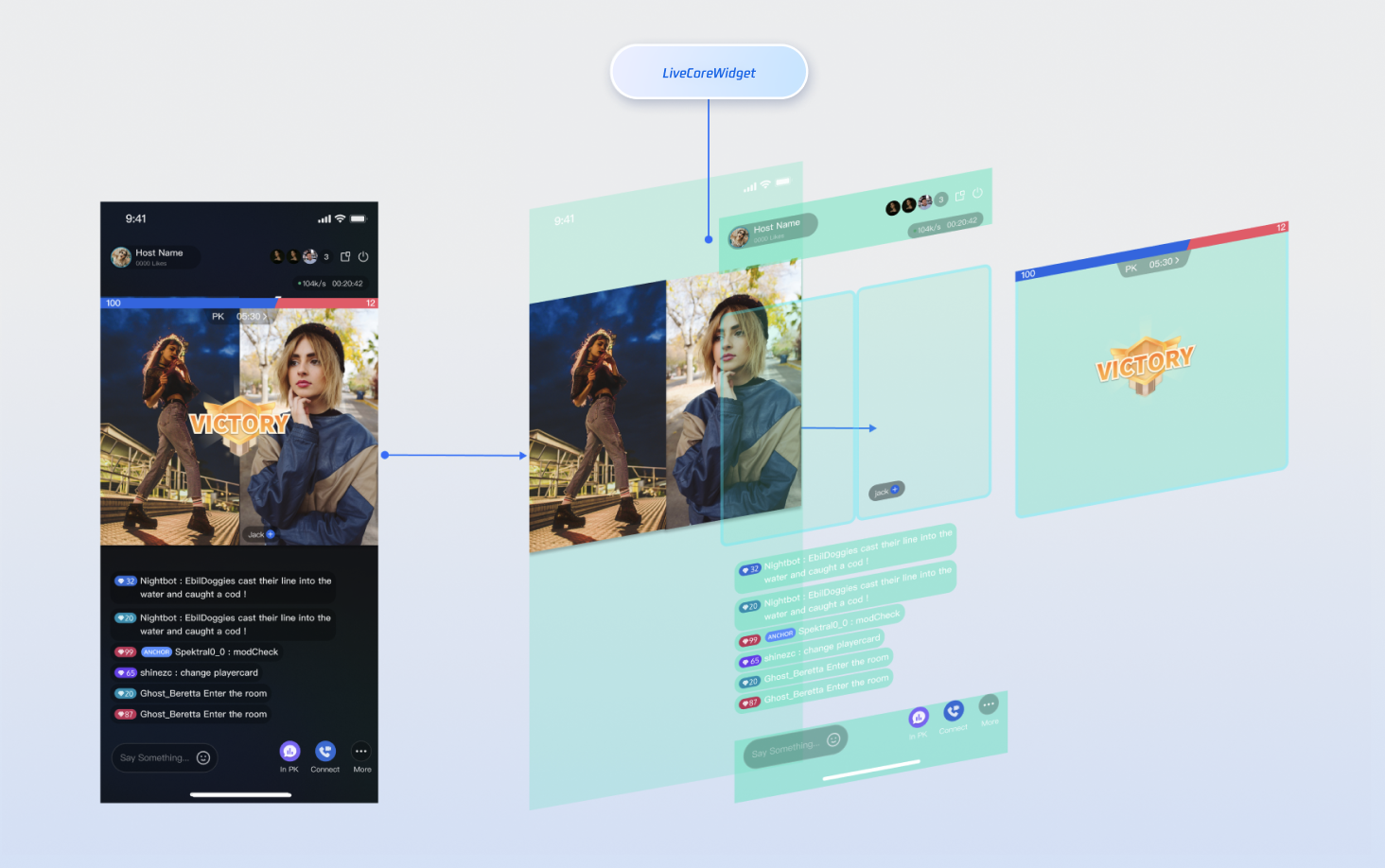
**LiveCoreWidget** is a lightweight widget purpose-built for live streaming scenarios and serves as the foundation of your live streaming interface. It abstracts complex live streaming technologies—including streaming, co-hosting, and audio/video rendering—so you can use LiveCoreWidget as the canvas for your live video. This allows you to focus on developing your custom UI and interactive features.
|
|
6
|
+
|
|
7
|
+
The following diagram illustrates where **LiveCoreWidget** fits within your live streaming interface and its role in the view hierarchy:
|
|
8
|
+
|
|
9
|
+
|
|
10
|
+
|
|
11
|
+
|
|
12
|
+
## Preparations
|
|
13
|
+
|
|
14
|
+
### Step 1: Activate the Service
|
|
15
|
+
|
|
16
|
+
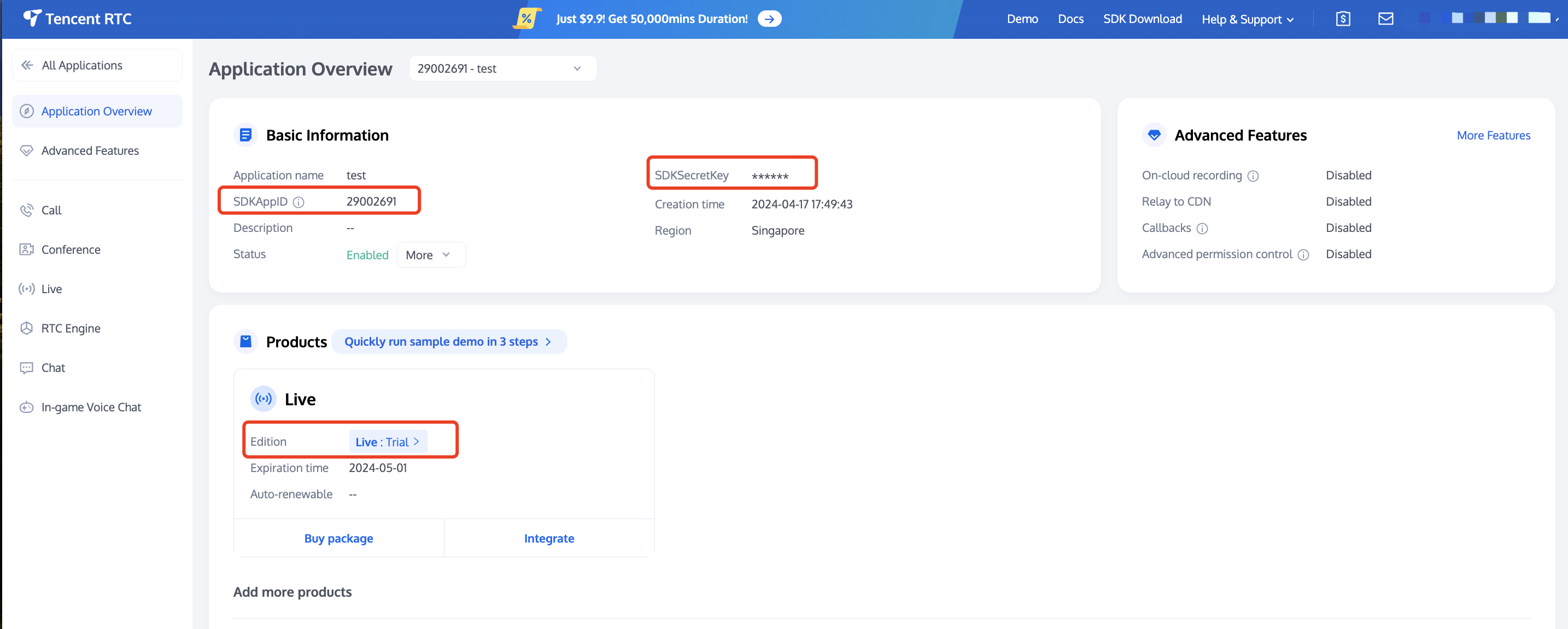
See [Activate Service](https://write.woa.com/document/141936672617742336) to obtain either the trial or paid version of the SDK.Then, go to [the Console](https://console.trtc.io/app) for application management, and get the following:
|
|
17
|
+
- `SDKAppID`: Application identifier (required). Tencent Cloud uses `SDKAppID` for billing and details.
|
|
18
|
+
|
|
19
|
+
- `SDKSecretKey`: Application secret key, used to initialize the configuration file with secret information.
|
|
20
|
+
|
|
21
|
+
|
|
22
|
+
|
|
23
|
+
|
|
24
|
+
### Step 2: Import AtomicXCore into Your Project
|
|
25
|
+
1. **Component installation**: Please add the `atomic_x_core` dependency in your `pubspec.yaml` file and execute `flutter pub get`.
|
|
26
|
+
|
|
27
|
+
``` yaml
|
|
28
|
+
dependencies:
|
|
29
|
+
atomic_x_core: ^3.6.0
|
|
30
|
+
```
|
|
31
|
+
2. **Configure project permissions:** Both Android and iOS projects require configuration.
|
|
32
|
+
|
|
33
|
+
|
|
34
|
+
|
|
35
|
+
|
|
36
|
+
【Android】
|
|
37
|
+
|
|
38
|
+
Please add permission to use camera and microphone in the `android/app/src/main/AndroidManifest.xml` file.
|
|
39
|
+
``` xml
|
|
40
|
+
<uses-permission android:name="android.permission.CAMERA" />
|
|
41
|
+
<uses-permission android:name="android.permission.RECORD_AUDIO" />
|
|
42
|
+
```
|
|
43
|
+
|
|
44
|
+
【iOS】
|
|
45
|
+
|
|
46
|
+
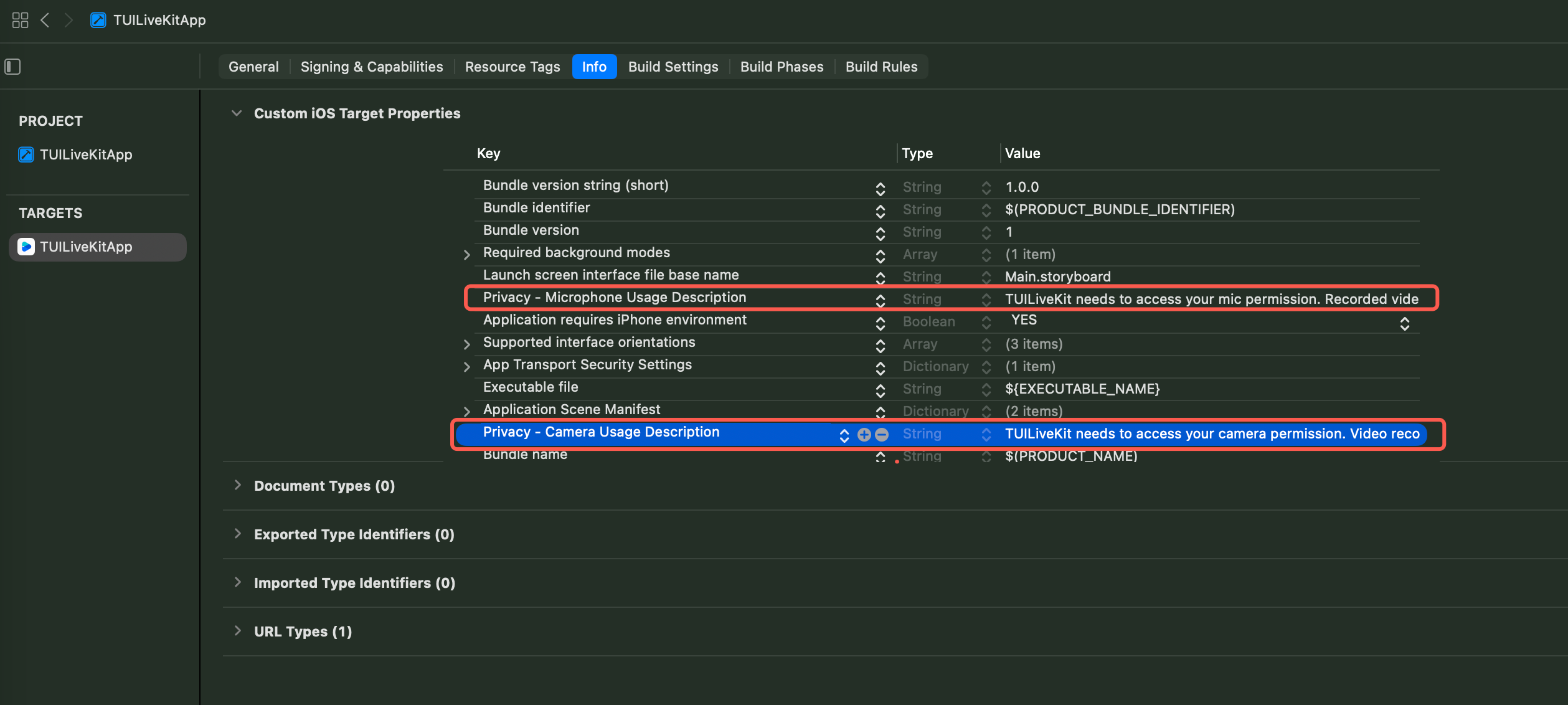
Please add permission to use camera and microphone in the `iOS` directory **Podfile** and `ios/Runner` directory `Info.plist` file.
|
|
47
|
+
|
|
48
|
+
**Podfile**
|
|
49
|
+
``` ruby
|
|
50
|
+
post_install do |installer|
|
|
51
|
+
installer.pods_project.targets.each do |target|
|
|
52
|
+
flutter_additional_ios_build_settings(target)
|
|
53
|
+
target.build_configurations.each do |config|
|
|
54
|
+
config.build_settings['GCC_PREPROCESSOR_DEFINITIONS'] ||= [
|
|
55
|
+
'$(inherited)',
|
|
56
|
+
'PERMISSION_MICROPHONE=1',
|
|
57
|
+
'PERMISSION_CAMERA=1',
|
|
58
|
+
]
|
|
59
|
+
end
|
|
60
|
+
end
|
|
61
|
+
end
|
|
62
|
+
```
|
|
63
|
+
|
|
64
|
+
**Info.plist**
|
|
65
|
+
``` xml
|
|
66
|
+
<key>NSCameraUsageDescription</key>
|
|
67
|
+
<string>TUILiveKit needs to access your camera permission. Video recording with picture only after enabling.</string>
|
|
68
|
+
<key>NSMicrophoneUsageDescription</key>
|
|
69
|
+
<string>TUILiveKit needs to access your mic permission. Recorded video will have sound when enabled.</string>
|
|
70
|
+
```
|
|
71
|
+
|
|
72
|
+
|
|
73
|
+
|
|
74
|
+
|
|
75
|
+
|
|
76
|
+
### Step 3: Implement Login Logic
|
|
77
|
+
|
|
78
|
+
Call `LoginStore.shared.login` in your project to complete login. **This is the key premise for using all functions of AtomicXCore.**
|
|
79
|
+
|
|
80
|
+
> **Important:**
|
|
81
|
+
>
|
|
82
|
+
|
|
83
|
+
> It is recommended to call LoginStore.shared.login after successful log-in to your App's user account to ensure clear and consistent business logic.
|
|
84
|
+
>
|
|
85
|
+
|
|
86
|
+
``` java
|
|
87
|
+
import 'package:flutter/material.dart';
|
|
88
|
+
import 'package:atomic_x_core/atomicxcore.dart';
|
|
89
|
+
|
|
90
|
+
void main() async {
|
|
91
|
+
WidgetsFlutterBinding.ensureInitialized();
|
|
92
|
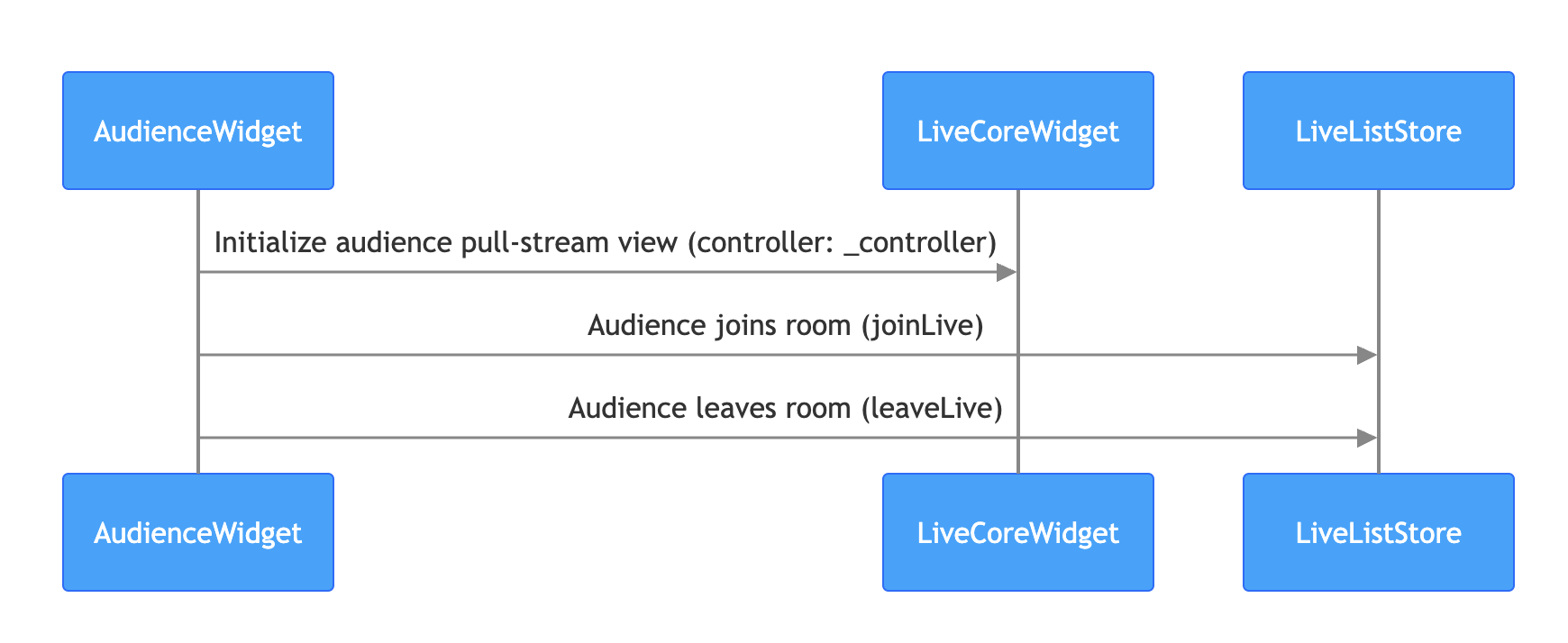
+
|
|
93
|
+
final result = await LoginStore.shared.login(
|
|
94
|
+
sdkAppID: 1400000001, // replace with your sdkAppID
|
|
95
|
+
userID: "test_001", // replace with your userID
|
|
96
|
+
userSig: "xxxxxxxxxxx", // replace with your userSig
|
|
97
|
+
);
|
|
98
|
+
|
|
99
|
+
if (result.isSuccess) {
|
|
100
|
+
debugPrint("login success");
|
|
101
|
+
} else {
|
|
102
|
+
debugPrint("login failed code: ${result.errorCode}, message: ${result.errorMessage}");
|
|
103
|
+
}
|
|
104
|
+
|
|
105
|
+
runApp(const MyApp());
|
|
106
|
+
}
|
|
107
|
+
```
|
|
108
|
+
|
|
109
|
+
**Logon API parameter description:**
|
|
110
|
+
<table>
|
|
111
|
+
<tr>
|
|
112
|
+
<td rowspan="1" colSpan="1" >**Parameter**</td>
|
|
113
|
+
|
|
114
|
+
<td rowspan="1" colSpan="1" >**Type**</td>
|
|
115
|
+
|
|
116
|
+
<td rowspan="1" colSpan="1" >**Note**</td>
|
|
117
|
+
</tr>
|
|
118
|
+
|
|
119
|
+
<tr>
|
|
120
|
+
<td rowspan="1" colSpan="1" >`sdkAppID`</td>
|
|
121
|
+
|
|
122
|
+
<td rowspan="1" colSpan="1" >`int`</td>
|
|
123
|
+
|
|
124
|
+
<td rowspan="1" colSpan="1" >Get this from [TRTC console](https://console.trtc.io/app).</td>
|
|
125
|
+
</tr>
|
|
126
|
+
|
|
127
|
+
<tr>
|
|
128
|
+
<td rowspan="1" colSpan="1" >`userID`</td>
|
|
129
|
+
|
|
130
|
+
<td rowspan="1" colSpan="1" >`String`</td>
|
|
131
|
+
|
|
132
|
+
<td rowspan="1" colSpan="1" >The unique ID for the current user. Must contain only English letters, numbers, hyphens, and underscores.. To avoid multi-end login conflict, **do not use**`1`, `123`**or other simple IDs**.</td>
|
|
133
|
+
</tr>
|
|
134
|
+
|
|
135
|
+
<tr>
|
|
136
|
+
<td rowspan="1" colSpan="1" >`userSig`</td>
|
|
137
|
+
|
|
138
|
+
<td rowspan="1" colSpan="1" >`String`</td>
|
|
139
|
+
|
|
140
|
+
<td rowspan="1" colSpan="1" >A ticket for Tencent Cloud authentication. Please note:<br>- Development Environment: You can use the local `GenerateTestUserSig.genTestSig` function to generate a `UserSig` or generate a temporary UserSig via the [UserSig Generation Tool](https://console.trtc.io/usersig).<br>- Production Environment: To prevent key leakage, you must use a server-side method to generate `UserSig`. For details, see [Generating UserSig on the Server](https://write.woa.com/document/89644530319802368).</td>
|
|
141
|
+
</tr>
|
|
142
|
+
</table>
|
|
143
|
+
|
|
144
|
+
|
|
145
|
+
## Building a Basic Live Room
|
|
146
|
+
|
|
147
|
+
### Step 1: Implement Broadcaster Video Streaming
|
|
148
|
+
|
|
149
|
+
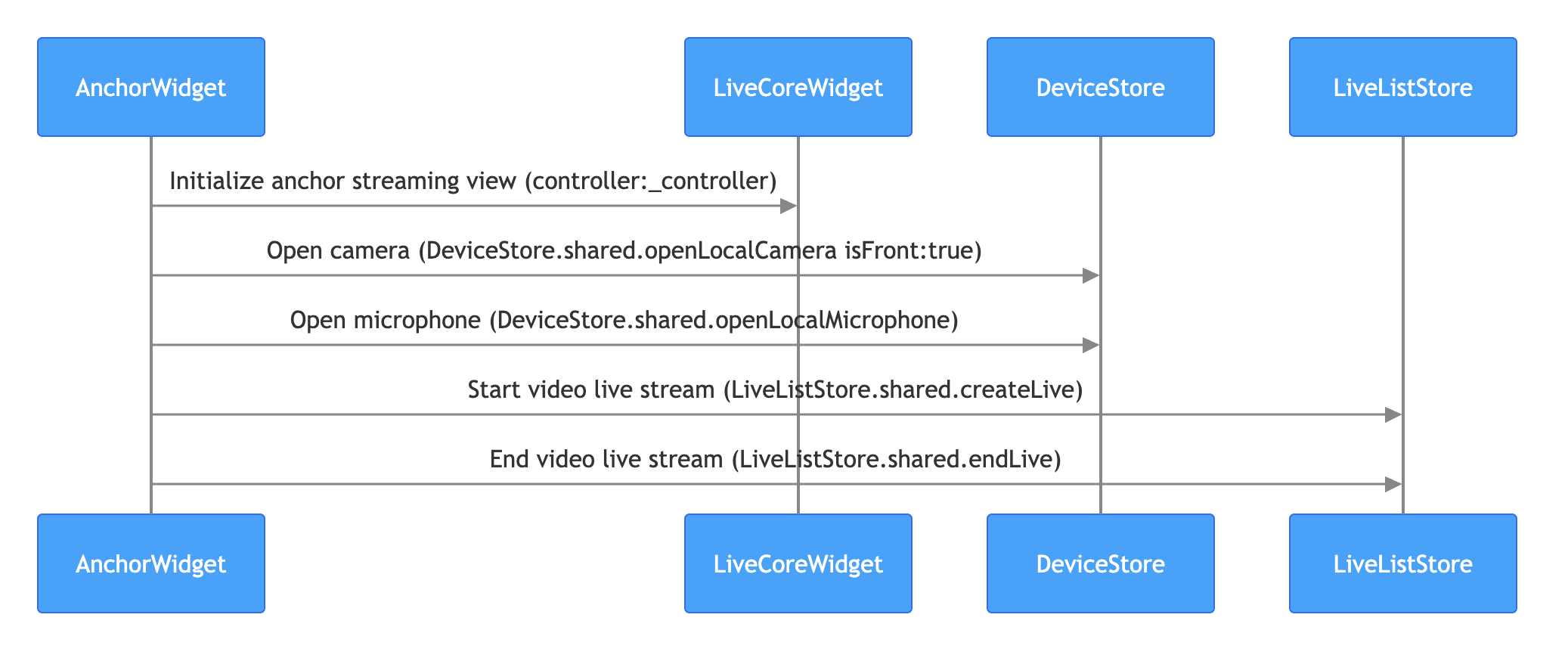
The anchor starts live streaming process is as follows. You just need to perform the following steps to quickly build a live stream.
|
|
150
|
+
|
|
151
|
+
|
|
152
|
+
|
|
153
|
+
|
|
154
|
+
> **Note:**
|
|
155
|
+
>
|
|
156
|
+
|
|
157
|
+
> For the business code of live stream publishing, you can also refer to the [live_room_anchor_widget.dart](https://github.com/Tencent-RTC/TUIKit_Flutter/blob/main/live/livekit/lib/live_stream/features/live_room_anchor_widget.dart) file in the TUILiveKit open-source project to understand the complete implementation logic.
|
|
158
|
+
>
|
|
159
|
+
|
|
160
|
+
1. **Initialize the Anchor live streaming view**
|
|
161
|
+
|
|
162
|
+
|
|
163
|
+
On your Anchor page, create a `LiveCoreWidget` instance and control the live stream behavior through `LiveCoreController`.
|
|
164
|
+
|
|
165
|
+
``` java
|
|
166
|
+
import 'package:flutter/material.dart';
|
|
167
|
+
import 'package:atomic_x_core/atomicxcore.dart';
|
|
168
|
+
|
|
169
|
+
/// YourAnchorPage represents your anchor starts live streaming page
|
|
170
|
+
class YourAnchorPage extends StatefulWidget {
|
|
171
|
+
final String liveId;
|
|
172
|
+
|
|
173
|
+
const YourAnchorPage({super.key, required this.liveId});
|
|
174
|
+
|
|
175
|
+
@override
|
|
176
|
+
State<YourAnchorPage> createState() => _YourAnchorPageState();
|
|
177
|
+
}
|
|
178
|
+
|
|
179
|
+
class _YourAnchorPageState extends State<YourAnchorPage> {
|
|
180
|
+
// 1. Create a LiveCoreController instance
|
|
181
|
+
late final LiveCoreController _controller;
|
|
182
|
+
|
|
183
|
+
@override
|
|
184
|
+
void initState() {
|
|
185
|
+
super.initState();
|
|
186
|
+
// 2. Initialize the controller
|
|
187
|
+
_controller = LiveCoreController.create();
|
|
188
|
+
// 3. Set up live streaming ID
|
|
189
|
+
_controller.setLiveID(widget.liveId);
|
|
190
|
+
}
|
|
191
|
+
|
|
192
|
+
@override
|
|
193
|
+
Widget build(BuildContext context) {
|
|
194
|
+
return Scaffold(
|
|
195
|
+
body: Stack(
|
|
196
|
+
children: [
|
|
197
|
+
// 4. Load the broadcaster stream page to your view
|
|
198
|
+
LiveCoreWidget(controller: _controller),
|
|
199
|
+
// Your other UI components
|
|
200
|
+
],
|
|
201
|
+
),
|
|
202
|
+
);
|
|
203
|
+
}
|
|
204
|
+
}
|
|
205
|
+
```
|
|
206
|
+
2. **Turn on the camera and microphone**
|
|
207
|
+
|
|
208
|
+
|
|
209
|
+
By calling the **DeviceStore**`openLocalCamera` and `openLocalMicrophone` APIs to turn on the camera and microphone, **no need to do additional configuration as LiveCoreWidget will auto preview the current camera's video stream**. Sample code:
|
|
210
|
+
|
|
211
|
+
``` java
|
|
212
|
+
import 'package:flutter/material.dart';
|
|
213
|
+
import 'package:atomic_x_core/atomicxcore.dart';
|
|
214
|
+
|
|
215
|
+
/// YourAnchorPage represents your anchor starts live streaming page
|
|
216
|
+
class YourAnchorPage extends StatefulWidget {
|
|
217
|
+
final String liveId;
|
|
218
|
+
|
|
219
|
+
const YourAnchorPage({super.key, required this.liveId});
|
|
220
|
+
|
|
221
|
+
@override
|
|
222
|
+
State<YourAnchorPage> createState() => _YourAnchorPageState();
|
|
223
|
+
}
|
|
224
|
+
|
|
225
|
+
class _YourAnchorPageState extends State<YourAnchorPage> {
|
|
226
|
+
late final LiveCoreController _controller;
|
|
227
|
+
|
|
228
|
+
@override
|
|
229
|
+
void initState() {
|
|
230
|
+
super.initState();
|
|
231
|
+
_controller = LiveCoreController.create();
|
|
232
|
+
_controller.setLiveID(widget.liveId);
|
|
233
|
+
// Turn on the device
|
|
234
|
+
_openDevices();
|
|
235
|
+
}
|
|
236
|
+
|
|
237
|
+
void _openDevices() {
|
|
238
|
+
// 1. Open front camera
|
|
239
|
+
DeviceStore.shared.openLocalCamera(true);
|
|
240
|
+
// 2. Turn on the microphone
|
|
241
|
+
DeviceStore.shared.openLocalMicrophone();
|
|
242
|
+
}
|
|
243
|
+
|
|
244
|
+
@override
|
|
245
|
+
Widget build(BuildContext context) {
|
|
246
|
+
return Scaffold(
|
|
247
|
+
body: Stack(
|
|
248
|
+
children: [
|
|
249
|
+
LiveCoreWidget(controller: _controller),
|
|
250
|
+
],
|
|
251
|
+
),
|
|
252
|
+
);
|
|
253
|
+
}
|
|
254
|
+
}
|
|
255
|
+
```
|
|
256
|
+
3. **Start live streaming**
|
|
257
|
+
|
|
258
|
+
|
|
259
|
+
By calling the **LiveListStore**`createLive` API to start video live streaming, sample code:
|
|
260
|
+
|
|
261
|
+
``` java
|
|
262
|
+
import 'package:flutter/material.dart';
|
|
263
|
+
import 'package:atomic_x_core/atomicxcore.dart';
|
|
264
|
+
|
|
265
|
+
/// YourAnchorPage represents your anchor starts live streaming page
|
|
266
|
+
class YourAnchorPage extends StatefulWidget {
|
|
267
|
+
final String liveId;
|
|
268
|
+
|
|
269
|
+
const YourAnchorPage({super.key, required this.liveId});
|
|
270
|
+
|
|
271
|
+
@override
|
|
272
|
+
State<YourAnchorPage> createState() => _YourAnchorPageState();
|
|
273
|
+
}
|
|
274
|
+
|
|
275
|
+
class _YourAnchorPageState extends State<YourAnchorPage> {
|
|
276
|
+
late final LiveCoreController _controller;
|
|
277
|
+
|
|
278
|
+
@override
|
|
279
|
+
void initState() {
|
|
280
|
+
super.initState();
|
|
281
|
+
_controller = LiveCoreController.create();
|
|
282
|
+
_controller.setLiveID(widget.liveId);
|
|
283
|
+
_openDevices();
|
|
284
|
+
}
|
|
285
|
+
|
|
286
|
+
void _openDevices() {
|
|
287
|
+
DeviceStore.shared.openLocalCamera(true);
|
|
288
|
+
DeviceStore.shared.openLocalMicrophone();
|
|
289
|
+
}
|
|
290
|
+
|
|
291
|
+
// Call the go live API to start live streaming
|
|
292
|
+
Future<void> _startLive() async {
|
|
293
|
+
// 1. Prepare the LiveInfo object
|
|
294
|
+
final liveInfo = LiveInfo(
|
|
295
|
+
// Set up live streaming room id
|
|
296
|
+
liveID: widget.liveId,
|
|
297
|
+
// Set up live streaming room name
|
|
298
|
+
liveName: "test live stream",
|
|
299
|
+
// Configure the layout template, default: 600 dynamic grid layout
|
|
300
|
+
seatLayoutTemplateID: 600,
|
|
301
|
+
// Configure the anchor to always stay on the seat
|
|
302
|
+
keepOwnerOnSeat: true,
|
|
303
|
+
);
|
|
304
|
+
|
|
305
|
+
// 2. Call LiveListStore.shared.createLive to start live streaming
|
|
306
|
+
final result = await LiveListStore.shared.createLive(liveInfo);
|
|
307
|
+
|
|
308
|
+
if (result.isSuccess) {
|
|
309
|
+
debugPrint("startLive success");
|
|
310
|
+
} else {
|
|
311
|
+
debugPrint("startLive error: ${result.errorMessage}");
|
|
312
|
+
}
|
|
313
|
+
}
|
|
314
|
+
|
|
315
|
+
@override
|
|
316
|
+
Widget build(BuildContext context) {
|
|
317
|
+
return Scaffold(
|
|
318
|
+
body: Stack(
|
|
319
|
+
children: [
|
|
320
|
+
LiveCoreWidget(controller: _controller),
|
|
321
|
+
// Go live button
|
|
322
|
+
Positioned(
|
|
323
|
+
bottom: 50,
|
|
324
|
+
left: 0,
|
|
325
|
+
right: 0,
|
|
326
|
+
child: Center(
|
|
327
|
+
child: ElevatedButton(
|
|
328
|
+
onPressed: _startLive,
|
|
329
|
+
child: const Text('Start live broadcast'),
|
|
330
|
+
),
|
|
331
|
+
),
|
|
332
|
+
),
|
|
333
|
+
],
|
|
334
|
+
),
|
|
335
|
+
);
|
|
336
|
+
}
|
|
337
|
+
}
|
|
338
|
+
```
|
|
339
|
+
|
|
340
|
+
**LiveInfo parameter description:**
|
|
341
|
+
|
|
342
|
+
<table>
|
|
343
|
+
<tr>
|
|
344
|
+
<td rowspan="1" colSpan="1" >**Parameter Name**</td>
|
|
345
|
+
|
|
346
|
+
<td rowspan="1" colSpan="1" >**Type**</td>
|
|
347
|
+
|
|
348
|
+
<td rowspan="1" colSpan="1" >**Attribute**</td>
|
|
349
|
+
|
|
350
|
+
<td rowspan="1" colSpan="1" >**Description**</td>
|
|
351
|
+
</tr>
|
|
352
|
+
|
|
353
|
+
<tr>
|
|
354
|
+
<td rowspan="1" colSpan="1" >`liveID`</td>
|
|
355
|
+
|
|
356
|
+
<td rowspan="1" colSpan="1" >`String`</td>
|
|
357
|
+
|
|
358
|
+
<td rowspan="1" colSpan="1" >Required</td>
|
|
359
|
+
|
|
360
|
+
<td rowspan="1" colSpan="1" >Unique identifier for the live streaming room.</td>
|
|
361
|
+
</tr>
|
|
362
|
+
|
|
363
|
+
<tr>
|
|
364
|
+
<td rowspan="1" colSpan="1" >`liveName`</td>
|
|
365
|
+
|
|
366
|
+
<td rowspan="1" colSpan="1" >`String`</td>
|
|
367
|
+
|
|
368
|
+
<td rowspan="1" colSpan="1" >Optional.</td>
|
|
369
|
+
|
|
370
|
+
<td rowspan="1" colSpan="1" >Title of the live streaming room.</td>
|
|
371
|
+
</tr>
|
|
372
|
+
|
|
373
|
+
<tr>
|
|
374
|
+
<td rowspan="1" colSpan="1" >`notice`</td>
|
|
375
|
+
|
|
376
|
+
<td rowspan="1" colSpan="1" >`String`</td>
|
|
377
|
+
|
|
378
|
+
<td rowspan="1" colSpan="1" >Optional.</td>
|
|
379
|
+
|
|
380
|
+
<td rowspan="1" colSpan="1" >Announcement information of the live streaming room.</td>
|
|
381
|
+
</tr>
|
|
382
|
+
|
|
383
|
+
<tr>
|
|
384
|
+
<td rowspan="1" colSpan="1" >`isMessageDisable`</td>
|
|
385
|
+
|
|
386
|
+
<td rowspan="1" colSpan="1" >`bool`</td>
|
|
387
|
+
|
|
388
|
+
<td rowspan="1" colSpan="1" >Optional.</td>
|
|
389
|
+
|
|
390
|
+
<td rowspan="1" colSpan="1" >Whether to mute (`true`: yes, `false`: no).</td>
|
|
391
|
+
</tr>
|
|
392
|
+
|
|
393
|
+
<tr>
|
|
394
|
+
<td rowspan="1" colSpan="1" >`isPublicVisible`</td>
|
|
395
|
+
|
|
396
|
+
<td rowspan="1" colSpan="1" >`bool`</td>
|
|
397
|
+
|
|
398
|
+
<td rowspan="1" colSpan="1" >Optional.</td>
|
|
399
|
+
|
|
400
|
+
<td rowspan="1" colSpan="1" >Whether publicly visible (`true`: yes, `false`: no).</td>
|
|
401
|
+
</tr>
|
|
402
|
+
|
|
403
|
+
<tr>
|
|
404
|
+
<td rowspan="1" colSpan="1" >`isSeatEnabled`</td>
|
|
405
|
+
|
|
406
|
+
<td rowspan="1" colSpan="1" >`bool`</td>
|
|
407
|
+
|
|
408
|
+
<td rowspan="1" colSpan="1" >Optional.</td>
|
|
409
|
+
|
|
410
|
+
<td rowspan="1" colSpan="1" >Whether to enable the seat feature (`true`: yes, `false`: no).</td>
|
|
411
|
+
</tr>
|
|
412
|
+
|
|
413
|
+
<tr>
|
|
414
|
+
<td rowspan="1" colSpan="1" >`keepOwnerOnSeat`</td>
|
|
415
|
+
|
|
416
|
+
<td rowspan="1" colSpan="1" >`bool`</td>
|
|
417
|
+
|
|
418
|
+
<td rowspan="1" colSpan="1" >Optional.</td>
|
|
419
|
+
|
|
420
|
+
<td rowspan="1" colSpan="1" >Whether to keep the room owner on the seat.</td>
|
|
421
|
+
</tr>
|
|
422
|
+
|
|
423
|
+
<tr>
|
|
424
|
+
<td rowspan="1" colSpan="1" >`maxSeatCount`</td>
|
|
425
|
+
|
|
426
|
+
<td rowspan="1" colSpan="1" >`int`</td>
|
|
427
|
+
|
|
428
|
+
<td rowspan="1" colSpan="1" >Optional.</td>
|
|
429
|
+
|
|
430
|
+
<td rowspan="1" colSpan="1" >Maximum number of microphones.</td>
|
|
431
|
+
</tr>
|
|
432
|
+
|
|
433
|
+
<tr>
|
|
434
|
+
<td rowspan="1" colSpan="1" >`seatMode`</td>
|
|
435
|
+
|
|
436
|
+
<td rowspan="1" colSpan="1" >`TakeSeatMode`</td>
|
|
437
|
+
|
|
438
|
+
<td rowspan="1" colSpan="1" >Optional.</td>
|
|
439
|
+
|
|
440
|
+
<td rowspan="1" colSpan="1" >Microphone mode (`TakeSeatMode.free`: Free to Join the Podium, `TakeSeatMode.apply`: Request to speak).</td>
|
|
441
|
+
</tr>
|
|
442
|
+
|
|
443
|
+
<tr>
|
|
444
|
+
<td rowspan="1" colSpan="1" >`seatLayoutTemplateID`</td>
|
|
445
|
+
|
|
446
|
+
<td rowspan="1" colSpan="1" >`int`</td>
|
|
447
|
+
|
|
448
|
+
<td rowspan="1" colSpan="1" >Required</td>
|
|
449
|
+
|
|
450
|
+
<td rowspan="1" colSpan="1" >layout template ID.</td>
|
|
451
|
+
</tr>
|
|
452
|
+
|
|
453
|
+
<tr>
|
|
454
|
+
<td rowspan="1" colSpan="1" >`coverURL`</td>
|
|
455
|
+
|
|
456
|
+
<td rowspan="1" colSpan="1" >`String`</td>
|
|
457
|
+
|
|
458
|
+
<td rowspan="1" colSpan="1" >Optional.</td>
|
|
459
|
+
|
|
460
|
+
<td rowspan="1" colSpan="1" >Thumbnail URL of the live streaming room.</td>
|
|
461
|
+
</tr>
|
|
462
|
+
|
|
463
|
+
<tr>
|
|
464
|
+
<td rowspan="1" colSpan="1" >`backgroundURL`</td>
|
|
465
|
+
|
|
466
|
+
<td rowspan="1" colSpan="1" >`String`</td>
|
|
467
|
+
|
|
468
|
+
<td rowspan="1" colSpan="1" >Optional.</td>
|
|
469
|
+
|
|
470
|
+
<td rowspan="1" colSpan="1" >Background image URL of the live streaming room.</td>
|
|
471
|
+
</tr>
|
|
472
|
+
|
|
473
|
+
<tr>
|
|
474
|
+
<td rowspan="1" colSpan="1" >`categoryList`</td>
|
|
475
|
+
|
|
476
|
+
<td rowspan="1" colSpan="1" >`List<int>`</td>
|
|
477
|
+
|
|
478
|
+
<td rowspan="1" colSpan="1" >Optional.</td>
|
|
479
|
+
|
|
480
|
+
<td rowspan="1" colSpan="1" >Tag list of categories in the live streaming room.</td>
|
|
481
|
+
</tr>
|
|
482
|
+
|
|
483
|
+
<tr>
|
|
484
|
+
<td rowspan="1" colSpan="1" >`activityStatus`</td>
|
|
485
|
+
|
|
486
|
+
<td rowspan="1" colSpan="1" >`int`</td>
|
|
487
|
+
|
|
488
|
+
<td rowspan="1" colSpan="1" >Optional.</td>
|
|
489
|
+
|
|
490
|
+
<td rowspan="1" colSpan="1" >Live stream status.</td>
|
|
491
|
+
</tr>
|
|
492
|
+
|
|
493
|
+
<tr>
|
|
494
|
+
<td rowspan="1" colSpan="1" >`isGiftEnabled`</td>
|
|
495
|
+
|
|
496
|
+
<td rowspan="1" colSpan="1" >`bool`</td>
|
|
497
|
+
|
|
498
|
+
<td rowspan="1" colSpan="1" >Optional.</td>
|
|
499
|
+
|
|
500
|
+
<td rowspan="1" colSpan="1" >Whether to enable the gift function (`true`: yes, `false`: no).</td>
|
|
501
|
+
</tr>
|
|
502
|
+
</table>
|
|
503
|
+
|
|
504
|
+
4. **End live streaming**
|
|
505
|
+
|
|
506
|
+
|
|
507
|
+
After the live streaming ends, the Anchor can call the **LiveListStore**'s `endLive` API to end the live stream. The SDK will handle the logic of stopping streaming and room termination.
|
|
508
|
+
|
|
509
|
+
``` java
|
|
510
|
+
import 'package:flutter/material.dart';
|
|
511
|
+
import 'package:atomic_x_core/atomicxcore.dart';
|
|
512
|
+
|
|
513
|
+
/// YourAnchorPage represents your anchor starts live streaming page
|
|
514
|
+
class YourAnchorPage extends StatefulWidget {
|
|
515
|
+
final String liveId;
|
|
516
|
+
|
|
517
|
+
const YourAnchorPage({super.key, required this.liveId});
|
|
518
|
+
|
|
519
|
+
@override
|
|
520
|
+
State<YourAnchorPage> createState() => _YourAnchorPageState();
|
|
521
|
+
}
|
|
522
|
+
|
|
523
|
+
class _YourAnchorPageState extends State<YourAnchorPage> {
|
|
524
|
+
// ... Other code ...
|
|
525
|
+
|
|
526
|
+
End live streaming
|
|
527
|
+
Future<void> _stopLive() async {
|
|
528
|
+
final result = await LiveListStore.shared.endLive();
|
|
529
|
+
|
|
530
|
+
if (result.isSuccess) {
|
|
531
|
+
debugPrint("endLive success");
|
|
532
|
+
} else {
|
|
533
|
+
debugPrint("endLive error: ${result.errorMessage}");
|
|
534
|
+
}
|
|
535
|
+
}
|
|
536
|
+
|
|
537
|
+
// ... Other code ...
|
|
538
|
+
}
|
|
539
|
+
```
|
|
540
|
+
|
|
541
|
+
### Step 2: Implement Audience Join and Watch
|
|
542
|
+
|
|
543
|
+
The audience viewing process is as follows. In just a few simple steps, you can achieve audience watching live.
|
|
544
|
+
|
|
545
|
+
|
|
546
|
+
|
|
547
|
+
|
|
548
|
+
> **Note:**
|
|
549
|
+
>
|
|
550
|
+
|
|
551
|
+
> For the business code of audience enter room to pull stream, you can also refer to the [audience_widget.dart](https://github.com/Tencent-RTC/TUIKit_Flutter/blob/main/live/livekit/lib/live_stream/features/audience/audience_widget.dart) file in the TUILiveKit open-source project to understand the complete implementation logic.
|
|
552
|
+
>
|
|
553
|
+
|
|
554
|
+
1. **Implement the audience pull stream page**
|
|
555
|
+
|
|
556
|
+
|
|
557
|
+
On your audience page, create a `LiveCoreWidget` instance and control the live stream behavior through `LiveCoreController`.
|
|
558
|
+
|
|
559
|
+
``` java
|
|
560
|
+
import 'package:flutter/material.dart';
|
|
561
|
+
import 'package:atomic_x_core/atomicxcore.dart';
|
|
562
|
+
|
|
563
|
+
/// YourAudiencePage represents your audience viewing webpage
|
|
564
|
+
class YourAudiencePage extends StatefulWidget {
|
|
565
|
+
final String liveId;
|
|
566
|
+
|
|
567
|
+
const YourAudiencePage({super.key, required this.liveId});
|
|
568
|
+
|
|
569
|
+
@override
|
|
570
|
+
State<YourAudiencePage> createState() => _YourAudiencePageState();
|
|
571
|
+
}
|
|
572
|
+
|
|
573
|
+
class _YourAudiencePageState extends State<YourAudiencePage> {
|
|
574
|
+
// 1. Create a LiveCoreController instance
|
|
575
|
+
late final LiveCoreController _controller;
|
|
576
|
+
|
|
577
|
+
@override
|
|
578
|
+
void initState() {
|
|
579
|
+
super.initState();
|
|
580
|
+
// 2. Initialize the controller
|
|
581
|
+
_controller = LiveCoreController.create();
|
|
582
|
+
// 3. Bind live streaming id
|
|
583
|
+
_controller.setLiveID(widget.liveId);
|
|
584
|
+
}
|
|
585
|
+
|
|
586
|
+
@override
|
|
587
|
+
Widget build(BuildContext context) {
|
|
588
|
+
return Scaffold(
|
|
589
|
+
body: Stack(
|
|
590
|
+
children: [
|
|
591
|
+
// 4. Load the audience pull stream page to your view
|
|
592
|
+
LiveCoreWidget(controller: _controller),
|
|
593
|
+
],
|
|
594
|
+
),
|
|
595
|
+
);
|
|
596
|
+
}
|
|
597
|
+
}
|
|
598
|
+
```
|
|
599
|
+
2. **Enter live room to watch**
|
|
600
|
+
|
|
601
|
+
|
|
602
|
+
By calling the **LiveListStore**`joinLive` API to join the live stream, **no need to do additional configuration, LiveCoreWidget will autoplay the current room video stream**, sample code:
|
|
603
|
+
|
|
604
|
+
``` java
|
|
605
|
+
import 'package:flutter/material.dart';
|
|
606
|
+
import 'package:atomic_x_core/atomicxcore.dart';
|
|
607
|
+
|
|
608
|
+
/// YourAudiencePage represents your audience viewing webpage
|
|
609
|
+
class YourAudiencePage extends StatefulWidget {
|
|
610
|
+
final String liveId;
|
|
611
|
+
|
|
612
|
+
const YourAudiencePage({super.key, required this.liveId});
|
|
613
|
+
|
|
614
|
+
@override
|
|
615
|
+
State<YourAudiencePage> createState() => _YourAudiencePageState();
|
|
616
|
+
}
|
|
617
|
+
|
|
618
|
+
class _YourAudiencePageState extends State<YourAudiencePage> {
|
|
619
|
+
late final LiveCoreController _controller;
|
|
620
|
+
|
|
621
|
+
@override
|
|
622
|
+
void initState() {
|
|
623
|
+
super.initState();
|
|
624
|
+
_controller = LiveCoreController.create();
|
|
625
|
+
_controller.setLiveID(widget.liveId);
|
|
626
|
+
// Enter live room
|
|
627
|
+
_joinLive();
|
|
628
|
+
}
|
|
629
|
+
|
|
630
|
+
Future<void> _joinLive() async {
|
|
631
|
+
// Call LiveListStore.shared.joinLive to enter live room
|
|
632
|
+
// - liveId: same liveId as anchor starts live streaming
|
|
633
|
+
final result = await LiveListStore.shared.joinLive(widget.liveId);
|
|
634
|
+
|
|
635
|
+
if (result.isSuccess) {
|
|
636
|
+
debugPrint("joinLive success");
|
|
637
|
+
} else {
|
|
638
|
+
debugPrint("joinLive error: ${result.errorMessage}");
|
|
639
|
+
// Failed to enter the room, must exit the page
|
|
640
|
+
// if (mounted) Navigator.of(context).pop();
|
|
641
|
+
}
|
|
642
|
+
}
|
|
643
|
+
|
|
644
|
+
@override
|
|
645
|
+
Widget build(BuildContext context) {
|
|
646
|
+
return Scaffold(
|
|
647
|
+
body: Stack(
|
|
648
|
+
children: [
|
|
649
|
+
LiveCoreWidget(controller: _controller),
|
|
650
|
+
],
|
|
651
|
+
),
|
|
652
|
+
);
|
|
653
|
+
}
|
|
654
|
+
}
|
|
655
|
+
```
|
|
656
|
+
3. **Log out of live stream**
|
|
657
|
+
|
|
658
|
+
|
|
659
|
+
When the audience exits the live streaming room, they need to call the **LiveListStore**'s `leaveLive` API to exit the live stream. The SDK will automatically stop pulling streams and leave the room.
|
|
660
|
+
|
|
661
|
+
``` java
|
|
662
|
+
import 'package:flutter/material.dart';
|
|
663
|
+
import 'package:atomic_x_core/atomicxcore.dart';
|
|
664
|
+
|
|
665
|
+
/// YourAudiencePage represents your audience viewing webpage
|
|
666
|
+
class YourAudiencePage extends StatefulWidget {
|
|
667
|
+
final String liveId;
|
|
668
|
+
|
|
669
|
+
const YourAudiencePage({super.key, required this.liveId});
|
|
670
|
+
|
|
671
|
+
@override
|
|
672
|
+
State<YourAudiencePage> createState() => _YourAudiencePageState();
|
|
673
|
+
}
|
|
674
|
+
|
|
675
|
+
class _YourAudiencePageState extends State<YourAudiencePage> {
|
|
676
|
+
// ... Other code ...
|
|
677
|
+
|
|
678
|
+
End live stream
|
|
679
|
+
Future<void> _leaveLive() async {
|
|
680
|
+
final result = await LiveListStore.shared.leaveLive();
|
|
681
|
+
|
|
682
|
+
if (result.isSuccess) {
|
|
683
|
+
debugPrint("leaveLive success");
|
|
684
|
+
} else {
|
|
685
|
+
debugPrint("leaveLive error: ${result.errorMessage}");
|
|
686
|
+
}
|
|
687
|
+
}
|
|
688
|
+
|
|
689
|
+
// ... Other code ...
|
|
690
|
+
}
|
|
691
|
+
```
|
|
692
|
+
|
|
693
|
+
### Step 3: Listen for Live Events
|
|
694
|
+
|
|
695
|
+
After the audience joins the live room, you also need to process some passive events inside the room. For example, the Anchor proactively ends the live stream, or the audience is kicked out of the room due to rule violation. If these events are not listened to, the client UI may stay on a black screen webpage, affecting user experience.
|
|
696
|
+
|
|
697
|
+
You can achieve event monitoring through `LiveListListener`.
|
|
698
|
+
``` java
|
|
699
|
+
import 'package:flutter/material.dart';
|
|
700
|
+
import 'package:atomic_x_core/atomicxcore.dart';
|
|
701
|
+
|
|
702
|
+
/// YourAudiencePage represents your audience viewing webpage
|
|
703
|
+
class YourAudiencePage extends StatefulWidget {
|
|
704
|
+
final String liveId;
|
|
705
|
+
|
|
706
|
+
const YourAudiencePage({super.key, required this.liveId});
|
|
707
|
+
|
|
708
|
+
@override
|
|
709
|
+
State<YourAudiencePage> createState() => _YourAudiencePageState();
|
|
710
|
+
}
|
|
711
|
+
|
|
712
|
+
class _YourAudiencePageState extends State<YourAudiencePage> {
|
|
713
|
+
late final LiveCoreController _controller;
|
|
714
|
+
// 1. Define LiveListListener to manage event monitoring
|
|
715
|
+
late final LiveListListener _liveListListener;
|
|
716
|
+
|
|
717
|
+
@override
|
|
718
|
+
void initState() {
|
|
719
|
+
super.initState();
|
|
720
|
+
_controller = LiveCoreController.create();
|
|
721
|
+
_controller.setLiveID(widget.liveId);
|
|
722
|
+
// 2. Listen to Live Event
|
|
723
|
+
_setupLiveEventListener();
|
|
724
|
+
// 3. Enter live room
|
|
725
|
+
_joinLive();
|
|
726
|
+
}
|
|
727
|
+
|
|
728
|
+
// 4. Add a method to set up event listening
|
|
729
|
+
void _setupLiveEventListener() {
|
|
730
|
+
_liveListListener = LiveListListener(
|
|
731
|
+
onLiveEnded: (liveID, reason, message) {
|
|
732
|
+
// Listen to live streaming end
|
|
733
|
+
debugPrint("Live ended. liveID: $liveID, reason: ${reason.value}, message: $message");
|
|
734
|
+
// Handle the logic for exiting a live streaming room herein, such as closing current page
|
|
735
|
+
// if (mounted) Navigator.of(context).pop();
|
|
736
|
+
},
|
|
737
|
+
onKickedOutOfLive: (liveID, reason, message) {
|
|
738
|
+
// Listen to being kicked out of live stream
|
|
739
|
+
debugPrint("Kicked out of live. liveID: $liveID, reason: ${reason.value}, message: $message");
|
|
740
|
+
// Handle the logic for exiting a live streaming room herein
|
|
741
|
+
// if (mounted) Navigator.of(context).pop();
|
|
742
|
+
},
|
|
743
|
+
);
|
|
744
|
+
LiveListStore.shared.addLiveListListener(_liveListListener);
|
|
745
|
+
}
|
|
746
|
+
|
|
747
|
+
Future<void> _joinLive() async {
|
|
748
|
+
final result = await LiveListStore.shared.joinLive(widget.liveId);
|
|
749
|
+
if (result.isSuccess) {
|
|
750
|
+
debugPrint("joinLive success");
|
|
751
|
+
} else {
|
|
752
|
+
debugPrint("joinLive error: ${result.errorMessage}");
|
|
753
|
+
}
|
|
754
|
+
}
|
|
755
|
+
|
|
756
|
+
Future<void> _leaveLive() async {
|
|
757
|
+
final result = await LiveListStore.shared.leaveLive();
|
|
758
|
+
if (result.isSuccess) {
|
|
759
|
+
debugPrint("leaveLive success");
|
|
760
|
+
} else {
|
|
761
|
+
debugPrint("leaveLive error: ${result.errorMessage}");
|
|
762
|
+
}
|
|
763
|
+
}
|
|
764
|
+
|
|
765
|
+
@override
|
|
766
|
+
void dispose() {
|
|
767
|
+
// 5. Remove event listening
|
|
768
|
+
LiveListStore.shared.removeLiveListListener(_liveListListener);
|
|
769
|
+
super.dispose();
|
|
770
|
+
}
|
|
771
|
+
|
|
772
|
+
@override
|
|
773
|
+
Widget build(BuildContext context) {
|
|
774
|
+
return Scaffold(
|
|
775
|
+
body: Stack(
|
|
776
|
+
children: [
|
|
777
|
+
LiveCoreWidget(controller: _controller),
|
|
778
|
+
],
|
|
779
|
+
),
|
|
780
|
+
);
|
|
781
|
+
}
|
|
782
|
+
}
|
|
783
|
+
```
|
|
784
|
+
|
|
785
|
+
### Run and Test
|
|
786
|
+
|
|
787
|
+
After integrating `LiveCoreWidget`, you will obtain a pure video rendering view with complete live streaming business capability but no interactive UI. You can refer to the next chapter [Enrich Live-Streaming Scenarios](https://write.woa.com/#.E4.B8.B0.E5.AF.8C.E7.9B.B4.E6.92.AD.E5.9C.BA.E6.99.AF) to refine live broadcasting scenarios.
|
|
788
|
+
<table>
|
|
789
|
+
<tr>
|
|
790
|
+
<td rowspan="1" colSpan="1" ></td>
|
|
791
|
+
|
|
792
|
+
<td rowspan="1" colSpan="1" >**Dynamic Grid Layout**</td>
|
|
793
|
+
|
|
794
|
+
<td rowspan="1" colSpan="1" >**Floating Window Layout**</td>
|
|
795
|
+
|
|
796
|
+
<td rowspan="1" colSpan="1" >**Fixed Grid Layout**</td>
|
|
797
|
+
</tr>
|
|
798
|
+
|
|
799
|
+
<tr>
|
|
800
|
+
<td rowspan="1" colSpan="1" >Template ID</td>
|
|
801
|
+
|
|
802
|
+
<td rowspan="1" colSpan="1" >600</td>
|
|
803
|
+
|
|
804
|
+
<td rowspan="1" colSpan="1" >601</td>
|
|
805
|
+
|
|
806
|
+
<td rowspan="1" colSpan="1" >800</td>
|
|
807
|
+
</tr>
|
|
808
|
+
|
|
809
|
+
<tr>
|
|
810
|
+
<td rowspan="1" colSpan="1" >Description</td>
|
|
811
|
+
|
|
812
|
+
<td rowspan="1" colSpan="1" >Default layout; grid size adjusts dynamically based on number of co-hosts.</td>
|
|
813
|
+
|
|
814
|
+
<td rowspan="1" colSpan="1" >Co-hosts are displayed as floating windows.</td>
|
|
815
|
+
|
|
816
|
+
<td rowspan="1" colSpan="1" >Fixed number of co-hosts; each occupies a fixed grid.</td>
|
|
817
|
+
</tr>
|
|
818
|
+
|
|
819
|
+
<tr>
|
|
820
|
+
<td rowspan="1" colSpan="1" >Example</td>
|
|
821
|
+
|
|
822
|
+
<td rowspan="1" colSpan="1" ><br>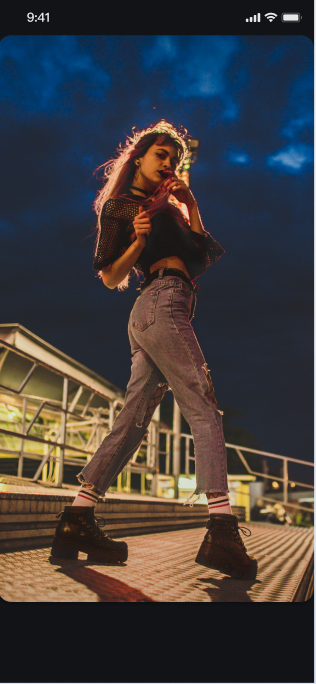</td>
|
|
823
|
+
|
|
824
|
+
<td rowspan="1" colSpan="1" ><br>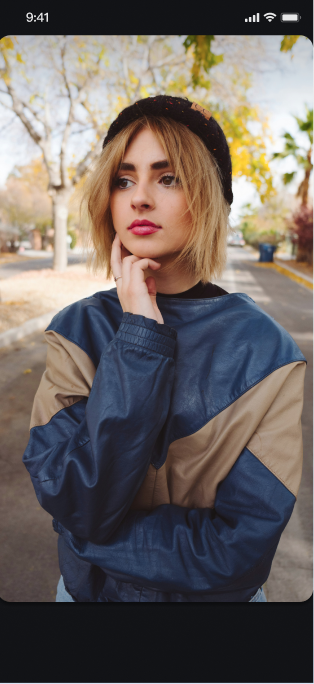</td>
|
|
825
|
+
|
|
826
|
+
<td rowspan="1" colSpan="1" ><br>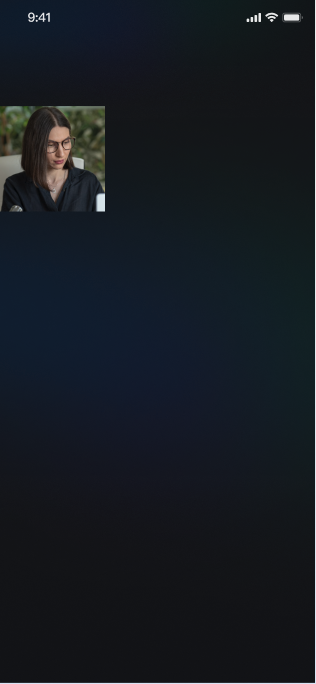</td>
|
|
827
|
+
</tr>
|
|
828
|
+
</table>
|
|
829
|
+
|
|
830
|
+
|
|
831
|
+
## Enrich Live Streaming Scenarios
|
|
832
|
+
|
|
833
|
+
Once the basic live streaming functionality is in place, refer to the following guides to add interactive features to your live stream:
|
|
834
|
+
<table>
|
|
835
|
+
<tr>
|
|
836
|
+
<td rowspan="1" colSpan="1" >**Feature**</td>
|
|
837
|
+
|
|
838
|
+
<td rowspan="1" colSpan="1" >**Description**</td>
|
|
839
|
+
|
|
840
|
+
<td rowspan="1" colSpan="1" >**Store**</td>
|
|
841
|
+
|
|
842
|
+
<td rowspan="1" colSpan="1" >**Implementation Guide**</td>
|
|
843
|
+
</tr>
|
|
844
|
+
|
|
845
|
+
<tr>
|
|
846
|
+
<td rowspan="1" colSpan="1" >**Enable Audience Audio/Video Co-hosting**</td>
|
|
847
|
+
|
|
848
|
+
<td rowspan="1" colSpan="1" >Audience can apply to join the host and interact via real-time video.</td>
|
|
849
|
+
|
|
850
|
+
<td rowspan="1" colSpan="1" >[CoGuestStore](https://tencent-rtc.github.io/TUIKit_Flutter/api_live_co_guest_store/CoGuestStore-class.html)</td>
|
|
851
|
+
|
|
852
|
+
<td rowspan="1" colSpan="1" >[Implementation Guide](https://write.woa.com/document/200455653984186368)</td>
|
|
853
|
+
</tr>
|
|
854
|
+
|
|
855
|
+
<tr>
|
|
856
|
+
<td rowspan="1" colSpan="1" >**Enable Host Cross-room PK**</td>
|
|
857
|
+
|
|
858
|
+
<td rowspan="1" colSpan="1" >Hosts from different rooms can connect for interaction or PK.</td>
|
|
859
|
+
|
|
860
|
+
<td rowspan="1" colSpan="1" >[CoHostStore](https://tencent-rtc.github.io/TUIKit_Flutter/api_live_co_host_store/CoHostStore-class.html) / [BattleStore](https://tencent-rtc.github.io/TUIKit_Flutter/api_live_battle_store/BattleStore-class.html)</td>
|
|
861
|
+
|
|
862
|
+
<td rowspan="1" colSpan="1" >[Implementation Guide](https://write.woa.com/document/200455659512819712)</td>
|
|
863
|
+
</tr>
|
|
864
|
+
|
|
865
|
+
<tr>
|
|
866
|
+
<td rowspan="1" colSpan="1" >**Add Bullet Chat Feature**</td>
|
|
867
|
+
|
|
868
|
+
<td rowspan="1" colSpan="1" >Audience can send and receive real-time text messages in the live room.</td>
|
|
869
|
+
|
|
870
|
+
<td rowspan="1" colSpan="1" >[BarrageStore](https://tencent-rtc.github.io/TUIKit_Flutter/api_barrage_barrage_store/BarrageStore-class.html)</td>
|
|
871
|
+
|
|
872
|
+
<td rowspan="1" colSpan="1" >[Implementation Guide](https://write.woa.com/document/200455665056206848)</td>
|
|
873
|
+
</tr>
|
|
874
|
+
|
|
875
|
+
<tr>
|
|
876
|
+
<td rowspan="1" colSpan="1" >**Build a Gift Giving System**</td>
|
|
877
|
+
|
|
878
|
+
<td rowspan="1" colSpan="1" >Audience can send virtual gifts to the host, increasing engagement and fun.</td>
|
|
879
|
+
|
|
880
|
+
<td rowspan="1" colSpan="1" >[GiftStore](https://tencent-rtc.github.io/TUIKit_Flutter/api_gift_gift_store/GiftStore-class.html)</td>
|
|
881
|
+
|
|
882
|
+
<td rowspan="1" colSpan="1" >[Implementation Guide](https://write.woa.com/document/195925512239050752)</td>
|
|
883
|
+
</tr>
|
|
884
|
+
</table>
|
|
885
|
+
|
|
886
|
+
|
|
887
|
+
## API documentation
|
|
888
|
+
<table>
|
|
889
|
+
<tr>
|
|
890
|
+
<td rowspan="1" colSpan="1" >**Store/Component**</td>
|
|
891
|
+
|
|
892
|
+
<td rowspan="1" colSpan="1" >**Feature Description**</td>
|
|
893
|
+
|
|
894
|
+
<td rowspan="1" colSpan="1" >**API Reference**</td>
|
|
895
|
+
</tr>
|
|
896
|
+
|
|
897
|
+
<tr>
|
|
898
|
+
<td rowspan="1" colSpan="1" >**LiveCoreWidget**</td>
|
|
899
|
+
|
|
900
|
+
<td rowspan="1" colSpan="1" >The core view component for live video stream display and interaction: responsible for video stream rendering and view widget processing, supporting scenarios like live streaming, audience co-broadcasting, and anchor connection.</td>
|
|
901
|
+
|
|
902
|
+
<td rowspan="1" colSpan="1" >[API documentation](https://tencent-rtc.github.io/TUIKit_Flutter/api_view_live_live_core_widget/LiveCoreWidget-class.html)</td>
|
|
903
|
+
</tr>
|
|
904
|
+
|
|
905
|
+
<tr>
|
|
906
|
+
<td rowspan="1" colSpan="1" >**LiveCoreController**</td>
|
|
907
|
+
|
|
908
|
+
<td rowspan="1" colSpan="1" >The controller of LiveCoreWidget: used to set up the live streaming ID, control the preview, and perform other operations.</td>
|
|
909
|
+
|
|
910
|
+
<td rowspan="1" colSpan="1" >[API documentation](https://tencent-rtc.github.io/TUIKit_Flutter/api_view_live_live_core_widget/LiveCoreController-class.html)</td>
|
|
911
|
+
</tr>
|
|
912
|
+
|
|
913
|
+
<tr>
|
|
914
|
+
<td rowspan="1" colSpan="1" >**LiveListStore**</td>
|
|
915
|
+
|
|
916
|
+
<td rowspan="1" colSpan="1" >Full lifecycle management of live streaming room: create/join/leave/terminate room, query room list, modify live information (name, notice), listen to live status (for example, being kicked out, ended).</td>
|
|
917
|
+
|
|
918
|
+
<td rowspan="1" colSpan="1" >[API documentation](https://tencent-rtc.github.io/TUIKit_Flutter/api_live_live_list_store/LiveListStore-class.html)</td>
|
|
919
|
+
</tr>
|
|
920
|
+
|
|
921
|
+
<tr>
|
|
922
|
+
<td rowspan="1" colSpan="1" >**DeviceStore**</td>
|
|
923
|
+
|
|
924
|
+
<td rowspan="1" colSpan="1" >Audio/Video device control: microphone (on/off, volume), camera (on/off, switchover, video quality), screen sharing, monitor device status in real time.</td>
|
|
925
|
+
|
|
926
|
+
<td rowspan="1" colSpan="1" >[API documentation](https://tencent-rtc.github.io/TUIKit_Flutter/api_device_device_store/DeviceStore-class.html)</td>
|
|
927
|
+
</tr>
|
|
928
|
+
|
|
929
|
+
<tr>
|
|
930
|
+
<td rowspan="1" colSpan="1" >**CoGuestStore**</td>
|
|
931
|
+
|
|
932
|
+
<td rowspan="1" colSpan="1" >Audience co-broadcasting management: join microphone application/invite/grant/deny, attendee permission control (microphone/camera), state synchronization.</td>
|
|
933
|
+
|
|
934
|
+
<td rowspan="1" colSpan="1" >[API documentation](https://tencent-rtc.github.io/TUIKit_Flutter/api_live_co_guest_store/CoGuestStore-class.html)</td>
|
|
935
|
+
</tr>
|
|
936
|
+
|
|
937
|
+
<tr>
|
|
938
|
+
<td rowspan="1" colSpan="1" >**CoHostStore**</td>
|
|
939
|
+
|
|
940
|
+
<td rowspan="1" colSpan="1" >Anchor cross-room connection: supports multiple layout templates (dynamic grid, etc.), initiate/accept/reject connection, and manage interactive co-broadcasting with Anchors.</td>
|
|
941
|
+
|
|
942
|
+
<td rowspan="1" colSpan="1" >[API documentation](https://tencent-rtc.github.io/TUIKit_Flutter/api_live_co_host_store/CoHostStore-class.html)</td>
|
|
943
|
+
</tr>
|
|
944
|
+
|
|
945
|
+
<tr>
|
|
946
|
+
<td rowspan="1" colSpan="1" >**BattleStore**</td>
|
|
947
|
+
|
|
948
|
+
<td rowspan="1" colSpan="1" >Anchor PK battle: trigger PK (duration configuration/competitor), manage PK status (start/End), synchronize score, listen to battle results.</td>
|
|
949
|
+
|
|
950
|
+
<td rowspan="1" colSpan="1" >[API documentation](https://tencent-rtc.github.io/TUIKit_Flutter/api_live_battle_store/BattleStore-class.html)</td>
|
|
951
|
+
</tr>
|
|
952
|
+
|
|
953
|
+
<tr>
|
|
954
|
+
<td rowspan="1" colSpan="1" >**GiftStore**</td>
|
|
955
|
+
|
|
956
|
+
<td rowspan="1" colSpan="1" >Gift interaction: get gift list, send/receive gifts, listen to gift events (including sender, gift details).</td>
|
|
957
|
+
|
|
958
|
+
<td rowspan="1" colSpan="1" >[API documentation](https://tencent-rtc.github.io/TUIKit_Flutter/api_gift_gift_store/GiftStore-class.html)</td>
|
|
959
|
+
</tr>
|
|
960
|
+
|
|
961
|
+
<tr>
|
|
962
|
+
<td rowspan="1" colSpan="1" >**BarrageStore**</td>
|
|
963
|
+
|
|
964
|
+
<td rowspan="1" colSpan="1" >Danmaku function: send text/custom barrage item, maintain bullet screen list, monitor bullet screen status in real time.</td>
|
|
965
|
+
|
|
966
|
+
<td rowspan="1" colSpan="1" >[API documentation](https://tencent-rtc.github.io/TUIKit_Flutter/api_barrage_barrage_store/BarrageStore-class.html)</td>
|
|
967
|
+
</tr>
|
|
968
|
+
|
|
969
|
+
<tr>
|
|
970
|
+
<td rowspan="1" colSpan="1" >**LikeStore**</td>
|
|
971
|
+
|
|
972
|
+
<td rowspan="1" colSpan="1" >Like interaction: send likes, listen to like events, sync total likes.</td>
|
|
973
|
+
|
|
974
|
+
<td rowspan="1" colSpan="1" >[API documentation](https://tencent-rtc.github.io/TUIKit_Flutter/api_live_like_store/LikeStore-class.html)</td>
|
|
975
|
+
</tr>
|
|
976
|
+
|
|
977
|
+
<tr>
|
|
978
|
+
<td rowspan="1" colSpan="1" >**LiveAudienceStore**</td>
|
|
979
|
+
|
|
980
|
+
<td rowspan="1" colSpan="1" >Audience management: get real-time audience list (ID/name/avatar), check audience size, listen to Enter/Exit Event.</td>
|
|
981
|
+
|
|
982
|
+
<td rowspan="1" colSpan="1" >[API documentation](https://tencent-rtc.github.io/TUIKit_Flutter/api_live_live_audience_store/LiveAudienceStore-class.html)</td>
|
|
983
|
+
</tr>
|
|
984
|
+
|
|
985
|
+
<tr>
|
|
986
|
+
<td rowspan="1" colSpan="1" >**AudioEffectStore**</td>
|
|
987
|
+
|
|
988
|
+
<td rowspan="1" colSpan="1" >Audio effects: voice-changing (child voice/male voice), reverberation (KTV), ear monitoring adjustment, switch effects in real time.</td>
|
|
989
|
+
|
|
990
|
+
<td rowspan="1" colSpan="1" >[API documentation](https://tencent-rtc.github.io/TUIKit_Flutter/api_device_audio_effect_store/AudioEffectStore-class.html)</td>
|
|
991
|
+
</tr>
|
|
992
|
+
|
|
993
|
+
<tr>
|
|
994
|
+
<td rowspan="1" colSpan="1" >**BaseBeautyStore**</td>
|
|
995
|
+
|
|
996
|
+
<td rowspan="1" colSpan="1" >Basic beauty filter: adjust skin smoothing/whitening/rosy (0-100 levels), reset beauty effect status, synchronize effect parameters.</td>
|
|
997
|
+
|
|
998
|
+
<td rowspan="1" colSpan="1" >[API documentation](https://tencent-rtc.github.io/TUIKit_Flutter/api_device_base_beauty_store/BaseBeautyStore-class.html)</td>
|
|
999
|
+
</tr>
|
|
1000
|
+
</table>
|
|
1001
|
+
|
|
1002
|
+
|
|
1003
|
+
## FAQs
|
|
1004
|
+
|
|
1005
|
+
### Why is the screen black with no video after the host calls createLive or the audience calls joinLive?
|
|
1006
|
+
- **Check setLiveID**: Please ensure the correct `liveID` has been set for the `LiveCoreController` instance before calling the live streaming or viewing API.
|
|
1007
|
+
|
|
1008
|
+
- **Check device permission**: Please ensure the app has obtained system usage permission for the camera and microphone.
|
|
1009
|
+
|
|
1010
|
+
- **Check anchor side**: Whether the Anchor side normally called `DeviceStore.shared.openLocalCamera(true)` to open the camera.
|
|
1011
|
+
|
|
1012
|
+
- **Check the network**: Please check whether the device network connection is normal.
|
|
1013
|
+
|
|
1014
|
+
|
|
1015
|
+
### How to Request Permission in a Flutter Project?
|
|
1016
|
+
|
|
1017
|
+
You can use the `permission_handler` plug-in to request camera and mic permission:
|
|
1018
|
+
``` java
|
|
1019
|
+
import 'package:permission_handler/permission_handler.dart';
|
|
1020
|
+
|
|
1021
|
+
Future<void> requestPermissions() async {
|
|
1022
|
+
await [
|
|
1023
|
+
Permission.camera,
|
|
1024
|
+
Permission.microphone,
|
|
1025
|
+
].request();
|
|
1026
|
+
}
|
|
1027
|
+
```
|
|
1028
|
+
|
|
1029
|
+
### How to Handle Page Lifecycle in Flutter?
|
|
1030
|
+
|
|
1031
|
+
It is recommended to clean up resources in the `dispose` method, such as removing event listeners:
|
|
1032
|
+
``` java
|
|
1033
|
+
@override
|
|
1034
|
+
void dispose() {
|
|
1035
|
+
LiveListStore.shared.removeLiveListListener(_liveListListener);
|
|
1036
|
+
super.dispose();
|
|
1037
|
+
}
|
|
1038
|
+
```
|
|
1039
|
+
|
|
1040
|
+
|
|
1041
|
+
|