@tencent-rtc/mcp 1.2.9 → 1.3.1
This diff represents the content of publicly available package versions that have been released to one of the supported registries. The information contained in this diff is provided for informational purposes only and reflects changes between package versions as they appear in their respective public registries.
- package/package.json +2 -2
- package/resource/doc/chatuikit/faq/common/server.md +44 -0
- package/resource/doc/chatuikit/faq/web_sdk/faq.md +57 -0
- package/resource/doc/chatuikit/react/integration.md +430 -49
- package/resource/doc/chatuikit/react/workflow.md +258 -0
- package/resource/doc/chatuikit/vue/integration.md +355 -144
- package/resource/doc/chatuikit/vue/workflow.md +395 -0
- package/resource/doc/livekit/vue/components/co-guest-panel.md +3 -3
- package/resource/doc/livekit/vue/components/live-view.md +4 -4
- package/resource/doc/livekit/vue/{components/live-list.md → live-list-integration.md} +7 -7
- package/resource/doc/livekit/vue/{components/live-player.md → live-player-desk-integration.md} +8 -8
- package/resource/doc/livekit/vue/live-player-h5-integration.md +269 -0
- package/resource/doc/livekit/vue/workflow.md +218 -0
- package/resource/doc/trtc/C++/ITRTCCloud.md +4119 -0
- package/resource/doc/trtc/C++/ITRTCStatistics.md +325 -0
- package/resource/doc/trtc/C++/ITXAudioEffectManager.md +1289 -0
- package/resource/doc/trtc/C++/ITXDeviceManager.md +1028 -0
- package/resource/doc/trtc/C++/TRTCCloudCallback.md +2650 -0
- package/resource/doc/trtc/C++/TRTCTypeDef.md +3600 -0
- package/resource/doc/trtc/C++/TXLiteAVCode.md +921 -0
- package/resource/doc/trtc/android/TRTCCloud.md +3782 -0
- package/resource/doc/trtc/android/TRTCCloudDef.md +3880 -0
- package/resource/doc/trtc/android/TRTCCloudListener.md +2431 -0
- package/resource/doc/trtc/android/TRTCStatistics.md +295 -0
- package/resource/doc/trtc/android/TXAudioEffectManager.md +1289 -0
- package/resource/doc/trtc/android/TXBeautyManager.md +979 -0
- package/resource/doc/trtc/android/TXDeviceManager.md +440 -0
- package/resource/doc/trtc/android/TXLiteAVCode.md +905 -0
- package/resource/doc/trtc/iOS/TRTCCloud.md +4238 -0
- package/resource/doc/trtc/iOS/TRTCCloudDef.md +3730 -0
- package/resource/doc/trtc/iOS/TRTCCloudDelegate.md +2531 -0
- package/resource/doc/trtc/iOS/TRTCStatistics.md +295 -0
- package/resource/doc/trtc/iOS/TXAudioEffectManager.md +1100 -0
- package/resource/doc/trtc/iOS/TXBeautyManager.md +985 -0
- package/resource/doc/trtc/iOS/TXDeviceManager.md +1024 -0
- package/resource/doc/trtc/iOS/TXLiteAVCode.md +928 -0
- package/tools/chat/get-web-chat-integration.js +31 -14
- package/tools/chat/get-web-chat-integration.js.map +1 -1
- package/tools/definitions/get_faq_def.js +4 -0
- package/tools/definitions/get_faq_def.js.map +1 -1
- package/tools/definitions/get_native_live_api_def.js +1 -1
- package/tools/definitions/get_trtc_native_api_def.js +16 -0
- package/tools/definitions/get_trtc_native_api_def.js.map +1 -0
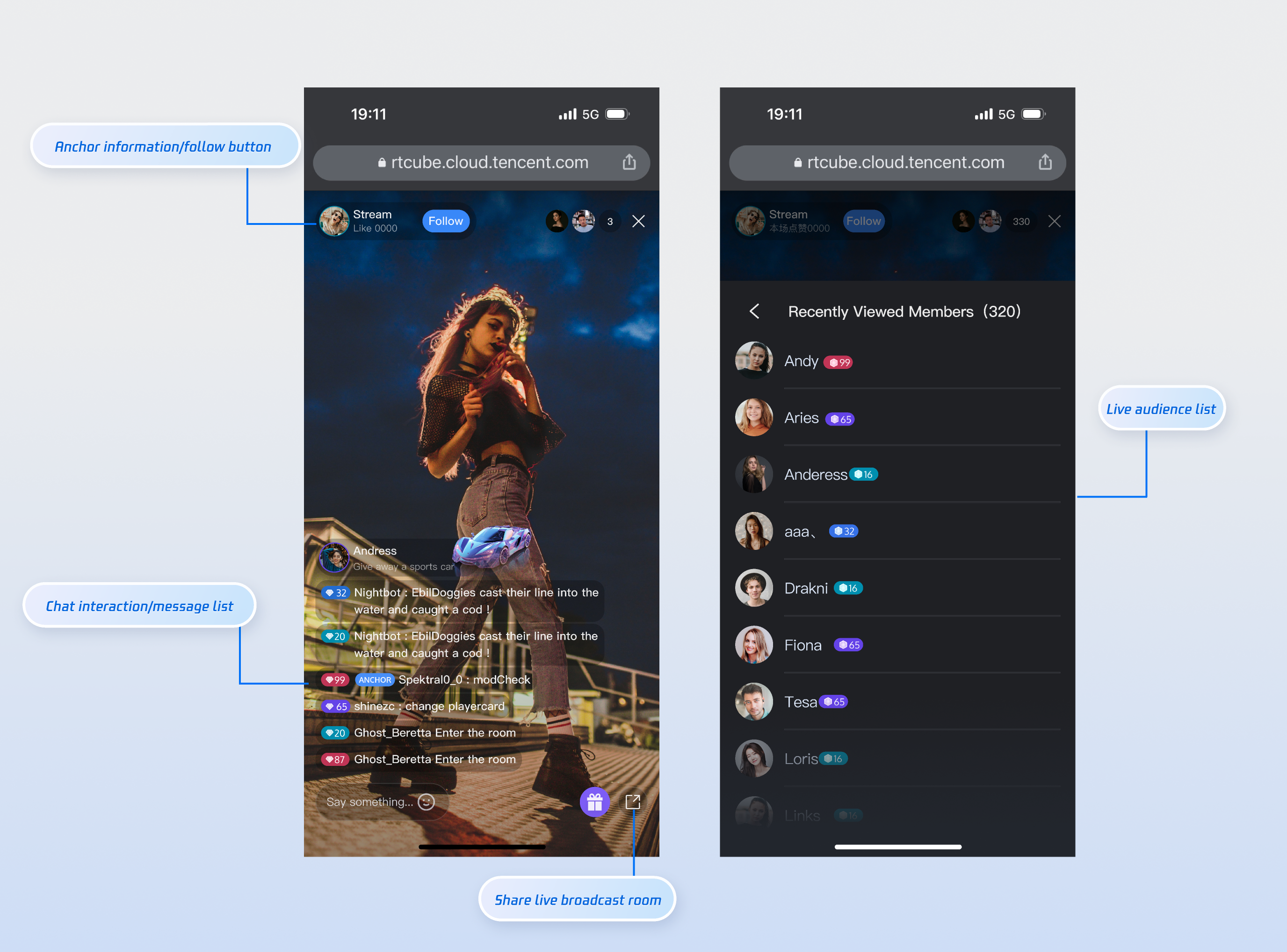
- package/tools/definitions/get_web_chat_uikit_integration_def.js +19 -12
- package/tools/definitions/get_web_chat_uikit_integration_def.js.map +1 -1
- package/tools/definitions/get_web_live_uikit_component_detail_def.js +13 -8
- package/tools/definitions/get_web_live_uikit_component_detail_def.js.map +1 -1
- package/tools/definitions/get_web_live_uikit_integration_def.js +32 -0
- package/tools/definitions/get_web_live_uikit_integration_def.js.map +1 -0
- package/tools/index.js +6 -4
- package/tools/index.js.map +1 -1
- package/tools/live/get-web-live-uikit-integration.js +52 -0
- package/tools/live/get-web-live-uikit-integration.js.map +1 -0
- package/tools/trtc/get-trtc-native-api.js +31 -0
- package/tools/trtc/get-trtc-native-api.js.map +1 -0
- package/utils/generate-structured-result.js +34 -0
- package/utils/generate-structured-result.js.map +1 -0
- package/utils/handle-component-name.js +0 -8
- package/utils/handle-component-name.js.map +1 -1
- package/utils/report-cls-client.js +1 -1
- package/utils/report-es-client.js +1 -1
- package/resource/doc/chatuikit/react/chat_window_integration.md +0 -94
- package/resource/doc/chatuikit/vue/chat_window_integration.md +0 -156
- package/tools/chat/get-web-chat-window-integration.js +0 -28
- package/tools/chat/get-web-chat-window-integration.js.map +0 -1
- package/tools/definitions/get_web_chat_window_integration_def.js +0 -26
- package/tools/definitions/get_web_chat_window_integration_def.js.map +0 -1
- /package/resource/doc/livekit/vue/{components/broadcast.md → live-pusher-integration.md} +0 -0
|
@@ -0,0 +1,269 @@
|
|
|
1
|
+
This article provides a detailed introduction to the watch page in **TUILiveKit **Demo. You can directly refer to this document to integrate the watch page we developed in your existing project, or you can deeply customize the page style, layout, and functional items according to your needs according to the content in the document.
|
|
2
|
+
|
|
3
|
+
### Function Overview
|
|
4
|
+
<table>
|
|
5
|
+
<tr>
|
|
6
|
+
<td rowspan="1" colSpan="1" >**Functional classification**</td>
|
|
7
|
+
|
|
8
|
+
<td rowspan="1" colSpan="1" >**Specific capabilities**</td>
|
|
9
|
+
</tr>
|
|
10
|
+
|
|
11
|
+
<tr>
|
|
12
|
+
<td rowspan="1" colSpan="1" >**Live video playback**</td>
|
|
13
|
+
|
|
14
|
+
<td rowspan="1" colSpan="1" >HD and smooth live streaming experience</td>
|
|
15
|
+
</tr>
|
|
16
|
+
|
|
17
|
+
<tr>
|
|
18
|
+
<td rowspan="1" colSpan="1" >**Barrage Interaction**</td>
|
|
19
|
+
|
|
20
|
+
<td rowspan="1" colSpan="1" >Real-time Barrage chat</td>
|
|
21
|
+
</tr>
|
|
22
|
+
|
|
23
|
+
<tr>
|
|
24
|
+
<td rowspan="1" colSpan="1" >**Viewer List**</td>
|
|
25
|
+
|
|
26
|
+
<td rowspan="1" colSpan="1" >View online viewer information</td>
|
|
27
|
+
</tr>
|
|
28
|
+
|
|
29
|
+
<tr>
|
|
30
|
+
<td rowspan="1" colSpan="1" >**Follow Streamer**</td>
|
|
31
|
+
|
|
32
|
+
<td rowspan="1" colSpan="1" >Follow your favorite streamers with one click</td>
|
|
33
|
+
</tr>
|
|
34
|
+
|
|
35
|
+
<tr>
|
|
36
|
+
<td rowspan="1" colSpan="1" >**Full Screen Play**</td>
|
|
37
|
+
|
|
38
|
+
<td rowspan="1" colSpan="1" >Immersive viewing experience</td>
|
|
39
|
+
</tr>
|
|
40
|
+
</table>
|
|
41
|
+
|
|
42
|
+
|
|
43
|
+
## Function Display
|
|
44
|
+
|
|
45
|
+
The watch page provides default behavior and style, but if the default behavior and style don't fully meet your needs, you can also customize the UI. The numbers shown in the figure correspond to categories in the specific function list. These mainly include live broadcast information display, video broadcast area, online audience, audio and video operation, live broadcast duration, screen resolution switching, full screen function, chat interaction, message list, etc.
|
|
46
|
+
|
|
47
|
+
|
|
48
|
+
|
|
49
|
+
|
|
50
|
+
## Quick Access
|
|
51
|
+
|
|
52
|
+
### Step 1: Environment Configuration and Service Activation
|
|
53
|
+
|
|
54
|
+
Before using Quick Access, you need to refer to [Preparations](https://write.woa.com/document/163673134112337920) configuration requirements and activate the corresponding services.
|
|
55
|
+
|
|
56
|
+
|
|
57
|
+
|
|
58
|
+
|
|
59
|
+
【npm】
|
|
60
|
+
``` bash
|
|
61
|
+
npm install tuikit-atomicx-vue3 @tencentcloud/uikit-base-component-vue3 --save
|
|
62
|
+
```
|
|
63
|
+
|
|
64
|
+
|
|
65
|
+
【pnpm】
|
|
66
|
+
``` bash
|
|
67
|
+
pnpm add tuikit-atomicx-vue3 @tencentcloud/uikit-base-component-vue3
|
|
68
|
+
```
|
|
69
|
+
|
|
70
|
+
|
|
71
|
+
【yarn】
|
|
72
|
+
``` bash
|
|
73
|
+
yarn add tuikit-atomicx-vue3 @tencentcloud/uikit-base-component-vue3
|
|
74
|
+
```
|
|
75
|
+
|
|
76
|
+
### Step 2: Access the viewing page
|
|
77
|
+
|
|
78
|
+
Create a live-player.vue file in your project and copy the following code to integrate the watch page into your project.
|
|
79
|
+
``` java
|
|
80
|
+
<template>
|
|
81
|
+
<UIKitProvider language="zh-CN">
|
|
82
|
+
<div class="container">
|
|
83
|
+
<!-- Live core area -->
|
|
84
|
+
<section class="live">
|
|
85
|
+
<header class="header">
|
|
86
|
+
<IconArrowStrokeBack class="back-btn" size="20" />
|
|
87
|
+
<Avatar :src="currentLive?.liveOwner.avatarUrl" :size="32" class="avatar" />
|
|
88
|
+
<span class="user-name">{{ currentLive?.liveOwner.userName || currentLive?.liveOwner.userId }}</span>
|
|
89
|
+
</header>
|
|
90
|
+
<LiveCoreView class="player" />
|
|
91
|
+
</section>
|
|
92
|
+
|
|
93
|
+
<div class="sidebar">
|
|
94
|
+
<!-- Online viewers list -->
|
|
95
|
+
<section class="audience">
|
|
96
|
+
<header class="section-header">
|
|
97
|
+
<h3> online viewers <span>({{ audienceList.length }})</span></h3>
|
|
98
|
+
</header>
|
|
99
|
+
<LiveAudienceList class="list" />
|
|
100
|
+
</section>
|
|
101
|
+
|
|
102
|
+
<!-- Message List & Message List -->
|
|
103
|
+
<section class="barrage">
|
|
104
|
+
<header class="section-header">
|
|
105
|
+
<h3>MessageList</h3>
|
|
106
|
+
</header>
|
|
107
|
+
<BarrageList class="list" />
|
|
108
|
+
<BarrageInput class="input" height="48px" />
|
|
109
|
+
</section>
|
|
110
|
+
</div>
|
|
111
|
+
</div>
|
|
112
|
+
</UIKitProvider>
|
|
113
|
+
</template>
|
|
114
|
+
|
|
115
|
+
<script setup lang="ts">
|
|
116
|
+
import { LiveAudienceList, BarrageList, BarrageInput, useLiveAudienceState, LiveCoreView, useLiveState, Avatar, useLoginState } from 'tuikit-atomicx-vue3';
|
|
117
|
+
import { UIKitProvider, IconArrowStrokeBack } from '@tencentcloud/uikit-base-component-vue3';
|
|
118
|
+
|
|
119
|
+
const { audienceList } = useLiveAudienceState();
|
|
120
|
+
const { currentLive } = useLiveState();
|
|
121
|
+
const { login } = useLoginState();
|
|
122
|
+
|
|
123
|
+
async function initLogin() {
|
|
124
|
+
try {
|
|
125
|
+
await login({
|
|
126
|
+
sdkAppId: 0, // SDKAppId, refer to step 1 to obtain
|
|
127
|
+
userId: '', // UserID, refer to step 1 to obtain
|
|
128
|
+
userSig: '', // userSig, refer to step 1 to obtain
|
|
129
|
+
});
|
|
130
|
+
} catch (error) {
|
|
131
|
+
console.error('Login Failed:', error);
|
|
132
|
+
}
|
|
133
|
+
}
|
|
134
|
+
|
|
135
|
+
onMounted(async () => {
|
|
136
|
+
await initLogin();
|
|
137
|
+
});
|
|
138
|
+
|
|
139
|
+
</script>
|
|
140
|
+
|
|
141
|
+
<style>:global(body){height:100vh;width:100vw;margin:0;padding:0;overflow:hidden;font-size:15px;line-height:1.6;text-rendering:optimizeLegibility;}:global(*),:global(*::before),:global(*::after){box-sizing:border-box;margin:0;}.container{display:grid;grid-template-columns:70% 30%;height:100vh;width:100vw;gap:16px;padding:16px;background:var(--bg-color-default);box-sizing:border-box;overflow:hidden;}.live{display:flex;flex-direction:column;background:var(--bg-color-operate);border-radius:12px;overflow:hidden;box-shadow:0 2px 8px var(--shadow-color);}.header{display:flex;align-items:center;gap:12px;padding:16px;border-bottom:1px solid var(--stroke-color-primary);}.back-btn{cursor:pointer;color:var(--text-color-tertiary);transition:color 0.2s;}.back-btn:hover{color:var(--text-color-link-hover);}.avatar{border:1px solid var(--uikit-color-white-7);}.user-name{color:var(--text-color-primary);font-weight:500;}.player{flex:1;background:var(--uikit-color-black-1);}.sidebar{display:flex;flex-direction:column;gap:16px;height:100%;overflow:hidden;}.audience{display:flex;flex-direction:column;background:var(--bg-color-operate);border-radius:12px;overflow:hidden;box-shadow:0 2px 8px var(--shadow-color);flex:1;min-height:0;}.barrage{display:flex;flex-direction:column;background:var(--bg-color-operate);border-radius:12px;overflow:hidden;box-shadow:0 2px 8px var(--shadow-color);flex:1;min-height:0;}.section-header{padding:16px;border-bottom:1px solid var(--stroke-color-primary);background:var(--bg-color-operate);}.section-header h3{margin:0;font-size:16px;font-weight:600;color:var(--text-color-primary);}.section-header span{font-weight:400;color:var(--text-color-secondary);font-size:14px;}.list{flex:1;min-height:0;overflow-y:auto;}.input{border-top:1px solid var(--stroke-color-primary);flex-shrink:0;height:48px;}@media (max-width:1200px){.container{grid-template-columns:1fr;grid-template-rows:60% 20% 20%;gap:12px;}.sidebar{gap:12px;}.audience,.barrage{min-height:200px;}}@media (max-width:768px){.container{padding:8px;gap:8px;grid-template-rows:50% 25% 25%;}.header,.section-header{padding:12px;}.sidebar{gap:8px;}}</style>
|
|
142
|
+
|
|
143
|
+
```
|
|
144
|
+
|
|
145
|
+
### Step 3: Start the project
|
|
146
|
+
``` bash
|
|
147
|
+
npm run dev
|
|
148
|
+
```
|
|
149
|
+
|
|
150
|
+
## Customizable
|
|
151
|
+
|
|
152
|
+
As shown in the functional diagram above, we also support customizing the UI of the watch page based on your project needs. The following table lists the main customizable features.
|
|
153
|
+
<table>
|
|
154
|
+
<tr>
|
|
155
|
+
<td rowspan="1" colSpan="1" >**Category**</td>
|
|
156
|
+
|
|
157
|
+
<td rowspan="1" colSpan="1" >**Function**</td>
|
|
158
|
+
|
|
159
|
+
<td rowspan="1" colSpan="1" >**Description**</td>
|
|
160
|
+
</tr>
|
|
161
|
+
|
|
162
|
+
<tr>
|
|
163
|
+
<td rowspan="1" colSpan="1" >**Live information display**</td>
|
|
164
|
+
|
|
165
|
+
<td rowspan="1" colSpan="1" >Customize the display of the watch page information area</td>
|
|
166
|
+
|
|
167
|
+
<td rowspan="1" colSpan="1" >**Supports:**<br>- **Show/hide the logo, replace it with your desired logo**<br>- **UI customization, show/hide the follow button, and replace it with your desired button style**</td>
|
|
168
|
+
</tr>
|
|
169
|
+
|
|
170
|
+
<tr>
|
|
171
|
+
<td rowspan="1" colSpan="1" >**Online viewers**</td>
|
|
172
|
+
|
|
173
|
+
<td rowspan="1" colSpan="1" >Customize audience information display</td>
|
|
174
|
+
|
|
175
|
+
<td rowspan="1" colSpan="1" >**Supports:**<br>- **Show/hide audience level**<br>- **Customize audience information font and color UI**<br>- **Replace icon style with your desired style**</td>
|
|
176
|
+
</tr>
|
|
177
|
+
|
|
178
|
+
<tr>
|
|
179
|
+
<td rowspan="1" colSpan="1" >**MessageList**</td>
|
|
180
|
+
|
|
181
|
+
<td rowspan="1" colSpan="1" >Custom message barrage area display</td>
|
|
182
|
+
|
|
183
|
+
<td rowspan="1" colSpan="1" >**Supports:**<br>- **Show/hide chat input area**<br>- **Supports UI customization for chat bubble style, audience level, etc.**</td>
|
|
184
|
+
</tr>
|
|
185
|
+
</table>
|
|
186
|
+
|
|
187
|
+
|
|
188
|
+
## Playing a Live Stream
|
|
189
|
+
|
|
190
|
+
#### Method 1: Playing by Specifying a LiveId
|
|
191
|
+
|
|
192
|
+
If you need to specify a LiveId for playback, you need to add the following code based on the code in [step 3](https://write.woa.com/#c1b852bc-da02-4c9f-bb11-2a63582ce978) of the Quick Access section above. The reference method is as follows:
|
|
193
|
+
``` java
|
|
194
|
+
// live-player.vue
|
|
195
|
+
import { onMounted } from 'vue';
|
|
196
|
+
import { useLiveState } from 'tuikit-atomicx-vue3';
|
|
197
|
+
|
|
198
|
+
const { joinLive } = useLiveState();
|
|
199
|
+
|
|
200
|
+
onMounted(async () => {
|
|
201
|
+
// Enter liveId to join the live broadcast room. For the specific meaning of the parameters,
|
|
202
|
+
// please refer to the preparation work in step 1.
|
|
203
|
+
await joinLive({ liveId: 'xxx' });
|
|
204
|
+
});
|
|
205
|
+
```
|
|
206
|
+
|
|
207
|
+
#### Method 2: Routing Configuration
|
|
208
|
+
|
|
209
|
+
Because of the logic involved in redirecting from the live stream list (or homepage) to the live stream room, you'll need to configure Vue Router. Create a new router folder in the project's src directory and create an index.ts file. Then, import and use the router in your main file (e.g., main.ts or index.ts). See the [GitHub code examples](https://github.com/Tencent-RTC/TUILiveKit/blob/main/Web/web-vite-vue3/src/main.ts) for more information. For a live stream list, see the Live Stream List documentation.
|
|
210
|
+
``` typescript
|
|
211
|
+
// src/router/index.ts
|
|
212
|
+
import { createRouter, createWebHistory } from 'vue-router';
|
|
213
|
+
|
|
214
|
+
const routes = [
|
|
215
|
+
{
|
|
216
|
+
path: '/live-player',
|
|
217
|
+
component: () => import('../views/live-player.vue'),
|
|
218
|
+
},
|
|
219
|
+
// If you need the live broadcast list function, you can add the following route
|
|
220
|
+
// {
|
|
221
|
+
// path: '/live-list',
|
|
222
|
+
// component: () => import('../views/live-list.vue'),
|
|
223
|
+
// },
|
|
224
|
+
];
|
|
225
|
+
|
|
226
|
+
const router = createRouter({
|
|
227
|
+
history: createWebHistory(),
|
|
228
|
+
routes,
|
|
229
|
+
});
|
|
230
|
+
export default router;
|
|
231
|
+
|
|
232
|
+
// src/main.ts
|
|
233
|
+
import { createApp } from 'vue';
|
|
234
|
+
import App from './App.vue';
|
|
235
|
+
import router from './router';
|
|
236
|
+
|
|
237
|
+
const app = createApp(App);
|
|
238
|
+
app.use(router);
|
|
239
|
+
app.mount('#app');
|
|
240
|
+
```
|
|
241
|
+
|
|
242
|
+
### Next Steps
|
|
243
|
+
|
|
244
|
+
Congratulations! You've successfully integrated the watch page. Next, you can implement content such as the anchor's start page and live broadcast list page. Please refer to the table below:
|
|
245
|
+
<table>
|
|
246
|
+
<tr>
|
|
247
|
+
<td rowspan="1" colSpan="1" >**Function**</td>
|
|
248
|
+
|
|
249
|
+
<td rowspan="1" colSpan="1" >**Description**</td>
|
|
250
|
+
|
|
251
|
+
<td rowspan="1" colSpan="1" >**Integration Guide**</td>
|
|
252
|
+
</tr>
|
|
253
|
+
|
|
254
|
+
<tr>
|
|
255
|
+
<td rowspan="1" colSpan="1" >**Host Streaming**</td>
|
|
256
|
+
|
|
257
|
+
<td rowspan="1" colSpan="1" >The complete workflow for a host to start a stream, including pre-stream setup and various in-stream interactions.</td>
|
|
258
|
+
|
|
259
|
+
<td rowspan="1" colSpan="1" >[Host Streaming](https://write.woa.com/document/194114399449153536)</td>
|
|
260
|
+
</tr>
|
|
261
|
+
|
|
262
|
+
<tr>
|
|
263
|
+
<td rowspan="1" colSpan="1" >**Live Stream List**</td>
|
|
264
|
+
|
|
265
|
+
<td rowspan="1" colSpan="1" >Display the live broadcast list interface and functions, including live broadcast list and room information display function</td>
|
|
266
|
+
|
|
267
|
+
<td rowspan="1" colSpan="1" >[Live Stream List](https://write.woa.com/document/194114814480777216)</td>
|
|
268
|
+
</tr>
|
|
269
|
+
</table>
|
|
@@ -0,0 +1,218 @@
|
|
|
1
|
+
# Web Live TUIKit Code Generation Workflow Instructions (Vue)
|
|
2
|
+
|
|
3
|
+
**【Instruction Purpose】**: Provide Agent with a **code generation blueprint** for implementing Vue Web Live TUIKit core functionalities, and guide Agent to **prioritize using the latest documentation content fetched in real-time via tools**.
|
|
4
|
+
|
|
5
|
+
**💡 Special Reminder:**
|
|
6
|
+
1. **When user requirements include 【Live List】, 【Broadcaster Page】, and 【Viewer Page】, Agent MUST add a 【Host/Viewer Identity Selection】 page or logic in the generated code to allow users to test with different UserIDs**.
|
|
7
|
+
2. **When users need to implement co-guest (mic connection) features, call** `get_web_live_state_detail` **to obtain liveKit client API for implementing related functions**.
|
|
8
|
+
|
|
9
|
+
---
|
|
10
|
+
|
|
11
|
+
## 📦 UIKit Version & Dependency Instructions
|
|
12
|
+
|
|
13
|
+
### Recommended Versions
|
|
14
|
+
```json
|
|
15
|
+
{
|
|
16
|
+
"tuikit-atomicx-vue3": "latest",
|
|
17
|
+
"@tencentcloud/uikit-base-component-vue3": "latest",
|
|
18
|
+
}
|
|
19
|
+
```
|
|
20
|
+
|
|
21
|
+
### Automatic Dependency Installation Workflow
|
|
22
|
+
After generating code, Agent **MUST automatically execute** the following steps:
|
|
23
|
+
|
|
24
|
+
1. **Detect Dependency Completeness**: Check if `package.json` contains all required dependencies
|
|
25
|
+
2. **Auto-install Dependencies**: Execute `npm install` or `pnpm install`
|
|
26
|
+
3. **Verify Installation**: Confirm successful installation before prompting user to run the project
|
|
27
|
+
|
|
28
|
+
### esbuild Issue Resolution
|
|
29
|
+
Add the following content to `package.json`. `resolutions` is compatible with `yarn`, `overrides` is compatible with `npm` and `pnpm`:
|
|
30
|
+
```json
|
|
31
|
+
{
|
|
32
|
+
"resolutions": {
|
|
33
|
+
"esbuild": "npm:esbuild-wasm@latest"
|
|
34
|
+
},
|
|
35
|
+
"overrides": {
|
|
36
|
+
"esbuild": "npm:esbuild-wasm@latest"
|
|
37
|
+
}
|
|
38
|
+
}
|
|
39
|
+
```
|
|
40
|
+
|
|
41
|
+
---
|
|
42
|
+
|
|
43
|
+
## 🔐 Automatic Test Credential Generation
|
|
44
|
+
|
|
45
|
+
### UserSig Auto-fetch Workflow
|
|
46
|
+
|
|
47
|
+
Before generating code, Agent **MUST**:
|
|
48
|
+
|
|
49
|
+
1. **Call `get_usersig` MCP tool** to automatically generate test account credentials
|
|
50
|
+
2. **Generate Test UserIDs**:
|
|
51
|
+
- Broadcaster UserID: Format as live001 or host001
|
|
52
|
+
- Viewer UserID: Format as user001 or viewer001
|
|
53
|
+
3. **Embed in Code**: Directly write the generated SDKAppID, userID (for both host and viewer), and userSig into the code's configuration section
|
|
54
|
+
4. **Security Notice**: Clearly mark in code comments that these are test credentials; production environment MUST generate on backend
|
|
55
|
+
|
|
56
|
+
---
|
|
57
|
+
|
|
58
|
+
## ⚙️ Core Code Generation Workflow (LLM Action Guide)
|
|
59
|
+
|
|
60
|
+
Agent, this tool has **fetched in real-time** the latest documentation content corresponding to the user's required functionalities (Goals), and attached this content **below this instruction** (in the `llm_code_generation_instructions_md` field).
|
|
61
|
+
|
|
62
|
+
### Strictly Execute Steps:
|
|
63
|
+
|
|
64
|
+
#### Step 0: Pre-preparation (Automated)
|
|
65
|
+
```
|
|
66
|
+
a. Call get_usersig tool to generate test credentials
|
|
67
|
+
- Broadcaster userID: Use format `live001`
|
|
68
|
+
- Viewer userID: Use format `user001`
|
|
69
|
+
|
|
70
|
+
b. Check and prepare project environment
|
|
71
|
+
- Verify dependency versions in package.json
|
|
72
|
+
- Automatically add to dependencies if missing
|
|
73
|
+
|
|
74
|
+
c. Execute dependency installation
|
|
75
|
+
- Run npm install or pnpm install
|
|
76
|
+
- Wait for completion and check for errors
|
|
77
|
+
```
|
|
78
|
+
|
|
79
|
+
#### Step 1: Select Functional Modules
|
|
80
|
+
Based on user's specific functional requirements, select corresponding instructions from the following function blocks.
|
|
81
|
+
|
|
82
|
+
#### Step 2: Use Real-time Documentation
|
|
83
|
+
**MUST prioritize and exclusively** use the real-time documentation content **provided in this tool's return results** (not external URLs) to generate Vue code snippets.
|
|
84
|
+
|
|
85
|
+
---
|
|
86
|
+
|
|
87
|
+
## 🎯 Feature Implementation Instructions
|
|
88
|
+
|
|
89
|
+
### 1. Implement Live List Page (`liveList`)
|
|
90
|
+
|
|
91
|
+
**Target Component**: `liveList`
|
|
92
|
+
|
|
93
|
+
**Code Generation Instructions**:
|
|
94
|
+
- Generate Vue component structure, import `liveList`
|
|
95
|
+
- **Auto-inject Test Credentials**: Use auto-generated **viewer** `SDKAppID`, `userID`, `userSig` during component initialization
|
|
96
|
+
- **Core Logic**: Reference real-time documentation content in this tool's return results, extract latest API calls and example code
|
|
97
|
+
|
|
98
|
+
**Dependent Components**: `liveList`
|
|
99
|
+
|
|
100
|
+
**Post-generation Actions**:
|
|
101
|
+
```bash
|
|
102
|
+
# Agent auto-executes
|
|
103
|
+
npm install # Install dependencies
|
|
104
|
+
npm run dev # Start dev server
|
|
105
|
+
```
|
|
106
|
+
|
|
107
|
+
---
|
|
108
|
+
|
|
109
|
+
### 2. Implement PC Live Viewer Page (`livePlayer` & `barrage`)
|
|
110
|
+
|
|
111
|
+
**Target Components**: `livePlayer`, `barrage`
|
|
112
|
+
|
|
113
|
+
**Code Generation Instructions**:
|
|
114
|
+
- Generate viewer page based on real-time documentation examples
|
|
115
|
+
- **Auto-inject Test Credentials**: Configure **viewer** test account during player initialization
|
|
116
|
+
- **Core Logic**: Reference real-time documentation content in this tool's return results, MUST follow documentation steps to integrate `livePlayer` and `barrage` (bullet comments), and demonstrate how to monitor video stream status
|
|
117
|
+
- **Interaction Optimization**: Add loading states, error handling, reconnection mechanisms
|
|
118
|
+
|
|
119
|
+
**Dependent Components**: `livePlayer`, `barrage`
|
|
120
|
+
|
|
121
|
+
---
|
|
122
|
+
|
|
123
|
+
### 3. Implement H5 Live Viewer Page (`livePlayer` & `barrage`)
|
|
124
|
+
|
|
125
|
+
**Target Components**: `livePlayer`, `barrage`
|
|
126
|
+
|
|
127
|
+
**Code Generation Instructions**:
|
|
128
|
+
- Generate viewer page based on real-time documentation examples
|
|
129
|
+
- **Auto-inject Test Credentials**: Configure **viewer** test account during player initialization
|
|
130
|
+
- **Core Logic**: Reference real-time documentation content in this tool's return results, MUST follow documentation steps to integrate `livePlayer` and `barrage` (bullet comments), and demonstrate how to monitor video stream status
|
|
131
|
+
- **Interaction Optimization**: Add loading states, error handling, reconnection mechanisms
|
|
132
|
+
|
|
133
|
+
**Dependent Components**: `livePlayer`, `barrage`
|
|
134
|
+
|
|
135
|
+
---
|
|
136
|
+
|
|
137
|
+
### 4. Implement Live Broadcasting Page (`livePusher`)
|
|
138
|
+
|
|
139
|
+
**Target Component**: `livePusher`
|
|
140
|
+
|
|
141
|
+
**Code Generation Instructions**:
|
|
142
|
+
- Generate broadcasting page based on real-time documentation examples
|
|
143
|
+
- **Auto-inject Test Credentials**: Configure **broadcaster** test account during pusher initialization
|
|
144
|
+
- **Core Logic**: Reference real-time documentation content in this tool's return results, MUST include Vue logic to handle camera and microphone **permission requests and toggle controls**
|
|
145
|
+
- **Device Detection**: Auto-detect available camera and microphone devices
|
|
146
|
+
- **Error Handling**: Handle permission denial, device unavailability, and other exceptions
|
|
147
|
+
|
|
148
|
+
**Dependent Components**: `livePusher`
|
|
149
|
+
|
|
150
|
+
---
|
|
151
|
+
|
|
152
|
+
### 5. Implement Live Co-guest Feature (`CoGuestPanel`)
|
|
153
|
+
|
|
154
|
+
**Target Component**: `CoGuestPanel`
|
|
155
|
+
|
|
156
|
+
**Code Generation Instructions**:
|
|
157
|
+
- Generate complex components or logic modules for co-guest functionality based on real-time documentation examples
|
|
158
|
+
- **Auto-inject Test Credentials**: Configure test accounts separately for broadcaster and co-guest viewers
|
|
159
|
+
- **Core Logic**: Reference real-time documentation content in this tool's return results, code should demonstrate how to use `CoGuestPanel` to manage co-guest requests and coordinate pusher/player logic switching
|
|
160
|
+
- **State Management**: Handle state transitions for co-guest invitations, acceptance, rejection, disconnection, etc.
|
|
161
|
+
- **Multi-person Co-guest**: Support scenarios with multiple simultaneous co-guests
|
|
162
|
+
|
|
163
|
+
**Dependent Components**: `CoGuestPanel`, `livePusher`, `livePlayer`
|
|
164
|
+
|
|
165
|
+
---
|
|
166
|
+
|
|
167
|
+
## 🔄 Complete Automation Workflow Summary
|
|
168
|
+
|
|
169
|
+
```mermaid
|
|
170
|
+
graph TD
|
|
171
|
+
A[Receive User Requirements] --> B[Call get_web_live_uikit_integration to Fetch Latest Docs]
|
|
172
|
+
B --> C[Check package.json Dependencies]
|
|
173
|
+
C --> D[Auto-add Missing Dependencies]
|
|
174
|
+
D --> E[Execute npm install]
|
|
175
|
+
E --> F[Generate Code Based on Real-time Docs]
|
|
176
|
+
F --> G[Call get_usersig to Generate Test Credentials]
|
|
177
|
+
G --> H[Inject Test Credentials into Code]
|
|
178
|
+
H --> I[Add Security Comments and Warnings]
|
|
179
|
+
I --> J[Start Dev Server]
|
|
180
|
+
J --> K[Output Test Info to User]
|
|
181
|
+
```
|
|
182
|
+
|
|
183
|
+
---
|
|
184
|
+
|
|
185
|
+
## 📋 Agent Checklist
|
|
186
|
+
|
|
187
|
+
After completing code generation, Agent MUST confirm:
|
|
188
|
+
|
|
189
|
+
- [x] Called `get_usersig` to generate test credentials
|
|
190
|
+
- [x] Embedded credentials into code configuration section
|
|
191
|
+
- [x] Added security warning comments in code
|
|
192
|
+
- [x] Checked `package.json` dependency completeness
|
|
193
|
+
- [x] Auto-executed `npm install`
|
|
194
|
+
- [x] Verified successful dependency installation
|
|
195
|
+
- [x] Used real-time documentation content (not external URLs)
|
|
196
|
+
- [x] Added error handling and logging output
|
|
197
|
+
- [x] Provided test account information to user
|
|
198
|
+
- [x] Prompted user to run `npm run dev`
|
|
199
|
+
|
|
200
|
+
---
|
|
201
|
+
|
|
202
|
+
## 🚨 Security Warning (MUST be included in generated code comments)
|
|
203
|
+
|
|
204
|
+
```javascript
|
|
205
|
+
/**
|
|
206
|
+
* ⚠️ Important Security Notice
|
|
207
|
+
*
|
|
208
|
+
* 1. The current userSig is a test credential auto-generated by development tools
|
|
209
|
+
* 2. userSig validity period is 7 days, regeneration required after expiration
|
|
210
|
+
* 3. ❌ Frontend generation of userSig is STRICTLY PROHIBITED in production
|
|
211
|
+
* 4. ✅ Before going live, userSig MUST be generated on backend services
|
|
212
|
+
* 5. Reference documentation: https://trtc.io/document/34385
|
|
213
|
+
*
|
|
214
|
+
* SDKAppID and secretKey retrieval locations:
|
|
215
|
+
* - Chat Application: https://console.trtc.io
|
|
216
|
+
* - TRTC Application: https://console.trtc.io
|
|
217
|
+
*/
|
|
218
|
+
```
|