@tencent-rtc/mcp 1.0.7 → 1.1.6
This diff represents the content of publicly available package versions that have been released to one of the supported registries. The information contained in this diff is provided for informational purposes only and reflects changes between package versions as they appear in their respective public registries.
- package/README.md +8 -4
- package/index.js +2 -0
- package/index.js.map +1 -1
- package/libs/TLSSigAPIv2.d.ts +134 -0
- package/libs/TLSSigAPIv2.js +243 -0
- package/package.json +1 -1
- package/resource/doc/chatuikit/react/chat_window_integration.md +92 -0
- package/resource/doc/chatuikit/react/components/chat.md +44 -0
- package/resource/doc/chatuikit/react/components/chatheader.md +189 -0
- package/resource/doc/chatuikit/react/components/conversation-list.md +1017 -0
- package/resource/doc/chatuikit/react/components/message-input.md +950 -0
- package/resource/doc/chatuikit/react/components/message-list.md +485 -0
- package/resource/doc/chatuikit/react/components/tuikit.md +80 -0
- package/resource/doc/chatuikit/react/create-group.md +23 -0
- package/resource/doc/chatuikit/react/init.md +26 -0
- package/resource/doc/chatuikit/react/integration.md +14 -10
- package/resource/doc/chatuikit/vue/chat_window_integration.md +155 -0
- package/resource/doc/chatuikit/vue/components/chat.md +50 -0
- package/resource/doc/chatuikit/{vue3 → vue}/components/chatheader.md +1 -1
- package/resource/doc/chatuikit/vue/components/conversation-list.md +770 -0
- package/resource/doc/chatuikit/{vue3/components/MessageInput.md → vue/components/message-input.md} +4 -1
- package/resource/doc/chatuikit/vue/components/message-list.md +662 -0
- package/resource/doc/chatuikit/vue/components/tuikit.md +45 -0
- package/resource/doc/chatuikit/vue/create-group.md +25 -0
- package/resource/doc/chatuikit/vue/init.md +40 -0
- package/resource/doc/chatuikit/{vue3 → vue}/integration.md +34 -74
- package/resource/doc/livekit/vue/components/barrage.md +616 -0
- package/resource/doc/livekit/vue/components/broadcast.md +595 -0
- package/resource/doc/livekit/vue/components/co-guest-panel.md +130 -0
- package/resource/doc/livekit/vue/components/live-audience-list.md +282 -0
- package/resource/doc/livekit/vue/components/live-list.md +200 -0
- package/resource/doc/livekit/vue/components/live-player.md +269 -0
- package/resource/doc/livekit/vue/components/live-scene-panel.md +175 -0
- package/resource/doc/livekit/vue/components/live-view.md +398 -0
- package/resource/doc/livekit/vue/components/stream-mixer.md +446 -0
- package/resource/doc/livekit/vue/states/live-state.md +3591 -0
- package/resource/doc/roomkit/vue/states/device-state.md +369 -0
- package/resource/doc/roomkit/vue/states/login-state.md +59 -0
- package/resource/doc/roomkit/vue/states/room-list-state.md +355 -0
- package/resource/doc/roomkit/vue/states/room-participant-state.md +388 -0
- package/server-config.js +35 -0
- package/server-config.js.map +1 -0
- package/tools/call/{get-native-call-integration-guide.js → get-native-call-integration.js} +5 -6
- package/tools/call/get-native-call-integration.js.map +1 -0
- package/tools/call/{get-web-call-integration-guide.js → get-web-call-integration.js} +7 -7
- package/tools/call/get-web-call-integration.js.map +1 -0
- package/tools/chat/create-group.js +30 -0
- package/tools/chat/create-group.js.map +1 -0
- package/tools/chat/get-chat-faq.js +3 -3
- package/tools/chat/get-chat-faq.js.map +1 -1
- package/tools/chat/get-native-chat-integration.js +34 -0
- package/tools/chat/get-native-chat-integration.js.map +1 -0
- package/tools/chat/get-web-chat-component-detail.js +9 -5
- package/tools/chat/get-web-chat-component-detail.js.map +1 -1
- package/tools/chat/get-web-chat-integration.js +37 -0
- package/tools/chat/get-web-chat-integration.js.map +1 -0
- package/tools/chat/get-web-chat-uikit-init.js +30 -0
- package/tools/chat/get-web-chat-uikit-init.js.map +1 -0
- package/tools/chat/get-web-chat-window-integration.js +37 -0
- package/tools/chat/get-web-chat-window-integration.js.map +1 -0
- package/tools/common/get-usersig.js +31 -26
- package/tools/common/get-usersig.js.map +1 -1
- package/tools/common/present-framework-choice.js +9 -19
- package/tools/common/present-framework-choice.js.map +1 -1
- package/tools/common/record-prompt.js +7 -8
- package/tools/common/record-prompt.js.map +1 -1
- package/tools/common/record-result.js +9 -8
- package/tools/common/record-result.js.map +1 -1
- package/tools/index.js +32 -13
- package/tools/index.js.map +1 -1
- package/tools/live/get-web-live-component-detail.js +34 -0
- package/tools/live/get-web-live-component-detail.js.map +1 -0
- package/tools/live/get-web-live-state-detail.js +34 -0
- package/tools/live/get-web-live-state-detail.js.map +1 -0
- package/tools/room/get-web-room-state-detail.js +34 -0
- package/tools/room/get-web-room-state-detail.js.map +1 -0
- package/tools/rtcengine/get-rtcengine-web-sdk-integration-guide.js +35 -0
- package/tools/rtcengine/get-rtcengine-web-sdk-integration-guide.js.map +1 -0
- package/tools/rtcengine/{get-rtcenigne-faq.js → get-trtc-web-sdk-faq.js} +5 -5
- package/tools/rtcengine/get-trtc-web-sdk-faq.js.map +1 -0
- package/tools/rtcengine/get-trtc-web-sdk-integration-guide.js +36 -0
- package/tools/rtcengine/get-trtc-web-sdk-integration-guide.js.map +1 -0
- package/utils/generate-usersig.js +7 -9
- package/utils/generate-usersig.js.map +1 -1
- package/utils/handle-component-name.js +57 -0
- package/utils/handle-component-name.js.map +1 -0
- package/utils/handle-framework.js +9 -0
- package/utils/handle-framework.js.map +1 -0
- package/utils/handle-state-name.js +29 -0
- package/utils/handle-state-name.js.map +1 -0
- package/@tencent/aegis-node-sdk/CHANGELOG.md +0 -8
- package/@tencent/aegis-node-sdk/LICENSE +0 -21
- package/@tencent/aegis-node-sdk/README.md +0 -562
- package/@tencent/aegis-node-sdk/lib/aegis.min.js +0 -1
- package/@tencent/aegis-node-sdk/lib/packages/core/src/constant/config.d.ts +0 -14
- package/@tencent/aegis-node-sdk/lib/packages/core/src/constant/global.d.ts +0 -1
- package/@tencent/aegis-node-sdk/lib/packages/core/src/constant/index.d.ts +0 -9
- package/@tencent/aegis-node-sdk/lib/packages/core/src/constant/report-ignore.d.ts +0 -2
- package/@tencent/aegis-node-sdk/lib/packages/core/src/core.d.ts +0 -85
- package/@tencent/aegis-node-sdk/lib/packages/core/src/hooks/afterRequestHooks.d.ts +0 -3
- package/@tencent/aegis-node-sdk/lib/packages/core/src/hooks/beforeRequestHooks.d.ts +0 -9
- package/@tencent/aegis-node-sdk/lib/packages/core/src/hooks/modifyRequestHooks.d.ts +0 -3
- package/@tencent/aegis-node-sdk/lib/packages/core/src/index.d.ts +0 -9
- package/@tencent/aegis-node-sdk/lib/packages/core/src/interface/config.d.ts +0 -62
- package/@tencent/aegis-node-sdk/lib/packages/core/src/interface/env.d.ts +0 -11
- package/@tencent/aegis-node-sdk/lib/packages/core/src/interface/index.d.ts +0 -4
- package/@tencent/aegis-node-sdk/lib/packages/core/src/interface/log.d.ts +0 -130
- package/@tencent/aegis-node-sdk/lib/packages/core/src/interface/send.d.ts +0 -34
- package/@tencent/aegis-node-sdk/lib/packages/core/src/pipes/format.d.ts +0 -2
- package/@tencent/aegis-node-sdk/lib/packages/core/src/pipes/index.d.ts +0 -18
- package/@tencent/aegis-node-sdk/lib/packages/core/src/pipes/length-limit.d.ts +0 -8
- package/@tencent/aegis-node-sdk/lib/packages/core/src/pipes/pv.d.ts +0 -8
- package/@tencent/aegis-node-sdk/lib/packages/core/src/pipes/remove-payload.d.ts +0 -2
- package/@tencent/aegis-node-sdk/lib/packages/core/src/pipes/repeat-limit.d.ts +0 -4
- package/@tencent/aegis-node-sdk/lib/packages/core/src/pipes/report.d.ts +0 -10
- package/@tencent/aegis-node-sdk/lib/packages/core/src/pipes/sample.d.ts +0 -3
- package/@tencent/aegis-node-sdk/lib/packages/core/src/pipes/throttle.d.ts +0 -3
- package/@tencent/aegis-node-sdk/lib/packages/core/src/pipes/trace/index.d.ts +0 -34
- package/@tencent/aegis-node-sdk/lib/packages/core/src/pipes/trace/jwt.d.ts +0 -12
- package/@tencent/aegis-node-sdk/lib/packages/core/src/pipes/trace/ot-js.d.ts +0 -14
- package/@tencent/aegis-node-sdk/lib/packages/core/src/pipes/trace/uuid.d.ts +0 -2
- package/@tencent/aegis-node-sdk/lib/packages/core/src/pipes/whitelist.d.ts +0 -12
- package/@tencent/aegis-node-sdk/lib/packages/core/src/pipes/write-before.d.ts +0 -3
- package/@tencent/aegis-node-sdk/lib/packages/core/src/plugin.d.ts +0 -33
- package/@tencent/aegis-node-sdk/lib/packages/core/src/polyfill.d.ts +0 -0
- package/@tencent/aegis-node-sdk/lib/packages/core/src/util/destroy.d.ts +0 -2
- package/@tencent/aegis-node-sdk/lib/packages/core/src/util/event-emitter.d.ts +0 -18
- package/@tencent/aegis-node-sdk/lib/packages/core/src/util/index.d.ts +0 -60
- package/@tencent/aegis-node-sdk/lib/packages/node-sdk/src/index.d.ts +0 -15
- package/@tencent/aegis-node-sdk/lib/packages/node-sdk/src/interface/selector.d.ts +0 -5
- package/@tencent/aegis-node-sdk/lib/packages/node-sdk/src/pipes/batch-report-pipe.d.ts +0 -6
- package/@tencent/aegis-node-sdk/lib/packages/node-sdk/src/protocol/protocol_base.d.ts +0 -18
- package/@tencent/aegis-node-sdk/lib/packages/node-sdk/src/protocol/protocol_http.d.ts +0 -12
- package/@tencent/aegis-node-sdk/lib/packages/node-sdk/src/selector/ip_selector.d.ts +0 -10
- package/@tencent/aegis-node-sdk/lib/packages/node-sdk/src/selector/polaris_selector.d.ts +0 -20
- package/@tencent/aegis-node-sdk/lib/packages/node-sdk/src/selector/selector_base.d.ts +0 -27
- package/@tencent/aegis-node-sdk/lib/packages/node-sdk/src/util/eval_require.d.ts +0 -2
- package/@tencent/aegis-node-sdk/package.json +0 -19
- package/@tencent/polaris/README.md +0 -407
- package/@tencent/polaris/dist/consumer/health.d.ts +0 -126
- package/@tencent/polaris/dist/consumer/health.js +0 -283
- package/@tencent/polaris/dist/consumer/health.js.map +0 -1
- package/@tencent/polaris/dist/consumer/index.d.ts +0 -120
- package/@tencent/polaris/dist/consumer/index.js +0 -348
- package/@tencent/polaris/dist/consumer/index.js.map +0 -1
- package/@tencent/polaris/dist/consumer/monitor.d.ts +0 -145
- package/@tencent/polaris/dist/consumer/monitor.js +0 -343
- package/@tencent/polaris/dist/consumer/monitor.js.map +0 -1
- package/@tencent/polaris/dist/consumer/selector.d.ts +0 -73
- package/@tencent/polaris/dist/consumer/selector.js +0 -316
- package/@tencent/polaris/dist/consumer/selector.js.map +0 -1
- package/@tencent/polaris/dist/errors.d.ts +0 -373
- package/@tencent/polaris/dist/errors.js +0 -154
- package/@tencent/polaris/dist/errors.js.map +0 -1
- package/@tencent/polaris/dist/global.d.ts +0 -16
- package/@tencent/polaris/dist/global.js +0 -18
- package/@tencent/polaris/dist/global.js.map +0 -1
- package/@tencent/polaris/dist/index.d.ts +0 -62
- package/@tencent/polaris/dist/index.js +0 -145
- package/@tencent/polaris/dist/index.js.map +0 -1
- package/@tencent/polaris/dist/instance.d.ts +0 -109
- package/@tencent/polaris/dist/instance.js +0 -38
- package/@tencent/polaris/dist/instance.js.map +0 -1
- package/@tencent/polaris/dist/limiter/bucket.d.ts +0 -51
- package/@tencent/polaris/dist/limiter/bucket.js +0 -152
- package/@tencent/polaris/dist/limiter/bucket.js.map +0 -1
- package/@tencent/polaris/dist/limiter/index.d.ts +0 -73
- package/@tencent/polaris/dist/limiter/index.js +0 -149
- package/@tencent/polaris/dist/limiter/index.js.map +0 -1
- package/@tencent/polaris/dist/limiter/ratelimit.d.ts +0 -27
- package/@tencent/polaris/dist/limiter/ratelimit.js +0 -134
- package/@tencent/polaris/dist/limiter/ratelimit.js.map +0 -1
- package/@tencent/polaris/dist/limiter/ratelimiter/base.d.ts +0 -17
- package/@tencent/polaris/dist/limiter/ratelimiter/base.js +0 -15
- package/@tencent/polaris/dist/limiter/ratelimiter/base.js.map +0 -1
- package/@tencent/polaris/dist/limiter/ratelimiter/global.d.ts +0 -59
- package/@tencent/polaris/dist/limiter/ratelimiter/global.js +0 -397
- package/@tencent/polaris/dist/limiter/ratelimiter/global.js.map +0 -1
- package/@tencent/polaris/dist/limiter/ratelimiter/index.d.ts +0 -3
- package/@tencent/polaris/dist/limiter/ratelimiter/index.js +0 -19
- package/@tencent/polaris/dist/limiter/ratelimiter/index.js.map +0 -1
- package/@tencent/polaris/dist/limiter/ratelimiter/local.d.ts +0 -17
- package/@tencent/polaris/dist/limiter/ratelimiter/local.js +0 -52
- package/@tencent/polaris/dist/limiter/ratelimiter/local.js.map +0 -1
- package/@tencent/polaris/dist/location.d.ts +0 -48
- package/@tencent/polaris/dist/location.js +0 -67
- package/@tencent/polaris/dist/location.js.map +0 -1
- package/@tencent/polaris/dist/logging.d.ts +0 -106
- package/@tencent/polaris/dist/logging.js +0 -130
- package/@tencent/polaris/dist/logging.js.map +0 -1
- package/@tencent/polaris/dist/metadata.d.ts +0 -78
- package/@tencent/polaris/dist/metadata.js +0 -119
- package/@tencent/polaris/dist/metadata.js.map +0 -1
- package/@tencent/polaris/dist/plugins/breaker/polaris.d.ts +0 -47
- package/@tencent/polaris/dist/plugins/breaker/polaris.js +0 -162
- package/@tencent/polaris/dist/plugins/breaker/polaris.js.map +0 -1
- package/@tencent/polaris/dist/plugins/lb/base.d.ts +0 -24
- package/@tencent/polaris/dist/plugins/lb/base.js +0 -32
- package/@tencent/polaris/dist/plugins/lb/base.js.map +0 -1
- package/@tencent/polaris/dist/plugins/lb/edf.d.ts +0 -24
- package/@tencent/polaris/dist/plugins/lb/edf.js +0 -77
- package/@tencent/polaris/dist/plugins/lb/edf.js.map +0 -1
- package/@tencent/polaris/dist/plugins/lb/hashring.d.ts +0 -24
- package/@tencent/polaris/dist/plugins/lb/hashring.js +0 -53
- package/@tencent/polaris/dist/plugins/lb/hashring.js.map +0 -1
- package/@tencent/polaris/dist/plugins/lb/sticky.d.ts +0 -31
- package/@tencent/polaris/dist/plugins/lb/sticky.js +0 -88
- package/@tencent/polaris/dist/plugins/lb/sticky.js.map +0 -1
- package/@tencent/polaris/dist/plugins/lb/swrr.d.ts +0 -25
- package/@tencent/polaris/dist/plugins/lb/swrr.js +0 -72
- package/@tencent/polaris/dist/plugins/lb/swrr.js.map +0 -1
- package/@tencent/polaris/dist/plugins/lb/wr.d.ts +0 -17
- package/@tencent/polaris/dist/plugins/lb/wr.js +0 -50
- package/@tencent/polaris/dist/plugins/lb/wr.js.map +0 -1
- package/@tencent/polaris/dist/plugins/lb/wrr.d.ts +0 -19
- package/@tencent/polaris/dist/plugins/lb/wrr.js +0 -81
- package/@tencent/polaris/dist/plugins/lb/wrr.js.map +0 -1
- package/@tencent/polaris/dist/plugins/logging/console.d.ts +0 -10
- package/@tencent/polaris/dist/plugins/logging/console.js +0 -38
- package/@tencent/polaris/dist/plugins/logging/console.js.map +0 -1
- package/@tencent/polaris/dist/plugins/naming/local-server/index.d.ts +0 -32
- package/@tencent/polaris/dist/plugins/naming/local-server/index.js +0 -88
- package/@tencent/polaris/dist/plugins/naming/local-server/index.js.map +0 -1
- package/@tencent/polaris/dist/plugins/naming/polaris-server/adapter/base.d.ts +0 -124
- package/@tencent/polaris/dist/plugins/naming/polaris-server/adapter/base.js +0 -398
- package/@tencent/polaris/dist/plugins/naming/polaris-server/adapter/base.js.map +0 -1
- package/@tencent/polaris/dist/plugins/naming/polaris-server/adapter/discover.d.ts +0 -27
- package/@tencent/polaris/dist/plugins/naming/polaris-server/adapter/discover.js +0 -287
- package/@tencent/polaris/dist/plugins/naming/polaris-server/adapter/discover.js.map +0 -1
- package/@tencent/polaris/dist/plugins/naming/polaris-server/adapter/index.d.ts +0 -15
- package/@tencent/polaris/dist/plugins/naming/polaris-server/adapter/index.js +0 -43
- package/@tencent/polaris/dist/plugins/naming/polaris-server/adapter/index.js.map +0 -1
- package/@tencent/polaris/dist/plugins/naming/polaris-server/adapter/monitor.d.ts +0 -28
- package/@tencent/polaris/dist/plugins/naming/polaris-server/adapter/monitor.js +0 -249
- package/@tencent/polaris/dist/plugins/naming/polaris-server/adapter/monitor.js.map +0 -1
- package/@tencent/polaris/dist/plugins/naming/polaris-server/adapter/ratelimit.d.ts +0 -19
- package/@tencent/polaris/dist/plugins/naming/polaris-server/adapter/ratelimit.js +0 -222
- package/@tencent/polaris/dist/plugins/naming/polaris-server/adapter/ratelimit.js.map +0 -1
- package/@tencent/polaris/dist/plugins/naming/polaris-server/connector/grpc/bidi.d.ts +0 -26
- package/@tencent/polaris/dist/plugins/naming/polaris-server/connector/grpc/bidi.js +0 -99
- package/@tencent/polaris/dist/plugins/naming/polaris-server/connector/grpc/bidi.js.map +0 -1
- package/@tencent/polaris/dist/plugins/naming/polaris-server/connector/grpc/index.d.ts +0 -60
- package/@tencent/polaris/dist/plugins/naming/polaris-server/connector/grpc/index.js +0 -259
- package/@tencent/polaris/dist/plugins/naming/polaris-server/connector/grpc/index.js.map +0 -1
- package/@tencent/polaris/dist/plugins/naming/polaris-server/connector/grpc/pb/discover.proto +0 -24
- package/@tencent/polaris/dist/plugins/naming/polaris-server/connector/grpc/pb/monitor.proto +0 -18
- package/@tencent/polaris/dist/plugins/naming/polaris-server/connector/grpc/pb/ratelimit.proto +0 -12
- package/@tencent/polaris/dist/plugins/naming/polaris-server/connector/http/index.d.ts +0 -39
- package/@tencent/polaris/dist/plugins/naming/polaris-server/connector/http/index.js +0 -115
- package/@tencent/polaris/dist/plugins/naming/polaris-server/connector/http/index.js.map +0 -1
- package/@tencent/polaris/dist/plugins/naming/polaris-server/discover-pb/api.proto +0 -24
- package/@tencent/polaris/dist/plugins/naming/polaris-server/discover-pb/client.proto +0 -22
- package/@tencent/polaris/dist/plugins/naming/polaris-server/discover-pb/model.proto +0 -28
- package/@tencent/polaris/dist/plugins/naming/polaris-server/discover-pb/ratelimit.proto +0 -80
- package/@tencent/polaris/dist/plugins/naming/polaris-server/discover-pb/request.proto +0 -18
- package/@tencent/polaris/dist/plugins/naming/polaris-server/discover-pb/response.proto +0 -65
- package/@tencent/polaris/dist/plugins/naming/polaris-server/discover-pb/routing.proto +0 -66
- package/@tencent/polaris/dist/plugins/naming/polaris-server/discover-pb/service.proto +0 -95
- package/@tencent/polaris/dist/plugins/naming/polaris-server/discover-pb/types.d.ts +0 -1568
- package/@tencent/polaris/dist/plugins/naming/polaris-server/index.d.ts +0 -36
- package/@tencent/polaris/dist/plugins/naming/polaris-server/index.js +0 -51
- package/@tencent/polaris/dist/plugins/naming/polaris-server/index.js.map +0 -1
- package/@tencent/polaris/dist/plugins/naming/polaris-server/monitor-pb/api.proto +0 -18
- package/@tencent/polaris/dist/plugins/naming/polaris-server/monitor-pb/circuitbreak.proto +0 -67
- package/@tencent/polaris/dist/plugins/naming/polaris-server/monitor-pb/request.proto +0 -82
- package/@tencent/polaris/dist/plugins/naming/polaris-server/monitor-pb/response.proto +0 -11
- package/@tencent/polaris/dist/plugins/naming/polaris-server/monitor-pb/sdkcache.proto +0 -46
- package/@tencent/polaris/dist/plugins/naming/polaris-server/monitor-pb/sdkconfiguration.proto +0 -16
- package/@tencent/polaris/dist/plugins/naming/polaris-server/monitor-pb/sdktoken.proto +0 -10
- package/@tencent/polaris/dist/plugins/naming/polaris-server/monitor-pb/types.d.ts +0 -1102
- package/@tencent/polaris/dist/plugins/naming/polaris-server/pool.d.ts +0 -29
- package/@tencent/polaris/dist/plugins/naming/polaris-server/pool.js +0 -77
- package/@tencent/polaris/dist/plugins/naming/polaris-server/pool.js.map +0 -1
- package/@tencent/polaris/dist/plugins/naming/polaris-server/ratelimit-pb/api.proto +0 -12
- package/@tencent/polaris/dist/plugins/naming/polaris-server/ratelimit-pb/ratelimit.proto +0 -28
- package/@tencent/polaris/dist/plugins/naming/polaris-server/ratelimit-pb/types.d.ts +0 -395
- package/@tencent/polaris/dist/plugins/naming/polaris-server/rules.d.ts +0 -13
- package/@tencent/polaris/dist/plugins/naming/polaris-server/rules.js +0 -116
- package/@tencent/polaris/dist/plugins/naming/polaris-server/rules.js.map +0 -1
- package/@tencent/polaris/dist/plugins/naming/polaris-server/types.d.ts +0 -67
- package/@tencent/polaris/dist/plugins/naming/polaris-server/types.js +0 -67
- package/@tencent/polaris/dist/plugins/naming/polaris-server/types.js.map +0 -1
- package/@tencent/polaris/dist/plugins/naming/polaris-server/utils.d.ts +0 -99
- package/@tencent/polaris/dist/plugins/naming/polaris-server/utils.js +0 -217
- package/@tencent/polaris/dist/plugins/naming/polaris-server/utils.js.map +0 -1
- package/@tencent/polaris/dist/plugins/registry/memory.d.ts +0 -10
- package/@tencent/polaris/dist/plugins/registry/memory.js +0 -50
- package/@tencent/polaris/dist/plugins/registry/memory.js.map +0 -1
- package/@tencent/polaris/dist/plugins/router/polaris/nearby.d.ts +0 -51
- package/@tencent/polaris/dist/plugins/router/polaris/nearby.js +0 -145
- package/@tencent/polaris/dist/plugins/router/polaris/nearby.js.map +0 -1
- package/@tencent/polaris/dist/plugins/router/polaris/rule.d.ts +0 -11
- package/@tencent/polaris/dist/plugins/router/polaris/rule.js +0 -174
- package/@tencent/polaris/dist/plugins/router/polaris/rule.js.map +0 -1
- package/@tencent/polaris/dist/plugins/router/trpc/canary.d.ts +0 -25
- package/@tencent/polaris/dist/plugins/router/trpc/canary.js +0 -36
- package/@tencent/polaris/dist/plugins/router/trpc/canary.js.map +0 -1
- package/@tencent/polaris/dist/plugins/router/trpc/env.d.ts +0 -10
- package/@tencent/polaris/dist/plugins/router/trpc/env.js +0 -34
- package/@tencent/polaris/dist/plugins/router/trpc/env.js.map +0 -1
- package/@tencent/polaris/dist/plugins/router/trpc/set.d.ts +0 -56
- package/@tencent/polaris/dist/plugins/router/trpc/set.js +0 -106
- package/@tencent/polaris/dist/plugins/router/trpc/set.js.map +0 -1
- package/@tencent/polaris/dist/plugins/shaping/unirate.d.ts +0 -31
- package/@tencent/polaris/dist/plugins/shaping/unirate.js +0 -124
- package/@tencent/polaris/dist/plugins/shaping/unirate.js.map +0 -1
- package/@tencent/polaris/dist/plugins/shaping/warmup.d.ts +0 -61
- package/@tencent/polaris/dist/plugins/shaping/warmup.js +0 -171
- package/@tencent/polaris/dist/plugins/shaping/warmup.js.map +0 -1
- package/@tencent/polaris/dist/plugins/weight/polaris.d.ts +0 -23
- package/@tencent/polaris/dist/plugins/weight/polaris.js +0 -159
- package/@tencent/polaris/dist/plugins/weight/polaris.js.map +0 -1
- package/@tencent/polaris/dist/plugins.d.ts +0 -619
- package/@tencent/polaris/dist/plugins.js +0 -91
- package/@tencent/polaris/dist/plugins.js.map +0 -1
- package/@tencent/polaris/dist/polaris.d.ts +0 -33
- package/@tencent/polaris/dist/polaris.js +0 -59
- package/@tencent/polaris/dist/polaris.js.map +0 -1
- package/@tencent/polaris/dist/provider/index.d.ts +0 -102
- package/@tencent/polaris/dist/provider/index.js +0 -168
- package/@tencent/polaris/dist/provider/index.js.map +0 -1
- package/@tencent/polaris/dist/registry.d.ts +0 -174
- package/@tencent/polaris/dist/registry.js +0 -660
- package/@tencent/polaris/dist/registry.js.map +0 -1
- package/@tencent/polaris/dist/rules.d.ts +0 -163
- package/@tencent/polaris/dist/rules.js +0 -24
- package/@tencent/polaris/dist/rules.js.map +0 -1
- package/@tencent/polaris/dist/scripts/postinstall.d.ts +0 -1
- package/@tencent/polaris/dist/scripts/postinstall.js +0 -71
- package/@tencent/polaris/dist/scripts/postinstall.js.map +0 -1
- package/@tencent/polaris/dist/service.d.ts +0 -18
- package/@tencent/polaris/dist/service.js +0 -3
- package/@tencent/polaris/dist/service.js.map +0 -1
- package/@tencent/polaris/dist/skeleton.d.ts +0 -87
- package/@tencent/polaris/dist/skeleton.js +0 -282
- package/@tencent/polaris/dist/skeleton.js.map +0 -1
- package/@tencent/polaris/dist/utils.d.ts +0 -36
- package/@tencent/polaris/dist/utils.js +0 -74
- package/@tencent/polaris/dist/utils.js.map +0 -1
- package/@tencent/polaris/dist/weak.d.ts +0 -11
- package/@tencent/polaris/dist/weak.js +0 -44
- package/@tencent/polaris/dist/weak.js.map +0 -1
- package/@tencent/polaris/package.json +0 -114
- package/libs/lib-generate-test-usersig-es.min.d.ts +0 -6
- package/libs/lib-generate-test-usersig-es.min.js +0 -2
- package/resource/doc/chatuikit/react/generate_UserSig.md +0 -306
- package/resource/doc/chatuikit/react/integrate_tuichat_only_react.md +0 -202
- package/resource/doc/chatuikit/react/integrate_tuichat_react.md +0 -279
- package/resource/doc/chatuikit/vue/generate_UserSig.md +0 -306
- package/resource/doc/chatuikit/vue/integrate_only_tuichat_Vue_web.md +0 -124
- package/resource/doc/chatuikit/vue/integrate_tuikit_Vue_web.md +0 -552
- package/streamableHttp.js +0 -74
- package/streamableHttp.js.map +0 -1
- package/tools/call/get-native-call-integration-guide.js.map +0 -1
- package/tools/call/get-web-call-integration-guide.js.map +0 -1
- package/tools/chat/get-native-chat-integration-guide.js +0 -34
- package/tools/chat/get-native-chat-integration-guide.js.map +0 -1
- package/tools/chat/get-web-chat-integration-guide.js +0 -35
- package/tools/chat/get-web-chat-integration-guide.js.map +0 -1
- package/tools/rtcengine/get-rtcengine-integration-guide.js +0 -33
- package/tools/rtcengine/get-rtcengine-integration-guide.js.map +0 -1
- package/tools/rtcengine/get-rtcenigne-faq.js.map +0 -1
- /package/resource/doc/chatuikit/{vue3 → vue}/components/avatar.md +0 -0
- /package/resource/doc/chatuikit/{vue3 → vue}/components/component-list.md +0 -0
- /package/resource/doc/chatuikit/{vue3 → vue}/components/userpicker.md +0 -0
|
@@ -0,0 +1,130 @@
|
|
|
1
|
+
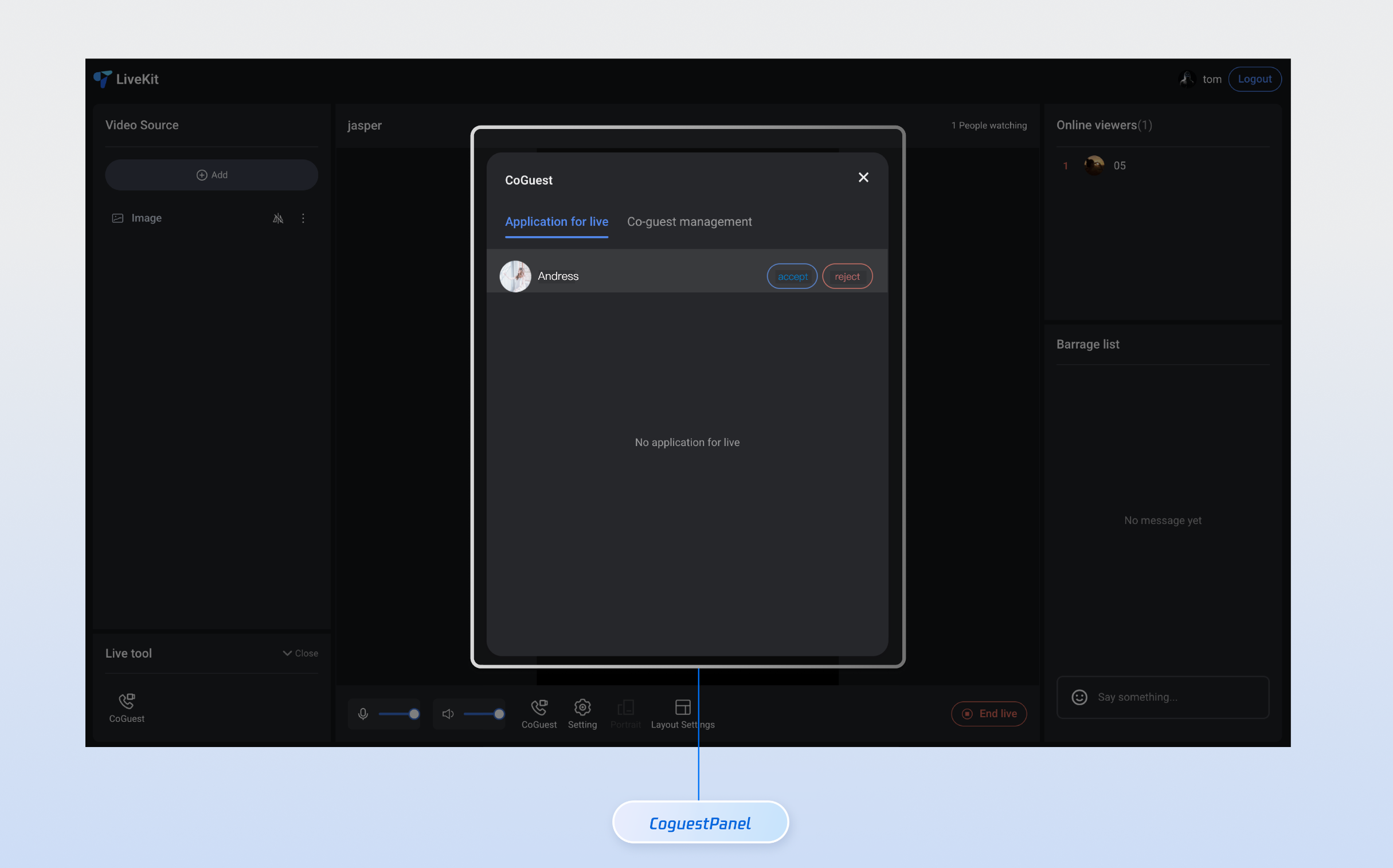
This document provides a detailed introduction to **Link Management Panel (CoGuestPanel)**. You can refer to the sample code in this document for seamless integration of our pre-developed components in your existing project, or customize the style and layout according to your needs by following the customization section of components in the document.
|
|
2
|
+
|
|
3
|
+
|
|
4
|
+
|
|
5
|
+
|
|
6
|
+
## Core Features
|
|
7
|
+
<table>
|
|
8
|
+
<tr>
|
|
9
|
+
<td rowspan="1" colSpan="1" >**Feature Name**</td>
|
|
10
|
+
|
|
11
|
+
<td rowspan="1" colSpan="1" >**Detailed Description**</td>
|
|
12
|
+
</tr>
|
|
13
|
+
|
|
14
|
+
<tr>
|
|
15
|
+
<td rowspan="1" colSpan="1" >**Tab switchover**</td>
|
|
16
|
+
|
|
17
|
+
<td rowspan="1" colSpan="1" >The UI offers dual tabs, allowing users to quickly switch between the Mic Connection Request and Mic Connection Management feature modules. It supports status memory and message prompts.</td>
|
|
18
|
+
</tr>
|
|
19
|
+
|
|
20
|
+
<tr>
|
|
21
|
+
<td rowspan="1" colSpan="1" >**Application List**</td>
|
|
22
|
+
|
|
23
|
+
<td rowspan="1" colSpan="1" >Display all pending Mic Connection Requests in real time, showing user avatars, Nicknames, and status. Supports sorting by time and the filter function.</td>
|
|
24
|
+
</tr>
|
|
25
|
+
|
|
26
|
+
<tr>
|
|
27
|
+
<td rowspan="1" colSpan="1" >**Anchor Operations**</td>
|
|
28
|
+
|
|
29
|
+
<td rowspan="1" colSpan="1" >Provide abundant one-click operation buttons, support accept application, reject application, disconnect and other features, with real-time feedback on operation results.</td>
|
|
30
|
+
</tr>
|
|
31
|
+
</table>
|
|
32
|
+
|
|
33
|
+
|
|
34
|
+
## Component Integration
|
|
35
|
+
|
|
36
|
+
### Step 1: Configuring the Environment and Activating the Service
|
|
37
|
+
|
|
38
|
+
Before performing quick integration, you need to refer to [preparations](https://write.woa.com/document/185222107981008896) to meet the related environment configuration and activate the corresponding service.
|
|
39
|
+
|
|
40
|
+
### Step 2: Dependency Installation
|
|
41
|
+
|
|
42
|
+
|
|
43
|
+
|
|
44
|
+
|
|
45
|
+
【npm】
|
|
46
|
+
``` bash
|
|
47
|
+
npm install tuikit-atomicx-vue3@latest @tencentcloud/uikit-base-component-vue3 --save
|
|
48
|
+
```
|
|
49
|
+
|
|
50
|
+
|
|
51
|
+
【pnpm】
|
|
52
|
+
``` bash
|
|
53
|
+
pnpm add tuikit-atomicx-vue3@latest @tencentcloud/uikit-base-component-vue3
|
|
54
|
+
```
|
|
55
|
+
|
|
56
|
+
|
|
57
|
+
【yarn】
|
|
58
|
+
``` bash
|
|
59
|
+
yarn add tuikit-atomicx-vue3@latest @tencentcloud/uikit-base-component-vue3
|
|
60
|
+
```
|
|
61
|
+
|
|
62
|
+
### Step 3: Integrating the Link Management Panel
|
|
63
|
+
|
|
64
|
+
Introduce **Link Management Panel** in your project and use it. You can copy the following example code directly to your project to show the Link Management Panel.
|
|
65
|
+
``` typescript
|
|
66
|
+
<template>
|
|
67
|
+
<UIKitProvider theme="light" language="en-US">
|
|
68
|
+
<div class="app">
|
|
69
|
+
<CoGuestPanel class="co-guest-panel" />
|
|
70
|
+
</div>
|
|
71
|
+
</UIKitProvider>
|
|
72
|
+
</template>
|
|
73
|
+
|
|
74
|
+
<script setup lang="ts">
|
|
75
|
+
import { onMounted, ref } from 'vue';
|
|
76
|
+
import { UIKitProvider } from '@tencentcloud/uikit-base-component-vue3';
|
|
77
|
+
import { CoGuestPanel, useLoginState, useLiveState } from 'tuikit-atomicx-vue3';
|
|
78
|
+
|
|
79
|
+
const { login, loginUserInfo } = useLoginState();
|
|
80
|
+
const { joinLive } = useLiveState();
|
|
81
|
+
|
|
82
|
+
async function initLogin() {
|
|
83
|
+
try {
|
|
84
|
+
await login({
|
|
85
|
+
sdkAppId: 0, // SDKAppID, see Step 1 to get
|
|
86
|
+
userId: '', // UserID, see Step 1 to get
|
|
87
|
+
userSig: '', // userSig, see Step 1 to get
|
|
88
|
+
});
|
|
89
|
+
} catch (error) {
|
|
90
|
+
console.error('login error:', error);
|
|
91
|
+
}
|
|
92
|
+
}
|
|
93
|
+
|
|
94
|
+
onMounted(async () => {
|
|
95
|
+
await initLogin();
|
|
96
|
+
// enter live room by inputting corresponding liveId
|
|
97
|
+
await joinLive({
|
|
98
|
+
liveId: 'input corresponding live streaming room LiveId',
|
|
99
|
+
});
|
|
100
|
+
});
|
|
101
|
+
</script>
|
|
102
|
+
|
|
103
|
+
<style scoped>.app{width:100vw;height:100vh;display:flex;justify-content:center;align-items:center;padding:20px;box-sizing:border-box}.co-guest-panel{width:100%;max-width:500px;padding: 24px;height:600px;background:rgba(255,255,255,0.9);border-radius:12px;box-shadow:0 8px 32px rgba(0,0,0,0.1);overflow:hidden}</style>
|
|
104
|
+
```
|
|
105
|
+
|
|
106
|
+
## Custom Style Customization
|
|
107
|
+
|
|
108
|
+
The Link Management Panel supports style customization via CSS variables. You can override the following variables to adjust the component appearance. After completing **Step 3**, see the following example to adjust the UI of the Link Management Panel, or directly perform incremental copying of the sample code into your component to generate the effect example.
|
|
109
|
+
``` typescript
|
|
110
|
+
<template>
|
|
111
|
+
<CoGuestPanel class="co-guest-panel" />
|
|
112
|
+
</template>
|
|
113
|
+
|
|
114
|
+
<style>
|
|
115
|
+
.co-guest-panel{--text-color-primary:#2d3748;--text-color-secondary:#93a3bb;--text-color-link:#20c9e7;--bg-color-primary:#ffffff;--bg-color-hover:#d6e7f3;--stroke-color-primary:#8bb6ef;--stroke-color-secondary:#90c0f4;--shadow-light:0 2px 8px rgba(69,67,67,0.08);--shadow-medium:0 4px 16px rgba(93,87,87,0.12);--transition:all 0.3s ease;}.co-guest-panel .panel-content{background:var(--bg-color-primary);border-radius:16px;border:1px solid var(--stroke-color-primary);box-shadow:var(--shadow-medium);transition:var(--transition);overflow:hidden;}.co-guest-panel .panel-content:hover{box-shadow:0 8px 24px rgba(0,0,0,0.15);transform:translateY(-2px);border-color:var(--stroke-color-secondary);}.co-guest-panel .user-item{padding:16px;margin:8px 0;background:var(--bg-color-primary);border:1px solid var(--stroke-color-primary);border-radius:12px;transition:var(--transition);cursor:pointer;}.co-guest-panel .user-item:hover{background:var(--bg-color-hover);border-color:var(--text-color-link);box-shadow:var(--shadow-light);transform:translateY(-1px);}.co-guest-panel .user-item:active{transform:translateY(0);transition:all 0.15s ease;}.co-guest-panel .user-item.selected{background:rgba(102,126,234,0.08);border-color:var(--text-color-link);box-shadow:var(--shadow-light);}
|
|
116
|
+
</style>
|
|
117
|
+
```
|
|
118
|
+
<table>
|
|
119
|
+
<tr>
|
|
120
|
+
<td rowspan="1" colSpan="1" >**Before modification**</td>
|
|
121
|
+
|
|
122
|
+
<td rowspan="1" colSpan="1" >**After modification**</td>
|
|
123
|
+
</tr>
|
|
124
|
+
|
|
125
|
+
<tr>
|
|
126
|
+
<td rowspan="1" colSpan="1" ><br>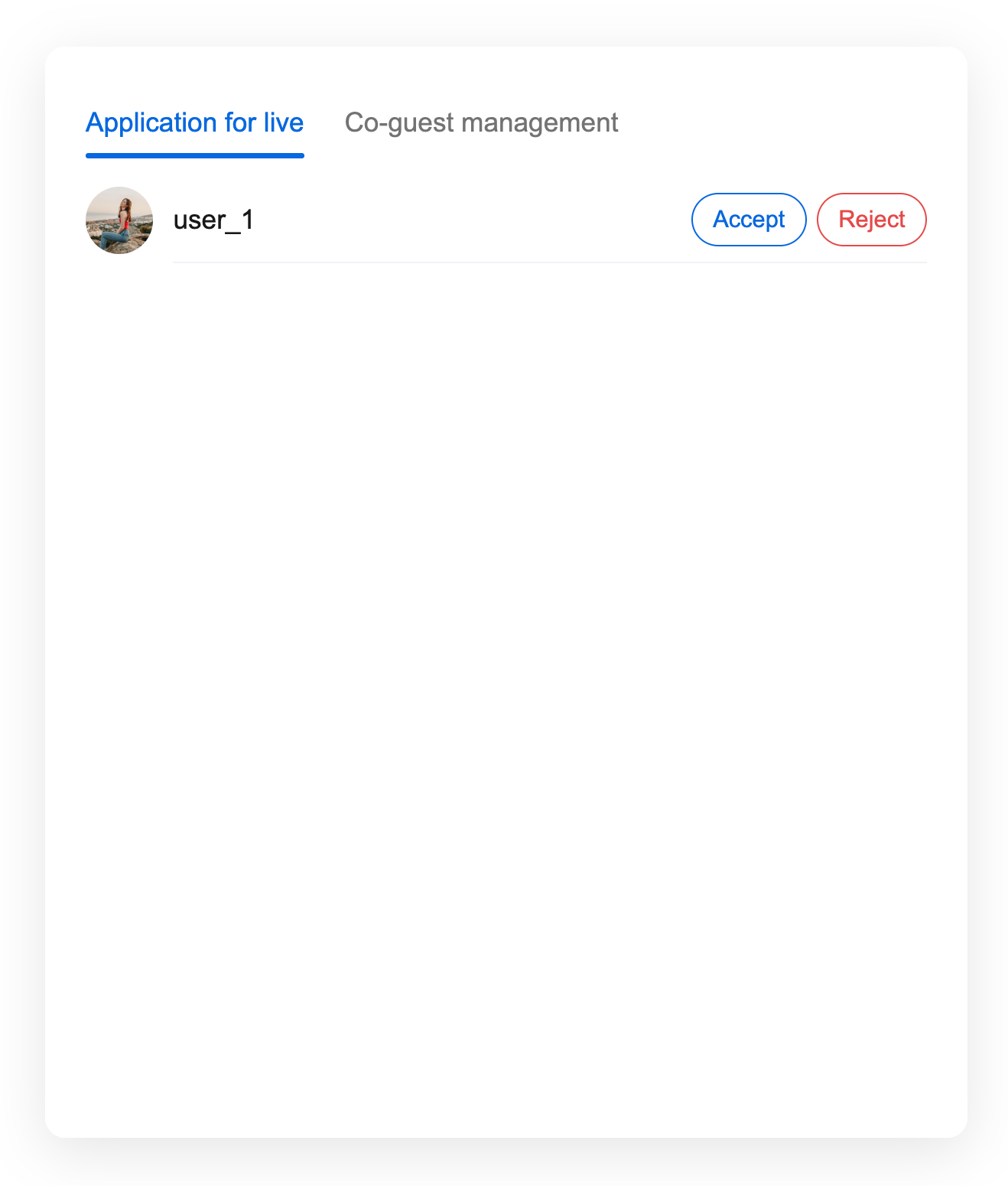</td>
|
|
127
|
+
|
|
128
|
+
<td rowspan="1" colSpan="1" ><br>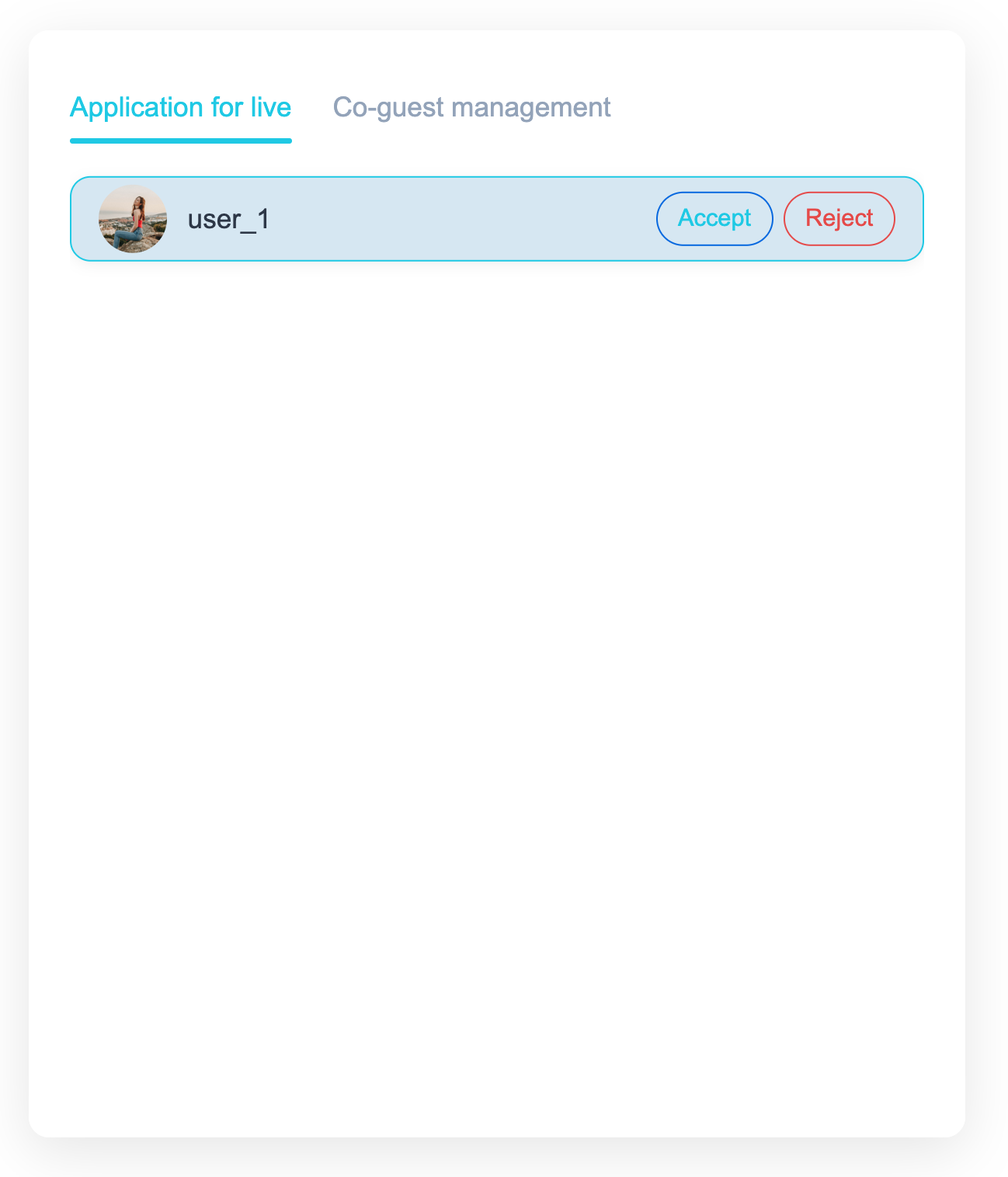</td>
|
|
129
|
+
</tr>
|
|
130
|
+
</table>
|
|
@@ -0,0 +1,282 @@
|
|
|
1
|
+
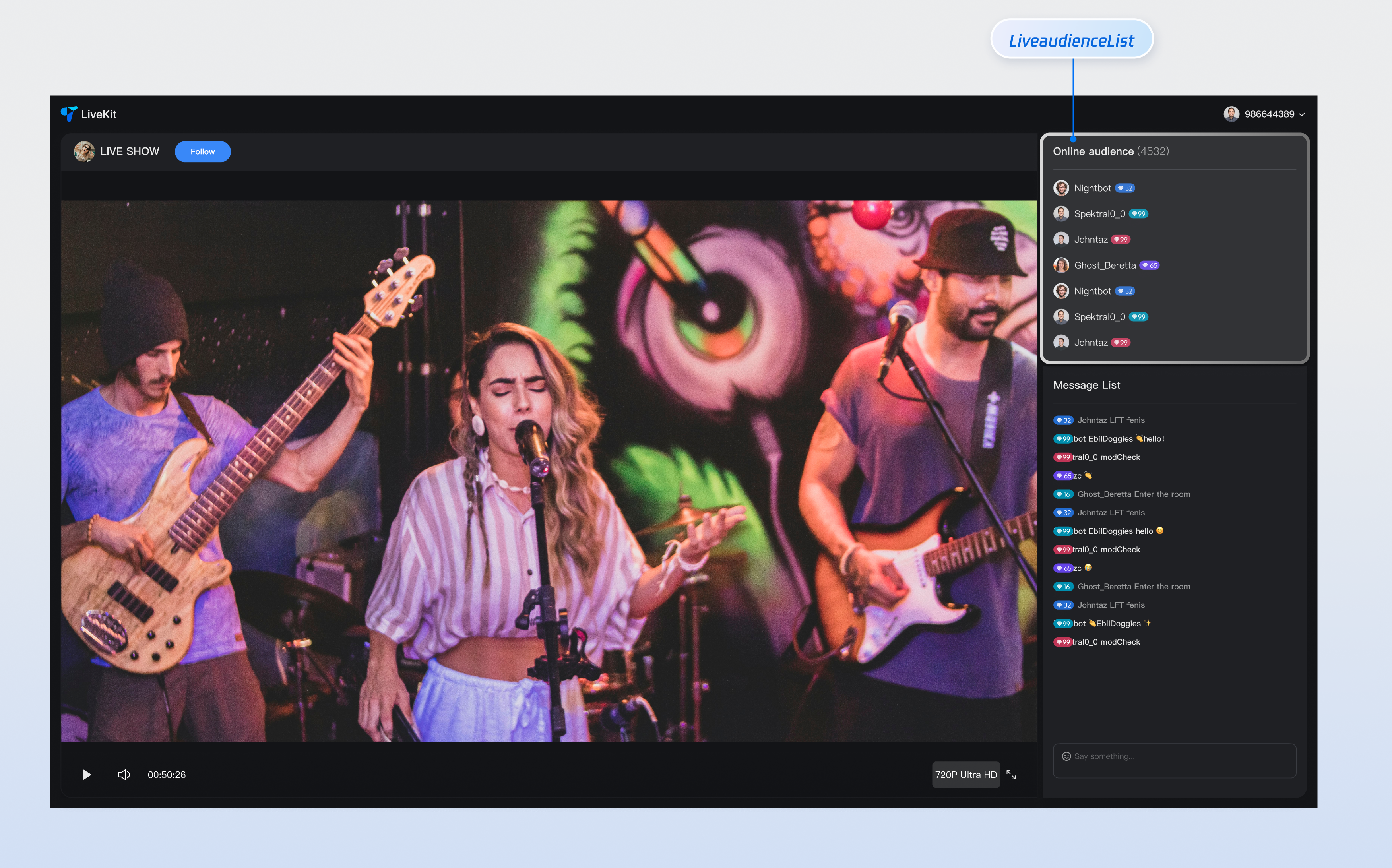
This document provides a detailed introduction to the **Audience List Component (LiveAudienceList)**. You can refer to the sample code in this document for seamless integration into your existing project, or customize the style and layout according to your needs by following the component customization section in the document.
|
|
2
|
+
|
|
3
|
+
|
|
4
|
+
|
|
5
|
+
|
|
6
|
+
## Core Features
|
|
7
|
+
<table>
|
|
8
|
+
<tr>
|
|
9
|
+
<td rowspan="1" colSpan="1" >**Feature Category**</td>
|
|
10
|
+
|
|
11
|
+
<td rowspan="1" colSpan="1" >**Specific capabilities**</td>
|
|
12
|
+
</tr>
|
|
13
|
+
|
|
14
|
+
<tr>
|
|
15
|
+
<td rowspan="1" colSpan="1" >**Real-time audience show**</td>
|
|
16
|
+
|
|
17
|
+
<td rowspan="1" colSpan="1" >Display the online audience list in the live streaming room in real time, support avatar and nickname display, and provide a clear audience information view, enabling hosts to intuitively understand audience composition.</td>
|
|
18
|
+
</tr>
|
|
19
|
+
|
|
20
|
+
<tr>
|
|
21
|
+
<td rowspan="1" colSpan="1" >**Responsive design**</td>
|
|
22
|
+
|
|
23
|
+
<td rowspan="1" colSpan="1" >Component support includes UI solutions for desktop and mobile terminals, automatically adapting to different device screen dimensions to provide consistent user experience and meet multi-platform live streaming needs.</td>
|
|
24
|
+
</tr>
|
|
25
|
+
|
|
26
|
+
<tr>
|
|
27
|
+
<td rowspan="1" colSpan="1" >**Customizable UI**</td>
|
|
28
|
+
|
|
29
|
+
<td rowspan="1" colSpan="1" >Provide flexible slot mechanism, support customization of audience tags, profile photo style and other elements, enabling you to customize the display effect of the audience list based on business needs, creating a unique visual experience.</td>
|
|
30
|
+
</tr>
|
|
31
|
+
</table>
|
|
32
|
+
|
|
33
|
+
|
|
34
|
+
## Component Integration
|
|
35
|
+
|
|
36
|
+
### Step 1: Configuring the Environment and Activating the Service
|
|
37
|
+
|
|
38
|
+
Before performing quick integration, you need to refer to [preparations](https://write.woa.com/document/185222107981008896), meet the required environment configuration and activate the corresponding service.
|
|
39
|
+
|
|
40
|
+
### Step 2: Dependency Installation
|
|
41
|
+
|
|
42
|
+
|
|
43
|
+
|
|
44
|
+
|
|
45
|
+
【npm】
|
|
46
|
+
``` bash
|
|
47
|
+
npm install tuikit-atomicx-vue3@latest @tencentcloud/uikit-base-component-vue3 --save
|
|
48
|
+
```
|
|
49
|
+
|
|
50
|
+
|
|
51
|
+
【pnpm】
|
|
52
|
+
``` bash
|
|
53
|
+
pnpm add tuikit-atomicx-vue3@latest @tencentcloud/uikit-base-component-vue3
|
|
54
|
+
```
|
|
55
|
+
|
|
56
|
+
|
|
57
|
+
【yarn】
|
|
58
|
+
``` bash
|
|
59
|
+
yarn add tuikit-atomicx-vue3@latest @tencentcloud/uikit-base-component-vue3
|
|
60
|
+
```
|
|
61
|
+
|
|
62
|
+
### Step 3: Integrating the Audience List Component
|
|
63
|
+
|
|
64
|
+
Introduce and use the **audience list component** in your project. You can copy the following example code directly to display the live broadcast audience list in your project.
|
|
65
|
+
``` typescript
|
|
66
|
+
<template>
|
|
67
|
+
<UIKitProvider theme="dark" language="zh-CN">
|
|
68
|
+
<div class="app">
|
|
69
|
+
<div class="live-audience-container">
|
|
70
|
+
<LiveAudienceList class="live-audience-list"/>
|
|
71
|
+
</div>
|
|
72
|
+
</div>
|
|
73
|
+
</UIKitProvider>
|
|
74
|
+
</template>
|
|
75
|
+
|
|
76
|
+
<script setup lang="ts">
|
|
77
|
+
import { onMounted } from 'vue';
|
|
78
|
+
import { UIKitProvider } from '@tencentcloud/uikit-base-component-vue3';
|
|
79
|
+
import { LiveAudienceList, useLoginState, useLiveState } from 'tuikit-atomicx-vue3';
|
|
80
|
+
|
|
81
|
+
const { login } = useLoginState();
|
|
82
|
+
const { joinLive } = useLiveState();
|
|
83
|
+
|
|
84
|
+
async function initLogin() {
|
|
85
|
+
try {
|
|
86
|
+
await login({
|
|
87
|
+
sdkAppId: 0, // SDKAppID, see Step 1 to get
|
|
88
|
+
userId: '', // UserID, see Step 1 to get
|
|
89
|
+
userSig: '', // userSig, see Step 1 to get
|
|
90
|
+
});
|
|
91
|
+
} catch (error) {
|
|
92
|
+
console.error('login error:', error);
|
|
93
|
+
}
|
|
94
|
+
}
|
|
95
|
+
|
|
96
|
+
onMounted(async () => {
|
|
97
|
+
await initLogin();
|
|
98
|
+
await joinLive({
|
|
99
|
+
liveId: 'input the corresponding live streaming room LiveId', // enter live room
|
|
100
|
+
});
|
|
101
|
+
});
|
|
102
|
+
</script>
|
|
103
|
+
|
|
104
|
+
<style>.live-audience-container{display:flex;height:100%;width:300px;padding:20px}.live-audience-list{width:100%;height:100%}</style>
|
|
105
|
+
```
|
|
106
|
+
|
|
107
|
+
## Component Customization
|
|
108
|
+
|
|
109
|
+
**Audience List Component** provides flexible custom slots, supporting adjustment of audience tags, unique identifiers and other elements' style and layout based on your needs. Below are slot usage examples.
|
|
110
|
+
|
|
111
|
+
### Component Slot
|
|
112
|
+
<table>
|
|
113
|
+
<tr>
|
|
114
|
+
<td rowspan="1" colSpan="1" >**Name**</td>
|
|
115
|
+
|
|
116
|
+
<td rowspan="1" colSpan="1" >**Parameter**</td>
|
|
117
|
+
|
|
118
|
+
<td rowspan="1" colSpan="1" >**Description**</td>
|
|
119
|
+
</tr>
|
|
120
|
+
|
|
121
|
+
<tr>
|
|
122
|
+
<td rowspan="1" colSpan="1" >**customAudienceInfo**</td>
|
|
123
|
+
|
|
124
|
+
<td rowspan="1" colSpan="1" >**audience: AudienceInfo**</td>
|
|
125
|
+
|
|
126
|
+
<td rowspan="1" colSpan="1" >**Customize audience information display UI**</td>
|
|
127
|
+
</tr>
|
|
128
|
+
</table>
|
|
129
|
+
|
|
130
|
+
``` typescript
|
|
131
|
+
// Example of using the customAudienceInfo slot
|
|
132
|
+
<LiveAudienceList>
|
|
133
|
+
<CustomAudienceInfo #customAudienceInfo />
|
|
134
|
+
</LiveAudienceList>
|
|
135
|
+
```
|
|
136
|
+
|
|
137
|
+
`AudienceInfo` defines the basic info and status of each audience in a live streaming room:
|
|
138
|
+
<table>
|
|
139
|
+
<tr>
|
|
140
|
+
<td rowspan="1" colSpan="1" >**Parameter**</td>
|
|
141
|
+
|
|
142
|
+
<td rowspan="1" colSpan="1" >**Type**</td>
|
|
143
|
+
|
|
144
|
+
<td rowspan="1" colSpan="1" >**Description**</td>
|
|
145
|
+
</tr>
|
|
146
|
+
|
|
147
|
+
<tr>
|
|
148
|
+
<td rowspan="1" colSpan="1" >`userId`</td>
|
|
149
|
+
|
|
150
|
+
<td rowspan="1" colSpan="1" >`string`</td>
|
|
151
|
+
|
|
152
|
+
<td rowspan="1" colSpan="1" >The audience's unique identifier must be unique across the entire system.</td>
|
|
153
|
+
</tr>
|
|
154
|
+
|
|
155
|
+
<tr>
|
|
156
|
+
<td rowspan="1" colSpan="1" >`userName`</td>
|
|
157
|
+
|
|
158
|
+
<td rowspan="1" colSpan="1" >`string`</td>
|
|
159
|
+
|
|
160
|
+
<td rowspan="1" colSpan="1" >The name displayed for the audience in the live stream supports Chinese and English characters. If empty, the userId is displayed.</td>
|
|
161
|
+
</tr>
|
|
162
|
+
|
|
163
|
+
<tr>
|
|
164
|
+
<td rowspan="1" colSpan="1" >`avatarUrl`</td>
|
|
165
|
+
|
|
166
|
+
<td rowspan="1" colSpan="1" >`string`</td>
|
|
167
|
+
|
|
168
|
+
<td rowspan="1" colSpan="1" >The complete URL of the audience avatar supports HTTPS protocol.</td>
|
|
169
|
+
</tr>
|
|
170
|
+
|
|
171
|
+
<tr>
|
|
172
|
+
<td rowspan="1" colSpan="1" >`isMessageDisabled`</td>
|
|
173
|
+
|
|
174
|
+
<td rowspan="1" colSpan="1" >`boolean`</td>
|
|
175
|
+
|
|
176
|
+
<td rowspan="1" colSpan="1" >Whether the audience is muted. true indicates muted, false indicates normal speaking.</td>
|
|
177
|
+
</tr>
|
|
178
|
+
|
|
179
|
+
<tr>
|
|
180
|
+
<td rowspan="1" colSpan="1" >`joinTime`</td>
|
|
181
|
+
|
|
182
|
+
<td rowspan="1" colSpan="1" >`number`</td>
|
|
183
|
+
|
|
184
|
+
<td rowspan="1" colSpan="1" >Timestamp of audience entering the live room, for sorting and statistics</td>
|
|
185
|
+
</tr>
|
|
186
|
+
</table>
|
|
187
|
+
|
|
188
|
+
``` typescript
|
|
189
|
+
interface AudienceInfo {
|
|
190
|
+
userId: string; // Audience unique ID
|
|
191
|
+
userName?: string; // Audience display name (optional)
|
|
192
|
+
avatarUrl?: string; // Audience avatar URL (optional)
|
|
193
|
+
isMessageDisabled?: boolean; // Whether muted (optional)
|
|
194
|
+
joinTime?: number; // Entry timestamp (optional)
|
|
195
|
+
}
|
|
196
|
+
```
|
|
197
|
+
|
|
198
|
+
### Component Properties
|
|
199
|
+
<table>
|
|
200
|
+
<tr>
|
|
201
|
+
<td rowspan="1" colSpan="1" >**Attribute name**</td>
|
|
202
|
+
|
|
203
|
+
<td rowspan="1" colSpan="1" >**Type**</td>
|
|
204
|
+
|
|
205
|
+
<td rowspan="1" colSpan="1" >**Default Value**</td>
|
|
206
|
+
|
|
207
|
+
<td rowspan="1" colSpan="1" >**Description**</td>
|
|
208
|
+
</tr>
|
|
209
|
+
|
|
210
|
+
<tr>
|
|
211
|
+
<td rowspan="1" colSpan="1" >`height`</td>
|
|
212
|
+
|
|
213
|
+
<td rowspan="1" colSpan="1" >`string`</td>
|
|
214
|
+
|
|
215
|
+
<td rowspan="1" colSpan="1" >**'500px'**</td>
|
|
216
|
+
|
|
217
|
+
<td rowspan="1" colSpan="1" >Component height, supports CSS units (px, %, vh)</td>
|
|
218
|
+
</tr>
|
|
219
|
+
|
|
220
|
+
<tr>
|
|
221
|
+
<td rowspan="1" colSpan="1" >`style`</td>
|
|
222
|
+
|
|
223
|
+
<td rowspan="1" colSpan="1" >`CSSProperties`</td>
|
|
224
|
+
|
|
225
|
+
<td rowspan="1" colSpan="1" >**{}**</td>
|
|
226
|
+
|
|
227
|
+
<td rowspan="1" colSpan="1" >Custom style object used to override component default style</td>
|
|
228
|
+
</tr>
|
|
229
|
+
</table>
|
|
230
|
+
|
|
231
|
+
|
|
232
|
+
#### Custom Slot Example
|
|
233
|
+
|
|
234
|
+
To help you better experience and understand the **audience list component**'s **customAudienceInfo** slot customization capability, we provide a **custom personal info** example scenario for your reference. You can refer to the above **step 3** and incrementally copy the following code into your project to achieve a similar effect.
|
|
235
|
+
``` typescript
|
|
236
|
+
<template>
|
|
237
|
+
<LiveAudienceList>
|
|
238
|
+
<template #customAudienceInfo="{ audience }">
|
|
239
|
+
<div class="custom-audience-info">
|
|
240
|
+
avatar
|
|
241
|
+
<img
|
|
242
|
+
:src="audience.avatarUrl || defaultAvatar"
|
|
243
|
+
:alt="audience.userName || audience.userId"
|
|
244
|
+
class="audience-avatar"
|
|
245
|
+
/>
|
|
246
|
+
|
|
247
|
+
audience information
|
|
248
|
+
<div class="audience-details">
|
|
249
|
+
<span class="audience-name">{{ audience.userName || audience.userId }}</span>
|
|
250
|
+
<span class="join-time">{{ formatJoinTime(audience.joinTime) }}</span>
|
|
251
|
+
</div>
|
|
252
|
+
|
|
253
|
+
status indicator
|
|
254
|
+
<div v-if="audience.isMessageDisabled" class="muted-indicator">🔇</div>
|
|
255
|
+
</div>
|
|
256
|
+
</template>
|
|
257
|
+
</LiveAudienceList>
|
|
258
|
+
</template>
|
|
259
|
+
|
|
260
|
+
<script setup lang="ts">
|
|
261
|
+
import { LiveAudienceList } from 'tuikit-atomicx-vue3';
|
|
262
|
+
|
|
263
|
+
const defaultAvatar = 'xxx'; // Input default avatar Url
|
|
264
|
+
|
|
265
|
+
const formatJoinTime = (timestamp?: number) => { // Format join time
|
|
266
|
+
if (!timestamp) return 'just now join';
|
|
267
|
+
|
|
268
|
+
const now = Date.now();
|
|
269
|
+
const diff = now - timestamp;
|
|
270
|
+
const minutes = Math.floor(diff / (1000 * 60));
|
|
271
|
+
const hours = Math.floor(diff / (1000 * 60 * 60));
|
|
272
|
+
const days = Math.floor(diff / (1000 * 60 * 60 * 24));
|
|
273
|
+
|
|
274
|
+
if (days > 0) return `${days} days ago join`;
|
|
275
|
+
if (hours > 0) return `${hours} hours ago join`;
|
|
276
|
+
if (minutes > 0) return `${minutes} minutes ago join`;
|
|
277
|
+
return 'just now join';
|
|
278
|
+
};
|
|
279
|
+
</script>
|
|
280
|
+
|
|
281
|
+
<style scoped>.custom-audience-info{display:flex;align-items:center;gap:12px;padding:8px;border-radius:8px;transition:background-color .2s ease}.custom-audience-info:hover{background-color:var(--uikit-color-gray-1)}.audience-avatar{width:40px;height:40px;border-radius:50%;object-fit:cover;border:2px solid var(--uikit-color-gray-3)}.audience-details{flex:1;display:flex;flex-direction:column;gap:4px}.audience-name{font-size:14px;font-weight:500;color:var(--text-color-primary);white-space:nowrap;overflow:hidden;text-overflow:ellipsis}.join-time{font-size:12px;color:var(--text-color-secondary)}.muted-indicator{font-size:16px;opacity:.6}</style>
|
|
282
|
+
```
|
|
@@ -0,0 +1,200 @@
|
|
|
1
|
+
## Overview
|
|
2
|
+
|
|
3
|
+
This document provides a detailed introduction to the **Live Stream List Page** in the TUILiveKit Demo. You can directly integrate our pre-developed live stream list page into your existing project as specified in this document, or customize the page style, layout, and feature items according to your needs.
|
|
4
|
+
|
|
5
|
+
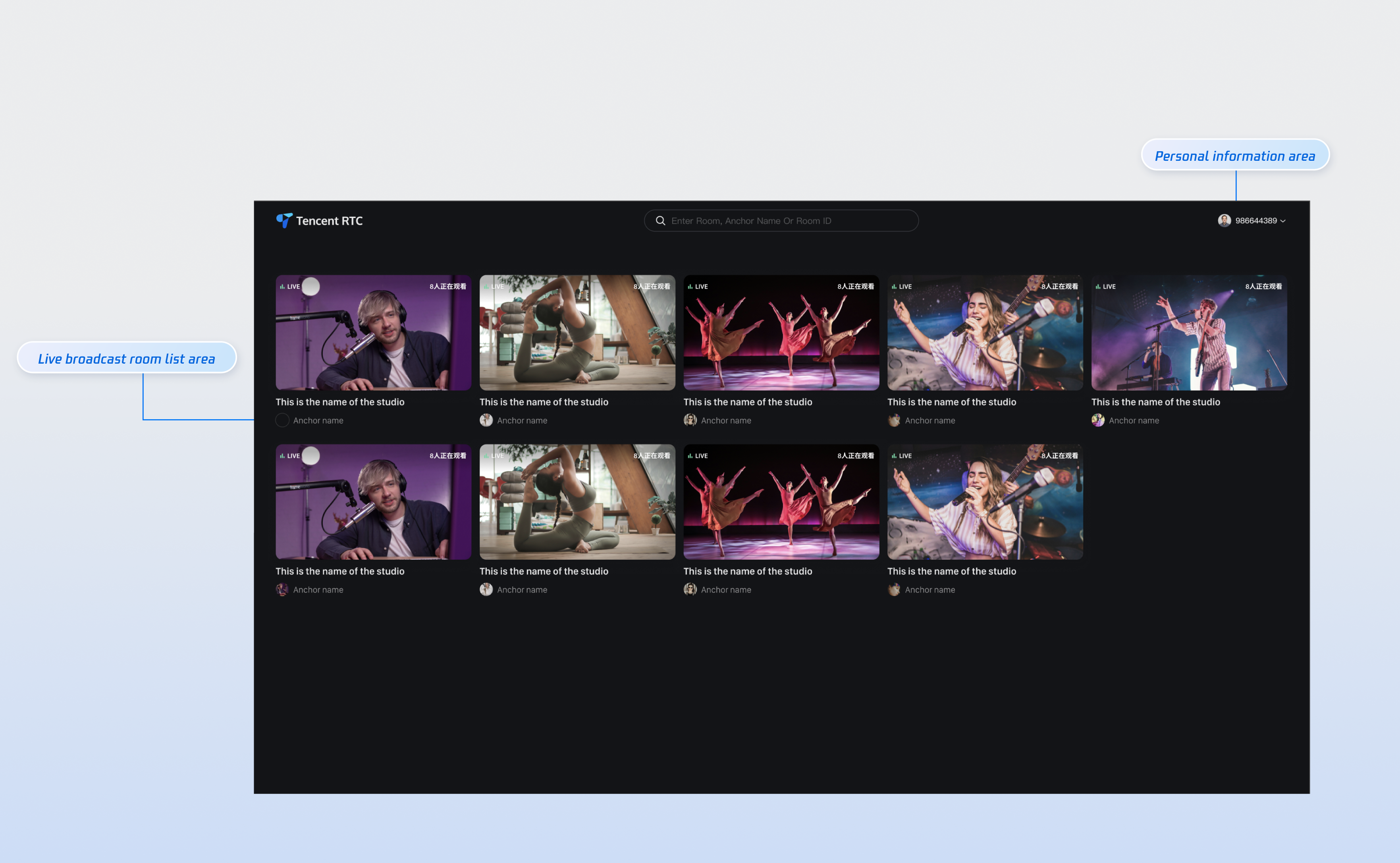
|
|
6
|
+
|
|
7
|
+
|
|
8
|
+
## Quick Connection
|
|
9
|
+
|
|
10
|
+
### Step 1: Configuring the Environment and Activating the Service
|
|
11
|
+
|
|
12
|
+
Before performing quick connection, you need to refer to [Preparations](https://write.woa.com/document/189228990450999296) to meet the required environment configuration and activate the corresponding service.
|
|
13
|
+
|
|
14
|
+
### Step 2: Dependency Installation
|
|
15
|
+
|
|
16
|
+
You can choose any method below to install dependencies:
|
|
17
|
+
|
|
18
|
+
|
|
19
|
+
|
|
20
|
+
|
|
21
|
+
【npm】
|
|
22
|
+
``` bash
|
|
23
|
+
npm install tuikit-atomicx-vue3@latest @tencentcloud/uikit-base-component-vue3 --save
|
|
24
|
+
```
|
|
25
|
+
|
|
26
|
+
|
|
27
|
+
【pnpm】
|
|
28
|
+
``` bash
|
|
29
|
+
pnpm add tuikit-atomicx-vue3@latest @tencentcloud/uikit-base-component-vue3
|
|
30
|
+
```
|
|
31
|
+
|
|
32
|
+
|
|
33
|
+
【yarn】
|
|
34
|
+
``` bash
|
|
35
|
+
yarn add tuikit-atomicx-vue3@latest @tencentcloud/uikit-base-component-vue3
|
|
36
|
+
```
|
|
37
|
+
|
|
38
|
+
### Step 3: Live Stream List Page Integration
|
|
39
|
+
|
|
40
|
+
Create the **live-list.vue** file under your project. You can copy the following code directly to your project for seamless integration with the **Live Stream List Page**.
|
|
41
|
+
``` javascript
|
|
42
|
+
<template>
|
|
43
|
+
<UIKitProvider language="zh-CN">
|
|
44
|
+
<div class="container">
|
|
45
|
+
<header class="header">
|
|
46
|
+
<h1 class="title">Online Live Streaming</h1>
|
|
47
|
+
</header>
|
|
48
|
+
<main class="main">
|
|
49
|
+
<LiveList @live-room-click="handleLiveRoomClick" />
|
|
50
|
+
</main>
|
|
51
|
+
</div>
|
|
52
|
+
</UIKitProvider>
|
|
53
|
+
</template>
|
|
54
|
+
|
|
55
|
+
<script setup lang="ts">
|
|
56
|
+
import { onMounted } from 'vue';
|
|
57
|
+
import { LiveList, type LiveInfo, useLoginState } from 'tuikit-atomicx-vue3';
|
|
58
|
+
import { UIKitProvider } from '@tencentcloud/uikit-base-component-vue3';
|
|
59
|
+
|
|
60
|
+
const { login } = useLoginState();
|
|
61
|
+
|
|
62
|
+
async function initLogin() {
|
|
63
|
+
try {
|
|
64
|
+
await login({
|
|
65
|
+
sdkAppId: 0, // SDKAppID, see Step 1 to obtain
|
|
66
|
+
userId: '', // UserID, see Step 1 to obtain
|
|
67
|
+
userSig: '', // userSig, see Step 1 to obtain
|
|
68
|
+
});
|
|
69
|
+
} catch (error) {
|
|
70
|
+
console.error('login error:', error);
|
|
71
|
+
}
|
|
72
|
+
}
|
|
73
|
+
|
|
74
|
+
onMounted(async () => {
|
|
75
|
+
await initLogin();
|
|
76
|
+
});
|
|
77
|
+
</script>
|
|
78
|
+
|
|
79
|
+
<style>:global(*),:global(::after),:global(::before){box-sizing:border-box;margin:0}.container{display:flex;flex-direction:column;height:100vh;width:100vw;background:var(--bg-color-default)}.header{display:flex;align-items:center;flex-shrink:0}.title{margin:0;font-size:24px;font-weight:600;color:var(--text-color-primary);letter-spacing:-.5px}.main{flex:1;padding:24px;overflow-y:auto;min-height:0}</style>
|
|
80
|
+
```
|
|
81
|
+
|
|
82
|
+
### Step 4: Starting a Project
|
|
83
|
+
|
|
84
|
+
Run the command to generate the live stream list page. You can select the corresponding live streaming room to watch.
|
|
85
|
+
``` bash
|
|
86
|
+
npm run dev
|
|
87
|
+
```
|
|
88
|
+
|
|
89
|
+
## Tailor-Made
|
|
90
|
+
|
|
91
|
+
As shown in the above feature diagram, we also support you to customize the live list webpage UI based on project requirements. The main customization options are as listed in the table below.
|
|
92
|
+
<table>
|
|
93
|
+
<tr>
|
|
94
|
+
<td rowspan="1" colSpan="1" >**Category**</td>
|
|
95
|
+
|
|
96
|
+
<td rowspan="1" colSpan="1" >**Function**</td>
|
|
97
|
+
|
|
98
|
+
<td rowspan="1" colSpan="1" >**Description**</td>
|
|
99
|
+
</tr>
|
|
100
|
+
|
|
101
|
+
<tr>
|
|
102
|
+
<td rowspan="1" colSpan="1" >**Live Room List**</td>
|
|
103
|
+
|
|
104
|
+
<td rowspan="1" colSpan="1" >Custom live room list display</td>
|
|
105
|
+
|
|
106
|
+
<td rowspan="1" colSpan="1" >**Supported:**<br>- **Live room information text display/hide, UI customization**<br>- **Custom fixed quantity display per line/column in live room**</td>
|
|
107
|
+
</tr>
|
|
108
|
+
|
|
109
|
+
<tr>
|
|
110
|
+
<td rowspan="1" colSpan="1" >**Personal information**</td>
|
|
111
|
+
|
|
112
|
+
<td rowspan="1" colSpan="1" >Custom personal information display</td>
|
|
113
|
+
|
|
114
|
+
<td rowspan="1" colSpan="1" >**Supported:**<br>- **Show/Hide personal info**<br>- **Personal info font, color UI customization**</td>
|
|
115
|
+
</tr>
|
|
116
|
+
</table>
|
|
117
|
+
|
|
118
|
+
|
|
119
|
+
## Designate a Live Streaming Room
|
|
120
|
+
|
|
121
|
+
To handle the redirect logic from the live list (or homepage) to the live streaming room, you need to configure Vue Router. In the `src` directory of your project, create a new `router` folder and create the `index.ts` file. Then, in your main file (such as **main.ts** or **index.ts**), import and use the router. See the [GitHub sample code](https://github.com/Tencent-RTC/TUILiveKit/blob/main/Web/web-vite-vue3/src/main.ts). If you need the live list, see the documentation for the [Live Stream List Page](https://write.woa.com/document/189228992611065856).
|
|
122
|
+
``` typescript
|
|
123
|
+
// live-list.vue can be incrementally added to your code
|
|
124
|
+
<template>
|
|
125
|
+
<UIKitProvider>
|
|
126
|
+
// .....abbreviated part see quick integration procedure 3 part
|
|
127
|
+
<LiveList @live-room-click="handleLiveRoomClick" />
|
|
128
|
+
</UIKitProvider>
|
|
129
|
+
</template>
|
|
130
|
+
|
|
131
|
+
<script setup lang="ts">
|
|
132
|
+
import { useRouter, useRoute } from 'vue-router';
|
|
133
|
+
|
|
134
|
+
const router = useRouter();
|
|
135
|
+
const route = useRoute();
|
|
136
|
+
|
|
137
|
+
function handleLiveRoomClick(liveInfo: LiveInfo) {
|
|
138
|
+
if (liveInfo?.liveId) {
|
|
139
|
+
router.push({ path: '/live-player', query: { ...route.query, liveId: liveInfo.liveId } });
|
|
140
|
+
}
|
|
141
|
+
}
|
|
142
|
+
|
|
143
|
+
<script>
|
|
144
|
+
|
|
145
|
+
// src/router/index.ts
|
|
146
|
+
import { createRouter, createWebHistory } from 'vue-router';
|
|
147
|
+
|
|
148
|
+
const routes = [
|
|
149
|
+
{
|
|
150
|
+
// Route jumping to the viewing page
|
|
151
|
+
path: '/live-player',
|
|
152
|
+
component: () => import('../views/live-player.vue'),
|
|
153
|
+
},
|
|
154
|
+
];
|
|
155
|
+
|
|
156
|
+
const router = createRouter({
|
|
157
|
+
history: createWebHistory(),
|
|
158
|
+
routes,
|
|
159
|
+
});
|
|
160
|
+
export default router;
|
|
161
|
+
|
|
162
|
+
// src/main.ts
|
|
163
|
+
import { createApp } from 'vue';
|
|
164
|
+
import App from './App.vue';
|
|
165
|
+
import router from './router';
|
|
166
|
+
|
|
167
|
+
const app = createApp(App);
|
|
168
|
+
app.use(router);
|
|
169
|
+
app.mount('#app');
|
|
170
|
+
```
|
|
171
|
+
|
|
172
|
+
### Next Steps
|
|
173
|
+
|
|
174
|
+
Congratulations! You have successfully integrated the live broadcast list page. Next, you can implement the anchor start page, audience viewing page, and other content. Please refer to the table below:
|
|
175
|
+
<table>
|
|
176
|
+
<tr>
|
|
177
|
+
<td rowspan="1" colSpan="1" >**Function**</td>
|
|
178
|
+
|
|
179
|
+
<td rowspan="1" colSpan="1" >**Description**</td>
|
|
180
|
+
|
|
181
|
+
<td rowspan="1" colSpan="1" >**Experience Link**</td>
|
|
182
|
+
</tr>
|
|
183
|
+
|
|
184
|
+
<tr>
|
|
185
|
+
<td rowspan="1" colSpan="1" >**Host Streaming**</td>
|
|
186
|
+
|
|
187
|
+
<td rowspan="1" colSpan="1" >The live streamer's entire live streaming process is supported, including pre-streaming preparation and post-streaming interactions.</td>
|
|
188
|
+
|
|
189
|
+
<td rowspan="1" colSpan="1" >[Host Streaming](https://write.woa.com/document/189497714561167360)</td>
|
|
190
|
+
</tr>
|
|
191
|
+
|
|
192
|
+
<tr>
|
|
193
|
+
<td rowspan="1" colSpan="1" >**Audience Viewing**</td>
|
|
194
|
+
|
|
195
|
+
<td rowspan="1" colSpan="1" >Viewers can enter the live streamer's room to watch the live stream, connect to the microphone, view live stream room information, view online viewers, and display comments.</td>
|
|
196
|
+
|
|
197
|
+
<td rowspan="1" colSpan="1" >[Audience Viewing](https://write.woa.com/document/189571398058663936)</td>
|
|
198
|
+
</tr>
|
|
199
|
+
</table>
|
|
200
|
+
|