@tencent-rtc/mcp 1.0.1 → 1.0.3
This diff represents the content of publicly available package versions that have been released to one of the supported registries. The information contained in this diff is provided for informational purposes only and reflects changes between package versions as they appear in their respective public registries.
- package/README.md +38 -37
- package/package.json +1 -1
- package/resource/doc/chatuikit/android/client_api_Android.md +1373 -0
- package/resource/doc/chatuikit/android/generate_UserSig.md +306 -0
- package/resource/doc/chatuikit/android/integrarte_only_tuichat_Android.md +290 -0
- package/resource/doc/chatuikit/android/integrate_tuikit_Android.md +287 -0
- package/resource/doc/chatuikit/android/quick_start_Android.md +138 -0
- package/resource/doc/chatuikit/android/show_typing_Android.md +43 -0
- package/resource/doc/chatuikit/faq/faq_sdk.md +120 -0
- package/resource/doc/chatuikit/faq/generate_UserSig.md +306 -0
- package/resource/doc/chatuikit/flutter/client_api_Flutter.md +932 -0
- package/resource/doc/chatuikit/flutter/generate_UserSig.md +306 -0
- package/resource/doc/chatuikit/flutter/integrate_only_tuichat_Flutter.md +333 -0
- package/resource/doc/chatuikit/flutter/integrate_tuikit_Flutter.md +769 -0
- package/resource/doc/chatuikit/flutter/quick_start_Flutter.md +217 -0
- package/resource/doc/chatuikit/iOS/client_api_iOS.md +1121 -0
- package/resource/doc/chatuikit/iOS/generate_UserSig.md +306 -0
- package/resource/doc/chatuikit/iOS/integrate_only_tuichat_iOS.md +748 -0
- package/resource/doc/chatuikit/iOS/integrate_tuikit_iOS.md +852 -0
- package/resource/doc/chatuikit/iOS/quick_start_iOS.md +163 -0
- package/resource/doc/chatuikit/iOS/show_typing_iOS.md +52 -0
- package/resource/doc/chatuikit/react/generate_UserSig.md +306 -0
- package/resource/doc/chatuikit/react/integrate_tuichat_only_react.md +202 -0
- package/resource/doc/chatuikit/react/integrate_tuichat_react.md +279 -0
- package/resource/doc/chatuikit/vue/generate_UserSig.md +306 -0
- package/resource/doc/chatuikit/vue/integrate_only_tuichat_Vue_web.md +124 -0
- package/resource/doc/chatuikit/vue/integrate_tuikit_Vue_web.md +552 -0
- package/resource/doc/tuicallkit/react/how_to_integrated_react_callkit.md +84 -55
- package/server.js +51 -27
- package/server.js.map +1 -1
|
@@ -0,0 +1,552 @@
|
|
|
1
|
+
## TUIKit Components
|
|
2
|
+
|
|
3
|
+
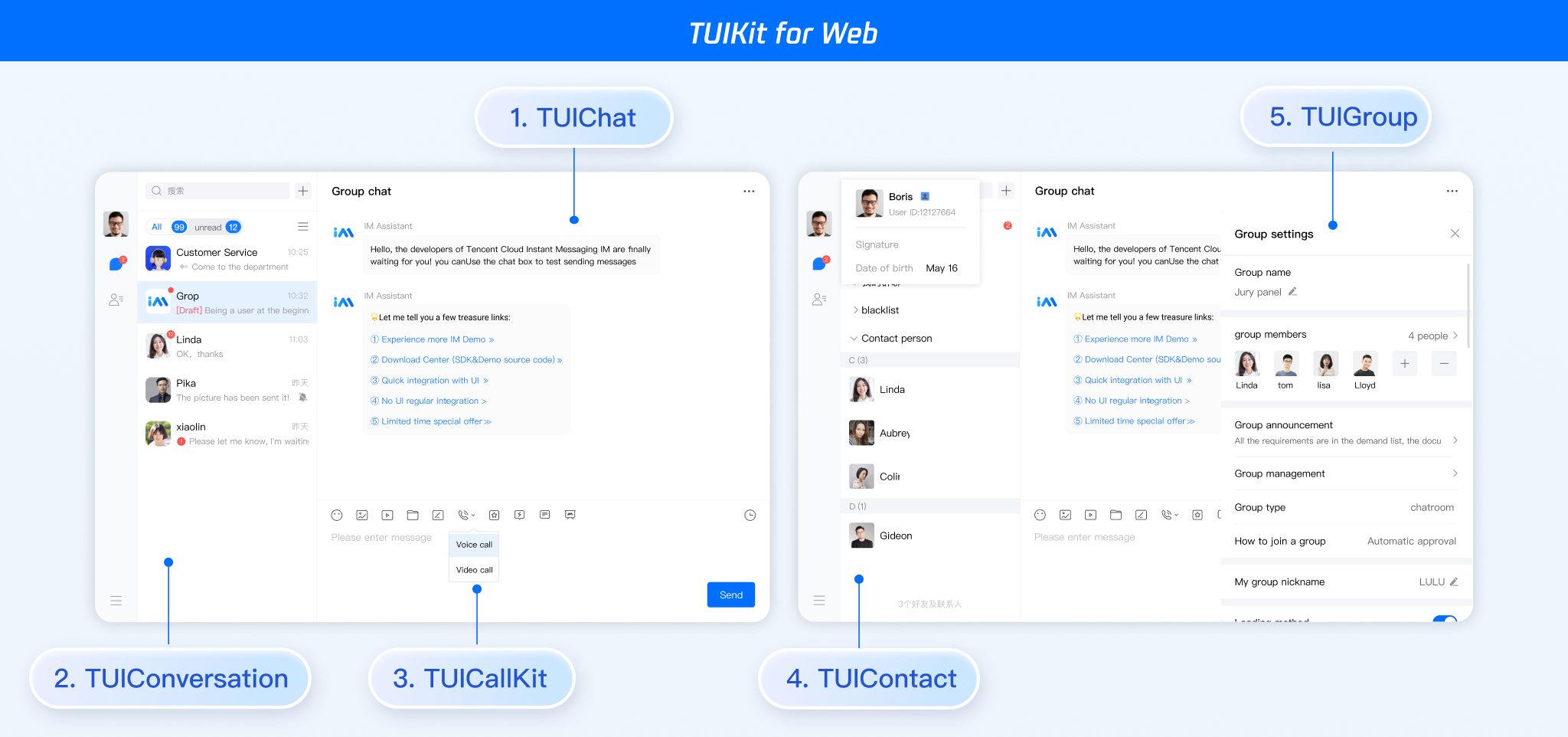
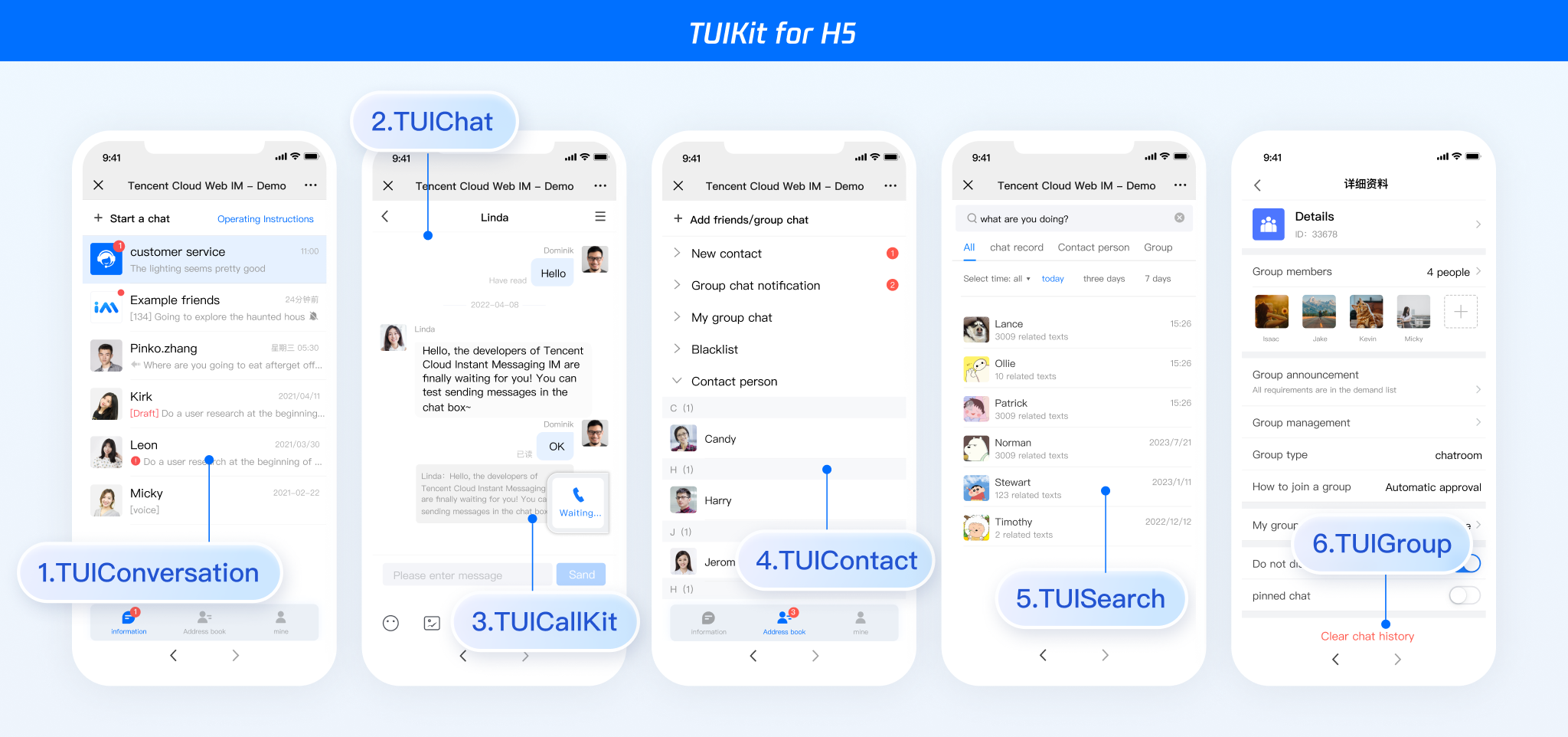
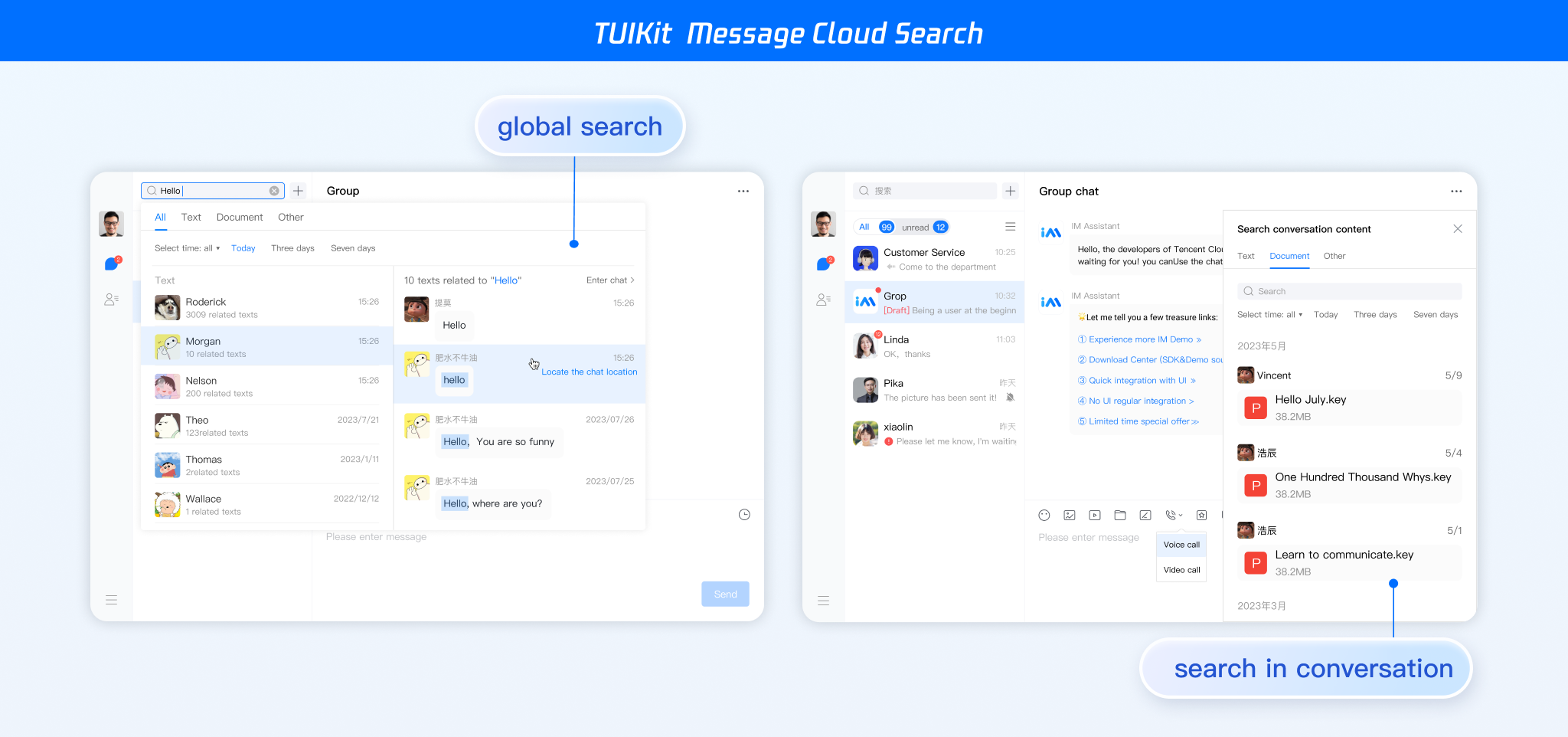
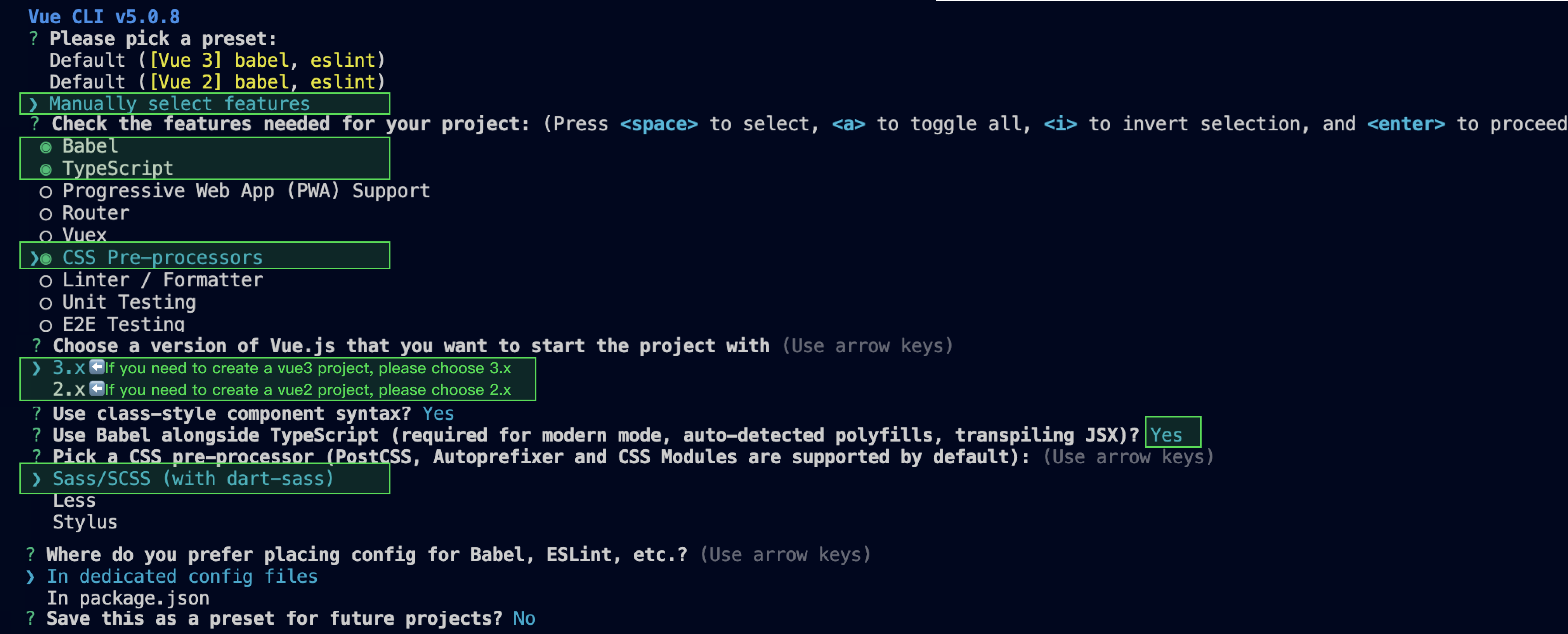
TUIKit is mainly divided into several UI sub-components: TUIChat, TUIConversation, TUIGroup, TUIContact, and TUISearch.
|
|
4
|
+
|
|
5
|
+
Each UI component is responsible for displaying different content.
|
|
6
|
+
|
|
7
|
+
|
|
8
|
+
|
|
9
|
+
|
|
10
|
+
|
|
11
|
+
|
|
12
|
+
|
|
13
|
+
## Environment Requirements
|
|
14
|
+
- Vue (Fully compatible with both Vue2 & Vue3. While incorporating below, please select the Vue version guide that matches your needs)
|
|
15
|
+
|
|
16
|
+
- TypeScript (Should your project be based on JavaScript, please proceed to [JS project integrate](https://write.woa.com/document/134592754616455168) to set up a progressive support for TypeScript)
|
|
17
|
+
|
|
18
|
+
- sass (sass version ≤ 1.77.4, sass-loader version ≤ 10.1.1)
|
|
19
|
+
|
|
20
|
+
- node(node.js ≥ 16.0.0)
|
|
21
|
+
|
|
22
|
+
- npm (use a version that matches the Node version in use)
|
|
23
|
+
|
|
24
|
+
|
|
25
|
+
## Integration of TUIKit (Web & H5)
|
|
26
|
+
|
|
27
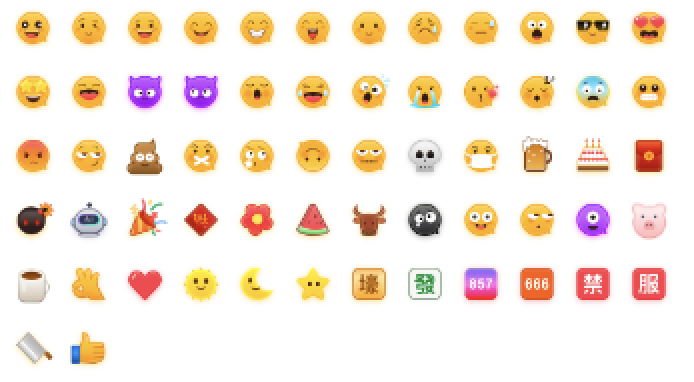
|
+
### Step 1. Create a project
|
|
28
|
+
|
|
29
|
+
TUIKit supports creating a project structure using webpack or vite, configured with Vue3 / Vue2 + TypeScript + sass. Below are a few examples of how to construct your project:
|
|
30
|
+
|
|
31
|
+
|
|
32
|
+
|
|
33
|
+
【vue-cli】
|
|
34
|
+
|
|
35
|
+
> **Please Note:**
|
|
36
|
+
>
|
|
37
|
+
|
|
38
|
+
> Please make sure you have ** @vue/cli version 5.0.0 or above **. The following sample code can be used to upgrade your @vue/cli version to v5.0.8.
|
|
39
|
+
>
|
|
40
|
+
|
|
41
|
+
|
|
42
|
+
Establish a project using Vue CLI, with configuration set to Vue2/Vue3 + TypeScript + Sass/SCSS.
|
|
43
|
+
If Vue CLI is not yet installed, or the version is below 5.0.0, you can use the following method for installation via Terminal or CMD:
|
|
44
|
+
|
|
45
|
+
|
|
46
|
+
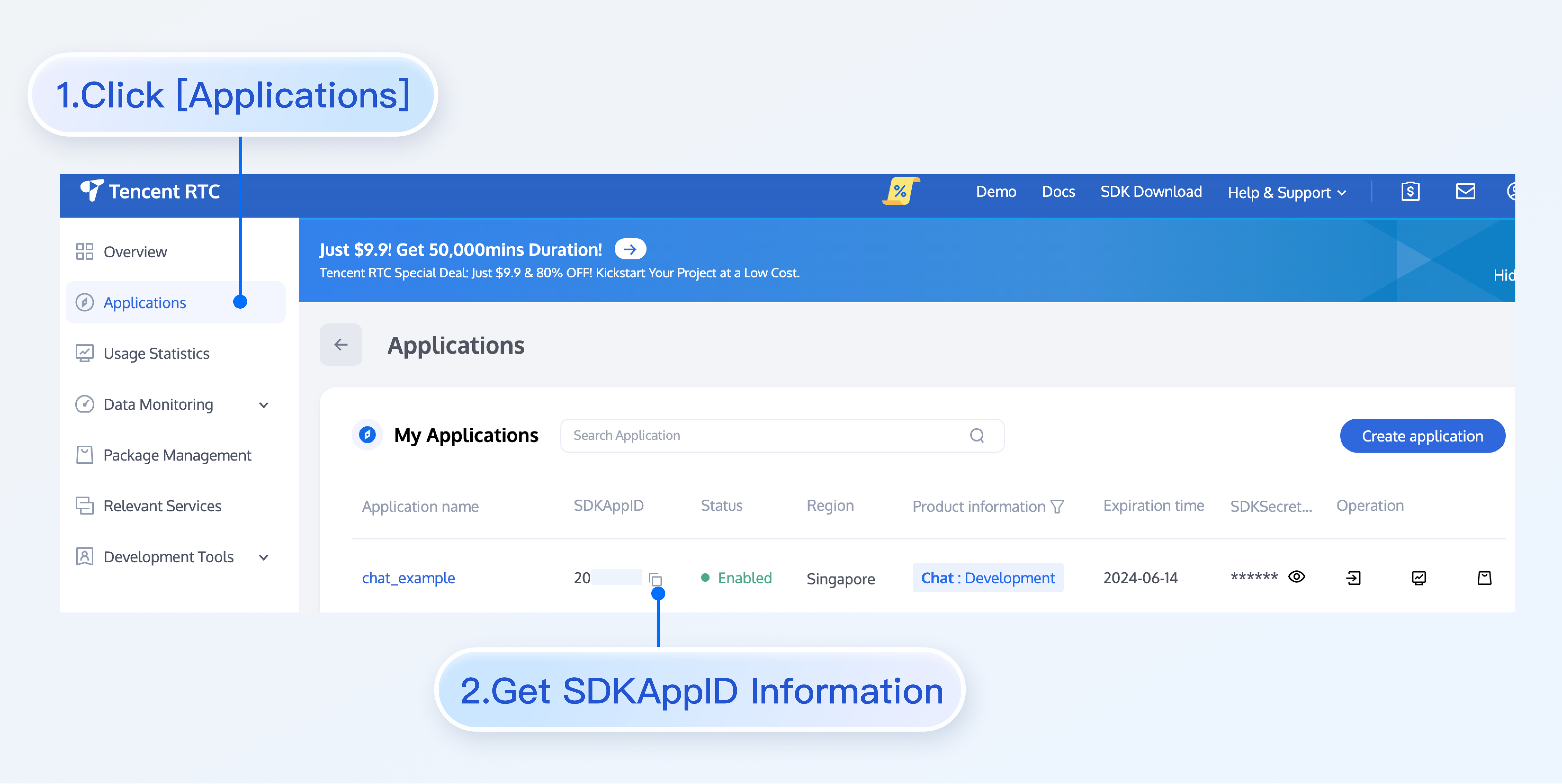
【shell】
|
|
47
|
+
``` bash
|
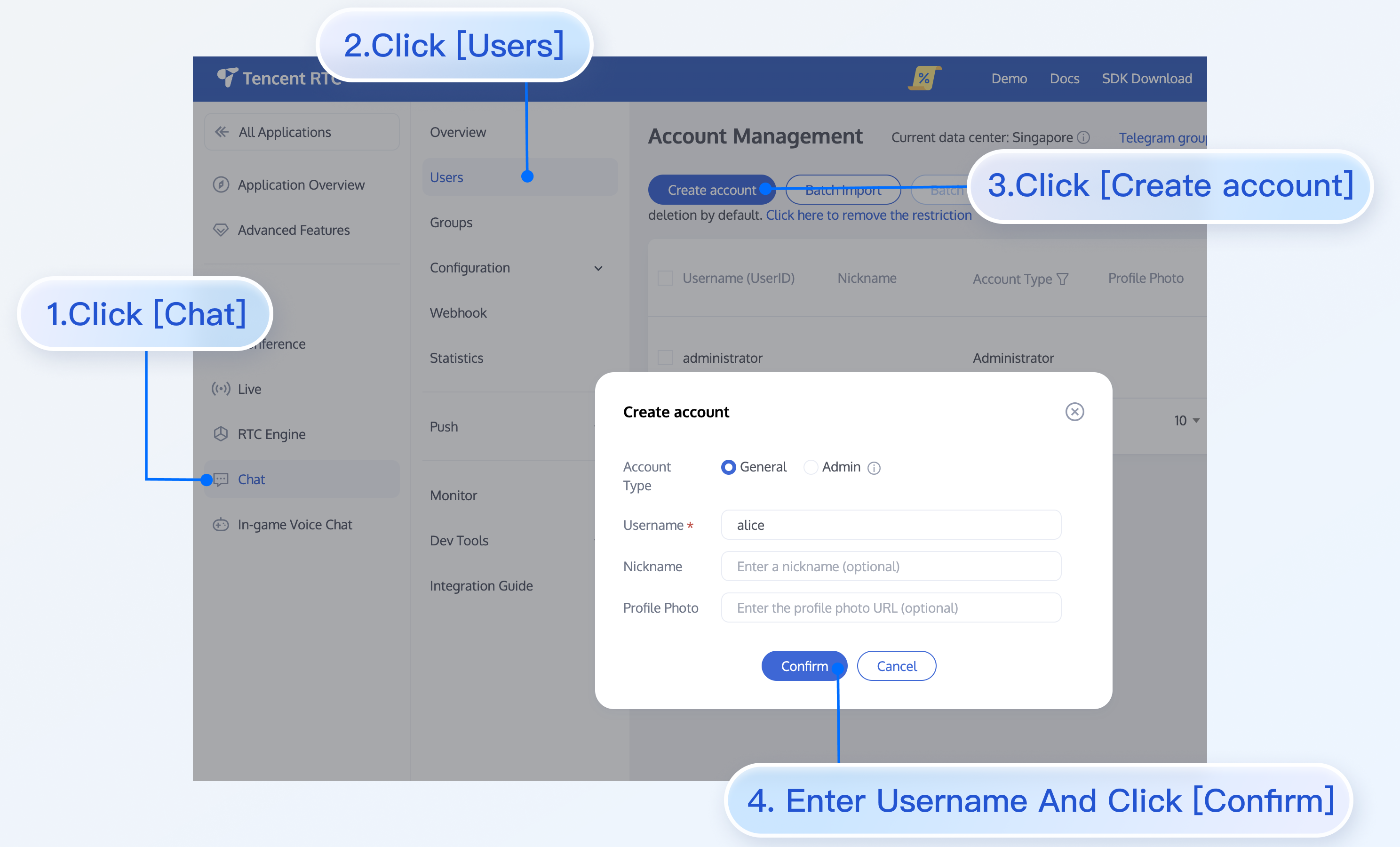
|
48
|
+
npm install -g @vue/cli@5.0.8 sass@1.77.0 sass-loader@10.1.1
|
|
49
|
+
```
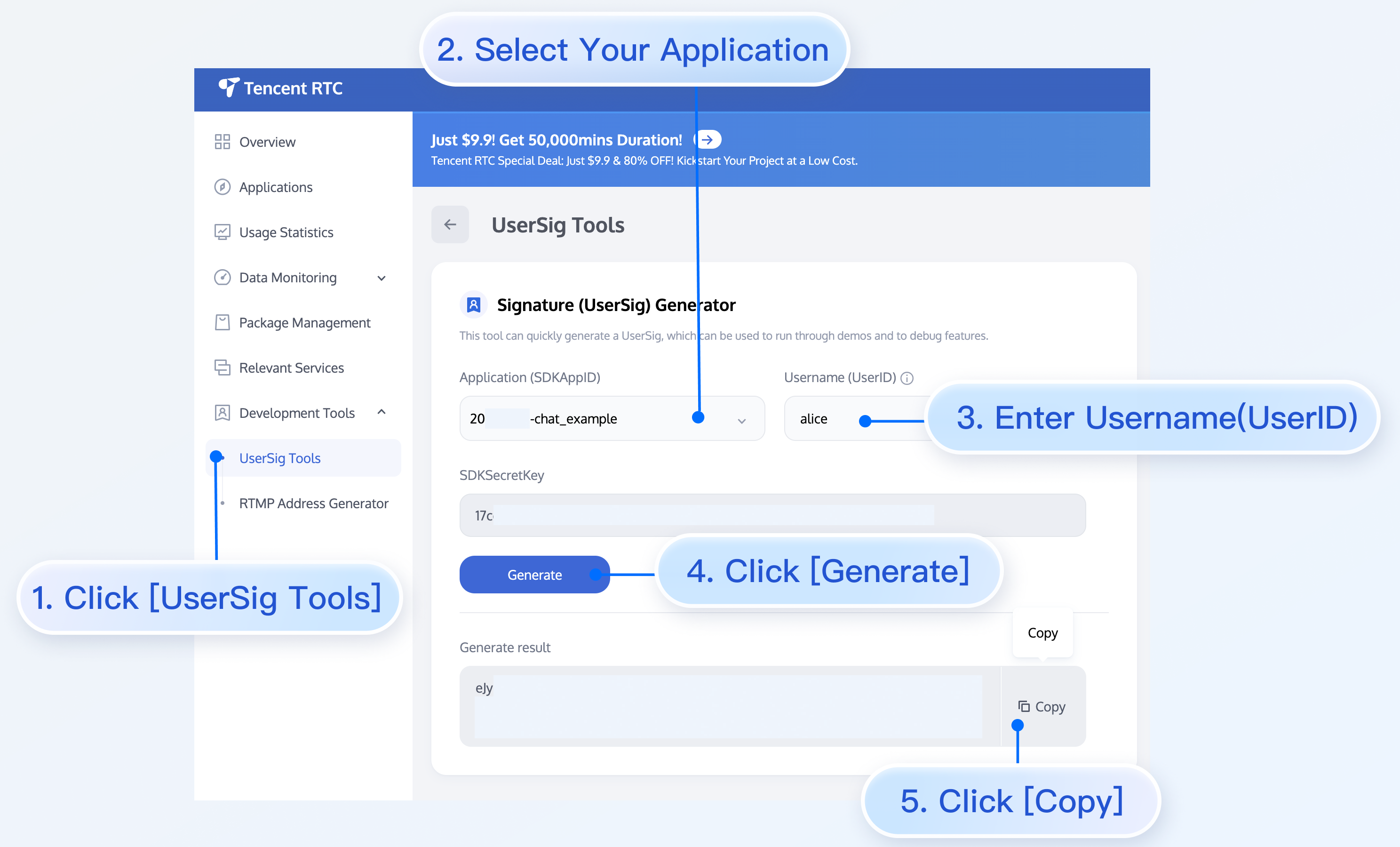
|
|
50
|
+
|
|
51
|
+
Create a project through Vue CLI and select the configuration items depicted below.
|
|
52
|
+
|
|
53
|
+
|
|
54
|
+
【shell】
|
|
55
|
+
``` bash
|
|
56
|
+
vue create chat-example
|
|
57
|
+
```
|
|
58
|
+
|
|
59
|
+
Please make sure to select according to the following configuration:
|
|
60
|
+
|
|
61
|
+
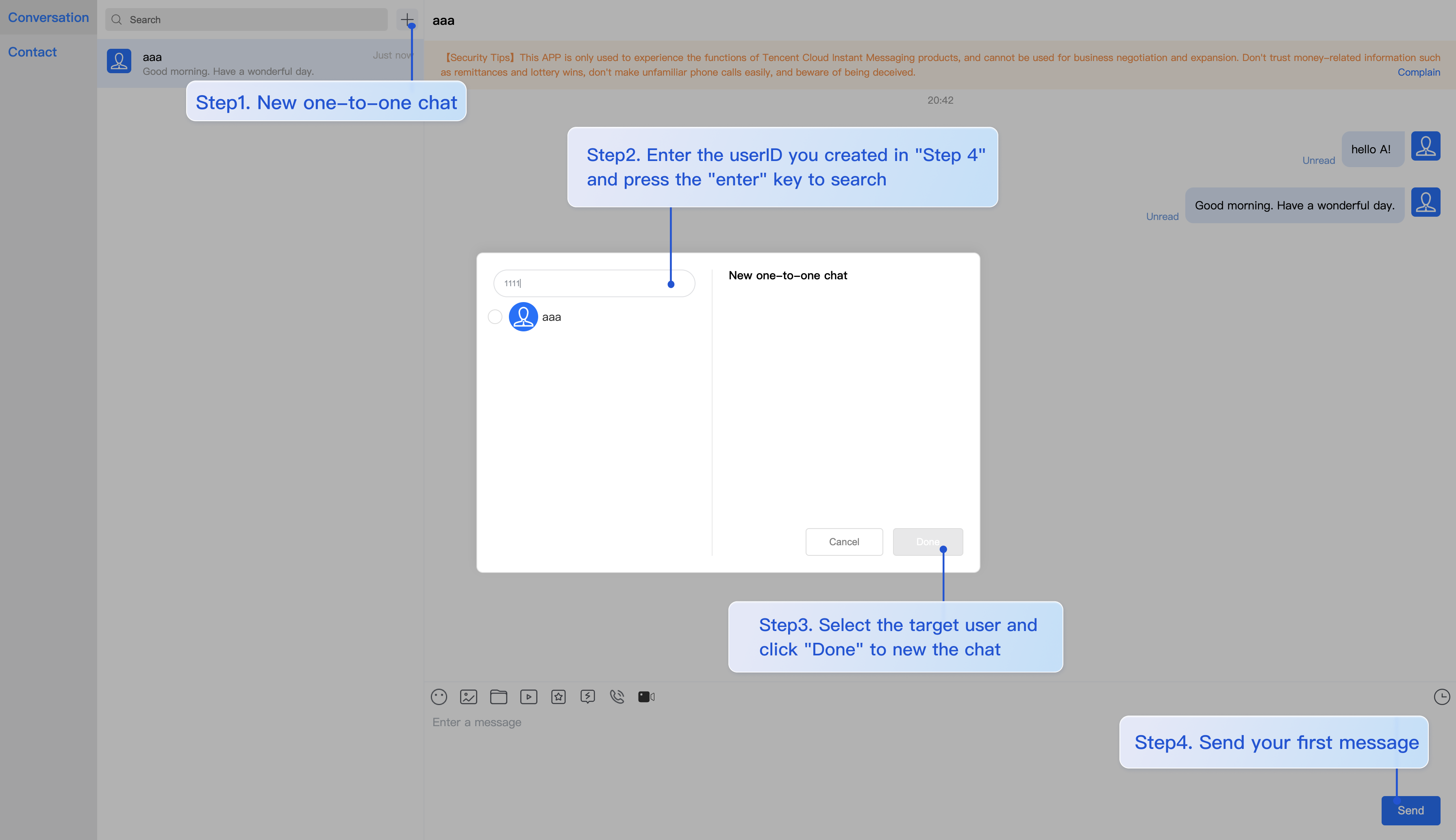
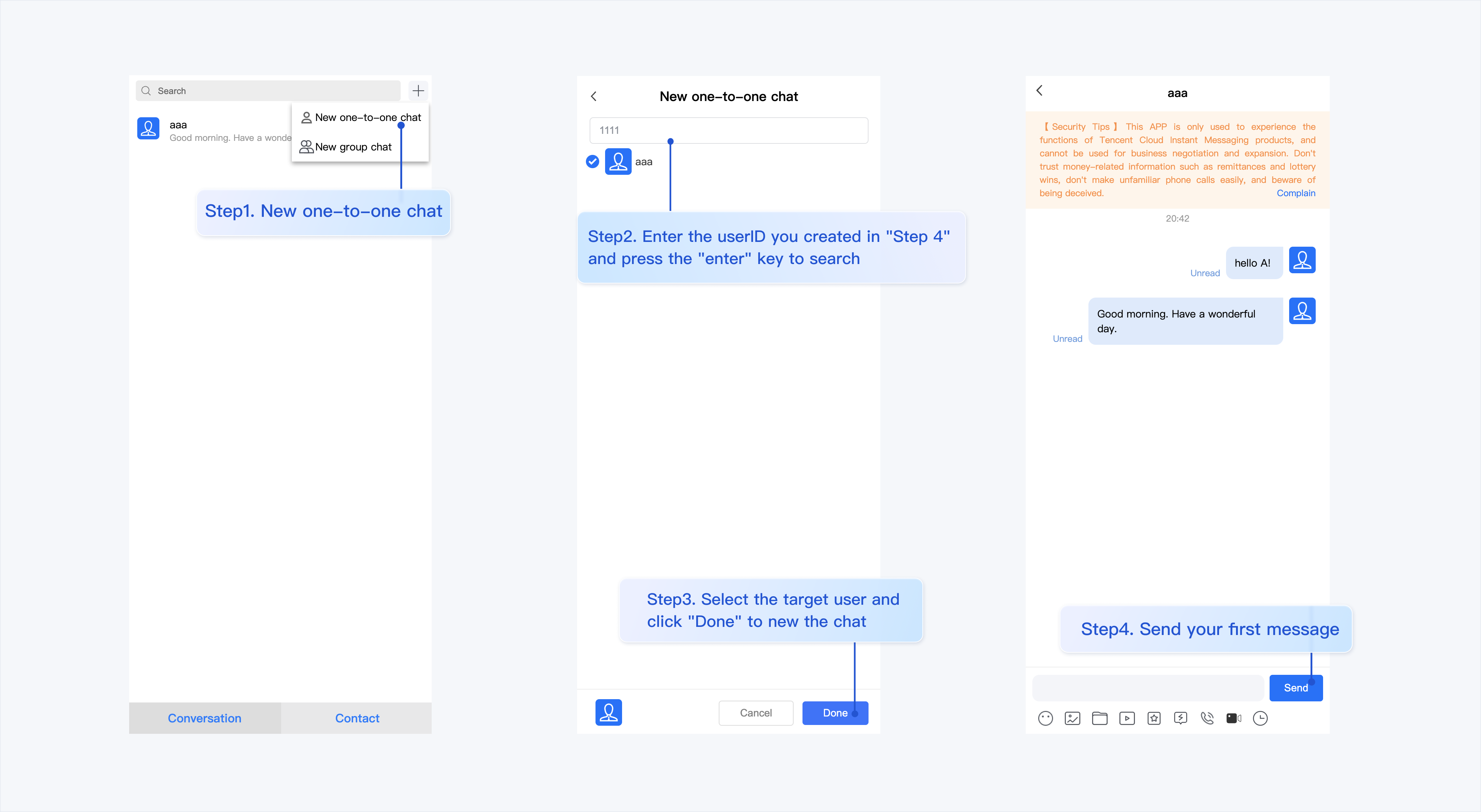
|
|
62
|
+
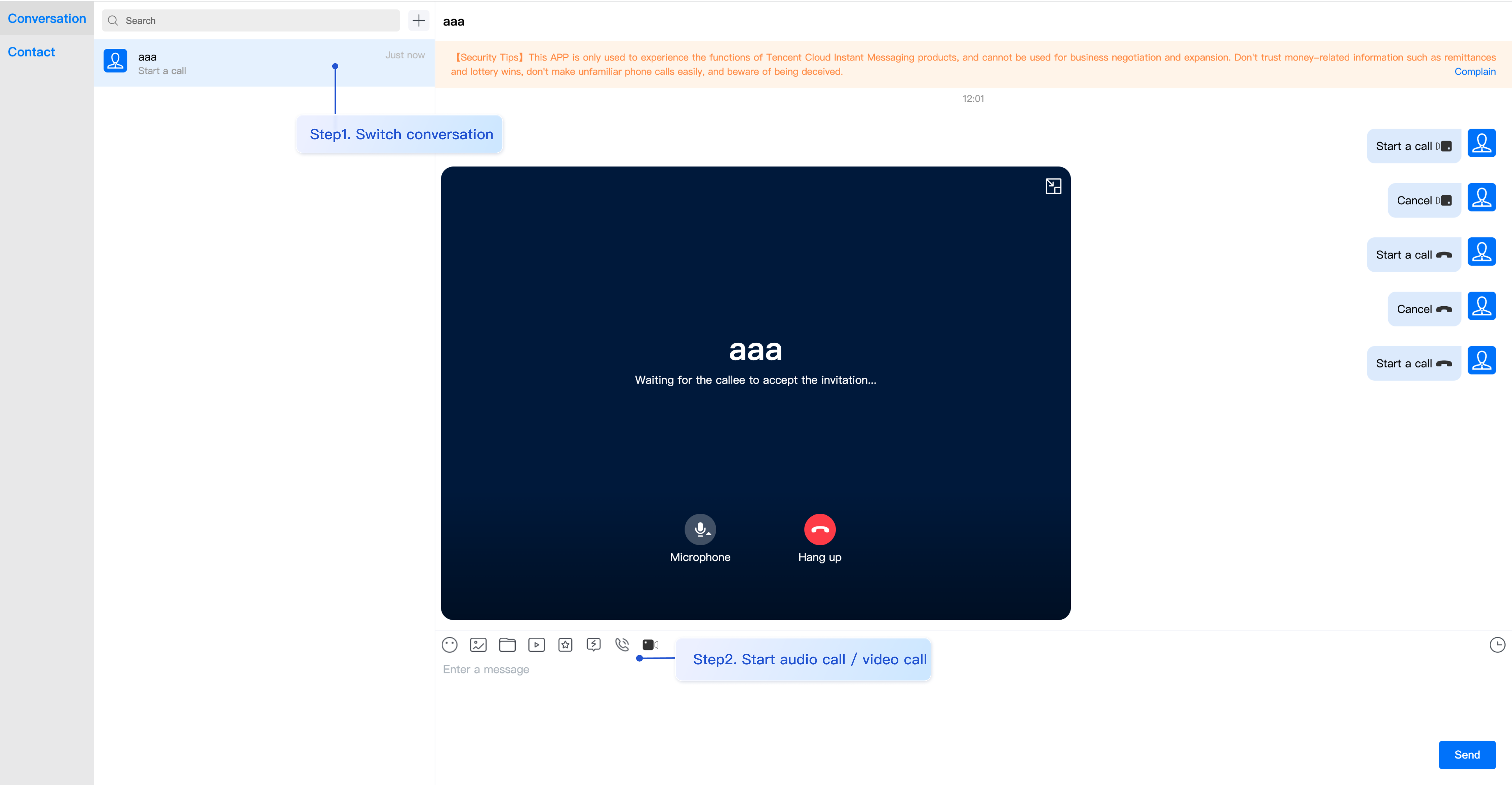
|
|
63
|
+
After creation, switch to the directory where the project is located:
|
|
64
|
+
``` bash
|
|
65
|
+
cd chat-example
|
|
66
|
+
```
|
|
67
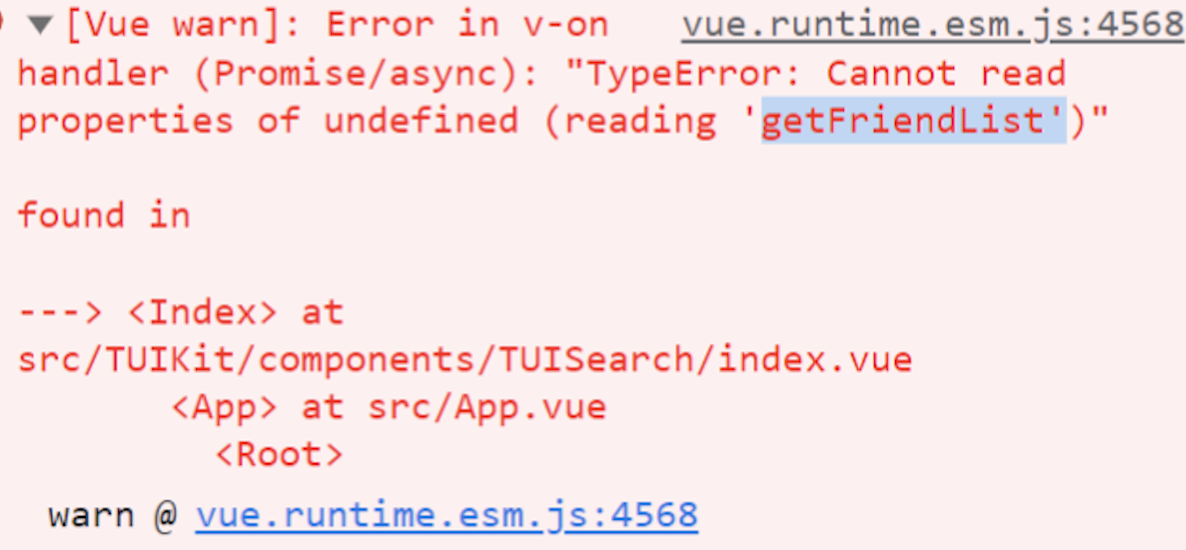
|
+
|
|
68
|
+
If you are a vue2 project, please make the following corresponding environment configurations based on the Vue version you are using.
|
|
69
|
+
|
|
70
|
+
IIf you are a vue2 project, please ignore.
|
|
71
|
+
|
|
72
|
+
|
|
73
|
+
|
|
74
|
+
【vue2.7】
|
|
75
|
+
``` bash
|
|
76
|
+
npm i vue@2.7.9 vue-template-compiler@2.7.9
|
|
77
|
+
```
|
|
78
|
+
|
|
79
|
+
【Vue 2.6 and below】
|
|
80
|
+
``` bash
|
|
81
|
+
npm i @vue/composition-api unplugin-vue2-script-setup vue@2.6.14 vue-template-compiler@2.6.14
|
|
82
|
+
```
|
|
83
|
+
|
|
84
|
+
【vite】
|
|
85
|
+
|
|
86
|
+
> **Please Note:**
|
|
87
|
+
>
|
|
88
|
+
|
|
89
|
+
> Vite requires [**Node.js**](https://nodejs.org/en/)** versions 18+, 20+.** Pay attention to upgrade your Node version when your package manager issues a warning, for more details refer to [Vite official website](https://cn.vitejs.dev/guide/).
|
|
90
|
+
>
|
|
91
|
+
|
|
92
|
+
|
|
93
|
+
Create a project using Vite, configure Vue + TypeScript according to the options in the picture below.
|
|
94
|
+
``` bash
|
|
95
|
+
npm create vite@latest
|
|
96
|
+
```
|
|
97
|
+
|
|
98
|
+

|
|
99
|
+
|
|
100
|
+
Then, switch to the project directory, and install the project dependencies:
|
|
101
|
+
``` bash
|
|
102
|
+
cd chat-example
|
|
103
|
+
npm install
|
|
104
|
+
```
|
|
105
|
+
|
|
106
|
+
Install the sass environment dependency required for TUIKit:
|
|
107
|
+
``` bash
|
|
108
|
+
npm i -D sass@1.77.0 sass-loader@10.1.1
|
|
109
|
+
```
|
|
110
|
+
|
|
111
|
+
> **Note:**
|
|
112
|
+
>
|
|
113
|
+
|
|
114
|
+
> If your tsconfig.json already has references configured, such as the vite official auto-configured "./tsconfig.app.json" and "./tsconfig.node.json", please add the following rules to the corresponding files tsconfig.app.json and tsconfig.node.json under compilerOptions.
|
|
115
|
+
>
|
|
116
|
+
|
|
117
|
+
|
|
118
|
+
|
|
119
|
+
|
|
120
|
+
|
|
121
|
+
【typescript ≥ 5.0.0】
|
|
122
|
+
``` json
|
|
123
|
+
{
|
|
124
|
+
...
|
|
125
|
+
"compilerOptions": {
|
|
126
|
+
"verbatimModuleSyntax": false,
|
|
127
|
+
}
|
|
128
|
+
}
|
|
129
|
+
```
|
|
130
|
+
|
|
131
|
+
|
|
132
|
+
【typescript < 5.0.0】
|
|
133
|
+
``` json
|
|
134
|
+
{
|
|
135
|
+
...
|
|
136
|
+
"compilerOptions": {
|
|
137
|
+
"importsNotUsedAsValues": "preserve",
|
|
138
|
+
}
|
|
139
|
+
}
|
|
140
|
+
```
|
|
141
|
+
|
|
142
|
+
### Step 2. Download the TUIKit component
|
|
143
|
+
|
|
144
|
+
Download the TUIKit component through [npm](https://www.npmjs.com/package/@tencentcloud/chat-uikit-vue). To facilitate your subsequent expansion, it is recommended that you copy the TUIKit component to the src directory of your project:
|
|
145
|
+
|
|
146
|
+
|
|
147
|
+
|
|
148
|
+
【macOS】
|
|
149
|
+
|
|
150
|
+
|
|
151
|
+
【shell】
|
|
152
|
+
``` bash
|
|
153
|
+
npm i @tencentcloud/chat-uikit-vue
|
|
154
|
+
mkdir -p ./src/TUIKit && rsync -av --exclude={'node_modules','package.json','excluded-list.txt'} ./node_modules/@tencentcloud/chat-uikit-vue/ ./src/TUIKit
|
|
155
|
+
```
|
|
156
|
+
|
|
157
|
+
【Windows】
|
|
158
|
+
|
|
159
|
+
|
|
160
|
+
【shell】
|
|
161
|
+
``` bash
|
|
162
|
+
npm i @tencentcloud/chat-uikit-vue
|
|
163
|
+
```
|
|
164
|
+
|
|
165
|
+
|
|
166
|
+
【shell】
|
|
167
|
+
``` bash
|
|
168
|
+
xcopy .\node_modules\@tencentcloud\chat-uikit-vue .\src\TUIKit /i /e /exclude:.\node_modules\@tencentcloud\chat-uikit-vue\excluded-list.txt
|
|
169
|
+
```
|
|
170
|
+
|
|
171
|
+
### Step 3. Import TUIKit component
|
|
172
|
+
|
|
173
|
+
##### On the page where you want to display it, simply import the TUIKit component to use it.
|
|
174
|
+
|
|
175
|
+
> **Note:**
|
|
176
|
+
>
|
|
177
|
+
|
|
178
|
+
> To respect the copyright of emoji designs, the Chat Demo/TUIKit project does not include cutouts of large emoji elements. Please replace them with your own designs or other emoji packs for which you hold the copyright before officially launching for commercial use. **The default smiley face emoji pack shown below is copyrighted by Tencent RTC** and is available for licensed use for a fee. If you need to obtain a license, please [contact us](https://trtc.io/contact).
|
|
179
|
+
>
|
|
180
|
+
|
|
181
|
+
> 
|
|
182
|
+
>
|
|
183
|
+
|
|
184
|
+
|
|
185
|
+
##### For example, implementing the following code on the App.vue page allows for a quick setup of the chat interface (the following example code supports both Web and H5):
|
|
186
|
+
|
|
187
|
+
> **Note:**
|
|
188
|
+
>
|
|
189
|
+
|
|
190
|
+
> The example code below uses the setup syntax. If your project does not use the setup syntax, please register components according to the standard methods of Vue3/Vue2.
|
|
191
|
+
>
|
|
192
|
+
|
|
193
|
+
|
|
194
|
+
|
|
195
|
+
|
|
196
|
+
【vue3】
|
|
197
|
+
``` javascript
|
|
198
|
+
<template>
|
|
199
|
+
<div id="app">
|
|
200
|
+
<TUIKit :SDKAppID="YOUR_SDKAPPID" userID="YOUR_USERID" userSig="YOUR_USERSIG" />
|
|
201
|
+
<TUICallKit class="callkit-container" :allowedMinimized="true" :allowedFullScreen="false" />
|
|
202
|
+
</div>
|
|
203
|
+
</template>
|
|
204
|
+
<script lang="ts" setup>
|
|
205
|
+
import { TUIKit } from './TUIKit';
|
|
206
|
+
import { TUICallKit } from '@tencentcloud/call-uikit-vue';
|
|
207
|
+
</script>
|
|
208
|
+
<style lang="scss">
|
|
209
|
+
</style>
|
|
210
|
+
```
|
|
211
|
+
|
|
212
|
+
【vue2.7】
|
|
213
|
+
``` javascript
|
|
214
|
+
<template>
|
|
215
|
+
<div id="app">
|
|
216
|
+
<TUIKit :SDKAppID="YOUR_SDKAPPID" userID="YOUR_USERID" userSig="YOUR_USERSIG" />
|
|
217
|
+
<TUICallKit class="callkit-container" :allowedMinimized="true" :allowedFullScreen="false" />
|
|
218
|
+
</div>
|
|
219
|
+
</template>
|
|
220
|
+
<script lang="ts" setup>
|
|
221
|
+
import { TUIKit } from './TUIKit';
|
|
222
|
+
import { TUICallKit } from '@tencentcloud/call-uikit-vue2';
|
|
223
|
+
</script>
|
|
224
|
+
<style lang="scss">
|
|
225
|
+
</style>
|
|
226
|
+
```
|
|
227
|
+
|
|
228
|
+
【vue2.6 and below】
|
|
229
|
+
``` javascript
|
|
230
|
+
<template>
|
|
231
|
+
<div id="app">
|
|
232
|
+
<TUIKit :SDKAppID="YOUR_SDKAPPID" userID="YOUR_USERID" userSig="YOUR_USERSIG" />
|
|
233
|
+
<TUICallKit class="callkit-container" :allowedMinimized="true" :allowedFullScreen="false" />
|
|
234
|
+
</div>
|
|
235
|
+
</template>
|
|
236
|
+
<script lang="ts" setup>
|
|
237
|
+
import { TUIKit } from './TUIKit';
|
|
238
|
+
import { TUICallKit } from '@tencentcloud/call-uikit-vue2.6';
|
|
239
|
+
</script>
|
|
240
|
+
<style lang="scss">
|
|
241
|
+
</style>
|
|
242
|
+
```
|
|
243
|
+
1. Install dependencies supporting composition-api and script setup, as well as dependencies related to vue2.6.
|
|
244
|
+
|
|
245
|
+
``` javascript
|
|
246
|
+
npm i @vue/composition-api unplugin-vue2-script-setup vue@2.6.14 vue-template-compiler@2.6.14
|
|
247
|
+
```
|
|
248
|
+
2. Import VueCompositionAPI in `main.ts/main.js`.
|
|
249
|
+
|
|
250
|
+
``` javascript
|
|
251
|
+
import VueCompositionAPI from "@vue/composition-api";
|
|
252
|
+
Vue.use(VueCompositionAPI);
|
|
253
|
+
```
|
|
254
|
+
3. Add the following in `vue.config.js` . If the file does not exist, please create it.
|
|
255
|
+
|
|
256
|
+
``` javascript
|
|
257
|
+
const ScriptSetup = require("unplugin-vue2-script-setup/webpack").default;
|
|
258
|
+
module.exports = {
|
|
259
|
+
parallel: false, // disable thread-loader, which is not compactible with this plugin
|
|
260
|
+
configureWebpack: {
|
|
261
|
+
plugins: [
|
|
262
|
+
ScriptSetup({
|
|
263
|
+
/* options */
|
|
264
|
+
}),
|
|
265
|
+
],
|
|
266
|
+
},
|
|
267
|
+
chainWebpack(config) {
|
|
268
|
+
// disable type check and let `vue-tsc` handles it
|
|
269
|
+
config.plugins.delete("fork-ts-checker");
|
|
270
|
+
},
|
|
271
|
+
};
|
|
272
|
+
```
|
|
273
|
+
4. At the end of the `src/TUIKit/adapter-vue.ts` file, replace the export source:
|
|
274
|
+
|
|
275
|
+
``` javascript
|
|
276
|
+
// Initial notation
|
|
277
|
+
export * from "vue";
|
|
278
|
+
// Replace with
|
|
279
|
+
export * from "@vue/composition-api";
|
|
280
|
+
```
|
|
281
|
+
|
|
282
|
+
### Step 4: Obtain SDKAppID, userID, and userSig
|
|
283
|
+
|
|
284
|
+
Set the relevant parameters SDKAppID, userID, and corresponding userSig in `<TUIKit>`:
|
|
285
|
+
- `SDKAppID` can be obtained through the [Chat Console](https://console.trtc.io/app) in `Applications`:
|
|
286
|
+
|
|
287
|
+
|
|
288
|
+
|
|
289
|
+
|
|
290
|
+
- `userID`
|
|
291
|
+
|
|
292
|
+
- Click to enter the [Application](https://console.trtc.io/app) you created above. You will see the `Chat` product entrance in the left sidebar. Click to enter.
|
|
293
|
+
|
|
294
|
+
- After entering the Chat Product subpage, click on `Users` to go to the User Management Page.
|
|
295
|
+
|
|
296
|
+
- Click `Create account`, a form for creating account information will pop up. If you are just a regular member, we recommend you choose the `General` type.
|
|
297
|
+
|
|
298
|
+
- To enhance your experience with message sending and receiving features, we recommend creating two userIDs.
|
|
299
|
+
|
|
300
|
+
|
|
301
|
+
|
|
302
|
+
|
|
303
|
+
- `userSig` can be generated in real-time using the development tools provided by the console. To access the development tools, click [Chat Console > Development Tools > UserSig Tools > Signature (UserSig) Generator](https://console.trtc.io/usersig).
|
|
304
|
+
|
|
305
|
+
|
|
306
|
+
|
|
307
|
+
|
|
308
|
+
|
|
309
|
+
### Step 5. Launch the project
|
|
310
|
+
|
|
311
|
+
|
|
312
|
+
|
|
313
|
+
【vue-cli】
|
|
314
|
+
|
|
315
|
+
> **Note:**
|
|
316
|
+
>
|
|
317
|
+
|
|
318
|
+
> Since vue-cli enables Webpack Global Overlay Error Message Prompt by default, for a better experience, **it is recommended to disable the global overlay error prompt**.
|
|
319
|
+
>
|
|
320
|
+
|
|
321
|
+
>
|
|
322
|
+
|
|
323
|
+
【webpack4】
|
|
324
|
+
> `module.exports = defineConfig({`
|
|
325
|
+
> ` devServer: {`
|
|
326
|
+
> ` client: {`
|
|
327
|
+
> ` overlay: false,`
|
|
328
|
+
> ` },`
|
|
329
|
+
> ` },`
|
|
330
|
+
> `});`
|
|
331
|
+
|
|
332
|
+
【webpack3】
|
|
333
|
+
> `module.exports = {`
|
|
334
|
+
> ` devServer: {`
|
|
335
|
+
> ` overlay: false,`
|
|
336
|
+
> ` },`
|
|
337
|
+
> `};`
|
|
338
|
+
>
|
|
339
|
+
|
|
340
|
+
|
|
341
|
+
|
|
342
|
+
【shell】
|
|
343
|
+
``` bash
|
|
344
|
+
npm run serve
|
|
345
|
+
```
|
|
346
|
+
|
|
347
|
+
【vite】
|
|
348
|
+
|
|
349
|
+
|
|
350
|
+
【shell】
|
|
351
|
+
``` bash
|
|
352
|
+
npm run dev
|
|
353
|
+
```
|
|
354
|
+
|
|
355
|
+
### Additional item: Switching languages
|
|
356
|
+
|
|
357
|
+
The `Vue TUIKit` comes with default **Simplified Chinese, English** language packages that serve as the interface display language.
|
|
358
|
+
|
|
359
|
+
You may switch languages through the following methods, for more methods please see [Internationalization](https://trtc.io/document/58652?platform=web&product=chat).
|
|
360
|
+
``` javascript
|
|
361
|
+
import { TUITranslateService } from "@tencentcloud/chat-uikit-engine";
|
|
362
|
+
// change language to chinese
|
|
363
|
+
TUITranslateService.changeLanguage("zh");
|
|
364
|
+
// change language to english
|
|
365
|
+
TUITranslateService.changeLanguage("en");
|
|
366
|
+
```
|
|
367
|
+
|
|
368
|
+
### Step 6. Send your first message
|
|
369
|
+
|
|
370
|
+
|
|
371
|
+
|
|
372
|
+
|
|
373
|
+
|
|
374
|
+
### Step 7: Make your first phone call
|
|
375
|
+
|
|
376
|
+
|
|
377
|
+
|
|
378
|
+
## FAQs
|
|
379
|
+
|
|
380
|
+
### Product Service FAQs
|
|
381
|
+
|
|
382
|
+
#### 1. The Audio/Video Call Capability package is not activated? Failure to initiate the Audio/Video Call?
|
|
383
|
+
|
|
384
|
+
Please click [Audio/Video Call > Frequently Asked Questions](https://trtc.io/document/51024?platform=web&product=call) to view the solutions.
|
|
385
|
+
|
|
386
|
+
#### 2. What is UserSig? How is UserSig generated?
|
|
387
|
+
|
|
388
|
+
A UserSig is a password with which you can log in to use Chat service. It is the ciphertext generated by encrypting information such as userID.
|
|
389
|
+
|
|
390
|
+
The issuance of UserSig is achieved by integrating the calculation code for UserSig into your server-side, whilst providing an interface designed for your project. Whenever UserSig is required, your project could request the operational server for a dynamic UserSig. For further information, please refer to [Generating UserSig on the server-side](https://trtc.io/document/39074?product=consoleguide).
|
|
391
|
+
|
|
392
|
+
> **Caution**
|
|
393
|
+
>
|
|
394
|
+
|
|
395
|
+
> The method to obtain UserSig demonstrated in this document utilizes the configuration of a SECRETKEY within the client-side code. Within this procedure, the SECRETKEY is notably vulnerable to decompilation and reverse-engineering. Should your SECRETKEY be leaked, malefactors could potentially exploit your Tencent Cloud traffic. Therefore, **this technique is only appropriate for local operation and functional debugging**. For the correct method of issuing UserSig, please refer to the earlier text.
|
|
396
|
+
>
|
|
397
|
+
|
|
398
|
+
|
|
399
|
+
### Connection Errors FAQs
|
|
400
|
+
|
|
401
|
+
#### 1. Runtime error: "TypeError: Cannot read properties of undefined (reading "getFriendList")"
|
|
402
|
+
|
|
403
|
+
If the following errors occur during runtime after connecting as per the steps outlined above, it is imperative that you **delete the node_modules directory under the TUIKit folder** to ensure the uniqueness of TUIKit's dependencies, preventing issues caused by multiple copies of dependencies.
|
|
404
|
+
|
|
405
|
+
|
|
406
|
+
|
|
407
|
+
#### 2. How does a JS project integrate the TUIKit component?
|
|
408
|
+
|
|
409
|
+
TUIKit exclusively supports the TS environment for operation. You can enable the coexistence of existing JS code in your project with the TS code in TUIKit through progressive configuration of TypeScript.
|
|
410
|
+
|
|
411
|
+
|
|
412
|
+
|
|
413
|
+
【vue-cli】
|
|
414
|
+
|
|
415
|
+
Please execute the following in the root directory of your engineering project created by the Vue CLI scaffold:
|
|
416
|
+
``` bash
|
|
417
|
+
vue add typescript
|
|
418
|
+
```
|
|
419
|
+
|
|
420
|
+
Subsequently, please make selections in accordance with the following configuration options. To assure that we can support both the existing js code and the ts code within TUIKit, it is imperative that you strictly adhere to the five options presented below. 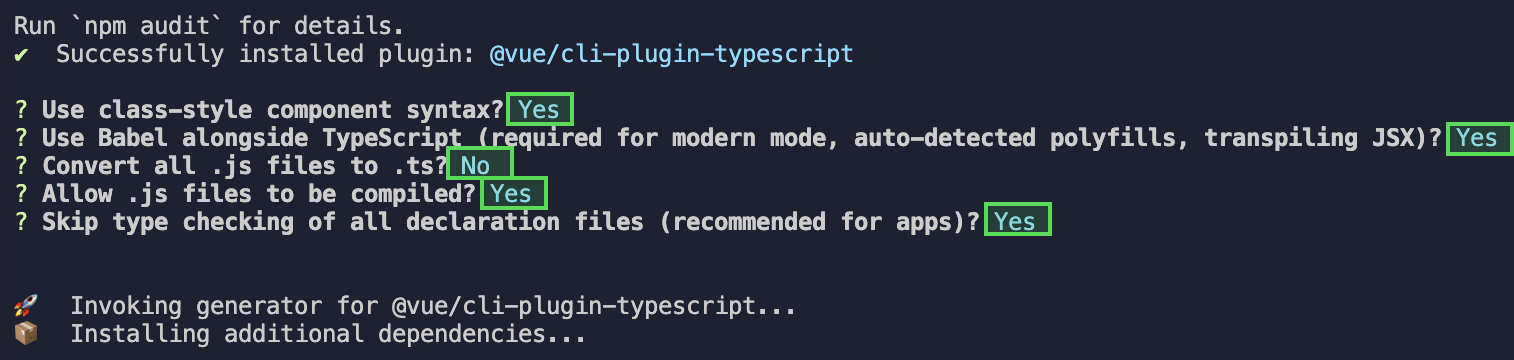
|
|
421
|
+
|
|
422
|
+
**Once these steps are completed, please rerun the project!**
|
|
423
|
+
|
|
424
|
+
【vite】
|
|
425
|
+
|
|
426
|
+
Please execute the following command in your project's root directory created with vite:
|
|
427
|
+
``` bash
|
|
428
|
+
npm install -D typescript
|
|
429
|
+
```
|
|
430
|
+
|
|
431
|
+
#### 3. Runtime error reported: /chat-example/src/TUIKit/components/TUIChat/message-input/message-input-editor.vue .ts(8,23)TS1005: expected.
|
|
432
|
+
|
|
433
|
+

|
|
434
|
+
|
|
435
|
+
The above error message appears because your installed @vue/cli version is too low. **You must ensure that your @vue/cli version is 5.0.0 or higher**. The upgrade method is as follows:
|
|
436
|
+
``` javascript
|
|
437
|
+
npm install -g @vue/cli@5.0.8
|
|
438
|
+
```
|
|
439
|
+
|
|
440
|
+
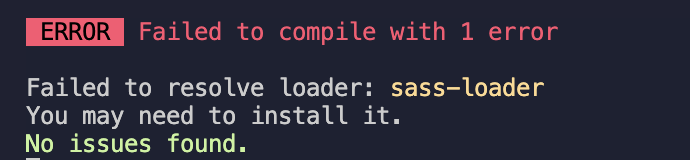
#### 4. Runtime error: Failed to resolve loader: sass-loader
|
|
441
|
+
|
|
442
|
+
|
|
443
|
+
|
|
444
|
+
The above error message appears because the `sass` environment is not installed on your machine, please run the following command to install the `sass` environment:
|
|
445
|
+
``` javascript
|
|
446
|
+
npm i -D sass sass-loader@10.1.1
|
|
447
|
+
```
|
|
448
|
+
|
|
449
|
+
#### 5. Other ESLint errors?
|
|
450
|
+
|
|
451
|
+
If copying chat-uikit-vue to the src directory results in error due to inconsistency with your local project code style, you may ignore this component directory. This can be achieved by adding .eslintignore file to the project root directory:
|
|
452
|
+
``` javascript
|
|
453
|
+
# .eslintignore
|
|
454
|
+
src/TUIKit
|
|
455
|
+
```
|
|
456
|
+
|
|
457
|
+
#### 6. How to disable the full screen overlay error message prompt of webpack in dev mode in vue/cli?
|
|
458
|
+
|
|
459
|
+
You can disable it in the vue.config.js file at the root directory of your project:
|
|
460
|
+
|
|
461
|
+
|
|
462
|
+
|
|
463
|
+
【webpack4】
|
|
464
|
+
``` javascript
|
|
465
|
+
module.exports = defineConfig({
|
|
466
|
+
...
|
|
467
|
+
devServer: {
|
|
468
|
+
client: {
|
|
469
|
+
overlay: false,
|
|
470
|
+
},
|
|
471
|
+
},
|
|
472
|
+
});
|
|
473
|
+
```
|
|
474
|
+
|
|
475
|
+
【webpack3】
|
|
476
|
+
``` javascript
|
|
477
|
+
module.exports = {
|
|
478
|
+
...
|
|
479
|
+
devServer: {
|
|
480
|
+
overlay: false,
|
|
481
|
+
},
|
|
482
|
+
};
|
|
483
|
+
```
|
|
484
|
+
|
|
485
|
+
#### 7. What to do when encountering 'Component name "XXXX" should always be multi-word'?
|
|
486
|
+
- The version of ESLint utilized in Chat TUIKit web is v6.7.2, which does not rigidly verify the camelCase format for module names.
|
|
487
|
+
|
|
488
|
+
- Should you encounter this dilemma, you may configure as follows in the .eslintrc.js file:
|
|
489
|
+
|
|
490
|
+
|
|
491
|
+
|
|
492
|
+
【shell】
|
|
493
|
+
``` bash
|
|
494
|
+
module.exports = {
|
|
495
|
+
...
|
|
496
|
+
rules: {
|
|
497
|
+
...
|
|
498
|
+
'vue/multi-word-component-names': 'warn',
|
|
499
|
+
},
|
|
500
|
+
};
|
|
501
|
+
```
|
|
502
|
+
|
|
503
|
+
#### 8. What should I do if I encounter ERESOLVE unable to resolve dependency tree?
|
|
504
|
+
|
|
505
|
+
If ERESOLVE unable to resolve dependency tree appears when npm install is run, it indicates a conflict in dependency installation. The following method can be adopted for installation:
|
|
506
|
+
|
|
507
|
+
|
|
508
|
+
【shell】
|
|
509
|
+
``` bash
|
|
510
|
+
npm install --legacy-peer-deps
|
|
511
|
+
```
|
|
512
|
+
|
|
513
|
+
#### 9. How might one address the error message, 'vue packages version mismatch' occurring during execution?
|
|
514
|
+
``` bash
|
|
515
|
+
// If you are using a vue2.7 project, please execute in your project root directory
|
|
516
|
+
npm i vue@2.7.9 vue-template-compiler@2.7.9
|
|
517
|
+
// If you have a Vue2.6 project, please execute in your project's root directory
|
|
518
|
+
npm i vue@2.6.14 vue-template-compiler@2.6.14
|
|
519
|
+
```
|
|
520
|
+
|
|
521
|
+
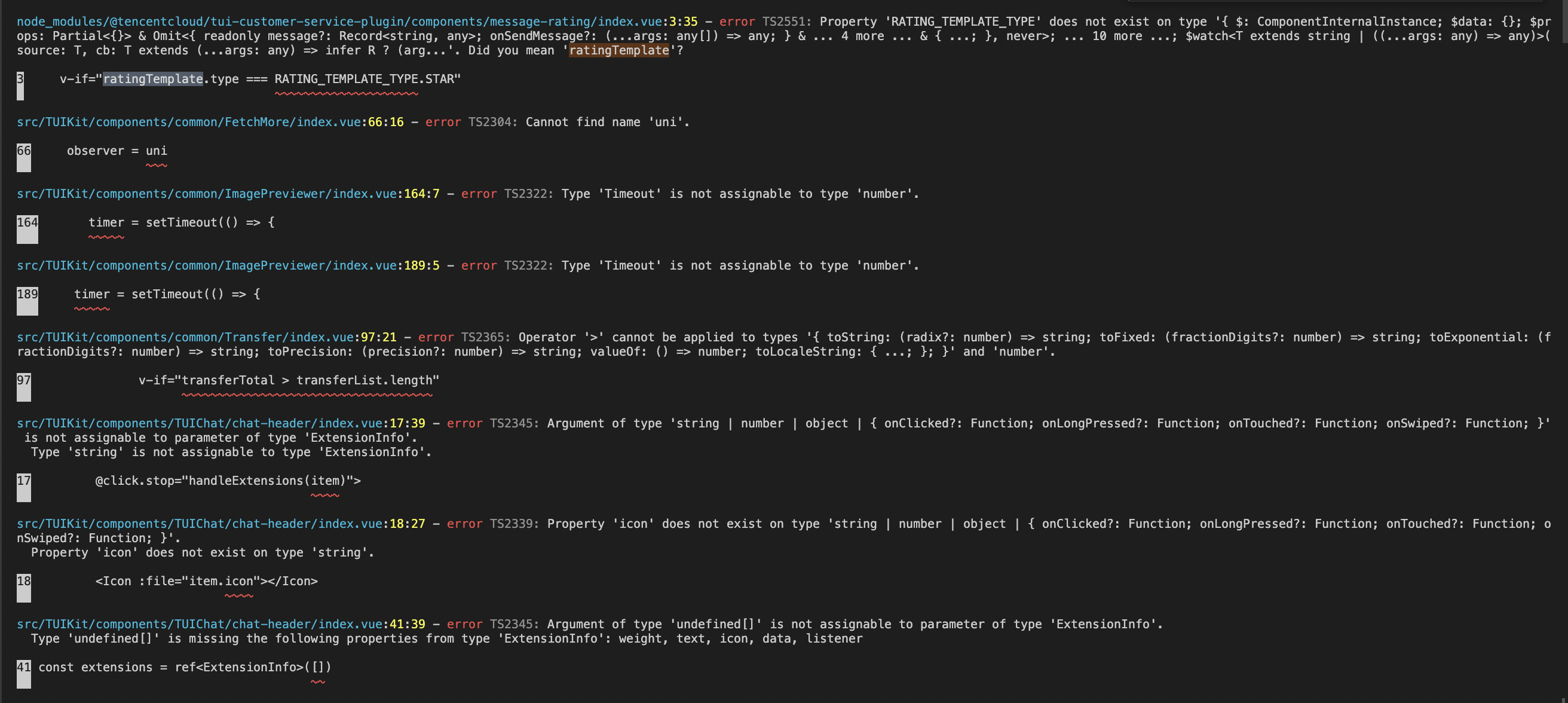
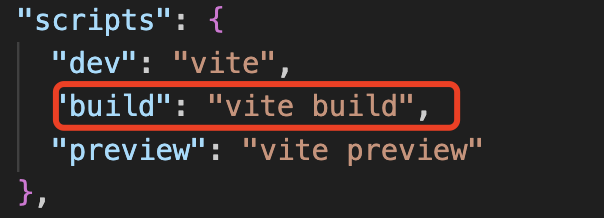
#### 10. Why does TypeScript report an error after npm run build in a Vite project?
|
|
522
|
+
|
|
523
|
+
|
|
524
|
+
|
|
525
|
+
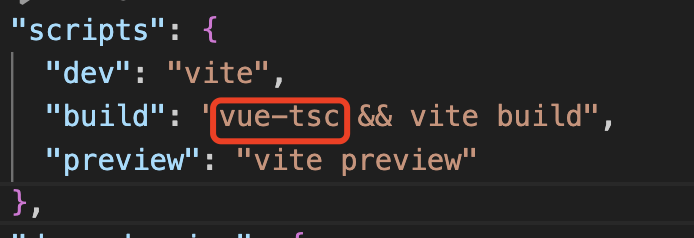
**Reason**: It's led by the vue-tsc command in "build": "vue-tsc && vite build" under package.json script.
|
|
526
|
+
|
|
527
|
+
|
|
528
|
+
|
|
529
|
+
**Solution**: Simply remove vue-tsc. "build": "vite build"
|
|
530
|
+
|
|
531
|
+
|
|
532
|
+
|
|
533
|
+
## Contact Us
|
|
534
|
+
|
|
535
|
+
Join the [Telegram technical discussion group](https://t.me/tencent_imsdk) or [WhatsApp discussion group](https://chat.whatsapp.com/IVa11ZkVmKTEwSWsAzSyik), enjoy the support of professional engineers, and solve your difficulties.
|
|
536
|
+
|
|
537
|
+
## Documentation
|
|
538
|
+
|
|
539
|
+
#### Related to Vue2 & Vue3 UIKit:
|
|
540
|
+
- [chat-uikit-vue npm](https://www.npmjs.com/package/@tencentcloud/chat-uikit-vue)
|
|
541
|
+
|
|
542
|
+
- [Vue2 Demo Source Code and Running Example](https://github.com/TencentCloud/chat-uikit-vue/tree/main/Vue2/Demo)
|
|
543
|
+
|
|
544
|
+
- [Vue3 Demo Source Code and Running Example](https://github.com/TencentCloud/chat-uikit-vue/tree/main/Vue3/Demo)
|
|
545
|
+
|
|
546
|
+
|
|
547
|
+
#### Vue2 & Vue3 UIKit logic layer: engine
|
|
548
|
+
- [chat-uikit-engine npm](https://www.npmjs.com/package/@tencentcloud/chat-uikit-engine)
|
|
549
|
+
|
|
550
|
+
- [chat-uikit-engine interface](https://web.sdk.qcloud.com/im/doc/chat-engine/index.html)
|
|
551
|
+
|
|
552
|
+
|