@tencent-connect/openclaw-qqbot 1.0.0-alpha.0
This diff represents the content of publicly available package versions that have been released to one of the supported registries. The information contained in this diff is provided for informational purposes only and reflects changes between package versions as they appear in their respective public registries.
- package/LICENSE +22 -0
- package/README.md +393 -0
- package/README.zh.md +390 -0
- package/bin/qqbot-cli.js +243 -0
- package/clawdbot.plugin.json +16 -0
- package/dist/index.d.ts +17 -0
- package/dist/index.js +22 -0
- package/dist/src/api.d.ts +138 -0
- package/dist/src/api.js +523 -0
- package/dist/src/channel.d.ts +3 -0
- package/dist/src/channel.js +337 -0
- package/dist/src/config.d.ts +25 -0
- package/dist/src/config.js +156 -0
- package/dist/src/gateway.d.ts +18 -0
- package/dist/src/gateway.js +2315 -0
- package/dist/src/image-server.d.ts +62 -0
- package/dist/src/image-server.js +401 -0
- package/dist/src/known-users.d.ts +100 -0
- package/dist/src/known-users.js +263 -0
- package/dist/src/onboarding.d.ts +10 -0
- package/dist/src/onboarding.js +203 -0
- package/dist/src/outbound.d.ts +150 -0
- package/dist/src/outbound.js +1175 -0
- package/dist/src/proactive.d.ts +170 -0
- package/dist/src/proactive.js +399 -0
- package/dist/src/runtime.d.ts +3 -0
- package/dist/src/runtime.js +10 -0
- package/dist/src/session-store.d.ts +52 -0
- package/dist/src/session-store.js +254 -0
- package/dist/src/types.d.ts +145 -0
- package/dist/src/types.js +1 -0
- package/dist/src/utils/audio-convert.d.ts +73 -0
- package/dist/src/utils/audio-convert.js +645 -0
- package/dist/src/utils/file-utils.d.ts +46 -0
- package/dist/src/utils/file-utils.js +107 -0
- package/dist/src/utils/image-size.d.ts +51 -0
- package/dist/src/utils/image-size.js +234 -0
- package/dist/src/utils/media-tags.d.ts +14 -0
- package/dist/src/utils/media-tags.js +120 -0
- package/dist/src/utils/payload.d.ts +112 -0
- package/dist/src/utils/payload.js +186 -0
- package/dist/src/utils/platform.d.ts +126 -0
- package/dist/src/utils/platform.js +358 -0
- package/dist/src/utils/upload-cache.d.ts +34 -0
- package/dist/src/utils/upload-cache.js +93 -0
- package/index.ts +27 -0
- package/moltbot.plugin.json +16 -0
- package/node_modules/@eshaz/web-worker/LICENSE +201 -0
- package/node_modules/@eshaz/web-worker/README.md +134 -0
- package/node_modules/@eshaz/web-worker/browser.js +17 -0
- package/node_modules/@eshaz/web-worker/cjs/browser.js +16 -0
- package/node_modules/@eshaz/web-worker/cjs/node.js +219 -0
- package/node_modules/@eshaz/web-worker/index.d.ts +4 -0
- package/node_modules/@eshaz/web-worker/node.js +223 -0
- package/node_modules/@eshaz/web-worker/package.json +54 -0
- package/node_modules/@wasm-audio-decoders/common/index.js +5 -0
- package/node_modules/@wasm-audio-decoders/common/package.json +36 -0
- package/node_modules/@wasm-audio-decoders/common/src/WASMAudioDecoderCommon.js +231 -0
- package/node_modules/@wasm-audio-decoders/common/src/WASMAudioDecoderWorker.js +129 -0
- package/node_modules/@wasm-audio-decoders/common/src/puff/README +67 -0
- package/node_modules/@wasm-audio-decoders/common/src/puff/build_puff.js +31 -0
- package/node_modules/@wasm-audio-decoders/common/src/puff/puff.c +863 -0
- package/node_modules/@wasm-audio-decoders/common/src/puff/puff.h +35 -0
- package/node_modules/@wasm-audio-decoders/common/src/utilities.js +3 -0
- package/node_modules/@wasm-audio-decoders/common/types.d.ts +7 -0
- package/node_modules/mpg123-decoder/README.md +265 -0
- package/node_modules/mpg123-decoder/dist/mpg123-decoder.min.js +185 -0
- package/node_modules/mpg123-decoder/dist/mpg123-decoder.min.js.map +1 -0
- package/node_modules/mpg123-decoder/index.js +8 -0
- package/node_modules/mpg123-decoder/package.json +58 -0
- package/node_modules/mpg123-decoder/src/EmscriptenWasm.js +464 -0
- package/node_modules/mpg123-decoder/src/MPEGDecoder.js +200 -0
- package/node_modules/mpg123-decoder/src/MPEGDecoderWebWorker.js +21 -0
- package/node_modules/mpg123-decoder/types.d.ts +30 -0
- package/node_modules/silk-wasm/LICENSE +21 -0
- package/node_modules/silk-wasm/README.md +85 -0
- package/node_modules/silk-wasm/lib/index.cjs +16 -0
- package/node_modules/silk-wasm/lib/index.d.ts +70 -0
- package/node_modules/silk-wasm/lib/index.mjs +16 -0
- package/node_modules/silk-wasm/lib/silk.wasm +0 -0
- package/node_modules/silk-wasm/lib/utils.d.ts +4 -0
- package/node_modules/silk-wasm/package.json +39 -0
- package/node_modules/simple-yenc/.github/FUNDING.yml +1 -0
- package/node_modules/simple-yenc/.prettierignore +1 -0
- package/node_modules/simple-yenc/LICENSE +7 -0
- package/node_modules/simple-yenc/README.md +163 -0
- package/node_modules/simple-yenc/dist/esm.js +1 -0
- package/node_modules/simple-yenc/dist/index.js +1 -0
- package/node_modules/simple-yenc/package.json +50 -0
- package/node_modules/simple-yenc/rollup.config.js +27 -0
- package/node_modules/simple-yenc/src/simple-yenc.js +302 -0
- package/node_modules/ws/LICENSE +20 -0
- package/node_modules/ws/README.md +548 -0
- package/node_modules/ws/browser.js +8 -0
- package/node_modules/ws/index.js +13 -0
- package/node_modules/ws/lib/buffer-util.js +131 -0
- package/node_modules/ws/lib/constants.js +19 -0
- package/node_modules/ws/lib/event-target.js +292 -0
- package/node_modules/ws/lib/extension.js +203 -0
- package/node_modules/ws/lib/limiter.js +55 -0
- package/node_modules/ws/lib/permessage-deflate.js +528 -0
- package/node_modules/ws/lib/receiver.js +706 -0
- package/node_modules/ws/lib/sender.js +602 -0
- package/node_modules/ws/lib/stream.js +161 -0
- package/node_modules/ws/lib/subprotocol.js +62 -0
- package/node_modules/ws/lib/validation.js +152 -0
- package/node_modules/ws/lib/websocket-server.js +554 -0
- package/node_modules/ws/lib/websocket.js +1393 -0
- package/node_modules/ws/package.json +69 -0
- package/node_modules/ws/wrapper.mjs +8 -0
- package/openclaw.plugin.json +16 -0
- package/package.json +76 -0
- package/scripts/proactive-api-server.ts +356 -0
- package/scripts/pull-latest.sh +316 -0
- package/scripts/send-proactive.ts +273 -0
- package/scripts/set-markdown.sh +156 -0
- package/scripts/upgrade-and-run.sh +525 -0
- package/scripts/upgrade.sh +127 -0
- package/skills/qqbot-cron/SKILL.md +513 -0
- package/skills/qqbot-media/SKILL.md +194 -0
- package/src/api.ts +704 -0
- package/src/channel.ts +368 -0
- package/src/config.ts +182 -0
- package/src/gateway.ts +2459 -0
- package/src/image-server.ts +474 -0
- package/src/known-users.ts +353 -0
- package/src/onboarding.ts +274 -0
- package/src/openclaw-plugin-sdk.d.ts +483 -0
- package/src/outbound.ts +1301 -0
- package/src/proactive.ts +530 -0
- package/src/runtime.ts +14 -0
- package/src/session-store.ts +303 -0
- package/src/types.ts +153 -0
- package/src/utils/audio-convert.ts +738 -0
- package/src/utils/file-utils.ts +122 -0
- package/src/utils/image-size.ts +266 -0
- package/src/utils/media-tags.ts +134 -0
- package/src/utils/payload.ts +265 -0
- package/src/utils/platform.ts +404 -0
- package/src/utils/upload-cache.ts +128 -0
- package/tsconfig.json +16 -0
package/LICENSE
ADDED
|
@@ -0,0 +1,22 @@
|
|
|
1
|
+
MIT License
|
|
2
|
+
|
|
3
|
+
Copyright (c) 2026 sliverp
|
|
4
|
+
Copyright (c) 2026 Tencent Connect
|
|
5
|
+
|
|
6
|
+
Permission is hereby granted, free of charge, to any person obtaining a copy
|
|
7
|
+
of this software and associated documentation files (the "Software"), to deal
|
|
8
|
+
in the Software without restriction, including without limitation the rights
|
|
9
|
+
to use, copy, modify, merge, publish, distribute, sublicense, and/or sell
|
|
10
|
+
copies of the Software, and to permit persons to whom the Software is
|
|
11
|
+
furnished to do so, subject to the following conditions:
|
|
12
|
+
|
|
13
|
+
The above copyright notice and this permission notice shall be included in all
|
|
14
|
+
copies or substantial portions of the Software.
|
|
15
|
+
|
|
16
|
+
THE SOFTWARE IS PROVIDED "AS IS", WITHOUT WARRANTY OF ANY KIND, EXPRESS OR
|
|
17
|
+
IMPLIED, INCLUDING BUT NOT LIMITED TO THE WARRANTIES OF MERCHANTABILITY,
|
|
18
|
+
FITNESS FOR A PARTICULAR PURPOSE AND NONINFRINGEMENT. IN NO EVENT SHALL THE
|
|
19
|
+
AUTHORS OR COPYRIGHT HOLDERS BE LIABLE FOR ANY CLAIM, DAMAGES OR OTHER
|
|
20
|
+
LIABILITY, WHETHER IN AN ACTION OF CONTRACT, TORT OR OTHERWISE, ARISING FROM,
|
|
21
|
+
OUT OF OR IN CONNECTION WITH THE SOFTWARE OR THE USE OR OTHER DEALINGS IN THE
|
|
22
|
+
SOFTWARE.
|
package/README.md
ADDED
|
@@ -0,0 +1,393 @@
|
|
|
1
|
+
<div align="center">
|
|
2
|
+
|
|
3
|
+
|
|
4
|
+
|
|
5
|
+
<img width="120" src="https://img.shields.io/badge/🤖-QQ_Bot-blue?style=for-the-badge" alt="QQ Bot" />
|
|
6
|
+
|
|
7
|
+
# QQ Bot Channel Plugin for OpenClaw
|
|
8
|
+
|
|
9
|
+
**Connect your AI assistant to QQ — private chat, group chat, and rich media, all in one plugin.**
|
|
10
|
+
|
|
11
|
+
[](./LICENSE)
|
|
12
|
+
[](https://bot.q.qq.com/wiki/)
|
|
13
|
+
[](https://github.com/tencent-connect/openclaw-qqbot)
|
|
14
|
+
[](https://nodejs.org/)
|
|
15
|
+
[](https://www.typescriptlang.org/)
|
|
16
|
+
|
|
17
|
+
<br/>
|
|
18
|
+
|
|
19
|
+
**[简体中文](README.zh.md) | English**
|
|
20
|
+
|
|
21
|
+
Scan to join the QQ group chat
|
|
22
|
+
|
|
23
|
+
<img width="300" height="540" alt="Clipboard_Screenshot_1773047715" src="https://github.com/user-attachments/assets/4d2d2337-229a-42ad-97ab-8a6d0607f296" />
|
|
24
|
+
|
|
25
|
+
|
|
26
|
+
</div>
|
|
27
|
+
|
|
28
|
+
---
|
|
29
|
+
|
|
30
|
+
## ✨ Features
|
|
31
|
+
|
|
32
|
+
| Feature | Description |
|
|
33
|
+
|---------|-------------|
|
|
34
|
+
| 🔒 **Multi-Scene** | C2C private chat, group @messages, channel messages, channel DMs |
|
|
35
|
+
| 🖼️ **Rich Media** | Send & receive images, voice, video, and files |
|
|
36
|
+
| 🎙️ **Voice (STT/TTS)** | Speech-to-text transcription & text-to-speech replies |
|
|
37
|
+
| ⏰ **Scheduled Push** | Proactive message delivery via scheduled tasks |
|
|
38
|
+
| 🔗 **URL Support** | Direct URL sending in private chat (no restrictions) |
|
|
39
|
+
| ⌨️ **Typing Indicator** | "Bot is typing..." status shown in real-time |
|
|
40
|
+
| 🔄 **Hot Reload** | Install via npm with seamless hot updates |
|
|
41
|
+
| 📝 **Markdown** | Full Markdown formatting support |
|
|
42
|
+
| 🛠️ **Commands** | Native OpenClaw command integration |
|
|
43
|
+
|
|
44
|
+
---
|
|
45
|
+
|
|
46
|
+
## 📸 Feature Showcase
|
|
47
|
+
|
|
48
|
+
> **Note:** This plugin serves as a **message channel** only — it relays messages between QQ and OpenClaw. Capabilities like image understanding, voice transcription, drawing, etc. depend on the **AI model** you configure and the **skills** installed in OpenClaw, not on this plugin itself.
|
|
49
|
+
|
|
50
|
+
### 🎙️ Voice Messages (STT)
|
|
51
|
+
|
|
52
|
+
With STT configured, the plugin automatically transcribes voice messages to text before passing them to AI. The whole process is transparent to the user — sending voice feels as natural as sending text.
|
|
53
|
+
|
|
54
|
+
> **You**: *(send a voice message)* "What's the weather like tomorrow in Shenzhen?"
|
|
55
|
+
>
|
|
56
|
+
> **QQBot**: Tomorrow (March 7, Saturday) Shenzhen weather forecast 🌤️ ...
|
|
57
|
+
|
|
58
|
+
<img width="360" src="docs/images/fc7b2236896cfba3a37c94be5d59ce3e_720.jpg" alt="Voice STT Demo" />
|
|
59
|
+
|
|
60
|
+
### 📄 File Understanding
|
|
61
|
+
|
|
62
|
+
Send any file to the bot — novels, reports, spreadsheets — AI automatically recognizes the content and gives an intelligent reply.
|
|
63
|
+
|
|
64
|
+
> **You**: *(send a TXT file of "War and Peace")*
|
|
65
|
+
>
|
|
66
|
+
> **QQBot**: Got it! You uploaded the Chinese version of "War and Peace" by Leo Tolstoy. This appears to be the opening of Chapter 1...
|
|
67
|
+
|
|
68
|
+
<img width="360" src="docs/images/07bff56ab68e03173d2af586eeb3bcee_720.jpg" alt="File Understanding Demo" />
|
|
69
|
+
|
|
70
|
+
### 🖼️ Image Understanding
|
|
71
|
+
|
|
72
|
+
If your main model supports vision (e.g. Tencent Hunyuan `hunyuan-vision`), AI can understand images too. This is a general multimodal capability, not plugin-specific.
|
|
73
|
+
|
|
74
|
+
> **You**: *(send an image)*
|
|
75
|
+
>
|
|
76
|
+
> **QQBot**: Haha, so cute! Is that a QQ penguin in a lobster costume? 🦞🐧 ...
|
|
77
|
+
|
|
78
|
+
<img width="360" src="docs/images/59d421891f813b0d3c0cbe12574b6a72_720.jpg" alt="Image Understanding Demo" />
|
|
79
|
+
|
|
80
|
+
### 🎨 Image Generation
|
|
81
|
+
|
|
82
|
+
> **You**: Draw me a cat
|
|
83
|
+
>
|
|
84
|
+
> **QQBot**: Here you go! 🐱
|
|
85
|
+
|
|
86
|
+
AI sends images via `<qqimg>path</qqimg>`. Supports local paths and URLs. Formats: jpg/png/gif/webp/bmp.
|
|
87
|
+
|
|
88
|
+
<img width="360" src="docs/images/4645f2b3a20822b7f8d6664a708529eb_720.jpg" alt="Image Generation Demo" />
|
|
89
|
+
|
|
90
|
+
### 🔊 Voice Reply (TTS)
|
|
91
|
+
|
|
92
|
+
> **You**: Tell me a joke in voice
|
|
93
|
+
>
|
|
94
|
+
> **QQBot**: *(sends a voice message)*
|
|
95
|
+
|
|
96
|
+
AI sends voice via `<qqvoice>path</qqvoice>`. Formats: mp3/wav/silk/ogg. No ffmpeg required.
|
|
97
|
+
|
|
98
|
+
<img width="360" src="docs/images/21dce8bfc553ce23d1bd1b270e9c516c.jpg" alt="TTS Voice Demo" />
|
|
99
|
+
|
|
100
|
+
### 📎 File Sending
|
|
101
|
+
|
|
102
|
+
> **You**: Extract chapter 1 of War and Peace and send it as a file
|
|
103
|
+
>
|
|
104
|
+
> **QQBot**: *(sends a .txt file)*
|
|
105
|
+
|
|
106
|
+
AI sends files via `<qqfile>path</qqfile>`. Any format, up to 20MB.
|
|
107
|
+
|
|
108
|
+
<img width="360" src="docs/images/17cada70df90185d45a2d6dd36e92f2f_720.jpg" alt="File Sending Demo" />
|
|
109
|
+
|
|
110
|
+
### 🎬 Video Sending
|
|
111
|
+
|
|
112
|
+
> **You**: Send me a demo video
|
|
113
|
+
>
|
|
114
|
+
> **QQBot**: *(sends a video)*
|
|
115
|
+
|
|
116
|
+
AI sends videos via `<qqvideo>path</qqvideo>`. Supports local files and URLs. Large files (>5MB) auto-show upload progress.
|
|
117
|
+
|
|
118
|
+
<img width="360" src="docs/images/85d03b8a216f267ab7b2aee248a18a41_720.jpg" alt="Video Sending Demo" />
|
|
119
|
+
|
|
120
|
+
### Rich Media Tag Reference
|
|
121
|
+
|
|
122
|
+
| Tag | Direction | Notes |
|
|
123
|
+
|-----|-----------|-------|
|
|
124
|
+
| `<qqimg>path</qqimg>` | Send | jpg/png/gif/webp/bmp, local path or URL |
|
|
125
|
+
| `<qqvoice>path</qqvoice>` | Send | mp3/wav/silk/ogg, no ffmpeg required |
|
|
126
|
+
| `<qqfile>path</qqfile>` | Send | Any format, up to 20MB |
|
|
127
|
+
| `<qqvideo>path</qqvideo>` | Send | Local path or URL |
|
|
128
|
+
| Voice / File / Image | Receive | Auto-transcribe (STT), auto-download, or vision analysis |
|
|
129
|
+
|
|
130
|
+
> **Under the hood:** 30+ tag variant auto-correction, upload dedup caching, ordered queue delivery, and multi-layer audio format fallback.
|
|
131
|
+
|
|
132
|
+
---
|
|
133
|
+
|
|
134
|
+
## 🚀 Getting Started
|
|
135
|
+
|
|
136
|
+
### Step 1 — Create a QQ Bot on the QQ Open Platform
|
|
137
|
+
|
|
138
|
+
1. Go to the [QQ Open Platform](https://q.qq.com/) and **scan the QR code with your phone QQ** to register / log in. If you haven't registered before, scanning will automatically complete the registration and bind your QQ account.
|
|
139
|
+
|
|
140
|
+
<img width="3246" height="1886" alt="Clipboard_Screenshot_1772980354" src="https://github.com/user-attachments/assets/d8491859-57e8-47e4-9d39-b21138be54d0" />
|
|
141
|
+
|
|
142
|
+
2. After scanning, tap **Agree** on your phone — you'll land on the bot configuration page.
|
|
143
|
+
3. Click **Create Bot** to create a new QQ bot.
|
|
144
|
+
|
|
145
|
+
<img width="1982" height="1316" alt="Clipboard_Screenshot_1772980440" src="https://github.com/user-attachments/assets/3ccb494d-6e4d-462c-9218-b4dfd43a254f" />
|
|
146
|
+
|
|
147
|
+
4. Find **AppID** and **AppSecret** on the bot's page, click **Copy** for each, and save them somewhere safe (e.g., a notepad). **AppSecret is not stored in plaintext — if you leave the page without saving it, you'll have to regenerate a new one.**
|
|
148
|
+
|
|
149
|
+
<img width="1670" height="1036" alt="Clipboard_Screenshot_1772980413" src="https://github.com/user-attachments/assets/b898d171-5711-4d42-bc07-2de967b119ec" />
|
|
150
|
+
|
|
151
|
+
> For a step-by-step walkthrough with screenshots, see the [official guide](https://cloud.tencent.com/developer/article/2626045).
|
|
152
|
+
|
|
153
|
+
> ⚠️ The bot will automatically appear in your QQ message list and send a first message. However, it will reply "The bot has gone to Mars" until you complete the configuration steps below.
|
|
154
|
+
|
|
155
|
+
### Step 2 — Install the Plugin
|
|
156
|
+
|
|
157
|
+
**Option A: One-Click Install & Run (Recommended)**
|
|
158
|
+
|
|
159
|
+
```bash
|
|
160
|
+
git clone https://github.com/tencent-connect/openclaw-qqbot.git && cd openclaw-qqbot
|
|
161
|
+
bash ./scripts/upgrade-and-run.sh --appid YOUR_APPID --secret YOUR_SECRET
|
|
162
|
+
```
|
|
163
|
+
|
|
164
|
+
The script handles everything: cleanup old plugins → install deps → register plugin → configure channel → start service. Once done, skip to [Step 4](#step-4--start--test).
|
|
165
|
+
|
|
166
|
+
**Option B: Manual Step-by-Step**
|
|
167
|
+
|
|
168
|
+
```bash
|
|
169
|
+
git clone https://github.com/tencent-connect/openclaw-qqbot.git && cd openclaw-qqbot
|
|
170
|
+
npm install --omit=dev
|
|
171
|
+
openclaw plugins install .
|
|
172
|
+
```
|
|
173
|
+
|
|
174
|
+
### Step 3 — Configure OpenClaw
|
|
175
|
+
|
|
176
|
+
**Option 1: CLI Wizard (Recommended)**
|
|
177
|
+
|
|
178
|
+
```bash
|
|
179
|
+
openclaw channels add --channel qqbot --token "AppID:AppSecret"
|
|
180
|
+
```
|
|
181
|
+
|
|
182
|
+
**Option 2: Edit Config File**
|
|
183
|
+
|
|
184
|
+
Edit `~/.openclaw/openclaw.json`:
|
|
185
|
+
|
|
186
|
+
```json
|
|
187
|
+
{
|
|
188
|
+
"channels": {
|
|
189
|
+
"qqbot": {
|
|
190
|
+
"enabled": true,
|
|
191
|
+
"appId": "Your AppID",
|
|
192
|
+
"clientSecret": "Your AppSecret"
|
|
193
|
+
}
|
|
194
|
+
}
|
|
195
|
+
}
|
|
196
|
+
```
|
|
197
|
+
|
|
198
|
+
### Step 4 — Start & Test
|
|
199
|
+
|
|
200
|
+
```bash
|
|
201
|
+
openclaw gateway
|
|
202
|
+
```
|
|
203
|
+
|
|
204
|
+
Open QQ, find your bot, and send a message!
|
|
205
|
+
|
|
206
|
+
<div align="center">
|
|
207
|
+
<img width="500" alt="Chat Demo" src="https://github.com/user-attachments/assets/b2776c8b-de72-4e37-b34d-e8287ce45de1" />
|
|
208
|
+
</div>
|
|
209
|
+
|
|
210
|
+
---
|
|
211
|
+
|
|
212
|
+
## ⚙️ Advanced Configuration
|
|
213
|
+
|
|
214
|
+
### Multi-Account Setup (Multi-Bot)
|
|
215
|
+
|
|
216
|
+
Run multiple QQ bots under a single OpenClaw instance.
|
|
217
|
+
|
|
218
|
+
#### Configuration
|
|
219
|
+
|
|
220
|
+
Edit `~/.openclaw/openclaw.json` and add an `accounts` field under `channels.qqbot`:
|
|
221
|
+
|
|
222
|
+
```json
|
|
223
|
+
{
|
|
224
|
+
"channels": {
|
|
225
|
+
"qqbot": {
|
|
226
|
+
"enabled": true,
|
|
227
|
+
"appId": "111111111",
|
|
228
|
+
"clientSecret": "secret-of-bot-1",
|
|
229
|
+
|
|
230
|
+
"accounts": {
|
|
231
|
+
"bot2": {
|
|
232
|
+
"enabled": true,
|
|
233
|
+
"appId": "222222222",
|
|
234
|
+
"clientSecret": "secret-of-bot-2"
|
|
235
|
+
},
|
|
236
|
+
"bot3": {
|
|
237
|
+
"enabled": true,
|
|
238
|
+
"appId": "333333333",
|
|
239
|
+
"clientSecret": "secret-of-bot-3"
|
|
240
|
+
}
|
|
241
|
+
}
|
|
242
|
+
}
|
|
243
|
+
}
|
|
244
|
+
}
|
|
245
|
+
```
|
|
246
|
+
|
|
247
|
+
**Notes:**
|
|
248
|
+
|
|
249
|
+
- The top-level `appId` / `clientSecret` is the **default account** (accountId = `"default"`)
|
|
250
|
+
- Each key under `accounts` (e.g. `bot2`, `bot3`) is the `accountId` for that bot
|
|
251
|
+
- Each account can independently configure `enabled`, `name`, `allowFrom`, `systemPrompt`, etc.
|
|
252
|
+
- You may also skip the top-level default account and only configure bots inside `accounts`
|
|
253
|
+
|
|
254
|
+
Add a second bot via CLI (if the framework supports the `--account` parameter):
|
|
255
|
+
|
|
256
|
+
```bash
|
|
257
|
+
openclaw channels add --channel qqbot --account bot2 --token "222222222:secret-of-bot-2"
|
|
258
|
+
```
|
|
259
|
+
|
|
260
|
+
#### Sending Messages to a Specific Account's Users
|
|
261
|
+
|
|
262
|
+
When using `openclaw message send`, specify which bot to use with the `--account` parameter:
|
|
263
|
+
|
|
264
|
+
```bash
|
|
265
|
+
# Send with the default bot (no --account = uses "default")
|
|
266
|
+
openclaw message send --channel "qqbot" \
|
|
267
|
+
--target "qqbot:c2c:OPENID" \
|
|
268
|
+
--message "hello from default bot"
|
|
269
|
+
|
|
270
|
+
# Send with bot2
|
|
271
|
+
openclaw message send --channel "qqbot" \
|
|
272
|
+
--account bot2 \
|
|
273
|
+
--target "qqbot:c2c:OPENID" \
|
|
274
|
+
--message "hello from bot2"
|
|
275
|
+
```
|
|
276
|
+
|
|
277
|
+
**Target Formats:**
|
|
278
|
+
|
|
279
|
+
| Format | Description |
|
|
280
|
+
|--------|-------------|
|
|
281
|
+
| `qqbot:c2c:OPENID` | Private chat (C2C) |
|
|
282
|
+
| `qqbot:group:GROUP_OPENID` | Group chat |
|
|
283
|
+
| `qqbot:channel:CHANNEL_ID` | Guild channel |
|
|
284
|
+
|
|
285
|
+
> ⚠️ **Important**: Each bot has its own set of user OpenIDs. An OpenID received by Bot A **cannot** be used to send messages via Bot B — this will result in a 500 error. Always use the matching bot's `accountId` to send messages to its users.
|
|
286
|
+
|
|
287
|
+
#### How It Works
|
|
288
|
+
|
|
289
|
+
- When `openclaw gateway` starts, all accounts with `enabled: true` launch their own WebSocket connections
|
|
290
|
+
- Each account maintains an independent Token cache (isolated by `appId`), preventing cross-contamination
|
|
291
|
+
- Incoming message logs are prefixed with `[qqbot:accountId]` for easy debugging
|
|
292
|
+
|
|
293
|
+
---
|
|
294
|
+
|
|
295
|
+
### Voice Configuration (STT / TTS)
|
|
296
|
+
|
|
297
|
+
#### STT (Speech-to-Text) — Transcribe Incoming Voice Messages
|
|
298
|
+
|
|
299
|
+
STT supports two-level configuration with priority fallback:
|
|
300
|
+
|
|
301
|
+
| Priority | Config Path | Scope |
|
|
302
|
+
|----------|------------|-------|
|
|
303
|
+
| 1 (highest) | `channels.qqbot.stt` | Plugin-specific |
|
|
304
|
+
| 2 (fallback) | `tools.media.audio.models[0]` | Framework-level |
|
|
305
|
+
|
|
306
|
+
```json
|
|
307
|
+
{
|
|
308
|
+
"channels": {
|
|
309
|
+
"qqbot": {
|
|
310
|
+
"stt": {
|
|
311
|
+
"provider": "your-provider",
|
|
312
|
+
"model": "your-stt-model"
|
|
313
|
+
}
|
|
314
|
+
}
|
|
315
|
+
}
|
|
316
|
+
}
|
|
317
|
+
```
|
|
318
|
+
|
|
319
|
+
- `provider` — references a key in `models.providers` to inherit `baseUrl` and `apiKey`
|
|
320
|
+
- Set `enabled: false` to disable
|
|
321
|
+
- When configured, incoming voice messages are automatically converted (SILK→WAV) and transcribed
|
|
322
|
+
|
|
323
|
+
#### TTS (Text-to-Speech) — Send Voice Messages
|
|
324
|
+
|
|
325
|
+
| Priority | Config Path | Scope |
|
|
326
|
+
|----------|------------|-------|
|
|
327
|
+
| 1 (highest) | `channels.qqbot.tts` | Plugin-specific |
|
|
328
|
+
| 2 (fallback) | `messages.tts` | Framework-level |
|
|
329
|
+
|
|
330
|
+
```json
|
|
331
|
+
{
|
|
332
|
+
"channels": {
|
|
333
|
+
"qqbot": {
|
|
334
|
+
"tts": {
|
|
335
|
+
"provider": "your-provider",
|
|
336
|
+
"model": "your-tts-model",
|
|
337
|
+
"voice": "your-voice"
|
|
338
|
+
}
|
|
339
|
+
}
|
|
340
|
+
}
|
|
341
|
+
}
|
|
342
|
+
```
|
|
343
|
+
|
|
344
|
+
- `provider` — references a key in `models.providers` to inherit `baseUrl` and `apiKey`
|
|
345
|
+
- `voice` — voice variant
|
|
346
|
+
- Set `enabled: false` to disable (default: `true`)
|
|
347
|
+
- When configured, AI can use `<qqvoice>` tags to generate and send voice messages
|
|
348
|
+
|
|
349
|
+
---
|
|
350
|
+
|
|
351
|
+
## 🔄 Upgrade
|
|
352
|
+
|
|
353
|
+
Run the one-click script to upgrade and restart:
|
|
354
|
+
|
|
355
|
+
```bash
|
|
356
|
+
bash ./scripts/upgrade-and-run.sh
|
|
357
|
+
```
|
|
358
|
+
|
|
359
|
+
When no `--appid` / `--secret` is provided, the script reads existing config from `~/.openclaw/openclaw.json` automatically.
|
|
360
|
+
|
|
361
|
+
```bash
|
|
362
|
+
# First-time or override credentials
|
|
363
|
+
bash ./scripts/upgrade-and-run.sh --appid YOUR_APPID --secret YOUR_SECRET
|
|
364
|
+
```
|
|
365
|
+
|
|
366
|
+
<details>
|
|
367
|
+
<summary>Full Options</summary>
|
|
368
|
+
|
|
369
|
+
| Option | Description |
|
|
370
|
+
|--------|-------------|
|
|
371
|
+
| `--appid <id>` | QQ Bot AppID |
|
|
372
|
+
| `--secret <secret>` | QQ Bot AppSecret |
|
|
373
|
+
| `--markdown <yes\|no>` | Enable Markdown format (default: no) |
|
|
374
|
+
| `-h, --help` | Show help |
|
|
375
|
+
|
|
376
|
+
Environment variables `QQBOT_APPID`, `QQBOT_SECRET`, `QQBOT_TOKEN` (AppID:Secret) are also supported.
|
|
377
|
+
|
|
378
|
+
</details>
|
|
379
|
+
|
|
380
|
+
---
|
|
381
|
+
|
|
382
|
+
## 📚 Documentation & Links
|
|
383
|
+
|
|
384
|
+
- [Command Reference](docs/commands.md) — OpenClaw CLI commands
|
|
385
|
+
- [Changelog](CHANGELOG.md) — release notes
|
|
386
|
+
|
|
387
|
+
## ⭐ Star History
|
|
388
|
+
|
|
389
|
+
<div align="center">
|
|
390
|
+
|
|
391
|
+
[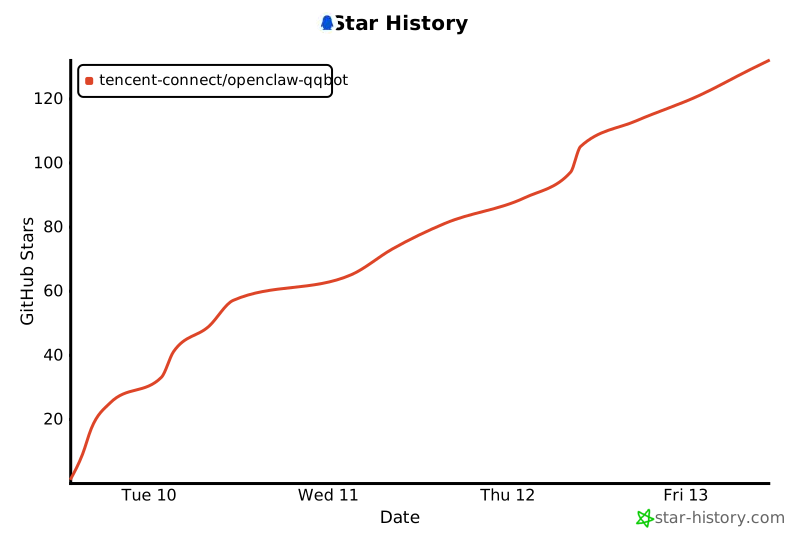](https://www.star-history.com/#tencent-connect/openclaw-qqbot&type=date&legend=top-left)
|
|
392
|
+
|
|
393
|
+
</div>
|