@temporalio/agent-harness 0.2.0 → 0.3.0
This diff represents the content of publicly available package versions that have been released to one of the supported registries. The information contained in this diff is provided for informational purposes only and reflects changes between package versions as they appear in their respective public registries.
- package/README.md +534 -5
- package/dist/src/harness/agent-protocol/agent-interface.d.ts +11 -0
- package/dist/src/harness/agent-protocol/agent-interface.js +14 -0
- package/dist/src/harness/agent-workflow/types.d.ts +3 -0
- package/dist/src/harness/agent-workflow.d.ts +12 -1
- package/dist/src/harness/agent-workflow.js +106 -35
- package/dist/src/harness/agent.d.ts +7 -0
- package/dist/src/harness/agent.js +8 -2
- package/package.json +6 -4
- package/skills/temporal-harness-typescript/SKILL.md +42 -0
- package/skills/temporal-harness-typescript/agents/openai.yaml +4 -0
- package/skills/temporal-harness-typescript/assets/starter/README.md.tmpl +95 -0
- package/skills/temporal-harness-typescript/assets/starter/agents.toml.tmpl +7 -0
- package/skills/temporal-harness-typescript/assets/starter/agents.ts.tmpl +61 -0
- package/skills/temporal-harness-typescript/assets/starter/env.example.tmpl +3 -0
- package/skills/temporal-harness-typescript/assets/starter/gitignore.tmpl +6 -0
- package/skills/temporal-harness-typescript/assets/starter/package.json.tmpl +35 -0
- package/skills/temporal-harness-typescript/assets/starter/tsconfig.json.tmpl +13 -0
- package/skills/temporal-harness-typescript/assets/starter/worker.ts.tmpl +24 -0
- package/skills/temporal-harness-typescript/references/advanced.md +57 -0
- package/skills/temporal-harness-typescript/references/api.md +110 -0
- package/skills/temporal-harness-typescript/references/authoring.md +65 -0
- package/skills/temporal-harness-typescript/references/verification.md +17 -0
package/README.md
CHANGED
|
@@ -1,6 +1,535 @@
|
|
|
1
|
-
#
|
|
1
|
+
# Temporal Agent Harness for TypeScript
|
|
2
2
|
|
|
3
|
-
|
|
4
|
-
|
|
5
|
-
|
|
6
|
-
|
|
3
|
+
**Temporal-native agent harness (experimental) — build durable, composable AI agents on Temporal,
|
|
4
|
+
with the AI SDKs you already use.**
|
|
5
|
+
|
|
6
|
+
Your agents survive worker restarts, expose typed message handlers, stream model and tool events,
|
|
7
|
+
and pause for human approval. Compose them as subagents, give them Code Mode tools, and build
|
|
8
|
+
products over their live state with the React and Svelte clients.
|
|
9
|
+
|
|
10
|
+
> **Experimental.** APIs change between releases. Pin versions and upgrade deliberately.
|
|
11
|
+
|
|
12
|
+
[Python quickstart](https://github.com/temporal-community/temporal-agent-harness/blob/main/python/README.md#quickstart)
|
|
13
|
+
· [Examples](https://github.com/temporal-community/temporal-agent-harness/tree/main/typescript/examples)
|
|
14
|
+
· [Releases](https://github.com/temporal-community/temporal-agent-harness/releases)
|
|
15
|
+
|
|
16
|
+
<a id="coding-agent-setup-and-starter"></a>
|
|
17
|
+
|
|
18
|
+
## Quickstart
|
|
19
|
+
|
|
20
|
+
Create an agent, install its coding-agent skill, and open a working session in four steps.
|
|
21
|
+
No repository checkout or Bazel installation is needed.
|
|
22
|
+
|
|
23
|
+
> **Available with the next npm release.** The `agent-harness` command is not in the published
|
|
24
|
+
> 0.2.0 package, and the starter's `harness:dev` script needs the Python release that adds
|
|
25
|
+
> `temporal-agent-harness dev`. Once both are published, the `@latest` command below selects
|
|
26
|
+
> them. Until then, use the [manual setup](#build-with-it--install-from-npm) with published packages.
|
|
27
|
+
|
|
28
|
+
You need **Node.js 22.18+**, npm, [uv](https://docs.astral.sh/uv/getting-started/installation/),
|
|
29
|
+
the [Temporal CLI](https://docs.temporal.io/cli), and an OpenAI API key for the starter's `ask`
|
|
30
|
+
handler. `uvx` can provision Python for the shared server, which requires Python 3.11+.
|
|
31
|
+
|
|
32
|
+
### 1. Create the project
|
|
33
|
+
|
|
34
|
+
Run this from the directory where you want the new project:
|
|
35
|
+
|
|
36
|
+
```bash
|
|
37
|
+
npx -y -p @temporalio/agent-harness-worker@latest agent-harness init my-agent
|
|
38
|
+
cd my-agent
|
|
39
|
+
npm install
|
|
40
|
+
```
|
|
41
|
+
|
|
42
|
+
`npx` supplies the CLI before you have a project; the first run downloads the worker package and
|
|
43
|
+
the Temporal SDK's native bridge once. `init` creates a new directory containing `agents.ts`,
|
|
44
|
+
`worker.ts`, `agents.toml`, TypeScript configuration, a `package.json` named after the
|
|
45
|
+
directory, and a README. It pins the installed harness version, compatible Temporal/model
|
|
46
|
+
dependencies, and the Python package that provides the shared services, and refuses to overwrite
|
|
47
|
+
existing files. The starter's weather tool returns sample data.
|
|
48
|
+
|
|
49
|
+
### 2. Configure it and install the skill
|
|
50
|
+
|
|
51
|
+
```bash
|
|
52
|
+
cp env.example .env.local
|
|
53
|
+
npm run schema
|
|
54
|
+
npm run harness:skill # Codex reads .agents/skills
|
|
55
|
+
npx agent-harness skills install --for claude # Claude Code reads .claude/skills
|
|
56
|
+
```
|
|
57
|
+
|
|
58
|
+
`.env.local` is where `OPENAI_API_KEY` goes once you try `ask`; never commit it. `schema`
|
|
59
|
+
compiles the agent and writes `agent.schema.json`. `harness:skill` copies this SDK release's skill, with
|
|
60
|
+
authoring, API, advanced-feature, and verification references, into the directory your coding
|
|
61
|
+
agent reads; run it for each tool you use. Installing the npm package bundles the skill; this
|
|
62
|
+
explicit step makes it discoverable in your project. For a tool with another skill directory,
|
|
63
|
+
run `npx agent-harness skills path` to locate the bundled resources, or use
|
|
64
|
+
`npx agent-harness skills install --dest <directory>`.
|
|
65
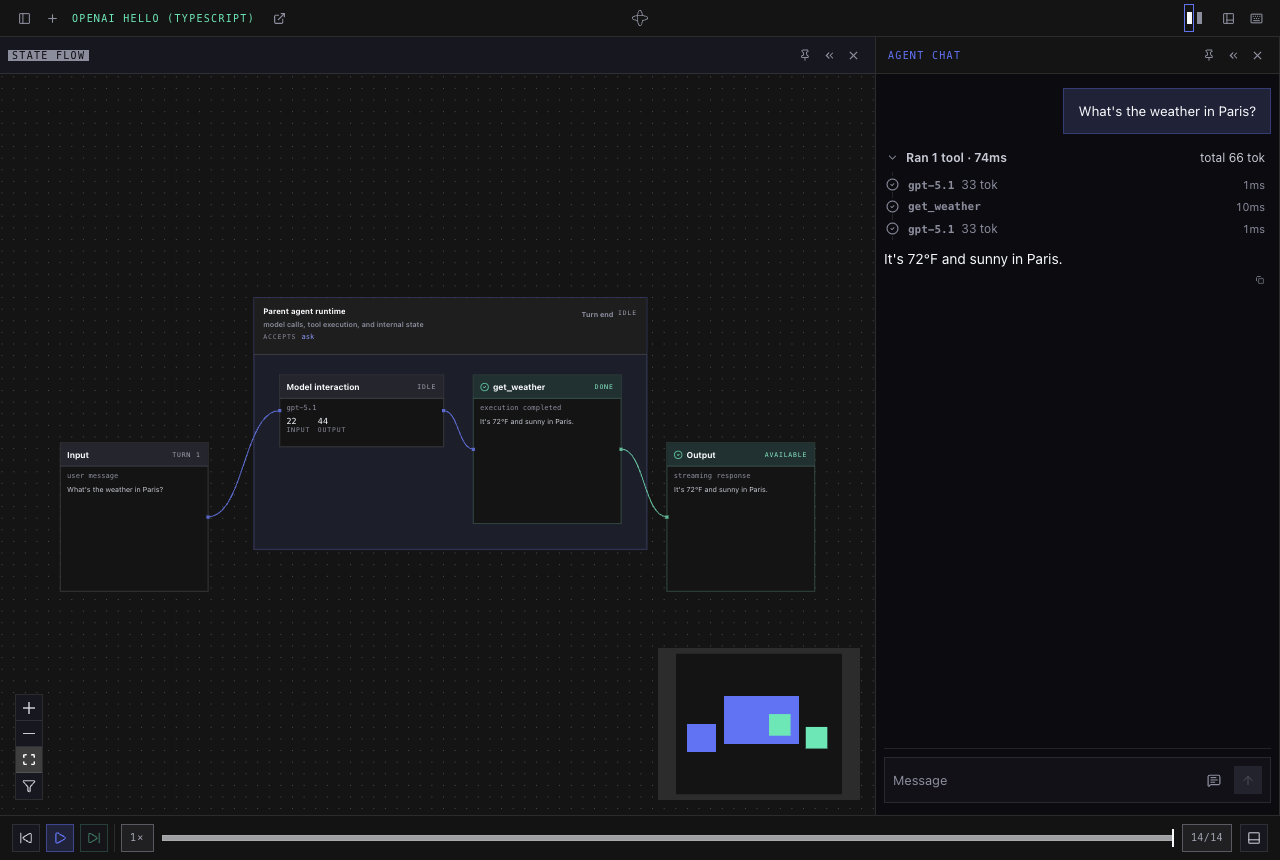
|
+
|
|
66
|
+
### 3. Start the three services
|
|
67
|
+
|
|
68
|
+
Run each command in its own terminal, all from this project directory:
|
|
69
|
+
|
|
70
|
+
**Terminal 1 — Temporal service** (skip if your configured Temporal service is already running):
|
|
71
|
+
|
|
72
|
+
```bash
|
|
73
|
+
temporal server start-dev
|
|
74
|
+
```
|
|
75
|
+
|
|
76
|
+
**Terminal 2 — shared session manager, API, and harness console:**
|
|
77
|
+
|
|
78
|
+
```bash
|
|
79
|
+
npm run harness:dev
|
|
80
|
+
```
|
|
81
|
+
|
|
82
|
+
**Terminal 3 — your TypeScript agent worker:**
|
|
83
|
+
|
|
84
|
+
```bash
|
|
85
|
+
npm start
|
|
86
|
+
```
|
|
87
|
+
|
|
88
|
+
**The API, console, and session manager come from the Python package.** `harness:dev` runs
|
|
89
|
+
`temporal-agent-harness dev` through `uvx`, in one process and without a Python project of your
|
|
90
|
+
own; the Python version is pinned in `package.json`. Your agent worker runs in Node. The console
|
|
91
|
+
is prebuilt, so no frontend build is needed.
|
|
92
|
+
|
|
93
|
+
Defaults are `localhost:7233` and namespace `default`. For another Temporal service, export the
|
|
94
|
+
same `TEMPORAL_*` connection settings in each service terminal. `.env.local` loads only into the
|
|
95
|
+
Node worker. Leave `TASK_QUEUE_PREFIX` unset for this starter. Keep all three processes running.
|
|
96
|
+
|
|
97
|
+
### 4. Verify, then develop with your coding agent
|
|
98
|
+
|
|
99
|
+
1. Open the **harness console at <http://localhost:8000>**. Create a session for
|
|
100
|
+
**OpenAI Hello (TypeScript)**.
|
|
101
|
+
2. Send `ping` a text message. Expect the same text back without a model request or an API key.
|
|
102
|
+
3. Set `OPENAI_API_KEY` in `.env.local`, restart the worker, then send `ask`
|
|
103
|
+
**“What's the weather in Paris?”**. Expect a streamed reply and a completed `get_weather`
|
|
104
|
+
tool trace with sample weather data. This step calls OpenAI.
|
|
105
|
+
4. Reload the page and confirm the session reconnects.
|
|
106
|
+
5. Check startup and worker availability:
|
|
107
|
+
|
|
108
|
+
```bash
|
|
109
|
+
npm run harness:doctor
|
|
110
|
+
```
|
|
111
|
+
|
|
112
|
+
Temporal's own workflow UI is at <http://localhost:8233>; it is separate from the harness console.
|
|
113
|
+
|
|
114
|
+
With the services running, open the project in your coding agent. Reload its session if it was
|
|
115
|
+
already running, then ask it to use the skill:
|
|
116
|
+
|
|
117
|
+
| Tool | Prompt |
|
|
118
|
+
| --- | --- |
|
|
119
|
+
| Codex | `Use $temporal-harness-typescript to help me build this agent. Explain the starter, then verify it with ping before making model calls.` |
|
|
120
|
+
| Claude Code | `/temporal-harness-typescript Explain the starter, then verify it with ping before making model calls.` |
|
|
121
|
+
|
|
122
|
+
Edit `agents.ts` to change your agent and `worker.ts` for worker configuration. After changes,
|
|
123
|
+
stop the worker, run `npm run schema`, and restart `npm start`. Use a new session for changed
|
|
124
|
+
workflow behavior. Commit `agent.schema.json` and `package-lock.json`.
|
|
125
|
+
|
|
126
|
+
After upgrading the SDK, rerun the `skills install` commands to update unchanged skill files.
|
|
127
|
+
Local edits produce a conflict and are preserved. Application-client guidance is in the installed
|
|
128
|
+
skill's `references/api.md`.
|
|
129
|
+
|
|
130
|
+
See [coding-agent development](https://github.com/temporal-community/temporal-agent-harness/blob/main/docs/agent-development.md)
|
|
131
|
+
for skill discovery and updates, and [troubleshooting](#troubleshooting) if a service fails.
|
|
132
|
+
|
|
133
|
+
<a id="installation"></a>
|
|
134
|
+
|
|
135
|
+
## Installation and manual reference
|
|
136
|
+
|
|
137
|
+
For a new application, start with the [four-step quickstart](#quickstart) above.
|
|
138
|
+
The reference below covers existing projects, manual setup, and repository examples.
|
|
139
|
+
|
|
140
|
+
| I want to… | Do this |
|
|
141
|
+
| --- | --- |
|
|
142
|
+
| **See it work** — chat with a TypeScript agent in a browser | [Try the example agent](#try-the-example-agent) from a release checkout |
|
|
143
|
+
| **Create a new agent project** with a coding-agent skill | [Four-step quickstart](#quickstart) |
|
|
144
|
+
| **Add the SDK to an existing project** or assemble it manually | [Install from npm](#build-with-it--install-from-npm) |
|
|
145
|
+
|
|
146
|
+
Your agent and worker are TypeScript. The shared console and session manager currently come
|
|
147
|
+
from the Python package, which `uvx` runs without a Python project of your own. Both SDKs use
|
|
148
|
+
the same console, registry format, and session API.
|
|
149
|
+
|
|
150
|
+
### Which package?
|
|
151
|
+
|
|
152
|
+
| Package | Use it for |
|
|
153
|
+
| --- | --- |
|
|
154
|
+
| `@temporalio/agent-harness` | Define agents, handlers, tools, approvals, and state in workflow code |
|
|
155
|
+
| `@temporalio/agent-harness-worker` | Run agents: worker plugins, model activities, the server-side agent client, and schema CLI |
|
|
156
|
+
| `@temporalio/agent-harness-client` | Build an application client without a UI framework |
|
|
157
|
+
| `@temporalio/agent-harness-react` / `@temporalio/agent-harness-svelte` | Build a product UI with live, typed sessions; each re-exports the client |
|
|
158
|
+
|
|
159
|
+
Model integrations are opt-in imports and optional peer dependencies. The walkthrough below
|
|
160
|
+
installs the OpenAI Agents integration. The
|
|
161
|
+
[Monty example](https://github.com/temporal-community/temporal-agent-harness/tree/main/typescript/examples/monty)
|
|
162
|
+
shows Gemini and Code Mode.
|
|
163
|
+
|
|
164
|
+
### Try the example agent
|
|
165
|
+
|
|
166
|
+
You need [just](https://just.systems/), [Bazelisk](https://github.com/bazelbuild/bazelisk) installed
|
|
167
|
+
as `bazel`, and the [Temporal CLI](https://docs.temporal.io/cli). Bazel supplies the build
|
|
168
|
+
toolchains and dependencies. Examples live in the repository and are not shipped in npm packages.
|
|
169
|
+
|
|
170
|
+
```bash
|
|
171
|
+
git clone --branch npm-v0.3.0 https://github.com/temporal-community/temporal-agent-harness.git
|
|
172
|
+
cd temporal-agent-harness
|
|
173
|
+
[ -f .env.local ] || cp .env.example .env.local
|
|
174
|
+
# Set OPENAI_API_KEY in .env.local.
|
|
175
|
+
cd typescript/examples/openai_hello
|
|
176
|
+
```
|
|
177
|
+
|
|
178
|
+
Run each command in its own terminal, from that example directory:
|
|
179
|
+
|
|
180
|
+
```bash
|
|
181
|
+
just temporal # skip if your configured Temporal server is already running
|
|
182
|
+
just session-manager
|
|
183
|
+
just server
|
|
184
|
+
just worker
|
|
185
|
+
```
|
|
186
|
+
|
|
187
|
+
Open <http://localhost:8000> and follow [Your first session](#your-first-session).
|
|
188
|
+
The [example README](https://github.com/temporal-community/temporal-agent-harness/tree/main/typescript/examples/openai_hello#readme)
|
|
189
|
+
explains the files and how to modify the agent. The checkout's recipes load the root `.env.local`.
|
|
190
|
+
|
|
191
|
+
### Build with it — install from npm
|
|
192
|
+
|
|
193
|
+
You need Node.js **22.18 or later**, npm, an OpenAI API key, the
|
|
194
|
+
[Temporal CLI](https://docs.temporal.io/cli), and [uv](https://docs.astral.sh/uv/getting-started/installation/).
|
|
195
|
+
`uvx` can provision Python for the shared services; the Python harness requires Python 3.11+.
|
|
196
|
+
|
|
197
|
+
Create an empty directory:
|
|
198
|
+
|
|
199
|
+
```bash
|
|
200
|
+
mkdir my-agent
|
|
201
|
+
cd my-agent
|
|
202
|
+
```
|
|
203
|
+
|
|
204
|
+
Create `package.json`. The install commands below add its dependencies:
|
|
205
|
+
|
|
206
|
+
```json
|
|
207
|
+
{
|
|
208
|
+
"name": "my-agent",
|
|
209
|
+
"private": true,
|
|
210
|
+
"type": "module",
|
|
211
|
+
"scripts": {
|
|
212
|
+
"build": "tsc -p tsconfig.json",
|
|
213
|
+
"schema": "npm run build && agent-harness-schema ./dist/agents.js#OpenAIHelloAgentTs -o OpenAIHelloAgentTs.schema.json",
|
|
214
|
+
"start": "node --env-file=.env.local dist/worker.js"
|
|
215
|
+
}
|
|
216
|
+
}
|
|
217
|
+
```
|
|
218
|
+
|
|
219
|
+
Install the harness and the model integration:
|
|
220
|
+
|
|
221
|
+
```bash
|
|
222
|
+
npm install --save-exact @temporalio/agent-harness@0.3.0 @temporalio/agent-harness-worker@0.3.0 @temporalio/agent-harness-client@0.3.0
|
|
223
|
+
npm install --save-exact @temporalio/activity@1.24.0 @temporalio/client@1.24.0 @temporalio/common@1.24.0 @temporalio/envconfig@1.24.0 @temporalio/plugin@1.24.0 @temporalio/worker@1.24.0 @temporalio/workflow@1.24.0 @temporalio/workflow-streams@1.24.0 @temporalio/openai-agents@1.24.0
|
|
224
|
+
npm install --save-exact @openai/agents-core@0.14.3 @openai/agents-openai@0.14.3 openai@6.46.0 zod@4.6.5
|
|
225
|
+
npm install --save-dev --save-exact typescript@7.0.2 @types/node@22.20.4
|
|
226
|
+
```
|
|
227
|
+
|
|
228
|
+
The Temporal SDK packages above share **1.24.0**, matching the OpenAI plugin. The harness packages
|
|
229
|
+
have their own version, **0.2.0**. Pinning the Temporal dependencies together avoids installing
|
|
230
|
+
incompatible copies through the plugin. Commit `package-lock.json` and use `npm ci` on subsequent
|
|
231
|
+
installs. The shared Python services below are pinned separately to **0.8.0**.
|
|
232
|
+
|
|
233
|
+
Create `tsconfig.json`:
|
|
234
|
+
|
|
235
|
+
```json
|
|
236
|
+
{
|
|
237
|
+
"compilerOptions": {
|
|
238
|
+
"target": "ES2023",
|
|
239
|
+
"module": "NodeNext",
|
|
240
|
+
"moduleResolution": "NodeNext",
|
|
241
|
+
"strict": true,
|
|
242
|
+
"skipLibCheck": true,
|
|
243
|
+
"types": ["node"],
|
|
244
|
+
"rootDir": ".",
|
|
245
|
+
"outDir": "dist"
|
|
246
|
+
},
|
|
247
|
+
"include": ["agents.ts", "worker.ts"]
|
|
248
|
+
}
|
|
249
|
+
```
|
|
250
|
+
|
|
251
|
+
Create `.gitignore`:
|
|
252
|
+
|
|
253
|
+
```gitignore
|
|
254
|
+
node_modules/
|
|
255
|
+
dist/
|
|
256
|
+
.env.local
|
|
257
|
+
```
|
|
258
|
+
|
|
259
|
+
Create `.env.local` with your API key:
|
|
260
|
+
|
|
261
|
+
```dotenv
|
|
262
|
+
OPENAI_API_KEY=your-openai-api-key
|
|
263
|
+
```
|
|
264
|
+
|
|
265
|
+
`npm start` explicitly loads this file. The `uvx` commands below do not load it; they do not need
|
|
266
|
+
the OpenAI key. For a non-default Temporal connection, export the same connection settings in
|
|
267
|
+
all three service terminals as described under [Temporal connection](#temporal-connection).
|
|
268
|
+
|
|
269
|
+
### Your first agent
|
|
270
|
+
|
|
271
|
+
Create `agents.ts`. This agent remembers the conversation across messages, calls one tool, and
|
|
272
|
+
streams the reply. The weather tool returns **sample data**, not a live weather forecast.
|
|
273
|
+
|
|
274
|
+
```ts
|
|
275
|
+
import { Agent, type AgentInputItem } from "@openai/agents-core";
|
|
276
|
+
import { z } from "zod";
|
|
277
|
+
import {
|
|
278
|
+
TextMessage,
|
|
279
|
+
TextReply,
|
|
280
|
+
ToolApprovalPolicy,
|
|
281
|
+
defineAgent,
|
|
282
|
+
handler,
|
|
283
|
+
tool,
|
|
284
|
+
} from "@temporalio/agent-harness";
|
|
285
|
+
import {
|
|
286
|
+
asOpenAIAgentTool,
|
|
287
|
+
runStreamed,
|
|
288
|
+
} from "@temporalio/agent-harness/ai-sdks/openai-agents-harness";
|
|
289
|
+
|
|
290
|
+
const getWeather = tool({
|
|
291
|
+
name: "get_weather",
|
|
292
|
+
description: "Return sample weather for a city.",
|
|
293
|
+
inputSchema: z.object({ city: z.string() }),
|
|
294
|
+
outputSchema: z.string(),
|
|
295
|
+
inherentlySafe: true,
|
|
296
|
+
execute: async ({ city }) => `It's 72°F and sunny in ${city}.`,
|
|
297
|
+
});
|
|
298
|
+
|
|
299
|
+
export const OpenAIHelloAgentTs = defineAgent({
|
|
300
|
+
name: "OpenAIHelloAgentTs",
|
|
301
|
+
approvalPolicyDefault: ToolApprovalPolicy.allowInherentlySafe(),
|
|
302
|
+
handlers: {
|
|
303
|
+
ask: handler({
|
|
304
|
+
description: "Chat with the assistant. Ask about the weather to try its tool.",
|
|
305
|
+
input: TextMessage,
|
|
306
|
+
output: TextReply,
|
|
307
|
+
}),
|
|
308
|
+
},
|
|
309
|
+
create: ({ runner }) => {
|
|
310
|
+
let conversation: AgentInputItem[] = [];
|
|
311
|
+
return {
|
|
312
|
+
async ask({ text }) {
|
|
313
|
+
const sdkAgent = new Agent({
|
|
314
|
+
name: "Hello",
|
|
315
|
+
instructions: "Answer briefly. For weather questions, call get_weather and explain that it returns sample data.",
|
|
316
|
+
model: "gpt-5.1",
|
|
317
|
+
tools: [asOpenAIAgentTool(runner, getWeather)],
|
|
318
|
+
});
|
|
319
|
+
const input: AgentInputItem[] = [...conversation, { role: "user", content: text }];
|
|
320
|
+
const result = await runStreamed(runner, sdkAgent, input, {
|
|
321
|
+
defaultModelParams: {
|
|
322
|
+
startToCloseTimeout: "2 minutes",
|
|
323
|
+
heartbeatTimeout: "30 seconds",
|
|
324
|
+
},
|
|
325
|
+
});
|
|
326
|
+
for await (const _event of result) void _event;
|
|
327
|
+
await result.completed;
|
|
328
|
+
conversation = result.history;
|
|
329
|
+
return { text: String(result.finalOutput) };
|
|
330
|
+
},
|
|
331
|
+
};
|
|
332
|
+
},
|
|
333
|
+
});
|
|
334
|
+
```
|
|
335
|
+
|
|
336
|
+
### Running a worker — one harness plugin
|
|
337
|
+
|
|
338
|
+
Create `worker.ts`. The model integration's plugin comes first, then `AgentHarnessPlugin`.
|
|
339
|
+
The worker bundles the **compiled** `dist/agents.js`; it does not run the agent as ordinary
|
|
340
|
+
Node application code.
|
|
341
|
+
|
|
342
|
+
```ts
|
|
343
|
+
import { fileURLToPath } from "node:url";
|
|
344
|
+
import { loadClientConnectConfig } from "@temporalio/envconfig";
|
|
345
|
+
import { NativeConnection, Worker } from "@temporalio/worker";
|
|
346
|
+
import { AgentHarnessPlugin } from "@temporalio/agent-harness-worker";
|
|
347
|
+
import { OpenAIAgentsPlugin } from "@temporalio/agent-harness-worker/ai-sdks/openai-agents";
|
|
348
|
+
|
|
349
|
+
// `ping` needs no model, so the worker starts without a key; only `ask` fails without one.
|
|
350
|
+
if (!process.env.OPENAI_API_KEY)
|
|
351
|
+
console.warn("OPENAI_API_KEY is not set: `ping` works, `ask` will fail until it is (see env.example)");
|
|
352
|
+
|
|
353
|
+
const { connectionOptions, namespace } = loadClientConnectConfig();
|
|
354
|
+
const connection = await NativeConnection.connect(connectionOptions);
|
|
355
|
+
try {
|
|
356
|
+
const worker = await Worker.create({
|
|
357
|
+
connection,
|
|
358
|
+
namespace: namespace ?? "default",
|
|
359
|
+
taskQueue: "openai-hello-ts",
|
|
360
|
+
workflowsPath: fileURLToPath(new URL("./agents.js", import.meta.url)),
|
|
361
|
+
plugins: [new OpenAIAgentsPlugin(), new AgentHarnessPlugin()],
|
|
362
|
+
});
|
|
363
|
+
await worker.run();
|
|
364
|
+
} finally {
|
|
365
|
+
await connection.close();
|
|
366
|
+
}
|
|
367
|
+
```
|
|
368
|
+
|
|
369
|
+
The [worker reference](https://github.com/temporal-community/temporal-agent-harness/tree/main/typescript/packages/worker#readme)
|
|
370
|
+
covers activity tools, plugins, schema generation, and connection configuration.
|
|
371
|
+
|
|
372
|
+
### Register the agent
|
|
373
|
+
|
|
374
|
+
Create `agents.toml` in the project root:
|
|
375
|
+
|
|
376
|
+
```toml
|
|
377
|
+
[[agents]]
|
|
378
|
+
key = "openai-hello-ts"
|
|
379
|
+
workflow_type = "OpenAIHelloAgentTs"
|
|
380
|
+
task_queue = "openai-hello-ts"
|
|
381
|
+
label = "OpenAI Hello (TypeScript)"
|
|
382
|
+
description = "Chat with a TypeScript agent and try its sample weather tool."
|
|
383
|
+
schema = "OpenAIHelloAgentTs.schema.json"
|
|
384
|
+
```
|
|
385
|
+
|
|
386
|
+
Build the project and generate the schema:
|
|
387
|
+
|
|
388
|
+
```bash
|
|
389
|
+
npm run schema
|
|
390
|
+
```
|
|
391
|
+
|
|
392
|
+
The server reads this document without importing your agent code. It describes handlers, state,
|
|
393
|
+
and init data; agents with required init data get a form before session creation. Regenerate it
|
|
394
|
+
when those declarations change and commit the generated schema with `agents.toml`.
|
|
395
|
+
|
|
396
|
+
### Run the web UI
|
|
397
|
+
|
|
398
|
+
Run one command per terminal, all from `my-agent/`:
|
|
399
|
+
|
|
400
|
+
```bash
|
|
401
|
+
# 1. Temporal dev server. Skip if your configured server is already running.
|
|
402
|
+
# Temporal's own workflow UI is at http://localhost:8233.
|
|
403
|
+
temporal server start-dev
|
|
404
|
+
|
|
405
|
+
# 2. Session-manager worker: starts agents and tracks sessions.
|
|
406
|
+
uvx --from 'temporal-agent-harness[ui]==0.9.0' temporal-agent-harness session-manager
|
|
407
|
+
|
|
408
|
+
# 3. Harness console + JSON API: http://localhost:8000.
|
|
409
|
+
uvx --from 'temporal-agent-harness[ui]==0.9.0' temporal-agent-harness serve ./agents.toml
|
|
410
|
+
|
|
411
|
+
# 4. Your TypeScript agent worker; loads .env.local.
|
|
412
|
+
npm start
|
|
413
|
+
```
|
|
414
|
+
|
|
415
|
+
The console is prebuilt in the Python package. No frontend build is needed. The console and
|
|
416
|
+
session-manager worker are shared infrastructure; your agent code runs on your TypeScript worker.
|
|
417
|
+
From the next Python release, `temporal-agent-harness dev ./agents.toml` runs steps 2 and 3 in
|
|
418
|
+
one process, as the quickstart's `npm run harness:dev` does.
|
|
419
|
+
Leave all four processes running while using the console. After editing TypeScript, stop your
|
|
420
|
+
worker, rerun `npm run schema`, and start it again. Start a new session when changing agent behavior.
|
|
421
|
+
|
|
422
|
+
### Your first session
|
|
423
|
+
|
|
424
|
+
1. Open the **harness console at <http://localhost:8000>**.
|
|
425
|
+
2. Click **New session** (the **+** in the top bar), choose **OpenAI Hello (TypeScript)**,
|
|
426
|
+
then click **Start session**.
|
|
427
|
+
3. Send **“What's the weather in Paris?”** to the `ask` handler.
|
|
428
|
+
4. Watch the streamed reply, then expand **Ran 1 tool** in the chat to inspect `get_weather`
|
|
429
|
+
and its `{ "city": "Paris" }` input and sample result. The tool returns “It's 72°F and sunny in Paris.”; the model's wording can vary.
|
|
430
|
+
5. Ask a follow-up in the same session. Reload the page to reconnect to its recorded conversation.
|
|
431
|
+
|
|
432
|
+
|
|
433
|
+
|
|
434
|
+
The screenshot shows the console after a completed weather turn. It uses a scripted model
|
|
435
|
+
response for a reproducible capture; the agent, tool execution, Temporal workflows, and console
|
|
436
|
+
are real. The quickstart above uses OpenAI and streams its response live.
|
|
437
|
+
|
|
438
|
+
### Temporal connection
|
|
439
|
+
|
|
440
|
+
With no connection configured, all three services use `localhost:7233` and namespace `default`.
|
|
441
|
+
For a project profile or Temporal Cloud, run these exports in **each** service terminal before
|
|
442
|
+
starting the session manager, console, and TypeScript worker:
|
|
443
|
+
|
|
444
|
+
```bash
|
|
445
|
+
export TEMPORAL_CONFIG_FILE="$PWD/temporal.toml"
|
|
446
|
+
export TEMPORAL_PROFILE=cloud
|
|
447
|
+
```
|
|
448
|
+
|
|
449
|
+
Use a profile containing your connection details. A `temporal.toml` in the current directory is
|
|
450
|
+
not picked up automatically. All services must use the same address and namespace. This
|
|
451
|
+
walkthrough uses the literal `openai-hello-ts` task queue in both worker and registry; leave
|
|
452
|
+
`TASK_QUEUE_PREFIX` unset. See the worker reference if you need prefixed queues.
|
|
453
|
+
|
|
454
|
+
## A taste — typed operations and init data
|
|
455
|
+
|
|
456
|
+
Like Python's `TravelAgent`, an agent can expose a typed operation rather than only text chat.
|
|
457
|
+
Zod schemas describe both its messages and the data supplied when the session starts:
|
|
458
|
+
|
|
459
|
+
```ts
|
|
460
|
+
import { z } from "zod";
|
|
461
|
+
import { defineAgent, handler, ToolApprovalPolicy } from "@temporalio/agent-harness";
|
|
462
|
+
|
|
463
|
+
export const TravelAgent = defineAgent({
|
|
464
|
+
name: "TravelAgent",
|
|
465
|
+
approvalPolicyDefault: ToolApprovalPolicy.allowInherentlySafe(),
|
|
466
|
+
initData: {
|
|
467
|
+
schema: z.object({ name: z.string(), home_airport: z.string() }),
|
|
468
|
+
required: true,
|
|
469
|
+
},
|
|
470
|
+
handlers: {
|
|
471
|
+
plan_trip: handler({
|
|
472
|
+
description: "Draft an itinerary for the traveler.",
|
|
473
|
+
input: z.object({ destination: z.string(), nights: z.number().int().positive() }),
|
|
474
|
+
output: z.object({ summary: z.string(), total_usd: z.number() }),
|
|
475
|
+
}),
|
|
476
|
+
},
|
|
477
|
+
create: ({ data }) => ({
|
|
478
|
+
async plan_trip({ destination, nights }) {
|
|
479
|
+
// Replace this sample response with your model and tool calls.
|
|
480
|
+
return {
|
|
481
|
+
summary: `${data.name}: ${nights} nights in ${destination}, departing ${data.home_airport}.`,
|
|
482
|
+
total_usd: 0,
|
|
483
|
+
};
|
|
484
|
+
},
|
|
485
|
+
}),
|
|
486
|
+
});
|
|
487
|
+
```
|
|
488
|
+
|
|
489
|
+
This is a separate authoring example, not needed to run Hello. To serve it, export it from your
|
|
490
|
+
workflow module, add a matching registry entry, and generate its schema using the worker CLI.
|
|
491
|
+
|
|
492
|
+
## Troubleshooting
|
|
493
|
+
|
|
494
|
+
| Symptom | Check |
|
|
495
|
+
| --- | --- |
|
|
496
|
+
| The worker warns that `OPENAI_API_KEY` is not set, or the model reports an authentication error | `ping` works without a key; for `ask`, put a valid key in `.env.local` and use `npm start` from the project root. Restart the worker after changing it. |
|
|
497
|
+
| Cannot connect to Temporal | Start the dev server, or check `TEMPORAL_CONFIG_FILE`, `TEMPORAL_PROFILE`, and `TEMPORAL_*` overrides in every terminal. |
|
|
498
|
+
| Console loads but agent discovery or session creation stalls | Start the session-manager worker and confirm it uses the same Temporal address and namespace as the console. |
|
|
499
|
+
| A session starts but messages never progress | Start the TypeScript worker. Its task queue must match `agents.toml`, and its address and namespace must match the other services. |
|
|
500
|
+
| `dist/worker.js` or the schema file is missing | Run `npm run schema` from the project root before starting the services. |
|
|
501
|
+
| Duplicate protobuf registrations or incompatible Temporal types | Reinstall with the pinned dependency versions above. Keep the underlying Temporal SDK packages aligned with the OpenAI plugin. |
|
|
502
|
+
| An edited registry still shows the old agents | The session-manager workflow caches its registry. For disposable local development, restart a fresh in-memory Temporal dev server, then restart the services. This discards local sessions; use it only when you can discard them. |
|
|
503
|
+
| Port 8000 shows nothing useful | Open the harness console on 8000; Temporal's workflow UI on 8233 is a separate application. Check the `serve` terminal for startup errors. |
|
|
504
|
+
|
|
505
|
+
## What next?
|
|
506
|
+
|
|
507
|
+
- **Approvals:** `allowInherentlySafe()` automatically permits this sample's read-only tool.
|
|
508
|
+
Use `alwaysRequireHumanApproval()` to try the console's approval flow in a new session.
|
|
509
|
+
See [human-in-the-loop approvals](https://github.com/temporal-community/temporal-agent-harness/blob/main/docs/internal/human-in-the-loop-tool-approvals.md)
|
|
510
|
+
for the shared concepts; its code examples are Python.
|
|
511
|
+
- **State:** declare observable state with `state(...)` and read or update it through the agent's
|
|
512
|
+
state references. See the
|
|
513
|
+
[Monty trip board](https://github.com/temporal-community/temporal-agent-harness/blob/main/typescript/examples/monty/trip-board.ts)
|
|
514
|
+
and its [agent declaration](https://github.com/temporal-community/temporal-agent-harness/blob/main/typescript/examples/monty/conversational-workflow.ts)
|
|
515
|
+
for a complete example.
|
|
516
|
+
- **Code Mode and subagents:** follow the
|
|
517
|
+
[TypeScript Monty example](https://github.com/temporal-community/temporal-agent-harness/tree/main/typescript/examples/monty).
|
|
518
|
+
- **Your own product UI:** use the
|
|
519
|
+
[React](https://github.com/temporal-community/temporal-agent-harness/tree/main/typescript/packages/react#readme)
|
|
520
|
+
or [Svelte](https://github.com/temporal-community/temporal-agent-harness/tree/main/typescript/packages/svelte#readme)
|
|
521
|
+
client. These connect to the shared session API for agents written in either language.
|
|
522
|
+
- **Worker configuration:** see the
|
|
523
|
+
[worker package](https://github.com/temporal-community/temporal-agent-harness/tree/main/typescript/packages/worker#readme)
|
|
524
|
+
for activity registration and schema CLI details.
|
|
525
|
+
|
|
526
|
+
## Versioning and stability
|
|
527
|
+
|
|
528
|
+
Pin the harness packages to the same exact harness release, and pin the underlying Temporal SDK
|
|
529
|
+
packages to the version required by your model integration. The Python services have a separate
|
|
530
|
+
release version. The manual walkthrough pairs npm **0.2.0** with Python **0.8.0**; do not assume those
|
|
531
|
+
version numbers should match.
|
|
532
|
+
|
|
533
|
+
Examples are not included in the npm packages: use the corresponding `npm-v<version>` repository
|
|
534
|
+
tag. Review the [release notes](https://github.com/temporal-community/temporal-agent-harness/releases)
|
|
535
|
+
when upgrading, regenerate schemas, and test the worker and shared services together.
|
|
@@ -19,6 +19,14 @@ export declare const MessageDisposition: {
|
|
|
19
19
|
readonly QUEUED: "queued";
|
|
20
20
|
};
|
|
21
21
|
export type MessageDisposition = (typeof MessageDisposition)[keyof typeof MessageDisposition];
|
|
22
|
+
/** Why an agent closed: on the `agent_closed` event and `AgentStatus.close_reason`. */
|
|
23
|
+
export declare const CloseReason: {
|
|
24
|
+
/** A `close` signal arrived: from a client, an operator, or a parent's `stopSubagent`. */
|
|
25
|
+
readonly REQUESTED: "requested";
|
|
26
|
+
/** The agent sat idle for its whole `close_after_idle` and the runner closed it. */
|
|
27
|
+
readonly IDLE_TIMEOUT_EXPIRED: "idle_timeout_expired";
|
|
28
|
+
};
|
|
29
|
+
export type CloseReason = (typeof CloseReason)[keyof typeof CloseReason];
|
|
22
30
|
/** What an auto-mode evaluator decides, named after AI SDK 7's tool-approval outcomes. */
|
|
23
31
|
export declare const ApprovalVerdict: {
|
|
24
32
|
readonly APPROVED: "approved";
|
|
@@ -271,6 +279,7 @@ export declare const AgentConfigSchema: z.ZodObject<{
|
|
|
271
279
|
escalate_if_irreversible_above: number | null;
|
|
272
280
|
} | null | undefined>>;
|
|
273
281
|
agent_id: z.ZodPipe<z.ZodOptional<z.ZodNullable<z.ZodString>>, z.ZodTransform<string | null, string | null | undefined>>;
|
|
282
|
+
close_after_idle: z.ZodPipe<z.ZodOptional<z.ZodNullable<z.ZodNumber>>, z.ZodTransform<number | null, number | null | undefined>>;
|
|
274
283
|
}, z.core.$strip>;
|
|
275
284
|
export type AgentConfig = z.output<typeof AgentConfigSchema>;
|
|
276
285
|
export type AgentConfigInput = z.input<typeof AgentConfigSchema>;
|
|
@@ -357,6 +366,8 @@ export interface AgentStatus {
|
|
|
357
366
|
subagents: SubagentInfo[];
|
|
358
367
|
approval_policy: ToolApprovalPolicy;
|
|
359
368
|
has_auto_approval_evaluator: boolean;
|
|
369
|
+
/** Why the agent closed, or null while it is open. */
|
|
370
|
+
close_reason: CloseReason | null;
|
|
360
371
|
}
|
|
361
372
|
/** One turn of the current run (a continued run keeps its last 20), as the `agent_state` query indexes it. */
|
|
362
373
|
export interface AcceptedFunction {
|
|
@@ -14,6 +14,13 @@ export const AGENT_ID_LENGTH = 6;
|
|
|
14
14
|
export const APPROVAL_SHORT_ID_LENGTH = 6;
|
|
15
15
|
export const MidTurn = { ENQUEUE: "enqueue", REJECT: "reject", ACCEPT: "accept" };
|
|
16
16
|
export const MessageDisposition = { OPENED: "opened", JOINED: "joined", QUEUED: "queued" };
|
|
17
|
+
/** Why an agent closed: on the `agent_closed` event and `AgentStatus.close_reason`. */
|
|
18
|
+
export const CloseReason = {
|
|
19
|
+
/** A `close` signal arrived: from a client, an operator, or a parent's `stopSubagent`. */
|
|
20
|
+
REQUESTED: "requested",
|
|
21
|
+
/** The agent sat idle for its whole `close_after_idle` and the runner closed it. */
|
|
22
|
+
IDLE_TIMEOUT_EXPIRED: "idle_timeout_expired",
|
|
23
|
+
};
|
|
17
24
|
/** What an auto-mode evaluator decides, named after AI SDK 7's tool-approval outcomes. */
|
|
18
25
|
export const ApprovalVerdict = {
|
|
19
26
|
APPROVED: "approved",
|
|
@@ -185,6 +192,13 @@ export const AgentConfigSchema = z.object({
|
|
|
185
192
|
.regex(AGENT_ID_PATTERN)
|
|
186
193
|
.nullish()
|
|
187
194
|
.transform((v) => v ?? null),
|
|
195
|
+
// Seconds idle before the runner closes the agent; 0 never closes. Null leaves the agent's
|
|
196
|
+
// default (`closeAfterIdleDefault`) in force.
|
|
197
|
+
close_after_idle: z
|
|
198
|
+
.number()
|
|
199
|
+
.nonnegative()
|
|
200
|
+
.nullish()
|
|
201
|
+
.transform((v) => v ?? null),
|
|
188
202
|
});
|
|
189
203
|
// Not z.record, which rebuilds the object and drops a "__proto__" key.
|
|
190
204
|
export const messagePayload = z
|
|
@@ -1,3 +1,4 @@
|
|
|
1
|
+
import type { Duration } from "@temporalio/common";
|
|
1
2
|
import type { z } from "zod";
|
|
2
3
|
import type { AgentMessage, AutoApprovalCriteria, AutoModeEvaluator, MessageContext, MidTurn, Schema, ToolApprovalPolicy } from "../agent-protocol/index.ts";
|
|
3
4
|
import type { StateDecl } from "../state/index.ts";
|
|
@@ -60,6 +61,8 @@ export interface RunnerOptions {
|
|
|
60
61
|
approvalPolicyDefault: ToolApprovalPolicy;
|
|
61
62
|
autoApprovalCriteriaDefault?: AutoApprovalCriteria | undefined;
|
|
62
63
|
autoModeEvaluator?: AutoModeEvaluator | undefined;
|
|
64
|
+
/** Close the agent once it has been idle this long; omitted or 0 never closes on idle. */
|
|
65
|
+
closeAfterIdleDefault?: Duration | undefined;
|
|
63
66
|
states?: Readonly<Record<string, AnyStateDecl>> | undefined;
|
|
64
67
|
/** The agent's validated init data, handed to each state's `initial`. */
|
|
65
68
|
data?: unknown;
|
|
@@ -51,6 +51,13 @@ export declare class AgentWorkflowRunner {
|
|
|
51
51
|
/** Declared state: each snapshot was published at construction, then every committed mutation. */
|
|
52
52
|
readonly state: Readonly<Record<string, StateRef<Record<string, unknown>>>>;
|
|
53
53
|
run(impls: Readonly<Record<string, HandlerImpl<HandlerDecl>>>): Promise<void>;
|
|
54
|
+
/**
|
|
55
|
+
* @internal The last step of a run, after teardown: parked stream polls are handed the last
|
|
56
|
+
* events, then every handler finishes. Not before teardown, which may publish too, and whose
|
|
57
|
+
* whole duration the stream must stay readable for: a poll arriving once pollers are detached
|
|
58
|
+
* is refused.
|
|
59
|
+
*/
|
|
60
|
+
finish(): Promise<void>;
|
|
54
61
|
/** @internal Enforce the approval policy for the in-flight tool call. Throws ToolApprovalDenied. */
|
|
55
62
|
applyApprovalPolicy(toolId: string, toolName: string, toolInput: Record<string, unknown>, opts: {
|
|
56
63
|
inherentlySafe: boolean;
|
|
@@ -66,7 +73,11 @@ export declare class AgentWorkflowRunner {
|
|
|
66
73
|
outputSchema: Record<string, unknown>;
|
|
67
74
|
timeout: string | number | undefined;
|
|
68
75
|
}): Promise<unknown>;
|
|
69
|
-
/**
|
|
76
|
+
/**
|
|
77
|
+
* Start a child agent; returns its short, tree-unique handle (also its agent_id). The child never
|
|
78
|
+
* closes on idle: `close_after_idle` is always pushed down as 0, overriding both `config` and the
|
|
79
|
+
* child's own default.
|
|
80
|
+
*/
|
|
70
81
|
startSubagent(agentKey: string, workflowType: string, taskQueue: string, { config, data }?: {
|
|
71
82
|
config?: Partial<AgentConfig>;
|
|
72
83
|
data?: unknown;
|