@syncfusion/ej2-vue-querybuilder 20.3.59 → 20.4.40
This diff represents the content of publicly available package versions that have been released to one of the supported registries. The information contained in this diff is provided for informational purposes only and reflects changes between package versions as they appear in their respective public registries.
package/CHANGELOG.md
CHANGED
|
@@ -6,26 +6,10 @@
|
|
|
6
6
|
|
|
7
7
|
#### Bug Fixes
|
|
8
8
|
|
|
9
|
-
- `#I404520` - Provided Localization support SQL query builder operators.
|
|
10
9
|
- `#F178375` - Issue with Browser window get freezes when we set the Invalid SQL rule to query builder has been fixed.
|
|
10
|
+
- `#I423706` - Issue with Field Dropdown list popups get collapses when we use `validateFields` method in query builder has been fixed
|
|
11
11
|
|
|
12
|
-
## 20.
|
|
13
|
-
|
|
14
|
-
### QueryBuilder
|
|
15
|
-
|
|
16
|
-
#### Bug Fixes
|
|
17
|
-
|
|
18
|
-
- `#I408324` - Issue with Script errors throwing in validating query builder fields while double click has been fixed.
|
|
19
|
-
|
|
20
|
-
## 20.3.49 (2022-10-11)
|
|
21
|
-
|
|
22
|
-
### QueryBuilder
|
|
23
|
-
|
|
24
|
-
#### Bug Fixes
|
|
25
|
-
|
|
26
|
-
- `#I408658` - Issue with Value getting removed while closing fields Dropdown without change the value when we set rule property of query builder has been fixed
|
|
27
|
-
|
|
28
|
-
## 20.3.47 (2022-09-29)
|
|
12
|
+
## 20.4.38 (2022-12-21)
|
|
29
13
|
|
|
30
14
|
### QueryBuilder
|
|
31
15
|
|
package/README.md
CHANGED
|
@@ -1,65 +1,147 @@
|
|
|
1
|
-
#
|
|
1
|
+
# Vue Query Builder Component (Vue Filter Component)
|
|
2
2
|
|
|
3
|
-
The [Vue Query Builder](https://www.syncfusion.com/vue-ui-components/vue-query-builder?utm_source=npm&utm_medium=listing&utm_campaign=vue-query-builder-npm) is a rich and responsive UI for filtering large amounts of data by creating or editing conditions that can be combined with data visualization controls like DataGrid and Charts to view the filtered data. It outputs structured JSON
|
|
3
|
+
The [Vue Query Builder](https://www.syncfusion.com/vue-ui-components/vue-query-builder?utm_source=npm&utm_medium=listing&utm_campaign=vue-query-builder-npm) is a rich and responsive UI for filtering large amounts of data by creating or editing conditions that can be combined with data visualization controls like DataGrid and Charts to view the filtered data. It outputs structured JSON that can be easily parsed to create SQL queries. It allows you to create conditions and group them using AND/OR logic.
|
|
4
4
|
|
|
5
|
-
|
|
5
|
+
<p align="center">
|
|
6
|
+
<a href="https://ej2.syncfusion.com/vue/documentation/query-builder/getting-started/?utm_source=npm&utm_medium=listing&utm_campaign=vue-query-builder-npm">Getting started</a> .
|
|
7
|
+
<a href="https://ej2.syncfusion.com/vue/demos/?utm_source=npm&utm_medium=listing&utm_campaign=vue-query-builder-npm#/bootstrap5/query-builder/default">Online demos</a> .
|
|
8
|
+
<a href="https://www.syncfusion.com/vue-components/vue-query-builder?utm_source=npm&utm_medium=listing&utm_campaign=vue-query-builder-npm">Learn more</a>
|
|
9
|
+
</p>
|
|
6
10
|
|
|
7
|
-
|
|
11
|
+
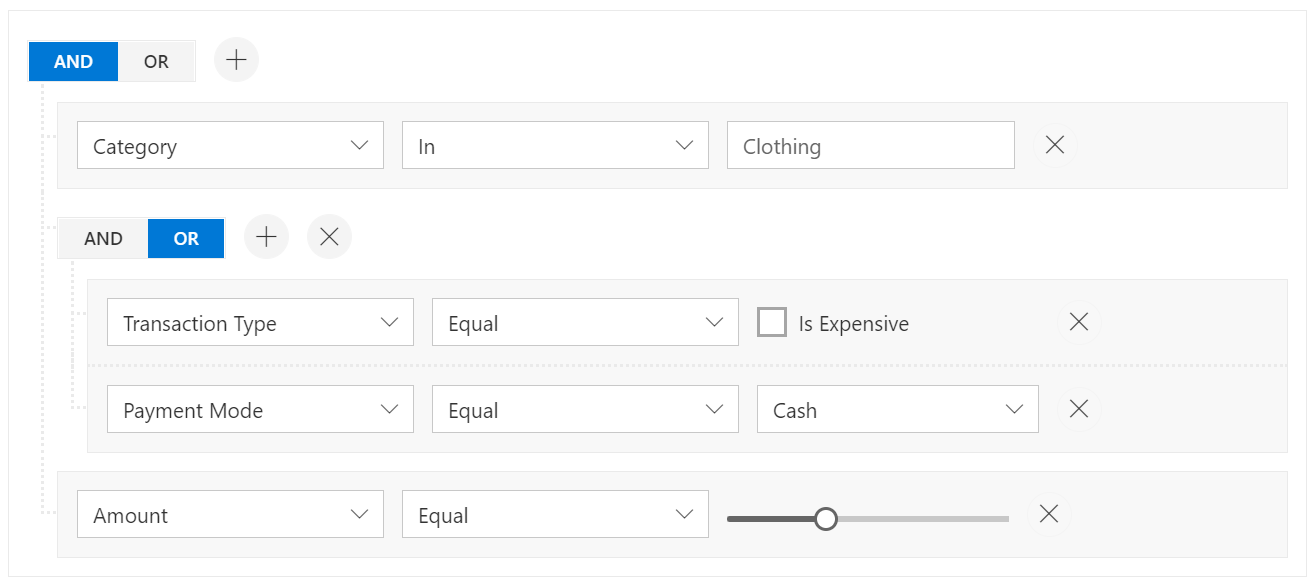
|
|
8
12
|
|
|
9
|
-
>
|
|
13
|
+
<p align="center">
|
|
14
|
+
Trusted by the world's leading companies
|
|
15
|
+
<a href="https://www.syncfusion.com">
|
|
16
|
+
<img src="https://raw.githubusercontent.com/SyncfusionExamples/nuget-img/master/syncfusion/syncfusion-trusted-companies.webp" alt="Bootstrap logo">
|
|
17
|
+
</a>
|
|
18
|
+
</p>
|
|
10
19
|
|
|
11
20
|
## Setup
|
|
12
21
|
|
|
13
|
-
|
|
22
|
+
### Create a Vue Application
|
|
14
23
|
|
|
15
|
-
|
|
16
|
-
|
|
24
|
+
You can use [`Vue CLI`](https://github.com/vuejs/vue-cli) to setup your Vue 2 application.To install Vue CLI use the following commands.
|
|
25
|
+
|
|
26
|
+
```bash
|
|
27
|
+
npm install -g @vue/cli
|
|
28
|
+
vue create quickstart
|
|
29
|
+
cd quickstart
|
|
30
|
+
npm run serve
|
|
17
31
|
```
|
|
32
|
+
Initiating a new project prompts us to choose the type of project to be used for the current application. Select the option `Default ([Vue 2] babel, eslint)` from the menu.
|
|
18
33
|
|
|
19
|
-
|
|
34
|
+
### Adding Syncfusion Vue Query Builder package
|
|
20
35
|
|
|
21
|
-
|
|
36
|
+
All Syncfusion Vue packages are published in [npmjs.com](https://www.npmjs.com/~syncfusionorg) registry. To install vue query builder package, use the following command.
|
|
22
37
|
|
|
23
|
-
|
|
38
|
+
```bash
|
|
39
|
+
npm install @syncfusion/ej2-vue-querybuilder --save
|
|
40
|
+
```
|
|
24
41
|
|
|
25
|
-
|
|
26
|
-
* [View Online Demos](https://ej2.syncfusion.com/vue/demos/?utm_source=npm&utm_medium=listing&utm_campaign=vue-query-builder-npm#/material/querybuilder/default.html)
|
|
27
|
-
* [Product Page](https://www.syncfusion.com/vue-ui-components/vue-query-builder?utm_source=npm&utm_medium=listing&utm_campaign=vue-query-builder-npm)
|
|
42
|
+
### Registering Vue Query Builder component
|
|
28
43
|
|
|
29
|
-
|
|
44
|
+
You can register the vue query builder component in your application by using the **Vue.use()**. Refer to the code example given below.
|
|
30
45
|
|
|
31
|
-
|
|
46
|
+
```typescript
|
|
47
|
+
import { QueryBuilderPlugin } from "@syncfusion/ej2-vue-querybuilder";
|
|
48
|
+
Vue.use(QueryBuilderPlugin);
|
|
49
|
+
```
|
|
32
50
|
|
|
33
|
-
|
|
34
|
-
2. [React Query Builder](https://www.syncfusion.com/react-ui-components/react-query-builder?utm_source=npm&utm_medium=listing&utm_campaign=vue-query-builder-npm)
|
|
35
|
-
3. [JavaScript Query Builder](https://www.syncfusion.com/javascript-ui-controls/js-query-builder?utm_source=npm&utm_medium=listing&utm_campaign=vue-query-builder-npm)
|
|
36
|
-
4. [ASP.NET Core Query Builder](https://www.syncfusion.com/aspnet-core-ui-controls/query-builder?utm_source=npm&utm_medium=listing&utm_campaign=vue-query-builder-npm)
|
|
37
|
-
5. [ASP.NET MVC Query Builder](https://www.syncfusion.com/aspnet-mvc-ui-controls/query-builder?utm_source=npm&utm_medium=listing&utm_campaign=vue-query-builder-npm)
|
|
51
|
+
> Registering **QueryBuilderPlugin** in vue, will register the query builder component along with its required child directives globally.
|
|
38
52
|
|
|
39
|
-
|
|
53
|
+
### Adding CSS references for Query Builder
|
|
40
54
|
|
|
41
|
-
|
|
55
|
+
Add CSS references needed for Query Builder in **style** section of the **App.vue** file from **../node_modules/@syncfusion** package folder.
|
|
42
56
|
|
|
43
|
-
|
|
57
|
+
```html
|
|
58
|
+
<style>
|
|
59
|
+
@import "../node_modules/@syncfusion/ej2-base/styles/bootstrap5.css";
|
|
60
|
+
@import "../node_modules/@syncfusion/ej2-buttons/styles/bootstrap5.css";
|
|
61
|
+
@import "../node_modules/@syncfusion/ej2-splitbuttons/styles/bootstrap5.css";
|
|
62
|
+
@import "../node_modules/@syncfusion/ej2-dropdowns/styles/bootstrap5.css";
|
|
63
|
+
@import "../node_modules/@syncfusion/ej2-inputs/styles/bootstrap5.css";
|
|
64
|
+
@import "../node_modules/@syncfusion/ej2-lists/styles/bootstrap5.css";
|
|
65
|
+
@import "../node_modules/@syncfusion/ej2-popups/styles/bootstrap5.css";
|
|
66
|
+
@import "../node_modules/@syncfusion/ej2-calendars/styles/bootstrap5.css";
|
|
67
|
+
@import "../node_modules/@syncfusion/ej2-vue-querybuilder/styles/bootstrap5.css";
|
|
68
|
+
</style>
|
|
69
|
+
```
|
|
44
70
|
|
|
45
|
-
|
|
71
|
+
## Add Syncfusion Vue Query Builder component
|
|
72
|
+
|
|
73
|
+
Add the Syncfusion Vue Query Builder by using **ejs-querybuilder** selector in **template** section of the **App.vue** file.
|
|
74
|
+
|
|
75
|
+
```html
|
|
76
|
+
<template>
|
|
77
|
+
<div id="app">
|
|
78
|
+
<ejs-querybuilder width="70%">
|
|
79
|
+
<e-columns>
|
|
80
|
+
<e-column field='EmployeeID' label='Employee ID' type='number' />
|
|
81
|
+
<e-column field='FirstName' label='First Name' type='string' />
|
|
82
|
+
<e-column field='TitleOfCourtesy' label='Title Of Courtesy' type='boolean' :values="values"/>
|
|
83
|
+
<e-column field='Title' label='Title' type='string' />
|
|
84
|
+
<e-column field='HireDate' label='Hire Date' type='date' format='dd/MM/yyyy' />
|
|
85
|
+
<e-column field='Country' label='Country' type='string' />
|
|
86
|
+
<e-column field='City' label='City' type='string' />
|
|
87
|
+
</e-columns>
|
|
88
|
+
</ejs-querybuilder>
|
|
89
|
+
</div>
|
|
90
|
+
</template>
|
|
91
|
+
<script>
|
|
92
|
+
import Vue from "vue";
|
|
93
|
+
import { QueryBuilderPlugin } from "@syncfusion/ej2-vue-querybuilder";
|
|
94
|
+
Vue.use(QueryBuilderPlugin);
|
|
95
|
+
export default {
|
|
96
|
+
data() {
|
|
97
|
+
return {
|
|
98
|
+
values: ['Mr.', 'Mrs.']
|
|
99
|
+
};
|
|
100
|
+
},
|
|
101
|
+
}
|
|
102
|
+
</script>
|
|
103
|
+
```
|
|
104
|
+
> Refer the [Getting started with Vue3](https://ej2.syncfusion.com/vue/documentation/query-builder/getting-started-vue/) for using Syncfusion Vue components in Vue 3 applications.
|
|
46
105
|
|
|
47
|
-
- **Queries**: Queries supports JSON/SQL rules.
|
|
48
106
|
|
|
49
|
-
##
|
|
107
|
+
## Supported frameworks
|
|
50
108
|
|
|
51
|
-
|
|
109
|
+
Query Builder component is offered in the following list of frameworks.
|
|
52
110
|
|
|
53
|
-
|
|
54
|
-
|
|
55
|
-
* Ask your query in [Stack Overflow](https://stackoverflow.com/?utm_source=npm&utm_medium=listing&utm_campaign=vue-query-builder-npm) with tag `syncfusion`, `ej2`.
|
|
111
|
+
| [<img src="https://ej2.syncfusion.com/github/images/js.svg" height="50" />](https://www.syncfusion.com/javascript-ui-controls?utm_medium=listing&utm_source=github)<br/> [JavaScript](https://www.syncfusion.com/javascript-ui-controls?utm_medium=listing&utm_source=github) | [<img src="https://ej2.syncfusion.com/github/images/angular.svg" height="50" />](https://www.syncfusion.com/angular-components/?utm_medium=listing&utm_source=github)<br/> [Angular](https://www.syncfusion.com/angular-components/?utm_medium=listing&utm_source=github) | [<img src="https://ej2.syncfusion.com/github/images/react.svg" height="50" />](https://www.syncfusion.com/react-ui-components?utm_medium=listing&utm_source=github)<br/> [React](https://www.syncfusion.com/react-ui-components?utm_medium=listing&utm_source=github) | [<img src="https://ej2.syncfusion.com/github/images/netcore.svg" height="50" />](https://www.syncfusion.com/aspnet-core-ui-controls?utm_medium=listing&utm_source=github)<br/> [ASP.NET Core](https://www.syncfusion.com/aspnet-core-ui-controls?utm_medium=listing&utm_source=github) | [<img src="https://ej2.syncfusion.com/github/images/netmvc.svg" height="50" />](https://www.syncfusion.com/aspnet-mvc-ui-controls?utm_medium=listing&utm_source=github)<br/> [ASP.NET MVC](https://www.syncfusion.com/aspnet-mvc-ui-controls?utm_medium=listing&utm_source=github) |
|
|
112
|
+
| :-----: | :-----: | :-----: | :-----: | :-----: |
|
|
56
113
|
|
|
57
|
-
##
|
|
114
|
+
## Key features
|
|
58
115
|
|
|
59
|
-
|
|
116
|
+
* [Data Sources](https://ej2.syncfusion.com/vue/documentation/query-builder/data-binding): The Query Builder can be bound to a variety of data sources, including arrays of JSON objects, complex data structures such as nested objects or arrays, and Data Manager. This allows users to filter data from a wide range of sources.
|
|
117
|
+
* [Template](https://ej2.syncfusion.com/vue/documentation/query-builder/templates): The Query Builder offers templates that allow users to create custom user experiences by customizing the user interface for individual values, the entire rule, and the group header. This allows users to tailor the Query Builder to their specific needs and preferences.
|
|
118
|
+
* [Importing and Exporting](https://ej2.syncfusion.com/vue/documentation/query-builder/import-export): The Query Builder allows users to export filters or conditions as SQL and structured JSON, and to import these filters into the Query Builder for regeneration. This makes it easy for users to save and share their filters with others.
|
|
119
|
+
* [Model Binding](https://ej2.syncfusion.com/vue/documentation/query-builder/model-binding): The Query Builder allows users to bind properties for the components used in the field, operator, and value user interfaces, allowing users to define the behavior and appearance of these components.
|
|
120
|
+
* [RTL support](https://ej2.syncfusion.com/vue/documentation/query-builder/how-to/rtl): The Query Builder supports RTL (right-to-left) mode, which aligns content from right to left. This is useful for languages that are written in a right-to-left script, such as Arabic.
|
|
121
|
+
* [Localization](https://ej2.syncfusion.com/vue/documentation/query-builder/global-local): The Query Builder provides inherent support for localization, allowing users to easily translate the user interface into different languages. This makes the Query Builder more accessible to users who speak languages other than English.
|
|
122
|
+
* Rich and responsive UI: The Query Builder provides a user-friendly interface for creating and editing conditions, making it easy for users to filter large amounts of data.
|
|
123
|
+
* AND/OR logic: The Query Builder allows users to group conditions using AND/OR logic, giving them greater control over the filtered data.
|
|
124
|
+
* Integration with data visualization controls: The Query Builder can be used in conjunction with data visualization controls like DataGrid and Charts to view the filtered data, providing a more comprehensive view of the data.
|
|
125
|
+
* Easy to use: The Query Builder is easy to use and can be easily integrated into any project, making it a convenient and powerful tool for filtering data.
|
|
126
|
+
|
|
127
|
+
## Support
|
|
128
|
+
|
|
129
|
+
Product support is available through the following mediums.
|
|
130
|
+
|
|
131
|
+
* [Support ticket](https://support.syncfusion.com/support/tickets/create) - Guaranteed Response in 24 hours | Unlimited tickets | Holiday support
|
|
132
|
+
* [Community forum](https://www.syncfusion.com/forums?utm_source=npm&utm_medium=listing&utm_campaign=vue-query-builder-npm)
|
|
133
|
+
* [GitHub issues](https://github.com/syncfusion/ej2-vue-ui-components/issues/new?utm_source=npm&utm_medium=listing&utm_campaign=vue-query-builder-npm)
|
|
134
|
+
* [Request feature or report bug](https://www.syncfusion.com/feedback/vue?utm_source=npm&utm_medium=listing&utm_campaign=react-query-builder-npm)
|
|
135
|
+
* Live chat
|
|
60
136
|
|
|
61
137
|
## Changelog
|
|
62
138
|
|
|
63
|
-
Check the changelog [here](https://github.com/syncfusion/ej2-vue-ui-components/blob/master/components/querybuilder/CHANGELOG.md?utm_source=npm&utm_medium=listing&utm_campaign=vue-query-builder-npm)
|
|
139
|
+
Check the changelog [here](https://github.com/syncfusion/ej2-vue-ui-components/blob/master/components/querybuilder/CHANGELOG.md?utm_source=npm&utm_medium=listing&utm_campaign=vue-query-builder-npm). Get minor improvements and bug fixes every week to stay up to date with frequent updates.
|
|
140
|
+
|
|
141
|
+
## License and copyright
|
|
142
|
+
|
|
143
|
+
> This is a commercial product and requires a paid license for possession or use. Syncfusion’s licensed software, including this component, is subject to the terms and conditions of Syncfusion's [EULA](https://www.syncfusion.com/eula/es/). To acquire a license for 80+ [Vue UI components](https://www.syncfusion.com/vue-components), you can [purchase](https://www.syncfusion.com/sales/products) or [start a free 30-day trial](https://www.syncfusion.com/account/manage-trials/start-trials).
|
|
144
|
+
> A free community [license](https://www.syncfusion.com/products/communitylicense) is also available for companies and individuals whose organizations have less than $1 million USD in annual gross revenue and five or fewer developers.
|
|
145
|
+
See [LICENSE FILE](https://github.com/syncfusion/ej2-vue-ui-components/blob/master/license?utm_source=npm&utm_medium=listing&utm_campaign=vue-query-builder-npm) for more info.
|
|
64
146
|
|
|
65
147
|
© Copyright 2022 Syncfusion, Inc. All Rights Reserved. The Syncfusion Essential Studio license and copyright applies to this distribution.
|
|
@@ -1,6 +1,6 @@
|
|
|
1
1
|
/*!
|
|
2
2
|
* filename: ej2-vue-querybuilder.umd.min.js
|
|
3
|
-
* version : 20.
|
|
3
|
+
* version : 20.4.40
|
|
4
4
|
* Copyright Syncfusion Inc. 2001 - 2020. All rights reserved.
|
|
5
5
|
* Use of this code is subject to the terms of our license.
|
|
6
6
|
* A copy of the current license can be obtained at any time by e-mailing
|