@syncfusion/ej2-vue-documenteditor 20.4.44 → 20.4.49
This diff represents the content of publicly available package versions that have been released to one of the supported registries. The information contained in this diff is provided for informational purposes only and reflects changes between package versions as they appear in their respective public registries.
- package/CHANGELOG.md +23 -0
- package/README.md +141 -45
- package/dist/ej2-vue-documenteditor.umd.min.js +1 -1
- package/dist/global/ej2-vue-documenteditor.min.js +2 -2
- package/package.json +8 -8
package/CHANGELOG.md
CHANGED
|
@@ -6,6 +6,29 @@
|
|
|
6
6
|
|
|
7
7
|
#### Bug Fixes
|
|
8
8
|
|
|
9
|
+
- `#I426407` - Resolved the issue with application-level CSS inherited to the content during copy and paste operation.
|
|
10
|
+
- `#I428463` - Resolved the issue while editing in header with track changes enabled state.
|
|
11
|
+
- `#I420355` - Resolved the issue with page break and paragraph pagination properties preservation.
|
|
12
|
+
- `#I371788` - Resolved the multiple spell check call triggering when enabled of initial disabled in creation.
|
|
13
|
+
|
|
14
|
+
## 20.4.48 (2023-02-01)
|
|
15
|
+
|
|
16
|
+
### Document Editor
|
|
17
|
+
|
|
18
|
+
#### Bug Fixes
|
|
19
|
+
|
|
20
|
+
- `#I426081` - Included the Footnote while printing.
|
|
21
|
+
- `#I426150` - Resolved the Whole Paragraph moving while entering TAB key.
|
|
22
|
+
- `#I425934` - Resolved the Error Message while opening the document in Ms Word.
|
|
23
|
+
- `#I430307` - Table is now pasted while pasting the copied table content.
|
|
24
|
+
- `#I430526` - Resolved the issue while comment post a comment and removing the content.
|
|
25
|
+
|
|
26
|
+
## 20.4.44 (2023-01-18)
|
|
27
|
+
|
|
28
|
+
### Document Editor
|
|
29
|
+
|
|
30
|
+
#### Bug Fixes
|
|
31
|
+
|
|
9
32
|
- `#425697` - Resolved the positioning and line spacing issue in shape document
|
|
10
33
|
|
|
11
34
|
#### New Features
|
package/README.md
CHANGED
|
@@ -1,74 +1,170 @@
|
|
|
1
|
-
#
|
|
1
|
+
# Vue Word Processor Component
|
|
2
2
|
|
|
3
|
-
The [Vue
|
|
3
|
+
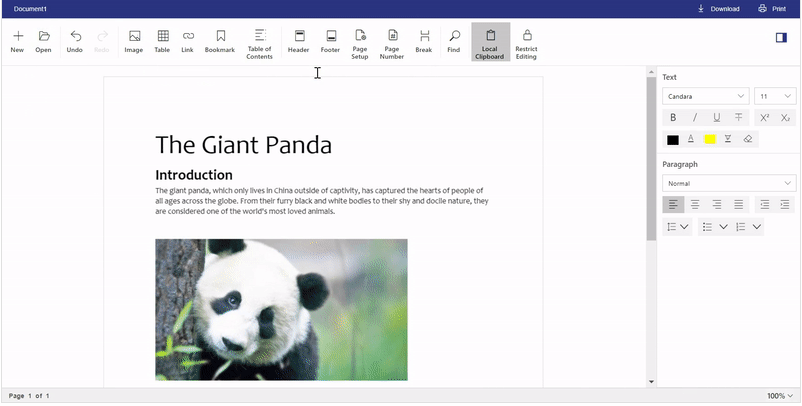
The [Vue Word Processor](https://www.syncfusion.com/vue-ui-components/vue-word-processor?utm_source=npm&utm_medium=listing&utm_campaign=vue-word-processor-npm) component is a feature rich UI component with document editing capabilities like Microsoft Word. Also known as the document editor, it is used to create, edit, view, and print Word documents. It provides all the common Word processing features including editing text, formatting content, resizing images and tables, finding and replacing text, bookmarks, tables of contents, track changes, commenting, restrict editing, printing, importing and exporting Word documents.
|
|
4
4
|
|
|
5
|
-
|
|
6
|
-
|
|
7
|
-
An example [Word Processor server-side Web API projects for ASP.NET MVC, ASP.NET Core, and Java is available in GitHub](https://github.com/SyncfusionExamples/EJ2-DocumentEditor-WebServices?utm_source=npm&utm_medium=listing&utm_campaign=vue-word-processor-npm) which contains all the mandatory Web APIs for opening Word documents, paste with formatting, restrict editing, spell-checking, and saving documents.
|
|
5
|
+
An example [Word Processor server-side Web API projects for ASP.NET MVC, ASP.NET Core, and Java is available in GitHub](https://github.com/SyncfusionExamples/EJ2-DocumentEditor-WebServices?utm_source=npm&utm_medium=listing&utm_campaign=vue-word-processor-npm) which contains all the mandatory Web APIs for opening Word documents, paste with formatting, restrict editing, spell-checking, and saving documents other than SFDT/DOCX format. Apart from these operations, all the user interactions and editing operations run purely in the client-side provides much faster editing experience to the users.
|
|
8
6
|
|
|
9
7
|
Syncfusion provides a predefined [Word Processor server docker image](https://hub.docker.com/r/syncfusion/word-processor-server?utm_source=npm&utm_medium=listing&utm_campaign=vue-word-processor-npm) targeting ASP.NET Core 2.1 framework. You can directly pull this docker image and deploy it in server on the go. You can also create own docker image by customizing the existing [docker project from GitHub](https://github.com/SyncfusionExamples/Word-Processor-Server-Docker?utm_source=npm&utm_medium=listing&utm_campaign=vue-word-processor-npm).
|
|
10
8
|
|
|
11
|
-
>
|
|
9
|
+
<p align="center">
|
|
10
|
+
<a href="https://ej2.syncfusion.com/vue/documentation/document-editor/getting-started/?utm_source=npm&utm_medium=listing&utm_campaign=vue-word-processor-npm">Getting Started</a> .
|
|
11
|
+
<a href="https://ej2.syncfusion.com/vue/demos/?utm_source=npm&utm_medium=listing&utm_campaign=vue-word-processor-npm#/bootstrap5/document-editor/default.html">Online demos</a> .
|
|
12
|
+
<a href="https://www.syncfusion.com/vue-ui-components/vue-word-processor?utm_source=npm&utm_medium=listing&utm_campaign=vue-word-processor-npm">Learn more</a>
|
|
13
|
+
</p>
|
|
12
14
|
|
|
13
|
-
>
|
|
15
|
+
<p align="center">
|
|
16
|
+
|
|
17
|
+
</p>
|
|
14
18
|
|
|
19
|
+
<p align="center">
|
|
20
|
+
Trusted by the world's leading companies
|
|
21
|
+
<a href="https://www.syncfusion.com">
|
|
22
|
+
<img src="https://raw.githubusercontent.com/SyncfusionExamples/nuget-img/master/syncfusion/syncfusion-trusted-companies.webp" alt="Bootstrap logo">
|
|
23
|
+
</a>
|
|
24
|
+
</p>
|
|
15
25
|
|
|
16
26
|
## Setup
|
|
17
27
|
|
|
18
|
-
|
|
28
|
+
### Create an Vue Application
|
|
29
|
+
|
|
30
|
+
You can use [`Vue CLI`](https://github.com/vuejs/vue-cli) to setup your Vue 2 applications.To install Vue CLI use the following commands.
|
|
19
31
|
|
|
20
|
-
```
|
|
21
|
-
npm install @
|
|
32
|
+
```bash
|
|
33
|
+
npm install -g @vue/cli
|
|
34
|
+
vue create quickstart
|
|
35
|
+
cd quickstart
|
|
36
|
+
npm run serve
|
|
22
37
|
```
|
|
38
|
+
Initiating a new project prompts us to choose the type of project to be used for the current application. Select the option `Default ([Vue 2] babel, eslint)` from the menu.
|
|
23
39
|
|
|
24
|
-
|
|
40
|
+
### Adding Syncfusion Word Processor package
|
|
25
41
|
|
|
26
|
-
|
|
27
|
-
|
|
28
|
-
|
|
42
|
+
All Syncfusion Vue packages are published in [npmjs.com](https://www.npmjs.com/~syncfusionorg) registry. To install Vue Document editor package, use the following command.
|
|
43
|
+
|
|
44
|
+
```bash
|
|
45
|
+
npm install @syncfusion/ej2-vue-documenteditor --save
|
|
46
|
+
```
|
|
29
47
|
|
|
30
|
-
|
|
48
|
+
### Registering Word Processor component
|
|
31
49
|
|
|
32
|
-
Document
|
|
50
|
+
You can register the Word Processor (Document editor) component in your application by using the **Vue.use()**. Refer to the code example given below.
|
|
33
51
|
|
|
34
|
-
|
|
35
|
-
|
|
36
|
-
3. [JavaScript Document Editor](https://www.syncfusion.com/javascript-ui-controls/js-word-processor?utm_source=npm&utm_medium=listing&utm_campaign=vue-word-processor-npm)
|
|
37
|
-
4. [ASP.NET Core Document Editor](https://www.syncfusion.com/aspnet-core-ui-controls/word-processor?utm_source=npm&utm_medium=listing&utm_campaign=vue-word-processor-npm)
|
|
38
|
-
5. [ASP.NET MVC Document Editor](https://www.syncfusion.com/aspnet-mvc-ui-controls/word-processor?utm_source=npm&utm_medium=listing&utm_campaign=vue-word-processor-npm)
|
|
52
|
+
```typescript
|
|
53
|
+
import { DocumentEditorPlugin } from '@syncfusion/ej2-vue-documenteditor';
|
|
39
54
|
|
|
40
|
-
|
|
55
|
+
Vue.use(DocumentEditorPlugin);
|
|
56
|
+
```
|
|
41
57
|
|
|
42
|
-
|
|
43
|
-
* **Supported elements** - Supports document elements like text, inline image, table, hyperlink, fields, bookmark, table of contents, section, header, and footer.
|
|
44
|
-
* **Styles** - Supports character and paragraph styles.
|
|
45
|
-
* **Editing** - Supports all the common editing and formatting operations.
|
|
46
|
-
* **History** - Supports options to perform undo redo operations.
|
|
47
|
-
* **Find and replace** - Provides support to find and replace text within the document.
|
|
48
|
-
* **Export** - Provides the options to export the documents in the client-side as `Syncfusion Document Text (*.sfdt)` and `Word document (*.docx)`.
|
|
49
|
-
* **Import** - Provides the options to import the native `Syncfusion Document Text (*.sfdt)` format documents in the client-side.
|
|
50
|
-
* **Print** - Provides the options to print the documents.
|
|
51
|
-
* **Clipboard** - Provides support to cut, copy, and paste rich text contents within the component. Also allows pasting simple text from other applications.
|
|
52
|
-
* **User interface** - Provides intuitive user friendly interface to perform various operations.
|
|
53
|
-
* **Context menu** - Provides context menu.
|
|
54
|
-
* **Dialog** - Provides dialog for inserting elements such as hyperlink, table and formatting such as font, paragraph, list, style, table.
|
|
55
|
-
* **Options pane** - Provides options pane to perform find and replace operations.
|
|
58
|
+
> Registering **DocumentEditorContainerPlugin** in vue, will register the Document editor component along with its required child directives globally.
|
|
56
59
|
|
|
57
|
-
|
|
60
|
+
### Adding CSS references for Word Processor
|
|
58
61
|
|
|
59
|
-
|
|
62
|
+
Add CSS references needed for Document editor in **style** section of the **App.vue** file from **../node_modules/@syncfusion** package folder.
|
|
60
63
|
|
|
61
|
-
|
|
62
|
-
|
|
63
|
-
|
|
64
|
+
```html
|
|
65
|
+
<style>
|
|
66
|
+
@import '../node_modules/@syncfusion/ej2-base/styles/material.css';
|
|
67
|
+
@import '../node_modules/@syncfusion/ej2-buttons/styles/material.css';
|
|
68
|
+
@import '../node_modules/@syncfusion/ej2-inputs/styles/material.css';
|
|
69
|
+
@import '../node_modules/@syncfusion/ej2-popups/styles/material.css';
|
|
70
|
+
@import '../node_modules/@syncfusion/ej2-lists/styles/material.css';
|
|
71
|
+
@import '../node_modules/@syncfusion/ej2-navigations/styles/material.css';
|
|
72
|
+
@import '../node_modules/@syncfusion/ej2-splitbuttons/styles/material.css';
|
|
73
|
+
@import '../node_modules/@syncfusion/ej2-dropdowns/styles/material.css';
|
|
74
|
+
@import "../node_modules/@syncfusion/ej2-vue-documenteditor/styles/material.css";
|
|
75
|
+
</style>
|
|
76
|
+
```
|
|
64
77
|
|
|
65
|
-
##
|
|
78
|
+
## Add Word Processor component
|
|
79
|
+
|
|
80
|
+
Add the Vue Document editor by using **ejs-documenteditorcontainer** selector in **template** section of the **App.vue** file.
|
|
81
|
+
|
|
82
|
+
```html
|
|
83
|
+
<template>
|
|
84
|
+
<div id="app">
|
|
85
|
+
<ejs-documenteditorcontainer height="590px" :serviceUrl='serviceUrl' :enableToolbar='true'> </ejs-documenteditorcontainer>
|
|
86
|
+
</div>
|
|
87
|
+
</template>
|
|
88
|
+
|
|
89
|
+
<script>
|
|
90
|
+
import Vue from 'vue';
|
|
91
|
+
import { DocumentEditorContainerPlugin, DocumentEditorContainerComponent,Toolbar } from '@syncfusion/ej2-vue-documenteditor';
|
|
92
|
+
|
|
93
|
+
Vue.use(DocumentEditorContainerPlugin);
|
|
94
|
+
export default {
|
|
95
|
+
data(){
|
|
96
|
+
return { serviceUrl:'https://ej2services.syncfusion.com/production/web-services/api/documenteditor/' }
|
|
97
|
+
},
|
|
98
|
+
provide: {
|
|
99
|
+
//Inject require modules.
|
|
100
|
+
DocumentEditorContainer: [Toolbar]
|
|
101
|
+
}
|
|
102
|
+
}
|
|
103
|
+
</script>
|
|
104
|
+
<style>
|
|
105
|
+
@import '../node_modules/@syncfusion/ej2-base/styles/material.css';
|
|
106
|
+
@import '../node_modules/@syncfusion/ej2-buttons/styles/material.css';
|
|
107
|
+
@import '../node_modules/@syncfusion/ej2-inputs/styles/material.css';
|
|
108
|
+
@import '../node_modules/@syncfusion/ej2-popups/styles/material.css';
|
|
109
|
+
@import '../node_modules/@syncfusion/ej2-lists/styles/material.css';
|
|
110
|
+
@import '../node_modules/@syncfusion/ej2-navigations/styles/material.css';
|
|
111
|
+
@import '../node_modules/@syncfusion/ej2-splitbuttons/styles/material.css';
|
|
112
|
+
@import '../node_modules/@syncfusion/ej2-dropdowns/styles/material.css';
|
|
113
|
+
@import "../node_modules/@syncfusion/ej2-vue-documenteditor/styles/material.css";
|
|
114
|
+
</style>
|
|
115
|
+
```
|
|
66
116
|
|
|
67
|
-
|
|
117
|
+
> The web API ('https://ej2services.syncfusion.com/production/web-services/api/documenteditor/') is created specifically for our online demos. You should host web API on your side, refer the [web service documentation](https://ej2.syncfusion.com/vue/documentation/document-editor/web-services/?utm_source=npm&utm_medium=listing&utm_campaign=vue-word-processor-npm) for more information.
|
|
118
|
+
> Refer the [Getting Started with Vue3](https://ej2.syncfusion.com/vue/documentation/document-editor/getting-started-vue-3/?utm_source=npm&utm_medium=listing&utm_campaign=vue-word-processor-npm) for using Syncfusion Vue components in Vue 3 applications.
|
|
119
|
+
|
|
120
|
+
## Supported frameworks
|
|
121
|
+
|
|
122
|
+
The Vue Word Processor (Document Editor) component is also offered in the following list of frameworks.
|
|
123
|
+
|
|
124
|
+
| [<img src="https://ej2.syncfusion.com/github/images/js.svg" height="50" />](https://www.syncfusion.com/javascript-ui-controls?utm_medium=listing&utm_source=github)<br/> [JavaScript](https://www.syncfusion.com/javascript-ui-controls?utm_medium=listing&utm_source=github) | [<img src="https://ej2.syncfusion.com/github/images/angular.svg" height="50" />](https://www.syncfusion.com/angular-components/?utm_medium=listing&utm_source=github)<br/> [Angular](https://www.syncfusion.com/angular-components/?utm_medium=listing&utm_source=github) | [<img src="https://ej2.syncfusion.com/github/images/react.svg" height="50" />](https://www.syncfusion.com/react-ui-components?utm_medium=listing&utm_source=github)<br/> [React](https://www.syncfusion.com/react-ui-components?utm_medium=listing&utm_source=github) | [<img src="https://ej2.syncfusion.com/github/images/netcore.svg" height="50" />](https://www.syncfusion.com/aspnet-core-ui-controls?utm_medium=listing&utm_source=github)<br/> [ASP.NET Core](https://www.syncfusion.com/aspnet-core-ui-controls?utm_medium=listing&utm_source=github) | [<img src="https://ej2.syncfusion.com/github/images/netmvc.svg" height="50" />](https://www.syncfusion.com/aspnet-mvc-ui-controls?utm_medium=listing&utm_source=github)<br/> [ASP.NET MVC](https://www.syncfusion.com/aspnet-mvc-ui-controls?utm_medium=listing&utm_source=github) |
|
|
125
|
+
| :-----: | :-----: | :-----: | :-----: | :-----: |
|
|
126
|
+
|
|
127
|
+
## Key features
|
|
128
|
+
|
|
129
|
+
* [Document Authoring](https://ej2.syncfusion.com/vue/demos/?utm_source=npm&utm_medium=listing&utm_campaign=vue-word-processor-npm#/bootstrap5/document-editor/default.html) - Allows to create a document with supported elements and formatting options.
|
|
130
|
+
* Supported elements - Supports document elements like text, inline image, table, hyperlink, fields, bookmark, table of contents, footnote and endnote, section, header, and footer.
|
|
131
|
+
* Styles - Supports character and paragraph styles.
|
|
132
|
+
* Editing - Supports all the common editing and formatting operations.
|
|
133
|
+
* History - Supports options to perform undo redo operations.
|
|
134
|
+
* Find and replace - Provides support to find and replace text within the document.
|
|
135
|
+
* [Track changes](https://ej2.syncfusion.com/vue/demos/?utm_source=npm&utm_medium=listing&utm_campaign=vue-word-processor-npm#/bootstrap5/document-editor/track-changes.html) - Suppports tracking the content insertion and deletion.
|
|
136
|
+
* [Commenting](https://ej2.syncfusion.com/vue/demos/?utm_source=npm&utm_medium=listing&utm_campaign=vue-word-processor-npm#/bootstrap5/document-editor/comments.html) - Supports adding a comment, replying to an existing comment or mark as resolved and more.
|
|
137
|
+
* [Form filling](https://ej2.syncfusion.com/vue/demos/?utm_source=npm&utm_medium=listing&utm_campaign=vue-word-processor-npm#/bootstrap5/document-editor/form-fields.html) - Supports designing fillable forms in Word document and fill the forms.
|
|
138
|
+
* [Restrict editng](https://ej2.syncfusion.com/vue/demos/?utm_source=npm&utm_medium=listing&utm_campaign=vue-word-processor-npm#/bootstrap5/document-editor/document-protection.html) - Supports restricting edit permission for a region in Word document and control what type of changes can be made to the document.
|
|
139
|
+
* Export - Provides the options to export the documents in the client-side as `Syncfusion Document Text (*.sfdt)` and `Word document (*.docx)`. With server-side library, exporting as other formats can be achieved.
|
|
140
|
+
* Import - Provides the options to import the native `Syncfusion Document Text (*.sfdt)` format documents in the client-side. With server-side library, importing other formats can be achieved.
|
|
141
|
+
* Print - Provides the options to print the documents.
|
|
142
|
+
* Clipboard - Provides support to cut, copy, and paste rich text contents within the component. Also allows pasting simple text from other applications. Paste rich text from other applications using server-side library.
|
|
143
|
+
* User interface - Provides intuitive user friendly interface to perform various operations.
|
|
144
|
+
* Context menu - Provides context menu.
|
|
145
|
+
* Dialog - Provides dialog for inserting elements such as hyperlink, table and formatting such as font, paragraph, list, style, table.
|
|
146
|
+
* Options pane - Provides options pane to perform find and replace operations.
|
|
147
|
+
|
|
148
|
+
## Support
|
|
149
|
+
|
|
150
|
+
Product support is available through the following mediums.
|
|
151
|
+
|
|
152
|
+
* [Support ticket](https://support.syncfusion.com/support/tickets/create) - Guaranteed Response in 24 hours | Unlimited tickets | Holiday support
|
|
153
|
+
* [Community forum](https://www.syncfusion.com/forums/vue?utm_source=npm&utm_medium=listing&utm_campaign=vue-word-processor-npm)
|
|
154
|
+
* [GitHub issues](https://github.com/syncfusion/ej2-vue-ui-components/issues/new)
|
|
155
|
+
* [Request feature or report bug](https://www.syncfusion.com/feedback/vue?utm_source=npm&utm_medium=listing&utm_campaign=vue-word-processor-npm)
|
|
156
|
+
* Live chat
|
|
68
157
|
|
|
69
158
|
## Changelog
|
|
70
159
|
|
|
71
|
-
Check the changelog [here](https://github.com/syncfusion/ej2-vue-ui-components/blob/master/components/documenteditor/CHANGELOG.md?utm_source=npm&utm_medium=listing&utm_campaign=vue-word-processor-npm)
|
|
160
|
+
Check the changelog [here](https://github.com/syncfusion/ej2-vue-ui-components/blob/master/components/documenteditor/CHANGELOG.md?utm_source=npm&utm_medium=listing&utm_campaign=vue-word-processor-npm). Get minor improvements and bug fixes every week to stay up to date with frequent updates.
|
|
161
|
+
|
|
162
|
+
## License and copyright
|
|
163
|
+
|
|
164
|
+
> This is a commercial product and requires a paid license for possession or use. Syncfusion’s licensed software, including this component, is subject to the terms and conditions of Syncfusion's [EULA](https://www.syncfusion.com/eula/es/). To acquire a license for 80+ [Vue UI components](https://www.syncfusion.com/vue-components), you can [purchase](https://www.syncfusion.com/sales/products) or [start a free 30-day trial](https://www.syncfusion.com/account/manage-trials/start-trials).
|
|
165
|
+
|
|
166
|
+
> A free community [license](https://www.syncfusion.com/products/communitylicense) is also available for companies and individuals whose organizations have less than $1 million USD in annual gross revenue and five or fewer developers.
|
|
72
167
|
|
|
168
|
+
See [LICENSE FILE](https://github.com/syncfusion/ej2-vue-ui-components/blob/master/license?utm_source=npm&utm_medium=listing&utm_campaign=vue-word-processor-npm) for more info.
|
|
73
169
|
|
|
74
|
-
© Copyright 2023 Syncfusion, Inc. All Rights Reserved. The Syncfusion Essential Studio license and copyright applies to this distribution.
|
|
170
|
+
© Copyright 2023 Syncfusion, Inc. All Rights Reserved. The Syncfusion Essential Studio license and copyright applies to this distribution.
|
|
@@ -1,6 +1,6 @@
|
|
|
1
1
|
/*!
|
|
2
2
|
* filename: ej2-vue-documenteditor.umd.min.js
|
|
3
|
-
* version : 20.4.
|
|
3
|
+
* version : 20.4.49
|
|
4
4
|
* Copyright Syncfusion Inc. 2001 - 2020. All rights reserved.
|
|
5
5
|
* Use of this code is subject to the terms of our license.
|
|
6
6
|
* A copy of the current license can be obtained at any time by e-mailing
|