@syncfusion/ej2-react-grids 20.3.59 → 20.3.61
This diff represents the content of publicly available package versions that have been released to one of the supported registries. The information contained in this diff is provided for informational purposes only and reflects changes between package versions as they appear in their respective public registries.
- package/CHANGELOG.md +20 -0
- package/README.md +127 -51
- package/dist/ej2-react-grids.min.js +1 -1
- package/dist/ej2-react-grids.umd.min.js +1 -1
- package/package.json +6 -6
- package/styles/bootstrap-dark.css +8 -3
- package/styles/bootstrap.css +8 -3
- package/styles/bootstrap4.css +8 -3
- package/styles/bootstrap5-dark.css +9 -4
- package/styles/bootstrap5.css +9 -4
- package/styles/fabric-dark.css +9 -4
- package/styles/fabric.css +9 -4
- package/styles/fluent-dark.css +9 -4
- package/styles/fluent.css +9 -4
- package/styles/grid/bootstrap-dark.css +8 -3
- package/styles/grid/bootstrap.css +8 -3
- package/styles/grid/bootstrap4.css +8 -3
- package/styles/grid/bootstrap5-dark.css +9 -4
- package/styles/grid/bootstrap5.css +9 -4
- package/styles/grid/fabric-dark.css +9 -4
- package/styles/grid/fabric.css +9 -4
- package/styles/grid/fluent-dark.css +9 -4
- package/styles/grid/fluent.css +9 -4
- package/styles/grid/highcontrast-light.css +7 -2
- package/styles/grid/highcontrast.css +9 -4
- package/styles/grid/material-dark.css +9 -4
- package/styles/grid/material.css +9 -4
- package/styles/grid/tailwind-dark.css +9 -4
- package/styles/grid/tailwind.css +9 -4
- package/styles/highcontrast-light.css +7 -2
- package/styles/highcontrast.css +9 -4
- package/styles/material-dark.css +9 -4
- package/styles/material.css +9 -4
- package/styles/tailwind-dark.css +9 -4
- package/styles/tailwind.css +9 -4
package/CHANGELOG.md
CHANGED
|
@@ -6,6 +6,26 @@
|
|
|
6
6
|
|
|
7
7
|
#### Bug Fixes
|
|
8
8
|
|
|
9
|
+
- `#I408271` - The reference link for the `checkBoxChange` event arguments has been updated in the documentation.
|
|
10
|
+
- `#I420019` - script error for focusing the content after deleting all the records has been fixed.
|
|
11
|
+
|
|
12
|
+
## 20.3.60 (2022-12-06)
|
|
13
|
+
|
|
14
|
+
### Grid
|
|
15
|
+
|
|
16
|
+
#### Bug Fixes
|
|
17
|
+
|
|
18
|
+
- `#I397543` - Issue with custom toolbar template item in grid has been resolved.
|
|
19
|
+
- `#I418069` - Searching issue when clicking search icon in adaptive mode has been fixed.
|
|
20
|
+
- `#I417934` - Column Reordering was not working properly after hiding the column has been fixed.
|
|
21
|
+
- `#I415585` - When JAWS is running, go to first page and last page buttons are working properly when enter key is pressed after focusing.
|
|
22
|
+
|
|
23
|
+
## 20.3.59 (2022-11-29)
|
|
24
|
+
|
|
25
|
+
### Grid
|
|
26
|
+
|
|
27
|
+
#### Bug Fixes
|
|
28
|
+
|
|
9
29
|
- `#I397894` - When pressing Tab Key, the first focusable element in the grid is need to be focused, instead of grid container issue has been fixed.
|
|
10
30
|
|
|
11
31
|
## 20.3.58 (2022-11-22)
|
package/README.md
CHANGED
|
@@ -1,75 +1,151 @@
|
|
|
1
|
-
#
|
|
1
|
+
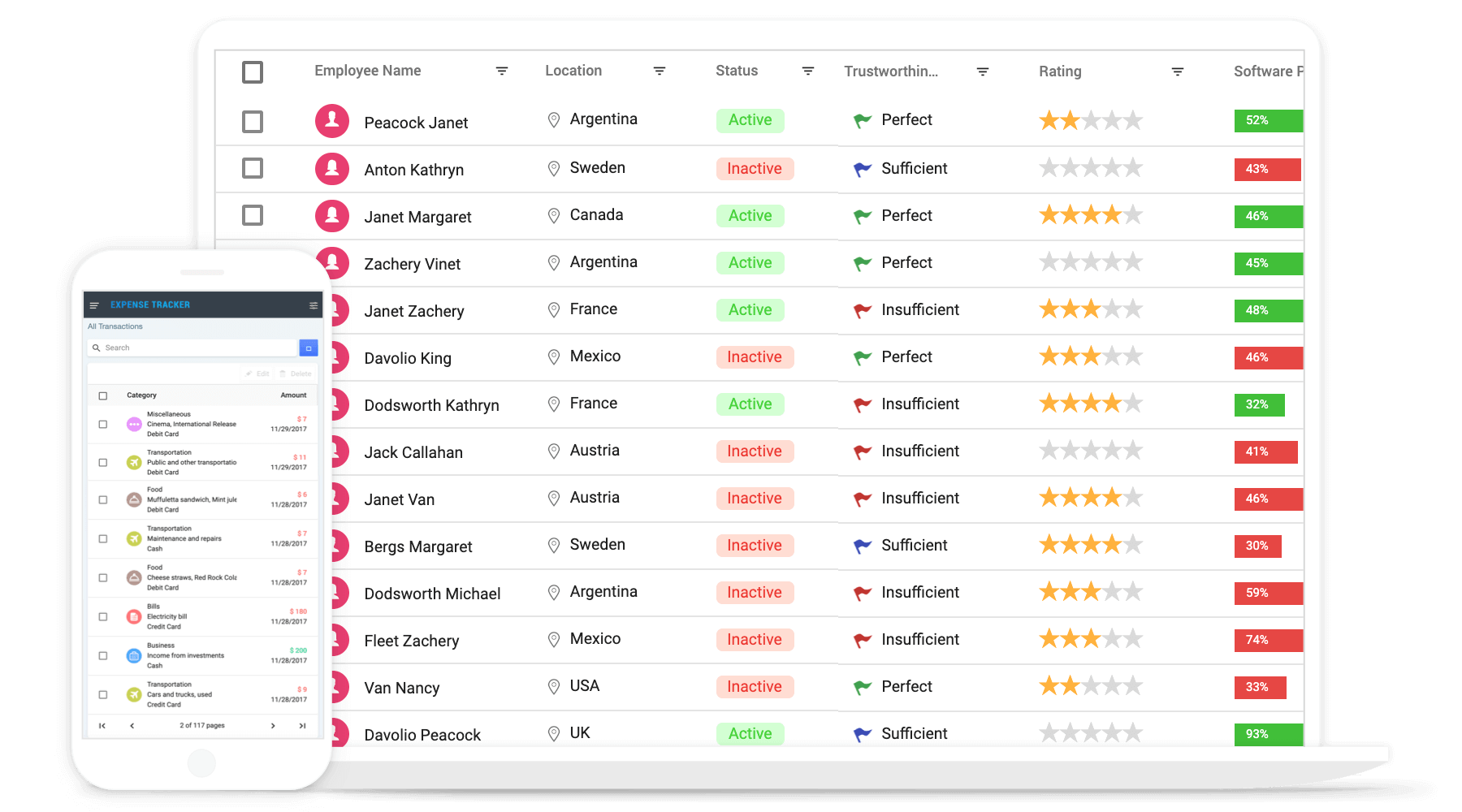
# React Grid Component
|
|
2
2
|
|
|
3
|
-
The [React Data Grid](https://www.syncfusion.com/react-ui-components/react-
|
|
3
|
+
The [React Data Grid](https://www.syncfusion.com/react-ui-components/react-grid?utm_source=npm&utm_medium=listing&utm_campaign=react-grid-npm) component is used to display and manipulate tabular data with configuration options to control the way the data is presented and manipulated. It will pull data from a data source, such as array of JSON objects, `OData web services`, or DataManager binding data fields to columns. Also displaying a column header to identify the field with support for grouped records.
|
|
4
4
|
|
|
5
|
-
|
|
5
|
+
<p align="center">
|
|
6
|
+
<a href="https://ej2.syncfusion.com/react/documentation/grid/getting-started/?utm_source=npm&utm_medium=listing&utm_campaign=react-grid-npm">Getting Started</a>.
|
|
7
|
+
<a href="https://ej2.syncfusion.com/react/demos/?utm_source=npm&utm_medium=listing&utm_campaign=react-grid-npm#/bootstrap5/grid/overview">Online demos</a>.
|
|
8
|
+
<a href="https://www.syncfusion.com/react-components/react-grid?utm_source=npm&utm_medium=listing&utm_campaign=react-grid-npm">Learn more</a>.
|
|
9
|
+
</p>
|
|
6
10
|
|
|
7
|
-
|
|
11
|
+
|
|
8
12
|
|
|
9
|
-
>
|
|
13
|
+
<p align="center">
|
|
14
|
+
Trusted by the world's leading companies
|
|
15
|
+
<a href="https://www.syncfusion.com">
|
|
16
|
+
<img src="https://raw.githubusercontent.com/SyncfusionExamples/nuget-img/master/syncfusion/syncfusion-trusted-companies.webp" alt="Bootstrap logo">
|
|
17
|
+
</a>
|
|
18
|
+
</p>
|
|
10
19
|
|
|
11
20
|
## Setup
|
|
12
21
|
|
|
13
|
-
|
|
22
|
+
### Create a React Application
|
|
23
|
+
|
|
24
|
+
You can use [`create-react-app`](https://github.com/facebookincubator/create-react-app) to setup the applications.
|
|
25
|
+
To install **create-react-app** run the following command.
|
|
26
|
+
|
|
27
|
+
```bash
|
|
28
|
+
npm install -g create-react-app
|
|
29
|
+
```
|
|
30
|
+
|
|
31
|
+
To setup basic **React** sample, use following commands.
|
|
32
|
+
|
|
33
|
+
```bash
|
|
34
|
+
create-react-app quickstart --scripts-version=react-scripts-ts
|
|
35
|
+
|
|
36
|
+
cd quickstart
|
|
37
|
+
|
|
38
|
+
npm install
|
|
14
39
|
|
|
15
|
-
```sh
|
|
16
|
-
npm install @syncfusion/ej2-react-grids
|
|
17
40
|
```
|
|
18
41
|
|
|
19
|
-
|
|
42
|
+
### Adding Syncfusion Grid package
|
|
43
|
+
|
|
44
|
+
All Syncfusion react packages are published in [`npmjs.com`](https://www.npmjs.com/~syncfusionorg) registry. To install react grid package, use the following command.
|
|
45
|
+
|
|
46
|
+
```bash
|
|
47
|
+
npm install @syncfusion/ej2-react-grids --save
|
|
48
|
+
```
|
|
20
49
|
|
|
21
|
-
|
|
22
|
-
* [View Online Demos](https://ej2.syncfusion.com/react/demos/?utm_source=npm&utm_medium=listing&utm_campaign=react-data-grid-npm/#/material/grid/default)
|
|
23
|
-
* [Product Page](https://www.syncfusion.com/react-ui-components/react-data-grid?utm_source=npm&utm_medium=listing&utm_campaign=react-data-grid-npm)
|
|
50
|
+
### Adding CSS references for Grid
|
|
24
51
|
|
|
25
|
-
|
|
52
|
+
Add CSS references needed for Grid in **src/App.css** from **../node_modules/@syncfusion** package folder.
|
|
53
|
+
|
|
54
|
+
```css
|
|
55
|
+
@import '../node_modules/@syncfusion/ej2-base/styles/material.css';
|
|
56
|
+
@import '../node_modules/@syncfusion/ej2-buttons/styles/material.css';
|
|
57
|
+
@import '../node_modules/@syncfusion/ej2-calendars/styles/material.css';
|
|
58
|
+
@import '../node_modules/@syncfusion/ej2-dropdowns/styles/material.css';
|
|
59
|
+
@import '../node_modules/@syncfusion/ej2-inputs/styles/material.css';
|
|
60
|
+
@import '../node_modules/@syncfusion/ej2-navigations/styles/material.css';
|
|
61
|
+
@import '../node_modules/@syncfusion/ej2-popups/styles/material.css';
|
|
62
|
+
@import '../node_modules/@syncfusion/ej2-splitbuttons/styles/material.css';
|
|
63
|
+
@import "../node_modules/@syncfusion/ej2-react-grids/styles/material.css";
|
|
64
|
+
```
|
|
65
|
+
|
|
66
|
+
### Add Grid Component
|
|
67
|
+
|
|
68
|
+
In **src/App.tsx** file, use the following code snippet to render the Syncfusion React Grid control and import **App.css** to apply styles to the grid:
|
|
69
|
+
|
|
70
|
+
```typescript
|
|
71
|
+
import { ColumnDirective, ColumnsDirective, GridComponent } from '@syncfusion/ej2-react-grids';
|
|
72
|
+
import * as React from 'react';
|
|
73
|
+
import './App.css';
|
|
74
|
+
|
|
75
|
+
function App() {
|
|
76
|
+
let data = [
|
|
77
|
+
{'OrderID': 10248,'CustomerID': 'VINET', 'ShipCountry': 'France'},
|
|
78
|
+
{'OrderID': 10249,'CustomerID': 'TOMSP', 'ShipCountry': 'Germany'},
|
|
79
|
+
{'OrderID': 10250,'CustomerID': 'HANAR', 'ShipCountry': 'Brazil' },
|
|
80
|
+
{'OrderID': 10251,'CustomerID': 'VICTE', 'ShipCountry': 'France'}
|
|
81
|
+
];
|
|
82
|
+
|
|
83
|
+
return <GridComponent dataSource={data}>
|
|
84
|
+
<ColumnsDirective>
|
|
85
|
+
<ColumnDirective field='OrderID' headerText='Order ID'/>
|
|
86
|
+
<ColumnDirective field='CustomerID' headerText='Customer ID' />
|
|
87
|
+
<ColumnDirective field='ShipCountry' headerText='Ship Country' />
|
|
88
|
+
</ColumnsDirective>
|
|
89
|
+
</GridComponent>
|
|
90
|
+
};
|
|
91
|
+
export default App;
|
|
92
|
+
```
|
|
93
|
+
|
|
94
|
+
## Supported frameworks
|
|
26
95
|
|
|
27
96
|
Grid component is also offered in following list of frameworks.
|
|
28
97
|
|
|
29
|
-
|
|
30
|
-
|
|
31
|
-
|
|
32
|
-
|
|
33
|
-
|
|
34
|
-
|
|
35
|
-
|
|
36
|
-
|
|
37
|
-
|
|
38
|
-
* [
|
|
39
|
-
* [
|
|
40
|
-
* [
|
|
41
|
-
* [
|
|
42
|
-
*
|
|
43
|
-
|
|
44
|
-
* [
|
|
45
|
-
* [
|
|
46
|
-
* [
|
|
47
|
-
* [
|
|
48
|
-
* [
|
|
49
|
-
* [
|
|
50
|
-
* [
|
|
51
|
-
* [
|
|
52
|
-
* [
|
|
53
|
-
* [
|
|
54
|
-
* [
|
|
55
|
-
* [
|
|
56
|
-
* [
|
|
57
|
-
* [
|
|
98
|
+
| [<img src="https://ej2.syncfusion.com/github/images/js.svg" height="50" />](https://www.syncfusion.com/javascript-ui-controls?utm_medium=listing&utm_source=github)<br/> [JavaScript](https://www.syncfusion.com/javascript-ui-controls?utm_medium=listing&utm_source=github) | [<img src="https://ej2.syncfusion.com/github/images/angular.svg" height="50" />](https://www.syncfusion.com/angular-components/?utm_medium=listing&utm_source=github)<br/> [Angular](https://www.syncfusion.com/angular-components/?utm_medium=listing&utm_source=github) | [<img src="https://ej2.syncfusion.com/github/images/vue.svg" height="50" />](https://www.syncfusion.com/vue-ui-components?utm_medium=listing&utm_source=github)<br/> [Vue](https://www.syncfusion.com/vue-ui-components?utm_medium=listing&utm_source=github) | [<img src="https://ej2.syncfusion.com/github/images/netcore.svg" height="50" />](https://www.syncfusion.com/aspnet-core-ui-controls?utm_medium=listing&utm_source=github)<br/> [ASP.NET Core](https://www.syncfusion.com/aspnet-core-ui-controls?utm_medium=listing&utm_source=github) | [<img src="https://ej2.syncfusion.com/github/images/netmvc.svg" height="50" />](https://www.syncfusion.com/aspnet-mvc-ui-controls?utm_medium=listing&utm_source=github)<br/> [ASP.NET MVC](https://www.syncfusion.com/aspnet-mvc-ui-controls?utm_medium=listing&utm_source=github) |
|
|
99
|
+
| :-----: | :-----: | :-----: | :-----: | :-----: |
|
|
100
|
+
|
|
101
|
+
## Showcase samples
|
|
102
|
+
|
|
103
|
+
* Loan Calculator - [Source](https://github.com/syncfusion/ej2-showcase-react-loan-calculator), [Live Demo](https://ej2.syncfusion.com/showcase/react/loancalculator/?utm_source=npm&utm_medium=listing&utm_campaign=react-grid-npm#/default)
|
|
104
|
+
|
|
105
|
+
## Key features
|
|
106
|
+
|
|
107
|
+
* [Data sources](https://ej2.syncfusion.com/react/demos/?utm_source=npm&utm_medium=listing&utm_campaign=react-grid-npm#/material/grid/local-binding) - Bind the Grid component with an array of JSON objects or DataManager.
|
|
108
|
+
* [Sorting and grouping](https://ej2.syncfusion.com/react/demos/?utm_source=npm&utm_medium=listing&utm_campaign=react-grid-npm#/material/grid/grouping) - Supports n levels of sorting and grouping.
|
|
109
|
+
* [Filtering](https://ej2.syncfusion.com/react/demos/?utm_source=npm&utm_medium=listing&utm_campaign=react-grid-npm#/material/grid/filtering) - Offers filter UI such as filter bar, menu, excel and checkbox at each column to filter data.
|
|
110
|
+
* [Paging](https://ej2.syncfusion.com/react/demos/?utm_source=npm&utm_medium=listing&utm_campaign=react-grid-npm#/material/grid/paging) - Provides the option to easily switch between pages using the pager bar.
|
|
111
|
+
* [Editing](https://ej2.syncfusion.com/react/demos/?utm_source=npm&utm_campaign=grid#/material/grid/normaledit) - provides the options for create, read, update, and delete operations.
|
|
112
|
+
* Columns - The column definitions are used as the dataSource schema in the Grid. This plays a vital role in rendering column values in the required format.
|
|
113
|
+
* [Reordering](https://ej2.syncfusion.com/react/demos/?utm_source=npm&utm_medium=listing&utm_campaign=react-grid-npm#/material/grid/reorder) - Allows you to drag any column and drop it at any position in the Grid’s column header row, allowing columns to be repositioned.
|
|
114
|
+
* [Column chooser](https://ej2.syncfusion.com/react/demos/?utm_source=npm&utm_medium=listing&utm_campaign=react-grid-npm#/material/grid/column-chooser) - The column chooser provides a list of column names paired with check boxes that allow the visibility to be toggled on the fly.
|
|
115
|
+
* [Resizing](https://ej2.syncfusion.com/react/demos/?utm_source=npm&utm_medium=listing&utm_campaign=react-grid-npm#/material/grid/column-resizing) - Resizing allows changing column width on the fly by simply dragging the right corner of the column header.
|
|
116
|
+
* [Freeze](https://ej2.syncfusion.com/react/demos/?utm_source=npm&utm_medium=listing&utm_campaign=react-grid-npm#/material/grid/frozen-rows) - Columns and rows can be frozen to allow scrolling and comparing cell values.
|
|
117
|
+
* [Cell spanning](https://ej2.syncfusion.com/react/demos/?utm_source=npm&utm_medium=listing&utm_campaign=react-grid-npm#/material/grid/column-spanning) - Grid cells can be spanned based on the preferred criteria.
|
|
118
|
+
* [Foreign data source](https://ej2.syncfusion.com/react/demos/?utm_source=npm&utm_medium=listing&utm_campaign=react-grid-npm#/material/grid/foreign-key) - This provides the option to show values from external or lookup data sources in a column based on foreign key/value mapping.
|
|
119
|
+
* [Cell styling](https://ej2.syncfusion.com/react/documentation/grid/how-to/?utm_source=npm&utm_medium=listing&utm_campaign=react-grid-npm#customize-column-styles) - Grid cell styles can be customized either by using CSS or programmatically.
|
|
120
|
+
* [Selection](https://ej2.syncfusion.com/react/demos/?utm_source=npm&utm_medium=listing&utm_campaign=react-grid-npm#/material/grid/selection) - Rows or cells can be selected in the grid. One or more rows or cells can also be selected by holding Ctrl or Command, or programmatically.
|
|
121
|
+
* [Templates](https://ej2.syncfusion.com/react/demos/?utm_source=npm&utm_medium=listing&utm_campaign=react-grid-npm#/material/grid/column-template) - Templates can be used to create custom user experiences in the grid.
|
|
122
|
+
* [Aggregation](https://ej2.syncfusion.com/react/demos/?utm_source=npm&utm_medium=listing&utm_campaign=react-grid-npm#/material/grid/aggregate-default) - Provides the option to easily visualized the Aggregates for column values.
|
|
123
|
+
* [Context menu](https://ej2.syncfusion.com/react/demos/?utm_source=npm&utm_medium=listing&utm_campaign=react-grid-npm#/material/grid/context-menu) -The context menu provides a list of actions to be performed in the grid. It appears when a cell, header, or the pager is right-clicked.
|
|
124
|
+
* [Clipboard](https://ej2.syncfusion.com/react/demos/?utm_source=npm&utm_medium=listing&utm_campaign=react-grid-npm#/material/grid/clipboard) - Selected rows and cells can be copied from the grid
|
|
125
|
+
* [Export](https://ej2.syncfusion.com/react/demos/?utm_source=npm&utm_medium=listing&utm_campaign=react-grid-npm#/material/grid/default-exporting) - Provides the options to Export the grid data to Excel, PDF, and CSV formats.
|
|
126
|
+
* [RTL support](https://ej2.syncfusion.com/react/documentation/grid/global-local/?utm_source=npm&utm_medium=listing&utm_campaign=react-grid-npm#right-to-left---rtl) - Provides a full-fledged right-to-left mode which aligns content in the Grid component from right to left.
|
|
127
|
+
* [Localization](https://ej2.syncfusion.com/react/documentation/grid/global-local/?utm_source=npm&utm_medium=listing&utm_campaign=react-grid-npm#localization)) - Provides inherent support to localize the UI.
|
|
58
128
|
|
|
59
129
|
## Support
|
|
60
130
|
|
|
61
|
-
Product support is available
|
|
131
|
+
Product support is available through following mediums.
|
|
62
132
|
|
|
63
|
-
*
|
|
64
|
-
*
|
|
65
|
-
*
|
|
133
|
+
* [Support ticket](https://support.syncfusion.com/support/tickets/create) - Guaranteed Response in 24 hours | Unlimited tickets | Holiday support
|
|
134
|
+
* [Community forum](https://www.syncfusion.com/forums/react-js2?utm_source=npm&utm_medium=listing&utm_campaign=react-grid-npm)
|
|
135
|
+
* [GitHub issues](https://github.com/syncfusion/ej2-react-ui-components/issues/new)
|
|
136
|
+
* [Request feature or report bug](https://www.syncfusion.com/feedback/react?utm_source=npm&utm_medium=listing&utm_campaign=react-grid-npm)
|
|
137
|
+
* Live chat
|
|
66
138
|
|
|
67
|
-
##
|
|
139
|
+
## Changelog
|
|
68
140
|
|
|
69
|
-
Check the
|
|
141
|
+
Check the changelog [here](https://github.com/syncfusion/ej2-react-ui-components/blob/master/components/grids/CHANGELOG.md?utm_source=npm&utm_medium=listing&utm_campaign=react-grid-npm). Get minor improvements and bug fixes every week to stay up to date with frequent updates.
|
|
70
142
|
|
|
71
|
-
##
|
|
143
|
+
## License and copyright
|
|
144
|
+
|
|
145
|
+
> This is a commercial product and requires a paid license for possession or use. Syncfusion’s licensed software, including this component, is subject to the terms and conditions of Syncfusion's [EULA](https://www.syncfusion.com/eula/es/). To acquire a license for 80+ [React UI controls](https://www.syncfusion.com/react-components), you can [purchase](https://www.syncfusion.com/sales/products) or [start a free 30-day trial](https://www.syncfusion.com/account/manage-trials/start-trials).
|
|
146
|
+
|
|
147
|
+
> A free community [license](https://www.syncfusion.com/products/communitylicense) is also available for companies and individuals whose organizations have less than $1 million USD in annual gross revenue and five or fewer developers.
|
|
72
148
|
|
|
73
|
-
|
|
149
|
+
See [LICENSE FILE](https://github.com/syncfusion/ej2-react-ui-components/blob/master/license?utm_source=npm&utm_medium=listing&utm_campaign=react-grid-npm) for more info.
|
|
74
150
|
|
|
75
|
-
© Copyright 2022 Syncfusion, Inc. All Rights Reserved. The Syncfusion Essential Studio license and copyright applies to this distribution.
|
|
151
|
+
© Copyright 2022 Syncfusion, Inc. All Rights Reserved. The Syncfusion Essential Studio license and copyright applies to this distribution.
|
|
@@ -1,6 +1,6 @@
|
|
|
1
1
|
/*!
|
|
2
2
|
* filename: ej2-react-grids.min.js
|
|
3
|
-
* version : 20.3.
|
|
3
|
+
* version : 20.3.61
|
|
4
4
|
* Copyright Syncfusion Inc. 2001 - 2020. All rights reserved.
|
|
5
5
|
* Use of this code is subject to the terms of our license.
|
|
6
6
|
* A copy of the current license can be obtained at any time by e-mailing
|
|
@@ -1,6 +1,6 @@
|
|
|
1
1
|
/*!
|
|
2
2
|
* filename: ej2-react-grids.umd.min.js
|
|
3
|
-
* version : 20.3.
|
|
3
|
+
* version : 20.3.61
|
|
4
4
|
* Copyright Syncfusion Inc. 2001 - 2020. All rights reserved.
|
|
5
5
|
* Use of this code is subject to the terms of our license.
|
|
6
6
|
* A copy of the current license can be obtained at any time by e-mailing
|
package/package.json
CHANGED
|
@@ -1,8 +1,8 @@
|
|
|
1
1
|
{
|
|
2
2
|
"_from": "@syncfusion/ej2-react-grids@*",
|
|
3
|
-
"_id": "@syncfusion/ej2-react-grids@20.3.
|
|
3
|
+
"_id": "@syncfusion/ej2-react-grids@20.3.60",
|
|
4
4
|
"_inBundle": false,
|
|
5
|
-
"_integrity": "sha512-
|
|
5
|
+
"_integrity": "sha512-0AqypOoEm+fabJHnZ4sWnJv99DIJfymkBWES9V8nKWgtERJF/rqy6DfnZuB15+qXueu0dQCytmlGL5fC6XkY9g==",
|
|
6
6
|
"_location": "/@syncfusion/ej2-react-grids",
|
|
7
7
|
"_phantomChildren": {},
|
|
8
8
|
"_requested": {
|
|
@@ -19,8 +19,8 @@
|
|
|
19
19
|
"_requiredBy": [
|
|
20
20
|
"/"
|
|
21
21
|
],
|
|
22
|
-
"_resolved": "https://nexus.syncfusion.com/repository/ej2-hotfix-new/@syncfusion/ej2-react-grids/-/ej2-react-grids-20.3.
|
|
23
|
-
"_shasum": "
|
|
22
|
+
"_resolved": "https://nexus.syncfusion.com/repository/ej2-hotfix-new/@syncfusion/ej2-react-grids/-/ej2-react-grids-20.3.60.tgz",
|
|
23
|
+
"_shasum": "de8e2f8af5af4eba04f8e7d7e6a5905b9c87d766",
|
|
24
24
|
"_spec": "@syncfusion/ej2-react-grids@*",
|
|
25
25
|
"_where": "/jenkins/workspace/ease-automation_release_19.1.0.1/packages/included",
|
|
26
26
|
"author": {
|
|
@@ -32,7 +32,7 @@
|
|
|
32
32
|
"bundleDependencies": false,
|
|
33
33
|
"dependencies": {
|
|
34
34
|
"@syncfusion/ej2-base": "~20.3.56",
|
|
35
|
-
"@syncfusion/ej2-grids": "20.3.
|
|
35
|
+
"@syncfusion/ej2-grids": "20.3.61",
|
|
36
36
|
"@syncfusion/ej2-react-base": "~20.3.56"
|
|
37
37
|
},
|
|
38
38
|
"deprecated": false,
|
|
@@ -65,6 +65,6 @@
|
|
|
65
65
|
"type": "git",
|
|
66
66
|
"url": "git+https://github.com/syncfusion/ej2-react-ui-components.git"
|
|
67
67
|
},
|
|
68
|
-
"version": "20.3.
|
|
68
|
+
"version": "20.3.61",
|
|
69
69
|
"sideEffects": false
|
|
70
70
|
}
|
|
@@ -1543,6 +1543,13 @@ li.e-separator.e-menu-item.e-excel-separator {
|
|
|
1543
1543
|
.e-grid .e-toolbar .e-toolbar-item.e-search-wrapper .e-sicon.e-clear-icon::before {
|
|
1544
1544
|
font-size: 12px;
|
|
1545
1545
|
}
|
|
1546
|
+
.e-grid .e-toolbar-items .e-input-group-icon.e-icons.e-sicon:hover:not(.e-clear-icon), .e-grid .e-toolbar-items .e-input-group-icon.e-icons.e-sicon:active:not(.e-clear-icon), .e-grid .e-toolbar-items .e-input-group-icon.e-icons.e-sicon:focus:not(.e-clear-icon) {
|
|
1547
|
+
background: none;
|
|
1548
|
+
box-shadow: none;
|
|
1549
|
+
}
|
|
1550
|
+
.e-grid .e-toolbar-items .e-input-group-icon.e-icons.e-sicon:not(.e-clear-icon) {
|
|
1551
|
+
border: none;
|
|
1552
|
+
}
|
|
1546
1553
|
.e-grid .e-res-toolbar {
|
|
1547
1554
|
border-bottom: 1px solid;
|
|
1548
1555
|
border-bottom-color: #484848;
|
|
@@ -2650,13 +2657,11 @@ li.e-separator.e-menu-item.e-excel-separator {
|
|
|
2650
2657
|
font-size: 10px;
|
|
2651
2658
|
padding: 13px 9px 11px 10px;
|
|
2652
2659
|
text-decoration: none;
|
|
2653
|
-
text-indent: 11px;
|
|
2654
2660
|
}
|
|
2655
2661
|
.e-grid .e-icon-grightarrow {
|
|
2656
2662
|
font-size: 10px;
|
|
2657
2663
|
padding: 12px 9px 12px 10px;
|
|
2658
2664
|
text-decoration: none;
|
|
2659
|
-
text-indent: 11px;
|
|
2660
2665
|
}
|
|
2661
2666
|
.e-grid .e-recordplusexpand {
|
|
2662
2667
|
padding-top: 5px;
|
|
@@ -3480,7 +3485,7 @@ li.e-separator.e-menu-item.e-excel-separator {
|
|
|
3480
3485
|
user-select: none;
|
|
3481
3486
|
}
|
|
3482
3487
|
.e-grid.sf-grid .e-gridheader .e-headercontent .e-reorderuparrow {
|
|
3483
|
-
margin-top:
|
|
3488
|
+
margin-top: 0.5px;
|
|
3484
3489
|
}
|
|
3485
3490
|
.e-grid.sf-grid .e-gridheader .e-headercontent .e-reorderdownarrow {
|
|
3486
3491
|
margin-top: -1.5px;
|
package/styles/bootstrap.css
CHANGED
|
@@ -1544,6 +1544,13 @@ li.e-separator.e-menu-item.e-excel-separator {
|
|
|
1544
1544
|
.e-grid .e-toolbar .e-toolbar-item.e-search-wrapper .e-sicon.e-clear-icon::before {
|
|
1545
1545
|
font-size: 12px;
|
|
1546
1546
|
}
|
|
1547
|
+
.e-grid .e-toolbar-items .e-input-group-icon.e-icons.e-sicon:hover:not(.e-clear-icon), .e-grid .e-toolbar-items .e-input-group-icon.e-icons.e-sicon:active:not(.e-clear-icon), .e-grid .e-toolbar-items .e-input-group-icon.e-icons.e-sicon:focus:not(.e-clear-icon) {
|
|
1548
|
+
background: none;
|
|
1549
|
+
box-shadow: none;
|
|
1550
|
+
}
|
|
1551
|
+
.e-grid .e-toolbar-items .e-input-group-icon.e-icons.e-sicon:not(.e-clear-icon) {
|
|
1552
|
+
border: none;
|
|
1553
|
+
}
|
|
1547
1554
|
.e-grid .e-res-toolbar {
|
|
1548
1555
|
border-bottom: 1px solid;
|
|
1549
1556
|
border-bottom-color: #ddd;
|
|
@@ -2651,13 +2658,11 @@ li.e-separator.e-menu-item.e-excel-separator {
|
|
|
2651
2658
|
font-size: 10px;
|
|
2652
2659
|
padding: 13px 9px 11px 10px;
|
|
2653
2660
|
text-decoration: none;
|
|
2654
|
-
text-indent: 11px;
|
|
2655
2661
|
}
|
|
2656
2662
|
.e-grid .e-icon-grightarrow {
|
|
2657
2663
|
font-size: 10px;
|
|
2658
2664
|
padding: 12px 9px 12px 10px;
|
|
2659
2665
|
text-decoration: none;
|
|
2660
|
-
text-indent: 11px;
|
|
2661
2666
|
}
|
|
2662
2667
|
.e-grid .e-recordplusexpand {
|
|
2663
2668
|
padding-top: 5px;
|
|
@@ -3481,7 +3486,7 @@ li.e-separator.e-menu-item.e-excel-separator {
|
|
|
3481
3486
|
user-select: none;
|
|
3482
3487
|
}
|
|
3483
3488
|
.e-grid.sf-grid .e-gridheader .e-headercontent .e-reorderuparrow {
|
|
3484
|
-
margin-top:
|
|
3489
|
+
margin-top: 0.5px;
|
|
3485
3490
|
}
|
|
3486
3491
|
.e-grid.sf-grid .e-gridheader .e-headercontent .e-reorderdownarrow {
|
|
3487
3492
|
margin-top: -1.5px;
|
package/styles/bootstrap4.css
CHANGED
|
@@ -1600,6 +1600,13 @@ li.e-separator.e-menu-item.e-excel-separator {
|
|
|
1600
1600
|
.e-grid .e-toolbar .e-toolbar-item.e-search-wrapper .e-sicon.e-clear-icon::before {
|
|
1601
1601
|
font-size: 14px;
|
|
1602
1602
|
}
|
|
1603
|
+
.e-grid .e-toolbar-items .e-input-group-icon.e-icons.e-sicon:hover:not(.e-clear-icon), .e-grid .e-toolbar-items .e-input-group-icon.e-icons.e-sicon:active:not(.e-clear-icon), .e-grid .e-toolbar-items .e-input-group-icon.e-icons.e-sicon:focus:not(.e-clear-icon) {
|
|
1604
|
+
background: none;
|
|
1605
|
+
box-shadow: none;
|
|
1606
|
+
}
|
|
1607
|
+
.e-grid .e-toolbar-items .e-input-group-icon.e-icons.e-sicon:not(.e-clear-icon) {
|
|
1608
|
+
border: none;
|
|
1609
|
+
}
|
|
1603
1610
|
.e-grid .e-res-toolbar {
|
|
1604
1611
|
border-bottom: 1px solid;
|
|
1605
1612
|
border-bottom-color: #dee2e6;
|
|
@@ -2709,13 +2716,11 @@ li.e-separator.e-menu-item.e-excel-separator {
|
|
|
2709
2716
|
font-size: 10px;
|
|
2710
2717
|
padding: 13px 9px 11px 10px;
|
|
2711
2718
|
text-decoration: none;
|
|
2712
|
-
text-indent: 11px;
|
|
2713
2719
|
}
|
|
2714
2720
|
.e-grid .e-icon-grightarrow {
|
|
2715
2721
|
font-size: 10px;
|
|
2716
2722
|
padding: 12px 9px 12px 10px;
|
|
2717
2723
|
text-decoration: none;
|
|
2718
|
-
text-indent: 11px;
|
|
2719
2724
|
}
|
|
2720
2725
|
.e-grid .e-recordplusexpand {
|
|
2721
2726
|
padding-top: 5px;
|
|
@@ -3540,7 +3545,7 @@ li.e-separator.e-menu-item.e-excel-separator {
|
|
|
3540
3545
|
user-select: none;
|
|
3541
3546
|
}
|
|
3542
3547
|
.e-grid.sf-grid .e-gridheader .e-headercontent .e-reorderuparrow {
|
|
3543
|
-
margin-top:
|
|
3548
|
+
margin-top: 0;
|
|
3544
3549
|
}
|
|
3545
3550
|
.e-grid.sf-grid .e-gridheader .e-headercontent .e-reorderdownarrow {
|
|
3546
3551
|
margin-top: -3px;
|
|
@@ -1606,6 +1606,13 @@ li.e-separator.e-menu-item.e-excel-separator {
|
|
|
1606
1606
|
.e-grid .e-toolbar .e-toolbar-item.e-search-wrapper .e-sicon.e-clear-icon::before {
|
|
1607
1607
|
font-size: 14px;
|
|
1608
1608
|
}
|
|
1609
|
+
.e-grid .e-toolbar-items .e-input-group-icon.e-icons.e-sicon:hover:not(.e-clear-icon), .e-grid .e-toolbar-items .e-input-group-icon.e-icons.e-sicon:active:not(.e-clear-icon), .e-grid .e-toolbar-items .e-input-group-icon.e-icons.e-sicon:focus:not(.e-clear-icon) {
|
|
1610
|
+
background: none;
|
|
1611
|
+
box-shadow: none;
|
|
1612
|
+
}
|
|
1613
|
+
.e-grid .e-toolbar-items .e-input-group-icon.e-icons.e-sicon:not(.e-clear-icon) {
|
|
1614
|
+
border: none;
|
|
1615
|
+
}
|
|
1609
1616
|
.e-grid .e-res-toolbar {
|
|
1610
1617
|
border-bottom: 1px solid;
|
|
1611
1618
|
border-bottom-color: #444c54;
|
|
@@ -2714,13 +2721,11 @@ li.e-separator.e-menu-item.e-excel-separator {
|
|
|
2714
2721
|
font-size: 14px;
|
|
2715
2722
|
padding: 12px 7px 11px 8px;
|
|
2716
2723
|
text-decoration: none;
|
|
2717
|
-
text-indent: 11px;
|
|
2718
2724
|
}
|
|
2719
2725
|
.e-grid .e-icon-grightarrow {
|
|
2720
2726
|
font-size: 14px;
|
|
2721
2727
|
padding: 11px 7px 12px 8px;
|
|
2722
2728
|
text-decoration: none;
|
|
2723
|
-
text-indent: 11px;
|
|
2724
2729
|
}
|
|
2725
2730
|
.e-grid .e-recordplusexpand {
|
|
2726
2731
|
padding-top: 5px;
|
|
@@ -3547,7 +3552,7 @@ li.e-separator.e-menu-item.e-excel-separator {
|
|
|
3547
3552
|
margin-top: 0;
|
|
3548
3553
|
}
|
|
3549
3554
|
.e-grid.sf-grid .e-gridheader .e-headercontent .e-reorderdownarrow {
|
|
3550
|
-
margin-top:
|
|
3555
|
+
margin-top: -2px;
|
|
3551
3556
|
}
|
|
3552
3557
|
.e-grid.sf-grid .e-masked-cell.e-rowcell .e-virtualcell {
|
|
3553
3558
|
background-color: rgba(0, 0, 0, 0.1);
|
|
@@ -3595,7 +3600,7 @@ li.e-separator.e-menu-item.e-excel-separator {
|
|
|
3595
3600
|
}
|
|
3596
3601
|
.e-bigger .e-grid .e-gridheader .e-headercontent .e-reorderuparrow,
|
|
3597
3602
|
.e-bigger.e-grid .e-gridheader .e-headercontent .e-reorderuparrow {
|
|
3598
|
-
margin-top: -
|
|
3603
|
+
margin-top: -2px;
|
|
3599
3604
|
}
|
|
3600
3605
|
.e-bigger .e-grid .e-gridheader thead .e-icons,
|
|
3601
3606
|
.e-bigger.e-grid .e-gridheader thead .e-icons {
|
package/styles/bootstrap5.css
CHANGED
|
@@ -1606,6 +1606,13 @@ li.e-separator.e-menu-item.e-excel-separator {
|
|
|
1606
1606
|
.e-grid .e-toolbar .e-toolbar-item.e-search-wrapper .e-sicon.e-clear-icon::before {
|
|
1607
1607
|
font-size: 14px;
|
|
1608
1608
|
}
|
|
1609
|
+
.e-grid .e-toolbar-items .e-input-group-icon.e-icons.e-sicon:hover:not(.e-clear-icon), .e-grid .e-toolbar-items .e-input-group-icon.e-icons.e-sicon:active:not(.e-clear-icon), .e-grid .e-toolbar-items .e-input-group-icon.e-icons.e-sicon:focus:not(.e-clear-icon) {
|
|
1610
|
+
background: none;
|
|
1611
|
+
box-shadow: none;
|
|
1612
|
+
}
|
|
1613
|
+
.e-grid .e-toolbar-items .e-input-group-icon.e-icons.e-sicon:not(.e-clear-icon) {
|
|
1614
|
+
border: none;
|
|
1615
|
+
}
|
|
1609
1616
|
.e-grid .e-res-toolbar {
|
|
1610
1617
|
border-bottom: 1px solid;
|
|
1611
1618
|
border-bottom-color: #dee2e6;
|
|
@@ -2714,13 +2721,11 @@ li.e-separator.e-menu-item.e-excel-separator {
|
|
|
2714
2721
|
font-size: 14px;
|
|
2715
2722
|
padding: 12px 7px 11px 8px;
|
|
2716
2723
|
text-decoration: none;
|
|
2717
|
-
text-indent: 11px;
|
|
2718
2724
|
}
|
|
2719
2725
|
.e-grid .e-icon-grightarrow {
|
|
2720
2726
|
font-size: 14px;
|
|
2721
2727
|
padding: 11px 7px 12px 8px;
|
|
2722
2728
|
text-decoration: none;
|
|
2723
|
-
text-indent: 11px;
|
|
2724
2729
|
}
|
|
2725
2730
|
.e-grid .e-recordplusexpand {
|
|
2726
2731
|
padding-top: 5px;
|
|
@@ -3547,7 +3552,7 @@ li.e-separator.e-menu-item.e-excel-separator {
|
|
|
3547
3552
|
margin-top: 0;
|
|
3548
3553
|
}
|
|
3549
3554
|
.e-grid.sf-grid .e-gridheader .e-headercontent .e-reorderdownarrow {
|
|
3550
|
-
margin-top:
|
|
3555
|
+
margin-top: -2px;
|
|
3551
3556
|
}
|
|
3552
3557
|
.e-grid.sf-grid .e-masked-cell.e-rowcell .e-virtualcell {
|
|
3553
3558
|
background-color: rgba(0, 0, 0, 0.1);
|
|
@@ -3595,7 +3600,7 @@ li.e-separator.e-menu-item.e-excel-separator {
|
|
|
3595
3600
|
}
|
|
3596
3601
|
.e-bigger .e-grid .e-gridheader .e-headercontent .e-reorderuparrow,
|
|
3597
3602
|
.e-bigger.e-grid .e-gridheader .e-headercontent .e-reorderuparrow {
|
|
3598
|
-
margin-top: -
|
|
3603
|
+
margin-top: -2px;
|
|
3599
3604
|
}
|
|
3600
3605
|
.e-bigger .e-grid .e-gridheader thead .e-icons,
|
|
3601
3606
|
.e-bigger.e-grid .e-gridheader thead .e-icons {
|
package/styles/fabric-dark.css
CHANGED
|
@@ -1517,6 +1517,13 @@ li.e-separator.e-menu-item.e-excel-separator {
|
|
|
1517
1517
|
.e-grid .e-toolbar .e-toolbar-item.e-search-wrapper .e-sicon.e-clear-icon::before {
|
|
1518
1518
|
font-size: 12px;
|
|
1519
1519
|
}
|
|
1520
|
+
.e-grid .e-toolbar-items .e-input-group-icon.e-icons.e-sicon:hover:not(.e-clear-icon), .e-grid .e-toolbar-items .e-input-group-icon.e-icons.e-sicon:active:not(.e-clear-icon), .e-grid .e-toolbar-items .e-input-group-icon.e-icons.e-sicon:focus:not(.e-clear-icon) {
|
|
1521
|
+
background: none;
|
|
1522
|
+
box-shadow: none;
|
|
1523
|
+
}
|
|
1524
|
+
.e-grid .e-toolbar-items .e-input-group-icon.e-icons.e-sicon:not(.e-clear-icon) {
|
|
1525
|
+
border: none;
|
|
1526
|
+
}
|
|
1520
1527
|
.e-grid .e-res-toolbar {
|
|
1521
1528
|
border-bottom: 1px solid;
|
|
1522
1529
|
border-bottom-color: #414040;
|
|
@@ -2624,13 +2631,11 @@ li.e-separator.e-menu-item.e-excel-separator {
|
|
|
2624
2631
|
font-size: 12px;
|
|
2625
2632
|
padding: 16px 8px 13px 9px;
|
|
2626
2633
|
text-decoration: none;
|
|
2627
|
-
text-indent: 8px;
|
|
2628
2634
|
}
|
|
2629
2635
|
.e-grid .e-icon-grightarrow {
|
|
2630
2636
|
font-size: 12px;
|
|
2631
2637
|
padding: 14px 9px 15px 9px;
|
|
2632
2638
|
text-decoration: none;
|
|
2633
|
-
text-indent: 8px;
|
|
2634
2639
|
}
|
|
2635
2640
|
.e-grid .e-recordplusexpand {
|
|
2636
2641
|
padding-top: 5px;
|
|
@@ -3454,10 +3459,10 @@ li.e-separator.e-menu-item.e-excel-separator {
|
|
|
3454
3459
|
user-select: none;
|
|
3455
3460
|
}
|
|
3456
3461
|
.e-grid.sf-grid .e-gridheader .e-headercontent .e-reorderuparrow {
|
|
3457
|
-
margin-top:
|
|
3462
|
+
margin-top: 1px;
|
|
3458
3463
|
}
|
|
3459
3464
|
.e-grid.sf-grid .e-gridheader .e-headercontent .e-reorderdownarrow {
|
|
3460
|
-
margin-top:
|
|
3465
|
+
margin-top: -1px;
|
|
3461
3466
|
}
|
|
3462
3467
|
.e-grid.sf-grid .e-masked-cell.e-rowcell .e-virtualcell {
|
|
3463
3468
|
background-color: rgba(0, 0, 0, 0.1);
|
package/styles/fabric.css
CHANGED
|
@@ -1510,6 +1510,13 @@ li.e-separator.e-menu-item.e-excel-separator {
|
|
|
1510
1510
|
.e-grid .e-toolbar .e-toolbar-item.e-search-wrapper .e-sicon.e-clear-icon::before {
|
|
1511
1511
|
font-size: 12px;
|
|
1512
1512
|
}
|
|
1513
|
+
.e-grid .e-toolbar-items .e-input-group-icon.e-icons.e-sicon:hover:not(.e-clear-icon), .e-grid .e-toolbar-items .e-input-group-icon.e-icons.e-sicon:active:not(.e-clear-icon), .e-grid .e-toolbar-items .e-input-group-icon.e-icons.e-sicon:focus:not(.e-clear-icon) {
|
|
1514
|
+
background: none;
|
|
1515
|
+
box-shadow: none;
|
|
1516
|
+
}
|
|
1517
|
+
.e-grid .e-toolbar-items .e-input-group-icon.e-icons.e-sicon:not(.e-clear-icon) {
|
|
1518
|
+
border: none;
|
|
1519
|
+
}
|
|
1513
1520
|
.e-grid .e-res-toolbar {
|
|
1514
1521
|
border-bottom: 1px solid;
|
|
1515
1522
|
border-bottom-color: #eaeaea;
|
|
@@ -2617,13 +2624,11 @@ li.e-separator.e-menu-item.e-excel-separator {
|
|
|
2617
2624
|
font-size: 12px;
|
|
2618
2625
|
padding: 16px 8px 13px 9px;
|
|
2619
2626
|
text-decoration: none;
|
|
2620
|
-
text-indent: 8px;
|
|
2621
2627
|
}
|
|
2622
2628
|
.e-grid .e-icon-grightarrow {
|
|
2623
2629
|
font-size: 12px;
|
|
2624
2630
|
padding: 14px 9px 15px 9px;
|
|
2625
2631
|
text-decoration: none;
|
|
2626
|
-
text-indent: 8px;
|
|
2627
2632
|
}
|
|
2628
2633
|
.e-grid .e-recordplusexpand {
|
|
2629
2634
|
padding-top: 5px;
|
|
@@ -3447,10 +3452,10 @@ li.e-separator.e-menu-item.e-excel-separator {
|
|
|
3447
3452
|
user-select: none;
|
|
3448
3453
|
}
|
|
3449
3454
|
.e-grid.sf-grid .e-gridheader .e-headercontent .e-reorderuparrow {
|
|
3450
|
-
margin-top:
|
|
3455
|
+
margin-top: 1px;
|
|
3451
3456
|
}
|
|
3452
3457
|
.e-grid.sf-grid .e-gridheader .e-headercontent .e-reorderdownarrow {
|
|
3453
|
-
margin-top:
|
|
3458
|
+
margin-top: -1px;
|
|
3454
3459
|
}
|
|
3455
3460
|
.e-grid.sf-grid .e-masked-cell.e-rowcell .e-virtualcell {
|
|
3456
3461
|
background-color: rgba(0, 0, 0, 0.1);
|