@syncfusion/ej2-angular-grids 20.3.62-ngcc → 20.4.38-ngcc
This diff represents the content of publicly available package versions that have been released to one of the supported registries. The information contained in this diff is provided for informational purposes only and reflects changes between package versions as they appear in their respective public registries.
- package/@syncfusion/ej2-angular-grids.es5.js +3 -3
- package/@syncfusion/ej2-angular-grids.es5.js.map +1 -1
- package/@syncfusion/ej2-angular-grids.js +3 -3
- package/@syncfusion/ej2-angular-grids.js.map +1 -1
- package/CHANGELOG.md +11 -115
- package/README.md +45 -58
- package/dist/ej2-angular-grids.umd.js +13 -2
- package/dist/ej2-angular-grids.umd.js.map +1 -1
- package/dist/ej2-angular-grids.umd.min.js +10 -1
- package/dist/ej2-angular-grids.umd.min.js.map +1 -1
- package/ej2-angular-grids.metadata.json +1 -1
- package/package.json +71 -71
- package/schematics/utils/lib-details.d.ts +2 -2
- package/schematics/utils/lib-details.js +2 -2
- package/schematics/utils/lib-details.ts +2 -2
- package/src/grid/columns.directive.d.ts +2 -2
- package/src/grid/grid.component.d.ts +1 -1
- package/src/grid/stacked-column.directive.d.ts +2 -2
- package/src/pager/pager.component.d.ts +4 -0
- package/styles/bootstrap-dark.css +0 -1
- package/styles/bootstrap.css +0 -1
- package/styles/bootstrap4.css +4 -1
- package/styles/bootstrap5-dark.css +4 -1
- package/styles/bootstrap5.css +4 -1
- package/styles/fabric-dark.css +0 -1
- package/styles/fabric.css +0 -1
- package/styles/fluent-dark.css +0 -1
- package/styles/fluent.css +0 -1
- package/styles/grid/bootstrap-dark.css +0 -1
- package/styles/grid/bootstrap.css +0 -1
- package/styles/grid/bootstrap4.css +4 -1
- package/styles/grid/bootstrap5-dark.css +4 -1
- package/styles/grid/bootstrap5.css +4 -1
- package/styles/grid/fabric-dark.css +0 -1
- package/styles/grid/fabric.css +0 -1
- package/styles/grid/fluent-dark.css +0 -1
- package/styles/grid/fluent.css +0 -1
- package/styles/grid/highcontrast-light.css +0 -1
- package/styles/grid/highcontrast.css +0 -1
- package/styles/grid/material-dark.css +0 -1
- package/styles/grid/material.css +0 -1
- package/styles/grid/tailwind-dark.css +0 -1
- package/styles/grid/tailwind.css +0 -1
- package/styles/highcontrast-light.css +0 -1
- package/styles/highcontrast.css +0 -1
- package/styles/material-dark.css +0 -1
- package/styles/material.css +0 -1
- package/styles/tailwind-dark.css +0 -1
- package/styles/tailwind.css +0 -1
package/CHANGELOG.md
CHANGED
|
@@ -2,119 +2,23 @@
|
|
|
2
2
|
|
|
3
3
|
## [Unreleased]
|
|
4
4
|
|
|
5
|
-
## 20.3.61 (2022-12-13)
|
|
6
|
-
|
|
7
|
-
### Grid
|
|
8
|
-
|
|
9
|
-
#### Bug Fixes
|
|
10
|
-
|
|
11
|
-
- `#I408271` - The reference link for the `checkBoxChange` event arguments has been updated in the documentation.
|
|
12
|
-
- `#I420019` - script error for focusing the content after deleting all the records has been fixed.
|
|
13
|
-
|
|
14
|
-
## 20.3.60 (2022-12-06)
|
|
15
|
-
|
|
16
|
-
### Grid
|
|
17
|
-
|
|
18
|
-
#### Bug Fixes
|
|
19
|
-
|
|
20
|
-
- `#I397543` - Issue with custom toolbar template item in grid has been resolved.
|
|
21
|
-
- `#I418069` - Searching issue when clicking search icon in adaptive mode has been fixed.
|
|
22
|
-
- `#I417934` - Column Reordering was not working properly after hiding the column has been fixed.
|
|
23
|
-
- `#I415585` - When JAWS is running, go to first page and last page buttons are working properly when enter key is pressed after focusing.
|
|
24
|
-
|
|
25
|
-
## 20.3.59 (2022-11-29)
|
|
26
|
-
|
|
27
|
-
### Grid
|
|
28
|
-
|
|
29
|
-
#### Bug Fixes
|
|
30
|
-
|
|
31
|
-
- `#I397894` - When pressing Tab Key, the first focusable element in the grid is need to be focused, instead of grid container issue has been fixed.
|
|
32
|
-
|
|
33
|
-
## 20.3.58 (2022-11-22)
|
|
34
|
-
|
|
35
|
-
### Grid
|
|
36
|
-
|
|
37
|
-
#### Bug Fixes
|
|
38
|
-
|
|
39
|
-
- `#I413206` - Unsaved batch changes gets deleted when grouping enabled and perform show/hide column using column chooser has been fixed.
|
|
40
|
-
- `#I413517` - column menu is now rendering properly with sticky header.
|
|
41
|
-
- `#I414774` - Grid checkbox filter issue while pasting text and search has been resolved.
|
|
42
|
-
- `#I415399` - Row Template issue while using react states to set grid datasource has been resolved.
|
|
43
|
-
|
|
44
|
-
## 20.3.57 (2022-11-15)
|
|
45
|
-
|
|
46
|
-
### Grid
|
|
47
|
-
|
|
48
|
-
#### Bug Fixes
|
|
49
|
-
|
|
50
|
-
- `#I413480` - Enter and shift enter key functionalities are working fine with template columns.
|
|
51
|
-
- `#F178089` - Script error with virtual scroll and frozen columns has been resolved.
|
|
52
|
-
- `#I414874` - Column chooser checkbox state is now reading properly by JAWS screen reader.
|
|
53
|
-
- `#I379911` - Now, the selected page will be read as current page by JAWS screen reader.
|
|
54
|
-
- `#I408692` - Tooltip Issue while using fancy characters in grid has been fixed.
|
|
55
|
-
- `#F38295` - Incorrect Ellipsis with narrow checkbox column in grid has been fixed.
|
|
56
|
-
- `#I413202` - Issue with rendering dropdown component in grid cell with batch editing has been fixed.
|
|
57
|
-
|
|
58
|
-
## 20.3.56 (2022-11-08)
|
|
59
|
-
|
|
60
5
|
### Grid
|
|
61
6
|
|
|
62
|
-
####
|
|
63
|
-
|
|
64
|
-
- `#I388098` - Editing issue in grouping with `virtualization` has been fixed.
|
|
65
|
-
- `#I406671` - Edit element not maintained when executing `setRowData` method is fixed.
|
|
66
|
-
- `#I413403` - Script error with toolbar template has been resolved.
|
|
67
|
-
- `#I408977` - Infinite Scrolling with row grouping and checkbox selection is now working fine.
|
|
68
|
-
- `#F177783` - Sort icon Alignment issue with header text right align when using autofit has been fixed.
|
|
69
|
-
|
|
70
|
-
## 20.3.52 (2022-10-26)
|
|
71
|
-
|
|
72
|
-
### Grid
|
|
73
|
-
|
|
74
|
-
#### Bug Fixes
|
|
75
|
-
|
|
76
|
-
- `#I400775` - `DataStateChange` event argument type is not matched with the original argument list has been fixed.
|
|
77
|
-
- `#I411026` - Expanding child grid throws script while adding data dynamically to the child has been resolved.
|
|
78
|
-
- `#I412478` - `SetCellValue` is working fine with `virtualization`.
|
|
79
|
-
- `#I411780` - German translation for the word search has been changed.
|
|
80
|
-
- `#I367158` - While rendering the grid in the template column the script error thrown with resizing the frozen column has been fixed.
|
|
81
|
-
|
|
82
|
-
## 20.3.50 (2022-10-18)
|
|
83
|
-
|
|
84
|
-
### Grid
|
|
85
|
-
|
|
86
|
-
#### Bug Fixes
|
|
87
|
-
|
|
88
|
-
- `#F176739` - CSS problem occurs when drag and drop between child grid and other grid issue has been fixed.
|
|
89
|
-
- `#I389344` - PDF Exporting issue with Hierarchy grid and grouping in parent grid has been fixed.
|
|
90
|
-
- `#F177682` - Validation message is not showing properly in movable columns with empty records has been fixed.
|
|
91
|
-
|
|
92
|
-
## 20.3.49 (2022-10-11)
|
|
93
|
-
|
|
94
|
-
### Grid
|
|
95
|
-
|
|
96
|
-
#### Bug Fixes
|
|
97
|
-
|
|
98
|
-
- `#F177034` - Grid editing after removing frozen column throws script error has been fixed.
|
|
99
|
-
- `#I409787` - Checkbox selection is not working properly on down arrow key navigation has been fixed.
|
|
100
|
-
- `#F177722` - Save action of command column is not working when Grid having both left and right frozen has been fixed.
|
|
101
|
-
- `#FB37591` - Frozen rows are not emptied even if filtering returns no record when `virtualization` enabled has been fixed.
|
|
102
|
-
- `#F177810` - Provided localization support for sort buttons in Adaptive Grid.
|
|
103
|
-
- `#I405703` - `CellSelected` event not triggered with custom span element in row cells has been fixed.
|
|
104
|
-
- `#I394025` - Memory leak issue with Command column has been fixed.
|
|
105
|
-
- `#FB32003`, `#FB38052` - Ellipsis is not showing in the Firefox browser has been fixed.
|
|
106
|
-
- `#I407497` - Focus issue while render multiple inputs in the column template issue has been fixed.
|
|
7
|
+
#### New Features
|
|
107
8
|
|
|
108
|
-
|
|
9
|
+
- `#I395531` - Improved the template rendering performance in React.
|
|
10
|
+
- `#I396818` - Provided support to add current selection to the filter.
|
|
11
|
+
- Provided support to skip the focus in non-editable columns while pressing tab/shift-tab in batch edit.
|
|
12
|
+
- Provided the lazy load group support for virtual scroll enabled grid.
|
|
13
|
+
- Provided support to refresh the aggregate values with lazy load grouping.
|
|
109
14
|
|
|
110
|
-
|
|
15
|
+
- `F26767` - Provided the Shimmer effect for grid while loading, refreshing and data processing.
|
|
16
|
+
- Provided the lazy load group support for infinite scrolling enabled grid.
|
|
17
|
+
- `I388050`, `I388052`, `I375590`, `I370773`, `I375590` - Grid features and icons have been enhanced to meet web accessibility standards and enabled localization support for aria-labels.
|
|
111
18
|
|
|
112
|
-
####
|
|
19
|
+
#### Breaking Changes
|
|
113
20
|
|
|
114
|
-
- `#
|
|
115
|
-
- `#I399882` - `rowIndexes` in `RowSelectEventArgs` becomes undefined when single row is selected has been fixed.
|
|
116
|
-
- `#I402071` - Column chooser with frozen columns and wrap mode as header throws script error has been fixed.
|
|
117
|
-
- `#I404733` - `SetRowData` method is not working properly used inside the `childGrid` is fixed.
|
|
21
|
+
- `#I374913` - Prevented the group collapse action in infinite scrolling with cache mode by hiding the icons.
|
|
118
22
|
|
|
119
23
|
## 20.3.47 (2022-09-29)
|
|
120
24
|
|
|
@@ -130,14 +34,6 @@
|
|
|
130
34
|
|
|
131
35
|
- `#I374913` - Prevented the group collapse action in infinite scrolling with cache mode by hiding the icons.
|
|
132
36
|
|
|
133
|
-
#### Bug Fixes
|
|
134
|
-
|
|
135
|
-
- `#I397430` - Script error while hiding the Sticky Header Grid using `ngIf` property has been fixed.
|
|
136
|
-
- `#I407127` - Custom command buttons not working with infinite scrolling is fixed.
|
|
137
|
-
- `#I401295` - Group by fails for 1 record on collapse issue has been fixed.
|
|
138
|
-
- `#I401412` - Script error after destroying the Grid with sticky header has been fixed.
|
|
139
|
-
- `#F176953` - Filtering issue with Frozen column and Row drag and drop feature has been resolved.
|
|
140
|
-
|
|
141
37
|
## 20.2.38 (2022-07-12)
|
|
142
38
|
|
|
143
39
|
### Grid
|
package/README.md
CHANGED
|
@@ -1,11 +1,11 @@
|
|
|
1
|
-
# Angular Grid Component
|
|
1
|
+
# Angular Data Grid Component
|
|
2
2
|
|
|
3
|
-
The [Angular Data Grid](https://www.syncfusion.com/angular-ui-components/angular-grid?utm_source=npm&utm_medium=listing&utm_campaign=angular-grid-npm) component is
|
|
3
|
+
The [Angular Data Grid](https://www.syncfusion.com/angular-ui-components/angular-grid?utm_source=npm&utm_medium=listing&utm_campaign=angular-grid-npm) component is a powerful and flexible tool for displaying and manipulating tabular data. Angular Data Grid component is its ability to bind to a wide range of data sources, including arrays of JSON objects, `OData web services`, and the Syncfusion [DataManager](https://ej2.syncfusion.com/angular/documentation/data/data-binding/?utm_source=npm&utm_medium=listing&utm_campaign=angular-grid-npm). This makes it easy to integrate the grid into your application and display data from a variety of sources. In addition to its data binding capabilities, the Angular Data Grid also offers support for features such as sorting, filtering, paging, grouping, editing, frozen rows and columns, virtualization, and more. These features allow you to easily manipulate and present large datasets in an efficient and user-friendly way.
|
|
4
4
|
|
|
5
5
|
<p align="center">
|
|
6
|
-
<a href="https://ej2.syncfusion.com/angular/documentation/grid/getting-started/?utm_source=npm&utm_medium=listing&utm_campaign=angular-grid-npm">Getting Started</a
|
|
7
|
-
<a href="https://ej2.syncfusion.com/angular/demos/?utm_source=npm&utm_medium=listing&utm_campaign=angular-grid-npm#/material/grid/over-view">Online demos</a
|
|
8
|
-
<a href="https://www.syncfusion.com/angular-components/angular-grid?utm_source=npm&utm_medium=listing&utm_campaign=angular-grid-npm">Learn more</a
|
|
6
|
+
<a href="https://ej2.syncfusion.com/angular/documentation/grid/getting-started/?utm_source=npm&utm_medium=listing&utm_campaign=angular-grid-npm">Getting Started</a> .
|
|
7
|
+
<a href="https://ej2.syncfusion.com/angular/demos/?utm_source=npm&utm_medium=listing&utm_campaign=angular-grid-npm#/material/grid/over-view">Online demos</a> .
|
|
8
|
+
<a href="https://www.syncfusion.com/angular-components/angular-grid?utm_source=npm&utm_medium=listing&utm_campaign=angular-grid-npm">Learn more</a>
|
|
9
9
|
</p>
|
|
10
10
|
|
|
11
11
|
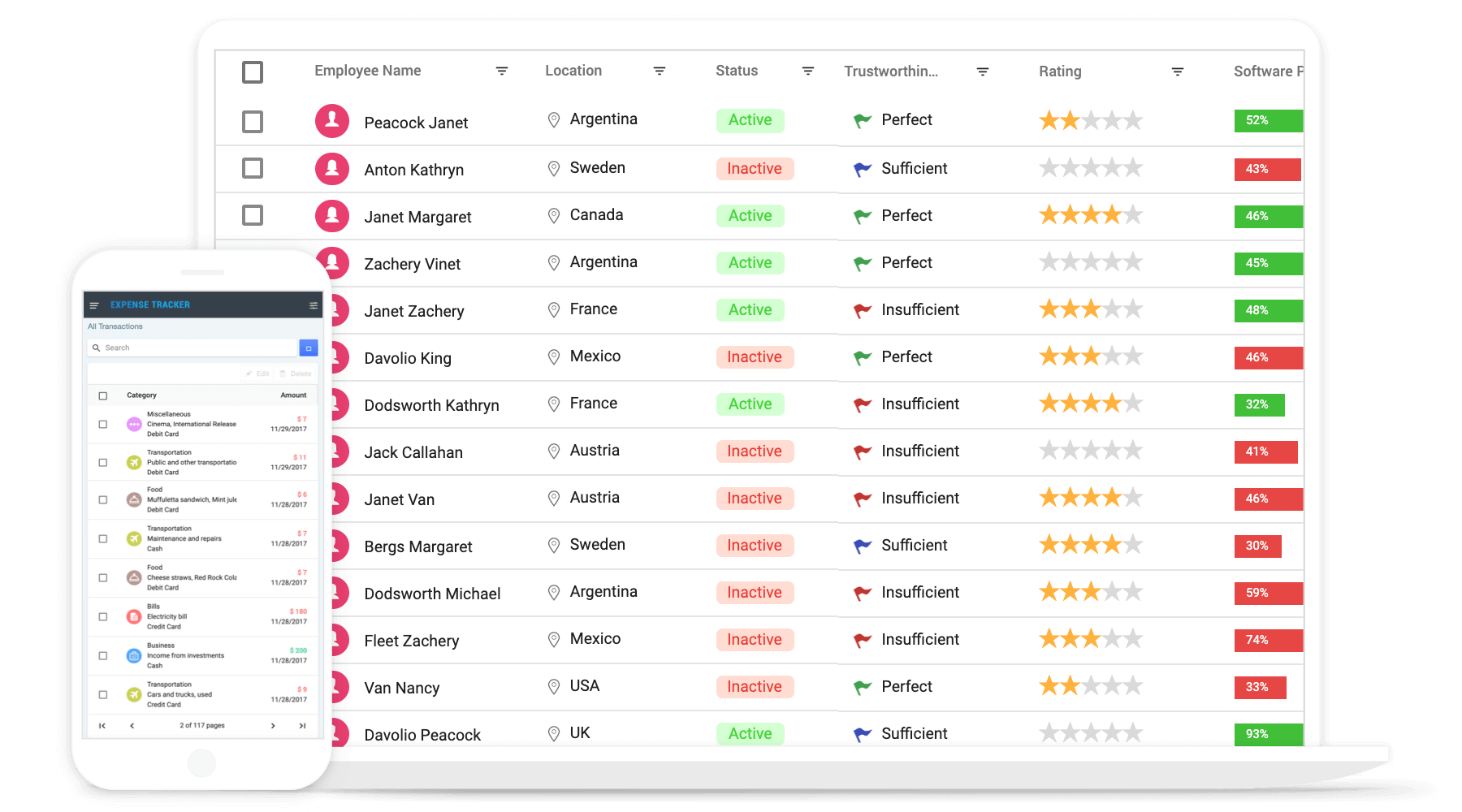
|
|
@@ -21,13 +21,13 @@ Trusted by the world's leading companies
|
|
|
21
21
|
|
|
22
22
|
### Create an Angular Application
|
|
23
23
|
|
|
24
|
-
You can use [Angular CLI](https://github.com/angular/angular-cli) to setup your Angular applications. To install Angular CLI use the following command.
|
|
24
|
+
You can use [Angular CLI](https://github.com/angular/angular-cli) to setup your Angular applications. To install the Angular CLI, use the following command.
|
|
25
25
|
|
|
26
26
|
```bash
|
|
27
27
|
npm install -g @angular/cli
|
|
28
28
|
```
|
|
29
29
|
|
|
30
|
-
Create a new Angular application using
|
|
30
|
+
Create a new Angular application using the following Angular CLI command.
|
|
31
31
|
|
|
32
32
|
```bash
|
|
33
33
|
ng new my-app
|
|
@@ -36,40 +36,23 @@ cd my-app
|
|
|
36
36
|
|
|
37
37
|
### Adding Syncfusion Grid package
|
|
38
38
|
|
|
39
|
-
All Syncfusion
|
|
39
|
+
All Syncfusion Angular packages are available in [npmjs.com](https://www.npmjs.com/~syncfusionorg). To install the Angular grid package, use the following command.
|
|
40
40
|
|
|
41
41
|
```bash
|
|
42
42
|
ng add @syncfusion/ej2-angular-grids
|
|
43
43
|
```
|
|
44
44
|
|
|
45
|
-
The
|
|
45
|
+
The above command does the below configuration to your Angular app.
|
|
46
46
|
|
|
47
|
-
* `@syncfusion/ej2-angular-grids` package
|
|
48
|
-
*
|
|
49
|
-
*
|
|
50
|
-
|
|
51
|
-
|
|
52
|
-
This will make it easy to add the Syncfusion Angular Grids module to your project and start using its features in your application.
|
|
53
|
-
|
|
54
|
-
### Adding CSS references for Grid
|
|
55
|
-
|
|
56
|
-
Add CSS references needed for Grid in **src/styles.css** from **../node_modules/@syncfusion** package folder.
|
|
57
|
-
|
|
58
|
-
```css
|
|
59
|
-
@import '../node_modules/@syncfusion/ej2-base/styles/material.css';
|
|
60
|
-
@import '../node_modules/@syncfusion/ej2-buttons/styles/material.css';
|
|
61
|
-
@import '../node_modules/@syncfusion/ej2-calendars/styles/material.css';
|
|
62
|
-
@import '../node_modules/@syncfusion/ej2-dropdowns/styles/material.css';
|
|
63
|
-
@import '../node_modules/@syncfusion/ej2-inputs/styles/material.css';
|
|
64
|
-
@import '../node_modules/@syncfusion/ej2-navigations/styles/material.css';
|
|
65
|
-
@import '../node_modules/@syncfusion/ej2-popups/styles/material.css';
|
|
66
|
-
@import '../node_modules/@syncfusion/ej2-splitbuttons/styles/material.css';
|
|
67
|
-
@import '../node_modules/@syncfusion/ej2-angular-grids/styles/material.css';
|
|
68
|
-
```
|
|
47
|
+
* Adds `@syncfusion/ej2-angular-grids` package and its peer dependencies to your `package.json` file.
|
|
48
|
+
* Imports the `GridModule` in your application module `app.module.ts`.
|
|
49
|
+
* Registers the Syncfusion UI default theme (material) in the `angular.json` file.
|
|
50
|
+
|
|
51
|
+
This makes it easy to add the Syncfusion Angular Grids module to your project and start using it in your application.
|
|
69
52
|
|
|
70
|
-
### Add Grid
|
|
53
|
+
### Add Grid component
|
|
71
54
|
|
|
72
|
-
In **src/app/app.component.ts**, use `<ejs-grid>` selector in `template` attribute of
|
|
55
|
+
In **src/app/app.component.ts**, use `<ejs-grid>` selector in the `template` attribute of the `@Component` directive to render the Syncfusion Angular Grid component.
|
|
73
56
|
|
|
74
57
|
```typescript
|
|
75
58
|
import { Component, OnInit } from '@angular/core';
|
|
@@ -101,7 +84,7 @@ export class AppComponent implements OnInit {
|
|
|
101
84
|
|
|
102
85
|
## Supported frameworks
|
|
103
86
|
|
|
104
|
-
Grid component is also offered in following list of frameworks.
|
|
87
|
+
Grid component is also offered in the following list of frameworks.
|
|
105
88
|
|
|
106
89
|
| [<img src="https://ej2.syncfusion.com/github/images/js.svg" height="50" />](https://www.syncfusion.com/javascript-ui-controls?utm_medium=listing&utm_source=github)<br/> [JavaScript](https://www.syncfusion.com/javascript-ui-controls?utm_medium=listing&utm_source=github) | [<img src="https://ej2.syncfusion.com/github/images/react.svg" height="50" />](https://www.syncfusion.com/react-ui-components?utm_medium=listing&utm_source=github)<br/> [React](https://www.syncfusion.com/react-ui-components?utm_medium=listing&utm_source=github) | [<img src="https://ej2.syncfusion.com/github/images/vue.svg" height="50" />](https://www.syncfusion.com/vue-ui-components?utm_medium=listing&utm_source=github)<br/> [Vue](https://www.syncfusion.com/vue-ui-components?utm_medium=listing&utm_source=github) | [<img src="https://ej2.syncfusion.com/github/images/netcore.svg" height="50" />](https://www.syncfusion.com/aspnet-core-ui-controls?utm_medium=listing&utm_source=github)<br/> [ASP.NET Core](https://www.syncfusion.com/aspnet-core-ui-controls?utm_medium=listing&utm_source=github) | [<img src="https://ej2.syncfusion.com/github/images/netmvc.svg" height="50" />](https://www.syncfusion.com/aspnet-mvc-ui-controls?utm_medium=listing&utm_source=github)<br/> [ASP.NET MVC](https://www.syncfusion.com/aspnet-mvc-ui-controls?utm_medium=listing&utm_source=github) |
|
|
107
90
|
| :-----: | :-----: | :-----: | :-----: | :-----: |
|
|
@@ -113,32 +96,36 @@ Grid component is also offered in following list of frameworks.
|
|
|
113
96
|
|
|
114
97
|
## Key features
|
|
115
98
|
|
|
116
|
-
* [Data sources](https://ej2.syncfusion.com/angular/demos/?utm_source=npm&utm_medium=listing&utm_campaign=angular-grid-npm#/material/grid/local-data)
|
|
117
|
-
* [Async pipe](https://ej2.syncfusion.com/angular/demos/?utm_source=npm&utm_medium=listing&utm_campaign=angular-grid-npm#/material/grid/async-pipe)
|
|
118
|
-
* [
|
|
119
|
-
* [
|
|
120
|
-
* [
|
|
121
|
-
* [
|
|
122
|
-
*
|
|
123
|
-
|
|
124
|
-
|
|
125
|
-
|
|
126
|
-
|
|
127
|
-
|
|
128
|
-
|
|
129
|
-
|
|
130
|
-
* [
|
|
131
|
-
* [
|
|
132
|
-
* [
|
|
133
|
-
* [
|
|
134
|
-
* [
|
|
135
|
-
* [
|
|
136
|
-
* [
|
|
137
|
-
* [
|
|
99
|
+
* [Data sources](https://ej2.syncfusion.com/angular/demos/?utm_source=npm&utm_medium=listing&utm_campaign=angular-grid-npm#/material/grid/local-data): Bind data seamlessly with various local and remote data sources such as JSON, OData, WCF, and RESTful web services with the help of [DataManager](https://ej2.syncfusion.com/angular/documentation/data/data-binding/?utm_source=npm&utm_medium=listing&utm_campaign=angular-grid-npm).
|
|
100
|
+
* [Async pipe](https://ej2.syncfusion.com/angular/demos/?utm_source=npm&utm_medium=listing&utm_campaign=angular-grid-npm#/material/grid/async-pipe): Bind the Grid component with `RxJS.Observable` using the `async` pipe.
|
|
101
|
+
* [High performance](https://ej2.syncfusion.com/angular/demos/?utm_source=npm&utm_medium=listing&utm_campaign=angular-grid-npm#/material/grid/virtualization): Well thought out efforts, and focuses mainly on fast paced performance to load millions of records. Grid renders only the rows within the viewport, and loads additional data as the user scrolls vertically.
|
|
102
|
+
* [Adaptive UI layout](https://ej2.syncfusion.com/angular/demos/?utm_source=npm&utm_medium=listing&utm_campaign=angular-grid-npm#/material/grid/adaptive-layout): UI is customized and redesigned for great views and usability on small screens. Filter, sort, search, and edit dialogs adaptive to the screen size and render row elements in a vertical direction.
|
|
103
|
+
* [Sorting and grouping](https://ej2.syncfusion.com/angular/demos/?utm_source=npm&utm_medium=listing&utm_campaign=angular-grid-npm#/material/grid/grouping): Supporting N level of sorting and grouping can be useful for more complex data sets that have a deeper hierarchical structure or that need to be organized and analyzed in more detailed ways.
|
|
104
|
+
* [Aggregation](https://ej2.syncfusion.com/angular/demos/?utm_source=npm&utm_medium=listing&utm_campaign=angular-grid-npm#/material/grid/aggregate-default): Easily visualize the aggregates for column values by calculating and displaying summary statistics such as sums, averages, counts, etc. By default, the aggregate value can be displayed in the footer, group footer, or group caption of the grid.
|
|
105
|
+
* [Filtering](https://ej2.syncfusion.com/angular/demos/?utm_source=npm&utm_medium=listing&utm_campaign=angular-grid-npm#/material/grid/filtering): The filter UIs, including the filter bar, menu, excel, and checkbox, are available at each column to filter data.
|
|
106
|
+
* [Paging](https://ej2.syncfusion.com/angular/demos/?utm_source=npm&utm_medium=listing&utm_campaign=angular-grid-npm#/material/grid/paging): Paging is used to view a segment of data from the assigned data source. It requests data on-demand when navigating to another page also allows to change the page size on the fly by using the page size dropdown in the pager.
|
|
107
|
+
* [Editing](https://ej2.syncfusion.com/angular/demos/?utm_source=npm&utm_medium=listing&utm_campaign=angular-grid-npm#/material/grid/normal-edit): Grid supports create, read, update, and delete operations (CRUD). Also provides various edit modes such as inline, dialog, and batch edit (cell editing).
|
|
108
|
+
* [Selection](https://ej2.syncfusion.com/angular/demos/?utm_source=npm&utm_medium=listing&utm_campaign=angular-grid-npm#/material/grid/selection): Select rows or cells either by using checkbox or by simply clicking them. Select more than one row or cell by holding Ctrl or Shift or Command, or simply dragging the pointer over the cells, or programmatically.
|
|
109
|
+
* [Hierarchical binding](https://ej2.syncfusion.com/angular/demos/?utm_source=npm&utm_medium=listing&utm_campaign=angular-grid-npm#/material/grid/hierarchy): Allows you to display table data in a hierarchical structure, allowing you to visualize the relationships between parent and child records in a clear and organized way.
|
|
110
|
+
* [Templates](https://ej2.syncfusion.com/angular/demos/?utm_source=npm&utm_medium=listing&utm_campaign=angular-grid-npm#/material/grid/column-template): Using templates, users can create custom UI. It provides various template options to create custom headers, custom cell contents, custom rows, detail rows, toolbars, and custom editors for edit action.
|
|
111
|
+
* [Row drag and drop](https://ej2.syncfusion.com/vue/demos/?utm_source=npm&utm_medium=listing&utm_campaign=angular-grid-npm#/material/grid/row-drag-and-drop.html): The Grid rows can be reordered while drag and drop the rows within the grid. Also allows to drop the dragged rows another Grid or custom component.
|
|
112
|
+
* Columns: Column definitions are used as the dataSource schema in the Grid. This plays a vital role in rendering column values in the required format.
|
|
113
|
+
* [Reordering](https://ej2.syncfusion.com/angular/demos/?utm_source=npm&utm_medium=listing&utm_campaign=angular-grid-npm#/material/grid/column/reorder): Allows you to rearrange the columns in the grid by dragging and dropping them to a new position in the column header row.
|
|
114
|
+
* [Column chooser](https://ej2.syncfusion.com/angular/demos/?utm_source=npm&utm_medium=listing&utm_campaign=angular-grid-npm#/material/grid/column/column-chooser): It provides a list of column names paired with check boxes that allow the visibility to be toggled on the fly.
|
|
115
|
+
* [Resizing](https://ej2.syncfusion.com/angular/demos/?utm_source=npm&utm_medium=listing&utm_campaign=angular-grid-npm#/material/grid/column/column-resizing): Resizing allows changing column width on the fly by simply dragging the right corner of the column header.
|
|
116
|
+
* [Frozen rows and columns](https://ej2.syncfusion.com/angular/demos/?utm_source=npm&utm_medium=listing&utm_campaign=angular-grid-npm#/material/grid/frozen-rows): Provides the ability to freeze columns and rows to allow for easy scrolling and comparison of cell values. It also offers the option to freeze columns on either the left or right side, or on both sides, of the grid.
|
|
117
|
+
* [Cell spanning](https://ej2.syncfusion.com/angular/demos/?utm_source=npm&utm_medium=listing&utm_campaign=angular-grid-npm#/material/grid/column/column-spanning): Grid cells can be spanned across multiple columns or rows in a grid layout to create a larger cell that takes up more space in the grid.
|
|
118
|
+
* [Foreign key column binding](https://ej2.syncfusion.com/angular/demos/?utm_source=npm&utm_medium=listing&utm_campaign=angular-grid-npm#/material/grid/column/foreign-key): A column can display values from external or lookup data sources using foreign key/value mapping.
|
|
119
|
+
* [Context menu](https://ej2.syncfusion.com/angular/demos/?utm_source=npm&utm_medium=listing&utm_campaign=angular-grid-npm#/material/grid/context-menu): The context menu provides a list of actions to be performed in the grid. It appears when a grid cell, header, or the pager is right-clicked.
|
|
120
|
+
* [Clipboard](https://ej2.syncfusion.com/angular/demos/?utm_source=npm&utm_medium=listing&utm_campaign=angular-grid-npm#/material/grid/clipboard): Selected rows and cells can be copied from the grid without header using Ctrl + C or with header using Ctrl + Shift + H shortcut. This allows you to easily transfer data from the grid to other applications or documents as needed.
|
|
121
|
+
* [Export to Excel and PDF](https://ej2.syncfusion.com/angular/demos/?utm_source=npm&utm_medium=listing&utm_campaign=angular-grid-npm#/material/grid/default-exporting): Provides the option to export grid data to Excel, PDF, and CSV formats.
|
|
122
|
+
* [RTL support](https://ej2.syncfusion.com/angular/documentation/grid/global-local/?utm_source=npm&utm_medium=listing&utm_campaign=angular-grid-npm#right-to-left---rtl): Provides the right-to-left mode which aligns content in the Grid component from right to left.
|
|
123
|
+
* [Accessibility](https://ej2.syncfusion.com/angular/documentation/grid/accessibility/?utm_source=npm&utm_medium=listing&utm_campaign=angular-grid-npm#wai-aria): Designed to be accessible to users with disabilities, with features such as WAI-ARIA standard compliance and keyboard navigation to ensure that the grid can be effectively used with assistive technologies such as screen readers.
|
|
124
|
+
* [Localization](https://ej2.syncfusion.com/angular/documentation/grid/global-local/?utm_source=npm&utm_medium=listing&utm_campaign=angular-grid-npm#localization): The Localization library enables you to adapt the default text content of the grid to fit the language and cultural preferences of your target audience.
|
|
138
125
|
|
|
139
126
|
## Support
|
|
140
127
|
|
|
141
|
-
Product support is available through following mediums.
|
|
128
|
+
Product support is available through the following mediums.
|
|
142
129
|
|
|
143
130
|
* [Support ticket](https://support.syncfusion.com/support/tickets/create) - Guaranteed Response in 24 hours | Unlimited tickets | Holiday support
|
|
144
131
|
* [Community forum](https://www.syncfusion.com/forums/angular-js2?utm_source=npm&utm_medium=listing&utm_campaign=angular-grid-npm)
|
|
@@ -158,4 +145,4 @@ Check the changelog [here](https://github.com/syncfusion/ej2-angular-ui-componen
|
|
|
158
145
|
|
|
159
146
|
See [LICENSE FILE](https://github.com/syncfusion/ej2-angular-ui-components/blob/master/license?utm_source=npm&utm_medium=listing&utm_campaign=angular-grid-npm) for more info.
|
|
160
147
|
|
|
161
|
-
|
|
148
|
+
© Copyright 2022 Syncfusion, Inc. All Rights Reserved. The Syncfusion Essential Studio license and copyright applies to this distribution.
|
|
@@ -1,3 +1,12 @@
|
|
|
1
|
+
/*!
|
|
2
|
+
* filename: ej2-angular-grids.umd.js
|
|
3
|
+
* version : 20.4.38
|
|
4
|
+
* Copyright Syncfusion Inc. 2001 - 2020. All rights reserved.
|
|
5
|
+
* Use of this code is subject to the terms of our license.
|
|
6
|
+
* A copy of the current license can be obtained at any time by e-mailing
|
|
7
|
+
* licensing@syncfusion.com. Any infringement will be prosecuted under
|
|
8
|
+
* applicable laws.
|
|
9
|
+
*/
|
|
1
10
|
(function (global, factory) {
|
|
2
11
|
typeof exports === 'object' && typeof module !== 'undefined' ? factory(exports, require('@angular/core'), require('@syncfusion/ej2-angular-base'), require('@syncfusion/ej2-grids'), require('@angular/common')) :
|
|
3
12
|
typeof define === 'function' && define.amd ? define(['exports', '@angular/core', '@syncfusion/ej2-angular-base', '@syncfusion/ej2-grids', '@angular/common'], factory) :
|
|
@@ -849,8 +858,8 @@ var __metadata$4 = (this && this.__metadata) || function (k, v) {
|
|
|
849
858
|
return Reflect.metadata(k, v);
|
|
850
859
|
};
|
|
851
860
|
var inputs$1 = ['cssClass', 'currentPage', 'customText', 'enableExternalMessage', 'enablePagerMessage', 'enablePersistence', 'enableQueryString', 'enableRtl', 'externalMessage', 'locale', 'pageCount', 'pageSize', 'pageSizes', 'template', 'totalRecordsCount'];
|
|
852
|
-
var outputs$5 = ['click', 'created', 'dropDownChanged'];
|
|
853
|
-
var twoWays$1 = [];
|
|
861
|
+
var outputs$5 = ['click', 'created', 'dropDownChanged', 'currentPageChange', 'pageSizeChange', 'pageCountChange', 'pageSizesChange'];
|
|
862
|
+
var twoWays$1 = ['currentPage', 'pageSize', 'pageCount', 'pageSizes'];
|
|
854
863
|
/**
|
|
855
864
|
* `ejs-pager` represents the Angular Pager Component.
|
|
856
865
|
* ```html
|
|
@@ -1145,6 +1154,7 @@ exports.generateExpandPredicates = ej2Grids.generateExpandPredicates;
|
|
|
1145
1154
|
exports.getPredicates = ej2Grids.getPredicates;
|
|
1146
1155
|
exports.getGroupKeysAndFields = ej2Grids.getGroupKeysAndFields;
|
|
1147
1156
|
exports.findCellIndex = ej2Grids.findCellIndex;
|
|
1157
|
+
exports.capitalizeFirstLetter = ej2Grids.capitalizeFirstLetter;
|
|
1148
1158
|
exports.created = ej2Grids.created;
|
|
1149
1159
|
exports.destroyed = ej2Grids.destroyed;
|
|
1150
1160
|
exports.load = ej2Grids.load;
|
|
@@ -1423,6 +1433,7 @@ exports.afterFilterColumnMenuClose = ej2Grids.afterFilterColumnMenuClose;
|
|
|
1423
1433
|
exports.beforeCheckboxfilterRenderer = ej2Grids.beforeCheckboxfilterRenderer;
|
|
1424
1434
|
exports.commandColumnDestroy = ej2Grids.commandColumnDestroy;
|
|
1425
1435
|
exports.batchCnfrmDlgCancel = ej2Grids.batchCnfrmDlgCancel;
|
|
1436
|
+
exports.refreshVirtualLazyLoadCache = ej2Grids.refreshVirtualLazyLoadCache;
|
|
1426
1437
|
exports.rowCell = ej2Grids.rowCell;
|
|
1427
1438
|
exports.gridHeader = ej2Grids.gridHeader;
|
|
1428
1439
|
exports.gridContent = ej2Grids.gridContent;
|